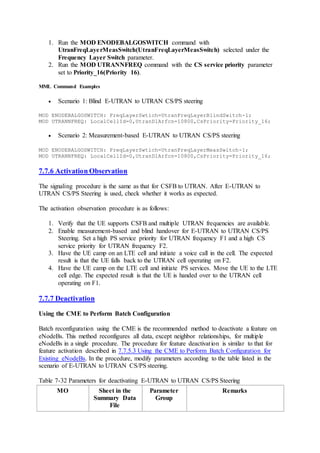
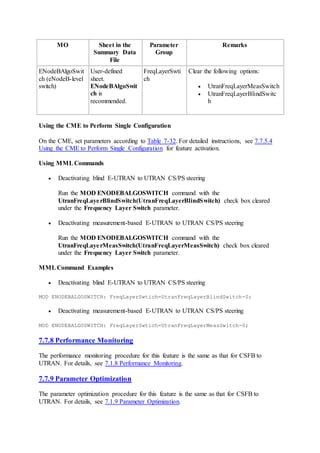
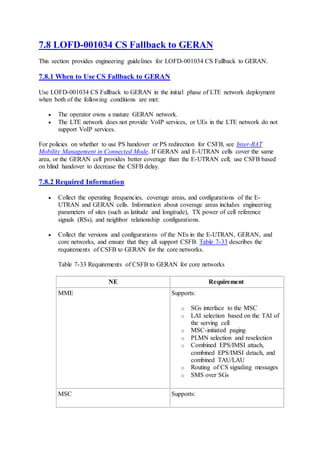
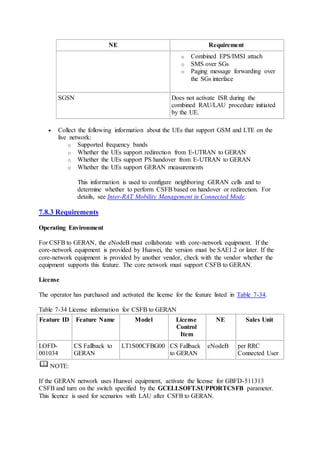
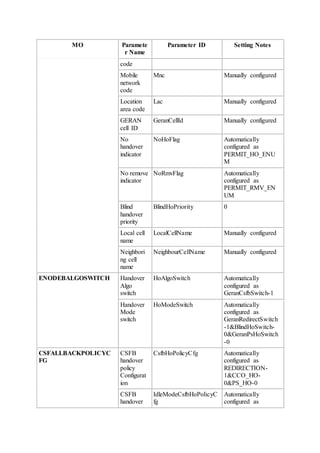
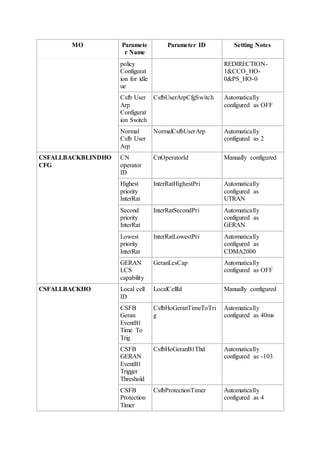
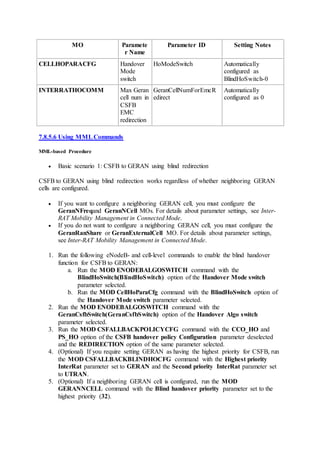
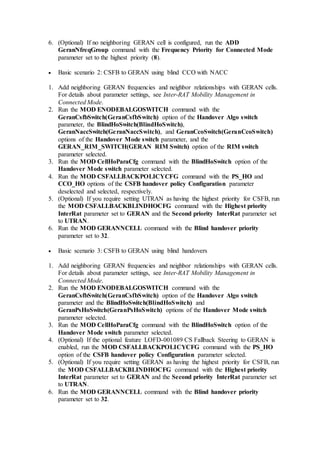
eRAN
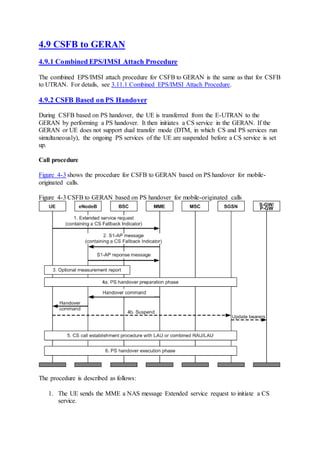
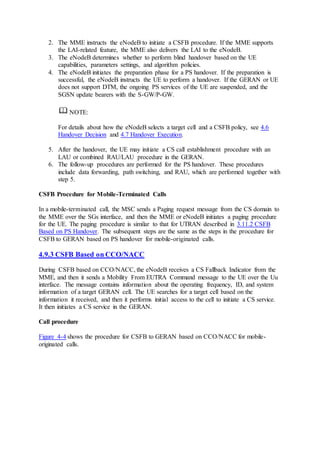
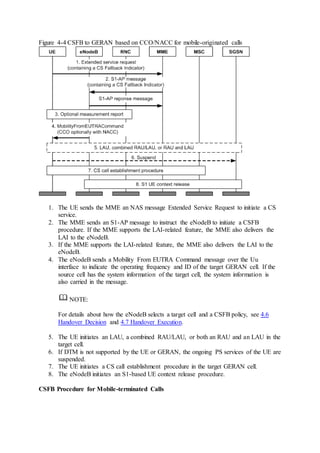
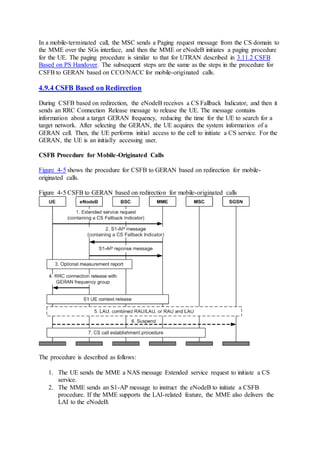
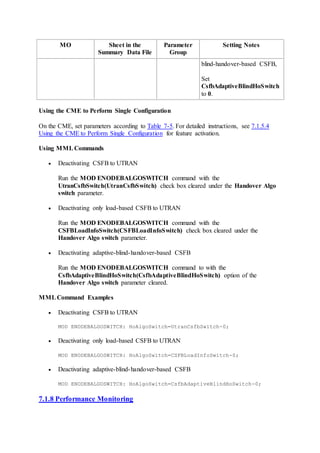
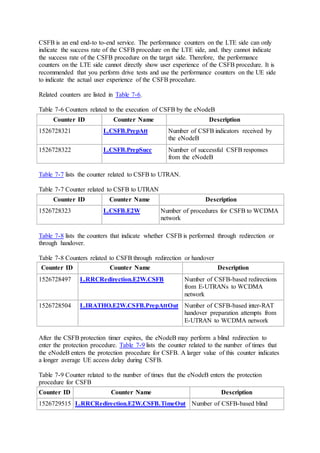
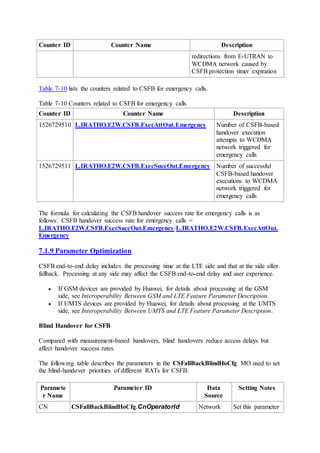
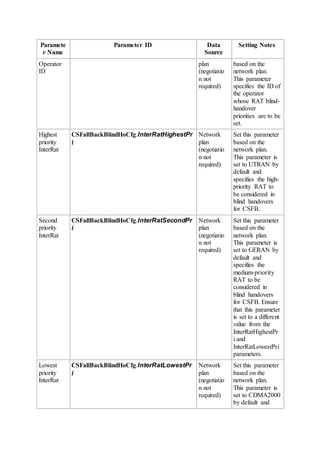
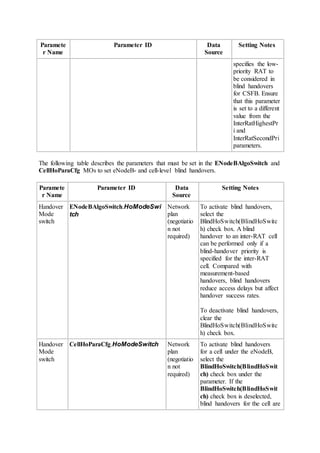
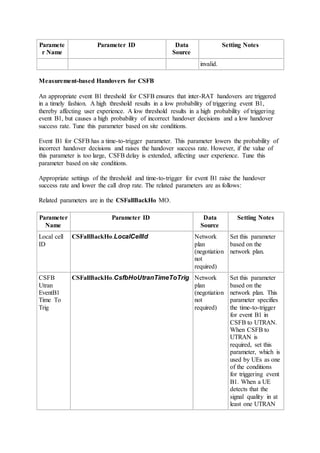
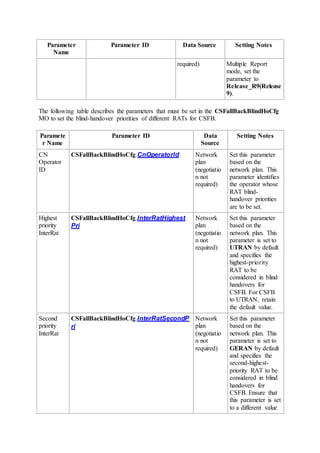
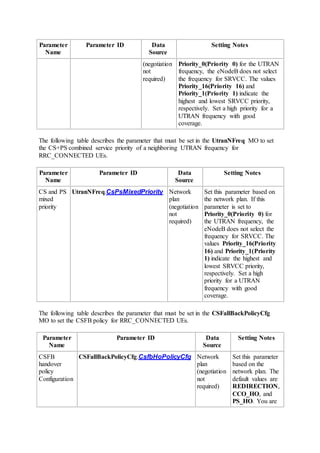
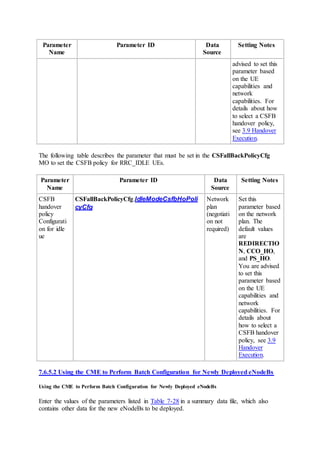
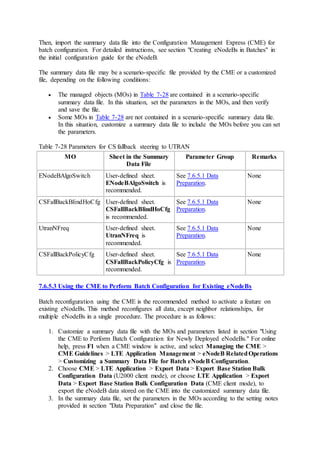
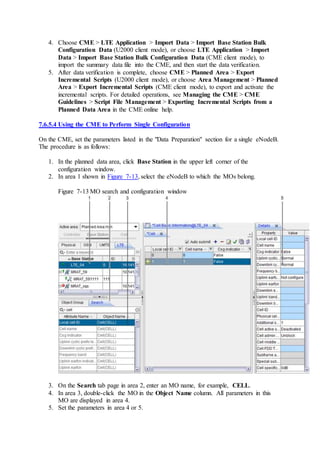
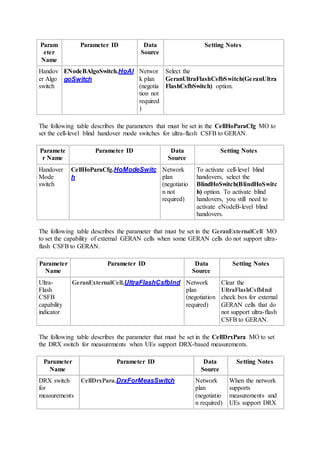
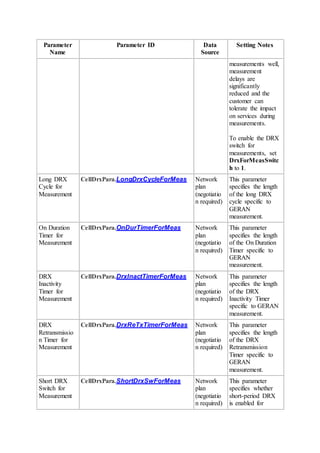
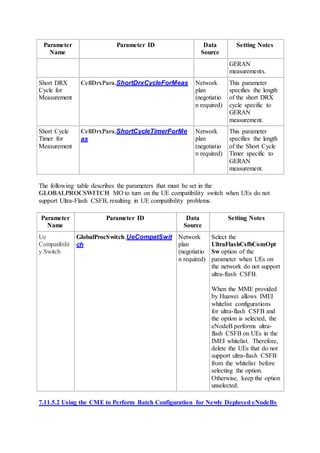
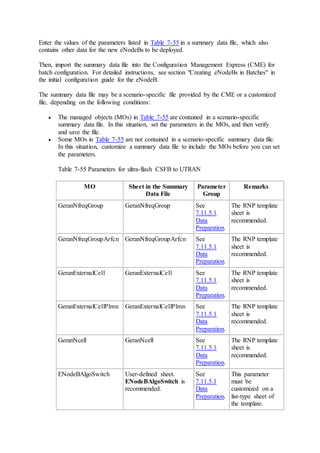
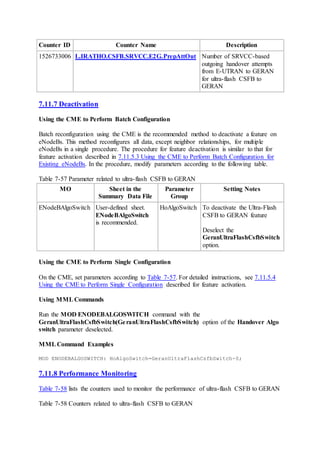
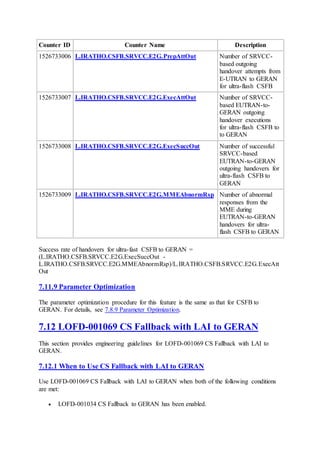
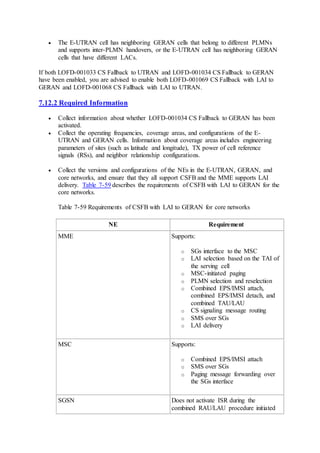
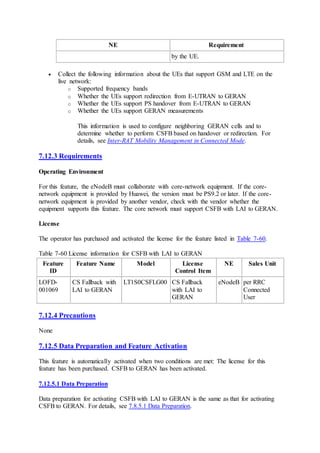
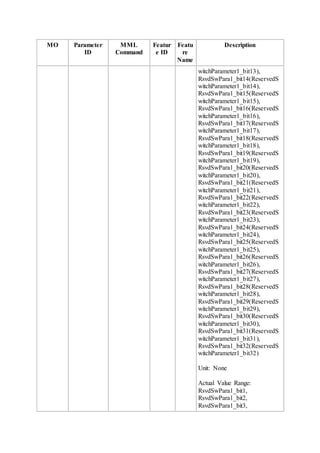
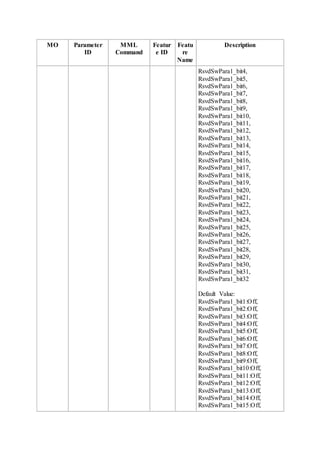
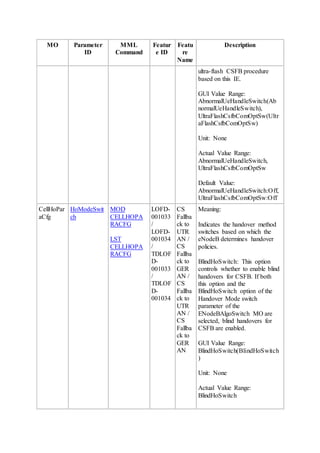
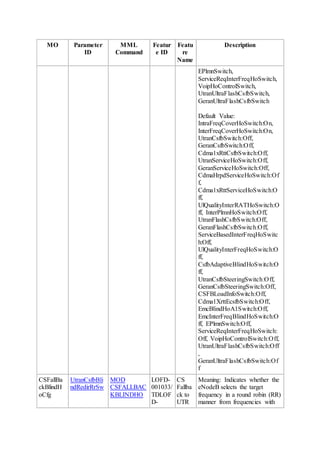
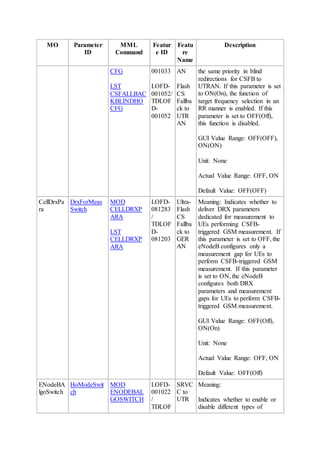
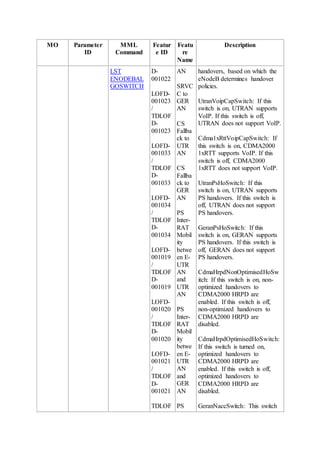
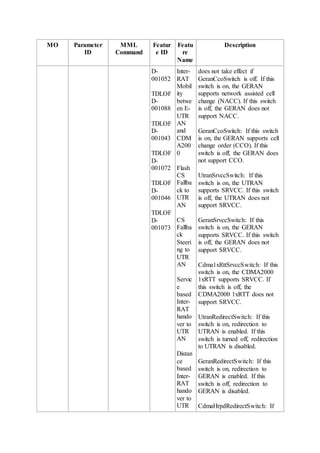
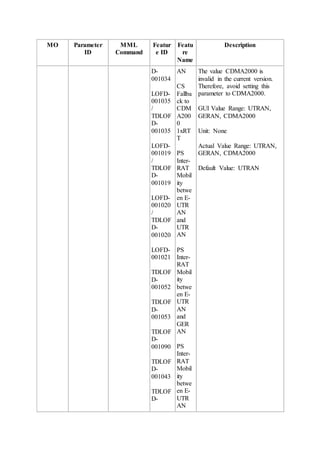
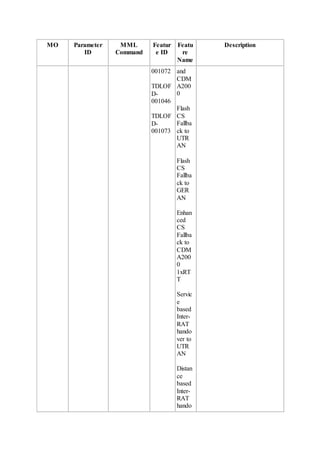
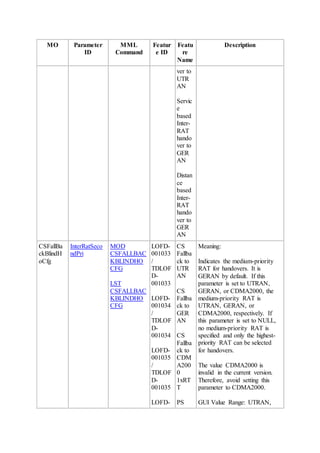
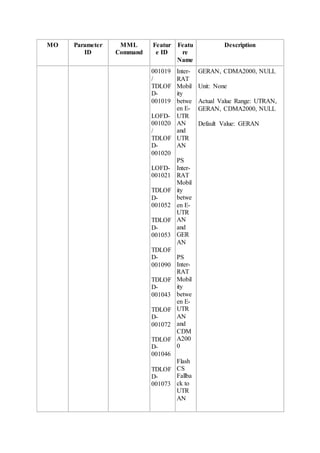
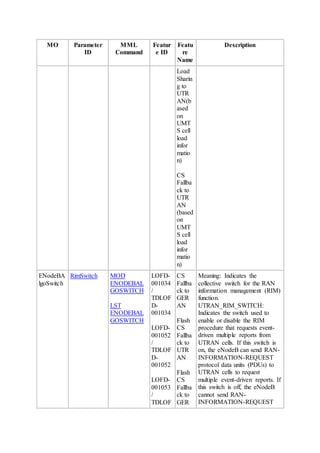
CS Fallback Feature Parameter Description
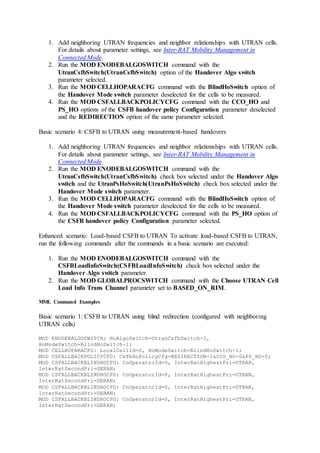
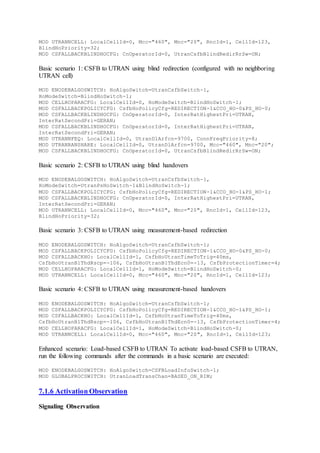
Issue 02
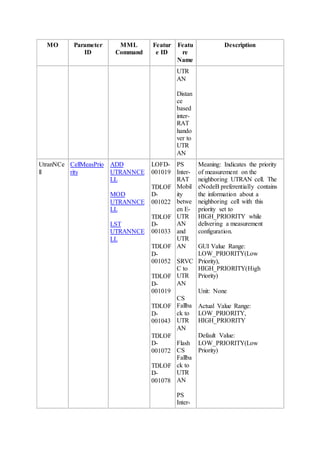
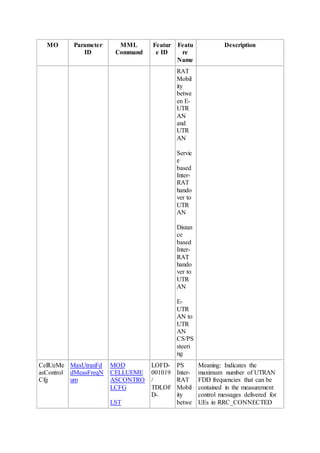
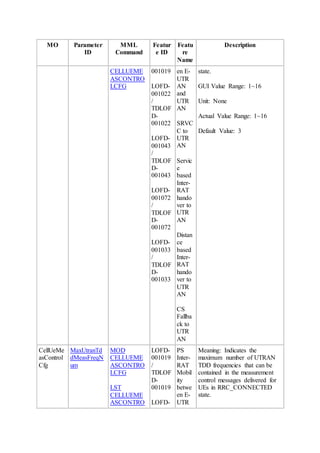
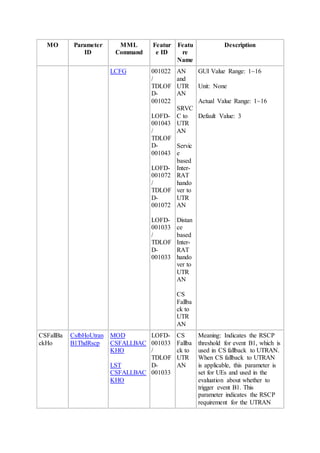
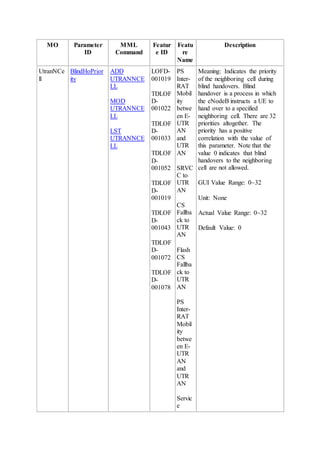
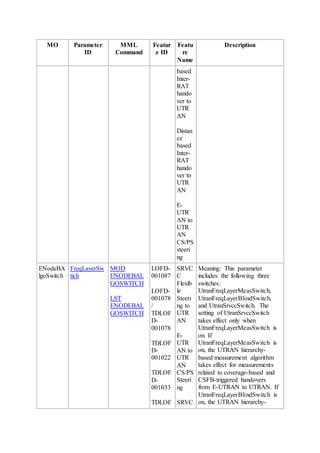
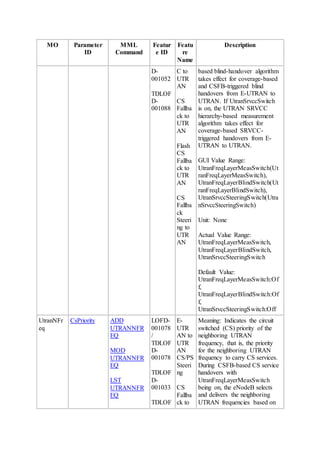
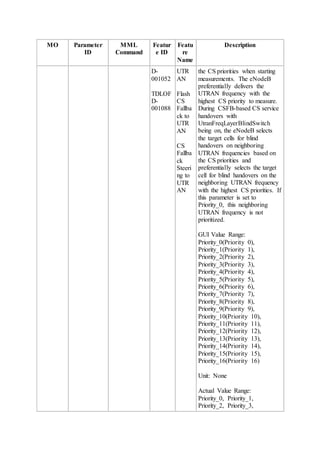
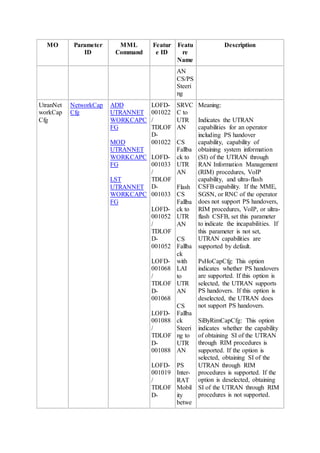
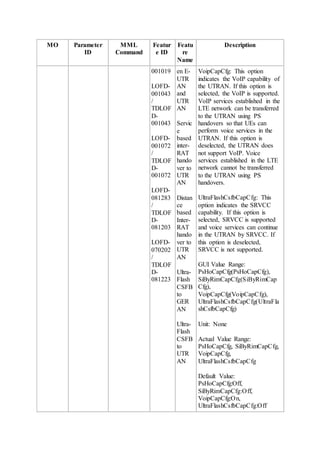
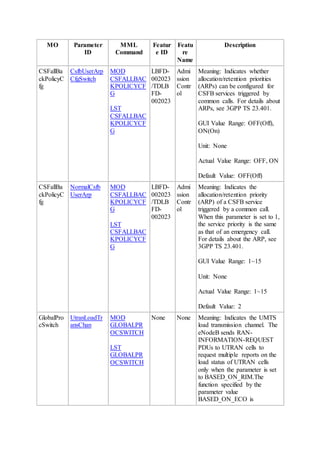
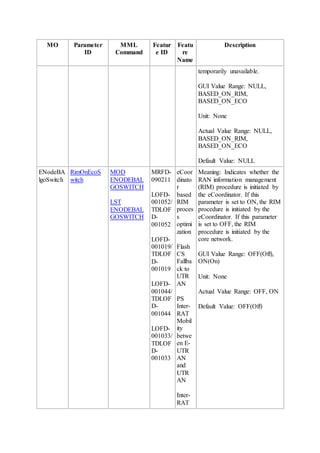
Date 2015-06-30
HUAWEI TECHNOLOGIES CO., LTD.
Copyright © Huawei Technologies Co., Ltd. 2015. All rights reserved.
No part of this document may be reproduced or transmitted in any form or by any means
without prior written consent of Huawei Technologies Co., Ltd.
Trademarks and Permissions
and other Huawei trademarks are trademarks of Huawei Technologies Co., Ltd.
All other trademarks and trade names mentioned in this document are the property of their
respective holders.
Notice
The purchased products, services and features are stipulated by the contract made between
Huawei and the customer. All or part of the products, services and features described in this
document may not be within the purchase scope or the usage scope. Unless otherwise
specified in the contract, all statements, information, and recommendations in this document
are provided "AS IS" without warranties, guarantees or representations of any kind, either
express or implied.
The information in this document is subject to change without notice. Every effort has been
made in the preparation of this document to ensure accuracy of the contents, but all
statements, information, and recommendations in this document do not constitute a warranty
of any kind, express or implied.
Huawei Technologies Co., Ltd.
Address:
Huawei Industrial Base Bantian, Longgang Shenzhen 518129 People's Republic
of China
Website: http://www.huawei.com
Email: support@huawei.com
Contents
1 About This Document
1.1 Scope
1.2 Intended Audience
1.3 Change History
1.4 Differences Between eNodeB Types
2 Overview
2.1 Overview
2.2 Benefits
2.3 Architecture
3 CSFB to UTRAN
3.1 Basic CSFB to UTRAN
3.1.1 Handover Measurement
3.1.2 Blind Handover
3.2 Flash CSFB to UTRAN
3.3 Ultra-Flash CSFB to UTRAN
3.4 CS Fallback with LAI to UTRAN
3.5 E-UTRAN to UTRAN CS Steering
3.6 CS Fallback Steering to UTRAN
3.7 Load-based CSFB to UTRAN
3.8 Handover Decision
3.8.1 Basic Handover Decision
3.8.2 Flash Redirection Decision
3.9 Handover Execution
3.9.1 Handover Policy Selection
3.9.2 Ultra-Flash CSFB to UTRAN
3.9.3 Redirection-based CSFB Optimization for UEs in Idle Mode
3.9.4 CSFB Admission Optimization for UEs in Idle Mode
3.10 RIM Procedure Between E-UTRAN and UTRAN
3.10.1 RIM Procedure Through the Core Network
3.10.2 RIM Procedure Through the eCoordinator
3.11 CSFB to UTRAN
3.11.1 Combined EPS/IMSI Attach Procedure
3.11.2 CSFB Based on PS Handover
3.11.3 Signaling procedure of redirection to CDMA2000 1xRTT
3.11.4 Flash CSFB
3.11.5 Ultra-Flash CSFB to UTRAN
3.11.6 Redirection-based CSFB Optimization for UEs in Idle Mode
3.11.7 CSFB for SMS
3.11.8 Emergency Call
3.11.9 CSFB for LCS
4 CSFB to GERAN
4.1 Basic CSFB to GERAN
4.2 Flash CSFB to GERAN
4.3 CS Fallback with LAI to GERAN
4.4 CS Fallback Steering to GERAN
4.5 Ultra-Flash CSFB to GERAN
4.6 Handover Decision
4.7 Handover Execution
4.8 RIM Procedure Between E-UTRAN and GERAN
4.9 CSFB to GERAN
4.9.1 Combined EPS/IMSI Attach Procedure
4.9.2 CSFB Based on PS Handover
4.9.3 CSFB Based on CCO/NACC
4.9.4 CSFB Based on Redirection
4.9.5 Flash CSFB
4.9.6 Ultra-Flash CSFB to GERAN
4.9.7 CSFB for SMS
4.9.8 Emergency Call
4.9.9 CSFB for LCS
5 Related Features
5.1 Features Related to LOFD-001033 CS Fallback to UTRAN
5.2 Features Related to LOFD-001052 Flash CS Fallback to UTRAN
5.3 Features Related to LOFD-070202 Ultra-Flash CSFB to UTRAN
5.4 Features Related to LOFD-001068 CS Fallback with LAI to UTRAN
5.5 Features Related to LOFD-001088 CS Fallback Steering to UTRAN
5.6 Features Related to LOFD-001078 E-UTRAN to UTRAN CS/PS Steering
5.7 Features Related to LOFD-001034 CS Fallback to GERAN
5.8 Features Related to LOFD-001053 Flash CS Fallback to GERAN
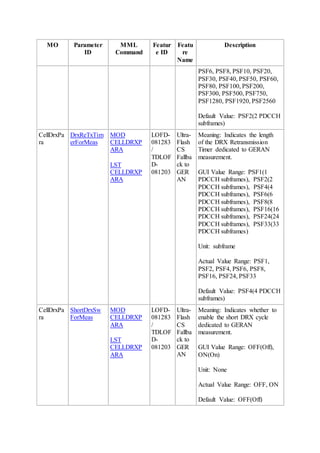
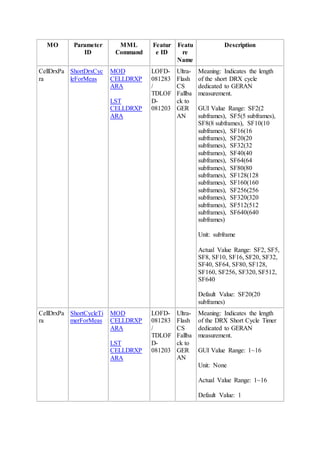
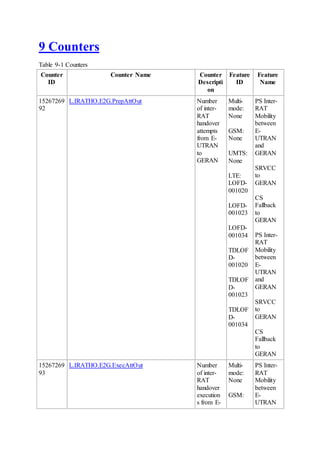
5.9 Feature Related to LOFD-081283 Ultra-Flash CSFB to GERAN
5.10 Features Related to LOFD-001069 CS Fallback with LAI to GERAN
5.11 Features Related to LOFD-001089 CS Fallback Steering to GERAN
6 Network Impact
6.1 LOFD-001033 CS Fallback to UTRAN
6.2 LOFD-001052 Flash CS Fallback to UTRAN
6.3 LOFD-070202 Ultra-Flash CSFB to UTRAN
6.4 LOFD-001068 CS Fallback with LAI to UTRAN
6.5 LOFD-001088 CS Fallback Steering to UTRAN
6.6 LOFD-001078 E-UTRAN to UTRAN CS/PS Steering
6.7 LOFD-001034 CS Fallback to GERAN
6.8 LOFD-001053 Flash CS Fallback to GERAN
6.9 LOFD-081283 Ultra-Flash CSFB to GERAN
6.10 LOFD-001069 CS Fallback with LAI to GERAN
6.11 LOFD-001089 CS Fallback Steering to GERAN
7 Engineering Guidelines
7.1 LOFD-001033 CS Fallback to UTRAN
7.1.1 When to Use CS Fallback to UTRAN
7.1.2 Required Information
7.1.3 Requirements
7.1.4 Precautions
7.1.5 Data Preparation and Feature Activation
7.1.5.1 Data Preparation
7.1.5.2 Using the CME to Perform Batch Configuration for Newly Deployed eNodeBs
7.1.5.3 Using the CME to Perform Batch Configuration for Existing eNodeBs
7.1.5.4 Using the CME to Perform Single Configuration
7.1.5.5 Using MML Commands
7.1.6 Activation Observation
7.1.7 Deactivation
7.1.8 Performance Monitoring
7.1.9 Parameter Optimization
7.2 RIM Procedure from E-UTRAN to UTRAN
7.2.1 When to Use RIM Procedure from E-UTRAN to UTRAN
7.2.2 Required Information
7.2.3 Requirements
7.2.4 Precautions
7.2.5 Data Preparation and Feature Activation
7.2.5.1 Data Preparation
7.2.5.2 Using the CME to Perform Batch Configuration for Newly Deployed eNodeBs
7.2.5.3 Using the CME to Perform Batch Configuration for Existing eNodeBs
7.2.5.4 Using the CME to Perform Single Configuration
7.2.5.5 Using MML Commands
7.2.6 Activation Observation
7.2.7 Deactivation
7.2.8 Performance Monitoring
7.2.9 Parameter Optimization
7.3 LOFD-001052 Flash CS Fallback to UTRAN
7.3.1 When to Use Flash CS Fallback to UTRAN
7.3.2 Required Information
7.3.3 Requirements
7.3.4 Precautions
7.3.5 Data Preparation and Feature Activation
7.3.5.1 Data Preparation
7.3.5.2 Using the CME to Perform Batch Configuration for Newly Deployed eNodeBs
7.3.5.3 Using the CME to Perform Batch Configuration for Existing eNodeBs
7.3.5.4 Using the CME to Perform Single Configuration
7.3.5.5 Using MML Commands
7.3.6 Activation Observation
7.3.7 Deactivation
7.3.8 Performance Monitoring
7.3.9 Parameter Optimization
7.4 LOFD-070202 Ultra-Flash CSFB to UTRAN
7.4.1 When to Use Ultra-Flash CSFB
7.4.2 Required Information
7.4.3 Requirements
7.4.4 Precautions
7.4.5 Data Preparation and Feature Activation
7.4.5.1 Data Preparation
7.4.5.2 Using the CME to Perform Batch Configuration for Newly Deployed eNodeBs
7.4.5.3 Using the CME to Perform Batch Configuration for Existing eNodeBs
7.4.5.4 Using the CME to Perform Single Configuration
7.4.5.5 Using MML Commands
7.4.6 Activation Observation
7.4.7 Deactivation
7.4.8 Performance Monitoring
7.4.9 Parameter Optimization
7.5 LOFD-001068 CS Fallback with LAI to UTRAN
7.5.1 When to Use CS Fallback with LAI to UTRAN
7.5.2 Required Information
7.5.3 Requirements
7.5.4 Precautions
7.5.5 Data Preparation and Feature Activation
7.5.5.1 Data Preparation
7.5.5.2 Using the CME to Perform Batch Configuration for Newly Deployed eNodeBs
7.5.5.3 Using the CME to Perform Batch Configuration for Existing eNodeBs
7.5.5.4 Using the CME to Perform Single Configuration
7.5.5.5 Using MML Commands
7.5.6 Activation Observation
7.5.7 Deactivation
7.5.8 Performance Monitoring
7.5.9 Parameter Optimization
7.6 LOFD-001088 CS Fallback Steering to UTRAN
7.6.1 When to Use CS Fallback Steering to UTRAN
7.6.2 Required Information
7.6.3 Requirements
7.6.4 Precautions
7.6.5 Data Preparation and Feature Activation
7.6.5.1 Data Preparation
7.6.5.2 Using the CME to Perform Batch Configuration for Newly Deployed eNodeBs
7.6.5.3 Using the CME to Perform Batch Configuration for Existing eNodeBs
7.6.5.4 Using the CME to Perform Single Configuration
7.6.5.5 Using MML Commands
7.6.6 Activation Observation
7.6.7 Deactivation
7.6.8 Performance Monitoring
7.6.9 Parameter Optimization
7.7 LOFD-001078 E-UTRAN to UTRAN CS/PS Steering
7.7.1 When to Use E-UTRAN to UTRAN CS/PS Steering
7.7.2 Required Information
7.7.3 Requirements
7.7.4 Precautions
7.7.5 Data Preparation and Feature Activation
7.7.5.1 Data Preparation
7.7.5.2 Using the CME to Perform Batch Configuration for Newly Deployed eNodeBs
7.7.5.3 Using the CME to Perform Batch Configuration for Existing eNodeBs
7.7.5.4 Using the CME to Perform Single Configuration
7.7.5.5 Using MML Commands
7.7.6 Activation Observation
7.7.7 Deactivation
7.7.8 Performance Monitoring
7.7.9 Parameter Optimization
7.8 LOFD-001034 CS Fallback to GERAN
7.8.1 When to Use CS Fallback to GERAN
7.8.2 Required Information
7.8.3 Requirements
7.8.4 Precautions
7.8.5 Data Preparation and Feature Activation
7.8.5.1 Data Preparation
7.8.5.2 Using the CME to Perform Batch Configuration for Newly Deployed eNodeBs
7.8.5.3 Using the CME to Perform Batch Configuration for Existing eNodeBs
7.8.5.4 Using the CME to Perform Single Configuration
7.8.5.5 Using Feature Operation and Maintenance on the CME
7.8.5.6 Using MML Commands
7.8.6 Activation Observation
7.8.7 Deactivation
7.8.8 Performance Monitoring
7.8.9 Parameter Optimization
7.9 RIM Procedure from E-UTRAN to GERAN
7.9.1 When to Use RIM Procedure Between E-UTRAN and GERAN
7.9.2 Required Information
7.9.3 Requirements
7.9.4 Precautions
7.9.5 Data Preparation and Feature Activation
7.9.5.1 Data Preparation
7.9.5.2 Using the CME to Perform Batch Configuration for Newly Deployed eNodeBs
7.9.5.3 Using the CME to Perform Batch Configuration for Existing eNodeBs
7.9.5.4 Using the CME to Perform Single Configuration
7.9.5.5 Using MML Commands
7.9.6 Activation Observation
7.9.7 Deactivation
7.9.8 Performance Monitoring
7.9.9 Parameter Optimization
7.10 LOFD-001053 Flash CS Fallback to GERAN
7.10.1 When to Use Flash CS Fallback to GERAN
7.10.2 Required Information
7.10.3 Requirements
7.10.4 Precautions
7.10.5 Data Preparation and Feature Activation
7.10.5.1 Data Preparation
7.10.5.2 Using the CME to Perform Batch Configuration for Newly Deployed eNodeBs
7.10.5.3 Using the CME to Perform Batch Configuration for Existing eNodeBs
7.10.5.4 Using the CME to Perform Single Configuration
7.10.5.5 Using MML Commands
7.10.6 Activation Observation
7.10.7 Deactivation
7.10.8 Performance Monitoring
7.10.9 Parameter Optimization
7.11 LOFD-081283 Ultra-Flash CSFB to GERAN
7.11.1 When to Use This Feature
7.11.2 Required Information
7.11.3 Requirements
7.11.4 Precautions
7.11.5 Data Preparation and Feature Activation
7.11.5.1 Data Preparation
7.11.5.2 Using the CME to Perform Batch Configuration for Newly Deployed eNodeBs
7.11.5.3 Using the CME to Perform Batch Configuration for Existing eNodeBs
7.11.5.4 Using the CME to Perform Single Configuration
7.11.5.5 Using MML Commands
7.11.6 Activation Observation
7.11.7 Deactivation
7.11.8 Performance Monitoring
7.11.9 Parameter Optimization
7.12 LOFD-001069 CS Fallback with LAI to GERAN
7.12.1 When to Use CS Fallback with LAI to GERAN
7.12.2 Required Information
7.12.3 Requirements
7.12.4 Precautions
7.12.5 Data Preparation and Feature Activation
7.12.5.1 Data Preparation
7.12.5.2 Using the CME to Perform Batch Configuration for Newly Deployed eNodeBs
7.12.5.3 Using the CME to Perform Batch Configuration for Existing eNodeBs
7.12.5.4 Using the CME to Perform Single Configuration
7.12.5.5 Using MML Commands
7.12.6 Activation Observation
7.12.7 Deactivation
7.12.8 Performance Monitoring
7.12.9 Parameter Optimization
7.13 LOFD-001089 CS Fallback Steering to GERAN
7.13.1 When to Use CS Fallback Steering to GERAN
7.13.2 Required Information
7.13.3 Requirements
7.13.4 Precautions
7.13.5 Data Preparation and Feature Activation
7.13.5.1 Data Preparation
7.13.5.2 Using the CME to Perform Batch Configuration for Newly Deployed eNodeBs
7.13.5.3 Using the CME to Perform Batch Configuration for Existing eNodeBs
7.13.5.4 Using the CME to Perform Single Configuration
7.13.5.5 Using MML Commands
7.13.6 Activation Observation
7.13.7 Deactivation
7.13.8 Performance Monitoring
7.13.9 Parameter Optimization
7.14 Troubleshooting
7.14.1 CSFB Calling Procedure Failure
7.14.2 eNodeB Receiving No Measurement Report
7.14.3 CSFB Blind Handover Failure
7.14.4 CSFB Handover Failure
8 Parameters
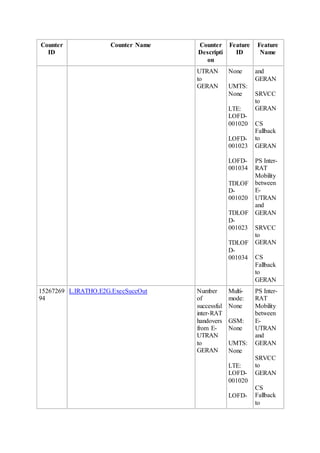
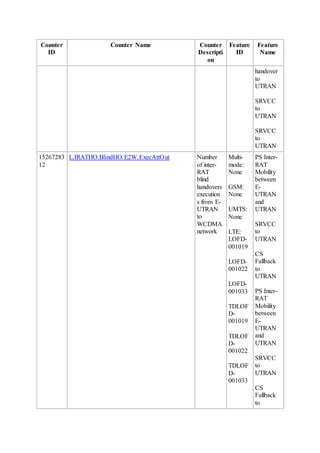
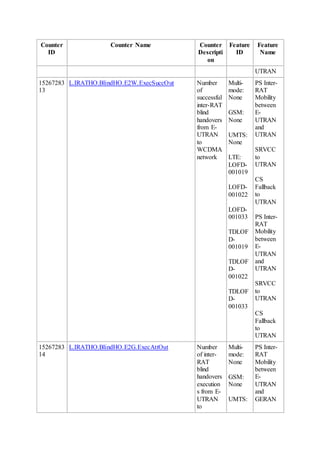
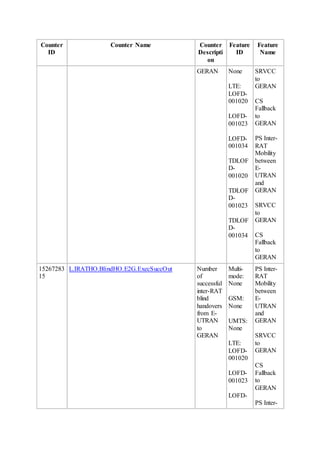
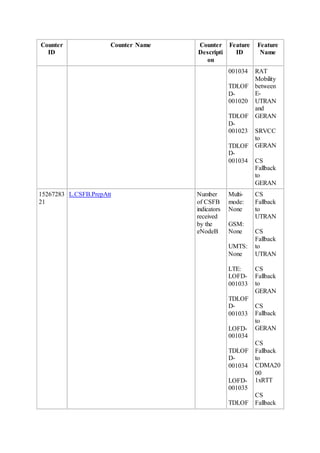
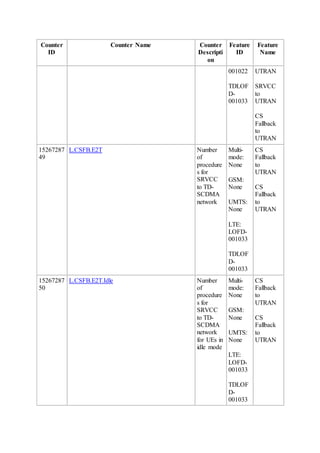
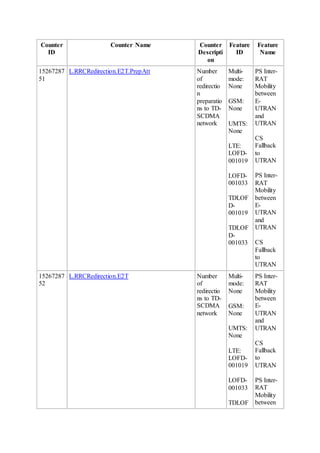
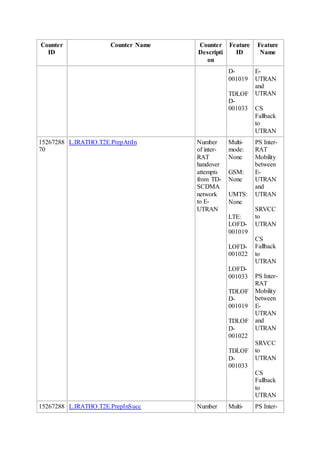
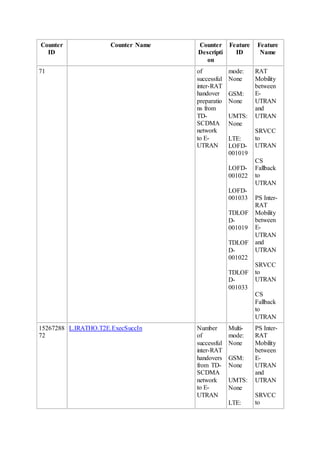
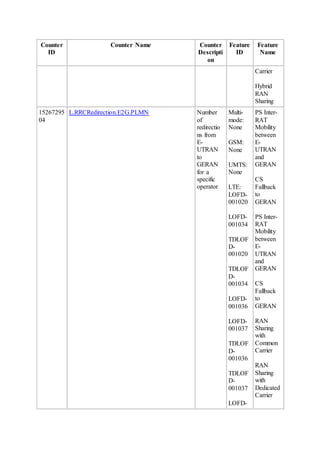
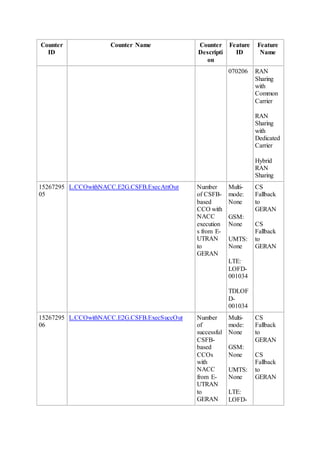
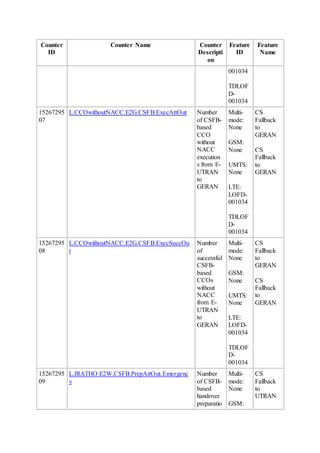
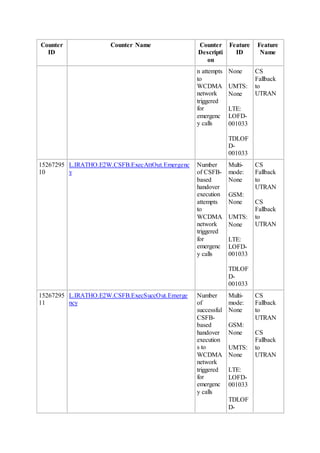
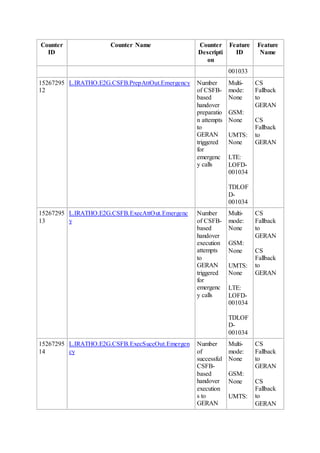
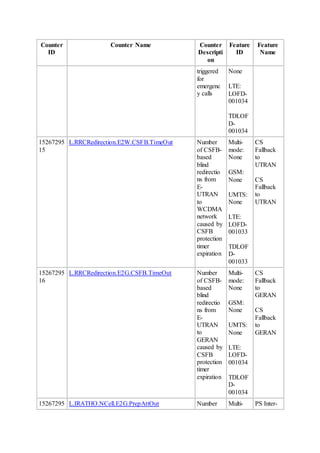
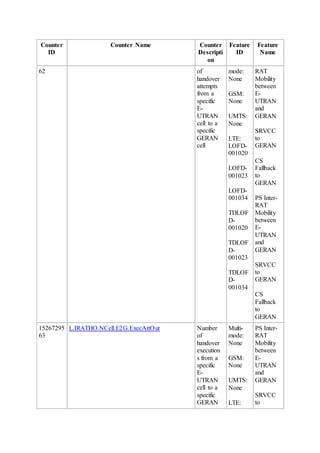
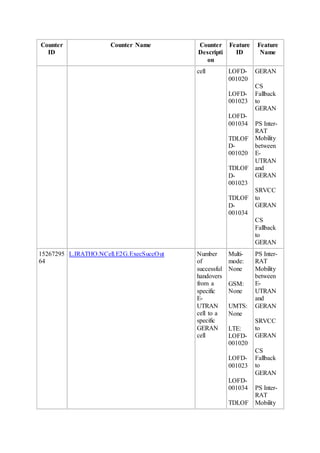
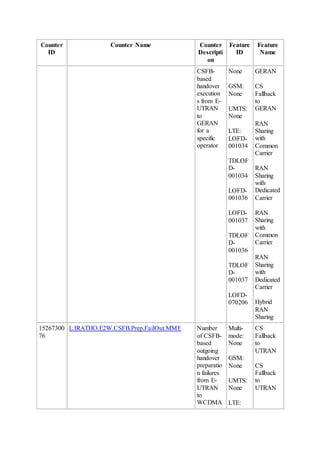
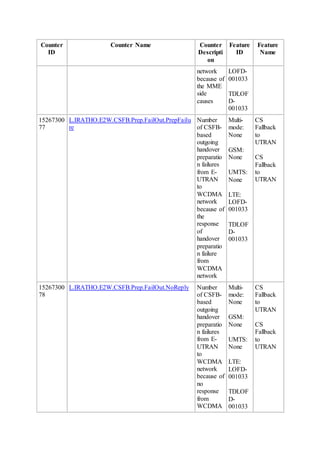
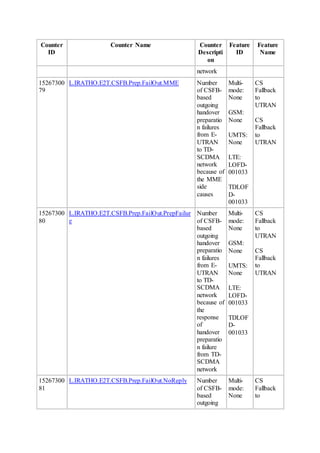
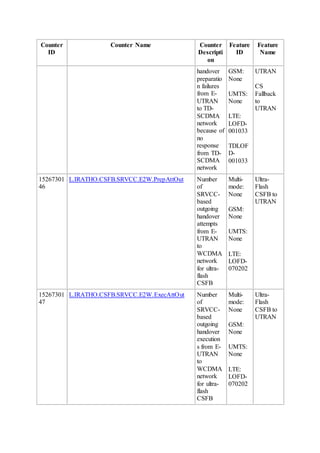
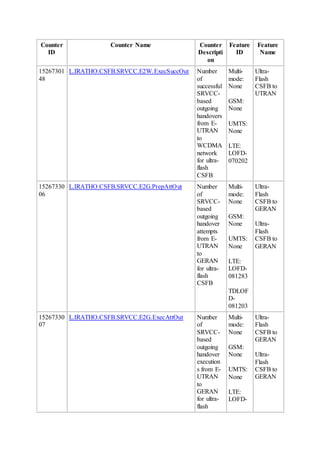
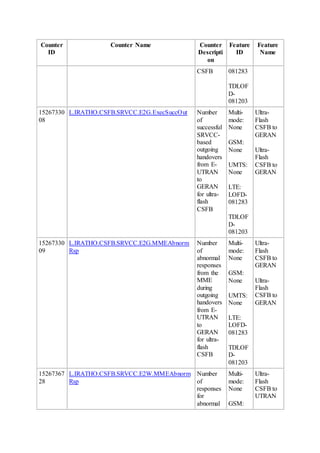
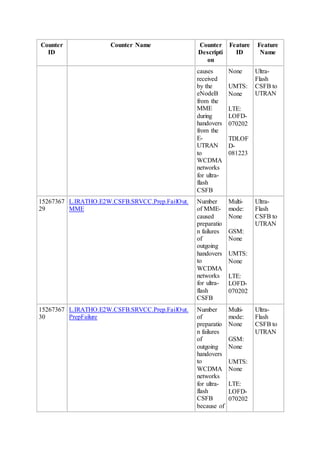
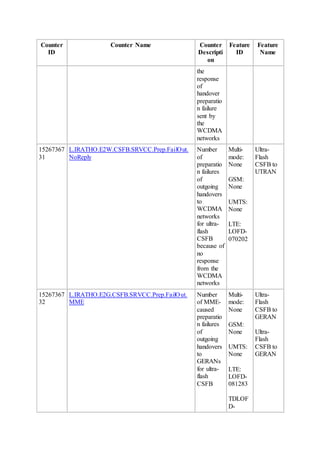
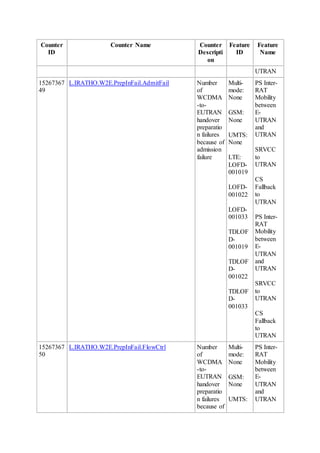
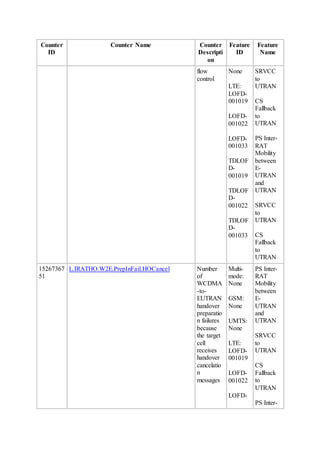
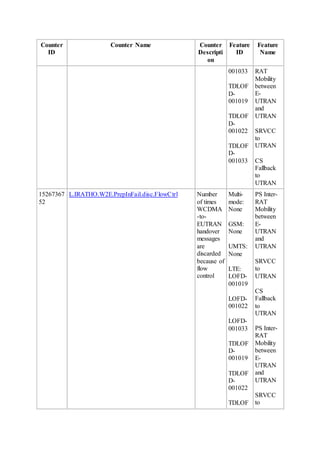
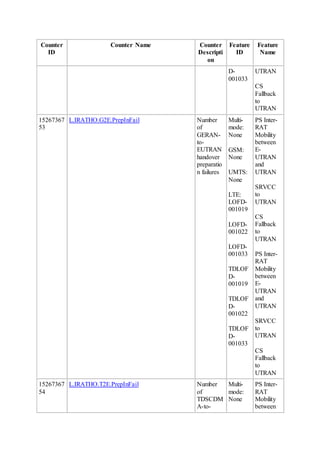
9 Counters
10 Glossary
11 Reference Documents
1 About This Document
1.1 Scope
This document describes circuit switched fallback (CSFB), including its technical principles,
related features, network impact, and engineering guidelines.
This document covers the following features:
 LOFD-001033 CS Fallback to UTRAN
 LOFD-001052 Flash CS Fallback to UTRAN
 LOFD-070202 Ultra-Flash CSFB to UTRAN
 LOFD-001068 CS Fallback with LAI to UTRAN
 LOFD-001088 CS Fallback Steering to UTRAN
 LOFD-001078 E-UTRAN to UTRAN CS/PS Steering
 LOFD-001034 CS Fallback to GERAN
 LOFD-001053 Flash CS Fallback to GERAN
 LOFD-001069 CS Fallback with LAI to GERAN
 LOFD-001089 CS Fallback Steering to GERAN
 LOFD-081283 Ultra-Flash CSFB to GERAN
If Huawei devices are used in the GERAN or UTRAN to which CS fallback is performed,
refer to the following documents to obtain details about CSFB implementation in the
corresponding network:
 For the GERAN, see CSFB in GBSS Feature Documentation.
 For the UTRAN, see Interoperability Between UMTS and LTE in RAN Feature
Documentation.
Any managed objects (MOs), parameters, alarms, or counters described herein correspond to
the software release delivered with this document. Any future updates will be described in the
product documentation delivered with future software releases.
This document applies only to LTE FDD. Any "LTE" in this document refers to LTE FDD,
and "eNodeB" refers to LTE FDD eNodeB.
This document applies to the following types of eNodeBs.
eNodeB Type Model
Macro 3900 series eNodeB
Micro BTS3202E
BTS3203E
LampSite DBS3900
1.2 Intended Audience
This document is intended for personnel who:
 Need to understand the features described herein
 Work with Huawei products
1.3 Change History
This section provides information about the changes in different document versions. There
are two types of changes:
 Feature change
Changes in features and parameters of a specified version as well as the affected
entities
 Editorial change
Changes in wording or addition of information and any related parameters affected by
editorial changes. Editorial change does not specify the affected entities.
eRAN8.1 02 (2015-06-30)
This issue includes the following changes.
Change Type Change Description Parameter Change Affected
Entity
Feature
change
Added the measurement-specific
DRX configuration for Ultra-Flash
CSFB to GERAN. For details, see 4.5
Ultra-Flash CSFB to GERAN.
None Macro,
micro, and
LampSite
eNodeBs
Added the random procedure
selection optimization for CSFB. For
details, see 7.1.5.1 Data Preparation.
Added the
RsvdSwPara1_bit23
option in the reserved
parameter
eNBRsvdPara.
RsvdSwPara1.
Macro,
micro, and
LampSite
eNodeBs
Editorial
change
None None -
eRAN8.1 01 (2015-03-23)
This issue includes the following changes.
Change
Type
Change Description Parameter Change Affected
Entity
Feature
change
Added the UE
compatibility risk
optimization for Ultra-
flash CSFB. For details,
see 7.11.5.1 Data
Preparation.
Added the UltraFlashCsfbComOptSw
option to the
GlobalProcSwitch.UeCompatSwitch
parameter.
Macro,
micro, and
LampSite
eNodeBs
Editorial
change
None None -
eRAN8.1 Draft A (2015-01-15)
Compared with Issue 06 (2014-12-30) of eRAN7.0, Draft A (2015-01-15) of eRAN8.1
includes the following changes.
Chan
ge
Type
Change Description Parameter Change Affecte
d
Entity
Featur
e
chang
e
Supported the cell-level
blind handling switch for
CSFB in CS Fallback to
UTRAN or GERAN and
Flash CS Fallback to
UTRAN or GERAN
Added the
CellHoParaCfg.HoModeSwitch
parameter.
Macro,
micro,
and
LampS
ite
eNode
Bs
Chan
ge
Type
Change Description Parameter Change Affecte
d
Entity
scenarios.
 For details about the
switch, see 3.1 Basic
CSFB to UTRAN
and 3.1.2 Blind
Handover.
 For details about
handover policy
selection, see 3.9.1
Handover Policy
Selection.
 For details about
scenario-specific
parameter
preparations, see
section "Data
Preparation" in
engineering
guidelines.
 For details about
scenario-specific
configurations, see
"Using the CME to
Perform Batch
Configuration for
Newly Deployed
eNodeBs" and
"Using MML
Commands" in
section "Activation"
in engineering
guidelines.
Added the feature LOFD-
081283 Ultra-Flash CSFB to
GERAN.
 For details about the
feature description,
see 4.5 Ultra-Flash
CSFB to GERAN.
 For details about the
signaling procedure,
see 4.9.6 Ultra-Flash
 Added the
GeranExternalCell.UltraFlashCsf
bInd parameter.
 Added the
GeranUltraFlashCsfbSwitch option
in the
ENodeBAlgoSwitch.HoAlgoSwitc
h parameter.
Macro,
micro,
and
LampS
ite
eNode
Bs
Chan
ge
Type
Change Description Parameter Change Affecte
d
Entity
CSFB to GERAN.
 For details about
related features and
network impact, see
5.9 Feature Related
to LOFD-081283
Ultra-Flash CSFB to
GERAN and 6.9
LOFD-081283 Ultra-
Flash CSFB to
GERAN.
 For details about
engineering
guidelines, see 7.11
LOFD-081283 Ultra-
Flash CSFB to
GERAN.
Added the configuration of
the round-robin function for
L2U blind redirections.
 For details about the
switch, see 3.1.2
Blind Handover.
 For details about
scenario-specific
data preparations, see
7.1.5.1 Data
Preparation.
 For details about the
function activation,
see 7.1.5.5 Using
MML Commands.
Added the
CSFallBackBlindHoCfg.UtranCsfbBlind
RedirRrSw parameter.
Macro,
micro,
and
LampS
ite
eNode
Bs
Added SPID-based mobility
management. For details
about the function, see 3.1.2
Blind Handover, 3.8.1 Basic
Handover Decision, and
3.8.2 Flash Redirection
Decision.
None Macro,
micro,
and
LampS
ite
eNode
Bs
Ultra-flash CSFB to
GERAN uses the DRX-
Added the
CellDrxPara.DrxForMeasSwitch
Macro,
micro,
Chan
ge
Type
Change Description Parameter Change Affecte
d
Entity
based measurement, which
is controlled by the
CellDrxPara.DrxForMeas
Switch parameter.
 For details about the
parameter, see 4.5
Ultra-Flash CSFB to
GERAN.
 For details about data
preparations and
MML
configurations, see
related sections in
7.11 LOFD-081283
Ultra-Flash CSFB to
GERAN.
parameter. and
LampS
ite
eNode
Bs
Editor
ial
chang
e
Changed "blind handling" to
"blind handover". For
details, see descriptions of
blind handover in this
document.
None -
1.4 Differences Between eNodeB Types
The features described in this document are implemented in the same way on macro, micro,
and LampSite eNodeBs.
2 Overview
In an early phase of evolved packet system (EPS) construction, operators who own a mature
UTRAN or GERAN can protect their investments in legacy CS networks and reduce their
investments in the EPS by using legacy CS networks to provide CS services such as the voice
service, short message service (SMS), location service (LCS), and emergency calls.
Currently, CSFB and voice over IP (VoIP) over IP multimedia subsystem (IMS) are the two
standard solutions to provide voice services for E-UTRAN UEs. After the technological
maturity, industry chain, and deployment costs of the two methods are well weighed, CSFB
is chosen to serve as an interim solution for voice service access before mature commercial
use of IMS.
2.1 Overview
With the CSFB solution, when a UE initiates a CS service, the MME instructs the UE to fall
back to the legacy CS network before the UE performs the service. CSFB is a session setup
procedure. UEs fall back to CS networks before CS sessions are set up, and they always stay
in the CS networks during the CS sessions. For details, see 3GPP TS 23.272 V8.5.0.
The eNodeB handles the CSFB for different types of CS services in a uniform way such as
the voice service, SMS, LCS, and emergency calls.
2.2 Benefits
CSFB brings the following benefits:
 Facilitates voice services for the LTE network.
 Helps operators reduce costs by reusing legacy CS networks and not deploying an
IMS network.
2.3 Architecture
CSFB is applicable to scenarios where the CS network of the UTRAN/GERAN has the same
or larger coverage area than E-UTRAN.
The network architecture for CSFB is simple. To implement CSFB, all mobile switching
centers (MSCs) that serve overlapping areas with the E-UTRAN coverage must be upgraded
to support functions involving the SGs interface. The SGs interface is between an MSC and a
mobility management entity (MME), and functions involving the SGs interface include
combined attach, combined TAU/LAU (TAU is short for tracking area update, and LAU is
short for location area update), paging, and SMS. If the live network uses an MSC pool, only
one or multiple MSCs in the MSC pool need to be upgraded to support the SGs interface.
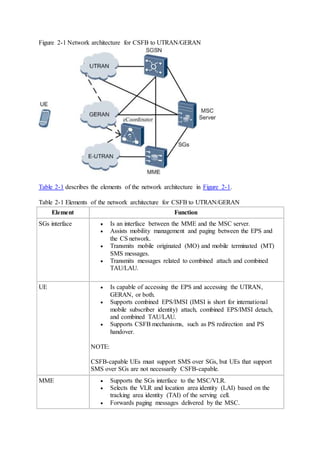
Figure 2-1 shows the network architecture for CSFB to UTRAN/GERAN.
Figure 2-1 Network architecture for CSFB to UTRAN/GERAN
Table 2-1 describes the elements of the network architecture in Figure 2-1.
Table 2-1 Elements of the network architecture for CSFB to UTRAN/GERAN
Element Function
SGs interface  Is an interface between the MME and the MSC server.
 Assists mobility management and paging between the EPS and
the CS network.
 Transmits mobile originated (MO) and mobile terminated (MT)
SMS messages.
 Transmits messages related to combined attach and combined
TAU/LAU.
UE  Is capable of accessing the EPS and accessing the UTRAN,
GERAN, or both.
 Supports combined EPS/IMSI (IMSI is short for international
mobile subscriber identity) attach, combined EPS/IMSI detach,
and combined TAU/LAU.
 Supports CSFB mechanisms, such as PS redirection and PS
handover.
NOTE:
CSFB-capable UEs must support SMS over SGs, but UEs that support
SMS over SGs are not necessarily CSFB-capable.
MME  Supports the SGs interface to the MSC/VLR.
 Selects the VLR and location area identity (LAI) based on the
tracking area identity (TAI) of the serving cell.
 Forwards paging messages delivered by the MSC.
Element Function
 Performs public land mobile network (PLMN) selection and
reselection.
 Supports combined EPS/IMSI attach, combined EPS/IMSI
detach, and combined TAU/LAU.
 Routes CS signaling.
 Supports SMS over SGs.
 Supports RIM, which is required when flash CSFB or CCO with
NACC is used as the CSFB mechanism. (CCO is short for cell
change order and NACC is short for network assisted cell
change.)
MSC  Supports combined EPS/IMSI attach.
 Supports SMS over SGs.
 Forwards paging messages transmitted through the SGs interface.
E-UTRAN  Forwards paging messages related to CSFB.
 Selects target cells for CSFB for E-UTRAN UEs.
 Supports one or more of the following functions:
o PS redirection to UTRAN or GERAN, if PS redirection is
used as the CSFB mechanism.
o PS handover to UTRAN or GERAN, if PS handover is
used as the CSFB mechanism.
o CCO without NACC to GERAN, if CCO without NACC
is used as the CSFB mechanism; RIM for acquiring the
system information of GERAN cells, if NACC is used as
the CSFB mechanism.
o RIM for acquiring the system information of UTRAN or
GERAN cells, in addition to PS redirection, if flash CSFB
is used as the CSFB mechanism.
UTRAN/GERAN Supports one or more of the following functions:
 Incoming handovers from the E-UTRAN, if PS handover is used
as the CSFB mechanism.
 RIM for delivering the system information of GERAN cells to
eNodeBs, if CCO with NACC is used as the CSFB mechanism.
 RIM for delivering the system information of UTRAN or
GERAN cells to eNodeBs, in addition to PS redirection, if flash
CSFB is used as the CSFB mechanism.
NOTE:
The UTRAN and GERAN do not need to provide extra functions to
support PS redirection. The GERAN does not need to provide extra
functions to support CCO without NACC.
SGSN  Supports the follow-up procedures performed for the PS
Element Function
handover, including data forwarding, path switching, RAU, and
encryption and authentication.
 Supports RIM, which is required when flash CSFB or CCO with
NACC is used as the CSFB mechanism.
eCoordinator Is a network element provided by Huawei, and is optional. The
eCoordinator supports the RIM procedure.
3 CSFB to UTRAN
CSFB to UTRAN can be implemented in different ways, and this section covers the
following features/functions:
 LOFD-001033 CS Fallback to UTRAN
 LOFD-001052 Flash CS Fallback to UTRAN
 LOFD-070202 Ultra-Flash CSFB to UTRAN
 LOFD-001068 CS Fallback with LAI to UTRAN
 LOFD-001078 E-UTRAN to UTRAN CS/PS Steering
 LOFD-001088 CS Fallback Steering to UTRAN
 Load-based CSFB to UTRAN
The triggering conditions for different features are different. Basically the procedure for
CSFB to UTRAN is as follows:
1. Selecting a target cell or frequency
In a measurement-based handover, the eNodeB generates a candidate cell list based
on inter-RAT measurement results and selects a target cell from the list.
In a blind handover, the eNodeB selects a target cell based on the blind handover
priorities of neighboring cells or selects a target frequency based on the frequency
priorities.
2. Handover decision
In the handover decision phase, the eNodeB checks the target cell list.
3. Handover execution
The eNodeB controls the UE to be handed over from the serving cell to the target cell.
3.1 Basic CSFB to UTRAN
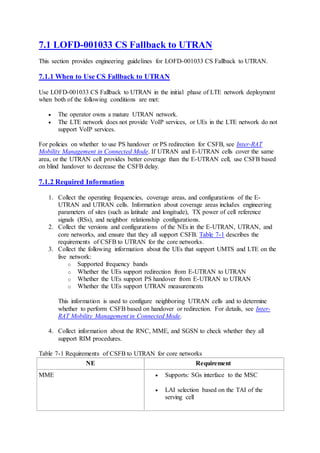
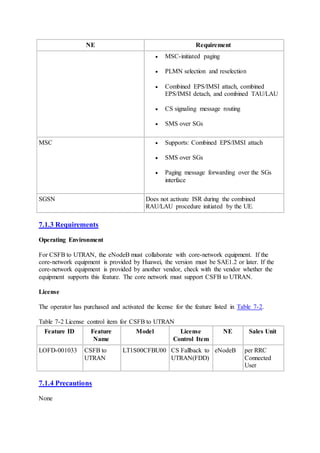
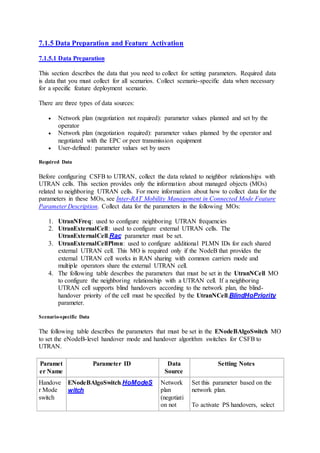
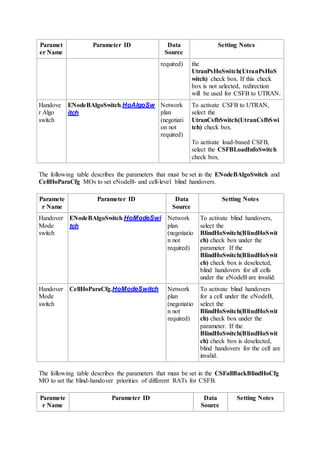
This section describes the optional feature LOFD-001033 CS Fallback to UTRAN. For
details about the engineering guidelines for this feature, see 7.1 LOFD-001033 CS Fallback
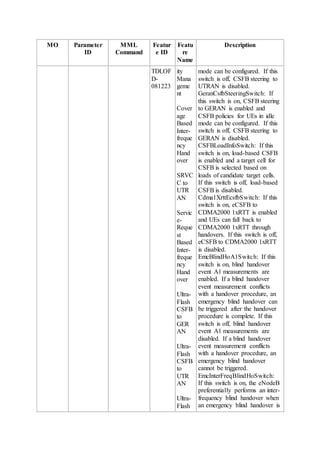
to UTRAN. The UtranCsfbSwitch option in the ENodeBAlgoSwitch.HoAlgoSwitch
parameter specifies whether to enable this feature.
When a UE initiates a CS service in the E-UTRAN, the MME sends an S1-AP message
containing CS Fallback Indicator to the eNodeB, instructing the eNodeB to transfer the UE as
well as the CS service to a target network.
The eNodeB determines whether to trigger UTRAN measurements or blind handling for
CSFB to UTRAN based on the status of the blind handling switch first. The blind handover
switch is controlled by the BlindHoSwitch option in the eNodeB-level parameter
ENodeBAlgoSwitch.HoModeSwitch and the BlindHoSwitch option in the cell-level
parameter CellHoParaCfg.HoModeSwitch. The blind handover function takes effect only
if the eNodeB-level BlindHoSwitch and cell-level BlindHoSwitch options are selected.
 If this option is selected, the eNodeB triggers blind handover directly.
 If this option is cleared, the eNodeB determines whether to trigger inter-RAT
measurements or blind handover based on the UE capability:
o If the UE supports UTRAN measurements, the eNodeB triggers inter-RAT
measurements.
o If the UE does not support UTRAN measurements, the eNodeB triggers a
blind handover.
3.1.1 Handover Measurement
Measurement Triggering Reason
During CSFB, the eNodeB starts a UTRAN measurement after it receives a CS Fallback
Indicator. The measurement configuration is the same as that for coverage-based handover
from E-UTRAN to UTRAN. For details, see Inter-RAT Mobility Management in Connected
Mode.
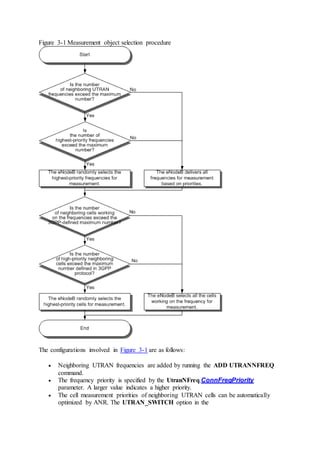
Figure 3-1 shows the measurement object selection procedure.
Figure 3-1 Measurement object selection procedure
The configurations involved in Figure 3-1 are as follows:
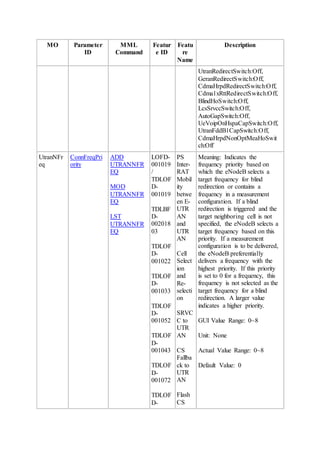
 Neighboring UTRAN frequencies are added by running the ADD UTRANNFREQ
command.
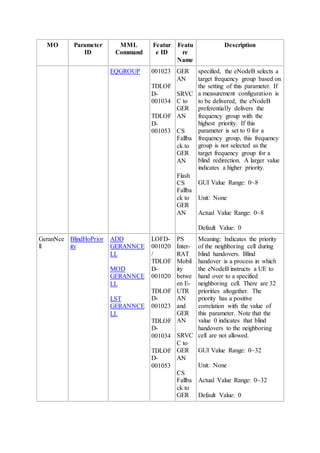
 The frequency priority is specified by the UtranNFreq.ConnFreqPriority
parameter. A larger value indicates a higher priority.
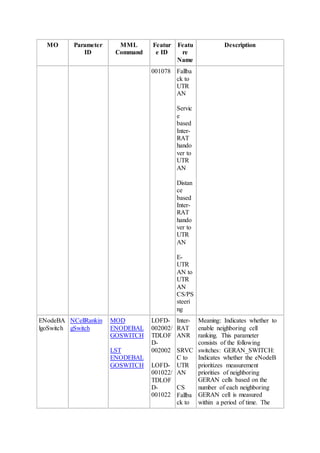
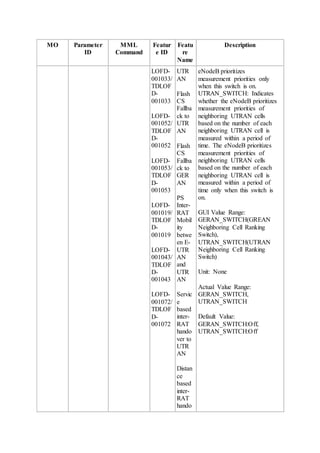
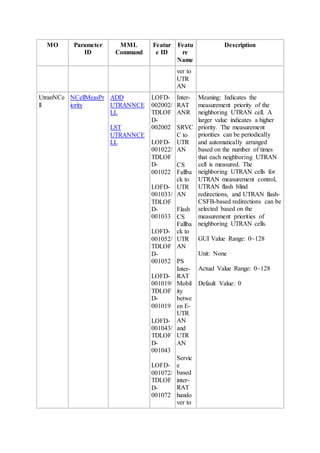
 The cell measurement priorities of neighboring UTRAN cells can be automatically
optimized by ANR. The UTRAN_SWITCH option in the
ENodeBAlgoSwitch.NCellRankingSwitch parameter is used to enable this
function. This option is recommended to be selected if ANR is enabled.
o If this option is selected, the eNodeB automatically optimizes the setting of the
UtranNCell.NCellMeasPriority parameter for the cell. This parameter
cannot be modified manually. For details, see ANR Management.
o If this option is cleared, the cell measurement priorities are specified by the
UtranNCell.CellMeasPriority parameter, which needs to be configured
manually.
 The number of frequencies or cells that the eNodeB can randomly select for
measurement is always equal to the allowed maximum number.
 The maximum number of frequencies is specified by the
CellUeMeasControlCfg.MaxUtranFddMeasFreqNum parameter.
 For details about the maximum number of neighboring cells in a measurement
configuration message, see section 6.4 "RRC multiplicity and type constraint values"
in 3GPP TS 36.331 V10.1.0.
Triggering of CSFB
During the measurement procedure, CSFB is triggered by event B1. The principle of
triggering CSFB by event B1 is the same as that of triggering the coverage-based inter-
frequency handover by event B1. For details, see Inter-RAT Mobility Management in
Connected Mode.
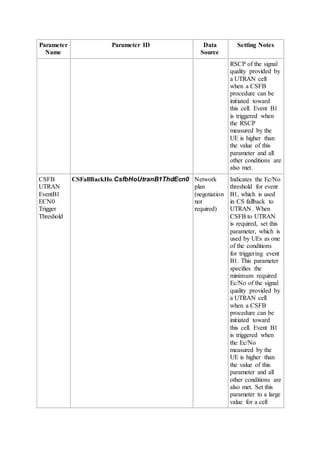
They have different thresholds and time-to-trigger. Table 3-1 lists the thresholds and time-to-
trigger related to event B1 for CSFB to UTRAN. Other parameters are the same as those
related to event B1 for coverage-based inter-frequency handovers.
Table 3-1 Parameters related to event B1 for CSFB to UTRAN
Parame
ter
Name
Parameter ID Parameter Description
CSFB
UTRAN
EventB
1 RSCP
Trigger
Thresho
ld
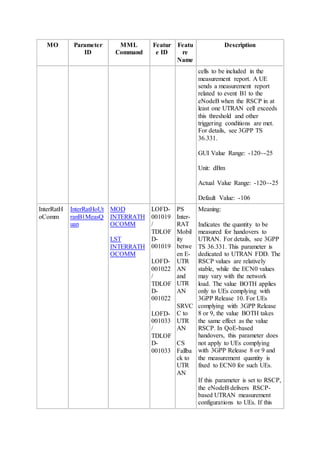
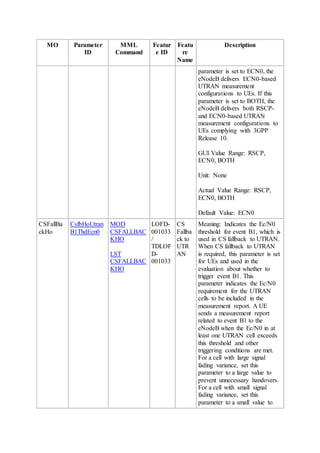
CSFallBackHo.CsfbHoUtranB1
ThdRscp
The
InterRatHoComm.InterRATHoUtranB1
MeasQuan parameter determines which
threshold is to be used.
CSFB
UTRAN
EventB
1 ECN0
Trigger
Thresho
ld
CSFallBackHo.CsfbHoUtranB1
ThdEcn0
CSFB
Utran
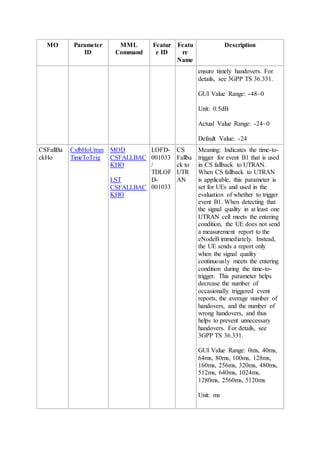
CSFallBackHo.CsfbHoUtranTim
eToTrig
N/A
Parame
ter
Name
Parameter ID Parameter Description
EventB
1 Time
To Trig
3.1.2 Blind Handover
Triggering of Blind Handover
The blind handover switch is controlled by the BlindHoSwitch option in the
ENodeBAlgoSwitch.HoModeSwitch parameter and the BlindHoSwitch option in the
CellHoParaCfg.HoModeSwitch parameter. The blind handover function takes effect only
if the eNodeB-level BlindHoSwitch and cell-level BlindHoSwitch options are selected.
When an E-UTRAN coverage area is larger than a UTRAN coverage area and E-UTRAN
and UTRAN base stations are co-sited, adaptive-blind-handover-based CSFB estimates the
signal strength of the neighboring UTRAN cell based on the signal strength of the serving E-
UTRAN cell.
 If the UE is located in the center of the E-UTRAN cell, the eNodeB performs the
blind handover.
 If the UE is located at the edge of the E-UTRAN cell, the eNodeB performs a
measurement-based handover.
When the blind handover function takes effect:
 If adaptive-blind-handover-based CSFB is disabled, the eNodeB directly enters the
blind handover procedure.
 If adaptive-blind-handover-based CSFB is enabled, the eNodeB delivers measurement
configurations for event A1.
o If the eNodeB receives an event A1 report and determines that the UE is
located in the center of the E-UTRAN cell, it directly enters the blind
handover procedure.
o If the eNodeB does not receive an event A1 report and determines that the UE
is located at the edge of the E-UTRAN cell, it enters the measurement
procedure.
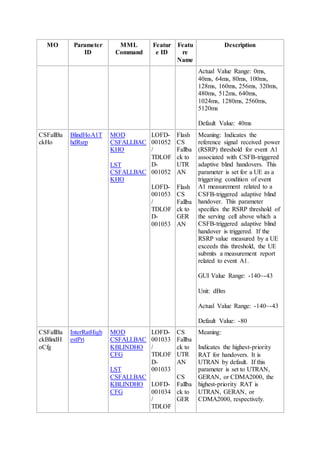
The event A1 threshold is specified by the CSFallBackHo.BlindHoA1ThdRsrp
parameter, and other event-A1-related principles are the same as these in coverage-
based handover from E-UTRAN to UTRAN. For details, see Inter-RAT Mobility
Management in Connected Mode.
Target RAT Selection
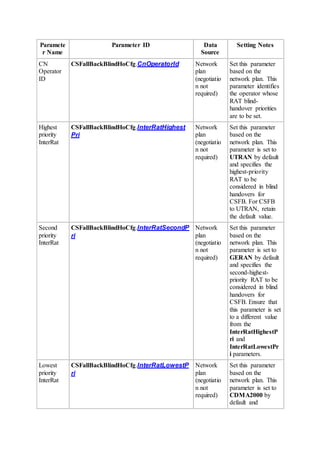
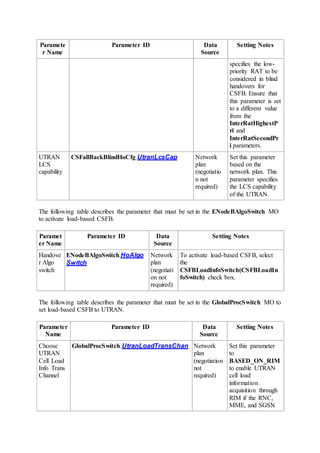
During a blind handover for CSFB, the eNodeB selects the target RAT based on the RAT
priorities specified by the following parameters:
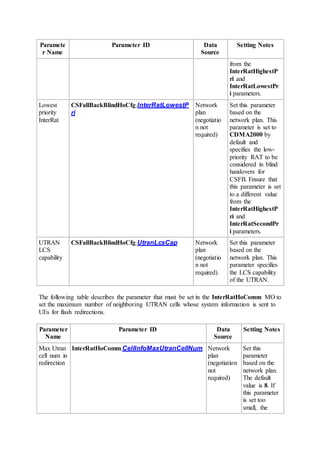
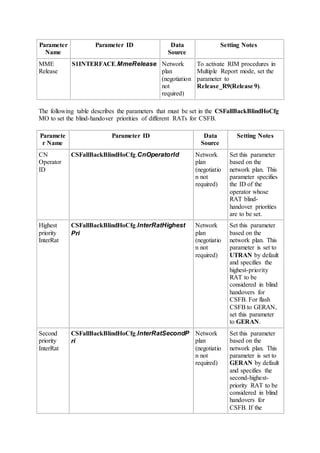
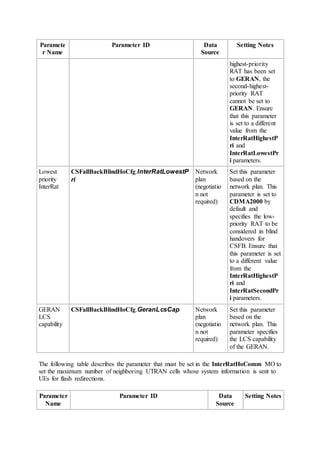
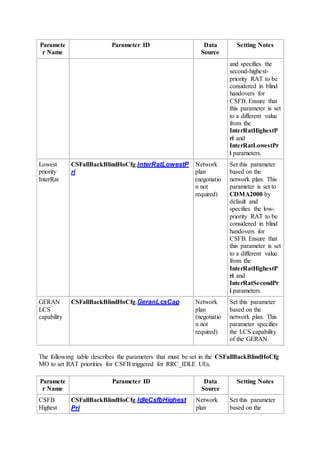
 CSFallBackBlindHoCfg.InterRatHighestPri: specifies the RAT with the highest
priority.
 CSFallBackBlindHoCfg.InterRatSecondPri: specifies the RAT with the second
highest priority.
 CSFallBackBlindHoCfg.InterRatLowestPri: specifies the RAT with the lowest
priority.
If CSFallBackBlindHoCfg.InterRatHighestPri is set to UTRAN(UTRAN), the eNodeB
performs CSFB to UTRAN.
 When selecting target cells for blind handover, the eNodeB excludes the following
neighboring cells:
o Blacklisted neighboring cells
o Neighboring cells with a handover prohibition flag
o Neighboring cells that have a different PLMN from the serving cell in the
neighboring cell list. If the inter-PLMN handover switch is turned on, such
cells are not excluded.
o Cells in the areas indicated by the Handover Restriction List IE in the
INITIAL CONTEXT SETUP REQUEST message sent from the MME
After the preceding exclusion, the eNodeB excludes cells from the neighboring cell
list based on SPID-based mobility management in connected mode. For details, see
LOFD-00105401 Camp and Handover Based on SPID in Flexible User Steering
Feature Parameter Description.
 When selecting target frequencies for blind redirection, the eNodeB filters frequencies
based on the RATs supported by the UE and PLMN information corresponding to
frequencies.
After the preceding exclusion, the eNodeB filters cells from the neighboring cell list
based on SPID-based mobility management in connected mode. For details, see
LOFD-00105401 Camp and Handover Based on SPID in Flexible User Steering
Feature Parameter Description.
During blind handover, the target selection procedure is different, depending on whether
neighboring UTRAN cells are configured.
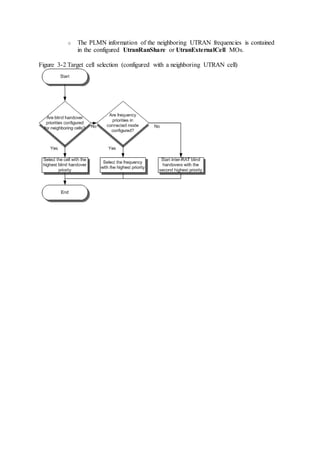
 If neighboring UTRAN cells are configured, the target selection procedure is shown
in Figure 3-2.
o The blind handover priority of a neighboring UTRAN cell is specified by the
UtranNCell.BlindHoPriority parameter. A larger value indicates a higher
priority.
o The priority of a neighboring UTRAN frequency is specified by
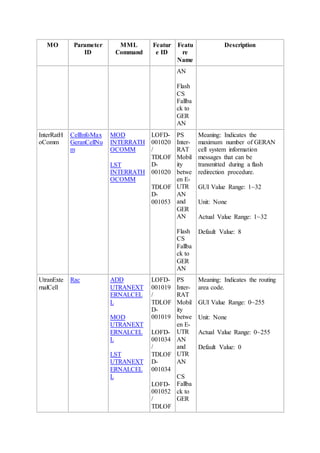
UtranNFreq.ConnFreqPriority parameter. A larger value indicates a higher
priority.
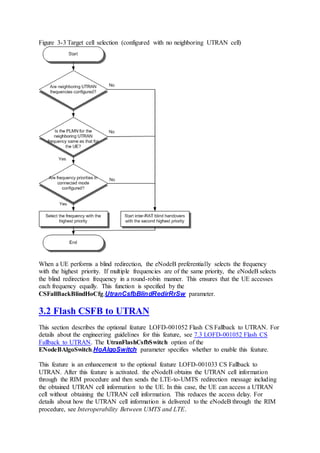
 If no neighboring UTRAN cell is configured, neighboring UTRAN frequencies are
configured, and the UE performs CSFB based on redirection, the target selection
procedure is shown in Figure 3-3.
o Neighboring UTRAN frequencies are configured in UtranNFreq MOs.
o The PLMN information of the neighboring UTRAN frequencies is contained
in the configured UtranRanShare or UtranExternalCell MOs.
Figure 3-2 Target cell selection (configured with a neighboring UTRAN cell)
Figure 3-3 Target cell selection (configured with no neighboring UTRAN cell)
When a UE performs a blind redirection, the eNodeB preferentially selects the frequency
with the highest priority. If multiple frequencies are of the same priority, the eNodeB selects
the blind redirection frequency in a round-robin manner. This ensures that the UE accesses
each frequency equally. This function is specified by the
CSFallBackBlindHoCfg.UtranCsfbBlindRedirRrSw parameter.
3.2 Flash CSFB to UTRAN
This section describes the optional feature LOFD-001052 Flash CS Fallback to UTRAN. For
details about the engineering guidelines for this feature, see 7.3 LOFD-001052 Flash CS
Fallback to UTRAN. The UtranFlashCsfbSwitch option of the
ENodeBAlgoSwitch.HoAlgoSwitch parameter specifies whether to enable this feature.
This feature is an enhancement to the optional feature LOFD-001033 CS Fallback to
UTRAN. After this feature is activated. the eNodeB obtains the UTRAN cell information
through the RIM procedure and then sends the LTE-to-UMTS redirection message including
the obtained UTRAN cell information to the UE. In this case, the UE can access a UTRAN
cell without obtaining the UTRAN cell information. This reduces the access delay. For
details about how the UTRAN cell information is delivered to the eNodeB through the RIM
procedure, see Interoperability Between UMTS and LTE.
This feature requires that the eNodeB can obtain UTRAN cell information through the RIM
procedures and the networks and UEs involved must support 3GPP Release 9 or later. For
details about the RIM procedure, see 3.10 RIM Procedure Between E-UTRAN and UTRAN.
Other procedures are the same as those in CSFB to UTRAN. For details, see 3.1 Basic CSFB
to UTRAN.
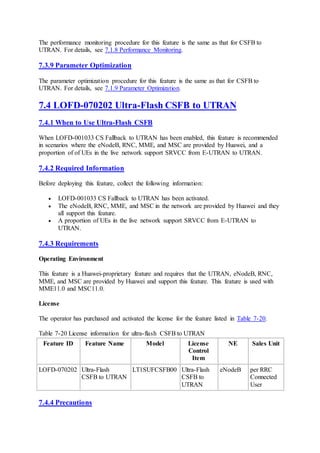
3.3 Ultra-Flash CSFB to UTRAN
This section describes the optional feature LOFD-070202 Ultra-Flash CSFB to UTRAN. For
details about the engineering guidelines for this feature, see 7.4 LOFD-070202 Ultra-Flash
CSFB to UTRAN. The UtranUltraFlashCsfbSwitch option in the
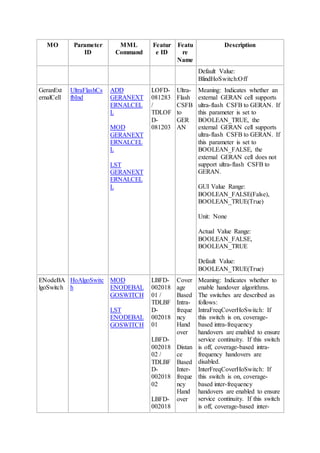
ENodeBAlgoSwitch.HoAlgoSwitch parameter specifies whether to enable this feature.
This feature is a Huawei-proprietary feature. To enable this feature, the MME, MSC, and
RNC must all provided by Huawei and support this feature.
When a UE initiates a CS service setup request in an LTE cell that does not support VoIP,
this feature enables the eNodeB to hand over the UE to the UTRAN through the SRVCC
handover procedure. This shortens the access delay for CS fallbacks by 1 second.
The measurement procedure and blind handover procedure for this feature are the same as
those in CSFB to UTRAN. For details, see 3.1 Basic CSFB to UTRAN.
NOTE:
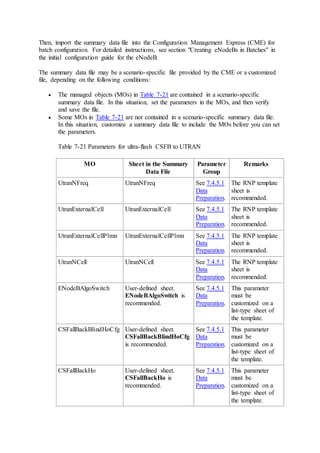
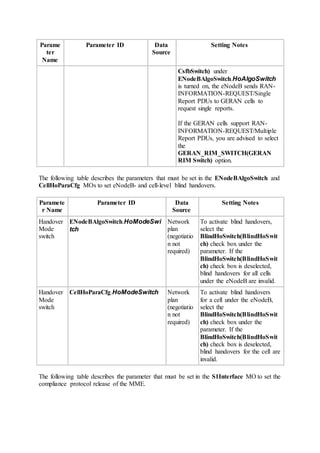
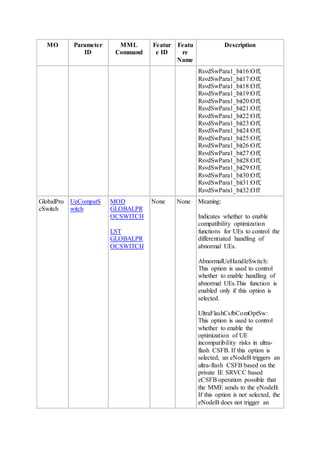
The following table describes the parameters that must be set in the
GLOBALPROCSWITCH MO to turn on the UE compatibility switch when UEs do not
support Ultra-Flash CSFB, resulting in UE compatibility problems.
3.4 CS Fallback with LAI to UTRAN
This section describes the optional feature LOFD-001068 CS Fallback with LAI to UTRAN.
For details about the engineering guidelines for this feature, see 7.5 LOFD-001068 CS
Fallback with LAI to UTRAN. This feature is under license control and is not controlled by a
switch.
This feature mainly applies to the following scenarios:
 In a multi-PLMN or national roaming scenario
An LAI consists of a PLMN ID and a LAC. In the CSFB with LAI function, the
PLMN ID identifies the CS network that the UE has registered with and will fall back
to after fallback.
If the serving E-UTRAN cell has multiple neighboring UTRAN or GERAN cells with
different PLMN IDs and the InterPlmnHoSwitch option of the
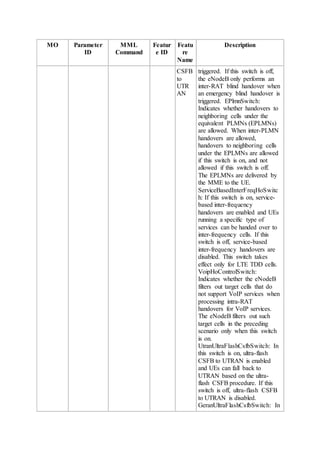
ENodeBAlgoSwitch.HoAlgoSwitch parameter is selected, or the serving PLMN
differs from the target PLMN, the operator can use CSFB with LAI to achieve
fallback to a specified target network.
 In a tracking area (TA) that overlaps multiple location areas (LAs)
The eNodeB selects a CSFB target cell with the same LAC as that mapped to the
network to which the UE has attached. An LAU is not required after CSFB, and
therefore the CSFB delay does not include the LAU time.
This feature is an enhancement to the optional feature LOFD-001033 CS Fallback to
UTRAN. With this feature, the eNodeB selects a target frequency or cell for measurement or
blind handover based on the LAI sent by the MME.
 In a measurement procedure, the eNodeB selects only an inter-RAT frequency on
which the PLMN ID of a neighboring cell is the same as that in the LAI received. The
follow-up measurement procedure is similar to that in CS Fallback to UTRAN. For
details, see 3.1.1 Handover Measurement.
The difference is that the eNodeB sorts neighboring cells in the following order after
receiving measurement reports from a UE:
1. Neighboring cells with PLMN IDs and LACs the same as those in the LAI
2. Neighboring cells with PLMN IDs the same as that in the LAI but LACs
different from that in the LAI
If no frequency or neighboring cell can be selected based on the LAI, the processing
is the same as that when no LAI is received.
 In a blind handover procedure, the eNodeB first selects a target cell for blind
handover.
If no neighboring UTRAN cell is configured, the eNodeB preferentially selects the
UTRAN frequencies whose PLMN ID is the same as that in the LAI. The follow-up
procedure is the same as that described in 3.1.2 Blind Handover.
If neighboring UTRAN cells are configured, the eNodeB preferentially selects the
operating UTRAN frequencies of the neighboring UTRAN cells whose PLMN ID is
the same as that in the LAI. The eNodeB then sorts the frequencies based on the blind
handover priorities of the neighboring cells and frequency priorities for connected
mode. For details, see 3.1.2 Blind Handover.
The eNodeB selects a target cell in the following order of preference:
1. Neighboring cell whose PLMN ID and LAC are the same as those in the LAI
2. If no neighboring cells described in 1 exist, the eNodeB selects the
neighboring cells with PLMN IDs the same as that in the LAI but LACs
different from that in the LAI.
3. If no neighboring cells described in 1 and 2 exist, the eNodeB selects the
neighboring cells with PLMN IDs the same as the serving PLMN ID of the
UE.
If the InterPlmnHoSwitch option of the
ENodeBAlgoSwitch.HoAlgoSwitch parameter is selected, the eNodeB also
selects cells whose PLMN IDs are in the target PLMN list.
3.5 E-UTRAN to UTRAN CS Steering
This section describes the CS steering function in the optional feature LOFD-001078 E-
UTRAN to UTRAN CS/PS Steering. For details about the engineering guidelines for this
function, see 7.7 LOFD-001078 E-UTRAN to UTRAN CS/PS Steering. For details about the
PS steering function in this feature, see Inter-RAT Mobility Management in Connected Mode.
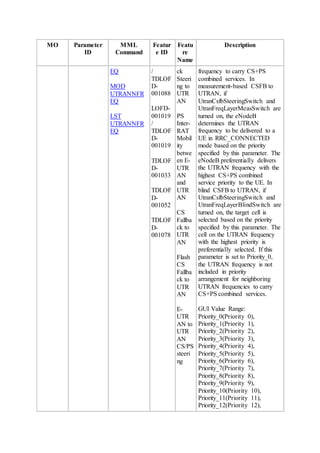
This feature applies to a scenario where service steering is required in a UTRAN with
multiple UTRAN frequencies. By setting CS service priorities for UTRAN frequencies, the
operator can achieve CSFB from E-UTRAN only to the UTRAN frequency that has a high
CS service priority.
CS Steering in CSFB
This function is an enhancement to the CS Fallback to UTRAN feature. The enhancements
are as follows:
 During inter-RAT measurement on the UTRAN, frequencies with a high CS service
priority are preferentially measured.
The UtranFreqLayerMeasSwitch option of the
ENodeBAlgoSwitch.FreqLayerSwtich parameter specifies whether to enable this
function.
If the option is selected, the eNodeB preferentially selects frequencies with a high CS
service priority specified by the UtranNFreq.CsPriority parameter as the
measurement targets. A larger value of this parameter indicates a higher priority. If
this parameter is set to Priority_0(Priority 0) for a frequency, the eNodeB does not
select this frequency as the measurement target. The follow-up measurement
procedure is the same as that in CS Fallback to UTRAN. For details, see 3.1.1
Handover Measurement.
 During blind handover, cells working on frequencies with a high CS service priority
are preferentially selected.
The UtranFreqLayerBlindSwitch option of the
ENodeBAlgoSwitch.FreqLayerSwtich parameter specifies whether to enable this
function.
If the option is selected, the eNodeB preferentially selects cells working on
frequencies with a high CS service priority specified by the UtranNFreq.CsPriority
parameter. A larger value of this parameter indicates a higher priority. If this
parameter is set to Priority_0(Priority 0) for a frequency, the eNodeB does not select
cells working on this frequency. The follow-up blind handover procedure is the same
as that in CS Fallback to UTRAN. For details, see 3.1.2 Blind Handover.
LAI-based CS Steering in CSFB
This function is an enhancement to the CS Fallback with LAI to UTRAN feature. The
enhancements are as follows:
 Enhancement in measurement
1. The eNodeB selects inter-RAT frequencies on which the PLMN ID of a
neighboring cell is the same as the PLMN ID in the LAI.
2. Among the selected frequencies, the eNodeB selects a frequency with a high
CS service priority specified by the UtranNFreq.CsPriority parameter.
3. The follow-up measurement procedure is similar to that in CS Fallback to
UTRAN. For details, see 3.1.1 Handover Measurement.
The difference is that the eNodeB sorts neighboring cells in the following
order after receiving measurement reports from a UE:
4. Neighboring cells with PLMN IDs and LACs the same as those in the LAI
5. Neighboring cells with PLMN IDs the same as that in the LAI but LACs
different from that in the LAI
6. Neighboring cells with PLMN IDs the same as the serving PLMN ID of the
UE
 Enhancement in blind handover
1. The eNodeB selects frequencies whose PLMN ID is the same as the PLMN ID
in the LAI.
2. Among the selected frequencies, the eNodeB selects a frequency with a high
CS service priority specified by the UtranNFreq.CsPriority parameter.
3. The eNodeB selects a neighboring cell whose PLMN ID and LAC are the
same as those in the LAI.
4. If such a neighboring cell is unavailable, the eNodeB selects a neighboring
cell whose PLMN ID is the same as that in the LAI but LAC is different from
that in the LAI.
5. The follow-up blind handover procedure is the same as that in CS Fallback to
UTRAN. For details, see 3.1.2 Blind Handover.
3.6 CS Fallback Steering to UTRAN
This chapter describes the optional feature LOFD-001088 CS Fallback Steering to UTRAN.
For details about the engineering guidelines for this feature, see 7.6 LOFD-001088 CS
Fallback Steering to UTRAN. The UtranCsfbSteeringSwitch option of the
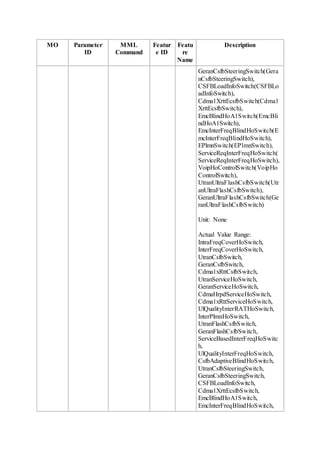
ENodeBAlgoSwitch.HoAlgoSwitch parameter specifies whether to enable this feature.
This feature is an enhancement to the optional feature LOFD-001033 CSFB to UTRAN. In
terms of the UE status at the time when the UE initiates a CS service, you can configure the
target RAT and handover policy flexibly. There are two types of UEs:
 CS-only UE
CS-only UE If the MME uses the INITIAL CONTEXT SETUP REQUEST message
to send the CSFB indicator to the eNodeB, the eNodeB determines that the UE is in
idle mode at the time when the UE initiates the CS service. This UE is called a CS-
only UE.
 CS+PS UE
If the MME uses the UE CONTEXT MODIFICATION REQUEST message to send
the CSFB indicator to the eNodeB, the eNodeB determines that the UE is performing
PS services at the time when the UE initiates the CS service. This UE is called a
CS+PS UE.
CS-only UE
If the UE is a CS-only UE, the eNodeB selects the target RAT based on the RAT priorities
for CSFB of CS-only UEs. The priorities are specified by the following parameters:
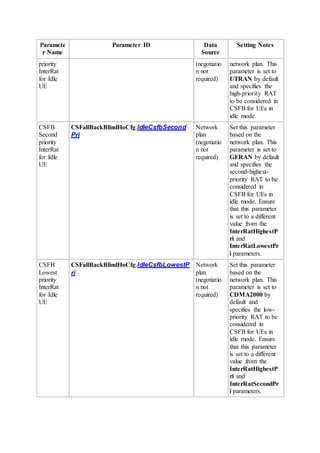
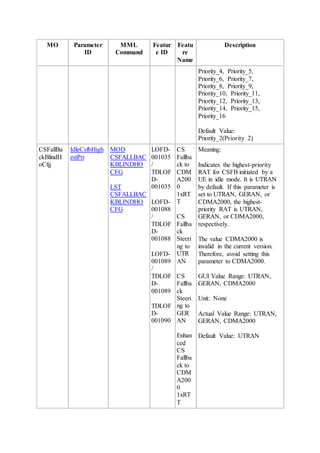
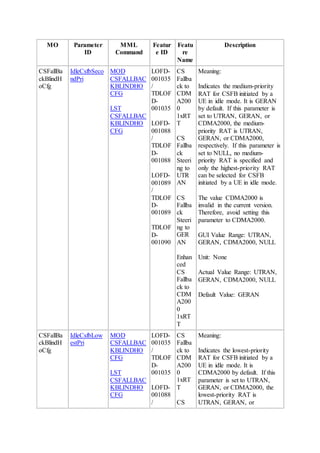
 CSFallBackBlindHoCfg.IdleCsfbHighestPri: specifies the highest-priority RAT
for CSFB of CS-only UEs.
 CSFallBackBlindHoCfg.IdleCsfbSecondPri: specifies the second-highest-priority
RAT for CSFB of CS-only UEs.
 CSFallBackBlindHoCfg.IdleCsfbLowestPri: specifies the lowest-priority RAT
for CSFB of CS-only UEs.
The eNodeB can select a neighboring cell or frequency with a lower-priority RAT only if no
neighboring cell or frequency with higher-priority RATs is configured.
If the target system with the highest priority is UTRAN, the eNodeB selects the target
frequencies based on the setting of the UtranNFreq.CsPriority parameter. For details, see
3.5 E-UTRAN to UTRAN CS Steering.
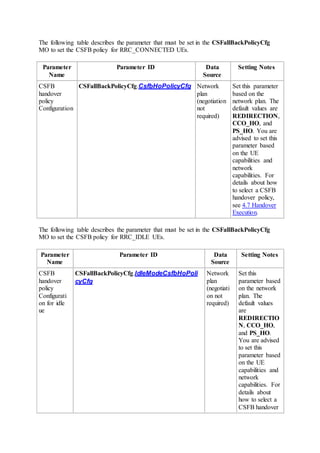
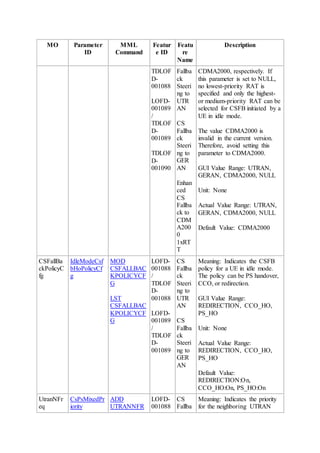
The eNodeB selects the handover policy for CSFB of CS-only UEs based on the setting of
the CSFallBackPolicyCfg.IdleModeCsfbHoPolicyCfg parameter. PS HO and redirection
are selected in descending order.
CS+PS UE
The eNodeB selects the target RAT based on the RAT priorities specified by the following
parameters:
 CSFallBackBlindHoCfg.InterRatHighestPri: specifies the RAT with the highest
priority.
 CSFallBackBlindHoCfg.InterRatSecondPri: specifies the RAT with the second-
highest priority.
 CSFallBackBlindHoCfg.InterRatLowestPri: specifies the RAT with the lowest
priority.
The eNodeB can select a neighboring cell or frequency with a lower-priority RAT only if no
neighboring cell or frequency with higher-priority RATs is configured.
If the target system with the highest priority is UTRAN, the eNodeB selects the target
frequencies based on the setting of the UtranNFreq.CsPsMixedPriority parameter. The
UtranNFreq.CsPsMixedPriority and UtranNFreq.CsPriority parameters have similar
setting principles. For details, see 3.5 E-UTRAN to UTRAN CS Steering.
The eNodeB selects the handover policy for CSFB based on the setting of the
CSFallBackPolicyCfg.CsfbHoPolicyCfg parameter. PS HO and redirection are selected in
descending order.
3.7 Load-based CSFB to UTRAN
This chapter describes load-based CSFB to UTRAN. This function is an enhancement to the
CS Fallback to UTRAN feature. For details about the engineering guidelines for this feature,
see 7.1 LOFD-001033 CS Fallback to UTRAN. The CSFBLoadInfoSwitch option of the
ENodeBAlgoSwitch.HoAlgoSwitch parameter specifies whether to enable this function.
In load-based CSFB to UTRAN, the eNodeB uses the RIM procedure in Multiple Report
mode to obtain the load information about UTRAN cells. For details about the RIM
procedure, see 3.10 RIM Procedure Between E-UTRAN and UTRAN. After receiving the
load information about UTRAN cells, the eNodeB saves the information and uses the
information to determine the target UTRAN cell for the CSFB.
In load-based CSFB to UTRAN, the measurement and blind handover procedures are the
same as those in the CS Fallback to UTRAN feature. For details, see 3.1 Basic CSFB to
UTRAN.
When the eNodeB selects the target UTRAN cell for the CSFB based on the load status of
UTRAN cells, the eNodeB considers UTRAN cells in descending order as follows: cells
whose load status is normal, cells whose load status is congested, and cells whose load status
is overloaded.
Load-based CSFB to UTRAN affects the target cell selection at a later phase. If measurement
is performed, the eNodeB does not select a low-priority frequency because all UTRAN cells
on the high-priority frequency are overloaded.
3.8 Handover Decision
3.8.1 Basic Handover Decision
When the handover policy is PS HO, SRVCC, or redirection (excluding flash redirection), the
eNodeB does not need to obtain system information of the peer and performs the basic
handover decision.
In the handover decision phase, the eNodeB checks the candidate cell list. Based on the check
result, the eNodeB determines whether a handover needs to be initiated and, if so, to which
cell the UE is to be handed over. If the eNodeB receives measurement reports about different
RATs, it processes the reports in an FIFO manner.
The eNodeB excludes the following cells from the neighboring cell list:
 Blacklisted neighboring cells
 Neighboring cells with a handover prohibition flag
 Neighboring cells that have a different PLMN from the serving cell in the neighboring
cell list
If the inter-PLMN handover switch is turned on, such cells are not excluded.
 Neighboring cells in the areas indicated by the IE Handover Restriction List in the
INITIAL CONTEXT SETUP REQUEST message sent from the MME
After the preceding exclusion, the eNodeB excludes cells from the neighboring cell list based
on SPID-based mobility management in connected mode. For details, see LOFD-00105401
Camp & Handover Based on SPID in Flexible User Steering Feature Parameter
Description.
The eNodeB then sends a handover request to the target cell at the top of the filtered
candidate cell list. If the handover request fails, the eNodeB sends the handover request to the
next target cell, as described in Table 3-2.
Table 3-2 Sequence of handover requests to be sent by the eNodeB
Candidate Cell List
Generated by
Sequence of Handover Requests
Measurement A handover request is sent to the cell with the best signal quality.
Blind handover A handover request is sent to a cell or frequency that has the
highest priority. If multiple cells have the highest priority, the
eNodeB randomly selects a cell for blind handover.
If the handover request fails in all candidate cells:
 For a measurement procedure, the eNodeB waits until the UE sends the next
measurement report.
 For a blind handover procedure, the eNodeB finishes the handover attempt.
3.8.2 Flash Redirection Decision
When the handover policy requires the eNodeB to obtain system information about the peer,
for example, flash redirection, handover decision based on system information is performed.
If the handover decision is based on system information, the eNodeB includes system
information of the target cell of the corresponding RAT. Therefore, the time for reading cell
system information is not required so that the UE can quickly access the target network.
Decision based on system information adheres to the following principles:
 In blind handover scenarios:
1. The target cell list for blind handover is selected, including other cells under
the target frequency for redirection. The UTRAN_SWITCH option of the
ENodeBAlgoSwitch.NCellRankingSwitch parameter specifies the
sequence of adding other cells.
When this option is selected, the eNodeB adds other cells in the target
frequency according to UtranNCell.NCellMeasPriority in descending
order.
When this option is cleared, the eNodeB adds other cells in the target
frequency according to UtranNCell.CellMeasPriority in descending order.
2. Basic handover decision is applied. For details, see 3.8.1 Basic Handover
Decision.
3. Cells whose system information is not obtained are filtered out.
4. The eNodeB excludes cells from the neighboring cell list based on SPID-
based mobility management in connected mode. For details, see LOFD-
00105401 Camp & Handover Based on SPID in Flexible User Steering
Feature Parameter Description.
 In measurement scenarios:
1. Cells in the candidate cell list generated by measurement are selected, plus
cells that are not in measurement reports but work on the target frequency for
redirection. The UTRAN_SWITCH option of the
ENodeBAlgoSwitch.NCellRankingSwitch parameter specifies the
sequence of adding other cells.
2. Basic handover decision is applied. For details, see 3.8.1 Basic Handover
Decision.
3. Cells whose system information is not obtained are filtered out.
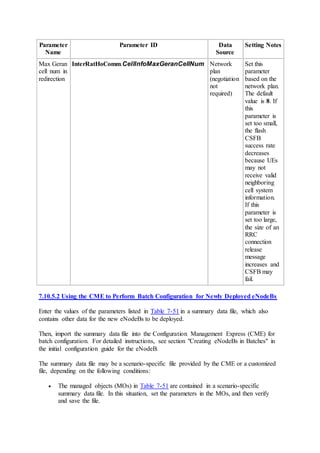
You can specify the number of UTRAN cells contained in the redirection message by setting
the InterRatHoComm.CellInfoMaxUtranCellNum parameter. Assume that this parameter
is set to N.
 If the number of target cells after flash redirection decision is greater than N, the
eNodeB selects the first N cells.
 If the number of target cells after flash redirection decision is smaller than N, the
eNodeB selects target cells after flash redirection decision.
The eNodeB obtains system information of target cells in the RAN information management
(RIM) procedure. If a target cell does not support the RIM procedure, the eNodeB cannot
obtain system information of that cell.
3.9 Handover Execution
3.9.1 Handover Policy Selection
When a UE in an LTE system needs to perform voice service but the LTE system does not
support VoIP, a CSFB to an inter-RAT network is triggered.
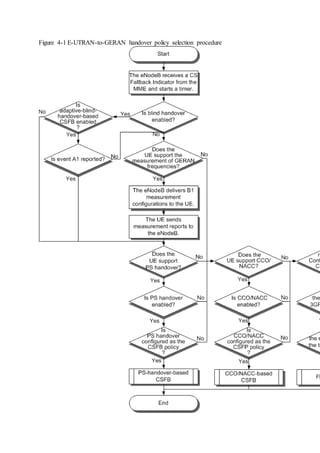
CSFB from E-UTRAN to UTRAN can be based on PS handover, redirection, or flash
redirection, as shown in Figure 3-4. This handover policy selection procedure is based on the
assumption that neighboring frequency and neighboring cell configurations are proper.
During a CSFB based on blind PS handover, if the target cell with the highest blind handover
priority fails to prepare the handover, the eNodeB attempts another cell with the second
highest blind handover priority. The eNodeB can attempt a maximum of eight cells. If all
these cells fail in preparation, the eNodeB performs CSFB based on redirection.
Figure 3-4 E-UTRAN-to-UTRAN CSFB policy selection procedure
The parameters mentioned in the preceding figure are described as follows:
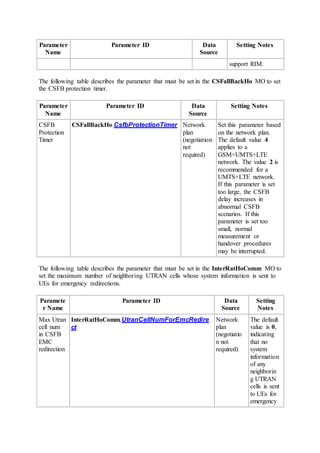
 The timer length is specified by the CSFallBackHo.CsfbProtectionTimer
parameter. If the UE stays in the area covered by the eNodeB before the timer expires,
the eNodeB performs the CSFB based on the blind redirection,
o The eNodeB preferentially selects a system that the UE has not measured. For
example, if the UE has measured the UTRAN, the eNodeB preferentially
selects the GERAN for redirection.
o If a cell to which the eNodeB has never attempted to hand over the UE is
reported, the eNodeB preferentially selects the operating frequency of the cell
for redirection.
o The eNodeB selects the target cell for redirection as it does during blind
handover. For details about how the eNodeB performs target selection during
blind handover, see 3.1.2 Blind Handover.
o If there is not target frequency available for redirection, the eNodeB stops the
procedure.
o If flash CSFB is enabled in this situation, redirection-based CSFB performed
by the eNodeB is referred to as CSFB emergency redirection. In this scenario,
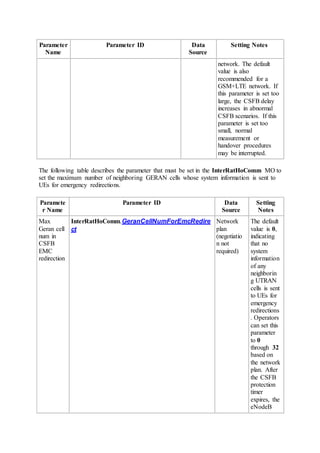
you need to set the InterRatHoComm.UTRANCellNumForEmcRedirect
parameter to specify the maximum number of UTRAN cell system
information messages that can be transmitted during a CSFB emergency
redirection procedure.
 The blind handover switch is controlled by the BlindHoSwitch option in the eNodeB-
level parameter ENodeBAlgoSwitch.HoModeSwitch and the BlindHoSwitch
option in the cell-level parameter CellHoParaCfg.HoModeSwitch. The blind
handover function takes effect only when the eNodeB-level BlindHoSwitch and cell-
level BlindHoSwitch options are selected.
 The adaptive-blind-handover-based CSFB switch is controlled by the
CsfbAdaptiveBlindHoSwitch option of the ENodeBAlgoSwitch.HoAlgoSwitch
parameter.
 If PS handover for CSFB is required, select the UtranPsHoSwitch option of the
ENodeBAlgoSwitch.HoModeSwitch parameter and the PS_HO option of the
CSFallBackPolicyCfg.CsfbHoPolicyCfg parameter. If either option is cleared, PS
handover for CSFB is invalid. The eNodeB selects the redirection policy. If the
redirection policy is invalid and the CSFB protection timer expires, the eNodeB enters
the blind redirection procedure.
 If blind redirection for CSFB is required, select the REDIRECTION option of the
CSFallBackPolicyCfg.CsfbHoPolicyCfg parameter.
 The CSFB policy is specified by different parameters, depending on whether LOFD-
001088 CS Fallback Steering to UTRAN is enabled.
If this feature is enabled:
o The CSFB policy for UEs in idle mode is specified by the
CSFallBackPolicyCfg.IdleModeCsfbHoPolicyCfg parameter.
o The CSFB policy for UEs in connected mode is specified by the
CSFallBackPolicyCfg.CsfbHoPolicyCfg parameter.
If this feature is not enabled, the CSFB policy is specified by the
CSFallBackPolicyCfg.CsfbHoPolicyCfg parameter, regardless of whether UEs are
in idle or connected mode.
3.9.2 Ultra-Flash CSFB to UTRAN
This section describes the optional feature LOFD-070202 Ultra-Flash CSFB to UTRAN. For
details about the engineering guidelines for this feature, see 7.4 LOFD-070202 Ultra-Flash
CSFB to UTRAN. The UtranUltraFlashCsfbSwitch option in the
ENodeBAlgoSwitch.HoAlgoSwitch parameter specifies whether to enable this feature.
This feature is a Huawei-proprietary feature. To enable this feature, the MME, MSC, and
RNC must all provided by Huawei and support this feature.
When a UE initiates a CS service setup request in an LTE cell that does not support VoIP,
this feature enables the eNodeB to hand over the UE to the UTRAN through the SRVCC
handover procedure. This shortens the access delay for CS fallbacks by 1 second.
The measurement procedure and blind handover procedure for this feature are the same as
those in CSFB to UTRAN. For details, see 3.1 Basic CSFB to UTRAN.
When a UE in an LTE system needs to perform voice service but the LTE system does not
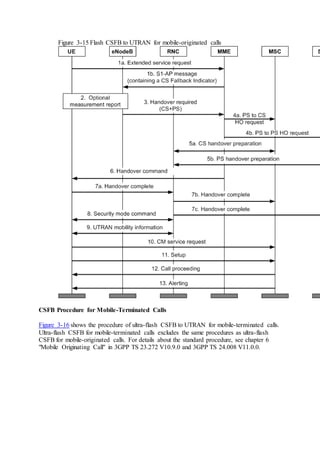
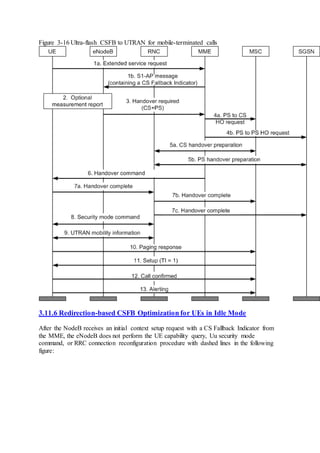
support VoIP, the eNodeB decides to perform ultra-flash CSFB if LOFD-070202 Ultra-Flash
CSFB to UTRAN is enabled. Figure 3-5 shows ultra-flash CSFB to UTRAN by using the
SRVCC procedure after the eNodeB performs a measurement or blind handover decision. For
details about how to select other CSFB policies, see 3.9.1 Handover Policy Selection.
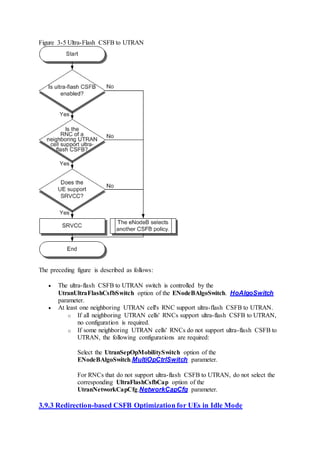
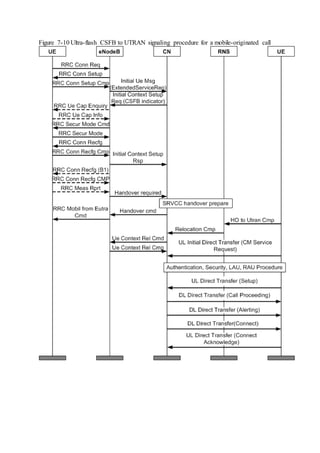
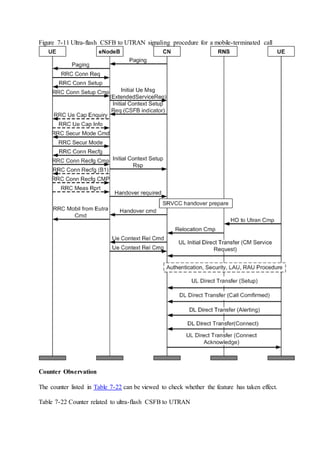
Figure 3-5 Ultra-Flash CSFB to UTRAN
The preceding figure is described as follows:
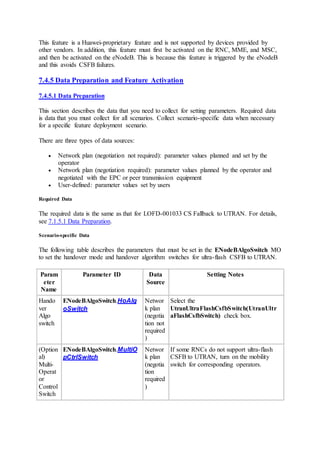
 The ultra-flash CSFB to UTRAN switch is controlled by the
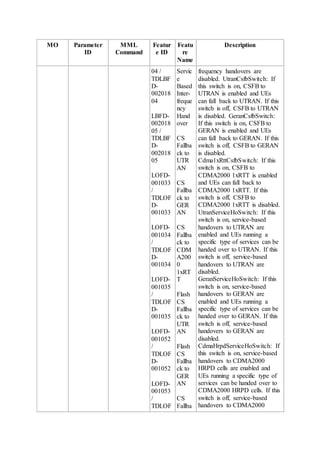
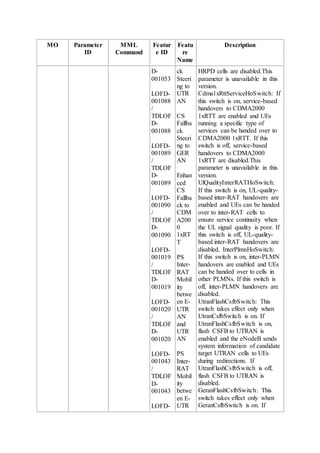
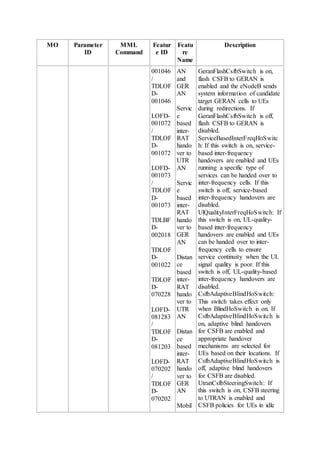
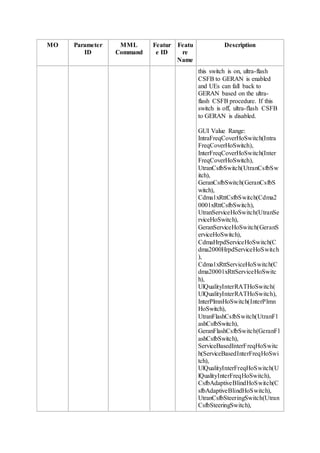
UtranUltraFlashCsfbSwitch option of the ENodeBAlgoSwitch. HoAlgoSwitch
parameter.
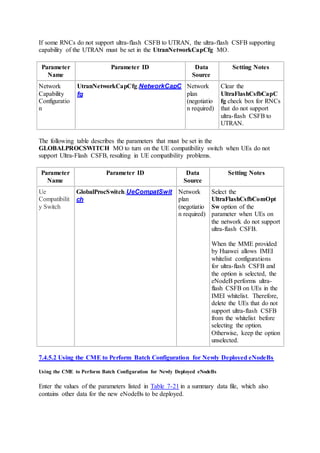
 At least one neighboring UTRAN cell's RNC support ultra-flash CSFB to UTRAN.
o If all neighboring UTRAN cells' RNCs support ultra-flash CSFB to UTRAN,
no configuration is required.
o If some neighboring UTRAN cells' RNCs do not support ultra-flash CSFB to
UTRAN, the following configurations are required:
Select the UtranSepOpMobilitySwitch option of the
ENodeBAlgoSwitch.MultiOpCtrlSwitch parameter.
For RNCs that do not support ultra-flash CSFB to UTRAN, do not select the
corresponding UltraFlashCsfbCap option of the
UtranNetworkCapCfg.NetworkCapCfg parameter.
3.9.3 Redirection-based CSFB Optimization for UEs in Idle Mode
To speed up CSFB for UEs in idle mode by shortening end-to-end delays and to reduce the
CSFB failure rate due to initial context setup failures, redirection-based CSFB for UEs in idle
mode is optimized.
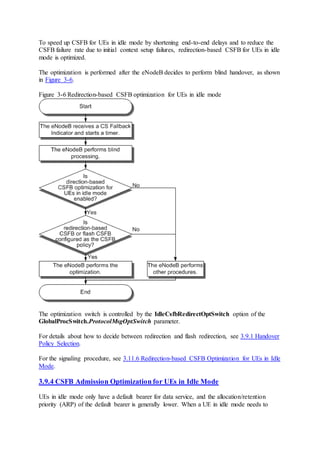
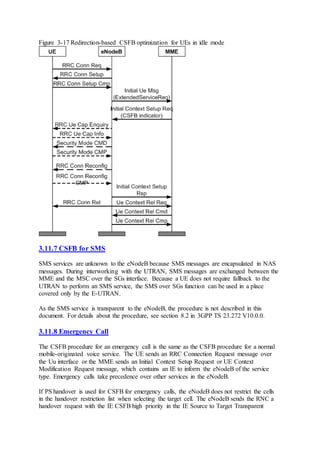
The optimization is performed after the eNodeB decides to perform blind handover, as shown
in Figure 3-6.
Figure 3-6 Redirection-based CSFB optimization for UEs in idle mode
The optimization switch is controlled by the IdleCsfbRedirectOptSwitch option of the
GlobalProcSwitch.ProtocolMsgOptSwitch parameter.
For details about how to decide between redirection and flash redirection, see 3.9.1 Handover
Policy Selection.
For the signaling procedure, see 3.11.6 Redirection-based CSFB Optimization for UEs in Idle
Mode.
3.9.4 CSFB Admission Optimization for UEs in Idle Mode
UEs in idle mode only have a default bearer for data service, and the allocation/retention
priority (ARP) of the default bearer is generally lower. When a UE in idle mode needs to
perform CSFB but the target cell is congested or cannot accommodate more UEs, this UE
cannot preempt resources in the target cell.
To ensure the CSFB success rate in the preceding scenario, the eNodeB can preferentially
admit CSFB UEs. This function is controlled by the
CSFallBackPolicyCfg.CsfbUserArpCfgSwitch parameter.
A larger value of the CsFallbackPolicyCfg.NormalCsfbUserArp parameter indicates a
higher probability of admission of CSFB UEs in idle mode. For details about the admission
procedure, see Admission and Congestion Control.
3.10 RIM Procedure Between E-UTRAN and UTRAN
The RIM procedure exchanges information between the E-UTRAN and UTRAN through the
core networks.
In CSFB procedures, the eNodeB obtains the load information of external UTRAN cells from
RNCs through the RIM procedure if the parameter
GlobalProcSwitch.UtranLoadTransChan is set to BASED_ON_RIM.
In flash CSFB procedures, the eNodeB obtains the system information (SI) of external cells
from RNCs through the RIM procedure. For details about related parameters, see 3.10.1 RIM
Procedure Through the Core Network and 3.10.2 RIM Procedure Through the eCoordinator.
The RIM procedure includes the following two information exchange modes:
 Single Report
In Single Report mode, the source sends a request, and then the target responds with a
single report.
When flash CSFB to UTRAN is triggered, the eNodeB sends a RIM message to the
RNC and then includes the obtained SI in a redirection message to send to the UE. If
the SI fails to be obtained from the RNC, the eNodeB no longer attempts the RIM
request.
 Multiple Report
In Multiple Report mode, the target responds with a report after receiving a request
from the source, and the target also sends a report to the source each time information
about the target changes.
When flash CSFB to UTRAN is triggered, the eNodeB sends RIM messages to all
neighboring UTRAN cells every four seconds no matter whether the eNodeB has
CSFB services.
To ensure that the SI of the target cell can be obtained successfully, the eNodeB starts
a four-second timer when it sends a RIM message.
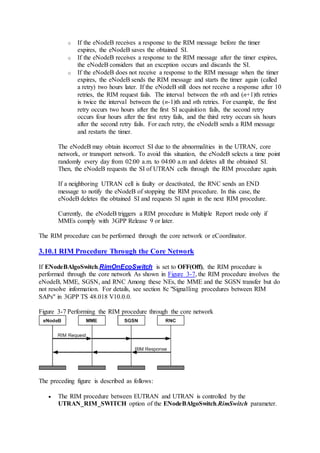
o If the eNodeB receives a response to the RIM message before the timer
expires, the eNodeB saves the obtained SI.
o If the eNodeB receives a response to the RIM message after the timer expires,
the eNodeB considers that an exception occurs and discards the SI.
o If the eNodeB does not receive a response to the RIM message when the timer
expires, the eNodeB sends the RIM message and starts the timer again (called
a retry) two hours later. If the eNodeB still does not receive a response after 10
retries, the RIM request fails. The interval between the nth and (n+1)th retries
is twice the interval between the (n-1)th and nth retries. For example, the first
retry occurs two hours after the first SI acquisition fails, the second retry
occurs four hours after the first retry fails, and the third retry occurs six hours
after the second retry fails. For each retry, the eNodeB sends a RIM message
and restarts the timer.
The eNodeB may obtain incorrect SI due to the abnormalities in the UTRAN, core
network, or transport network. To avoid this situation, the eNodeB selects a time point
randomly every day from 02:00 a.m. to 04:00 a.m and deletes all the obtained SI.
Then, the eNodeB requests the SI of UTRAN cells through the RIM procedure again.
If a neighboring UTRAN cell is faulty or deactivated, the RNC sends an END
message to notify the eNodeB of stopping the RIM procedure. In this case, the
eNodeB deletes the obtained SI and requests SI again in the next RIM procedure.
Currently, the eNodeB triggers a RIM procedure in Multiple Report mode only if
MMEs comply with 3GPP Release 9 or later.
The RIM procedure can be performed through the core network or eCoordinator.
3.10.1 RIM Procedure Through the Core Network
If ENodeBAlgoSwitch.RimOnEcoSwitch is set to OFF(Off), the RIM procedure is
performed through the core network As shown in Figure 3-7, the RIM procedure involves the
eNodeB, MME, SGSN, and RNC Among these NEs, the MME and the SGSN transfer but do
not resolve information. For details, see section 8c "Signalling procedures between RIM
SAPs" in 3GPP TS 48.018 V10.0.0.
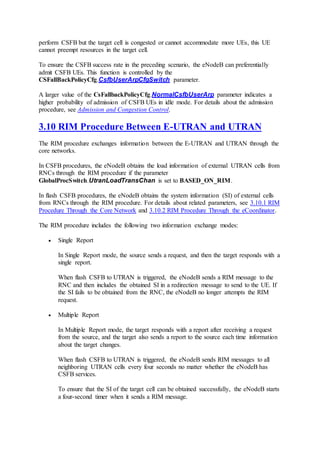
Figure 3-7 Performing the RIM procedure through the core network
The preceding figure is described as follows:
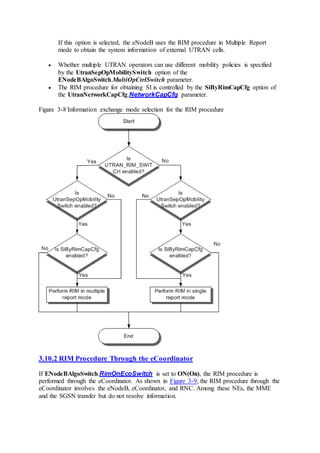
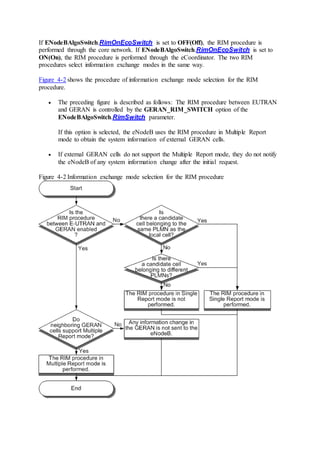
 The RIM procedure between EUTRAN and UTRAN is controlled by the
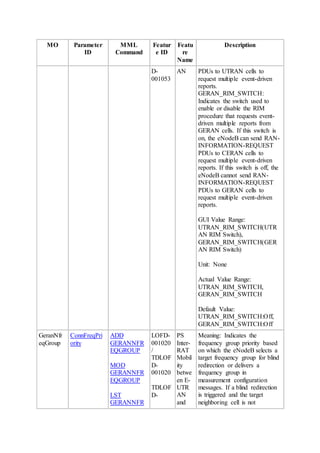
UTRAN_RIM_SWITCH option of the ENodeBAlgoSwitch.RimSwitch parameter.
If this option is selected, the eNodeB uses the RIM procedure in Multiple Report
mode to obtain the system information of external UTRAN cells.
 Whether multiple UTRAN operators can use different mobility policies is specified
by the UtranSepOpMobilitySwitch option of the
ENodeBAlgoSwitch.MultiOpCtrlSwitch parameter.
 The RIM procedure for obtaining SI is controlled by the SiByRimCapCfg option of
the UtranNetworkCapCfg.NetworkCapCfg parameter.
Figure 3-8 Information exchange mode selection for the RIM procedure
3.10.2 RIM Procedure Through the eCoordinator
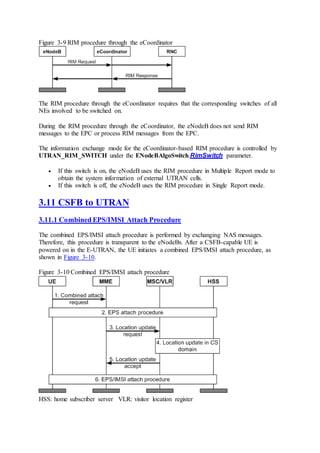
If ENodeBAlgoSwitch.RimOnEcoSwitch is set to ON(On), the RIM procedure is
performed through the eCoordinator. As shown in Figure 3-9, the RIM procedure through the
eCoordinator involves the eNodeB, eCoordinator, and RNC. Among these NEs, the MME
and the SGSN transfer but do not resolve information.
Figure 3-9 RIM procedure through the eCoordinator
The RIM procedure through the eCoordinator requires that the corresponding switches of all
NEs involved to be switched on.
During the RIM procedure through the eCoordinator, the eNodeB does not send RIM
messages to the EPC or process RIM messages from the EPC.
The information exchange mode for the eCoordinator-based RIM procedure is controlled by
UTRAN_RIM_SWITCH under the ENodeBAlgoSwitch.RimSwitch parameter.
 If this switch is on, the eNodeB uses the RIM procedure in Multiple Report mode to
obtain the system information of external UTRAN cells.
 If this switch is off, the eNodeB uses the RIM procedure in Single Report mode.
3.11 CSFB to UTRAN
3.11.1 Combined EPS/IMSI Attach Procedure
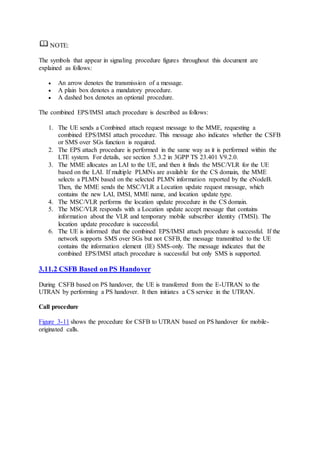
The combined EPS/IMSI attach procedure is performed by exchanging NAS messages.
Therefore, this procedure is transparent to the eNodeBs. After a CSFB-capable UE is
powered on in the E-UTRAN, the UE initiates a combined EPS/IMSI attach procedure, as
shown in Figure 3-10.
Figure 3-10 Combined EPS/IMSI attach procedure
HSS: home subscriber server VLR: visitor location register
NOTE:
The symbols that appear in signaling procedure figures throughout this document are
explained as follows:
 An arrow denotes the transmission of a message.
 A plain box denotes a mandatory procedure.
 A dashed box denotes an optional procedure.
The combined EPS/IMSI attach procedure is described as follows:
1. The UE sends a Combined attach request message to the MME, requesting a
combined EPS/IMSI attach procedure. This message also indicates whether the CSFB
or SMS over SGs function is required.
2. The EPS attach procedure is performed in the same way as it is performed within the
LTE system. For details, see section 5.3.2 in 3GPP TS 23.401 V9.2.0.
3. The MME allocates an LAI to the UE, and then it finds the MSC/VLR for the UE
based on the LAI. If multiple PLMNs are available for the CS domain, the MME
selects a PLMN based on the selected PLMN information reported by the eNodeB.
Then, the MME sends the MSC/VLR a Location update request message, which
contains the new LAI, IMSI, MME name, and location update type.
4. The MSC/VLR performs the location update procedure in the CS domain.
5. The MSC/VLR responds with a Location update accept message that contains
information about the VLR and temporary mobile subscriber identity (TMSI). The
location update procedure is successful.
6. The UE is informed that the combined EPS/IMSI attach procedure is successful. If the
network supports SMS over SGs but not CSFB, the message transmitted to the UE
contains the information element (IE) SMS-only. The message indicates that the
combined EPS/IMSI attach procedure is successful but only SMS is supported.
3.11.2 CSFB Based on PS Handover
During CSFB based on PS handover, the UE is transferred from the E-UTRAN to the
UTRAN by performing a PS handover. It then initiates a CS service in the UTRAN.
Call procedure
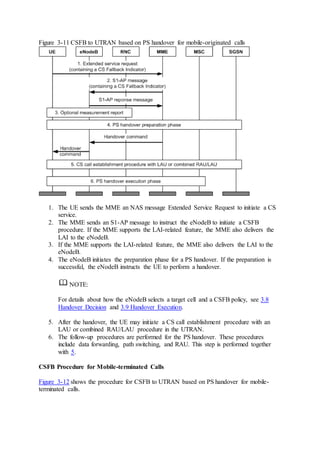
Figure 3-11 shows the procedure for CSFB to UTRAN based on PS handover for mobile-
originated calls.
Figure 3-11 CSFB to UTRAN based on PS handover for mobile-originated calls
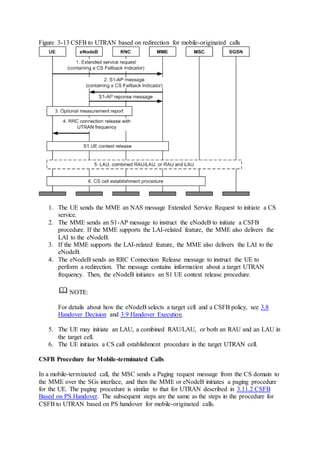
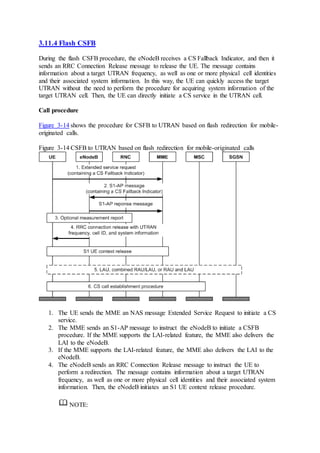
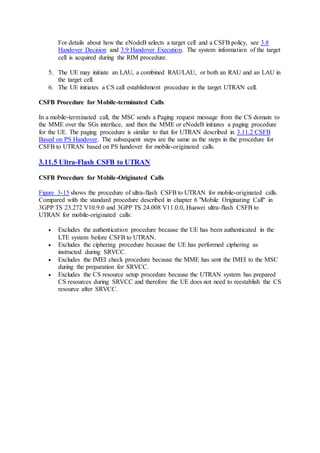
1. The UE sends the MME an NAS message Extended Service Request to initiate a CS
service.
2. The MME sends an S1-AP message to instruct the eNodeB to initiate a CSFB
procedure. If the MME supports the LAI-related feature, the MME also delivers the
LAI to the eNodeB.
3. If the MME supports the LAI-related feature, the MME also delivers the LAI to the
eNodeB.
4. The eNodeB initiates the preparation phase for a PS handover. If the preparation is
successful, the eNodeB instructs the UE to perform a handover.
NOTE:
For details about how the eNodeB selects a target cell and a CSFB policy, see 3.8
Handover Decision and 3.9 Handover Execution.
5. After the handover, the UE may initiate a CS call establishment procedure with an
LAU or combined RAU/LAU procedure in the UTRAN.
6. The follow-up procedures are performed for the PS handover. These procedures
include data forwarding, path switching, and RAU. This step is performed together
with 5.
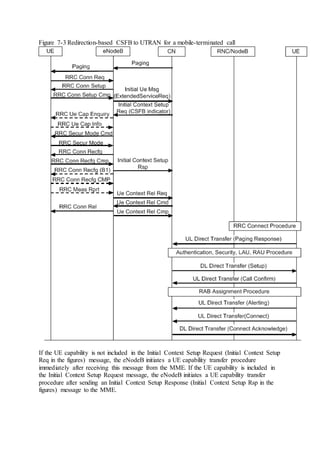
CSFB Procedure for Mobile-terminated Calls
Figure 3-12 shows the procedure for CSFB to UTRAN based on PS handover for mobile-
terminated calls.
Figure 3-12 CSFB to UTRAN based on PS handover for mobile-terminated calls
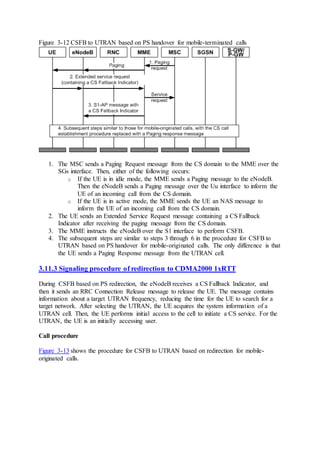
1. The MSC sends a Paging Request message from the CS domain to the MME over the
SGs interface. Then, either of the following occurs:
o If the UE is in idle mode, the MME sends a Paging message to the eNodeB.
Then the eNodeB sends a Paging message over the Uu interface to inform the
UE of an incoming call from the CS domain.
o If the UE is in active mode, the MME sends the UE an NAS message to
inform the UE of an incoming call from the CS domain.
2. The UE sends an Extended Service Request message containing a CS Fallback
Indicator after receiving the paging message from the CS domain.
3. The MME instructs the eNodeB over the S1 interface to perform CSFB.
4. The subsequent steps are similar to steps 3 through 6 in the procedure for CSFB to
UTRAN based on PS handover for mobile-originated calls. The only difference is that
the UE sends a Paging Response message from the UTRAN cell.
3.11.3 Signaling procedure of redirection to CDMA2000 1xRTT
During CSFB based on PS redirection, the eNodeB receives a CS Fallback Indicator, and
then it sends an RRC Connection Release message to release the UE. The message contains
information about a target UTRAN frequency, reducing the time for the UE to search for a
target network. After selecting the UTRAN, the UE acquires the system information of a
UTRAN cell. Then, the UE performs initial access to the cell to initiate a CS service. For the
UTRAN, the UE is an initially accessing user.
Call procedure
Figure 3-13 shows the procedure for CSFB to UTRAN based on redirection for mobile-
originated calls.
Figure 3-13 CSFB to UTRAN based on redirection for mobile-originated calls
1. The UE sends the MME an NAS message Extended Service Request to initiate a CS
service.
2. The MME sends an S1-AP message to instruct the eNodeB to initiate a CSFB
procedure. If the MME supports the LAI-related feature, the MME also delivers the
LAI to the eNodeB.
3. If the MME supports the LAI-related feature, the MME also delivers the LAI to the
eNodeB.
4. The eNodeB sends an RRC Connection Release message to instruct the UE to
perform a redirection. The message contains information about a target UTRAN
frequency. Then, the eNodeB initiates an S1 UE context release procedure.
NOTE:
For details about how the eNodeB selects a target cell and a CSFB policy, see 3.8
Handover Decision and 3.9 Handover Execution.
5. The UE may initiate an LAU, a combined RAU/LAU, or both an RAU and an LAU in
the target cell.
6. The UE initiates a CS call establishment procedure in the target UTRAN cell.
CSFB Procedure for Mobile-terminated Calls
In a mobile-terminated call, the MSC sends a Paging request message from the CS domain to
the MME over the SGs interface, and then the MME or eNodeB initiates a paging procedure
for the UE. The paging procedure is similar to that for UTRAN described in 3.11.2 CSFB
Based on PS Handover. The subsequent steps are the same as the steps in the procedure for
CSFB to UTRAN based on PS handover for mobile-originated calls.
3.11.4 Flash CSFB
During the flash CSFB procedure, the eNodeB receives a CS Fallback Indicator, and then it
sends an RRC Connection Release message to release the UE. The message contains
information about a target UTRAN frequency, as well as one or more physical cell identities
and their associated system information. In this way, the UE can quickly access the target
UTRAN without the need to perform the procedure for acquiring system information of the
target UTRAN cell. Then, the UE can directly initiate a CS service in the UTRAN cell.
Call procedure
Figure 3-14 shows the procedure for CSFB to UTRAN based on flash redirection for mobile-
originated calls.
Figure 3-14 CSFB to UTRAN based on flash redirection for mobile-originated calls
1. The UE sends the MME an NAS message Extended Service Request to initiate a CS
service.
2. The MME sends an S1-AP message to instruct the eNodeB to initiate a CSFB
procedure. If the MME supports the LAI-related feature, the MME also delivers the
LAI to the eNodeB.
3. If the MME supports the LAI-related feature, the MME also delivers the LAI to the
eNodeB.
4. The eNodeB sends an RRC Connection Release message to instruct the UE to
perform a redirection. The message contains information about a target UTRAN
frequency, as well as one or more physical cell identities and their associated system
information. Then, the eNodeB initiates an S1 UE context release procedure.
NOTE:
For details about how the eNodeB selects a target cell and a CSFB policy, see 3.8
Handover Decision and 3.9 Handover Execution. The system information of the target
cell is acquired during the RIM procedure.
5. The UE may initiate an LAU, a combined RAU/LAU, or both an RAU and an LAU in
the target cell.
6. The UE initiates a CS call establishment procedure in the target UTRAN cell.
CSFB Procedure for Mobile-terminated Calls
In a mobile-terminated call, the MSC sends a Paging request message from the CS domain to
the MME over the SGs interface, and then the MME or eNodeB initiates a paging procedure
for the UE. The paging procedure is similar to that for UTRAN described in 3.11.2 CSFB
Based on PS Handover. The subsequent steps are the same as the steps in the procedure for
CSFB to UTRAN based on PS handover for mobile-originated calls.
3.11.5 Ultra-Flash CSFB to UTRAN
CSFB Procedure for Mobile-Originated Calls
Figure 3-15 shows the procedure of ultra-flash CSFB to UTRAN for mobile-originated calls.
Compared with the standard procedure described in chapter 6 "Mobile Originating Call" in
3GPP TS 23.272 V10.9.0 and 3GPP TS 24.008 V11.0.0, Huawei ultra-flash CSFB to
UTRAN for mobile-originated calls:
 Excludes the authentication procedure because the UE has been authenticated in the
LTE system before CSFB to UTRAN.
 Excludes the ciphering procedure because the UE has performed ciphering as
instructed during SRVCC.
 Excludes the IMEI check procedure because the MME has sent the IMEI to the MSC
during the preparation for SRVCC.
 Excludes the CS resource setup procedure because the UTRAN system has prepared
CS resources during SRVCC and therefore the UE does not need to reestablish the CS
resource after SRVCC.
Figure 3-15 Flash CSFB to UTRAN for mobile-originated calls
CSFB Procedure for Mobile-Terminated Calls
Figure 3-16 shows the procedure of ultra-flash CSFB to UTRAN for mobile-terminated calls.
Ultra-flash CSFB for mobile-terminated calls excludes the same procedures as ultra-flash
CSFB for mobile-originated calls. For details about the standard procedure, see chapter 6
"Mobile Originating Call" in 3GPP TS 23.272 V10.9.0 and 3GPP TS 24.008 V11.0.0.
Figure 3-16 Ultra-flash CSFB to UTRAN for mobile-terminated calls
3.11.6 Redirection-based CSFB Optimization for UEs in Idle Mode
After the NodeB receives an initial context setup request with a CS Fallback Indicator from
the MME, the eNodeB does not perform the UE capability query, Uu security mode
command, or RRC connection reconfiguration procedure with dashed lines in the following
figure:
Figure 3-17 Redirection-based CSFB optimization for UEs in idle mode
3.11.7 CSFB for SMS
SMS services are unknown to the eNodeB because SMS messages are encapsulated in NAS
messages. During interworking with the UTRAN, SMS messages are exchanged between the
MME and the MSC over the SGs interface. Because a UE does not require fallback to the
UTRAN to perform an SMS service, the SMS over SGs function can be used in a place
covered only by the E-UTRAN.
As the SMS service is transparent to the eNodeB, the procedure is not described in this
document. For details about the procedure, see section 8.2 in 3GPP TS 23.272 V10.0.0.
3.11.8 Emergency Call
The CSFB procedure for an emergency call is the same as the CSFB procedure for a normal
mobile-originated voice service. The UE sends an RRC Connection Request message over
the Uu interface or the MME sends an Initial Context Setup Request or UE Context
Modification Request message, which contains an IE to inform the eNodeB of the service
type. Emergency calls take precedence over other services in the eNodeB.
If PS handover is used for CSFB for emergency calls, the eNodeB does not restrict the cells
in the handover restriction list when selecting the target cell. The eNodeB sends the RNC a
handover request with the IE CSFB high priority in the IE Source to Target Transparent
Container. This request informs the RNC that a CSFB procedure is required for an
emergency call. Upon receiving the information, the RNC preferentially processes this call
when using related algorithms such as admission control.
If redirection is used for CSFB for emergency calls, the RRC Connection Request message
that the UE sends when accessing the UTRAN contains the indication of a CS emergency
call.
The UTRAN will treat this call as a common CS emergency call. For details about admission
and preemption of emergency calls, see Emergency Call.
3.11.9 CSFB for LCS
After a UE initiates an LCS request, the MME performs an attach or combined TAU/LAU
procedure to inform the UE of the LCS capability of the EPS. If the EPS does not support
LCS, the UE falls back to the UTRAN to initiate LCS under the control of the EPS. The
CSFB procedure is the same as the procedure for CSFB to UTRAN for mobile-originated
calls.
If the UTRAN initiates an LCS request towards a UE camping on an E-UTRAN cell, the
MSC sends an LCS indicator to the MME over the SGs interface. Then, the MME instructs
the eNodeB to perform CSFB for the UE. The CSFB procedure is the same as the procedure
for CSFB to UTRAN for mobile-terminated calls. The UE performs the LCS service after the
fallback to the UTRAN.
For details about the CSFB procedure for LCS, see section 8.3 in 3GPP TS 23.272 V10.0.0
and LCS.
4 CSFB to GERAN
CSFB to GERAN can be implemented in different ways, and this section covers the
following features/functions:
 LOFD-001034 CS Fallback to GERAN
 LOFD-001053 Flash CS Fallback to GERAN
 OFD-001069 CS Fallback with LAI to GERAN
 LOFD-001089 CS Fallback Steering to GERAN
 LOFD-081283 Ultra-Flash CSFB to GERAN
The triggering condition for different features are different. Basically the procedure is as
follows:
1. Target cell/frequency selection
For a measurement, the eNodeB generates a candidate cell list based on inter-RAT
measurement results.
For a blind handover, the eNodeB selects a blind handover target based on the blind
handover priority or frequency priority of neighboring cells.
2. Handover decision
In the handover decision phase, the eNodeB checks the candidate cell list. Based on
the check result, the eNodeB determines whether a handover needs to be initiated and,
if so, to which cell the UE is to be handed over.
3. Handover execution
The eNodeB controls the UE to be handed over from the serving cell to the target cell.
4.1 Basic CSFB to GERAN
This section describes the optional feature LOFD-001034 CS Fallback to GERAN. For
details about the engineering guidelines for this feature, see 7.8 LOFD-001034 CS Fallback
to GERAN. The GeranCsfbSwitch option in the ENodeBAlgoSwitch.HoAlgoSwitch
parameter specifies whether to enable this feature.
The blind handover switch is controlled by the BlindHoSwitch option in the eNodeB-level
parameter ENodeBAlgoSwitch.HoModeSwitch and the BlindHoSwitch option in the cell-
level parameter CellHoParaCfg.HoModeSwitch. The blind handover function takes effect
only when the eNodeB-level BlindHoSwitch and cell-level BlindHoSwitch options are
selected.
This feature has the same principle as CSFB to UTRAN, except the parameters mentioned
below in this section. For details about the principle of CSFB to UTRAN, see 3.1 Basic
CSFB to UTRAN.
Handover Measurement
The frequency priority used during target frequency selection is specified by the
GeranNfreqGroup.ConnFreqPriority parameter. A larger value indicates a higher
priority.
During the GERAN frequency selection for measurement that is different from the UTRAN
frequency selection, if the total number of the GERAN frequencies that can be delivered in
the frequency group with the highest priority and the frequencies that have been delivered
exceeds the allowed maximum number 32, all frequencies in this frequency group cannot be
delivered. The eNodeB determines whether the GERAN frequencies in the frequency group
with the second highest priority can be delivered until the number of delivered frequencies is
less than or equal to the maximum number of GERAN frequencies allowed for measurement
or all frequency groups are determined.
In GERAN, no cell measurement priority is configured. If the number of cells working on a
frequency exceeds the specification, the eNodeB randomly measures certain cells.
Blind Handover
If CSFallBackBlindHoCfg.InterRatHighestPri is set to GERAN(GERAN), the eNodeB
performs CSFB to GERAN.
During blind handover, the target selection procedure is different, depending on whether
neighboring GERAN cells are configured.
 If neighboring GERAN cells are configured:
o The blind handover priority of a GERAN neighboring cell is specified by the
GeranNcell.BlindHoPriority parameter. A larger value indicates a higher
priority.
o The GERAN frequency group with the highest priority (specified by the
GeranNfreqGroup.ConnFreqPriority parameter) is selected for blind
handover. A larger value indicates a higher priority.
o If the priorities of neighboring GERAN cells or frequencies are the same, the
eNodeB randomly selects a target cell or frequency. Due to uncertainty of
random selection, to increase the probability of a successful blind handover,
you are not advised to set an identical priority for neighboring GERAN cells
or frequencies.
 If no neighboring GERAN cell is configured:
o Neighboring GERAN frequencies are configured in GeranNfreqGroup MOs.
o The PLMN information of the neighboring GERAN frequency is contained in
the configured GeranRanShare or GeranExternalCell MOs.
4.2 Flash CSFB to GERAN
This section describes the optional feature LOFD-001053 Flash CS Fallback to GERAN. For
details about the engineering guidelines for this feature, see 7.10 LOFD-001053 Flash CS
Fallback to GERAN. The GeranFlashCsfbSwitchh option of the
ENodeBAlgoSwitch.HoAlgoSwitch parameter specifies whether to enable this feature.
This feature is an enhancement to the optional feature LOFD-001034 CS Fallback to
GERAN. After this feature is activated, the eNodeB obtains the GERAN cell information
through the RIM procedure and then sends the LTE-to-GSM redirection message including
the obtained GERAN cell information to the UE. The
InterRatHoComm.CellInfoMaxGeranCellNum parameter specifies the maximum
number of GERAN cells that can be contained in the redirection message, which is
configurable.
In this case, the UE can access a GERAN cell without obtaining GERAN cell information.
This reduces the access delay. For details about how the GERAN cell information is
delivered to the eNodeB through the RIM procedure, see Interoperability Between GSM and
LTE.
This feature has the same principle as flash CSFB to UTRAN. For details, see 3.2 Flash
CSFB to UTRAN.
4.3 CS Fallback with LAI to GERAN
This section describes the optional feature LOFD-001069 CS Fallback with LAI to GERAN.
For details about the engineering guidelines for this feature, see 7.12 LOFD-001069 CS
Fallback with LAI to GERAN. This feature is under license control and is not controlled by a
switch.
This feature has the same principle as CS fallback with LAI to UTRAN. For details, see 3.4
CS Fallback with LAI to UTRAN.
4.4 CS Fallback Steering to GERAN
This chapter describes the optional feature LOFD-001089 CS Fallback Steering to GERAN.
For details about the engineering guidelines for this feature, see 7.13 LOFD-001089 CS
Fallback Steering to GERAN. The GeranCsfbSteeringSwitch option of the
ENodeBAlgoSwitch.HoAlgoSwitch parameter specifies whether to enable this feature.
The principles of this feature are similar to the principles of the CS Fallback Steering to
UTRAN feature. For details about the principles, see 3.6 CS Fallback Steering to UTRAN.
The eNodeB selects a handover policy for CSFB of a CS-only UE based on the setting of the
CSFallBackPolicyCfg.IdleModeCsfbHoPolicyCfg parameter. The eNodeB selects PS
HO, CCO, and redirection in descending order.
The eNodeB selects a handover policy for CSFB of a CS+PS UE based on the setting of the
CSFallBackPolicyCfg.CsfbHoPolicyCfg parameter. The eNodeB selects PS HO, CCO,
and redirection in descending order.
4.5 Ultra-Flash CSFB to GERAN
This section describes the optional feature LOFD-081283 Ultra-Flash CSFB to GERAN. The
GeranUltraFlashCsfbSwitch option in the ENodeBAlgoSwitch.HoAlgoSwitch parameter
specifies whether to enable this feature. This feature is a Huawei-proprietary feature. To
enable this feature, the MME, MSC, and eNodeB must be all provided by Huawei and
support this feature.
When a UE initiates a voice setup request in an LTE cell that does not support VoIP, this
feature enables the eNodeB to transfer the UE to the GERAN through the SRVCC handover
procedure. This shortens the access delay for CS fallbacks by 2 seconds.
 The measurement procedure and blind handover procedure for this feature are the
same as those in CSFB to GERAN. For details, see 3.1 Basic CSFB to UTRAN.
 The SRVCC handover policy for this feature is the same as that for ultra-flash CSFB
to GERAN. For details, see 3.9.2 Ultra-Flash CSFB to UTRAN.
This feature requires that external GERAN cells support ultra-flash CSFB to GERAN.
 If all external GERAN cells support ultra-flash CSFB to GERAN, no configuration is
required.
 If some external GERAN cells do not support ultra-flash CSFB to GERAN, the
following configurations are required:
o Set UltraFlashCsfbInd to BOOLEAN_FALSE for external GERAN cells
that do not support ultra-flash CSFB to GERAN.
o The ultra-flash CSFB to GERAN capability for external GERAN cells is
specified by the GeranExternalCell.UltraFlashCsfbInd parameter.
When the UE completes voice services on the E-UTRAN after the Ultra-Flash CSFB to
GERAN, you can enable the Fast Return to LTE feature on the GSM side so that the UE
quickly returns to the E-UTRAN. After the UE completes voice services on the GERAN, the
UE carries the LTE frequency information in a Channel Release message and selects a proper
LTE cell to camp on based on the frequency information to accelerate the return to the E-
UTRAN.
When IratMeasCfgTransSwitch in the GlobalProcSwitch.ProtocolMsgOptSwitch parameter
is set to ON, the eNodeB filters LTE frequencies supported by the UE based on the UE
capability to obtain a frequency set. During the SRVCC handover, the eNodeB sends a
Handover Required message containing the frequency set to the BSC of the target cell and
provides reference for the UE to accelerate the return to the E-UTRAN after the UE
completes voice services on the GERAN.
When the CellDrxPara.DrxForMeasSwitch parameter is set to ON(On), the eNodeB
delivers the DRX and gap-assisted measurement configurations if the following conditions
are met. The UE uses the DRX measurement preferentially and makes more use of DRX
sleep time continuously to accelerate the measurement and decrease the delay.
 The UE cannot perform the gap-assisted measurement. In this case, the
AutoGapSwitch option of the ENODEBALGOSWITCH.HoModeSwitch
parameter is set to OFF(Off) or the interRAT-NeedForGaps option for the GSM
frequency of the UE capability is set to TRUE(True).
 The gap-assisted measurement is not configured for the UE.
 The UE supports DRX.
 The BlindHoSwitch option of the ENODEBALGOSWITCH.HoModeSwitch
parameter is set to OFF(Off).
After the DRX measurement is used, you need to set longer sleep time for measurements.
Therefore, the UE is easier to enter the sleep time, affecting the scheduling by decreasing the
cell throughput.
For details about how to configure measurement-specific DRX troubleshooting and related
parameters, see DRX and Signaling Control.
NOTE:
The following table describes the parameters that must be set in the
GLOBALPROCSWITCH MO to turn on the UE compatibility switch when UEs do not
support Ultra-Flash CSFB, resulting in UE compatibility problems.
4.6 Handover Decision
The handover decision for CSFB to GERAN is the same as that for CSFB to UTRAN. For
details, see 3.8 Handover Decision.
4.7 Handover Execution
When a UE in an LTE system needs to perform voice service but the LTE system does not
support VoIP, a CSFB to an inter-RAT network is triggered.
CSFB from E-UTRAN to GERAN can be based on PS handover, CCO/NACC, redirection,
or flash redirection, as shown in Figure 4-1. This handover policy selection procedure is
based on the assumption that neighboring frequency and neighboring cell configurations are
proper.
During a CSFB based on blind PS handover, if the target cell with the highest blind handover
priority fails to prepare the handover, the eNodeB attempts another cell with the second
highest blind handover priority. The eNodeB can attempt a maximum of eight cells. If all
these cells fail in preparation, the eNodeB performs CSFB based on redirection.
Figure 4-1 E-UTRAN-to-GERAN handover policy selection procedure
The parameters mentioned in the preceding figure are described as follows:
 The timer length is specified by the CSFallBackHo.CsfbProtectionTimer
parameter. If the UE stays in the area covered by the eNodeB before the timer expires,
the eNodeB performs the CSFB based on the blind redirection,
o The eNodeB preferentially selects a system that the UE has not measured. For
example, if the UE has measured the UTRAN, the eNodeB preferentially
selects the GERAN for redirection.
o If there is not target frequency available for redirection, the eNodeB stops the
procedure.
 The BlindHoSwitch switch under the ENodeBAlgoSwitch.HoModeSwitch
parameter and the BlindHoSwitch switch under the
CELLHOPARACFG.HoModeSwitch parameter specify whether to enable blind
handover. The CSFB blind handover is triggered only when eNodeB- and cell-level
blind handover switches are enabled.
 The adaptive-blind-handover-based CSFB switch is controlled by the
CsfbAdaptiveBlindHoSwitch option of the ENodeBAlgoSwitch.HoAlgoSwitch
parameter.
 The CSFB policy switches are controlled by the options of the
ENodeBAlgoSwitch.HoModeSwitch parameter:
o The PS handover supporting capability is specified by GeranPsHoSwitch.
o The CCO supporting capability is specified by GeranCcoSwitch.
o The NACC supporting capability is specified by GeranNaccSwitch.
When CSFB to GERAN is based on CCO/NACC, the eNodeB obtains SI of
external cells from RNCs through the RIM procedure. For details about the
RIM procedure, see 4.8 RIM Procedure Between E-UTRAN and GERAN.
 The CSFB policy is specified by different parameters, depending on whether LOFD-
001089 CS Fallback Steering to GERAN is enabled.
If this feature is enabled:
o The CSFB policy for UEs in idle mode is specified by the
CSFallBackPolicyCfg.IdleModeCsfbHoPolicyCfg parameter.
o The CSFB policy for UEs in connected mode is specified by the
CSFallBackPolicyCfg.CsfbHoPolicyCfg parameter.
If this feature is not enabled, the CSFB policy is specified by the
CSFallBackPolicyCfg.CsfbHoPolicyCfg parameter, regardless of whether UEs are
in idle or connected mode.
4.8 RIM Procedure Between E-UTRAN and GERAN
The principles of the RIM procedure between E-UTRAN and GERAN are the same as those
for UTRAN described in 3.10 RIM Procedure Between E-UTRAN and UTRAN.
The RIM procedure between E-UTRAN and GERAN is enabled by default because there is
no switch for selecting a load information transfer channel.
If ENodeBAlgoSwitch.RimOnEcoSwitch is set to OFF(Off), the RIM procedure is
performed through the core network. If ENodeBAlgoSwitch.RimOnEcoSwitch is set to
ON(On), the RIM procedure is performed through the eCoordinator. The two RIM
procedures select information exchange modes in the same way.
Figure 4-2 shows the procedure of information exchange mode selection for the RIM
procedure.
 The preceding figure is described as follows: The RIM procedure between EUTRAN
and GERAN is controlled by the GERAN_RIM_SWITCH option of the
ENodeBAlgoSwitch.RimSwitch parameter.
If this option is selected, the eNodeB uses the RIM procedure in Multiple Report
mode to obtain the system information of external GERAN cells.
 If external GERAN cells do not support the Multiple Report mode, they do not notify
the eNodeB of any system information change after the initial request.
Figure 4-2 Information exchange mode selection for the RIM procedure
4.9 CSFB to GERAN
4.9.1 Combined EPS/IMSI Attach Procedure
The combined EPS/IMSI attach procedure for CSFB to GERAN is the same as that for CSFB
to UTRAN. For details, see 3.11.1 Combined EPS/IMSI Attach Procedure.
4.9.2 CSFB Based on PS Handover
During CSFB based on PS handover, the UE is transferred from the E-UTRAN to the
GERAN by performing a PS handover. It then initiates a CS service in the GERAN. If the
GERAN or UE does not support dual transfer mode (DTM, in which CS and PS services run
simultaneously), the ongoing PS services of the UE are suspended before a CS service is set
up.
Call procedure
Figure 4-3 shows the procedure for CSFB to GERAN based on PS handover for mobile-
originated calls.
Figure 4-3 CSFB to GERAN based on PS handover for mobile-originated calls
The procedure is described as follows:
1. The UE sends the MME a NAS message Extended service request to initiate a CS
service.
2. The MME instructs the eNodeB to initiate a CSFB procedure. If the MME supports
the LAI-related feature, the MME also delivers the LAI to the eNodeB.
3. The eNodeB determines whether to perform blind handover based on the UE
capabilities, parameters settings, and algorithm policies.
4. The eNodeB initiates the preparation phase for a PS handover. If the preparation is
successful, the eNodeB instructs the UE to perform a handover. If the GERAN or UE
does not support DTM, the ongoing PS services of the UE are suspended, and the
SGSN update bearers with the S-GW/P-GW.
NOTE:
For details about how the eNodeB selects a target cell and a CSFB policy, see 4.6
Handover Decision and 4.7 Handover Execution.
5. After the handover, the UE may initiate a CS call establishment procedure with an
LAU or combined RAU/LAU procedure in the GERAN.
6. The follow-up procedures are performed for the PS handover. These procedures
include data forwarding, path switching, and RAU, which are performed together with
step 5.
CSFB Procedure for Mobile-Terminated Calls
In a mobile-terminated call, the MSC sends a Paging request message from the CS domain to
the MME over the SGs interface, and then the MME or eNodeB initiates a paging procedure
for the UE. The paging procedure is similar to that for UTRAN described in 3.11.2 CSFB
Based on PS Handover. The subsequent steps are the same as the steps in the procedure for
CSFB to GERAN based on PS handover for mobile-originated calls.
4.9.3 CSFB Based on CCO/NACC
During CSFB based on CCO/NACC, the eNodeB receives a CS Fallback Indicator from the
MME, and then it sends a Mobility From EUTRA Command message to the UE over the Uu
interface. The message contains information about the operating frequency, ID, and system
information of a target GERAN cell. The UE searches for a target cell based on the
information it received, and then it performs initial access to the cell to initiate a CS service.
It then initiates a CS service in the GERAN.
Call procedure
Figure 4-4 shows the procedure for CSFB to GERAN based on CCO/NACC for mobile-
originated calls.
Figure 4-4 CSFB to GERAN based on CCO/NACC for mobile-originated calls
1. The UE sends the MME an NAS message Extended Service Request to initiate a CS
service.
2. The MME sends an S1-AP message to instruct the eNodeB to initiate a CSFB
procedure. If the MME supports the LAI-related feature, the MME also delivers the
LAI to the eNodeB.
3. If the MME supports the LAI-related feature, the MME also delivers the LAI to the
eNodeB.
4. The eNodeB sends a Mobility From EUTRA Command message over the Uu
interface to indicate the operating frequency and ID of the target GERAN cell. If the
source cell has the system information of the target cell, the system information is
also carried in the message.
NOTE:
For details about how the eNodeB selects a target cell and a CSFB policy, see 4.6
Handover Decision and 4.7 Handover Execution.
5. The UE initiates an LAU, a combined RAU/LAU, or both an RAU and an LAU in the
target cell.
6. If DTM is not supported by the UE or GERAN, the ongoing PS services of the UE are
suspended.
7. The UE initiates a CS call establishment procedure in the target GERAN cell.
8. The eNodeB initiates an S1-based UE context release procedure.
CSFB Procedure for Mobile-terminated Calls
In a mobile-terminated call, the MSC sends a Paging request message from the CS domain to
the MME over the SGs interface, and then the MME or eNodeB initiates a paging procedure
for the UE. The paging procedure is similar to that for UTRAN described in 3.11.2 CSFB
Based on PS Handover. The subsequent steps are the same as the steps in the procedure for
CSFB to GERAN based on CCO/NACC for mobile-originated calls.
4.9.4 CSFB Based on Redirection
During CSFB based on redirection, the eNodeB receives a CS Fallback Indicator, and then it
sends an RRC Connection Release message to release the UE. The message contains
information about a target GERAN frequency, reducing the time for the UE to search for a
target network. After selecting the GERAN, the UE acquires the system information of a
GERAN cell. Then, the UE performs initial access to the cell to initiate a CS service. For the
GERAN, the UE is an initially accessing user.
CSFB Procedure for Mobile-Originated Calls
Figure 4-5 shows the procedure for CSFB to GERAN based on redirection for mobile-
originated calls.
Figure 4-5 CSFB to GERAN based on redirection for mobile-originated calls
The procedure is described as follows:
1. The UE sends the MME a NAS message Extended service request to initiate a CS
service.
2. The MME sends an S1-AP message to instruct the eNodeB to initiate a CSFB
procedure. If the MME supports the LAI-related feature, the MME also delivers the
LAI to the eNodeB.
3. The eNodeB determines whether to perform blind handover based on the UE
capabilities, parameters settings, and algorithm policies.
4. The eNodeB sends an RRC Connection Release message to instruct the UE to
perform a redirection. The message contains information about a target GERAN
frequency. Then, the eNodeB initiates an S1 UE context release procedure.
NOTE:
For details about how the eNodeB selects a target cell and a CSFB policy, see 4.6
Handover Decision and 4.7 Handover Execution.
5. The UE may initiate an LAU, a combined RAU/LAU, or both an RAU and an LAU in
the target cell.
6. If the GERAN or UE does not support DTM, the ongoing PS services of the UE are
suspended.
7. The UE initiates a CS call establishment procedure in the target GERAN cell.
CSFB Procedure for Mobile-Terminated Calls
In a mobile-terminated call, the MSC sends a Paging request message from the CS domain to
the MME over the SGs interface. Then, the MME or eNodeB initiates a paging procedure for
the UE. The paging procedure is similar to that for UTRAN described in 3.11.2 CSFB Based
on PS Handover. The subsequent steps are the same as the steps in the procedure for CSFB to
GERAN based on redirection for mobile-originated calls.
4.9.5 Flash CSFB
During the flash CSFB procedure, the eNodeB receives a CS Fallback Indicator, and then it
sends an RRC Connection Release message to release the UE. The message contains
information about a target UTRAN frequency, as well as one or more physical cell identities
and their associated system information. In this way, the UE can quickly access the target
UTRAN without the need to perform the procedure for acquiring system information of the
target UTRAN cell. Then, the UE can directly initiate a CS service in the UTRAN cell. It
then initiates a CS service in the GERAN.
Because flash CSFB complies with 3GPP Release 9, the networks and UEs involved must
support 3GPP Release 9 or later.
Call procedure
Figure 4-6 shows the procedure for CSFB to GERAN based on flash redirection for mobile-
originated calls.
Figure 4-6 CSFB to GERAN based on flash redirection for mobile-originated calls
1. The UE sends the MME an NAS message Extended Service Request to initiate a CS
service.
2. The MME sends an S1-AP message to instruct the eNodeB to initiate a CSFB
procedure. If the MME supports the LAI-related feature, the MME also delivers the
LAI to the eNodeB.
3. The eNodeB determines whether to perform a blind redirection based on the UE
capabilities, parameters settings, and algorithm policies.
4. The eNodeB sends an RRC Connection Release message to instruct the UE to
perform a redirection. The message contains information about a target GERAN
carrier frequency group, as well as one or more physical cell identities and their
associated system information. Then, the eNodeB initiates an S1 UE context release
procedure.
NOTE:
For details about how the eNodeB selects a target cell and a CSFB policy, see 4.6
Handover Decision and 4.7 Handover Execution. The system information of the target
cell is acquired during the RIM procedure.
5. The UE initiates an LAU, a combined RAU/LAU, or both an RAU and an LAU in the
target cell.
6. If DTM is not supported by the UE or GERAN, the ongoing PS services of the UE are
suspended.
7. The UE initiates a CS call establishment procedure in the target GERAN cell.
CSFB Procedure for Mobile-terminated Calls
In a mobile-terminated call, the MSC sends a Paging request message from the CS domain to
the MME over the SGs interface. Then, the MME or eNodeB initiates a paging procedure for
the UE. The paging procedure is similar to that for UTRAN described in 3.11.2 CSFB Based
on PS Handover. The subsequent steps are the same as the steps in the procedure for CSFB to
GERAN based on CCO/NACC for mobile-originated calls.
4.9.6 Ultra-Flash CSFB to GERAN
Ultra-Flash CSFB to GERAN is a Huawei-proprietary procedure. To enable this feature, the
MSC, MME, and eNodeB must all be provided by Huawei and support this feature.
Resources are prepared in advance on the GERAN using the SRVCC, and authentication and
encryption procedures are excluded to reduce delays. The following figures show Ultra-Flash
CSFB to GERAN of mobile-originated calls and mobile-terminated calls, respectively.
Figure 4-7 Ultra-flash CSFB to GERAN for mobile-originated calls
Figure 4-8 Ultra-flash CSFB to GERAN for mobile-terminated calls
Steps 1 to 3a: The UE initiates voice services (mobile-originated calls and mobile-terminated
calls) on the E-UTRAN. The eNodeB triggers SRVCC to GERAN. The MME and MSC
guarantees the proper procedure through special processing.
Step 3b: The BSC receives an SRVCC request and prepares CS resources.
Step 4: The eNodeB receives the handover command transferred over the core network and
sends it to the UE.
Step 5: The UE is transferred to the GERAN.
Steps 6 to 9: The UE establishes voice services on the GERAN. Signaling is carried on the
TCH, which accelerates the transfer and reduces delays.
As shown in the preceding figures, Ultra-Flash CSFB to GERAN excludes the following
procedures:
 Authentication procedure
The UE has been authenticated in the LTE system before CSFB to GERAN.
 Ciphering procedure
The UE has performed ciphering as instructed during SRVCC. Therefore, the
encryption procedure is not required after the UE is transferred to the GERAN.
 IMEI query procedure
The MME has sent the IMEI to the MSC during the preparation for SRVCC. There,
the procedure is not required in the GERAN after SRVCC.
 CS resource setup procedure
The GSM system has prepared CS resources during SRVCC and therefore the UE
does not need to reestablish the CS resource after SRVCC. There, the procedure is not
required in the GERAN after SRVCC.
When the UE completes voice services in the GERAN after the Ultra-Flash CSFB to
GERAN, you can enable the Fast Return to LTE feature on the GERAN side so that the UE
quickly returns to the E-UTRAN. After the UE completes voice services in the GERAN, the
UE carries the LTE frequency information in a Channel Release message and selects a proper
LTE cell to camp on based on the frequency information to accelerate the return to the E-
UTRAN.
When IratMeasCfgTransSwitch is set to ON, the eNodeB filters LTE frequencies supported
by the UE based on the UE capability to obtain a frequency set. During the SRVCC, the
eNodeB sends a Handover Required message containing the frequency set to the BSC of the
target cell and provides reference for the UE to accelerate the return to the E-UTRAN after
the UE completes voice services on the GERAN.
4.9.7 CSFB for SMS
SMS services are unknown to the eNodeB because SMS messages are encapsulated in NAS
messages. During interworking with the GERAN, SMS messages are exchanged between the
MME and the MSC over the SGs interface. Because a UE does not require fallback to the
GERAN to perform an SMS service, the SMS over SGs function can be used in a place
covered only by the E-UTRAN.
As the SMS service is transparent to the eNodeB, the procedure is not described in this
document. For details about the procedure, see section 8.2 in 3GPP TS 23.272 V10.0.0.
4.9.8 Emergency Call
The CSFB procedure for an emergency call is the same as the CSFB procedure for a normal
mobile-originated voice service. The UE sends an RRC Connection Request message over
the Uu interface or the MME sends an Initial Context Setup Request or UE Context
Modification Request message, which contains an IE to inform the eNodeB of the service
type. Emergency calls take precedence over other services in the eNodeB.
If PS handover is used for CSFB for emergency calls, the eNodeB does not restrict the cells
in the handover restriction list when selecting the target cell.
If redirection is used for CSFB for emergency calls, the Channel Request message that the
UE sends when accessing the GERAN contains the indication of a CS emergency call.
The GERAN will treat this call as a common CS emergency call. For details about admission
and preemption of emergency calls, see Emergency Call.
4.9.9 CSFB for LCS
After a UE initiates an LCS request, the MME performs an attach or combined TAU/LAU
procedure to inform the UE of the LCS capability of the EPS. If the EPS does not support
LCS, the UE falls back to the GERAN to initiate LCS under the control of the EPS. The
CSFB procedure is the same as the procedure for CSFB to GERAN for mobile-originated
calls.
If the GERAN initiates an LCS request towards a UE camping on an E-UTRAN cell, the
MSC sends an LCS indicator to the MME over the SGs interface. Then, the MME instructs
the eNodeB to perform CSFB for the UE. The CSFB procedure is the same as the procedure
for CSFB to GERAN for mobile-terminated calls. The UE performs the LCS service after the
fallback to the GERAN.
For details about the CSFB procedure for LCS, see section 8.3 in 3GPP TS 23.272 V10.0.0
and LCS.
5 Related Features
5.1 Features Related to LOFD-001033 CS Fallback to
UTRAN
Prerequisite Features
This feature requires the optional feature LOFD-001019 PS Inter-RAT Mobility between E-
UTRAN and UTRAN.
Mutually Exclusive Features
None
Impacted Features
When a UE initiates a CSFB request, the eNodeB cannot determine whether the target inter-
RAT network is a CDMA2000 1xRTT network or a GERAN/UTRAN, according to 3GPP
Release 9. Therefore, it is not recommended that CSFB to GERAN/UTRAN be enabled
together with CSFB to CDMA2000 1xRTT. In addition, it is not recommended that this
feature be enabled together with either of the following features:
 LOFD-001035 CS Fallback to CDMA2000 1xRTT
 LOFD-001090 Enhanced CS Fallback to CDMA2000 1xRTT
If both CSFB to UTRAN and CSFB to CDMA2000 are enabled, the eNodeB attempts CSFB
to UTRAN first. If the attempt fails, the eNodeB attempts CSFB to CDMA2000.
5.2 Features Related to LOFD-001052 Flash CS Fallback
to UTRAN
Prerequisite Features
This feature requires LOFD-001033 CS Fallback to UTRAN.
Mutually Exclusive Features
When a UE initiates a CSFB request, the eNodeB cannot determine, according to 3GPP
Release 9 specifications, whether the target inter-RAT network is a CDMA2000 1xRTT
network or a GERAN/UTRAN. Therefore, CSFB to GERAN/UTRAN cannot be enabled
together with CSFB to CDMA2000 1xRTT. This feature does not work with the following
features:
 LOFD-001035 CS Fallback to CDMA2000 1xRTT
 LOFD-001090 Enhanced CS Fallback to CDMA2000 1xRTT
Impacted Features
None
5.3 Features Related to LOFD-070202 Ultra-Flash CSFB
to UTRAN
Prerequisite Features
This feature depends on the optional feature LOFD-001033 CS Fallback to UTRAN.
Mutually Exclusive Features
None
Impacted Features
None
5.4 Features Related to LOFD-001068 CS Fallback with
LAI to UTRAN
Prerequisite Features
This feature requires LOFD-001033 CS Fallback to UTRAN.
Mutually Exclusive Features
When a UE initiates a CSFB request, the eNodeB cannot determine, according to 3GPP
Release 9 specifications, whether the target inter-RAT network is a CDMA2000 1xRTT
network or a GERAN/UTRAN. Therefore, CSFB to GERAN/UTRAN cannot be enabled
together with CSFB to CDMA2000 1xRTT. This feature does not work with the following
features:
 LOFD-001035 CS Fallback to CDMA2000 1xRTT
 LOFD-001090 Enhanced CS Fallback to CDMA2000 1xRTT
Impacted Features
None
5.5 Features Related to LOFD-001088 CS Fallback
Steering to UTRAN
Prerequisite Features
This feature requires LOFD-001033 CS Fallback to UTRAN and LOFD-001078 E-UTRAN
to UTRAN CS/PS Steering.
Mutually Exclusive Features
When a UE initiates a CSFB request, the eNodeB cannot determine, according to 3GPP
Release 9 specifications, whether the target inter-RAT network is a CDMA2000 1xRTT
network or a GERAN/UTRAN. Therefore, CSFB to GERAN/UTRAN cannot be enabled
together with CSFB to CDMA2000 1xRTT. This feature does not work with the following
features:
 LOFD-001035 CS Fallback to CDMA2000 1xRTT
 LOFD-001090 Enhanced CS Fallback to CDMA2000 1xRTT
Impacted Features
This feature affects LOFD-001089 CS Fallback Steering to GERAN. In overlapping coverage
of GSM, UMTS, and LTE networks, LOFD-001088 CS Fallback Steering to UTRAN and
LOFD-001089 CS Fallback Steering to GERAN, if enabled simultaneously, achieve CSFB
steering to different RATs.
5.6 Features Related to LOFD-001078 E-UTRAN to
UTRAN CS/PS Steering
Required Features
This feature requires LOFD-001019 PS Inter-RAT Mobility between E-UTRAN and
UTRAN or LOFD-001033 CS Fallback to UTRAN.
Mutually Exclusive Features
None
Affected Features
None
5.7 Features Related to LOFD-001034 CS Fallback to
GERAN
Prerequisite Features
This feature requires LOFD-001020 PS Inter-RAT Mobility between E-UTRAN and
GERAN.
Mutually Exclusive Features
None
Impacted Features
When a UE initiates a CSFB request, the eNodeB cannot determine whether the target inter-
RAT network is a CDMA2000 1xRTT network or a GERAN/UTRAN, according to 3GPP
Release 9. Therefore, it is not recommended that CSFB to GERAN/UTRAN be enabled
together with CSFB to CDMA2000 1xRTT. In addition, it is not recommended that this
feature be enabled together with either of the following features:
 LOFD-001035 CS Fallback to CDMA2000 1xRTT
 LOFD-001090 Enhanced CS Fallback to CDMA2000 1xRTT
If both CSFB to GERAN and CSFB to CDMA2000 are enabled, the eNodeB attempts CSFB
to GERAN first. If the attempt fails, the eNodeB attempts CSFB to CDMA2000.
5.8 Features Related to LOFD-001053 Flash CS Fallback
to GERAN
Prerequisite Features
This feature requires LOFD-001034 CS Fallback to GERAN.
Mutually Exclusive Features
When a UE initiates a CSFB request, the eNodeB cannot determine, according to 3GPP
Release 9 specifications, whether the target inter-RAT network is a CDMA2000 1xRTT
network or a GERAN/UTRAN. Therefore, CSFB to GERAN/UTRAN cannot be enabled
together with CSFB to CDMA2000 1xRTT. This feature does not work with the following
features:
 LOFD-001035 CS Fallback to CDMA2000 1xRTT
 LOFD-001090 Enhanced CS Fallback to CDMA2000 1xRTT
Impacted Features
None
5.9 Feature Related to LOFD-081283 Ultra-Flash CSFB to
GERAN
Prerequisite Features
This feature requires the optional feature LOFD-001034 CS Fallback to GERAN.
Mutually Exclusive Features
None
Impacted Features
None
5.10 Features Related to LOFD-001069 CS Fallback with
LAI to GERAN
Prerequisite Features
This feature requires LOFD-001034 CS Fallback to GERAN.
Mutually Exclusive Features
When a UE initiates a CSFB request, the eNodeB cannot determine, according to 3GPP
Release 9 specifications, whether the target inter-RAT network is a CDMA2000 1xRTT
network or a GERAN/UTRAN. Therefore, CSFB to GERAN/UTRAN cannot be enabled
together with CSFB to CDMA2000 1xRTT. This feature does not work with the following
features:
 LOFD-001035 CS Fallback to CDMA2000 1xRTT
 LOFD-001090 Enhanced CS Fallback to CDMA2000 1xRTT
Impacted Features
None
5.11 Features Related to LOFD-001089 CS Fallback
Steering to GERAN
Prerequisite Features
This feature requires LOFD-001034 CS Fallback to GERAN.
Mutually Exclusive Features
When a UE initiates a CSFB request, the eNodeB cannot determine, according to 3GPP
Release 9 specifications, whether the target inter-RAT network is a CDMA2000 1xRTT
network or a GERAN/UTRAN. Therefore, CSFB to GERAN/UTRAN cannot be enabled
together with CSFB to CDMA2000 1xRTT. This feature does not work with the following
features:
 LOFD-001035 CS Fallback to CDMA2000 1xRTT
 LOFD-001090 Enhanced CS Fallback to CDMA2000 1xRTT
Impacted Features
This feature affects LOFD-001088 CS Fallback Steering to UTRAN. In overlapping coverage
of GSM, UMTS, and LTE networks, LOFD-001088 CS Fallback Steering to UTRAN and
LOFD-001089 CS Fallback Steering to GERAN, if enabled simultaneously, achieve CSFB
steering to different RATs.
6 Network Impact
6.1 LOFD-001033 CS Fallback to UTRAN
System Capacity
In essence, CSFB provides CS service access for E-UTRAN UEs. Considering that the
number of UEs that request CS services within an area is relatively stable and is not affected
by EPS deployment, CSFB has no impact on the total number of UEs that request CS
services within a network.
Load-based CSFB to UTRAN prevents PS handover preparation failure caused by UTRAN
cell congestion, because the eNodeB selects a target cell based on the UTRAN cell load
status. This increases system capacity.
CSFB mechanisms affect signaling overhead as follows:
 If redirection is used as the CSFB mechanism, no extra signaling message is required
for the UTRAN because each CSFB procedure is equivalent to the initiation of a new
CS service. The EPS does not need to interact with the target network, and the
corresponding signaling overhead is negligible.
 If PS handover is used as the CSFB mechanism, extra signaling messages are required
from each NE for the request, preparation, and execution of each handover. However,
from the perspective of traffic statistics, the number of UEs that initiate CS services
per second per cell during peak hours is far below cell capacity. Therefore, signaling
overhead caused by PS handovers is low.
Network Performance
Load-based CSFB to UTRAN prevents PS handover preparation failure caused by UTRAN
cell congestion, because the eNodeB selects a target cell based on the UTRAN cell load
status. This increase the CSFB delay.
CSFB affects the access success rate as follows:
 CSFB affects the access success rate as follows: If redirection is used as the CSFB
mechanism, each CSFB procedure is equivalent to the initiation of a new CS service.
Therefore, the access success rate for CSFB UEs is theoretically the same as that for
normal CS UEs in the UTRAN.
 If PS handover is used as the CSFB mechanism, the access success rate for CSFB
UEs depends on the success rate of handovers to the target RAT. Handover-triggered
CS service access has a higher requirement for signal quality compared with normal
CS service access. Therefore, the access success rate for CSFB UEs is a little lower
than that for normal CS UEs in the UTRAN.
6.2 LOFD-001052 Flash CS Fallback to UTRAN
System Capacity
In essence, CSFB provides CS service access for E-UTRAN UEs. Considering that the
number of UEs that request CS services within an area is relatively stable and is not affected
by EPS deployment, CSFB has no impact on the total number of UEs that request CS
services within a network.
Extra signaling messages are required only during eNodeB deployment.
 Afterward, signaling overhead is negligible because of infrequent system information
updates.
Network Performance
Flash CSFB to UTRAN decreases the CSFB delay by up to 1.28s because UEs obtain
information about the target UTRAN cell for redirection before RRC connections to the LTE
network are released.
Flash CSFB affects the access success rate as follows:
 Each flash CSFB procedure is equivalent to the initiation of a new CS service.
Therefore, the access success rate for CSFB UEs is theoretically the same as that for
normal CS UEs in the UTRAN.
 The RRC connection setup success rate may decrease slightly for the UTRAN. The
uplink interference information contained in SIB7 in the UTRAN updates frequently.
The RNC cannot update the uplink interference information in the system information
sent to the LTE network based on SIB7 in the UTRAN. Therefore, the uplink
interference information contained in SIB7 in the LTE network is a default value (–
105 dBm). If the actual uplink interference in the UTRAN is greater than –105 dBm,
the transmit power on UEs' physical random access channel (PRACH) increases and
the RRC connection setup success rate may decrease.
6.3 LOFD-070202 Ultra-Flash CSFB to UTRAN
System Capacity
Non impact.
Network Performance
Compared with standard CSFB, this feature reduces the delay of CSFB to UTRAN by 1
second, improving user experience.
6.4 LOFD-001068 CS Fallback with LAI to UTRAN
System Capacity
No impact.
Network Performance
CSFB with LAI ensures that a UE can fall back to the CS network to which the UE has
attached. This prevents CSFB failure or long delay caused by incorrect target RAT selection
and increases the CSFB success rate.
6.5 LOFD-001088 CS Fallback Steering to UTRAN
System Capacity
No impact.
Network Performance
Using this feature, an operator that owns inter-RAT networks can specify the target RAT and
frequency for CSFB based on the network plan and network load balancing requirements and
thereby improve network operating efficiency.
If the frequency with the highest priority is inappropriately configured, for example, if the
highest-priority frequency has coverage holes, a UE may fail to measure this frequency and
therefore the CSFB delay increases.
This feature may conflict with the service-based directed retry decision (DRD) algorithm
used for UTRAN, thereby affecting user experience. For example, if a CS service is initiated
for a UE that is performing PS services, the eNodeB may select a High Speed Packet Access
(HSPA) frequency used in UTRAN for CSFB based on configured policies. However, if the
UE requests CS bearer establishment first after the fallback, the UTRAN may transfer the UE
to an R99 frequency.
6.6 LOFD-001078 E-UTRAN to UTRAN CS/PS Steering
System Capacity
No impact.
Network Performance
E-UTRAN to UTRAN CS/PS Steering enables an eNodeB to include only UTRAN
frequencies with a high CS service priority in measurement configurations. This prevents
redundant measurements, reduces the measurement time, and decreases end-to-end CSFB
delay.
If the CS service priorities of UTRAN frequencies configured on the eNodeB are consistent
with those configured at the UTRAN side, E-UTRAN to UTRAN CS/PS Steering prevents
further intra-UTRAN handovers for service steering.
6.7 LOFD-001034 CS Fallback to GERAN
System Capacity
In essence, CSFB provides CS service access for E-UTRAN UEs. Considering that the
number of UEs that request CS services within an area is relatively stable and is not affected
by EPS deployment, CSFB has no impact on the total number of UEs that request CS
services within a network.
CSFB mechanisms affect signaling overhead as follows:
 CSFB mechanisms affect signaling overhead as follows: If redirection or CCO
without NACC is used as the CSFB mechanism, no extra signaling message is
required for the GERAN because each CSFB procedure is equivalent to the initiation
of a new CS service. The EPS does not need to interact with the target network.
Therefore, signaling overhead is negligible.
 If CCO with NACC is used as the CSFB mechanism, extra signaling messages are
required only during eNodeB deployment.
 Afterward, signaling overhead is negligible because of infrequent system information
updates. If PS handover is used as the CSFB mechanism, extra signaling messages are
required from each NE for the request, preparation, and execution of each handover.
However, from the perspective of traffic statistics, the number of UEs that initiate CS
services per second per cell during peak hours is far below cell capacity. Therefore,
signaling overhead caused by PS handovers is low.
Network Performance
CSFB affects the access success rate as follows:
 If redirection or CCO/NACC is used as the CSFB mechanism, each CSFB procedure
is equivalent to the initiation of a new CS service. Therefore, the access success rate
for CSFB UEs is theoretically the same as that for normal CS UEs in the GERAN.
 If PS handover is used as the CSFB mechanism, the access success rate for CSFB
UEs depends on the success rate of handovers to the target RAT. Handover-triggered
CS service access has a higher requirement for signal quality compared with normal
CS service access. Therefore, the access success rate for CSFB UEs is a little lower
than that for normal UEs in the GERAN.
6.8 LOFD-001053 Flash CS Fallback to GERAN
System Capacity
In essence, CSFB provides CS service access for E-UTRAN UEs. Considering that the
number of UEs that request CS services within an area is relatively stable and is not affected
by EPS deployment, CSFB has no impact on the total number of UEs that request CS
services within a network.
CSFB mechanisms affect signaling overhead as follows: Flash CSFB affects signaling
overhead as follows: Extra signaling messages are required only during eNodeB deployment.
Afterward, signaling overhead is negligible because of infrequent system information
updates.
Network Performance
If flash CSFB is used as the CSFB mechanism, each CSFB procedure is equivalent to the
initiation of a new CS service. Therefore, the access success rate for CSFB UEs is
theoretically the same as that for normal CS UEs in the GERAN.
Flash CSFB to GERAN decreases the CSFB delay by up to 2s because UEs obtain
information about the target GERAN cell for redirection before RRC connections to the LTE
network are released.
6.9 LOFD-081283 Ultra-Flash CSFB to GERAN
System Capacity
When DRX measurements are used, there is a higher probability that the UE enters the DTX
sleep state, affecting the scheduling by decreasing the cell throughput.
Network Performance
Compared with standard CSFB, this feature reduces the delay of CSFB to GERAN by 2
seconds, improving user experience.
6.10 LOFD-001069 CS Fallback with LAI to GERAN
System Capacity
No impact.
Network Performance
CSFB with LAI ensures that a UE can fall back to the CS network to which the UE has
attached. This prevents CSFB failure or long delay caused by incorrect target RAT selection
and increases the CSFB success rate.
6.11 LOFD-001089 CS Fallback Steering to GERAN
System Capacity
No impact.
Network Performance
Using this feature, an operator that owns inter-RAT networks can specify the target RAT and
frequency for CSFB based on the network plan and network load balancing requirements and
thereby improve network operating efficiency.
If the frequency with the highest priority is inappropriately configured, for example, if the
highest-priority frequency has coverage holes, a UE may fail to measure this frequency and
therefore the CSFB delay increases.
7 Engineering Guidelines
7.1 LOFD-001033 CS Fallback to UTRAN
This section provides engineering guidelines for LOFD-001033 CS Fallback to UTRAN.
7.1.1 When to Use CS Fallback to UTRAN
Use LOFD-001033 CS Fallback to UTRAN in the initial phase of LTE network deployment
when both of the following conditions are met:
 The operator owns a mature UTRAN network.
 The LTE network does not provide VoIP services, or UEs in the LTE network do not
support VoIP services.
For policies on whether to use PS handover or PS redirection for CSFB, see Inter-RAT
Mobility Management in Connected Mode. If UTRAN and E-UTRAN cells cover the same
area, or the UTRAN cell provides better coverage than the E-UTRAN cell, use CSFB based
on blind handover to decrease the CSFB delay.
7.1.2 Required Information
1. Collect the operating frequencies, coverage areas, and configurations of the E-
UTRAN and UTRAN cells. Information about coverage areas includes engineering
parameters of sites (such as latitude and longitude), TX power of cell reference
signals (RSs), and neighbor relationship configurations.
2. Collect the versions and configurations of the NEs in the E-UTRAN, UTRAN, and
core networks, and ensure that they all support CSFB. Table 7-1 describes the
requirements of CSFB to UTRAN for the core networks.
3. Collect the following information about the UEs that support UMTS and LTE on the
live network:
o Supported frequency bands
o Whether the UEs support redirection from E-UTRAN to UTRAN
o Whether the UEs support PS handover from E-UTRAN to UTRAN
o Whether the UEs support UTRAN measurements
This information is used to configure neighboring UTRAN cells and to determine
whether to perform CSFB based on handover or redirection. For details, see Inter-
RAT Mobility Management in Connected Mode.
4. Collect information about the RNC, MME, and SGSN to check whether they all
support RIM procedures.
Table 7-1 Requirements of CSFB to UTRAN for core networks
NE Requirement
MME  Supports: SGs interface to the MSC
 LAI selection based on the TAI of the
serving cell
NE Requirement
 MSC-initiated paging
 PLMN selection and reselection
 Combined EPS/IMSI attach, combined
EPS/IMSI detach, and combined TAU/LAU
 CS signaling message routing
 SMS over SGs
MSC  Supports: Combined EPS/IMSI attach
 SMS over SGs
 Paging message forwarding over the SGs
interface
SGSN Does not activate ISR during the combined
RAU/LAU procedure initiated by the UE.
7.1.3 Requirements
Operating Environment
For CSFB to UTRAN, the eNodeB must collaborate with core-network equipment. If the
core-network equipment is provided by Huawei, the version must be SAE1.2 or later. If the
core-network equipment is provided by another vendor, check with the vendor whether the
equipment supports this feature. The core network must support CSFB to UTRAN.
License
The operator has purchased and activated the license for the feature listed in Table 7-2.
Table 7-2 License control item for CSFB to UTRAN
Feature ID Feature
Name
Model License
Control Item
NE Sales Unit
LOFD-001033 CSFB to
UTRAN
LT1S00CFBU00 CS Fallback to
UTRAN(FDD)
eNodeB per RRC
Connected
User
7.1.4 Precautions
None
7.1.5 Data Preparation and Feature Activation
7.1.5.1 Data Preparation
This section describes the data that you need to collect for setting parameters. Required data
is data that you must collect for all scenarios. Collect scenario-specific data when necessary
for a specific feature deployment scenario.
There are three types of data sources:
 Network plan (negotiation not required): parameter values planned and set by the
operator
 Network plan (negotiation required): parameter values planned by the operator and
negotiated with the EPC or peer transmission equipment
 User-defined: parameter values set by users
Required Data
Before configuring CSFB to UTRAN, collect the data related to neighbor relationships with
UTRAN cells. This section provides only the information about managed objects (MOs)
related to neighboring UTRAN cells. For more information about how to collect data for the
parameters in these MOs, see Inter-RAT Mobility Management in Connected Mode Feature
Parameter Description. Collect data for the parameters in the following MOs:
1. UtranNFreq: used to configure neighboring UTRAN frequencies
2. UtranExternalCell: used to configure external UTRAN cells. The
UtranExternalCell.Rac parameter must be set.
3. UtranExternalCellPlmn: used to configure additional PLMN IDs for each shared
external UTRAN cell. This MO is required only if the NodeB that provides the
external UTRAN cell works in RAN sharing with common carriers mode and
multiple operators share the external UTRAN cell.
4. The following table describes the parameters that must be set in the UtranNCell MO
to configure the neighboring relationship with a UTRAN cell. If a neighboring
UTRAN cell supports blind handovers according to the network plan, the blind-
handover priority of the cell must be specified by the UtranNCell.BlindHoPriority
parameter.
Scenario-specific Data
The following table describes the parameters that must be set in the ENodeBAlgoSwitch MO
to set the eNodeB-level handover mode and handover algorithm switches for CSFB to
UTRAN.
Paramet
er Name
Parameter ID Data
Source
Setting Notes
Handove
r Mode
switch
ENodeBAlgoSwitch.HoModeS
witch
Network
plan
(negotiati
on not
Set this parameter based on the
network plan.
To activate PS handovers, select
Paramet
er Name
Parameter ID Data
Source
Setting Notes
required) the
UtranPsHoSwitch(UtranPsHoS
witch) check box. If this check
box is not selected, redirection
will be used for CSFB to UTRAN.
Handove
r Algo
switch
ENodeBAlgoSwitch.HoAlgoSw
itch
Network
plan
(negotiati
on not
required)
To activate CSFB to UTRAN,
select the
UtranCsfbSwitch(UtranCsfbSwi
tch) check box.
To activate load-based CSFB,
select the CSFBLoadInfoSwitch
check box.
The following table describes the parameters that must be set in the ENodeBAlgoSwitch and
CellHoParaCfg MOs to set eNodeB- and cell-level blind handovers.
Paramete
r Name
Parameter ID Data
Source
Setting Notes
Handover
Mode
switch
ENodeBAlgoSwitch.HoModeSwi
tch
Network
plan
(negotiatio
n not
required)
To activate blind handovers,
select the
BlindHoSwitch(BlindHoSwit
ch) check box under the
parameter. If the
BlindHoSwitch(BlindHoSwit
ch) check box is deselected,
blind handovers for all cells
under the eNodeB are invalid.
Handover
Mode
switch
CellHoParaCfg.HoModeSwitch Network
plan
(negotiatio
n not
required)
To activate blind handovers
for a cell under the eNodeB,
select the
BlindHoSwitch(BlindHoSwit
ch) check box under the
parameter. If the
BlindHoSwitch(BlindHoSwit
ch) check box is deselected,
blind handovers for the cell are
invalid.
The following table describes the parameters that must be set in the CSFallBackBlindHoCfg
MO to set the blind-handover priorities of different RATs for CSFB.
Paramete
r Name
Parameter ID Data
Source
Setting Notes
Paramete
r Name
Parameter ID Data
Source
Setting Notes
CN
Operator
ID
CSFallBackBlindHoCfg.CnOperatorId Network
plan
(negotiatio
n not
required)
Set this parameter
based on the
network plan. This
parameter identifies
the operator whose
RAT blind-
handover priorities
are to be set.
Highest
priority
InterRat
CSFallBackBlindHoCfg.InterRatHighest
Pri
Network
plan
(negotiatio
n not
required)
Set this parameter
based on the
network plan. This
parameter is set to
UTRAN by default
and specifies the
highest-priority
RAT to be
considered in blind
handovers for
CSFB. For CSFB
to UTRAN, retain
the default value.
Second
priority
InterRat
CSFallBackBlindHoCfg.InterRatSecondP
ri
Network
plan
(negotiatio
n not
required)
Set this parameter
based on the
network plan. This
parameter is set to
GERAN by default
and specifies the
second-highest-
priority RAT to be
considered in blind
handovers for
CSFB. Ensure that
this parameter is set
to a different value
from the
InterRatHighestP
ri and
InterRatLowestPr
i parameters.
Lowest
priority
InterRat
CSFallBackBlindHoCfg.InterRatLowestP
ri
Network
plan
(negotiatio
n not
required)
Set this parameter
based on the
network plan. This
parameter is set to
CDMA2000 by
default and
Paramete
r Name
Parameter ID Data
Source
Setting Notes
specifies the low-
priority RAT to be
considered in blind
handovers for
CSFB. Ensure that
this parameter is set
to a different value
from the
InterRatHighestP
ri and
InterRatSecondPr
i parameters.
UTRAN
LCS
capability
CSFallBackBlindHoCfg.UtranLcsCap Network
plan
(negotiatio
n not
required)
Set this parameter
based on the
network plan. This
parameter specifies
the LCS capability
of the UTRAN.
The following table describes the parameter that must be set in the ENodeBAlgoSwitch MO
to activate load-based CSFB.
Paramet
er Name
Parameter ID Data
Source
Setting Notes
Handove
r Algo
switch
ENodeBAlgoSwitch.HoAlgo
Switch
Network
plan
(negotiati
on not
required)
To activate load-based CSFB, select
the
CSFBLoadInfoSwitch(CSFBLoadIn
foSwitch) check box.
The following table describes the parameter that must be set in the GlobalProcSwitch MO to
set load-based CSFB to UTRAN.
Parameter
Name
Parameter ID Data
Source
Setting Notes
Choose
UTRAN
Cell Load
Info Trans
Channel
GlobalProcSwitch.UtranLoadTransChan Network
plan
(negotiation
not
required)
Set this parameter
to
BASED_ON_RIM
to enable UTRAN
cell load
information
acquisition through
RIM if the RNC,
MME, and SGSN
Parameter
Name
Parameter ID Data
Source
Setting Notes
support RIM.
The following table describes the parameter that must be set in the CSFallBackHo MO to set
the CSFB protection timer.
Parameter
Name
Parameter ID Data
Source
Setting Notes
CSFB
Protection
Timer
CSFallBackHo.CsfbProtectionTimer Network
plan
(negotiation
not
required)
Set this parameter based
on the network plan.
The default value 4
applies to a
GSM+UMTS+LTE
network. The value 2 is
recommended for a
UMTS+LTE network.
If this parameter is set
too large, the CSFB
delay increases in
abnormal CSFB
scenarios. If this
parameter is set too
small, normal
measurement or
handover procedures
may be interrupted.
The following table describes the parameter that must be set in the InterRatHoComm MO to
set the maximum number of neighboring UTRAN cells whose system information is sent to
UEs for emergency redirections.
Paramete
r Name
Parameter ID Data
Source
Setting
Notes
Max Utran
cell num
in CSFB
EMC
redirection
InterRatHoComm.UtranCellNumForEmcRedire
ct
Network
plan
(negotiatio
n not
required)
The default
value is 0,
indicating
that no
system
information
of any
neighborin
g UTRAN
cells is sent
to UEs for
emergency
Paramete
r Name
Parameter ID Data
Source
Setting
Notes
redirections
. Operators
can set this
parameter
to 0
through 16
based on
the network
plan. After
the CSFB
protection
timer
expires, the
eNodeB
performs an
emergency
redirection.
If the signal
quality of
the serving
cell is poor
and this
parameter
is set to a
large value,
the eNodeB
may fail to
send the
system
information
of
neighborin
g UTRAN
cells to
UEs.
The following table describes the parameter that must be set in the CSFallBackPolicyCfg
MO to specify the CSFB policy.
Parameter
Name
Parameter ID Data
Source
Setting Notes
CSFB
handover
policy
Configuration
CSFallBackPolicyCfg.CsfbHoPolicyCfg Network
plan
(negotiation
not
required)
Set this parameter
based on the
network plan. The
default values are
REDIRECTION,
Parameter
Name
Parameter ID Data
Source
Setting Notes
CCO_HO, and
PS_HO. You are
advised to set this
parameter based
on the UE
capabilities and
network
capabilities.
NOTE:
If none of the
three options is
selected and
measurement-
based mobility is
enabled, the
eNodeB does not
perform CSFB for
a UE until the
CSFB protection
timer expires.
Then the eNodeB
performs a blind
redirection for the
UE. If blind
handover is
enabled, the
eNodeB directly
performs a blind
redirection for the
UE.
CCO_HO applies
only to CSFB to
GERAN.
The following table describes the parameter that must be set in the
CSFALLBACKBLINDHOCFG MO to set the round-robin switch when multiple
frequencies are of the same priority for CSFB-based blind redirections.
Parameter
Name
Parameter ID Data
Source
Setting Notes
CSFB to
UTRAN
Blind
UtranCsfbBlindRedirRrSw Network
plan
(negotiation
Set this parameter based on the
network plan. The option is cleared
by default. When the UE needs to
Parameter
Name
Parameter ID Data
Source
Setting Notes
Redirection
RR Switch
not
required)
perform a blind redirection and
multiple frequencies are of the
same priority, the option can be
selected to ensure that the UE
accesses each frequency equally. In
addition, you are advised to plan
neighboring cells on the
frequencies and neighboring
frequencies, and neighboring cell
priorities before selecting the
option.
The following table describes the parameter that must be set in the ENBRSVDPARA MO to
set the random procedure selection optimization for CSFB.
Parameter
Name
Parameter ID Data
Source
Setting Notes
Reserved
Switch
Parameter
1
ENBRSVDPARA.RsvdSwPara1 Network
plan
(negotiation
not
required)
Select the
RsvdSwPara1_bit23 option
when CSFB selects a target
frequency or cell to enter the
random selection procedure.
This ensures that each
frequency or cell is selected
evenly.
7.1.5.2 Using the CME to Perform Batch Configuration for Newly Deployed eNodeBs
Enter the values of the parameters listed in Table 7-3 in a summary data file, which also
contains other data for the new eNodeBs to be deployed.
Then, import the summary data file into the Configuration Management Express (CME) for
batch configuration. For detailed instructions, see section "Creating eNodeBs in Batches" in
the initial configuration guide for the eNodeB.
The summary data file may be a scenario-specific file provided by the CME or a customized
file, depending on the following conditions:
 The managed objects (MOs) in Table 7-3 are contained in a scenario-specific
summary data file. In this situation, set the parameters in the MOs, and then verify
and save the file.
 Some MOs in Table 7-3 are not contained in a scenario-specific summary data file. In
this situation, customize a summary data file to include the MOs before you can set
the parameters.
When configuring neighboring cells, you are advised to use the radio data planning file. For
details about how to fill in and export the radio data planning file, see section "Creating
eNodeBs in Batches" in the initial configuration guide for the eNodeB.
Table 7-3 Parameters for CSFB to UTRAN
MO Sheet in the Summary
Data File
Parameter
Group
Remarks
UtranNFreq UtranNFreq See 7.1.5.1
Data
Preparation.
The RNP template
sheet is recommended.
UtranExternalCell UtranExternalCell See 7.1.5.1
Data
Preparation.
The RNP template
sheet is recommended.
UtranExternalCellPlmn UtranExternalCellPlmn See 7.1.5.1
Data
Preparation.
The RNP template
sheet is recommended.
UtranNCell UtranNCell See 7.1.5.1
Data
Preparation.
The RNP template
sheet is recommended.
ENodeBAlgoSwitch User-defined sheet.
ENodeBAlgoSwitch is
recommended.
See 7.1.5.1
Data
Preparation.
This parameter must
be customized on a
list-type sheet of the
template.
CSFallBackBlindHoCfg User-defined sheet.
CSFallBackBlindHoCfg
is recommended.
See 7.1.5.1
Data
Preparation.
This parameter must
be customized on a
list-type sheet of the
template.
CellHoParaCfg User-defined sheet.
CellHoParaCfg is
recommended.
See 7.1.5.1
Data
Preparation.
This parameter must
be customized on a
list-type sheet of the
template.
CSFallBackHo User-defined sheet.
CSFallBackHo is
recommended.
See 7.1.5.1
Data
Preparation.
This parameter must
be customized on a
list-type sheet of the
template.
InterRatHoComm User-defined sheet.
InterRatHoComm is
recommended.
See 7.1.5.1
Data
Preparation.
None
7.1.5.3 Using the CME to Perform Batch Configuration for Existing eNodeBs
Batch Activated
This feature can be batch activated using the CME. For detailed operations, see the following
section in the CME product documentation or online help: Managing the CME > CME
Guidelines > Enhanced Feature Management > Feature Operation and Maintenance.
Batch Reconfiguration
Batch reconfiguration using the CME is the recommended method to activate a feature on
existing eNodeBs. This method reconfigures all data, except neighbor relationships, for
multiple eNodeBs in a single procedure.
1. Customize a summary data file with the MOs and parameters listed in section "Using
the CME to Perform Batch Configuration for Newly Deployed eNodeBs." For online
help, press F1 when a CME window is active, and select Managing the CME >
CME Guidelines > LTE Application Management > eNodeB RelatedOperations
> Customizing a Summary Data File for Batch eNodeB Configuration.
2. Choose CME > LTE Application > Export Data > Export Base Station Bulk
Configuration Data (U2000 client mode), or choose LTE Application > Export
Data > Export Base Station Bulk Configuration Data (CME client mode), to
export the eNodeB data stored on the CME into the customized summary data file.
3. In the summary data file, set the parameters in the MOs according to the setting notes
provided in section "Data Preparation" and close the file.
4. Choose CME > LTE Application > Import Data > Import Base Station Bulk
Configuration Data (U2000 client mode), or choose LTE Application > Import
Data > Import Base Station Bulk Configuration Data (CME client mode), to
import the summary data file into the CME.
5. After data verification is complete, choose CME > Planned Area > Export
Incremental Scripts (U2000 client mode), or choose Area Management > Planned
Area > Export Incremental Scripts (CME client mode), to export and activate the
incremental scripts. For detailed operations, see Managing the CME > CME
Guidelines > Script File Management > Exporting Incremental Scripts from a
Planned Data Area in the CME online help.
7.1.5.4 Using the CME to Perform Single Configuration
On the CME, set the parameters listed in the "Data Preparation" section for a single eNodeB.
The procedure is as follows:
1. In the planned data area, click Base Station in the upper left corner of the
configuration window.
2. In area 1 shown in Figure 7-1, select the eNodeB to which the MOs belong.
Figure 7-1 MO search and configuration window
3. On the Search tab page in area 2, enter an MO name, for example, CELL.
4. In area 3, double-click the MO in the Object Name column. All parameters in this
MO are displayed in area 4.
5. Set the parameters in area 4 or 5.
6. Choose CME > Planned Area > Export Incremental Scripts (U2000 client mode),
or choose Area Management > Planned Area > Export Incremental Scripts (CME
client mode), to export and activate the incremental scripts.
7.1.5.5 Using MMLCommands
Using MML Commands
Basic scenario 1: CSFB to UTRAN using blind redirection
CSFB to UTRAN using blind redirection works regardless of whether neighboring UTRAN
cells are configured.
 If you want to configure a neighboring UTRAN cell, you must configure the
UtranNFreq and UtranNCell MOs. For details about parameter settings, see Inter-
RAT Mobility Management in Connected Mode.
 If you do not want to configure a neighboring UTRAN cell, you must configure the
UtranRanShare or UtranExternalCell MO. For details about parameter settings, see
Inter-RAT Mobility Management in Connected Mode.
1. Run the MOD ENODEBALGOSWITCH command with the
UtranCsfbSwitch(UtranCsfbSwitch) option of the Handover Algo switch
parameter selected.
2. Run the following eNodeB- and cell-level commands to enable blind handovers for
CSFB to UTRAN:
a. Run the MOD ENODEBALGOSWITCH command with the
BlindHoSwitch(BlindHoSwitch) option of the Handover Mode switch
parameter selected.
b. Run the MOD CELLHOPARACFG command with the BlindHoSwitch
option of the Handover Mode switch parameter selected.
3. Run the MOD CSFALLBACKPOLICYCFG command with the CCO_HO and
PS_HO options of the CSFB handover policy Configuration parameter deselected
and the REDIRECTION option of the same parameter selected.
4. (Optional) If you require setting UTRAN as having the highest priority for CSFB, run
the MOD CSFALLBACKBLINDHOCFG command with the Highest priority
InterRat parameter set to UTRAN and the Second priority InterRat parameter set
to GERAN.
5. (Optional) If a neighboring UTRAN cell is configured, run the MOD
UTRANNCELL command with the Blind handover priority parameter set to the
highest priority (32).
6. (Optional) If no neighboring UTRAN cell is configured, run the MOD
UTRANNFREQ command with the Frequency Priority for Connected Mode
parameter set to the highest priority (8).
7. (Optional) Run the MOD CSFALLBACKBLINDHOCFG command to turn on the
CSFB to UTRAN blind redirection RR switch.
Basic scenario 2: CSFB to UTRAN using blind handover
1. Add neighboring UTRAN frequencies and neighbor relationships with UTRAN cells.
For details about parameter settings, see Inter-RAT Mobility Management in
Connected Mode.
2. Run the MOD ENODEBALGOSWITCH command with the
UtranCsfbSwitch(UtranCsfbSwitch) option of the Handover Algo switch
parameter selected.
3. Run the following eNodeB- and cell-level commands to enable blind handovers for
CSFB to UTRAN:
a. Run the MOD ENODEBALGOSWITCH command with the
BlindHoSwitch(BlindHoSwitch) option of the Handover Mode switch
parameter selected.
b. Run the MOD CELLHOPARACFG command with the BlindHoSwitch
option of the Handover Mode switch parameter selected.
4. Run the MOD CSFALLBACKPOLICYCFG command with the PS_HO option of
the CSFB handover policy Configuration parameter selected.
5. Run the MOD UTRANNCELL command with the Blind handover priority
parameter set to 32.
Basic scenario 3: CSFB to UTRAN using measurement-based redirection
1. Add neighboring UTRAN frequencies and neighbor relationships with UTRAN cells.
For details about parameter settings, see Inter-RAT Mobility Management in
Connected Mode.
2. Run the MOD ENODEBALGOSWITCH command with the
UtranCsfbSwitch(UtranCsfbSwitch) option of the Handover Algo switch
parameter selected.
3. Run the MOD CELLHOPARACFG command with the BlindHoSwitch option of
the Handover Mode switch parameter deselected for the cells to be measured.
4. Run the MOD CSFALLBACKPOLICYCFG command with the CCO_HO and
PS_HO options of the CSFB handover policy Configuration parameter deselected
and the REDIRECTION option of the same parameter selected.
Basic scenario 4: CSFB to UTRAN using measurement-based handovers
1. Add neighboring UTRAN frequencies and neighbor relationships with UTRAN cells.
For details about parameter settings, see Inter-RAT Mobility Management in
Connected Mode.
2. Run the MOD ENODEBALGOSWITCH command with the
UtranCsfbSwitch(UtranCsfbSwitch) check box selected under the Handover Algo
switch and the UtranPsHoSwitch(UtranPsHoSwitch) check box selected under the
Handover Mode switch parameter.
3. Run the MOD CELLHOPARACFG command with the BlindHoSwitch option of
the Handover Mode switch parameter deselected for the cells to be measured.
4. Run the MOD CSFALLBACKPOLICYCFG command with the PS_HO option of
the CSFB handover policy Configuration parameter selected.
Enhanced scenario: Load-based CSFB to UTRAN To activate load-based CSFB to UTRAN,
run the following commands after the commands in a basic scenario are executed:
1. Run the MOD ENODEBALGOSWITCH command with the
CSFBLoadInfoSwitch(CSFBLoadInfoSwitch) check box selected under the
Handover Algo switch parameter.
2. Run the MOD GLOBALPROCSWITCH command with the Choose UTRAN Cell
Load Info Trans Channel parameter set to BASED_ON_RIM.
MML Command Examples
Basic scenario 1: CSFB to UTRAN using blind redirection (configured with neighboring
UTRAN cells)
MOD ENODEBALGOSWITCH: HoAlgoSwitch=UtranCsfbSwitch-1,
HoModeSwitch=BlindHoSwitch-1;
MOD CELLHOPARACFG: LocalCellId=0, HoModeSwitch=BlindHoSwitch-1;
MOD CSFALLBACKPOLICYCFG: CsfbHoPolicyCfg=REDIRECTION-1&CCO_HO-0&PS_HO-0;
MOD CSFALLBACKBLINDHOCFG: CnOperatorId=0, InterRatHighestPri=UTRAN,
InterRatSecondPri=GERAN;
MOD CSFALLBACKBLINDHOCFG: CnOperatorId=0, InterRatHighestPri=UTRAN,
InterRatSecondPri=GERAN;
MOD CSFALLBACKBLINDHOCFG: CnOperatorId=0, InterRatHighestPri=UTRAN,
InterRatSecondPri=GERAN;
MOD CSFALLBACKBLINDHOCFG: CnOperatorId=0, InterRatHighestPri=UTRAN,
InterRatSecondPri=GERAN;
MOD UTRANNCELL: LocalCellId=0, Mcc="460", Mnc="20", RncId=1, CellId=123,
BlindHoPriority=32;
MOD CSFALLBACKBLINDHOCFG: CnOperatorId=0, UtranCsfbBlindRedirRrSw=ON;
Basic scenario 1: CSFB to UTRAN using blind redirection (configured with no neighboring
UTRAN cell)
MOD ENODEBALGOSWITCH: HoAlgoSwitch=UtranCsfbSwitch-1,
HoModeSwitch=BlindHoSwitch-1;
MOD CELLHOPARACFG: LocalCellId=0, HoModeSwitch=BlindHoSwitch-1;
MOD CSFALLBACKPOLICYCFG: CsfbHoPolicyCfg=REDIRECTION-1&CCO_HO-0&PS_HO-0;
MOD CSFALLBACKBLINDHOCFG: CnOperatorId=0, InterRatHighestPri=UTRAN,
InterRatSecondPri=GERAN;
MOD CSFALLBACKBLINDHOCFG: CnOperatorId=0, InterRatHighestPri=UTRAN,
InterRatSecondPri=GERAN;
MOD UTRANNFEQ: LocalCellId=0, UtranDlArfcn=9700, ConnFreqPriority=8;
MOD UTRANRANSHARE: LocalCellId=0, UtranDlArfcn=9700, Mcc="460", Mnc="20";
MOD CSFALLBACKBLINDHOCFG: CnOperatorId=0, UtranCsfbBlindRedirRrSw=ON;
Basic scenario 2: CSFB to UTRAN using blind handovers
MOD ENODEBALGOSWITCH: HoAlgoSwitch=UtranCsfbSwitch-1,
HoModeSwitch=UtranPsHoSwitch-1&BlindHoSwitch-1;
MOD CSFALLBACKPOLICYCFG: CsfbHoPolicyCfg=REDIRECTION-1&CCO_HO-1&PS_HO-1;
MOD CSFALLBACKBLINDHOCFG: CnOperatorId=0, InterRatHighestPri=UTRAN,
InterRatSecondPri=GERAN;
MOD UTRANNCELL: LocalCellId=0, Mcc="460", Mnc="20", RncId=1, CellId=123,
BlindHoPriority=32;
Basic scenario 3: CSFB to UTRAN using measurement-based redirection
MOD ENODEBALGOSWITCH: HoAlgoSwitch=UtranCsfbSwitch-1;
MOD CSFALLBACKPOLICYCFG: CsfbHoPolicyCfg=REDIRECTION-1&CCO_HO-0&PS_HO-0;
MOD CSFALLBACKHO: LocalCellId=1, CsfbHoUtranTimeToTrig=40ms,
CsfbHoUtranB1ThdRscp=-106, CsfbHoUtranB1ThdEcn0=-13, CsfbProtectionTimer=4;
MOD CELLHOPARACFG: LocalCellId=1, HoModeSwitch=BlindHoSwitch-0;
MOD UTRANNCELL: LocalCellId=0, Mcc="460", Mnc="20", RncId=1, CellId=123;
Basic scenario 4: CSFB to UTRAN using measurement-based handovers
MOD ENODEBALGOSWITCH: HoAlgoSwitch=UtranCsfbSwitch-1;
MOD CSFALLBACKPOLICYCFG: CsfbHoPolicyCfg=REDIRECTION-1&CCO_HO-1&PS_HO-1;
MOD CSFALLBACKHO: LocalCellId=1, CsfbHoUtranTimeToTrig=40ms,
CsfbHoUtranB1ThdRscp=-106, CsfbHoUtranB1ThdEcn0=-13, CsfbProtectionTimer=4;
MOD CELLHOPARACFG: LocalCellId=1, HoModeSwitch=BlindHoSwitch-0;
MOD UTRANNCELL: LocalCellId=0, Mcc="460", Mnc="20", RncId=1, CellId=123;
Enhanced scenario: Load-based CSFB to UTRAN To activate load-based CSFB to UTRAN,
run the following commands after the commands in a basic scenario are executed:
MOD ENODEBALGOSWITCH: HoAlgoSwitch=CSFBLoadInfoSwitch-1;
MOD GLOBALPROCSWITCH: UtranLoadTransChan=BASED_ON_RIM;
7.1.6 Activation Observation
Signaling Observation
The activation observation procedure for CSFB to UTRAN is as follows:
1. Enable a UE to camp on an E-UTRAN cell and originate a voice call so that the UE
falls back to a UTRAN cell and completes the call.
2. Enable a UE to camp on an E-UTRAN cell and receive a voice call so that the UE
falls back to a UTRAN cell and completes the call.
The activation observation procedure for load-based CSFB to UTRAN is as follows:
Two UTRAN cells A and B report MRs and are under overload control and in the normal
state, respectively. The RSCP of cell A is larger than that of cell B.
Enable a UE to perform a PS-handover-based CSFB when both cell A and cell B provides
services correctly.
1. If the RSCP of cell B meets the handover requirements, the eNodeB transfers the UE
to cell B.
2. If cell B is blocked and the RSCP of cell A meets the handover requirements, the
eNodeB transfers the UE to cell A and the UE can access the network through
preemption or queuing.
Figure 7-2 and Figure 7-3 show sample procedures for CSFB to UTRAN for a mobile-
originated call and CSFB to UTRAN for a mobile-terminated call, respectively. In the
examples, the UE was in idle mode before the call and is forced to fall back to the UTRAN
using a redirection.
NOTE:
The same UE is shown in the left and right sides of the figure. This applies to all figures in
the rest of this document. The messages on the UTRAN side are only for reference.
Figure 7-2 Redirection-based CSFB to UTRAN for a mobile-originated call
Figure 7-3 Redirection-based CSFB to UTRAN for a mobile-terminated call
If the UE capability is not included in the Initial Context Setup Request (Initial Context Setup
Req in the figures) message, the eNodeB initiates a UE capability transfer procedure
immediately after receiving this message from the MME. If the UE capability is included in
the Initial Context Setup Request message, the eNodeB initiates a UE capability transfer
procedure after sending an Initial Context Setup Response (Initial Context Setup Rsp in the
figures) message to the MME.
If measurement-based redirection is used for CSFB to UTRAN, the eNodeB delivers the B1-
related measurement configuration.
If blind redirection is used for CSFB to UTRAN, the eNodeB does not deliver the B1-related
measurement configuration but sends an RRC Connection Release (RRC Conn Rel in the
figures) message to the UE. As shown in the red and green boxes in Figure 7-4, in the RRC
Connection Release message, the cause value is "other" and the target RAT is UTRAN. For
an emergency call, the cause value is "CSFBhighpriority."
Figure 7-4 The RRC Connection Release message during CSFB to UTRAN
If PS handover is used for CSFB to UTRAN, the eNodeB initiates a PS handover procedure
after receiving a measurement report from the UE, instead of sending an RRC Connection
Release message to the UE. Figure 7-5 shows the PS handover procedure. As shown in the
red and green boxes in Figure 7-6, in the handover command sent over the air interface, the
cs-FallbackIndicator IE is TRUE and the target RAT is UTRAN.
Figure 7-5 PS handover procedure
Figure 7-6 The MobilityFromEUTRAN message during CSFB to UTRAN
MMLCommand Observation
The activation observation procedure for load-based CSFB to UTRAN is as follows: Run the
DSP UTRANRIMLOADINFO command to query neighboring UTRAN cell load status to
check whether load-based CSFB has been activated.
If the neighboring UTRAN cell load status is displayed, load-based CSFB has been activated.
Counter Observation
Table 7-4 lists the performance counters for observing functions related to CSFB to UTRAN.
Table 7-4 Performance counters for observing CSFB to UTRAN
Function Counter ID Counter Name Description
CSFB to
UTRAN
1526728323 L.CSFB.E2W Number of times CSFB to
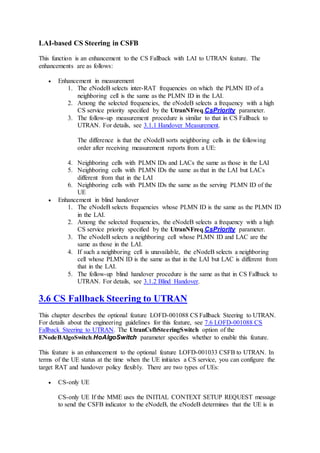
UTRAN is performed
CSFB to
UTRAN
triggered for
emergency
calls
1526728709 L.CSFB.E2W.Emergency Number of times CSFB to
UTRAN is triggered for
emergency calls
RIM during
load-based
CSFB to
UTRAN
1526728949 L.RIM.Load.E2W.Req Number of load information
requests sent from an eNodeB to a
UMTS network
1526728950 L.RIM.Load.E2W.Resp Number of load information
responses sent from a UMTS
network to an eNodeB
1526728951 L.RIM.Load.E2W.Update Number of load information
updates sent from a UMTS
network to an eNodeB
7.1.7 Deactivation
Using the CME to Perform Batch Configuration
Batch reconfiguration using the CME is the recommended method to deactivate a feature on
eNodeBs. This method reconfigures all data, except neighbor relationships, for multiple
eNodeBs in a single procedure. The procedure for feature deactivation is similar to that for
feature activation described in Batch Reconfiguration. In the procedure, modify parameters
according to Table 7-5.
Table 7-5 Parameters for deactivating CSFB to UTRAN
MO Sheet in the
Summary Data File
Parameter
Group
Setting Notes
ENodeBAlgoSwitch User-defined sheet.
ENodeBAlgoSwitch
is recommended.
HoAlgoSwitch To deactivate CSFB to
UTRAN, set
UtranCsfbSwitch under the
HoAlgoSwitch parameter to
0.
To deactivate only load-based
CSFB to UTRAN, set
CSFBLoadInfoSwitch under
the HoAlgoSwitch parameter
to 0.
To deactivate only adaptive-
MO Sheet in the
Summary Data File
Parameter
Group
Setting Notes
blind-handover-based CSFB,
Set
CsfbAdaptiveBlindHoSwitch
to 0.
Using the CME to Perform Single Configuration
On the CME, set parameters according to Table 7-5. For detailed instructions, see 7.1.5.4
Using the CME to Perform Single Configuration for feature activation.
Using MMLCommands
 Deactivating CSFB to UTRAN
Run the MOD ENODEBALGOSWITCH command with the
UtranCsfbSwitch(UtranCsfbSwitch) check box cleared under the Handover Algo
switch parameter.
 Deactivating only load-based CSFB to UTRAN
Run the MOD ENODEBALGOSWITCH command with the
CSFBLoadInfoSwitch(CSFBLoadInfoSwitch) check box cleared under the
Handover Algo switch parameter.
 Deactivating adaptive-blind-handover-based CSFB
Run the MOD ENODEBALGOSWITCH command to with the
CsfbAdaptiveBlindHoSwitch(CsfbAdaptiveBlindHoSwitch) option of the
Handover Algo switch parameter cleared.
MMLCommand Examples
 Deactivating CSFB to UTRAN
MOD ENODEBALGOSWITCH: HoAlgoSwitch=UtranCsfbSwitch-0;
 Deactivating only load-based CSFB to UTRAN
MOD ENODEBALGOSWITCH: HoAlgoSwitch=CSFBLoadInfoSwitch-0;
 Deactivating adaptive-blind-handover-based CSFB
MOD ENODEBALGOSWITCH: HoAlgoSwitch=CsfbAdaptiveBlindHoSwitch-0;
7.1.8 Performance Monitoring
CSFB is an end end-to to-end service. The performance counters on the LTE side can only
indicate the success rate of the CSFB procedure on the LTE side, and. they cannot indicate
the success rate of the CSFB procedure on the target side. Therefore, the performance
counters on the LTE side cannot directly show user experience of the CSFB procedure. It is
recommended that you perform drive tests and use the performance counters on the UE side
to indicate the actual user experience of the CSFB procedure.
Related counters are listed in Table 7-6.
Table 7-6 Counters related to the execution of CSFB by the eNodeB
Counter ID Counter Name Description
1526728321 L.CSFB.PrepAtt Number of CSFB indicators received by
the eNodeB
1526728322 L.CSFB.PrepSucc Number of successful CSFB responses
from the eNodeB
Table 7-7 lists the counter related to CSFB to UTRAN.
Table 7-7 Counter related to CSFB to UTRAN
Counter ID Counter Name Description
1526728323 L.CSFB.E2W Number of procedures for CSFB to WCDMA
network
Table 7-8 lists the counters that indicate whether CSFB is performed through redirection or
through handover.
Table 7-8 Counters related to CSFB through redirection or handover
Counter ID Counter Name Description
1526728497 L.RRCRedirection.E2W.CSFB Number of CSFB-based redirections
from E-UTRANs to WCDMA
network
1526728504 L.IRATHO.E2W.CSFB.PrepAttOut Number of CSFB-based inter-RAT
handover preparation attempts from
E-UTRAN to WCDMA network
After the CSFB protection timer expires, the eNodeB may perform a blind redirection to
enter the protection procedure. Table 7-9 lists the counter related to the number of times that
the eNodeB enters the protection procedure for CSFB. A larger value of this counter indicates
a longer average UE access delay during CSFB.
Table 7-9 Counter related to the number of times that the eNodeB enters the protection
procedure for CSFB
Counter ID Counter Name Description
1526729515 L.RRCRedirection.E2W.CSFB.TimeOut Number of CSFB-based blind
Counter ID Counter Name Description
redirections from E-UTRAN to
WCDMA network caused by
CSFB protection timer expiration
Table 7-10 lists the counters related to CSFB for emergency calls.
Table 7-10 Counters related to CSFB for emergency calls
Counter ID Counter Name Description
1526729510 L.IRATHO.E2W.CSFB.ExecAttOut.Emergency Number of CSFB-based
handover execution
attempts to WCDMA
network triggered for
emergency calls
1526729511 L.IRATHO.E2W.CSFB.ExecSuccOut.Emergency Number of successful
CSFB-based handover
executions to WCDMA
network triggered for
emergency calls
The formula for calculating the CSFB handover success rate for emergency calls is as
follows: CSFB handover success rate for emergency calls =
L.IRATHO.E2W.CSFB.ExecSuccOut.Emergency/L.IRATHO.E2W.CSFB.ExecAttOut.
Emergency
7.1.9 Parameter Optimization
CSFB end-to-end delay includes the processing time at the LTE side and that at the side after
fallback. Processing at any side may affect the CSFB end-to-end delay and user experience.
 If GSM devices are provided by Huawei, for details about processing at the GSM
side, see Interoperability Between GSM and LTE Feature Parameter Description.
 If UMTS devices are provided by Huawei, for details about processing at the UMTS
side, see Interoperability Between UMTS and LTE Feature Parameter Description.
Blind Handover for CSFB
Compared with measurement-based handovers, blind handovers reduce access delays but
affect handover success rates.
The following table describes the parameters in the CSFallBackBlindHoCfg MO used to set
the blind-handover priorities of different RATs for CSFB.
Paramete
r Name
Parameter ID Data
Source
Setting Notes
CN CSFallBackBlindHoCfg.CnOperatorId Network Set this parameter
Paramete
r Name
Parameter ID Data
Source
Setting Notes
Operator
ID
plan
(negotiatio
n not
required)
based on the
network plan.
This parameter
specifies the ID of
the operator
whose RAT blind-
handover
priorities are to be
set.
Highest
priority
InterRat
CSFallBackBlindHoCfg.InterRatHighestPr
i
Network
plan
(negotiatio
n not
required)
Set this parameter
based on the
network plan.
This parameter is
set to UTRAN by
default and
specifies the high-
priority RAT to
be considered in
blind handovers
for CSFB.
Second
priority
InterRat
CSFallBackBlindHoCfg.InterRatSecondPr
i
Network
plan
(negotiatio
n not
required)
Set this parameter
based on the
network plan.
This parameter is
set to GERAN by
default and
specifies the
medium-priority
RAT to be
considered in
blind handovers
for CSFB. Ensure
that this parameter
is set to a different
value from the
InterRatHighestPr
i and
InterRatLowestPri
parameters.
Lowest
priority
InterRat
CSFallBackBlindHoCfg.InterRatLowestPr
i
Network
plan
(negotiatio
n not
required)
Set this parameter
based on the
network plan.
This parameter is
set to CDMA2000
by default and
Paramete
r Name
Parameter ID Data
Source
Setting Notes
specifies the low-
priority RAT to
be considered in
blind handovers
for CSFB. Ensure
that this parameter
is set to a different
value from the
InterRatHighestPr
i and
InterRatSecondPri
parameters.
The following table describes the parameters that must be set in the ENodeBAlgoSwitch and
CellHoParaCfg MOs to set eNodeB- and cell-level blind handovers.
Paramete
r Name
Parameter ID Data
Source
Setting Notes
Handover
Mode
switch
ENodeBAlgoSwitch.HoModeSwi
tch
Network
plan
(negotiatio
n not
required)
To activate blind handovers,
select the
BlindHoSwitch(BlindHoSwitc
h) check box. A blind
handover to an inter-RAT cell
can be performed only if a
blind-handover priority is
specified for the inter-RAT
cell. Compared with
measurement-based
handovers, blind handovers
reduce access delays but affect
handover success rates.
To deactivate blind handovers,
clear the
BlindHoSwitch(BlindHoSwitc
h) check box.
Handover
Mode
switch
CellHoParaCfg.HoModeSwitch Network
plan
(negotiatio
n not
required)
To activate blind handovers
for a cell under the eNodeB,
select the
BlindHoSwitch(BlindHoSwit
ch) check box under the
parameter. If the
BlindHoSwitch(BlindHoSwit
ch) check box is deselected,
blind handovers for the cell are
Paramete
r Name
Parameter ID Data
Source
Setting Notes
invalid.
Measurement-based Handovers for CSFB
An appropriate event B1 threshold for CSFB ensures that inter-RAT handovers are triggered
in a timely fashion. A high threshold results in a low probability of triggering event B1,
thereby affecting user experience. A low threshold results in a high probability of triggering
event B1, but causes a high probability of incorrect handover decisions and a low handover
success rate. Tune this parameter based on site conditions.
Event B1 for CSFB has a time-to-trigger parameter. This parameter lowers the probability of
incorrect handover decisions and raises the handover success rate. However, if the value of
this parameter is too large, CSFB delay is extended, affecting user experience. Tune this
parameter based on site conditions.
Appropriate settings of the threshold and time-to-trigger for event B1 raise the handover
success rate and lower the call drop rate. The related parameters are as follows:
Related parameters are in the CSFallBackHo MO.
Parameter
Name
Parameter ID Data
Source
Setting Notes
Local cell
ID
CSFallBackHo.LocalCellId Network
plan
(negotiation
not
required)
Set this parameter
based on the
network plan.
CSFB
Utran
EventB1
Time To
Trig
CSFallBackHo.CsfbHoUtranTimeToTrig Network
plan
(negotiation
not
required)
Set this parameter
based on the
network plan. This
parameter specifies
the time-to-trigger
for event B1 in
CSFB to UTRAN.
When CSFB to
UTRAN is
required, set this
parameter, which is
used by UEs as one
of the conditions
for triggering event
B1. When a UE
detects that the
signal quality in at
least one UTRAN
Parameter
Name
Parameter ID Data
Source
Setting Notes
cell meets the
entering condition,
it does not
immediately send a
measurement report
to the eNodeB.
Instead, the UE
sends a
measurement report
only when the
signal quality has
been meeting the
entering condition
throughout a period
defined by this
parameter. This
parameter helps
decrease the
number of
occasionally
triggered event
reports, the average
number of
handovers, and the
number of incorrect
handovers,
preventing
unnecessary
handovers.
CSFB
UTRAN
EventB1
RSCP
Trigger
Threshold
CSFallBackHo.CsfbHoUtranB1ThdRscp Network
plan
(negotiation
not
required)
Set this parameter
based on the
network plan. This
parameter specifies
the RSCP threshold
for event B1 in
CSFB to UTRAN.
When CSFB to
UTRAN is
required, set this
parameter, which is
used by UEs as one
of the conditions
for triggering event
B1. This parameter
specifies the
minimum required
Parameter
Name
Parameter ID Data
Source
Setting Notes
RSCP of the signal
quality provided by
a UTRAN cell
when a CSFB
procedure can be
initiated toward
this cell. Event B1
is triggered when
the RSCP
measured by the
UE is higher than
the value of this
parameter and all
other conditions are
also met.
CSFB
UTRAN
EventB1
ECN0
Trigger
Threshold
CSFallBackHo.CsfbHoUtranB1ThdEcn0 Network
plan
(negotiation
not
required)
Indicates the Ec/No
threshold for event
B1, which is used
in CS fallback to
UTRAN. When
CSFB to UTRAN
is required, set this
parameter, which is
used by UEs as one
of the conditions
for triggering event
B1. This parameter
specifies the
minimum required
Ec/No of the signal
quality provided by
a UTRAN cell
when a CSFB
procedure can be
initiated toward
this cell. Event B1
is triggered when
the Ec/No
measured by the
UE is higher than
the value of this
parameter and all
other conditions are
also met. Set this
parameter to a large
value for a cell
Parameter
Name
Parameter ID Data
Source
Setting Notes
with a large signal
fading variance in
order to reduce the
probability of
unnecessary
handovers. Set this
parameter to a
small value for a
cell with a small
signal fading
variance in order to
ensure timely
handovers.
7.2 RIM Procedure from E-UTRAN to UTRAN
7.2.1 When to Use RIM Procedure from E-UTRAN to UTRAN
It is recommended that the RIM procedure be performed through the Huawei-proprietary
eCoordinator if the following two conditions are met: 1. Both the eNodeB and the RNC/BSC
are provided by Huawei and are connected to the same eCoordinator. 2. The core network
that the eNodeB and the RNC/BSC are connected to does not support the RIM procedure or
is not enabled with the RIM procedure. To perform the RIM procedure through the
eCoordinator, set ENodeBAlgoSwitch.RimOnEcoSwitch to ON(On).
In other conditions, it is recommended that the RIM procedure be performed through the core
network. In this case, set ENodeBAlgoSwitch.RimOnEcoSwitch to OFF(Off).
7.2.2 Required Information
Check whether the RNC, MME, and SGSN support the RIM procedure, and whether an
eCoordinator has been deployed.
7.2.3 Requirements
Operating Environment
If the RIM procedure is performed through the core network, the core-network equipment
must support this feature:
 If the core-network equipment is provided by Huawei, the version must be SAE1.2 or
later.
 If the core-network equipment is provided by another vendor, check with the vendor
whether the equipment supports this feature. The core network must support the RIM
procedure from E-UTRAN to UTRAN.
If the RIM procedure is performed through the eCoordinator, the RNC/BSC, eNodeB, and
eCoordinator must all be provided by Huawei and with the switch for supporting the RIM
procedure through eCoordinator turned on.
To facilitate connection setup for RIM message exchange, you must enable RIM in the
UTRAN before you enable it in the E-UTRAN.
License
The operator has purchased and activated the license for the feature listed in Table 7-11.
Table 7-11 License control item for CSFB to UTRAN
Feature ID Feature
Name
Model License
Control Item
NE Sales Unit
LOFD-001033 CSFB to
UTRAN
LT1S00CFBU00 CS Fallback to
UTRAN(FDD)
eNodeB per RRC
Connected
User
7.2.4 Precautions
None
7.2.5 Data Preparation and Feature Activation
7.2.5.1 Data Preparation
This section describes the data that you need to collect for setting parameters. Required data
is data that you must collect for all scenarios. Collect scenario-specific data when necessary
for a specific feature deployment scenario.
There are three types of data sources:
 Network plan (negotiation not required): parameter values planned and set by the
operator
 Network plan (negotiation required): parameter values planned by the operator and
negotiated with the EPC or peer transmission equipment
 User-defined: parameter values set by users
Required Data
The required data is the same as that for LOFD-001033 CS Fallback to UTRAN. For details,
see 7.1.5.1 Data Preparation.
UtranExternalCell: used to configure external UTRAN cells. The UtranExternalCell.Rac
parameter must be set.
Scenario-specific Data
The following table describes the parameter that must be set in the ENodeBAlgoSwitch MO
to configure the RIM procedure.
Paramete
r Name
Parameter ID Data
Source
Setting Notes
Support
RIM by
eCoordina
tor Switch
ENodeBAlgoSwitch.RimOnEc
oSwitch
Network
plan
(negotiati
on not
required)
If
ENodeBAlgoSwitch.RimOnEc
oSwitch is set to OFF(Off), the
RIM procedure is performed
through the core network.
If
ENodeBAlgoSwitch.RimOnEc
oSwitch is set to ON(On), the
RIM procedure is performed
through the eCoordinator.
7.2.5.2 Using the CME to Perform Batch Configuration for Newly Deployed eNodeBs
Enter the values of the parameters listed in Table 7-12 in a summary data file, which also
contains other data for the new eNodeBs to be deployed.
Then, import the summary data file into the Configuration Management Express (CME) for
batch configuration. For detailed instructions, see section "Creating eNodeBs in Batches" in
the initial configuration guide for the eNodeB.
The summary data file may be a scenario-specific file provided by the CME or a customized
file, depending on the following conditions:
 The managed objects (MOs) in Table 7-12 are contained in a scenario-specific
summary data file. In this situation, set the parameters in the MOs, and then verify
and save the file.
 Some MOs in Table 7-12 are not contained in a scenario-specific summary data file.
In this situation, customize a summary data file to include the MOs before you can set
the parameters.
Table 7-12 Parameters for the RIM procedure
MO Sheet in the
Summary Data File
Parameter Group Remarks
ENodeBAlgoSwitch User-defined sheet.
ENodeBAlgoSwitch
is recommended.
See 7.2.5.1 Data
Preparation.
None
7.2.5.3 Using the CME to Perform Batch Configuration for Existing eNodeBs
Batch reconfiguration using the CME is the recommended method to activate a feature on
existing eNodeBs. This method reconfigures all data, except neighbor relationships, for
multiple eNodeBs in a single procedure. The procedure is as follows:
1. Customize a summary data file with the MOs and parameters listed in section "Using
the CME to Perform Batch Configuration for Newly Deployed eNodeBs." For online
help, press F1 when a CME window is active, and select Managing the CME >
CME Guidelines > LTE Application Management > eNodeB RelatedOperations
> Customizing a Summary Data File for Batch eNodeB Configuration.
2. Choose CME > LTE Application > Export Data > Export Base Station Bulk
Configuration Data (U2000 client mode), or choose LTE Application > Export
Data > Export Base Station Bulk Configuration Data (CME client mode), to
export the eNodeB data stored on the CME into the customized summary data file.
3. In the summary data file, set the parameters in the MOs according to the setting notes
provided in section "Data Preparation" and close the file.
4. Choose CME > LTE Application > Import Data > Import Base Station Bulk
Configuration Data (U2000 client mode), or choose LTE Application > Import
Data > Import Base Station Bulk Configuration Data (CME client mode), to
import the summary data file into the CME, and then start the data verification.
5. After data verification is complete, choose CME > Planned Area > Export
Incremental Scripts (U2000 client mode), or choose Area Management > Planned
Area > Export Incremental Scripts (CME client mode), to export and activate the
incremental scripts. For detailed operations, see Managing the CME > CME
Guidelines > Script File Management > Exporting Incremental Scripts from a
Planned Data Area in the CME online help.
7.2.5.4 Using the CME to Perform Single Configuration
On the CME, set the parameters listed in the "Data Preparation" section for a single eNodeB.
The procedure is as follows:
1. In the planned data area, click Base Station in the upper left corner of the
configuration window.
2. In area 1 shown in Figure 7-7, select the eNodeB to which the MOs belong.
Figure 7-7 MO search and configuration window
3. On the Search tab page in area 2, enter an MO name, for example, CELL.
4. In area 3, double-click the MO in the Object Name column. All parameters in this
MO are displayed in area 4.
5. Set the parameters in area 4 or 5.
6. Choose CME > Planned Area > Export Incremental Scripts (U2000 client mode), or
choose Area Management > Planned Area > Export Incremental Scripts (CME client
mode), to export and activate the incremental scripts.
7.2.5.5 Using MMLCommands
Using MML Commands
 Performing the RIM procedure through the core network
Run the MOD ENODEBALGOSWITCH command with the Support RIM by
eCoordinator Switch parameter set to OFF(Off).
 Performing the RIM procedure through the eCoordinator
Run the MOD ENODEBALGOSWITCH command with the Support RIM by
eCoordinator Switch parameter set to ON(On).
MML Command Examples
 Performing the RIM procedure through the core network
MOD ENODEBALGOSWITCH: RimOnEcoSwitch=OFF;
 Performing the RIM procedure through the eCoordinator
MOD ENODEBALGOSWITCH: RimOnEcoSwitch=ON;
7.2.6 Activation Observation
Counter Observation
No matter whether the RIM procedure is performed through the core network or the
eCoordinator, performance counters listed in Table 7-13 can be used to observe whether the
RIM procedure has taken effect.
Table 7-13 Counters related to the RIM procedure between E-UTRAN and UTRAN
Counter ID Counter Name Description
1526728949 L.RIM.Load.E2W.Req Number of load information requests from an
eNodeB to WCDMA network
1526728950 L.RIM.Load.E2W.Resp Number of times the eNodeB receives load
information responses from WCDMA
network
1526728951 L.RIM.Load.E2W.Update Number of times the eNodeB receives load
information updates from WCDMA network
Signaling Tracing Result Observation
If the RIM procedure is performed through the core network, trace signaling messages as
follows:
1. Start an S1 interface tracing task on the eNodeB LMT.
Check whether the eNB DIRECT INFORMATION TRANSFER message containing
the RAN-INFORMATION-REQUEST IE is sent over the S1 interface. If the message
is sent, you can infer that the eNodeB has sent the RIM request successfully.
2. Start an Iu interface tracing task on the RNC LMT.
If after receiving the DIRECT INFORMATION TRANSFER message containing the
RAN-INFORMATION-REQUEST IE, the RNC sends the DIRECT INFORMATION
TRANSFER message containing the RAN-INFORMAION IE to the SGSN, you can
infer that the RNC can response to the RIM request normally.
3. Change the state of the UTRAN cell.
If the RNC sends the DIRECT INFORMATION TRANSFER message containing the
RAN-INFORMATION IE over the Iu interface, you can infer that the RNC can notify
the eNodeB with the cell state change through the RIM procedure.
If the RIM procedure is performed through the eCoordinator, trace signaling messages as
follows:
1. Start an Se interface tracing task on the eNodeB LMT.
Check whether the ENB DIRECT INFORMATION TRANSFER message containing
the RAN-INFORMAION-REQUEST IE is sent over the Se interface. If the message
is sent, you can infer that the eNodeB has sent the RIM request successfully.
2. Start an Sr interface tracing task on the RNC LMT.
If after receiving the ECO DIRECT INFORMATION TRANSFER message
containing the RAN-INFORMAION-REQUEST IE, the RNC sends the RNC
DIRECT INFORMATION TRANSFER message containing the RAN-
INFORMAION IE to the eCoordinator, you can infer that the RNC can response to
the RIM request normally.
3. Change the state of the UTRAN cell.
If the RNC sends the RNC DIRECT INFORMATION TRANSFER message
containing the RAN-INFORMATION IE over the Sr interface, you can infer that the
RNC can notify the eNodeB with the cell state change through the RIM procedure.
7.2.7 Deactivation
Using the CME to Perform Batch Configuration
Batch reconfiguration using the CME is the recommended method to deactivate a feature on
eNodeBs. This method reconfigures all data, except neighbor relationships, for multiple
eNodeBs in a single procedure. The procedure for feature deactivation is similar to that for
feature activation described in 7.2.5.3 Using the CME to Perform Batch Configuration for
Existing eNodeBs. In the procedure, modify parameters according to the table listed in the
scenario of E-UTRAN to UTRAN CS/PS steering.
Table 7-14 Parameters for the RIM procedure
MO Sheet in the
Summary Data File
Parameter
Group
Setting Notes
ENodeBAlgoSwitch
(eNodeB-level
switch)
User-defined sheet.
ENodeBAlgoSwitch
is recommended.
RimOnEcoSwitch Set this parameter to
OFF(Off).
Using the CME to Perform Single Configuration
On the CME, set parameters according to Table 7-14. For detailed instructions, see 7.2.5.4
Using the CME to Perform Single Configuration for feature activation.
Using MML Commands
 Performing the RIM procedure through the core network
Run the MOD ENODEBALGOSWITCH command with the Support RIM by
eCoordinator Switch parameter set to ON(On).
 Performing the RIM procedure through the eCoordinator
Run the MOD ENODEBALGOSWITCH command with the Support RIM by
eCoordinator Switch parameter set to OFF(Off).
MMLCommand Examples
 Performing the RIM procedure through the core network
MOD ENODEBALGOSWITCH: RimOnEcoSwitch=ON;
 Performing the RIM procedure through the eCoordinator
MOD ENODEBALGOSWITCH: RimOnEcoSwitch=OFF;
7.2.8 Performance Monitoring
The performance monitoring procedure for this feature is the same as that for CSFB to
UTRAN. For details, see 7.1.8 Performance Monitoring.
7.2.9 Parameter Optimization
The parameter optimization procedure for this feature is the same as that for CSFB to
UTRAN. For details, see 7.1.9 Parameter Optimization.
7.3 LOFD-001052 Flash CS Fallback to UTRAN
This section provides engineering guidelines for LOFD-001052 Flash CS Fallback to
UTRAN.
7.3.1 When to Use Flash CS Fallback to UTRAN
When LOFD-001033 CS Fallback to UTRAN has been enabled, use LOFD-001052 Flash CS
Fallback to UTRAN if all the following conditions are met: The E-UTRAN and UTRAN
support the RIM with SIB procedure. 3GPP Release 9 UEs are used on the live network. The
core networks support the RIM procedure. The eCo has been deployed. For policies on
whether to use PS handover or PS redirection for CSFB, see Inter-RAT Mobility Management
in Connected Mode. If UTRAN and E-UTRAN cells cover the same area, or the UTRAN cell
provides better coverage than the E-UTRAN cell, use CSFB based on blind handover to
decrease the CSFB delay.
7.3.2 Required Information
1. Collect information about whether LOFD-001033 CS Fallback to UTRAN has been
activated.
2. Collect the operating frequencies, coverage areas, and configurations of the E-
UTRAN and UTRAN cells. Information about coverage areas includes engineering
parameters of sites (such as latitude and longitude), TX power of cell reference
signals (RSs), and neighbor relationship configurations.
3. Collect the versions and configurations of the NEs in the E-UTRAN, UTRAN, and
core networks, and ensure that they all support CSFB and the RIM procedure. Table
7-15 describes the requirements of flash CSFB to UTRAN for the core networks. For
details about the deployment guide on the UTRAN, see Interoperability Between
UMTS and LTE Feature Parameter Description.
4. Collect the following information about the UEs that support UMTS and LTE on the
live network:
o Supported frequency bands
o Whether the UEs support redirection from E-UTRAN to UTRAN
o Whether the UEs support PS handover from E-UTRAN to UTRAN
o Whether the UEs support UTRAN measurements
o Whether the UEs comply with 3GPP Release 9 specifications
This information is used to configure neighboring UTRAN cells and to determine
whether to perform CSFB based on handover or redirection. For details, see Inter-
RAT Mobility Management in Connected Mode.
Table 7-15 Requirements of flash CSFB to UTRAN for core networks
NE Requirement
MME Supports CSFB and RIM procedures in compliance with 3GPP
Release 9
SGSN Supports CSFB and RIM procedures in compliance with 3GPP
Release 9
7.3.3 Requirements
Operating Environment
For flash CSFB to UTRAN, the eNodeB must collaborate with core-network equipment. If
the core-network equipment is provided by Huawei, the version must be PS9.1 or later. If the
core-network equipment is provided by another vendor, check with the vendor whether the
equipment supports this feature. The core network must support flash CSFB to UTRAN.
License
The operator has purchased and activated the license for the feature listed in Table 7-16.
Table 7-16 License control item for Flash CS Fallback to UTRAN
Feature ID Feature
Name
Model License
Control Item
NE Sales Unit
LOFD-001033 CSFB to LT1S00CFBU00 CS Fallback to eNodeB per RRC
Feature ID Feature
Name
Model License
Control Item
NE Sales Unit
UTRAN UTRAN(FDD) Connected
User
LOFD-001052 Flash CSFB
to UTRAN
LT1S0FCFBU00 Flash CS
Fallback to
UTRAN
eNodeB per RRC
Connected
User
NOTE:
If the UTRAN uses Huawei devices, RIM-based flash CSFB needs to be enabled on the
UTRAN.
7.3.4 Precautions
None
7.3.5 Data Preparation and Feature Activation
7.3.5.1 Data Preparation
This section describes the data that you need to collect for setting parameters. Required data
is data that you must collect for all scenarios. Collect scenario-specific data when necessary
for a specific feature deployment scenario.
There are three types of data sources:
 Network plan (negotiation not required): parameter values planned and set by the
operator
 Network plan (negotiation required): parameter values planned by the operator and
negotiated with the EPC or peer transmission equipment
 User-defined: parameter values set by users
Required Data
Before configuring CSFB to UTRAN, collect the data related to neighbor relationships with
UTRAN cells. This section provides only the information about MOs related to neighboring
UTRAN cells and key parameters in these MOs. For more information about how to collect
data for the parameters in these MOs, see Inter-RAT Mobility Management in Connected
Mode Feature Parameter Description.
1. The following table describes the parameters that must be set in the UtranNFreq MO
to configure a neighboring UTRAN frequency.
2. UtranExternalCell: used to configure external UTRAN cells. The
UtranExternalCell.Rac parameter must be set.
3. UtranExternalCellPlmn: used to configure additional PLMN IDs for each shared
external UTRAN cell. This MO is required only if the BTS that provides the external
GERAN cell works in RAN sharing with common carriers mode and multiple
operators share the external GERAN cell.
4. The following table describes the parameters that must be set in the UtranNCell MO
to configure the neighboring relationship with a UTRAN cell. If a neighboring
UTRAN cell supports blind handovers according to the network plan, the blind-
handover priority of the cell must be specified by the UtranNCell.BlindHoPriority
parameter.
Scenario-specific Data
The following table describes the parameters that must be set in the ENodeBAlgoSwitch MO
to set the handover mode and handover algorithm switches for flash CSFB to UTRAN.
Parame
ter
Name
Parameter ID Data
Source
Setting Notes
Handov
er Mode
switch
ENodeBAlgoSwitch.HoMod
eSwitch
Network
plan
(negotiat
ion not
required)
Set this parameter based on the
network plan.
Handov
er Algo
switch
ENodeBAlgoSwitch.HoAlgo
Switch
Network
plan
(negotiat
ion not
required)
To activate flash CSFB to UTRAN,
select the
UtranCsfbSwitch(UtranCsfbSwitch)
and
UtranFlashCsfbSwitch(UtranFlashC
sfbSwitch) check boxes.
RIM
switch
ENodeBAlgoSwitch.RimSwi
tch
Network
plan
(negotiat
ion not
required)
UTRAN_RIM_SWITCH(UTRAN
RIM Switch) under this parameter
specifies whether to enable or disable
the RIM procedure that requests event-
driven multiple reports from UTRAN
cells.
If this switch is turned on, the eNodeB
can send RAN-INFORMATION-
REQUEST/Multiple Report protocol
data units (PDUs) to UTRAN cells to
request event-driven multiple reports.
If this switch is turned off, the eNodeB
cannot send RAN-INFORMATION-
REQUEST/Multiple Report PDUs to
UTRAN cells.
If this switch is turned off and
UtranFlashCsfbSwitch(UtranFlashC
sfbSwitch) under
ENodeBAlgoSwitch.HoAlgoSwitch
is turned on, the eNodeB sends RAN-
Parame
ter
Name
Parameter ID Data
Source
Setting Notes
INFORMATION-REQUEST/Single
Report PDUs to UTRAN cells to
request single reports.
If the UTRAN cells support RAN-
INFORMATION-REQUEST/Multiple
Report PDUs, you are advised to select
the
UTRAN_RIM_SWITCH(UTRAN
RIM Switch) option.
The following table describes the parameters that must be set in the ENodeBAlgoSwitch and
CellHoParaCfg MOs to set eNodeB- and cell-level blind handovers.
Paramete
r Name
Parameter ID Data
Source
Setting Notes
Handover
Mode
switch
ENodeBAlgoSwitch.HoModeSwi
tch
Network
plan
(negotiatio
n not
required)
To activate blind handovers,
select the
BlindHoSwitch(BlindHoSwit
ch) check box under the
parameter. If the
BlindHoSwitch(BlindHoSwit
ch) check box is deselected,
blind handovers for all cells
under the eNodeB are invalid.
Handover
Mode
switch
CellHoParaCfg.HoModeSwitch Network
plan
(negotiatio
n not
required)
To activate blind handovers
for a cell under the eNodeB,
select the
BlindHoSwitch(BlindHoSwit
ch) check box under the
parameter. If the
BlindHoSwitch(BlindHoSwit
ch) check box is deselected,
blind handovers for the cell are
invalid.
The following table describes the parameter that must be set in the S1Interface MO to set the
compliance protocol release of the MME.
Parameter
Name
Parameter ID Data Source Setting Notes
MME Release S1INTERFACE.MmeRelease Network plan
(negotiation not
To activate RIM
procedures in
Parameter
Name
Parameter ID Data Source Setting Notes
required) Multiple Report
mode, set the
parameter to
Release_R9(Release
9).
The following table describes the parameters that must be set in the CSFallBackBlindHoCfg
MO to set the blind-handover priorities of different RATs for CSFB.
Paramete
r Name
Parameter ID Data
Source
Setting Notes
CN
Operator
ID
CSFallBackBlindHoCfg.CnOperatorId Network
plan
(negotiatio
n not
required)
Set this parameter
based on the
network plan. This
parameter identifies
the operator whose
RAT blind-
handover priorities
are to be set.
Highest
priority
InterRat
CSFallBackBlindHoCfg.InterRatHighest
Pri
Network
plan
(negotiatio
n not
required)
Set this parameter
based on the
network plan. This
parameter is set to
UTRAN by default
and specifies the
highest-priority
RAT to be
considered in blind
handovers for
CSFB. For CSFB
to UTRAN, retain
the default value.
Second
priority
InterRat
CSFallBackBlindHoCfg.InterRatSecondP
ri
Network
plan
(negotiatio
n not
required)
Set this parameter
based on the
network plan. This
parameter is set to
GERAN by default
and specifies the
second-highest-
priority RAT to be
considered in blind
handovers for
CSFB. Ensure that
this parameter is set
to a different value
Paramete
r Name
Parameter ID Data
Source
Setting Notes
from the
InterRatHighestP
ri and
InterRatLowestPr
i parameters.
Lowest
priority
InterRat
CSFallBackBlindHoCfg.InterRatLowestP
ri
Network
plan
(negotiatio
n not
required)
Set this parameter
based on the
network plan. This
parameter is set to
CDMA2000 by
default and
specifies the low-
priority RAT to be
considered in blind
handovers for
CSFB. Ensure that
this parameter is set
to a different value
from the
InterRatHighestP
ri and
InterRatSecondPr
i parameters.
UTRAN
LCS
capability
CSFallBackBlindHoCfg.UtranLcsCap Network
plan
(negotiatio
n not
required)
Set this parameter
based on the
network plan. This
parameter specifies
the LCS capability
of the UTRAN.
The following table describes the parameter that must be set in the InterRatHoComm MO to
set the maximum number of neighboring UTRAN cells whose system information is sent to
UEs for flash redirections.
Parameter
Name
Parameter ID Data
Source
Setting Notes
Max Utran
cell num in
redirection
InterRatHoComm.CellInfoMaxUtranCellNum Network
plan
(negotiation
not
required)
Set this
parameter
based on the
network plan.
The default
value is 8. If
this parameter
is set too
small, the
Parameter
Name
Parameter ID Data
Source
Setting Notes
flash CSFB
success rate
decreases
because UEs
may not
receive valid
neighboring
cell system
information. If
this parameter
is set too
large, the size
of an RRC
connection
release
message
increases and
CSFB may
fail.
7.3.5.2 Using the CME to Perform Batch Configuration for Newly Deployed eNodeBs
Enter the values of the parameters listed in Table 7-17 in a summary data file, which also
contains other data for the new eNodeBs to be deployed.
Then, import the summary data file into the Configuration Management Express (CME) for
batch configuration. For detailed instructions, see section "Creating eNodeBs in Batches" in
the initial configuration guide for the eNodeB.
The summary data file may be a scenario-specific file provided by the CME or a customized
file, depending on the following conditions:
 The managed objects (MOs) in Table 7-17 are contained in a scenario-specific
summary data file. In this situation, set the parameters in the MOs, and then verify
and save the file.
 Some MOs in Table 7-17 are not contained in a scenario-specific summary data file.
In this situation, customize a summary data file to include the MOs before you can set
the parameters.
When configuring neighboring cells, you are advised to use the radio data planning file. For
details about how to fill in and export the radio data planning file, see section "Creating
eNodeBs in Batches" in the initial configuration guide for the eNodeB.
Table 7-17 Parameters for flash CSFB to UTRAN
MO Sheet in the Summary
Data File
Parameter Group Remarks
MO Sheet in the Summary
Data File
Parameter Group Remarks
UtranNFreq UtranNFreq See 7.3.5.1 Data
Preparation.
The RNP
template sheet is
recommended.
UtranExternalCell UtranExternalCell See 7.3.5.1 Data
Preparation.
The RNP
template sheet is
recommended.
UtranExternalCellPlmn UtranExternalCellPlmn See 7.3.5.1 Data
Preparation.
The RNP
template sheet is
recommended.
UtranNCell UtranNCell See 7.3.5.1 Data
Preparation.
The RNP
template sheet is
recommended.
S1Interface S1Interface See 7.3.5.1 Data
Preparation.
This parameter
must be
customized on a
list-type sheet of
the template.
ENodeBAlgoSwitch User-defined sheet.
ENodeBAlgoSwitch is
recommended.
See 7.3.5.1 Data
Preparation.
This parameter
must be
customized on a
list-type sheet of
the template.
CSFallBackBlindHoCfg User-defined sheet.
CSFallBackBlindHoCfg
is recommended.
See 7.3.5.1 Data
Preparation.
This parameter
must be
customized on a
list-type sheet of
the template.
InterRatHoComm User-defined sheet.
InterRatHoComm is
recommended.
See 7.3.5.1 Data
Preparation.
This parameter
must be
customized on a
list-type sheet of
the template.
CSFallBackHo User-defined sheet.
CSFallBackHo is
recommended.
See 7.3.5.1 Data
Preparation.
This parameter
must be
customized on a
list-type sheet of
the template.
(Optional)
GlobalProcSwitch
User-defined sheet.
GlobalProcSwitch is
recommended.
See 7.3.5.1 Data
Preparation.
This parameter
must be
customized on a
list-type sheet of
the template.
MO Sheet in the Summary
Data File
Parameter Group Remarks
CellHoParaCfg User-defined sheet.
CellHoParaCfg is
recommended.
See 7.3.5.1 Data
Preparation.
This parameter
must be
customized on a
list-type sheet of
the template.
7.3.5.3 Using the CME to Perform Batch Configuration for Existing eNodeBs
Batch Activated
This feature can be batch activated using the CME. For detailed operations, see the following
section in the CME product documentation or online help: Managing the CME > CME
Guidelines > Enhanced Feature Management > Feature Operation and Maintenance.
Batch Reconfiguration
Batch reconfiguration using the CME is the recommended method to activate a feature on
existing eNodeBs. This method reconfigures all data, except neighbor relationships, for
multiple eNodeBs in a single procedure.
1. Customize a summary data file with the MOs and parameters listed in section "Using
the CME to Perform Batch Configuration for Newly Deployed eNodeBs." For online
help, press F1 when a CME window is active, and select Managing the CME >
CME Guidelines > LTE Application Management > eNodeB RelatedOperations
> Customizing a Summary Data File for Batch eNodeB Configuration.
2. Choose CME > LTE Application > Export Data > Export Base Station Bulk
Configuration Data (U2000 client mode), or choose LTE Application > Export
Data > Export Base Station Bulk Configuration Data (CME client mode), to
export the eNodeB data stored on the CME into the customized summary data file.
3. In the summary data file, set the parameters in the MOs according to the setting notes
provided in section "Data Preparation" and close the file.
4. Choose CME > LTE Application > Import Data > Import Base Station Bulk
Configuration Data (U2000 client mode), or choose LTE Application > Import
Data > Import Base Station Bulk Configuration Data (CME client mode), to
import the summary data file into the CME.
5. After data verification is complete, choose CME > Planned Area > Export
Incremental Scripts (U2000 client mode), or choose Area Management > Planned
Area > Export Incremental Scripts (CME client mode), to export and activate the
incremental scripts. For detailed operations, see Managing the CME > CME
Guidelines > Script File Management > Exporting Incremental Scripts from a
Planned Data Area in the CME online help.
7.3.5.4 Using the CME to Perform Single Configuration
On the CME, set the parameters listed in the "Data Preparation" section for a single eNodeB.
The procedure is as follows:
1. In the planned data area, click Base Station in the upper left corner of the
configuration window.
2. In area 1 shown in Figure 7-8, select the eNodeB to which the MOs belong.
Figure 7-8 MO search and configuration window
3. On the Search tab page in area 2, enter an MO name, for example, CELL.
4. In area 3, double-click the MO in the Object Name column. All parameters in this
MO are displayed in area 4.
5. Set the parameters in area 4 or 5.
6. Choose CME > Planned Area > Export Incremental Scripts (U2000 client mode), or
choose Area Management > Planned Area > Export Incremental Scripts (CME client
mode), to export and activate the incremental scripts.
7.3.5.5 Using MMLCommands
Using MML Commands
The prerequisite is that CSFB to UTRAN has been activated.
1. Run the MOD GLOBALPROCSWITCH command to set the RIM Coding Policy
parameter.
If the peer device is a Huawei device, go to 2 directly.
If the peer device is not a Huawei device, you need to modify the RIM Coding
Policy feature. Run the MOD GLOBALPROCSWITCH command to set the RIM
Coding Policy parameter to StandardCoding.
2. Run the MOD ENODEBALGOSWITCH command with the
UtranFlashCsfbSwitch(UtranFlashCsfbSwitch) check box selected under the
Handover Algo switch parameter and with the UTRAN_RIM_SWITCH(UTRAN
RIM Switch) check box selected under the RIM switch parameter.
3. Run the MOD S1INTERFACE command with the MMERelease parameter set to
Release_R9(Release 9).
MML Command Examples
MOD ENODEBALGOSWITCH: HoAlgoSwitch=UtranFlashCsfbSwitch-
1,RimSwitch=UTRAN_RIM_SWITCH-1;
MOD S1INTERFACE:
S1InterfaceId=2,S1CpBearerId=1,CnOperatorId=0,MmeRelease=Release_R9;
7.3.6 Activation Observation
Signaling Observation
Enable a UE to camp on an E-UTRAN cell and make a voice call. If the call continues and
the RRC Connection Release message traced on the Uu interface carries the information
about neighboring UTRAN cells, flash CSFB to UTRAN has been activated.
The signaling procedure for flash CSFB to UTRAN is similar to that for redirection-based
CSFB to UTRAN described in 7.1.6 Activation Observation. The difference is that the RRC
Connection Release message carries the information about neighboring UTRAN cells.
MMLCommand Observation
Check the status of the RIM procedure towards neighboring UTRAN cells by running the
DSP UTRANRIMINFO command. If the ID of a neighboring UTRAN cell is displayed in
the command output, the eNodeB has obtained the system information of this neighboring
UTRAN cell.
Counter Observation
Table 7-18 lists the performance counters for observing functions related to flash CSFB to
UTRAN.
Table 7-18 Performance counters for observing flash CSFB to UTRAN
Function Counter ID Counter Name Description
Flash CSFB to
UTRAN
1526728705 L.FlashCSFB.E2W Number of times flash CSFB
to UTRAN is performed
RIM during flash
CSFB to UTRAN
1526728946 L.RIM.SI.E2W.Req Number of system
information requests sent
from an eNodeB to a UMTS
Function Counter ID Counter Name Description
network
1526728947 L.RIM.SI.E2W.Resp Number of system
information responses sent
from a UMTS network to an
eNodeB
1526728948 L.RIM.SI.E2W.Update Number of system
information updates sent from
a UMTS network to an
eNodeB
7.3.7 Deactivation
Using the CME to Perform Batch Configuration
Batch reconfiguration using the CME is the recommended method to deactivate a feature on
eNodeBs. This method reconfigures all data, except neighbor relationships, for multiple
eNodeBs in a single procedure. The procedure for feature deactivation is similar to that for
feature activation described in 7.3.5.3 Using the CME to Perform Batch Configuration for
Existing eNodeBs. In the procedure, modify parameters according to Table 7-19.
Table 7-19 Parameters for deactivating flash CSFB to UTRAN
MO Sheet in the
Summary Data File
Parameter
Group
Remarks
ENodeBAlgoSwitch User-defined sheet HoAlgoSwitch Set UtranFlashCsfbSwitch
under the HoAlgoSwitch
parameter to 0.
Using the CME to Perform Single Configuration
On the CME, set parameters according to Table 7-19. For detailed instructions, see 7.3.5.4
Using the CME to Perform Single Configuration described for feature activation.
Using MMLCommands
Run the MOD ENODEBALGOSWITCH command with the
UtranFlashCsfbSwitch(UtranFlashCsfbSwitch) check box cleared under the Handover
Algo switch parameter.
MMLCommand Examples
MOD ENODEBALGOSWITCH: HoAlgoSwitch=UtranFlashCsfbSwitch-0;
7.3.8 Performance Monitoring
The performance monitoring procedure for this feature is the same as that for CSFB to
UTRAN. For details, see 7.1.8 Performance Monitoring.
7.3.9 Parameter Optimization
The parameter optimization procedure for this feature is the same as that for CSFB to
UTRAN. For details, see 7.1.9 Parameter Optimization.
7.4 LOFD-070202 Ultra-Flash CSFB to UTRAN
7.4.1 When to Use Ultra-Flash CSFB
When LOFD-001033 CS Fallback to UTRAN has been enabled, this feature is recommended
in scenarios where the eNodeB, RNC, MME, and MSC are provided by Huawei, and a
proportion of of UEs in the live network support SRVCC from E-UTRAN to UTRAN.
7.4.2 Required Information
Before deploying this feature, collect the following information:
 LOFD-001033 CS Fallback to UTRAN has been activated.
 The eNodeB, RNC, MME, and MSC in the network are provided by Huawei and they
all support this feature.
 A proportion of UEs in the live network support SRVCC from E-UTRAN to
UTRAN.
7.4.3 Requirements
Operating Environment
This feature is a Huawei-proprietary feature and requires that the UTRAN, eNodeB, RNC,
MME, and MSC are provided by Huawei and support this feature. This feature is used with
MME11.0 and MSC11.0.
License
The operator has purchased and activated the license for the feature listed in Table 7-20.
Table 7-20 License information for ultra-flash CSFB to UTRAN
Feature ID Feature Name Model License
Control
Item
NE Sales Unit
LOFD-070202 Ultra-Flash
CSFB to UTRAN
LT1SUFCSFB00 Ultra-Flash
CSFB to
UTRAN
eNodeB per RRC
Connected
User
7.4.4 Precautions
This feature is a Huawei-proprietary feature and is not supported by devices provided by
other vendors. In addition, this feature must first be activated on the RNC, MME, and MSC,
and then be activated on the eNodeB. This is because this feature is triggered by the eNodeB
and this avoids CSFB failures.
7.4.5 Data Preparation and Feature Activation
7.4.5.1 Data Preparation
This section describes the data that you need to collect for setting parameters. Required data
is data that you must collect for all scenarios. Collect scenario-specific data when necessary
for a specific feature deployment scenario.
There are three types of data sources:
 Network plan (negotiation not required): parameter values planned and set by the
operator
 Network plan (negotiation required): parameter values planned by the operator and
negotiated with the EPC or peer transmission equipment
 User-defined: parameter values set by users
Required Data
The required data is the same as that for LOFD-001033 CS Fallback to UTRAN. For details,
see 7.1.5.1 Data Preparation.
Scenario-specific Data
The following table describes the parameters that must be set in the ENodeBAlgoSwitch MO
to set the handover mode and handover algorithm switches for ultra-flash CSFB to UTRAN.
Param
eter
Name
Parameter ID Data
Source
Setting Notes
Hando
ver
Algo
switch
ENodeBAlgoSwitch.HoAlg
oSwitch
Networ
k plan
(negotia
tion not
required
)
Select the
UtranUltraFlashCsfbSwitch(UtranUltr
aFlashCsfbSwitch) check box.
(Option
al)
Multi-
Operat
or
Control
Switch
ENodeBAlgoSwitch.MultiO
pCtrlSwitch
Networ
k plan
(negotia
tion
required
)
If some RNCs do not support ultra-flash
CSFB to UTRAN, turn on the mobility
switch for corresponding operators.
If some RNCs do not support ultra-flash CSFB to UTRAN, the ultra-flash CSFB supporting
capability of the UTRAN must be set in the UtranNetworkCapCfg MO.
Parameter
Name
Parameter ID Data
Source
Setting Notes
Network
Capability
Configuratio
n
UtranNetworkCapCfg.NetworkCapC
fg
Network
plan
(negotiatio
n required)
Clear the
UltraFlashCsfbCapC
fg check box for RNCs
that do not support
ultra-flash CSFB to
UTRAN.
The following table describes the parameters that must be set in the
GLOBALPROCSWITCH MO to turn on the UE compatibility switch when UEs do not
support Ultra-Flash CSFB, resulting in UE compatibility problems.
Parameter
Name
Parameter ID Data
Source
Setting Notes
Ue
Compatibilit
y Switch
GlobalProcSwitch.UeCompatSwit
ch
Network
plan
(negotiatio
n required)
Select the
UltraFlashCsfbComOpt
Sw option of the
parameter when UEs on
the network do not support
ultra-flash CSFB.
When the MME provided
by Huawei allows IMEI
whitelist configurations
for ultra-flash CSFB and
the option is selected, the
eNodeB performs ultra-
flash CSFB on UEs in the
IMEI whitelist. Therefore,
delete the UEs that do not
support ultra-flash CSFB
from the whitelist before
selecting the option.
Otherwise, keep the option
unselected.
7.4.5.2 Using the CME to Perform Batch Configuration for Newly Deployed eNodeBs
Using the CME to Perform Batch Configuration for Newly Deployed eNodeBs
Enter the values of the parameters listed in Table 7-21 in a summary data file, which also
contains other data for the new eNodeBs to be deployed.
Then, import the summary data file into the Configuration Management Express (CME) for
batch configuration. For detailed instructions, see section "Creating eNodeBs in Batches" in
the initial configuration guide for the eNodeB.
The summary data file may be a scenario-specific file provided by the CME or a customized
file, depending on the following conditions:
 The managed objects (MOs) in Table 7-21 are contained in a scenario-specific
summary data file. In this situation, set the parameters in the MOs, and then verify
and save the file.
 Some MOs in Table 7-21 are not contained in a scenario-specific summary data file.
In this situation, customize a summary data file to include the MOs before you can set
the parameters.
Table 7-21 Parameters for ultra-flash CSFB to UTRAN
MO Sheet in the Summary
Data File
Parameter
Group
Remarks
UtranNFreq UtranNFreq See 7.4.5.1
Data
Preparation.
The RNP template
sheet is
recommended.
UtranExternalCell UtranExternalCell See 7.4.5.1
Data
Preparation.
The RNP template
sheet is
recommended.
UtranExternalCellPlmn UtranExternalCellPlmn See 7.4.5.1
Data
Preparation.
The RNP template
sheet is
recommended.
UtranNCell UtranNCell See 7.4.5.1
Data
Preparation.
The RNP template
sheet is
recommended.
ENodeBAlgoSwitch User-defined sheet.
ENodeBAlgoSwitch is
recommended.
See 7.4.5.1
Data
Preparation.
This parameter
must be
customized on a
list-type sheet of
the template.
CSFallBackBlindHoCfg User-defined sheet.
CSFallBackBlindHoCfg
is recommended.
See 7.4.5.1
Data
Preparation.
This parameter
must be
customized on a
list-type sheet of
the template.
CSFallBackHo User-defined sheet.
CSFallBackHo is
recommended.
See 7.4.5.1
Data
Preparation.
This parameter
must be
customized on a
list-type sheet of
the template.
MO Sheet in the Summary
Data File
Parameter
Group
Remarks
InterRatHoComm User-defined sheet.
InterRatHoComm is
recommended.
See 7.4.5.1
Data
Preparation.
This parameter
must be
customized on a
list-type sheet of
the template.
GeranNfreqGroup User-defined sheet.
GeranNfreqGroup is
recommended.
See 7.4.5.1
Data
Preparation.
This parameter
must be
customized on a
list-type sheet of
the template.
GlobalProcSwitch User-defined sheet.
GlobalProcSwitch is
recommended.
See 7.4.5.1
Data
Preparation.
This parameter
must be
customized on a
list-type sheet of
the template.
7.4.5.3 Using the CME to Perform Batch Configuration for Existing eNodeBs
Batch reconfiguration using the CME is the recommended method to activate a feature on
existing eNodeBs. This method reconfigures all data, except neighbor relationships, for
multiple eNodeBs in a single procedure. The procedure is as follows:
1. Customize a summary data file with the MOs and parameters listed in section "Using
the CME to Perform Batch Configuration for Newly Deployed eNodeBs." For online
help, press F1 when a CME window is active, and select Managing the CME >
CME Guidelines > LTE Application Management > eNodeB RelatedOperations
> Customizing a Summary Data File for Batch eNodeB Configuration.
2. Choose CME > LTE Application > Export Data > Export Base Station Bulk
Configuration Data (U2000 client mode), or choose LTE Application > Export
Data > Export Base Station Bulk Configuration Data (CME client mode), to
export the eNodeB data stored on the CME into the customized summary data file.
3. In the summary data file, set the parameters in the MOs according to the setting notes
provided in section "Data Preparation" and close the file.
4. Choose CME > LTE Application > Import Data > Import Base Station Bulk
Configuration Data (U2000 client mode), or choose LTE Application > Import
Data > Import Base Station Bulk Configuration Data (CME client mode), to
import the summary data file into the CME, and then start the data verification.
5. After data verification is complete, choose CME > Planned Area > Export
Incremental Scripts (U2000 client mode), or choose Area Management > Planned
Area > Export Incremental Scripts (CME client mode), to export and activate the
incremental scripts. For detailed operations, see Managing the CME > CME
Guidelines > Script File Management > Exporting Incremental Scripts from a
Planned Data Area in the CME online help.
7.4.5.4 Using the CME to Perform Single Configuration
On the CME, set the parameters listed in the "Data Preparation" section for a single eNodeB.
The procedure is as follows:
1. In the planned data area, click Base Station in the upper left corner of the
configuration window.
2. In area 1 shown in Figure 7-9, select the eNodeB to which the MOs belong.
Figure 7-9 MO search and configuration window
3. On the Search tab page in area 2, enter an MO name, for example, CELL.
4. In area 3, double-click the MO in the Object Name column. All parameters in this
MO are displayed in area 4.
5. Set the parameters in area 4 or 5.
6. Choose CME > Planned Area > Export Incremental Scripts (U2000 client mode), or
choose Area Management > Planned Area > Export Incremental Scripts (CME client
mode), to export and activate the incremental scripts.
7.4.5.5 Using MMLCommands
Using MML Commands
 Ultra-Flash CSFB to UTRAN
1. For details about parameter settings, see Inter-RAT Mobility Management in
Connected Mode.
2. Run the MOD ENODEBALGOSWITCH command with the
UtranUltraFlashCsfbSwitch(UtranUltraFlashCsfbSwitch) check box selected
under the Handover Algo switch parameter.
 (Optional) If some RNCs do not support ultra-flash CSFB to UTRAN, perform the
following operations:
1. Run the MOD ENODEBALGOSWITCH command with the
UtranSepOpMobilitySwitch(UtranSepOpMobilitySwitch) check box selected
under the Multi-Operator Control Switch parameter.
2. Run the MOD UTRANNETWORKCAPCFG command with the
UltraFlashCsfbCapCfg(UltraFlashCsfbCapCfg) check box cleared under the
Network Capability Configuration parameter for RNCs that do not support ultra-
flash CSFB to UTRAN.
 (Optional) Perform the following operation if UE compatibility risks exist after ultra-
flash CSFB is activated.
1. Run the MOD GLOBALPROCSWITCH command with the
UltraFlashCsfbComOptSw(UltraFlashCsfbComOptSw) option of the UE
Compatibility Switch parameter selected.
MML Command Examples
 Ultra-Flash CSFB to UTRAN
MOD ENODEBALGOSWITCH: HoAlgoSwitch= UtranUltraFlashCsfbSwitch-1;
 (Optional) If some RNCs do not support ultra-flash CSFB to UTRAN, perform the
following operations:
 MOD ENODEBALGOSWITCH: MultiOpCtrlSwitch= UtranSepOpMobilitySwitch-1;
MOD UTRANNETWORKCAPCFG: Mcc="460", Mnc="32", RncId=0, NetworkCapCfg=
SrvccBasedCsfbCapCfg-0;
 (Optional) Perform the following operation if UE compatibility risks exist after ultra-
flash CSFB is activated.
MO GLOBALPROCSWITCH: UeCompatSwitch= UltraFlashCsfbComOptSw-1;
7.4.6 Activation Observation
Signaling Observation
The activation observation procedure for ultra-flash CSFB to UTRAN is as follows:
1. Enable a UE to camp on an E-UTRAN cell and originate a voice call so that the UE
falls back to a UTRAN cell and completes the call.
2. Enable a UE to camp on an E-UTRAN cell and receive a voice call so that the UE
falls back to a UTRAN cell and completes the call.
Figure 7-10 shows the ultra-flash CSFB to UTRAN signaling procedure for a mobile-
originated call.
Figure 7-11 shows the ultra-flash CSFB to UTRAN signaling procedure for a mobile-
terminated call.
The UEs in the left and right sides of the figure are the same UE. The messages on the
UTRAN side are only for reference. The UE was in idle mode before the call.
If the UE capability is not included in the Initial Context Setup Request (Initial Context Setup
Req in the figures) message, the eNodeB initiates a UE capability transfer procedure
immediately after receiving this message from the MME. If the UE capability is included in
the Initial Context Setup Request message, the eNodeB initiates a UE capability transfer
procedure after sending an Initial Context Setup Response (Initial Context Setup Rsp in the
figures) message to the MME.
Figure 7-10 Ultra-flash CSFB to UTRAN signaling procedure for a mobile-originated call
Figure 7-11 Ultra-flash CSFB to UTRAN signaling procedure for a mobile-terminated call
Counter Observation
The counter listed in Table 7-22 can be viewed to check whether the feature has taken effect.
Table 7-22 Counter related to ultra-flash CSFB to UTRAN
Counter ID Counter Name Description
1526730147 L.IRATHO.CSFB.SRVCC.E2W.ExecAttOut Triggered by ultra-flash
CSFB
Number of SRVCC-based
outgoing handover executions
from E-UTRAN to WCDMA
network for ultra-flash CSFB
7.4.7 Deactivation
Using the CME to Perform Batch Configuration
Batch reconfiguration using the CME is the recommended method to deactivate a feature on
eNodeBs. This method reconfigures all data, except neighbor relationships, for multiple
eNodeBs in a single procedure. The procedure for feature deactivation is similar to that for
feature activation described in 7.4.5.3 Using the CME to Perform Batch Configuration for
Existing eNodeBs. In the procedure, modify parameters according to the table listed in the
scenario of E-UTRAN to UTRAN CS/PS steering.
Table 7-23 Parameter related to ultra-flash CSFB to UTRAN
MO Sheet in the
Summary
Data File
Paramete
r Group
Setting Notes
ENodeBAlgoS
witch
(eNodeB-level
switch)
User-defined
sheet.
ENodeBAlgoS
witch is
recommended.
HoAlgoSw
itch
Clear the
UtranUltraFlashCsfbSwitch(UtranUltraFla
shCsfbSwitch) check box.
Using the CME to Perform Single Configuration
On the CME, set parameters according to Table 7-23. For detailed instructions, see 7.4.5.4
Using the CME to Perform Single Configuration for feature activation.
Using MMLCommands
Run the MOD ENODEBALGOSWITCH command with the
UtranUltraFlashCsfbSwitch(UtranUltraFlashCsfbSwitch) check box cleared under the
Handover Algo switch parameter.
MMLCommand Examples
MOD ENODEBALGOSWITCH: HoAlgoSwitch=UtranUltraFlashCsfbSwitch-0;
7.4.8 Performance Monitoring
The performance monitoring procedure for this feature is the same as that for CSFB to
UTRAN. For details, see 7.1.8 Performance Monitoring.
Table 7-24
Counter ID Counter Name Description
1526730146 L.IRATHO.CSFB.SRVCC.E2W.PrepAttOut Number of SRVCC-based
outgoing handover attempts
from E-UTRAN to
WCDMA network for ultra-
flash CSFB
1526730147 L.IRATHO.CSFB.SRVCC.E2W.ExecAttOut Number of SRVCC-based
outgoing handover
executions from E-UTRAN
to WCDMA network for
ultra-flash CSFB
1526730148 L.IRATHO.CSFB.SRVCC.E2W.ExecSuccOut Number of successful
SRVCC-based outgoing
handovers from E-UTRAN
to WCDMA network for
ultra-flash CSFB to
UTRAN
Ultra-flash CSFB to UTRAN success rate =
L.IRATHO.CSFB.SRVCC.E2W.ExecSuccOut/L.IRATHO.CSFB.SRVCC.E2W.PrepAttOut
7.4.9 Parameter Optimization
The parameter optimization procedure for this feature is the same as that for CSFB to
UTRAN. For details, see 7.1.9 Parameter Optimization.
7.5 LOFD-001068 CS Fallback with LAI to UTRAN
This section provides engineering guidelines for LOFD-001068 CS Fallback with LAI to
UTRAN.
7.5.1 When to Use CS Fallback with LAI to UTRAN
Use LOFD-001068 CS Fallback with LAI to UTRAN when both of the following conditions
are met:LOFD-001033 CS Fallback to UTRAN has been enabled.The E-UTRAN cell has
neighboring UTRAN cells that belong to different PLMNs and supports inter-PLMN
handovers, or the E-UTRAN cell has neighboring UTRAN cells that have different location
area codes (LACs).
If both LOFD-001033 CS Fallback to UTRAN and LOFD-001034 CS Fallback to GERAN
have been enabled, you are advised to enable both LOFD-001068 CS Fallback with LAI to
UTRAN and LOFD-001069 CS Fallback with LAI to GERAN.
7.5.2 Required Information
1. Collect information about whether LOFD-001033 CS Fallback to UTRAN has been
activated.
2. Collect the operating frequencies, coverage areas, and configurations of the E-
UTRAN and UTRAN cells.
3. Collect the versions and configurations of the NEs in the E-UTRAN, UTRAN, and
core networks, and ensure that they all support CSFB and the MME supports LAI
delivery. Table 7-25 describes the requirements of CSFB with LAI to UTRAN for the
core networks.
4. Collect the following information about the UEs that support UMTS and LTE on the
live network:
o Supported frequency bands
o Whether the UEs support redirection from E-UTRAN to UTRAN
o Whether the UEs support PS handover from E-UTRAN to UTRAN
o Whether the UEs support UTRAN measurements
This information is used to configure neighboring UTRAN cells and to determine
whether to perform CSFB based on handover or redirection. For details, see Inter-
RAT Mobility Management in Connected Mode.
Table 7-25 Requirements of CSFB with LAI to UTRAN for core networks
NE Requirement
MME  Supports: SGs interface to the MSC
 LAI selection based on the TAI of the
serving cell
 MSC-initiated paging
 PLMN selection and reselection
 Combined EPS/IMSI attach, combined
EPS/IMSI detach, and combined TAU/LAU
 CS signaling message routing
 SMS over SGs
 LAI delivery
MSC  Supports: Combined EPS/IMSI attach
 SMS over SGs
 Paging message forwarding over the SGs
interface
SGSN Does not activate ISR during the combined
RAU/LAU procedure initiated by the UE.
7.5.3 Requirements
Operating Environment
For CSFB with LAI to UTRAN, the eNodeB must collaborate with core-network equipment.
If the core-network equipment is provided by Huawei, the version must be PS9.2 or later. If
the core-network equipment is provided by another vendor, check with the vendor whether
the equipment supports this feature. The core network must support CSFB with LAI to
UTRAN.
License
The operator has purchased and activated the license for the feature listed in Table 7-26.
Table 7-26 License information for CSFB with LAI to UTRAN
Feature
ID
Feature Name Model License
Control Item
NE Sales Unit
LOFD-
001068
CS Fallback with
LAI to UTRAN
LT1S0CSFLU00 CS Fallback
with LAI to
UTRAN
eNodeB per RRC
Connected
User
7.5.4 Precautions
None
7.5.5 Data Preparation and Feature Activation
CSFB with LAI to UTRAN is automatically activated when two conditions are met: The
license for this feature has been purchased. CSFB to UTRAN has been activated.
7.5.5.1 Data Preparation
Data preparation for activating CSFB with LAI to UTRAN is the same as that for activating
CSFB to UTRAN. For details, see 7.1.5.1 Data Preparation.
7.5.5.2 Using the CME to Perform Batch Configuration for Newly Deployed eNodeBs
For details, see 7.1.5.2 Using the CME to Perform Batch Configuration for Newly Deployed
eNodeBs.
7.5.5.3 Using the CME to Perform Batch Configuration for Existing eNodeBs
For details, see 7.1.5.3 Using the CME to Perform Batch Configuration for Existing
eNodeBs.
7.5.5.4 Using the CME to Perform Single Configuration
For details, see 7.1.5.4 Using the CME to Perform Single Configuration.
7.5.5.5 Using MMLCommands
For details, see 7.1.5.5 Using MML Commands.
7.5.6 Activation Observation
The activation observation procedure is as follows:
1. Configure two neighboring UTRAN cells with different LAIs for an E-UTRAN cell,
and enable the MME to include only one of the two LAIs in the instructions that will
be delivered to the eNodeB.
2. Ensure that the signal strengths of the two UTRAN cells both reach the threshold for
event B1. You can query the threshold by running the LST
INTERRATHOUTRANGROUP command.
3. Enable a UE to camp on an E-UTRAN cell and originate a voice call so that the UE
falls back to the UTRAN cell with the specified LAI and completes the call.
4. Enable the UE to camp on the E-UTRAN cell and receive a voice call so that the UE
falls back to the UTRAN cell with the specified LAI and completes the call.
You can observe the signaling procedure for CSFB with LAI to UTRAN, which is
similar to that for CSFB to UTRAN described in 7.1.6 Activation Observation. The
difference is that the Initial Context Setup Request or UE Context Mod Request
message carries the LAI that the MME delivers to the eNodeB, as shown in the
following figure:
Figure 7-12 LAI signaling tracing
7.5.7 Deactivation
CSFB with LAI to UTRAN is automatically deactivated when its license or CSFB to
UTRAN is deactivated. For details about how to deactivate CSFB to UTRAN, see 7.1.7
Deactivation.
7.5.8 Performance Monitoring
The performance monitoring procedure for this feature is the same as that for CSFB to
UTRAN. For details, see 7.1.8 Performance Monitoring.
7.5.9 Parameter Optimization
The parameter optimization procedure for this feature is the same as that for CSFB to
UTRAN. For details, see 7.1.9 Parameter Optimization.
7.6 LOFD-001088 CS Fallback Steering to UTRAN
This section provides engineering guidelines for LOFD-001088 CS Fallback Steering to
UTRAN.
7.6.1 When to Use CS Fallback Steering to UTRAN
Use LOFD-001088 CS Fallback Steering to UTRAN to improve the network efficiency when
both of the following conditions are met:
 LOFD-001033 CS Fallback to UTRAN has been activated.
 An operator owns multiple UTRAN frequencies or the operator has different
handover policies for CS-only services and combined CS+PS services.
If the operator owns both UTRAN and GERAN, you can also activate LOFD-001089 CS
Fallback Steering to GERAN to improve the network efficiency.
7.6.2 Required Information
1. Collect information about whether LOFD-001033 CS Fallback to UTRAN has been
activated.
2. Collect the following information about the UEs that support UMTS and LTE on the
live network:
o Supported frequency bands
o Whether the UEs support redirection from E-UTRAN to UTRAN
o Whether the UEs support PS handover from E-UTRAN to UTRAN
o Whether the UEs support UTRAN measurements
This information is used to configure neighboring UTRAN cells and to determine
whether to perform CSFB based on handover or redirection. For details, see Inter-
RAT Mobility Management in Connected Mode.
3. Collect information about the frequencies and frequency policies of the UTRAN. The
frequency policies for UTRAN and E-UTRAN must be the same. For example, if F1
is the preferred frequency for voice services on UTRAN, the same configuration is
recommended for E-UTRAN.
4. If LOFD-001089 CS Fallback Steering to GERAN is also to be activated, consider the
GERAN frequencies when making frequency policies.
7.6.3 Requirements
Operating Environment
For CSFB steering to UTRAN, the eNodeB must collaborate with core-network equipment. If
the core-network equipment is provided by Huawei, the version must be SAE1.2 or later. If
the core-network equipment is provided by another vendor, check with the vendor whether
the equipment supports this feature. The core network must support CSFB steering to
UTRAN.
License
The operator has purchased and activated the license for the feature listed in Table 7-27.
Table 7-27 License information for CSFB steering to UTRAN
Feature
ID
Feature Name Model License
Control Item
NE Sales Unit
LOFD-
001088
CS Fallback
Steering to
UTRAN
LT1S0CFBSU00 CS Fallback
Steering to
UTRAN
eNodeB per RRC
Connected
User
7.6.4 Precautions
None
7.6.5 Data Preparation and Feature Activation
7.6.5.1 Data Preparation
This section describes the data that you need to collect for setting parameters. Required data
is data that you must collect for all scenarios. Collect scenario-specific data when necessary
for a specific feature deployment scenario.
There are three types of data sources:
 Network plan (negotiation not required): parameter values planned and set by the
operator
 Network plan (negotiation required): parameter values planned by the operator and
negotiated with the EPC or peer transmission equipment
 User-defined: parameter values set by users
Required Data
The required data is the same as that for LOFD-001033 CS Fallback to UTRAN. For details,
see 7.1.5.1 Data Preparation.
Scenario-specific Data
The following table describes the parameter that must be set in the ENodeBAlgoSwitch MO
to enable CSFB steering to UTRAN.
Parame
ter
Name
Parameter ID Data
Source
Setting Notes
Handov ENodeBAlgoSwitch.HoAl Network Select the
Parame
ter
Name
Parameter ID Data
Source
Setting Notes
er Algo
switch
goSwitch plan
(negotiat
ion not
required
)
UtranCsfbSteeringSwitch(UtranCsfbSt
eeringSwitch) check box under this
parameter.
The following table describes the parameters that must be set in the CSFallBackBlindHoCfg
MO to set RAT priorities for CSFB triggered for RRC_CONNECTED UEs.
Paramete
r Name
Parameter ID Data
Source
Setting Notes
CN
Operator
ID
CSFallBackBlindHoCfg.CnOperatorId Network
plan
(negotiatio
n not
required)
Set this parameter
based on the
network plan.
Highest
priority
InterRat
CSFallBackBlindHoCfg.InterRatHighest
Pri
Network
plan
(negotiatio
n not
required)
Set this parameter
based on the
network plan. This
parameter is set to
UTRAN by default
and specifies the
highest-priority
RAT to be
considered in blind
handovers for
CSFB. For CSFB
to UTRAN, retain
the default value.
Second
priority
InterRat
CSFallBackBlindHoCfg.InterRatSecondP
ri
Network
plan
(negotiatio
n not
required)
Set this parameter
based on the
network plan. This
parameter is set to
GERAN by default
and specifies the
second-highest-
priority RAT to be
considered in blind
handovers for
CSFB. Ensure that
this parameter is set
to a different value
from the
InterRatHighestP
Paramete
r Name
Parameter ID Data
Source
Setting Notes
ri and
InterRatLowestPr
i parameters.
Lowest
priority
InterRat
CSFallBackBlindHoCfg.InterRatLowestP
ri
Network
plan
(negotiatio
n not
required)
Set this parameter
based on the
network plan. This
parameter is set to
CDMA2000 by
default and
specifies the low-
priority RAT to be
considered in blind
handovers for
CSFB. Ensure that
this parameter is set
to a different value
from the
InterRatHighestP
ri and
InterRatSecondPr
i parameters.
UTRAN
LCS
capability
CSFallBackBlindHoCfg.UtranLcsCap Network
plan
(negotiatio
n not
required)
Set this parameter
based on the
network plan. This
parameter specifies
the LCS capability
of the UTRAN.
The following table describes the parameters that must be set in the CSFallBackBlindHoCfg
MO to set RAT priorities for CSFB triggered for RRC_IDLE UEs.
Paramete
r Name
Parameter ID Data
Source
Setting Notes
CSFB
Highest
priority
InterRat
for Idle
UE
CSFallBackBlindHoCfg.IdleCsfbHighest
Pri
Network
plan
(negotiatio
n not
required)
Set this parameter
based on the
network plan. This
parameter is set to
UTRAN by default
and specifies the
high-priority RAT
to be considered in
CSFB for UEs in
idle mode. For
CSFB to UTRAN,
retain the default
Paramete
r Name
Parameter ID Data
Source
Setting Notes
value.
CSFB
Second
priority
InterRat
for Idle
UE
CSFallBackBlindHoCfg.IdleCsfbSecond
Pri
Network
plan
(negotiatio
n not
required)
Set this parameter
based on the
network plan. This
parameter is set to
GERAN by default
and specifies the
second-highest-
priority RAT to be
considered in
CSFB for UEs in
idle mode. Ensure
that this parameter
is set to a different
value from the
InterRatHighestP
ri and
InterRatLowestPr
i parameters.
CSFB
Lowest
priority
InterRat
for Idle
UE
CSFallBackBlindHoCfg.IdleCsfbLowestP
ri
Network
plan
(negotiatio
n not
required)
Set this parameter
based on the
network plan. This
parameter is set to
CDMA2000 by
default and
specifies the low-
priority RAT to be
considered in
CSFB for UEs in
idle mode. Ensure
that this parameter
is set to a different
value from the
InterRatHighestP
ri and
InterRatSecondPr
i parameters.
The following table describes the parameter that must be set in the UtranNFreq MO to set
the CS service priority of a neighboring UTRAN frequency considered for RRC_IDLE UEs.
Parameter
Name
Parameter ID Data
Source
Setting Notes
CS service
priority
UtranNFreq.CsPriority Network
plan
Set this parameter based on the
network plan. If this parameter is set to
Parameter
Name
Parameter ID Data
Source
Setting Notes
(negotiation
not
required)
Priority_0(Priority 0) for the UTRAN
frequency, the eNodeB does not select
the frequency for SRVCC. The values
Priority_16(Priority 16) and
Priority_1(Priority 1) indicate the
highest and lowest SRVCC priority,
respectively. Set a high priority for a
UTRAN frequency with good
coverage.
The following table describes the parameter that must be set in the UtranNFreq MO to set
the CS+PS combined service priority of a neighboring UTRAN frequency for
RRC_CONNECTED UEs.
Parameter
Name
Parameter ID Data
Source
Setting Notes
CS and PS
mixed
priority
UtranNFreq.CsPsMixedPriority Network
plan
(negotiation
not
required)
Set this parameter based on
the network plan. If this
parameter is set to
Priority_0(Priority 0) for
the UTRAN frequency, the
eNodeB does not select the
frequency for SRVCC. The
values Priority_16(Priority
16) and Priority_1(Priority
1) indicate the highest and
lowest SRVCC priority,
respectively. Set a high
priority for a UTRAN
frequency with good
coverage.
The following table describes the parameter that must be set in the CSFallBackPolicyCfg
MO to set the CSFB policy for RRC_CONNECTED UEs.
Parameter
Name
Parameter ID Data
Source
Setting Notes
CSFB
handover
policy
Configuration
CSFallBackPolicyCfg.CsfbHoPolicyCfg Network
plan
(negotiation
not
required)
Set this parameter
based on the
network plan. The
default values are
REDIRECTION,
CCO_HO, and
PS_HO. You are
Parameter
Name
Parameter ID Data
Source
Setting Notes
advised to set this
parameter based
on the UE
capabilities and
network
capabilities. For
details about how
to select a CSFB
handover policy,
see 3.9 Handover
Execution.
The following table describes the parameter that must be set in the CSFallBackPolicyCfg
MO to set the CSFB policy for RRC_IDLE UEs.
Parameter
Name
Parameter ID Data
Source
Setting Notes
CSFB
handover
policy
Configurati
on for idle
ue
CSFallBackPolicyCfg.IdleModeCsfbHoPoli
cyCfg
Network
plan
(negotiati
on not
required)
Set this
parameter based
on the network
plan. The
default values
are
REDIRECTIO
N, CCO_HO,
and PS_HO.
You are advised
to set this
parameter based
on the UE
capabilities and
network
capabilities. For
details about
how to select a
CSFB handover
policy, see 3.9
Handover
Execution.
7.6.5.2 Using the CME to Perform Batch Configuration for Newly Deployed eNodeBs
Using the CME to Perform Batch Configuration for Newly Deployed eNodeBs
Enter the values of the parameters listed in Table 7-28 in a summary data file, which also
contains other data for the new eNodeBs to be deployed.
Then, import the summary data file into the Configuration Management Express (CME) for
batch configuration. For detailed instructions, see section "Creating eNodeBs in Batches" in
the initial configuration guide for the eNodeB.
The summary data file may be a scenario-specific file provided by the CME or a customized
file, depending on the following conditions:
 The managed objects (MOs) in Table 7-28 are contained in a scenario-specific
summary data file. In this situation, set the parameters in the MOs, and then verify
and save the file.
 Some MOs in Table 7-28 are not contained in a scenario-specific summary data file.
In this situation, customize a summary data file to include the MOs before you can set
the parameters.
Table 7-28 Parameters for CS fallback steering to UTRAN
MO Sheet in the Summary
Data File
Parameter Group Remarks
ENodeBAlgoSwitch User-defined sheet.
ENodeBAlgoSwitch is
recommended.
See 7.6.5.1 Data
Preparation.
None
CSFallBackBlindHoCfg User-defined sheet.
CSFallBackBlindHoCfg
is recommended.
See 7.6.5.1 Data
Preparation.
None
UtranNFreq User-defined sheet.
UtranNFreq is
recommended.
See 7.6.5.1 Data
Preparation.
None
CSFallBackPolicyCfg User-defined sheet.
CSFallBackPolicyCfg is
recommended.
See 7.6.5.1 Data
Preparation.
None
7.6.5.3 Using the CME to Perform Batch Configuration for Existing eNodeBs
Batch reconfiguration using the CME is the recommended method to activate a feature on
existing eNodeBs. This method reconfigures all data, except neighbor relationships, for
multiple eNodeBs in a single procedure. The procedure is as follows:
1. Customize a summary data file with the MOs and parameters listed in section "Using
the CME to Perform Batch Configuration for Newly Deployed eNodeBs." For online
help, press F1 when a CME window is active, and select Managing the CME >
CME Guidelines > LTE Application Management > eNodeB RelatedOperations
> Customizing a Summary Data File for Batch eNodeB Configuration.
2. Choose CME > LTE Application > Export Data > Export Base Station Bulk
Configuration Data (U2000 client mode), or choose LTE Application > Export
Data > Export Base Station Bulk Configuration Data (CME client mode), to
export the eNodeB data stored on the CME into the customized summary data file.
3. In the summary data file, set the parameters in the MOs according to the setting notes
provided in section "Data Preparation" and close the file.
4. Choose CME > LTE Application > Import Data > Import Base Station Bulk
Configuration Data (U2000 client mode), or choose LTE Application > Import
Data > Import Base Station Bulk Configuration Data (CME client mode), to
import the summary data file into the CME, and then start the data verification.
5. After data verification is complete, choose CME > Planned Area > Export
Incremental Scripts (U2000 client mode), or choose Area Management > Planned
Area > Export Incremental Scripts (CME client mode), to export and activate the
incremental scripts. For detailed operations, see Managing the CME > CME
Guidelines > Script File Management > Exporting Incremental Scripts from a
Planned Data Area in the CME online help.
7.6.5.4 Using the CME to Perform Single Configuration
On the CME, set the parameters listed in the "Data Preparation" section for a single eNodeB.
The procedure is as follows:
1. In the planned data area, click Base Station in the upper left corner of the
configuration window.
2. In area 1 shown in Figure 7-13, select the eNodeB to which the MOs belong.
Figure 7-13 MO search and configuration window
3. On the Search tab page in area 2, enter an MO name, for example, CELL.
4. In area 3, double-click the MO in the Object Name column. All parameters in this
MO are displayed in area 4.
5. Set the parameters in area 4 or 5.
6. Choose CME > Planned Area > Export Incremental Scripts (U2000 client mode), or
choose Area Management > Planned Area > Export Incremental Scripts (CME client
mode), to export and activate the incremental scripts.
7.6.5.5 Using MMLCommands
Using MML Commands
The configurations in this section are examples, and configurations on the live network can
differ from the examples.
The prerequisite for the following operations is that E-UTRAN to UTRAN CS/PS Steering
has been activated.
Scenario 1: The UTRAN and GERAN cover the same area and provide contiguous coverage.
1. Run the MOD ENODEBALGOSWITCH command with the
UtranCsfbSteeringSwitch(UtranCsfbSteeringSwitch) check box selected under the
Handover Algo switch parameter.
2. Run the MOD CSFALLBACKBLINDHOCFG command with the Highest priority
InterRat, Second priority InterRat, CSFB Highest priority InterRat for Idle UE,
and CSFB Second priority InterRat for Idle UE parameters to UTRAN, GERAN,
GERAN, and UTRAN, respectively.
3. Run the MOD UTRANNFREQ command with the CS service priority or CS and
PS mixed priority parameter set to Priority_16(Priority 16) for UTRAN
frequencies.
4. Run the MOD CSFAllBACKPOLICYCFG command with the PS_HO check box
selected under the CSFB handover policy Configuration parameter and the
REDIRECTION check box selected under the CSFB handover policy
Configuration for idle ue parameter.
Scenario 2: The UTRAN and GERAN cover the same area, and the GERAN provides
contiguous coverage but the UTRAN does not. In this scenario, the eNodeB may not receive
measurement reports after delivering UTRAN measurement configurations. When the CSFB
protection timer expires, the UE is redirected to the GERAN.
1. The feature activation procedure is as follows: Run the MOD GERANNCELL
command with the blind handover priority specified for the neighboring GERAN cell.
2. Run the MOD ENODEBALGOSWITCH command with switches set as follows:
o Select the following options of the Handover Algo switch parameter:
UtranCsfbSwitch(UtranCsfbSwitch),
GeranCsfbSwitch(GeranCsfbSwitch),
UtranCsfbSteeringSwitch(UtranCsfbSteeringSwitch), and
GeranCsfbSteeringSwitch(GeranCsfbSteeringSwitch).
o Select the UtranFreqLayerMeasSwitch(UtranFreqLayerMeasSwitch)
option of the Frequency Layer Switch parameter.
o Deselect the BlindHoSwitch option of the Handover Mode switch
parameter.
3. Run the MOD CSFALLBACKBLINDHOCFG command with parameters set as
follows based on the network conditions and policies: Set the Highest priority
InterRat parameter to UTRAN. Set the Second priority InterRat parameter to
GERAN. Set the CSFB Highest priority InterRat for Idle UE parameter to
UTRAN. Set the CSFB Second priority InterRat for Idle UE parameter to
GERAN.
4. Run the MOD CSFALLBACKPOLICYCFG command with the REDIRECTION
option of the CSFB handover policy Configuration parameter selected.
MML Command Examples
Scenario 1: The UTRAN and GERAN cover the same area and provide contiguous coverage.
MOD ENODEBALGOSWITCH: HoAlgoSwitch=UtranCsfbSteeringSwitch-1;
MOD CSFALLBACKBLINDHOCFG: CnOperatorId=0,
InterRatHighestPri=UTRAN,InterRatSecondPri=GERAN,IdleCsfbHighestPri=GERAN,I
dleCsfbSecondPri=UTRAN;
MOD UTRANNFREQ: LocalCellId=0,UtranDlArfcn=10800,CsPriority=Priority_16;
MOD UTRANNFREQ:
LocalCellId=1,UtranDlArfcn=9700,CsPsMixedPriority=Priority_16;
MOD CSFALLBACKPOLICYCFG: CsfbHoPolicyCfg=REDIRECTION-1&CCO_HO-0&PS_HO-1,
IdleModeCsfbHoPolicyCfg=REDIRECTION-1&CCO_HO-0&PS_HO-0;
Scenario 2: The UTRAN and GERAN cover the same area, and the GERAN provides
contiguous coverage but the UTRAN does not.
MOD GERANNCELL:LocalCellId=1, Mcc="460", Mnc="20", Lac=12,
GeranCellId=16,BlindHoPriority=32;
MOD ENODEBALGOSWITCH:HoModeSwitch=BlindHoSwitch-
0,HoAlgoSwitch=UtranCsfbSwitch-1&GeranCsfbSwitch-
1,HoAlgoSwitch=UtranCsfbSteeringSwitch-1&GeranCsfbSteeringSwitch-
1,FreqLayerSwtich=UtranFreqLayerMeasSwitch-1;
MOD
CSFALLBACKBLINDHOCFG:CnOperatorId=0,InterRatHighestPri=UTRAN,InterRatSecond
Pri=GERAN,IdleCsfbHighestPri=UTRAN,IdleCsfbSecondPri=GERAN;
MOD CSFALLBACKPOLICYCFG:CsfbHoPolicyCfg=REDIRECTION-1&CCO_HO-0&PS_HO-
0,IdleModeCsfbHoPolicyCfg=REDIRECTION-1&CCO_HO-0&PS_HO-0;
7.6.6 Activation Observation
The signaling procedure is the same as that for CSFB to UTRAN. After CS Fallback Steering
to UTRAN is used, check whether it works as expected.
The activation observation procedure for CSFB steering to UTRAN is as follows:
1. Check that the UE supports redirection-based CSFB and handover-based CSFB.
2. Set CSFB policies for RRC_IDLE UEs and RRC_CONNECTED UEs to redirection
and handover, respectively.
3. Enable the UE to initiate a voice call in idle mode and in connected mode.
4. Observe the counters L.CSFB.E2W, L.RRCRedirection.E2W.CSFB, and
L.IRATHO.E2W.CSFB.ExecAttOut. If the values of the counters increase by 2, 1,
and 1, respectively, CSFB steering to UTRAN has been activated.
If CSFB steering to GERAN has also been activated, the activation observation procedure is
as follows:
1. Check that the UE supports CSFB to GERAN and CSFB to UTRAN.
2. Set GERAN as the highest-priority RAT for CSFB triggered for RRC_IDLE UEs and
UTRAN as the highest-priority RAT for CSFB triggered for RRC_CONNECTED
UEs.
3. Enable the UE to initiate a voice call in idle mode and in connected mode.
4. Observe the counters L.CSFB.E2W and L.CSFB.E2G. If both the values increase by
1, both CSFB steering to UTRAN and CSFB steering to GERAN have been activated.
7.6.7 Deactivation
Using the CME to Perform Batch Configuration
Batch reconfiguration using the CME is the recommended method to deactivate a feature on
eNodeBs. This method reconfigures all data, except neighbor relationships, for multiple
eNodeBs in a single procedure. The procedure for feature deactivation is similar to that for
feature activation described in 7.6.5.3 Using the CME to Perform Batch Configuration for
Existing eNodeBs. In the procedure, modify parameters according to Table 7-29.
Table 7-29 Parameters for deactivating CSFB steering to UTRAN
MO Sheet in the
Summary Data File
Parameter
Group
Remarks
ENodeBAlgoSwitch
(eNodeB-level
switch)
User-defined sheet.
ENodeBAlgoSwitch is
recommended.
HoAlgoSwitch Set
UtranCsfbSteeringSwitch
under the HoAlgoSwitch
parameter to 0.
Using the CME to Perform Single Configuration
On the CME, set parameters according to Table 7-29. For detailed instructions, see 7.6.5.4
Using the CME to Perform Single Configuration for feature activation.
Using MMLCommands
Run the MOD ENODEBALGOSWITCH command with the
UtranCsfbSteeringSwitch(UtranCsfbSteeringSwitch) check box cleared under the
Handover Algo switch parameter.
MMLCommand Examples
MOD ENODEBALGOSWITCH: HoAlgoSwitch=UtranCsfbSteeringSwitch-0;
7.6.8 Performance Monitoring
The performance monitoring procedure for this feature is the same as that for CSFB to
UTRAN. For details, see 7.1.8 Performance Monitoring.
7.6.9 Parameter Optimization
The parameter optimization procedure for this feature is the same as that for CSFB to
UTRAN. For details, see 7.1.9 Parameter Optimization.
7.7 LOFD-001078 E-UTRAN to UTRAN CS/PS Steering
This section provides engineering guidelines for activation and activation observation of
LOFD-001078 E-UTRAN to UTRAN CS/PS Steering.
7.7.1 When to Use E-UTRAN to UTRAN CS/PS Steering
Use LOFD-001078 E-TURAN to UTRAN CS/PS Steering when all of the following
conditions are met: LOFD-001034 CS Fallback to UTRAN and LOFD-001019 PS Inter-RAT
Mobility between E-UTRAN and UTRAN have been activated. The operator owns multiple
UTRAN frequencies. The operator wants to divert CS or PS services to specific UTRAN
frequencies based on the network plan and loads.
7.7.2 Required Information
1. Determine whether LOFD-001034 CS Fallback to UTRAN and LOFD-001019 PS
Inter-RAT Mobility between E-UTRAN and UTRAN have been activated.
2. Collect the following information about the UEs that support UMTS and LTE on the
live network:
o Supported frequency bands
o Whether the UEs support redirection from E-UTRAN to UTRAN
o Whether the UEs support PS handover from E-UTRAN to UTRAN
o Whether the UEs support UTRAN measurements
This information is used to configure neighboring UTRAN cells and to determine
whether to perform CSFB based on handover or redirection. For details, see Inter-
RAT Mobility Management in Connected Mode.
3. Collect the operating frequencies and frequency policies of the E-UTRAN and
UTRAN. The frequency policies for UTRAN and E-UTRAN must be the same. For
example, if F1 is the preferred frequency for voice services on UTRAN, the same
configuration is recommended for E-UTRAN.
4. Collect the configurations and versions of E-UTRAN and UTRAN equipment to
check whether CSFB is supported.
7.7.3 Requirements
Operating Environment
None
License
The operator has purchased and activated the license for the feature listed in Table 7-30.
Table 7-30 License information for E-UTRAN to UTRAN CS/PS Steering
Feature ID Feature
Name
Model License
Control Item
NE Sales Unit
LOFD-
001078
E-UTRAN to
UTRAN
CS/PS
Steering
LT1SEUCSPS00 E-UTRAN to
UTRAN CS/PS
Steering
eNodeB per RRC
Connected
User
7.7.4 Precautions
None
7.7.5 Data Preparation and Feature Activation
7.7.5.1 Data Preparation
This section describes the data that you need to collect for setting parameters. Required data
is data that you must collect for all scenarios. Collect scenario-specific data when necessary
for a specific feature deployment scenario.
There are three types of data sources:
 Network plan (negotiation not required): parameter values planned and set by the
operator
 Network plan (negotiation required): parameter values planned by the operator and
negotiated with the EPC or peer transmission equipment
 User-defined: parameter values set by users
Required Data
The required data is the same as that for LOFD-001033 CS Fallback to UTRAN. For details,
see 7.1.5.1 Data Preparation.
Scenario-specific Data
The following table describes the parameter that must be set in the ENodeBAlgoSwitch MO
to enable E-UTRAN to UTRAN CS/PS Steering.
Param
eter
Name
Parameter ID Data
Source
Setting Notes
Freque
ncy
Layer
Switch
ENodeBAlgoSwitch.Freq
LayerSwtich
Networ
k plan
(negoti
ation
not
require
d)
When CSFB to UTRAN and PS inter-RAT
mobility between E-UTRAN and UTRAN
have been configured, set this parameter as
follows:
 Select the
UtranFreqLayerMeasSwitch(Utra
nFreqLayerMeasSwitch) check box
Param
eter
Name
Parameter ID Data
Source
Setting Notes
to enable measurement-based
handover for E-UTRAN to UTRAN
CS/PS Steering.
 Select the
UtranFreqLayerBlindSwitch(Utra
nFreqLayerBlindSwitch) check box
to enable blind handover for E-
UTRAN to UTRAN CS/PS Steering.
The two check boxes can be simultaneously
selected.
The following table describes the parameter that must be set in the UtranNFreq MO to set
the CS service priority for a UTRAN frequency.
Parameter
Name
Parameter ID Data Source Setting Notes
CS service
priority
UtranNFreq.CsPriority Network plan
(negotiation not
required)
Set this parameter based on the
network plan. This parameter
specifies the CS service priority for
the UTRAN frequency.
7.7.5.2 Using the CME to Perform Batch Configuration for Newly Deployed eNodeBs
Enter the values of the parameters listed in Table 7-31 in a summary data file, which also
contains other data for the new eNodeBs to be deployed.
Then, import the summary data file into the Configuration Management Express (CME) for
batch configuration. For detailed instructions, see section "Creating eNodeBs in Batches" in
the initial configuration guide for the eNodeB.
The summary data file may be a scenario-specific file provided by the CME or a customized
file, depending on the following conditions:
 The managed objects (MOs) in Table 7-31 are contained in a scenario-specific
summary data file. In this situation, set the parameters in the MOs, and then verify
and save the file.
 Some MOs in Table 7-31 are not contained in a scenario-specific summary data file.
In this situation, customize a summary data file to include the MOs before you can set
the parameters.
Table 7-31 Parameters for E-UTRAN to UTRAN CS/PS steering
MO Sheet in the
Summary Data File
Parameter Group Remarks
ENodeBAlgoSwitch User-defined sheet.
ENodeBAlgoSwitch
is recommended.
See 7.7.5.1 Data
Preparation.
None
UtranNFreq User-defined sheet.
UtranNFreq is
recommended.
See 7.7.5.1 Data
Preparation.
None
7.7.5.3 Using the CME to Perform Batch Configuration for Existing eNodeBs
Batch reconfiguration using the CME is the recommended method to activate a feature on
existing eNodeBs. This method reconfigures all data, except neighbor relationships, for
multiple eNodeBs in a single procedure. The procedure is as follows:
1. Customize a summary data file with the MOs and parameters listed in section "Using
the CME to Perform Batch Configuration for Newly Deployed eNodeBs." For online
help, press F1 when a CME window is active, and select Managing the CME >
CME Guidelines > LTE Application Management > eNodeB RelatedOperations
> Customizing a Summary Data File for Batch eNodeB Configuration.
2. Choose CME > LTE Application > Export Data > Export Base Station Bulk
Configuration Data (U2000 client mode), or choose LTE Application > Export
Data > Export Base Station Bulk Configuration Data (CME client mode), to
export the eNodeB data stored on the CME into the customized summary data file.
3. In the summary data file, set the parameters in the MOs according to the setting notes
provided in section "Data Preparation" and close the file.
4. Choose CME > LTE Application > Import Data > Import Base Station Bulk
Configuration Data (U2000 client mode), or choose LTE Application > Import
Data > Import Base Station Bulk Configuration Data (CME client mode), to
import the summary data file into the CME, and then start the data verification.
5. After data verification is complete, choose CME > Planned Area > Export
Incremental Scripts (U2000 client mode), or choose Area Management > Planned
Area > Export Incremental Scripts (CME client mode), to export and activate the
incremental scripts. For detailed operations, see Managing the CME > CME
Guidelines > Script File Management > Exporting Incremental Scripts from a
Planned Data Area in the CME online help.
7.7.5.4 Using the CME to Perform Single Configuration
On the CME, set the parameters listed in the "Data Preparation" section for a single eNodeB.
The procedure is as follows:
1. In the planned data area, click Base Station in the upper left corner of the
configuration window.
2. In area 1 shown in Figure 7-14, select the eNodeB to which the MOs belong.
Figure 7-14 MO search and configuration window
3. On the Search tab page in area 2, enter an MO name, for example, CELL.
4. In area 3, double-click the MO in the Object Name column. All parameters in this
MO are displayed in area 4.
5. Set the parameters in area 4 or 5.
6. Choose CME > Planned Area > Export Incremental Scripts (U2000 client mode), or
choose Area Management > Planned Area > Export Incremental Scripts (CME client
mode), to export and activate the incremental scripts.
7.7.5.5 Using MMLCommands
Using MML Commands
The prerequisite is that CSFB to UTRAN has been activated.
 Scenario 1: Blind E-UTRAN to UTRAN CS/PS steering
1. Run the MOD ENODEBALGOSWITCH command with the
UtranFreqLayerBlindSwitch(UtranFreqLayerBlindSwitch) check box selected
under the Frequency Layer Switch parameter.
2. Run the MOD UTRANNFREQ command with the CS service priority parameter
set to Priority_16(Priority 16).
 Scenario 2: Measurement-based E-UTRAN to UTRAN CS/PS steering
1. Run the MOD ENODEBALGOSWITCH command with
UtranFreqLayerMeasSwitch(UtranFreqLayerMeasSwitch) selected under the
Frequency Layer Switch parameter.
2. Run the MOD UTRANNFREQ command with the CS service priority parameter
set to Priority_16(Priority 16).
MML Command Examples
 Scenario 1: Blind E-UTRAN to UTRAN CS/PS steering
MOD ENODEBALGOSWITCH: FreqLayerSwtich=UtranFreqLayerBlindSwitch-1;
MOD UTRANNFREQ: LocalCellId=0,UtranDlArfcn=10800,CsPriority=Priority_16;
 Scenario 2: Measurement-based E-UTRAN to UTRAN CS/PS steering
MOD ENODEBALGOSWITCH: FreqLayerSwtich=UtranFreqLayerMeasSwitch-1;
MOD UTRANNFREQ: LocalCellId=0,UtranDlArfcn=10800,CsPriority=Priority_16;
7.7.6 Activation Observation
The signaling procedure is the same as that for CSFB to UTRAN. After E-UTRAN to
UTRAN CS/PS Steering is used, check whether it works as expected.
The activation observation procedure is as follows:
1. Verify that the UE supports CSFB and multiple UTRAN frequencies are available.
2. Enable measurement-based and blind handover for E-UTRAN to UTRAN CS/PS
Steering. Set a high PS service priority for UTRAN frequency F1 and a high CS
service priority for UTRAN frequency F2.
3. Have the UE camp on an LTE cell and initiate a voice call in the cell. The expected
result is that the UE falls back to the UTRAN cell operating on F2.
4. Have the UE camp on the LTE cell and initiate PS services. Move the UE to the LTE
cell edge. The expected result is that the UE is handed over to the UTRAN cell
operating on F1.
7.7.7 Deactivation
Using the CME to Perform Batch Configuration
Batch reconfiguration using the CME is the recommended method to deactivate a feature on
eNodeBs. This method reconfigures all data, except neighbor relationships, for multiple
eNodeBs in a single procedure. The procedure for feature deactivation is similar to that for
feature activation described in 7.7.5.3 Using the CME to Perform Batch Configuration for
Existing eNodeBs. In the procedure, modify parameters according to the table listed in the
scenario of E-UTRAN to UTRAN CS/PS steering.
Table 7-32 Parameters for deactivating E-UTRAN to UTRAN CS/PS Steering
MO Sheet in the
Summary Data
File
Parameter
Group
Remarks
MO Sheet in the
Summary Data
File
Parameter
Group
Remarks
ENodeBAlgoSwit
ch (eNodeB-level
switch)
User-defined
sheet.
ENodeBAlgoSwit
ch is
recommended.
FreqLayerSwti
ch
Clear the following options:
 UtranFreqLayerMeasSwitch
 UtranFreqLayerBlindSwitc
h
Using the CME to Perform Single Configuration
On the CME, set parameters according to Table 7-32. For detailed instructions, see 7.7.5.4
Using the CME to Perform Single Configuration for feature activation.
Using MMLCommands
 Deactivating blind E-UTRAN to UTRAN CS/PS steering
Run the MOD ENODEBALGOSWITCH command with the
UtranFreqLayerBlindSwitch(UtranFreqLayerBlindSwitch) check box cleared
under the Frequency Layer Switch parameter.
 Deactivating measurement-based E-UTRAN to UTRAN CS/PS steering
Run the MOD ENODEBALGOSWITCH command with the
UtranFreqLayerMeasSwitch(UtranFreqLayerMeasSwitch) check box cleared
under the Frequency Layer Switch parameter.
MMLCommand Examples
 Deactivating blind E-UTRAN to UTRAN CS/PS steering
MOD ENODEBALGOSWITCH: FreqLayerSwtich=UtranFreqLayerBlindSwitch-0;
 Deactivating measurement-based E-UTRAN to UTRAN CS/PS steering
MOD ENODEBALGOSWITCH: FreqLayerSwtich=UtranFreqLayerMeasSwitch-0;
7.7.8 Performance Monitoring
The performance monitoring procedure for this feature is the same as that for CSFB to
UTRAN. For details, see 7.1.8 Performance Monitoring.
7.7.9 Parameter Optimization
The parameter optimization procedure for this feature is the same as that for CSFB to
UTRAN. For details, see 7.1.9 Parameter Optimization.
7.8 LOFD-001034 CS Fallback to GERAN
This section provides engineering guidelines for LOFD-001034 CS Fallback to GERAN.
7.8.1 When to Use CS Fallback to GERAN
Use LOFD-001034 CS Fallback to GERAN in the initial phase of LTE network deployment
when both of the following conditions are met:
 The operator owns a mature GERAN network.
 The LTE network does not provide VoIP services, or UEs in the LTE network do not
support VoIP services.
For policies on whether to use PS handover or PS redirection for CSFB, see Inter-RAT
Mobility Management in Connected Mode. If GERAN and E-UTRAN cells cover the same
area, or the GERAN cell provides better coverage than the E-UTRAN cell, use CSFB based
on blind handover to decrease the CSFB delay.
7.8.2 Required Information
 Collect the operating frequencies, coverage areas, and configurations of the E-
UTRAN and GERAN cells. Information about coverage areas includes engineering
parameters of sites (such as latitude and longitude), TX power of cell reference
signals (RSs), and neighbor relationship configurations.
 Collect the versions and configurations of the NEs in the E-UTRAN, GERAN, and
core networks, and ensure that they all support CSFB. Table 7-33 describes the
requirements of CSFB to GERAN for the core networks.
Table 7-33 Requirements of CSFB to GERAN for core networks
NE Requirement
MME Supports:
o SGs interface to the MSC
o LAI selection based on the TAI of
the serving cell
o MSC-initiated paging
o PLMN selection and reselection
o Combined EPS/IMSI attach,
combined EPS/IMSI detach, and
combined TAU/LAU
o Routing of CS signaling messages
o SMS over SGs
MSC Supports:
NE Requirement
o Combined EPS/IMSI attach
o SMS over SGs
o Paging message forwarding over
the SGs interface
SGSN Does not activate ISR during the
combined RAU/LAU procedure initiated
by the UE.
 Collect the following information about the UEs that support GSM and LTE on the
live network:
o Supported frequency bands
o Whether the UEs support redirection from E-UTRAN to GERAN
o Whether the UEs support PS handover from E-UTRAN to GERAN
o Whether the UEs support GERAN measurements
This information is used to configure neighboring GERAN cells and to
determine whether to perform CSFB based on handover or redirection. For
details, see Inter-RAT Mobility Management in Connected Mode.
7.8.3 Requirements
Operating Environment
For CSFB to GERAN, the eNodeB must collaborate with core-network equipment. If the
core-network equipment is provided by Huawei, the version must be SAE1.2 or later. If the
core-network equipment is provided by another vendor, check with the vendor whether the
equipment supports this feature. The core network must support CSFB to GERAN.
License
The operator has purchased and activated the license for the feature listed in Table 7-34.
Table 7-34 License information for CSFB to GERAN
Feature ID Feature Name Model License
Control
Item
NE Sales Unit
LOFD-
001034
CS Fallback to
GERAN
LT1S00CFBG00 CS Fallback
to GERAN
eNodeB per RRC
Connected User
NOTE:
If the GERAN network uses Huawei equipment, activate the license for GBFD-511313
CSFB and turn on the switch specified by the GCELLSOFT.SUPPORTCSFB parameter.
This licence is used for scenarios with LAU after CSFB to GERAN.
7.8.4 Precautions
None
7.8.5 Data Preparation and Feature Activation
7.8.5.1 Data Preparation
This section describes the data that you need to collect for setting parameters. Required data
is data that you must collect for all scenarios. Collect scenario-specific data when necessary
for a specific feature deployment scenario.
There are three types of data sources:
 Network plan (negotiation not required): parameter values planned and set by the
operator
 Network plan (negotiation required): parameter values planned by the operator and
negotiated with the EPC or peer transmission equipment
 User-defined: parameter values set by users
Required Data
Before configuring CSFB to GERAN, collect the data related to neighbor relationships with
GERAN cells. This section provides only the information about MOs related to neighboring
GERAN cells. For more information about how to collect data for the parameters in these
MOs, see Inter-RAT Mobility Management in Connected Mode Feature Parameter
Description.
1. GeranNfreqGroup: used to configure a group of neighboring GERAN frequencies.
2. GeranNfreqGroupArfcn: used to configure a neighboring BCCH frequency in a
GERAN carrier frequency group.
3. GeranExternalCell: used to configure external GERAN cells. The
GeranExternalCell.Rac parameter must be set.
4. GeranExternalCellPlmn: used to configure additional PLMN IDs for each shared
external GERAN cell. This MO is required only if the BTS that provides the external
GERAN cell works in RAN sharing with common carriers mode and multiple
operators share the external GERAN cell.
5. GeranNcell: used to configure the neighboring relationship with a GERAN cell. If a
neighboring GERAN cell supports blind handovers according to the network plan, the
blind-handover priority of the cell must be specified by the
GeranNcell.BlindHoPriority parameter.
Scenario-specific Data
The following table describes the parameters that must be set in the ENodeBAlgoSwitch MO
to set the handover mode and handover algorithm switches for CSFB to GERAN.
Paramet
er Name
Parameter ID Data
Source
Setting Notes
Paramet
er Name
Parameter ID Data
Source
Setting Notes
Handove
r Mode
switch
ENodeBAlgoSwitch.HoModeS
witch
Network
plan
(negotiati
on not
required)
Set this parameter based on the
network plan.
To activate PS handovers, select
the
GeranPsHoSwitch(GeranPsHoS
witch) check box. To activate
CCO, select the
GeranCcoSwitch(GeranCcoSwit
ch) check box. To activate NACC,
select the
GeranNaccSwitch(GeranNaccS
witch) check box. If none of the
preceding check boxes is selected,
redirection will be used for CSFB
to GERAN.
Handove
r Algo
switch
ENodeBAlgoSwitch.HoAlgoS
witch
Network
plan
(negotiati
on not
required)
To activate CSFB to GERAN,
select the
GeranCsfbSwitch(GeranCsfbSw
itch) option.
The following table describes the parameters that must be set in the ENodeBAlgoSwitch and
CellHoParaCfg MOs to set eNodeB- and cell-level blind handovers.
Paramete
r Name
Parameter ID Data
Source
Setting Notes
Handover
Mode
switch
ENodeBAlgoSwitch.HoModeSwi
tch
Network
plan
(negotiatio
n not
required)
To activate blind handovers,
select the
BlindHoSwitch(BlindHoSwit
ch) check box under the
parameter. If the
BlindHoSwitch(BlindHoSwit
ch) check box is deselected,
blind handovers for all cells
under the eNodeB are invalid.
Handover
Mode
switch
CellHoParaCfg.HoModeSwitch Network
plan
(negotiatio
n not
required)
To activate blind handovers
for a cell under the eNodeB,
select the
BlindHoSwitch(BlindHoSwit
ch) check box under the
parameter. If the
BlindHoSwitch(BlindHoSwit
ch) check box is deselected,
blind handovers for the cell are
Paramete
r Name
Parameter ID Data
Source
Setting Notes
invalid.
The following table describes the parameters that must be set in the CSFallBackBlindHoCfg
MO to set the blind-handover priorities of different RATs for CSFB.
Paramete
r Name
Parameter ID Data
Source
Setting Notes
CN
Operator
ID
CSFallBackBlindHoCfg.CnOperatorId Network
plan
(negotiatio
n not
required)
Set this parameter
based on the
network plan. This
parameter specifies
the ID of the
operator whose
RAT blind-
handover priorities
are to be set.
Highest
priority
InterRat
CSFallBackBlindHoCfg.InterRatHighest
Pri
Network
plan
(negotiatio
n not
required)
Set this parameter
based on the
network plan. This
parameter is set to
UTRAN by default
and specifies the
highest-priority
RAT to be
considered in blind
handovers for
CSFB. For CSFB
to GERAN, set this
parameter to
GERAN.
Second
priority
InterRat
CSFallBackBlindHoCfg.InterRatSecondP
ri
Network
plan
(negotiatio
n not
required)
Set this parameter
based on the
network plan. This
parameter is set to
GERAN by default
and specifies the
second-highest-
priority RAT to be
considered in blind
handovers for
CSFB. If the
highest-priority
RAT has been set
to GERAN, the
second-highest-
Paramete
r Name
Parameter ID Data
Source
Setting Notes
priority RAT
cannot be set to
GERAN. Ensure
that this parameter
is set to a different
value from the
InterRatHighestP
ri and
InterRatLowestPr
i parameters.
Lowest
priority
InterRat
CSFallBackBlindHoCfg.InterRatLowestP
ri
Network
plan
(negotiatio
n not
required)
Set this parameter
based on the
network plan. This
parameter is set to
CDMA2000 by
default and
specifies the low-
priority RAT to be
considered in blind
handovers for
CSFB. Ensure that
this parameter is set
to a different value
from the
InterRatHighestP
ri and
InterRatSecondPr
i parameters.
GERAN
LCS
capability
CSFallBackBlindHoCfg.GeranLcsCap Network
plan
(negotiatio
n not
required)
Set this parameter
based on the
network plan. This
parameter specifies
the LCS capability
of the GERAN.
The following table describes the parameter that must be set in the CSFallBackHo MO to set
the CSFB protection timer.
Parameter
Name
Parameter ID Data
Source
Setting Notes
CSFB
Protection
Timer
CSFallBackHo.CsfbProtectionTimer Network
plan
(negotiation
not
required)
Set this parameter based
on the network plan.
The default value 4
applies to a
GSM+UMTS+LTE
Parameter
Name
Parameter ID Data
Source
Setting Notes
network. The default
value is also
recommended for a
GSM+LTE network. If
this parameter is set too
large, the CSFB delay
increases in abnormal
CSFB scenarios. If this
parameter is set too
small, normal
measurement or
handover procedures
may be interrupted.
The following table describes the parameter that must be set in the InterRatHoComm MO to
set the maximum number of neighboring GERAN cells whose system information is sent to
UEs for emergency redirections.
Paramete
r Name
Parameter ID Data
Source
Setting
Notes
Max
Geran cell
num in
CSFB
EMC
redirection
InterRatHoComm.GeranCellNumForEmcRedire
ct
Network
plan
(negotiatio
n not
required)
The default
value is 0,
indicating
that no
system
information
of any
neighborin
g UTRAN
cells is sent
to UEs for
emergency
redirections
. Operators
can set this
parameter
to 0
through 32
based on
the network
plan. After
the CSFB
protection
timer
expires, the
eNodeB
Paramete
r Name
Parameter ID Data
Source
Setting
Notes
performs
an
emergency
redirection.
If the signal
quality of
the serving
cell is poor
and this
parameter
is set to a
large value,
the eNodeB
may fail to
send the
system
information
of
neighborin
g UTRAN
cells to
UEs.
7.8.5.2 Using the CME to Perform Batch Configuration for Newly Deployed eNodeBs
Enter the values of the parameters listed in Table 7-35 in a summary data file, which also
contains other data for the new eNodeBs to be deployed.
Then, import the summary data file into the Configuration Management Express (CME) for
batch configuration. For detailed instructions, see section "Creating eNodeBs in Batches" in
the initial configuration guide for the eNodeB.
The summary data file may be a scenario-specific file provided by the CME or a customized
file, depending on the following conditions:
 The managed objects (MOs) in Table 7-35 are contained in a scenario-specific
summary data file. In this situation, set the parameters in the MOs, and then verify
and save the file.
 Some MOs in Table 7-35 are not contained in a scenario-specific summary data file.
In this situation, customize a summary data file to include the MOs before you can set
the parameters.
When configuring neighboring cells, you are advised to use the radio data planning file. For
details about how to fill in and export the radio data planning file, see section "Creating
eNodeBs in Batches" in the initial configuration guide for the eNodeB.
Table 7-35 Parameters for CSFB to GERAN
MO Sheet in the Summary
Data File
Parameter Group Remarks
GeranNfreqGroup GeranNfreqGroup See 7.8.5.1 Data
Preparation.
The RNP
template sheet is
recommended.
GeranNfreqGroupArfcn GeranNfreqGroupArfcn See 7.8.5.1 Data
Preparation.
The RNP
template sheet is
recommended.
GeranExternalCell GeranExternalCell See 7.8.5.1 Data
Preparation.
The RNP
template sheet is
recommended.
GeranExternalCellPlmn GeranExternalCellPlmn See 7.8.5.1 Data
Preparation.
The RNP
template sheet is
recommended.
GeranNcell GeranNcell See 7.8.5.1 Data
Preparation.
The RNP
template sheet is
recommended.
ENodeBAlgoSwitch User-defined sheet.
ENodeBAlgoSwitch is
recommended.
See 7.8.5.1 Data
Preparation.
This parameter
must be
customized on a
list-type sheet of
the template.
CSFallBackBlindHoCfg User-defined sheet.
CSFallBackBlindHoCfg
is recommended.
See 7.8.5.1 Data
Preparation.
This parameter
must be
customized on a
list-type sheet of
the template.
CSFallBackHo User-defined sheet.
CSFallBackHo is
recommended.
See 7.8.5.1 Data
Preparation.
This parameter
must be
customized on a
list-type sheet of
the template.
InterRatHoComm User-defined sheet.
InterRatHoComm is
recommended.
See 7.8.5.1 Data
Preparation.
None
CellHoParaCfg User-defined sheet.
CellHoParaCfg is
recommended.
See 7.8.5.1 Data
Preparation.
This parameter
must be
customized on a
list-type sheet of
the template.
7.8.5.3 Using the CME to Perform Batch Configuration for Existing eNodeBs
Batch Activated
This feature can be batch activated using the CME. For detailed operations, see the following
section in the CME product documentation or online help: Managing the CME > CME
Guidelines > Enhanced Feature Management > Feature Operation and Maintenance.
Batch Reconfiguration
Batch reconfiguration using the CME is the recommended method to activate a feature on
existing eNodeBs. This method reconfigures all data, except neighbor relationships, for
multiple eNodeBs in a single procedure.
1. Customize a summary data file with the MOs and parameters listed in section "Using
the CME to Perform Batch Configuration for Newly Deployed eNodeBs." For online
help, press F1 when a CME window is active, and select Managing the CME >
CME Guidelines > LTE Application Management > eNodeB RelatedOperations
> Customizing a Summary Data File for Batch eNodeB Configuration.
2. Choose CME > LTE Application > Export Data > Export Base Station Bulk
Configuration Data (U2000 client mode), or choose LTE Application > Export
Data > Export Base Station Bulk Configuration Data (CME client mode), to
export the eNodeB data stored on the CME into the customized summary data file.
3. In the summary data file, set the parameters in the MOs according to the setting notes
provided in section "Data Preparation" and close the file.
4. Choose CME > LTE Application > Import Data > Import Base Station Bulk
Configuration Data (U2000 client mode), or choose LTE Application > Import
Data > Import Base Station Bulk Configuration Data (CME client mode), to
import the summary data file into the CME.
5. After data verification is complete, choose CME > Planned Area > Export
Incremental Scripts (U2000 client mode), or choose Area Management > Planned
Area > Export Incremental Scripts (CME client mode), to export and activate the
incremental scripts. For detailed operations, see Managing the CME > CME
Guidelines > Script File Management > Exporting Incremental Scripts from a
Planned Data Area in the CME online help.
7.8.5.4 Using the CME to Perform Single Configuration
Using the CME to Perform Single Configuration
On the CME, set the parameters listed in the "Data Preparation" section for a single eNodeB.
The procedure is as follows:
1. In the planned data area, click Base Station in the upper left corner of the
configuration window.
2. In area 1 shown in Figure 7-15, select the eNodeB to which the MOs belong.
Figure 7-15 MO search and configuration window
3. On the Search tab page in area 2, enter an MO name, for example, CELL.
4. In area 3, double-click the MO in the Object Name column. All parameters in this
MO are displayed in area 4.
5. Set the parameters in area 4 or 5.
6. Choose CME > Planned Area > Export Incremental Scripts (U2000 client mode), or
choose Area Management > Planned Area > Export Incremental Scripts (CME client
mode), to export and activate the incremental scripts.
7.8.5.5 Using Feature Operation and Maintenance on the CME
1. On the U2000 client, choose CME > Planned Area > Create Planned Area.
2. In the displayed Create Planned Area dialog box, specify Planned area name,
select the eNodeB (for which CSFB to GERAN is to be activated) on the Base
Station tab page under Available NEs, and click so that it is added to
SelectedNEs. Then, click OK.
3. Choose CME > Advanced > Feature Operation and Maintenance >
Export Feature Commission Data from the main menu.
4. In the displayed dialog box, click LTE in the Category drop-down list, and select the
CSFB to GERAN feature to be activated, for example, TDLOFD-001033 CSFB to
GERAN. Then, click Next.
5. Under Available Base Stations in the dialog box, select the eNodeB whose data is to
be exported. Click so that the eNodeB is added to SelectedBase Stations.
Then, click Next.
6. In the dialog box, set Export as to the format (.xls or .xlsm) in which the exported
data is to be saved. Click to the right of Export path to specify the save path.
Then, click Next.
7. Wait until the data is exported.
8. Click the hyperlink to the save path. Alternatively, click Finish, and locate the
exported file in the save path.
9. Set related parameters in the CSFB to UTRAN data file (for example, TDLOFD-
001033.xls).
10. After setting the parameters, choose CME > Advanced > Feature Operation
and Maintenance > Import Feature Commission Data on the U2000 client. In
the displayed dialog box, select the CSFB to GERAN data file, and click Next.
11. Wait until the file is imported. Leave the Export incremental script check box
selected (default setting). Click Finish.
12. In the displayed dialog box, check that the eNodeB is displayed in the SelectedNEs
area. Set Encrypt script and Script Executor Operation. You are advised to set
Script Executor Operation to Launch script executor and activate exported
project so that the script will be executed upon it is loaded. Then, click OK.
13. In the displayed confirmation dialog box, click Yes. Data synchronization starts for
the eNodeB. When Success is displayed in the Result column, the CSFB to GERAN
feature has been activated.
The following table describes parameters for CSFB to GERAN:
Table 7-36 Parameters for CSFB to GERAN
MO Paramete
r Name
Parameter ID Setting Notes
GERANNFREQGROUP Local cell
ID
LocalCellId Manually configured
BCCH
group ID
BcchGroupId Manually configured
GERAN
versi
GeranVersion Manually configured
Starting
ARFCN
StartingArfcn Manually configured
Band
indicator
BandIndicator Manually configured
Cell
reselection
priority
configure
indicator
CellReselPriorityCfgInd Automatically
configured as
NOT_CFG
Cell
reselection
priority
CellReselPriority Automatically
configured as 1
PMAX
configure
PmaxGeranCfgInd Automatically
configured as
MO Paramete
r Name
Parameter ID Setting Notes
indicator NOT_CFG
PMAX PmaxGeran Manually configured
Minimum
required
RX level
QRxLevMin Automatically
configured as 0
High
priority
threshold
ThreshXHigh Automatically
configured as 7
Lower
priority
threshold
ThreshXLow Automatically
configured as 7
Frequency
offset
OffsetFreq Automatically
configured as 0
NCC
monitoring
permitted
NccPermitted Automatically
configured as 255
GERANNFREQGROUPA
RFCN
Local cell
ID
LocalCellId Manually configured
BCCH
group ID
BcchGroupId Manually configured
GERAN
ARFCN
GeranArfcn Manually configured
GERANEXTERNALCELL Mobile
country
code
Mcc Manually configured
Mobile
network
code
Mnc Manually configured
GERAN
cell ID
GeranCellId Manually configured
Location
area code
Lac Manually configured
Routing
area code
configure
indicator
RacCfgInd Automatically
configured as
NOT_CFG
Routing
area code
Rac Manually configured
MO Paramete
r Name
Parameter ID Setting Notes
Band
indicator
BandIndicator Manually configured
GERAN
ARFCN
GeranArfcn Manually configured
Network
color code
NetworkColourCode Manually configured
Base
station
color code
BaseStationColourCode Manually configured
DTM
indication
DtmInd Automatically
configured as
DTM_NOT_AVAIL
ABLE
Cell name CellName Manually configured
CS and PS
handover
indication
CsPsHOInd Automatically
configured as
BOOLEAN_FALSE
GERANEXTERNALCELL
PLMN
GERAN
cell ID
GeranCellId Manually configured
Location
area code
Lac Manually configured
Mobile
country
code
Mcc Manually configured
Mobile
network
code
Mnc Manually configured
Share
mobile
country
code
ShareMcc Manually configured
Share
mobile
network
code
ShareMnc Manually configured
GERANNCELL Local cell
ID
LocalCellId Manually configured
Mobile
country
Mcc Manually configured
MO Paramete
r Name
Parameter ID Setting Notes
code
Mobile
network
code
Mnc Manually configured
Location
area code
Lac Manually configured
GERAN
cell ID
GeranCellId Manually configured
No
handover
indicator
NoHoFlag Automatically
configured as
PERMIT_HO_ENU
M
No remove
indicator
NoRmvFlag Automatically
configured as
PERMIT_RMV_EN
UM
Blind
handover
priority
BlindHoPriority 0
Local cell
name
LocalCellName Manually configured
Neighbori
ng cell
name
NeighbourCellName Manually configured
ENODEBALGOSWITCH Handover
Algo
switch
HoAlgoSwitch Automatically
configured as
GeranCsfbSwitch-1
Handover
Mode
switch
HoModeSwitch Automatically
configured as
GeranRedirectSwitch
-1&BlindHoSwitch-
0&GeranPsHoSwitch
-0
CSFALLBACKPOLICYC
FG
CSFB
handover
policy
Configurat
ion
CsfbHoPolicyCfg Automatically
configured as
REDIRECTION-
1&CCO_HO-
0&PS_HO-0
CSFB
handover
IdleModeCsfbHoPolicyC
fg
Automatically
configured as
MO Paramete
r Name
Parameter ID Setting Notes
policy
Configurat
ion for idle
ue
REDIRECTION-
1&CCO_HO-
0&PS_HO-0
Csfb User
Arp
Configurat
ion Switch
CsfbUserArpCfgSwitch Automatically
configured as OFF
Normal
Csfb User
Arp
NormalCsfbUserArp Automatically
configured as 2
CSFALLBACKBLINDHO
CFG
CN
operator
ID
CnOperatorId Manually configured
Highest
priority
InterRat
InterRatHighestPri Automatically
configured as
UTRAN
Second
priority
InterRat
InterRatSecondPri Automatically
configured as
GERAN
Lowest
priority
InterRat
InterRatLowestPri Automatically
configured as
CDMA2000
GERAN
LCS
capability
GeranLcsCap Automatically
configured as OFF
CSFALLBACKHO Local cell
ID
LocalCellId Manually configured
CSFB
Geran
EventB1
Time To
Trig
CsfbHoGeranTimeToTri
g
Automatically
configured as 40ms
CSFB
GERAN
EventB1
Trigger
Threshold
CsfbHoGeranB1Thd Automatically
configured as -103
CSFB
Protection
Timer
CsfbProtectionTimer Automatically
configured as 4
MO Paramete
r Name
Parameter ID Setting Notes
CELLHOPARACFG Handover
Mode
switch
HoModeSwitch Automatically
configured as
BlindHoSwitch-0
INTERRATHOCOMM Max Geran
cell num in
CSFB
EMC
redirection
GeranCellNumForEmcR
edirect
Automatically
configured as 0
7.8.5.6 Using MMLCommands
MML-based Procedure
 Basic scenario 1: CSFB to GERAN using blind redirection
CSFB to GERAN using blind redirection works regardless of whether neighboring GERAN
cells are configured.
 If you want to configure a neighboring GERAN cell, you must configure the
GeranNFreqand GeranNCell MOs. For details about parameter settings, see Inter-
RAT Mobility Management in Connected Mode.
 If you do not want to configure a neighboring GERAN cell, you must configure the
GeranRanShare or GeranExternalCell MO. For details about parameter settings,
see Inter-RAT Mobility Management in Connected Mode.
1. Run the following eNodeB- and cell-level commands to enable the blind handover
function for CSFB to GERAN:
a. Run the MOD ENODEBALGOSWITCH command with the
BlindHoSwitch(BlindHoSwitch) option of the Handover Mode switch
parameter selected.
b. Run the MOD CellHoParaCfg command with the BlindHoSwitch option of
the Handover Mode switch parameter selected.
2. Run the MOD ENODEBALGOSWITCH command with the
GeranCsfbSwitch(GeranCsfbSwitch) option of the Handover Algo switch
parameter selected.
3. Run the MOD CSFALLBACKPOLICYCFG command with the CCO_HO and
PS_HO option of the CSFB handover policy Configuration parameter deselected
and the REDIRECTION option of the same parameter selected.
4. (Optional) If you require setting GERAN as having the highest priority for CSFB, run
the MOD CSFALLBACKBLINDHOCFG command with the Highest priority
InterRat parameter set to GERAN and the Second priority InterRat parameter set
to UTRAN.
5. (Optional) If a neighboring GERAN cell is configured, run the MOD
GERANNCELL command with the Blind handover priority parameter set to the
highest priority (32).
6. (Optional) If no neighboring GERAN cell is configured, run the ADD
GeranNfreqGroup command with the Frequency Priority for Connected Mode
parameter set to the highest priority (8).
 Basic scenario 2: CSFB to GERAN using blind CCO with NACC
1. Add neighboring GERAN frequencies and neighbor relationships with GERAN cells.
For details about parameter settings, see Inter-RAT Mobility Management in
Connected Mode.
2. Run the MOD ENODEBALGOSWITCH command with the
GeranCsfbSwitch(GeranCsfbSwitch) option of the Handover Algo switch
parameter, the BlindHoSwitch(BlindHoSwitch),
GeranNaccSwitch(GeranNaccSwitch), and GeranCcoSwitch(GeranCcoSwitch)
options of the Handover Mode switch parameter, and the
GERAN_RIM_SWITCH(GERAN RIM Switch) option of the RIM switch
parameter selected.
3. Run the MOD CellHoParaCfg command with the BlindHoSwitch option of the
Handover Mode switch parameter selected.
4. Run the MOD CSFALLBACKPOLICYCFG command with the PS_HO and
CCO_HO options of the CSFB handover policy Configuration parameter
deselected and selected, respectively.
5. (Optional) If you require setting UTRAN as having the highest priority for CSFB, run
the MOD CSFALLBACKBLINDHOCFG command with the Highest priority
InterRat parameter set to GERAN and the Second priority InterRat parameter set
to UTRAN.
6. Run the MOD GERANNCELL command with the Blind handover priority
parameter set to 32.
 Basic scenario 3: CSFB to GERAN using blind handovers
1. Add neighboring GERAN frequencies and neighbor relationships with GERAN cells.
For details about parameter settings, see Inter-RAT Mobility Management in
Connected Mode.
2. Run the MOD ENODEBALGOSWITCH command with the
GeranCsfbSwitch(GeranCsfbSwitch) option of the Handover Algo switch
parameter and the BlindHoSwitch(BlindHoSwitch) and
GeranPsHoSwitch(GeranPsHoSwitch) options of the Handover Mode switch
parameter selected.
3. Run the MOD CellHoParaCfg command with the BlindHoSwitch option of the
Handover Mode switch parameter selected.
4. (Optional) If the optional feature LOFD-001089 CS Fallback Steering to GERAN is
enabled, run the MOD CSFALLBACKPOLICYCFG command with the PS_HO
option of the CSFB handover policy Configuration parameter selected.
5. (Optional) If you require setting GERAN as having the highest priority for CSFB, run
the MOD CSFALLBACKBLINDHOCFG command with the Highest priority
InterRat parameter set to GERAN and the Second priority InterRat parameter set
to UTRAN.
6. Run the MOD GERANNCELL command with the Blind handover priority
parameter set to 32.
 Basic scenario 4: CSFB to GERAN using measurement-based redirections
1. Add neighboring GERAN frequencies and neighbor relationships with GERAN cells.
For details about parameter settings, see Inter-RAT Mobility Management in
Connected Mode.
2. Run the MOD ENODEBALGOSWITCH command with the
GeranCsfbSwitch(GeranCsfbSwitch) option of the Handover Algo switch
parameter selected.
3. Run the MOD CELLHOPARACFG command with the BlindHoSwitch option of
the Handover Mode switch parameter deselected for the cells to be measured.
4. Run the MOD CSFALLBACKPOLICYCFG command with the CCO_HO and
PS_HO option of the CSFB handover policy Configuration parameter deselected
and the REDIRECTION option of the same parameter selected.
5. Run the MOD GERANNCELL command with the Blind handover priority
parameter set to 32.
 Basic scenario 5: CSFB to GERAN using measurement-based handovers
(recommended)
1. Add neighboring GERAN frequencies and neighbor relationships with GERAN cells.
For details about parameter settings, see Inter-RAT Mobility Management in
Connected Mode.
2. Run the MOD ENODEBALGOSWITCH command with the
GeranCsfbSwitch(GeranCsfbSwitch) check box selected under the Handover Algo
switch and the GeranPsHoSwitch(GeranPsHoSwitch) check box selected under the
Handover Mode switch parameter.
3. Run the MOD CELLHOPARACFG command with the BlindHoSwitch option of
the Handover Mode switch parameter deselected for the cells to be measured.
4. (Optional) If the optional feature LOFD-001089 CS Fallback Steering to GERAN is
enabled, run the MOD CSFALLBACKPOLICYCFG command with the PS_HO
option of the CSFB handover policy Configuration parameter selected.
5. Run the MOD GERANNCELL command with the Blind handover priority
parameter set to 32.
 Basic scenario 6: CSFB to GERAN using measurement-based CCO with NACC
(recommended)
1. Add neighboring GERAN frequencies and neighbor relationships with GERAN cells.
For details about parameter settings, see Inter-RAT Mobility Management in
Connected Mode.
2. Run the MOD ENODEBALGOSWITCH command with the
GeranCsfbSwitch(GeranCsfbSwitch) option of the Handover Algo switch
parameter, the GeranNaccSwitch(GeranNaccSwitch) and
GeranCcoSwitch(GeranCcoSwitch) options of the Handover Mode switch
parameter, and the GERAN_RIM_SWITCH(GERAN RIM Switch) option of the
RIM switch parameter selected.
3. Run the MOD CELLHOPARACFG command with the BlindHoSwitch option of
the Handover Mode switch parameter deselected for the cells to be measured.
4. Run the MOD CSFALLBACKPOLICYCFG command with the PS_HO and
CCO_HO options of the CSFB handover policy Configuration parameter
deselected and selected, respectively.
5. Run the MOD GERANNCELL command with the Blind handover priority
parameter set to 32.
MML Command Examples
 Basic scenario 1: CSFB to GERAN using blind redirection (configured with
neighboring GERAN cells)
MOD ENODEBALGOSWITCH: HoAlgoSwitch=GeranCsfbSwitch-1,
HoModeSwitch=BlindHoSwitch-1;
MOD CELLHOPARACFG: LocalCellId=0, HoModeSwitch=BlindHoSwitch-1;
MOD CSFALLBACKPOLICYCFG: CsfbHoPolicyCfg=REDIRECTION-1&CCO_HO-0&PS_HO-0;
MOD CSFALLBACKBLINDHOCFG: CnOperatorId=0,
InterRatHighestPri=GERAN,InterRatSecondPri=UTRAN;
MOD GERANNCELL: LocalCellId=0, Mcc="460", Mnc="20", Lac=12,
GeranCellId=15,BlindHoPriority=32;
 Basic scenario 1: CSFB to GERAN using blind redirection (configured with no
neighboring GERAN cell)
MOD ENODEBALGOSWITCH: HoAlgoSwitch=GeranCsfbSwitch-1,
HoModeSwitch=BlindHoSwitch-1;
MOD CELLHOPARACFG: LocalCellId=0, HoModeSwitch=BlindHoSwitch-1;
MOD CSFALLBACKPOLICYCFG: CsfbHoPolicyCfg=REDIRECTION-1&CCO_HO-0&PS_HO-0;
MOD CSFALLBACKBLINDHOCFG: CnOperatorId=0,
InterRatHighestPri=GERAN,InterRatSecondPri=UTRAN;
ADD GeranNfreqGroup: LocalCellId=0, BcchGroupId=0, StratingArfcn=0,
ConnFreqPriority=8;
ADD GERANNFREQGROUPARFCN: LocalCellId=0, BcchGroupId=0,GeranArfcn=0;
ADD GERANRANSHARE: LocalCellId=0, BcchGroupId=0, Mcc="460", Mnc="20";
 Basic scenario 2: CSFB to GERAN using blind CCO with NACC
MOD ENODEBALGOSWITCH: HoAlgoSwitch=GeranCsfbSwitch-1,
HoModeSwitch=BlindHoSwitch-1&GeranNaccSwitch-1&GeranCcoSwitch-
1,RimSwitch=GERAN_RIM_SWITCH-1;
MOD CELLHOPARACFG: LocalCellId=0, HoModeSwitch=BlindHoSwitch-1;
MOD CSFALLBACKPOLICYCFG: CsfbHoPolicyCfg=REDIRECTION-1&CCO_HO-1&PS_HO-0;
MOD CSFALLBACKBLINDHOCFG: CnOperatorId=0,
InterRatHighestPri=GERAN,InterRatSecondPri=UTRAN;
MOD GERANNCELL: LocalCellId=0, Mcc="460", Mnc="20", Lac=12,
GeranCellId=15,BlindHoPriority=32;
 Basic scenario 3: CSFB to GERAN using blind handovers
MOD ENODEBALGOSWITCH: HoAlgoSwitch=GeranCsfbSwitch-1,
HoModeSwitch=GeranPsHoSwitch-1&BlindHoSwitch-1;
MOD CSFALLBACKPOLICYCFG: CsfbHoPolicyCfg=REDIRECTION-1&CCO_HO-1&PS_HO-1;
MOD CELLHOPARACFG: LocalCellId=0, HoModeSwitch=BlindHoSwitch-1;
MOD CSFALLBACKBLINDHOCFG: CnOperatorId=0,
InterRatHighestPri=GERAN,InterRatSecondPri=UTRAN;
MOD GERANNCELL: LocalCellId=0, Mcc="460", Mnc="20", Lac=12,
GeranCellId=15,BlindHoPriority=32;
 Basic scenario 4: CSFB to GERAN using measurement-based redirections
MOD ENODEBALGOSWITCH: HoAlgoSwitch=GeranCsfbSwitch-1;
MOD CELLHOPARACFG: LocalCellId=1, HoModeSwitch=BlindHoSwitch-0;
MOD CSFALLBACKPOLICYCFG: CsfbHoPolicyCfg=REDIRECTION-1&CCO_HO-0&PS_HO-0;
MOD GERANNCELL: LocalCellId=0, Mcc="460", Mnc="20", Lac=12,
GeranCellId=15,BlindHoPriority=32;
 Basic scenario 5: CSFB to GERAN using measurement-based handovers
MOD ENODEBALGOSWITCH: HoAlgoSwitch=GeranCsfbSwitch-1,
HoModeSwitch=GeranPsHoSwitch-1;
MOD CELLHOPARACFG: LocalCellId=1, HoModeSwitch=BlindHoSwitch-0;
MOD CSFALLBACKPOLICYCFG: CsfbHoPolicyCfg=REDIRECTION-1&CCO_HO-1&PS_HO-1;
MOD GERANNCELL: LocalCellId=0, Mcc="460", Mnc="20", Lac=12,
GeranCellId=15,BlindHoPriority=32;
 Basic scenario 6: CSFB to GERAN using measurement-based CCO with NACC
MOD ENODEBALGOSWITCH: HoAlgoSwitch=GeranCsfbSwitch-1,
HoModeSwitch=GeranNaccSwitch-1&GeranCcoSwitch-1,RimSwitch=GERAN_RIM_SWITCH-
1;
MOD CELLHOPARACFG: LocalCellId=1, HoModeSwitch=BlindHoSwitch-0;
MOD CSFALLBACKPOLICYCFG: CsfbHoPolicyCfg=REDIRECTION-1&CCO_HO-1&PS_HO-0;
MOD GERANNCELL: LocalCellId=0, Mcc="460", Mnc="20", Lac=12,
GeranCellId=15,BlindHoPriority=32;
7.8.6 Activation Observation
Signaling Observation
The activation observation procedure is as follows:
1. Enable a UE to camp on an E-UTRAN cell and make a voice call.
2. Enable the UE to camp on an E-UTRAN cell and receive a voice call.
You can observe the signaling procedures for CSFB to GERAN, which is similar to that for
CSFB to UTRAN described in section Figure 7-16.
NOTE:
In the following figures, the UE on the left side and the UE on the right side are the same UE.
The signaling on the GERAN side is for reference only. The procedure for mobile-terminated
calls is similar to the procedure for mobile-originated calls except that the procedure for
mobile-terminated calls includes paging.
Figure 7-16 Redirection-based CSFB to GERAN for a mobile-originated call
The signaling procedure for PS handover-based CSFB to GERAN is different from the
signaling procedure for redirection-based CSFB to GERAN. The difference is as follows: In
PS handover-based CSFB to GERAN, the eNodeB performs a PS handover procedure rather
than an RRC connection release procedure after the UE reports measurement results to the
eNodeB. For details about the signaling procedure of PS handover-based CSFB to GERAN,
see 7.1.6 Activation Observation. In the signaling procedure of PS handover-based CSFB to
GERAN, the CSFB indication flag is true and the CSFB target is GERAN in the
MobilityFromEUTRACommand message.
In the signaling procedure for PS handover-based CSFB to GERAN, the cs-FallbackIndicator
IE is TRUE and the CSFB target is GERAN in the MobilityFromEUTRACommand message.
Figure 7-17 shows the signaling procedure for CCO/NACC-based CFSB to GERAN for a
mobile-originated call. In the CSFB, handover preparation is absent. The
MobilityFromEUTRACommand message carries the CCO/NACC information and the CSFB
target is GERAN.
Figure 7-17 CCO/NACC-based CSFB to GERAN for a mobile-originated call
Counter Observation
Table 7-37 lists the performance counters for observing functions related to CSFB to
GERAN.
Table 7-37 Performance counters for observing CSFB to GERAN
Function Counter ID Counter Name Description
CSFB to GERAN 1526728324 L.CSFB.E2G Number of times CSFB to
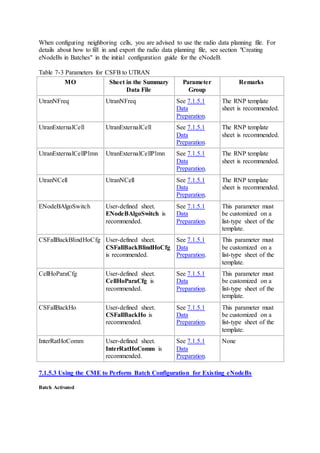
GERAN is performed
CSFB to GERAN
triggered for
emergency calls
1526728710 L.CSFB.E2G.Emergency Number of times CSFB to
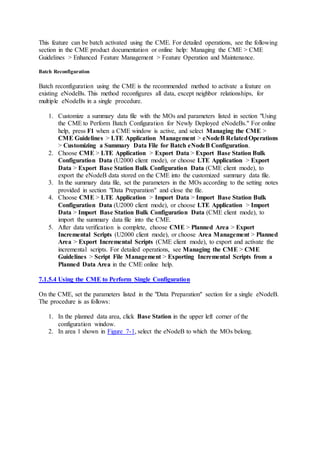
GERAN is triggered for
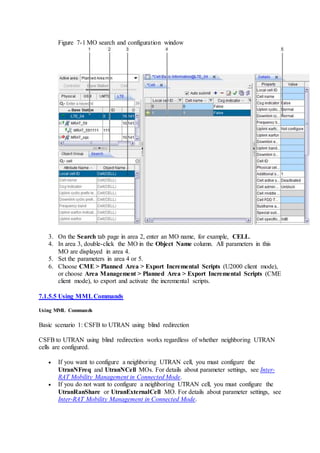
emergency calls
7.8.7 Deactivation
Using the CME to Perform Batch Configuration
Batch reconfiguration using the CME is the recommended method to deactivate a feature on
eNodeBs. This method reconfigures all data, except neighbor relationships, for multiple
eNodeBs in a single procedure. The procedure for feature deactivation is similar to that for
feature activation described in 7.8.5.3 Using the CME to Perform Batch Configuration for
Existing eNodeBs. In the procedure, modify parameters according to Table 7-38.
Table 7-38 Parameters for deactivating CSFB to GERAN
MO Sheet in the
Summary Data File
Parameter Group Remarks
ENodeBAlgoSwitch User-defined sheet HoAlgoSwitch To deactivate CSFB
to GERAN, set
GeranCsfbSwitch
under the
HoAlgoSwitch
parameter to 0.
Using the CME to Perform Single Configuration
On the CME, set parameters according to Table 7-38. For detailed instructions, see 7.8.5.4
Using the CME to Perform Single Configuration described for feature activation.
Using MMLCommands
Run the MOD ENODEBALGOSWITCH command with the
GeranCsfbSwitch(GeranCsfbSwitch) check box cleared under the Handover Algo switch
parameter.
MMLCommand Examples
MOD ENODEBALGOSWITCH: HoAlgoSwitch=GeranCsfbSwitch-0;
7.8.8 Performance Monitoring
CSFB is an end end-to to-end service. The performance counters on the LTE side can only
indicate the success rate of the CSFB procedure on the LTE side, and. they cannot indicate
the success rate of the CSFB procedure on the target side. Therefore, the performance
counters on the LTE side cannot directly show user experience of the CSFB procedure. It is
recommended that you perform drive tests and use the performance counters on the UE side
to indicate the actual user experience of the CSFB procedure.
Related counters are listed in Table 7-39.
Table 7-39 Counters related to the execution of CSFB by the eNodeB
Counter ID Counter Name Description
1526728321 L.CSFB.PrepAtt Number of CSFB indicators received by
the eNodeB
1526728322 L.CSFB.PrepSucc Number of successful CSFB responses
from the eNodeB
Table 7-40 lists the counter related to CSFB to GERAN.
Table 7-40 Counter related to CSFB to GERAN
Counter ID Counter Name Description
1526728324 L.CSFB.E2G Number of procedures for CSFB to GERAN
Table 7-41 lists the counters that indicate whether CSFB is performed through redirection or
through handover.
Table 7-41 Counters related to CSFB through redirection or handover
Counter ID Counter Name Description
1526728498 L.RRCRedirection.E2G.CSFB Number of CSFB-based redirections
from E-UTRAN to GERAN
1526728507 L.IRATHO.E2G.CSFB.PrepAttOut Number of CSFB-based inter-RAT
handover preparation attempts from
E-UTRAN to GERAN
You can check whether CCO with NACC or CCO without NACC is used as the CSFB
mechanism by viewing the counters listed in Table 7-42.
Table 7-42 Counters related to using CCO with NACC or CCO without NACC
Counter ID Counter Name Description
1526729505 L.CCOwithNACC.E2G.CSFB.ExecAttOut Number of CSFB-based
CCO with NACC executions
from E-UTRAN to GERAN
1526729506 L.CCOwithNACC.E2G.CSFB.ExecSuccOut Number of successful
CSFB-based CCOs with
NACC from E-UTRAN to
Counter ID Counter Name Description
GERAN
1526729507 L.CCOwithoutNACC.E2G.CSFB.ExecAttOut Number of CSFB-based
CCO without NACC
executions from E-UTRAN
to GERAN
The CCO success rate can be calculated in the following ways:
 L.CCOwithNACC.E2G.CSFB.ExecSuccOut/
L.CCOwithNACC.E2G.CSFB.ExecAttOut
 L.CCOwithoutNACC.E2G.CSFB.ExecSuccOut/
L.CCOwithoutNACC.E2G.CSFB.ExecAttOut
After the CSFB protection timer expires, the eNodeB may perform a blind redirection to
enter the protection procedure. Table 7-43 lists the related counter. A larger value of this
counter indicates a longer average UE access delay during CSFB.
Table 7-43 Counter related to the number of times that the eNodeB enters the protection
procedure for CSFB
Counter ID Counter Name Description
1526729516 L.RRCRedirection.E2G.CSFB.TimeOut Number of CSFB-based blind
redirections from E-UTRAN to
GERAN caused by CSFB
protection timer expiration
Table 7-44 lists the counters related to CSFB for emergency calls.
Table 7-44 Counters related to CSFB for emergency calls
Counter ID Counter Name Description
1526729513 L.IRATHO.E2G.CSFB.ExecAttOut.Emergency Number of CSFB-based
handover execution
attempts to GERAN
triggered for emergency
calls
1526729514 L.IRATHO.E2G.CSFB.ExecSuccOut.Emergency Number of successful
CSFB-based handover
executions to GERAN
triggered for emergency
calls
CSFB handover success rate for emergency calls =
L.IRATHO.E2G.CSFB.ExecSuccOut.Emergency/L.IRATHO.E2G.CSFB.ExecAttOut.Emerg
ency
7.8.9 Parameter Optimization
The blind-handover-related parameter optimization procedure for CSFB to GERAN is the
same as that for CSFB to UTRAN. For details, see 7.1.9 Parameter Optimization.
The following table lists event-B1-related parameters for CSFB to GERAN in the
CSFallBackHo MO.
Parameter
Name
Parameter ID Data
Source
Setting Notes
Local cell
ID
CSFallBackHo.LocalCellId Network
plan
(negotiation
not
required)
Set this parameter
based on the
network plan.
CSFB
GERAN
EventB1
Trigger
Threshold
CSFallBackHo.CsfbHoGeranB1Thd Network
plan
(negotiation
not
required)
Set this parameter
based on the
network plan. This
parameter specifies
the RSSI threshold
for event B1 in
CSFB to GERAN.
Event B1 is
triggered when the
measured RSSI of
a GERAN cell
reaches the value
of this parameter
and all other
conditions are also
met.
CSFB
Geran
EventB1
Time To
Trig
CSFallBackHo.CsfbHoGeranTimeToTrig Network
plan
(negotiation
not
required)
Set this parameter
based on the
network plan. This
parameter specifies
the time-to-trigger
for event B1 in
CSFB to GERAN.
When CSFB to
GERAN is
required, set this
parameter, which
is used by UEs as
one of the
conditions for
triggering event
B1. When a UE
detects that the
Parameter
Name
Parameter ID Data
Source
Setting Notes
signal quality in at
least one GERAN
cell meets the
entering condition,
it does not
immediately send a
measurement
report to the
eNodeB. Instead,
the UE sends a
measurement
report only when
the signal quality
has been meeting
the entering
condition
throughout a
period defined by
this parameter.
This parameter
helps decrease the
number of
occasionally
triggered event
reports, the
average number of
handovers, and the
number of
incorrect
handovers,
preventing
unnecessary
handovers.
7.9 RIM Procedure from E-UTRAN to GERAN
7.9.1 When to Use RIM Procedure Between E-UTRAN and GERAN
It is recommended that the RIM procedure be performed through the Huawei-proprietary
eCoordinator if the following two conditions are met: 1. Both the eNodeB and the RNC/BSC
are provided by Huawei and are connected to the same eCoordinator. 2. The core network
that the eNodeB and the RNC/BSC are connected to does not support the RIM procedure or
is not enabled with the RIM procedure. To perform the RIM procedure through the
eCoordinator, set ENodeBAlgoSwitch.RimOnEcoSwitch to ON(On).
In other conditions, it is recommended that the RIM procedure be performed through the core
network. In this case, set ENodeBAlgoSwitch.RimOnEcoSwitch to OFF(Off).
7.9.2 Required Information
Check whether the BSC, MME, and SGSN support the RIM procedure, and whether an
eCoordinator has been deployed.
7.9.3 Requirements
Operating Environment
If the RIM procedure is performed through the core network, the core-network equipment
must support this feature:
 If the equipment is provided by Huawei, the version must be SAE1.2.
 If the core-network equipment is provided by another vendor, check with the vendor
whether the equipment supports this feature.
 The BSC, MME, and SGSN must support the RIM procedures. If one of the NEs does
not support, the RIM procedures fail.
NOTE:
In a multioperator core network (MOCN) scenario, the eNodeB preferentially selects
the link for the primary operator when sending an RIM request. If the RIM procedure
fails, the eNodeB no longer attempts to send the RIM request on other links.
If the RIM procedure is performed through the eCoordinator, the RNC/BSC, eNodeB, and
eCoordinator must all be provided by Huawei and with the switch for supporting the RIM
procedures through eCoordinator turned on.
License
The operator has purchased and activated the license for the feature listed in Table 7-45.
Table 7-45 License control item for CSFB to GERAN
Feature
ID
Feature
Name
Model License
Control Item
NE Sales Unit
LOFD-
001034
CSFB to
GERAN
LT1S00CFBG00 CS Fallback to
GERAN
eNodeB per user in RRC
connected mode
7.9.4 Precautions
None
7.9.5 Data Preparation and Feature Activation
7.9.5.1 Data Preparation
This section describes the data that you need to collect for setting parameters. Required data
is data that you must collect for all scenarios. Collect scenario-specific data when necessary
for a specific feature deployment scenario.
There are three types of data sources:
 Network plan (negotiation not required): parameter values planned and set by the
operator
 Network plan (negotiation required): parameter values planned by the operator and
negotiated with the EPC or peer transmission equipment
 User-defined: parameter values set by users
Required Data
The required data is the same as that for LOFD-001033 CS Fallback to UTRAN. For details,
see 7.1.5.1 Data Preparation.
GeranExternalCell: used to configure external GERAN cells. The GeranExternalCell.Rac
parameter must be set.
Scenario-specific Data
The following table describes the parameter that must be set in the ENodeBAlgoSwitch MO
to configure the RIM procedure.
Paramete
r Name
Parameter ID Data
Source
Setting Notes
Support
RIM by
eCoordina
tor Switch
ENodeBAlgoSwitch.RimOnEc
oSwitch
Network
plan
(negotiati
on not
required)
If
ENodeBAlgoSwitch.RimOnEc
oSwitch is set to OFF(Off), the
RIM procedure is performed
through the core network.
If
ENodeBAlgoSwitch.RimOnEc
oSwitch is set to ON(On), the
RIM procedure is performed
through the eCoordinator.
7.9.5.2 Using the CME to Perform Batch Configuration for Newly Deployed eNodeBs
Enter the values of the parameters listed in Table 7-46 in a summary data file, which also
contains other data for the new eNodeBs to be deployed.
Then, import the summary data file into the Configuration Management Express (CME) for
batch configuration. For detailed instructions, see section "Creating eNodeBs in Batches" in
the initial configuration guide for the eNodeB.
The summary data file may be a scenario-specific file provided by the CME or a customized
file, depending on the following conditions:
 The managed objects (MOs) in Table 7-46 are contained in a scenario-specific
summary data file. In this situation, set the parameters in the MOs, and then verify
and save the file.
 Some MOs in Table 7-46 are not contained in a scenario-specific summary data file.
In this situation, customize a summary data file to include the MOs before you can set
the parameters.
Table 7-46 Parameters for the RIM procedure
MO Sheet in the
Summary Data File
Parameter Group Remarks
ENodeBAlgoSwitch User-defined sheet.
ENodeBAlgoSwitch
is recommended.
Support RIM by
eCoordinator Switch
None
7.9.5.3 Using the CME to Perform Batch Configuration for Existing eNodeBs
Batch reconfiguration using the CME is the recommended method to activate a feature on
existing eNodeBs. This method reconfigures all data, except neighbor relationships, for
multiple eNodeBs in a single procedure. The procedure is as follows:
1. Customize a summary data file with the MOs and parameters listed in section "Using
the CME to Perform Batch Configuration for Newly Deployed eNodeBs." For online
help, press F1 when a CME window is active, and select Managing the CME >
CME Guidelines > LTE Application Management > eNodeB RelatedOperations
> Customizing a Summary Data File for Batch eNodeB Configuration.
2. Choose CME > LTE Application > Export Data > Export Base Station Bulk
Configuration Data (U2000 client mode), or choose LTE Application > Export
Data > Export Base Station Bulk Configuration Data (CME client mode), to
export the eNodeB data stored on the CME into the customized summary data file.
3. In the summary data file, set the parameters in the MOs according to the setting notes
provided in section "Data Preparation" and close the file.
4. Choose CME > LTE Application > Import Data > Import Base Station Bulk
Configuration Data (U2000 client mode), or choose LTE Application > Import
Data > Import Base Station Bulk Configuration Data (CME client mode), to
import the summary data file into the CME, and then start the data verification.
5. After data verification is complete, choose CME > Planned Area > Export
Incremental Scripts (U2000 client mode), or choose Area Management > Planned
Area > Export Incremental Scripts (CME client mode), to export and activate the
incremental scripts. For detailed operations, see Managing the CME > CME
Guidelines > Script File Management > Exporting Incremental Scripts from a
Planned Data Area in the CME online help.
7.9.5.4 Using the CME to Perform Single Configuration
On the CME, set the parameters listed in the "Data Preparation" section for a single eNodeB.
The procedure is as follows:
1. In the planned data area, click Base Station in the upper left corner of the
configuration window.
2. In area 1 shown in Figure 7-18, select the eNodeB to which the MOs belong.
Figure 7-18 MO search and configuration window
3. On the Search tab page in area 2, enter an MO name, for example, CELL.
4. In area 3, double-click the MO in the Object Name column. All parameters in this
MO are displayed in area 4.
5. Set the parameters in area 4 or 5.
6. Choose CME > Planned Area > Export Incremental Scripts (U2000 client mode), or
choose Area Management > Planned Area > Export Incremental Scripts (CME client
mode), to export and activate the incremental scripts.
7.9.5.5 Using MMLCommands
Using MML Commands
 Performing the RIM procedure through the core network
Run the MOD ENODEBALGOSWITCH command with the Support RIM by
eCoordinator Switch parameter set to OFF(Off).
 Performing the RIM procedure through the eCoordinator
Run the MOD ENODEBALGOSWITCH command with the Support RIM by
eCoordinator Switch parameter set to ON(On).
MML Command Examples
 Performing the RIM procedure through the core network
MOD ENODEBALGOSWITCH: RimOnEcoSwitch=OFF;
 Performing the RIM procedure through the eCoordinator
MOD ENODEBALGOSWITCH: RimOnEcoSwitch=ON;
7.9.6 Activation Observation
Counter Observation
No matter whether the RIM procedure is performed through the core network or the
eCoordinator, performance counters listed in Table 7-47 can be used to observe whether the
RIM procedure has taken effect.
Table 7-47 Counters related to the RIM procedure between E-UTRAN and GERAN
Counter ID Counter Name Description
1526729661 L.RIM.SI.E2G.Req Number of times the eNodeB
sends a system information
request to a GERAN
1526729662 L.RIM.SI.E2G.Resp Number of times the eNodeB
receives a system information
response from a GERAN
1526729663 L.RIM.SI.E2G.Update Number of times the eNodeB
receives a system information
update from a GERAN
Signaling Tracing Result Observation
If the RIM procedure is performed through the core network, trace signaling messages as
follows:
1. Start an S1 interface tracing task on the eNodeB LMT.
Check whether the eNB DIRECT INFORMATION TRANSFER message containing
the RAN-INFORMATION-REQUEST IE is sent over the S1 interface. If the message
is sent, you can infer that the eNodeB has sent the RIM request successfully.
2. Start a Gb interface tracing task on the BSC LMT.
If after receiving the DIRECT INFORMATION TRANSFER message containing the
RAN-INFORMATION-REQUEST IE, the BSC sends the DIRECT INFORMATION
TRANSFER message containing the RAN-INFORMATION IE to the SGSN, you can
infer that the BSC can response to the RIM request normally.
3. Change the state of the GSM cell.
If the BSC sends the DIRECT INFORMATION TRANSFER message containing the
RAN-INFORMAION IE over the Gb interface, you can infer that the BSC can notify
the eNodeB with the cell state change through the RIM procedure.
If the RIM procedure is performed through the eCoordinator, trace signaling messages as
follows:
1. Start an Se interface tracing task on the eNodeB LMT.
Check whether the ENB DIRECT INFORMATION TRANSFER message containing
the RAN-INFORMATION-REQUEST IE is sent over the Se interface. If the message
is sent, you can infer that the eNodeB has sent the RIM request successfully.
2. Start an Sg interface tracing task on the BSC LMT.
If after receiving the ECO DIRECT INFORMATION TRANSFER message
containing the RAN-INFORMATION-REQUEST IE, the BSC sends the BSC
DIRECT INFORMATION TRANSFER message containing the RAN-
INFORMAION IE to the eCoordinator, you can infer that the BSC can response to
the RIM request normally.
3. Change the state of the GSM cell.
If the BSC sends the BSC DIRECT INFORMATION TRANSFER message
containing the RAN-INFORMATION IE over the Sg interface, you can infer that the
BSC can notify the eNodeB with the cell state change through the RIM procedure.
7.9.7 Deactivation
Using the CME to Perform Batch Configuration
Batch reconfiguration using the CME is the recommended method to deactivate a feature on
eNodeBs. This method reconfigures all data, except neighbor relationships, for multiple
eNodeBs in a single procedure. The procedure for feature deactivation is similar to that for
feature activation described in 7.9.5.3 Using the CME to Perform Batch Configuration for
Existing eNodeBs. In the procedure, modify parameters according to the table listed in the
scenario of E-UTRAN to UTRAN CS/PS steering.
Table 7-48 Parameters for the RIM procedure
MO Sheet in the
Summary Data File
Parameter
Group
Remarks
ENodeBAlgoSwitch User-defined sheet. RimOnEcoSwitch Set this parameter to
MO Sheet in the
Summary Data File
Parameter
Group
Remarks
ENodeBAlgoSwitch
is recommended.
OFF(Off).
Using the CME to Perform Single Configuration
On the CME, set parameters according to Table 7-48. For detailed instructions, see 7.9.5.4
Using the CME to Perform Single Configuration for feature activation.
Using MML Commands
 Performing the RIM procedure through the core network
Run the MOD ENODEBALGOSWITCH command with the Support RIM by
eCoordinator Switch parameter set to ON(On).
 Performing the RIM procedure through the eCoordinator
Run the MOD ENODEBALGOSWITCH command with the Support RIM by
eCoordinator Switch parameter set to OFF(Off).
MMLCommand Examples
 Performing the RIM procedure through the core network
MOD ENODEBALGOSWITCH: RimOnEcoSwitch=ON;
 Performing the RIM procedure through the eCoordinator
MOD ENODEBALGOSWITCH: RimOnEcoSwitch=OFF;
7.9.8 Performance Monitoring
The performance monitoring procedure for this feature is the same as that for CSFB to
GERAN. For details, see 7.8.8 Performance Monitoring.
7.9.9 Parameter Optimization
The parameter optimization procedure for this feature is the same as that for CSFB to
GERAN. For details, see 7.8.9 Parameter Optimization.
7.10 LOFD-001053 Flash CS Fallback to GERAN
This section provides engineering guidelines for LOFD-001053 Flash CS Fallback to
GERAN.
7.10.1 When to Use Flash CS Fallback to GERAN
When LOFD-001034 CS Fallback to GERAN has been enabled, use LOFD-001053 Flash CS
Fallback to GERAN if all the following conditions are met:The E-UTRAN and GERAN
support the RIM with SIB procedure.3GPP Release 9 UEs are used on the live network.The
core networks support the RIM procedure. For policies on whether to use PS handover or PS
redirection for CSFB, see Inter-RAT Mobility Management in Connected Mode. If GERAN
and E-UTRAN cells cover the same area, or the GERAN cell provides better coverage than
the E-UTRAN cell, use CSFB based on blind handover to decrease the CSFB delay.
7.10.2 Required Information
 Collect information about whether LOFD-001034 CS Fallback to GERAN has been
activated.
 Collect the operating frequencies, coverage areas, and configurations of the E-
UTRAN and GERAN cells. Information about coverage areas includes engineering
parameters of sites (such as latitude and longitude), TX power of cell reference
signals (RSs), and neighbor relationship configurations.
 Collect the versions and configurations of the NEs in the E-UTRAN, GERAN, and
core networks, and ensure that they all support CSFB and the RIM procedure. Table
7-49 describes the requirements of flash CSFB to GERAN for the core networks. For
details about processing in Huawei GSM equipment, see Interoperability Between
GSM and LTE in GBSS Feature Documentation.
 Collect the following information about the UEs that support GSM and LTE on the
live network:
o Supported frequency bands
o Whether the UEs support redirection from E-UTRAN to GERAN
o Whether the UEs support PS handover from E-UTRAN to GERAN
o Whether the UEs support GERAN measurements
o Whether the UEs comply with 3GPP Release 9 specifications
 This information is used to configure neighboring GERAN cells and to determine
whether to perform CSFB based on handover or redirection. For details, see Inter-
RAT Mobility Management in Connected Mode.
Table 7-49 Requirements of flash CSFB to GERAN for core networks
NE Requirement
MME Supports CSFB and RIM procedures
SGSN Supports CSFB and RIM procedures
7.10.3 Requirements
Operating Environment
For flash CSFB to GERAN, the eNodeB must collaborate with core-network equipment. If
the core-network equipment is provided by Huawei, the version must be PS9.2 or later. If the
core-network equipment is provided by another vendor, check with the vendor whether the
equipment supports this feature. The core network must support flash CSFB to UTRAN.
License
The operator has purchased and activated the license for the feature listed in Table 7-50.
Table 7-50 License information for flash CSFB to GERAN
Feature ID Feature
Name
Model License
Control Item
NE Sales Unit
LOFD-
001034
CSFB to
GERAN
LT1S00CFBG00 CS Fallback to
GERAN
eNodeB per RRC
Connected User
LOFD-
001053
Flash CSFB
to GERAN
LT1S0FCFBG00 Flash CS
Fallback to
GERAN
eNodeB per RRC
Connected User
NOTE:
If the GERAN uses Huawei devices, evolved network assisted cell change (eNACC) between
E-UTRAN and GERAN for CSFB needs to be enabled on the GERAN.
7.10.4 Precautions
None
7.10.5 Data Preparation and Feature Activation
7.10.5.1 Data Preparation
This section describes the data that you need to collect for setting parameters. Required data
is data that you must collect for all scenarios. Collect scenario-specific data when necessary
for a specific feature deployment scenario.
There are three types of data sources:
 Network plan (negotiation not required): parameter values planned and set by the
operator
 Network plan (negotiation required): parameter values planned by the operator and
negotiated with the EPC or peer transmission equipment
 User-defined: parameter values set by users
Required Data
Before configuring CSFB to GERAN, collect the data related to neighbor relationships with
GERAN cells. This section provides only the information about MOs related to neighboring
GERAN cells and key parameters in these MOs. For more information about how to collect
data for the parameters in these MOs, see Inter-RAT Mobility Management in Connected
Mode Feature Parameter Description.
1. GeranNfreqGroup: used to configure a group of neighboring GERAN frequencies.
2. GeranNfreqGroupArfcn: used to configure a neighboring BCCH frequency in a
GERAN carrier frequency group.
3. GeranExternalCell: used to configure external GERAN cells. The
GeranExternalCell.Rac parameter must be set.
4. GeranExternalCellPlmn: used to configure additional PLMN IDs for each shared
external GERAN cell. This MO is required only if the BTS that provides the external
GERAN cell works in RAN sharing with common carriers mode and multiple
operators share the external GERAN cell.
5. GeranNcell: used to configure the neighboring relationship with a GERAN cell. If a
neighboring GERAN cell supports blind handovers according to the network plan, the
blind-handover priority of the cell must be specified by the
GeranNcell.BlindHoPriority parameter.
Scenario-specific Data
The following table describes the parameters that must be set in the ENodeBAlgoSwitch MO
to set the handover mode and handover algorithm switches for flash CSFB to GERAN.
Parame
ter
Name
Parameter ID Data
Source
Setting Notes
Handov
er Mode
switch
ENodeBAlgoSwitch.HoMod
eSwitch
Network
plan
(negotiat
ion not
required)
Set this parameter based on the network
plan.
Handov
er Algo
switch
ENodeBAlgoSwitch.HoAlgo
Switch
Network
plan
(negotiat
ion not
required)
To activate flash CSFB to GERAN,
select the
GeranCsfbSwitch(GeranCsfbSwitch)
and
GeranFlashCsfbSwitch(GeranFlash
CsfbSwitch) check boxes.
RIM
switch
ENodeBAlgoSwitch.RimSwi
tch
Network
plan
(negotiat
ion not
required)
GERAN_RIM_SWITCH(GERAN
RIM Switch) under this parameter
specifies whether to enable or disable
the RIM procedure that requests event-
driven multiple reports from GERAN
cells.
If this switch is turned on, the eNodeB
can send RAN-INFORMATION-
REQUEST/Multiple Report PDUs to
GERAN cells to request event-driven
multiple reports.
If this switch is turned off, the eNodeB
cannot send RAN-INFORMATION-
REQUEST/Multiple Report PDUs to
GERAN cells.
If this switch is turned off and
GeranFlashCsfbSwitch(GeranFlash
Parame
ter
Name
Parameter ID Data
Source
Setting Notes
CsfbSwitch) under
ENodeBAlgoSwitch.HoAlgoSwitch
is turned on, the eNodeB sends RAN-
INFORMATION-REQUEST/Single
Report PDUs to GERAN cells to
request single reports.
If the GERAN cells support RAN-
INFORMATION-REQUEST/Multiple
Report PDUs, you are advised to select
the
GERAN_RIM_SWITCH(GERAN
RIM Switch) option.
The following table describes the parameters that must be set in the ENodeBAlgoSwitch and
CellHoParaCfg MOs to set eNodeB- and cell-level blind handovers.
Paramete
r Name
Parameter ID Data
Source
Setting Notes
Handover
Mode
switch
ENodeBAlgoSwitch.HoModeSwi
tch
Network
plan
(negotiatio
n not
required)
To activate blind handovers,
select the
BlindHoSwitch(BlindHoSwit
ch) check box under the
parameter. If the
BlindHoSwitch(BlindHoSwit
ch) check box is deselected,
blind handovers for all cells
under the eNodeB are invalid.
Handover
Mode
switch
CellHoParaCfg.HoModeSwitch Network
plan
(negotiatio
n not
required)
To activate blind handovers
for a cell under the eNodeB,
select the
BlindHoSwitch(BlindHoSwit
ch) check box under the
parameter. If the
BlindHoSwitch(BlindHoSwit
ch) check box is deselected,
blind handovers for the cell are
invalid.
The following table describes the parameter that must be set in the S1Interface MO to set the
compliance protocol release of the MME.
Parameter
Name
Parameter ID Data
Source
Setting Notes
MME
Release
S1INTERFACE.MmeRelease Network
plan
(negotiation
not
required)
To activate RIM procedures in
Multiple Report mode, set the
parameter to
Release_R9(Release 9).
The following table describes the parameters that must be set in the CSFallBackBlindHoCfg
MO to set the blind-handover priorities of different RATs for CSFB.
Paramete
r Name
Parameter ID Data
Source
Setting Notes
CN
Operator
ID
CSFallBackBlindHoCfg.CnOperatorId Network
plan
(negotiatio
n not
required)
Set this parameter
based on the
network plan. This
parameter specifies
the ID of the
operator whose
RAT blind-
handover priorities
are to be set.
Highest
priority
InterRat
CSFallBackBlindHoCfg.InterRatHighest
Pri
Network
plan
(negotiatio
n not
required)
Set this parameter
based on the
network plan. This
parameter is set to
UTRAN by default
and specifies the
highest-priority
RAT to be
considered in blind
handovers for
CSFB. For flash
CSFB to GERAN,
set this parameter
to GERAN.
Second
priority
InterRat
CSFallBackBlindHoCfg.InterRatSecondP
ri
Network
plan
(negotiatio
n not
required)
Set this parameter
based on the
network plan. This
parameter is set to
GERAN by default
and specifies the
second-highest-
priority RAT to be
considered in blind
handovers for
CSFB. If the
Paramete
r Name
Parameter ID Data
Source
Setting Notes
highest-priority
RAT has been set
to GERAN, the
second-highest-
priority RAT
cannot be set to
GERAN. Ensure
that this parameter
is set to a different
value from the
InterRatHighestP
ri and
InterRatLowestPr
i parameters.
Lowest
priority
InterRat
CSFallBackBlindHoCfg.InterRatLowestP
ri
Network
plan
(negotiatio
n not
required)
Set this parameter
based on the
network plan. This
parameter is set to
CDMA2000 by
default and
specifies the low-
priority RAT to be
considered in blind
handovers for
CSFB. Ensure that
this parameter is set
to a different value
from the
InterRatHighestP
ri and
InterRatSecondPr
i parameters.
GERAN
LCS
capability
CSFallBackBlindHoCfg.GeranLcsCap Network
plan
(negotiatio
n not
required)
Set this parameter
based on the
network plan. This
parameter specifies
the LCS capability
of the GERAN.
The following table describes the parameter that must be set in the InterRatHoComm MO to
set the maximum number of neighboring UTRAN cells whose system information is sent to
UEs for flash redirections.
Parameter
Name
Parameter ID Data
Source
Setting Notes
Parameter
Name
Parameter ID Data
Source
Setting Notes
Max Geran
cell num in
redirection
InterRatHoComm.CellInfoMaxGeranCellNum Network
plan
(negotiation
not
required)
Set this
parameter
based on the
network plan.
The default
value is 8. If
this
parameter is
set too small,
the flash
CSFB
success rate
decreases
because UEs
may not
receive valid
neighboring
cell system
information.
If this
parameter is
set too large,
the size of an
RRC
connection
release
message
increases and
CSFB may
fail.
7.10.5.2 Using the CME to Perform Batch Configuration for Newly Deployed eNodeBs
Enter the values of the parameters listed in Table 7-51 in a summary data file, which also
contains other data for the new eNodeBs to be deployed.
Then, import the summary data file into the Configuration Management Express (CME) for
batch configuration. For detailed instructions, see section "Creating eNodeBs in Batches" in
the initial configuration guide for the eNodeB.
The summary data file may be a scenario-specific file provided by the CME or a customized
file, depending on the following conditions:
 The managed objects (MOs) in Table 7-51 are contained in a scenario-specific
summary data file. In this situation, set the parameters in the MOs, and then verify
and save the file.
 Some MOs in Table 7-51 are not contained in a scenario-specific summary data file.
In this situation, customize a summary data file to include the MOs before you can set
the parameters.
Table 7-51 Parameters for flash CSFB to GERAN
MO Sheet in the Summary
Data File
Parameter Group Remarks
GeranNfreqGroup GeranNfreqGroup See 7.10.5.1 Data
Preparation.
The RNP
template sheet
is
recommended.
GeranNfreqGroupArfcn GeranNfreqGroupArfcn See 7.10.5.1 Data
Preparation.
The RNP
template sheet
is
recommended.
GeranExternalCell GeranExternalCell See 7.10.5.1 Data
Preparation.
The RNP
template sheet
is
recommended.
GeranExternalCellPlmn GeranExternalCellPlmn See 7.10.5.1 Data
Preparation.
The RNP
template sheet
is
recommended.
GeranNcell GeranNcell See 7.10.5.1 Data
Preparation.
The RNP
template sheet
is
recommended.
S1Interface S1Interface See 7.10.5.1 Data
Preparation.
This
parameter
must be
customized on
a list-type
sheet of the
template.
ENodeBAlgoSwitch User-defined sheet.
ENodeBAlgoSwitch is
recommended.
See 7.10.5.1 Data
Preparation.
This
parameter
must be
customized on
a list-type
sheet of the
template.
CSFallBackBlindHoCfg User-defined sheet.
CSFallBackBlindHoCfg
is recommended.
See 7.10.5.1 Data
Preparation.
This
parameter
must be
customized on
MO Sheet in the Summary
Data File
Parameter Group Remarks
a list-type
sheet of the
template.
InterRatHoComm User-defined sheet.
InterRatHoComm is
recommended.
See 7.10.5.1 Data
Preparation.
None
CSFallBackHo User-defined sheet.
CSFallBackHo is
recommended.
See 7.10.5.1 Data
Preparation.
None
CellHoParaCfg User-defined sheet.
CellHoParaCfg is
recommended.
See 7.10.5.1 Data
Preparation.
This
parameter
must be
customized on
a list-type
sheet of the
template.
7.10.5.3 Using the CME to Perform Batch Configuration for Existing eNodeBs
Batch Activated
This feature can be batch activated using the CME. For detailed operations, see the following
section in the CME product documentation or online help: Managing the CME > CME
Guidelines > Enhanced Feature Management > Feature Operation and Maintenance.
Batch Reconfiguration
Batch reconfiguration using the CME is the recommended method to activate a feature on
existing eNodeBs. This method reconfigures all data, except neighbor relationships, for
multiple eNodeBs in a single procedure.
1. Customize a summary data file with the MOs and parameters listed in section "Using
the CME to Perform Batch Configuration for Newly Deployed eNodeBs." For online
help, press F1 when a CME window is active, and select Managing the CME >
CME Guidelines > LTE Application Management > eNodeB RelatedOperations
> Customizing a Summary Data File for Batch eNodeB Configuration.
2. Choose CME > LTE Application > Export Data > Export Base Station Bulk
Configuration Data (U2000 client mode), or choose LTE Application > Export
Data > Export Base Station Bulk Configuration Data (CME client mode), to
export the eNodeB data stored on the CME into the customized summary data file.
3. In the summary data file, set the parameters in the MOs according to the setting notes
provided in section "Data Preparation" and close the file.
4. Choose CME > LTE Application > Import Data > Import Base Station Bulk
Configuration Data (U2000 client mode), or choose LTE Application > Import
Data > Import Base Station Bulk Configuration Data (CME client mode), to
import the summary data file into the CME.
5. After data verification is complete, choose CME > Planned Area > Export
Incremental Scripts (U2000 client mode), or choose Area Management > Planned
Area > Export Incremental Scripts (CME client mode), to export and activate the
incremental scripts. For detailed operations, see Managing the CME > CME
Guidelines > Script File Management > Exporting Incremental Scripts from a
Planned Data Area in the CME online help.
7.10.5.4 Using the CME to Perform Single Configuration
On the CME, set the parameters listed in the "Data Preparation" section for a single eNodeB.
The procedure is as follows:
1. In the planned data area, click Base Station in the upper left corner of the
configuration window.
2. In area 1 shown in Figure 7-19, select the eNodeB to which the MOs belong.
Figure 7-19 MO search and configuration window
3. On the Search tab page in area 2, enter an MO name, for example, CELL.
4. In area 3, double-click the MO in the Object Name column. All parameters in this
MO are displayed in area 4.
5. Set the parameters in area 4 or 5.
6. Choose CME > Planned Area > Export Incremental Scripts (U2000 client mode), or
choose Area Management > Planned Area > Export Incremental Scripts (CME client
mode), to export and activate the incremental scripts.
7.10.5.5 Using MMLCommands
Using MML Commands
The prerequisite is that CSFB to GERAN has been activated. In addition to the steps in the
CSFB to GERAN using blind redirections or CSFB to GERAN using measurement-based
redirections scenario, perform the following steps:
1. Run the MOD ENODEBALGOSWITCH command with the
GeranFlashCsfbSwitch(GeranFlashCsfbSwitch) check box selected under the
Handover Algo switch parameter and with the GERAN_RIM_SWITCH(GERAN
RIM Switch) check box selected under the RIM switch parameter.
2. Run the MOD S1INTERFACE command with the MMERelease parameter set to
Release_R9(Release 9).
MML Command Examples
MOD ENODEBALGOSWITCH: HoAlgoSwitch=GeranFlashCsfbSwitch-
1,RimSwitch=GERAN_RIM_SWITCH-1;
MOD S1INTERFACE:
S1InterfaceId=2,S1CpBearerId=1,CnOperatorId=0,MmeRelease=Release_R9;
7.10.6 Activation Observation
Signaling Observation
Enable a UE to camp on an E-UTRAN cell and originate a voice call. If so that the UE falls
back to a GERAN cell and completes the call continues, and the RRC Connection Release
message traced in on the Uu interface tracing carries the information of the neighboring
GERAN cell. In this case, flash CSFB to GERAN has been activated successfully.
In this case, flash CSFB to GERAN has been activated successfully. The procedure of flash
CS fallback to GERAN on the E-UTRAN side is the same as the procedure of redirection-
based CS fallback to GERAN. For details, see 7.1.6 Activation Observation. The difference is
that the RRC Connection Release message carries the system information of the neighboring
GERAN cell. For details, see Figure 7-20.
Figure 7-20 The RRC Connection Release message during flash CSFB to GERAN
MMLCommand Observation
Check the status of the RIM procedure towards neighboring GERAN cells by running the
DSP GERANRIMINFO command. If the ID of a neighboring GERAN cell is displayed in
the command output, the eNodeB has obtained the system information of this neighboring
GERAN cell.
Counter Observation
The counter listed in Table 7-52 can be viewed to check whether the feature has taken effect.
Table 7-52 Performance counters for observing flash CSFB to GERAN
Functions Counter ID Counter Name Description
Flash CS Fallback to
GERAN
1526728706 L.FlashCSFB.E2G Number of
procedures for flash
CSFB to GERAN
RIM during flash
CSFB to GERAN
1526729661 L.RIM.SI.E2G.Req Number of times the
eNodeB sends a
system information
request to a GERAN
1526729662 L.RIM.SI.E2G.Resp Number of times the
eNodeB receives a
system information
response from a
GERAN
1526729663 L.RIM.SI.E2G.Update Number of times the
eNodeB receives a
system information
update from a
GERAN
7.10.7 Deactivation
Using the CME to Perform Batch Configuration
Batch reconfiguration using the CME is the recommended method to deactivate a feature on
eNodeBs. This method reconfigures all data, except neighbor relationships, for multiple
eNodeBs in a single procedure. The procedure for feature deactivation is similar to that for
feature activation described in 7.10.5.3 Using the CME to Perform Batch Configuration for
Existing eNodeBs. In the procedure, modify parameters according to Table 7-53.
Table 7-53 Parameters for deactivating flash CSFB to GERAN
MO Sheet in the
Summary Data File
Parameter Group Remarks
ENodeBAlgoSwitch User-defined sheet HoAlgoSwitch Set
GeranFlashCsfbSwitch
under the
HoAlgoSwitch
parameter to 0.
Using the CME to Perform Single Configuration
On the CME, set parameters according to Table 7-53. For detailed instructions, see 7.10.5.4
Using the CME to Perform Single Configuration described for feature activation.
Using MMLCommands
Run the MOD ENODEBALGOSWITCH command with the
GeranFlashCsfbSwitch(GeranFlashCsfbSwitch) check box cleared under the Handover
Algo switch parameter.
MMLCommand Examples
MOD ENODEBALGOSWITCH: HoAlgoSwitch=GeranFlashCsfbSwitch-0;
7.10.8 Performance Monitoring
The performance monitoring procedure for this feature is the same as that for CSFB to
GERAN. For details, see 7.8.8 Performance Monitoring.
7.10.9 Parameter Optimization
The parameter optimization procedure for this feature is the same as that for CSFB to
GERAN. For details, see 7.8.9 Parameter Optimization.
7.11 LOFD-081283 Ultra-Flash CSFB to GERAN
This section provides engineering guidelines for LOFD-081283 Ultra-Flash CSFB to
GERAN.
7.11.1 When to Use This Feature
The LOFD-001034 CS Fallback to GERAN feature is recommended in scenarios where the
eNodeB, MME, and MSC are provided by Huawei, and a proportion of UEs in the live
network support SRVCC from E-UTRAN to GERAN. It is recommended that this feature be
activated in GERAN and E-UTRAN overlapping coverage areas.
7.11.2 Required Information
Before deploying this feature, collect the following information:
 Check whether LOFD-001034 CS Fallback to GERAN has been activated.
 Check whether the eNodeB, MME, and MSC in the network are provided by Huawei
and they all support this feature.
Check whether a proportion of UEs in the live network support SRVCC from E-UTRAN to
GERAN.
7.11.3 Requirements
Operating Environment
This feature is a Huawei-proprietary feature and requires that the eNodeB, MME, and MSC
are provided by Huawei and support this feature. This feature is used with MME11.0 and
MSC11.0.
License
The operator has purchased and activated the license for the feature listed in Table 7-54.
Table 7-54 License information for ultra-flash CSFB to GERAN
Feature
ID
Feature Name Model License
Control
Item
NE Sales Unit
LOFD-
081283
Ultra-Flash CSFB
to GERAN
LT1SUFCSFB20 Ultra-Flash
CSFB to
GERAN
eNodeB per RRC
Connected
User
7.11.4 Precautions
This feature is a Huawei-proprietary feature and is not supported by devices provided by
other vendors. In addition, this feature must first be activated on the BSC, MME, and MSC,
and then be activated on the eNodeB. This is because this feature is triggered by the eNodeB
and this avoids CSFB failures.
7.11.5 Data Preparation and Feature Activation
7.11.5.1 Data Preparation
This section describes the data that you need to collect for setting parameters. Required data
is data that you must collect for all scenarios. Required data is data that you must collect for
all scenarios. Collect scenario-specific data when necessary for a specific feature deployment
scenario.
There are three types of data sources: data sources:
 Network plan (negotiation not required): parameter values planned and set by the
operator
 Network plan (negotiation required): parameter values planned by the operator and
negotiated with the EPC or peer transmission equipment
 User-defined: parameter values set by users
Required Data
The required data is the same as that for LOFD-001034 CS Fallback to GERAN. For details,
see 7.8.5.1 Data Preparation.
Scenario-specific Data
The following table describes the parameters that must be set in the ENodeBAlgoSwitch MO
to set the eNodeB-level handover mode and handover algorithm switches for ultra-flash
CSFB to GERAN.
Param
eter
Name
Parameter ID Data
Source
Setting Notes
Handov
er Algo
switch
ENodeBAlgoSwitch.HoAl
goSwitch
Networ
k plan
(negotia
tion not
required
)
Select the
GeranUltraFlashCsfbSwitch(GeranUltra
FlashCsfbSwitch) option.
The following table describes the parameters that must be set in the CellHoParaCfg MO to
set the cell-level blind handover mode switches for ultra-flash CSFB to GERAN.
Paramete
r Name
Parameter ID Data
Source
Setting Notes
Handover
Mode
switch
CellHoParaCfg.HoModeSwitc
h
Network
plan
(negotiatio
n not
required)
To activate cell-level blind
handovers, select the
BlindHoSwitch(BlindHoSwitc
h) option. To activate blind
handovers, you still need to
activate eNodeB-level blind
handovers.
The following table describes the parameter that must be set in the GeranExternalCell MO
to set the capability of external GERAN cells when some GERAN cells do not support ultra-
flash CSFB to GERAN.
Parameter
Name
Parameter ID Data
Source
Setting Notes
Ultra-
Flash
CSFB
capability
indicator
GeranExternalCell.UltraFlashCsfbInd Network
plan
(negotiation
required)
Clear the
UltraFlashCsfbInd
check box for external
GERAN cells that do
not support ultra-flash
CSFB to GERAN.
The following table describes the parameter that must be set in the CellDrxPara MO to set
the DRX switch for measurements when UEs support DRX-based measurements.
Parameter
Name
Parameter ID Data
Source
Setting Notes
DRX switch
for
measurements
CellDrxPara.DrxForMeasSwitch Network
plan
(negotiatio
n required)
When the network
supports
measurements and
UEs support DRX
Parameter
Name
Parameter ID Data
Source
Setting Notes
measurements well,
measurement
delays are
significantly
reduced and the
customer can
tolerate the impact
on services during
measurements.
To enable the DRX
switch for
measurements, set
DrxForMeasSwitc
h to 1.
Long DRX
Cycle for
Measurement
CellDrxPara.LongDrxCycleForMeas Network
plan
(negotiatio
n required)
This parameter
specifies the length
of the long DRX
cycle specific to
GERAN
measurement.
On Duration
Timer for
Measurement
CellDrxPara.OnDurTimerForMeas Network
plan
(negotiatio
n required)
This parameter
specifies the length
of the On Duration
Timer specific to
GERAN
measurement.
DRX
Inactivity
Timer for
Measurement
CellDrxPara.DrxInactTimerForMeas Network
plan
(negotiatio
n required)
This parameter
specifies the length
of the DRX
Inactivity Timer
specific to GERAN
measurement.
DRX
Retransmissio
n Timer for
Measurement
CellDrxPara.DrxReTxTimerForMeas Network
plan
(negotiatio
n required)
This parameter
specifies the length
of the DRX
Retransmission
Timer specific to
GERAN
measurement.
Short DRX
Switch for
Measurement
CellDrxPara.ShortDrxSwForMeas Network
plan
(negotiatio
n required)
This parameter
specifies whether
short-period DRX
is enabled for
Parameter
Name
Parameter ID Data
Source
Setting Notes
GERAN
measurements.
Short DRX
Cycle for
Measurement
CellDrxPara.ShortDrxCycleForMeas Network
plan
(negotiatio
n required)
This parameter
specifies the length
of the short DRX
cycle specific to
GERAN
measurement.
Short Cycle
Timer for
Measurement
CellDrxPara.ShortCycleTimerForMe
as
Network
plan
(negotiatio
n required)
This parameter
specifies the length
of the Short Cycle
Timer specific to
GERAN
measurement.
The following table describes the parameters that must be set in the
GLOBALPROCSWITCH MO to turn on the UE compatibility switch when UEs do not
support Ultra-Flash CSFB, resulting in UE compatibility problems.
Parameter
Name
Parameter ID Data
Source
Setting Notes
Ue
Compatibilit
y Switch
GlobalProcSwitch.UeCompatSwit
ch
Network
plan
(negotiatio
n required)
Select the
UltraFlashCsfbComOpt
Sw option of the
parameter when UEs on
the network do not support
ultra-flash CSFB.
When the MME provided
by Huawei allows IMEI
whitelist configurations
for ultra-flash CSFB and
the option is selected, the
eNodeB performs ultra-
flash CSFB on UEs in the
IMEI whitelist. Therefore,
delete the UEs that do not
support ultra-flash CSFB
from the whitelist before
selecting the option.
Otherwise, keep the option
unselected.
7.11.5.2 Using the CME to Perform Batch Configuration for Newly Deployed eNodeBs
Enter the values of the parameters listed in Table 7-55 in a summary data file, which also
contains other data for the new eNodeBs to be deployed.
Then, import the summary data file into the Configuration Management Express (CME) for
batch configuration. For detailed instructions, see section "Creating eNodeBs in Batches" in
the initial configuration guide for the eNodeB.
The summary data file may be a scenario-specific file provided by the CME or a customized
file, depending on the following conditions:
 The managed objects (MOs) in Table 7-55 are contained in a scenario-specific
summary data file. In this situation, set the parameters in the MOs, and then verify
and save the file.
 Some MOs in Table 7-55 are not contained in a scenario-specific summary data file.
In this situation, customize a summary data file to include the MOs before you can set
the parameters.
Table 7-55 Parameters for ultra-flash CSFB to UTRAN
MO Sheet in the Summary
Data File
Parameter
Group
Remarks
GeranNfreqGroup GeranNfreqGroup See
7.11.5.1
Data
Preparation.
The RNP template
sheet is
recommended.
GeranNfreqGroupArfcn GeranNfreqGroupArfcn See
7.11.5.1
Data
Preparation.
The RNP template
sheet is
recommended.
GeranExternalCell GeranExternalCell See
7.11.5.1
Data
Preparation.
The RNP template
sheet is
recommended.
GeranExternalCellPlmn GeranExternalCellPlmn See
7.11.5.1
Data
Preparation.
The RNP template
sheet is
recommended.
GeranNcell GeranNcell See
7.11.5.1
Data
Preparation.
The RNP template
sheet is
recommended.
ENodeBAlgoSwitch User-defined sheet.
ENodeBAlgoSwitch is
recommended.
See
7.11.5.1
Data
Preparation.
This parameter
must be
customized on a
list-type sheet of
the template.
MO Sheet in the Summary
Data File
Parameter
Group
Remarks
CellHoParaCfg User-defined sheet.
CellHoParaCfg is
recommended.
See
7.11.5.1
Data
Preparation.
This parameter
must be
customized on a
list-type sheet of
the template.
CSFallBackBlindHoCfg User-defined sheet.
CSFallBackBlindHoCfg
is recommended.
See
7.11.5.1
Data
Preparation.
This parameter
must be
customized on a
list-type sheet of
the template.
CSFallBackHo User-defined sheet.
CSFallBackHo is
recommended.
See
7.11.5.1
Data
Preparation.
This parameter
must be
customized on a
list-type sheet of
the template.
InterRatHoComm User-defined sheet.
InterRatHoComm is
recommended.
See
7.11.5.1
Data
Preparation.
This parameter
must be
customized on a
list-type sheet of
the template.
GlobalProcSwitch User-defined sheet.
GlobalProcSwitch is
recommended.
See
7.11.5.1
Data
Preparation.
This parameter
must be
customized on a
list-type sheet of
the template.
7.11.5.3 Using the CME to Perform Batch Configuration for Existing eNodeBs
Batch Activation
This feature can be batch activated using the CME. For detailed operations, see the following
section in the CME product documentation or online help: Managing the CME > CME
Guidelines > Enhanced Feature Management > Feature Operation and Maintenance.
Batch Reconfiguration
Batch reconfiguration using the CME is the recommended method to activate a feature on
existing eNodeBs. This method reconfigures all data, except neighbor relationships, for
multiple eNodeBs in a single procedure.
1. Customize a summary data file with the MOs and parameters listed in section "Using
the CME to Perform Batch Configuration for Newly Deployed eNodeBs." For online
help, press F1 when a CME window is active, and select Managing the CME >
CME Guidelines > LTE Application Management > eNodeB RelatedOperations
> Customizing a Summary Data File for Batch eNodeB Configuration.
2. Choose CME > LTE Application > Export Data > Export Base Station Bulk
Configuration Data (U2000 client mode), or choose LTE Application > Export
Data > Export Base Station Bulk Configuration Data (CME client mode), to
export the eNodeB data stored on the CME into the customized summary data file.
3. In the summary data file, set the parameters in the MOs according to the setting notes
provided in section "Data Preparation" and close the file.
4. Choose CME > LTE Application > Import Data > Import Base Station Bulk
Configuration Data (U2000 client mode), or choose LTE Application > Import
Data > Import Base Station Bulk Configuration Data (CME client mode), to
import the summary data file into the CME.
5. After data verification is complete, choose CME > Planned Area > Export
Incremental Scripts (U2000 client mode), or choose Area Management > Planned
Area > Export Incremental Scripts (CME client mode), to export and activate the
incremental scripts. For detailed operations, see Managing the CME > CME
Guidelines > Script File Management > Exporting Incremental Scripts from a
Planned Data Area in the CME online help.
7.11.5.4 Using the CME to Perform Single Configuration
On the CME, set the parameters listed in the "Data Preparation" section for a single eNodeB.
The procedure is as follows:
1. In the planned data area, click Base Station in the upper left corner of the
configuration window.
2. In area 1 shown in Figure 7-21, select the eNodeB to which the MOs belong.
Figure 7-21 MO search and configuration window
3. On the Search tab page in area 2, enter an MO name, for example, CELL.
4. In area 3, double-click the MO in the Object Name column. All parameters in this
MO are displayed in area 4.
5. Set the parameters in area 4 or 5.
6. Choose CME > Planned Area > Export Incremental Scripts (U2000 client mode), or
choose Area Management > Planned Area > Export Incremental Scripts (CME client
mode), to export and activate the incremental scripts.
7.11.5.5 Using MMLCommands
Using MML Commands
 Basic scenario
1. Add neighboring GERAN frequencies and neighbor relationships with GERAN cells.
For details about parameter settings, see Inter-RAT Mobility Management in
Connected Mode.
2. Run the MOD ENODEBALGOSWITCH command with the
GeranUltraFlashCsfbSwitch(GeranUltraFlashCsfbSwitch) option of the
Handover Algo switch parameter selected.
3. (Optional) Run the MOD GlobalProcSwitch command with the
IratMeasCfgTransSwitch option of the ProtocolMsgOptSwitch parameter selected
if you need to optimize "G2L Fast Return after Ultra-Flash CSFB to UTRAN" based
on the E-UTRA frequency capability supported by UEs. The eNodeB transfers E-
UTRA frequency information supported by UEs to the BSC during the SRVCC.
4. (Optional) Run the MO GERANEXTERNALCELL command with the Ultra-Flash
CSFB capability indicator parameter set to BOOLEAN_FALSE if some external
GERAN cells do not support ultra-flash CSFB to UTRAN.
5. (Optional) Run the MOD CELLDRXPARA command with the DRX for
Measurement Switch parameter set to ON(On) if UEs support DRX-based
measurements.
 (Optional) Perform the following operation if UE compatibility risks exist after Ultra-
Flash CSFB is activated.
1. Run the MOD GLOBALPROCSWITCH command with the
UltraFlashCsfbComOptSw(UltraFlashCsfbComOptSw) option of the UE
Compatibility Switch parameter selected.
MML Command Examples
 Basic scenario
 MOD ENODEBALGOSWITCH: HoAlgoSwitch= GeranUltraFlashCsfbSwitch-1;
 MOD GlobalProcSwitch: ProtocolMsgOptSwitch=IratMeasCfgTransSwitch-1;
 MOD GERANEXTERNALCELL: Mcc="302", Mnc="220", GeranCellId=2, Lac=12,
UltraFlashCsfbInd=BOOLEAN_TRUE;
MOD CELLDRXPARA: LocalCellId=0,
DrxForMeasSwitch=1;LongDrxCycleForMeas=SF160, OnDurTimerForMeas=PSF2,
DrxInactTimerForMeas=PSF2, DrxReTxTimerForMeas=PSF4,
ShortDrxSwForMeas=1, ShortDrxCycleForMeas=SF20,
ShortCycleTimerForMeas=1;
 (Optional) Perform the following operation if UE compatibility risks exist after Ultra-
Flash CSFB is activated.
MOD GLOBALPROCSWITCH: UeCompatSwitch= UltraFlashCsfbComOptSw-1;
7.11.6 Activation Observation
Signaling Observation
To use signaling tracing to verify whether this feature has been activated, perform the
following steps:
1. As shown in the following figure, the HANDOVER REQUIRED message sent from
the eNodeB to the MME over the S1 interface contains handover request cause values
"cs-fallback-triggered" and "sRVCCHOIndication-cSonly (1)", indicating that a ultra-
flash CSFB to GERAN is triggered successfully.
2. The UE falls back to a GERAN cell and completes the call.
Figure 7-22 HANDOVER REQUIRED message
Counter Observation
The counter listed in the following table can be monitored to check whether the feature has
been activated.
Table 7-56 Performance counters for ultra-flash CSFB to GERAN
Counter ID Counter Name Description
1526733006 L.IRATHO.CSFB.SRVCC.E2G.PrepAttOut Number of SRVCC-based
outgoing handover attempts
from E-UTRAN to GERAN
for ultra-flash CSFB to
GERAN
7.11.7 Deactivation
Using the CME to Perform Batch Configuration
Batch reconfiguration using the CME is the recommended method to deactivate a feature on
eNodeBs. This method reconfigures all data, except neighbor relationships, for multiple
eNodeBs in a single procedure. The procedure for feature deactivation is similar to that for
feature activation described in 7.11.5.3 Using the CME to Perform Batch Configuration for
Existing eNodeBs. In the procedure, modify parameters according to the following table.
Table 7-57 Parameter related to ultra-flash CSFB to GERAN
MO Sheet in the
Summary Data File
Parameter
Group
Setting Notes
ENodeBAlgoSwitch User-defined sheet.
ENodeBAlgoSwitch
is recommended.
HoAlgoSwitch To deactivate the Ultra-Flash
CSFB to GERAN feature
Deselect the
GeranUltraFlashCsfbSwitch
option.
Using the CME to Perform Single Configuration
On the CME, set parameters according to Table 7-57. For detailed instructions, see 7.11.5.4
Using the CME to Perform Single Configuration described for feature activation.
Using MMLCommands
Run the MOD ENODEBALGOSWITCH command with the
GeranUltraFlashCsfbSwitch(GeranUltraFlashCsfbSwitch) option of the Handover Algo
switch parameter deselected.
MMLCommand Examples
MOD ENODEBALGOSWITCH: HoAlgoSwitch=GeranUltraFlashCsfbSwitch-0;
7.11.8 Performance Monitoring
Table 7-58 lists the counters used to monitor the performance of ultra-flash CSFB to GERAN
Table 7-58 Counters related to ultra-flash CSFB to GERAN
Counter ID Counter Name Description
1526733006 L.IRATHO.CSFB.SRVCC.E2G.PrepAttOut Number of SRVCC-
based outgoing
handover attempts from
E-UTRAN to GERAN
for ultra-flash CSFB
1526733007 L.IRATHO.CSFB.SRVCC.E2G.ExecAttOut Number of SRVCC-
based EUTRAN-to-
GERAN outgoing
handover executions
for ultra-flash CSFB to
to GERAN
1526733008 L.IRATHO.CSFB.SRVCC.E2G.ExecSuccOut Number of successful
SRVCC-based
EUTRAN-to-GERAN
outgoing handovers for
ultra-flash CSFB to
GERAN
1526733009 L.IRATHO.CSFB.SRVCC.E2G.MMEAbnormRsp Number of abnormal
responses from the
MME during
EUTRAN-to-GERAN
handovers for ultra-
flash CSFB to GERAN
Success rate of handovers for ultra-fast CSFB to GERAN =
(L.IRATHO.CSFB.SRVCC.E2G.ExecSuccOut -
L.IRATHO.CSFB.SRVCC.E2G.MMEAbnormRsp)/L.IRATHO.CSFB.SRVCC.E2G.ExecAtt
Out
7.11.9 Parameter Optimization
The parameter optimization procedure for this feature is the same as that for CSFB to
GERAN. For details, see 7.8.9 Parameter Optimization.
7.12 LOFD-001069 CS Fallback with LAI to GERAN
This section provides engineering guidelines for LOFD-001069 CS Fallback with LAI to
GERAN.
7.12.1 When to Use CS Fallback with LAI to GERAN
Use LOFD-001069 CS Fallback with LAI to GERAN when both of the following conditions
are met:
 LOFD-001034 CS Fallback to GERAN has been enabled.
 The E-UTRAN cell has neighboring GERAN cells that belong to different PLMNs
and supports inter-PLMN handovers, or the E-UTRAN cell has neighboring GERAN
cells that have different LACs.
If both LOFD-001033 CS Fallback to UTRAN and LOFD-001034 CS Fallback to GERAN
have been enabled, you are advised to enable both LOFD-001069 CS Fallback with LAI to
GERAN and LOFD-001068 CS Fallback with LAI to UTRAN.
7.12.2 Required Information
 Collect information about whether LOFD-001034 CS Fallback to GERAN has been
activated.
 Collect the operating frequencies, coverage areas, and configurations of the E-
UTRAN and GERAN cells. Information about coverage areas includes engineering
parameters of sites (such as latitude and longitude), TX power of cell reference
signals (RSs), and neighbor relationship configurations.
 Collect the versions and configurations of the NEs in the E-UTRAN, GERAN, and
core networks, and ensure that they all support CSFB and the MME supports LAI
delivery. Table 7-59 describes the requirements of CSFB with LAI to GERAN for the
core networks.
Table 7-59 Requirements of CSFB with LAI to GERAN for core networks
NE Requirement
MME Supports:
o SGs interface to the MSC
o LAI selection based on the TAI of
the serving cell
o MSC-initiated paging
o PLMN selection and reselection
o Combined EPS/IMSI attach,
combined EPS/IMSI detach, and
combined TAU/LAU
o CS signaling message routing
o SMS over SGs
o LAI delivery
MSC Supports:
o Combined EPS/IMSI attach
o SMS over SGs
o Paging message forwarding over
the SGs interface
SGSN Does not activate ISR during the
combined RAU/LAU procedure initiated
NE Requirement
by the UE.
 Collect the following information about the UEs that support GSM and LTE on the
live network:
o Supported frequency bands
o Whether the UEs support redirection from E-UTRAN to GERAN
o Whether the UEs support PS handover from E-UTRAN to GERAN
o Whether the UEs support GERAN measurements
This information is used to configure neighboring GERAN cells and to
determine whether to perform CSFB based on handover or redirection. For
details, see Inter-RAT Mobility Management in Connected Mode.
7.12.3 Requirements
Operating Environment
For this feature, the eNodeB must collaborate with core-network equipment. If the core-
network equipment is provided by Huawei, the version must be PS9.2 or later. If the core-
network equipment is provided by another vendor, check with the vendor whether the
equipment supports this feature. The core network must support CSFB with LAI to GERAN.
License
The operator has purchased and activated the license for the feature listed in Table 7-60.
Table 7-60 License information for CSFB with LAI to GERAN
Feature
ID
Feature Name Model License
Control Item
NE Sales Unit
LOFD-
001069
CS Fallback with
LAI to GERAN
LT1S0CSFLG00 CS Fallback
with LAI to
GERAN
eNodeB per RRC
Connected
User
7.12.4 Precautions
None
7.12.5 Data Preparation and Feature Activation
This feature is automatically activated when two conditions are met: The license for this
feature has been purchased. CSFB to GERAN has been activated.
7.12.5.1 Data Preparation
Data preparation for activating CSFB with LAI to GERAN is the same as that for activating
CSFB to GERAN. For details, see 7.8.5.1 Data Preparation.
7.12.5.2 Using the CME to Perform Batch Configuration for Newly Deployed eNodeBs
For details, see 7.8.5.2 Using the CME to Perform Batch Configuration for Newly Deployed
eNodeBs.
7.12.5.3 Using the CME to Perform Batch Configuration for Existing eNodeBs
For details, see 7.8.5.3 Using the CME to Perform Batch Configuration for Existing
eNodeBs.
7.12.5.4 Using the CME to Perform Single Configuration
For details, see 7.8.5.4 Using the CME to Perform Single Configuration.
7.12.5.5 Using MMLCommands
For details, see 7.8.5.6 Using MML Commands.
7.12.6 Activation Observation
The activation observation procedure is as follows:
1. Configure two neighboring GERAN cells with different LAIs for an E-UTRAN cell,
and enable the MME to include only one of the two LAIs in the instructions that will
be delivered to the eNodeB.
2. Ensure that the signal strengths of the two GERAN cells both reach the threshold for
event B1. You can query the threshold by running the LST
INTERRATHOGERANGROUP command.
3. Enable a UE to camp on the E-UTRAN cell and make a voice call.
4. Enable the UE to camp on the E-UTRAN cell and receive a voice call.
You can observe the signaling procedure for CSFB with LAI to GERAN, which is similar to
that for CSFB to GERAN described in 7.9.6 Activation Observation. The difference is that
the Initial Context Setup Request or UE Context Mod Request message carries the LAI that
the MME delivers to the eNodeB, as shown in the following figure:
Figure 7-23 LAI signaling tracing
7.12.7 Deactivation
CSFB with LAI to GERAN is automatically deactivated when its license or CSFB to
GERAN is deactivated. For details about how to deactivate CSFB to GERAN, see 7.8.7
Deactivation.
7.12.8 Performance Monitoring
The performance monitoring procedure for this feature is the same as that for CSFB to
GERAN. For details, see 7.8.8 Performance Monitoring.
7.12.9 Parameter Optimization
The parameter optimization procedure for this feature is the same as that for CSFB to
GERAN. For details, see 7.8.9 Parameter Optimization.
7.13 LOFD-001089 CS Fallback Steering to GERAN
This section provides engineering guidelines for LOFD-001089 CS Fallback Steering to
GERAN.
7.13.1 When to Use CS Fallback Steering to GERAN
Use LOFD-001089 CS Fallback Steering to GERAN to improve the network efficiency when
both of the following conditions are met:
 LOFD-001034 CS Fallback to GERAN has been activated.
 An operator has multiple GERAN frequencies and has different handover policies for
CS-only services and combined CS+PS services.
If the operator owns both UTRAN and GERAN, you can also activate LOFD-001088 CS
Fallback Steering to UTRAN to improve the network efficiency.
7.13.2 Required Information
1. Collect information about whether LOFD-001034 CS Fallback to GERAN has been
activated.
2. Collect the following information about the UEs that support GSM and LTE on the
live network:
o Supported frequency bands
o Whether the UEs support redirection from E-UTRAN to GERAN
o Whether the UEs support PS handover from E-UTRAN to GERAN
o Whether the UEs support CCO from E-UTRAN to GERAN
o Whether the UEs support GERAN measurements
This information is used to configure neighboring GERAN cells and to determine
whether to perform CSFB based on handover, redirection, or CCO. For details, see
Inter-RAT Mobility Management in Connected Mode Feature Parameter Description.
3. Collect information about the frequencies and frequency policies of the GERAN.
Frequency policies must be the same for GERAN and E-UTRAN.
4. If LOFD-001088 CS Fallback Steering to UTRAN is also to be activated, consider the
UTRAN frequencies when making frequency policies.
7.13.3 Requirements
Operating Environment
For CSFB steering to GERAN, the eNodeB must collaborate with core-network equipment. If
the core-network equipment is provided by Huawei, the version must be SAE1.2 or later. If
the core-network equipment is provided by another vendor, check with the vendor whether
the equipment supports this feature. The core network must support CSFB steering to
GERAN.
License
The operator has purchased and activated the license for the feature listed in Table 7-61.
Table 7-61 License information for CSFB steering to GERAN
Feature ID Feature Name Model License
Control
Item
NE Sales Unit
LOFD-001089 CS Fallback
Steering to
GERAN
LT1S0CFBSG00 CS Fallback
Steering to
GERAN
eNodeB per RRC
Connected
User
7.13.4 Precautions
None
7.13.5 Data Preparation and Feature Activation
7.13.5.1 Data Preparation
This section describes the data that you need to collect for setting parameters. Required data
is data that you must collect for all scenarios. Collect scenario-specific data when necessary
for a specific feature deployment scenario.
There are three types of data sources:
 Network plan (negotiation not required): parameter values planned and set by the
operator
 Network plan (negotiation required): parameter values planned by the operator and
negotiated with the EPC or peer transmission equipment
 User-defined: parameter values set by users
Required Data
The required data is the same as that for CS Fallback to GERAN. For details, see 7.8.5.1 Data
Preparation.
Scenario-specific Data
The following table describes the parameter that must be set in the ENodeBAlgoSwitch MO
to enable CSFB steering to GERAN.
Parame
ter
Name
Parameter ID Data
Source
Setting Notes
Handov
er Algo
switch
ENodeBAlgoSwitch.HoAl
goSwitch
Network
plan
(negotiat
ion not
required
)
Select the
GeranCsfbSteeringSwitch(GeranCsfbSt
eeringSwitch) check box under this
parameter.
The following table describes the parameters that must be set in the CSFallBackBlindHoCfg
MO to set RAT priorities for CSFB triggered for RRC_CONNECTED UEs.
Paramete
r Name
Parameter ID Data
Source
Setting Notes
CN
Operator
ID
CSFallBackBlindHoCfg.CnOperatorId Network
plan
(negotiatio
n not
required)
Set this parameter
based on the
network plan. This
parameter identifies
the operator whose
RAT blind-
handover priorities
are to be set.
Highest
priority
InterRat
CSFallBackBlindHoCfg.InterRatHighest
Pri
Network
plan
(negotiatio
n not
required)
Set this parameter
based on the
network plan. This
parameter is set to
UTRAN by default
and specifies the
highest-priority
RAT to be
considered in blind
handovers for
CSFB.
Second
priority
InterRat
CSFallBackBlindHoCfg.InterRatSecondP
ri
Network
plan
(negotiatio
n not
required)
Set this parameter
based on the
network plan. This
parameter is set to
GERAN by default
Paramete
r Name
Parameter ID Data
Source
Setting Notes
and specifies the
second-highest-
priority RAT to be
considered in blind
handovers for
CSFB. Ensure that
this parameter is set
to a different value
from the
InterRatHighestP
ri and
InterRatLowestPr
i parameters.
Lowest
priority
InterRat
CSFallBackBlindHoCfg.InterRatLowestP
ri
Network
plan
(negotiatio
n not
required)
Set this parameter
based on the
network plan. This
parameter is set to
CDMA2000 by
default and
specifies the low-
priority RAT to be
considered in blind
handovers for
CSFB. Ensure that
this parameter is set
to a different value
from the
InterRatHighestP
ri and
InterRatSecondPr
i parameters.
GERAN
LCS
capability
CSFallBackBlindHoCfg.GeranLcsCap Network
plan
(negotiatio
n not
required)
Set this parameter
based on the
network plan. This
parameter specifies
the LCS capability
of the GERAN.
The following table describes the parameters that must be set in the CSFallBackBlindHoCfg
MO to set RAT priorities for CSFB triggered for RRC_IDLE UEs.
Paramete
r Name
Parameter ID Data
Source
Setting Notes
CSFB
Highest
CSFallBackBlindHoCfg.IdleCsfbHighest
Pri
Network
plan
Set this parameter
based on the
Paramete
r Name
Parameter ID Data
Source
Setting Notes
priority
InterRat
for Idle
UE
(negotiatio
n not
required)
network plan. This
parameter is set to
UTRAN by default
and specifies the
high-priority RAT
to be considered in
CSFB for UEs in
idle mode.
CSFB
Second
priority
InterRat
for Idle
UE
CSFallBackBlindHoCfg.IdleCsfbSecond
Pri
Network
plan
(negotiatio
n not
required)
Set this parameter
based on the
network plan. This
parameter is set to
GERAN by default
and specifies the
second-highest-
priority RAT to be
considered in
CSFB for UEs in
idle mode. Ensure
that this parameter
is set to a different
value from the
InterRatHighestP
ri and
InterRatLowestPr
i parameters.
CSFB
Lowest
priority
InterRat
for Idle
UE
CSFallBackBlindHoCfg.IdleCsfbLowestP
ri
Network
plan
(negotiatio
n not
required)
Set this parameter
based on the
network plan. This
parameter is set to
CDMA2000 by
default and
specifies the low-
priority RAT to be
considered in
CSFB for UEs in
idle mode. Ensure
that this parameter
is set to a different
value from the
InterRatHighestP
ri and
InterRatSecondPr
i parameters.
The following table describes the parameter that must be set in the CSFallBackPolicyCfg
MO to set the CSFB policy for RRC_CONNECTED UEs.
Parameter
Name
Parameter ID Data
Source
Setting Notes
CSFB
handover
policy
Configuration
CSFallBackPolicyCfg.CsfbHoPolicyCfg Network
plan
(negotiation
not
required)
Set this parameter
based on the
network plan. The
default values are
REDIRECTION,
CCO_HO, and
PS_HO. You are
advised to set this
parameter based
on the UE
capabilities and
network
capabilities. For
details about how
to select a CSFB
handover policy,
see 4.7 Handover
Execution.
The following table describes the parameter that must be set in the CSFallBackPolicyCfg
MO to set the CSFB policy for RRC_IDLE UEs.
Parameter
Name
Parameter ID Data
Source
Setting Notes
CSFB
handover
policy
Configurati
on for idle
ue
CSFallBackPolicyCfg.IdleModeCsfbHoPoli
cyCfg
Network
plan
(negotiati
on not
required)
Set this
parameter based
on the network
plan. The
default values
are
REDIRECTIO
N, CCO_HO,
and PS_HO.
You are advised
to set this
parameter based
on the UE
capabilities and
network
capabilities. For
details about
how to select a
CSFB handover
Parameter
Name
Parameter ID Data
Source
Setting Notes
policy, see 4.7
Handover
Execution.
7.13.5.2 Using the CME to Perform Batch Configuration for Newly Deployed eNodeBs
Using the CME to Perform Batch Configuration for Newly Deployed eNodeBs
Enter the values of the parameters listed in Table 7-62 in a summary data file, which also
contains other data for the new eNodeBs to be deployed.
Then, import the summary data file into the Configuration Management Express (CME) for
batch configuration. For detailed instructions, see section "Creating eNodeBs in Batches" in
the initial configuration guide for the eNodeB.
The summary data file may be a scenario-specific file provided by the CME or a customized
file, depending on the following conditions:
 The managed objects (MOs) in Table 7-62 are contained in a scenario-specific
summary data file. In this situation, set the parameters in the MOs, and then verify
and save the file.
 Some MOs in Table 7-62 are not contained in a scenario-specific summary data file.
In this situation, customize a summary data file to include the MOs before you can set
the parameters.
Table 7-62 Parameters for CSFB steering to GERAN
MO Sheet in the Summary
Data File
Parameter Group Remarks
ENodeBAlgoSwitch User-defined sheet.
ENodeBAlgoSwitch is
recommended.
Handover Algo switch This
parameter
must be
customized
on a list-type
sheet of the
template.
CSFallBackBlindHoCfg User-defined sheet.
CSFallBackBlindHoCfg
is recommended.
CN Operator ID, Highest
priority InterRat, Second
priority InterRat, Lowest
priority InterRat, CSFB
Highest priority InterRat
for Idle UE, CSFB
Second priority InterRat
for Idle UE, CSFB
Lowest priority InterRat
for Idle UE
This
parameter
must be
customized
on a list-type
sheet of the
template.
MO Sheet in the Summary
Data File
Parameter Group Remarks
CSFallBackPolicyCfg User-defined sheet.
CSFallBackPolicyCfg is
recommended.
CSFB handover policy
Configuration, CSFB
handover policy
Configuration for idle ue
This
parameter
must be
customized
on a list-type
sheet of the
template.
7.13.5.3 Using the CME to Perform Batch Configuration for Existing eNodeBs
Batch reconfiguration using the CME is the recommended method to activate a feature on
existing eNodeBs. This method reconfigures all data, except neighbor relationships, for
multiple eNodeBs in a single procedure. The procedure is as follows:
1. Customize a summary data file with the MOs and parameters listed in section "Using
the CME to Perform Batch Configuration for Newly Deployed eNodeBs." For online
help, press F1 when a CME window is active, and select Managing the CME >
CME Guidelines > LTE Application Management > eNodeB RelatedOperations
> Customizing a Summary Data File for Batch eNodeB Configuration.
2. Choose CME > LTE Application > Export Data > Export Base Station Bulk
Configuration Data (U2000 client mode), or choose LTE Application > Export
Data > Export Base Station Bulk Configuration Data (CME client mode), to
export the eNodeB data stored on the CME into the customized summary data file.
3. In the summary data file, set the parameters in the MOs according to the setting notes
provided in section "Data Preparation" and close the file.
4. Choose CME > LTE Application > Import Data > Import Base Station Bulk
Configuration Data (U2000 client mode), or choose LTE Application > Import
Data > Import Base Station Bulk Configuration Data (CME client mode), to
import the summary data file into the CME, and then start the data verification.
5. After data verification is complete, choose CME > Planned Area > Export
Incremental Scripts (U2000 client mode), or choose Area Management > Planned
Area > Export Incremental Scripts (CME client mode), to export and activate the
incremental scripts. For detailed operations, see Managing the CME > CME
Guidelines > Script File Management > Exporting Incremental Scripts from a
Planned Data Area in the CME online help.
7.13.5.4 Using the CME to Perform Single Configuration
On the CME, set the parameters listed in the "Data Preparation" section for a single eNodeB.
The procedure is as follows:
1. In the planned data area, click Base Station in the upper left corner of the
configuration window.
2. In area 1 shown in Figure 7-24, select the eNodeB to which the MOs belong.
Figure 7-24 MO search and configuration window
3. On the Search tab page in area 2, enter an MO name, for example, CELL.
4. In area 3, double-click the MO in the Object Name column. All parameters in this
MO are displayed in area 4.
5. Set the parameters in area 4 or 5.
6. Choose CME > Planned Area > Export Incremental Scripts (U2000 client mode), or
choose Area Management > Planned Area > Export Incremental Scripts (CME client
mode), to export and activate the incremental scripts.
7.13.5.5 Using MMLCommands
Using MML Commands
The configuration is just an example, and configurations on the live network can differ from
this example. For MML command settings in scenarios where the UTRAN and GERAN
cover the same area but only the GERAN provides contiguous coverage, see 7.6.5 Data
Preparation and Feature Activation.
The prerequisite is that CSFB to GERAN has been activated.
1. Run the MOD ENODEBALGOSWITCH command with the
GeranCsfbSteeringSwitch(GeranCsfbSteeringSwitch) check box selected under
the Handover Algo switch parameter.
2. Run the MOD CSFALLBACKBLINDHOCFG command with the Highest priority
InterRat, Second priority InterRat, CSFB Highest priority InterRat for Idle UE,
and CSFB Second priority InterRat for Idle UE parameters to UTRAN, GERAN,
GERAN, and UTRAN, respectively.
3. Run the MOD CSFALLBACKPOLICYCFG command with the PS_HO check box
selected under the CSFB handover policy Configuration parameter and the
REDIRECTION check box selected under the CSFB handover policy
Configuration for idle ue parameter.
MML Command Examples
MOD ENODEBALGOSWITCH: HoAlgoSwitch=GeranCsfbSteeringSwitch-1;
MOD CSFALLBACKBLINDHOCFG: CnOperatorId=0,
InterRatHighestPri=UTRAN,InterRatSecondPri=GERAN,IdleCsfbHighestPri=GERAN,I
dleCsfbSecondPri=UTRAN;
MOD CSFALLBACKPOLICYCFG: CsfbHoPolicyCfg=REDIRECTION-1&CCO_HO-0&PS_HO-1,
IdleModeCsfbHoPolicyCfg=REDIRECTION-1&CCO_HO-0&PS_HO-0;
7.13.6 Activation Observation
The signaling procedure is the same as that for CSFB to GERAN. After CS Fallback Steering
to GERAN is used, check whether it works as expected.
The activation observation procedure for CSFB steering to GERAN is as follows:
1. Check that the UE supports redirection-based CSFB and handover-based CSFB.
2. Set CSFB policies for RRC_IDLE UEs and RRC_CONNECTED UEs to redirection
and handover, respectively.
3. Enable the UE to initiate a voice call in idle mode and in connected mode.
4. Observe the counters L.CSFB.E2G, L.RRCRedirection.E2G.CSFB, and
L.IRATHO.E2G.CSFB.ExecAttOut. If the values of the counters increase by 2, 1, and
1, respectively, CSFB steering to GERAN has been activated.
If CSFB steering to UTRAN has also been activated, the activation observation procedure is
as follows:
1. Check that the UE supports CSFB to GERAN and CSFB to UTRAN.
2. Set GERAN as the highest-priority RAT for CSFB triggered for RRC_IDLE UEs and
UTRAN as the highest-priority RAT for CSFB triggered for RRC_CONNECTED
UEs.
3. Enable the UE to initiate a voice call in idle mode and in connected mode.
4. Observe the counters L.CSFB.E2W and L.CSFB.E2G. If both the values increase by
1, both CSFB steering to UTRAN and CSFB steering to GERAN have been activated.
7.13.7 Deactivation
Using the CME to Perform Batch Configuration
Batch reconfiguration using the CME is the recommended method to deactivate a feature on
eNodeBs. This method reconfigures all data, except neighbor relationships, for multiple
eNodeBs in a single procedure. The procedure for feature deactivation is similar to that for
feature activation described in 7.13.5.3 Using the CME to Perform Batch Configuration for
Existing eNodeBs. In the procedure, modify parameters according to Table 7-63.
Table 7-63 Parameters for deactivating CSFB steering to GERAN
MO Sheet in the
Summary Data File
Parameter
Group
Remarks
ENodeBAlgoSwitch User-defined sheet.
ENodeBAlgoSwitch
is recommended.
HoAlgoSwitch Set
GeranCsfbSteeringSwitch
under the HoAlgoSwitch
parameter to 0.
Using the CME to Perform Single Configuration
On the CME, set parameters according to Table 7-63. For detailed instructions, see 7.13.5.4
Using the CME to Perform Single Configuration for feature activation.
Using MML Commands
Run the MOD ENODEBALGOSWITCH command with the
GeranCsfbSteeringSwitch(GeranCsfbSteeringSwitch) check box cleared under the
Handover Algo switch parameter.
MMLCommand Examples
MOD ENODEBALGOSWITCH: HoAlgoSwitch=GeranCsfbSteeringSwitch-0;
7.13.8 Performance Monitoring
The performance monitoring procedure for this feature is the same as that for CSFB to
GERAN. For details, see 7.8.8 Performance Monitoring.
7.13.9 Parameter Optimization
The parameter optimization procedure for this feature is the same as that for CSFB to
GERAN. For details, see 7.8.9 Parameter Optimization.
7.14 Troubleshooting
7.14.1 CSFB Calling Procedure Failure
Fault Description
A UE performs cell reselection to an inter-RAT neighboring cell directly after initiating a
voice call in an E-UTRAN cell, and the S1 interface tracing result shows that CSFB is not
triggered.
Fault Handling
1. Create an S1 interface tracing task, use the UE to camp on the E-UTRAN cell again,
and check whether the value of the information element (IE) ePS-attach-type-value is
"combined-attach" in the traced Attach Request message.
o If so, go to 2.
o If not, replace the UE with one that supports combined EPS/IMSI attach, and
try again.
2. Check whether the traced Attach Accept message includes the IE cs-domain-not-
available.
o If it does, go to 3.
o If not, contact Huawei technical support.
3. Contact the vendors of core network NEs to ensure the following:
o Attach procedures to the CS domain are allowed according to the subscription
data on the HSS.
o The core network supports CSFB.
o The SGs interface is correctly configured.
7.14.2 eNodeB Receiving No Measurement Report
Fault Description
An eNodeB delivers an RRC Connection Reconfiguration message for measurement control
to a UE that has initiated a voice call in the LTE network, but the eNodeB does not receive a
measurement report.
Fault Handling
1. Check whether the RRC Connection Reconfiguration message contains B1-related
measurement configurations and whether the information about the inter-RAT
systems in the configuration is correct.
o If it is, go to 2
o If not, rectify the faults and try again.
2. Check whether the coverage of the inter-RAT neighboring cell is satisfactory. If the
coverage is unsatisfactory, adjust B1-related parameters or use CSFB based on blind
handovers.
For details about how to adjust B1-related parameters, see Inter-RAT Mobility
Management in Connected Mode.
7.14.3 CSFB Blind Handover Failure
Fault Description
Even when blind handovers are configured as the preferred choice according to the operator
policies, instead of triggering a blind handover for CSFB, an eNodeB delivers an inter-RAT
measurement configuration to a UE that has initiated a voice call.
Fault Handling
1. Run the LST ENODEBALGOSWITCH command and check the setting of
BlindHoSwitch under the Handover Mode Switch parameter. If BlindHoSwitch is
Off, run the MOD ENODEBALGOSWITCH command with the
BlindHoSwitch(BlindHoSwitch) check box under the Handover Mode Switch
parameter selected.
2. Run the LST CELLHOPARACFG command and check the setting of
BlindHoSwitch under the Handover Mode Switch parameter. If BlindHoSwitch is
Off, run the MOD CELLHOPARACFG command with the
BlindHoSwitch(BlindHoSwitch) check box under the Handover Mode Switch
parameter selected. In addition, check the CSFB mechanism and perform the
following:
o If CSFB to UTRAN is required, go to 3.
o If CSFB to GERAN is required, go to 4.
3. Run the LST UTRANNCELL command and check whether Blind handover
priority is 0 for a neighboring UTRAN cell that is supposed to accept incoming blind
handovers.
o If Blind handover priority is 0, blind handovers to this cell are not allowed.
In this case, run the MOD UTRANNCELL command with the Blind
handover priority parameter set to a value other than 0.
o If Blind handover priority is not 0, contact Huawei technical support.
4. Run the LST GERANNCELL command and check whether Blind handover
priority is 0 for a neighboring GERAN cell that is supposed to accept incoming blind
handovers.
o If Blind handover priority is 0, blind handovers to this cell are not allowed.
In this case, run the MOD GERANNCELL command with the Blind
handover priority parameter set to a value other than 0.
o If Blind handover priority is not 0, contact Huawei technical support.
7.14.4 CSFB Handover Failure
Fault Description
During CSFB to UTRAN procedures with the handover policy set to PS HO, the handover
preparation success rate is low.
Table 7-64 Counters related to the handover preparation success rate
Counter ID Counter Name Description
1526728504 L.IRATHO.E2W.CSFB.PrepAttOut Number of CSFB-based inter-RAT
handover preparation attempts from
E-UTRAN to WCDMA network
1526728505 L.IRATHO.E2W.CSFB.ExecAttOut Number of CSFB-based inter-RAT
handover execution attempts from
E-UTRAN to WCDMA network
Fault Handling
Here uses the CSFB to UTRAN as an example to describe the fault handling procedure.
Similar counters are provided for CSFB to GERAN or to other systems.
1. View the counters listed in Table 7-65 to check the cause for the low handover
preparation success rate.
Table 7-65 Counters related to outgoing handover preparation failures
Counter ID Counter Name Description
1526730076 L.IRATHO.E2W.CSFB.Prep.FailOut.MME Number of
CSFB-based
outgoing
handover
preparation
failures from E-
UTRAN to
WCDMA
network because
of the MME side
causes
1526730077 L.IRATHO.E2W.CSFB.Prep.FailOut.PrepFailure Number of
CSFB-based
outgoing
handover
preparation
failures from E-
UTRAN to
WCDMA
network because
of the response
of handover
preparation
failure from
WCDMA
network
1526730078 L.IRATHO.E2W.CSFB.Prep.FailOut.NoReply Number of
CSFB-based
outgoing
handover
preparation
failures from E-
UTRAN to
WCDMA
network because
of no response
from WCDMA
network
2. Analyze the failure cause based on the values of the preceding counters for each NE.
8 Parameters
Table 8-1 Parameters
MO Parameter
ID
MML
Command
Featur
e ID
Featu
re
Name
Description
eNBRsvd
Para
RsvdSwPara
1
MOD
ENBRSVDP
ARA
LST
ENBRSVDP
ARA
None None Meaning:
Indicates reserved 32-bit switch
parameter 1 that is reserved for
future requirements.
Note on parameter replacement:
Reserved parameters are
temporarily used in patch
versions and will be replaced
with new parameters. For
example, the ID of a new
parameter can signify the
parameter function. Therefore,
avoid using this parameter.
GUI Value Range:
RsvdSwPara1_bit1(ReservedS
witchParameter1_bit1),
RsvdSwPara1_bit2(ReservedS
witchParameter1_bit2),
RsvdSwPara1_bit3(ReservedS
witchParameter1_bit3),
RsvdSwPara1_bit4(ReservedS
witchParameter1_bit4),
RsvdSwPara1_bit5(ReservedS
witchParameter1_bit5),
RsvdSwPara1_bit6(ReservedS
witchParameter1_bit6),
RsvdSwPara1_bit7(ReservedS
witchParameter1_bit7),
RsvdSwPara1_bit8(ReservedS
witchParameter1_bit8),
RsvdSwPara1_bit9(ReservedS
witchParameter1_bit9),
RsvdSwPara1_bit10(ReservedS
witchParameter1_bit10),
RsvdSwPara1_bit11(ReservedS
witchParameter1_bit11),
RsvdSwPara1_bit12(ReservedS
witchParameter1_bit12),
RsvdSwPara1_bit13(ReservedS
MO Parameter
ID
MML
Command
Featur
e ID
Featu
re
Name
Description
witchParameter1_bit13),
RsvdSwPara1_bit14(ReservedS
witchParameter1_bit14),
RsvdSwPara1_bit15(ReservedS
witchParameter1_bit15),
RsvdSwPara1_bit16(ReservedS
witchParameter1_bit16),
RsvdSwPara1_bit17(ReservedS
witchParameter1_bit17),
RsvdSwPara1_bit18(ReservedS
witchParameter1_bit18),
RsvdSwPara1_bit19(ReservedS
witchParameter1_bit19),
RsvdSwPara1_bit20(ReservedS
witchParameter1_bit20),
RsvdSwPara1_bit21(ReservedS
witchParameter1_bit21),
RsvdSwPara1_bit22(ReservedS
witchParameter1_bit22),
RsvdSwPara1_bit23(ReservedS
witchParameter1_bit23),
RsvdSwPara1_bit24(ReservedS
witchParameter1_bit24),
RsvdSwPara1_bit25(ReservedS
witchParameter1_bit25),
RsvdSwPara1_bit26(ReservedS
witchParameter1_bit26),
RsvdSwPara1_bit27(ReservedS
witchParameter1_bit27),
RsvdSwPara1_bit28(ReservedS
witchParameter1_bit28),
RsvdSwPara1_bit29(ReservedS
witchParameter1_bit29),
RsvdSwPara1_bit30(ReservedS
witchParameter1_bit30),
RsvdSwPara1_bit31(ReservedS
witchParameter1_bit31),
RsvdSwPara1_bit32(ReservedS
witchParameter1_bit32)
Unit: None
Actual Value Range:
RsvdSwPara1_bit1,
RsvdSwPara1_bit2,
RsvdSwPara1_bit3,
MO Parameter
ID
MML
Command
Featur
e ID
Featu
re
Name
Description
RsvdSwPara1_bit4,
RsvdSwPara1_bit5,
RsvdSwPara1_bit6,
RsvdSwPara1_bit7,
RsvdSwPara1_bit8,
RsvdSwPara1_bit9,
RsvdSwPara1_bit10,
RsvdSwPara1_bit11,
RsvdSwPara1_bit12,
RsvdSwPara1_bit13,
RsvdSwPara1_bit14,
RsvdSwPara1_bit15,
RsvdSwPara1_bit16,
RsvdSwPara1_bit17,
RsvdSwPara1_bit18,
RsvdSwPara1_bit19,
RsvdSwPara1_bit20,
RsvdSwPara1_bit21,
RsvdSwPara1_bit22,
RsvdSwPara1_bit23,
RsvdSwPara1_bit24,
RsvdSwPara1_bit25,
RsvdSwPara1_bit26,
RsvdSwPara1_bit27,
RsvdSwPara1_bit28,
RsvdSwPara1_bit29,
RsvdSwPara1_bit30,
RsvdSwPara1_bit31,
RsvdSwPara1_bit32
Default Value:
RsvdSwPara1_bit1:Off,
RsvdSwPara1_bit2:Off,
RsvdSwPara1_bit3:Off,
RsvdSwPara1_bit4:Off,
RsvdSwPara1_bit5:Off,
RsvdSwPara1_bit6:Off,
RsvdSwPara1_bit7:Off,
RsvdSwPara1_bit8:Off,
RsvdSwPara1_bit9:Off,
RsvdSwPara1_bit10:Off,
RsvdSwPara1_bit11:Off,
RsvdSwPara1_bit12:Off,
RsvdSwPara1_bit13:Off,
RsvdSwPara1_bit14:Off,
RsvdSwPara1_bit15:Off,
MO Parameter
ID
MML
Command
Featur
e ID
Featu
re
Name
Description
RsvdSwPara1_bit16:Off,
RsvdSwPara1_bit17:Off,
RsvdSwPara1_bit18:Off,
RsvdSwPara1_bit19:Off,
RsvdSwPara1_bit20:Off,
RsvdSwPara1_bit21:Off,
RsvdSwPara1_bit22:Off,
RsvdSwPara1_bit23:Off,
RsvdSwPara1_bit24:Off,
RsvdSwPara1_bit25:Off,
RsvdSwPara1_bit26:Off,
RsvdSwPara1_bit27:Off,
RsvdSwPara1_bit28:Off,
RsvdSwPara1_bit29:Off,
RsvdSwPara1_bit30:Off,
RsvdSwPara1_bit31:Off,
RsvdSwPara1_bit32:Off
GlobalPro
cSwitch
UeCompatS
witch
MOD
GLOBALPR
OCSWITCH
LST
GLOBALPR
OCSWITCH
None None Meaning:
Indicates whether to enable
compatibility optimization
functions for UEs to control the
differentiated handling of
abnormal UEs.
AbnormalUeHandleSwitch:
This option is used to control
whether to enable handling of
abnormal UEs.This function is
enabled only if this option is
selected.
UltraFlashCsfbComOptSw:
This option is used to control
whether to enable the
optimization of UE
incompatibility risks in ultra-
flash CSFB. If this option is
selected, an eNodeB triggers an
ultra-flash CSFB based on the
private IE SRVCC based
eCSFB operation possible that
the MME sends to the eNodeB.
If this option is not selected, the
eNodeB does not trigger an
MO Parameter
ID
MML
Command
Featur
e ID
Featu
re
Name
Description
ultra-flash CSFB procedure
based on this IE.
GUI Value Range:
AbnormalUeHandleSwitch(Ab
normalUeHandleSwitch),
UltraFlashCsfbComOptSw(Ultr
aFlashCsfbComOptSw)
Unit: None
Actual Value Range:
AbnormalUeHandleSwitch,
UltraFlashCsfbComOptSw
Default Value:
AbnormalUeHandleSwitch:Off,
UltraFlashCsfbComOptSw:Off
CellHoPar
aCfg
HoModeSwit
ch
MOD
CELLHOPA
RACFG
LST
CELLHOPA
RACFG
LOFD-
001033
/
LOFD-
001034
/
TDLOF
D-
001033
/
TDLOF
D-
001034
CS
Fallba
ck to
UTR
AN /
CS
Fallba
ck to
GER
AN /
CS
Fallba
ck to
UTR
AN /
CS
Fallba
ck to
GER
AN
Meaning:
Indicates the handover method
switches based on which the
eNodeB determines handover
policies.
BlindHoSwitch: This option
controls whether to enable blind
handovers for CSFB. If both
this option and the
BlindHoSwitch option of the
Handover Mode switch
parameter of the
ENodeBAlgoSwitch MO are
selected, blind handovers for
CSFB are enabled.
GUI Value Range:
BlindHoSwitch(BlindHoSwitch
)
Unit: None
Actual Value Range:
BlindHoSwitch
MO Parameter
ID
MML
Command
Featur
e ID
Featu
re
Name
Description
Default Value:
BlindHoSwitch:Off
GeranExt
ernalCell
UltraFlashCs
fbInd
ADD
GERANEXT
ERNALCEL
L
MOD
GERANEXT
ERNALCEL
L
LST
GERANEXT
ERNALCEL
L
LOFD-
081283
/
TDLOF
D-
081203
Ultra-
Flash
CSFB
to
GER
AN
Meaning: Indicates whether an
external GERAN cell supports
ultra-flash CSFB to GERAN. If
this parameter is set to
BOOLEAN_TRUE, the
external GERAN cell supports
ultra-flash CSFB to GERAN. If
this parameter is set to
BOOLEAN_FALSE, the
external GERAN cell does not
support ultra-flash CSFB to
GERAN.
GUI Value Range:
BOOLEAN_FALSE(False),
BOOLEAN_TRUE(True)
Unit: None
Actual Value Range:
BOOLEAN_FALSE,
BOOLEAN_TRUE
Default Value:
BOOLEAN_TRUE(True)
ENodeBA
lgoSwitch
HoAlgoSwitc
h
MOD
ENODEBAL
GOSWITCH
LST
ENODEBAL
GOSWITCH
LBFD-
002018
01 /
TDLBF
D-
002018
01
LBFD-
002018
02 /
TDLBF
D-
002018
02
LBFD-
002018
Cover
age
Based
Intra-
freque
ncy
Hand
over
Distan
ce
Based
Inter-
freque
ncy
Hand
over
Meaning: Indicates whether to
enable handover algorithms.
The switches are described as
follows:
IntraFreqCoverHoSwitch: If
this switch is on, coverage-
based intra-frequency
handovers are enabled to ensure
service continuity. If this switch
is off, coverage-based intra-
frequency handovers are
disabled.
InterFreqCoverHoSwitch: If
this switch is on, coverage-
based inter-frequency
handovers are enabled to ensure
service continuity. If this switch
is off, coverage-based inter-
MO Parameter
ID
MML
Command
Featur
e ID
Featu
re
Name
Description
04 /
TDLBF
D-
002018
04
LBFD-
002018
05 /
TDLBF
D-
002018
05
LOFD-
001033
/
TDLOF
D-
001033
LOFD-
001034
/
TDLOF
D-
001034
LOFD-
001035
/
TDLOF
D-
001035
LOFD-
001052
/
TDLOF
D-
001052
LOFD-
001053
/
TDLOF
Servic
e
Based
Inter-
freque
ncy
Hand
over
CS
Fallba
ck to
UTR
AN
CS
Fallba
ck to
GER
AN
CS
Fallba
ck to
CDM
A200
0
1xRT
T
Flash
CS
Fallba
ck to
UTR
AN
Flash
CS
Fallba
ck to
GER
AN
CS
Fallba
frequency handovers are
disabled. UtranCsfbSwitch: If
this switch is on, CSFB to
UTRAN is enabled and UEs
can fall back to UTRAN. If this
switch is off, CSFB to UTRAN
is disabled. GeranCsfbSwitch:
If this switch is on, CSFB to
GERAN is enabled and UEs
can fall back to GERAN. If this
switch is off, CSFB to GERAN
is disabled.
Cdma1xRttCsfbSwitch: If this
switch is on, CSFB to
CDMA2000 1xRTT is enabled
and UEs can fall back to
CDMA2000 1xRTT. If this
switch is off, CSFB to
CDMA2000 1xRTT is disabled.
UtranServiceHoSwitch: If this
switch is on, service-based
handovers to UTRAN are
enabled and UEs running a
specific type of services can be
handed over to UTRAN. If this
switch is off, service-based
handovers to UTRAN are
disabled.
GeranServiceHoSwitch: If this
switch is on, service-based
handovers to GERAN are
enabled and UEs running a
specific type of services can be
handed over to GERAN. If this
switch is off, service-based
handovers to GERAN are
disabled.
CdmaHrpdServiceHoSwitch: If
this switch is on, service-based
handovers to CDMA2000
HRPD cells are enabled and
UEs running a specific type of
services can be handed over to
CDMA2000 HRPD cells. If this
switch is off, service-based
handovers to CDMA2000
MO Parameter
ID
MML
Command
Featur
e ID
Featu
re
Name
Description
D-
001053
LOFD-
001088
/
TDLOF
D-
001088
LOFD-
001089
/
TDLOF
D-
001089
LOFD-
001090
/
TDLOF
D-
001090
LOFD-
001019
/
TDLOF
D-
001019
LOFD-
001020
/
TDLOF
D-
001020
LOFD-
001043
/
TDLOF
D-
001043
LOFD-
ck
Steeri
ng to
UTR
AN
CS
Fallba
ck
Steeri
ng to
GER
AN
Enhan
ced
CS
Fallba
ck to
CDM
A200
0
1xRT
T
PS
Inter-
RAT
Mobil
ity
betwe
en E-
UTR
AN
and
UTR
AN
PS
Inter-
RAT
Mobil
ity
betwe
en E-
UTR
HRPD cells are disabled.This
parameter is unavailable in this
version.
Cdma1xRttServiceHoSwitch: If
this switch is on, service-based
handovers to CDMA2000
1xRTT are enabled and UEs
running a specific type of
services can be handed over to
CDMA2000 1xRTT. If this
switch is off, service-based
handovers to CDMA2000
1xRTT are disabled.This
parameter is unavailable in this
version.
UlQualityInterRATHoSwitch:
If this switch is on, UL-quality-
based inter-RAT handovers are
enabled and UEs can be handed
over to inter-RAT cells to
ensure service continuity when
the UL signal quality is poor. If
this switch is off, UL-quality-
based inter-RAT handovers are
disabled. InterPlmnHoSwitch:
If this switch is on, inter-PLMN
handovers are enabled and UEs
can be handed over to cells in
other PLMNs. If this switch is
off, inter-PLMN handovers are
disabled.
UtranFlashCsfbSwitch: This
switch takes effect only when
UtranCsfbSwitch is on. If
UtranFlashCsfbSwitch is on,
flash CSFB to UTRAN is
enabled and the eNodeB sends
system information of candidate
target UTRAN cells to UEs
during redirections. If
UtranFlashCsfbSwitch is off,
flash CSFB to UTRAN is
disabled.
GeranFlashCsfbSwitch: This
switch takes effect only when
GeranCsfbSwitch is on. If
MO Parameter
ID
MML
Command
Featur
e ID
Featu
re
Name
Description
001046
/
TDLOF
D-
001046
LOFD-
001072
/
TDLOF
D-
001072
LOFD-
001073
/
TDLOF
D-
001073
TDLBF
D-
002018
TDLOF
D-
001022
TDLOF
D-
070228
LOFD-
081283
/
TDLOF
D-
081203
LOFD-
070202
/
TDLOF
D-
070202
AN
and
GER
AN
Servic
e
based
inter-
RAT
hando
ver to
UTR
AN
Servic
e
based
inter-
RAT
hando
ver to
GER
AN
Distan
ce
based
inter-
RAT
hando
ver to
UTR
AN
Distan
ce
based
inter-
RAT
hando
ver to
GER
AN
Mobil
GeranFlashCsfbSwitch is on,
flash CSFB to GERAN is
enabled and the eNodeB sends
system information of candidate
target GERAN cells to UEs
during redirections. If
GeranFlashCsfbSwitch is off,
flash CSFB to GERAN is
disabled.
ServiceBasedInterFreqHoSwitc
h: If this switch is on, service-
based inter-frequency
handovers are enabled and UEs
running a specific type of
services can be handed over to
inter-frequency cells. If this
switch is off, service-based
inter-frequency handovers are
disabled.
UlQualityInterFreqHoSwitch: If
this switch is on, UL-quality-
based inter-frequency
handovers are enabled and UEs
can be handed over to inter-
frequency cells to ensure
service continuity when the UL
signal quality is poor. If this
switch is off, UL-quality-based
inter-frequency handovers are
disabled.
CsfbAdaptiveBlindHoSwitch:
This switch takes effect only
when BlindHoSwitch is on. If
CsfbAdaptiveBlindHoSwitch is
on, adaptive blind handovers
for CSFB are enabled and
appropriate handover
mechanisms are selected for
UEs based on their locations. If
CsfbAdaptiveBlindHoSwitch is
off, adaptive blind handovers
for CSFB are disabled.
UtranCsfbSteeringSwitch: If
this switch is on, CSFB steering
to UTRAN is enabled and
CSFB policies for UEs in idle
MO Parameter
ID
MML
Command
Featur
e ID
Featu
re
Name
Description
TDLOF
D-
081223
ity
Mana
geme
nt
Cover
age
Based
Inter-
freque
ncy
Hand
over
SRVC
C to
UTR
AN
Servic
e-
Reque
st
Based
Inter-
freque
ncy
Hand
over
Ultra-
Flash
CSFB
to
GER
AN
Ultra-
Flash
CSFB
to
UTR
AN
Ultra-
Flash
mode can be configured. If this
switch is off, CSFB steering to
UTRAN is disabled.
GeranCsfbSteeringSwitch: If
this switch is on, CSFB steering
to GERAN is enabled and
CSFB policies for UEs in idle
mode can be configured. If this
switch is off, CSFB steering to
GERAN is disabled.
CSFBLoadInfoSwitch: If this
switch is on, load-based CSFB
is enabled and a target cell for
CSFB is selected based on
loads of candidate target cells.
If this switch is off, load-based
CSFB is disabled.
Cdma1XrttEcsfbSwitch: If this
switch is on, eCSFB to
CDMA2000 1xRTT is enabled
and UEs can fall back to
CDMA2000 1xRTT through
handovers. If this switch is off,
eCSFB to CDMA2000 1xRTT
is disabled.
EmcBlindHoA1Switch: If this
switch is on, blind handover
event A1 measurements are
enabled. If a blind handover
event measurement conflicts
with a handover procedure, an
emergency blind handover can
be triggered after the handover
procedure is complete. If this
switch is off, blind handover
event A1 measurements are
disabled. If a blind handover
event measurement conflicts
with a handover procedure, an
emergency blind handover
cannot be triggered.
EmcInterFreqBlindHoSwitch:
If this switch is on, the eNodeB
preferentially performs an inter-
frequency blind handover when
an emergency blind handover is
MO Parameter
ID
MML
Command
Featur
e ID
Featu
re
Name
Description
CSFB
to
UTR
AN
triggered. If this switch is off,
the eNodeB only performs an
inter-RAT blind handover when
an emergency blind handover is
triggered. EPlmnSwitch:
Indicates whether handovers to
neighboring cells under the
equivalent PLMNs (EPLMNs)
are allowed. When inter-PLMN
handovers are allowed,
handovers to neighboring cells
under the EPLMNs are allowed
if this switch is on, and not
allowed if this switch is off.
The EPLMNs are delivered by
the MME to the UE.
ServiceBasedInterFreqHoSwitc
h: If this switch is on, service-
based inter-frequency
handovers are enabled and UEs
running a specific type of
services can be handed over to
inter-frequency cells. If this
switch is off, service-based
inter-frequency handovers are
disabled. This switch takes
effect only for LTE TDD cells.
VoipHoControlSwitch:
Indicates whether the eNodeB
filters out target cells that do
not support VoIP services when
processing intra-RAT
handovers for VoIP services.
The eNodeB filters out such
target cells in the preceding
scenario only when this switch
is on.
UtranUltraFlashCsfbSwitch: In
this switch is on, ultra-flash
CSFB to UTRAN is enabled
and UEs can fall back to
UTRAN based on the ultra-
flash CSFB procedure. If this
switch is off, ultra-flash CSFB
to UTRAN is disabled.
GeranUltraFlashCsfbSwitch: In
MO Parameter
ID
MML
Command
Featur
e ID
Featu
re
Name
Description
this switch is on, ultra-flash
CSFB to GERAN is enabled
and UEs can fall back to
GERAN based on the ultra-
flash CSFB procedure. If this
switch is off, ultra-flash CSFB
to GERAN is disabled.
GUI Value Range:
IntraFreqCoverHoSwitch(Intra
FreqCoverHoSwitch),
InterFreqCoverHoSwitch(Inter
FreqCoverHoSwitch),
UtranCsfbSwitch(UtranCsfbSw
itch),
GeranCsfbSwitch(GeranCsfbS
witch),
Cdma1xRttCsfbSwitch(Cdma2
0001xRttCsfbSwitch),
UtranServiceHoSwitch(UtranSe
rviceHoSwitch),
GeranServiceHoSwitch(GeranS
erviceHoSwitch),
CdmaHrpdServiceHoSwitch(C
dma2000HrpdServiceHoSwitch
),
Cdma1xRttServiceHoSwitch(C
dma20001xRttServiceHoSwitc
h),
UlQualityInterRATHoSwitch(
UlQualityInterRATHoSwitch),
InterPlmnHoSwitch(InterPlmn
HoSwitch),
UtranFlashCsfbSwitch(UtranFl
ashCsfbSwitch),
GeranFlashCsfbSwitch(GeranFl
ashCsfbSwitch),
ServiceBasedInterFreqHoSwitc
h(ServiceBasedInterFreqHoSwi
tch),
UlQualityInterFreqHoSwitch(U
lQualityInterFreqHoSwitch),
CsfbAdaptiveBlindHoSwitch(C
sfbAdaptiveBlindHoSwitch),
UtranCsfbSteeringSwitch(Utran
CsfbSteeringSwitch),
MO Parameter
ID
MML
Command
Featur
e ID
Featu
re
Name
Description
GeranCsfbSteeringSwitch(Gera
nCsfbSteeringSwitch),
CSFBLoadInfoSwitch(CSFBLo
adInfoSwitch),
Cdma1XrttEcsfbSwitch(Cdma1
XrttEcsfbSwitch),
EmcBlindHoA1Switch(EmcBli
ndHoA1Switch),
EmcInterFreqBlindHoSwitch(E
mcInterFreqBlindHoSwitch),
EPlmnSwitch(EPlmnSwitch),
ServiceReqInterFreqHoSwitch(
ServiceReqInterFreqHoSwitch),
VoipHoControlSwitch(VoipHo
ControlSwitch),
UtranUltraFlashCsfbSwitch(Utr
anUltraFlashCsfbSwitch),
GeranUltraFlashCsfbSwitch(Ge
ranUltraFlashCsfbSwitch)
Unit: None
Actual Value Range:
IntraFreqCoverHoSwitch,
InterFreqCoverHoSwitch,
UtranCsfbSwitch,
GeranCsfbSwitch,
Cdma1xRttCsfbSwitch,
UtranServiceHoSwitch,
GeranServiceHoSwitch,
CdmaHrpdServiceHoSwitch,
Cdma1xRttServiceHoSwitch,
UlQualityInterRATHoSwitch,
InterPlmnHoSwitch,
UtranFlashCsfbSwitch,
GeranFlashCsfbSwitch,
ServiceBasedInterFreqHoSwitc
h,
UlQualityInterFreqHoSwitch,
CsfbAdaptiveBlindHoSwitch,
UtranCsfbSteeringSwitch,
GeranCsfbSteeringSwitch,
CSFBLoadInfoSwitch,
Cdma1XrttEcsfbSwitch,
EmcBlindHoA1Switch,
EmcInterFreqBlindHoSwitch,
MO Parameter
ID
MML
Command
Featur
e ID
Featu
re
Name
Description
EPlmnSwitch,
ServiceReqInterFreqHoSwitch,
VoipHoControlSwitch,
UtranUltraFlashCsfbSwitch,
GeranUltraFlashCsfbSwitch
Default Value:
IntraFreqCoverHoSwitch:On,
InterFreqCoverHoSwitch:On,
UtranCsfbSwitch:Off,
GeranCsfbSwitch:Off,
Cdma1xRttCsfbSwitch:Off,
UtranServiceHoSwitch:Off,
GeranServiceHoSwitch:Off,
CdmaHrpdServiceHoSwitch:Of
f,
Cdma1xRttServiceHoSwitch:O
ff,
UlQualityInterRATHoSwitch:O
ff, InterPlmnHoSwitch:Off,
UtranFlashCsfbSwitch:Off,
GeranFlashCsfbSwitch:Off,
ServiceBasedInterFreqHoSwitc
h:Off,
UlQualityInterFreqHoSwitch:O
ff,
CsfbAdaptiveBlindHoSwitch:O
ff,
UtranCsfbSteeringSwitch:Off,
GeranCsfbSteeringSwitch:Off,
CSFBLoadInfoSwitch:Off,
Cdma1XrttEcsfbSwitch:Off,
EmcBlindHoA1Switch:Off,
EmcInterFreqBlindHoSwitch:O
ff, EPlmnSwitch:Off,
ServiceReqInterFreqHoSwitch:
Off, VoipHoControlSwitch:Off,
UtranUltraFlashCsfbSwitch:Off
,
GeranUltraFlashCsfbSwitch:Of
f
CSFallBa
ckBlindH
oCfg
UtranCsfbBli
ndRedirRrSw
MOD
CSFALLBAC
KBLINDHO
LOFD-
001033/
TDLOF
D-
CS
Fallba
ck to
UTR
Meaning: Indicates whether the
eNodeB selects the target
frequency in a round robin (RR)
manner from frequencies with
MO Parameter
ID
MML
Command
Featur
e ID
Featu
re
Name
Description
CFG
LST
CSFALLBAC
KBLINDHO
CFG
001033
LOFD-
001052/
TDLOF
D-
001052
AN
Flash
CS
Fallba
ck to
UTR
AN
the same priority in blind
redirections for CSFB to
UTRAN. If this parameter is set
to ON(On), the function of
target frequency selection in an
RR manner is enabled. If this
parameter is set to OFF(Off),
this function is disabled.
GUI Value Range: OFF(OFF),
ON(ON)
Unit: None
Actual Value Range: OFF, ON
Default Value: OFF(OFF)
CellDrxPa
ra
DrxForMeas
Switch
MOD
CELLDRXP
ARA
LST
CELLDRXP
ARA
LOFD-
081283
/
TDLOF
D-
081203
Ultra-
Flash
CS
Fallba
ck to
GER
AN
Meaning: Indicates whether to
deliver DRX parameters
dedicated for measurement to
UEs performing CSFB-
triggered GSM measurement. If
this parameter is set to OFF, the
eNodeB configures only a
measurement gap for UEs to
perform CSFB-triggered GSM
measurement. If this parameter
is set to ON, the eNodeB
configures both DRX
parameters and measurement
gaps for UEs to perform CSFB-
triggered GSM measurement.
GUI Value Range: OFF(Off),
ON(On)
Unit: None
Actual Value Range: OFF, ON
Default Value: OFF(Off)
ENodeBA
lgoSwitch
HoModeSwit
ch
MOD
ENODEBAL
GOSWITCH
LOFD-
001022
/
TDLOF
SRVC
C to
UTR
Meaning:
Indicates whether to enable or
disable different types of
MO Parameter
ID
MML
Command
Featur
e ID
Featu
re
Name
Description
LST
ENODEBAL
GOSWITCH
D-
001022
LOFD-
001023
/
TDLOF
D-
001023
LOFD-
001033
/
TDLOF
D-
001033
LOFD-
001034
/
TDLOF
D-
001034
LOFD-
001019
/
TDLOF
D-
001019
LOFD-
001020
/
TDLOF
D-
001020
LOFD-
001021
/
TDLOF
D-
001021
TDLOF
AN
SRVC
C to
GER
AN
CS
Fallba
ck to
UTR
AN
CS
Fallba
ck to
GER
AN
PS
Inter-
RAT
Mobil
ity
betwe
en E-
UTR
AN
and
UTR
AN
PS
Inter-
RAT
Mobil
ity
betwe
en E-
UTR
AN
and
GER
AN
PS
handovers, based on which the
eNodeB determines handover
policies.
UtranVoipCapSwitch: If this
switch is on, UTRAN supports
VoIP. If this switch is off,
UTRAN does not support VoIP.
Cdma1xRttVoipCapSwitch: If
this switch is on, CDMA2000
1xRTT supports VoIP. If this
switch is off, CDMA2000
1xRTT does not support VoIP.
UtranPsHoSwitch: If this
switch is on, UTRAN supports
PS handovers. If this switch is
off, UTRAN does not support
PS handovers.
GeranPsHoSwitch: If this
switch is on, GERAN supports
PS handovers. If this switch is
off, GERAN does not support
PS handovers.
CdmaHrpdNonOptimisedHoSw
itch: If this switch is on, non-
optimized handovers to
CDMA2000 HRPD are
enabled. If this switch is off,
non-optimized handovers to
CDMA2000 HRPD are
disabled.
CdmaHrpdOptimisedHoSwitch:
If this switch is turned on,
optimized handovers to
CDMA2000 HRPD are
enabled. If this switch is off,
optimized handovers to
CDMA2000 HRPD are
disabled.
GeranNaccSwitch: This switch
MO Parameter
ID
MML
Command
Featur
e ID
Featu
re
Name
Description
D-
001052
TDLOF
D-
001088
TDLOF
D-
001043
TDLOF
D-
001072
TDLOF
D-
001046
TDLOF
D-
001073
Inter-
RAT
Mobil
ity
betwe
en E-
UTR
AN
and
CDM
A200
0
Flash
CS
Fallba
ck to
UTR
AN
CS
Fallba
ck
Steeri
ng to
UTR
AN
Servic
e
based
Inter-
RAT
hando
ver to
UTR
AN
Distan
ce
based
Inter-
RAT
hando
ver to
UTR
does not take effect if
GeranCcoSwitch is off. If this
switch is on, the GERAN
supports network assisted cell
change (NACC). If this switch
is off, the GERAN does not
support NACC.
GeranCcoSwitch: If this switch
is on, the GERAN supports cell
change order (CCO). If this
switch is off, the GERAN does
not support CCO.
UtranSrvccSwitch: If this
switch is on, the UTRAN
supports SRVCC. If this switch
is off, the UTRAN does not
support SRVCC.
GeranSrvccSwitch: If this
switch is on, the GERAN
supports SRVCC. If this switch
is off, the GERAN does not
support SRVCC.
Cdma1xRttSrvccSwitch: If this
switch is on, the CDMA2000
1xRTT supports SRVCC. If
this switch is off, the
CDMA2000 1xRTT does not
support SRVCC.
UtranRedirectSwitch: If this
switch is on, redirection to
UTRAN is enabled. If this
switch is turned off, redirection
to UTRAN is disabled.
GeranRedirectSwitch: If this
switch is on, redirection to
GERAN is enabled. If this
switch is off, redirection to
GERAN is disabled.
CdmaHrpdRedirectSwitch: If
MO Parameter
ID
MML
Command
Featur
e ID
Featu
re
Name
Description
AN
Servic
e
based
Inter-
RAT
hando
ver to
GER
AN
Distan
ce
based
Inter-
RAT
hando
ver to
GER
AN
this switch is on, redirection to
CDMA2000 HRPD is enabled.
If this switch is off, redirection
to CDMA2000 HRPD is
disabled.
Cdma1xRttRedirectSwitch: If
this switch is on, redirection to
CDMA2000 1xRTT is enabled.
If this switch is off, redirection
to CDMA2000 1xRTT is
disabled.
BlindHoSwitch: If this switch is
on, blind handovers for CSFB
are enabled. If this switch is off,
blind handovers for CSFB are
disabled. If both this option and
the BlindHoSwitch option of
the Handover Mode switch
parameter of the
CellHoParaCfg MO are
selected, blind CSFB handovers
for CSFB are enabled.
LcsSrvccSwitch: If this switch
is on, an SRVCC procedure is
triggered when a UE receives a
CSFB instruction during a VoIP
service. If this switch is off, an
SRVCC procedure is not
triggered when a UE receives a
CSFB instruction during a VoIP
service.
AutoGapSwitch: If this switch
is on and UEs support
automatic measurement gap
configurations on the target
frequency, the eNodeB does not
deliver gap configurations to
UEs. If this switch is off, the
eNodeB delivers gap
configurations to UEs during all
inter-frequency and inter-RAT
MO Parameter
ID
MML
Command
Featur
e ID
Featu
re
Name
Description
measurements.
UeVoipOnHspaCapSwitch: If
this switch is on and the
eNodeB attempts to hand over
UEs using voice services to
UTRAN, the eNodeB checks
UE capabilities when
determining whether PS
handover is applied. UEs must
support voiceOverPS-HS-
UTRA-FDD-r9 if the target
UTRAN cell works in FDD
mode or voiceOverPS-HS-
UTRA-TDD128-r9 if the target
UTRAN cell works in TDD
mode. If this switch is off, the
eNodeB does not check UE
capabilities when handing over
UEs to UTRAN based on PS
handovers.
UtranFddB1CapSwitch: If this
switch is on, the setting of bit
41 of FGI specifying the UE
capability of event B1
measurement on FDD UTRAN
cells must be considered. If this
switch is off, the setting of bit
41 of FGI does not need to be
considered.
CdmaHrpdNonOptMeaHoSwit
ch: If this switch is on,
measurement-based non-
optimized handovers to
CDMA2000 HRPD are
enabled. If this switch is off,
measurement-based non-
optimized handovers to
CDMA2000 HRPD are
disabled.
GUI Value Range:
EutranVoipCapSwitch(EutranV
oipCapSwitch),
MO Parameter
ID
MML
Command
Featur
e ID
Featu
re
Name
Description
UtranVoipCapSwitch(UtranVoi
pCapSwitch),
GeranVoipCapSwitch(GeranVo
ipCapSwitch),
Cdma1xRttVoipCapSwitch(Cd
ma1xRttVoipCapSwitch),
UtranPsHoSwitch(UtranPsHoS
witch),
GeranPsHoSwitch(GeranPsHoS
witch),
CdmaHrpdNonOptimisedHoSw
itch(CdmaHrpdNonOptimisedH
oSwitch),
CdmaHrpdOptimisedHoSwitch
(CdmaHrpdOptimisedHoSwitc
h),
GeranNaccSwitch(GeranNaccS
witch),
GeranCcoSwitch(GeranCcoSwi
tch),
UtranSrvccSwitch(UtranSrvccS
witch),
GeranSrvccSwitch(GeranSrvcc
Switch),
Cdma1xRttSrvccSwitch(Cdma1
xRttSrvccSwitch),
UtranRedirectSwitch(UtranRed
irectSwitch),
GeranRedirectSwitch(GeranRe
directSwitch),
CdmaHrpdRedirectSwitch(Cdm
aHrpdRedirectSwitch),
Cdma1xRttRedirectSwitch(Cd
ma1xRttRedirectSwitch),
BlindHoSwitch(BlindHoSwitch
),
LcsSrvccSwitch(LcsSrvccSwitc
h),
AutoGapSwitch(AutoGapSwitc
h),
UeVoipOnHspaCapSwitch(Ue
VoipOnHspaCapSwitch),
UtranFddB1CapSwitch(UtranF
ddB1CapSwitch),
CdmaHrpdNonOptMeaHoSwit
ch(CdmaHrpdNonOptMeaHoS
MO Parameter
ID
MML
Command
Featur
e ID
Featu
re
Name
Description
witch)
Unit: None
Actual Value Range:
EutranVoipCapSwitch,
UtranVoipCapSwitch,
GeranVoipCapSwitch,
Cdma1xRttVoipCapSwitch,
UtranPsHoSwitch,
GeranPsHoSwitch,
CdmaHrpdNonOptimisedHoSw
itch,
CdmaHrpdOptimisedHoSwitch,
GeranNaccSwitch,
GeranCcoSwitch,
UtranSrvccSwitch,
GeranSrvccSwitch,
Cdma1xRttSrvccSwitch,
UtranRedirectSwitch,
GeranRedirectSwitch,
CdmaHrpdRedirectSwitch,
Cdma1xRttRedirectSwitch,
BlindHoSwitch,
LcsSrvccSwitch,
AutoGapSwitch,
UeVoipOnHspaCapSwitch,
UtranFddB1CapSwitch,
CdmaHrpdNonOptMeaHoSwit
ch
Default Value:
EutranVoipCapSwitch:On,
UtranVoipCapSwitch:Off,
GeranVoipCapSwitch:Off,
Cdma1xRttVoipCapSwitch:Off,
UtranPsHoSwitch:Off,
GeranPsHoSwitch:Off,
CdmaHrpdNonOptimisedHoSw
itch:Off,
CdmaHrpdOptimisedHoSwitch:
Off, GeranNaccSwitch:Off,
GeranCcoSwitch:Off,
UtranSrvccSwitch:Off,
GeranSrvccSwitch:Off,
Cdma1xRttSrvccSwitch:Off,
MO Parameter
ID
MML
Command
Featur
e ID
Featu
re
Name
Description
UtranRedirectSwitch:Off,
GeranRedirectSwitch:Off,
CdmaHrpdRedirectSwitch:Off,
Cdma1xRttRedirectSwitch:Off,
BlindHoSwitch:Off,
LcsSrvccSwitch:Off,
AutoGapSwitch:Off,
UeVoipOnHspaCapSwitch:Off,
UtranFddB1CapSwitch:Off,
CdmaHrpdNonOptMeaHoSwit
ch:Off
UtranNFr
eq
ConnFreqPri
ority
ADD
UTRANNFR
EQ
MOD
UTRANNFR
EQ
LST
UTRANNFR
EQ
LOFD-
001019
/
TDLOF
D-
001019
TDLBF
D-
002018
03
TDLOF
D-
001022
TDLOF
D-
001033
TDLOF
D-
001052
TDLOF
D-
001043
TDLOF
D-
001072
TDLOF
D-
PS
Inter-
RAT
Mobil
ity
betwe
en E-
UTR
AN
and
UTR
AN
Cell
Select
ion
and
Re-
selecti
on
SRVC
C to
UTR
AN
CS
Fallba
ck to
UTR
AN
Flash
CS
Meaning: Indicates the
frequency priority based on
which the eNodeB selects a
target frequency for blind
redirection or contains a
frequency in a measurement
configuration. If a blind
redirection is triggered and the
target neighboring cell is not
specified, the eNodeB selects a
target frequency based on this
priority. If a measurement
configuration is to be delivered,
the eNodeB preferentially
delivers a frequency with the
highest priority. If this priority
is set to 0 for a frequency, this
frequency is not selected as the
target frequency for a blind
redirection. A larger value
indicates a higher priority.
GUI Value Range: 0~8
Unit: None
Actual Value Range: 0~8
Default Value: 0
MO Parameter
ID
MML
Command
Featur
e ID
Featu
re
Name
Description
001078 Fallba
ck to
UTR
AN
Servic
e
based
Inter-
RAT
hando
ver to
UTR
AN
Distan
ce
based
Inter-
RAT
hando
ver to
UTR
AN
E-
UTR
AN to
UTR
AN
CS/PS
steeri
ng
ENodeBA
lgoSwitch
NCellRankin
gSwitch
MOD
ENODEBAL
GOSWITCH
LST
ENODEBAL
GOSWITCH
LOFD-
002002/
TDLOF
D-
002002
LOFD-
001022/
TDLOF
D-
001022
Inter-
RAT
ANR
SRVC
C to
UTR
AN
CS
Fallba
ck to
Meaning: Indicates whether to
enable neighboring cell
ranking. This parameter
consists of the following
switches: GERAN_SWITCH:
Indicates whether the eNodeB
prioritizes measurement
priorities of neighboring
GERAN cells based on the
number of each neighboring
GERAN cell is measured
within a period of time. The
MO Parameter
ID
MML
Command
Featur
e ID
Featu
re
Name
Description
LOFD-
001033/
TDLOF
D-
001033
LOFD-
001052/
TDLOF
D-
001052
LOFD-
001053/
TDLOF
D-
001053
LOFD-
001019/
TDLOF
D-
001019
LOFD-
001043/
TDLOF
D-
001043
LOFD-
001072/
TDLOF
D-
001072
UTR
AN
Flash
CS
Fallba
ck to
UTR
AN
Flash
CS
Fallba
ck to
GER
AN
PS
Inter-
RAT
Mobil
ity
betwe
en E-
UTR
AN
and
UTR
AN
Servic
e
based
inter-
RAT
hando
ver to
UTR
AN
Distan
ce
based
inter-
RAT
hando
eNodeB prioritizes
measurement priorities only
when this switch is on.
UTRAN_SWITCH: Indicates
whether the eNodeB prioritizes
measurement priorities of
neighboring UTRAN cells
based on the number of each
neighboring UTRAN cell is
measured within a period of
time. The eNodeB prioritizes
measurement priorities of
neighboring UTRAN cells
based on the number of each
neighboring UTRAN cell is
measured within a period of
time only when this switch is
on.
GUI Value Range:
GERAN_SWITCH(GREAN
Neighboring Cell Ranking
Switch),
UTRAN_SWITCH(UTRAN
Neighboring Cell Ranking
Switch)
Unit: None
Actual Value Range:
GERAN_SWITCH,
UTRAN_SWITCH
Default Value:
GERAN_SWITCH:Off,
UTRAN_SWITCH:Off
MO Parameter
ID
MML
Command
Featur
e ID
Featu
re
Name
Description
ver to
UTR
AN
UtranNCe
ll
NCellMeasPr
iority
ADD
UTRANNCE
LL
LST
UTRANNCE
LL
LOFD-
002002/
TDLOF
D-
002002
LOFD-
001022/
TDLOF
D-
001022
LOFD-
001033/
TDLOF
D-
001033
LOFD-
001052/
TDLOF
D-
001052
LOFD-
001019/
TDLOF
D-
001019
LOFD-
001043/
TDLOF
D-
001043
LOFD-
001072/
TDLOF
D-
001072
Inter-
RAT
ANR
SRVC
C to
UTR
AN
CS
Fallba
ck to
UTR
AN
Flash
CS
Fallba
ck to
UTR
AN
PS
Inter-
RAT
Mobil
ity
betwe
en E-
UTR
AN
and
UTR
AN
Servic
e
based
inter-
RAT
hando
ver to
Meaning: Indicates the
measurement priority of the
neighboring UTRAN cell. A
larger value indicates a higher
priority. The measurement
priorities can be periodically
and automatically arranged
based on the number of times
that each neighboring UTRAN
cell is measured. The
neighboring UTRAN cells for
UTRAN measurement control,
UTRAN flash blind
redirections, and UTRAN flash-
CSFB-based redirections can be
selected based on the
measurement priorities of
neighboring UTRAN cells.
GUI Value Range: 0~128
Unit: None
Actual Value Range: 0~128
Default Value: 0
MO Parameter
ID
MML
Command
Featur
e ID
Featu
re
Name
Description
UTR
AN
Distan
ce
based
inter-
RAT
hando
ver to
UTR
AN
UtranNCe
ll
CellMeasPrio
rity
ADD
UTRANNCE
LL
MOD
UTRANNCE
LL
LST
UTRANNCE
LL
LOFD-
001019
TDLOF
D-
001022
TDLOF
D-
001033
TDLOF
D-
001052
TDLOF
D-
001019
TDLOF
D-
001043
TDLOF
D-
001072
TDLOF
D-
001078
PS
Inter-
RAT
Mobil
ity
betwe
en E-
UTR
AN
and
UTR
AN
SRVC
C to
UTR
AN
CS
Fallba
ck to
UTR
AN
Flash
CS
Fallba
ck to
UTR
AN
PS
Inter-
Meaning: Indicates the priority
of measurement on the
neighboring UTRAN cell. The
eNodeB preferentially contains
the information about a
neighboring cell with this
priority set to
HIGH_PRIORITY while
delivering a measurement
configuration.
GUI Value Range:
LOW_PRIORITY(Low
Priority),
HIGH_PRIORITY(High
Priority)
Unit: None
Actual Value Range:
LOW_PRIORITY,
HIGH_PRIORITY
Default Value:
LOW_PRIORITY(Low
Priority)
MO Parameter
ID
MML
Command
Featur
e ID
Featu
re
Name
Description
RAT
Mobil
ity
betwe
en E-
UTR
AN
and
UTR
AN
Servic
e
based
Inter-
RAT
hando
ver to
UTR
AN
Distan
ce
based
Inter-
RAT
hando
ver to
UTR
AN
E-
UTR
AN to
UTR
AN
CS/PS
steeri
ng
CellUeMe
asControl
Cfg
MaxUtranFd
dMeasFreqN
um
MOD
CELLUEME
ASCONTRO
LCFG
LST
LOFD-
001019
/
TDLOF
D-
PS
Inter-
RAT
Mobil
ity
betwe
Meaning: Indicates the
maximum number of UTRAN
FDD frequencies that can be
contained in the measurement
control messages delivered for
UEs in RRC_CONNECTED
MO Parameter
ID
MML
Command
Featur
e ID
Featu
re
Name
Description
CELLUEME
ASCONTRO
LCFG
001019
LOFD-
001022
/
TDLOF
D-
001022
LOFD-
001043
/
TDLOF
D-
001043
LOFD-
001072
/
TDLOF
D-
001072
LOFD-
001033
/
TDLOF
D-
001033
en E-
UTR
AN
and
UTR
AN
SRVC
C to
UTR
AN
Servic
e
based
Inter-
RAT
hando
ver to
UTR
AN
Distan
ce
based
Inter-
RAT
hando
ver to
UTR
AN
CS
Fallba
ck to
UTR
AN
state.
GUI Value Range: 1~16
Unit: None
Actual Value Range: 1~16
Default Value: 3
CellUeMe
asControl
Cfg
MaxUtranTd
dMeasFreqN
um
MOD
CELLUEME
ASCONTRO
LCFG
LST
CELLUEME
ASCONTRO
LOFD-
001019
/
TDLOF
D-
001019
LOFD-
PS
Inter-
RAT
Mobil
ity
betwe
en E-
UTR
Meaning: Indicates the
maximum number of UTRAN
TDD frequencies that can be
contained in the measurement
control messages delivered for
UEs in RRC_CONNECTED
state.
MO Parameter
ID
MML
Command
Featur
e ID
Featu
re
Name
Description
LCFG 001022
/
TDLOF
D-
001022
LOFD-
001043
/
TDLOF
D-
001043
LOFD-
001072
/
TDLOF
D-
001072
LOFD-
001033
/
TDLOF
D-
001033
AN
and
UTR
AN
SRVC
C to
UTR
AN
Servic
e
based
Inter-
RAT
hando
ver to
UTR
AN
Distan
ce
based
Inter-
RAT
hando
ver to
UTR
AN
CS
Fallba
ck to
UTR
AN
GUI Value Range: 1~16
Unit: None
Actual Value Range: 1~16
Default Value: 3
CSFallBa
ckHo
CsfbHoUtran
B1ThdRscp
MOD
CSFALLBAC
KHO
LST
CSFALLBAC
KHO
LOFD-
001033
/
TDLOF
D-
001033
CS
Fallba
ck to
UTR
AN
Meaning: Indicates the RSCP
threshold for event B1, which is
used in CS fallback to UTRAN.
When CS fallback to UTRAN
is applicable, this parameter is
set for UEs and used in the
evaluation about whether to
trigger event B1. This
parameter indicates the RSCP
requirement for the UTRAN
MO Parameter
ID
MML
Command
Featur
e ID
Featu
re
Name
Description
cells to be included in the
measurement report. A UE
sends a measurement report
related to event B1 to the
eNodeB when the RSCP in at
least one UTRAN cell exceeds
this threshold and other
triggering conditions are met.
For details, see 3GPP TS
36.331.
GUI Value Range: -120~-25
Unit: dBm
Actual Value Range: -120~-25
Default Value: -106
InterRatH
oComm
InterRatHoUt
ranB1MeasQ
uan
MOD
INTERRATH
OCOMM
LST
INTERRATH
OCOMM
LOFD-
001019
/
TDLOF
D-
001019
LOFD-
001022
/
TDLOF
D-
001022
LOFD-
001033
/
TDLOF
D-
001033
PS
Inter-
RAT
Mobil
ity
betwe
en E-
UTR
AN
and
UTR
AN
SRVC
C to
UTR
AN
CS
Fallba
ck to
UTR
AN
Meaning:
Indicates the quantity to be
measured for handovers to
UTRAN. For details, see 3GPP
TS 36.331. This parameter is
dedicated to UTRAN FDD. The
RSCP values are relatively
stable, while the ECN0 values
may vary with the network
load. The value BOTH applies
only to UEs complying with
3GPP Release 10. For UEs
complying with 3GPP Release
8 or 9, the value BOTH takes
the same effect as the value
RSCP. In QoE-based
handovers, this parameter does
not apply to UEs complying
with 3GPP Release 8 or 9 and
the measurement quantity is
fixed to ECN0 for such UEs.
If this parameter is set to RSCP,
the eNodeB delivers RSCP-
based UTRAN measurement
configurations to UEs. If this
MO Parameter
ID
MML
Command
Featur
e ID
Featu
re
Name
Description
parameter is set to ECN0, the
eNodeB delivers ECN0-based
UTRAN measurement
configurations to UEs. If this
parameter is set to BOTH, the
eNodeB delivers both RSCP-
and ECN0-based UTRAN
measurement configurations to
UEs complying with 3GPP
Release 10.
GUI Value Range: RSCP,
ECN0, BOTH
Unit: None
Actual Value Range: RSCP,
ECN0, BOTH
Default Value: ECN0
CSFallBa
ckHo
CsfbHoUtran
B1ThdEcn0
MOD
CSFALLBAC
KHO
LST
CSFALLBAC
KHO
LOFD-
001033
/
TDLOF
D-
001033
CS
Fallba
ck to
UTR
AN
Meaning: Indicates the Ec/N0
threshold for event B1, which is
used in CS fallback to UTRAN.
When CS fallback to UTRAN
is required, this parameter is set
for UEs and used in the
evaluation about whether to
trigger event B1. This
parameter indicates the Ec/N0
requirement for the UTRAN
cells to be included in the
measurement report. A UE
sends a measurement report
related to event B1 to the
eNodeB when the Ec/N0 in at
least one UTRAN cell exceeds
this threshold and other
triggering conditions are met.
For a cell with large signal
fading variance, set this
parameter to a large value to
prevent unnecessary handovers.
For a cell with small signal
fading variance, set this
parameter to a small value to
MO Parameter
ID
MML
Command
Featur
e ID
Featu
re
Name
Description
ensure timely handovers. For
details, see 3GPP TS 36.331.
GUI Value Range: -48~0
Unit: 0.5dB
Actual Value Range: -24~0
Default Value: -24
CSFallBa
ckHo
CsfbHoUtran
TimeToTrig
MOD
CSFALLBAC
KHO
LST
CSFALLBAC
KHO
LOFD-
001033
/
TDLOF
D-
001033
CS
Fallba
ck to
UTR
AN
Meaning: Indicates the time-to-
trigger for event B1 that is used
in CS fallback to UTRAN.
When CS fallback to UTRAN
is applicable, this parameter is
set for UEs and used in the
evaluation of whether to trigger
event B1. When detecting that
the signal quality in at least one
UTRAN cell meets the entering
condition, the UE does not send
a measurement report to the
eNodeB immediately. Instead,
the UE sends a report only
when the signal quality
continuously meets the entering
condition during the time-to-
trigger. This parameter helps
decrease the number of
occasionally triggered event
reports, the average number of
handovers, and the number of
wrong handovers, and thus
helps to prevent unnecessary
handovers. For details, see
3GPP TS 36.331.
GUI Value Range: 0ms, 40ms,
64ms, 80ms, 100ms, 128ms,
160ms, 256ms, 320ms, 480ms,
512ms, 640ms, 1024ms,
1280ms, 2560ms, 5120ms
Unit: ms
MO Parameter
ID
MML
Command
Featur
e ID
Featu
re
Name
Description
Actual Value Range: 0ms,
40ms, 64ms, 80ms, 100ms,
128ms, 160ms, 256ms, 320ms,
480ms, 512ms, 640ms,
1024ms, 1280ms, 2560ms,
5120ms
Default Value: 40ms
CSFallBa
ckHo
BlindHoA1T
hdRsrp
MOD
CSFALLBAC
KHO
LST
CSFALLBAC
KHO
LOFD-
001052
/
TDLOF
D-
001052
LOFD-
001053
/
TDLOF
D-
001053
Flash
CS
Fallba
ck to
UTR
AN
Flash
CS
Fallba
ck to
GER
AN
Meaning: Indicates the
reference signal received power
(RSRP) threshold for event A1
associated with CSFB-triggered
adaptive blind handovers. This
parameter is set for a UE as a
triggering condition of event
A1 measurement related to a
CSFB-triggered adaptive blind
handover. This parameter
specifies the RSRP threshold of
the serving cell above which a
CSFB-triggered adaptive blind
handover is triggered. If the
RSRP value measured by a UE
exceeds this threshold, the UE
submits a measurement report
related to event A1.
GUI Value Range: -140~-43
Unit: dBm
Actual Value Range: -140~-43
Default Value: -80
CSFallBa
ckBlindH
oCfg
InterRatHigh
estPri
MOD
CSFALLBAC
KBLINDHO
CFG
LST
CSFALLBAC
KBLINDHO
CFG
LOFD-
001033
/
TDLOF
D-
001033
LOFD-
001034
/
TDLOF
CS
Fallba
ck to
UTR
AN
CS
Fallba
ck to
GER
Meaning:
Indicates the highest-priority
RAT for handovers. It is
UTRAN by default. If this
parameter is set to UTRAN,
GERAN, or CDMA2000, the
highest-priority RAT is
UTRAN, GERAN, or
CDMA2000, respectively.
MO Parameter
ID
MML
Command
Featur
e ID
Featu
re
Name
Description
D-
001034
LOFD-
001035
/
TDLOF
D-
001035
LOFD-
001019
/
TDLOF
D-
001019
LOFD-
001020
/
TDLOF
D-
001020
LOFD-
001021
TDLOF
D-
001052
TDLOF
D-
001053
TDLOF
D-
001090
TDLOF
D-
001043
TDLOF
D-
AN
CS
Fallba
ck to
CDM
A200
0
1xRT
T
PS
Inter-
RAT
Mobil
ity
betwe
en E-
UTR
AN
and
UTR
AN
PS
Inter-
RAT
Mobil
ity
betwe
en E-
UTR
AN
and
GER
AN
PS
Inter-
RAT
Mobil
ity
betwe
en E-
UTR
AN
The value CDMA2000 is
invalid in the current version.
Therefore, avoid setting this
parameter to CDMA2000.
GUI Value Range: UTRAN,
GERAN, CDMA2000
Unit: None
Actual Value Range: UTRAN,
GERAN, CDMA2000
Default Value: UTRAN
MO Parameter
ID
MML
Command
Featur
e ID
Featu
re
Name
Description
001072
TDLOF
D-
001046
TDLOF
D-
001073
and
CDM
A200
0
Flash
CS
Fallba
ck to
UTR
AN
Flash
CS
Fallba
ck to
GER
AN
Enhan
ced
CS
Fallba
ck to
CDM
A200
0
1xRT
T
Servic
e
based
Inter-
RAT
hando
ver to
UTR
AN
Distan
ce
based
Inter-
RAT
hando
MO Parameter
ID
MML
Command
Featur
e ID
Featu
re
Name
Description
ver to
UTR
AN
Servic
e
based
Inter-
RAT
hando
ver to
GER
AN
Distan
ce
based
Inter-
RAT
hando
ver to
GER
AN
CSFallBa
ckBlindH
oCfg
InterRatSeco
ndPri
MOD
CSFALLBAC
KBLINDHO
CFG
LST
CSFALLBAC
KBLINDHO
CFG
LOFD-
001033
/
TDLOF
D-
001033
LOFD-
001034
/
TDLOF
D-
001034
LOFD-
001035
/
TDLOF
D-
001035
LOFD-
CS
Fallba
ck to
UTR
AN
CS
Fallba
ck to
GER
AN
CS
Fallba
ck to
CDM
A200
0
1xRT
T
PS
Meaning:
Indicates the medium-priority
RAT for handovers. It is
GERAN by default. If this
parameter is set to UTRAN,
GERAN, or CDMA2000, the
medium-priority RAT is
UTRAN, GERAN, or
CDMA2000, respectively. If
this parameter is set to NULL,
no medium-priority RAT is
specified and only the highest-
priority RAT can be selected
for handovers.
The value CDMA2000 is
invalid in the current version.
Therefore, avoid setting this
parameter to CDMA2000.
GUI Value Range: UTRAN,
MO Parameter
ID
MML
Command
Featur
e ID
Featu
re
Name
Description
001019
/
TDLOF
D-
001019
LOFD-
001020
/
TDLOF
D-
001020
LOFD-
001021
TDLOF
D-
001052
TDLOF
D-
001053
TDLOF
D-
001090
TDLOF
D-
001043
TDLOF
D-
001072
TDLOF
D-
001046
TDLOF
D-
001073
Inter-
RAT
Mobil
ity
betwe
en E-
UTR
AN
and
UTR
AN
PS
Inter-
RAT
Mobil
ity
betwe
en E-
UTR
AN
and
GER
AN
PS
Inter-
RAT
Mobil
ity
betwe
en E-
UTR
AN
and
CDM
A200
0
Flash
CS
Fallba
ck to
UTR
AN
GERAN, CDMA2000, NULL
Unit: None
Actual Value Range: UTRAN,
GERAN, CDMA2000, NULL
Default Value: GERAN
MO Parameter
ID
MML
Command
Featur
e ID
Featu
re
Name
Description
Flash
CS
Fallba
ck to
GER
AN
Enhan
ced
CS
Fallba
ck to
CDM
A200
0
1xRT
T
Servic
e
based
Inter-
RAT
hando
ver to
UTR
AN
Distan
ce
based
Inter-
RAT
hando
ver to
UTR
AN
Servic
e
based
Inter-
RAT
hando
ver to
GER
MO Parameter
ID
MML
Command
Featur
e ID
Featu
re
Name
Description
AN
Distan
ce
based
Inter-
RAT
hando
ver to
GER
AN
CSFallBa
ckBlindH
oCfg
InterRatLowe
stPri
MOD
CSFALLBAC
KBLINDHO
CFG
LST
CSFALLBAC
KBLINDHO
CFG
LOFD-
001033
/
TDLOF
D-
001033
LOFD-
001034
/
TDLOF
D-
001034
LOFD-
001035
/
TDLOF
D-
001035
LOFD-
001019
/
TDLOF
D-
001019
LOFD-
001020
/
TDLOF
D-
CS
Fallba
ck to
UTR
AN
CS
Fallba
ck to
GER
AN
CS
Fallba
ck to
CDM
A200
0
1xRT
T
PS
Inter-
RAT
Mobil
ity
betwe
en E-
UTR
AN
and
UTR
AN
Meaning:
Indicates the lowest-priority
RAT for handovers. It is
CDMA2000 by default. If this
parameter is set to UTRAN,
GERAN, or CDMA2000, the
lowest-priority RAT is
UTRAN, GERAN, or
CDMA2000, respectively. If
this parameter is set to NULL,
no lowest-priority RAT is
specified and only the highest-
or medium-priority RAT can be
selected for handovers.
The value CDMA2000 is
invalid in the current version.
Therefore, avoid setting this
parameter to CDMA2000.
GUI Value Range: UTRAN,
GERAN, CDMA2000, NULL
Unit: None
Actual Value Range: UTRAN,
GERAN, CDMA2000, NULL
Default Value: CDMA2000
MO Parameter
ID
MML
Command
Featur
e ID
Featu
re
Name
Description
001020
LOFD-
001021
TDLOF
D-
001052
TDLOF
D-
001053
TDLOF
D-
001090
TDLOF
D-
001043
TDLOF
D-
001072
TDLOF
D-
001046
TDLOF
D-
001073
PS
Inter-
RAT
Mobil
ity
betwe
en E-
UTR
AN
and
GER
AN
PS
Inter-
RAT
Mobil
ity
betwe
en E-
UTR
AN
and
CDM
A200
0
Flash
CS
Fallba
ck to
UTR
AN
Flash
CS
Fallba
ck to
GER
AN
Enhan
ced
CS
Fallba
ck to
MO Parameter
ID
MML
Command
Featur
e ID
Featu
re
Name
Description
CDM
A200
0
1xRT
T
Servic
e
based
Inter-
RAT
hando
ver to
UTR
AN
Distan
ce
based
Inter-
RAT
hando
ver to
UTR
AN
Servic
e
based
Inter-
RAT
hando
ver to
GER
AN
Distan
ce
based
Inter-
RAT
hando
ver to
GER
AN
MO Parameter
ID
MML
Command
Featur
e ID
Featu
re
Name
Description
UtranNCe
ll
BlindHoPrior
ity
ADD
UTRANNCE
LL
MOD
UTRANNCE
LL
LST
UTRANNCE
LL
LOFD-
001019
TDLOF
D-
001022
TDLOF
D-
001033
TDLOF
D-
001052
TDLOF
D-
001019
TDLOF
D-
001043
TDLOF
D-
001072
TDLOF
D-
001078
PS
Inter-
RAT
Mobil
ity
betwe
en E-
UTR
AN
and
UTR
AN
SRVC
C to
UTR
AN
CS
Fallba
ck to
UTR
AN
Flash
CS
Fallba
ck to
UTR
AN
PS
Inter-
RAT
Mobil
ity
betwe
en E-
UTR
AN
and
UTR
AN
Servic
e
Meaning: Indicates the priority
of the neighboring cell during
blind handovers. Blind
handover is a process in which
the eNodeB instructs a UE to
hand over to a specified
neighboring cell. There are 32
priorities altogether. The
priority has a positive
correlation with the value of
this parameter. Note that the
value 0 indicates that blind
handovers to the neighboring
cell are not allowed.
GUI Value Range: 0~32
Unit: None
Actual Value Range: 0~32
Default Value: 0
MO Parameter
ID
MML
Command
Featur
e ID
Featu
re
Name
Description
based
Inter-
RAT
hando
ver to
UTR
AN
Distan
ce
based
Inter-
RAT
hando
ver to
UTR
AN
E-
UTR
AN to
UTR
AN
CS/PS
steeri
ng
ENodeBA
lgoSwitch
FreqLayerSw
tich
MOD
ENODEBAL
GOSWITCH
LST
ENODEBAL
GOSWITCH
LOFD-
001087
LOFD-
001078
/
TDLOF
D-
001078
TDLOF
D-
001022
TDLOF
D-
001033
TDLOF
SRVC
C
Flexib
le
Steeri
ng to
UTR
AN
E-
UTR
AN to
UTR
AN
CS/PS
Steeri
ng
SRVC
Meaning: This parameter
includes the following three
switches:
UtranFreqLayerMeasSwitch,
UtranFreqLayerBlindSwitch,
and UtranSrvccSwitch. The
setting of UtranSrvccSwitch
takes effect only when
UtranFreqLayerMeasSwitch is
on. If
UtranFreqLayerMeasSwitch is
on, the UTRAN hierarchy-
based measurement algorithm
takes effect for measurements
related to coverage-based and
CSFB-triggered handovers
from E-UTRAN to UTRAN. If
UtranFreqLayerBlindSwitch is
on, the UTRAN hierarchy-
MO Parameter
ID
MML
Command
Featur
e ID
Featu
re
Name
Description
D-
001052
TDLOF
D-
001088
C to
UTR
AN
CS
Fallba
ck to
UTR
AN
Flash
CS
Fallba
ck to
UTR
AN
CS
Fallba
ck
Steeri
ng to
UTR
AN
based blind-handover algorithm
takes effect for coverage-based
and CSFB-triggered blind
handovers from E-UTRAN to
UTRAN. If UtranSrvccSwitch
is on, the UTRAN SRVCC
hierarchy-based measurement
algorithm takes effect for
coverage-based SRVCC-
triggered handovers from E-
UTRAN to UTRAN.
GUI Value Range:
UtranFreqLayerMeasSwitch(Ut
ranFreqLayerMeasSwitch),
UtranFreqLayerBlindSwitch(Ut
ranFreqLayerBlindSwitch),
UtranSrvccSteeringSwitch(Utra
nSrvccSteeringSwitch)
Unit: None
Actual Value Range:
UtranFreqLayerMeasSwitch,
UtranFreqLayerBlindSwitch,
UtranSrvccSteeringSwitch
Default Value:
UtranFreqLayerMeasSwitch:Of
f,
UtranFreqLayerBlindSwitch:Of
f,
UtranSrvccSteeringSwitch:Off
UtranNFr
eq
CsPriority ADD
UTRANNFR
EQ
MOD
UTRANNFR
EQ
LST
UTRANNFR
EQ
LOFD-
001078
/
TDLOF
D-
001078
TDLOF
D-
001033
TDLOF
E-
UTR
AN to
UTR
AN
CS/PS
Steeri
ng
CS
Fallba
ck to
Meaning: Indicates the circuit
switched (CS) priority of the
neighboring UTRAN
frequency, that is, the priority
for the neighboring UTRAN
frequency to carry CS services.
During CSFB-based CS service
handovers with
UtranFreqLayerMeasSwitch
being on, the eNodeB selects
and delivers the neighboring
UTRAN frequencies based on
MO Parameter
ID
MML
Command
Featur
e ID
Featu
re
Name
Description
D-
001052
TDLOF
D-
001088
UTR
AN
Flash
CS
Fallba
ck to
UTR
AN
CS
Fallba
ck
Steeri
ng to
UTR
AN
the CS priorities when starting
measurements. The eNodeB
preferentially delivers the
UTRAN frequency with the
highest CS priority to measure.
During CSFB-based CS service
handovers with
UtranFreqLayerBlindSwitch
being on, the eNodeB selects
the target cells for blind
handovers on neighboring
UTRAN frequencies based on
the CS priorities and
preferentially selects the target
cell for blind handovers on the
neighboring UTRAN frequency
with the highest CS priorities. If
this parameter is set to
Priority_0, this neighboring
UTRAN frequency is not
prioritized.
GUI Value Range:
Priority_0(Priority 0),
Priority_1(Priority 1),
Priority_2(Priority 2),
Priority_3(Priority 3),
Priority_4(Priority 4),
Priority_5(Priority 5),
Priority_6(Priority 6),
Priority_7(Priority 7),
Priority_8(Priority 8),
Priority_9(Priority 9),
Priority_10(Priority 10),
Priority_11(Priority 11),
Priority_12(Priority 12),
Priority_13(Priority 13),
Priority_14(Priority 14),
Priority_15(Priority 15),
Priority_16(Priority 16)
Unit: None
Actual Value Range:
Priority_0, Priority_1,
Priority_2, Priority_3,
MO Parameter
ID
MML
Command
Featur
e ID
Featu
re
Name
Description
Priority_4, Priority_5,
Priority_6, Priority_7,
Priority_8, Priority_9,
Priority_10, Priority_11,
Priority_12, Priority_13,
Priority_14, Priority_15,
Priority_16
Default Value:
Priority_2(Priority 2)
CSFallBa
ckBlindH
oCfg
IdleCsfbHigh
estPri
MOD
CSFALLBAC
KBLINDHO
CFG
LST
CSFALLBAC
KBLINDHO
CFG
LOFD-
001035
/
TDLOF
D-
001035
LOFD-
001088
/
TDLOF
D-
001088
LOFD-
001089
/
TDLOF
D-
001089
TDLOF
D-
001090
CS
Fallba
ck to
CDM
A200
0
1xRT
T
CS
Fallba
ck
Steeri
ng to
UTR
AN
CS
Fallba
ck
Steeri
ng to
GER
AN
Enhan
ced
CS
Fallba
ck to
CDM
A200
0
1xRT
T
Meaning:
Indicates the highest-priority
RAT for CSFB initiated by a
UE in idle mode. It is UTRAN
by default. If this parameter is
set to UTRAN, GERAN, or
CDMA2000, the highest-
priority RAT is UTRAN,
GERAN, or CDMA2000,
respectively.
The value CDMA2000 is
invalid in the current version.
Therefore, avoid setting this
parameter to CDMA2000.
GUI Value Range: UTRAN,
GERAN, CDMA2000
Unit: None
Actual Value Range: UTRAN,
GERAN, CDMA2000
Default Value: UTRAN
MO Parameter
ID
MML
Command
Featur
e ID
Featu
re
Name
Description
CSFallBa
ckBlindH
oCfg
IdleCsfbSeco
ndPri
MOD
CSFALLBAC
KBLINDHO
CFG
LST
CSFALLBAC
KBLINDHO
CFG
LOFD-
001035
/
TDLOF
D-
001035
LOFD-
001088
/
TDLOF
D-
001088
LOFD-
001089
/
TDLOF
D-
001089
TDLOF
D-
001090
CS
Fallba
ck to
CDM
A200
0
1xRT
T
CS
Fallba
ck
Steeri
ng to
UTR
AN
CS
Fallba
ck
Steeri
ng to
GER
AN
Enhan
ced
CS
Fallba
ck to
CDM
A200
0
1xRT
T
Meaning:
Indicates the medium-priority
RAT for CSFB initiated by a
UE in idle mode. It is GERAN
by default. If this parameter is
set to UTRAN, GERAN, or
CDMA2000, the medium-
priority RAT is UTRAN,
GERAN, or CDMA2000,
respectively. If this parameter is
set to NULL, no medium-
priority RAT is specified and
only the highest-priority RAT
can be selected for CSFB
initiated by a UE in idle mode.
The value CDMA2000 is
invalid in the current version.
Therefore, avoid setting this
parameter to CDMA2000.
GUI Value Range: UTRAN,
GERAN, CDMA2000, NULL
Unit: None
Actual Value Range: UTRAN,
GERAN, CDMA2000, NULL
Default Value: GERAN
CSFallBa
ckBlindH
oCfg
IdleCsfbLow
estPri
MOD
CSFALLBAC
KBLINDHO
CFG
LST
CSFALLBAC
KBLINDHO
CFG
LOFD-
001035
/
TDLOF
D-
001035
LOFD-
001088
/
CS
Fallba
ck to
CDM
A200
0
1xRT
T
CS
Meaning:
Indicates the lowest-priority
RAT for CSFB initiated by a
UE in idle mode. It is
CDMA2000 by default. If this
parameter is set to UTRAN,
GERAN, or CDMA2000, the
lowest-priority RAT is
UTRAN, GERAN, or
MO Parameter
ID
MML
Command
Featur
e ID
Featu
re
Name
Description
TDLOF
D-
001088
LOFD-
001089
/
TDLOF
D-
001089
TDLOF
D-
001090
Fallba
ck
Steeri
ng to
UTR
AN
CS
Fallba
ck
Steeri
ng to
GER
AN
Enhan
ced
CS
Fallba
ck to
CDM
A200
0
1xRT
T
CDMA2000, respectively. If
this parameter is set to NULL,
no lowest-priority RAT is
specified and only the highest-
or medium-priority RAT can be
selected for CSFB initiated by a
UE in idle mode.
The value CDMA2000 is
invalid in the current version.
Therefore, avoid setting this
parameter to CDMA2000.
GUI Value Range: UTRAN,
GERAN, CDMA2000, NULL
Unit: None
Actual Value Range: UTRAN,
GERAN, CDMA2000, NULL
Default Value: CDMA2000
CSFallBa
ckPolicyC
fg
IdleModeCsf
bHoPolicyCf
g
MOD
CSFALLBAC
KPOLICYCF
G
LST
CSFALLBAC
KPOLICYCF
G
LOFD-
001088
/
TDLOF
D-
001088
LOFD-
001089
/
TDLOF
D-
001089
CS
Fallba
ck
Steeri
ng to
UTR
AN
CS
Fallba
ck
Steeri
ng to
GER
AN
Meaning: Indicates the CSFB
policy for a UE in idle mode.
The policy can be PS handover,
CCO, or redirection.
GUI Value Range:
REDIRECTION, CCO_HO,
PS_HO
Unit: None
Actual Value Range:
REDIRECTION, CCO_HO,
PS_HO
Default Value:
REDIRECTION:On,
CCO_HO:On, PS_HO:On
UtranNFr
eq
CsPsMixedPr
iority
ADD
UTRANNFR
LOFD-
001088
CS
Fallba
Meaning: Indicates the priority
for the neighboring UTRAN
MO Parameter
ID
MML
Command
Featur
e ID
Featu
re
Name
Description
EQ
MOD
UTRANNFR
EQ
LST
UTRANNFR
EQ
/
TDLOF
D-
001088
LOFD-
001019
/
TDLOF
D-
001019
TDLOF
D-
001033
TDLOF
D-
001052
TDLOF
D-
001078
ck
Steeri
ng to
UTR
AN
PS
Inter-
RAT
Mobil
ity
betwe
en E-
UTR
AN
and
UTR
AN
CS
Fallba
ck to
UTR
AN
Flash
CS
Fallba
ck to
UTR
AN
E-
UTR
AN to
UTR
AN
CS/PS
steeri
ng
frequency to carry CS+PS
combined services. In
measurement-based CSFB to
UTRAN, if
UtranCsfbSteeringSwitch and
UtranFreqLayerMeasSwitch are
turned on, the eNodeB
determines the UTRAN
frequency to be delivered to a
UE in RRC_CONNECTED
mode based on the priority
specified by this parameter. The
eNodeB preferentially delivers
the UTRAN frequency with the
highest CS+PS combined
service priority to the UE. In
blind CSFB to UTRAN, if
UtranCsfbSteeringSwitch and
UtranFreqLayerBlindSwitch are
turned on, the target cell is
selected based on the priority
specified by this parameter. The
cell on the UTRAN frequency
with the highest priority is
preferentially selected. If this
parameter is set to Priority_0,
the UTRAN frequency is not
included in priority
arrangement for neighboring
UTRAN frequencies to carry
CS+PS combined services.
GUI Value Range:
Priority_0(Priority 0),
Priority_1(Priority 1),
Priority_2(Priority 2),
Priority_3(Priority 3),
Priority_4(Priority 4),
Priority_5(Priority 5),
Priority_6(Priority 6),
Priority_7(Priority 7),
Priority_8(Priority 8),
Priority_9(Priority 9),
Priority_10(Priority 10),
Priority_11(Priority 11),
Priority_12(Priority 12),
MO Parameter
ID
MML
Command
Featur
e ID
Featu
re
Name
Description
Priority_13(Priority 13),
Priority_14(Priority 14),
Priority_15(Priority 15),
Priority_16(Priority 16)
Unit: None
Actual Value Range:
Priority_0, Priority_1,
Priority_2, Priority_3,
Priority_4, Priority_5,
Priority_6, Priority_7,
Priority_8, Priority_9,
Priority_10, Priority_11,
Priority_12, Priority_13,
Priority_14, Priority_15,
Priority_16
Default Value:
Priority_2(Priority 2)
CSFallBa
ckPolicyC
fg
CsfbHoPolic
yCfg
MOD
CSFALLBAC
KPOLICYCF
G
LST
CSFALLBAC
KPOLICYCF
G
LOFD-
001033
/
TDLOF
D-
001033
LOFD-
001034
/
TDLOF
D-
001034
LOFD-
001088
/
TDLOF
D-
001088
LOFD-
001089
/
TDLOF
CS
Fallba
ck to
UTR
AN
CS
Fallba
ck to
GER
AN
CS
Fallba
ck
Steeri
ng to
UTR
AN
CS
Fallba
ck
Steeri
ng to
Meaning: Indicates the CSFB
policy for a UE in connected
mode. If the CSFB steering
function is disabled, this
parameter also applies to UEs
in idle mode. The policy can be
PS handover, CCO, or
redirection.
GUI Value Range:
REDIRECTION, CCO_HO,
PS_HO
Unit: None
Actual Value Range:
REDIRECTION, CCO_HO,
PS_HO
Default Value:
REDIRECTION:On,
CCO_HO:On, PS_HO:On
MO Parameter
ID
MML
Command
Featur
e ID
Featu
re
Name
Description
D-
001089
GER
AN
InterRatH
oComm
CellInfoMax
UtranCellNu
m
MOD
INTERRATH
OCOMM
LST
INTERRATH
OCOMM
LOFD-
001019
/
TDLOF
D-
001019
TDLOF
D-
001052
PS
Inter-
RAT
Mobil
ity
betwe
en E-
UTR
AN
and
UTR
AN
Flash
CS
Fallba
ck to
UTR
AN
Meaning: Indicates the
maximum number of UTRAN
cell system information
messages that can be
transmitted during a flash
redirection procedure.
GUI Value Range: 1~16
Unit: None
Actual Value Range: 1~16
Default Value: 8
CSFallBa
ckHo
CsfbProtectio
nTimer
MOD
CSFALLBAC
KHO
LST
CSFALLBAC
KHO
LOFD-
001033
/
TDLOF
D-
001033
LOFD-
001033
/
TDLOF
D-
001034
LOFD-
001033
/
TDLOF
D-
001090
CS
Fallba
ck to
UTR
AN
CS
Fallba
ck to
GER
AN
Enhan
ced
CS
Fallba
ck to
CDM
A200
0
1xRT
T
Meaning: Indicates the timer
governing the period in which
only CSFB can be performed .
After the timer expires, the
eNodeB performs a blind
redirection for the UE.
GUI Value Range: 1~10
Unit: s
Actual Value Range: 1~10
Default Value: 4
InterRatH UtranCellNu MOD LOFD- CS Meaning: Indicates the
MO Parameter
ID
MML
Command
Featur
e ID
Featu
re
Name
Description
oComm mForEmcRe
direct
INTERRATH
OCOMM
LST
INTERRATH
OCOMM
001033
/
TDLOF
D-
001033
TDLOF
D-
001052
Fallba
ck to
UTR
AN
Flash
CS
Fallba
ck to
UTR
AN
maximum number of UTRAN
cell system information
messages that can be
transmitted during a CSFB
emergency redirection
procedure.
GUI Value Range: 0~16
Unit: None
Actual Value Range: 0~16
Default Value: 0
ENodeBA
lgoSwitch
MultiOpCtrl
Switch
MOD
ENODEBAL
GOSWITCH
LST
ENODEBAL
GOSWITCH
LOFD-
001022
LOFD-
001087
LOFD-
001033
LOFD-
001052
LOFD-
001068
LOFD-
001088
LOFD-
001019
LOFD-
001043
LOFD-
001072
LOFD-
001078
SRVC
C to
UTR
AN
SRVC
C
Flexib
le
Steeri
ng to
UTR
AN
CS
Fallba
ck to
UTR
AN
Flash
CS
Fallba
ck to
UTR
AN
CS
Fallba
ck
with
Meaning: Indicates the switch
used to control whether
operators can adopt different
policies. This parameter is a bit-
filed-type parameter. By
specifying the bit fields under
this parameter, operators can
adopt different policies on the
corresponding RAT.
UtranSepOpMobilitySwitch is a
switch used to control whether
operators can adopt different
mobility policies on their
UTRANs. If this switch is on,
operators can adopt different
policies (for example, PS
handover capability and RIM-
based system information
reading capability) on their
UTRANs. If this switch is off,
operators cannot adopt different
policies on their UTRANs.
GUI Value Range:
UtranSepOpMobilitySwitch(Ut
ranSepOpMobilitySwitch)
Unit: None
Actual Value Range:
MO Parameter
ID
MML
Command
Featur
e ID
Featu
re
Name
Description
LAI
to
UTR
AN
CS
Fallba
ck
Steeri
ng to
UTR
AN
PS
Inter-
RAT
Mobil
ity
betwe
en E-
UTR
AN
and
UTR
AN
Servic
e
based
inter-
RAT
Distan
ce
based
Inter-
RAT
hando
ver to
UTR
AN
E-
UTR
AN to
UTR
UtranSepOpMobilitySwitch
Default Value:
UtranSepOpMobilitySwitch:Of
f
MO Parameter
ID
MML
Command
Featur
e ID
Featu
re
Name
Description
AN
CS/PS
Steeri
ng
UtranNet
workCap
Cfg
NetworkCap
Cfg
ADD
UTRANNET
WORKCAPC
FG
MOD
UTRANNET
WORKCAPC
FG
LST
UTRANNET
WORKCAPC
FG
LOFD-
001022
/
TDLOF
D-
001022
LOFD-
001033
/
TDLOF
D-
001033
LOFD-
001052
/
TDLOF
D-
001052
LOFD-
001068
/
TDLOF
D-
001068
LOFD-
001088
/
TDLOF
D-
001088
LOFD-
001019
/
TDLOF
D-
SRVC
C to
UTR
AN
CS
Fallba
ck to
UTR
AN
Flash
CS
Fallba
ck to
UTR
AN
CS
Fallba
ck
with
LAI
to
UTR
AN
CS
Fallba
ck
Steeri
ng to
UTR
AN
PS
Inter-
RAT
Mobil
ity
betwe
Meaning:
Indicates the UTRAN
capabilities for an operator
including PS handover
capability, capability of
obtaining system information
(SI) of the UTRAN through
RAN Information Management
(RIM) procedures, VoIP
capability, and ultra-flash
CSFB capability. If the MME,
SGSN, or RNC of the operator
does not support PS handovers,
RIM procedures, VoIP, or ultra-
flash CSFB, set this parameter
to indicate the incapabilities. If
this parameter is not set,
UTRAN capabilities are
supported by default.
PsHoCapCfg: This option
indicates whether PS handovers
are supported. If this option is
selected, the UTRAN supports
PS handovers. If this option is
deselected, the UTRAN does
not support PS handovers.
SiByRimCapCfg: This option
indicates whether the capability
of obtaining SI of the UTRAN
through RIM procedures is
supported. If the option is
selected, obtaining SI of the
UTRAN through RIM
procedures is supported. If the
option is deselected, obtaining
SI of the UTRAN through RIM
procedures is not supported.
MO Parameter
ID
MML
Command
Featur
e ID
Featu
re
Name
Description
001019
LOFD-
001043
/
TDLOF
D-
001043
LOFD-
001072
/
TDLOF
D-
001072
LOFD-
081283
/
TDLOF
D-
081203
LOFD-
070202
/
TDLOF
D-
081223
en E-
UTR
AN
and
UTR
AN
Servic
e
based
inter-
RAT
hando
ver to
UTR
AN
Distan
ce
based
Inter-
RAT
hando
ver to
UTR
AN
Ultra-
Flash
CSFB
to
GER
AN
Ultra-
Flash
CSFB
to
UTR
AN
VoipCapCfg: This option
indicates the VoIP capability of
the UTRAN. If this option is
selected, the VoIP is supported.
VoIP services established in the
LTE network can be transferred
to the UTRAN using PS
handovers so that UEs can
perform voice services in the
UTRAN. If this option is
deselected, the UTRAN does
not support VoIP. Voice
services established in the LTE
network cannot be transferred
to the UTRAN using PS
handovers.
UltraFlashCsfbCapCfg: This
option indicates the SRVCC
capability. If this option is
selected, SRVCC is supported
and voice services can continue
in the UTRAN by SRVCC. If
this option is deselected,
SRVCC is not supported.
GUI Value Range:
PsHoCapCfg(PsHoCapCfg),
SiByRimCapCfg(SiByRimCap
Cfg),
VoipCapCfg(VoipCapCfg),
UltraFlashCsfbCapCfg(UltraFla
shCsfbCapCfg)
Unit: None
Actual Value Range:
PsHoCapCfg, SiByRimCapCfg,
VoipCapCfg,
UltraFlashCsfbCapCfg
Default Value:
PsHoCapCfg:Off,
SiByRimCapCfg:Off,
VoipCapCfg:On,
UltraFlashCsfbCapCfg:Off
MO Parameter
ID
MML
Command
Featur
e ID
Featu
re
Name
Description
CSFallBa
ckPolicyC
fg
CsfbUserArp
CfgSwitch
MOD
CSFALLBAC
KPOLICYCF
G
LST
CSFALLBAC
KPOLICYCF
G
LBFD-
002023
/TDLB
FD-
002023
Admi
ssion
Contr
ol
Meaning: Indicates whether
allocation/retention priorities
(ARPs) can be configured for
CSFB services triggered by
common calls. For details about
ARPs, see 3GPP TS 23.401.
GUI Value Range: OFF(Off),
ON(On)
Unit: None
Actual Value Range: OFF, ON
Default Value: OFF(Off)
CSFallBa
ckPolicyC
fg
NormalCsfb
UserArp
MOD
CSFALLBAC
KPOLICYCF
G
LST
CSFALLBAC
KPOLICYCF
G
LBFD-
002023
/TDLB
FD-
002023
Admi
ssion
Contr
ol
Meaning: Indicates the
allocation/retention priority
(ARP) of a CSFB service
triggered by a common call.
When this parameter is set to 1,
the service priority is the same
as that of an emergency call.
For details about the ARP, see
3GPP TS 23.401.
GUI Value Range: 1~15
Unit: None
Actual Value Range: 1~15
Default Value: 2
GlobalPro
cSwitch
UtranLoadTr
ansChan
MOD
GLOBALPR
OCSWITCH
LST
GLOBALPR
OCSWITCH
None None Meaning: Indicates the UMTS
load transmission channel. The
eNodeB sends RAN-
INFORMATION-REQUEST
PDUs to UTRAN cells to
request multiple reports on the
load status of UTRAN cells
only when the parameter is set
to BASED_ON_RIM.The
function specified by the
parameter value
BASED_ON_ECO is
MO Parameter
ID
MML
Command
Featur
e ID
Featu
re
Name
Description
temporarily unavailable.
GUI Value Range: NULL,
BASED_ON_RIM,
BASED_ON_ECO
Unit: None
Actual Value Range: NULL,
BASED_ON_RIM,
BASED_ON_ECO
Default Value: NULL
ENodeBA
lgoSwitch
RimOnEcoS
witch
MOD
ENODEBAL
GOSWITCH
LST
ENODEBAL
GOSWITCH
MRFD-
090211
LOFD-
001052/
TDLOF
D-
001052
LOFD-
001019/
TDLOF
D-
001019
LOFD-
001044/
TDLOF
D-
001044
LOFD-
001033/
TDLOF
D-
001033
eCoor
dinato
r
based
RIM
proces
s
optimi
zation
Flash
CS
Fallba
ck to
UTR
AN
PS
Inter-
RAT
Mobil
ity
betwe
en E-
UTR
AN
and
UTR
AN
Inter-
RAT
Meaning: Indicates whether the
RAN information management
(RIM) procedure is initiated by
the eCoordinator. If this
parameter is set to ON, the RIM
procedure is initiated by the
eCoordinator. If this parameter
is set to OFF, the RIM
procedure is initiated by the
core network.
GUI Value Range: OFF(Off),
ON(On)
Unit: None
Actual Value Range: OFF, ON
Default Value: OFF(Off)
MO Parameter
ID
MML
Command
Featur
e ID
Featu
re
Name
Description
Load
Sharin
g to
UTR
AN(b
ased
on
UMT
S cell
load
infor
matio
n)
CS
Fallba
ck to
UTR
AN
(based
on
UMT
S cell
load
infor
matio
n)
ENodeBA
lgoSwitch
RimSwitch MOD
ENODEBAL
GOSWITCH
LST
ENODEBAL
GOSWITCH
LOFD-
001034
/
TDLOF
D-
001034
LOFD-
001052
/
TDLOF
D-
001052
LOFD-
001053
/
TDLOF
CS
Fallba
ck to
GER
AN
Flash
CS
Fallba
ck to
UTR
AN
Flash
CS
Fallba
ck to
GER
Meaning: Indicates the
collective switch for the RAN
information management (RIM)
function.
UTRAN_RIM_SWITCH:
Indicates the switch used to
enable or disable the RIM
procedure that requests event-
driven multiple reports from
UTRAN cells. If this switch is
on, the eNodeB can send RAN-
INFORMATION-REQUEST
protocol data units (PDUs) to
UTRAN cells to request
multiple event-driven reports. If
this switch is off, the eNodeB
cannot send RAN-
INFORMATION-REQUEST
MO Parameter
ID
MML
Command
Featur
e ID
Featu
re
Name
Description
D-
001053
AN PDUs to UTRAN cells to
request multiple event-driven
reports.
GERAN_RIM_SWITCH:
Indicates the switch used to
enable or disable the RIM
procedure that requests event-
driven multiple reports from
GERAN cells. If this switch is
on, the eNodeB can send RAN-
INFORMATION-REQUEST
PDUs to CERAN cells to
request multiple event-driven
reports. If this switch is off, the
eNodeB cannot send RAN-
INFORMATION-REQUEST
PDUs to GERAN cells to
request multiple event-driven
reports.
GUI Value Range:
UTRAN_RIM_SWITCH(UTR
AN RIM Switch),
GERAN_RIM_SWITCH(GER
AN RIM Switch)
Unit: None
Actual Value Range:
UTRAN_RIM_SWITCH,
GERAN_RIM_SWITCH
Default Value:
UTRAN_RIM_SWITCH:Off,
GERAN_RIM_SWITCH:Off
GeranNfr
eqGroup
ConnFreqPri
ority
ADD
GERANNFR
EQGROUP
MOD
GERANNFR
EQGROUP
LST
GERANNFR
LOFD-
001020
/
TDLOF
D-
001020
TDLOF
D-
PS
Inter-
RAT
Mobil
ity
betwe
en E-
UTR
AN
and
Meaning: Indicates the
frequency group priority based
on which the eNodeB selects a
target frequency group for blind
redirection or delivers a
frequency group in
measurement configuration
messages. If a blind redirection
is triggered and the target
neighboring cell is not
MO Parameter
ID
MML
Command
Featur
e ID
Featu
re
Name
Description
EQGROUP 001023
TDLOF
D-
001034
TDLOF
D-
001053
GER
AN
SRVC
C to
GER
AN
CS
Fallba
ck to
GER
AN
Flash
CS
Fallba
ck to
GER
AN
specified, the eNodeB selects a
target frequency group based on
the setting of this parameter. If
a measurement configuration is
to be delivered, the eNodeB
preferentially delivers the
frequency group with the
highest priority. If this
parameter is set to 0 for a
frequency group, this frequency
group is not selected as the
target frequency group for a
blind redirection. A larger value
indicates a higher priority.
GUI Value Range: 0~8
Unit: None
Actual Value Range: 0~8
Default Value: 0
GeranNce
ll
BlindHoPrior
ity
ADD
GERANNCE
LL
MOD
GERANNCE
LL
LST
GERANNCE
LL
LOFD-
001020
/
TDLOF
D-
001020
TDLOF
D-
001023
TDLOF
D-
001034
TDLOF
D-
001053
PS
Inter-
RAT
Mobil
ity
betwe
en E-
UTR
AN
and
GER
AN
SRVC
C to
GER
AN
CS
Fallba
ck to
GER
Meaning: Indicates the priority
of the neighboring cell during
blind handovers. Blind
handover is a process in which
the eNodeB instructs a UE to
hand over to a specified
neighboring cell. There are 32
priorities altogether. The
priority has a positive
correlation with the value of
this parameter. Note that the
value 0 indicates that blind
handovers to the neighboring
cell are not allowed.
GUI Value Range: 0~32
Unit: None
Actual Value Range: 0~32
Default Value: 0
MO Parameter
ID
MML
Command
Featur
e ID
Featu
re
Name
Description
AN
Flash
CS
Fallba
ck to
GER
AN
InterRatH
oComm
CellInfoMax
GeranCellNu
m
MOD
INTERRATH
OCOMM
LST
INTERRATH
OCOMM
LOFD-
001020
/
TDLOF
D-
001020
TDLOF
D-
001053
PS
Inter-
RAT
Mobil
ity
betwe
en E-
UTR
AN
and
GER
AN
Flash
CS
Fallba
ck to
GER
AN
Meaning: Indicates the
maximum number of GERAN
cell system information
messages that can be
transmitted during a flash
redirection procedure.
GUI Value Range: 1~32
Unit: None
Actual Value Range: 1~32
Default Value: 8
UtranExte
rnalCell
Rac ADD
UTRANEXT
ERNALCEL
L
MOD
UTRANEXT
ERNALCEL
L
LST
UTRANEXT
ERNALCEL
L
LOFD-
001019
/
TDLOF
D-
001019
LOFD-
001034
/
TDLOF
D-
001034
LOFD-
001052
/
TDLOF
PS
Inter-
RAT
Mobil
ity
betwe
en E-
UTR
AN
and
UTR
AN
CS
Fallba
ck to
GER
Meaning: Indicates the routing
area code.
GUI Value Range: 0~255
Unit: None
Actual Value Range: 0~255
Default Value: 0
MO Parameter
ID
MML
Command
Featur
e ID
Featu
re
Name
Description
D-
001052
TDLOF
D-
001033
TDLOF
D-
001043
TDLOF
D-
001072
TDLOF
D-
001078
AN
Flash
CS
Fallba
ck to
UTR
AN
CS
Fallba
ck to
UTR
AN
Servic
e
based
Inter-
RAT
hando
ver to
UTR
AN
Distan
ce
based
Inter-
RAT
hando
ver to
UTR
AN
E-
UTR
AN to
UTR
AN
CS/PS
steeri
ng
CSFallBa
ckBlindH
CnOperatorId LST
CSFALLBAC
LOFD-
001033
CS
Fallba
Meaning: Indicates the index of
MO Parameter
ID
MML
Command
Featur
e ID
Featu
re
Name
Description
oCfg KBLINDHO
CFG
MOD
CSFALLBAC
KBLINDHO
CFG
/
TDLOF
D-
001033
LOFD-
001034
/
TDLOF
D-
001034
TDLOF
D-
001052
TDLOF
D-
001053
TDLOF
D-
001035
TDLOF
D-
001090
ck to
UTR
AN
CS
Fallba
ck to
GER
AN
Flash
CS
Fallba
ck to
UTR
AN
Flash
CS
Fallba
ck to
GER
AN
CS
Fallba
ck to
CDM
A200
0
1xRT
T
Enhan
ced
CS
Fallba
ck to
CDM
A200
0
1xRT
T
the operator.
GUI Value Range: 0~5
Unit: None
Actual Value Range: 0~5
Default Value: None
CSFallBa
ckBlindH
UtranLcsCap MOD
CSFALLBAC
LOFD-
001033
CS
Fallba
Meaning: Indicates the LCS
capability of the UTRAN. If
MO Parameter
ID
MML
Command
Featur
e ID
Featu
re
Name
Description
oCfg KBLINDHO
CFG
LST
CSFALLBAC
KBLINDHO
CFG
/
TDLOF
D-
001033
ck to
UTR
AN
this parameter is set to ON, the
UTRAN supports LCS. If this
parameter is set to OFF, the
UTRAN does not support LCS.
GUI Value Range: OFF(Off),
ON(On)
Unit: None
Actual Value Range: OFF, ON
Default Value: OFF(Off)
CSFallBa
ckHo
LocalCellId LST
CSFALLBAC
KHO
MOD
CSFALLBAC
KHO
None None Meaning: Indicates the local ID
of the cell. It uniquely identifies
a cell within a BS.
GUI Value Range: 0~255
Unit: None
Actual Value Range: 0~255
Default Value: None
S1Interfac
e
MmeRelease ADD
S1INTERFA
CE
MOD
S1INTERFA
CE
DSP
S1INTERFA
CE
LBFD-
003001
01 /
TDLBF
D-
003001
01
LBFD-
003001
02 /
TDLBF
D-
003001
02
LBFD-
003001
03 /
TDLBF
D-
Star
Topol
ogy
Chain
Topol
ogy
Tree
Topol
ogy
3GPP
R11
Specif
icatio
ns
Meaning: Indicates the
compliance protocol release of
the MME to which the eNodeB
is connected through the S1
interface. The eNodeB sends S1
messages complying with the
protocol release specified by
this parameter. The value of
this parameter must be the same
as the MME-complied protocol
release. If the parameter value
is different from the MME-
complied protocol release, the
way in which the MME handles
these message is subject to the
MME implementation.
GUI Value Range:
Release_R8(Release 8),
Release_R9(Release 9),
Release_R10(Release 10),
MO Parameter
ID
MML
Command
Featur
e ID
Featu
re
Name
Description
003001
03
LBFD-
001008
/
TDLBF
D-
070111
Release_R11(Release 11)
Unit: None
Actual Value Range:
Release_R8, Release_R9,
Release_R10, Release_R11
Default Value:
Release_R8(Release 8)
GeranExt
ernalCell
Rac ADD
GERANEXT
ERNALCEL
L
MOD
GERANEXT
ERNALCEL
L
LST
GERANEXT
ERNALCEL
L
LOFD-
001034
/
LOFD-
001034
LOFD-
001053
LOFD-
001020
/
TDLOF
D-
001020
CS
Fallba
ck to
GER
AN
Flash
CS
Fallba
ck to
GER
AN
PS
Inter-
RAT
Mobil
ity
betwe
en E-
UTR
AN
and
GER
AN
Meaning: Indicates the routing
area code.
GUI Value Range: 0~255
Unit: None
Actual Value Range: 0~255
Default Value: 0
CSFallBa
ckBlindH
oCfg
GeranLcsCap MOD
CSFALLBAC
KBLINDHO
CFG
LST
CSFALLBAC
KBLINDHO
CFG
LOFD-
001034
/
TDLOF
D-
001034
CS
Fallba
ck to
GER
AN
Meaning: Indicates the LCS
capability of the GERAN. If
this parameter is set to ON, the
GERAN supports LCS. If this
parameter is set to OFF, the
GERAN does not support LCS.
GUI Value Range: OFF(Off),
ON(On)
MO Parameter
ID
MML
Command
Featur
e ID
Featu
re
Name
Description
Unit: None
Actual Value Range: OFF, ON
Default Value: OFF(Off)
InterRatH
oComm
GeranCellNu
mForEmcRe
direct
MOD
INTERRATH
OCOMM
LST
INTERRATH
OCOMM
LOFD-
001034
/
TDLOF
D-
001034
CS
Fallba
ck to
GER
AN
Meaning: Indicates the
maximum number of GERAN
cell system information
messages that can be
transmitted during a CSFB
emergency redirection
procedure.
GUI Value Range: 0~32
Unit: None
Actual Value Range: 0~32
Default Value: 0
CSFallBa
ckHo
CsfbHoGera
nB1Thd
MOD
CSFALLBAC
KHO
LST
CSFALLBAC
KHO
LOFD-
001034
/
TDLOF
D-
001034
CS
Fall
Back
to
GER
AN
Meaning: Indicates the RSSI
threshold for event B1 that is
used in CS fallback to GERAN.
A UE sends a measurement
report related to event B1 to the
eNodeB when the RSSI in at
least one GERAN cell exceeds
this threshold and other
triggering conditions are met.
For details, see 3GPP TS
36.331.
GUI Value Range: -110~-48
Unit: dBm
Actual Value Range: -110~-48
Default Value: -103
CSFallBa
ckHo
CsfbHoGera
nTimeToTrig
MOD
CSFALLBAC
KHO
LST
LOFD-
001034
/
TDLOF
D-
CS
Fall
Back
to
GER
Meaning: Indicates the time-to-
trigger for event B1 that is used
in CS fallback to GERAN.
When CS fallback to GERAN
is applicable, this parameter is
MO Parameter
ID
MML
Command
Featur
e ID
Featu
re
Name
Description
CSFALLBAC
KHO
001034 AN set for UEs and used in the
evaluation of whether to trigger
event B1. When detecting that
the signal quality in at least one
GERAN cell meets the entering
condition, the UE does not send
a measurement report to the
eNodeB immediately. Instead,
the UE sends a report only
when the signal quality
continuously meets the entering
condition during the time-to-
trigger. This parameter helps
decrease the number of
occasionally triggered event
reports, the average number of
handovers, and the number of
wrong handovers, and thus
helps to prevent unnecessary
handovers. For details, see
3GPP TS 36.331.
GUI Value Range: 0ms, 40ms,
64ms, 80ms, 100ms, 128ms,
160ms, 256ms, 320ms, 480ms,
512ms, 640ms, 1024ms,
1280ms, 2560ms, 5120ms
Unit: ms
Actual Value Range: 0ms,
40ms, 64ms, 80ms, 100ms,
128ms, 160ms, 256ms, 320ms,
480ms, 512ms, 640ms,
1024ms, 1280ms, 2560ms,
5120ms
Default Value: 40ms
CellDrxPa
ra
LongDrxCyc
leForMeas
MOD
CELLDRXP
ARA
LST
CELLDRXP
ARA
LOFD-
081283
/
TDLOF
D-
081203
Ultra-
Flash
CS
Fallba
ck to
GER
AN
Meaning: Indicates the length
of the long DRX cycle
dedicated to GERAN
measurement.
GUI Value Range: SF128(128
subframes), SF160(160
MO Parameter
ID
MML
Command
Featur
e ID
Featu
re
Name
Description
subframes), SF256(256
subframes), SF320(320
subframes), SF512(512
subframes), SF640(640
subframes), SF1024(1024
subframes), SF1280(1280
subframes), SF2048(2048
subframes), SF2560(2560
subframes)
Unit: subframe
Actual Value Range: SF128,
SF160, SF256, SF320, SF512,
SF640, SF1024, SF1280,
SF2048, SF2560
Default Value: SF160(160
subframes)
CellDrxPa
ra
OnDurTimer
ForMeas
MOD
CELLDRXP
ARA
LST
CELLDRXP
ARA
LOFD-
081283
/
TDLOF
D-
081203
Ultra-
Flash
CS
Fallba
ck to
GER
AN
Meaning: Indicates the length
of the On Duration Timer
dedicated to GERAN
measurement.
GUI Value Range: PSF1(1
PDCCH subframe), PSF2(2
PDCCH subframes), PSF3(3
PDCCH subframes), PSF4(4
PDCCH subframes), PSF5(5
PDCCH subframes), PSF6(6
PDCCH subframes), PSF8(8
PDCCH subframes), PSF10(10
PDCCH subframes), PSF20(20
PDCCH subframes), PSF30(30
PDCCH subframes), PSF40(40
PDCCH subframes), PSF50(50
PDCCH subframes), PSF60(60
PDCCH subframes), PSF80(80
PDCCH subframes),
PSF100(100 PDCCH
subframes), PSF200(200
PDCCH subframes)
Unit: subframe
MO Parameter
ID
MML
Command
Featur
e ID
Featu
re
Name
Description
Actual Value Range: PSF1,
PSF2, PSF3, PSF4, PSF5,
PSF6, PSF8, PSF10, PSF20,
PSF30, PSF40, PSF50, PSF60,
PSF80, PSF100, PSF200
Default Value: PSF2(2 PDCCH
subframes)
CellDrxPa
ra
DrxInactTim
erForMeas
MOD
CELLDRXP
ARA
LST
CELLDRXP
ARA
LOFD-
081283
/
TDLOF
D-
081203
Ultra-
Flash
CS
Fallba
ck to
GER
AN
Meaning: Indicates the length
of the DRX Inactivity Timer
dedicated to GERAN
measurement.
GUI Value Range: PSF1(1
PDCCH subframe), PSF2(2
PDCCH subframes), PSF3(3
PDCCH subframes), PSF4(4
PDCCH subframes), PSF5(5
PDCCH subframes), PSF6(6
PDCCH subframes), PSF8(8
PDCCH subframes), PSF10(10
PDCCH subframes), PSF20(20
PDCCH subframes), PSF30(30
PDCCH subframes), PSF40(40
PDCCH subframes), PSF50(50
PDCCH subframes), PSF60(60
PDCCH subframes), PSF80(80
PDCCH subframes),
PSF100(100 PDCCH
subframes), PSF200(200
PDCCH subframes),
PSF300(300 PDCCH
subframes), PSF500(500
PDCCH subframes),
PSF750(750 PDCCH
subframes), PSF1280(1280
PDCCH subframes),
PSF1920(1920 PDCCH
subframes), PSF2560(2560
PDCCH subframes)
Unit: subframe
Actual Value Range: PSF1,
PSF2, PSF3, PSF4, PSF5,
MO Parameter
ID
MML
Command
Featur
e ID
Featu
re
Name
Description
PSF6, PSF8, PSF10, PSF20,
PSF30, PSF40, PSF50, PSF60,
PSF80, PSF100, PSF200,
PSF300, PSF500, PSF750,
PSF1280, PSF1920, PSF2560
Default Value: PSF2(2 PDCCH
subframes)
CellDrxPa
ra
DrxReTxTim
erForMeas
MOD
CELLDRXP
ARA
LST
CELLDRXP
ARA
LOFD-
081283
/
TDLOF
D-
081203
Ultra-
Flash
CS
Fallba
ck to
GER
AN
Meaning: Indicates the length
of the DRX Retransmission
Timer dedicated to GERAN
measurement.
GUI Value Range: PSF1(1
PDCCH subframes), PSF2(2
PDCCH subframes), PSF4(4
PDCCH subframes), PSF6(6
PDCCH subframes), PSF8(8
PDCCH subframes), PSF16(16
PDCCH subframes), PSF24(24
PDCCH subframes), PSF33(33
PDCCH subframes)
Unit: subframe
Actual Value Range: PSF1,
PSF2, PSF4, PSF6, PSF8,
PSF16, PSF24, PSF33
Default Value: PSF4(4 PDCCH
subframes)
CellDrxPa
ra
ShortDrxSw
ForMeas
MOD
CELLDRXP
ARA
LST
CELLDRXP
ARA
LOFD-
081283
/
TDLOF
D-
081203
Ultra-
Flash
CS
Fallba
ck to
GER
AN
Meaning: Indicates whether to
enable the short DRX cycle
dedicated to GERAN
measurement.
GUI Value Range: OFF(Off),
ON(On)
Unit: None
Actual Value Range: OFF, ON
Default Value: OFF(Off)
MO Parameter
ID
MML
Command
Featur
e ID
Featu
re
Name
Description
CellDrxPa
ra
ShortDrxCyc
leForMeas
MOD
CELLDRXP
ARA
LST
CELLDRXP
ARA
LOFD-
081283
/
TDLOF
D-
081203
Ultra-
Flash
CS
Fallba
ck to
GER
AN
Meaning: Indicates the length
of the short DRX cycle
dedicated to GERAN
measurement.
GUI Value Range: SF2(2
subframes), SF5(5 subframes),
SF8(8 subframes), SF10(10
subframes), SF16(16
subframes), SF20(20
subframes), SF32(32
subframes), SF40(40
subframes), SF64(64
subframes), SF80(80
subframes), SF128(128
subframes), SF160(160
subframes), SF256(256
subframes), SF320(320
subframes), SF512(512
subframes), SF640(640
subframes)
Unit: subframe
Actual Value Range: SF2, SF5,
SF8, SF10, SF16, SF20, SF32,
SF40, SF64, SF80, SF128,
SF160, SF256, SF320, SF512,
SF640
Default Value: SF20(20
subframes)
CellDrxPa
ra
ShortCycleTi
merForMeas
MOD
CELLDRXP
ARA
LST
CELLDRXP
ARA
LOFD-
081283
/
TDLOF
D-
081203
Ultra-
Flash
CS
Fallba
ck to
GER
AN
Meaning: Indicates the length
of the DRX Short Cycle Timer
dedicated to GERAN
measurement.
GUI Value Range: 1~16
Unit: None
Actual Value Range: 1~16
Default Value: 1
9 Counters
Table 9-1 Counters
Counter
ID
Counter Name Counter
Descripti
on
Feature
ID
Feature
Name
15267269
92
L.IRATHO.E2G.PrepAttOut Number
of inter-
RAT
handover
attempts
from E-
UTRAN
to
GERAN
Multi-
mode:
None
GSM:
None
UMTS:
None
LTE:
LOFD-
001020
LOFD-
001023
LOFD-
001034
TDLOF
D-
001020
TDLOF
D-
001023
TDLOF
D-
001034
PS Inter-
RAT
Mobility
between
E-
UTRAN
and
GERAN
SRVCC
to
GERAN
CS
Fallback
to
GERAN
PS Inter-
RAT
Mobility
between
E-
UTRAN
and
GERAN
SRVCC
to
GERAN
CS
Fallback
to
GERAN
15267269
93
L.IRATHO.E2G.ExecAttOut Number
of inter-
RAT
handover
execution
s from E-
Multi-
mode:
None
GSM:
PS Inter-
RAT
Mobility
between
E-
UTRAN
Counter
ID
Counter Name Counter
Descripti
on
Feature
ID
Feature
Name
UTRAN
to
GERAN
None
UMTS:
None
LTE:
LOFD-
001020
LOFD-
001023
LOFD-
001034
TDLOF
D-
001020
TDLOF
D-
001023
TDLOF
D-
001034
and
GERAN
SRVCC
to
GERAN
CS
Fallback
to
GERAN
PS Inter-
RAT
Mobility
between
E-
UTRAN
and
GERAN
SRVCC
to
GERAN
CS
Fallback
to
GERAN
15267269
94
L.IRATHO.E2G.ExecSuccOut Number
of
successful
inter-RAT
handovers
from E-
UTRAN
to
GERAN
Multi-
mode:
None
GSM:
None
UMTS:
None
LTE:
LOFD-
001020
LOFD-
PS Inter-
RAT
Mobility
between
E-
UTRAN
and
GERAN
SRVCC
to
GERAN
CS
Fallback
to
Counter
ID
Counter Name Counter
Descripti
on
Feature
ID
Feature
Name
001023
LOFD-
001034
TDLOF
D-
001020
TDLOF
D-
001023
TDLOF
D-
001034
GERAN
PS Inter-
RAT
Mobility
between
E-
UTRAN
and
GERAN
SRVCC
to
GERAN
CS
Fallback
to
GERAN
15267283
06
L.IRATHO.E2G.Prep.FailOut.MME Number
of inter-
RAT
handover
preparatio
n failures
from E-
UTRAN
to
GERAN
because of
faults on
the MME
side
Multi-
mode:
None
GSM:
None
UMTS:
None
LTE:
LOFD-
001034
TDLOF
D-
001034
LOFD-
001020
TDLOF
D-
001020
LOFD-
CS
Fallback
to
GERAN
CS
Fallback
to
GERAN
PS Inter-
RAT
Mobility
between
E-
UTRAN
and
GERAN
PS Inter-
RAT
Mobility
between
E-
UTRAN
and
Counter
ID
Counter Name Counter
Descripti
on
Feature
ID
Feature
Name
001046
TDLOF
D-
001046
LOFD-
001073
LOFD-
001023
TDLOF
D-
001023
GERAN
Service
based
inter-
RAT
handover
to
GERAN
Service
based
Inter-
RAT
handover
to
GERAN
Distance
based
Inter-
RAT
handover
to
GERAN
SRVCC
to
GERAN
SRVCC
to
GERAN
15267283
07
L.IRATHO.E2G.Prep.FailOut.NoReply Number
of inter-
RAT
handover
preparatio
n failures
from E-
UTRAN
to
GERAN
because of
no
Multi-
mode:
None
GSM:
None
UMTS:
None
LTE:
LOFD-
CS
Fallback
to
GERAN
CS
Fallback
to
GERAN
PS Inter-
RAT
Counter
ID
Counter Name Counter
Descripti
on
Feature
ID
Feature
Name
responses
from
GERAN
001034
TDLOF
D-
001034
LOFD-
001020
TDLOF
D-
001020
LOFD-
001046
TDLOF
D-
001046
LOFD-
001073
LOFD-
001023
TDLOF
D-
001023
Mobility
between
E-
UTRAN
and
GERAN
PS Inter-
RAT
Mobility
between
E-
UTRAN
and
GERAN
Service
based
inter-
RAT
handover
to
GERAN
Service
based
Inter-
RAT
handover
to
GERAN
Distance
based
Inter-
RAT
handover
to
GERAN
SRVCC
to
GERAN
SRVCC
to
Counter
ID
Counter Name Counter
Descripti
on
Feature
ID
Feature
Name
GERAN
15267283
08
L.IRATHO.E2G.Prep.FailOut.PrepFailure Number
of inter-
RAT
handover
preparatio
n failures
from E-
UTRAN
to
GERAN
due
tobecause
GERAN
cells send
handover
preparatio
n failure
messages
Multi-
mode:
None
GSM:
None
UMTS:
None
LTE:
LOFD-
001034
TDLOF
D-
001034
LOFD-
001020
TDLOF
D-
001020
LOFD-
001046
TDLOF
D-
001046
LOFD-
001073
LOFD-
001023
TDLOF
D-
001023
CS
Fallback
to
GERAN
CS
Fallback
to
GERAN
PS Inter-
RAT
Mobility
between
E-
UTRAN
and
GERAN
PS Inter-
RAT
Mobility
between
E-
UTRAN
and
GERAN
Service
based
inter-
RAT
handover
to
GERAN
Service
based
Inter-
RAT
handover
to
GERAN
Counter
ID
Counter Name Counter
Descripti
on
Feature
ID
Feature
Name
Distance
based
Inter-
RAT
handover
to
GERAN
SRVCC
to
GERAN
SRVCC
to
GERAN
15267283
09
L.IRATHO.E2T.Prep.FailOut.MME Number
of inter-
RAT
handover
preparatio
n failures
from E-
UTRAN
to TD-
SCDMA
network
because of
faults on
the MME
side
Multi-
mode:
None
GSM:
None
UMTS:
None
LTE:
LOFD-
001033
TDLOF
D-
001033
LOFD-
001019
TDLOF
D-
001019
LOFD-
001043
TDLOF
D-
CS
Fallback
to
UTRAN
CS
Fallback
to
UTRAN
PS Inter-
RAT
Mobility
between
E-
UTRAN
and
UTRAN
PS Inter-
RAT
Mobility
between
E-
UTRAN
and
UTRAN
Service
based
Counter
ID
Counter Name Counter
Descripti
on
Feature
ID
Feature
Name
001043
LOFD-
001072
LOFD-
001022
TDLOF
D-
001022
inter-
RAT
handover
to
UTRAN
Service
based
Inter-
RAT
handover
to
UTRAN
Distance
based
Inter-
RAT
handover
to
UTRAN
SRVCC
to
UTRAN
SRVCC
to
UTRAN
15267283
10
L.IRATHO.E2T.Prep.FailOut.NoReply Number
of inter-
RAT
handover
preparatio
n failures
from E-
UTRAN
to TD-
SCDMA
network
due
tobecause
of no
responses
from TD-
Multi-
mode:
None
GSM:
None
UMTS:
None
LTE:
LOFD-
001033
TDLOF
D-
CS
Fallback
to
UTRAN
CS
Fallback
to
UTRAN
PS Inter-
RAT
Mobility
between
E-
UTRAN
Counter
ID
Counter Name Counter
Descripti
on
Feature
ID
Feature
Name
SCDMA
network
001033
LOFD-
001019
TDLOF
D-
001019
LOFD-
001043
TDLOF
D-
001043
LOFD-
001072
LOFD-
001022
TDLOF
D-
001022
and
UTRAN
PS Inter-
RAT
Mobility
between
E-
UTRAN
and
UTRAN
Service
based
inter-
RAT
handover
to
UTRAN
Service
based
Inter-
RAT
handover
to
UTRAN
Distance
based
Inter-
RAT
handover
to
UTRAN
SRVCC
to
UTRAN
SRVCC
to
UTRAN
15267283
11
L.IRATHO.E2T.Prep.FailOut.PrepFailure Number
of inter-
Multi-
mode:
CS
Fallback
Counter
ID
Counter Name Counter
Descripti
on
Feature
ID
Feature
Name
RAT
handover
preparatio
n failures
because
TD-
SCDMA
network
cells send
handover
preparatio
n failure
messages
None
GSM:
None
UMTS:
None
LTE:
LOFD-
001033
TDLOF
D-
001033
LOFD-
001019
TDLOF
D-
001019
LOFD-
001043
TDLOF
D-
001043
LOFD-
001072
LOFD-
001022
TDLOF
D-
001022
to
UTRAN
CS
Fallback
to
UTRAN
PS Inter-
RAT
Mobility
between
E-
UTRAN
and
UTRAN
PS Inter-
RAT
Mobility
between
E-
UTRAN
and
UTRAN
Service
based
inter-
RAT
handover
to
UTRAN
Service
based
Inter-
RAT
handover
to
UTRAN
Distance
based
Inter-
RAT
Counter
ID
Counter Name Counter
Descripti
on
Feature
ID
Feature
Name
handover
to
UTRAN
SRVCC
to
UTRAN
SRVCC
to
UTRAN
15267283
12
L.IRATHO.BlindHO.E2W.ExecAttOut Number
of inter-
RAT
blind
handovers
execution
s from E-
UTRAN
to
WCDMA
network
Multi-
mode:
None
GSM:
None
UMTS:
None
LTE:
LOFD-
001019
LOFD-
001022
LOFD-
001033
TDLOF
D-
001019
TDLOF
D-
001022
TDLOF
D-
001033
PS Inter-
RAT
Mobility
between
E-
UTRAN
and
UTRAN
SRVCC
to
UTRAN
CS
Fallback
to
UTRAN
PS Inter-
RAT
Mobility
between
E-
UTRAN
and
UTRAN
SRVCC
to
UTRAN
CS
Fallback
to
Counter
ID
Counter Name Counter
Descripti
on
Feature
ID
Feature
Name
UTRAN
15267283
13
L.IRATHO.BlindHO.E2W.ExecSuccOut Number
of
successful
inter-RAT
blind
handovers
from E-
UTRAN
to
WCDMA
network
Multi-
mode:
None
GSM:
None
UMTS:
None
LTE:
LOFD-
001019
LOFD-
001022
LOFD-
001033
TDLOF
D-
001019
TDLOF
D-
001022
TDLOF
D-
001033
PS Inter-
RAT
Mobility
between
E-
UTRAN
and
UTRAN
SRVCC
to
UTRAN
CS
Fallback
to
UTRAN
PS Inter-
RAT
Mobility
between
E-
UTRAN
and
UTRAN
SRVCC
to
UTRAN
CS
Fallback
to
UTRAN
15267283
14
L.IRATHO.BlindHO.E2G.ExecAttOut Number
of inter-
RAT
blind
handovers
execution
s from E-
UTRAN
to
Multi-
mode:
None
GSM:
None
UMTS:
PS Inter-
RAT
Mobility
between
E-
UTRAN
and
GERAN
Counter
ID
Counter Name Counter
Descripti
on
Feature
ID
Feature
Name
GERAN None
LTE:
LOFD-
001020
LOFD-
001023
LOFD-
001034
TDLOF
D-
001020
TDLOF
D-
001023
TDLOF
D-
001034
SRVCC
to
GERAN
CS
Fallback
to
GERAN
PS Inter-
RAT
Mobility
between
E-
UTRAN
and
GERAN
SRVCC
to
GERAN
CS
Fallback
to
GERAN
15267283
15
L.IRATHO.BlindHO.E2G.ExecSuccOut Number
of
successful
inter-RAT
blind
handovers
from E-
UTRAN
to
GERAN
Multi-
mode:
None
GSM:
None
UMTS:
None
LTE:
LOFD-
001020
LOFD-
001023
LOFD-
PS Inter-
RAT
Mobility
between
E-
UTRAN
and
GERAN
SRVCC
to
GERAN
CS
Fallback
to
GERAN
PS Inter-
Counter
ID
Counter Name Counter
Descripti
on
Feature
ID
Feature
Name
001034
TDLOF
D-
001020
TDLOF
D-
001023
TDLOF
D-
001034
RAT
Mobility
between
E-
UTRAN
and
GERAN
SRVCC
to
GERAN
CS
Fallback
to
GERAN
15267283
21
L.CSFB.PrepAtt Number
of CSFB
indicators
received
by the
eNodeB
Multi-
mode:
None
GSM:
None
UMTS:
None
LTE:
LOFD-
001033
TDLOF
D-
001033
LOFD-
001034
TDLOF
D-
001034
LOFD-
001035
TDLOF
CS
Fallback
to
UTRAN
CS
Fallback
to
UTRAN
CS
Fallback
to
GERAN
CS
Fallback
to
GERAN
CS
Fallback
to
CDMA20
00
1xRTT
CS
Fallback
Counter
ID
Counter Name Counter
Descripti
on
Feature
ID
Feature
Name
D-
001035
to
CDMA20
00
1xRTT
15267283
22
L.CSFB.PrepSucc Number
of
successful
CSFB
responses
from the
eNodeB
Multi-
mode:
None
GSM:
None
UMTS:
None
LTE:
LOFD-
001033
TDLOF
D-
001033
LOFD-
001034
TDLOF
D-
001034
LOFD-
001035
TDLOF
D-
001035
CS
Fallback
to
UTRAN
CS
Fallback
to
UTRAN
CS
Fallback
to
GERAN
CS
Fallback
to
GERAN
CS
Fallback
to
CDMA20
00
1xRTT
CS
Fallback
to
CDMA20
00
1xRTT
15267283
23
L.CSFB.E2W Number
of
procedure
s for
CSFB to
WCDMA
network
Multi-
mode:
None
GSM:
None
UMTS:
CS
Fallback
to
UTRAN
CS
Fallback
to
Counter
ID
Counter Name Counter
Descripti
on
Feature
ID
Feature
Name
None
LTE:
LOFD-
001033
TDLOF
D-
001033
LOFD-
070202
TDLOF
D-
081223
UTRAN
Ultra-
Flash
CSFB to
UTRAN
Ultra-
Flash
CSFB to
UTRAN
15267283
24
L.CSFB.E2G Number
of
procedure
s for
CSFB to
GERAN
Multi-
mode:
None
GSM:
None
UMTS:
None
LTE:
LOFD-
001034
TDLOF
D-
001034
CS
Fallback
to
GERAN
CS
Fallback
to
GERAN
15267283
26
L.RRCRedirection.E2W Number
of
redirectio
ns from
E-
UTRAN
to
WCDMA
network
Multi-
mode:
None
GSM:
None
UMTS:
None
LTE:
LOFD-
PS Inter-
RAT
Mobility
between
E-
UTRAN
and
UTRAN
CS
Fallback
to
Counter
ID
Counter Name Counter
Descripti
on
Feature
ID
Feature
Name
001019
LOFD-
001033
TDLOF
D-
001019
TDLOF
D-
001033
UTRAN
PS Inter-
RAT
Mobility
between
E-
UTRAN
and
UTRAN
CS
Fallback
to
UTRAN
15267283
27
L.RRCRedirection.E2G Number
of
redirectio
ns from
E-
UTRAN
to
GERAN
Multi-
mode:
None
GSM:
None
UMTS:
None
LTE:
LOFD-
001020
LOFD-
001034
TDLOF
D-
001020
TDLOF
D-
001034
PS Inter-
RAT
Mobility
between
E-
UTRAN
and
GERAN
CS
Fallback
to
GERAN
PS Inter-
RAT
Mobility
between
E-
UTRAN
and
GERAN
CS
Fallback
to
GERAN
15267283
28
L.IRATHO.BlindHO.E2W.PrepAttOut Number
of inter-
RAT
Multi-
mode:
CS
Fallback
to
Counter
ID
Counter Name Counter
Descripti
on
Feature
ID
Feature
Name
blind
handover
attempts
from E-
UTRAN
to
WCDMA
network
None
GSM:
None
UMTS:
None
LTE:
LOFD-
001033
TDLOF
D-
001033
LOFD-
001019
TDLOF
D-
001019
UTRAN
CS
Fallback
to
UTRAN
PS Inter-
RAT
Mobility
between
E-
UTRAN
and
UTRAN
PS Inter-
RAT
Mobility
between
E-
UTRAN
and
UTRAN
15267283
29
L.IRATHO.BlindHO.E2G.PrepAttOut Number
of inter-
RAT
blind
handover
attempts
from E-
UTRAN
to
GERAN
Multi-
mode:
None
GSM:
None
UMTS:
None
LTE:
LOFD-
001034
TDLOF
D-
001034
LOFD-
001020
CS
Fallback
to
GERAN
CS
Fallback
to
GERAN
PS Inter-
RAT
Mobility
between
E-
UTRAN
and
GERAN
PS Inter-
RAT
Counter
ID
Counter Name Counter
Descripti
on
Feature
ID
Feature
Name
TDLOF
D-
001020
Mobility
between
E-
UTRAN
and
GERAN
15267283
30
L.RRCRedirection.E2W.PrepAtt Number
of
redirectio
n
preparatio
ns from
E-
UTRAN
to
WCDMA
network
Multi-
mode:
None
GSM:
None
UMTS:
None
LTE:
LOFD-
001019
LOFD-
001033
TDLOF
D-
001019
TDLOF
D-
001033
PS Inter-
RAT
Mobility
between
E-
UTRAN
and
UTRAN
CS
Fallback
to
UTRAN
PS Inter-
RAT
Mobility
between
E-
UTRAN
and
UTRAN
CS
Fallback
to
UTRAN
15267283
31
L.RRCRedirection.E2G.PrepAtt Number
of
redirectio
n
preparatio
ns from
E-
UTRAN
to
GERAN
Multi-
mode:
None
GSM:
None
UMTS:
None
LTE:
LOFD-
PS Inter-
RAT
Mobility
between
E-
UTRAN
and
GERAN
CS
Fallback
to
Counter
ID
Counter Name Counter
Descripti
on
Feature
ID
Feature
Name
001020
LOFD-
001034
TDLOF
D-
001020
TDLOF
D-
001034
GERAN
PS Inter-
RAT
Mobility
between
E-
UTRAN
and
GERAN
CS
Fallback
to
GERAN
15267283
80
L.IRATHO.E2G.PrepAttOut.PLMN Number
of inter-
RAT
handover
attempts
from E-
UTRAN
to
GERAN
for a
specific
operator
Multi-
mode:
None
GSM:
None
UMTS:
None
LTE:
LOFD-
001020
LOFD-
001023
LOFD-
001034
TDLOF
D-
001020
TDLOF
D-
001023
TDLOF
D-
PS Inter-
RAT
Mobility
between
E-
UTRAN
and
GERAN
SRVCC
to
GERAN
CS
Fallback
to
GERAN
PS Inter-
RAT
Mobility
between
E-
UTRAN
and
GERAN
SRVCC
to
Counter
ID
Counter Name Counter
Descripti
on
Feature
ID
Feature
Name
001034
LOFD-
001036
LOFD-
001037
TDLOF
D-
001036
TDLOF
D-
001037
LOFD-
070206
GERAN
CS
Fallback
to
GERAN
RAN
Sharing
with
Common
Carrier
RAN
Sharing
with
Dedicated
Carrier
RAN
Sharing
with
Common
Carrier
RAN
Sharing
with
Dedicated
Carrier
Hybrid
RAN
Sharing
15267283
81
L.IRATHO.E2G.ExecAttOut.PLMN Number
of inter-
RAT
handover
execution
s from E-
UTRAN
to
GERAN
for a
specific
Multi-
mode:
None
GSM:
None
UMTS:
None
LTE:
PS Inter-
RAT
Mobility
between
E-
UTRAN
and
GERAN
SRVCC
to
Counter
ID
Counter Name Counter
Descripti
on
Feature
ID
Feature
Name
operator LOFD-
001020
LOFD-
001023
LOFD-
001034
TDLOF
D-
001020
TDLOF
D-
001023
TDLOF
D-
001034
LOFD-
001036
LOFD-
001037
TDLOF
D-
001036
TDLOF
D-
001037
LOFD-
070206
GERAN
CS
Fallback
to
GERAN
PS Inter-
RAT
Mobility
between
E-
UTRAN
and
GERAN
SRVCC
to
GERAN
CS
Fallback
to
GERAN
RAN
Sharing
with
Common
Carrier
RAN
Sharing
with
Dedicated
Carrier
RAN
Sharing
with
Common
Carrier
RAN
Sharing
with
Counter
ID
Counter Name Counter
Descripti
on
Feature
ID
Feature
Name
Dedicated
Carrier
Hybrid
RAN
Sharing
15267283
82
L.IRATHO.E2G.ExecSuccOut.PLMN Number
of
successful
inter-RAT
handovers
from E-
UTRAN
to
GERAN
for a
specific
operator
Multi-
mode:
None
GSM:
None
UMTS:
None
LTE:
LOFD-
001020
LOFD-
001023
LOFD-
001034
TDLOF
D-
001020
TDLOF
D-
001023
TDLOF
D-
001034
LOFD-
001036
LOFD-
001037
TDLOF
PS Inter-
RAT
Mobility
between
E-
UTRAN
and
GERAN
SRVCC
to
GERAN
CS
Fallback
to
GERAN
PS Inter-
RAT
Mobility
between
E-
UTRAN
and
GERAN
SRVCC
to
GERAN
CS
Fallback
to
GERAN
RAN
Sharing
with
Counter
ID
Counter Name Counter
Descripti
on
Feature
ID
Feature
Name
D-
001036
TDLOF
D-
001037
LOFD-
070206
Common
Carrier
RAN
Sharing
with
Dedicated
Carrier
RAN
Sharing
with
Common
Carrier
RAN
Sharing
with
Dedicated
Carrier
Hybrid
RAN
Sharing
15267283
86
L.CSFB.PrepAtt.Idle Number
of CSFB
indicators
received
by the
eNodeB
for UEs in
idle mode
Multi-
mode:
None
GSM:
None
UMTS:
None
LTE:
LOFD-
001033
TDLOF
D-
001033
LOFD-
001034
CS
Fallback
to
UTRAN
CS
Fallback
to
UTRAN
CS
Fallback
to
GERAN
CS
Fallback
to
GERAN
CS
Counter
ID
Counter Name Counter
Descripti
on
Feature
ID
Feature
Name
TDLOF
D-
001034
LOFD-
001035
TDLOF
D-
001035
Fallback
to
CDMA20
00
1xRTT
CS
Fallback
to
CDMA20
00
1xRTT
15267283
87
L.CSFB.PrepSucc.Idle Number
of
successful
CSFB
responses
from the
eNodeB
for UEs in
idle mode
Multi-
mode:
None
GSM:
None
UMTS:
None
LTE:
LOFD-
001033
TDLOF
D-
001033
LOFD-
001034
TDLOF
D-
001034
LOFD-
001035
TDLOF
D-
001035
CS
Fallback
to
UTRAN
CS
Fallback
to
UTRAN
CS
Fallback
to
GERAN
CS
Fallback
to
GERAN
CS
Fallback
to
CDMA20
00
1xRTT
CS
Fallback
to
CDMA20
00
1xRTT
Counter
ID
Counter Name Counter
Descripti
on
Feature
ID
Feature
Name
15267283
88
L.CSFB.E2W.Idle Number
of
procedure
s for
CSFB to
WCDMA
network
for UEs in
idle mode
Multi-
mode:
None
GSM:
None
UMTS:
None
LTE:
LOFD-
001033
TDLOF
D-
001033
LOFD-
070202
TDLOF
D-
081223
CS
Fallback
to
UTRAN
CS
Fallback
to
UTRAN
Ultra-
Flash
CSFB to
UTRAN
Ultra-
Flash
CSFB to
UTRAN
15267283
89
L.IRATHO.BlindHO.E2W.PrepAttOut.PLMN Number
of inter-
RAT
blind
handover
attempts
from E-
UTRAN
to
WCDMA
network
for a
specific
operator
Multi-
mode:
None
GSM:
None
UMTS:
None
LTE:
LOFD-
001019
LOFD-
001022
LOFD-
001033
TDLOF
PS Inter-
RAT
Mobility
between
E-
UTRAN
and
UTRAN
SRVCC
to
UTRAN
CS
Fallback
to
UTRAN
PS Inter-
RAT
Mobility
Counter
ID
Counter Name Counter
Descripti
on
Feature
ID
Feature
Name
D-
001019
TDLOF
D-
001022
TDLOF
D-
001033
LOFD-
001036
LOFD-
001037
TDLOF
D-
001036
TDLOF
D-
001037
LOFD-
070206
between
E-
UTRAN
and
UTRAN
SRVCC
to
UTRAN
CS
Fallback
to
UTRAN
RAN
Sharing
with
Common
Carrier
RAN
Sharing
with
Dedicated
Carrier
RAN
Sharing
with
Common
Carrier
RAN
Sharing
with
Dedicated
Carrier
Hybrid
RAN
Sharing
15267283
90
L.IRATHO.BlindHO.E2G.PrepAttOut.PLMN Number
of inter-
RAT
Multi-
mode:
PS Inter-
RAT
Mobility
Counter
ID
Counter Name Counter
Descripti
on
Feature
ID
Feature
Name
blind
handover
attempts
from E-
UTRAN
to
GERAN
for a
specific
operator
None
GSM:
None
UMTS:
None
LTE:
LOFD-
001020
LOFD-
001023
LOFD-
001034
TDLOF
D-
001020
TDLOF
D-
001023
TDLOF
D-
001034
LOFD-
001036
LOFD-
001037
TDLOF
D-
001036
TDLOF
D-
001037
LOFD-
070206
between
E-
UTRAN
and
GERAN
SRVCC
to
GERAN
CS
Fallback
to
GERAN
PS Inter-
RAT
Mobility
between
E-
UTRAN
and
GERAN
SRVCC
to
GERAN
CS
Fallback
to
GERAN
RAN
Sharing
with
Common
Carrier
RAN
Sharing
with
Dedicated
Carrier
RAN
Counter
ID
Counter Name Counter
Descripti
on
Feature
ID
Feature
Name
Sharing
with
Common
Carrier
RAN
Sharing
with
Dedicated
Carrier
Hybrid
RAN
Sharing
15267283
91
L.IRATHO.BlindHO.E2W.ExecAttOut.PLMN Number
of inter-
RAT
blind
handover
execution
s from E-
UTRAN
to
WCDMA
network
for a
specific
operator
Multi-
mode:
None
GSM:
None
UMTS:
None
LTE:
LOFD-
001019
LOFD-
001022
LOFD-
001033
TDLOF
D-
001019
TDLOF
D-
001022
TDLOF
D-
PS Inter-
RAT
Mobility
between
E-
UTRAN
and
UTRAN
SRVCC
to
UTRAN
CS
Fallback
to
UTRAN
PS Inter-
RAT
Mobility
between
E-
UTRAN
and
UTRAN
SRVCC
to
UTRAN
Counter
ID
Counter Name Counter
Descripti
on
Feature
ID
Feature
Name
001033
LOFD-
001036
LOFD-
001037
TDLOF
D-
001036
TDLOF
D-
001037
LOFD-
070206
CS
Fallback
to
UTRAN
RAN
Sharing
with
Common
Carrier
RAN
Sharing
with
Dedicated
Carrier
RAN
Sharing
with
Common
Carrier
RAN
Sharing
with
Dedicated
Carrier
Hybrid
RAN
Sharing
15267283
92
L.IRATHO.BlindHO.E2W.ExecSuccOut.PLM
N
Number
of
successful
inter-RAT
blind
handover
execution
s from E-
UTRAN
to
WCDMA
network
for a
Multi-
mode:
None
GSM:
None
UMTS:
None
LTE:
LOFD-
PS Inter-
RAT
Mobility
between
E-
UTRAN
and
UTRAN
SRVCC
to
UTRAN
Counter
ID
Counter Name Counter
Descripti
on
Feature
ID
Feature
Name
specific
operator
001019
LOFD-
001022
LOFD-
001033
TDLOF
D-
001019
TDLOF
D-
001022
TDLOF
D-
001033
LOFD-
001036
LOFD-
001037
TDLOF
D-
001036
TDLOF
D-
001037
LOFD-
070206
CS
Fallback
to
UTRAN
PS Inter-
RAT
Mobility
between
E-
UTRAN
and
UTRAN
SRVCC
to
UTRAN
CS
Fallback
to
UTRAN
RAN
Sharing
with
Common
Carrier
RAN
Sharing
with
Dedicated
Carrier
RAN
Sharing
with
Common
Carrier
RAN
Sharing
with
Dedicated
Counter
ID
Counter Name Counter
Descripti
on
Feature
ID
Feature
Name
Carrier
Hybrid
RAN
Sharing
15267283
93
L.IRATHO.BlindHO.E2G.ExecAttOut.PLMN Number
of inter-
RAT
blind
handover
execution
s from E-
UTRAN
to
GERAN
for a
specific
operator
Multi-
mode:
None
GSM:
None
UMTS:
None
LTE:
LOFD-
001020
LOFD-
001023
LOFD-
001034
TDLOF
D-
001020
TDLOF
D-
001023
TDLOF
D-
001034
LOFD-
001036
LOFD-
001037
TDLOF
D-
PS Inter-
RAT
Mobility
between
E-
UTRAN
and
GERAN
SRVCC
to
GERAN
CS
Fallback
to
GERAN
PS Inter-
RAT
Mobility
between
E-
UTRAN
and
GERAN
SRVCC
to
GERAN
CS
Fallback
to
GERAN
RAN
Sharing
with
Common
Counter
ID
Counter Name Counter
Descripti
on
Feature
ID
Feature
Name
001036
TDLOF
D-
001037
LOFD-
070206
Carrier
RAN
Sharing
with
Dedicated
Carrier
RAN
Sharing
with
Common
Carrier
RAN
Sharing
with
Dedicated
Carrier
Hybrid
RAN
Sharing
15267283
94
L.IRATHO.BlindHO.E2G.ExecSuccOut.PLM
N
Number
of
successful
inter-RAT
blind
handover
execution
s from E-
UTRAN
to
GERAN
for a
specific
operator
Multi-
mode:
None
GSM:
None
UMTS:
None
LTE:
LOFD-
001020
LOFD-
001023
LOFD-
001034
TDLOF
D-
PS Inter-
RAT
Mobility
between
E-
UTRAN
and
GERAN
SRVCC
to
GERAN
CS
Fallback
to
GERAN
PS Inter-
RAT
Mobility
between
Counter
ID
Counter Name Counter
Descripti
on
Feature
ID
Feature
Name
001020
TDLOF
D-
001023
TDLOF
D-
001034
LOFD-
001036
LOFD-
001037
TDLOF
D-
001036
TDLOF
D-
001037
LOFD-
070206
E-
UTRAN
and
GERAN
SRVCC
to
GERAN
CS
Fallback
to
GERAN
RAN
Sharing
with
Common
Carrier
RAN
Sharing
with
Dedicated
Carrier
RAN
Sharing
with
Common
Carrier
RAN
Sharing
with
Dedicated
Carrier
Hybrid
RAN
Sharing
15267284
97
L.RRCRedirection.E2W.CSFB Number
of CSFB-
based
redirectio
Multi-
mode:
None
CS
Fallback
to
Counter
ID
Counter Name Counter
Descripti
on
Feature
ID
Feature
Name
ns from
E-
UTRANs
to
WCDMA
network
GSM:
None
UMTS:
None
LTE:
LOFD-
001033
TDLOF
D-
001033
UTRAN
CS
Fallback
to
UTRAN
15267284
98
L.RRCRedirection.E2G.CSFB Number
of CSFB-
based
redirectio
ns from
E-
UTRAN
to
GERAN
Multi-
mode:
None
GSM:
None
UMTS:
None
LTE:
LOFD-
001034
TDLOF
D-
001034
CS
Fallback
to
GERAN
CS
Fallback
to
GERAN
15267285
00
L.RRCRedirection.E2T.CSFB Number
of CSFB-
based
redirectio
ns from
E-
UTRAN
to TD-
SCDMA
network
Multi-
mode:
None
GSM:
None
UMTS:
None
LTE:
LOFD-
001033
TDLOF
CS
Fallback
to
UTRAN
CS
Fallback
to
UTRAN
Counter
ID
Counter Name Counter
Descripti
on
Feature
ID
Feature
Name
D-
001033
15267285
04
L.IRATHO.E2W.CSFB.PrepAttOut Number
of CSFB-
based
inter-RAT
handover
preparatio
n attempts
from E-
UTRAN
to
WCDMA
network
Multi-
mode:
None
GSM:
None
UMTS:
None
LTE:
LOFD-
001033
TDLOF
D-
001033
CS
Fallback
to
UTRAN
CS
Fallback
to
UTRAN
15267285
05
L.IRATHO.E2W.CSFB.ExecAttOut Number
of CSFB-
based
inter-RAT
handover
execution
attempts
from E-
UTRAN
to
WCDMA
network
Multi-
mode:
None
GSM:
None
UMTS:
None
LTE:
LOFD-
001033
TDLOF
D-
001033
CS
Fallback
to
UTRAN
CS
Fallback
to
UTRAN
15267285
06
L.IRATHO.E2W.CSFB.ExecSuccOut Number
of
successful
CSFB-
based
inter-RAT
handover
execution
Multi-
mode:
None
GSM:
None
UMTS:
CS
Fallback
to
UTRAN
CS
Fallback
to
Counter
ID
Counter Name Counter
Descripti
on
Feature
ID
Feature
Name
s from E-
UTRAN
to
WCDMA
network
None
LTE:
LOFD-
001033
TDLOF
D-
001033
UTRAN
15267285
07
L.IRATHO.E2G.CSFB.PrepAttOut Number
of CSFB-
based
inter-RAT
handover
preparatio
n attempts
from E-
UTRAN
to
GERAN
Multi-
mode:
None
GSM:
None
UMTS:
None
LTE:
LOFD-
001034
TDLOF
D-
001034
CS
Fallback
to
GERAN
CS
Fallback
to
GERAN
15267285
08
L.IRATHO.E2G.CSFB.ExecAttOut Number
of CSFB-
based
inter-RAT
handover
execution
attempts
from E-
UTRAN
to
GERAN
Multi-
mode:
None
GSM:
None
UMTS:
None
LTE:
LOFD-
001034
TDLOF
D-
001034
CS
Fallback
to
GERAN
CS
Fallback
to
GERAN
15267285 L.IRATHO.E2G.CSFB.ExecSuccOut Number Multi- CS
Counter
ID
Counter Name Counter
Descripti
on
Feature
ID
Feature
Name
09 of
successful
CSFB-
based
inter-RAT
handover
execution
s from E-
UTRAN
to
GERAN
mode:
None
GSM:
None
UMTS:
None
LTE:
LOFD-
001034
TDLOF
D-
001034
Fallback
to
GERAN
CS
Fallback
to
GERAN
15267285
10
L.IRATHO.E2T.CSFB.PrepAttOut Number
of CSFB-
based
inter-RAT
handover
preparatio
n attempts
from E-
UTRAN
to TD-
SCDMA
network
Multi-
mode:
None
GSM:
None
UMTS:
None
LTE:
LOFD-
001033
TDLOF
D-
001033
CS
Fallback
to
UTRAN
CS
Fallback
to
UTRAN
15267285
11
L.IRATHO.E2T.CSFB.ExecAttOut Number
of CSFB-
based
inter-RAT
handover
execution
attempts
from E-
UTRAN
to TD-
SCDMA
network
Multi-
mode:
None
GSM:
None
UMTS:
None
LTE:
LOFD-
CS
Fallback
to
UTRAN
CS
Fallback
to
UTRAN
Counter
ID
Counter Name Counter
Descripti
on
Feature
ID
Feature
Name
001033
TDLOF
D-
001033
15267285
12
L.IRATHO.E2T.CSFB.ExecSuccOut Number
of
successful
CSFB-
based
inter-RAT
handover
execution
s from E-
UTRAN
to TD-
SCDMA
network
Multi-
mode:
None
GSM:
None
UMTS:
None
LTE:
LOFD-
001033
TDLOF
D-
001033
CS
Fallback
to
UTRAN
CS
Fallback
to
UTRAN
15267285
13
L.CSFB.PrepFail.Conflict Number
of CSFB
preparatio
n failures
because of
process
conflict
Multi-
mode:
None
GSM:
None
UMTS:
None
LTE:
LOFD-
001033
TDLOF
D-
001033
LOFD-
001034
TDLOF
D-
CS
Fallback
to
UTRAN
CS
Fallback
to
UTRAN
CS
Fallback
to
GERAN
CS
Fallback
to
GERAN
CS
Fallback
to
Counter
ID
Counter Name Counter
Descripti
on
Feature
ID
Feature
Name
001034
LOFD-
001035
CDMA20
00
1xRTT
15267285
60
L.IRATHO.E2W.NoData.ExecAttOut Number
of inter-
RAT
handover
execution
s from E-
UTRAN
to
WCDMA
network
triggered
for UEs
that do
not
transmit
or receive
data
Multi-
mode:
None
GSM:
None
UMTS:
None
LTE:
LOFD-
001019
LOFD-
001022
LOFD-
001033
TDLOF
D-
001019
TDLOF
D-
001022
TDLOF
D-
001033
LOFD-
001105
TDLOF
D-
001105
PS Inter-
RAT
Mobility
between
E-
UTRAN
and
UTRAN
SRVCC
to
UTRAN
CS
Fallback
to
UTRAN
PS Inter-
RAT
Mobility
between
E-
UTRAN
and
UTRAN
SRVCC
to
UTRAN
CS
Fallback
to
UTRAN
Dynamic
DRX
Dynamic
DRX
Counter
ID
Counter Name Counter
Descripti
on
Feature
ID
Feature
Name
15267285
61
L.IRATHO.E2W.NoData.ExecSuccOut Number
of
successful
inter-RAT
handovers
from E-
UTRAN
to
WCDMA
network
triggered
for UEs
that do
not
transmit
or receive
data
Multi-
mode:
None
GSM:
None
UMTS:
None
LTE:
LOFD-
001019
LOFD-
001022
LOFD-
001033
TDLOF
D-
001019
TDLOF
D-
001022
TDLOF
D-
001033
LOFD-
001105
TDLOF
D-
001105
PS Inter-
RAT
Mobility
between
E-
UTRAN
and
UTRAN
SRVCC
to
UTRAN
CS
Fallback
to
UTRAN
PS Inter-
RAT
Mobility
between
E-
UTRAN
and
UTRAN
SRVCC
to
UTRAN
CS
Fallback
to
UTRAN
Dynamic
DRX
Dynamic
DRX
15267287
05
L.FlashCSFB.E2W Number
of
procedure
s for flash
Multi-
mode:
None
Flash CS
Fallback
to
Counter
ID
Counter Name Counter
Descripti
on
Feature
ID
Feature
Name
CSFB to
WCDMA
network
GSM:
None
UMTS:
None
LTE:
LOFD-
001052
TDLOF
D-
001052
UTRAN
Flash CS
Fallback
to
UTRAN
15267287
06
L.FlashCSFB.E2G Number
of
procedure
s for flash
CSFB to
GERAN
Multi-
mode:
None
GSM:
None
UMTS:
None
LTE:
LOFD-
001053
TDLOF
D-
001053
Flash CS
Fallback
to
GERAN
Flash CS
Fallback
to
GERAN
15267287
07
L.CSFB.PrepAtt.Emergency Number
of CSFB
indicators
received
by the
eNodeB
for
emergenc
y calls
Multi-
mode:
None
GSM:
None
UMTS:
None
LTE:
LOFD-
001033
TDLOF
CS
Fallback
to
UTRAN
CS
Fallback
to
UTRAN
CS
Fallback
to
GERAN
Counter
ID
Counter Name Counter
Descripti
on
Feature
ID
Feature
Name
D-
001033
LOFD-
001034
TDLOF
D-
001034
LOFD-
001035
TDLOF
D-
001035
CS
Fallback
to
GERAN
CS
Fallback
to
CDMA20
00
1xRTT
CS
Fallback
to
CDMA20
00
1xRTT
15267287
08
L.CSFB.PrepSucc.Emergency Number
of
responses
sent from
the
eNodeB
for CSFB
triggered
for
emergenc
y calls
Multi-
mode:
None
GSM:
None
UMTS:
None
LTE:
LOFD-
001033
TDLOF
D-
001033
LOFD-
001034
TDLOF
D-
001034
LOFD-
CS
Fallback
to
UTRAN
CS
Fallback
to
UTRAN
CS
Fallback
to
GERAN
CS
Fallback
to
GERAN
CS
Fallback
to
CDMA20
00
1xRTT
Counter
ID
Counter Name Counter
Descripti
on
Feature
ID
Feature
Name
001035
TDLOF
D-
001035
CS
Fallback
to
CDMA20
00
1xRTT
15267287
09
L.CSFB.E2W.Emergency Number
of
procedure
s for
CSFB to
WCDMA
network
triggered
for
emergenc
y calls
Multi-
mode:
None
GSM:
None
UMTS:
None
LTE:
LOFD-
001033
TDLOF
D-
001033
LOFD-
070202
TDLOF
D-
081223
CS
Fallback
to
UTRAN
CS
Fallback
to
UTRAN
Ultra-
Flash
CSFB to
UTRAN
Ultra-
Flash
CSFB to
UTRAN
15267287
10
L.CSFB.E2G.Emergency Number
of
procedure
s for
CSFB to
GERAN
triggered
for
emergenc
y calls
Multi-
mode:
None
GSM:
None
UMTS:
None
LTE:
LOFD-
001034
TDLOF
CS
Fallback
to
GERAN
CS
Fallback
to
GERAN
Counter
ID
Counter Name Counter
Descripti
on
Feature
ID
Feature
Name
D-
001034
15267287
46
L.IRATHO.BlindHO.E2T.PrepAttOut Number
of inter-
RAT
blind
handover
attempts
from E-
UTRAN
to TD-
SCDMA
network
Multi-
mode:
None
GSM:
None
UMTS:
None
LTE:
LOFD-
001033
TDLOF
D-
001033
LOFD-
001019
TDLOF
D-
001019
CS
Fallback
to
UTRAN
CS
Fallback
to
UTRAN
PS Inter-
RAT
Mobility
between
E-
UTRAN
and
UTRAN
PS Inter-
RAT
Mobility
between
E-
UTRAN
and
UTRAN
15267287
47
L.IRATHO.BlindHO.E2T.ExecAttOut Number
of inter-
RAT
blind
handover
execution
s from E-
UTRAN
to TD-
SCDMA
network
Multi-
mode:
None
GSM:
None
UMTS:
None
LTE:
LOFD-
001019
LOFD-
PS Inter-
RAT
Mobility
between
E-
UTRAN
and
UTRAN
SRVCC
to
UTRAN
CS
Fallback
to
Counter
ID
Counter Name Counter
Descripti
on
Feature
ID
Feature
Name
001022
LOFD-
001033
TDLOF
D-
001019
TDLOF
D-
001022
TDLOF
D-
001033
UTRAN
PS Inter-
RAT
Mobility
between
E-
UTRAN
and
UTRAN
SRVCC
to
UTRAN
CS
Fallback
to
UTRAN
15267287
48
L.IRATHO.BlindHO.E2T.ExecSuccOut Number
of
successful
inter-RAT
blind
handovers
from E-
UTRAN
to TD-
SCDMA
network
Multi-
mode:
None
GSM:
None
UMTS:
None
LTE:
LOFD-
001019
LOFD-
001022
LOFD-
001033
TDLOF
D-
001019
TDLOF
D-
PS Inter-
RAT
Mobility
between
E-
UTRAN
and
UTRAN
SRVCC
to
UTRAN
CS
Fallback
to
UTRAN
PS Inter-
RAT
Mobility
between
E-
UTRAN
and
Counter
ID
Counter Name Counter
Descripti
on
Feature
ID
Feature
Name
001022
TDLOF
D-
001033
UTRAN
SRVCC
to
UTRAN
CS
Fallback
to
UTRAN
15267287
49
L.CSFB.E2T Number
of
procedure
s for
SRVCC
to TD-
SCDMA
network
Multi-
mode:
None
GSM:
None
UMTS:
None
LTE:
LOFD-
001033
TDLOF
D-
001033
CS
Fallback
to
UTRAN
CS
Fallback
to
UTRAN
15267287
50
L.CSFB.E2T.Idle Number
of
procedure
s for
SRVCC
to TD-
SCDMA
network
for UEs in
idle mode
Multi-
mode:
None
GSM:
None
UMTS:
None
LTE:
LOFD-
001033
TDLOF
D-
001033
CS
Fallback
to
UTRAN
CS
Fallback
to
UTRAN
Counter
ID
Counter Name Counter
Descripti
on
Feature
ID
Feature
Name
15267287
51
L.RRCRedirection.E2T.PrepAtt Number
of
redirectio
n
preparatio
ns to TD-
SCDMA
network
Multi-
mode:
None
GSM:
None
UMTS:
None
LTE:
LOFD-
001019
LOFD-
001033
TDLOF
D-
001019
TDLOF
D-
001033
PS Inter-
RAT
Mobility
between
E-
UTRAN
and
UTRAN
CS
Fallback
to
UTRAN
PS Inter-
RAT
Mobility
between
E-
UTRAN
and
UTRAN
CS
Fallback
to
UTRAN
15267287
52
L.RRCRedirection.E2T Number
of
redirectio
ns to TD-
SCDMA
network
Multi-
mode:
None
GSM:
None
UMTS:
None
LTE:
LOFD-
001019
LOFD-
001033
TDLOF
PS Inter-
RAT
Mobility
between
E-
UTRAN
and
UTRAN
CS
Fallback
to
UTRAN
PS Inter-
RAT
Mobility
between
Counter
ID
Counter Name Counter
Descripti
on
Feature
ID
Feature
Name
D-
001019
TDLOF
D-
001033
E-
UTRAN
and
UTRAN
CS
Fallback
to
UTRAN
15267288
70
L.IRATHO.T2E.PrepAttIn Number
of inter-
RAT
handover
attempts
from TD-
SCDMA
network
to E-
UTRAN
Multi-
mode:
None
GSM:
None
UMTS:
None
LTE:
LOFD-
001019
LOFD-
001022
LOFD-
001033
TDLOF
D-
001019
TDLOF
D-
001022
TDLOF
D-
001033
PS Inter-
RAT
Mobility
between
E-
UTRAN
and
UTRAN
SRVCC
to
UTRAN
CS
Fallback
to
UTRAN
PS Inter-
RAT
Mobility
between
E-
UTRAN
and
UTRAN
SRVCC
to
UTRAN
CS
Fallback
to
UTRAN
15267288 L.IRATHO.T2E.PrepInSucc Number Multi- PS Inter-
Counter
ID
Counter Name Counter
Descripti
on
Feature
ID
Feature
Name
71 of
successful
inter-RAT
handover
preparatio
ns from
TD-
SCDMA
network
to E-
UTRAN
mode:
None
GSM:
None
UMTS:
None
LTE:
LOFD-
001019
LOFD-
001022
LOFD-
001033
TDLOF
D-
001019
TDLOF
D-
001022
TDLOF
D-
001033
RAT
Mobility
between
E-
UTRAN
and
UTRAN
SRVCC
to
UTRAN
CS
Fallback
to
UTRAN
PS Inter-
RAT
Mobility
between
E-
UTRAN
and
UTRAN
SRVCC
to
UTRAN
CS
Fallback
to
UTRAN
15267288
72
L.IRATHO.T2E.ExecSuccIn Number
of
successful
inter-RAT
handovers
from TD-
SCDMA
network
to E-
UTRAN
Multi-
mode:
None
GSM:
None
UMTS:
None
LTE:
PS Inter-
RAT
Mobility
between
E-
UTRAN
and
UTRAN
SRVCC
to
Counter
ID
Counter Name Counter
Descripti
on
Feature
ID
Feature
Name
LOFD-
001019
LOFD-
001022
LOFD-
001033
TDLOF
D-
001019
TDLOF
D-
001022
TDLOF
D-
001033
UTRAN
CS
Fallback
to
UTRAN
PS Inter-
RAT
Mobility
between
E-
UTRAN
and
UTRAN
SRVCC
to
UTRAN
CS
Fallback
to
UTRAN
15267288
73
L.IRATHO.T2E.PrepInFail.TgtNotAllow Number
of inter-
RAT
handover
preparatio
n failures
from TD-
SCDMA
network
in the
target cell
due to
Handover
Target not
allowed
Multi-
mode:
None
GSM:
None
UMTS:
None
LTE:
LOFD-
001019
LOFD-
001022
LOFD-
001033
TDLOF
PS Inter-
RAT
Mobility
between
E-
UTRAN
and
UTRAN
SRVCC
to
UTRAN
CS
Fallback
to
UTRAN
PS Inter-
RAT
Mobility
Counter
ID
Counter Name Counter
Descripti
on
Feature
ID
Feature
Name
D-
001019
TDLOF
D-
001022
TDLOF
D-
001033
between
E-
UTRAN
and
UTRAN
SRVCC
to
UTRAN
CS
Fallback
to
UTRAN
15267288
74
L.IRATHO.W2E.PrepAttIn Number
of inter-
RAT
handover
attempts
from
WCDMA
network
to E-
UTRAN
Multi-
mode:
None
GSM:
None
UMTS:
None
LTE:
LOFD-
001019
LOFD-
001022
LOFD-
001033
TDLOF
D-
001019
TDLOF
D-
001022
TDLOF
D-
001033
PS Inter-
RAT
Mobility
between
E-
UTRAN
and
UTRAN
SRVCC
to
UTRAN
CS
Fallback
to
UTRAN
PS Inter-
RAT
Mobility
between
E-
UTRAN
and
UTRAN
SRVCC
to
UTRAN
Counter
ID
Counter Name Counter
Descripti
on
Feature
ID
Feature
Name
CS
Fallback
to
UTRAN
15267288
75
L.IRATHO.W2E.PrepInSucc Number
of
successful
inter-RAT
handover
preparatio
ns from
WCDMA
network
to E-
UTRAN
Multi-
mode:
None
GSM:
None
UMTS:
None
LTE:
LOFD-
001019
LOFD-
001022
LOFD-
001033
TDLOF
D-
001019
TDLOF
D-
001022
TDLOF
D-
001033
PS Inter-
RAT
Mobility
between
E-
UTRAN
and
UTRAN
SRVCC
to
UTRAN
CS
Fallback
to
UTRAN
PS Inter-
RAT
Mobility
between
E-
UTRAN
and
UTRAN
SRVCC
to
UTRAN
CS
Fallback
to
UTRAN
15267288
76
L.IRATHO.W2E.ExecSuccIn Number
of
successful
inter-RAT
handovers
from
Multi-
mode:
None
GSM:
PS Inter-
RAT
Mobility
between
E-
UTRAN
Counter
ID
Counter Name Counter
Descripti
on
Feature
ID
Feature
Name
WCDMA
network
to E-
UTRAN
None
UMTS:
None
LTE:
LOFD-
001019
LOFD-
001022
LOFD-
001033
TDLOF
D-
001019
TDLOF
D-
001022
TDLOF
D-
001033
and
UTRAN
SRVCC
to
UTRAN
CS
Fallback
to
UTRAN
PS Inter-
RAT
Mobility
between
E-
UTRAN
and
UTRAN
SRVCC
to
UTRAN
CS
Fallback
to
UTRAN
15267288
77
L.IRATHO.W2E.PrepInFail.TgtNotAllow Number
of inter-
RAT
handover
preparatio
n failures
from
WCDMA
network
in the
target cell
due to
Handover
Target not
allowed
Multi-
mode:
None
GSM:
None
UMTS:
None
LTE:
LOFD-
001019
LOFD-
PS Inter-
RAT
Mobility
between
E-
UTRAN
and
UTRAN
SRVCC
to
UTRAN
CS
Fallback
to
Counter
ID
Counter Name Counter
Descripti
on
Feature
ID
Feature
Name
001022
LOFD-
001033
TDLOF
D-
001019
TDLOF
D-
001022
TDLOF
D-
001033
UTRAN
PS Inter-
RAT
Mobility
between
E-
UTRAN
and
UTRAN
SRVCC
to
UTRAN
CS
Fallback
to
UTRAN
15267288
99
L.IRATHO.E2W.CSFB.MMEAbnormRsp Number
of
responses
for
abnormal
causes
received
by the
eNodeB
from the
MME
during
CSFB-
based
inter-RAT
handover
execution
s from E-
UTRAN
to
WCDMA
network
Multi-
mode:
None
GSM:
None
UMTS:
None
LTE:
LOFD-
001033
TDLOF
D-
001033
CS
Fallback
to
UTRAN
CS
Fallback
to
UTRAN
15267289
00
L.IRATHO.E2G.CSFB.MMEAbnormRsp Number
of
responses
for
Multi-
mode:
None
CS
Fallback
to
Counter
ID
Counter Name Counter
Descripti
on
Feature
ID
Feature
Name
abnormal
causes
received
by the
eNodeB
from the
MME
during
CSFB-
based
inter-RAT
handover
execution
s from E-
UTRAN
to
GERAN
GSM:
None
UMTS:
None
LTE:
LOFD-
001034
TDLOF
D-
001034
GERAN
CS
Fallback
to
GERAN
15267289
01
L.IRATHO.E2T.CSFB.MMEAbnormRsp Number
of
responses
for
abnormal
causes
received
by the
eNodeB
from the
MME
during
CSFB-
based
inter-RAT
handover
execution
s from E-
UTRAN
to TD-
SCDMA
network
Multi-
mode:
None
GSM:
None
UMTS:
None
LTE:
LOFD-
001033
TDLOF
D-
001033
CS
Fallback
to
UTRAN
CS
Fallback
to
UTRAN
15267289
46
L.RIM.SI.E2W.Req Number
of times
the
eNodeB
sends a
system
Multi-
mode:
None
GSM:
Flash CS
Fallback
to
UTRAN
Flash CS
Counter
ID
Counter Name Counter
Descripti
on
Feature
ID
Feature
Name
informatio
n request
to a
WCDMA
network
None
UMTS:
None
LTE:
LOFD-
001052
TDLOF
D-
001052
Fallback
to
UTRAN
15267289
47
L.RIM.SI.E2W.Resp Number
of times
the
eNodeB
receives a
system
informatio
n response
from a
WCDMA
network
Multi-
mode:
None
GSM:
None
UMTS:
None
LTE:
LOFD-
001052
TDLOF
D-
001052
Flash CS
Fallback
to
UTRAN
Flash CS
Fallback
to
UTRAN
15267289
48
L.RIM.SI.E2W.Update Number
of times
the
eNodeB
receives a
system
informatio
n update
from a
WCDMA
network
Multi-
mode:
None
GSM:
None
UMTS:
None
LTE:
LOFD-
001052
TDLOF
D-
Flash CS
Fallback
to
UTRAN
Flash CS
Fallback
to
UTRAN
Counter
ID
Counter Name Counter
Descripti
on
Feature
ID
Feature
Name
001052
15267289
49
L.RIM.Load.E2W.Req Number
of times
the
eNodeB
sends a
load
informatio
n request
to a
WCDMA
network
Multi-
mode:
None
GSM:
None
UMTS:
None
LTE:
LOFD-
001044
TDLOF
D-
001044
Inter-
RAT
Load
Sharing
to
UTRAN
Inter-
RAT
Load
Sharing
to
UTRAN
15267289
50
L.RIM.Load.E2W.Resp Number
of times
the
eNodeB
receives a
load
informatio
n response
from a
WCDMA
network
Multi-
mode:
None
GSM:
None
UMTS:
None
LTE:
LOFD-
001044
TDLOF
D-
001044
Inter-
RAT
Load
Sharing
to
UTRAN
Inter-
RAT
Load
Sharing
to
UTRAN
15267289
51
L.RIM.Load.E2W.Update Number
of times
the
eNodeB
receives a
load
informatio
n update
from a
Multi-
mode:
None
GSM:
None
UMTS:
Inter-
RAT
Load
Sharing
to
UTRAN
Inter-
RAT
Counter
ID
Counter Name Counter
Descripti
on
Feature
ID
Feature
Name
WCDMA
network
None
LTE:
LOFD-
001044
TDLOF
D-
001044
Load
Sharing
to
UTRAN
15267292
60
L.CSFB.E2G.Idle Number
of
procedure
s for
CSFB to
GERAN
network
for UEs in
idle mode
Multi-
mode:
None
GSM:
None
UMTS:
None
LTE:
LOFD-
001034
TDLOF
D-
001034
CS
Fallback
to
GERAN
CS
Fallback
to
GERAN
15267294
32
L.IRATHO.E2W.TimeAvg Average
handover
duration
from E-
UTRAN
to
WCDMA
network
Multi-
mode:
None
GSM:
None
UMTS:
None
LTE:
LOFD-
001019
LOFD-
001022
LOFD-
PS Inter-
RAT
Mobility
between
E-
UTRAN
and
UTRAN
SRVCC
to
UTRAN
CS
Fallback
to
UTRAN
PS Inter-
Counter
ID
Counter Name Counter
Descripti
on
Feature
ID
Feature
Name
001033
TDLOF
D-
001019
TDLOF
D-
001022
TDLOF
D-
001033
RAT
Mobility
between
E-
UTRAN
and
UTRAN
SRVCC
to
UTRAN
CS
Fallback
to
UTRAN
15267294
33
L.IRATHO.E2G.TimeAvg Average
handover
duration
from E-
UTRAN
to
GERAN
Multi-
mode:
None
GSM:
None
UMTS:
None
LTE:
LOFD-
001020
LOFD-
001023
LOFD-
001034
TDLOF
D-
001020
TDLOF
D-
001023
TDLOF
PS Inter-
RAT
Mobility
between
E-
UTRAN
and
GERAN
SRVCC
to
GERAN
CS
Fallback
to
GERAN
PS Inter-
RAT
Mobility
between
E-
UTRAN
and
GERAN
SRVCC
to
Counter
ID
Counter Name Counter
Descripti
on
Feature
ID
Feature
Name
D-
001034
GERAN
CS
Fallback
to
GERAN
15267294
34
L.IRATHO.E2T.TimeAvg Average
handover
duration
from E-
UTRAN
to TD-
SCDMA
network
Multi-
mode:
None
GSM:
None
UMTS:
None
LTE:
LOFD-
001019
LOFD-
001022
LOFD-
001033
TDLOF
D-
001019
TDLOF
D-
001022
TDLOF
D-
001033
PS Inter-
RAT
Mobility
between
E-
UTRAN
and
UTRAN
SRVCC
to
UTRAN
CS
Fallback
to
UTRAN
PS Inter-
RAT
Mobility
between
E-
UTRAN
and
UTRAN
SRVCC
to
UTRAN
CS
Fallback
to
UTRAN
15267295
03
L.RRCRedirection.E2W.PLMN Number
of
redirectio
ns from
Multi-
mode:
None
PS Inter-
RAT
Mobility
between
Counter
ID
Counter Name Counter
Descripti
on
Feature
ID
Feature
Name
E-
UTRAN
to
WCDMA
network
for a
specific
operator
GSM:
None
UMTS:
None
LTE:
LOFD-
001019
LOFD-
001033
TDLOF
D-
001019
TDLOF
D-
001033
LOFD-
001036
LOFD-
001037
TDLOF
D-
001036
TDLOF
D-
001037
LOFD-
070206
E-
UTRAN
and
UTRAN
CS
Fallback
to
UTRAN
PS Inter-
RAT
Mobility
between
E-
UTRAN
and
UTRAN
CS
Fallback
to
UTRAN
RAN
Sharing
with
Common
Carrier
RAN
Sharing
with
Dedicated
Carrier
RAN
Sharing
with
Common
Carrier
RAN
Sharing
with
Dedicated
Counter
ID
Counter Name Counter
Descripti
on
Feature
ID
Feature
Name
Carrier
Hybrid
RAN
Sharing
15267295
04
L.RRCRedirection.E2G.PLMN Number
of
redirectio
ns from
E-
UTRAN
to
GERAN
for a
specific
operator
Multi-
mode:
None
GSM:
None
UMTS:
None
LTE:
LOFD-
001020
LOFD-
001034
TDLOF
D-
001020
TDLOF
D-
001034
LOFD-
001036
LOFD-
001037
TDLOF
D-
001036
TDLOF
D-
001037
LOFD-
PS Inter-
RAT
Mobility
between
E-
UTRAN
and
GERAN
CS
Fallback
to
GERAN
PS Inter-
RAT
Mobility
between
E-
UTRAN
and
GERAN
CS
Fallback
to
GERAN
RAN
Sharing
with
Common
Carrier
RAN
Sharing
with
Dedicated
Carrier
Counter
ID
Counter Name Counter
Descripti
on
Feature
ID
Feature
Name
070206 RAN
Sharing
with
Common
Carrier
RAN
Sharing
with
Dedicated
Carrier
Hybrid
RAN
Sharing
15267295
05
L.CCOwithNACC.E2G.CSFB.ExecAttOut Number
of CSFB-
based
CCO with
NACC
execution
s from E-
UTRAN
to
GERAN
Multi-
mode:
None
GSM:
None
UMTS:
None
LTE:
LOFD-
001034
TDLOF
D-
001034
CS
Fallback
to
GERAN
CS
Fallback
to
GERAN
15267295
06
L.CCOwithNACC.E2G.CSFB.ExecSuccOut Number
of
successful
CSFB-
based
CCOs
with
NACC
from E-
UTRAN
to
GERAN
Multi-
mode:
None
GSM:
None
UMTS:
None
LTE:
LOFD-
CS
Fallback
to
GERAN
CS
Fallback
to
GERAN
Counter
ID
Counter Name Counter
Descripti
on
Feature
ID
Feature
Name
001034
TDLOF
D-
001034
15267295
07
L.CCOwithoutNACC.E2G.CSFB.ExecAttOut Number
of CSFB-
based
CCO
without
NACC
execution
s from E-
UTRAN
to
GERAN
Multi-
mode:
None
GSM:
None
UMTS:
None
LTE:
LOFD-
001034
TDLOF
D-
001034
CS
Fallback
to
GERAN
CS
Fallback
to
GERAN
15267295
08
L.CCOwithoutNACC.E2G.CSFB.ExecSuccOu
t
Number
of
successful
CSFB-
based
CCOs
without
NACC
from E-
UTRAN
to
GERAN
Multi-
mode:
None
GSM:
None
UMTS:
None
LTE:
LOFD-
001034
TDLOF
D-
001034
CS
Fallback
to
GERAN
CS
Fallback
to
GERAN
15267295
09
L.IRATHO.E2W.CSFB.PrepAttOut.Emergenc
y
Number
of CSFB-
based
handover
preparatio
Multi-
mode:
None
GSM:
CS
Fallback
to
UTRAN
Counter
ID
Counter Name Counter
Descripti
on
Feature
ID
Feature
Name
n attempts
to
WCDMA
network
triggered
for
emergenc
y calls
None
UMTS:
None
LTE:
LOFD-
001033
TDLOF
D-
001033
CS
Fallback
to
UTRAN
15267295
10
L.IRATHO.E2W.CSFB.ExecAttOut.Emergenc
y
Number
of CSFB-
based
handover
execution
attempts
to
WCDMA
network
triggered
for
emergenc
y calls
Multi-
mode:
None
GSM:
None
UMTS:
None
LTE:
LOFD-
001033
TDLOF
D-
001033
CS
Fallback
to
UTRAN
CS
Fallback
to
UTRAN
15267295
11
L.IRATHO.E2W.CSFB.ExecSuccOut.Emerge
ncy
Number
of
successful
CSFB-
based
handover
execution
s to
WCDMA
network
triggered
for
emergenc
y calls
Multi-
mode:
None
GSM:
None
UMTS:
None
LTE:
LOFD-
001033
TDLOF
D-
CS
Fallback
to
UTRAN
CS
Fallback
to
UTRAN
Counter
ID
Counter Name Counter
Descripti
on
Feature
ID
Feature
Name
001033
15267295
12
L.IRATHO.E2G.CSFB.PrepAttOut.Emergency Number
of CSFB-
based
handover
preparatio
n attempts
to
GERAN
triggered
for
emergenc
y calls
Multi-
mode:
None
GSM:
None
UMTS:
None
LTE:
LOFD-
001034
TDLOF
D-
001034
CS
Fallback
to
GERAN
CS
Fallback
to
GERAN
15267295
13
L.IRATHO.E2G.CSFB.ExecAttOut.Emergenc
y
Number
of CSFB-
based
handover
execution
attempts
to
GERAN
triggered
for
emergenc
y calls
Multi-
mode:
None
GSM:
None
UMTS:
None
LTE:
LOFD-
001034
TDLOF
D-
001034
CS
Fallback
to
GERAN
CS
Fallback
to
GERAN
15267295
14
L.IRATHO.E2G.CSFB.ExecSuccOut.Emergen
cy
Number
of
successful
CSFB-
based
handover
execution
s to
GERAN
Multi-
mode:
None
GSM:
None
UMTS:
CS
Fallback
to
GERAN
CS
Fallback
to
GERAN
Counter
ID
Counter Name Counter
Descripti
on
Feature
ID
Feature
Name
triggered
for
emergenc
y calls
None
LTE:
LOFD-
001034
TDLOF
D-
001034
15267295
15
L.RRCRedirection.E2W.CSFB.TimeOut Number
of CSFB-
based
blind
redirectio
ns from
E-
UTRAN
to
WCDMA
network
caused by
CSFB
protection
timer
expiration
Multi-
mode:
None
GSM:
None
UMTS:
None
LTE:
LOFD-
001033
TDLOF
D-
001033
CS
Fallback
to
UTRAN
CS
Fallback
to
UTRAN
15267295
16
L.RRCRedirection.E2G.CSFB.TimeOut Number
of CSFB-
based
blind
redirectio
ns from
E-
UTRAN
to
GERAN
caused by
CSFB
protection
timer
expiration
Multi-
mode:
None
GSM:
None
UMTS:
None
LTE:
LOFD-
001034
TDLOF
D-
001034
CS
Fallback
to
GERAN
CS
Fallback
to
GERAN
15267295 L.IRATHO.NCell.E2G.PrepAttOut Number Multi- PS Inter-
Counter
ID
Counter Name Counter
Descripti
on
Feature
ID
Feature
Name
62 of
handover
attempts
from a
specific
E-
UTRAN
cell to a
specific
GERAN
cell
mode:
None
GSM:
None
UMTS:
None
LTE:
LOFD-
001020
LOFD-
001023
LOFD-
001034
TDLOF
D-
001020
TDLOF
D-
001023
TDLOF
D-
001034
RAT
Mobility
between
E-
UTRAN
and
GERAN
SRVCC
to
GERAN
CS
Fallback
to
GERAN
PS Inter-
RAT
Mobility
between
E-
UTRAN
and
GERAN
SRVCC
to
GERAN
CS
Fallback
to
GERAN
15267295
63
L.IRATHO.NCell.E2G.ExecAttOut Number
of
handover
execution
s from a
specific
E-
UTRAN
cell to a
specific
GERAN
Multi-
mode:
None
GSM:
None
UMTS:
None
LTE:
PS Inter-
RAT
Mobility
between
E-
UTRAN
and
GERAN
SRVCC
to
Counter
ID
Counter Name Counter
Descripti
on
Feature
ID
Feature
Name
cell LOFD-
001020
LOFD-
001023
LOFD-
001034
TDLOF
D-
001020
TDLOF
D-
001023
TDLOF
D-
001034
GERAN
CS
Fallback
to
GERAN
PS Inter-
RAT
Mobility
between
E-
UTRAN
and
GERAN
SRVCC
to
GERAN
CS
Fallback
to
GERAN
15267295
64
L.IRATHO.NCell.E2G.ExecSuccOut Number
of
successful
handovers
from a
specific
E-
UTRAN
cell to a
specific
GERAN
cell
Multi-
mode:
None
GSM:
None
UMTS:
None
LTE:
LOFD-
001020
LOFD-
001023
LOFD-
001034
TDLOF
PS Inter-
RAT
Mobility
between
E-
UTRAN
and
GERAN
SRVCC
to
GERAN
CS
Fallback
to
GERAN
PS Inter-
RAT
Mobility
Counter
ID
Counter Name Counter
Descripti
on
Feature
ID
Feature
Name
D-
001020
TDLOF
D-
001023
TDLOF
D-
001034
between
E-
UTRAN
and
GERAN
SRVCC
to
GERAN
CS
Fallback
to
GERAN
15267295
65
L.IRATHO.NCell.E2W.PrepAttOut Number
of
handover
attempts
from a
specific
E-
UTRAN
cell to a
specific
WCDMA
cell
Multi-
mode:
None
GSM:
None
UMTS:
None
LTE:
LOFD-
001019
LOFD-
001022
LOFD-
001033
TDLOF
D-
001019
TDLOF
D-
001022
TDLOF
D-
001033
PS Inter-
RAT
Mobility
between
E-
UTRAN
and
UTRAN
SRVCC
to
UTRAN
CS
Fallback
to
UTRAN
PS Inter-
RAT
Mobility
between
E-
UTRAN
and
UTRAN
SRVCC
to
UTRAN
Counter
ID
Counter Name Counter
Descripti
on
Feature
ID
Feature
Name
CS
Fallback
to
UTRAN
15267295
66
L.IRATHO.NCell.E2W.ExecAttOut Number
of
handover
execution
s from a
specific
E-
UTRAN
cell to a
specific
WCDMA
cell
Multi-
mode:
None
GSM:
None
UMTS:
None
LTE:
LOFD-
001019
LOFD-
001022
LOFD-
001033
TDLOF
D-
001019
TDLOF
D-
001022
TDLOF
D-
001033
PS Inter-
RAT
Mobility
between
E-
UTRAN
and
UTRAN
SRVCC
to
UTRAN
CS
Fallback
to
UTRAN
PS Inter-
RAT
Mobility
between
E-
UTRAN
and
UTRAN
SRVCC
to
UTRAN
CS
Fallback
to
UTRAN
15267295
67
L.IRATHO.NCell.E2W.ExecSuccOut Number
of
successful
handovers
from a
specific
Multi-
mode:
None
GSM:
PS Inter-
RAT
Mobility
between
E-
UTRAN
Counter
ID
Counter Name Counter
Descripti
on
Feature
ID
Feature
Name
E-
UTRAN
cell to a
specific
WCDMA
cell
None
UMTS:
None
LTE:
LOFD-
001019
LOFD-
001022
LOFD-
001033
TDLOF
D-
001019
TDLOF
D-
001022
TDLOF
D-
001033
and
UTRAN
SRVCC
to
UTRAN
CS
Fallback
to
UTRAN
PS Inter-
RAT
Mobility
between
E-
UTRAN
and
UTRAN
SRVCC
to
UTRAN
CS
Fallback
to
UTRAN
15267296
61
L.RIM.SI.E2G.Req Number
of times
the
eNodeB
sends a
system
informatio
n request
to a
GERAN
Multi-
mode:
None
GSM:
None
UMTS:
None
LTE:
LOFD-
001053
TDLOF
D-
Flash CS
Fallback
to
GERAN
Flash CS
Fallback
to
GERAN
Counter
ID
Counter Name Counter
Descripti
on
Feature
ID
Feature
Name
001053
15267296
62
L.RIM.SI.E2G.Resp Number
of times
the
eNodeB
receives a
system
informatio
n response
from a
GERAN
Multi-
mode:
None
GSM:
None
UMTS:
None
LTE:
LOFD-
001053
TDLOF
D-
001053
Flash CS
Fallback
to
GERAN
Flash CS
Fallback
to
GERAN
15267296
63
L.RIM.SI.E2G.Update Number
of times
the
eNodeB
receives a
system
informatio
n update
from a
GERAN
Multi-
mode:
None
GSM:
None
UMTS:
None
LTE:
LOFD-
001053
TDLOF
D-
001053
Flash CS
Fallback
to
GERAN
Flash CS
Fallback
to
GERAN
15267300
44
L.CSFB.PrepAtt.PLMN Number
of CSFB
indicators
received
by the
eNodeB
for a
specific
operator
Multi-
mode:
None
GSM:
None
UMTS:
CS
Fallback
to
UTRAN
CS
Fallback
to
Counter
ID
Counter Name Counter
Descripti
on
Feature
ID
Feature
Name
None
LTE:
LOFD-
001033
TDLOF
D-
001033
LOFD-
001034
TDLOF
D-
001034
LOFD-
001035
LOFD-
001036
LOFD-
001037
TDLOF
D-
001036
TDLOF
D-
001037
LOFD-
070206
UTRAN
CS
Fallback
to
GERAN
CS
Fallback
to
GERAN
CS
Fallback
to
CDMA20
00
1xRTT
RAN
Sharing
with
Common
Carrier
RAN
Sharing
with
Dedicated
Carrier
RAN
Sharing
with
Common
Carrier
RAN
Sharing
with
Dedicated
Carrier
Hybrid
RAN
Sharing
Counter
ID
Counter Name Counter
Descripti
on
Feature
ID
Feature
Name
15267300
45
L.CSFB.PrepSucc.PLMN Number
of
successful
CSFB
responses
sent from
the
eNodeB
for a
specific
operator
Multi-
mode:
None
GSM:
None
UMTS:
None
LTE:
LOFD-
001033
TDLOF
D-
001033
LOFD-
001034
TDLOF
D-
001034
LOFD-
001035
LOFD-
001036
LOFD-
001037
TDLOF
D-
001036
TDLOF
D-
001037
LOFD-
070206
CS
Fallback
to
UTRAN
CS
Fallback
to
UTRAN
CS
Fallback
to
GERAN
CS
Fallback
to
GERAN
CS
Fallback
to
CDMA20
00
1xRTT
RAN
Sharing
with
Common
Carrier
RAN
Sharing
with
Dedicated
Carrier
RAN
Sharing
with
Common
Carrier
RAN
Counter
ID
Counter Name Counter
Descripti
on
Feature
ID
Feature
Name
Sharing
with
Dedicated
Carrier
Hybrid
RAN
Sharing
15267300
46
L.RRCRedirection.E2W.CSFB.PLMN Number
of CSFB-
based
redirectio
ns from
E-
UTRAN
to
WCDMA
network
for a
specific
operator
Multi-
mode:
None
GSM:
None
UMTS:
None
LTE:
LOFD-
001033
TDLOF
D-
001033
LOFD-
001036
LOFD-
001037
TDLOF
D-
001036
TDLOF
D-
001037
LOFD-
070206
CS
Fallback
to
UTRAN
CS
Fallback
to
UTRAN
RAN
Sharing
with
Common
Carrier
RAN
Sharing
with
Dedicated
Carrier
RAN
Sharing
with
Common
Carrier
RAN
Sharing
with
Dedicated
Carrier
Hybrid
RAN
Sharing
Counter
ID
Counter Name Counter
Descripti
on
Feature
ID
Feature
Name
15267300
47
L.IRATHO.E2W.CSFB.PrepAttOut.PLMN Number
of CSFB-
based
handover
preparatio
n attempts
from E-
UTRAN
to
WCDMA
network
for a
specific
operator
Multi-
mode:
None
GSM:
None
UMTS:
None
LTE:
LOFD-
001033
TDLOF
D-
001033
LOFD-
001036
LOFD-
001037
TDLOF
D-
001036
TDLOF
D-
001037
LOFD-
070206
CS
Fallback
to
UTRAN
CS
Fallback
to
UTRAN
RAN
Sharing
with
Common
Carrier
RAN
Sharing
with
Dedicated
Carrier
RAN
Sharing
with
Common
Carrier
RAN
Sharing
with
Dedicated
Carrier
Hybrid
RAN
Sharing
15267300
48
L.IRATHO.E2W.CSFB.ExecAttOut.PLMN Number
of CSFB-
based
handover
execution
attempts
from E-
UTRAN
Multi-
mode:
None
GSM:
None
UMTS:
CS
Fallback
to
UTRAN
CS
Fallback
to
Counter
ID
Counter Name Counter
Descripti
on
Feature
ID
Feature
Name
to
WCDMA
network
for a
specific
operator
None
LTE:
LOFD-
001033
TDLOF
D-
001033
LOFD-
001036
LOFD-
001037
TDLOF
D-
001036
TDLOF
D-
001037
LOFD-
070206
UTRAN
RAN
Sharing
with
Common
Carrier
RAN
Sharing
with
Dedicated
Carrier
RAN
Sharing
with
Common
Carrier
RAN
Sharing
with
Dedicated
Carrier
Hybrid
RAN
Sharing
15267300
49
L.IRATHO.E2W.CSFB.ExecSuccOut.PLMN Number
of
successful
CSFB-
based
handover
execution
s from E-
UTRAN
to
WCDMA
network
for a
specific
operator
Multi-
mode:
None
GSM:
None
UMTS:
None
LTE:
LOFD-
001033
TDLOF
D-
CS
Fallback
to
UTRAN
CS
Fallback
to
UTRAN
RAN
Sharing
with
Common
Carrier
Counter
ID
Counter Name Counter
Descripti
on
Feature
ID
Feature
Name
001033
LOFD-
001036
LOFD-
001037
TDLOF
D-
001036
TDLOF
D-
001037
LOFD-
070206
RAN
Sharing
with
Dedicated
Carrier
RAN
Sharing
with
Common
Carrier
RAN
Sharing
with
Dedicated
Carrier
Hybrid
RAN
Sharing
15267300
50
L.RRCRedirection.E2G.CSFB.PLMN Number
of CSFB-
based
redirectio
ns from
E-
UTRAN
to
GERAN
for a
specific
operator
Multi-
mode:
None
GSM:
None
UMTS:
None
LTE:
LOFD-
001034
TDLOF
D-
001034
LOFD-
001036
LOFD-
001037
CS
Fallback
to
GERAN
CS
Fallback
to
GERAN
RAN
Sharing
with
Common
Carrier
RAN
Sharing
with
Dedicated
Carrier
RAN
Sharing
Counter
ID
Counter Name Counter
Descripti
on
Feature
ID
Feature
Name
TDLOF
D-
001036
TDLOF
D-
001037
LOFD-
070206
with
Common
Carrier
RAN
Sharing
with
Dedicated
Carrier
Hybrid
RAN
Sharing
15267300
51
L.IRATHO.E2G.CSFB.PrepAttOut.PLMN Number
of CSFB-
based
handover
preparatio
n attempts
from E-
UTRAN
to
GERAN
for a
specific
operator
Multi-
mode:
None
GSM:
None
UMTS:
None
LTE:
LOFD-
001034
TDLOF
D-
001034
LOFD-
001036
LOFD-
001037
TDLOF
D-
001036
TDLOF
D-
001037
CS
Fallback
to
GERAN
CS
Fallback
to
GERAN
RAN
Sharing
with
Common
Carrier
RAN
Sharing
with
Dedicated
Carrier
RAN
Sharing
with
Common
Carrier
RAN
Sharing
with
Dedicated
Counter
ID
Counter Name Counter
Descripti
on
Feature
ID
Feature
Name
LOFD-
070206
Carrier
Hybrid
RAN
Sharing
15267300
52
L.IRATHO.E2G.CSFB.ExecAttOut.PLMN Number
of CSFB-
based
handover
execution
attempts
from E-
UTRAN
to
GERAN
for a
specific
operator
Multi-
mode:
None
GSM:
None
UMTS:
None
LTE:
LOFD-
001034
TDLOF
D-
001034
LOFD-
001036
LOFD-
001037
TDLOF
D-
001036
TDLOF
D-
001037
LOFD-
070206
CS
Fallback
to
GERAN
CS
Fallback
to
GERAN
RAN
Sharing
with
Common
Carrier
RAN
Sharing
with
Dedicated
Carrier
RAN
Sharing
with
Common
Carrier
RAN
Sharing
with
Dedicated
Carrier
Hybrid
RAN
Sharing
15267300
53
L.IRATHO.E2G.CSFB.ExecSuccOut.PLMN Number
of
successful
Multi-
mode:
CS
Fallback
to
Counter
ID
Counter Name Counter
Descripti
on
Feature
ID
Feature
Name
CSFB-
based
handover
execution
s from E-
UTRAN
to
GERAN
for a
specific
operator
None
GSM:
None
UMTS:
None
LTE:
LOFD-
001034
TDLOF
D-
001034
LOFD-
001036
LOFD-
001037
TDLOF
D-
001036
TDLOF
D-
001037
LOFD-
070206
GERAN
CS
Fallback
to
GERAN
RAN
Sharing
with
Common
Carrier
RAN
Sharing
with
Dedicated
Carrier
RAN
Sharing
with
Common
Carrier
RAN
Sharing
with
Dedicated
Carrier
Hybrid
RAN
Sharing
15267300
76
L.IRATHO.E2W.CSFB.Prep.FailOut.MME Number
of CSFB-
based
outgoing
handover
preparatio
n failures
from E-
UTRAN
to
WCDMA
Multi-
mode:
None
GSM:
None
UMTS:
None
LTE:
CS
Fallback
to
UTRAN
CS
Fallback
to
UTRAN
Counter
ID
Counter Name Counter
Descripti
on
Feature
ID
Feature
Name
network
because of
the MME
side
causes
LOFD-
001033
TDLOF
D-
001033
15267300
77
L.IRATHO.E2W.CSFB.Prep.FailOut.PrepFailu
re
Number
of CSFB-
based
outgoing
handover
preparatio
n failures
from E-
UTRAN
to
WCDMA
network
because of
the
response
of
handover
preparatio
n failure
from
WCDMA
network
Multi-
mode:
None
GSM:
None
UMTS:
None
LTE:
LOFD-
001033
TDLOF
D-
001033
CS
Fallback
to
UTRAN
CS
Fallback
to
UTRAN
15267300
78
L.IRATHO.E2W.CSFB.Prep.FailOut.NoReply Number
of CSFB-
based
outgoing
handover
preparatio
n failures
from E-
UTRAN
to
WCDMA
network
because of
no
response
from
WCDMA
Multi-
mode:
None
GSM:
None
UMTS:
None
LTE:
LOFD-
001033
TDLOF
D-
001033
CS
Fallback
to
UTRAN
CS
Fallback
to
UTRAN
Counter
ID
Counter Name Counter
Descripti
on
Feature
ID
Feature
Name
network
15267300
79
L.IRATHO.E2T.CSFB.Prep.FailOut.MME Number
of CSFB-
based
outgoing
handover
preparatio
n failures
from E-
UTRAN
to TD-
SCDMA
network
because of
the MME
side
causes
Multi-
mode:
None
GSM:
None
UMTS:
None
LTE:
LOFD-
001033
TDLOF
D-
001033
CS
Fallback
to
UTRAN
CS
Fallback
to
UTRAN
15267300
80
L.IRATHO.E2T.CSFB.Prep.FailOut.PrepFailur
e
Number
of CSFB-
based
outgoing
handover
preparatio
n failures
from E-
UTRAN
to TD-
SCDMA
network
because of
the
response
of
handover
preparatio
n failure
from TD-
SCDMA
network
Multi-
mode:
None
GSM:
None
UMTS:
None
LTE:
LOFD-
001033
TDLOF
D-
001033
CS
Fallback
to
UTRAN
CS
Fallback
to
UTRAN
15267300
81
L.IRATHO.E2T.CSFB.Prep.FailOut.NoReply Number
of CSFB-
based
outgoing
Multi-
mode:
None
CS
Fallback
to
Counter
ID
Counter Name Counter
Descripti
on
Feature
ID
Feature
Name
handover
preparatio
n failures
from E-
UTRAN
to TD-
SCDMA
network
because of
no
response
from TD-
SCDMA
network
GSM:
None
UMTS:
None
LTE:
LOFD-
001033
TDLOF
D-
001033
UTRAN
CS
Fallback
to
UTRAN
15267301
46
L.IRATHO.CSFB.SRVCC.E2W.PrepAttOut Number
of
SRVCC-
based
outgoing
handover
attempts
from E-
UTRAN
to
WCDMA
network
for ultra-
flash
CSFB
Multi-
mode:
None
GSM:
None
UMTS:
None
LTE:
LOFD-
070202
Ultra-
Flash
CSFB to
UTRAN
15267301
47
L.IRATHO.CSFB.SRVCC.E2W.ExecAttOut Number
of
SRVCC-
based
outgoing
handover
execution
s from E-
UTRAN
to
WCDMA
network
for ultra-
flash
CSFB
Multi-
mode:
None
GSM:
None
UMTS:
None
LTE:
LOFD-
070202
Ultra-
Flash
CSFB to
UTRAN
Counter
ID
Counter Name Counter
Descripti
on
Feature
ID
Feature
Name
15267301
48
L.IRATHO.CSFB.SRVCC.E2W.ExecSuccOut Number
of
successful
SRVCC-
based
outgoing
handovers
from E-
UTRAN
to
WCDMA
network
for ultra-
flash
CSFB
Multi-
mode:
None
GSM:
None
UMTS:
None
LTE:
LOFD-
070202
Ultra-
Flash
CSFB to
UTRAN
15267330
06
L.IRATHO.CSFB.SRVCC.E2G.PrepAttOut Number
of
SRVCC-
based
outgoing
handover
attempts
from E-
UTRAN
to
GERAN
for ultra-
flash
CSFB
Multi-
mode:
None
GSM:
None
UMTS:
None
LTE:
LOFD-
081283
TDLOF
D-
081203
Ultra-
Flash
CSFB to
GERAN
Ultra-
Flash
CSFB to
GERAN
15267330
07
L.IRATHO.CSFB.SRVCC.E2G.ExecAttOut Number
of
SRVCC-
based
outgoing
handover
execution
s from E-
UTRAN
to
GERAN
for ultra-
flash
Multi-
mode:
None
GSM:
None
UMTS:
None
LTE:
LOFD-
Ultra-
Flash
CSFB to
GERAN
Ultra-
Flash
CSFB to
GERAN
Counter
ID
Counter Name Counter
Descripti
on
Feature
ID
Feature
Name
CSFB 081283
TDLOF
D-
081203
15267330
08
L.IRATHO.CSFB.SRVCC.E2G.ExecSuccOut Number
of
successful
SRVCC-
based
outgoing
handovers
from E-
UTRAN
to
GERAN
for ultra-
flash
CSFB
Multi-
mode:
None
GSM:
None
UMTS:
None
LTE:
LOFD-
081283
TDLOF
D-
081203
Ultra-
Flash
CSFB to
GERAN
Ultra-
Flash
CSFB to
GERAN
15267330
09
L.IRATHO.CSFB.SRVCC.E2G.MMEAbnorm
Rsp
Number
of
abnormal
responses
from the
MME
during
outgoing
handovers
from E-
UTRAN
to
GERAN
for ultra-
flash
CSFB
Multi-
mode:
None
GSM:
None
UMTS:
None
LTE:
LOFD-
081283
TDLOF
D-
081203
Ultra-
Flash
CSFB to
GERAN
Ultra-
Flash
CSFB to
GERAN
15267367
28
L.IRATHO.CSFB.SRVCC.E2W.MMEAbnorm
Rsp
Number
of
responses
for
abnormal
Multi-
mode:
None
GSM:
Ultra-
Flash
CSFB to
UTRAN
Counter
ID
Counter Name Counter
Descripti
on
Feature
ID
Feature
Name
causes
received
by the
eNodeB
from the
MME
during
handovers
from the
E-
UTRAN
to
WCDMA
networks
for ultra-
flash
CSFB
None
UMTS:
None
LTE:
LOFD-
070202
TDLOF
D-
081223
Ultra-
Flash
CSFB to
UTRAN
15267367
29
L.IRATHO.E2W.CSFB.SRVCC.Prep.FailOut.
MME
Number
of MME-
caused
preparatio
n failures
of
outgoing
handovers
to
WCDMA
networks
for ultra-
flash
CSFB
Multi-
mode:
None
GSM:
None
UMTS:
None
LTE:
LOFD-
070202
Ultra-
Flash
CSFB to
UTRAN
15267367
30
L.IRATHO.E2W.CSFB.SRVCC.Prep.FailOut.
PrepFailure
Number
of
preparatio
n failures
of
outgoing
handovers
to
WCDMA
networks
for ultra-
flash
CSFB
because of
Multi-
mode:
None
GSM:
None
UMTS:
None
LTE:
LOFD-
070202
Ultra-
Flash
CSFB to
UTRAN
Counter
ID
Counter Name Counter
Descripti
on
Feature
ID
Feature
Name
the
response
of
handover
preparatio
n failure
sent by
the
WCDMA
networks
15267367
31
L.IRATHO.E2W.CSFB.SRVCC.Prep.FailOut.
NoReply
Number
of
preparatio
n failures
of
outgoing
handovers
to
WCDMA
networks
for ultra-
flash
CSFB
because of
no
response
from the
WCDMA
networks
Multi-
mode:
None
GSM:
None
UMTS:
None
LTE:
LOFD-
070202
Ultra-
Flash
CSFB to
UTRAN
15267367
32
L.IRATHO.E2G.CSFB.SRVCC.Prep.FailOut.
MME
Number
of MME-
caused
preparatio
n failures
of
outgoing
handovers
to
GERANs
for ultra-
flash
CSFB
Multi-
mode:
None
GSM:
None
UMTS:
None
LTE:
LOFD-
081283
TDLOF
D-
Ultra-
Flash
CSFB to
GERAN
Ultra-
Flash
CSFB to
GERAN
Counter
ID
Counter Name Counter
Descripti
on
Feature
ID
Feature
Name
081203
15267367
33
L.IRATHO.E2G.CSFB.SRVCC.Prep.FailOut.P
repFailure
Number
of
preparatio
n failures
of
outgoing
handovers
to
GERANs
for ultra-
flash
CSFB
because of
the
response
of
handover
preparatio
n failure
sent by
the
GERANs
Multi-
mode:
None
GSM:
None
UMTS:
None
LTE:
LOFD-
081283
TDLOF
D-
081203
Ultra-
Flash
CSFB to
GERAN
Ultra-
Flash
CSFB to
GERAN
15267367
34
L.IRATHO.E2G.CSFB.SRVCC.Prep.FailOut.
NoReply
Number
of
preparatio
n failures
of
outgoing
handovers
to
GERANs
for ultra-
flash
CSFB
because of
no
response
from the
GERANs
Multi-
mode:
None
GSM:
None
UMTS:
None
LTE:
LOFD-
081283
TDLOF
D-
081203
Ultra-
Flash
CSFB to
GERAN
Ultra-
Flash
CSFB to
GERAN
15267367
45
L.IRATHO.T2E.PrepInFail.AdmitFail Number
of
TDSCDM
A-to-
Multi-
mode:
None
PS Inter-
RAT
Mobility
between
Counter
ID
Counter Name Counter
Descripti
on
Feature
ID
Feature
Name
EUTRAN
handover
preparatio
n failures
because of
admission
failure
GSM:
None
UMTS:
None
LTE:
LOFD-
001019
LOFD-
001022
LOFD-
001033
TDLOF
D-
001019
TDLOF
D-
001022
TDLOF
D-
001033
E-
UTRAN
and
UTRAN
SRVCC
to
UTRAN
CS
Fallback
to
UTRAN
PS Inter-
RAT
Mobility
between
E-
UTRAN
and
UTRAN
SRVCC
to
UTRAN
CS
Fallback
to
UTRAN
15267367
46
L.IRATHO.T2E.PrepInFail.FlowCtrl Number
of
TDSCDM
A-to-
EUTRAN
handover
preparatio
n failures
because of
flow
control
Multi-
mode:
None
GSM:
None
UMTS:
None
LTE:
LOFD-
001019
PS Inter-
RAT
Mobility
between
E-
UTRAN
and
UTRAN
SRVCC
to
UTRAN
CS
Counter
ID
Counter Name Counter
Descripti
on
Feature
ID
Feature
Name
LOFD-
001022
LOFD-
001033
TDLOF
D-
001019
TDLOF
D-
001022
TDLOF
D-
001033
Fallback
to
UTRAN
PS Inter-
RAT
Mobility
between
E-
UTRAN
and
UTRAN
SRVCC
to
UTRAN
CS
Fallback
to
UTRAN
15267367
47
L.IRATHO.T2E.PrepInFail.HOCancel Number
of
TDSCDM
A-to-
EUTRAN
handover
preparatio
n failures
because
the target
cell
receives
handover
cancelatio
n
messages
Multi-
mode:
None
GSM:
None
UMTS:
None
LTE:
LOFD-
001019
LOFD-
001022
LOFD-
001033
TDLOF
D-
001019
PS Inter-
RAT
Mobility
between
E-
UTRAN
and
UTRAN
SRVCC
to
UTRAN
CS
Fallback
to
UTRAN
PS Inter-
RAT
Mobility
between
E-
UTRAN
Counter
ID
Counter Name Counter
Descripti
on
Feature
ID
Feature
Name
TDLOF
D-
001022
TDLOF
D-
001033
and
UTRAN
SRVCC
to
UTRAN
CS
Fallback
to
UTRAN
15267367
48
L.IRATHO.T2E.PrepInFail.disc.FlowCtrl Number
of times
TDSCDM
A-to-
EUTRAN
handover
messages
are
discarded
because of
flow
control
Multi-
mode:
None
GSM:
None
UMTS:
None
LTE:
LOFD-
001019
LOFD-
001022
LOFD-
001033
TDLOF
D-
001019
TDLOF
D-
001022
TDLOF
D-
001033
PS Inter-
RAT
Mobility
between
E-
UTRAN
and
UTRAN
SRVCC
to
UTRAN
CS
Fallback
to
UTRAN
PS Inter-
RAT
Mobility
between
E-
UTRAN
and
UTRAN
SRVCC
to
UTRAN
CS
Fallback
to
Counter
ID
Counter Name Counter
Descripti
on
Feature
ID
Feature
Name
UTRAN
15267367
49
L.IRATHO.W2E.PrepInFail.AdmitFail Number
of
WCDMA
-to-
EUTRAN
handover
preparatio
n failures
because of
admission
failure
Multi-
mode:
None
GSM:
None
UMTS:
None
LTE:
LOFD-
001019
LOFD-
001022
LOFD-
001033
TDLOF
D-
001019
TDLOF
D-
001022
TDLOF
D-
001033
PS Inter-
RAT
Mobility
between
E-
UTRAN
and
UTRAN
SRVCC
to
UTRAN
CS
Fallback
to
UTRAN
PS Inter-
RAT
Mobility
between
E-
UTRAN
and
UTRAN
SRVCC
to
UTRAN
CS
Fallback
to
UTRAN
15267367
50
L.IRATHO.W2E.PrepInFail.FlowCtrl Number
of
WCDMA
-to-
EUTRAN
handover
preparatio
n failures
because of
Multi-
mode:
None
GSM:
None
UMTS:
PS Inter-
RAT
Mobility
between
E-
UTRAN
and
UTRAN
Counter
ID
Counter Name Counter
Descripti
on
Feature
ID
Feature
Name
flow
control
None
LTE:
LOFD-
001019
LOFD-
001022
LOFD-
001033
TDLOF
D-
001019
TDLOF
D-
001022
TDLOF
D-
001033
SRVCC
to
UTRAN
CS
Fallback
to
UTRAN
PS Inter-
RAT
Mobility
between
E-
UTRAN
and
UTRAN
SRVCC
to
UTRAN
CS
Fallback
to
UTRAN
15267367
51
L.IRATHO.W2E.PrepInFail.HOCancel Number
of
WCDMA
-to-
EUTRAN
handover
preparatio
n failures
because
the target
cell
receives
handover
cancelatio
n
messages
Multi-
mode:
None
GSM:
None
UMTS:
None
LTE:
LOFD-
001019
LOFD-
001022
LOFD-
PS Inter-
RAT
Mobility
between
E-
UTRAN
and
UTRAN
SRVCC
to
UTRAN
CS
Fallback
to
UTRAN
PS Inter-
Counter
ID
Counter Name Counter
Descripti
on
Feature
ID
Feature
Name
001033
TDLOF
D-
001019
TDLOF
D-
001022
TDLOF
D-
001033
RAT
Mobility
between
E-
UTRAN
and
UTRAN
SRVCC
to
UTRAN
CS
Fallback
to
UTRAN
15267367
52
L.IRATHO.W2E.PrepInFail.disc.FlowCtrl Number
of times
WCDMA
-to-
EUTRAN
handover
messages
are
discarded
because of
flow
control
Multi-
mode:
None
GSM:
None
UMTS:
None
LTE:
LOFD-
001019
LOFD-
001022
LOFD-
001033
TDLOF
D-
001019
TDLOF
D-
001022
TDLOF
PS Inter-
RAT
Mobility
between
E-
UTRAN
and
UTRAN
SRVCC
to
UTRAN
CS
Fallback
to
UTRAN
PS Inter-
RAT
Mobility
between
E-
UTRAN
and
UTRAN
SRVCC
to
Counter
ID
Counter Name Counter
Descripti
on
Feature
ID
Feature
Name
D-
001033
UTRAN
CS
Fallback
to
UTRAN
15267367
53
L.IRATHO.G2E.PrepInFail Number
of
GERAN-
to-
EUTRAN
handover
preparatio
n failures
Multi-
mode:
None
GSM:
None
UMTS:
None
LTE:
LOFD-
001019
LOFD-
001022
LOFD-
001033
TDLOF
D-
001019
TDLOF
D-
001022
TDLOF
D-
001033
PS Inter-
RAT
Mobility
between
E-
UTRAN
and
UTRAN
SRVCC
to
UTRAN
CS
Fallback
to
UTRAN
PS Inter-
RAT
Mobility
between
E-
UTRAN
and
UTRAN
SRVCC
to
UTRAN
CS
Fallback
to
UTRAN
15267367
54
L.IRATHO.T2E.PrepInFail Number
of
TDSCDM
A-to-
Multi-
mode:
None
PS Inter-
RAT
Mobility
between
Counter
ID
Counter Name Counter
Descripti
on
Feature
ID
Feature
Name
EUTRAN
handover
preparatio
n failures
GSM:
None
UMTS:
None
LTE:
LOFD-
001019
LOFD-
001022
LOFD-
001033
TDLOF
D-
001019
TDLOF
D-
001022
TDLOF
D-
001033
E-
UTRAN
and
UTRAN
SRVCC
to
UTRAN
CS
Fallback
to
UTRAN
PS Inter-
RAT
Mobility
between
E-
UTRAN
and
UTRAN
SRVCC
to
UTRAN
CS
Fallback
to
UTRAN
15267367
55
L.IRATHO.W2E.PrepInFail Number
of
WCDMA
-to-
EUTRAN
handover
preparatio
n failures
Multi-
mode:
None
GSM:
None
UMTS:
None
LTE:
LOFD-
001019
PS Inter-
RAT
Mobility
between
E-
UTRAN
and
UTRAN
SRVCC
to
UTRAN
CS
Counter
ID
Counter Name Counter
Descripti
on
Feature
ID
Feature
Name
LOFD-
001022
LOFD-
001033
TDLOF
D-
001019
TDLOF
D-
001022
TDLOF
D-
001033
Fallback
to
UTRAN
PS Inter-
RAT
Mobility
between
E-
UTRAN
and
UTRAN
SRVCC
to
UTRAN
CS
Fallback
to
UTRAN
15267367
60
L.IRATHO.E2W.CSFB.MMEAbnormRsp.PL
MN
Number
of
responses
for
abnormal
causes
received
by the
eNodeB
from the
MME
during
CSFB-
based
inter-RAT
handover
execution
s from E-
UTRAN
to
WCDMA
network
for a
specific
Multi-
mode:
None
GSM:
None
UMTS:
None
LTE:
LOFD-
001033
TDLOF
D-
001033
CS
Fallback
to
UTRAN
CS
Fallback
to
UTRAN
Counter
ID
Counter Name Counter
Descripti
on
Feature
ID
Feature
Name
operator
15267377
20
L.RRCRedirection.E2T.CSFB.TimeOut Number
of CSFB-
based
blind
LTE-to-
TD-
SCDMA
redirectio
ns
triggered
due to
timer
expiration
Multi-
mode:
None
GSM:
None
UMTS:
None
LTE:
LOFD-
001033
TDLOF
D-
001033
CS
Fallback
to
UTRAN
CS
Fallback
to
UTRAN
10 Glossary
For the acronyms, abbreviations, terms, and definitions, see Glossary.
11 Reference Documents
1. 3GPP TS 23.272, "Circuit Switched (CS) fallback in Evolved Packet System (EPS)"
2. 3GPP TS 23.216, "Single Radio Voice Call Continuity (SRVCC); Stage 2"
3. VoLGA Forum Specifications
4. 3GPP TS 36.300, "E-UTRAN Overall description"
5. 3GPP TS 23.401, "General Packet Radio Service (GPRS) enhancements for Evolved
Universal Terrestrial Radio Access Network (E-UTRAN) access "
6. 3GPP TS 48.018, "General Packet Radio Service (GPRS); Base Station System (BSS)
- Serving GPRS Support Node (SGSN); BSS GPRS protocol (BSSGP) "
7. VoLGA Forum Specifications Inter-RAT Mobility Management in Connected Mode
8. Emergency Call
9. LCS
10. Interoperability Between GSM and LTE
11. Interoperability Between UMTS and LTE

Cs fall back

  • 1.
    eRAN CS Fallback FeatureParameter Description Issue 02 Date 2015-06-30 HUAWEI TECHNOLOGIES CO., LTD.
  • 2.
    Copyright © HuaweiTechnologies Co., Ltd. 2015. All rights reserved. No part of this document may be reproduced or transmitted in any form or by any means without prior written consent of Huawei Technologies Co., Ltd. Trademarks and Permissions and other Huawei trademarks are trademarks of Huawei Technologies Co., Ltd. All other trademarks and trade names mentioned in this document are the property of their respective holders. Notice The purchased products, services and features are stipulated by the contract made between Huawei and the customer. All or part of the products, services and features described in this document may not be within the purchase scope or the usage scope. Unless otherwise specified in the contract, all statements, information, and recommendations in this document are provided "AS IS" without warranties, guarantees or representations of any kind, either express or implied. The information in this document is subject to change without notice. Every effort has been made in the preparation of this document to ensure accuracy of the contents, but all statements, information, and recommendations in this document do not constitute a warranty of any kind, express or implied. Huawei Technologies Co., Ltd. Address: Huawei Industrial Base Bantian, Longgang Shenzhen 518129 People's Republic of China Website: http://www.huawei.com Email: support@huawei.com Contents 1 About This Document 1.1 Scope
  • 3.
    1.2 Intended Audience 1.3Change History 1.4 Differences Between eNodeB Types 2 Overview 2.1 Overview 2.2 Benefits 2.3 Architecture 3 CSFB to UTRAN 3.1 Basic CSFB to UTRAN 3.1.1 Handover Measurement 3.1.2 Blind Handover 3.2 Flash CSFB to UTRAN 3.3 Ultra-Flash CSFB to UTRAN 3.4 CS Fallback with LAI to UTRAN 3.5 E-UTRAN to UTRAN CS Steering 3.6 CS Fallback Steering to UTRAN 3.7 Load-based CSFB to UTRAN 3.8 Handover Decision 3.8.1 Basic Handover Decision 3.8.2 Flash Redirection Decision 3.9 Handover Execution 3.9.1 Handover Policy Selection 3.9.2 Ultra-Flash CSFB to UTRAN 3.9.3 Redirection-based CSFB Optimization for UEs in Idle Mode 3.9.4 CSFB Admission Optimization for UEs in Idle Mode
  • 4.
    3.10 RIM ProcedureBetween E-UTRAN and UTRAN 3.10.1 RIM Procedure Through the Core Network 3.10.2 RIM Procedure Through the eCoordinator 3.11 CSFB to UTRAN 3.11.1 Combined EPS/IMSI Attach Procedure 3.11.2 CSFB Based on PS Handover 3.11.3 Signaling procedure of redirection to CDMA2000 1xRTT 3.11.4 Flash CSFB 3.11.5 Ultra-Flash CSFB to UTRAN 3.11.6 Redirection-based CSFB Optimization for UEs in Idle Mode 3.11.7 CSFB for SMS 3.11.8 Emergency Call 3.11.9 CSFB for LCS 4 CSFB to GERAN 4.1 Basic CSFB to GERAN 4.2 Flash CSFB to GERAN 4.3 CS Fallback with LAI to GERAN 4.4 CS Fallback Steering to GERAN 4.5 Ultra-Flash CSFB to GERAN 4.6 Handover Decision 4.7 Handover Execution 4.8 RIM Procedure Between E-UTRAN and GERAN 4.9 CSFB to GERAN 4.9.1 Combined EPS/IMSI Attach Procedure 4.9.2 CSFB Based on PS Handover
  • 5.
    4.9.3 CSFB Basedon CCO/NACC 4.9.4 CSFB Based on Redirection 4.9.5 Flash CSFB 4.9.6 Ultra-Flash CSFB to GERAN 4.9.7 CSFB for SMS 4.9.8 Emergency Call 4.9.9 CSFB for LCS 5 Related Features 5.1 Features Related to LOFD-001033 CS Fallback to UTRAN 5.2 Features Related to LOFD-001052 Flash CS Fallback to UTRAN 5.3 Features Related to LOFD-070202 Ultra-Flash CSFB to UTRAN 5.4 Features Related to LOFD-001068 CS Fallback with LAI to UTRAN 5.5 Features Related to LOFD-001088 CS Fallback Steering to UTRAN 5.6 Features Related to LOFD-001078 E-UTRAN to UTRAN CS/PS Steering 5.7 Features Related to LOFD-001034 CS Fallback to GERAN 5.8 Features Related to LOFD-001053 Flash CS Fallback to GERAN 5.9 Feature Related to LOFD-081283 Ultra-Flash CSFB to GERAN 5.10 Features Related to LOFD-001069 CS Fallback with LAI to GERAN 5.11 Features Related to LOFD-001089 CS Fallback Steering to GERAN 6 Network Impact 6.1 LOFD-001033 CS Fallback to UTRAN 6.2 LOFD-001052 Flash CS Fallback to UTRAN 6.3 LOFD-070202 Ultra-Flash CSFB to UTRAN 6.4 LOFD-001068 CS Fallback with LAI to UTRAN 6.5 LOFD-001088 CS Fallback Steering to UTRAN
  • 6.
    6.6 LOFD-001078 E-UTRANto UTRAN CS/PS Steering 6.7 LOFD-001034 CS Fallback to GERAN 6.8 LOFD-001053 Flash CS Fallback to GERAN 6.9 LOFD-081283 Ultra-Flash CSFB to GERAN 6.10 LOFD-001069 CS Fallback with LAI to GERAN 6.11 LOFD-001089 CS Fallback Steering to GERAN 7 Engineering Guidelines 7.1 LOFD-001033 CS Fallback to UTRAN 7.1.1 When to Use CS Fallback to UTRAN 7.1.2 Required Information 7.1.3 Requirements 7.1.4 Precautions 7.1.5 Data Preparation and Feature Activation 7.1.5.1 Data Preparation 7.1.5.2 Using the CME to Perform Batch Configuration for Newly Deployed eNodeBs 7.1.5.3 Using the CME to Perform Batch Configuration for Existing eNodeBs 7.1.5.4 Using the CME to Perform Single Configuration 7.1.5.5 Using MML Commands 7.1.6 Activation Observation 7.1.7 Deactivation 7.1.8 Performance Monitoring 7.1.9 Parameter Optimization 7.2 RIM Procedure from E-UTRAN to UTRAN 7.2.1 When to Use RIM Procedure from E-UTRAN to UTRAN 7.2.2 Required Information
  • 7.
    7.2.3 Requirements 7.2.4 Precautions 7.2.5Data Preparation and Feature Activation 7.2.5.1 Data Preparation 7.2.5.2 Using the CME to Perform Batch Configuration for Newly Deployed eNodeBs 7.2.5.3 Using the CME to Perform Batch Configuration for Existing eNodeBs 7.2.5.4 Using the CME to Perform Single Configuration 7.2.5.5 Using MML Commands 7.2.6 Activation Observation 7.2.7 Deactivation 7.2.8 Performance Monitoring 7.2.9 Parameter Optimization 7.3 LOFD-001052 Flash CS Fallback to UTRAN 7.3.1 When to Use Flash CS Fallback to UTRAN 7.3.2 Required Information 7.3.3 Requirements 7.3.4 Precautions 7.3.5 Data Preparation and Feature Activation 7.3.5.1 Data Preparation 7.3.5.2 Using the CME to Perform Batch Configuration for Newly Deployed eNodeBs 7.3.5.3 Using the CME to Perform Batch Configuration for Existing eNodeBs 7.3.5.4 Using the CME to Perform Single Configuration 7.3.5.5 Using MML Commands 7.3.6 Activation Observation 7.3.7 Deactivation
  • 8.
    7.3.8 Performance Monitoring 7.3.9Parameter Optimization 7.4 LOFD-070202 Ultra-Flash CSFB to UTRAN 7.4.1 When to Use Ultra-Flash CSFB 7.4.2 Required Information 7.4.3 Requirements 7.4.4 Precautions 7.4.5 Data Preparation and Feature Activation 7.4.5.1 Data Preparation 7.4.5.2 Using the CME to Perform Batch Configuration for Newly Deployed eNodeBs 7.4.5.3 Using the CME to Perform Batch Configuration for Existing eNodeBs 7.4.5.4 Using the CME to Perform Single Configuration 7.4.5.5 Using MML Commands 7.4.6 Activation Observation 7.4.7 Deactivation 7.4.8 Performance Monitoring 7.4.9 Parameter Optimization 7.5 LOFD-001068 CS Fallback with LAI to UTRAN 7.5.1 When to Use CS Fallback with LAI to UTRAN 7.5.2 Required Information 7.5.3 Requirements 7.5.4 Precautions 7.5.5 Data Preparation and Feature Activation 7.5.5.1 Data Preparation 7.5.5.2 Using the CME to Perform Batch Configuration for Newly Deployed eNodeBs
  • 9.
    7.5.5.3 Using theCME to Perform Batch Configuration for Existing eNodeBs 7.5.5.4 Using the CME to Perform Single Configuration 7.5.5.5 Using MML Commands 7.5.6 Activation Observation 7.5.7 Deactivation 7.5.8 Performance Monitoring 7.5.9 Parameter Optimization 7.6 LOFD-001088 CS Fallback Steering to UTRAN 7.6.1 When to Use CS Fallback Steering to UTRAN 7.6.2 Required Information 7.6.3 Requirements 7.6.4 Precautions 7.6.5 Data Preparation and Feature Activation 7.6.5.1 Data Preparation 7.6.5.2 Using the CME to Perform Batch Configuration for Newly Deployed eNodeBs 7.6.5.3 Using the CME to Perform Batch Configuration for Existing eNodeBs 7.6.5.4 Using the CME to Perform Single Configuration 7.6.5.5 Using MML Commands 7.6.6 Activation Observation 7.6.7 Deactivation 7.6.8 Performance Monitoring 7.6.9 Parameter Optimization 7.7 LOFD-001078 E-UTRAN to UTRAN CS/PS Steering 7.7.1 When to Use E-UTRAN to UTRAN CS/PS Steering 7.7.2 Required Information
  • 10.
    7.7.3 Requirements 7.7.4 Precautions 7.7.5Data Preparation and Feature Activation 7.7.5.1 Data Preparation 7.7.5.2 Using the CME to Perform Batch Configuration for Newly Deployed eNodeBs 7.7.5.3 Using the CME to Perform Batch Configuration for Existing eNodeBs 7.7.5.4 Using the CME to Perform Single Configuration 7.7.5.5 Using MML Commands 7.7.6 Activation Observation 7.7.7 Deactivation 7.7.8 Performance Monitoring 7.7.9 Parameter Optimization 7.8 LOFD-001034 CS Fallback to GERAN 7.8.1 When to Use CS Fallback to GERAN 7.8.2 Required Information 7.8.3 Requirements 7.8.4 Precautions 7.8.5 Data Preparation and Feature Activation 7.8.5.1 Data Preparation 7.8.5.2 Using the CME to Perform Batch Configuration for Newly Deployed eNodeBs 7.8.5.3 Using the CME to Perform Batch Configuration for Existing eNodeBs 7.8.5.4 Using the CME to Perform Single Configuration 7.8.5.5 Using Feature Operation and Maintenance on the CME 7.8.5.6 Using MML Commands 7.8.6 Activation Observation
  • 11.
    7.8.7 Deactivation 7.8.8 PerformanceMonitoring 7.8.9 Parameter Optimization 7.9 RIM Procedure from E-UTRAN to GERAN 7.9.1 When to Use RIM Procedure Between E-UTRAN and GERAN 7.9.2 Required Information 7.9.3 Requirements 7.9.4 Precautions 7.9.5 Data Preparation and Feature Activation 7.9.5.1 Data Preparation 7.9.5.2 Using the CME to Perform Batch Configuration for Newly Deployed eNodeBs 7.9.5.3 Using the CME to Perform Batch Configuration for Existing eNodeBs 7.9.5.4 Using the CME to Perform Single Configuration 7.9.5.5 Using MML Commands 7.9.6 Activation Observation 7.9.7 Deactivation 7.9.8 Performance Monitoring 7.9.9 Parameter Optimization 7.10 LOFD-001053 Flash CS Fallback to GERAN 7.10.1 When to Use Flash CS Fallback to GERAN 7.10.2 Required Information 7.10.3 Requirements 7.10.4 Precautions 7.10.5 Data Preparation and Feature Activation 7.10.5.1 Data Preparation
  • 12.
    7.10.5.2 Using theCME to Perform Batch Configuration for Newly Deployed eNodeBs 7.10.5.3 Using the CME to Perform Batch Configuration for Existing eNodeBs 7.10.5.4 Using the CME to Perform Single Configuration 7.10.5.5 Using MML Commands 7.10.6 Activation Observation 7.10.7 Deactivation 7.10.8 Performance Monitoring 7.10.9 Parameter Optimization 7.11 LOFD-081283 Ultra-Flash CSFB to GERAN 7.11.1 When to Use This Feature 7.11.2 Required Information 7.11.3 Requirements 7.11.4 Precautions 7.11.5 Data Preparation and Feature Activation 7.11.5.1 Data Preparation 7.11.5.2 Using the CME to Perform Batch Configuration for Newly Deployed eNodeBs 7.11.5.3 Using the CME to Perform Batch Configuration for Existing eNodeBs 7.11.5.4 Using the CME to Perform Single Configuration 7.11.5.5 Using MML Commands 7.11.6 Activation Observation 7.11.7 Deactivation 7.11.8 Performance Monitoring 7.11.9 Parameter Optimization 7.12 LOFD-001069 CS Fallback with LAI to GERAN 7.12.1 When to Use CS Fallback with LAI to GERAN
  • 13.
    7.12.2 Required Information 7.12.3Requirements 7.12.4 Precautions 7.12.5 Data Preparation and Feature Activation 7.12.5.1 Data Preparation 7.12.5.2 Using the CME to Perform Batch Configuration for Newly Deployed eNodeBs 7.12.5.3 Using the CME to Perform Batch Configuration for Existing eNodeBs 7.12.5.4 Using the CME to Perform Single Configuration 7.12.5.5 Using MML Commands 7.12.6 Activation Observation 7.12.7 Deactivation 7.12.8 Performance Monitoring 7.12.9 Parameter Optimization 7.13 LOFD-001089 CS Fallback Steering to GERAN 7.13.1 When to Use CS Fallback Steering to GERAN 7.13.2 Required Information 7.13.3 Requirements 7.13.4 Precautions 7.13.5 Data Preparation and Feature Activation 7.13.5.1 Data Preparation 7.13.5.2 Using the CME to Perform Batch Configuration for Newly Deployed eNodeBs 7.13.5.3 Using the CME to Perform Batch Configuration for Existing eNodeBs 7.13.5.4 Using the CME to Perform Single Configuration 7.13.5.5 Using MML Commands 7.13.6 Activation Observation
  • 14.
    7.13.7 Deactivation 7.13.8 PerformanceMonitoring 7.13.9 Parameter Optimization 7.14 Troubleshooting 7.14.1 CSFB Calling Procedure Failure 7.14.2 eNodeB Receiving No Measurement Report 7.14.3 CSFB Blind Handover Failure 7.14.4 CSFB Handover Failure 8 Parameters 9 Counters 10 Glossary 11 Reference Documents 1 About This Document 1.1 Scope This document describes circuit switched fallback (CSFB), including its technical principles, related features, network impact, and engineering guidelines. This document covers the following features:  LOFD-001033 CS Fallback to UTRAN  LOFD-001052 Flash CS Fallback to UTRAN  LOFD-070202 Ultra-Flash CSFB to UTRAN  LOFD-001068 CS Fallback with LAI to UTRAN  LOFD-001088 CS Fallback Steering to UTRAN  LOFD-001078 E-UTRAN to UTRAN CS/PS Steering  LOFD-001034 CS Fallback to GERAN  LOFD-001053 Flash CS Fallback to GERAN  LOFD-001069 CS Fallback with LAI to GERAN  LOFD-001089 CS Fallback Steering to GERAN  LOFD-081283 Ultra-Flash CSFB to GERAN If Huawei devices are used in the GERAN or UTRAN to which CS fallback is performed, refer to the following documents to obtain details about CSFB implementation in the corresponding network:
  • 15.
     For theGERAN, see CSFB in GBSS Feature Documentation.  For the UTRAN, see Interoperability Between UMTS and LTE in RAN Feature Documentation. Any managed objects (MOs), parameters, alarms, or counters described herein correspond to the software release delivered with this document. Any future updates will be described in the product documentation delivered with future software releases. This document applies only to LTE FDD. Any "LTE" in this document refers to LTE FDD, and "eNodeB" refers to LTE FDD eNodeB. This document applies to the following types of eNodeBs. eNodeB Type Model Macro 3900 series eNodeB Micro BTS3202E BTS3203E LampSite DBS3900 1.2 Intended Audience This document is intended for personnel who:  Need to understand the features described herein  Work with Huawei products 1.3 Change History This section provides information about the changes in different document versions. There are two types of changes:  Feature change Changes in features and parameters of a specified version as well as the affected entities  Editorial change Changes in wording or addition of information and any related parameters affected by editorial changes. Editorial change does not specify the affected entities. eRAN8.1 02 (2015-06-30) This issue includes the following changes.
  • 16.
    Change Type ChangeDescription Parameter Change Affected Entity Feature change Added the measurement-specific DRX configuration for Ultra-Flash CSFB to GERAN. For details, see 4.5 Ultra-Flash CSFB to GERAN. None Macro, micro, and LampSite eNodeBs Added the random procedure selection optimization for CSFB. For details, see 7.1.5.1 Data Preparation. Added the RsvdSwPara1_bit23 option in the reserved parameter eNBRsvdPara. RsvdSwPara1. Macro, micro, and LampSite eNodeBs Editorial change None None - eRAN8.1 01 (2015-03-23) This issue includes the following changes. Change Type Change Description Parameter Change Affected Entity Feature change Added the UE compatibility risk optimization for Ultra- flash CSFB. For details, see 7.11.5.1 Data Preparation. Added the UltraFlashCsfbComOptSw option to the GlobalProcSwitch.UeCompatSwitch parameter. Macro, micro, and LampSite eNodeBs Editorial change None None - eRAN8.1 Draft A (2015-01-15) Compared with Issue 06 (2014-12-30) of eRAN7.0, Draft A (2015-01-15) of eRAN8.1 includes the following changes. Chan ge Type Change Description Parameter Change Affecte d Entity Featur e chang e Supported the cell-level blind handling switch for CSFB in CS Fallback to UTRAN or GERAN and Flash CS Fallback to UTRAN or GERAN Added the CellHoParaCfg.HoModeSwitch parameter. Macro, micro, and LampS ite eNode Bs
  • 17.
    Chan ge Type Change Description ParameterChange Affecte d Entity scenarios.  For details about the switch, see 3.1 Basic CSFB to UTRAN and 3.1.2 Blind Handover.  For details about handover policy selection, see 3.9.1 Handover Policy Selection.  For details about scenario-specific parameter preparations, see section "Data Preparation" in engineering guidelines.  For details about scenario-specific configurations, see "Using the CME to Perform Batch Configuration for Newly Deployed eNodeBs" and "Using MML Commands" in section "Activation" in engineering guidelines. Added the feature LOFD- 081283 Ultra-Flash CSFB to GERAN.  For details about the feature description, see 4.5 Ultra-Flash CSFB to GERAN.  For details about the signaling procedure, see 4.9.6 Ultra-Flash  Added the GeranExternalCell.UltraFlashCsf bInd parameter.  Added the GeranUltraFlashCsfbSwitch option in the ENodeBAlgoSwitch.HoAlgoSwitc h parameter. Macro, micro, and LampS ite eNode Bs
  • 18.
    Chan ge Type Change Description ParameterChange Affecte d Entity CSFB to GERAN.  For details about related features and network impact, see 5.9 Feature Related to LOFD-081283 Ultra-Flash CSFB to GERAN and 6.9 LOFD-081283 Ultra- Flash CSFB to GERAN.  For details about engineering guidelines, see 7.11 LOFD-081283 Ultra- Flash CSFB to GERAN. Added the configuration of the round-robin function for L2U blind redirections.  For details about the switch, see 3.1.2 Blind Handover.  For details about scenario-specific data preparations, see 7.1.5.1 Data Preparation.  For details about the function activation, see 7.1.5.5 Using MML Commands. Added the CSFallBackBlindHoCfg.UtranCsfbBlind RedirRrSw parameter. Macro, micro, and LampS ite eNode Bs Added SPID-based mobility management. For details about the function, see 3.1.2 Blind Handover, 3.8.1 Basic Handover Decision, and 3.8.2 Flash Redirection Decision. None Macro, micro, and LampS ite eNode Bs Ultra-flash CSFB to GERAN uses the DRX- Added the CellDrxPara.DrxForMeasSwitch Macro, micro,
  • 19.
    Chan ge Type Change Description ParameterChange Affecte d Entity based measurement, which is controlled by the CellDrxPara.DrxForMeas Switch parameter.  For details about the parameter, see 4.5 Ultra-Flash CSFB to GERAN.  For details about data preparations and MML configurations, see related sections in 7.11 LOFD-081283 Ultra-Flash CSFB to GERAN. parameter. and LampS ite eNode Bs Editor ial chang e Changed "blind handling" to "blind handover". For details, see descriptions of blind handover in this document. None - 1.4 Differences Between eNodeB Types The features described in this document are implemented in the same way on macro, micro, and LampSite eNodeBs. 2 Overview In an early phase of evolved packet system (EPS) construction, operators who own a mature UTRAN or GERAN can protect their investments in legacy CS networks and reduce their investments in the EPS by using legacy CS networks to provide CS services such as the voice service, short message service (SMS), location service (LCS), and emergency calls. Currently, CSFB and voice over IP (VoIP) over IP multimedia subsystem (IMS) are the two standard solutions to provide voice services for E-UTRAN UEs. After the technological maturity, industry chain, and deployment costs of the two methods are well weighed, CSFB is chosen to serve as an interim solution for voice service access before mature commercial use of IMS. 2.1 Overview
  • 20.
    With the CSFBsolution, when a UE initiates a CS service, the MME instructs the UE to fall back to the legacy CS network before the UE performs the service. CSFB is a session setup procedure. UEs fall back to CS networks before CS sessions are set up, and they always stay in the CS networks during the CS sessions. For details, see 3GPP TS 23.272 V8.5.0. The eNodeB handles the CSFB for different types of CS services in a uniform way such as the voice service, SMS, LCS, and emergency calls. 2.2 Benefits CSFB brings the following benefits:  Facilitates voice services for the LTE network.  Helps operators reduce costs by reusing legacy CS networks and not deploying an IMS network. 2.3 Architecture CSFB is applicable to scenarios where the CS network of the UTRAN/GERAN has the same or larger coverage area than E-UTRAN. The network architecture for CSFB is simple. To implement CSFB, all mobile switching centers (MSCs) that serve overlapping areas with the E-UTRAN coverage must be upgraded to support functions involving the SGs interface. The SGs interface is between an MSC and a mobility management entity (MME), and functions involving the SGs interface include combined attach, combined TAU/LAU (TAU is short for tracking area update, and LAU is short for location area update), paging, and SMS. If the live network uses an MSC pool, only one or multiple MSCs in the MSC pool need to be upgraded to support the SGs interface. Figure 2-1 shows the network architecture for CSFB to UTRAN/GERAN.
  • 21.
    Figure 2-1 Networkarchitecture for CSFB to UTRAN/GERAN Table 2-1 describes the elements of the network architecture in Figure 2-1. Table 2-1 Elements of the network architecture for CSFB to UTRAN/GERAN Element Function SGs interface  Is an interface between the MME and the MSC server.  Assists mobility management and paging between the EPS and the CS network.  Transmits mobile originated (MO) and mobile terminated (MT) SMS messages.  Transmits messages related to combined attach and combined TAU/LAU. UE  Is capable of accessing the EPS and accessing the UTRAN, GERAN, or both.  Supports combined EPS/IMSI (IMSI is short for international mobile subscriber identity) attach, combined EPS/IMSI detach, and combined TAU/LAU.  Supports CSFB mechanisms, such as PS redirection and PS handover. NOTE: CSFB-capable UEs must support SMS over SGs, but UEs that support SMS over SGs are not necessarily CSFB-capable. MME  Supports the SGs interface to the MSC/VLR.  Selects the VLR and location area identity (LAI) based on the tracking area identity (TAI) of the serving cell.  Forwards paging messages delivered by the MSC.
  • 22.
    Element Function  Performspublic land mobile network (PLMN) selection and reselection.  Supports combined EPS/IMSI attach, combined EPS/IMSI detach, and combined TAU/LAU.  Routes CS signaling.  Supports SMS over SGs.  Supports RIM, which is required when flash CSFB or CCO with NACC is used as the CSFB mechanism. (CCO is short for cell change order and NACC is short for network assisted cell change.) MSC  Supports combined EPS/IMSI attach.  Supports SMS over SGs.  Forwards paging messages transmitted through the SGs interface. E-UTRAN  Forwards paging messages related to CSFB.  Selects target cells for CSFB for E-UTRAN UEs.  Supports one or more of the following functions: o PS redirection to UTRAN or GERAN, if PS redirection is used as the CSFB mechanism. o PS handover to UTRAN or GERAN, if PS handover is used as the CSFB mechanism. o CCO without NACC to GERAN, if CCO without NACC is used as the CSFB mechanism; RIM for acquiring the system information of GERAN cells, if NACC is used as the CSFB mechanism. o RIM for acquiring the system information of UTRAN or GERAN cells, in addition to PS redirection, if flash CSFB is used as the CSFB mechanism. UTRAN/GERAN Supports one or more of the following functions:  Incoming handovers from the E-UTRAN, if PS handover is used as the CSFB mechanism.  RIM for delivering the system information of GERAN cells to eNodeBs, if CCO with NACC is used as the CSFB mechanism.  RIM for delivering the system information of UTRAN or GERAN cells to eNodeBs, in addition to PS redirection, if flash CSFB is used as the CSFB mechanism. NOTE: The UTRAN and GERAN do not need to provide extra functions to support PS redirection. The GERAN does not need to provide extra functions to support CCO without NACC. SGSN  Supports the follow-up procedures performed for the PS
  • 23.
    Element Function handover, includingdata forwarding, path switching, RAU, and encryption and authentication.  Supports RIM, which is required when flash CSFB or CCO with NACC is used as the CSFB mechanism. eCoordinator Is a network element provided by Huawei, and is optional. The eCoordinator supports the RIM procedure. 3 CSFB to UTRAN CSFB to UTRAN can be implemented in different ways, and this section covers the following features/functions:  LOFD-001033 CS Fallback to UTRAN  LOFD-001052 Flash CS Fallback to UTRAN  LOFD-070202 Ultra-Flash CSFB to UTRAN  LOFD-001068 CS Fallback with LAI to UTRAN  LOFD-001078 E-UTRAN to UTRAN CS/PS Steering  LOFD-001088 CS Fallback Steering to UTRAN  Load-based CSFB to UTRAN The triggering conditions for different features are different. Basically the procedure for CSFB to UTRAN is as follows: 1. Selecting a target cell or frequency In a measurement-based handover, the eNodeB generates a candidate cell list based on inter-RAT measurement results and selects a target cell from the list. In a blind handover, the eNodeB selects a target cell based on the blind handover priorities of neighboring cells or selects a target frequency based on the frequency priorities. 2. Handover decision In the handover decision phase, the eNodeB checks the target cell list. 3. Handover execution The eNodeB controls the UE to be handed over from the serving cell to the target cell. 3.1 Basic CSFB to UTRAN
  • 24.
    This section describesthe optional feature LOFD-001033 CS Fallback to UTRAN. For details about the engineering guidelines for this feature, see 7.1 LOFD-001033 CS Fallback to UTRAN. The UtranCsfbSwitch option in the ENodeBAlgoSwitch.HoAlgoSwitch parameter specifies whether to enable this feature. When a UE initiates a CS service in the E-UTRAN, the MME sends an S1-AP message containing CS Fallback Indicator to the eNodeB, instructing the eNodeB to transfer the UE as well as the CS service to a target network. The eNodeB determines whether to trigger UTRAN measurements or blind handling for CSFB to UTRAN based on the status of the blind handling switch first. The blind handover switch is controlled by the BlindHoSwitch option in the eNodeB-level parameter ENodeBAlgoSwitch.HoModeSwitch and the BlindHoSwitch option in the cell-level parameter CellHoParaCfg.HoModeSwitch. The blind handover function takes effect only if the eNodeB-level BlindHoSwitch and cell-level BlindHoSwitch options are selected.  If this option is selected, the eNodeB triggers blind handover directly.  If this option is cleared, the eNodeB determines whether to trigger inter-RAT measurements or blind handover based on the UE capability: o If the UE supports UTRAN measurements, the eNodeB triggers inter-RAT measurements. o If the UE does not support UTRAN measurements, the eNodeB triggers a blind handover. 3.1.1 Handover Measurement Measurement Triggering Reason During CSFB, the eNodeB starts a UTRAN measurement after it receives a CS Fallback Indicator. The measurement configuration is the same as that for coverage-based handover from E-UTRAN to UTRAN. For details, see Inter-RAT Mobility Management in Connected Mode. Figure 3-1 shows the measurement object selection procedure.
  • 25.
    Figure 3-1 Measurementobject selection procedure The configurations involved in Figure 3-1 are as follows:  Neighboring UTRAN frequencies are added by running the ADD UTRANNFREQ command.  The frequency priority is specified by the UtranNFreq.ConnFreqPriority parameter. A larger value indicates a higher priority.  The cell measurement priorities of neighboring UTRAN cells can be automatically optimized by ANR. The UTRAN_SWITCH option in the
  • 26.
    ENodeBAlgoSwitch.NCellRankingSwitch parameter isused to enable this function. This option is recommended to be selected if ANR is enabled. o If this option is selected, the eNodeB automatically optimizes the setting of the UtranNCell.NCellMeasPriority parameter for the cell. This parameter cannot be modified manually. For details, see ANR Management. o If this option is cleared, the cell measurement priorities are specified by the UtranNCell.CellMeasPriority parameter, which needs to be configured manually.  The number of frequencies or cells that the eNodeB can randomly select for measurement is always equal to the allowed maximum number.  The maximum number of frequencies is specified by the CellUeMeasControlCfg.MaxUtranFddMeasFreqNum parameter.  For details about the maximum number of neighboring cells in a measurement configuration message, see section 6.4 "RRC multiplicity and type constraint values" in 3GPP TS 36.331 V10.1.0. Triggering of CSFB During the measurement procedure, CSFB is triggered by event B1. The principle of triggering CSFB by event B1 is the same as that of triggering the coverage-based inter- frequency handover by event B1. For details, see Inter-RAT Mobility Management in Connected Mode. They have different thresholds and time-to-trigger. Table 3-1 lists the thresholds and time-to- trigger related to event B1 for CSFB to UTRAN. Other parameters are the same as those related to event B1 for coverage-based inter-frequency handovers. Table 3-1 Parameters related to event B1 for CSFB to UTRAN Parame ter Name Parameter ID Parameter Description CSFB UTRAN EventB 1 RSCP Trigger Thresho ld CSFallBackHo.CsfbHoUtranB1 ThdRscp The InterRatHoComm.InterRATHoUtranB1 MeasQuan parameter determines which threshold is to be used. CSFB UTRAN EventB 1 ECN0 Trigger Thresho ld CSFallBackHo.CsfbHoUtranB1 ThdEcn0 CSFB Utran CSFallBackHo.CsfbHoUtranTim eToTrig N/A
  • 27.
    Parame ter Name Parameter ID ParameterDescription EventB 1 Time To Trig 3.1.2 Blind Handover Triggering of Blind Handover The blind handover switch is controlled by the BlindHoSwitch option in the ENodeBAlgoSwitch.HoModeSwitch parameter and the BlindHoSwitch option in the CellHoParaCfg.HoModeSwitch parameter. The blind handover function takes effect only if the eNodeB-level BlindHoSwitch and cell-level BlindHoSwitch options are selected. When an E-UTRAN coverage area is larger than a UTRAN coverage area and E-UTRAN and UTRAN base stations are co-sited, adaptive-blind-handover-based CSFB estimates the signal strength of the neighboring UTRAN cell based on the signal strength of the serving E- UTRAN cell.  If the UE is located in the center of the E-UTRAN cell, the eNodeB performs the blind handover.  If the UE is located at the edge of the E-UTRAN cell, the eNodeB performs a measurement-based handover. When the blind handover function takes effect:  If adaptive-blind-handover-based CSFB is disabled, the eNodeB directly enters the blind handover procedure.  If adaptive-blind-handover-based CSFB is enabled, the eNodeB delivers measurement configurations for event A1. o If the eNodeB receives an event A1 report and determines that the UE is located in the center of the E-UTRAN cell, it directly enters the blind handover procedure. o If the eNodeB does not receive an event A1 report and determines that the UE is located at the edge of the E-UTRAN cell, it enters the measurement procedure. The event A1 threshold is specified by the CSFallBackHo.BlindHoA1ThdRsrp parameter, and other event-A1-related principles are the same as these in coverage- based handover from E-UTRAN to UTRAN. For details, see Inter-RAT Mobility Management in Connected Mode. Target RAT Selection During a blind handover for CSFB, the eNodeB selects the target RAT based on the RAT priorities specified by the following parameters:
  • 28.
     CSFallBackBlindHoCfg.InterRatHighestPri: specifiesthe RAT with the highest priority.  CSFallBackBlindHoCfg.InterRatSecondPri: specifies the RAT with the second highest priority.  CSFallBackBlindHoCfg.InterRatLowestPri: specifies the RAT with the lowest priority. If CSFallBackBlindHoCfg.InterRatHighestPri is set to UTRAN(UTRAN), the eNodeB performs CSFB to UTRAN.  When selecting target cells for blind handover, the eNodeB excludes the following neighboring cells: o Blacklisted neighboring cells o Neighboring cells with a handover prohibition flag o Neighboring cells that have a different PLMN from the serving cell in the neighboring cell list. If the inter-PLMN handover switch is turned on, such cells are not excluded. o Cells in the areas indicated by the Handover Restriction List IE in the INITIAL CONTEXT SETUP REQUEST message sent from the MME After the preceding exclusion, the eNodeB excludes cells from the neighboring cell list based on SPID-based mobility management in connected mode. For details, see LOFD-00105401 Camp and Handover Based on SPID in Flexible User Steering Feature Parameter Description.  When selecting target frequencies for blind redirection, the eNodeB filters frequencies based on the RATs supported by the UE and PLMN information corresponding to frequencies. After the preceding exclusion, the eNodeB filters cells from the neighboring cell list based on SPID-based mobility management in connected mode. For details, see LOFD-00105401 Camp and Handover Based on SPID in Flexible User Steering Feature Parameter Description. During blind handover, the target selection procedure is different, depending on whether neighboring UTRAN cells are configured.  If neighboring UTRAN cells are configured, the target selection procedure is shown in Figure 3-2. o The blind handover priority of a neighboring UTRAN cell is specified by the UtranNCell.BlindHoPriority parameter. A larger value indicates a higher priority. o The priority of a neighboring UTRAN frequency is specified by UtranNFreq.ConnFreqPriority parameter. A larger value indicates a higher priority.  If no neighboring UTRAN cell is configured, neighboring UTRAN frequencies are configured, and the UE performs CSFB based on redirection, the target selection procedure is shown in Figure 3-3. o Neighboring UTRAN frequencies are configured in UtranNFreq MOs.
  • 29.
    o The PLMNinformation of the neighboring UTRAN frequencies is contained in the configured UtranRanShare or UtranExternalCell MOs. Figure 3-2 Target cell selection (configured with a neighboring UTRAN cell)
  • 30.
    Figure 3-3 Targetcell selection (configured with no neighboring UTRAN cell) When a UE performs a blind redirection, the eNodeB preferentially selects the frequency with the highest priority. If multiple frequencies are of the same priority, the eNodeB selects the blind redirection frequency in a round-robin manner. This ensures that the UE accesses each frequency equally. This function is specified by the CSFallBackBlindHoCfg.UtranCsfbBlindRedirRrSw parameter. 3.2 Flash CSFB to UTRAN This section describes the optional feature LOFD-001052 Flash CS Fallback to UTRAN. For details about the engineering guidelines for this feature, see 7.3 LOFD-001052 Flash CS Fallback to UTRAN. The UtranFlashCsfbSwitch option of the ENodeBAlgoSwitch.HoAlgoSwitch parameter specifies whether to enable this feature. This feature is an enhancement to the optional feature LOFD-001033 CS Fallback to UTRAN. After this feature is activated. the eNodeB obtains the UTRAN cell information through the RIM procedure and then sends the LTE-to-UMTS redirection message including the obtained UTRAN cell information to the UE. In this case, the UE can access a UTRAN cell without obtaining the UTRAN cell information. This reduces the access delay. For details about how the UTRAN cell information is delivered to the eNodeB through the RIM procedure, see Interoperability Between UMTS and LTE.
  • 31.
    This feature requiresthat the eNodeB can obtain UTRAN cell information through the RIM procedures and the networks and UEs involved must support 3GPP Release 9 or later. For details about the RIM procedure, see 3.10 RIM Procedure Between E-UTRAN and UTRAN. Other procedures are the same as those in CSFB to UTRAN. For details, see 3.1 Basic CSFB to UTRAN. 3.3 Ultra-Flash CSFB to UTRAN This section describes the optional feature LOFD-070202 Ultra-Flash CSFB to UTRAN. For details about the engineering guidelines for this feature, see 7.4 LOFD-070202 Ultra-Flash CSFB to UTRAN. The UtranUltraFlashCsfbSwitch option in the ENodeBAlgoSwitch.HoAlgoSwitch parameter specifies whether to enable this feature. This feature is a Huawei-proprietary feature. To enable this feature, the MME, MSC, and RNC must all provided by Huawei and support this feature. When a UE initiates a CS service setup request in an LTE cell that does not support VoIP, this feature enables the eNodeB to hand over the UE to the UTRAN through the SRVCC handover procedure. This shortens the access delay for CS fallbacks by 1 second. The measurement procedure and blind handover procedure for this feature are the same as those in CSFB to UTRAN. For details, see 3.1 Basic CSFB to UTRAN. NOTE: The following table describes the parameters that must be set in the GLOBALPROCSWITCH MO to turn on the UE compatibility switch when UEs do not support Ultra-Flash CSFB, resulting in UE compatibility problems. 3.4 CS Fallback with LAI to UTRAN This section describes the optional feature LOFD-001068 CS Fallback with LAI to UTRAN. For details about the engineering guidelines for this feature, see 7.5 LOFD-001068 CS Fallback with LAI to UTRAN. This feature is under license control and is not controlled by a switch. This feature mainly applies to the following scenarios:  In a multi-PLMN or national roaming scenario An LAI consists of a PLMN ID and a LAC. In the CSFB with LAI function, the PLMN ID identifies the CS network that the UE has registered with and will fall back to after fallback. If the serving E-UTRAN cell has multiple neighboring UTRAN or GERAN cells with different PLMN IDs and the InterPlmnHoSwitch option of the ENodeBAlgoSwitch.HoAlgoSwitch parameter is selected, or the serving PLMN
  • 32.
    differs from thetarget PLMN, the operator can use CSFB with LAI to achieve fallback to a specified target network.  In a tracking area (TA) that overlaps multiple location areas (LAs) The eNodeB selects a CSFB target cell with the same LAC as that mapped to the network to which the UE has attached. An LAU is not required after CSFB, and therefore the CSFB delay does not include the LAU time. This feature is an enhancement to the optional feature LOFD-001033 CS Fallback to UTRAN. With this feature, the eNodeB selects a target frequency or cell for measurement or blind handover based on the LAI sent by the MME.  In a measurement procedure, the eNodeB selects only an inter-RAT frequency on which the PLMN ID of a neighboring cell is the same as that in the LAI received. The follow-up measurement procedure is similar to that in CS Fallback to UTRAN. For details, see 3.1.1 Handover Measurement. The difference is that the eNodeB sorts neighboring cells in the following order after receiving measurement reports from a UE: 1. Neighboring cells with PLMN IDs and LACs the same as those in the LAI 2. Neighboring cells with PLMN IDs the same as that in the LAI but LACs different from that in the LAI If no frequency or neighboring cell can be selected based on the LAI, the processing is the same as that when no LAI is received.  In a blind handover procedure, the eNodeB first selects a target cell for blind handover. If no neighboring UTRAN cell is configured, the eNodeB preferentially selects the UTRAN frequencies whose PLMN ID is the same as that in the LAI. The follow-up procedure is the same as that described in 3.1.2 Blind Handover. If neighboring UTRAN cells are configured, the eNodeB preferentially selects the operating UTRAN frequencies of the neighboring UTRAN cells whose PLMN ID is the same as that in the LAI. The eNodeB then sorts the frequencies based on the blind handover priorities of the neighboring cells and frequency priorities for connected mode. For details, see 3.1.2 Blind Handover. The eNodeB selects a target cell in the following order of preference: 1. Neighboring cell whose PLMN ID and LAC are the same as those in the LAI 2. If no neighboring cells described in 1 exist, the eNodeB selects the neighboring cells with PLMN IDs the same as that in the LAI but LACs different from that in the LAI. 3. If no neighboring cells described in 1 and 2 exist, the eNodeB selects the neighboring cells with PLMN IDs the same as the serving PLMN ID of the UE.
  • 33.
    If the InterPlmnHoSwitchoption of the ENodeBAlgoSwitch.HoAlgoSwitch parameter is selected, the eNodeB also selects cells whose PLMN IDs are in the target PLMN list. 3.5 E-UTRAN to UTRAN CS Steering This section describes the CS steering function in the optional feature LOFD-001078 E- UTRAN to UTRAN CS/PS Steering. For details about the engineering guidelines for this function, see 7.7 LOFD-001078 E-UTRAN to UTRAN CS/PS Steering. For details about the PS steering function in this feature, see Inter-RAT Mobility Management in Connected Mode. This feature applies to a scenario where service steering is required in a UTRAN with multiple UTRAN frequencies. By setting CS service priorities for UTRAN frequencies, the operator can achieve CSFB from E-UTRAN only to the UTRAN frequency that has a high CS service priority. CS Steering in CSFB This function is an enhancement to the CS Fallback to UTRAN feature. The enhancements are as follows:  During inter-RAT measurement on the UTRAN, frequencies with a high CS service priority are preferentially measured. The UtranFreqLayerMeasSwitch option of the ENodeBAlgoSwitch.FreqLayerSwtich parameter specifies whether to enable this function. If the option is selected, the eNodeB preferentially selects frequencies with a high CS service priority specified by the UtranNFreq.CsPriority parameter as the measurement targets. A larger value of this parameter indicates a higher priority. If this parameter is set to Priority_0(Priority 0) for a frequency, the eNodeB does not select this frequency as the measurement target. The follow-up measurement procedure is the same as that in CS Fallback to UTRAN. For details, see 3.1.1 Handover Measurement.  During blind handover, cells working on frequencies with a high CS service priority are preferentially selected. The UtranFreqLayerBlindSwitch option of the ENodeBAlgoSwitch.FreqLayerSwtich parameter specifies whether to enable this function. If the option is selected, the eNodeB preferentially selects cells working on frequencies with a high CS service priority specified by the UtranNFreq.CsPriority parameter. A larger value of this parameter indicates a higher priority. If this parameter is set to Priority_0(Priority 0) for a frequency, the eNodeB does not select cells working on this frequency. The follow-up blind handover procedure is the same as that in CS Fallback to UTRAN. For details, see 3.1.2 Blind Handover.
  • 34.
    LAI-based CS Steeringin CSFB This function is an enhancement to the CS Fallback with LAI to UTRAN feature. The enhancements are as follows:  Enhancement in measurement 1. The eNodeB selects inter-RAT frequencies on which the PLMN ID of a neighboring cell is the same as the PLMN ID in the LAI. 2. Among the selected frequencies, the eNodeB selects a frequency with a high CS service priority specified by the UtranNFreq.CsPriority parameter. 3. The follow-up measurement procedure is similar to that in CS Fallback to UTRAN. For details, see 3.1.1 Handover Measurement. The difference is that the eNodeB sorts neighboring cells in the following order after receiving measurement reports from a UE: 4. Neighboring cells with PLMN IDs and LACs the same as those in the LAI 5. Neighboring cells with PLMN IDs the same as that in the LAI but LACs different from that in the LAI 6. Neighboring cells with PLMN IDs the same as the serving PLMN ID of the UE  Enhancement in blind handover 1. The eNodeB selects frequencies whose PLMN ID is the same as the PLMN ID in the LAI. 2. Among the selected frequencies, the eNodeB selects a frequency with a high CS service priority specified by the UtranNFreq.CsPriority parameter. 3. The eNodeB selects a neighboring cell whose PLMN ID and LAC are the same as those in the LAI. 4. If such a neighboring cell is unavailable, the eNodeB selects a neighboring cell whose PLMN ID is the same as that in the LAI but LAC is different from that in the LAI. 5. The follow-up blind handover procedure is the same as that in CS Fallback to UTRAN. For details, see 3.1.2 Blind Handover. 3.6 CS Fallback Steering to UTRAN This chapter describes the optional feature LOFD-001088 CS Fallback Steering to UTRAN. For details about the engineering guidelines for this feature, see 7.6 LOFD-001088 CS Fallback Steering to UTRAN. The UtranCsfbSteeringSwitch option of the ENodeBAlgoSwitch.HoAlgoSwitch parameter specifies whether to enable this feature. This feature is an enhancement to the optional feature LOFD-001033 CSFB to UTRAN. In terms of the UE status at the time when the UE initiates a CS service, you can configure the target RAT and handover policy flexibly. There are two types of UEs:  CS-only UE CS-only UE If the MME uses the INITIAL CONTEXT SETUP REQUEST message to send the CSFB indicator to the eNodeB, the eNodeB determines that the UE is in
  • 35.
    idle mode atthe time when the UE initiates the CS service. This UE is called a CS- only UE.  CS+PS UE If the MME uses the UE CONTEXT MODIFICATION REQUEST message to send the CSFB indicator to the eNodeB, the eNodeB determines that the UE is performing PS services at the time when the UE initiates the CS service. This UE is called a CS+PS UE. CS-only UE If the UE is a CS-only UE, the eNodeB selects the target RAT based on the RAT priorities for CSFB of CS-only UEs. The priorities are specified by the following parameters:  CSFallBackBlindHoCfg.IdleCsfbHighestPri: specifies the highest-priority RAT for CSFB of CS-only UEs.  CSFallBackBlindHoCfg.IdleCsfbSecondPri: specifies the second-highest-priority RAT for CSFB of CS-only UEs.  CSFallBackBlindHoCfg.IdleCsfbLowestPri: specifies the lowest-priority RAT for CSFB of CS-only UEs. The eNodeB can select a neighboring cell or frequency with a lower-priority RAT only if no neighboring cell or frequency with higher-priority RATs is configured. If the target system with the highest priority is UTRAN, the eNodeB selects the target frequencies based on the setting of the UtranNFreq.CsPriority parameter. For details, see 3.5 E-UTRAN to UTRAN CS Steering. The eNodeB selects the handover policy for CSFB of CS-only UEs based on the setting of the CSFallBackPolicyCfg.IdleModeCsfbHoPolicyCfg parameter. PS HO and redirection are selected in descending order. CS+PS UE The eNodeB selects the target RAT based on the RAT priorities specified by the following parameters:  CSFallBackBlindHoCfg.InterRatHighestPri: specifies the RAT with the highest priority.  CSFallBackBlindHoCfg.InterRatSecondPri: specifies the RAT with the second- highest priority.  CSFallBackBlindHoCfg.InterRatLowestPri: specifies the RAT with the lowest priority. The eNodeB can select a neighboring cell or frequency with a lower-priority RAT only if no neighboring cell or frequency with higher-priority RATs is configured. If the target system with the highest priority is UTRAN, the eNodeB selects the target frequencies based on the setting of the UtranNFreq.CsPsMixedPriority parameter. The
  • 36.
    UtranNFreq.CsPsMixedPriority and UtranNFreq.CsPriorityparameters have similar setting principles. For details, see 3.5 E-UTRAN to UTRAN CS Steering. The eNodeB selects the handover policy for CSFB based on the setting of the CSFallBackPolicyCfg.CsfbHoPolicyCfg parameter. PS HO and redirection are selected in descending order. 3.7 Load-based CSFB to UTRAN This chapter describes load-based CSFB to UTRAN. This function is an enhancement to the CS Fallback to UTRAN feature. For details about the engineering guidelines for this feature, see 7.1 LOFD-001033 CS Fallback to UTRAN. The CSFBLoadInfoSwitch option of the ENodeBAlgoSwitch.HoAlgoSwitch parameter specifies whether to enable this function. In load-based CSFB to UTRAN, the eNodeB uses the RIM procedure in Multiple Report mode to obtain the load information about UTRAN cells. For details about the RIM procedure, see 3.10 RIM Procedure Between E-UTRAN and UTRAN. After receiving the load information about UTRAN cells, the eNodeB saves the information and uses the information to determine the target UTRAN cell for the CSFB. In load-based CSFB to UTRAN, the measurement and blind handover procedures are the same as those in the CS Fallback to UTRAN feature. For details, see 3.1 Basic CSFB to UTRAN. When the eNodeB selects the target UTRAN cell for the CSFB based on the load status of UTRAN cells, the eNodeB considers UTRAN cells in descending order as follows: cells whose load status is normal, cells whose load status is congested, and cells whose load status is overloaded. Load-based CSFB to UTRAN affects the target cell selection at a later phase. If measurement is performed, the eNodeB does not select a low-priority frequency because all UTRAN cells on the high-priority frequency are overloaded. 3.8 Handover Decision 3.8.1 Basic Handover Decision When the handover policy is PS HO, SRVCC, or redirection (excluding flash redirection), the eNodeB does not need to obtain system information of the peer and performs the basic handover decision. In the handover decision phase, the eNodeB checks the candidate cell list. Based on the check result, the eNodeB determines whether a handover needs to be initiated and, if so, to which cell the UE is to be handed over. If the eNodeB receives measurement reports about different RATs, it processes the reports in an FIFO manner. The eNodeB excludes the following cells from the neighboring cell list:  Blacklisted neighboring cells
  • 37.
     Neighboring cellswith a handover prohibition flag  Neighboring cells that have a different PLMN from the serving cell in the neighboring cell list If the inter-PLMN handover switch is turned on, such cells are not excluded.  Neighboring cells in the areas indicated by the IE Handover Restriction List in the INITIAL CONTEXT SETUP REQUEST message sent from the MME After the preceding exclusion, the eNodeB excludes cells from the neighboring cell list based on SPID-based mobility management in connected mode. For details, see LOFD-00105401 Camp & Handover Based on SPID in Flexible User Steering Feature Parameter Description. The eNodeB then sends a handover request to the target cell at the top of the filtered candidate cell list. If the handover request fails, the eNodeB sends the handover request to the next target cell, as described in Table 3-2. Table 3-2 Sequence of handover requests to be sent by the eNodeB Candidate Cell List Generated by Sequence of Handover Requests Measurement A handover request is sent to the cell with the best signal quality. Blind handover A handover request is sent to a cell or frequency that has the highest priority. If multiple cells have the highest priority, the eNodeB randomly selects a cell for blind handover. If the handover request fails in all candidate cells:  For a measurement procedure, the eNodeB waits until the UE sends the next measurement report.  For a blind handover procedure, the eNodeB finishes the handover attempt. 3.8.2 Flash Redirection Decision When the handover policy requires the eNodeB to obtain system information about the peer, for example, flash redirection, handover decision based on system information is performed. If the handover decision is based on system information, the eNodeB includes system information of the target cell of the corresponding RAT. Therefore, the time for reading cell system information is not required so that the UE can quickly access the target network. Decision based on system information adheres to the following principles:  In blind handover scenarios: 1. The target cell list for blind handover is selected, including other cells under the target frequency for redirection. The UTRAN_SWITCH option of the ENodeBAlgoSwitch.NCellRankingSwitch parameter specifies the sequence of adding other cells.
  • 38.
    When this optionis selected, the eNodeB adds other cells in the target frequency according to UtranNCell.NCellMeasPriority in descending order. When this option is cleared, the eNodeB adds other cells in the target frequency according to UtranNCell.CellMeasPriority in descending order. 2. Basic handover decision is applied. For details, see 3.8.1 Basic Handover Decision. 3. Cells whose system information is not obtained are filtered out. 4. The eNodeB excludes cells from the neighboring cell list based on SPID- based mobility management in connected mode. For details, see LOFD- 00105401 Camp & Handover Based on SPID in Flexible User Steering Feature Parameter Description.  In measurement scenarios: 1. Cells in the candidate cell list generated by measurement are selected, plus cells that are not in measurement reports but work on the target frequency for redirection. The UTRAN_SWITCH option of the ENodeBAlgoSwitch.NCellRankingSwitch parameter specifies the sequence of adding other cells. 2. Basic handover decision is applied. For details, see 3.8.1 Basic Handover Decision. 3. Cells whose system information is not obtained are filtered out. You can specify the number of UTRAN cells contained in the redirection message by setting the InterRatHoComm.CellInfoMaxUtranCellNum parameter. Assume that this parameter is set to N.  If the number of target cells after flash redirection decision is greater than N, the eNodeB selects the first N cells.  If the number of target cells after flash redirection decision is smaller than N, the eNodeB selects target cells after flash redirection decision. The eNodeB obtains system information of target cells in the RAN information management (RIM) procedure. If a target cell does not support the RIM procedure, the eNodeB cannot obtain system information of that cell. 3.9 Handover Execution 3.9.1 Handover Policy Selection When a UE in an LTE system needs to perform voice service but the LTE system does not support VoIP, a CSFB to an inter-RAT network is triggered. CSFB from E-UTRAN to UTRAN can be based on PS handover, redirection, or flash redirection, as shown in Figure 3-4. This handover policy selection procedure is based on the assumption that neighboring frequency and neighboring cell configurations are proper.
  • 39.
    During a CSFBbased on blind PS handover, if the target cell with the highest blind handover priority fails to prepare the handover, the eNodeB attempts another cell with the second highest blind handover priority. The eNodeB can attempt a maximum of eight cells. If all these cells fail in preparation, the eNodeB performs CSFB based on redirection.
  • 40.
    Figure 3-4 E-UTRAN-to-UTRANCSFB policy selection procedure The parameters mentioned in the preceding figure are described as follows:
  • 41.
     The timerlength is specified by the CSFallBackHo.CsfbProtectionTimer parameter. If the UE stays in the area covered by the eNodeB before the timer expires, the eNodeB performs the CSFB based on the blind redirection, o The eNodeB preferentially selects a system that the UE has not measured. For example, if the UE has measured the UTRAN, the eNodeB preferentially selects the GERAN for redirection. o If a cell to which the eNodeB has never attempted to hand over the UE is reported, the eNodeB preferentially selects the operating frequency of the cell for redirection. o The eNodeB selects the target cell for redirection as it does during blind handover. For details about how the eNodeB performs target selection during blind handover, see 3.1.2 Blind Handover. o If there is not target frequency available for redirection, the eNodeB stops the procedure. o If flash CSFB is enabled in this situation, redirection-based CSFB performed by the eNodeB is referred to as CSFB emergency redirection. In this scenario, you need to set the InterRatHoComm.UTRANCellNumForEmcRedirect parameter to specify the maximum number of UTRAN cell system information messages that can be transmitted during a CSFB emergency redirection procedure.  The blind handover switch is controlled by the BlindHoSwitch option in the eNodeB- level parameter ENodeBAlgoSwitch.HoModeSwitch and the BlindHoSwitch option in the cell-level parameter CellHoParaCfg.HoModeSwitch. The blind handover function takes effect only when the eNodeB-level BlindHoSwitch and cell- level BlindHoSwitch options are selected.  The adaptive-blind-handover-based CSFB switch is controlled by the CsfbAdaptiveBlindHoSwitch option of the ENodeBAlgoSwitch.HoAlgoSwitch parameter.  If PS handover for CSFB is required, select the UtranPsHoSwitch option of the ENodeBAlgoSwitch.HoModeSwitch parameter and the PS_HO option of the CSFallBackPolicyCfg.CsfbHoPolicyCfg parameter. If either option is cleared, PS handover for CSFB is invalid. The eNodeB selects the redirection policy. If the redirection policy is invalid and the CSFB protection timer expires, the eNodeB enters the blind redirection procedure.  If blind redirection for CSFB is required, select the REDIRECTION option of the CSFallBackPolicyCfg.CsfbHoPolicyCfg parameter.  The CSFB policy is specified by different parameters, depending on whether LOFD- 001088 CS Fallback Steering to UTRAN is enabled. If this feature is enabled: o The CSFB policy for UEs in idle mode is specified by the CSFallBackPolicyCfg.IdleModeCsfbHoPolicyCfg parameter. o The CSFB policy for UEs in connected mode is specified by the CSFallBackPolicyCfg.CsfbHoPolicyCfg parameter. If this feature is not enabled, the CSFB policy is specified by the CSFallBackPolicyCfg.CsfbHoPolicyCfg parameter, regardless of whether UEs are in idle or connected mode.
  • 42.
    3.9.2 Ultra-Flash CSFBto UTRAN This section describes the optional feature LOFD-070202 Ultra-Flash CSFB to UTRAN. For details about the engineering guidelines for this feature, see 7.4 LOFD-070202 Ultra-Flash CSFB to UTRAN. The UtranUltraFlashCsfbSwitch option in the ENodeBAlgoSwitch.HoAlgoSwitch parameter specifies whether to enable this feature. This feature is a Huawei-proprietary feature. To enable this feature, the MME, MSC, and RNC must all provided by Huawei and support this feature. When a UE initiates a CS service setup request in an LTE cell that does not support VoIP, this feature enables the eNodeB to hand over the UE to the UTRAN through the SRVCC handover procedure. This shortens the access delay for CS fallbacks by 1 second. The measurement procedure and blind handover procedure for this feature are the same as those in CSFB to UTRAN. For details, see 3.1 Basic CSFB to UTRAN. When a UE in an LTE system needs to perform voice service but the LTE system does not support VoIP, the eNodeB decides to perform ultra-flash CSFB if LOFD-070202 Ultra-Flash CSFB to UTRAN is enabled. Figure 3-5 shows ultra-flash CSFB to UTRAN by using the SRVCC procedure after the eNodeB performs a measurement or blind handover decision. For details about how to select other CSFB policies, see 3.9.1 Handover Policy Selection.
  • 43.
    Figure 3-5 Ultra-FlashCSFB to UTRAN The preceding figure is described as follows:  The ultra-flash CSFB to UTRAN switch is controlled by the UtranUltraFlashCsfbSwitch option of the ENodeBAlgoSwitch. HoAlgoSwitch parameter.  At least one neighboring UTRAN cell's RNC support ultra-flash CSFB to UTRAN. o If all neighboring UTRAN cells' RNCs support ultra-flash CSFB to UTRAN, no configuration is required. o If some neighboring UTRAN cells' RNCs do not support ultra-flash CSFB to UTRAN, the following configurations are required: Select the UtranSepOpMobilitySwitch option of the ENodeBAlgoSwitch.MultiOpCtrlSwitch parameter. For RNCs that do not support ultra-flash CSFB to UTRAN, do not select the corresponding UltraFlashCsfbCap option of the UtranNetworkCapCfg.NetworkCapCfg parameter. 3.9.3 Redirection-based CSFB Optimization for UEs in Idle Mode
  • 44.
    To speed upCSFB for UEs in idle mode by shortening end-to-end delays and to reduce the CSFB failure rate due to initial context setup failures, redirection-based CSFB for UEs in idle mode is optimized. The optimization is performed after the eNodeB decides to perform blind handover, as shown in Figure 3-6. Figure 3-6 Redirection-based CSFB optimization for UEs in idle mode The optimization switch is controlled by the IdleCsfbRedirectOptSwitch option of the GlobalProcSwitch.ProtocolMsgOptSwitch parameter. For details about how to decide between redirection and flash redirection, see 3.9.1 Handover Policy Selection. For the signaling procedure, see 3.11.6 Redirection-based CSFB Optimization for UEs in Idle Mode. 3.9.4 CSFB Admission Optimization for UEs in Idle Mode UEs in idle mode only have a default bearer for data service, and the allocation/retention priority (ARP) of the default bearer is generally lower. When a UE in idle mode needs to
  • 45.
    perform CSFB butthe target cell is congested or cannot accommodate more UEs, this UE cannot preempt resources in the target cell. To ensure the CSFB success rate in the preceding scenario, the eNodeB can preferentially admit CSFB UEs. This function is controlled by the CSFallBackPolicyCfg.CsfbUserArpCfgSwitch parameter. A larger value of the CsFallbackPolicyCfg.NormalCsfbUserArp parameter indicates a higher probability of admission of CSFB UEs in idle mode. For details about the admission procedure, see Admission and Congestion Control. 3.10 RIM Procedure Between E-UTRAN and UTRAN The RIM procedure exchanges information between the E-UTRAN and UTRAN through the core networks. In CSFB procedures, the eNodeB obtains the load information of external UTRAN cells from RNCs through the RIM procedure if the parameter GlobalProcSwitch.UtranLoadTransChan is set to BASED_ON_RIM. In flash CSFB procedures, the eNodeB obtains the system information (SI) of external cells from RNCs through the RIM procedure. For details about related parameters, see 3.10.1 RIM Procedure Through the Core Network and 3.10.2 RIM Procedure Through the eCoordinator. The RIM procedure includes the following two information exchange modes:  Single Report In Single Report mode, the source sends a request, and then the target responds with a single report. When flash CSFB to UTRAN is triggered, the eNodeB sends a RIM message to the RNC and then includes the obtained SI in a redirection message to send to the UE. If the SI fails to be obtained from the RNC, the eNodeB no longer attempts the RIM request.  Multiple Report In Multiple Report mode, the target responds with a report after receiving a request from the source, and the target also sends a report to the source each time information about the target changes. When flash CSFB to UTRAN is triggered, the eNodeB sends RIM messages to all neighboring UTRAN cells every four seconds no matter whether the eNodeB has CSFB services. To ensure that the SI of the target cell can be obtained successfully, the eNodeB starts a four-second timer when it sends a RIM message.
  • 46.
    o If theeNodeB receives a response to the RIM message before the timer expires, the eNodeB saves the obtained SI. o If the eNodeB receives a response to the RIM message after the timer expires, the eNodeB considers that an exception occurs and discards the SI. o If the eNodeB does not receive a response to the RIM message when the timer expires, the eNodeB sends the RIM message and starts the timer again (called a retry) two hours later. If the eNodeB still does not receive a response after 10 retries, the RIM request fails. The interval between the nth and (n+1)th retries is twice the interval between the (n-1)th and nth retries. For example, the first retry occurs two hours after the first SI acquisition fails, the second retry occurs four hours after the first retry fails, and the third retry occurs six hours after the second retry fails. For each retry, the eNodeB sends a RIM message and restarts the timer. The eNodeB may obtain incorrect SI due to the abnormalities in the UTRAN, core network, or transport network. To avoid this situation, the eNodeB selects a time point randomly every day from 02:00 a.m. to 04:00 a.m and deletes all the obtained SI. Then, the eNodeB requests the SI of UTRAN cells through the RIM procedure again. If a neighboring UTRAN cell is faulty or deactivated, the RNC sends an END message to notify the eNodeB of stopping the RIM procedure. In this case, the eNodeB deletes the obtained SI and requests SI again in the next RIM procedure. Currently, the eNodeB triggers a RIM procedure in Multiple Report mode only if MMEs comply with 3GPP Release 9 or later. The RIM procedure can be performed through the core network or eCoordinator. 3.10.1 RIM Procedure Through the Core Network If ENodeBAlgoSwitch.RimOnEcoSwitch is set to OFF(Off), the RIM procedure is performed through the core network As shown in Figure 3-7, the RIM procedure involves the eNodeB, MME, SGSN, and RNC Among these NEs, the MME and the SGSN transfer but do not resolve information. For details, see section 8c "Signalling procedures between RIM SAPs" in 3GPP TS 48.018 V10.0.0. Figure 3-7 Performing the RIM procedure through the core network The preceding figure is described as follows:  The RIM procedure between EUTRAN and UTRAN is controlled by the UTRAN_RIM_SWITCH option of the ENodeBAlgoSwitch.RimSwitch parameter.
  • 47.
    If this optionis selected, the eNodeB uses the RIM procedure in Multiple Report mode to obtain the system information of external UTRAN cells.  Whether multiple UTRAN operators can use different mobility policies is specified by the UtranSepOpMobilitySwitch option of the ENodeBAlgoSwitch.MultiOpCtrlSwitch parameter.  The RIM procedure for obtaining SI is controlled by the SiByRimCapCfg option of the UtranNetworkCapCfg.NetworkCapCfg parameter. Figure 3-8 Information exchange mode selection for the RIM procedure 3.10.2 RIM Procedure Through the eCoordinator If ENodeBAlgoSwitch.RimOnEcoSwitch is set to ON(On), the RIM procedure is performed through the eCoordinator. As shown in Figure 3-9, the RIM procedure through the eCoordinator involves the eNodeB, eCoordinator, and RNC. Among these NEs, the MME and the SGSN transfer but do not resolve information.
  • 48.
    Figure 3-9 RIMprocedure through the eCoordinator The RIM procedure through the eCoordinator requires that the corresponding switches of all NEs involved to be switched on. During the RIM procedure through the eCoordinator, the eNodeB does not send RIM messages to the EPC or process RIM messages from the EPC. The information exchange mode for the eCoordinator-based RIM procedure is controlled by UTRAN_RIM_SWITCH under the ENodeBAlgoSwitch.RimSwitch parameter.  If this switch is on, the eNodeB uses the RIM procedure in Multiple Report mode to obtain the system information of external UTRAN cells.  If this switch is off, the eNodeB uses the RIM procedure in Single Report mode. 3.11 CSFB to UTRAN 3.11.1 Combined EPS/IMSI Attach Procedure The combined EPS/IMSI attach procedure is performed by exchanging NAS messages. Therefore, this procedure is transparent to the eNodeBs. After a CSFB-capable UE is powered on in the E-UTRAN, the UE initiates a combined EPS/IMSI attach procedure, as shown in Figure 3-10. Figure 3-10 Combined EPS/IMSI attach procedure HSS: home subscriber server VLR: visitor location register
  • 49.
    NOTE: The symbols thatappear in signaling procedure figures throughout this document are explained as follows:  An arrow denotes the transmission of a message.  A plain box denotes a mandatory procedure.  A dashed box denotes an optional procedure. The combined EPS/IMSI attach procedure is described as follows: 1. The UE sends a Combined attach request message to the MME, requesting a combined EPS/IMSI attach procedure. This message also indicates whether the CSFB or SMS over SGs function is required. 2. The EPS attach procedure is performed in the same way as it is performed within the LTE system. For details, see section 5.3.2 in 3GPP TS 23.401 V9.2.0. 3. The MME allocates an LAI to the UE, and then it finds the MSC/VLR for the UE based on the LAI. If multiple PLMNs are available for the CS domain, the MME selects a PLMN based on the selected PLMN information reported by the eNodeB. Then, the MME sends the MSC/VLR a Location update request message, which contains the new LAI, IMSI, MME name, and location update type. 4. The MSC/VLR performs the location update procedure in the CS domain. 5. The MSC/VLR responds with a Location update accept message that contains information about the VLR and temporary mobile subscriber identity (TMSI). The location update procedure is successful. 6. The UE is informed that the combined EPS/IMSI attach procedure is successful. If the network supports SMS over SGs but not CSFB, the message transmitted to the UE contains the information element (IE) SMS-only. The message indicates that the combined EPS/IMSI attach procedure is successful but only SMS is supported. 3.11.2 CSFB Based on PS Handover During CSFB based on PS handover, the UE is transferred from the E-UTRAN to the UTRAN by performing a PS handover. It then initiates a CS service in the UTRAN. Call procedure Figure 3-11 shows the procedure for CSFB to UTRAN based on PS handover for mobile- originated calls.
  • 50.
    Figure 3-11 CSFBto UTRAN based on PS handover for mobile-originated calls 1. The UE sends the MME an NAS message Extended Service Request to initiate a CS service. 2. The MME sends an S1-AP message to instruct the eNodeB to initiate a CSFB procedure. If the MME supports the LAI-related feature, the MME also delivers the LAI to the eNodeB. 3. If the MME supports the LAI-related feature, the MME also delivers the LAI to the eNodeB. 4. The eNodeB initiates the preparation phase for a PS handover. If the preparation is successful, the eNodeB instructs the UE to perform a handover. NOTE: For details about how the eNodeB selects a target cell and a CSFB policy, see 3.8 Handover Decision and 3.9 Handover Execution. 5. After the handover, the UE may initiate a CS call establishment procedure with an LAU or combined RAU/LAU procedure in the UTRAN. 6. The follow-up procedures are performed for the PS handover. These procedures include data forwarding, path switching, and RAU. This step is performed together with 5. CSFB Procedure for Mobile-terminated Calls Figure 3-12 shows the procedure for CSFB to UTRAN based on PS handover for mobile- terminated calls.
  • 51.
    Figure 3-12 CSFBto UTRAN based on PS handover for mobile-terminated calls 1. The MSC sends a Paging Request message from the CS domain to the MME over the SGs interface. Then, either of the following occurs: o If the UE is in idle mode, the MME sends a Paging message to the eNodeB. Then the eNodeB sends a Paging message over the Uu interface to inform the UE of an incoming call from the CS domain. o If the UE is in active mode, the MME sends the UE an NAS message to inform the UE of an incoming call from the CS domain. 2. The UE sends an Extended Service Request message containing a CS Fallback Indicator after receiving the paging message from the CS domain. 3. The MME instructs the eNodeB over the S1 interface to perform CSFB. 4. The subsequent steps are similar to steps 3 through 6 in the procedure for CSFB to UTRAN based on PS handover for mobile-originated calls. The only difference is that the UE sends a Paging Response message from the UTRAN cell. 3.11.3 Signaling procedure of redirection to CDMA2000 1xRTT During CSFB based on PS redirection, the eNodeB receives a CS Fallback Indicator, and then it sends an RRC Connection Release message to release the UE. The message contains information about a target UTRAN frequency, reducing the time for the UE to search for a target network. After selecting the UTRAN, the UE acquires the system information of a UTRAN cell. Then, the UE performs initial access to the cell to initiate a CS service. For the UTRAN, the UE is an initially accessing user. Call procedure Figure 3-13 shows the procedure for CSFB to UTRAN based on redirection for mobile- originated calls.
  • 52.
    Figure 3-13 CSFBto UTRAN based on redirection for mobile-originated calls 1. The UE sends the MME an NAS message Extended Service Request to initiate a CS service. 2. The MME sends an S1-AP message to instruct the eNodeB to initiate a CSFB procedure. If the MME supports the LAI-related feature, the MME also delivers the LAI to the eNodeB. 3. If the MME supports the LAI-related feature, the MME also delivers the LAI to the eNodeB. 4. The eNodeB sends an RRC Connection Release message to instruct the UE to perform a redirection. The message contains information about a target UTRAN frequency. Then, the eNodeB initiates an S1 UE context release procedure. NOTE: For details about how the eNodeB selects a target cell and a CSFB policy, see 3.8 Handover Decision and 3.9 Handover Execution. 5. The UE may initiate an LAU, a combined RAU/LAU, or both an RAU and an LAU in the target cell. 6. The UE initiates a CS call establishment procedure in the target UTRAN cell. CSFB Procedure for Mobile-terminated Calls In a mobile-terminated call, the MSC sends a Paging request message from the CS domain to the MME over the SGs interface, and then the MME or eNodeB initiates a paging procedure for the UE. The paging procedure is similar to that for UTRAN described in 3.11.2 CSFB Based on PS Handover. The subsequent steps are the same as the steps in the procedure for CSFB to UTRAN based on PS handover for mobile-originated calls.
  • 53.
    3.11.4 Flash CSFB Duringthe flash CSFB procedure, the eNodeB receives a CS Fallback Indicator, and then it sends an RRC Connection Release message to release the UE. The message contains information about a target UTRAN frequency, as well as one or more physical cell identities and their associated system information. In this way, the UE can quickly access the target UTRAN without the need to perform the procedure for acquiring system information of the target UTRAN cell. Then, the UE can directly initiate a CS service in the UTRAN cell. Call procedure Figure 3-14 shows the procedure for CSFB to UTRAN based on flash redirection for mobile- originated calls. Figure 3-14 CSFB to UTRAN based on flash redirection for mobile-originated calls 1. The UE sends the MME an NAS message Extended Service Request to initiate a CS service. 2. The MME sends an S1-AP message to instruct the eNodeB to initiate a CSFB procedure. If the MME supports the LAI-related feature, the MME also delivers the LAI to the eNodeB. 3. If the MME supports the LAI-related feature, the MME also delivers the LAI to the eNodeB. 4. The eNodeB sends an RRC Connection Release message to instruct the UE to perform a redirection. The message contains information about a target UTRAN frequency, as well as one or more physical cell identities and their associated system information. Then, the eNodeB initiates an S1 UE context release procedure. NOTE:
  • 54.
    For details abouthow the eNodeB selects a target cell and a CSFB policy, see 3.8 Handover Decision and 3.9 Handover Execution. The system information of the target cell is acquired during the RIM procedure. 5. The UE may initiate an LAU, a combined RAU/LAU, or both an RAU and an LAU in the target cell. 6. The UE initiates a CS call establishment procedure in the target UTRAN cell. CSFB Procedure for Mobile-terminated Calls In a mobile-terminated call, the MSC sends a Paging request message from the CS domain to the MME over the SGs interface, and then the MME or eNodeB initiates a paging procedure for the UE. The paging procedure is similar to that for UTRAN described in 3.11.2 CSFB Based on PS Handover. The subsequent steps are the same as the steps in the procedure for CSFB to UTRAN based on PS handover for mobile-originated calls. 3.11.5 Ultra-Flash CSFB to UTRAN CSFB Procedure for Mobile-Originated Calls Figure 3-15 shows the procedure of ultra-flash CSFB to UTRAN for mobile-originated calls. Compared with the standard procedure described in chapter 6 "Mobile Originating Call" in 3GPP TS 23.272 V10.9.0 and 3GPP TS 24.008 V11.0.0, Huawei ultra-flash CSFB to UTRAN for mobile-originated calls:  Excludes the authentication procedure because the UE has been authenticated in the LTE system before CSFB to UTRAN.  Excludes the ciphering procedure because the UE has performed ciphering as instructed during SRVCC.  Excludes the IMEI check procedure because the MME has sent the IMEI to the MSC during the preparation for SRVCC.  Excludes the CS resource setup procedure because the UTRAN system has prepared CS resources during SRVCC and therefore the UE does not need to reestablish the CS resource after SRVCC.
  • 55.
    Figure 3-15 FlashCSFB to UTRAN for mobile-originated calls CSFB Procedure for Mobile-Terminated Calls Figure 3-16 shows the procedure of ultra-flash CSFB to UTRAN for mobile-terminated calls. Ultra-flash CSFB for mobile-terminated calls excludes the same procedures as ultra-flash CSFB for mobile-originated calls. For details about the standard procedure, see chapter 6 "Mobile Originating Call" in 3GPP TS 23.272 V10.9.0 and 3GPP TS 24.008 V11.0.0.
  • 56.
    Figure 3-16 Ultra-flashCSFB to UTRAN for mobile-terminated calls 3.11.6 Redirection-based CSFB Optimization for UEs in Idle Mode After the NodeB receives an initial context setup request with a CS Fallback Indicator from the MME, the eNodeB does not perform the UE capability query, Uu security mode command, or RRC connection reconfiguration procedure with dashed lines in the following figure:
  • 57.
    Figure 3-17 Redirection-basedCSFB optimization for UEs in idle mode 3.11.7 CSFB for SMS SMS services are unknown to the eNodeB because SMS messages are encapsulated in NAS messages. During interworking with the UTRAN, SMS messages are exchanged between the MME and the MSC over the SGs interface. Because a UE does not require fallback to the UTRAN to perform an SMS service, the SMS over SGs function can be used in a place covered only by the E-UTRAN. As the SMS service is transparent to the eNodeB, the procedure is not described in this document. For details about the procedure, see section 8.2 in 3GPP TS 23.272 V10.0.0. 3.11.8 Emergency Call The CSFB procedure for an emergency call is the same as the CSFB procedure for a normal mobile-originated voice service. The UE sends an RRC Connection Request message over the Uu interface or the MME sends an Initial Context Setup Request or UE Context Modification Request message, which contains an IE to inform the eNodeB of the service type. Emergency calls take precedence over other services in the eNodeB. If PS handover is used for CSFB for emergency calls, the eNodeB does not restrict the cells in the handover restriction list when selecting the target cell. The eNodeB sends the RNC a handover request with the IE CSFB high priority in the IE Source to Target Transparent
  • 58.
    Container. This requestinforms the RNC that a CSFB procedure is required for an emergency call. Upon receiving the information, the RNC preferentially processes this call when using related algorithms such as admission control. If redirection is used for CSFB for emergency calls, the RRC Connection Request message that the UE sends when accessing the UTRAN contains the indication of a CS emergency call. The UTRAN will treat this call as a common CS emergency call. For details about admission and preemption of emergency calls, see Emergency Call. 3.11.9 CSFB for LCS After a UE initiates an LCS request, the MME performs an attach or combined TAU/LAU procedure to inform the UE of the LCS capability of the EPS. If the EPS does not support LCS, the UE falls back to the UTRAN to initiate LCS under the control of the EPS. The CSFB procedure is the same as the procedure for CSFB to UTRAN for mobile-originated calls. If the UTRAN initiates an LCS request towards a UE camping on an E-UTRAN cell, the MSC sends an LCS indicator to the MME over the SGs interface. Then, the MME instructs the eNodeB to perform CSFB for the UE. The CSFB procedure is the same as the procedure for CSFB to UTRAN for mobile-terminated calls. The UE performs the LCS service after the fallback to the UTRAN. For details about the CSFB procedure for LCS, see section 8.3 in 3GPP TS 23.272 V10.0.0 and LCS. 4 CSFB to GERAN CSFB to GERAN can be implemented in different ways, and this section covers the following features/functions:  LOFD-001034 CS Fallback to GERAN  LOFD-001053 Flash CS Fallback to GERAN  OFD-001069 CS Fallback with LAI to GERAN  LOFD-001089 CS Fallback Steering to GERAN  LOFD-081283 Ultra-Flash CSFB to GERAN The triggering condition for different features are different. Basically the procedure is as follows: 1. Target cell/frequency selection For a measurement, the eNodeB generates a candidate cell list based on inter-RAT measurement results. For a blind handover, the eNodeB selects a blind handover target based on the blind handover priority or frequency priority of neighboring cells.
  • 59.
    2. Handover decision Inthe handover decision phase, the eNodeB checks the candidate cell list. Based on the check result, the eNodeB determines whether a handover needs to be initiated and, if so, to which cell the UE is to be handed over. 3. Handover execution The eNodeB controls the UE to be handed over from the serving cell to the target cell. 4.1 Basic CSFB to GERAN This section describes the optional feature LOFD-001034 CS Fallback to GERAN. For details about the engineering guidelines for this feature, see 7.8 LOFD-001034 CS Fallback to GERAN. The GeranCsfbSwitch option in the ENodeBAlgoSwitch.HoAlgoSwitch parameter specifies whether to enable this feature. The blind handover switch is controlled by the BlindHoSwitch option in the eNodeB-level parameter ENodeBAlgoSwitch.HoModeSwitch and the BlindHoSwitch option in the cell- level parameter CellHoParaCfg.HoModeSwitch. The blind handover function takes effect only when the eNodeB-level BlindHoSwitch and cell-level BlindHoSwitch options are selected. This feature has the same principle as CSFB to UTRAN, except the parameters mentioned below in this section. For details about the principle of CSFB to UTRAN, see 3.1 Basic CSFB to UTRAN. Handover Measurement The frequency priority used during target frequency selection is specified by the GeranNfreqGroup.ConnFreqPriority parameter. A larger value indicates a higher priority. During the GERAN frequency selection for measurement that is different from the UTRAN frequency selection, if the total number of the GERAN frequencies that can be delivered in the frequency group with the highest priority and the frequencies that have been delivered exceeds the allowed maximum number 32, all frequencies in this frequency group cannot be delivered. The eNodeB determines whether the GERAN frequencies in the frequency group with the second highest priority can be delivered until the number of delivered frequencies is less than or equal to the maximum number of GERAN frequencies allowed for measurement or all frequency groups are determined. In GERAN, no cell measurement priority is configured. If the number of cells working on a frequency exceeds the specification, the eNodeB randomly measures certain cells. Blind Handover If CSFallBackBlindHoCfg.InterRatHighestPri is set to GERAN(GERAN), the eNodeB performs CSFB to GERAN.
  • 60.
    During blind handover,the target selection procedure is different, depending on whether neighboring GERAN cells are configured.  If neighboring GERAN cells are configured: o The blind handover priority of a GERAN neighboring cell is specified by the GeranNcell.BlindHoPriority parameter. A larger value indicates a higher priority. o The GERAN frequency group with the highest priority (specified by the GeranNfreqGroup.ConnFreqPriority parameter) is selected for blind handover. A larger value indicates a higher priority. o If the priorities of neighboring GERAN cells or frequencies are the same, the eNodeB randomly selects a target cell or frequency. Due to uncertainty of random selection, to increase the probability of a successful blind handover, you are not advised to set an identical priority for neighboring GERAN cells or frequencies.  If no neighboring GERAN cell is configured: o Neighboring GERAN frequencies are configured in GeranNfreqGroup MOs. o The PLMN information of the neighboring GERAN frequency is contained in the configured GeranRanShare or GeranExternalCell MOs. 4.2 Flash CSFB to GERAN This section describes the optional feature LOFD-001053 Flash CS Fallback to GERAN. For details about the engineering guidelines for this feature, see 7.10 LOFD-001053 Flash CS Fallback to GERAN. The GeranFlashCsfbSwitchh option of the ENodeBAlgoSwitch.HoAlgoSwitch parameter specifies whether to enable this feature. This feature is an enhancement to the optional feature LOFD-001034 CS Fallback to GERAN. After this feature is activated, the eNodeB obtains the GERAN cell information through the RIM procedure and then sends the LTE-to-GSM redirection message including the obtained GERAN cell information to the UE. The InterRatHoComm.CellInfoMaxGeranCellNum parameter specifies the maximum number of GERAN cells that can be contained in the redirection message, which is configurable. In this case, the UE can access a GERAN cell without obtaining GERAN cell information. This reduces the access delay. For details about how the GERAN cell information is delivered to the eNodeB through the RIM procedure, see Interoperability Between GSM and LTE. This feature has the same principle as flash CSFB to UTRAN. For details, see 3.2 Flash CSFB to UTRAN. 4.3 CS Fallback with LAI to GERAN This section describes the optional feature LOFD-001069 CS Fallback with LAI to GERAN. For details about the engineering guidelines for this feature, see 7.12 LOFD-001069 CS
  • 61.
    Fallback with LAIto GERAN. This feature is under license control and is not controlled by a switch. This feature has the same principle as CS fallback with LAI to UTRAN. For details, see 3.4 CS Fallback with LAI to UTRAN. 4.4 CS Fallback Steering to GERAN This chapter describes the optional feature LOFD-001089 CS Fallback Steering to GERAN. For details about the engineering guidelines for this feature, see 7.13 LOFD-001089 CS Fallback Steering to GERAN. The GeranCsfbSteeringSwitch option of the ENodeBAlgoSwitch.HoAlgoSwitch parameter specifies whether to enable this feature. The principles of this feature are similar to the principles of the CS Fallback Steering to UTRAN feature. For details about the principles, see 3.6 CS Fallback Steering to UTRAN. The eNodeB selects a handover policy for CSFB of a CS-only UE based on the setting of the CSFallBackPolicyCfg.IdleModeCsfbHoPolicyCfg parameter. The eNodeB selects PS HO, CCO, and redirection in descending order. The eNodeB selects a handover policy for CSFB of a CS+PS UE based on the setting of the CSFallBackPolicyCfg.CsfbHoPolicyCfg parameter. The eNodeB selects PS HO, CCO, and redirection in descending order. 4.5 Ultra-Flash CSFB to GERAN This section describes the optional feature LOFD-081283 Ultra-Flash CSFB to GERAN. The GeranUltraFlashCsfbSwitch option in the ENodeBAlgoSwitch.HoAlgoSwitch parameter specifies whether to enable this feature. This feature is a Huawei-proprietary feature. To enable this feature, the MME, MSC, and eNodeB must be all provided by Huawei and support this feature. When a UE initiates a voice setup request in an LTE cell that does not support VoIP, this feature enables the eNodeB to transfer the UE to the GERAN through the SRVCC handover procedure. This shortens the access delay for CS fallbacks by 2 seconds.  The measurement procedure and blind handover procedure for this feature are the same as those in CSFB to GERAN. For details, see 3.1 Basic CSFB to UTRAN.  The SRVCC handover policy for this feature is the same as that for ultra-flash CSFB to GERAN. For details, see 3.9.2 Ultra-Flash CSFB to UTRAN. This feature requires that external GERAN cells support ultra-flash CSFB to GERAN.  If all external GERAN cells support ultra-flash CSFB to GERAN, no configuration is required.  If some external GERAN cells do not support ultra-flash CSFB to GERAN, the following configurations are required: o Set UltraFlashCsfbInd to BOOLEAN_FALSE for external GERAN cells that do not support ultra-flash CSFB to GERAN.
  • 62.
    o The ultra-flashCSFB to GERAN capability for external GERAN cells is specified by the GeranExternalCell.UltraFlashCsfbInd parameter. When the UE completes voice services on the E-UTRAN after the Ultra-Flash CSFB to GERAN, you can enable the Fast Return to LTE feature on the GSM side so that the UE quickly returns to the E-UTRAN. After the UE completes voice services on the GERAN, the UE carries the LTE frequency information in a Channel Release message and selects a proper LTE cell to camp on based on the frequency information to accelerate the return to the E- UTRAN. When IratMeasCfgTransSwitch in the GlobalProcSwitch.ProtocolMsgOptSwitch parameter is set to ON, the eNodeB filters LTE frequencies supported by the UE based on the UE capability to obtain a frequency set. During the SRVCC handover, the eNodeB sends a Handover Required message containing the frequency set to the BSC of the target cell and provides reference for the UE to accelerate the return to the E-UTRAN after the UE completes voice services on the GERAN. When the CellDrxPara.DrxForMeasSwitch parameter is set to ON(On), the eNodeB delivers the DRX and gap-assisted measurement configurations if the following conditions are met. The UE uses the DRX measurement preferentially and makes more use of DRX sleep time continuously to accelerate the measurement and decrease the delay.  The UE cannot perform the gap-assisted measurement. In this case, the AutoGapSwitch option of the ENODEBALGOSWITCH.HoModeSwitch parameter is set to OFF(Off) or the interRAT-NeedForGaps option for the GSM frequency of the UE capability is set to TRUE(True).  The gap-assisted measurement is not configured for the UE.  The UE supports DRX.  The BlindHoSwitch option of the ENODEBALGOSWITCH.HoModeSwitch parameter is set to OFF(Off). After the DRX measurement is used, you need to set longer sleep time for measurements. Therefore, the UE is easier to enter the sleep time, affecting the scheduling by decreasing the cell throughput. For details about how to configure measurement-specific DRX troubleshooting and related parameters, see DRX and Signaling Control. NOTE: The following table describes the parameters that must be set in the GLOBALPROCSWITCH MO to turn on the UE compatibility switch when UEs do not support Ultra-Flash CSFB, resulting in UE compatibility problems. 4.6 Handover Decision The handover decision for CSFB to GERAN is the same as that for CSFB to UTRAN. For details, see 3.8 Handover Decision.
  • 63.
    4.7 Handover Execution Whena UE in an LTE system needs to perform voice service but the LTE system does not support VoIP, a CSFB to an inter-RAT network is triggered. CSFB from E-UTRAN to GERAN can be based on PS handover, CCO/NACC, redirection, or flash redirection, as shown in Figure 4-1. This handover policy selection procedure is based on the assumption that neighboring frequency and neighboring cell configurations are proper. During a CSFB based on blind PS handover, if the target cell with the highest blind handover priority fails to prepare the handover, the eNodeB attempts another cell with the second highest blind handover priority. The eNodeB can attempt a maximum of eight cells. If all these cells fail in preparation, the eNodeB performs CSFB based on redirection.
  • 64.
    Figure 4-1 E-UTRAN-to-GERANhandover policy selection procedure
  • 65.
    The parameters mentionedin the preceding figure are described as follows:  The timer length is specified by the CSFallBackHo.CsfbProtectionTimer parameter. If the UE stays in the area covered by the eNodeB before the timer expires, the eNodeB performs the CSFB based on the blind redirection, o The eNodeB preferentially selects a system that the UE has not measured. For example, if the UE has measured the UTRAN, the eNodeB preferentially selects the GERAN for redirection. o If there is not target frequency available for redirection, the eNodeB stops the procedure.  The BlindHoSwitch switch under the ENodeBAlgoSwitch.HoModeSwitch parameter and the BlindHoSwitch switch under the CELLHOPARACFG.HoModeSwitch parameter specify whether to enable blind handover. The CSFB blind handover is triggered only when eNodeB- and cell-level blind handover switches are enabled.  The adaptive-blind-handover-based CSFB switch is controlled by the CsfbAdaptiveBlindHoSwitch option of the ENodeBAlgoSwitch.HoAlgoSwitch parameter.  The CSFB policy switches are controlled by the options of the ENodeBAlgoSwitch.HoModeSwitch parameter: o The PS handover supporting capability is specified by GeranPsHoSwitch. o The CCO supporting capability is specified by GeranCcoSwitch. o The NACC supporting capability is specified by GeranNaccSwitch. When CSFB to GERAN is based on CCO/NACC, the eNodeB obtains SI of external cells from RNCs through the RIM procedure. For details about the RIM procedure, see 4.8 RIM Procedure Between E-UTRAN and GERAN.  The CSFB policy is specified by different parameters, depending on whether LOFD- 001089 CS Fallback Steering to GERAN is enabled. If this feature is enabled: o The CSFB policy for UEs in idle mode is specified by the CSFallBackPolicyCfg.IdleModeCsfbHoPolicyCfg parameter. o The CSFB policy for UEs in connected mode is specified by the CSFallBackPolicyCfg.CsfbHoPolicyCfg parameter. If this feature is not enabled, the CSFB policy is specified by the CSFallBackPolicyCfg.CsfbHoPolicyCfg parameter, regardless of whether UEs are in idle or connected mode. 4.8 RIM Procedure Between E-UTRAN and GERAN The principles of the RIM procedure between E-UTRAN and GERAN are the same as those for UTRAN described in 3.10 RIM Procedure Between E-UTRAN and UTRAN. The RIM procedure between E-UTRAN and GERAN is enabled by default because there is no switch for selecting a load information transfer channel.
  • 66.
    If ENodeBAlgoSwitch.RimOnEcoSwitch isset to OFF(Off), the RIM procedure is performed through the core network. If ENodeBAlgoSwitch.RimOnEcoSwitch is set to ON(On), the RIM procedure is performed through the eCoordinator. The two RIM procedures select information exchange modes in the same way. Figure 4-2 shows the procedure of information exchange mode selection for the RIM procedure.  The preceding figure is described as follows: The RIM procedure between EUTRAN and GERAN is controlled by the GERAN_RIM_SWITCH option of the ENodeBAlgoSwitch.RimSwitch parameter. If this option is selected, the eNodeB uses the RIM procedure in Multiple Report mode to obtain the system information of external GERAN cells.  If external GERAN cells do not support the Multiple Report mode, they do not notify the eNodeB of any system information change after the initial request. Figure 4-2 Information exchange mode selection for the RIM procedure
  • 67.
    4.9 CSFB toGERAN 4.9.1 Combined EPS/IMSI Attach Procedure The combined EPS/IMSI attach procedure for CSFB to GERAN is the same as that for CSFB to UTRAN. For details, see 3.11.1 Combined EPS/IMSI Attach Procedure. 4.9.2 CSFB Based on PS Handover During CSFB based on PS handover, the UE is transferred from the E-UTRAN to the GERAN by performing a PS handover. It then initiates a CS service in the GERAN. If the GERAN or UE does not support dual transfer mode (DTM, in which CS and PS services run simultaneously), the ongoing PS services of the UE are suspended before a CS service is set up. Call procedure Figure 4-3 shows the procedure for CSFB to GERAN based on PS handover for mobile- originated calls. Figure 4-3 CSFB to GERAN based on PS handover for mobile-originated calls The procedure is described as follows: 1. The UE sends the MME a NAS message Extended service request to initiate a CS service.
  • 68.
    2. The MMEinstructs the eNodeB to initiate a CSFB procedure. If the MME supports the LAI-related feature, the MME also delivers the LAI to the eNodeB. 3. The eNodeB determines whether to perform blind handover based on the UE capabilities, parameters settings, and algorithm policies. 4. The eNodeB initiates the preparation phase for a PS handover. If the preparation is successful, the eNodeB instructs the UE to perform a handover. If the GERAN or UE does not support DTM, the ongoing PS services of the UE are suspended, and the SGSN update bearers with the S-GW/P-GW. NOTE: For details about how the eNodeB selects a target cell and a CSFB policy, see 4.6 Handover Decision and 4.7 Handover Execution. 5. After the handover, the UE may initiate a CS call establishment procedure with an LAU or combined RAU/LAU procedure in the GERAN. 6. The follow-up procedures are performed for the PS handover. These procedures include data forwarding, path switching, and RAU, which are performed together with step 5. CSFB Procedure for Mobile-Terminated Calls In a mobile-terminated call, the MSC sends a Paging request message from the CS domain to the MME over the SGs interface, and then the MME or eNodeB initiates a paging procedure for the UE. The paging procedure is similar to that for UTRAN described in 3.11.2 CSFB Based on PS Handover. The subsequent steps are the same as the steps in the procedure for CSFB to GERAN based on PS handover for mobile-originated calls. 4.9.3 CSFB Based on CCO/NACC During CSFB based on CCO/NACC, the eNodeB receives a CS Fallback Indicator from the MME, and then it sends a Mobility From EUTRA Command message to the UE over the Uu interface. The message contains information about the operating frequency, ID, and system information of a target GERAN cell. The UE searches for a target cell based on the information it received, and then it performs initial access to the cell to initiate a CS service. It then initiates a CS service in the GERAN. Call procedure Figure 4-4 shows the procedure for CSFB to GERAN based on CCO/NACC for mobile- originated calls.
  • 69.
    Figure 4-4 CSFBto GERAN based on CCO/NACC for mobile-originated calls 1. The UE sends the MME an NAS message Extended Service Request to initiate a CS service. 2. The MME sends an S1-AP message to instruct the eNodeB to initiate a CSFB procedure. If the MME supports the LAI-related feature, the MME also delivers the LAI to the eNodeB. 3. If the MME supports the LAI-related feature, the MME also delivers the LAI to the eNodeB. 4. The eNodeB sends a Mobility From EUTRA Command message over the Uu interface to indicate the operating frequency and ID of the target GERAN cell. If the source cell has the system information of the target cell, the system information is also carried in the message. NOTE: For details about how the eNodeB selects a target cell and a CSFB policy, see 4.6 Handover Decision and 4.7 Handover Execution. 5. The UE initiates an LAU, a combined RAU/LAU, or both an RAU and an LAU in the target cell. 6. If DTM is not supported by the UE or GERAN, the ongoing PS services of the UE are suspended. 7. The UE initiates a CS call establishment procedure in the target GERAN cell. 8. The eNodeB initiates an S1-based UE context release procedure. CSFB Procedure for Mobile-terminated Calls
  • 70.
    In a mobile-terminatedcall, the MSC sends a Paging request message from the CS domain to the MME over the SGs interface, and then the MME or eNodeB initiates a paging procedure for the UE. The paging procedure is similar to that for UTRAN described in 3.11.2 CSFB Based on PS Handover. The subsequent steps are the same as the steps in the procedure for CSFB to GERAN based on CCO/NACC for mobile-originated calls. 4.9.4 CSFB Based on Redirection During CSFB based on redirection, the eNodeB receives a CS Fallback Indicator, and then it sends an RRC Connection Release message to release the UE. The message contains information about a target GERAN frequency, reducing the time for the UE to search for a target network. After selecting the GERAN, the UE acquires the system information of a GERAN cell. Then, the UE performs initial access to the cell to initiate a CS service. For the GERAN, the UE is an initially accessing user. CSFB Procedure for Mobile-Originated Calls Figure 4-5 shows the procedure for CSFB to GERAN based on redirection for mobile- originated calls. Figure 4-5 CSFB to GERAN based on redirection for mobile-originated calls The procedure is described as follows: 1. The UE sends the MME a NAS message Extended service request to initiate a CS service. 2. The MME sends an S1-AP message to instruct the eNodeB to initiate a CSFB procedure. If the MME supports the LAI-related feature, the MME also delivers the LAI to the eNodeB.
  • 71.
    3. The eNodeBdetermines whether to perform blind handover based on the UE capabilities, parameters settings, and algorithm policies. 4. The eNodeB sends an RRC Connection Release message to instruct the UE to perform a redirection. The message contains information about a target GERAN frequency. Then, the eNodeB initiates an S1 UE context release procedure. NOTE: For details about how the eNodeB selects a target cell and a CSFB policy, see 4.6 Handover Decision and 4.7 Handover Execution. 5. The UE may initiate an LAU, a combined RAU/LAU, or both an RAU and an LAU in the target cell. 6. If the GERAN or UE does not support DTM, the ongoing PS services of the UE are suspended. 7. The UE initiates a CS call establishment procedure in the target GERAN cell. CSFB Procedure for Mobile-Terminated Calls In a mobile-terminated call, the MSC sends a Paging request message from the CS domain to the MME over the SGs interface. Then, the MME or eNodeB initiates a paging procedure for the UE. The paging procedure is similar to that for UTRAN described in 3.11.2 CSFB Based on PS Handover. The subsequent steps are the same as the steps in the procedure for CSFB to GERAN based on redirection for mobile-originated calls. 4.9.5 Flash CSFB During the flash CSFB procedure, the eNodeB receives a CS Fallback Indicator, and then it sends an RRC Connection Release message to release the UE. The message contains information about a target UTRAN frequency, as well as one or more physical cell identities and their associated system information. In this way, the UE can quickly access the target UTRAN without the need to perform the procedure for acquiring system information of the target UTRAN cell. Then, the UE can directly initiate a CS service in the UTRAN cell. It then initiates a CS service in the GERAN. Because flash CSFB complies with 3GPP Release 9, the networks and UEs involved must support 3GPP Release 9 or later. Call procedure Figure 4-6 shows the procedure for CSFB to GERAN based on flash redirection for mobile- originated calls.
  • 72.
    Figure 4-6 CSFBto GERAN based on flash redirection for mobile-originated calls 1. The UE sends the MME an NAS message Extended Service Request to initiate a CS service. 2. The MME sends an S1-AP message to instruct the eNodeB to initiate a CSFB procedure. If the MME supports the LAI-related feature, the MME also delivers the LAI to the eNodeB. 3. The eNodeB determines whether to perform a blind redirection based on the UE capabilities, parameters settings, and algorithm policies. 4. The eNodeB sends an RRC Connection Release message to instruct the UE to perform a redirection. The message contains information about a target GERAN carrier frequency group, as well as one or more physical cell identities and their associated system information. Then, the eNodeB initiates an S1 UE context release procedure. NOTE: For details about how the eNodeB selects a target cell and a CSFB policy, see 4.6 Handover Decision and 4.7 Handover Execution. The system information of the target cell is acquired during the RIM procedure. 5. The UE initiates an LAU, a combined RAU/LAU, or both an RAU and an LAU in the target cell. 6. If DTM is not supported by the UE or GERAN, the ongoing PS services of the UE are suspended. 7. The UE initiates a CS call establishment procedure in the target GERAN cell. CSFB Procedure for Mobile-terminated Calls
  • 73.
    In a mobile-terminatedcall, the MSC sends a Paging request message from the CS domain to the MME over the SGs interface. Then, the MME or eNodeB initiates a paging procedure for the UE. The paging procedure is similar to that for UTRAN described in 3.11.2 CSFB Based on PS Handover. The subsequent steps are the same as the steps in the procedure for CSFB to GERAN based on CCO/NACC for mobile-originated calls. 4.9.6 Ultra-Flash CSFB to GERAN Ultra-Flash CSFB to GERAN is a Huawei-proprietary procedure. To enable this feature, the MSC, MME, and eNodeB must all be provided by Huawei and support this feature. Resources are prepared in advance on the GERAN using the SRVCC, and authentication and encryption procedures are excluded to reduce delays. The following figures show Ultra-Flash CSFB to GERAN of mobile-originated calls and mobile-terminated calls, respectively. Figure 4-7 Ultra-flash CSFB to GERAN for mobile-originated calls
  • 74.
    Figure 4-8 Ultra-flashCSFB to GERAN for mobile-terminated calls Steps 1 to 3a: The UE initiates voice services (mobile-originated calls and mobile-terminated calls) on the E-UTRAN. The eNodeB triggers SRVCC to GERAN. The MME and MSC guarantees the proper procedure through special processing. Step 3b: The BSC receives an SRVCC request and prepares CS resources. Step 4: The eNodeB receives the handover command transferred over the core network and sends it to the UE. Step 5: The UE is transferred to the GERAN. Steps 6 to 9: The UE establishes voice services on the GERAN. Signaling is carried on the TCH, which accelerates the transfer and reduces delays.
  • 75.
    As shown inthe preceding figures, Ultra-Flash CSFB to GERAN excludes the following procedures:  Authentication procedure The UE has been authenticated in the LTE system before CSFB to GERAN.  Ciphering procedure The UE has performed ciphering as instructed during SRVCC. Therefore, the encryption procedure is not required after the UE is transferred to the GERAN.  IMEI query procedure The MME has sent the IMEI to the MSC during the preparation for SRVCC. There, the procedure is not required in the GERAN after SRVCC.  CS resource setup procedure The GSM system has prepared CS resources during SRVCC and therefore the UE does not need to reestablish the CS resource after SRVCC. There, the procedure is not required in the GERAN after SRVCC. When the UE completes voice services in the GERAN after the Ultra-Flash CSFB to GERAN, you can enable the Fast Return to LTE feature on the GERAN side so that the UE quickly returns to the E-UTRAN. After the UE completes voice services in the GERAN, the UE carries the LTE frequency information in a Channel Release message and selects a proper LTE cell to camp on based on the frequency information to accelerate the return to the E- UTRAN. When IratMeasCfgTransSwitch is set to ON, the eNodeB filters LTE frequencies supported by the UE based on the UE capability to obtain a frequency set. During the SRVCC, the eNodeB sends a Handover Required message containing the frequency set to the BSC of the target cell and provides reference for the UE to accelerate the return to the E-UTRAN after the UE completes voice services on the GERAN. 4.9.7 CSFB for SMS SMS services are unknown to the eNodeB because SMS messages are encapsulated in NAS messages. During interworking with the GERAN, SMS messages are exchanged between the MME and the MSC over the SGs interface. Because a UE does not require fallback to the GERAN to perform an SMS service, the SMS over SGs function can be used in a place covered only by the E-UTRAN. As the SMS service is transparent to the eNodeB, the procedure is not described in this document. For details about the procedure, see section 8.2 in 3GPP TS 23.272 V10.0.0. 4.9.8 Emergency Call
  • 76.
    The CSFB procedurefor an emergency call is the same as the CSFB procedure for a normal mobile-originated voice service. The UE sends an RRC Connection Request message over the Uu interface or the MME sends an Initial Context Setup Request or UE Context Modification Request message, which contains an IE to inform the eNodeB of the service type. Emergency calls take precedence over other services in the eNodeB. If PS handover is used for CSFB for emergency calls, the eNodeB does not restrict the cells in the handover restriction list when selecting the target cell. If redirection is used for CSFB for emergency calls, the Channel Request message that the UE sends when accessing the GERAN contains the indication of a CS emergency call. The GERAN will treat this call as a common CS emergency call. For details about admission and preemption of emergency calls, see Emergency Call. 4.9.9 CSFB for LCS After a UE initiates an LCS request, the MME performs an attach or combined TAU/LAU procedure to inform the UE of the LCS capability of the EPS. If the EPS does not support LCS, the UE falls back to the GERAN to initiate LCS under the control of the EPS. The CSFB procedure is the same as the procedure for CSFB to GERAN for mobile-originated calls. If the GERAN initiates an LCS request towards a UE camping on an E-UTRAN cell, the MSC sends an LCS indicator to the MME over the SGs interface. Then, the MME instructs the eNodeB to perform CSFB for the UE. The CSFB procedure is the same as the procedure for CSFB to GERAN for mobile-terminated calls. The UE performs the LCS service after the fallback to the GERAN. For details about the CSFB procedure for LCS, see section 8.3 in 3GPP TS 23.272 V10.0.0 and LCS. 5 Related Features 5.1 Features Related to LOFD-001033 CS Fallback to UTRAN Prerequisite Features This feature requires the optional feature LOFD-001019 PS Inter-RAT Mobility between E- UTRAN and UTRAN. Mutually Exclusive Features None Impacted Features
  • 77.
    When a UEinitiates a CSFB request, the eNodeB cannot determine whether the target inter- RAT network is a CDMA2000 1xRTT network or a GERAN/UTRAN, according to 3GPP Release 9. Therefore, it is not recommended that CSFB to GERAN/UTRAN be enabled together with CSFB to CDMA2000 1xRTT. In addition, it is not recommended that this feature be enabled together with either of the following features:  LOFD-001035 CS Fallback to CDMA2000 1xRTT  LOFD-001090 Enhanced CS Fallback to CDMA2000 1xRTT If both CSFB to UTRAN and CSFB to CDMA2000 are enabled, the eNodeB attempts CSFB to UTRAN first. If the attempt fails, the eNodeB attempts CSFB to CDMA2000. 5.2 Features Related to LOFD-001052 Flash CS Fallback to UTRAN Prerequisite Features This feature requires LOFD-001033 CS Fallback to UTRAN. Mutually Exclusive Features When a UE initiates a CSFB request, the eNodeB cannot determine, according to 3GPP Release 9 specifications, whether the target inter-RAT network is a CDMA2000 1xRTT network or a GERAN/UTRAN. Therefore, CSFB to GERAN/UTRAN cannot be enabled together with CSFB to CDMA2000 1xRTT. This feature does not work with the following features:  LOFD-001035 CS Fallback to CDMA2000 1xRTT  LOFD-001090 Enhanced CS Fallback to CDMA2000 1xRTT Impacted Features None 5.3 Features Related to LOFD-070202 Ultra-Flash CSFB to UTRAN Prerequisite Features This feature depends on the optional feature LOFD-001033 CS Fallback to UTRAN. Mutually Exclusive Features None Impacted Features
  • 78.
    None 5.4 Features Relatedto LOFD-001068 CS Fallback with LAI to UTRAN Prerequisite Features This feature requires LOFD-001033 CS Fallback to UTRAN. Mutually Exclusive Features When a UE initiates a CSFB request, the eNodeB cannot determine, according to 3GPP Release 9 specifications, whether the target inter-RAT network is a CDMA2000 1xRTT network or a GERAN/UTRAN. Therefore, CSFB to GERAN/UTRAN cannot be enabled together with CSFB to CDMA2000 1xRTT. This feature does not work with the following features:  LOFD-001035 CS Fallback to CDMA2000 1xRTT  LOFD-001090 Enhanced CS Fallback to CDMA2000 1xRTT Impacted Features None 5.5 Features Related to LOFD-001088 CS Fallback Steering to UTRAN Prerequisite Features This feature requires LOFD-001033 CS Fallback to UTRAN and LOFD-001078 E-UTRAN to UTRAN CS/PS Steering. Mutually Exclusive Features When a UE initiates a CSFB request, the eNodeB cannot determine, according to 3GPP Release 9 specifications, whether the target inter-RAT network is a CDMA2000 1xRTT network or a GERAN/UTRAN. Therefore, CSFB to GERAN/UTRAN cannot be enabled together with CSFB to CDMA2000 1xRTT. This feature does not work with the following features:  LOFD-001035 CS Fallback to CDMA2000 1xRTT  LOFD-001090 Enhanced CS Fallback to CDMA2000 1xRTT Impacted Features This feature affects LOFD-001089 CS Fallback Steering to GERAN. In overlapping coverage of GSM, UMTS, and LTE networks, LOFD-001088 CS Fallback Steering to UTRAN and
  • 79.
    LOFD-001089 CS FallbackSteering to GERAN, if enabled simultaneously, achieve CSFB steering to different RATs. 5.6 Features Related to LOFD-001078 E-UTRAN to UTRAN CS/PS Steering Required Features This feature requires LOFD-001019 PS Inter-RAT Mobility between E-UTRAN and UTRAN or LOFD-001033 CS Fallback to UTRAN. Mutually Exclusive Features None Affected Features None 5.7 Features Related to LOFD-001034 CS Fallback to GERAN Prerequisite Features This feature requires LOFD-001020 PS Inter-RAT Mobility between E-UTRAN and GERAN. Mutually Exclusive Features None Impacted Features When a UE initiates a CSFB request, the eNodeB cannot determine whether the target inter- RAT network is a CDMA2000 1xRTT network or a GERAN/UTRAN, according to 3GPP Release 9. Therefore, it is not recommended that CSFB to GERAN/UTRAN be enabled together with CSFB to CDMA2000 1xRTT. In addition, it is not recommended that this feature be enabled together with either of the following features:  LOFD-001035 CS Fallback to CDMA2000 1xRTT  LOFD-001090 Enhanced CS Fallback to CDMA2000 1xRTT If both CSFB to GERAN and CSFB to CDMA2000 are enabled, the eNodeB attempts CSFB to GERAN first. If the attempt fails, the eNodeB attempts CSFB to CDMA2000.
  • 80.
    5.8 Features Relatedto LOFD-001053 Flash CS Fallback to GERAN Prerequisite Features This feature requires LOFD-001034 CS Fallback to GERAN. Mutually Exclusive Features When a UE initiates a CSFB request, the eNodeB cannot determine, according to 3GPP Release 9 specifications, whether the target inter-RAT network is a CDMA2000 1xRTT network or a GERAN/UTRAN. Therefore, CSFB to GERAN/UTRAN cannot be enabled together with CSFB to CDMA2000 1xRTT. This feature does not work with the following features:  LOFD-001035 CS Fallback to CDMA2000 1xRTT  LOFD-001090 Enhanced CS Fallback to CDMA2000 1xRTT Impacted Features None 5.9 Feature Related to LOFD-081283 Ultra-Flash CSFB to GERAN Prerequisite Features This feature requires the optional feature LOFD-001034 CS Fallback to GERAN. Mutually Exclusive Features None Impacted Features None 5.10 Features Related to LOFD-001069 CS Fallback with LAI to GERAN Prerequisite Features This feature requires LOFD-001034 CS Fallback to GERAN. Mutually Exclusive Features
  • 81.
    When a UEinitiates a CSFB request, the eNodeB cannot determine, according to 3GPP Release 9 specifications, whether the target inter-RAT network is a CDMA2000 1xRTT network or a GERAN/UTRAN. Therefore, CSFB to GERAN/UTRAN cannot be enabled together with CSFB to CDMA2000 1xRTT. This feature does not work with the following features:  LOFD-001035 CS Fallback to CDMA2000 1xRTT  LOFD-001090 Enhanced CS Fallback to CDMA2000 1xRTT Impacted Features None 5.11 Features Related to LOFD-001089 CS Fallback Steering to GERAN Prerequisite Features This feature requires LOFD-001034 CS Fallback to GERAN. Mutually Exclusive Features When a UE initiates a CSFB request, the eNodeB cannot determine, according to 3GPP Release 9 specifications, whether the target inter-RAT network is a CDMA2000 1xRTT network or a GERAN/UTRAN. Therefore, CSFB to GERAN/UTRAN cannot be enabled together with CSFB to CDMA2000 1xRTT. This feature does not work with the following features:  LOFD-001035 CS Fallback to CDMA2000 1xRTT  LOFD-001090 Enhanced CS Fallback to CDMA2000 1xRTT Impacted Features This feature affects LOFD-001088 CS Fallback Steering to UTRAN. In overlapping coverage of GSM, UMTS, and LTE networks, LOFD-001088 CS Fallback Steering to UTRAN and LOFD-001089 CS Fallback Steering to GERAN, if enabled simultaneously, achieve CSFB steering to different RATs. 6 Network Impact 6.1 LOFD-001033 CS Fallback to UTRAN System Capacity In essence, CSFB provides CS service access for E-UTRAN UEs. Considering that the number of UEs that request CS services within an area is relatively stable and is not affected
  • 82.
    by EPS deployment,CSFB has no impact on the total number of UEs that request CS services within a network. Load-based CSFB to UTRAN prevents PS handover preparation failure caused by UTRAN cell congestion, because the eNodeB selects a target cell based on the UTRAN cell load status. This increases system capacity. CSFB mechanisms affect signaling overhead as follows:  If redirection is used as the CSFB mechanism, no extra signaling message is required for the UTRAN because each CSFB procedure is equivalent to the initiation of a new CS service. The EPS does not need to interact with the target network, and the corresponding signaling overhead is negligible.  If PS handover is used as the CSFB mechanism, extra signaling messages are required from each NE for the request, preparation, and execution of each handover. However, from the perspective of traffic statistics, the number of UEs that initiate CS services per second per cell during peak hours is far below cell capacity. Therefore, signaling overhead caused by PS handovers is low. Network Performance Load-based CSFB to UTRAN prevents PS handover preparation failure caused by UTRAN cell congestion, because the eNodeB selects a target cell based on the UTRAN cell load status. This increase the CSFB delay. CSFB affects the access success rate as follows:  CSFB affects the access success rate as follows: If redirection is used as the CSFB mechanism, each CSFB procedure is equivalent to the initiation of a new CS service. Therefore, the access success rate for CSFB UEs is theoretically the same as that for normal CS UEs in the UTRAN.  If PS handover is used as the CSFB mechanism, the access success rate for CSFB UEs depends on the success rate of handovers to the target RAT. Handover-triggered CS service access has a higher requirement for signal quality compared with normal CS service access. Therefore, the access success rate for CSFB UEs is a little lower than that for normal CS UEs in the UTRAN. 6.2 LOFD-001052 Flash CS Fallback to UTRAN System Capacity In essence, CSFB provides CS service access for E-UTRAN UEs. Considering that the number of UEs that request CS services within an area is relatively stable and is not affected by EPS deployment, CSFB has no impact on the total number of UEs that request CS services within a network. Extra signaling messages are required only during eNodeB deployment.
  • 83.
     Afterward, signalingoverhead is negligible because of infrequent system information updates. Network Performance Flash CSFB to UTRAN decreases the CSFB delay by up to 1.28s because UEs obtain information about the target UTRAN cell for redirection before RRC connections to the LTE network are released. Flash CSFB affects the access success rate as follows:  Each flash CSFB procedure is equivalent to the initiation of a new CS service. Therefore, the access success rate for CSFB UEs is theoretically the same as that for normal CS UEs in the UTRAN.  The RRC connection setup success rate may decrease slightly for the UTRAN. The uplink interference information contained in SIB7 in the UTRAN updates frequently. The RNC cannot update the uplink interference information in the system information sent to the LTE network based on SIB7 in the UTRAN. Therefore, the uplink interference information contained in SIB7 in the LTE network is a default value (– 105 dBm). If the actual uplink interference in the UTRAN is greater than –105 dBm, the transmit power on UEs' physical random access channel (PRACH) increases and the RRC connection setup success rate may decrease. 6.3 LOFD-070202 Ultra-Flash CSFB to UTRAN System Capacity Non impact. Network Performance Compared with standard CSFB, this feature reduces the delay of CSFB to UTRAN by 1 second, improving user experience. 6.4 LOFD-001068 CS Fallback with LAI to UTRAN System Capacity No impact. Network Performance CSFB with LAI ensures that a UE can fall back to the CS network to which the UE has attached. This prevents CSFB failure or long delay caused by incorrect target RAT selection and increases the CSFB success rate. 6.5 LOFD-001088 CS Fallback Steering to UTRAN
  • 84.
    System Capacity No impact. NetworkPerformance Using this feature, an operator that owns inter-RAT networks can specify the target RAT and frequency for CSFB based on the network plan and network load balancing requirements and thereby improve network operating efficiency. If the frequency with the highest priority is inappropriately configured, for example, if the highest-priority frequency has coverage holes, a UE may fail to measure this frequency and therefore the CSFB delay increases. This feature may conflict with the service-based directed retry decision (DRD) algorithm used for UTRAN, thereby affecting user experience. For example, if a CS service is initiated for a UE that is performing PS services, the eNodeB may select a High Speed Packet Access (HSPA) frequency used in UTRAN for CSFB based on configured policies. However, if the UE requests CS bearer establishment first after the fallback, the UTRAN may transfer the UE to an R99 frequency. 6.6 LOFD-001078 E-UTRAN to UTRAN CS/PS Steering System Capacity No impact. Network Performance E-UTRAN to UTRAN CS/PS Steering enables an eNodeB to include only UTRAN frequencies with a high CS service priority in measurement configurations. This prevents redundant measurements, reduces the measurement time, and decreases end-to-end CSFB delay. If the CS service priorities of UTRAN frequencies configured on the eNodeB are consistent with those configured at the UTRAN side, E-UTRAN to UTRAN CS/PS Steering prevents further intra-UTRAN handovers for service steering. 6.7 LOFD-001034 CS Fallback to GERAN System Capacity In essence, CSFB provides CS service access for E-UTRAN UEs. Considering that the number of UEs that request CS services within an area is relatively stable and is not affected by EPS deployment, CSFB has no impact on the total number of UEs that request CS services within a network. CSFB mechanisms affect signaling overhead as follows:
  • 85.
     CSFB mechanismsaffect signaling overhead as follows: If redirection or CCO without NACC is used as the CSFB mechanism, no extra signaling message is required for the GERAN because each CSFB procedure is equivalent to the initiation of a new CS service. The EPS does not need to interact with the target network. Therefore, signaling overhead is negligible.  If CCO with NACC is used as the CSFB mechanism, extra signaling messages are required only during eNodeB deployment.  Afterward, signaling overhead is negligible because of infrequent system information updates. If PS handover is used as the CSFB mechanism, extra signaling messages are required from each NE for the request, preparation, and execution of each handover. However, from the perspective of traffic statistics, the number of UEs that initiate CS services per second per cell during peak hours is far below cell capacity. Therefore, signaling overhead caused by PS handovers is low. Network Performance CSFB affects the access success rate as follows:  If redirection or CCO/NACC is used as the CSFB mechanism, each CSFB procedure is equivalent to the initiation of a new CS service. Therefore, the access success rate for CSFB UEs is theoretically the same as that for normal CS UEs in the GERAN.  If PS handover is used as the CSFB mechanism, the access success rate for CSFB UEs depends on the success rate of handovers to the target RAT. Handover-triggered CS service access has a higher requirement for signal quality compared with normal CS service access. Therefore, the access success rate for CSFB UEs is a little lower than that for normal UEs in the GERAN. 6.8 LOFD-001053 Flash CS Fallback to GERAN System Capacity In essence, CSFB provides CS service access for E-UTRAN UEs. Considering that the number of UEs that request CS services within an area is relatively stable and is not affected by EPS deployment, CSFB has no impact on the total number of UEs that request CS services within a network. CSFB mechanisms affect signaling overhead as follows: Flash CSFB affects signaling overhead as follows: Extra signaling messages are required only during eNodeB deployment. Afterward, signaling overhead is negligible because of infrequent system information updates. Network Performance If flash CSFB is used as the CSFB mechanism, each CSFB procedure is equivalent to the initiation of a new CS service. Therefore, the access success rate for CSFB UEs is theoretically the same as that for normal CS UEs in the GERAN.
  • 86.
    Flash CSFB toGERAN decreases the CSFB delay by up to 2s because UEs obtain information about the target GERAN cell for redirection before RRC connections to the LTE network are released. 6.9 LOFD-081283 Ultra-Flash CSFB to GERAN System Capacity When DRX measurements are used, there is a higher probability that the UE enters the DTX sleep state, affecting the scheduling by decreasing the cell throughput. Network Performance Compared with standard CSFB, this feature reduces the delay of CSFB to GERAN by 2 seconds, improving user experience. 6.10 LOFD-001069 CS Fallback with LAI to GERAN System Capacity No impact. Network Performance CSFB with LAI ensures that a UE can fall back to the CS network to which the UE has attached. This prevents CSFB failure or long delay caused by incorrect target RAT selection and increases the CSFB success rate. 6.11 LOFD-001089 CS Fallback Steering to GERAN System Capacity No impact. Network Performance Using this feature, an operator that owns inter-RAT networks can specify the target RAT and frequency for CSFB based on the network plan and network load balancing requirements and thereby improve network operating efficiency. If the frequency with the highest priority is inappropriately configured, for example, if the highest-priority frequency has coverage holes, a UE may fail to measure this frequency and therefore the CSFB delay increases. 7 Engineering Guidelines
  • 87.
    7.1 LOFD-001033 CSFallback to UTRAN This section provides engineering guidelines for LOFD-001033 CS Fallback to UTRAN. 7.1.1 When to Use CS Fallback to UTRAN Use LOFD-001033 CS Fallback to UTRAN in the initial phase of LTE network deployment when both of the following conditions are met:  The operator owns a mature UTRAN network.  The LTE network does not provide VoIP services, or UEs in the LTE network do not support VoIP services. For policies on whether to use PS handover or PS redirection for CSFB, see Inter-RAT Mobility Management in Connected Mode. If UTRAN and E-UTRAN cells cover the same area, or the UTRAN cell provides better coverage than the E-UTRAN cell, use CSFB based on blind handover to decrease the CSFB delay. 7.1.2 Required Information 1. Collect the operating frequencies, coverage areas, and configurations of the E- UTRAN and UTRAN cells. Information about coverage areas includes engineering parameters of sites (such as latitude and longitude), TX power of cell reference signals (RSs), and neighbor relationship configurations. 2. Collect the versions and configurations of the NEs in the E-UTRAN, UTRAN, and core networks, and ensure that they all support CSFB. Table 7-1 describes the requirements of CSFB to UTRAN for the core networks. 3. Collect the following information about the UEs that support UMTS and LTE on the live network: o Supported frequency bands o Whether the UEs support redirection from E-UTRAN to UTRAN o Whether the UEs support PS handover from E-UTRAN to UTRAN o Whether the UEs support UTRAN measurements This information is used to configure neighboring UTRAN cells and to determine whether to perform CSFB based on handover or redirection. For details, see Inter- RAT Mobility Management in Connected Mode. 4. Collect information about the RNC, MME, and SGSN to check whether they all support RIM procedures. Table 7-1 Requirements of CSFB to UTRAN for core networks NE Requirement MME  Supports: SGs interface to the MSC  LAI selection based on the TAI of the serving cell
  • 88.
    NE Requirement  MSC-initiatedpaging  PLMN selection and reselection  Combined EPS/IMSI attach, combined EPS/IMSI detach, and combined TAU/LAU  CS signaling message routing  SMS over SGs MSC  Supports: Combined EPS/IMSI attach  SMS over SGs  Paging message forwarding over the SGs interface SGSN Does not activate ISR during the combined RAU/LAU procedure initiated by the UE. 7.1.3 Requirements Operating Environment For CSFB to UTRAN, the eNodeB must collaborate with core-network equipment. If the core-network equipment is provided by Huawei, the version must be SAE1.2 or later. If the core-network equipment is provided by another vendor, check with the vendor whether the equipment supports this feature. The core network must support CSFB to UTRAN. License The operator has purchased and activated the license for the feature listed in Table 7-2. Table 7-2 License control item for CSFB to UTRAN Feature ID Feature Name Model License Control Item NE Sales Unit LOFD-001033 CSFB to UTRAN LT1S00CFBU00 CS Fallback to UTRAN(FDD) eNodeB per RRC Connected User 7.1.4 Precautions None
  • 89.
    7.1.5 Data Preparationand Feature Activation 7.1.5.1 Data Preparation This section describes the data that you need to collect for setting parameters. Required data is data that you must collect for all scenarios. Collect scenario-specific data when necessary for a specific feature deployment scenario. There are three types of data sources:  Network plan (negotiation not required): parameter values planned and set by the operator  Network plan (negotiation required): parameter values planned by the operator and negotiated with the EPC or peer transmission equipment  User-defined: parameter values set by users Required Data Before configuring CSFB to UTRAN, collect the data related to neighbor relationships with UTRAN cells. This section provides only the information about managed objects (MOs) related to neighboring UTRAN cells. For more information about how to collect data for the parameters in these MOs, see Inter-RAT Mobility Management in Connected Mode Feature Parameter Description. Collect data for the parameters in the following MOs: 1. UtranNFreq: used to configure neighboring UTRAN frequencies 2. UtranExternalCell: used to configure external UTRAN cells. The UtranExternalCell.Rac parameter must be set. 3. UtranExternalCellPlmn: used to configure additional PLMN IDs for each shared external UTRAN cell. This MO is required only if the NodeB that provides the external UTRAN cell works in RAN sharing with common carriers mode and multiple operators share the external UTRAN cell. 4. The following table describes the parameters that must be set in the UtranNCell MO to configure the neighboring relationship with a UTRAN cell. If a neighboring UTRAN cell supports blind handovers according to the network plan, the blind- handover priority of the cell must be specified by the UtranNCell.BlindHoPriority parameter. Scenario-specific Data The following table describes the parameters that must be set in the ENodeBAlgoSwitch MO to set the eNodeB-level handover mode and handover algorithm switches for CSFB to UTRAN. Paramet er Name Parameter ID Data Source Setting Notes Handove r Mode switch ENodeBAlgoSwitch.HoModeS witch Network plan (negotiati on not Set this parameter based on the network plan. To activate PS handovers, select
  • 90.
    Paramet er Name Parameter IDData Source Setting Notes required) the UtranPsHoSwitch(UtranPsHoS witch) check box. If this check box is not selected, redirection will be used for CSFB to UTRAN. Handove r Algo switch ENodeBAlgoSwitch.HoAlgoSw itch Network plan (negotiati on not required) To activate CSFB to UTRAN, select the UtranCsfbSwitch(UtranCsfbSwi tch) check box. To activate load-based CSFB, select the CSFBLoadInfoSwitch check box. The following table describes the parameters that must be set in the ENodeBAlgoSwitch and CellHoParaCfg MOs to set eNodeB- and cell-level blind handovers. Paramete r Name Parameter ID Data Source Setting Notes Handover Mode switch ENodeBAlgoSwitch.HoModeSwi tch Network plan (negotiatio n not required) To activate blind handovers, select the BlindHoSwitch(BlindHoSwit ch) check box under the parameter. If the BlindHoSwitch(BlindHoSwit ch) check box is deselected, blind handovers for all cells under the eNodeB are invalid. Handover Mode switch CellHoParaCfg.HoModeSwitch Network plan (negotiatio n not required) To activate blind handovers for a cell under the eNodeB, select the BlindHoSwitch(BlindHoSwit ch) check box under the parameter. If the BlindHoSwitch(BlindHoSwit ch) check box is deselected, blind handovers for the cell are invalid. The following table describes the parameters that must be set in the CSFallBackBlindHoCfg MO to set the blind-handover priorities of different RATs for CSFB. Paramete r Name Parameter ID Data Source Setting Notes
  • 91.
    Paramete r Name Parameter IDData Source Setting Notes CN Operator ID CSFallBackBlindHoCfg.CnOperatorId Network plan (negotiatio n not required) Set this parameter based on the network plan. This parameter identifies the operator whose RAT blind- handover priorities are to be set. Highest priority InterRat CSFallBackBlindHoCfg.InterRatHighest Pri Network plan (negotiatio n not required) Set this parameter based on the network plan. This parameter is set to UTRAN by default and specifies the highest-priority RAT to be considered in blind handovers for CSFB. For CSFB to UTRAN, retain the default value. Second priority InterRat CSFallBackBlindHoCfg.InterRatSecondP ri Network plan (negotiatio n not required) Set this parameter based on the network plan. This parameter is set to GERAN by default and specifies the second-highest- priority RAT to be considered in blind handovers for CSFB. Ensure that this parameter is set to a different value from the InterRatHighestP ri and InterRatLowestPr i parameters. Lowest priority InterRat CSFallBackBlindHoCfg.InterRatLowestP ri Network plan (negotiatio n not required) Set this parameter based on the network plan. This parameter is set to CDMA2000 by default and
  • 92.
    Paramete r Name Parameter IDData Source Setting Notes specifies the low- priority RAT to be considered in blind handovers for CSFB. Ensure that this parameter is set to a different value from the InterRatHighestP ri and InterRatSecondPr i parameters. UTRAN LCS capability CSFallBackBlindHoCfg.UtranLcsCap Network plan (negotiatio n not required) Set this parameter based on the network plan. This parameter specifies the LCS capability of the UTRAN. The following table describes the parameter that must be set in the ENodeBAlgoSwitch MO to activate load-based CSFB. Paramet er Name Parameter ID Data Source Setting Notes Handove r Algo switch ENodeBAlgoSwitch.HoAlgo Switch Network plan (negotiati on not required) To activate load-based CSFB, select the CSFBLoadInfoSwitch(CSFBLoadIn foSwitch) check box. The following table describes the parameter that must be set in the GlobalProcSwitch MO to set load-based CSFB to UTRAN. Parameter Name Parameter ID Data Source Setting Notes Choose UTRAN Cell Load Info Trans Channel GlobalProcSwitch.UtranLoadTransChan Network plan (negotiation not required) Set this parameter to BASED_ON_RIM to enable UTRAN cell load information acquisition through RIM if the RNC, MME, and SGSN
  • 93.
    Parameter Name Parameter ID Data Source SettingNotes support RIM. The following table describes the parameter that must be set in the CSFallBackHo MO to set the CSFB protection timer. Parameter Name Parameter ID Data Source Setting Notes CSFB Protection Timer CSFallBackHo.CsfbProtectionTimer Network plan (negotiation not required) Set this parameter based on the network plan. The default value 4 applies to a GSM+UMTS+LTE network. The value 2 is recommended for a UMTS+LTE network. If this parameter is set too large, the CSFB delay increases in abnormal CSFB scenarios. If this parameter is set too small, normal measurement or handover procedures may be interrupted. The following table describes the parameter that must be set in the InterRatHoComm MO to set the maximum number of neighboring UTRAN cells whose system information is sent to UEs for emergency redirections. Paramete r Name Parameter ID Data Source Setting Notes Max Utran cell num in CSFB EMC redirection InterRatHoComm.UtranCellNumForEmcRedire ct Network plan (negotiatio n not required) The default value is 0, indicating that no system information of any neighborin g UTRAN cells is sent to UEs for emergency
  • 94.
    Paramete r Name Parameter IDData Source Setting Notes redirections . Operators can set this parameter to 0 through 16 based on the network plan. After the CSFB protection timer expires, the eNodeB performs an emergency redirection. If the signal quality of the serving cell is poor and this parameter is set to a large value, the eNodeB may fail to send the system information of neighborin g UTRAN cells to UEs. The following table describes the parameter that must be set in the CSFallBackPolicyCfg MO to specify the CSFB policy. Parameter Name Parameter ID Data Source Setting Notes CSFB handover policy Configuration CSFallBackPolicyCfg.CsfbHoPolicyCfg Network plan (negotiation not required) Set this parameter based on the network plan. The default values are REDIRECTION,
  • 95.
    Parameter Name Parameter ID Data Source SettingNotes CCO_HO, and PS_HO. You are advised to set this parameter based on the UE capabilities and network capabilities. NOTE: If none of the three options is selected and measurement- based mobility is enabled, the eNodeB does not perform CSFB for a UE until the CSFB protection timer expires. Then the eNodeB performs a blind redirection for the UE. If blind handover is enabled, the eNodeB directly performs a blind redirection for the UE. CCO_HO applies only to CSFB to GERAN. The following table describes the parameter that must be set in the CSFALLBACKBLINDHOCFG MO to set the round-robin switch when multiple frequencies are of the same priority for CSFB-based blind redirections. Parameter Name Parameter ID Data Source Setting Notes CSFB to UTRAN Blind UtranCsfbBlindRedirRrSw Network plan (negotiation Set this parameter based on the network plan. The option is cleared by default. When the UE needs to
  • 96.
    Parameter Name Parameter ID Data Source SettingNotes Redirection RR Switch not required) perform a blind redirection and multiple frequencies are of the same priority, the option can be selected to ensure that the UE accesses each frequency equally. In addition, you are advised to plan neighboring cells on the frequencies and neighboring frequencies, and neighboring cell priorities before selecting the option. The following table describes the parameter that must be set in the ENBRSVDPARA MO to set the random procedure selection optimization for CSFB. Parameter Name Parameter ID Data Source Setting Notes Reserved Switch Parameter 1 ENBRSVDPARA.RsvdSwPara1 Network plan (negotiation not required) Select the RsvdSwPara1_bit23 option when CSFB selects a target frequency or cell to enter the random selection procedure. This ensures that each frequency or cell is selected evenly. 7.1.5.2 Using the CME to Perform Batch Configuration for Newly Deployed eNodeBs Enter the values of the parameters listed in Table 7-3 in a summary data file, which also contains other data for the new eNodeBs to be deployed. Then, import the summary data file into the Configuration Management Express (CME) for batch configuration. For detailed instructions, see section "Creating eNodeBs in Batches" in the initial configuration guide for the eNodeB. The summary data file may be a scenario-specific file provided by the CME or a customized file, depending on the following conditions:  The managed objects (MOs) in Table 7-3 are contained in a scenario-specific summary data file. In this situation, set the parameters in the MOs, and then verify and save the file.  Some MOs in Table 7-3 are not contained in a scenario-specific summary data file. In this situation, customize a summary data file to include the MOs before you can set the parameters.
  • 97.
    When configuring neighboringcells, you are advised to use the radio data planning file. For details about how to fill in and export the radio data planning file, see section "Creating eNodeBs in Batches" in the initial configuration guide for the eNodeB. Table 7-3 Parameters for CSFB to UTRAN MO Sheet in the Summary Data File Parameter Group Remarks UtranNFreq UtranNFreq See 7.1.5.1 Data Preparation. The RNP template sheet is recommended. UtranExternalCell UtranExternalCell See 7.1.5.1 Data Preparation. The RNP template sheet is recommended. UtranExternalCellPlmn UtranExternalCellPlmn See 7.1.5.1 Data Preparation. The RNP template sheet is recommended. UtranNCell UtranNCell See 7.1.5.1 Data Preparation. The RNP template sheet is recommended. ENodeBAlgoSwitch User-defined sheet. ENodeBAlgoSwitch is recommended. See 7.1.5.1 Data Preparation. This parameter must be customized on a list-type sheet of the template. CSFallBackBlindHoCfg User-defined sheet. CSFallBackBlindHoCfg is recommended. See 7.1.5.1 Data Preparation. This parameter must be customized on a list-type sheet of the template. CellHoParaCfg User-defined sheet. CellHoParaCfg is recommended. See 7.1.5.1 Data Preparation. This parameter must be customized on a list-type sheet of the template. CSFallBackHo User-defined sheet. CSFallBackHo is recommended. See 7.1.5.1 Data Preparation. This parameter must be customized on a list-type sheet of the template. InterRatHoComm User-defined sheet. InterRatHoComm is recommended. See 7.1.5.1 Data Preparation. None 7.1.5.3 Using the CME to Perform Batch Configuration for Existing eNodeBs Batch Activated
  • 98.
    This feature canbe batch activated using the CME. For detailed operations, see the following section in the CME product documentation or online help: Managing the CME > CME Guidelines > Enhanced Feature Management > Feature Operation and Maintenance. Batch Reconfiguration Batch reconfiguration using the CME is the recommended method to activate a feature on existing eNodeBs. This method reconfigures all data, except neighbor relationships, for multiple eNodeBs in a single procedure. 1. Customize a summary data file with the MOs and parameters listed in section "Using the CME to Perform Batch Configuration for Newly Deployed eNodeBs." For online help, press F1 when a CME window is active, and select Managing the CME > CME Guidelines > LTE Application Management > eNodeB RelatedOperations > Customizing a Summary Data File for Batch eNodeB Configuration. 2. Choose CME > LTE Application > Export Data > Export Base Station Bulk Configuration Data (U2000 client mode), or choose LTE Application > Export Data > Export Base Station Bulk Configuration Data (CME client mode), to export the eNodeB data stored on the CME into the customized summary data file. 3. In the summary data file, set the parameters in the MOs according to the setting notes provided in section "Data Preparation" and close the file. 4. Choose CME > LTE Application > Import Data > Import Base Station Bulk Configuration Data (U2000 client mode), or choose LTE Application > Import Data > Import Base Station Bulk Configuration Data (CME client mode), to import the summary data file into the CME. 5. After data verification is complete, choose CME > Planned Area > Export Incremental Scripts (U2000 client mode), or choose Area Management > Planned Area > Export Incremental Scripts (CME client mode), to export and activate the incremental scripts. For detailed operations, see Managing the CME > CME Guidelines > Script File Management > Exporting Incremental Scripts from a Planned Data Area in the CME online help. 7.1.5.4 Using the CME to Perform Single Configuration On the CME, set the parameters listed in the "Data Preparation" section for a single eNodeB. The procedure is as follows: 1. In the planned data area, click Base Station in the upper left corner of the configuration window. 2. In area 1 shown in Figure 7-1, select the eNodeB to which the MOs belong.
  • 99.
    Figure 7-1 MOsearch and configuration window 3. On the Search tab page in area 2, enter an MO name, for example, CELL. 4. In area 3, double-click the MO in the Object Name column. All parameters in this MO are displayed in area 4. 5. Set the parameters in area 4 or 5. 6. Choose CME > Planned Area > Export Incremental Scripts (U2000 client mode), or choose Area Management > Planned Area > Export Incremental Scripts (CME client mode), to export and activate the incremental scripts. 7.1.5.5 Using MMLCommands Using MML Commands Basic scenario 1: CSFB to UTRAN using blind redirection CSFB to UTRAN using blind redirection works regardless of whether neighboring UTRAN cells are configured.  If you want to configure a neighboring UTRAN cell, you must configure the UtranNFreq and UtranNCell MOs. For details about parameter settings, see Inter- RAT Mobility Management in Connected Mode.  If you do not want to configure a neighboring UTRAN cell, you must configure the UtranRanShare or UtranExternalCell MO. For details about parameter settings, see Inter-RAT Mobility Management in Connected Mode.
  • 100.
    1. Run theMOD ENODEBALGOSWITCH command with the UtranCsfbSwitch(UtranCsfbSwitch) option of the Handover Algo switch parameter selected. 2. Run the following eNodeB- and cell-level commands to enable blind handovers for CSFB to UTRAN: a. Run the MOD ENODEBALGOSWITCH command with the BlindHoSwitch(BlindHoSwitch) option of the Handover Mode switch parameter selected. b. Run the MOD CELLHOPARACFG command with the BlindHoSwitch option of the Handover Mode switch parameter selected. 3. Run the MOD CSFALLBACKPOLICYCFG command with the CCO_HO and PS_HO options of the CSFB handover policy Configuration parameter deselected and the REDIRECTION option of the same parameter selected. 4. (Optional) If you require setting UTRAN as having the highest priority for CSFB, run the MOD CSFALLBACKBLINDHOCFG command with the Highest priority InterRat parameter set to UTRAN and the Second priority InterRat parameter set to GERAN. 5. (Optional) If a neighboring UTRAN cell is configured, run the MOD UTRANNCELL command with the Blind handover priority parameter set to the highest priority (32). 6. (Optional) If no neighboring UTRAN cell is configured, run the MOD UTRANNFREQ command with the Frequency Priority for Connected Mode parameter set to the highest priority (8). 7. (Optional) Run the MOD CSFALLBACKBLINDHOCFG command to turn on the CSFB to UTRAN blind redirection RR switch. Basic scenario 2: CSFB to UTRAN using blind handover 1. Add neighboring UTRAN frequencies and neighbor relationships with UTRAN cells. For details about parameter settings, see Inter-RAT Mobility Management in Connected Mode. 2. Run the MOD ENODEBALGOSWITCH command with the UtranCsfbSwitch(UtranCsfbSwitch) option of the Handover Algo switch parameter selected. 3. Run the following eNodeB- and cell-level commands to enable blind handovers for CSFB to UTRAN: a. Run the MOD ENODEBALGOSWITCH command with the BlindHoSwitch(BlindHoSwitch) option of the Handover Mode switch parameter selected. b. Run the MOD CELLHOPARACFG command with the BlindHoSwitch option of the Handover Mode switch parameter selected. 4. Run the MOD CSFALLBACKPOLICYCFG command with the PS_HO option of the CSFB handover policy Configuration parameter selected. 5. Run the MOD UTRANNCELL command with the Blind handover priority parameter set to 32. Basic scenario 3: CSFB to UTRAN using measurement-based redirection
  • 101.
    1. Add neighboringUTRAN frequencies and neighbor relationships with UTRAN cells. For details about parameter settings, see Inter-RAT Mobility Management in Connected Mode. 2. Run the MOD ENODEBALGOSWITCH command with the UtranCsfbSwitch(UtranCsfbSwitch) option of the Handover Algo switch parameter selected. 3. Run the MOD CELLHOPARACFG command with the BlindHoSwitch option of the Handover Mode switch parameter deselected for the cells to be measured. 4. Run the MOD CSFALLBACKPOLICYCFG command with the CCO_HO and PS_HO options of the CSFB handover policy Configuration parameter deselected and the REDIRECTION option of the same parameter selected. Basic scenario 4: CSFB to UTRAN using measurement-based handovers 1. Add neighboring UTRAN frequencies and neighbor relationships with UTRAN cells. For details about parameter settings, see Inter-RAT Mobility Management in Connected Mode. 2. Run the MOD ENODEBALGOSWITCH command with the UtranCsfbSwitch(UtranCsfbSwitch) check box selected under the Handover Algo switch and the UtranPsHoSwitch(UtranPsHoSwitch) check box selected under the Handover Mode switch parameter. 3. Run the MOD CELLHOPARACFG command with the BlindHoSwitch option of the Handover Mode switch parameter deselected for the cells to be measured. 4. Run the MOD CSFALLBACKPOLICYCFG command with the PS_HO option of the CSFB handover policy Configuration parameter selected. Enhanced scenario: Load-based CSFB to UTRAN To activate load-based CSFB to UTRAN, run the following commands after the commands in a basic scenario are executed: 1. Run the MOD ENODEBALGOSWITCH command with the CSFBLoadInfoSwitch(CSFBLoadInfoSwitch) check box selected under the Handover Algo switch parameter. 2. Run the MOD GLOBALPROCSWITCH command with the Choose UTRAN Cell Load Info Trans Channel parameter set to BASED_ON_RIM. MML Command Examples Basic scenario 1: CSFB to UTRAN using blind redirection (configured with neighboring UTRAN cells) MOD ENODEBALGOSWITCH: HoAlgoSwitch=UtranCsfbSwitch-1, HoModeSwitch=BlindHoSwitch-1; MOD CELLHOPARACFG: LocalCellId=0, HoModeSwitch=BlindHoSwitch-1; MOD CSFALLBACKPOLICYCFG: CsfbHoPolicyCfg=REDIRECTION-1&CCO_HO-0&PS_HO-0; MOD CSFALLBACKBLINDHOCFG: CnOperatorId=0, InterRatHighestPri=UTRAN, InterRatSecondPri=GERAN; MOD CSFALLBACKBLINDHOCFG: CnOperatorId=0, InterRatHighestPri=UTRAN, InterRatSecondPri=GERAN; MOD CSFALLBACKBLINDHOCFG: CnOperatorId=0, InterRatHighestPri=UTRAN, InterRatSecondPri=GERAN; MOD CSFALLBACKBLINDHOCFG: CnOperatorId=0, InterRatHighestPri=UTRAN, InterRatSecondPri=GERAN;
  • 102.
    MOD UTRANNCELL: LocalCellId=0,Mcc="460", Mnc="20", RncId=1, CellId=123, BlindHoPriority=32; MOD CSFALLBACKBLINDHOCFG: CnOperatorId=0, UtranCsfbBlindRedirRrSw=ON; Basic scenario 1: CSFB to UTRAN using blind redirection (configured with no neighboring UTRAN cell) MOD ENODEBALGOSWITCH: HoAlgoSwitch=UtranCsfbSwitch-1, HoModeSwitch=BlindHoSwitch-1; MOD CELLHOPARACFG: LocalCellId=0, HoModeSwitch=BlindHoSwitch-1; MOD CSFALLBACKPOLICYCFG: CsfbHoPolicyCfg=REDIRECTION-1&CCO_HO-0&PS_HO-0; MOD CSFALLBACKBLINDHOCFG: CnOperatorId=0, InterRatHighestPri=UTRAN, InterRatSecondPri=GERAN; MOD CSFALLBACKBLINDHOCFG: CnOperatorId=0, InterRatHighestPri=UTRAN, InterRatSecondPri=GERAN; MOD UTRANNFEQ: LocalCellId=0, UtranDlArfcn=9700, ConnFreqPriority=8; MOD UTRANRANSHARE: LocalCellId=0, UtranDlArfcn=9700, Mcc="460", Mnc="20"; MOD CSFALLBACKBLINDHOCFG: CnOperatorId=0, UtranCsfbBlindRedirRrSw=ON; Basic scenario 2: CSFB to UTRAN using blind handovers MOD ENODEBALGOSWITCH: HoAlgoSwitch=UtranCsfbSwitch-1, HoModeSwitch=UtranPsHoSwitch-1&BlindHoSwitch-1; MOD CSFALLBACKPOLICYCFG: CsfbHoPolicyCfg=REDIRECTION-1&CCO_HO-1&PS_HO-1; MOD CSFALLBACKBLINDHOCFG: CnOperatorId=0, InterRatHighestPri=UTRAN, InterRatSecondPri=GERAN; MOD UTRANNCELL: LocalCellId=0, Mcc="460", Mnc="20", RncId=1, CellId=123, BlindHoPriority=32; Basic scenario 3: CSFB to UTRAN using measurement-based redirection MOD ENODEBALGOSWITCH: HoAlgoSwitch=UtranCsfbSwitch-1; MOD CSFALLBACKPOLICYCFG: CsfbHoPolicyCfg=REDIRECTION-1&CCO_HO-0&PS_HO-0; MOD CSFALLBACKHO: LocalCellId=1, CsfbHoUtranTimeToTrig=40ms, CsfbHoUtranB1ThdRscp=-106, CsfbHoUtranB1ThdEcn0=-13, CsfbProtectionTimer=4; MOD CELLHOPARACFG: LocalCellId=1, HoModeSwitch=BlindHoSwitch-0; MOD UTRANNCELL: LocalCellId=0, Mcc="460", Mnc="20", RncId=1, CellId=123; Basic scenario 4: CSFB to UTRAN using measurement-based handovers MOD ENODEBALGOSWITCH: HoAlgoSwitch=UtranCsfbSwitch-1; MOD CSFALLBACKPOLICYCFG: CsfbHoPolicyCfg=REDIRECTION-1&CCO_HO-1&PS_HO-1; MOD CSFALLBACKHO: LocalCellId=1, CsfbHoUtranTimeToTrig=40ms, CsfbHoUtranB1ThdRscp=-106, CsfbHoUtranB1ThdEcn0=-13, CsfbProtectionTimer=4; MOD CELLHOPARACFG: LocalCellId=1, HoModeSwitch=BlindHoSwitch-0; MOD UTRANNCELL: LocalCellId=0, Mcc="460", Mnc="20", RncId=1, CellId=123; Enhanced scenario: Load-based CSFB to UTRAN To activate load-based CSFB to UTRAN, run the following commands after the commands in a basic scenario are executed: MOD ENODEBALGOSWITCH: HoAlgoSwitch=CSFBLoadInfoSwitch-1; MOD GLOBALPROCSWITCH: UtranLoadTransChan=BASED_ON_RIM; 7.1.6 Activation Observation Signaling Observation
  • 103.
    The activation observationprocedure for CSFB to UTRAN is as follows: 1. Enable a UE to camp on an E-UTRAN cell and originate a voice call so that the UE falls back to a UTRAN cell and completes the call. 2. Enable a UE to camp on an E-UTRAN cell and receive a voice call so that the UE falls back to a UTRAN cell and completes the call. The activation observation procedure for load-based CSFB to UTRAN is as follows: Two UTRAN cells A and B report MRs and are under overload control and in the normal state, respectively. The RSCP of cell A is larger than that of cell B. Enable a UE to perform a PS-handover-based CSFB when both cell A and cell B provides services correctly. 1. If the RSCP of cell B meets the handover requirements, the eNodeB transfers the UE to cell B. 2. If cell B is blocked and the RSCP of cell A meets the handover requirements, the eNodeB transfers the UE to cell A and the UE can access the network through preemption or queuing. Figure 7-2 and Figure 7-3 show sample procedures for CSFB to UTRAN for a mobile- originated call and CSFB to UTRAN for a mobile-terminated call, respectively. In the examples, the UE was in idle mode before the call and is forced to fall back to the UTRAN using a redirection. NOTE: The same UE is shown in the left and right sides of the figure. This applies to all figures in the rest of this document. The messages on the UTRAN side are only for reference.
  • 104.
    Figure 7-2 Redirection-basedCSFB to UTRAN for a mobile-originated call
  • 105.
    Figure 7-3 Redirection-basedCSFB to UTRAN for a mobile-terminated call If the UE capability is not included in the Initial Context Setup Request (Initial Context Setup Req in the figures) message, the eNodeB initiates a UE capability transfer procedure immediately after receiving this message from the MME. If the UE capability is included in the Initial Context Setup Request message, the eNodeB initiates a UE capability transfer procedure after sending an Initial Context Setup Response (Initial Context Setup Rsp in the figures) message to the MME.
  • 106.
    If measurement-based redirectionis used for CSFB to UTRAN, the eNodeB delivers the B1- related measurement configuration. If blind redirection is used for CSFB to UTRAN, the eNodeB does not deliver the B1-related measurement configuration but sends an RRC Connection Release (RRC Conn Rel in the figures) message to the UE. As shown in the red and green boxes in Figure 7-4, in the RRC Connection Release message, the cause value is "other" and the target RAT is UTRAN. For an emergency call, the cause value is "CSFBhighpriority." Figure 7-4 The RRC Connection Release message during CSFB to UTRAN If PS handover is used for CSFB to UTRAN, the eNodeB initiates a PS handover procedure after receiving a measurement report from the UE, instead of sending an RRC Connection Release message to the UE. Figure 7-5 shows the PS handover procedure. As shown in the red and green boxes in Figure 7-6, in the handover command sent over the air interface, the cs-FallbackIndicator IE is TRUE and the target RAT is UTRAN.
  • 107.
    Figure 7-5 PShandover procedure Figure 7-6 The MobilityFromEUTRAN message during CSFB to UTRAN MMLCommand Observation The activation observation procedure for load-based CSFB to UTRAN is as follows: Run the DSP UTRANRIMLOADINFO command to query neighboring UTRAN cell load status to check whether load-based CSFB has been activated. If the neighboring UTRAN cell load status is displayed, load-based CSFB has been activated. Counter Observation Table 7-4 lists the performance counters for observing functions related to CSFB to UTRAN.
  • 108.
    Table 7-4 Performancecounters for observing CSFB to UTRAN Function Counter ID Counter Name Description CSFB to UTRAN 1526728323 L.CSFB.E2W Number of times CSFB to UTRAN is performed CSFB to UTRAN triggered for emergency calls 1526728709 L.CSFB.E2W.Emergency Number of times CSFB to UTRAN is triggered for emergency calls RIM during load-based CSFB to UTRAN 1526728949 L.RIM.Load.E2W.Req Number of load information requests sent from an eNodeB to a UMTS network 1526728950 L.RIM.Load.E2W.Resp Number of load information responses sent from a UMTS network to an eNodeB 1526728951 L.RIM.Load.E2W.Update Number of load information updates sent from a UMTS network to an eNodeB 7.1.7 Deactivation Using the CME to Perform Batch Configuration Batch reconfiguration using the CME is the recommended method to deactivate a feature on eNodeBs. This method reconfigures all data, except neighbor relationships, for multiple eNodeBs in a single procedure. The procedure for feature deactivation is similar to that for feature activation described in Batch Reconfiguration. In the procedure, modify parameters according to Table 7-5. Table 7-5 Parameters for deactivating CSFB to UTRAN MO Sheet in the Summary Data File Parameter Group Setting Notes ENodeBAlgoSwitch User-defined sheet. ENodeBAlgoSwitch is recommended. HoAlgoSwitch To deactivate CSFB to UTRAN, set UtranCsfbSwitch under the HoAlgoSwitch parameter to 0. To deactivate only load-based CSFB to UTRAN, set CSFBLoadInfoSwitch under the HoAlgoSwitch parameter to 0. To deactivate only adaptive-
  • 109.
    MO Sheet inthe Summary Data File Parameter Group Setting Notes blind-handover-based CSFB, Set CsfbAdaptiveBlindHoSwitch to 0. Using the CME to Perform Single Configuration On the CME, set parameters according to Table 7-5. For detailed instructions, see 7.1.5.4 Using the CME to Perform Single Configuration for feature activation. Using MMLCommands  Deactivating CSFB to UTRAN Run the MOD ENODEBALGOSWITCH command with the UtranCsfbSwitch(UtranCsfbSwitch) check box cleared under the Handover Algo switch parameter.  Deactivating only load-based CSFB to UTRAN Run the MOD ENODEBALGOSWITCH command with the CSFBLoadInfoSwitch(CSFBLoadInfoSwitch) check box cleared under the Handover Algo switch parameter.  Deactivating adaptive-blind-handover-based CSFB Run the MOD ENODEBALGOSWITCH command to with the CsfbAdaptiveBlindHoSwitch(CsfbAdaptiveBlindHoSwitch) option of the Handover Algo switch parameter cleared. MMLCommand Examples  Deactivating CSFB to UTRAN MOD ENODEBALGOSWITCH: HoAlgoSwitch=UtranCsfbSwitch-0;  Deactivating only load-based CSFB to UTRAN MOD ENODEBALGOSWITCH: HoAlgoSwitch=CSFBLoadInfoSwitch-0;  Deactivating adaptive-blind-handover-based CSFB MOD ENODEBALGOSWITCH: HoAlgoSwitch=CsfbAdaptiveBlindHoSwitch-0; 7.1.8 Performance Monitoring
  • 110.
    CSFB is anend end-to to-end service. The performance counters on the LTE side can only indicate the success rate of the CSFB procedure on the LTE side, and. they cannot indicate the success rate of the CSFB procedure on the target side. Therefore, the performance counters on the LTE side cannot directly show user experience of the CSFB procedure. It is recommended that you perform drive tests and use the performance counters on the UE side to indicate the actual user experience of the CSFB procedure. Related counters are listed in Table 7-6. Table 7-6 Counters related to the execution of CSFB by the eNodeB Counter ID Counter Name Description 1526728321 L.CSFB.PrepAtt Number of CSFB indicators received by the eNodeB 1526728322 L.CSFB.PrepSucc Number of successful CSFB responses from the eNodeB Table 7-7 lists the counter related to CSFB to UTRAN. Table 7-7 Counter related to CSFB to UTRAN Counter ID Counter Name Description 1526728323 L.CSFB.E2W Number of procedures for CSFB to WCDMA network Table 7-8 lists the counters that indicate whether CSFB is performed through redirection or through handover. Table 7-8 Counters related to CSFB through redirection or handover Counter ID Counter Name Description 1526728497 L.RRCRedirection.E2W.CSFB Number of CSFB-based redirections from E-UTRANs to WCDMA network 1526728504 L.IRATHO.E2W.CSFB.PrepAttOut Number of CSFB-based inter-RAT handover preparation attempts from E-UTRAN to WCDMA network After the CSFB protection timer expires, the eNodeB may perform a blind redirection to enter the protection procedure. Table 7-9 lists the counter related to the number of times that the eNodeB enters the protection procedure for CSFB. A larger value of this counter indicates a longer average UE access delay during CSFB. Table 7-9 Counter related to the number of times that the eNodeB enters the protection procedure for CSFB Counter ID Counter Name Description 1526729515 L.RRCRedirection.E2W.CSFB.TimeOut Number of CSFB-based blind
  • 111.
    Counter ID CounterName Description redirections from E-UTRAN to WCDMA network caused by CSFB protection timer expiration Table 7-10 lists the counters related to CSFB for emergency calls. Table 7-10 Counters related to CSFB for emergency calls Counter ID Counter Name Description 1526729510 L.IRATHO.E2W.CSFB.ExecAttOut.Emergency Number of CSFB-based handover execution attempts to WCDMA network triggered for emergency calls 1526729511 L.IRATHO.E2W.CSFB.ExecSuccOut.Emergency Number of successful CSFB-based handover executions to WCDMA network triggered for emergency calls The formula for calculating the CSFB handover success rate for emergency calls is as follows: CSFB handover success rate for emergency calls = L.IRATHO.E2W.CSFB.ExecSuccOut.Emergency/L.IRATHO.E2W.CSFB.ExecAttOut. Emergency 7.1.9 Parameter Optimization CSFB end-to-end delay includes the processing time at the LTE side and that at the side after fallback. Processing at any side may affect the CSFB end-to-end delay and user experience.  If GSM devices are provided by Huawei, for details about processing at the GSM side, see Interoperability Between GSM and LTE Feature Parameter Description.  If UMTS devices are provided by Huawei, for details about processing at the UMTS side, see Interoperability Between UMTS and LTE Feature Parameter Description. Blind Handover for CSFB Compared with measurement-based handovers, blind handovers reduce access delays but affect handover success rates. The following table describes the parameters in the CSFallBackBlindHoCfg MO used to set the blind-handover priorities of different RATs for CSFB. Paramete r Name Parameter ID Data Source Setting Notes CN CSFallBackBlindHoCfg.CnOperatorId Network Set this parameter
  • 112.
    Paramete r Name Parameter IDData Source Setting Notes Operator ID plan (negotiatio n not required) based on the network plan. This parameter specifies the ID of the operator whose RAT blind- handover priorities are to be set. Highest priority InterRat CSFallBackBlindHoCfg.InterRatHighestPr i Network plan (negotiatio n not required) Set this parameter based on the network plan. This parameter is set to UTRAN by default and specifies the high- priority RAT to be considered in blind handovers for CSFB. Second priority InterRat CSFallBackBlindHoCfg.InterRatSecondPr i Network plan (negotiatio n not required) Set this parameter based on the network plan. This parameter is set to GERAN by default and specifies the medium-priority RAT to be considered in blind handovers for CSFB. Ensure that this parameter is set to a different value from the InterRatHighestPr i and InterRatLowestPri parameters. Lowest priority InterRat CSFallBackBlindHoCfg.InterRatLowestPr i Network plan (negotiatio n not required) Set this parameter based on the network plan. This parameter is set to CDMA2000 by default and
  • 113.
    Paramete r Name Parameter IDData Source Setting Notes specifies the low- priority RAT to be considered in blind handovers for CSFB. Ensure that this parameter is set to a different value from the InterRatHighestPr i and InterRatSecondPri parameters. The following table describes the parameters that must be set in the ENodeBAlgoSwitch and CellHoParaCfg MOs to set eNodeB- and cell-level blind handovers. Paramete r Name Parameter ID Data Source Setting Notes Handover Mode switch ENodeBAlgoSwitch.HoModeSwi tch Network plan (negotiatio n not required) To activate blind handovers, select the BlindHoSwitch(BlindHoSwitc h) check box. A blind handover to an inter-RAT cell can be performed only if a blind-handover priority is specified for the inter-RAT cell. Compared with measurement-based handovers, blind handovers reduce access delays but affect handover success rates. To deactivate blind handovers, clear the BlindHoSwitch(BlindHoSwitc h) check box. Handover Mode switch CellHoParaCfg.HoModeSwitch Network plan (negotiatio n not required) To activate blind handovers for a cell under the eNodeB, select the BlindHoSwitch(BlindHoSwit ch) check box under the parameter. If the BlindHoSwitch(BlindHoSwit ch) check box is deselected, blind handovers for the cell are
  • 114.
    Paramete r Name Parameter IDData Source Setting Notes invalid. Measurement-based Handovers for CSFB An appropriate event B1 threshold for CSFB ensures that inter-RAT handovers are triggered in a timely fashion. A high threshold results in a low probability of triggering event B1, thereby affecting user experience. A low threshold results in a high probability of triggering event B1, but causes a high probability of incorrect handover decisions and a low handover success rate. Tune this parameter based on site conditions. Event B1 for CSFB has a time-to-trigger parameter. This parameter lowers the probability of incorrect handover decisions and raises the handover success rate. However, if the value of this parameter is too large, CSFB delay is extended, affecting user experience. Tune this parameter based on site conditions. Appropriate settings of the threshold and time-to-trigger for event B1 raise the handover success rate and lower the call drop rate. The related parameters are as follows: Related parameters are in the CSFallBackHo MO. Parameter Name Parameter ID Data Source Setting Notes Local cell ID CSFallBackHo.LocalCellId Network plan (negotiation not required) Set this parameter based on the network plan. CSFB Utran EventB1 Time To Trig CSFallBackHo.CsfbHoUtranTimeToTrig Network plan (negotiation not required) Set this parameter based on the network plan. This parameter specifies the time-to-trigger for event B1 in CSFB to UTRAN. When CSFB to UTRAN is required, set this parameter, which is used by UEs as one of the conditions for triggering event B1. When a UE detects that the signal quality in at least one UTRAN
  • 115.
    Parameter Name Parameter ID Data Source SettingNotes cell meets the entering condition, it does not immediately send a measurement report to the eNodeB. Instead, the UE sends a measurement report only when the signal quality has been meeting the entering condition throughout a period defined by this parameter. This parameter helps decrease the number of occasionally triggered event reports, the average number of handovers, and the number of incorrect handovers, preventing unnecessary handovers. CSFB UTRAN EventB1 RSCP Trigger Threshold CSFallBackHo.CsfbHoUtranB1ThdRscp Network plan (negotiation not required) Set this parameter based on the network plan. This parameter specifies the RSCP threshold for event B1 in CSFB to UTRAN. When CSFB to UTRAN is required, set this parameter, which is used by UEs as one of the conditions for triggering event B1. This parameter specifies the minimum required
  • 116.
    Parameter Name Parameter ID Data Source SettingNotes RSCP of the signal quality provided by a UTRAN cell when a CSFB procedure can be initiated toward this cell. Event B1 is triggered when the RSCP measured by the UE is higher than the value of this parameter and all other conditions are also met. CSFB UTRAN EventB1 ECN0 Trigger Threshold CSFallBackHo.CsfbHoUtranB1ThdEcn0 Network plan (negotiation not required) Indicates the Ec/No threshold for event B1, which is used in CS fallback to UTRAN. When CSFB to UTRAN is required, set this parameter, which is used by UEs as one of the conditions for triggering event B1. This parameter specifies the minimum required Ec/No of the signal quality provided by a UTRAN cell when a CSFB procedure can be initiated toward this cell. Event B1 is triggered when the Ec/No measured by the UE is higher than the value of this parameter and all other conditions are also met. Set this parameter to a large value for a cell
  • 117.
    Parameter Name Parameter ID Data Source SettingNotes with a large signal fading variance in order to reduce the probability of unnecessary handovers. Set this parameter to a small value for a cell with a small signal fading variance in order to ensure timely handovers. 7.2 RIM Procedure from E-UTRAN to UTRAN 7.2.1 When to Use RIM Procedure from E-UTRAN to UTRAN It is recommended that the RIM procedure be performed through the Huawei-proprietary eCoordinator if the following two conditions are met: 1. Both the eNodeB and the RNC/BSC are provided by Huawei and are connected to the same eCoordinator. 2. The core network that the eNodeB and the RNC/BSC are connected to does not support the RIM procedure or is not enabled with the RIM procedure. To perform the RIM procedure through the eCoordinator, set ENodeBAlgoSwitch.RimOnEcoSwitch to ON(On). In other conditions, it is recommended that the RIM procedure be performed through the core network. In this case, set ENodeBAlgoSwitch.RimOnEcoSwitch to OFF(Off). 7.2.2 Required Information Check whether the RNC, MME, and SGSN support the RIM procedure, and whether an eCoordinator has been deployed. 7.2.3 Requirements Operating Environment If the RIM procedure is performed through the core network, the core-network equipment must support this feature:  If the core-network equipment is provided by Huawei, the version must be SAE1.2 or later.  If the core-network equipment is provided by another vendor, check with the vendor whether the equipment supports this feature. The core network must support the RIM procedure from E-UTRAN to UTRAN.
  • 118.
    If the RIMprocedure is performed through the eCoordinator, the RNC/BSC, eNodeB, and eCoordinator must all be provided by Huawei and with the switch for supporting the RIM procedure through eCoordinator turned on. To facilitate connection setup for RIM message exchange, you must enable RIM in the UTRAN before you enable it in the E-UTRAN. License The operator has purchased and activated the license for the feature listed in Table 7-11. Table 7-11 License control item for CSFB to UTRAN Feature ID Feature Name Model License Control Item NE Sales Unit LOFD-001033 CSFB to UTRAN LT1S00CFBU00 CS Fallback to UTRAN(FDD) eNodeB per RRC Connected User 7.2.4 Precautions None 7.2.5 Data Preparation and Feature Activation 7.2.5.1 Data Preparation This section describes the data that you need to collect for setting parameters. Required data is data that you must collect for all scenarios. Collect scenario-specific data when necessary for a specific feature deployment scenario. There are three types of data sources:  Network plan (negotiation not required): parameter values planned and set by the operator  Network plan (negotiation required): parameter values planned by the operator and negotiated with the EPC or peer transmission equipment  User-defined: parameter values set by users Required Data The required data is the same as that for LOFD-001033 CS Fallback to UTRAN. For details, see 7.1.5.1 Data Preparation. UtranExternalCell: used to configure external UTRAN cells. The UtranExternalCell.Rac parameter must be set. Scenario-specific Data
  • 119.
    The following tabledescribes the parameter that must be set in the ENodeBAlgoSwitch MO to configure the RIM procedure. Paramete r Name Parameter ID Data Source Setting Notes Support RIM by eCoordina tor Switch ENodeBAlgoSwitch.RimOnEc oSwitch Network plan (negotiati on not required) If ENodeBAlgoSwitch.RimOnEc oSwitch is set to OFF(Off), the RIM procedure is performed through the core network. If ENodeBAlgoSwitch.RimOnEc oSwitch is set to ON(On), the RIM procedure is performed through the eCoordinator. 7.2.5.2 Using the CME to Perform Batch Configuration for Newly Deployed eNodeBs Enter the values of the parameters listed in Table 7-12 in a summary data file, which also contains other data for the new eNodeBs to be deployed. Then, import the summary data file into the Configuration Management Express (CME) for batch configuration. For detailed instructions, see section "Creating eNodeBs in Batches" in the initial configuration guide for the eNodeB. The summary data file may be a scenario-specific file provided by the CME or a customized file, depending on the following conditions:  The managed objects (MOs) in Table 7-12 are contained in a scenario-specific summary data file. In this situation, set the parameters in the MOs, and then verify and save the file.  Some MOs in Table 7-12 are not contained in a scenario-specific summary data file. In this situation, customize a summary data file to include the MOs before you can set the parameters. Table 7-12 Parameters for the RIM procedure MO Sheet in the Summary Data File Parameter Group Remarks ENodeBAlgoSwitch User-defined sheet. ENodeBAlgoSwitch is recommended. See 7.2.5.1 Data Preparation. None 7.2.5.3 Using the CME to Perform Batch Configuration for Existing eNodeBs
  • 120.
    Batch reconfiguration usingthe CME is the recommended method to activate a feature on existing eNodeBs. This method reconfigures all data, except neighbor relationships, for multiple eNodeBs in a single procedure. The procedure is as follows: 1. Customize a summary data file with the MOs and parameters listed in section "Using the CME to Perform Batch Configuration for Newly Deployed eNodeBs." For online help, press F1 when a CME window is active, and select Managing the CME > CME Guidelines > LTE Application Management > eNodeB RelatedOperations > Customizing a Summary Data File for Batch eNodeB Configuration. 2. Choose CME > LTE Application > Export Data > Export Base Station Bulk Configuration Data (U2000 client mode), or choose LTE Application > Export Data > Export Base Station Bulk Configuration Data (CME client mode), to export the eNodeB data stored on the CME into the customized summary data file. 3. In the summary data file, set the parameters in the MOs according to the setting notes provided in section "Data Preparation" and close the file. 4. Choose CME > LTE Application > Import Data > Import Base Station Bulk Configuration Data (U2000 client mode), or choose LTE Application > Import Data > Import Base Station Bulk Configuration Data (CME client mode), to import the summary data file into the CME, and then start the data verification. 5. After data verification is complete, choose CME > Planned Area > Export Incremental Scripts (U2000 client mode), or choose Area Management > Planned Area > Export Incremental Scripts (CME client mode), to export and activate the incremental scripts. For detailed operations, see Managing the CME > CME Guidelines > Script File Management > Exporting Incremental Scripts from a Planned Data Area in the CME online help. 7.2.5.4 Using the CME to Perform Single Configuration On the CME, set the parameters listed in the "Data Preparation" section for a single eNodeB. The procedure is as follows: 1. In the planned data area, click Base Station in the upper left corner of the configuration window. 2. In area 1 shown in Figure 7-7, select the eNodeB to which the MOs belong.
  • 121.
    Figure 7-7 MOsearch and configuration window 3. On the Search tab page in area 2, enter an MO name, for example, CELL. 4. In area 3, double-click the MO in the Object Name column. All parameters in this MO are displayed in area 4. 5. Set the parameters in area 4 or 5. 6. Choose CME > Planned Area > Export Incremental Scripts (U2000 client mode), or choose Area Management > Planned Area > Export Incremental Scripts (CME client mode), to export and activate the incremental scripts. 7.2.5.5 Using MMLCommands Using MML Commands  Performing the RIM procedure through the core network Run the MOD ENODEBALGOSWITCH command with the Support RIM by eCoordinator Switch parameter set to OFF(Off).  Performing the RIM procedure through the eCoordinator Run the MOD ENODEBALGOSWITCH command with the Support RIM by eCoordinator Switch parameter set to ON(On). MML Command Examples
  • 122.
     Performing theRIM procedure through the core network MOD ENODEBALGOSWITCH: RimOnEcoSwitch=OFF;  Performing the RIM procedure through the eCoordinator MOD ENODEBALGOSWITCH: RimOnEcoSwitch=ON; 7.2.6 Activation Observation Counter Observation No matter whether the RIM procedure is performed through the core network or the eCoordinator, performance counters listed in Table 7-13 can be used to observe whether the RIM procedure has taken effect. Table 7-13 Counters related to the RIM procedure between E-UTRAN and UTRAN Counter ID Counter Name Description 1526728949 L.RIM.Load.E2W.Req Number of load information requests from an eNodeB to WCDMA network 1526728950 L.RIM.Load.E2W.Resp Number of times the eNodeB receives load information responses from WCDMA network 1526728951 L.RIM.Load.E2W.Update Number of times the eNodeB receives load information updates from WCDMA network Signaling Tracing Result Observation If the RIM procedure is performed through the core network, trace signaling messages as follows: 1. Start an S1 interface tracing task on the eNodeB LMT. Check whether the eNB DIRECT INFORMATION TRANSFER message containing the RAN-INFORMATION-REQUEST IE is sent over the S1 interface. If the message is sent, you can infer that the eNodeB has sent the RIM request successfully. 2. Start an Iu interface tracing task on the RNC LMT. If after receiving the DIRECT INFORMATION TRANSFER message containing the RAN-INFORMATION-REQUEST IE, the RNC sends the DIRECT INFORMATION TRANSFER message containing the RAN-INFORMAION IE to the SGSN, you can infer that the RNC can response to the RIM request normally. 3. Change the state of the UTRAN cell.
  • 123.
    If the RNCsends the DIRECT INFORMATION TRANSFER message containing the RAN-INFORMATION IE over the Iu interface, you can infer that the RNC can notify the eNodeB with the cell state change through the RIM procedure. If the RIM procedure is performed through the eCoordinator, trace signaling messages as follows: 1. Start an Se interface tracing task on the eNodeB LMT. Check whether the ENB DIRECT INFORMATION TRANSFER message containing the RAN-INFORMAION-REQUEST IE is sent over the Se interface. If the message is sent, you can infer that the eNodeB has sent the RIM request successfully. 2. Start an Sr interface tracing task on the RNC LMT. If after receiving the ECO DIRECT INFORMATION TRANSFER message containing the RAN-INFORMAION-REQUEST IE, the RNC sends the RNC DIRECT INFORMATION TRANSFER message containing the RAN- INFORMAION IE to the eCoordinator, you can infer that the RNC can response to the RIM request normally. 3. Change the state of the UTRAN cell. If the RNC sends the RNC DIRECT INFORMATION TRANSFER message containing the RAN-INFORMATION IE over the Sr interface, you can infer that the RNC can notify the eNodeB with the cell state change through the RIM procedure. 7.2.7 Deactivation Using the CME to Perform Batch Configuration Batch reconfiguration using the CME is the recommended method to deactivate a feature on eNodeBs. This method reconfigures all data, except neighbor relationships, for multiple eNodeBs in a single procedure. The procedure for feature deactivation is similar to that for feature activation described in 7.2.5.3 Using the CME to Perform Batch Configuration for Existing eNodeBs. In the procedure, modify parameters according to the table listed in the scenario of E-UTRAN to UTRAN CS/PS steering. Table 7-14 Parameters for the RIM procedure MO Sheet in the Summary Data File Parameter Group Setting Notes ENodeBAlgoSwitch (eNodeB-level switch) User-defined sheet. ENodeBAlgoSwitch is recommended. RimOnEcoSwitch Set this parameter to OFF(Off). Using the CME to Perform Single Configuration On the CME, set parameters according to Table 7-14. For detailed instructions, see 7.2.5.4 Using the CME to Perform Single Configuration for feature activation.
  • 124.
    Using MML Commands Performing the RIM procedure through the core network Run the MOD ENODEBALGOSWITCH command with the Support RIM by eCoordinator Switch parameter set to ON(On).  Performing the RIM procedure through the eCoordinator Run the MOD ENODEBALGOSWITCH command with the Support RIM by eCoordinator Switch parameter set to OFF(Off). MMLCommand Examples  Performing the RIM procedure through the core network MOD ENODEBALGOSWITCH: RimOnEcoSwitch=ON;  Performing the RIM procedure through the eCoordinator MOD ENODEBALGOSWITCH: RimOnEcoSwitch=OFF; 7.2.8 Performance Monitoring The performance monitoring procedure for this feature is the same as that for CSFB to UTRAN. For details, see 7.1.8 Performance Monitoring. 7.2.9 Parameter Optimization The parameter optimization procedure for this feature is the same as that for CSFB to UTRAN. For details, see 7.1.9 Parameter Optimization. 7.3 LOFD-001052 Flash CS Fallback to UTRAN This section provides engineering guidelines for LOFD-001052 Flash CS Fallback to UTRAN. 7.3.1 When to Use Flash CS Fallback to UTRAN When LOFD-001033 CS Fallback to UTRAN has been enabled, use LOFD-001052 Flash CS Fallback to UTRAN if all the following conditions are met: The E-UTRAN and UTRAN support the RIM with SIB procedure. 3GPP Release 9 UEs are used on the live network. The core networks support the RIM procedure. The eCo has been deployed. For policies on whether to use PS handover or PS redirection for CSFB, see Inter-RAT Mobility Management in Connected Mode. If UTRAN and E-UTRAN cells cover the same area, or the UTRAN cell provides better coverage than the E-UTRAN cell, use CSFB based on blind handover to decrease the CSFB delay. 7.3.2 Required Information
  • 125.
    1. Collect informationabout whether LOFD-001033 CS Fallback to UTRAN has been activated. 2. Collect the operating frequencies, coverage areas, and configurations of the E- UTRAN and UTRAN cells. Information about coverage areas includes engineering parameters of sites (such as latitude and longitude), TX power of cell reference signals (RSs), and neighbor relationship configurations. 3. Collect the versions and configurations of the NEs in the E-UTRAN, UTRAN, and core networks, and ensure that they all support CSFB and the RIM procedure. Table 7-15 describes the requirements of flash CSFB to UTRAN for the core networks. For details about the deployment guide on the UTRAN, see Interoperability Between UMTS and LTE Feature Parameter Description. 4. Collect the following information about the UEs that support UMTS and LTE on the live network: o Supported frequency bands o Whether the UEs support redirection from E-UTRAN to UTRAN o Whether the UEs support PS handover from E-UTRAN to UTRAN o Whether the UEs support UTRAN measurements o Whether the UEs comply with 3GPP Release 9 specifications This information is used to configure neighboring UTRAN cells and to determine whether to perform CSFB based on handover or redirection. For details, see Inter- RAT Mobility Management in Connected Mode. Table 7-15 Requirements of flash CSFB to UTRAN for core networks NE Requirement MME Supports CSFB and RIM procedures in compliance with 3GPP Release 9 SGSN Supports CSFB and RIM procedures in compliance with 3GPP Release 9 7.3.3 Requirements Operating Environment For flash CSFB to UTRAN, the eNodeB must collaborate with core-network equipment. If the core-network equipment is provided by Huawei, the version must be PS9.1 or later. If the core-network equipment is provided by another vendor, check with the vendor whether the equipment supports this feature. The core network must support flash CSFB to UTRAN. License The operator has purchased and activated the license for the feature listed in Table 7-16. Table 7-16 License control item for Flash CS Fallback to UTRAN Feature ID Feature Name Model License Control Item NE Sales Unit LOFD-001033 CSFB to LT1S00CFBU00 CS Fallback to eNodeB per RRC
  • 126.
    Feature ID Feature Name ModelLicense Control Item NE Sales Unit UTRAN UTRAN(FDD) Connected User LOFD-001052 Flash CSFB to UTRAN LT1S0FCFBU00 Flash CS Fallback to UTRAN eNodeB per RRC Connected User NOTE: If the UTRAN uses Huawei devices, RIM-based flash CSFB needs to be enabled on the UTRAN. 7.3.4 Precautions None 7.3.5 Data Preparation and Feature Activation 7.3.5.1 Data Preparation This section describes the data that you need to collect for setting parameters. Required data is data that you must collect for all scenarios. Collect scenario-specific data when necessary for a specific feature deployment scenario. There are three types of data sources:  Network plan (negotiation not required): parameter values planned and set by the operator  Network plan (negotiation required): parameter values planned by the operator and negotiated with the EPC or peer transmission equipment  User-defined: parameter values set by users Required Data Before configuring CSFB to UTRAN, collect the data related to neighbor relationships with UTRAN cells. This section provides only the information about MOs related to neighboring UTRAN cells and key parameters in these MOs. For more information about how to collect data for the parameters in these MOs, see Inter-RAT Mobility Management in Connected Mode Feature Parameter Description. 1. The following table describes the parameters that must be set in the UtranNFreq MO to configure a neighboring UTRAN frequency. 2. UtranExternalCell: used to configure external UTRAN cells. The UtranExternalCell.Rac parameter must be set. 3. UtranExternalCellPlmn: used to configure additional PLMN IDs for each shared external UTRAN cell. This MO is required only if the BTS that provides the external GERAN cell works in RAN sharing with common carriers mode and multiple operators share the external GERAN cell.
  • 127.
    4. The followingtable describes the parameters that must be set in the UtranNCell MO to configure the neighboring relationship with a UTRAN cell. If a neighboring UTRAN cell supports blind handovers according to the network plan, the blind- handover priority of the cell must be specified by the UtranNCell.BlindHoPriority parameter. Scenario-specific Data The following table describes the parameters that must be set in the ENodeBAlgoSwitch MO to set the handover mode and handover algorithm switches for flash CSFB to UTRAN. Parame ter Name Parameter ID Data Source Setting Notes Handov er Mode switch ENodeBAlgoSwitch.HoMod eSwitch Network plan (negotiat ion not required) Set this parameter based on the network plan. Handov er Algo switch ENodeBAlgoSwitch.HoAlgo Switch Network plan (negotiat ion not required) To activate flash CSFB to UTRAN, select the UtranCsfbSwitch(UtranCsfbSwitch) and UtranFlashCsfbSwitch(UtranFlashC sfbSwitch) check boxes. RIM switch ENodeBAlgoSwitch.RimSwi tch Network plan (negotiat ion not required) UTRAN_RIM_SWITCH(UTRAN RIM Switch) under this parameter specifies whether to enable or disable the RIM procedure that requests event- driven multiple reports from UTRAN cells. If this switch is turned on, the eNodeB can send RAN-INFORMATION- REQUEST/Multiple Report protocol data units (PDUs) to UTRAN cells to request event-driven multiple reports. If this switch is turned off, the eNodeB cannot send RAN-INFORMATION- REQUEST/Multiple Report PDUs to UTRAN cells. If this switch is turned off and UtranFlashCsfbSwitch(UtranFlashC sfbSwitch) under ENodeBAlgoSwitch.HoAlgoSwitch is turned on, the eNodeB sends RAN-
  • 128.
    Parame ter Name Parameter ID Data Source SettingNotes INFORMATION-REQUEST/Single Report PDUs to UTRAN cells to request single reports. If the UTRAN cells support RAN- INFORMATION-REQUEST/Multiple Report PDUs, you are advised to select the UTRAN_RIM_SWITCH(UTRAN RIM Switch) option. The following table describes the parameters that must be set in the ENodeBAlgoSwitch and CellHoParaCfg MOs to set eNodeB- and cell-level blind handovers. Paramete r Name Parameter ID Data Source Setting Notes Handover Mode switch ENodeBAlgoSwitch.HoModeSwi tch Network plan (negotiatio n not required) To activate blind handovers, select the BlindHoSwitch(BlindHoSwit ch) check box under the parameter. If the BlindHoSwitch(BlindHoSwit ch) check box is deselected, blind handovers for all cells under the eNodeB are invalid. Handover Mode switch CellHoParaCfg.HoModeSwitch Network plan (negotiatio n not required) To activate blind handovers for a cell under the eNodeB, select the BlindHoSwitch(BlindHoSwit ch) check box under the parameter. If the BlindHoSwitch(BlindHoSwit ch) check box is deselected, blind handovers for the cell are invalid. The following table describes the parameter that must be set in the S1Interface MO to set the compliance protocol release of the MME. Parameter Name Parameter ID Data Source Setting Notes MME Release S1INTERFACE.MmeRelease Network plan (negotiation not To activate RIM procedures in
  • 129.
    Parameter Name Parameter ID DataSource Setting Notes required) Multiple Report mode, set the parameter to Release_R9(Release 9). The following table describes the parameters that must be set in the CSFallBackBlindHoCfg MO to set the blind-handover priorities of different RATs for CSFB. Paramete r Name Parameter ID Data Source Setting Notes CN Operator ID CSFallBackBlindHoCfg.CnOperatorId Network plan (negotiatio n not required) Set this parameter based on the network plan. This parameter identifies the operator whose RAT blind- handover priorities are to be set. Highest priority InterRat CSFallBackBlindHoCfg.InterRatHighest Pri Network plan (negotiatio n not required) Set this parameter based on the network plan. This parameter is set to UTRAN by default and specifies the highest-priority RAT to be considered in blind handovers for CSFB. For CSFB to UTRAN, retain the default value. Second priority InterRat CSFallBackBlindHoCfg.InterRatSecondP ri Network plan (negotiatio n not required) Set this parameter based on the network plan. This parameter is set to GERAN by default and specifies the second-highest- priority RAT to be considered in blind handovers for CSFB. Ensure that this parameter is set to a different value
  • 130.
    Paramete r Name Parameter IDData Source Setting Notes from the InterRatHighestP ri and InterRatLowestPr i parameters. Lowest priority InterRat CSFallBackBlindHoCfg.InterRatLowestP ri Network plan (negotiatio n not required) Set this parameter based on the network plan. This parameter is set to CDMA2000 by default and specifies the low- priority RAT to be considered in blind handovers for CSFB. Ensure that this parameter is set to a different value from the InterRatHighestP ri and InterRatSecondPr i parameters. UTRAN LCS capability CSFallBackBlindHoCfg.UtranLcsCap Network plan (negotiatio n not required) Set this parameter based on the network plan. This parameter specifies the LCS capability of the UTRAN. The following table describes the parameter that must be set in the InterRatHoComm MO to set the maximum number of neighboring UTRAN cells whose system information is sent to UEs for flash redirections. Parameter Name Parameter ID Data Source Setting Notes Max Utran cell num in redirection InterRatHoComm.CellInfoMaxUtranCellNum Network plan (negotiation not required) Set this parameter based on the network plan. The default value is 8. If this parameter is set too small, the
  • 131.
    Parameter Name Parameter ID Data Source SettingNotes flash CSFB success rate decreases because UEs may not receive valid neighboring cell system information. If this parameter is set too large, the size of an RRC connection release message increases and CSFB may fail. 7.3.5.2 Using the CME to Perform Batch Configuration for Newly Deployed eNodeBs Enter the values of the parameters listed in Table 7-17 in a summary data file, which also contains other data for the new eNodeBs to be deployed. Then, import the summary data file into the Configuration Management Express (CME) for batch configuration. For detailed instructions, see section "Creating eNodeBs in Batches" in the initial configuration guide for the eNodeB. The summary data file may be a scenario-specific file provided by the CME or a customized file, depending on the following conditions:  The managed objects (MOs) in Table 7-17 are contained in a scenario-specific summary data file. In this situation, set the parameters in the MOs, and then verify and save the file.  Some MOs in Table 7-17 are not contained in a scenario-specific summary data file. In this situation, customize a summary data file to include the MOs before you can set the parameters. When configuring neighboring cells, you are advised to use the radio data planning file. For details about how to fill in and export the radio data planning file, see section "Creating eNodeBs in Batches" in the initial configuration guide for the eNodeB. Table 7-17 Parameters for flash CSFB to UTRAN MO Sheet in the Summary Data File Parameter Group Remarks
  • 132.
    MO Sheet inthe Summary Data File Parameter Group Remarks UtranNFreq UtranNFreq See 7.3.5.1 Data Preparation. The RNP template sheet is recommended. UtranExternalCell UtranExternalCell See 7.3.5.1 Data Preparation. The RNP template sheet is recommended. UtranExternalCellPlmn UtranExternalCellPlmn See 7.3.5.1 Data Preparation. The RNP template sheet is recommended. UtranNCell UtranNCell See 7.3.5.1 Data Preparation. The RNP template sheet is recommended. S1Interface S1Interface See 7.3.5.1 Data Preparation. This parameter must be customized on a list-type sheet of the template. ENodeBAlgoSwitch User-defined sheet. ENodeBAlgoSwitch is recommended. See 7.3.5.1 Data Preparation. This parameter must be customized on a list-type sheet of the template. CSFallBackBlindHoCfg User-defined sheet. CSFallBackBlindHoCfg is recommended. See 7.3.5.1 Data Preparation. This parameter must be customized on a list-type sheet of the template. InterRatHoComm User-defined sheet. InterRatHoComm is recommended. See 7.3.5.1 Data Preparation. This parameter must be customized on a list-type sheet of the template. CSFallBackHo User-defined sheet. CSFallBackHo is recommended. See 7.3.5.1 Data Preparation. This parameter must be customized on a list-type sheet of the template. (Optional) GlobalProcSwitch User-defined sheet. GlobalProcSwitch is recommended. See 7.3.5.1 Data Preparation. This parameter must be customized on a list-type sheet of the template.
  • 133.
    MO Sheet inthe Summary Data File Parameter Group Remarks CellHoParaCfg User-defined sheet. CellHoParaCfg is recommended. See 7.3.5.1 Data Preparation. This parameter must be customized on a list-type sheet of the template. 7.3.5.3 Using the CME to Perform Batch Configuration for Existing eNodeBs Batch Activated This feature can be batch activated using the CME. For detailed operations, see the following section in the CME product documentation or online help: Managing the CME > CME Guidelines > Enhanced Feature Management > Feature Operation and Maintenance. Batch Reconfiguration Batch reconfiguration using the CME is the recommended method to activate a feature on existing eNodeBs. This method reconfigures all data, except neighbor relationships, for multiple eNodeBs in a single procedure. 1. Customize a summary data file with the MOs and parameters listed in section "Using the CME to Perform Batch Configuration for Newly Deployed eNodeBs." For online help, press F1 when a CME window is active, and select Managing the CME > CME Guidelines > LTE Application Management > eNodeB RelatedOperations > Customizing a Summary Data File for Batch eNodeB Configuration. 2. Choose CME > LTE Application > Export Data > Export Base Station Bulk Configuration Data (U2000 client mode), or choose LTE Application > Export Data > Export Base Station Bulk Configuration Data (CME client mode), to export the eNodeB data stored on the CME into the customized summary data file. 3. In the summary data file, set the parameters in the MOs according to the setting notes provided in section "Data Preparation" and close the file. 4. Choose CME > LTE Application > Import Data > Import Base Station Bulk Configuration Data (U2000 client mode), or choose LTE Application > Import Data > Import Base Station Bulk Configuration Data (CME client mode), to import the summary data file into the CME. 5. After data verification is complete, choose CME > Planned Area > Export Incremental Scripts (U2000 client mode), or choose Area Management > Planned Area > Export Incremental Scripts (CME client mode), to export and activate the incremental scripts. For detailed operations, see Managing the CME > CME Guidelines > Script File Management > Exporting Incremental Scripts from a Planned Data Area in the CME online help. 7.3.5.4 Using the CME to Perform Single Configuration On the CME, set the parameters listed in the "Data Preparation" section for a single eNodeB. The procedure is as follows:
  • 134.
    1. In theplanned data area, click Base Station in the upper left corner of the configuration window. 2. In area 1 shown in Figure 7-8, select the eNodeB to which the MOs belong. Figure 7-8 MO search and configuration window 3. On the Search tab page in area 2, enter an MO name, for example, CELL. 4. In area 3, double-click the MO in the Object Name column. All parameters in this MO are displayed in area 4. 5. Set the parameters in area 4 or 5. 6. Choose CME > Planned Area > Export Incremental Scripts (U2000 client mode), or choose Area Management > Planned Area > Export Incremental Scripts (CME client mode), to export and activate the incremental scripts. 7.3.5.5 Using MMLCommands Using MML Commands The prerequisite is that CSFB to UTRAN has been activated. 1. Run the MOD GLOBALPROCSWITCH command to set the RIM Coding Policy parameter. If the peer device is a Huawei device, go to 2 directly.
  • 135.
    If the peerdevice is not a Huawei device, you need to modify the RIM Coding Policy feature. Run the MOD GLOBALPROCSWITCH command to set the RIM Coding Policy parameter to StandardCoding. 2. Run the MOD ENODEBALGOSWITCH command with the UtranFlashCsfbSwitch(UtranFlashCsfbSwitch) check box selected under the Handover Algo switch parameter and with the UTRAN_RIM_SWITCH(UTRAN RIM Switch) check box selected under the RIM switch parameter. 3. Run the MOD S1INTERFACE command with the MMERelease parameter set to Release_R9(Release 9). MML Command Examples MOD ENODEBALGOSWITCH: HoAlgoSwitch=UtranFlashCsfbSwitch- 1,RimSwitch=UTRAN_RIM_SWITCH-1; MOD S1INTERFACE: S1InterfaceId=2,S1CpBearerId=1,CnOperatorId=0,MmeRelease=Release_R9; 7.3.6 Activation Observation Signaling Observation Enable a UE to camp on an E-UTRAN cell and make a voice call. If the call continues and the RRC Connection Release message traced on the Uu interface carries the information about neighboring UTRAN cells, flash CSFB to UTRAN has been activated. The signaling procedure for flash CSFB to UTRAN is similar to that for redirection-based CSFB to UTRAN described in 7.1.6 Activation Observation. The difference is that the RRC Connection Release message carries the information about neighboring UTRAN cells. MMLCommand Observation Check the status of the RIM procedure towards neighboring UTRAN cells by running the DSP UTRANRIMINFO command. If the ID of a neighboring UTRAN cell is displayed in the command output, the eNodeB has obtained the system information of this neighboring UTRAN cell. Counter Observation Table 7-18 lists the performance counters for observing functions related to flash CSFB to UTRAN. Table 7-18 Performance counters for observing flash CSFB to UTRAN Function Counter ID Counter Name Description Flash CSFB to UTRAN 1526728705 L.FlashCSFB.E2W Number of times flash CSFB to UTRAN is performed RIM during flash CSFB to UTRAN 1526728946 L.RIM.SI.E2W.Req Number of system information requests sent from an eNodeB to a UMTS
  • 136.
    Function Counter IDCounter Name Description network 1526728947 L.RIM.SI.E2W.Resp Number of system information responses sent from a UMTS network to an eNodeB 1526728948 L.RIM.SI.E2W.Update Number of system information updates sent from a UMTS network to an eNodeB 7.3.7 Deactivation Using the CME to Perform Batch Configuration Batch reconfiguration using the CME is the recommended method to deactivate a feature on eNodeBs. This method reconfigures all data, except neighbor relationships, for multiple eNodeBs in a single procedure. The procedure for feature deactivation is similar to that for feature activation described in 7.3.5.3 Using the CME to Perform Batch Configuration for Existing eNodeBs. In the procedure, modify parameters according to Table 7-19. Table 7-19 Parameters for deactivating flash CSFB to UTRAN MO Sheet in the Summary Data File Parameter Group Remarks ENodeBAlgoSwitch User-defined sheet HoAlgoSwitch Set UtranFlashCsfbSwitch under the HoAlgoSwitch parameter to 0. Using the CME to Perform Single Configuration On the CME, set parameters according to Table 7-19. For detailed instructions, see 7.3.5.4 Using the CME to Perform Single Configuration described for feature activation. Using MMLCommands Run the MOD ENODEBALGOSWITCH command with the UtranFlashCsfbSwitch(UtranFlashCsfbSwitch) check box cleared under the Handover Algo switch parameter. MMLCommand Examples MOD ENODEBALGOSWITCH: HoAlgoSwitch=UtranFlashCsfbSwitch-0; 7.3.8 Performance Monitoring
  • 137.
    The performance monitoringprocedure for this feature is the same as that for CSFB to UTRAN. For details, see 7.1.8 Performance Monitoring. 7.3.9 Parameter Optimization The parameter optimization procedure for this feature is the same as that for CSFB to UTRAN. For details, see 7.1.9 Parameter Optimization. 7.4 LOFD-070202 Ultra-Flash CSFB to UTRAN 7.4.1 When to Use Ultra-Flash CSFB When LOFD-001033 CS Fallback to UTRAN has been enabled, this feature is recommended in scenarios where the eNodeB, RNC, MME, and MSC are provided by Huawei, and a proportion of of UEs in the live network support SRVCC from E-UTRAN to UTRAN. 7.4.2 Required Information Before deploying this feature, collect the following information:  LOFD-001033 CS Fallback to UTRAN has been activated.  The eNodeB, RNC, MME, and MSC in the network are provided by Huawei and they all support this feature.  A proportion of UEs in the live network support SRVCC from E-UTRAN to UTRAN. 7.4.3 Requirements Operating Environment This feature is a Huawei-proprietary feature and requires that the UTRAN, eNodeB, RNC, MME, and MSC are provided by Huawei and support this feature. This feature is used with MME11.0 and MSC11.0. License The operator has purchased and activated the license for the feature listed in Table 7-20. Table 7-20 License information for ultra-flash CSFB to UTRAN Feature ID Feature Name Model License Control Item NE Sales Unit LOFD-070202 Ultra-Flash CSFB to UTRAN LT1SUFCSFB00 Ultra-Flash CSFB to UTRAN eNodeB per RRC Connected User 7.4.4 Precautions
  • 138.
    This feature isa Huawei-proprietary feature and is not supported by devices provided by other vendors. In addition, this feature must first be activated on the RNC, MME, and MSC, and then be activated on the eNodeB. This is because this feature is triggered by the eNodeB and this avoids CSFB failures. 7.4.5 Data Preparation and Feature Activation 7.4.5.1 Data Preparation This section describes the data that you need to collect for setting parameters. Required data is data that you must collect for all scenarios. Collect scenario-specific data when necessary for a specific feature deployment scenario. There are three types of data sources:  Network plan (negotiation not required): parameter values planned and set by the operator  Network plan (negotiation required): parameter values planned by the operator and negotiated with the EPC or peer transmission equipment  User-defined: parameter values set by users Required Data The required data is the same as that for LOFD-001033 CS Fallback to UTRAN. For details, see 7.1.5.1 Data Preparation. Scenario-specific Data The following table describes the parameters that must be set in the ENodeBAlgoSwitch MO to set the handover mode and handover algorithm switches for ultra-flash CSFB to UTRAN. Param eter Name Parameter ID Data Source Setting Notes Hando ver Algo switch ENodeBAlgoSwitch.HoAlg oSwitch Networ k plan (negotia tion not required ) Select the UtranUltraFlashCsfbSwitch(UtranUltr aFlashCsfbSwitch) check box. (Option al) Multi- Operat or Control Switch ENodeBAlgoSwitch.MultiO pCtrlSwitch Networ k plan (negotia tion required ) If some RNCs do not support ultra-flash CSFB to UTRAN, turn on the mobility switch for corresponding operators.
  • 139.
    If some RNCsdo not support ultra-flash CSFB to UTRAN, the ultra-flash CSFB supporting capability of the UTRAN must be set in the UtranNetworkCapCfg MO. Parameter Name Parameter ID Data Source Setting Notes Network Capability Configuratio n UtranNetworkCapCfg.NetworkCapC fg Network plan (negotiatio n required) Clear the UltraFlashCsfbCapC fg check box for RNCs that do not support ultra-flash CSFB to UTRAN. The following table describes the parameters that must be set in the GLOBALPROCSWITCH MO to turn on the UE compatibility switch when UEs do not support Ultra-Flash CSFB, resulting in UE compatibility problems. Parameter Name Parameter ID Data Source Setting Notes Ue Compatibilit y Switch GlobalProcSwitch.UeCompatSwit ch Network plan (negotiatio n required) Select the UltraFlashCsfbComOpt Sw option of the parameter when UEs on the network do not support ultra-flash CSFB. When the MME provided by Huawei allows IMEI whitelist configurations for ultra-flash CSFB and the option is selected, the eNodeB performs ultra- flash CSFB on UEs in the IMEI whitelist. Therefore, delete the UEs that do not support ultra-flash CSFB from the whitelist before selecting the option. Otherwise, keep the option unselected. 7.4.5.2 Using the CME to Perform Batch Configuration for Newly Deployed eNodeBs Using the CME to Perform Batch Configuration for Newly Deployed eNodeBs Enter the values of the parameters listed in Table 7-21 in a summary data file, which also contains other data for the new eNodeBs to be deployed.
  • 140.
    Then, import thesummary data file into the Configuration Management Express (CME) for batch configuration. For detailed instructions, see section "Creating eNodeBs in Batches" in the initial configuration guide for the eNodeB. The summary data file may be a scenario-specific file provided by the CME or a customized file, depending on the following conditions:  The managed objects (MOs) in Table 7-21 are contained in a scenario-specific summary data file. In this situation, set the parameters in the MOs, and then verify and save the file.  Some MOs in Table 7-21 are not contained in a scenario-specific summary data file. In this situation, customize a summary data file to include the MOs before you can set the parameters. Table 7-21 Parameters for ultra-flash CSFB to UTRAN MO Sheet in the Summary Data File Parameter Group Remarks UtranNFreq UtranNFreq See 7.4.5.1 Data Preparation. The RNP template sheet is recommended. UtranExternalCell UtranExternalCell See 7.4.5.1 Data Preparation. The RNP template sheet is recommended. UtranExternalCellPlmn UtranExternalCellPlmn See 7.4.5.1 Data Preparation. The RNP template sheet is recommended. UtranNCell UtranNCell See 7.4.5.1 Data Preparation. The RNP template sheet is recommended. ENodeBAlgoSwitch User-defined sheet. ENodeBAlgoSwitch is recommended. See 7.4.5.1 Data Preparation. This parameter must be customized on a list-type sheet of the template. CSFallBackBlindHoCfg User-defined sheet. CSFallBackBlindHoCfg is recommended. See 7.4.5.1 Data Preparation. This parameter must be customized on a list-type sheet of the template. CSFallBackHo User-defined sheet. CSFallBackHo is recommended. See 7.4.5.1 Data Preparation. This parameter must be customized on a list-type sheet of the template.
  • 141.
    MO Sheet inthe Summary Data File Parameter Group Remarks InterRatHoComm User-defined sheet. InterRatHoComm is recommended. See 7.4.5.1 Data Preparation. This parameter must be customized on a list-type sheet of the template. GeranNfreqGroup User-defined sheet. GeranNfreqGroup is recommended. See 7.4.5.1 Data Preparation. This parameter must be customized on a list-type sheet of the template. GlobalProcSwitch User-defined sheet. GlobalProcSwitch is recommended. See 7.4.5.1 Data Preparation. This parameter must be customized on a list-type sheet of the template. 7.4.5.3 Using the CME to Perform Batch Configuration for Existing eNodeBs Batch reconfiguration using the CME is the recommended method to activate a feature on existing eNodeBs. This method reconfigures all data, except neighbor relationships, for multiple eNodeBs in a single procedure. The procedure is as follows: 1. Customize a summary data file with the MOs and parameters listed in section "Using the CME to Perform Batch Configuration for Newly Deployed eNodeBs." For online help, press F1 when a CME window is active, and select Managing the CME > CME Guidelines > LTE Application Management > eNodeB RelatedOperations > Customizing a Summary Data File for Batch eNodeB Configuration. 2. Choose CME > LTE Application > Export Data > Export Base Station Bulk Configuration Data (U2000 client mode), or choose LTE Application > Export Data > Export Base Station Bulk Configuration Data (CME client mode), to export the eNodeB data stored on the CME into the customized summary data file. 3. In the summary data file, set the parameters in the MOs according to the setting notes provided in section "Data Preparation" and close the file. 4. Choose CME > LTE Application > Import Data > Import Base Station Bulk Configuration Data (U2000 client mode), or choose LTE Application > Import Data > Import Base Station Bulk Configuration Data (CME client mode), to import the summary data file into the CME, and then start the data verification. 5. After data verification is complete, choose CME > Planned Area > Export Incremental Scripts (U2000 client mode), or choose Area Management > Planned Area > Export Incremental Scripts (CME client mode), to export and activate the incremental scripts. For detailed operations, see Managing the CME > CME Guidelines > Script File Management > Exporting Incremental Scripts from a Planned Data Area in the CME online help. 7.4.5.4 Using the CME to Perform Single Configuration
  • 142.
    On the CME,set the parameters listed in the "Data Preparation" section for a single eNodeB. The procedure is as follows: 1. In the planned data area, click Base Station in the upper left corner of the configuration window. 2. In area 1 shown in Figure 7-9, select the eNodeB to which the MOs belong. Figure 7-9 MO search and configuration window 3. On the Search tab page in area 2, enter an MO name, for example, CELL. 4. In area 3, double-click the MO in the Object Name column. All parameters in this MO are displayed in area 4. 5. Set the parameters in area 4 or 5. 6. Choose CME > Planned Area > Export Incremental Scripts (U2000 client mode), or choose Area Management > Planned Area > Export Incremental Scripts (CME client mode), to export and activate the incremental scripts. 7.4.5.5 Using MMLCommands Using MML Commands  Ultra-Flash CSFB to UTRAN 1. For details about parameter settings, see Inter-RAT Mobility Management in Connected Mode.
  • 143.
    2. Run theMOD ENODEBALGOSWITCH command with the UtranUltraFlashCsfbSwitch(UtranUltraFlashCsfbSwitch) check box selected under the Handover Algo switch parameter.  (Optional) If some RNCs do not support ultra-flash CSFB to UTRAN, perform the following operations: 1. Run the MOD ENODEBALGOSWITCH command with the UtranSepOpMobilitySwitch(UtranSepOpMobilitySwitch) check box selected under the Multi-Operator Control Switch parameter. 2. Run the MOD UTRANNETWORKCAPCFG command with the UltraFlashCsfbCapCfg(UltraFlashCsfbCapCfg) check box cleared under the Network Capability Configuration parameter for RNCs that do not support ultra- flash CSFB to UTRAN.  (Optional) Perform the following operation if UE compatibility risks exist after ultra- flash CSFB is activated. 1. Run the MOD GLOBALPROCSWITCH command with the UltraFlashCsfbComOptSw(UltraFlashCsfbComOptSw) option of the UE Compatibility Switch parameter selected. MML Command Examples  Ultra-Flash CSFB to UTRAN MOD ENODEBALGOSWITCH: HoAlgoSwitch= UtranUltraFlashCsfbSwitch-1;  (Optional) If some RNCs do not support ultra-flash CSFB to UTRAN, perform the following operations:  MOD ENODEBALGOSWITCH: MultiOpCtrlSwitch= UtranSepOpMobilitySwitch-1; MOD UTRANNETWORKCAPCFG: Mcc="460", Mnc="32", RncId=0, NetworkCapCfg= SrvccBasedCsfbCapCfg-0;  (Optional) Perform the following operation if UE compatibility risks exist after ultra- flash CSFB is activated. MO GLOBALPROCSWITCH: UeCompatSwitch= UltraFlashCsfbComOptSw-1; 7.4.6 Activation Observation Signaling Observation The activation observation procedure for ultra-flash CSFB to UTRAN is as follows: 1. Enable a UE to camp on an E-UTRAN cell and originate a voice call so that the UE falls back to a UTRAN cell and completes the call. 2. Enable a UE to camp on an E-UTRAN cell and receive a voice call so that the UE falls back to a UTRAN cell and completes the call.
  • 144.
    Figure 7-10 showsthe ultra-flash CSFB to UTRAN signaling procedure for a mobile- originated call. Figure 7-11 shows the ultra-flash CSFB to UTRAN signaling procedure for a mobile- terminated call. The UEs in the left and right sides of the figure are the same UE. The messages on the UTRAN side are only for reference. The UE was in idle mode before the call. If the UE capability is not included in the Initial Context Setup Request (Initial Context Setup Req in the figures) message, the eNodeB initiates a UE capability transfer procedure immediately after receiving this message from the MME. If the UE capability is included in the Initial Context Setup Request message, the eNodeB initiates a UE capability transfer procedure after sending an Initial Context Setup Response (Initial Context Setup Rsp in the figures) message to the MME.
  • 145.
    Figure 7-10 Ultra-flashCSFB to UTRAN signaling procedure for a mobile-originated call
  • 146.
    Figure 7-11 Ultra-flashCSFB to UTRAN signaling procedure for a mobile-terminated call Counter Observation The counter listed in Table 7-22 can be viewed to check whether the feature has taken effect. Table 7-22 Counter related to ultra-flash CSFB to UTRAN
  • 147.
    Counter ID CounterName Description 1526730147 L.IRATHO.CSFB.SRVCC.E2W.ExecAttOut Triggered by ultra-flash CSFB Number of SRVCC-based outgoing handover executions from E-UTRAN to WCDMA network for ultra-flash CSFB 7.4.7 Deactivation Using the CME to Perform Batch Configuration Batch reconfiguration using the CME is the recommended method to deactivate a feature on eNodeBs. This method reconfigures all data, except neighbor relationships, for multiple eNodeBs in a single procedure. The procedure for feature deactivation is similar to that for feature activation described in 7.4.5.3 Using the CME to Perform Batch Configuration for Existing eNodeBs. In the procedure, modify parameters according to the table listed in the scenario of E-UTRAN to UTRAN CS/PS steering. Table 7-23 Parameter related to ultra-flash CSFB to UTRAN MO Sheet in the Summary Data File Paramete r Group Setting Notes ENodeBAlgoS witch (eNodeB-level switch) User-defined sheet. ENodeBAlgoS witch is recommended. HoAlgoSw itch Clear the UtranUltraFlashCsfbSwitch(UtranUltraFla shCsfbSwitch) check box. Using the CME to Perform Single Configuration On the CME, set parameters according to Table 7-23. For detailed instructions, see 7.4.5.4 Using the CME to Perform Single Configuration for feature activation. Using MMLCommands Run the MOD ENODEBALGOSWITCH command with the UtranUltraFlashCsfbSwitch(UtranUltraFlashCsfbSwitch) check box cleared under the Handover Algo switch parameter. MMLCommand Examples MOD ENODEBALGOSWITCH: HoAlgoSwitch=UtranUltraFlashCsfbSwitch-0; 7.4.8 Performance Monitoring
  • 148.
    The performance monitoringprocedure for this feature is the same as that for CSFB to UTRAN. For details, see 7.1.8 Performance Monitoring. Table 7-24 Counter ID Counter Name Description 1526730146 L.IRATHO.CSFB.SRVCC.E2W.PrepAttOut Number of SRVCC-based outgoing handover attempts from E-UTRAN to WCDMA network for ultra- flash CSFB 1526730147 L.IRATHO.CSFB.SRVCC.E2W.ExecAttOut Number of SRVCC-based outgoing handover executions from E-UTRAN to WCDMA network for ultra-flash CSFB 1526730148 L.IRATHO.CSFB.SRVCC.E2W.ExecSuccOut Number of successful SRVCC-based outgoing handovers from E-UTRAN to WCDMA network for ultra-flash CSFB to UTRAN Ultra-flash CSFB to UTRAN success rate = L.IRATHO.CSFB.SRVCC.E2W.ExecSuccOut/L.IRATHO.CSFB.SRVCC.E2W.PrepAttOut 7.4.9 Parameter Optimization The parameter optimization procedure for this feature is the same as that for CSFB to UTRAN. For details, see 7.1.9 Parameter Optimization. 7.5 LOFD-001068 CS Fallback with LAI to UTRAN This section provides engineering guidelines for LOFD-001068 CS Fallback with LAI to UTRAN. 7.5.1 When to Use CS Fallback with LAI to UTRAN Use LOFD-001068 CS Fallback with LAI to UTRAN when both of the following conditions are met:LOFD-001033 CS Fallback to UTRAN has been enabled.The E-UTRAN cell has neighboring UTRAN cells that belong to different PLMNs and supports inter-PLMN handovers, or the E-UTRAN cell has neighboring UTRAN cells that have different location area codes (LACs). If both LOFD-001033 CS Fallback to UTRAN and LOFD-001034 CS Fallback to GERAN have been enabled, you are advised to enable both LOFD-001068 CS Fallback with LAI to UTRAN and LOFD-001069 CS Fallback with LAI to GERAN.
  • 149.
    7.5.2 Required Information 1.Collect information about whether LOFD-001033 CS Fallback to UTRAN has been activated. 2. Collect the operating frequencies, coverage areas, and configurations of the E- UTRAN and UTRAN cells. 3. Collect the versions and configurations of the NEs in the E-UTRAN, UTRAN, and core networks, and ensure that they all support CSFB and the MME supports LAI delivery. Table 7-25 describes the requirements of CSFB with LAI to UTRAN for the core networks. 4. Collect the following information about the UEs that support UMTS and LTE on the live network: o Supported frequency bands o Whether the UEs support redirection from E-UTRAN to UTRAN o Whether the UEs support PS handover from E-UTRAN to UTRAN o Whether the UEs support UTRAN measurements This information is used to configure neighboring UTRAN cells and to determine whether to perform CSFB based on handover or redirection. For details, see Inter- RAT Mobility Management in Connected Mode. Table 7-25 Requirements of CSFB with LAI to UTRAN for core networks NE Requirement MME  Supports: SGs interface to the MSC  LAI selection based on the TAI of the serving cell  MSC-initiated paging  PLMN selection and reselection  Combined EPS/IMSI attach, combined EPS/IMSI detach, and combined TAU/LAU  CS signaling message routing  SMS over SGs  LAI delivery MSC  Supports: Combined EPS/IMSI attach  SMS over SGs  Paging message forwarding over the SGs interface SGSN Does not activate ISR during the combined RAU/LAU procedure initiated by the UE. 7.5.3 Requirements Operating Environment
  • 150.
    For CSFB withLAI to UTRAN, the eNodeB must collaborate with core-network equipment. If the core-network equipment is provided by Huawei, the version must be PS9.2 or later. If the core-network equipment is provided by another vendor, check with the vendor whether the equipment supports this feature. The core network must support CSFB with LAI to UTRAN. License The operator has purchased and activated the license for the feature listed in Table 7-26. Table 7-26 License information for CSFB with LAI to UTRAN Feature ID Feature Name Model License Control Item NE Sales Unit LOFD- 001068 CS Fallback with LAI to UTRAN LT1S0CSFLU00 CS Fallback with LAI to UTRAN eNodeB per RRC Connected User 7.5.4 Precautions None 7.5.5 Data Preparation and Feature Activation CSFB with LAI to UTRAN is automatically activated when two conditions are met: The license for this feature has been purchased. CSFB to UTRAN has been activated. 7.5.5.1 Data Preparation Data preparation for activating CSFB with LAI to UTRAN is the same as that for activating CSFB to UTRAN. For details, see 7.1.5.1 Data Preparation. 7.5.5.2 Using the CME to Perform Batch Configuration for Newly Deployed eNodeBs For details, see 7.1.5.2 Using the CME to Perform Batch Configuration for Newly Deployed eNodeBs. 7.5.5.3 Using the CME to Perform Batch Configuration for Existing eNodeBs For details, see 7.1.5.3 Using the CME to Perform Batch Configuration for Existing eNodeBs. 7.5.5.4 Using the CME to Perform Single Configuration For details, see 7.1.5.4 Using the CME to Perform Single Configuration. 7.5.5.5 Using MMLCommands For details, see 7.1.5.5 Using MML Commands.
  • 151.
    7.5.6 Activation Observation Theactivation observation procedure is as follows: 1. Configure two neighboring UTRAN cells with different LAIs for an E-UTRAN cell, and enable the MME to include only one of the two LAIs in the instructions that will be delivered to the eNodeB. 2. Ensure that the signal strengths of the two UTRAN cells both reach the threshold for event B1. You can query the threshold by running the LST INTERRATHOUTRANGROUP command. 3. Enable a UE to camp on an E-UTRAN cell and originate a voice call so that the UE falls back to the UTRAN cell with the specified LAI and completes the call. 4. Enable the UE to camp on the E-UTRAN cell and receive a voice call so that the UE falls back to the UTRAN cell with the specified LAI and completes the call. You can observe the signaling procedure for CSFB with LAI to UTRAN, which is similar to that for CSFB to UTRAN described in 7.1.6 Activation Observation. The difference is that the Initial Context Setup Request or UE Context Mod Request message carries the LAI that the MME delivers to the eNodeB, as shown in the following figure: Figure 7-12 LAI signaling tracing 7.5.7 Deactivation CSFB with LAI to UTRAN is automatically deactivated when its license or CSFB to UTRAN is deactivated. For details about how to deactivate CSFB to UTRAN, see 7.1.7 Deactivation. 7.5.8 Performance Monitoring The performance monitoring procedure for this feature is the same as that for CSFB to UTRAN. For details, see 7.1.8 Performance Monitoring. 7.5.9 Parameter Optimization
  • 152.
    The parameter optimizationprocedure for this feature is the same as that for CSFB to UTRAN. For details, see 7.1.9 Parameter Optimization. 7.6 LOFD-001088 CS Fallback Steering to UTRAN This section provides engineering guidelines for LOFD-001088 CS Fallback Steering to UTRAN. 7.6.1 When to Use CS Fallback Steering to UTRAN Use LOFD-001088 CS Fallback Steering to UTRAN to improve the network efficiency when both of the following conditions are met:  LOFD-001033 CS Fallback to UTRAN has been activated.  An operator owns multiple UTRAN frequencies or the operator has different handover policies for CS-only services and combined CS+PS services. If the operator owns both UTRAN and GERAN, you can also activate LOFD-001089 CS Fallback Steering to GERAN to improve the network efficiency. 7.6.2 Required Information 1. Collect information about whether LOFD-001033 CS Fallback to UTRAN has been activated. 2. Collect the following information about the UEs that support UMTS and LTE on the live network: o Supported frequency bands o Whether the UEs support redirection from E-UTRAN to UTRAN o Whether the UEs support PS handover from E-UTRAN to UTRAN o Whether the UEs support UTRAN measurements This information is used to configure neighboring UTRAN cells and to determine whether to perform CSFB based on handover or redirection. For details, see Inter- RAT Mobility Management in Connected Mode. 3. Collect information about the frequencies and frequency policies of the UTRAN. The frequency policies for UTRAN and E-UTRAN must be the same. For example, if F1 is the preferred frequency for voice services on UTRAN, the same configuration is recommended for E-UTRAN. 4. If LOFD-001089 CS Fallback Steering to GERAN is also to be activated, consider the GERAN frequencies when making frequency policies. 7.6.3 Requirements Operating Environment For CSFB steering to UTRAN, the eNodeB must collaborate with core-network equipment. If the core-network equipment is provided by Huawei, the version must be SAE1.2 or later. If the core-network equipment is provided by another vendor, check with the vendor whether
  • 153.
    the equipment supportsthis feature. The core network must support CSFB steering to UTRAN. License The operator has purchased and activated the license for the feature listed in Table 7-27. Table 7-27 License information for CSFB steering to UTRAN Feature ID Feature Name Model License Control Item NE Sales Unit LOFD- 001088 CS Fallback Steering to UTRAN LT1S0CFBSU00 CS Fallback Steering to UTRAN eNodeB per RRC Connected User 7.6.4 Precautions None 7.6.5 Data Preparation and Feature Activation 7.6.5.1 Data Preparation This section describes the data that you need to collect for setting parameters. Required data is data that you must collect for all scenarios. Collect scenario-specific data when necessary for a specific feature deployment scenario. There are three types of data sources:  Network plan (negotiation not required): parameter values planned and set by the operator  Network plan (negotiation required): parameter values planned by the operator and negotiated with the EPC or peer transmission equipment  User-defined: parameter values set by users Required Data The required data is the same as that for LOFD-001033 CS Fallback to UTRAN. For details, see 7.1.5.1 Data Preparation. Scenario-specific Data The following table describes the parameter that must be set in the ENodeBAlgoSwitch MO to enable CSFB steering to UTRAN. Parame ter Name Parameter ID Data Source Setting Notes Handov ENodeBAlgoSwitch.HoAl Network Select the
  • 154.
    Parame ter Name Parameter ID Data Source SettingNotes er Algo switch goSwitch plan (negotiat ion not required ) UtranCsfbSteeringSwitch(UtranCsfbSt eeringSwitch) check box under this parameter. The following table describes the parameters that must be set in the CSFallBackBlindHoCfg MO to set RAT priorities for CSFB triggered for RRC_CONNECTED UEs. Paramete r Name Parameter ID Data Source Setting Notes CN Operator ID CSFallBackBlindHoCfg.CnOperatorId Network plan (negotiatio n not required) Set this parameter based on the network plan. Highest priority InterRat CSFallBackBlindHoCfg.InterRatHighest Pri Network plan (negotiatio n not required) Set this parameter based on the network plan. This parameter is set to UTRAN by default and specifies the highest-priority RAT to be considered in blind handovers for CSFB. For CSFB to UTRAN, retain the default value. Second priority InterRat CSFallBackBlindHoCfg.InterRatSecondP ri Network plan (negotiatio n not required) Set this parameter based on the network plan. This parameter is set to GERAN by default and specifies the second-highest- priority RAT to be considered in blind handovers for CSFB. Ensure that this parameter is set to a different value from the InterRatHighestP
  • 155.
    Paramete r Name Parameter IDData Source Setting Notes ri and InterRatLowestPr i parameters. Lowest priority InterRat CSFallBackBlindHoCfg.InterRatLowestP ri Network plan (negotiatio n not required) Set this parameter based on the network plan. This parameter is set to CDMA2000 by default and specifies the low- priority RAT to be considered in blind handovers for CSFB. Ensure that this parameter is set to a different value from the InterRatHighestP ri and InterRatSecondPr i parameters. UTRAN LCS capability CSFallBackBlindHoCfg.UtranLcsCap Network plan (negotiatio n not required) Set this parameter based on the network plan. This parameter specifies the LCS capability of the UTRAN. The following table describes the parameters that must be set in the CSFallBackBlindHoCfg MO to set RAT priorities for CSFB triggered for RRC_IDLE UEs. Paramete r Name Parameter ID Data Source Setting Notes CSFB Highest priority InterRat for Idle UE CSFallBackBlindHoCfg.IdleCsfbHighest Pri Network plan (negotiatio n not required) Set this parameter based on the network plan. This parameter is set to UTRAN by default and specifies the high-priority RAT to be considered in CSFB for UEs in idle mode. For CSFB to UTRAN, retain the default
  • 156.
    Paramete r Name Parameter IDData Source Setting Notes value. CSFB Second priority InterRat for Idle UE CSFallBackBlindHoCfg.IdleCsfbSecond Pri Network plan (negotiatio n not required) Set this parameter based on the network plan. This parameter is set to GERAN by default and specifies the second-highest- priority RAT to be considered in CSFB for UEs in idle mode. Ensure that this parameter is set to a different value from the InterRatHighestP ri and InterRatLowestPr i parameters. CSFB Lowest priority InterRat for Idle UE CSFallBackBlindHoCfg.IdleCsfbLowestP ri Network plan (negotiatio n not required) Set this parameter based on the network plan. This parameter is set to CDMA2000 by default and specifies the low- priority RAT to be considered in CSFB for UEs in idle mode. Ensure that this parameter is set to a different value from the InterRatHighestP ri and InterRatSecondPr i parameters. The following table describes the parameter that must be set in the UtranNFreq MO to set the CS service priority of a neighboring UTRAN frequency considered for RRC_IDLE UEs. Parameter Name Parameter ID Data Source Setting Notes CS service priority UtranNFreq.CsPriority Network plan Set this parameter based on the network plan. If this parameter is set to
  • 157.
    Parameter Name Parameter ID Data Source SettingNotes (negotiation not required) Priority_0(Priority 0) for the UTRAN frequency, the eNodeB does not select the frequency for SRVCC. The values Priority_16(Priority 16) and Priority_1(Priority 1) indicate the highest and lowest SRVCC priority, respectively. Set a high priority for a UTRAN frequency with good coverage. The following table describes the parameter that must be set in the UtranNFreq MO to set the CS+PS combined service priority of a neighboring UTRAN frequency for RRC_CONNECTED UEs. Parameter Name Parameter ID Data Source Setting Notes CS and PS mixed priority UtranNFreq.CsPsMixedPriority Network plan (negotiation not required) Set this parameter based on the network plan. If this parameter is set to Priority_0(Priority 0) for the UTRAN frequency, the eNodeB does not select the frequency for SRVCC. The values Priority_16(Priority 16) and Priority_1(Priority 1) indicate the highest and lowest SRVCC priority, respectively. Set a high priority for a UTRAN frequency with good coverage. The following table describes the parameter that must be set in the CSFallBackPolicyCfg MO to set the CSFB policy for RRC_CONNECTED UEs. Parameter Name Parameter ID Data Source Setting Notes CSFB handover policy Configuration CSFallBackPolicyCfg.CsfbHoPolicyCfg Network plan (negotiation not required) Set this parameter based on the network plan. The default values are REDIRECTION, CCO_HO, and PS_HO. You are
  • 158.
    Parameter Name Parameter ID Data Source SettingNotes advised to set this parameter based on the UE capabilities and network capabilities. For details about how to select a CSFB handover policy, see 3.9 Handover Execution. The following table describes the parameter that must be set in the CSFallBackPolicyCfg MO to set the CSFB policy for RRC_IDLE UEs. Parameter Name Parameter ID Data Source Setting Notes CSFB handover policy Configurati on for idle ue CSFallBackPolicyCfg.IdleModeCsfbHoPoli cyCfg Network plan (negotiati on not required) Set this parameter based on the network plan. The default values are REDIRECTIO N, CCO_HO, and PS_HO. You are advised to set this parameter based on the UE capabilities and network capabilities. For details about how to select a CSFB handover policy, see 3.9 Handover Execution. 7.6.5.2 Using the CME to Perform Batch Configuration for Newly Deployed eNodeBs Using the CME to Perform Batch Configuration for Newly Deployed eNodeBs Enter the values of the parameters listed in Table 7-28 in a summary data file, which also contains other data for the new eNodeBs to be deployed.
  • 159.
    Then, import thesummary data file into the Configuration Management Express (CME) for batch configuration. For detailed instructions, see section "Creating eNodeBs in Batches" in the initial configuration guide for the eNodeB. The summary data file may be a scenario-specific file provided by the CME or a customized file, depending on the following conditions:  The managed objects (MOs) in Table 7-28 are contained in a scenario-specific summary data file. In this situation, set the parameters in the MOs, and then verify and save the file.  Some MOs in Table 7-28 are not contained in a scenario-specific summary data file. In this situation, customize a summary data file to include the MOs before you can set the parameters. Table 7-28 Parameters for CS fallback steering to UTRAN MO Sheet in the Summary Data File Parameter Group Remarks ENodeBAlgoSwitch User-defined sheet. ENodeBAlgoSwitch is recommended. See 7.6.5.1 Data Preparation. None CSFallBackBlindHoCfg User-defined sheet. CSFallBackBlindHoCfg is recommended. See 7.6.5.1 Data Preparation. None UtranNFreq User-defined sheet. UtranNFreq is recommended. See 7.6.5.1 Data Preparation. None CSFallBackPolicyCfg User-defined sheet. CSFallBackPolicyCfg is recommended. See 7.6.5.1 Data Preparation. None 7.6.5.3 Using the CME to Perform Batch Configuration for Existing eNodeBs Batch reconfiguration using the CME is the recommended method to activate a feature on existing eNodeBs. This method reconfigures all data, except neighbor relationships, for multiple eNodeBs in a single procedure. The procedure is as follows: 1. Customize a summary data file with the MOs and parameters listed in section "Using the CME to Perform Batch Configuration for Newly Deployed eNodeBs." For online help, press F1 when a CME window is active, and select Managing the CME > CME Guidelines > LTE Application Management > eNodeB RelatedOperations > Customizing a Summary Data File for Batch eNodeB Configuration. 2. Choose CME > LTE Application > Export Data > Export Base Station Bulk Configuration Data (U2000 client mode), or choose LTE Application > Export Data > Export Base Station Bulk Configuration Data (CME client mode), to export the eNodeB data stored on the CME into the customized summary data file. 3. In the summary data file, set the parameters in the MOs according to the setting notes provided in section "Data Preparation" and close the file.
  • 160.
    4. Choose CME> LTE Application > Import Data > Import Base Station Bulk Configuration Data (U2000 client mode), or choose LTE Application > Import Data > Import Base Station Bulk Configuration Data (CME client mode), to import the summary data file into the CME, and then start the data verification. 5. After data verification is complete, choose CME > Planned Area > Export Incremental Scripts (U2000 client mode), or choose Area Management > Planned Area > Export Incremental Scripts (CME client mode), to export and activate the incremental scripts. For detailed operations, see Managing the CME > CME Guidelines > Script File Management > Exporting Incremental Scripts from a Planned Data Area in the CME online help. 7.6.5.4 Using the CME to Perform Single Configuration On the CME, set the parameters listed in the "Data Preparation" section for a single eNodeB. The procedure is as follows: 1. In the planned data area, click Base Station in the upper left corner of the configuration window. 2. In area 1 shown in Figure 7-13, select the eNodeB to which the MOs belong. Figure 7-13 MO search and configuration window 3. On the Search tab page in area 2, enter an MO name, for example, CELL. 4. In area 3, double-click the MO in the Object Name column. All parameters in this MO are displayed in area 4. 5. Set the parameters in area 4 or 5.
  • 161.
    6. Choose CME> Planned Area > Export Incremental Scripts (U2000 client mode), or choose Area Management > Planned Area > Export Incremental Scripts (CME client mode), to export and activate the incremental scripts. 7.6.5.5 Using MMLCommands Using MML Commands The configurations in this section are examples, and configurations on the live network can differ from the examples. The prerequisite for the following operations is that E-UTRAN to UTRAN CS/PS Steering has been activated. Scenario 1: The UTRAN and GERAN cover the same area and provide contiguous coverage. 1. Run the MOD ENODEBALGOSWITCH command with the UtranCsfbSteeringSwitch(UtranCsfbSteeringSwitch) check box selected under the Handover Algo switch parameter. 2. Run the MOD CSFALLBACKBLINDHOCFG command with the Highest priority InterRat, Second priority InterRat, CSFB Highest priority InterRat for Idle UE, and CSFB Second priority InterRat for Idle UE parameters to UTRAN, GERAN, GERAN, and UTRAN, respectively. 3. Run the MOD UTRANNFREQ command with the CS service priority or CS and PS mixed priority parameter set to Priority_16(Priority 16) for UTRAN frequencies. 4. Run the MOD CSFAllBACKPOLICYCFG command with the PS_HO check box selected under the CSFB handover policy Configuration parameter and the REDIRECTION check box selected under the CSFB handover policy Configuration for idle ue parameter. Scenario 2: The UTRAN and GERAN cover the same area, and the GERAN provides contiguous coverage but the UTRAN does not. In this scenario, the eNodeB may not receive measurement reports after delivering UTRAN measurement configurations. When the CSFB protection timer expires, the UE is redirected to the GERAN. 1. The feature activation procedure is as follows: Run the MOD GERANNCELL command with the blind handover priority specified for the neighboring GERAN cell. 2. Run the MOD ENODEBALGOSWITCH command with switches set as follows: o Select the following options of the Handover Algo switch parameter: UtranCsfbSwitch(UtranCsfbSwitch), GeranCsfbSwitch(GeranCsfbSwitch), UtranCsfbSteeringSwitch(UtranCsfbSteeringSwitch), and GeranCsfbSteeringSwitch(GeranCsfbSteeringSwitch). o Select the UtranFreqLayerMeasSwitch(UtranFreqLayerMeasSwitch) option of the Frequency Layer Switch parameter. o Deselect the BlindHoSwitch option of the Handover Mode switch parameter. 3. Run the MOD CSFALLBACKBLINDHOCFG command with parameters set as follows based on the network conditions and policies: Set the Highest priority
  • 162.
    InterRat parameter toUTRAN. Set the Second priority InterRat parameter to GERAN. Set the CSFB Highest priority InterRat for Idle UE parameter to UTRAN. Set the CSFB Second priority InterRat for Idle UE parameter to GERAN. 4. Run the MOD CSFALLBACKPOLICYCFG command with the REDIRECTION option of the CSFB handover policy Configuration parameter selected. MML Command Examples Scenario 1: The UTRAN and GERAN cover the same area and provide contiguous coverage. MOD ENODEBALGOSWITCH: HoAlgoSwitch=UtranCsfbSteeringSwitch-1; MOD CSFALLBACKBLINDHOCFG: CnOperatorId=0, InterRatHighestPri=UTRAN,InterRatSecondPri=GERAN,IdleCsfbHighestPri=GERAN,I dleCsfbSecondPri=UTRAN; MOD UTRANNFREQ: LocalCellId=0,UtranDlArfcn=10800,CsPriority=Priority_16; MOD UTRANNFREQ: LocalCellId=1,UtranDlArfcn=9700,CsPsMixedPriority=Priority_16; MOD CSFALLBACKPOLICYCFG: CsfbHoPolicyCfg=REDIRECTION-1&CCO_HO-0&PS_HO-1, IdleModeCsfbHoPolicyCfg=REDIRECTION-1&CCO_HO-0&PS_HO-0; Scenario 2: The UTRAN and GERAN cover the same area, and the GERAN provides contiguous coverage but the UTRAN does not. MOD GERANNCELL:LocalCellId=1, Mcc="460", Mnc="20", Lac=12, GeranCellId=16,BlindHoPriority=32; MOD ENODEBALGOSWITCH:HoModeSwitch=BlindHoSwitch- 0,HoAlgoSwitch=UtranCsfbSwitch-1&GeranCsfbSwitch- 1,HoAlgoSwitch=UtranCsfbSteeringSwitch-1&GeranCsfbSteeringSwitch- 1,FreqLayerSwtich=UtranFreqLayerMeasSwitch-1; MOD CSFALLBACKBLINDHOCFG:CnOperatorId=0,InterRatHighestPri=UTRAN,InterRatSecond Pri=GERAN,IdleCsfbHighestPri=UTRAN,IdleCsfbSecondPri=GERAN; MOD CSFALLBACKPOLICYCFG:CsfbHoPolicyCfg=REDIRECTION-1&CCO_HO-0&PS_HO- 0,IdleModeCsfbHoPolicyCfg=REDIRECTION-1&CCO_HO-0&PS_HO-0; 7.6.6 Activation Observation The signaling procedure is the same as that for CSFB to UTRAN. After CS Fallback Steering to UTRAN is used, check whether it works as expected. The activation observation procedure for CSFB steering to UTRAN is as follows: 1. Check that the UE supports redirection-based CSFB and handover-based CSFB. 2. Set CSFB policies for RRC_IDLE UEs and RRC_CONNECTED UEs to redirection and handover, respectively. 3. Enable the UE to initiate a voice call in idle mode and in connected mode. 4. Observe the counters L.CSFB.E2W, L.RRCRedirection.E2W.CSFB, and L.IRATHO.E2W.CSFB.ExecAttOut. If the values of the counters increase by 2, 1, and 1, respectively, CSFB steering to UTRAN has been activated. If CSFB steering to GERAN has also been activated, the activation observation procedure is as follows:
  • 163.
    1. Check thatthe UE supports CSFB to GERAN and CSFB to UTRAN. 2. Set GERAN as the highest-priority RAT for CSFB triggered for RRC_IDLE UEs and UTRAN as the highest-priority RAT for CSFB triggered for RRC_CONNECTED UEs. 3. Enable the UE to initiate a voice call in idle mode and in connected mode. 4. Observe the counters L.CSFB.E2W and L.CSFB.E2G. If both the values increase by 1, both CSFB steering to UTRAN and CSFB steering to GERAN have been activated. 7.6.7 Deactivation Using the CME to Perform Batch Configuration Batch reconfiguration using the CME is the recommended method to deactivate a feature on eNodeBs. This method reconfigures all data, except neighbor relationships, for multiple eNodeBs in a single procedure. The procedure for feature deactivation is similar to that for feature activation described in 7.6.5.3 Using the CME to Perform Batch Configuration for Existing eNodeBs. In the procedure, modify parameters according to Table 7-29. Table 7-29 Parameters for deactivating CSFB steering to UTRAN MO Sheet in the Summary Data File Parameter Group Remarks ENodeBAlgoSwitch (eNodeB-level switch) User-defined sheet. ENodeBAlgoSwitch is recommended. HoAlgoSwitch Set UtranCsfbSteeringSwitch under the HoAlgoSwitch parameter to 0. Using the CME to Perform Single Configuration On the CME, set parameters according to Table 7-29. For detailed instructions, see 7.6.5.4 Using the CME to Perform Single Configuration for feature activation. Using MMLCommands Run the MOD ENODEBALGOSWITCH command with the UtranCsfbSteeringSwitch(UtranCsfbSteeringSwitch) check box cleared under the Handover Algo switch parameter. MMLCommand Examples MOD ENODEBALGOSWITCH: HoAlgoSwitch=UtranCsfbSteeringSwitch-0; 7.6.8 Performance Monitoring The performance monitoring procedure for this feature is the same as that for CSFB to UTRAN. For details, see 7.1.8 Performance Monitoring. 7.6.9 Parameter Optimization
  • 164.
    The parameter optimizationprocedure for this feature is the same as that for CSFB to UTRAN. For details, see 7.1.9 Parameter Optimization. 7.7 LOFD-001078 E-UTRAN to UTRAN CS/PS Steering This section provides engineering guidelines for activation and activation observation of LOFD-001078 E-UTRAN to UTRAN CS/PS Steering. 7.7.1 When to Use E-UTRAN to UTRAN CS/PS Steering Use LOFD-001078 E-TURAN to UTRAN CS/PS Steering when all of the following conditions are met: LOFD-001034 CS Fallback to UTRAN and LOFD-001019 PS Inter-RAT Mobility between E-UTRAN and UTRAN have been activated. The operator owns multiple UTRAN frequencies. The operator wants to divert CS or PS services to specific UTRAN frequencies based on the network plan and loads. 7.7.2 Required Information 1. Determine whether LOFD-001034 CS Fallback to UTRAN and LOFD-001019 PS Inter-RAT Mobility between E-UTRAN and UTRAN have been activated. 2. Collect the following information about the UEs that support UMTS and LTE on the live network: o Supported frequency bands o Whether the UEs support redirection from E-UTRAN to UTRAN o Whether the UEs support PS handover from E-UTRAN to UTRAN o Whether the UEs support UTRAN measurements This information is used to configure neighboring UTRAN cells and to determine whether to perform CSFB based on handover or redirection. For details, see Inter- RAT Mobility Management in Connected Mode. 3. Collect the operating frequencies and frequency policies of the E-UTRAN and UTRAN. The frequency policies for UTRAN and E-UTRAN must be the same. For example, if F1 is the preferred frequency for voice services on UTRAN, the same configuration is recommended for E-UTRAN. 4. Collect the configurations and versions of E-UTRAN and UTRAN equipment to check whether CSFB is supported. 7.7.3 Requirements Operating Environment None License The operator has purchased and activated the license for the feature listed in Table 7-30. Table 7-30 License information for E-UTRAN to UTRAN CS/PS Steering
  • 165.
    Feature ID Feature Name ModelLicense Control Item NE Sales Unit LOFD- 001078 E-UTRAN to UTRAN CS/PS Steering LT1SEUCSPS00 E-UTRAN to UTRAN CS/PS Steering eNodeB per RRC Connected User 7.7.4 Precautions None 7.7.5 Data Preparation and Feature Activation 7.7.5.1 Data Preparation This section describes the data that you need to collect for setting parameters. Required data is data that you must collect for all scenarios. Collect scenario-specific data when necessary for a specific feature deployment scenario. There are three types of data sources:  Network plan (negotiation not required): parameter values planned and set by the operator  Network plan (negotiation required): parameter values planned by the operator and negotiated with the EPC or peer transmission equipment  User-defined: parameter values set by users Required Data The required data is the same as that for LOFD-001033 CS Fallback to UTRAN. For details, see 7.1.5.1 Data Preparation. Scenario-specific Data The following table describes the parameter that must be set in the ENodeBAlgoSwitch MO to enable E-UTRAN to UTRAN CS/PS Steering. Param eter Name Parameter ID Data Source Setting Notes Freque ncy Layer Switch ENodeBAlgoSwitch.Freq LayerSwtich Networ k plan (negoti ation not require d) When CSFB to UTRAN and PS inter-RAT mobility between E-UTRAN and UTRAN have been configured, set this parameter as follows:  Select the UtranFreqLayerMeasSwitch(Utra nFreqLayerMeasSwitch) check box
  • 166.
    Param eter Name Parameter ID Data Source SettingNotes to enable measurement-based handover for E-UTRAN to UTRAN CS/PS Steering.  Select the UtranFreqLayerBlindSwitch(Utra nFreqLayerBlindSwitch) check box to enable blind handover for E- UTRAN to UTRAN CS/PS Steering. The two check boxes can be simultaneously selected. The following table describes the parameter that must be set in the UtranNFreq MO to set the CS service priority for a UTRAN frequency. Parameter Name Parameter ID Data Source Setting Notes CS service priority UtranNFreq.CsPriority Network plan (negotiation not required) Set this parameter based on the network plan. This parameter specifies the CS service priority for the UTRAN frequency. 7.7.5.2 Using the CME to Perform Batch Configuration for Newly Deployed eNodeBs Enter the values of the parameters listed in Table 7-31 in a summary data file, which also contains other data for the new eNodeBs to be deployed. Then, import the summary data file into the Configuration Management Express (CME) for batch configuration. For detailed instructions, see section "Creating eNodeBs in Batches" in the initial configuration guide for the eNodeB. The summary data file may be a scenario-specific file provided by the CME or a customized file, depending on the following conditions:  The managed objects (MOs) in Table 7-31 are contained in a scenario-specific summary data file. In this situation, set the parameters in the MOs, and then verify and save the file.  Some MOs in Table 7-31 are not contained in a scenario-specific summary data file. In this situation, customize a summary data file to include the MOs before you can set the parameters. Table 7-31 Parameters for E-UTRAN to UTRAN CS/PS steering
  • 167.
    MO Sheet inthe Summary Data File Parameter Group Remarks ENodeBAlgoSwitch User-defined sheet. ENodeBAlgoSwitch is recommended. See 7.7.5.1 Data Preparation. None UtranNFreq User-defined sheet. UtranNFreq is recommended. See 7.7.5.1 Data Preparation. None 7.7.5.3 Using the CME to Perform Batch Configuration for Existing eNodeBs Batch reconfiguration using the CME is the recommended method to activate a feature on existing eNodeBs. This method reconfigures all data, except neighbor relationships, for multiple eNodeBs in a single procedure. The procedure is as follows: 1. Customize a summary data file with the MOs and parameters listed in section "Using the CME to Perform Batch Configuration for Newly Deployed eNodeBs." For online help, press F1 when a CME window is active, and select Managing the CME > CME Guidelines > LTE Application Management > eNodeB RelatedOperations > Customizing a Summary Data File for Batch eNodeB Configuration. 2. Choose CME > LTE Application > Export Data > Export Base Station Bulk Configuration Data (U2000 client mode), or choose LTE Application > Export Data > Export Base Station Bulk Configuration Data (CME client mode), to export the eNodeB data stored on the CME into the customized summary data file. 3. In the summary data file, set the parameters in the MOs according to the setting notes provided in section "Data Preparation" and close the file. 4. Choose CME > LTE Application > Import Data > Import Base Station Bulk Configuration Data (U2000 client mode), or choose LTE Application > Import Data > Import Base Station Bulk Configuration Data (CME client mode), to import the summary data file into the CME, and then start the data verification. 5. After data verification is complete, choose CME > Planned Area > Export Incremental Scripts (U2000 client mode), or choose Area Management > Planned Area > Export Incremental Scripts (CME client mode), to export and activate the incremental scripts. For detailed operations, see Managing the CME > CME Guidelines > Script File Management > Exporting Incremental Scripts from a Planned Data Area in the CME online help. 7.7.5.4 Using the CME to Perform Single Configuration On the CME, set the parameters listed in the "Data Preparation" section for a single eNodeB. The procedure is as follows: 1. In the planned data area, click Base Station in the upper left corner of the configuration window. 2. In area 1 shown in Figure 7-14, select the eNodeB to which the MOs belong.
  • 168.
    Figure 7-14 MOsearch and configuration window 3. On the Search tab page in area 2, enter an MO name, for example, CELL. 4. In area 3, double-click the MO in the Object Name column. All parameters in this MO are displayed in area 4. 5. Set the parameters in area 4 or 5. 6. Choose CME > Planned Area > Export Incremental Scripts (U2000 client mode), or choose Area Management > Planned Area > Export Incremental Scripts (CME client mode), to export and activate the incremental scripts. 7.7.5.5 Using MMLCommands Using MML Commands The prerequisite is that CSFB to UTRAN has been activated.  Scenario 1: Blind E-UTRAN to UTRAN CS/PS steering 1. Run the MOD ENODEBALGOSWITCH command with the UtranFreqLayerBlindSwitch(UtranFreqLayerBlindSwitch) check box selected under the Frequency Layer Switch parameter. 2. Run the MOD UTRANNFREQ command with the CS service priority parameter set to Priority_16(Priority 16).  Scenario 2: Measurement-based E-UTRAN to UTRAN CS/PS steering
  • 169.
    1. Run theMOD ENODEBALGOSWITCH command with UtranFreqLayerMeasSwitch(UtranFreqLayerMeasSwitch) selected under the Frequency Layer Switch parameter. 2. Run the MOD UTRANNFREQ command with the CS service priority parameter set to Priority_16(Priority 16). MML Command Examples  Scenario 1: Blind E-UTRAN to UTRAN CS/PS steering MOD ENODEBALGOSWITCH: FreqLayerSwtich=UtranFreqLayerBlindSwitch-1; MOD UTRANNFREQ: LocalCellId=0,UtranDlArfcn=10800,CsPriority=Priority_16;  Scenario 2: Measurement-based E-UTRAN to UTRAN CS/PS steering MOD ENODEBALGOSWITCH: FreqLayerSwtich=UtranFreqLayerMeasSwitch-1; MOD UTRANNFREQ: LocalCellId=0,UtranDlArfcn=10800,CsPriority=Priority_16; 7.7.6 Activation Observation The signaling procedure is the same as that for CSFB to UTRAN. After E-UTRAN to UTRAN CS/PS Steering is used, check whether it works as expected. The activation observation procedure is as follows: 1. Verify that the UE supports CSFB and multiple UTRAN frequencies are available. 2. Enable measurement-based and blind handover for E-UTRAN to UTRAN CS/PS Steering. Set a high PS service priority for UTRAN frequency F1 and a high CS service priority for UTRAN frequency F2. 3. Have the UE camp on an LTE cell and initiate a voice call in the cell. The expected result is that the UE falls back to the UTRAN cell operating on F2. 4. Have the UE camp on the LTE cell and initiate PS services. Move the UE to the LTE cell edge. The expected result is that the UE is handed over to the UTRAN cell operating on F1. 7.7.7 Deactivation Using the CME to Perform Batch Configuration Batch reconfiguration using the CME is the recommended method to deactivate a feature on eNodeBs. This method reconfigures all data, except neighbor relationships, for multiple eNodeBs in a single procedure. The procedure for feature deactivation is similar to that for feature activation described in 7.7.5.3 Using the CME to Perform Batch Configuration for Existing eNodeBs. In the procedure, modify parameters according to the table listed in the scenario of E-UTRAN to UTRAN CS/PS steering. Table 7-32 Parameters for deactivating E-UTRAN to UTRAN CS/PS Steering MO Sheet in the Summary Data File Parameter Group Remarks
  • 170.
    MO Sheet inthe Summary Data File Parameter Group Remarks ENodeBAlgoSwit ch (eNodeB-level switch) User-defined sheet. ENodeBAlgoSwit ch is recommended. FreqLayerSwti ch Clear the following options:  UtranFreqLayerMeasSwitch  UtranFreqLayerBlindSwitc h Using the CME to Perform Single Configuration On the CME, set parameters according to Table 7-32. For detailed instructions, see 7.7.5.4 Using the CME to Perform Single Configuration for feature activation. Using MMLCommands  Deactivating blind E-UTRAN to UTRAN CS/PS steering Run the MOD ENODEBALGOSWITCH command with the UtranFreqLayerBlindSwitch(UtranFreqLayerBlindSwitch) check box cleared under the Frequency Layer Switch parameter.  Deactivating measurement-based E-UTRAN to UTRAN CS/PS steering Run the MOD ENODEBALGOSWITCH command with the UtranFreqLayerMeasSwitch(UtranFreqLayerMeasSwitch) check box cleared under the Frequency Layer Switch parameter. MMLCommand Examples  Deactivating blind E-UTRAN to UTRAN CS/PS steering MOD ENODEBALGOSWITCH: FreqLayerSwtich=UtranFreqLayerBlindSwitch-0;  Deactivating measurement-based E-UTRAN to UTRAN CS/PS steering MOD ENODEBALGOSWITCH: FreqLayerSwtich=UtranFreqLayerMeasSwitch-0; 7.7.8 Performance Monitoring The performance monitoring procedure for this feature is the same as that for CSFB to UTRAN. For details, see 7.1.8 Performance Monitoring. 7.7.9 Parameter Optimization The parameter optimization procedure for this feature is the same as that for CSFB to UTRAN. For details, see 7.1.9 Parameter Optimization.
  • 171.
    7.8 LOFD-001034 CSFallback to GERAN This section provides engineering guidelines for LOFD-001034 CS Fallback to GERAN. 7.8.1 When to Use CS Fallback to GERAN Use LOFD-001034 CS Fallback to GERAN in the initial phase of LTE network deployment when both of the following conditions are met:  The operator owns a mature GERAN network.  The LTE network does not provide VoIP services, or UEs in the LTE network do not support VoIP services. For policies on whether to use PS handover or PS redirection for CSFB, see Inter-RAT Mobility Management in Connected Mode. If GERAN and E-UTRAN cells cover the same area, or the GERAN cell provides better coverage than the E-UTRAN cell, use CSFB based on blind handover to decrease the CSFB delay. 7.8.2 Required Information  Collect the operating frequencies, coverage areas, and configurations of the E- UTRAN and GERAN cells. Information about coverage areas includes engineering parameters of sites (such as latitude and longitude), TX power of cell reference signals (RSs), and neighbor relationship configurations.  Collect the versions and configurations of the NEs in the E-UTRAN, GERAN, and core networks, and ensure that they all support CSFB. Table 7-33 describes the requirements of CSFB to GERAN for the core networks. Table 7-33 Requirements of CSFB to GERAN for core networks NE Requirement MME Supports: o SGs interface to the MSC o LAI selection based on the TAI of the serving cell o MSC-initiated paging o PLMN selection and reselection o Combined EPS/IMSI attach, combined EPS/IMSI detach, and combined TAU/LAU o Routing of CS signaling messages o SMS over SGs MSC Supports:
  • 172.
    NE Requirement o CombinedEPS/IMSI attach o SMS over SGs o Paging message forwarding over the SGs interface SGSN Does not activate ISR during the combined RAU/LAU procedure initiated by the UE.  Collect the following information about the UEs that support GSM and LTE on the live network: o Supported frequency bands o Whether the UEs support redirection from E-UTRAN to GERAN o Whether the UEs support PS handover from E-UTRAN to GERAN o Whether the UEs support GERAN measurements This information is used to configure neighboring GERAN cells and to determine whether to perform CSFB based on handover or redirection. For details, see Inter-RAT Mobility Management in Connected Mode. 7.8.3 Requirements Operating Environment For CSFB to GERAN, the eNodeB must collaborate with core-network equipment. If the core-network equipment is provided by Huawei, the version must be SAE1.2 or later. If the core-network equipment is provided by another vendor, check with the vendor whether the equipment supports this feature. The core network must support CSFB to GERAN. License The operator has purchased and activated the license for the feature listed in Table 7-34. Table 7-34 License information for CSFB to GERAN Feature ID Feature Name Model License Control Item NE Sales Unit LOFD- 001034 CS Fallback to GERAN LT1S00CFBG00 CS Fallback to GERAN eNodeB per RRC Connected User NOTE: If the GERAN network uses Huawei equipment, activate the license for GBFD-511313 CSFB and turn on the switch specified by the GCELLSOFT.SUPPORTCSFB parameter. This licence is used for scenarios with LAU after CSFB to GERAN.
  • 173.
    7.8.4 Precautions None 7.8.5 DataPreparation and Feature Activation 7.8.5.1 Data Preparation This section describes the data that you need to collect for setting parameters. Required data is data that you must collect for all scenarios. Collect scenario-specific data when necessary for a specific feature deployment scenario. There are three types of data sources:  Network plan (negotiation not required): parameter values planned and set by the operator  Network plan (negotiation required): parameter values planned by the operator and negotiated with the EPC or peer transmission equipment  User-defined: parameter values set by users Required Data Before configuring CSFB to GERAN, collect the data related to neighbor relationships with GERAN cells. This section provides only the information about MOs related to neighboring GERAN cells. For more information about how to collect data for the parameters in these MOs, see Inter-RAT Mobility Management in Connected Mode Feature Parameter Description. 1. GeranNfreqGroup: used to configure a group of neighboring GERAN frequencies. 2. GeranNfreqGroupArfcn: used to configure a neighboring BCCH frequency in a GERAN carrier frequency group. 3. GeranExternalCell: used to configure external GERAN cells. The GeranExternalCell.Rac parameter must be set. 4. GeranExternalCellPlmn: used to configure additional PLMN IDs for each shared external GERAN cell. This MO is required only if the BTS that provides the external GERAN cell works in RAN sharing with common carriers mode and multiple operators share the external GERAN cell. 5. GeranNcell: used to configure the neighboring relationship with a GERAN cell. If a neighboring GERAN cell supports blind handovers according to the network plan, the blind-handover priority of the cell must be specified by the GeranNcell.BlindHoPriority parameter. Scenario-specific Data The following table describes the parameters that must be set in the ENodeBAlgoSwitch MO to set the handover mode and handover algorithm switches for CSFB to GERAN. Paramet er Name Parameter ID Data Source Setting Notes
  • 174.
    Paramet er Name Parameter IDData Source Setting Notes Handove r Mode switch ENodeBAlgoSwitch.HoModeS witch Network plan (negotiati on not required) Set this parameter based on the network plan. To activate PS handovers, select the GeranPsHoSwitch(GeranPsHoS witch) check box. To activate CCO, select the GeranCcoSwitch(GeranCcoSwit ch) check box. To activate NACC, select the GeranNaccSwitch(GeranNaccS witch) check box. If none of the preceding check boxes is selected, redirection will be used for CSFB to GERAN. Handove r Algo switch ENodeBAlgoSwitch.HoAlgoS witch Network plan (negotiati on not required) To activate CSFB to GERAN, select the GeranCsfbSwitch(GeranCsfbSw itch) option. The following table describes the parameters that must be set in the ENodeBAlgoSwitch and CellHoParaCfg MOs to set eNodeB- and cell-level blind handovers. Paramete r Name Parameter ID Data Source Setting Notes Handover Mode switch ENodeBAlgoSwitch.HoModeSwi tch Network plan (negotiatio n not required) To activate blind handovers, select the BlindHoSwitch(BlindHoSwit ch) check box under the parameter. If the BlindHoSwitch(BlindHoSwit ch) check box is deselected, blind handovers for all cells under the eNodeB are invalid. Handover Mode switch CellHoParaCfg.HoModeSwitch Network plan (negotiatio n not required) To activate blind handovers for a cell under the eNodeB, select the BlindHoSwitch(BlindHoSwit ch) check box under the parameter. If the BlindHoSwitch(BlindHoSwit ch) check box is deselected, blind handovers for the cell are
  • 175.
    Paramete r Name Parameter IDData Source Setting Notes invalid. The following table describes the parameters that must be set in the CSFallBackBlindHoCfg MO to set the blind-handover priorities of different RATs for CSFB. Paramete r Name Parameter ID Data Source Setting Notes CN Operator ID CSFallBackBlindHoCfg.CnOperatorId Network plan (negotiatio n not required) Set this parameter based on the network plan. This parameter specifies the ID of the operator whose RAT blind- handover priorities are to be set. Highest priority InterRat CSFallBackBlindHoCfg.InterRatHighest Pri Network plan (negotiatio n not required) Set this parameter based on the network plan. This parameter is set to UTRAN by default and specifies the highest-priority RAT to be considered in blind handovers for CSFB. For CSFB to GERAN, set this parameter to GERAN. Second priority InterRat CSFallBackBlindHoCfg.InterRatSecondP ri Network plan (negotiatio n not required) Set this parameter based on the network plan. This parameter is set to GERAN by default and specifies the second-highest- priority RAT to be considered in blind handovers for CSFB. If the highest-priority RAT has been set to GERAN, the second-highest-
  • 176.
    Paramete r Name Parameter IDData Source Setting Notes priority RAT cannot be set to GERAN. Ensure that this parameter is set to a different value from the InterRatHighestP ri and InterRatLowestPr i parameters. Lowest priority InterRat CSFallBackBlindHoCfg.InterRatLowestP ri Network plan (negotiatio n not required) Set this parameter based on the network plan. This parameter is set to CDMA2000 by default and specifies the low- priority RAT to be considered in blind handovers for CSFB. Ensure that this parameter is set to a different value from the InterRatHighestP ri and InterRatSecondPr i parameters. GERAN LCS capability CSFallBackBlindHoCfg.GeranLcsCap Network plan (negotiatio n not required) Set this parameter based on the network plan. This parameter specifies the LCS capability of the GERAN. The following table describes the parameter that must be set in the CSFallBackHo MO to set the CSFB protection timer. Parameter Name Parameter ID Data Source Setting Notes CSFB Protection Timer CSFallBackHo.CsfbProtectionTimer Network plan (negotiation not required) Set this parameter based on the network plan. The default value 4 applies to a GSM+UMTS+LTE
  • 177.
    Parameter Name Parameter ID Data Source SettingNotes network. The default value is also recommended for a GSM+LTE network. If this parameter is set too large, the CSFB delay increases in abnormal CSFB scenarios. If this parameter is set too small, normal measurement or handover procedures may be interrupted. The following table describes the parameter that must be set in the InterRatHoComm MO to set the maximum number of neighboring GERAN cells whose system information is sent to UEs for emergency redirections. Paramete r Name Parameter ID Data Source Setting Notes Max Geran cell num in CSFB EMC redirection InterRatHoComm.GeranCellNumForEmcRedire ct Network plan (negotiatio n not required) The default value is 0, indicating that no system information of any neighborin g UTRAN cells is sent to UEs for emergency redirections . Operators can set this parameter to 0 through 32 based on the network plan. After the CSFB protection timer expires, the eNodeB
  • 178.
    Paramete r Name Parameter IDData Source Setting Notes performs an emergency redirection. If the signal quality of the serving cell is poor and this parameter is set to a large value, the eNodeB may fail to send the system information of neighborin g UTRAN cells to UEs. 7.8.5.2 Using the CME to Perform Batch Configuration for Newly Deployed eNodeBs Enter the values of the parameters listed in Table 7-35 in a summary data file, which also contains other data for the new eNodeBs to be deployed. Then, import the summary data file into the Configuration Management Express (CME) for batch configuration. For detailed instructions, see section "Creating eNodeBs in Batches" in the initial configuration guide for the eNodeB. The summary data file may be a scenario-specific file provided by the CME or a customized file, depending on the following conditions:  The managed objects (MOs) in Table 7-35 are contained in a scenario-specific summary data file. In this situation, set the parameters in the MOs, and then verify and save the file.  Some MOs in Table 7-35 are not contained in a scenario-specific summary data file. In this situation, customize a summary data file to include the MOs before you can set the parameters. When configuring neighboring cells, you are advised to use the radio data planning file. For details about how to fill in and export the radio data planning file, see section "Creating eNodeBs in Batches" in the initial configuration guide for the eNodeB. Table 7-35 Parameters for CSFB to GERAN
  • 179.
    MO Sheet inthe Summary Data File Parameter Group Remarks GeranNfreqGroup GeranNfreqGroup See 7.8.5.1 Data Preparation. The RNP template sheet is recommended. GeranNfreqGroupArfcn GeranNfreqGroupArfcn See 7.8.5.1 Data Preparation. The RNP template sheet is recommended. GeranExternalCell GeranExternalCell See 7.8.5.1 Data Preparation. The RNP template sheet is recommended. GeranExternalCellPlmn GeranExternalCellPlmn See 7.8.5.1 Data Preparation. The RNP template sheet is recommended. GeranNcell GeranNcell See 7.8.5.1 Data Preparation. The RNP template sheet is recommended. ENodeBAlgoSwitch User-defined sheet. ENodeBAlgoSwitch is recommended. See 7.8.5.1 Data Preparation. This parameter must be customized on a list-type sheet of the template. CSFallBackBlindHoCfg User-defined sheet. CSFallBackBlindHoCfg is recommended. See 7.8.5.1 Data Preparation. This parameter must be customized on a list-type sheet of the template. CSFallBackHo User-defined sheet. CSFallBackHo is recommended. See 7.8.5.1 Data Preparation. This parameter must be customized on a list-type sheet of the template. InterRatHoComm User-defined sheet. InterRatHoComm is recommended. See 7.8.5.1 Data Preparation. None CellHoParaCfg User-defined sheet. CellHoParaCfg is recommended. See 7.8.5.1 Data Preparation. This parameter must be customized on a list-type sheet of the template. 7.8.5.3 Using the CME to Perform Batch Configuration for Existing eNodeBs Batch Activated
  • 180.
    This feature canbe batch activated using the CME. For detailed operations, see the following section in the CME product documentation or online help: Managing the CME > CME Guidelines > Enhanced Feature Management > Feature Operation and Maintenance. Batch Reconfiguration Batch reconfiguration using the CME is the recommended method to activate a feature on existing eNodeBs. This method reconfigures all data, except neighbor relationships, for multiple eNodeBs in a single procedure. 1. Customize a summary data file with the MOs and parameters listed in section "Using the CME to Perform Batch Configuration for Newly Deployed eNodeBs." For online help, press F1 when a CME window is active, and select Managing the CME > CME Guidelines > LTE Application Management > eNodeB RelatedOperations > Customizing a Summary Data File for Batch eNodeB Configuration. 2. Choose CME > LTE Application > Export Data > Export Base Station Bulk Configuration Data (U2000 client mode), or choose LTE Application > Export Data > Export Base Station Bulk Configuration Data (CME client mode), to export the eNodeB data stored on the CME into the customized summary data file. 3. In the summary data file, set the parameters in the MOs according to the setting notes provided in section "Data Preparation" and close the file. 4. Choose CME > LTE Application > Import Data > Import Base Station Bulk Configuration Data (U2000 client mode), or choose LTE Application > Import Data > Import Base Station Bulk Configuration Data (CME client mode), to import the summary data file into the CME. 5. After data verification is complete, choose CME > Planned Area > Export Incremental Scripts (U2000 client mode), or choose Area Management > Planned Area > Export Incremental Scripts (CME client mode), to export and activate the incremental scripts. For detailed operations, see Managing the CME > CME Guidelines > Script File Management > Exporting Incremental Scripts from a Planned Data Area in the CME online help. 7.8.5.4 Using the CME to Perform Single Configuration Using the CME to Perform Single Configuration On the CME, set the parameters listed in the "Data Preparation" section for a single eNodeB. The procedure is as follows: 1. In the planned data area, click Base Station in the upper left corner of the configuration window. 2. In area 1 shown in Figure 7-15, select the eNodeB to which the MOs belong.
  • 181.
    Figure 7-15 MOsearch and configuration window 3. On the Search tab page in area 2, enter an MO name, for example, CELL. 4. In area 3, double-click the MO in the Object Name column. All parameters in this MO are displayed in area 4. 5. Set the parameters in area 4 or 5. 6. Choose CME > Planned Area > Export Incremental Scripts (U2000 client mode), or choose Area Management > Planned Area > Export Incremental Scripts (CME client mode), to export and activate the incremental scripts. 7.8.5.5 Using Feature Operation and Maintenance on the CME 1. On the U2000 client, choose CME > Planned Area > Create Planned Area. 2. In the displayed Create Planned Area dialog box, specify Planned area name, select the eNodeB (for which CSFB to GERAN is to be activated) on the Base Station tab page under Available NEs, and click so that it is added to SelectedNEs. Then, click OK. 3. Choose CME > Advanced > Feature Operation and Maintenance > Export Feature Commission Data from the main menu. 4. In the displayed dialog box, click LTE in the Category drop-down list, and select the CSFB to GERAN feature to be activated, for example, TDLOFD-001033 CSFB to GERAN. Then, click Next. 5. Under Available Base Stations in the dialog box, select the eNodeB whose data is to be exported. Click so that the eNodeB is added to SelectedBase Stations. Then, click Next.
  • 182.
    6. In thedialog box, set Export as to the format (.xls or .xlsm) in which the exported data is to be saved. Click to the right of Export path to specify the save path. Then, click Next. 7. Wait until the data is exported. 8. Click the hyperlink to the save path. Alternatively, click Finish, and locate the exported file in the save path. 9. Set related parameters in the CSFB to UTRAN data file (for example, TDLOFD- 001033.xls). 10. After setting the parameters, choose CME > Advanced > Feature Operation and Maintenance > Import Feature Commission Data on the U2000 client. In the displayed dialog box, select the CSFB to GERAN data file, and click Next. 11. Wait until the file is imported. Leave the Export incremental script check box selected (default setting). Click Finish. 12. In the displayed dialog box, check that the eNodeB is displayed in the SelectedNEs area. Set Encrypt script and Script Executor Operation. You are advised to set Script Executor Operation to Launch script executor and activate exported project so that the script will be executed upon it is loaded. Then, click OK. 13. In the displayed confirmation dialog box, click Yes. Data synchronization starts for the eNodeB. When Success is displayed in the Result column, the CSFB to GERAN feature has been activated. The following table describes parameters for CSFB to GERAN: Table 7-36 Parameters for CSFB to GERAN MO Paramete r Name Parameter ID Setting Notes GERANNFREQGROUP Local cell ID LocalCellId Manually configured BCCH group ID BcchGroupId Manually configured GERAN versi GeranVersion Manually configured Starting ARFCN StartingArfcn Manually configured Band indicator BandIndicator Manually configured Cell reselection priority configure indicator CellReselPriorityCfgInd Automatically configured as NOT_CFG Cell reselection priority CellReselPriority Automatically configured as 1 PMAX configure PmaxGeranCfgInd Automatically configured as
  • 183.
    MO Paramete r Name ParameterID Setting Notes indicator NOT_CFG PMAX PmaxGeran Manually configured Minimum required RX level QRxLevMin Automatically configured as 0 High priority threshold ThreshXHigh Automatically configured as 7 Lower priority threshold ThreshXLow Automatically configured as 7 Frequency offset OffsetFreq Automatically configured as 0 NCC monitoring permitted NccPermitted Automatically configured as 255 GERANNFREQGROUPA RFCN Local cell ID LocalCellId Manually configured BCCH group ID BcchGroupId Manually configured GERAN ARFCN GeranArfcn Manually configured GERANEXTERNALCELL Mobile country code Mcc Manually configured Mobile network code Mnc Manually configured GERAN cell ID GeranCellId Manually configured Location area code Lac Manually configured Routing area code configure indicator RacCfgInd Automatically configured as NOT_CFG Routing area code Rac Manually configured
  • 184.
    MO Paramete r Name ParameterID Setting Notes Band indicator BandIndicator Manually configured GERAN ARFCN GeranArfcn Manually configured Network color code NetworkColourCode Manually configured Base station color code BaseStationColourCode Manually configured DTM indication DtmInd Automatically configured as DTM_NOT_AVAIL ABLE Cell name CellName Manually configured CS and PS handover indication CsPsHOInd Automatically configured as BOOLEAN_FALSE GERANEXTERNALCELL PLMN GERAN cell ID GeranCellId Manually configured Location area code Lac Manually configured Mobile country code Mcc Manually configured Mobile network code Mnc Manually configured Share mobile country code ShareMcc Manually configured Share mobile network code ShareMnc Manually configured GERANNCELL Local cell ID LocalCellId Manually configured Mobile country Mcc Manually configured
  • 185.
    MO Paramete r Name ParameterID Setting Notes code Mobile network code Mnc Manually configured Location area code Lac Manually configured GERAN cell ID GeranCellId Manually configured No handover indicator NoHoFlag Automatically configured as PERMIT_HO_ENU M No remove indicator NoRmvFlag Automatically configured as PERMIT_RMV_EN UM Blind handover priority BlindHoPriority 0 Local cell name LocalCellName Manually configured Neighbori ng cell name NeighbourCellName Manually configured ENODEBALGOSWITCH Handover Algo switch HoAlgoSwitch Automatically configured as GeranCsfbSwitch-1 Handover Mode switch HoModeSwitch Automatically configured as GeranRedirectSwitch -1&BlindHoSwitch- 0&GeranPsHoSwitch -0 CSFALLBACKPOLICYC FG CSFB handover policy Configurat ion CsfbHoPolicyCfg Automatically configured as REDIRECTION- 1&CCO_HO- 0&PS_HO-0 CSFB handover IdleModeCsfbHoPolicyC fg Automatically configured as
  • 186.
    MO Paramete r Name ParameterID Setting Notes policy Configurat ion for idle ue REDIRECTION- 1&CCO_HO- 0&PS_HO-0 Csfb User Arp Configurat ion Switch CsfbUserArpCfgSwitch Automatically configured as OFF Normal Csfb User Arp NormalCsfbUserArp Automatically configured as 2 CSFALLBACKBLINDHO CFG CN operator ID CnOperatorId Manually configured Highest priority InterRat InterRatHighestPri Automatically configured as UTRAN Second priority InterRat InterRatSecondPri Automatically configured as GERAN Lowest priority InterRat InterRatLowestPri Automatically configured as CDMA2000 GERAN LCS capability GeranLcsCap Automatically configured as OFF CSFALLBACKHO Local cell ID LocalCellId Manually configured CSFB Geran EventB1 Time To Trig CsfbHoGeranTimeToTri g Automatically configured as 40ms CSFB GERAN EventB1 Trigger Threshold CsfbHoGeranB1Thd Automatically configured as -103 CSFB Protection Timer CsfbProtectionTimer Automatically configured as 4
  • 187.
    MO Paramete r Name ParameterID Setting Notes CELLHOPARACFG Handover Mode switch HoModeSwitch Automatically configured as BlindHoSwitch-0 INTERRATHOCOMM Max Geran cell num in CSFB EMC redirection GeranCellNumForEmcR edirect Automatically configured as 0 7.8.5.6 Using MMLCommands MML-based Procedure  Basic scenario 1: CSFB to GERAN using blind redirection CSFB to GERAN using blind redirection works regardless of whether neighboring GERAN cells are configured.  If you want to configure a neighboring GERAN cell, you must configure the GeranNFreqand GeranNCell MOs. For details about parameter settings, see Inter- RAT Mobility Management in Connected Mode.  If you do not want to configure a neighboring GERAN cell, you must configure the GeranRanShare or GeranExternalCell MO. For details about parameter settings, see Inter-RAT Mobility Management in Connected Mode. 1. Run the following eNodeB- and cell-level commands to enable the blind handover function for CSFB to GERAN: a. Run the MOD ENODEBALGOSWITCH command with the BlindHoSwitch(BlindHoSwitch) option of the Handover Mode switch parameter selected. b. Run the MOD CellHoParaCfg command with the BlindHoSwitch option of the Handover Mode switch parameter selected. 2. Run the MOD ENODEBALGOSWITCH command with the GeranCsfbSwitch(GeranCsfbSwitch) option of the Handover Algo switch parameter selected. 3. Run the MOD CSFALLBACKPOLICYCFG command with the CCO_HO and PS_HO option of the CSFB handover policy Configuration parameter deselected and the REDIRECTION option of the same parameter selected. 4. (Optional) If you require setting GERAN as having the highest priority for CSFB, run the MOD CSFALLBACKBLINDHOCFG command with the Highest priority InterRat parameter set to GERAN and the Second priority InterRat parameter set to UTRAN. 5. (Optional) If a neighboring GERAN cell is configured, run the MOD GERANNCELL command with the Blind handover priority parameter set to the highest priority (32).
  • 188.
    6. (Optional) Ifno neighboring GERAN cell is configured, run the ADD GeranNfreqGroup command with the Frequency Priority for Connected Mode parameter set to the highest priority (8).  Basic scenario 2: CSFB to GERAN using blind CCO with NACC 1. Add neighboring GERAN frequencies and neighbor relationships with GERAN cells. For details about parameter settings, see Inter-RAT Mobility Management in Connected Mode. 2. Run the MOD ENODEBALGOSWITCH command with the GeranCsfbSwitch(GeranCsfbSwitch) option of the Handover Algo switch parameter, the BlindHoSwitch(BlindHoSwitch), GeranNaccSwitch(GeranNaccSwitch), and GeranCcoSwitch(GeranCcoSwitch) options of the Handover Mode switch parameter, and the GERAN_RIM_SWITCH(GERAN RIM Switch) option of the RIM switch parameter selected. 3. Run the MOD CellHoParaCfg command with the BlindHoSwitch option of the Handover Mode switch parameter selected. 4. Run the MOD CSFALLBACKPOLICYCFG command with the PS_HO and CCO_HO options of the CSFB handover policy Configuration parameter deselected and selected, respectively. 5. (Optional) If you require setting UTRAN as having the highest priority for CSFB, run the MOD CSFALLBACKBLINDHOCFG command with the Highest priority InterRat parameter set to GERAN and the Second priority InterRat parameter set to UTRAN. 6. Run the MOD GERANNCELL command with the Blind handover priority parameter set to 32.  Basic scenario 3: CSFB to GERAN using blind handovers 1. Add neighboring GERAN frequencies and neighbor relationships with GERAN cells. For details about parameter settings, see Inter-RAT Mobility Management in Connected Mode. 2. Run the MOD ENODEBALGOSWITCH command with the GeranCsfbSwitch(GeranCsfbSwitch) option of the Handover Algo switch parameter and the BlindHoSwitch(BlindHoSwitch) and GeranPsHoSwitch(GeranPsHoSwitch) options of the Handover Mode switch parameter selected. 3. Run the MOD CellHoParaCfg command with the BlindHoSwitch option of the Handover Mode switch parameter selected. 4. (Optional) If the optional feature LOFD-001089 CS Fallback Steering to GERAN is enabled, run the MOD CSFALLBACKPOLICYCFG command with the PS_HO option of the CSFB handover policy Configuration parameter selected. 5. (Optional) If you require setting GERAN as having the highest priority for CSFB, run the MOD CSFALLBACKBLINDHOCFG command with the Highest priority InterRat parameter set to GERAN and the Second priority InterRat parameter set to UTRAN. 6. Run the MOD GERANNCELL command with the Blind handover priority parameter set to 32.
  • 189.
     Basic scenario4: CSFB to GERAN using measurement-based redirections 1. Add neighboring GERAN frequencies and neighbor relationships with GERAN cells. For details about parameter settings, see Inter-RAT Mobility Management in Connected Mode. 2. Run the MOD ENODEBALGOSWITCH command with the GeranCsfbSwitch(GeranCsfbSwitch) option of the Handover Algo switch parameter selected. 3. Run the MOD CELLHOPARACFG command with the BlindHoSwitch option of the Handover Mode switch parameter deselected for the cells to be measured. 4. Run the MOD CSFALLBACKPOLICYCFG command with the CCO_HO and PS_HO option of the CSFB handover policy Configuration parameter deselected and the REDIRECTION option of the same parameter selected. 5. Run the MOD GERANNCELL command with the Blind handover priority parameter set to 32.  Basic scenario 5: CSFB to GERAN using measurement-based handovers (recommended) 1. Add neighboring GERAN frequencies and neighbor relationships with GERAN cells. For details about parameter settings, see Inter-RAT Mobility Management in Connected Mode. 2. Run the MOD ENODEBALGOSWITCH command with the GeranCsfbSwitch(GeranCsfbSwitch) check box selected under the Handover Algo switch and the GeranPsHoSwitch(GeranPsHoSwitch) check box selected under the Handover Mode switch parameter. 3. Run the MOD CELLHOPARACFG command with the BlindHoSwitch option of the Handover Mode switch parameter deselected for the cells to be measured. 4. (Optional) If the optional feature LOFD-001089 CS Fallback Steering to GERAN is enabled, run the MOD CSFALLBACKPOLICYCFG command with the PS_HO option of the CSFB handover policy Configuration parameter selected. 5. Run the MOD GERANNCELL command with the Blind handover priority parameter set to 32.  Basic scenario 6: CSFB to GERAN using measurement-based CCO with NACC (recommended) 1. Add neighboring GERAN frequencies and neighbor relationships with GERAN cells. For details about parameter settings, see Inter-RAT Mobility Management in Connected Mode. 2. Run the MOD ENODEBALGOSWITCH command with the GeranCsfbSwitch(GeranCsfbSwitch) option of the Handover Algo switch parameter, the GeranNaccSwitch(GeranNaccSwitch) and GeranCcoSwitch(GeranCcoSwitch) options of the Handover Mode switch parameter, and the GERAN_RIM_SWITCH(GERAN RIM Switch) option of the RIM switch parameter selected. 3. Run the MOD CELLHOPARACFG command with the BlindHoSwitch option of the Handover Mode switch parameter deselected for the cells to be measured.
  • 190.
    4. Run theMOD CSFALLBACKPOLICYCFG command with the PS_HO and CCO_HO options of the CSFB handover policy Configuration parameter deselected and selected, respectively. 5. Run the MOD GERANNCELL command with the Blind handover priority parameter set to 32. MML Command Examples  Basic scenario 1: CSFB to GERAN using blind redirection (configured with neighboring GERAN cells) MOD ENODEBALGOSWITCH: HoAlgoSwitch=GeranCsfbSwitch-1, HoModeSwitch=BlindHoSwitch-1; MOD CELLHOPARACFG: LocalCellId=0, HoModeSwitch=BlindHoSwitch-1; MOD CSFALLBACKPOLICYCFG: CsfbHoPolicyCfg=REDIRECTION-1&CCO_HO-0&PS_HO-0; MOD CSFALLBACKBLINDHOCFG: CnOperatorId=0, InterRatHighestPri=GERAN,InterRatSecondPri=UTRAN; MOD GERANNCELL: LocalCellId=0, Mcc="460", Mnc="20", Lac=12, GeranCellId=15,BlindHoPriority=32;  Basic scenario 1: CSFB to GERAN using blind redirection (configured with no neighboring GERAN cell) MOD ENODEBALGOSWITCH: HoAlgoSwitch=GeranCsfbSwitch-1, HoModeSwitch=BlindHoSwitch-1; MOD CELLHOPARACFG: LocalCellId=0, HoModeSwitch=BlindHoSwitch-1; MOD CSFALLBACKPOLICYCFG: CsfbHoPolicyCfg=REDIRECTION-1&CCO_HO-0&PS_HO-0; MOD CSFALLBACKBLINDHOCFG: CnOperatorId=0, InterRatHighestPri=GERAN,InterRatSecondPri=UTRAN; ADD GeranNfreqGroup: LocalCellId=0, BcchGroupId=0, StratingArfcn=0, ConnFreqPriority=8; ADD GERANNFREQGROUPARFCN: LocalCellId=0, BcchGroupId=0,GeranArfcn=0; ADD GERANRANSHARE: LocalCellId=0, BcchGroupId=0, Mcc="460", Mnc="20";  Basic scenario 2: CSFB to GERAN using blind CCO with NACC MOD ENODEBALGOSWITCH: HoAlgoSwitch=GeranCsfbSwitch-1, HoModeSwitch=BlindHoSwitch-1&GeranNaccSwitch-1&GeranCcoSwitch- 1,RimSwitch=GERAN_RIM_SWITCH-1; MOD CELLHOPARACFG: LocalCellId=0, HoModeSwitch=BlindHoSwitch-1; MOD CSFALLBACKPOLICYCFG: CsfbHoPolicyCfg=REDIRECTION-1&CCO_HO-1&PS_HO-0; MOD CSFALLBACKBLINDHOCFG: CnOperatorId=0, InterRatHighestPri=GERAN,InterRatSecondPri=UTRAN; MOD GERANNCELL: LocalCellId=0, Mcc="460", Mnc="20", Lac=12, GeranCellId=15,BlindHoPriority=32;  Basic scenario 3: CSFB to GERAN using blind handovers MOD ENODEBALGOSWITCH: HoAlgoSwitch=GeranCsfbSwitch-1, HoModeSwitch=GeranPsHoSwitch-1&BlindHoSwitch-1; MOD CSFALLBACKPOLICYCFG: CsfbHoPolicyCfg=REDIRECTION-1&CCO_HO-1&PS_HO-1; MOD CELLHOPARACFG: LocalCellId=0, HoModeSwitch=BlindHoSwitch-1; MOD CSFALLBACKBLINDHOCFG: CnOperatorId=0, InterRatHighestPri=GERAN,InterRatSecondPri=UTRAN; MOD GERANNCELL: LocalCellId=0, Mcc="460", Mnc="20", Lac=12, GeranCellId=15,BlindHoPriority=32;
  • 191.
     Basic scenario4: CSFB to GERAN using measurement-based redirections MOD ENODEBALGOSWITCH: HoAlgoSwitch=GeranCsfbSwitch-1; MOD CELLHOPARACFG: LocalCellId=1, HoModeSwitch=BlindHoSwitch-0; MOD CSFALLBACKPOLICYCFG: CsfbHoPolicyCfg=REDIRECTION-1&CCO_HO-0&PS_HO-0; MOD GERANNCELL: LocalCellId=0, Mcc="460", Mnc="20", Lac=12, GeranCellId=15,BlindHoPriority=32;  Basic scenario 5: CSFB to GERAN using measurement-based handovers MOD ENODEBALGOSWITCH: HoAlgoSwitch=GeranCsfbSwitch-1, HoModeSwitch=GeranPsHoSwitch-1; MOD CELLHOPARACFG: LocalCellId=1, HoModeSwitch=BlindHoSwitch-0; MOD CSFALLBACKPOLICYCFG: CsfbHoPolicyCfg=REDIRECTION-1&CCO_HO-1&PS_HO-1; MOD GERANNCELL: LocalCellId=0, Mcc="460", Mnc="20", Lac=12, GeranCellId=15,BlindHoPriority=32;  Basic scenario 6: CSFB to GERAN using measurement-based CCO with NACC MOD ENODEBALGOSWITCH: HoAlgoSwitch=GeranCsfbSwitch-1, HoModeSwitch=GeranNaccSwitch-1&GeranCcoSwitch-1,RimSwitch=GERAN_RIM_SWITCH- 1; MOD CELLHOPARACFG: LocalCellId=1, HoModeSwitch=BlindHoSwitch-0; MOD CSFALLBACKPOLICYCFG: CsfbHoPolicyCfg=REDIRECTION-1&CCO_HO-1&PS_HO-0; MOD GERANNCELL: LocalCellId=0, Mcc="460", Mnc="20", Lac=12, GeranCellId=15,BlindHoPriority=32; 7.8.6 Activation Observation Signaling Observation The activation observation procedure is as follows: 1. Enable a UE to camp on an E-UTRAN cell and make a voice call. 2. Enable the UE to camp on an E-UTRAN cell and receive a voice call. You can observe the signaling procedures for CSFB to GERAN, which is similar to that for CSFB to UTRAN described in section Figure 7-16. NOTE: In the following figures, the UE on the left side and the UE on the right side are the same UE. The signaling on the GERAN side is for reference only. The procedure for mobile-terminated calls is similar to the procedure for mobile-originated calls except that the procedure for mobile-terminated calls includes paging.
  • 192.
    Figure 7-16 Redirection-basedCSFB to GERAN for a mobile-originated call The signaling procedure for PS handover-based CSFB to GERAN is different from the signaling procedure for redirection-based CSFB to GERAN. The difference is as follows: In PS handover-based CSFB to GERAN, the eNodeB performs a PS handover procedure rather than an RRC connection release procedure after the UE reports measurement results to the eNodeB. For details about the signaling procedure of PS handover-based CSFB to GERAN, see 7.1.6 Activation Observation. In the signaling procedure of PS handover-based CSFB to GERAN, the CSFB indication flag is true and the CSFB target is GERAN in the MobilityFromEUTRACommand message.
  • 193.
    In the signalingprocedure for PS handover-based CSFB to GERAN, the cs-FallbackIndicator IE is TRUE and the CSFB target is GERAN in the MobilityFromEUTRACommand message. Figure 7-17 shows the signaling procedure for CCO/NACC-based CFSB to GERAN for a mobile-originated call. In the CSFB, handover preparation is absent. The MobilityFromEUTRACommand message carries the CCO/NACC information and the CSFB target is GERAN. Figure 7-17 CCO/NACC-based CSFB to GERAN for a mobile-originated call Counter Observation
  • 194.
    Table 7-37 liststhe performance counters for observing functions related to CSFB to GERAN. Table 7-37 Performance counters for observing CSFB to GERAN Function Counter ID Counter Name Description CSFB to GERAN 1526728324 L.CSFB.E2G Number of times CSFB to GERAN is performed CSFB to GERAN triggered for emergency calls 1526728710 L.CSFB.E2G.Emergency Number of times CSFB to GERAN is triggered for emergency calls 7.8.7 Deactivation Using the CME to Perform Batch Configuration Batch reconfiguration using the CME is the recommended method to deactivate a feature on eNodeBs. This method reconfigures all data, except neighbor relationships, for multiple eNodeBs in a single procedure. The procedure for feature deactivation is similar to that for feature activation described in 7.8.5.3 Using the CME to Perform Batch Configuration for Existing eNodeBs. In the procedure, modify parameters according to Table 7-38. Table 7-38 Parameters for deactivating CSFB to GERAN MO Sheet in the Summary Data File Parameter Group Remarks ENodeBAlgoSwitch User-defined sheet HoAlgoSwitch To deactivate CSFB to GERAN, set GeranCsfbSwitch under the HoAlgoSwitch parameter to 0. Using the CME to Perform Single Configuration On the CME, set parameters according to Table 7-38. For detailed instructions, see 7.8.5.4 Using the CME to Perform Single Configuration described for feature activation. Using MMLCommands Run the MOD ENODEBALGOSWITCH command with the GeranCsfbSwitch(GeranCsfbSwitch) check box cleared under the Handover Algo switch parameter. MMLCommand Examples MOD ENODEBALGOSWITCH: HoAlgoSwitch=GeranCsfbSwitch-0; 7.8.8 Performance Monitoring
  • 195.
    CSFB is anend end-to to-end service. The performance counters on the LTE side can only indicate the success rate of the CSFB procedure on the LTE side, and. they cannot indicate the success rate of the CSFB procedure on the target side. Therefore, the performance counters on the LTE side cannot directly show user experience of the CSFB procedure. It is recommended that you perform drive tests and use the performance counters on the UE side to indicate the actual user experience of the CSFB procedure. Related counters are listed in Table 7-39. Table 7-39 Counters related to the execution of CSFB by the eNodeB Counter ID Counter Name Description 1526728321 L.CSFB.PrepAtt Number of CSFB indicators received by the eNodeB 1526728322 L.CSFB.PrepSucc Number of successful CSFB responses from the eNodeB Table 7-40 lists the counter related to CSFB to GERAN. Table 7-40 Counter related to CSFB to GERAN Counter ID Counter Name Description 1526728324 L.CSFB.E2G Number of procedures for CSFB to GERAN Table 7-41 lists the counters that indicate whether CSFB is performed through redirection or through handover. Table 7-41 Counters related to CSFB through redirection or handover Counter ID Counter Name Description 1526728498 L.RRCRedirection.E2G.CSFB Number of CSFB-based redirections from E-UTRAN to GERAN 1526728507 L.IRATHO.E2G.CSFB.PrepAttOut Number of CSFB-based inter-RAT handover preparation attempts from E-UTRAN to GERAN You can check whether CCO with NACC or CCO without NACC is used as the CSFB mechanism by viewing the counters listed in Table 7-42. Table 7-42 Counters related to using CCO with NACC or CCO without NACC Counter ID Counter Name Description 1526729505 L.CCOwithNACC.E2G.CSFB.ExecAttOut Number of CSFB-based CCO with NACC executions from E-UTRAN to GERAN 1526729506 L.CCOwithNACC.E2G.CSFB.ExecSuccOut Number of successful CSFB-based CCOs with NACC from E-UTRAN to
  • 196.
    Counter ID CounterName Description GERAN 1526729507 L.CCOwithoutNACC.E2G.CSFB.ExecAttOut Number of CSFB-based CCO without NACC executions from E-UTRAN to GERAN The CCO success rate can be calculated in the following ways:  L.CCOwithNACC.E2G.CSFB.ExecSuccOut/ L.CCOwithNACC.E2G.CSFB.ExecAttOut  L.CCOwithoutNACC.E2G.CSFB.ExecSuccOut/ L.CCOwithoutNACC.E2G.CSFB.ExecAttOut After the CSFB protection timer expires, the eNodeB may perform a blind redirection to enter the protection procedure. Table 7-43 lists the related counter. A larger value of this counter indicates a longer average UE access delay during CSFB. Table 7-43 Counter related to the number of times that the eNodeB enters the protection procedure for CSFB Counter ID Counter Name Description 1526729516 L.RRCRedirection.E2G.CSFB.TimeOut Number of CSFB-based blind redirections from E-UTRAN to GERAN caused by CSFB protection timer expiration Table 7-44 lists the counters related to CSFB for emergency calls. Table 7-44 Counters related to CSFB for emergency calls Counter ID Counter Name Description 1526729513 L.IRATHO.E2G.CSFB.ExecAttOut.Emergency Number of CSFB-based handover execution attempts to GERAN triggered for emergency calls 1526729514 L.IRATHO.E2G.CSFB.ExecSuccOut.Emergency Number of successful CSFB-based handover executions to GERAN triggered for emergency calls CSFB handover success rate for emergency calls = L.IRATHO.E2G.CSFB.ExecSuccOut.Emergency/L.IRATHO.E2G.CSFB.ExecAttOut.Emerg ency
  • 197.
    7.8.9 Parameter Optimization Theblind-handover-related parameter optimization procedure for CSFB to GERAN is the same as that for CSFB to UTRAN. For details, see 7.1.9 Parameter Optimization. The following table lists event-B1-related parameters for CSFB to GERAN in the CSFallBackHo MO. Parameter Name Parameter ID Data Source Setting Notes Local cell ID CSFallBackHo.LocalCellId Network plan (negotiation not required) Set this parameter based on the network plan. CSFB GERAN EventB1 Trigger Threshold CSFallBackHo.CsfbHoGeranB1Thd Network plan (negotiation not required) Set this parameter based on the network plan. This parameter specifies the RSSI threshold for event B1 in CSFB to GERAN. Event B1 is triggered when the measured RSSI of a GERAN cell reaches the value of this parameter and all other conditions are also met. CSFB Geran EventB1 Time To Trig CSFallBackHo.CsfbHoGeranTimeToTrig Network plan (negotiation not required) Set this parameter based on the network plan. This parameter specifies the time-to-trigger for event B1 in CSFB to GERAN. When CSFB to GERAN is required, set this parameter, which is used by UEs as one of the conditions for triggering event B1. When a UE detects that the
  • 198.
    Parameter Name Parameter ID Data Source SettingNotes signal quality in at least one GERAN cell meets the entering condition, it does not immediately send a measurement report to the eNodeB. Instead, the UE sends a measurement report only when the signal quality has been meeting the entering condition throughout a period defined by this parameter. This parameter helps decrease the number of occasionally triggered event reports, the average number of handovers, and the number of incorrect handovers, preventing unnecessary handovers. 7.9 RIM Procedure from E-UTRAN to GERAN 7.9.1 When to Use RIM Procedure Between E-UTRAN and GERAN It is recommended that the RIM procedure be performed through the Huawei-proprietary eCoordinator if the following two conditions are met: 1. Both the eNodeB and the RNC/BSC are provided by Huawei and are connected to the same eCoordinator. 2. The core network that the eNodeB and the RNC/BSC are connected to does not support the RIM procedure or is not enabled with the RIM procedure. To perform the RIM procedure through the eCoordinator, set ENodeBAlgoSwitch.RimOnEcoSwitch to ON(On).
  • 199.
    In other conditions,it is recommended that the RIM procedure be performed through the core network. In this case, set ENodeBAlgoSwitch.RimOnEcoSwitch to OFF(Off). 7.9.2 Required Information Check whether the BSC, MME, and SGSN support the RIM procedure, and whether an eCoordinator has been deployed. 7.9.3 Requirements Operating Environment If the RIM procedure is performed through the core network, the core-network equipment must support this feature:  If the equipment is provided by Huawei, the version must be SAE1.2.  If the core-network equipment is provided by another vendor, check with the vendor whether the equipment supports this feature.  The BSC, MME, and SGSN must support the RIM procedures. If one of the NEs does not support, the RIM procedures fail. NOTE: In a multioperator core network (MOCN) scenario, the eNodeB preferentially selects the link for the primary operator when sending an RIM request. If the RIM procedure fails, the eNodeB no longer attempts to send the RIM request on other links. If the RIM procedure is performed through the eCoordinator, the RNC/BSC, eNodeB, and eCoordinator must all be provided by Huawei and with the switch for supporting the RIM procedures through eCoordinator turned on. License The operator has purchased and activated the license for the feature listed in Table 7-45. Table 7-45 License control item for CSFB to GERAN Feature ID Feature Name Model License Control Item NE Sales Unit LOFD- 001034 CSFB to GERAN LT1S00CFBG00 CS Fallback to GERAN eNodeB per user in RRC connected mode 7.9.4 Precautions None 7.9.5 Data Preparation and Feature Activation 7.9.5.1 Data Preparation
  • 200.
    This section describesthe data that you need to collect for setting parameters. Required data is data that you must collect for all scenarios. Collect scenario-specific data when necessary for a specific feature deployment scenario. There are three types of data sources:  Network plan (negotiation not required): parameter values planned and set by the operator  Network plan (negotiation required): parameter values planned by the operator and negotiated with the EPC or peer transmission equipment  User-defined: parameter values set by users Required Data The required data is the same as that for LOFD-001033 CS Fallback to UTRAN. For details, see 7.1.5.1 Data Preparation. GeranExternalCell: used to configure external GERAN cells. The GeranExternalCell.Rac parameter must be set. Scenario-specific Data The following table describes the parameter that must be set in the ENodeBAlgoSwitch MO to configure the RIM procedure. Paramete r Name Parameter ID Data Source Setting Notes Support RIM by eCoordina tor Switch ENodeBAlgoSwitch.RimOnEc oSwitch Network plan (negotiati on not required) If ENodeBAlgoSwitch.RimOnEc oSwitch is set to OFF(Off), the RIM procedure is performed through the core network. If ENodeBAlgoSwitch.RimOnEc oSwitch is set to ON(On), the RIM procedure is performed through the eCoordinator. 7.9.5.2 Using the CME to Perform Batch Configuration for Newly Deployed eNodeBs Enter the values of the parameters listed in Table 7-46 in a summary data file, which also contains other data for the new eNodeBs to be deployed. Then, import the summary data file into the Configuration Management Express (CME) for batch configuration. For detailed instructions, see section "Creating eNodeBs in Batches" in the initial configuration guide for the eNodeB.
  • 201.
    The summary datafile may be a scenario-specific file provided by the CME or a customized file, depending on the following conditions:  The managed objects (MOs) in Table 7-46 are contained in a scenario-specific summary data file. In this situation, set the parameters in the MOs, and then verify and save the file.  Some MOs in Table 7-46 are not contained in a scenario-specific summary data file. In this situation, customize a summary data file to include the MOs before you can set the parameters. Table 7-46 Parameters for the RIM procedure MO Sheet in the Summary Data File Parameter Group Remarks ENodeBAlgoSwitch User-defined sheet. ENodeBAlgoSwitch is recommended. Support RIM by eCoordinator Switch None 7.9.5.3 Using the CME to Perform Batch Configuration for Existing eNodeBs Batch reconfiguration using the CME is the recommended method to activate a feature on existing eNodeBs. This method reconfigures all data, except neighbor relationships, for multiple eNodeBs in a single procedure. The procedure is as follows: 1. Customize a summary data file with the MOs and parameters listed in section "Using the CME to Perform Batch Configuration for Newly Deployed eNodeBs." For online help, press F1 when a CME window is active, and select Managing the CME > CME Guidelines > LTE Application Management > eNodeB RelatedOperations > Customizing a Summary Data File for Batch eNodeB Configuration. 2. Choose CME > LTE Application > Export Data > Export Base Station Bulk Configuration Data (U2000 client mode), or choose LTE Application > Export Data > Export Base Station Bulk Configuration Data (CME client mode), to export the eNodeB data stored on the CME into the customized summary data file. 3. In the summary data file, set the parameters in the MOs according to the setting notes provided in section "Data Preparation" and close the file. 4. Choose CME > LTE Application > Import Data > Import Base Station Bulk Configuration Data (U2000 client mode), or choose LTE Application > Import Data > Import Base Station Bulk Configuration Data (CME client mode), to import the summary data file into the CME, and then start the data verification. 5. After data verification is complete, choose CME > Planned Area > Export Incremental Scripts (U2000 client mode), or choose Area Management > Planned Area > Export Incremental Scripts (CME client mode), to export and activate the incremental scripts. For detailed operations, see Managing the CME > CME Guidelines > Script File Management > Exporting Incremental Scripts from a Planned Data Area in the CME online help. 7.9.5.4 Using the CME to Perform Single Configuration
  • 202.
    On the CME,set the parameters listed in the "Data Preparation" section for a single eNodeB. The procedure is as follows: 1. In the planned data area, click Base Station in the upper left corner of the configuration window. 2. In area 1 shown in Figure 7-18, select the eNodeB to which the MOs belong. Figure 7-18 MO search and configuration window 3. On the Search tab page in area 2, enter an MO name, for example, CELL. 4. In area 3, double-click the MO in the Object Name column. All parameters in this MO are displayed in area 4. 5. Set the parameters in area 4 or 5. 6. Choose CME > Planned Area > Export Incremental Scripts (U2000 client mode), or choose Area Management > Planned Area > Export Incremental Scripts (CME client mode), to export and activate the incremental scripts. 7.9.5.5 Using MMLCommands Using MML Commands  Performing the RIM procedure through the core network Run the MOD ENODEBALGOSWITCH command with the Support RIM by eCoordinator Switch parameter set to OFF(Off).
  • 203.
     Performing theRIM procedure through the eCoordinator Run the MOD ENODEBALGOSWITCH command with the Support RIM by eCoordinator Switch parameter set to ON(On). MML Command Examples  Performing the RIM procedure through the core network MOD ENODEBALGOSWITCH: RimOnEcoSwitch=OFF;  Performing the RIM procedure through the eCoordinator MOD ENODEBALGOSWITCH: RimOnEcoSwitch=ON; 7.9.6 Activation Observation Counter Observation No matter whether the RIM procedure is performed through the core network or the eCoordinator, performance counters listed in Table 7-47 can be used to observe whether the RIM procedure has taken effect. Table 7-47 Counters related to the RIM procedure between E-UTRAN and GERAN Counter ID Counter Name Description 1526729661 L.RIM.SI.E2G.Req Number of times the eNodeB sends a system information request to a GERAN 1526729662 L.RIM.SI.E2G.Resp Number of times the eNodeB receives a system information response from a GERAN 1526729663 L.RIM.SI.E2G.Update Number of times the eNodeB receives a system information update from a GERAN Signaling Tracing Result Observation If the RIM procedure is performed through the core network, trace signaling messages as follows: 1. Start an S1 interface tracing task on the eNodeB LMT. Check whether the eNB DIRECT INFORMATION TRANSFER message containing the RAN-INFORMATION-REQUEST IE is sent over the S1 interface. If the message is sent, you can infer that the eNodeB has sent the RIM request successfully. 2. Start a Gb interface tracing task on the BSC LMT.
  • 204.
    If after receivingthe DIRECT INFORMATION TRANSFER message containing the RAN-INFORMATION-REQUEST IE, the BSC sends the DIRECT INFORMATION TRANSFER message containing the RAN-INFORMATION IE to the SGSN, you can infer that the BSC can response to the RIM request normally. 3. Change the state of the GSM cell. If the BSC sends the DIRECT INFORMATION TRANSFER message containing the RAN-INFORMAION IE over the Gb interface, you can infer that the BSC can notify the eNodeB with the cell state change through the RIM procedure. If the RIM procedure is performed through the eCoordinator, trace signaling messages as follows: 1. Start an Se interface tracing task on the eNodeB LMT. Check whether the ENB DIRECT INFORMATION TRANSFER message containing the RAN-INFORMATION-REQUEST IE is sent over the Se interface. If the message is sent, you can infer that the eNodeB has sent the RIM request successfully. 2. Start an Sg interface tracing task on the BSC LMT. If after receiving the ECO DIRECT INFORMATION TRANSFER message containing the RAN-INFORMATION-REQUEST IE, the BSC sends the BSC DIRECT INFORMATION TRANSFER message containing the RAN- INFORMAION IE to the eCoordinator, you can infer that the BSC can response to the RIM request normally. 3. Change the state of the GSM cell. If the BSC sends the BSC DIRECT INFORMATION TRANSFER message containing the RAN-INFORMATION IE over the Sg interface, you can infer that the BSC can notify the eNodeB with the cell state change through the RIM procedure. 7.9.7 Deactivation Using the CME to Perform Batch Configuration Batch reconfiguration using the CME is the recommended method to deactivate a feature on eNodeBs. This method reconfigures all data, except neighbor relationships, for multiple eNodeBs in a single procedure. The procedure for feature deactivation is similar to that for feature activation described in 7.9.5.3 Using the CME to Perform Batch Configuration for Existing eNodeBs. In the procedure, modify parameters according to the table listed in the scenario of E-UTRAN to UTRAN CS/PS steering. Table 7-48 Parameters for the RIM procedure MO Sheet in the Summary Data File Parameter Group Remarks ENodeBAlgoSwitch User-defined sheet. RimOnEcoSwitch Set this parameter to
  • 205.
    MO Sheet inthe Summary Data File Parameter Group Remarks ENodeBAlgoSwitch is recommended. OFF(Off). Using the CME to Perform Single Configuration On the CME, set parameters according to Table 7-48. For detailed instructions, see 7.9.5.4 Using the CME to Perform Single Configuration for feature activation. Using MML Commands  Performing the RIM procedure through the core network Run the MOD ENODEBALGOSWITCH command with the Support RIM by eCoordinator Switch parameter set to ON(On).  Performing the RIM procedure through the eCoordinator Run the MOD ENODEBALGOSWITCH command with the Support RIM by eCoordinator Switch parameter set to OFF(Off). MMLCommand Examples  Performing the RIM procedure through the core network MOD ENODEBALGOSWITCH: RimOnEcoSwitch=ON;  Performing the RIM procedure through the eCoordinator MOD ENODEBALGOSWITCH: RimOnEcoSwitch=OFF; 7.9.8 Performance Monitoring The performance monitoring procedure for this feature is the same as that for CSFB to GERAN. For details, see 7.8.8 Performance Monitoring. 7.9.9 Parameter Optimization The parameter optimization procedure for this feature is the same as that for CSFB to GERAN. For details, see 7.8.9 Parameter Optimization. 7.10 LOFD-001053 Flash CS Fallback to GERAN This section provides engineering guidelines for LOFD-001053 Flash CS Fallback to GERAN. 7.10.1 When to Use Flash CS Fallback to GERAN
  • 206.
    When LOFD-001034 CSFallback to GERAN has been enabled, use LOFD-001053 Flash CS Fallback to GERAN if all the following conditions are met:The E-UTRAN and GERAN support the RIM with SIB procedure.3GPP Release 9 UEs are used on the live network.The core networks support the RIM procedure. For policies on whether to use PS handover or PS redirection for CSFB, see Inter-RAT Mobility Management in Connected Mode. If GERAN and E-UTRAN cells cover the same area, or the GERAN cell provides better coverage than the E-UTRAN cell, use CSFB based on blind handover to decrease the CSFB delay. 7.10.2 Required Information  Collect information about whether LOFD-001034 CS Fallback to GERAN has been activated.  Collect the operating frequencies, coverage areas, and configurations of the E- UTRAN and GERAN cells. Information about coverage areas includes engineering parameters of sites (such as latitude and longitude), TX power of cell reference signals (RSs), and neighbor relationship configurations.  Collect the versions and configurations of the NEs in the E-UTRAN, GERAN, and core networks, and ensure that they all support CSFB and the RIM procedure. Table 7-49 describes the requirements of flash CSFB to GERAN for the core networks. For details about processing in Huawei GSM equipment, see Interoperability Between GSM and LTE in GBSS Feature Documentation.  Collect the following information about the UEs that support GSM and LTE on the live network: o Supported frequency bands o Whether the UEs support redirection from E-UTRAN to GERAN o Whether the UEs support PS handover from E-UTRAN to GERAN o Whether the UEs support GERAN measurements o Whether the UEs comply with 3GPP Release 9 specifications  This information is used to configure neighboring GERAN cells and to determine whether to perform CSFB based on handover or redirection. For details, see Inter- RAT Mobility Management in Connected Mode. Table 7-49 Requirements of flash CSFB to GERAN for core networks NE Requirement MME Supports CSFB and RIM procedures SGSN Supports CSFB and RIM procedures 7.10.3 Requirements Operating Environment For flash CSFB to GERAN, the eNodeB must collaborate with core-network equipment. If the core-network equipment is provided by Huawei, the version must be PS9.2 or later. If the core-network equipment is provided by another vendor, check with the vendor whether the equipment supports this feature. The core network must support flash CSFB to UTRAN. License
  • 207.
    The operator haspurchased and activated the license for the feature listed in Table 7-50. Table 7-50 License information for flash CSFB to GERAN Feature ID Feature Name Model License Control Item NE Sales Unit LOFD- 001034 CSFB to GERAN LT1S00CFBG00 CS Fallback to GERAN eNodeB per RRC Connected User LOFD- 001053 Flash CSFB to GERAN LT1S0FCFBG00 Flash CS Fallback to GERAN eNodeB per RRC Connected User NOTE: If the GERAN uses Huawei devices, evolved network assisted cell change (eNACC) between E-UTRAN and GERAN for CSFB needs to be enabled on the GERAN. 7.10.4 Precautions None 7.10.5 Data Preparation and Feature Activation 7.10.5.1 Data Preparation This section describes the data that you need to collect for setting parameters. Required data is data that you must collect for all scenarios. Collect scenario-specific data when necessary for a specific feature deployment scenario. There are three types of data sources:  Network plan (negotiation not required): parameter values planned and set by the operator  Network plan (negotiation required): parameter values planned by the operator and negotiated with the EPC or peer transmission equipment  User-defined: parameter values set by users Required Data Before configuring CSFB to GERAN, collect the data related to neighbor relationships with GERAN cells. This section provides only the information about MOs related to neighboring GERAN cells and key parameters in these MOs. For more information about how to collect data for the parameters in these MOs, see Inter-RAT Mobility Management in Connected Mode Feature Parameter Description. 1. GeranNfreqGroup: used to configure a group of neighboring GERAN frequencies. 2. GeranNfreqGroupArfcn: used to configure a neighboring BCCH frequency in a GERAN carrier frequency group. 3. GeranExternalCell: used to configure external GERAN cells. The GeranExternalCell.Rac parameter must be set.
  • 208.
    4. GeranExternalCellPlmn: usedto configure additional PLMN IDs for each shared external GERAN cell. This MO is required only if the BTS that provides the external GERAN cell works in RAN sharing with common carriers mode and multiple operators share the external GERAN cell. 5. GeranNcell: used to configure the neighboring relationship with a GERAN cell. If a neighboring GERAN cell supports blind handovers according to the network plan, the blind-handover priority of the cell must be specified by the GeranNcell.BlindHoPriority parameter. Scenario-specific Data The following table describes the parameters that must be set in the ENodeBAlgoSwitch MO to set the handover mode and handover algorithm switches for flash CSFB to GERAN. Parame ter Name Parameter ID Data Source Setting Notes Handov er Mode switch ENodeBAlgoSwitch.HoMod eSwitch Network plan (negotiat ion not required) Set this parameter based on the network plan. Handov er Algo switch ENodeBAlgoSwitch.HoAlgo Switch Network plan (negotiat ion not required) To activate flash CSFB to GERAN, select the GeranCsfbSwitch(GeranCsfbSwitch) and GeranFlashCsfbSwitch(GeranFlash CsfbSwitch) check boxes. RIM switch ENodeBAlgoSwitch.RimSwi tch Network plan (negotiat ion not required) GERAN_RIM_SWITCH(GERAN RIM Switch) under this parameter specifies whether to enable or disable the RIM procedure that requests event- driven multiple reports from GERAN cells. If this switch is turned on, the eNodeB can send RAN-INFORMATION- REQUEST/Multiple Report PDUs to GERAN cells to request event-driven multiple reports. If this switch is turned off, the eNodeB cannot send RAN-INFORMATION- REQUEST/Multiple Report PDUs to GERAN cells. If this switch is turned off and GeranFlashCsfbSwitch(GeranFlash
  • 209.
    Parame ter Name Parameter ID Data Source SettingNotes CsfbSwitch) under ENodeBAlgoSwitch.HoAlgoSwitch is turned on, the eNodeB sends RAN- INFORMATION-REQUEST/Single Report PDUs to GERAN cells to request single reports. If the GERAN cells support RAN- INFORMATION-REQUEST/Multiple Report PDUs, you are advised to select the GERAN_RIM_SWITCH(GERAN RIM Switch) option. The following table describes the parameters that must be set in the ENodeBAlgoSwitch and CellHoParaCfg MOs to set eNodeB- and cell-level blind handovers. Paramete r Name Parameter ID Data Source Setting Notes Handover Mode switch ENodeBAlgoSwitch.HoModeSwi tch Network plan (negotiatio n not required) To activate blind handovers, select the BlindHoSwitch(BlindHoSwit ch) check box under the parameter. If the BlindHoSwitch(BlindHoSwit ch) check box is deselected, blind handovers for all cells under the eNodeB are invalid. Handover Mode switch CellHoParaCfg.HoModeSwitch Network plan (negotiatio n not required) To activate blind handovers for a cell under the eNodeB, select the BlindHoSwitch(BlindHoSwit ch) check box under the parameter. If the BlindHoSwitch(BlindHoSwit ch) check box is deselected, blind handovers for the cell are invalid. The following table describes the parameter that must be set in the S1Interface MO to set the compliance protocol release of the MME.
  • 210.
    Parameter Name Parameter ID Data Source SettingNotes MME Release S1INTERFACE.MmeRelease Network plan (negotiation not required) To activate RIM procedures in Multiple Report mode, set the parameter to Release_R9(Release 9). The following table describes the parameters that must be set in the CSFallBackBlindHoCfg MO to set the blind-handover priorities of different RATs for CSFB. Paramete r Name Parameter ID Data Source Setting Notes CN Operator ID CSFallBackBlindHoCfg.CnOperatorId Network plan (negotiatio n not required) Set this parameter based on the network plan. This parameter specifies the ID of the operator whose RAT blind- handover priorities are to be set. Highest priority InterRat CSFallBackBlindHoCfg.InterRatHighest Pri Network plan (negotiatio n not required) Set this parameter based on the network plan. This parameter is set to UTRAN by default and specifies the highest-priority RAT to be considered in blind handovers for CSFB. For flash CSFB to GERAN, set this parameter to GERAN. Second priority InterRat CSFallBackBlindHoCfg.InterRatSecondP ri Network plan (negotiatio n not required) Set this parameter based on the network plan. This parameter is set to GERAN by default and specifies the second-highest- priority RAT to be considered in blind handovers for CSFB. If the
  • 211.
    Paramete r Name Parameter IDData Source Setting Notes highest-priority RAT has been set to GERAN, the second-highest- priority RAT cannot be set to GERAN. Ensure that this parameter is set to a different value from the InterRatHighestP ri and InterRatLowestPr i parameters. Lowest priority InterRat CSFallBackBlindHoCfg.InterRatLowestP ri Network plan (negotiatio n not required) Set this parameter based on the network plan. This parameter is set to CDMA2000 by default and specifies the low- priority RAT to be considered in blind handovers for CSFB. Ensure that this parameter is set to a different value from the InterRatHighestP ri and InterRatSecondPr i parameters. GERAN LCS capability CSFallBackBlindHoCfg.GeranLcsCap Network plan (negotiatio n not required) Set this parameter based on the network plan. This parameter specifies the LCS capability of the GERAN. The following table describes the parameter that must be set in the InterRatHoComm MO to set the maximum number of neighboring UTRAN cells whose system information is sent to UEs for flash redirections. Parameter Name Parameter ID Data Source Setting Notes
  • 212.
    Parameter Name Parameter ID Data Source SettingNotes Max Geran cell num in redirection InterRatHoComm.CellInfoMaxGeranCellNum Network plan (negotiation not required) Set this parameter based on the network plan. The default value is 8. If this parameter is set too small, the flash CSFB success rate decreases because UEs may not receive valid neighboring cell system information. If this parameter is set too large, the size of an RRC connection release message increases and CSFB may fail. 7.10.5.2 Using the CME to Perform Batch Configuration for Newly Deployed eNodeBs Enter the values of the parameters listed in Table 7-51 in a summary data file, which also contains other data for the new eNodeBs to be deployed. Then, import the summary data file into the Configuration Management Express (CME) for batch configuration. For detailed instructions, see section "Creating eNodeBs in Batches" in the initial configuration guide for the eNodeB. The summary data file may be a scenario-specific file provided by the CME or a customized file, depending on the following conditions:  The managed objects (MOs) in Table 7-51 are contained in a scenario-specific summary data file. In this situation, set the parameters in the MOs, and then verify and save the file.
  • 213.
     Some MOsin Table 7-51 are not contained in a scenario-specific summary data file. In this situation, customize a summary data file to include the MOs before you can set the parameters. Table 7-51 Parameters for flash CSFB to GERAN MO Sheet in the Summary Data File Parameter Group Remarks GeranNfreqGroup GeranNfreqGroup See 7.10.5.1 Data Preparation. The RNP template sheet is recommended. GeranNfreqGroupArfcn GeranNfreqGroupArfcn See 7.10.5.1 Data Preparation. The RNP template sheet is recommended. GeranExternalCell GeranExternalCell See 7.10.5.1 Data Preparation. The RNP template sheet is recommended. GeranExternalCellPlmn GeranExternalCellPlmn See 7.10.5.1 Data Preparation. The RNP template sheet is recommended. GeranNcell GeranNcell See 7.10.5.1 Data Preparation. The RNP template sheet is recommended. S1Interface S1Interface See 7.10.5.1 Data Preparation. This parameter must be customized on a list-type sheet of the template. ENodeBAlgoSwitch User-defined sheet. ENodeBAlgoSwitch is recommended. See 7.10.5.1 Data Preparation. This parameter must be customized on a list-type sheet of the template. CSFallBackBlindHoCfg User-defined sheet. CSFallBackBlindHoCfg is recommended. See 7.10.5.1 Data Preparation. This parameter must be customized on
  • 214.
    MO Sheet inthe Summary Data File Parameter Group Remarks a list-type sheet of the template. InterRatHoComm User-defined sheet. InterRatHoComm is recommended. See 7.10.5.1 Data Preparation. None CSFallBackHo User-defined sheet. CSFallBackHo is recommended. See 7.10.5.1 Data Preparation. None CellHoParaCfg User-defined sheet. CellHoParaCfg is recommended. See 7.10.5.1 Data Preparation. This parameter must be customized on a list-type sheet of the template. 7.10.5.3 Using the CME to Perform Batch Configuration for Existing eNodeBs Batch Activated This feature can be batch activated using the CME. For detailed operations, see the following section in the CME product documentation or online help: Managing the CME > CME Guidelines > Enhanced Feature Management > Feature Operation and Maintenance. Batch Reconfiguration Batch reconfiguration using the CME is the recommended method to activate a feature on existing eNodeBs. This method reconfigures all data, except neighbor relationships, for multiple eNodeBs in a single procedure. 1. Customize a summary data file with the MOs and parameters listed in section "Using the CME to Perform Batch Configuration for Newly Deployed eNodeBs." For online help, press F1 when a CME window is active, and select Managing the CME > CME Guidelines > LTE Application Management > eNodeB RelatedOperations > Customizing a Summary Data File for Batch eNodeB Configuration. 2. Choose CME > LTE Application > Export Data > Export Base Station Bulk Configuration Data (U2000 client mode), or choose LTE Application > Export Data > Export Base Station Bulk Configuration Data (CME client mode), to export the eNodeB data stored on the CME into the customized summary data file. 3. In the summary data file, set the parameters in the MOs according to the setting notes provided in section "Data Preparation" and close the file. 4. Choose CME > LTE Application > Import Data > Import Base Station Bulk Configuration Data (U2000 client mode), or choose LTE Application > Import
  • 215.
    Data > ImportBase Station Bulk Configuration Data (CME client mode), to import the summary data file into the CME. 5. After data verification is complete, choose CME > Planned Area > Export Incremental Scripts (U2000 client mode), or choose Area Management > Planned Area > Export Incremental Scripts (CME client mode), to export and activate the incremental scripts. For detailed operations, see Managing the CME > CME Guidelines > Script File Management > Exporting Incremental Scripts from a Planned Data Area in the CME online help. 7.10.5.4 Using the CME to Perform Single Configuration On the CME, set the parameters listed in the "Data Preparation" section for a single eNodeB. The procedure is as follows: 1. In the planned data area, click Base Station in the upper left corner of the configuration window. 2. In area 1 shown in Figure 7-19, select the eNodeB to which the MOs belong. Figure 7-19 MO search and configuration window 3. On the Search tab page in area 2, enter an MO name, for example, CELL. 4. In area 3, double-click the MO in the Object Name column. All parameters in this MO are displayed in area 4. 5. Set the parameters in area 4 or 5.
  • 216.
    6. Choose CME> Planned Area > Export Incremental Scripts (U2000 client mode), or choose Area Management > Planned Area > Export Incremental Scripts (CME client mode), to export and activate the incremental scripts. 7.10.5.5 Using MMLCommands Using MML Commands The prerequisite is that CSFB to GERAN has been activated. In addition to the steps in the CSFB to GERAN using blind redirections or CSFB to GERAN using measurement-based redirections scenario, perform the following steps: 1. Run the MOD ENODEBALGOSWITCH command with the GeranFlashCsfbSwitch(GeranFlashCsfbSwitch) check box selected under the Handover Algo switch parameter and with the GERAN_RIM_SWITCH(GERAN RIM Switch) check box selected under the RIM switch parameter. 2. Run the MOD S1INTERFACE command with the MMERelease parameter set to Release_R9(Release 9). MML Command Examples MOD ENODEBALGOSWITCH: HoAlgoSwitch=GeranFlashCsfbSwitch- 1,RimSwitch=GERAN_RIM_SWITCH-1; MOD S1INTERFACE: S1InterfaceId=2,S1CpBearerId=1,CnOperatorId=0,MmeRelease=Release_R9; 7.10.6 Activation Observation Signaling Observation Enable a UE to camp on an E-UTRAN cell and originate a voice call. If so that the UE falls back to a GERAN cell and completes the call continues, and the RRC Connection Release message traced in on the Uu interface tracing carries the information of the neighboring GERAN cell. In this case, flash CSFB to GERAN has been activated successfully. In this case, flash CSFB to GERAN has been activated successfully. The procedure of flash CS fallback to GERAN on the E-UTRAN side is the same as the procedure of redirection- based CS fallback to GERAN. For details, see 7.1.6 Activation Observation. The difference is that the RRC Connection Release message carries the system information of the neighboring GERAN cell. For details, see Figure 7-20.
  • 217.
    Figure 7-20 TheRRC Connection Release message during flash CSFB to GERAN MMLCommand Observation Check the status of the RIM procedure towards neighboring GERAN cells by running the DSP GERANRIMINFO command. If the ID of a neighboring GERAN cell is displayed in the command output, the eNodeB has obtained the system information of this neighboring GERAN cell. Counter Observation The counter listed in Table 7-52 can be viewed to check whether the feature has taken effect.
  • 218.
    Table 7-52 Performancecounters for observing flash CSFB to GERAN Functions Counter ID Counter Name Description Flash CS Fallback to GERAN 1526728706 L.FlashCSFB.E2G Number of procedures for flash CSFB to GERAN RIM during flash CSFB to GERAN 1526729661 L.RIM.SI.E2G.Req Number of times the eNodeB sends a system information request to a GERAN 1526729662 L.RIM.SI.E2G.Resp Number of times the eNodeB receives a system information response from a GERAN 1526729663 L.RIM.SI.E2G.Update Number of times the eNodeB receives a system information update from a GERAN 7.10.7 Deactivation Using the CME to Perform Batch Configuration Batch reconfiguration using the CME is the recommended method to deactivate a feature on eNodeBs. This method reconfigures all data, except neighbor relationships, for multiple eNodeBs in a single procedure. The procedure for feature deactivation is similar to that for feature activation described in 7.10.5.3 Using the CME to Perform Batch Configuration for Existing eNodeBs. In the procedure, modify parameters according to Table 7-53. Table 7-53 Parameters for deactivating flash CSFB to GERAN MO Sheet in the Summary Data File Parameter Group Remarks ENodeBAlgoSwitch User-defined sheet HoAlgoSwitch Set GeranFlashCsfbSwitch under the HoAlgoSwitch parameter to 0. Using the CME to Perform Single Configuration On the CME, set parameters according to Table 7-53. For detailed instructions, see 7.10.5.4 Using the CME to Perform Single Configuration described for feature activation. Using MMLCommands
  • 219.
    Run the MODENODEBALGOSWITCH command with the GeranFlashCsfbSwitch(GeranFlashCsfbSwitch) check box cleared under the Handover Algo switch parameter. MMLCommand Examples MOD ENODEBALGOSWITCH: HoAlgoSwitch=GeranFlashCsfbSwitch-0; 7.10.8 Performance Monitoring The performance monitoring procedure for this feature is the same as that for CSFB to GERAN. For details, see 7.8.8 Performance Monitoring. 7.10.9 Parameter Optimization The parameter optimization procedure for this feature is the same as that for CSFB to GERAN. For details, see 7.8.9 Parameter Optimization. 7.11 LOFD-081283 Ultra-Flash CSFB to GERAN This section provides engineering guidelines for LOFD-081283 Ultra-Flash CSFB to GERAN. 7.11.1 When to Use This Feature The LOFD-001034 CS Fallback to GERAN feature is recommended in scenarios where the eNodeB, MME, and MSC are provided by Huawei, and a proportion of UEs in the live network support SRVCC from E-UTRAN to GERAN. It is recommended that this feature be activated in GERAN and E-UTRAN overlapping coverage areas. 7.11.2 Required Information Before deploying this feature, collect the following information:  Check whether LOFD-001034 CS Fallback to GERAN has been activated.  Check whether the eNodeB, MME, and MSC in the network are provided by Huawei and they all support this feature. Check whether a proportion of UEs in the live network support SRVCC from E-UTRAN to GERAN. 7.11.3 Requirements Operating Environment This feature is a Huawei-proprietary feature and requires that the eNodeB, MME, and MSC are provided by Huawei and support this feature. This feature is used with MME11.0 and MSC11.0.
  • 220.
    License The operator haspurchased and activated the license for the feature listed in Table 7-54. Table 7-54 License information for ultra-flash CSFB to GERAN Feature ID Feature Name Model License Control Item NE Sales Unit LOFD- 081283 Ultra-Flash CSFB to GERAN LT1SUFCSFB20 Ultra-Flash CSFB to GERAN eNodeB per RRC Connected User 7.11.4 Precautions This feature is a Huawei-proprietary feature and is not supported by devices provided by other vendors. In addition, this feature must first be activated on the BSC, MME, and MSC, and then be activated on the eNodeB. This is because this feature is triggered by the eNodeB and this avoids CSFB failures. 7.11.5 Data Preparation and Feature Activation 7.11.5.1 Data Preparation This section describes the data that you need to collect for setting parameters. Required data is data that you must collect for all scenarios. Required data is data that you must collect for all scenarios. Collect scenario-specific data when necessary for a specific feature deployment scenario. There are three types of data sources: data sources:  Network plan (negotiation not required): parameter values planned and set by the operator  Network plan (negotiation required): parameter values planned by the operator and negotiated with the EPC or peer transmission equipment  User-defined: parameter values set by users Required Data The required data is the same as that for LOFD-001034 CS Fallback to GERAN. For details, see 7.8.5.1 Data Preparation. Scenario-specific Data The following table describes the parameters that must be set in the ENodeBAlgoSwitch MO to set the eNodeB-level handover mode and handover algorithm switches for ultra-flash CSFB to GERAN.
  • 221.
    Param eter Name Parameter ID Data Source SettingNotes Handov er Algo switch ENodeBAlgoSwitch.HoAl goSwitch Networ k plan (negotia tion not required ) Select the GeranUltraFlashCsfbSwitch(GeranUltra FlashCsfbSwitch) option. The following table describes the parameters that must be set in the CellHoParaCfg MO to set the cell-level blind handover mode switches for ultra-flash CSFB to GERAN. Paramete r Name Parameter ID Data Source Setting Notes Handover Mode switch CellHoParaCfg.HoModeSwitc h Network plan (negotiatio n not required) To activate cell-level blind handovers, select the BlindHoSwitch(BlindHoSwitc h) option. To activate blind handovers, you still need to activate eNodeB-level blind handovers. The following table describes the parameter that must be set in the GeranExternalCell MO to set the capability of external GERAN cells when some GERAN cells do not support ultra- flash CSFB to GERAN. Parameter Name Parameter ID Data Source Setting Notes Ultra- Flash CSFB capability indicator GeranExternalCell.UltraFlashCsfbInd Network plan (negotiation required) Clear the UltraFlashCsfbInd check box for external GERAN cells that do not support ultra-flash CSFB to GERAN. The following table describes the parameter that must be set in the CellDrxPara MO to set the DRX switch for measurements when UEs support DRX-based measurements. Parameter Name Parameter ID Data Source Setting Notes DRX switch for measurements CellDrxPara.DrxForMeasSwitch Network plan (negotiatio n required) When the network supports measurements and UEs support DRX
  • 222.
    Parameter Name Parameter ID Data Source SettingNotes measurements well, measurement delays are significantly reduced and the customer can tolerate the impact on services during measurements. To enable the DRX switch for measurements, set DrxForMeasSwitc h to 1. Long DRX Cycle for Measurement CellDrxPara.LongDrxCycleForMeas Network plan (negotiatio n required) This parameter specifies the length of the long DRX cycle specific to GERAN measurement. On Duration Timer for Measurement CellDrxPara.OnDurTimerForMeas Network plan (negotiatio n required) This parameter specifies the length of the On Duration Timer specific to GERAN measurement. DRX Inactivity Timer for Measurement CellDrxPara.DrxInactTimerForMeas Network plan (negotiatio n required) This parameter specifies the length of the DRX Inactivity Timer specific to GERAN measurement. DRX Retransmissio n Timer for Measurement CellDrxPara.DrxReTxTimerForMeas Network plan (negotiatio n required) This parameter specifies the length of the DRX Retransmission Timer specific to GERAN measurement. Short DRX Switch for Measurement CellDrxPara.ShortDrxSwForMeas Network plan (negotiatio n required) This parameter specifies whether short-period DRX is enabled for
  • 223.
    Parameter Name Parameter ID Data Source SettingNotes GERAN measurements. Short DRX Cycle for Measurement CellDrxPara.ShortDrxCycleForMeas Network plan (negotiatio n required) This parameter specifies the length of the short DRX cycle specific to GERAN measurement. Short Cycle Timer for Measurement CellDrxPara.ShortCycleTimerForMe as Network plan (negotiatio n required) This parameter specifies the length of the Short Cycle Timer specific to GERAN measurement. The following table describes the parameters that must be set in the GLOBALPROCSWITCH MO to turn on the UE compatibility switch when UEs do not support Ultra-Flash CSFB, resulting in UE compatibility problems. Parameter Name Parameter ID Data Source Setting Notes Ue Compatibilit y Switch GlobalProcSwitch.UeCompatSwit ch Network plan (negotiatio n required) Select the UltraFlashCsfbComOpt Sw option of the parameter when UEs on the network do not support ultra-flash CSFB. When the MME provided by Huawei allows IMEI whitelist configurations for ultra-flash CSFB and the option is selected, the eNodeB performs ultra- flash CSFB on UEs in the IMEI whitelist. Therefore, delete the UEs that do not support ultra-flash CSFB from the whitelist before selecting the option. Otherwise, keep the option unselected. 7.11.5.2 Using the CME to Perform Batch Configuration for Newly Deployed eNodeBs
  • 224.
    Enter the valuesof the parameters listed in Table 7-55 in a summary data file, which also contains other data for the new eNodeBs to be deployed. Then, import the summary data file into the Configuration Management Express (CME) for batch configuration. For detailed instructions, see section "Creating eNodeBs in Batches" in the initial configuration guide for the eNodeB. The summary data file may be a scenario-specific file provided by the CME or a customized file, depending on the following conditions:  The managed objects (MOs) in Table 7-55 are contained in a scenario-specific summary data file. In this situation, set the parameters in the MOs, and then verify and save the file.  Some MOs in Table 7-55 are not contained in a scenario-specific summary data file. In this situation, customize a summary data file to include the MOs before you can set the parameters. Table 7-55 Parameters for ultra-flash CSFB to UTRAN MO Sheet in the Summary Data File Parameter Group Remarks GeranNfreqGroup GeranNfreqGroup See 7.11.5.1 Data Preparation. The RNP template sheet is recommended. GeranNfreqGroupArfcn GeranNfreqGroupArfcn See 7.11.5.1 Data Preparation. The RNP template sheet is recommended. GeranExternalCell GeranExternalCell See 7.11.5.1 Data Preparation. The RNP template sheet is recommended. GeranExternalCellPlmn GeranExternalCellPlmn See 7.11.5.1 Data Preparation. The RNP template sheet is recommended. GeranNcell GeranNcell See 7.11.5.1 Data Preparation. The RNP template sheet is recommended. ENodeBAlgoSwitch User-defined sheet. ENodeBAlgoSwitch is recommended. See 7.11.5.1 Data Preparation. This parameter must be customized on a list-type sheet of the template.
  • 225.
    MO Sheet inthe Summary Data File Parameter Group Remarks CellHoParaCfg User-defined sheet. CellHoParaCfg is recommended. See 7.11.5.1 Data Preparation. This parameter must be customized on a list-type sheet of the template. CSFallBackBlindHoCfg User-defined sheet. CSFallBackBlindHoCfg is recommended. See 7.11.5.1 Data Preparation. This parameter must be customized on a list-type sheet of the template. CSFallBackHo User-defined sheet. CSFallBackHo is recommended. See 7.11.5.1 Data Preparation. This parameter must be customized on a list-type sheet of the template. InterRatHoComm User-defined sheet. InterRatHoComm is recommended. See 7.11.5.1 Data Preparation. This parameter must be customized on a list-type sheet of the template. GlobalProcSwitch User-defined sheet. GlobalProcSwitch is recommended. See 7.11.5.1 Data Preparation. This parameter must be customized on a list-type sheet of the template. 7.11.5.3 Using the CME to Perform Batch Configuration for Existing eNodeBs Batch Activation This feature can be batch activated using the CME. For detailed operations, see the following section in the CME product documentation or online help: Managing the CME > CME Guidelines > Enhanced Feature Management > Feature Operation and Maintenance. Batch Reconfiguration Batch reconfiguration using the CME is the recommended method to activate a feature on existing eNodeBs. This method reconfigures all data, except neighbor relationships, for multiple eNodeBs in a single procedure. 1. Customize a summary data file with the MOs and parameters listed in section "Using the CME to Perform Batch Configuration for Newly Deployed eNodeBs." For online help, press F1 when a CME window is active, and select Managing the CME > CME Guidelines > LTE Application Management > eNodeB RelatedOperations > Customizing a Summary Data File for Batch eNodeB Configuration.
  • 226.
    2. Choose CME> LTE Application > Export Data > Export Base Station Bulk Configuration Data (U2000 client mode), or choose LTE Application > Export Data > Export Base Station Bulk Configuration Data (CME client mode), to export the eNodeB data stored on the CME into the customized summary data file. 3. In the summary data file, set the parameters in the MOs according to the setting notes provided in section "Data Preparation" and close the file. 4. Choose CME > LTE Application > Import Data > Import Base Station Bulk Configuration Data (U2000 client mode), or choose LTE Application > Import Data > Import Base Station Bulk Configuration Data (CME client mode), to import the summary data file into the CME. 5. After data verification is complete, choose CME > Planned Area > Export Incremental Scripts (U2000 client mode), or choose Area Management > Planned Area > Export Incremental Scripts (CME client mode), to export and activate the incremental scripts. For detailed operations, see Managing the CME > CME Guidelines > Script File Management > Exporting Incremental Scripts from a Planned Data Area in the CME online help. 7.11.5.4 Using the CME to Perform Single Configuration On the CME, set the parameters listed in the "Data Preparation" section for a single eNodeB. The procedure is as follows: 1. In the planned data area, click Base Station in the upper left corner of the configuration window. 2. In area 1 shown in Figure 7-21, select the eNodeB to which the MOs belong. Figure 7-21 MO search and configuration window 3. On the Search tab page in area 2, enter an MO name, for example, CELL. 4. In area 3, double-click the MO in the Object Name column. All parameters in this MO are displayed in area 4. 5. Set the parameters in area 4 or 5.
  • 227.
    6. Choose CME> Planned Area > Export Incremental Scripts (U2000 client mode), or choose Area Management > Planned Area > Export Incremental Scripts (CME client mode), to export and activate the incremental scripts. 7.11.5.5 Using MMLCommands Using MML Commands  Basic scenario 1. Add neighboring GERAN frequencies and neighbor relationships with GERAN cells. For details about parameter settings, see Inter-RAT Mobility Management in Connected Mode. 2. Run the MOD ENODEBALGOSWITCH command with the GeranUltraFlashCsfbSwitch(GeranUltraFlashCsfbSwitch) option of the Handover Algo switch parameter selected. 3. (Optional) Run the MOD GlobalProcSwitch command with the IratMeasCfgTransSwitch option of the ProtocolMsgOptSwitch parameter selected if you need to optimize "G2L Fast Return after Ultra-Flash CSFB to UTRAN" based on the E-UTRA frequency capability supported by UEs. The eNodeB transfers E- UTRA frequency information supported by UEs to the BSC during the SRVCC. 4. (Optional) Run the MO GERANEXTERNALCELL command with the Ultra-Flash CSFB capability indicator parameter set to BOOLEAN_FALSE if some external GERAN cells do not support ultra-flash CSFB to UTRAN. 5. (Optional) Run the MOD CELLDRXPARA command with the DRX for Measurement Switch parameter set to ON(On) if UEs support DRX-based measurements.  (Optional) Perform the following operation if UE compatibility risks exist after Ultra- Flash CSFB is activated. 1. Run the MOD GLOBALPROCSWITCH command with the UltraFlashCsfbComOptSw(UltraFlashCsfbComOptSw) option of the UE Compatibility Switch parameter selected. MML Command Examples  Basic scenario  MOD ENODEBALGOSWITCH: HoAlgoSwitch= GeranUltraFlashCsfbSwitch-1;  MOD GlobalProcSwitch: ProtocolMsgOptSwitch=IratMeasCfgTransSwitch-1;  MOD GERANEXTERNALCELL: Mcc="302", Mnc="220", GeranCellId=2, Lac=12, UltraFlashCsfbInd=BOOLEAN_TRUE; MOD CELLDRXPARA: LocalCellId=0, DrxForMeasSwitch=1;LongDrxCycleForMeas=SF160, OnDurTimerForMeas=PSF2, DrxInactTimerForMeas=PSF2, DrxReTxTimerForMeas=PSF4, ShortDrxSwForMeas=1, ShortDrxCycleForMeas=SF20, ShortCycleTimerForMeas=1;  (Optional) Perform the following operation if UE compatibility risks exist after Ultra- Flash CSFB is activated. MOD GLOBALPROCSWITCH: UeCompatSwitch= UltraFlashCsfbComOptSw-1;
  • 228.
    7.11.6 Activation Observation SignalingObservation To use signaling tracing to verify whether this feature has been activated, perform the following steps: 1. As shown in the following figure, the HANDOVER REQUIRED message sent from the eNodeB to the MME over the S1 interface contains handover request cause values "cs-fallback-triggered" and "sRVCCHOIndication-cSonly (1)", indicating that a ultra- flash CSFB to GERAN is triggered successfully. 2. The UE falls back to a GERAN cell and completes the call. Figure 7-22 HANDOVER REQUIRED message Counter Observation The counter listed in the following table can be monitored to check whether the feature has been activated. Table 7-56 Performance counters for ultra-flash CSFB to GERAN Counter ID Counter Name Description
  • 229.
    Counter ID CounterName Description 1526733006 L.IRATHO.CSFB.SRVCC.E2G.PrepAttOut Number of SRVCC-based outgoing handover attempts from E-UTRAN to GERAN for ultra-flash CSFB to GERAN 7.11.7 Deactivation Using the CME to Perform Batch Configuration Batch reconfiguration using the CME is the recommended method to deactivate a feature on eNodeBs. This method reconfigures all data, except neighbor relationships, for multiple eNodeBs in a single procedure. The procedure for feature deactivation is similar to that for feature activation described in 7.11.5.3 Using the CME to Perform Batch Configuration for Existing eNodeBs. In the procedure, modify parameters according to the following table. Table 7-57 Parameter related to ultra-flash CSFB to GERAN MO Sheet in the Summary Data File Parameter Group Setting Notes ENodeBAlgoSwitch User-defined sheet. ENodeBAlgoSwitch is recommended. HoAlgoSwitch To deactivate the Ultra-Flash CSFB to GERAN feature Deselect the GeranUltraFlashCsfbSwitch option. Using the CME to Perform Single Configuration On the CME, set parameters according to Table 7-57. For detailed instructions, see 7.11.5.4 Using the CME to Perform Single Configuration described for feature activation. Using MMLCommands Run the MOD ENODEBALGOSWITCH command with the GeranUltraFlashCsfbSwitch(GeranUltraFlashCsfbSwitch) option of the Handover Algo switch parameter deselected. MMLCommand Examples MOD ENODEBALGOSWITCH: HoAlgoSwitch=GeranUltraFlashCsfbSwitch-0; 7.11.8 Performance Monitoring Table 7-58 lists the counters used to monitor the performance of ultra-flash CSFB to GERAN Table 7-58 Counters related to ultra-flash CSFB to GERAN
  • 230.
    Counter ID CounterName Description 1526733006 L.IRATHO.CSFB.SRVCC.E2G.PrepAttOut Number of SRVCC- based outgoing handover attempts from E-UTRAN to GERAN for ultra-flash CSFB 1526733007 L.IRATHO.CSFB.SRVCC.E2G.ExecAttOut Number of SRVCC- based EUTRAN-to- GERAN outgoing handover executions for ultra-flash CSFB to to GERAN 1526733008 L.IRATHO.CSFB.SRVCC.E2G.ExecSuccOut Number of successful SRVCC-based EUTRAN-to-GERAN outgoing handovers for ultra-flash CSFB to GERAN 1526733009 L.IRATHO.CSFB.SRVCC.E2G.MMEAbnormRsp Number of abnormal responses from the MME during EUTRAN-to-GERAN handovers for ultra- flash CSFB to GERAN Success rate of handovers for ultra-fast CSFB to GERAN = (L.IRATHO.CSFB.SRVCC.E2G.ExecSuccOut - L.IRATHO.CSFB.SRVCC.E2G.MMEAbnormRsp)/L.IRATHO.CSFB.SRVCC.E2G.ExecAtt Out 7.11.9 Parameter Optimization The parameter optimization procedure for this feature is the same as that for CSFB to GERAN. For details, see 7.8.9 Parameter Optimization. 7.12 LOFD-001069 CS Fallback with LAI to GERAN This section provides engineering guidelines for LOFD-001069 CS Fallback with LAI to GERAN. 7.12.1 When to Use CS Fallback with LAI to GERAN Use LOFD-001069 CS Fallback with LAI to GERAN when both of the following conditions are met:  LOFD-001034 CS Fallback to GERAN has been enabled.
  • 231.
     The E-UTRANcell has neighboring GERAN cells that belong to different PLMNs and supports inter-PLMN handovers, or the E-UTRAN cell has neighboring GERAN cells that have different LACs. If both LOFD-001033 CS Fallback to UTRAN and LOFD-001034 CS Fallback to GERAN have been enabled, you are advised to enable both LOFD-001069 CS Fallback with LAI to GERAN and LOFD-001068 CS Fallback with LAI to UTRAN. 7.12.2 Required Information  Collect information about whether LOFD-001034 CS Fallback to GERAN has been activated.  Collect the operating frequencies, coverage areas, and configurations of the E- UTRAN and GERAN cells. Information about coverage areas includes engineering parameters of sites (such as latitude and longitude), TX power of cell reference signals (RSs), and neighbor relationship configurations.  Collect the versions and configurations of the NEs in the E-UTRAN, GERAN, and core networks, and ensure that they all support CSFB and the MME supports LAI delivery. Table 7-59 describes the requirements of CSFB with LAI to GERAN for the core networks. Table 7-59 Requirements of CSFB with LAI to GERAN for core networks NE Requirement MME Supports: o SGs interface to the MSC o LAI selection based on the TAI of the serving cell o MSC-initiated paging o PLMN selection and reselection o Combined EPS/IMSI attach, combined EPS/IMSI detach, and combined TAU/LAU o CS signaling message routing o SMS over SGs o LAI delivery MSC Supports: o Combined EPS/IMSI attach o SMS over SGs o Paging message forwarding over the SGs interface SGSN Does not activate ISR during the combined RAU/LAU procedure initiated
  • 232.
    NE Requirement by theUE.  Collect the following information about the UEs that support GSM and LTE on the live network: o Supported frequency bands o Whether the UEs support redirection from E-UTRAN to GERAN o Whether the UEs support PS handover from E-UTRAN to GERAN o Whether the UEs support GERAN measurements This information is used to configure neighboring GERAN cells and to determine whether to perform CSFB based on handover or redirection. For details, see Inter-RAT Mobility Management in Connected Mode. 7.12.3 Requirements Operating Environment For this feature, the eNodeB must collaborate with core-network equipment. If the core- network equipment is provided by Huawei, the version must be PS9.2 or later. If the core- network equipment is provided by another vendor, check with the vendor whether the equipment supports this feature. The core network must support CSFB with LAI to GERAN. License The operator has purchased and activated the license for the feature listed in Table 7-60. Table 7-60 License information for CSFB with LAI to GERAN Feature ID Feature Name Model License Control Item NE Sales Unit LOFD- 001069 CS Fallback with LAI to GERAN LT1S0CSFLG00 CS Fallback with LAI to GERAN eNodeB per RRC Connected User 7.12.4 Precautions None 7.12.5 Data Preparation and Feature Activation This feature is automatically activated when two conditions are met: The license for this feature has been purchased. CSFB to GERAN has been activated. 7.12.5.1 Data Preparation Data preparation for activating CSFB with LAI to GERAN is the same as that for activating CSFB to GERAN. For details, see 7.8.5.1 Data Preparation.
  • 233.
    7.12.5.2 Using theCME to Perform Batch Configuration for Newly Deployed eNodeBs For details, see 7.8.5.2 Using the CME to Perform Batch Configuration for Newly Deployed eNodeBs. 7.12.5.3 Using the CME to Perform Batch Configuration for Existing eNodeBs For details, see 7.8.5.3 Using the CME to Perform Batch Configuration for Existing eNodeBs. 7.12.5.4 Using the CME to Perform Single Configuration For details, see 7.8.5.4 Using the CME to Perform Single Configuration. 7.12.5.5 Using MMLCommands For details, see 7.8.5.6 Using MML Commands. 7.12.6 Activation Observation The activation observation procedure is as follows: 1. Configure two neighboring GERAN cells with different LAIs for an E-UTRAN cell, and enable the MME to include only one of the two LAIs in the instructions that will be delivered to the eNodeB. 2. Ensure that the signal strengths of the two GERAN cells both reach the threshold for event B1. You can query the threshold by running the LST INTERRATHOGERANGROUP command. 3. Enable a UE to camp on the E-UTRAN cell and make a voice call. 4. Enable the UE to camp on the E-UTRAN cell and receive a voice call. You can observe the signaling procedure for CSFB with LAI to GERAN, which is similar to that for CSFB to GERAN described in 7.9.6 Activation Observation. The difference is that the Initial Context Setup Request or UE Context Mod Request message carries the LAI that the MME delivers to the eNodeB, as shown in the following figure: Figure 7-23 LAI signaling tracing
  • 234.
    7.12.7 Deactivation CSFB withLAI to GERAN is automatically deactivated when its license or CSFB to GERAN is deactivated. For details about how to deactivate CSFB to GERAN, see 7.8.7 Deactivation. 7.12.8 Performance Monitoring The performance monitoring procedure for this feature is the same as that for CSFB to GERAN. For details, see 7.8.8 Performance Monitoring. 7.12.9 Parameter Optimization The parameter optimization procedure for this feature is the same as that for CSFB to GERAN. For details, see 7.8.9 Parameter Optimization. 7.13 LOFD-001089 CS Fallback Steering to GERAN This section provides engineering guidelines for LOFD-001089 CS Fallback Steering to GERAN. 7.13.1 When to Use CS Fallback Steering to GERAN Use LOFD-001089 CS Fallback Steering to GERAN to improve the network efficiency when both of the following conditions are met:  LOFD-001034 CS Fallback to GERAN has been activated.  An operator has multiple GERAN frequencies and has different handover policies for CS-only services and combined CS+PS services. If the operator owns both UTRAN and GERAN, you can also activate LOFD-001088 CS Fallback Steering to UTRAN to improve the network efficiency. 7.13.2 Required Information 1. Collect information about whether LOFD-001034 CS Fallback to GERAN has been activated. 2. Collect the following information about the UEs that support GSM and LTE on the live network: o Supported frequency bands o Whether the UEs support redirection from E-UTRAN to GERAN o Whether the UEs support PS handover from E-UTRAN to GERAN o Whether the UEs support CCO from E-UTRAN to GERAN o Whether the UEs support GERAN measurements This information is used to configure neighboring GERAN cells and to determine whether to perform CSFB based on handover, redirection, or CCO. For details, see Inter-RAT Mobility Management in Connected Mode Feature Parameter Description.
  • 235.
    3. Collect informationabout the frequencies and frequency policies of the GERAN. Frequency policies must be the same for GERAN and E-UTRAN. 4. If LOFD-001088 CS Fallback Steering to UTRAN is also to be activated, consider the UTRAN frequencies when making frequency policies. 7.13.3 Requirements Operating Environment For CSFB steering to GERAN, the eNodeB must collaborate with core-network equipment. If the core-network equipment is provided by Huawei, the version must be SAE1.2 or later. If the core-network equipment is provided by another vendor, check with the vendor whether the equipment supports this feature. The core network must support CSFB steering to GERAN. License The operator has purchased and activated the license for the feature listed in Table 7-61. Table 7-61 License information for CSFB steering to GERAN Feature ID Feature Name Model License Control Item NE Sales Unit LOFD-001089 CS Fallback Steering to GERAN LT1S0CFBSG00 CS Fallback Steering to GERAN eNodeB per RRC Connected User 7.13.4 Precautions None 7.13.5 Data Preparation and Feature Activation 7.13.5.1 Data Preparation This section describes the data that you need to collect for setting parameters. Required data is data that you must collect for all scenarios. Collect scenario-specific data when necessary for a specific feature deployment scenario. There are three types of data sources:  Network plan (negotiation not required): parameter values planned and set by the operator  Network plan (negotiation required): parameter values planned by the operator and negotiated with the EPC or peer transmission equipment  User-defined: parameter values set by users Required Data
  • 236.
    The required datais the same as that for CS Fallback to GERAN. For details, see 7.8.5.1 Data Preparation. Scenario-specific Data The following table describes the parameter that must be set in the ENodeBAlgoSwitch MO to enable CSFB steering to GERAN. Parame ter Name Parameter ID Data Source Setting Notes Handov er Algo switch ENodeBAlgoSwitch.HoAl goSwitch Network plan (negotiat ion not required ) Select the GeranCsfbSteeringSwitch(GeranCsfbSt eeringSwitch) check box under this parameter. The following table describes the parameters that must be set in the CSFallBackBlindHoCfg MO to set RAT priorities for CSFB triggered for RRC_CONNECTED UEs. Paramete r Name Parameter ID Data Source Setting Notes CN Operator ID CSFallBackBlindHoCfg.CnOperatorId Network plan (negotiatio n not required) Set this parameter based on the network plan. This parameter identifies the operator whose RAT blind- handover priorities are to be set. Highest priority InterRat CSFallBackBlindHoCfg.InterRatHighest Pri Network plan (negotiatio n not required) Set this parameter based on the network plan. This parameter is set to UTRAN by default and specifies the highest-priority RAT to be considered in blind handovers for CSFB. Second priority InterRat CSFallBackBlindHoCfg.InterRatSecondP ri Network plan (negotiatio n not required) Set this parameter based on the network plan. This parameter is set to GERAN by default
  • 237.
    Paramete r Name Parameter IDData Source Setting Notes and specifies the second-highest- priority RAT to be considered in blind handovers for CSFB. Ensure that this parameter is set to a different value from the InterRatHighestP ri and InterRatLowestPr i parameters. Lowest priority InterRat CSFallBackBlindHoCfg.InterRatLowestP ri Network plan (negotiatio n not required) Set this parameter based on the network plan. This parameter is set to CDMA2000 by default and specifies the low- priority RAT to be considered in blind handovers for CSFB. Ensure that this parameter is set to a different value from the InterRatHighestP ri and InterRatSecondPr i parameters. GERAN LCS capability CSFallBackBlindHoCfg.GeranLcsCap Network plan (negotiatio n not required) Set this parameter based on the network plan. This parameter specifies the LCS capability of the GERAN. The following table describes the parameters that must be set in the CSFallBackBlindHoCfg MO to set RAT priorities for CSFB triggered for RRC_IDLE UEs. Paramete r Name Parameter ID Data Source Setting Notes CSFB Highest CSFallBackBlindHoCfg.IdleCsfbHighest Pri Network plan Set this parameter based on the
  • 238.
    Paramete r Name Parameter IDData Source Setting Notes priority InterRat for Idle UE (negotiatio n not required) network plan. This parameter is set to UTRAN by default and specifies the high-priority RAT to be considered in CSFB for UEs in idle mode. CSFB Second priority InterRat for Idle UE CSFallBackBlindHoCfg.IdleCsfbSecond Pri Network plan (negotiatio n not required) Set this parameter based on the network plan. This parameter is set to GERAN by default and specifies the second-highest- priority RAT to be considered in CSFB for UEs in idle mode. Ensure that this parameter is set to a different value from the InterRatHighestP ri and InterRatLowestPr i parameters. CSFB Lowest priority InterRat for Idle UE CSFallBackBlindHoCfg.IdleCsfbLowestP ri Network plan (negotiatio n not required) Set this parameter based on the network plan. This parameter is set to CDMA2000 by default and specifies the low- priority RAT to be considered in CSFB for UEs in idle mode. Ensure that this parameter is set to a different value from the InterRatHighestP ri and InterRatSecondPr i parameters.
  • 239.
    The following tabledescribes the parameter that must be set in the CSFallBackPolicyCfg MO to set the CSFB policy for RRC_CONNECTED UEs. Parameter Name Parameter ID Data Source Setting Notes CSFB handover policy Configuration CSFallBackPolicyCfg.CsfbHoPolicyCfg Network plan (negotiation not required) Set this parameter based on the network plan. The default values are REDIRECTION, CCO_HO, and PS_HO. You are advised to set this parameter based on the UE capabilities and network capabilities. For details about how to select a CSFB handover policy, see 4.7 Handover Execution. The following table describes the parameter that must be set in the CSFallBackPolicyCfg MO to set the CSFB policy for RRC_IDLE UEs. Parameter Name Parameter ID Data Source Setting Notes CSFB handover policy Configurati on for idle ue CSFallBackPolicyCfg.IdleModeCsfbHoPoli cyCfg Network plan (negotiati on not required) Set this parameter based on the network plan. The default values are REDIRECTIO N, CCO_HO, and PS_HO. You are advised to set this parameter based on the UE capabilities and network capabilities. For details about how to select a CSFB handover
  • 240.
    Parameter Name Parameter ID Data Source SettingNotes policy, see 4.7 Handover Execution. 7.13.5.2 Using the CME to Perform Batch Configuration for Newly Deployed eNodeBs Using the CME to Perform Batch Configuration for Newly Deployed eNodeBs Enter the values of the parameters listed in Table 7-62 in a summary data file, which also contains other data for the new eNodeBs to be deployed. Then, import the summary data file into the Configuration Management Express (CME) for batch configuration. For detailed instructions, see section "Creating eNodeBs in Batches" in the initial configuration guide for the eNodeB. The summary data file may be a scenario-specific file provided by the CME or a customized file, depending on the following conditions:  The managed objects (MOs) in Table 7-62 are contained in a scenario-specific summary data file. In this situation, set the parameters in the MOs, and then verify and save the file.  Some MOs in Table 7-62 are not contained in a scenario-specific summary data file. In this situation, customize a summary data file to include the MOs before you can set the parameters. Table 7-62 Parameters for CSFB steering to GERAN MO Sheet in the Summary Data File Parameter Group Remarks ENodeBAlgoSwitch User-defined sheet. ENodeBAlgoSwitch is recommended. Handover Algo switch This parameter must be customized on a list-type sheet of the template. CSFallBackBlindHoCfg User-defined sheet. CSFallBackBlindHoCfg is recommended. CN Operator ID, Highest priority InterRat, Second priority InterRat, Lowest priority InterRat, CSFB Highest priority InterRat for Idle UE, CSFB Second priority InterRat for Idle UE, CSFB Lowest priority InterRat for Idle UE This parameter must be customized on a list-type sheet of the template.
  • 241.
    MO Sheet inthe Summary Data File Parameter Group Remarks CSFallBackPolicyCfg User-defined sheet. CSFallBackPolicyCfg is recommended. CSFB handover policy Configuration, CSFB handover policy Configuration for idle ue This parameter must be customized on a list-type sheet of the template. 7.13.5.3 Using the CME to Perform Batch Configuration for Existing eNodeBs Batch reconfiguration using the CME is the recommended method to activate a feature on existing eNodeBs. This method reconfigures all data, except neighbor relationships, for multiple eNodeBs in a single procedure. The procedure is as follows: 1. Customize a summary data file with the MOs and parameters listed in section "Using the CME to Perform Batch Configuration for Newly Deployed eNodeBs." For online help, press F1 when a CME window is active, and select Managing the CME > CME Guidelines > LTE Application Management > eNodeB RelatedOperations > Customizing a Summary Data File for Batch eNodeB Configuration. 2. Choose CME > LTE Application > Export Data > Export Base Station Bulk Configuration Data (U2000 client mode), or choose LTE Application > Export Data > Export Base Station Bulk Configuration Data (CME client mode), to export the eNodeB data stored on the CME into the customized summary data file. 3. In the summary data file, set the parameters in the MOs according to the setting notes provided in section "Data Preparation" and close the file. 4. Choose CME > LTE Application > Import Data > Import Base Station Bulk Configuration Data (U2000 client mode), or choose LTE Application > Import Data > Import Base Station Bulk Configuration Data (CME client mode), to import the summary data file into the CME, and then start the data verification. 5. After data verification is complete, choose CME > Planned Area > Export Incremental Scripts (U2000 client mode), or choose Area Management > Planned Area > Export Incremental Scripts (CME client mode), to export and activate the incremental scripts. For detailed operations, see Managing the CME > CME Guidelines > Script File Management > Exporting Incremental Scripts from a Planned Data Area in the CME online help. 7.13.5.4 Using the CME to Perform Single Configuration On the CME, set the parameters listed in the "Data Preparation" section for a single eNodeB. The procedure is as follows: 1. In the planned data area, click Base Station in the upper left corner of the configuration window. 2. In area 1 shown in Figure 7-24, select the eNodeB to which the MOs belong.
  • 242.
    Figure 7-24 MOsearch and configuration window 3. On the Search tab page in area 2, enter an MO name, for example, CELL. 4. In area 3, double-click the MO in the Object Name column. All parameters in this MO are displayed in area 4. 5. Set the parameters in area 4 or 5. 6. Choose CME > Planned Area > Export Incremental Scripts (U2000 client mode), or choose Area Management > Planned Area > Export Incremental Scripts (CME client mode), to export and activate the incremental scripts. 7.13.5.5 Using MMLCommands Using MML Commands The configuration is just an example, and configurations on the live network can differ from this example. For MML command settings in scenarios where the UTRAN and GERAN cover the same area but only the GERAN provides contiguous coverage, see 7.6.5 Data Preparation and Feature Activation. The prerequisite is that CSFB to GERAN has been activated. 1. Run the MOD ENODEBALGOSWITCH command with the GeranCsfbSteeringSwitch(GeranCsfbSteeringSwitch) check box selected under the Handover Algo switch parameter. 2. Run the MOD CSFALLBACKBLINDHOCFG command with the Highest priority InterRat, Second priority InterRat, CSFB Highest priority InterRat for Idle UE,
  • 243.
    and CSFB Secondpriority InterRat for Idle UE parameters to UTRAN, GERAN, GERAN, and UTRAN, respectively. 3. Run the MOD CSFALLBACKPOLICYCFG command with the PS_HO check box selected under the CSFB handover policy Configuration parameter and the REDIRECTION check box selected under the CSFB handover policy Configuration for idle ue parameter. MML Command Examples MOD ENODEBALGOSWITCH: HoAlgoSwitch=GeranCsfbSteeringSwitch-1; MOD CSFALLBACKBLINDHOCFG: CnOperatorId=0, InterRatHighestPri=UTRAN,InterRatSecondPri=GERAN,IdleCsfbHighestPri=GERAN,I dleCsfbSecondPri=UTRAN; MOD CSFALLBACKPOLICYCFG: CsfbHoPolicyCfg=REDIRECTION-1&CCO_HO-0&PS_HO-1, IdleModeCsfbHoPolicyCfg=REDIRECTION-1&CCO_HO-0&PS_HO-0; 7.13.6 Activation Observation The signaling procedure is the same as that for CSFB to GERAN. After CS Fallback Steering to GERAN is used, check whether it works as expected. The activation observation procedure for CSFB steering to GERAN is as follows: 1. Check that the UE supports redirection-based CSFB and handover-based CSFB. 2. Set CSFB policies for RRC_IDLE UEs and RRC_CONNECTED UEs to redirection and handover, respectively. 3. Enable the UE to initiate a voice call in idle mode and in connected mode. 4. Observe the counters L.CSFB.E2G, L.RRCRedirection.E2G.CSFB, and L.IRATHO.E2G.CSFB.ExecAttOut. If the values of the counters increase by 2, 1, and 1, respectively, CSFB steering to GERAN has been activated. If CSFB steering to UTRAN has also been activated, the activation observation procedure is as follows: 1. Check that the UE supports CSFB to GERAN and CSFB to UTRAN. 2. Set GERAN as the highest-priority RAT for CSFB triggered for RRC_IDLE UEs and UTRAN as the highest-priority RAT for CSFB triggered for RRC_CONNECTED UEs. 3. Enable the UE to initiate a voice call in idle mode and in connected mode. 4. Observe the counters L.CSFB.E2W and L.CSFB.E2G. If both the values increase by 1, both CSFB steering to UTRAN and CSFB steering to GERAN have been activated. 7.13.7 Deactivation Using the CME to Perform Batch Configuration Batch reconfiguration using the CME is the recommended method to deactivate a feature on eNodeBs. This method reconfigures all data, except neighbor relationships, for multiple eNodeBs in a single procedure. The procedure for feature deactivation is similar to that for feature activation described in 7.13.5.3 Using the CME to Perform Batch Configuration for Existing eNodeBs. In the procedure, modify parameters according to Table 7-63.
  • 244.
    Table 7-63 Parametersfor deactivating CSFB steering to GERAN MO Sheet in the Summary Data File Parameter Group Remarks ENodeBAlgoSwitch User-defined sheet. ENodeBAlgoSwitch is recommended. HoAlgoSwitch Set GeranCsfbSteeringSwitch under the HoAlgoSwitch parameter to 0. Using the CME to Perform Single Configuration On the CME, set parameters according to Table 7-63. For detailed instructions, see 7.13.5.4 Using the CME to Perform Single Configuration for feature activation. Using MML Commands Run the MOD ENODEBALGOSWITCH command with the GeranCsfbSteeringSwitch(GeranCsfbSteeringSwitch) check box cleared under the Handover Algo switch parameter. MMLCommand Examples MOD ENODEBALGOSWITCH: HoAlgoSwitch=GeranCsfbSteeringSwitch-0; 7.13.8 Performance Monitoring The performance monitoring procedure for this feature is the same as that for CSFB to GERAN. For details, see 7.8.8 Performance Monitoring. 7.13.9 Parameter Optimization The parameter optimization procedure for this feature is the same as that for CSFB to GERAN. For details, see 7.8.9 Parameter Optimization. 7.14 Troubleshooting 7.14.1 CSFB Calling Procedure Failure Fault Description A UE performs cell reselection to an inter-RAT neighboring cell directly after initiating a voice call in an E-UTRAN cell, and the S1 interface tracing result shows that CSFB is not triggered. Fault Handling 1. Create an S1 interface tracing task, use the UE to camp on the E-UTRAN cell again, and check whether the value of the information element (IE) ePS-attach-type-value is "combined-attach" in the traced Attach Request message.
  • 245.
    o If so,go to 2. o If not, replace the UE with one that supports combined EPS/IMSI attach, and try again. 2. Check whether the traced Attach Accept message includes the IE cs-domain-not- available. o If it does, go to 3. o If not, contact Huawei technical support. 3. Contact the vendors of core network NEs to ensure the following: o Attach procedures to the CS domain are allowed according to the subscription data on the HSS. o The core network supports CSFB. o The SGs interface is correctly configured. 7.14.2 eNodeB Receiving No Measurement Report Fault Description An eNodeB delivers an RRC Connection Reconfiguration message for measurement control to a UE that has initiated a voice call in the LTE network, but the eNodeB does not receive a measurement report. Fault Handling 1. Check whether the RRC Connection Reconfiguration message contains B1-related measurement configurations and whether the information about the inter-RAT systems in the configuration is correct. o If it is, go to 2 o If not, rectify the faults and try again. 2. Check whether the coverage of the inter-RAT neighboring cell is satisfactory. If the coverage is unsatisfactory, adjust B1-related parameters or use CSFB based on blind handovers. For details about how to adjust B1-related parameters, see Inter-RAT Mobility Management in Connected Mode. 7.14.3 CSFB Blind Handover Failure Fault Description Even when blind handovers are configured as the preferred choice according to the operator policies, instead of triggering a blind handover for CSFB, an eNodeB delivers an inter-RAT measurement configuration to a UE that has initiated a voice call. Fault Handling 1. Run the LST ENODEBALGOSWITCH command and check the setting of BlindHoSwitch under the Handover Mode Switch parameter. If BlindHoSwitch is Off, run the MOD ENODEBALGOSWITCH command with the BlindHoSwitch(BlindHoSwitch) check box under the Handover Mode Switch parameter selected.
  • 246.
    2. Run theLST CELLHOPARACFG command and check the setting of BlindHoSwitch under the Handover Mode Switch parameter. If BlindHoSwitch is Off, run the MOD CELLHOPARACFG command with the BlindHoSwitch(BlindHoSwitch) check box under the Handover Mode Switch parameter selected. In addition, check the CSFB mechanism and perform the following: o If CSFB to UTRAN is required, go to 3. o If CSFB to GERAN is required, go to 4. 3. Run the LST UTRANNCELL command and check whether Blind handover priority is 0 for a neighboring UTRAN cell that is supposed to accept incoming blind handovers. o If Blind handover priority is 0, blind handovers to this cell are not allowed. In this case, run the MOD UTRANNCELL command with the Blind handover priority parameter set to a value other than 0. o If Blind handover priority is not 0, contact Huawei technical support. 4. Run the LST GERANNCELL command and check whether Blind handover priority is 0 for a neighboring GERAN cell that is supposed to accept incoming blind handovers. o If Blind handover priority is 0, blind handovers to this cell are not allowed. In this case, run the MOD GERANNCELL command with the Blind handover priority parameter set to a value other than 0. o If Blind handover priority is not 0, contact Huawei technical support. 7.14.4 CSFB Handover Failure Fault Description During CSFB to UTRAN procedures with the handover policy set to PS HO, the handover preparation success rate is low. Table 7-64 Counters related to the handover preparation success rate Counter ID Counter Name Description 1526728504 L.IRATHO.E2W.CSFB.PrepAttOut Number of CSFB-based inter-RAT handover preparation attempts from E-UTRAN to WCDMA network 1526728505 L.IRATHO.E2W.CSFB.ExecAttOut Number of CSFB-based inter-RAT handover execution attempts from E-UTRAN to WCDMA network Fault Handling Here uses the CSFB to UTRAN as an example to describe the fault handling procedure. Similar counters are provided for CSFB to GERAN or to other systems.
  • 247.
    1. View thecounters listed in Table 7-65 to check the cause for the low handover preparation success rate. Table 7-65 Counters related to outgoing handover preparation failures Counter ID Counter Name Description 1526730076 L.IRATHO.E2W.CSFB.Prep.FailOut.MME Number of CSFB-based outgoing handover preparation failures from E- UTRAN to WCDMA network because of the MME side causes 1526730077 L.IRATHO.E2W.CSFB.Prep.FailOut.PrepFailure Number of CSFB-based outgoing handover preparation failures from E- UTRAN to WCDMA network because of the response of handover preparation failure from WCDMA network 1526730078 L.IRATHO.E2W.CSFB.Prep.FailOut.NoReply Number of CSFB-based outgoing handover preparation failures from E- UTRAN to WCDMA network because of no response from WCDMA network 2. Analyze the failure cause based on the values of the preceding counters for each NE.
  • 248.
    8 Parameters Table 8-1Parameters MO Parameter ID MML Command Featur e ID Featu re Name Description eNBRsvd Para RsvdSwPara 1 MOD ENBRSVDP ARA LST ENBRSVDP ARA None None Meaning: Indicates reserved 32-bit switch parameter 1 that is reserved for future requirements. Note on parameter replacement: Reserved parameters are temporarily used in patch versions and will be replaced with new parameters. For example, the ID of a new parameter can signify the parameter function. Therefore, avoid using this parameter. GUI Value Range: RsvdSwPara1_bit1(ReservedS witchParameter1_bit1), RsvdSwPara1_bit2(ReservedS witchParameter1_bit2), RsvdSwPara1_bit3(ReservedS witchParameter1_bit3), RsvdSwPara1_bit4(ReservedS witchParameter1_bit4), RsvdSwPara1_bit5(ReservedS witchParameter1_bit5), RsvdSwPara1_bit6(ReservedS witchParameter1_bit6), RsvdSwPara1_bit7(ReservedS witchParameter1_bit7), RsvdSwPara1_bit8(ReservedS witchParameter1_bit8), RsvdSwPara1_bit9(ReservedS witchParameter1_bit9), RsvdSwPara1_bit10(ReservedS witchParameter1_bit10), RsvdSwPara1_bit11(ReservedS witchParameter1_bit11), RsvdSwPara1_bit12(ReservedS witchParameter1_bit12), RsvdSwPara1_bit13(ReservedS
  • 249.
    MO Parameter ID MML Command Featur e ID Featu re Name Description witchParameter1_bit13), RsvdSwPara1_bit14(ReservedS witchParameter1_bit14), RsvdSwPara1_bit15(ReservedS witchParameter1_bit15), RsvdSwPara1_bit16(ReservedS witchParameter1_bit16), RsvdSwPara1_bit17(ReservedS witchParameter1_bit17), RsvdSwPara1_bit18(ReservedS witchParameter1_bit18), RsvdSwPara1_bit19(ReservedS witchParameter1_bit19), RsvdSwPara1_bit20(ReservedS witchParameter1_bit20), RsvdSwPara1_bit21(ReservedS witchParameter1_bit21), RsvdSwPara1_bit22(ReservedS witchParameter1_bit22), RsvdSwPara1_bit23(ReservedS witchParameter1_bit23), RsvdSwPara1_bit24(ReservedS witchParameter1_bit24), RsvdSwPara1_bit25(ReservedS witchParameter1_bit25), RsvdSwPara1_bit26(ReservedS witchParameter1_bit26), RsvdSwPara1_bit27(ReservedS witchParameter1_bit27), RsvdSwPara1_bit28(ReservedS witchParameter1_bit28), RsvdSwPara1_bit29(ReservedS witchParameter1_bit29), RsvdSwPara1_bit30(ReservedS witchParameter1_bit30), RsvdSwPara1_bit31(ReservedS witchParameter1_bit31), RsvdSwPara1_bit32(ReservedS witchParameter1_bit32) Unit:None Actual Value Range: RsvdSwPara1_bit1, RsvdSwPara1_bit2, RsvdSwPara1_bit3,
  • 250.
    MO Parameter ID MML Command Featur e ID Featu re Name Description RsvdSwPara1_bit4, RsvdSwPara1_bit5, RsvdSwPara1_bit6, RsvdSwPara1_bit7, RsvdSwPara1_bit8, RsvdSwPara1_bit9, RsvdSwPara1_bit10, RsvdSwPara1_bit11, RsvdSwPara1_bit12, RsvdSwPara1_bit13, RsvdSwPara1_bit14, RsvdSwPara1_bit15, RsvdSwPara1_bit16, RsvdSwPara1_bit17, RsvdSwPara1_bit18, RsvdSwPara1_bit19, RsvdSwPara1_bit20, RsvdSwPara1_bit21, RsvdSwPara1_bit22, RsvdSwPara1_bit23, RsvdSwPara1_bit24, RsvdSwPara1_bit25, RsvdSwPara1_bit26, RsvdSwPara1_bit27, RsvdSwPara1_bit28, RsvdSwPara1_bit29, RsvdSwPara1_bit30, RsvdSwPara1_bit31, RsvdSwPara1_bit32 DefaultValue: RsvdSwPara1_bit1:Off, RsvdSwPara1_bit2:Off, RsvdSwPara1_bit3:Off, RsvdSwPara1_bit4:Off, RsvdSwPara1_bit5:Off, RsvdSwPara1_bit6:Off, RsvdSwPara1_bit7:Off, RsvdSwPara1_bit8:Off, RsvdSwPara1_bit9:Off, RsvdSwPara1_bit10:Off, RsvdSwPara1_bit11:Off, RsvdSwPara1_bit12:Off, RsvdSwPara1_bit13:Off, RsvdSwPara1_bit14:Off, RsvdSwPara1_bit15:Off,
  • 251.
    MO Parameter ID MML Command Featur e ID Featu re Name Description RsvdSwPara1_bit16:Off, RsvdSwPara1_bit17:Off, RsvdSwPara1_bit18:Off, RsvdSwPara1_bit19:Off, RsvdSwPara1_bit20:Off, RsvdSwPara1_bit21:Off, RsvdSwPara1_bit22:Off, RsvdSwPara1_bit23:Off, RsvdSwPara1_bit24:Off, RsvdSwPara1_bit25:Off, RsvdSwPara1_bit26:Off, RsvdSwPara1_bit27:Off, RsvdSwPara1_bit28:Off, RsvdSwPara1_bit29:Off, RsvdSwPara1_bit30:Off, RsvdSwPara1_bit31:Off, RsvdSwPara1_bit32:Off GlobalPro cSwitch UeCompatS witch MOD GLOBALPR OCSWITCH LST GLOBALPR OCSWITCH NoneNone Meaning: Indicates whether to enable compatibility optimization functions for UEs to control the differentiated handling of abnormal UEs. AbnormalUeHandleSwitch: This option is used to control whether to enable handling of abnormal UEs.This function is enabled only if this option is selected. UltraFlashCsfbComOptSw: This option is used to control whether to enable the optimization of UE incompatibility risks in ultra- flash CSFB. If this option is selected, an eNodeB triggers an ultra-flash CSFB based on the private IE SRVCC based eCSFB operation possible that the MME sends to the eNodeB. If this option is not selected, the eNodeB does not trigger an
  • 252.
    MO Parameter ID MML Command Featur e ID Featu re Name Description ultra-flashCSFB procedure based on this IE. GUI Value Range: AbnormalUeHandleSwitch(Ab normalUeHandleSwitch), UltraFlashCsfbComOptSw(Ultr aFlashCsfbComOptSw) Unit: None Actual Value Range: AbnormalUeHandleSwitch, UltraFlashCsfbComOptSw Default Value: AbnormalUeHandleSwitch:Off, UltraFlashCsfbComOptSw:Off CellHoPar aCfg HoModeSwit ch MOD CELLHOPA RACFG LST CELLHOPA RACFG LOFD- 001033 / LOFD- 001034 / TDLOF D- 001033 / TDLOF D- 001034 CS Fallba ck to UTR AN / CS Fallba ck to GER AN / CS Fallba ck to UTR AN / CS Fallba ck to GER AN Meaning: Indicates the handover method switches based on which the eNodeB determines handover policies. BlindHoSwitch: This option controls whether to enable blind handovers for CSFB. If both this option and the BlindHoSwitch option of the Handover Mode switch parameter of the ENodeBAlgoSwitch MO are selected, blind handovers for CSFB are enabled. GUI Value Range: BlindHoSwitch(BlindHoSwitch ) Unit: None Actual Value Range: BlindHoSwitch
  • 253.
    MO Parameter ID MML Command Featur e ID Featu re Name Description DefaultValue: BlindHoSwitch:Off GeranExt ernalCell UltraFlashCs fbInd ADD GERANEXT ERNALCEL L MOD GERANEXT ERNALCEL L LST GERANEXT ERNALCEL L LOFD- 081283 / TDLOF D- 081203 Ultra- Flash CSFB to GER AN Meaning: Indicates whether an external GERAN cell supports ultra-flash CSFB to GERAN. If this parameter is set to BOOLEAN_TRUE, the external GERAN cell supports ultra-flash CSFB to GERAN. If this parameter is set to BOOLEAN_FALSE, the external GERAN cell does not support ultra-flash CSFB to GERAN. GUI Value Range: BOOLEAN_FALSE(False), BOOLEAN_TRUE(True) Unit: None Actual Value Range: BOOLEAN_FALSE, BOOLEAN_TRUE Default Value: BOOLEAN_TRUE(True) ENodeBA lgoSwitch HoAlgoSwitc h MOD ENODEBAL GOSWITCH LST ENODEBAL GOSWITCH LBFD- 002018 01 / TDLBF D- 002018 01 LBFD- 002018 02 / TDLBF D- 002018 02 LBFD- 002018 Cover age Based Intra- freque ncy Hand over Distan ce Based Inter- freque ncy Hand over Meaning: Indicates whether to enable handover algorithms. The switches are described as follows: IntraFreqCoverHoSwitch: If this switch is on, coverage- based intra-frequency handovers are enabled to ensure service continuity. If this switch is off, coverage-based intra- frequency handovers are disabled. InterFreqCoverHoSwitch: If this switch is on, coverage- based inter-frequency handovers are enabled to ensure service continuity. If this switch is off, coverage-based inter-
  • 254.
    MO Parameter ID MML Command Featur e ID Featu re Name Description 04/ TDLBF D- 002018 04 LBFD- 002018 05 / TDLBF D- 002018 05 LOFD- 001033 / TDLOF D- 001033 LOFD- 001034 / TDLOF D- 001034 LOFD- 001035 / TDLOF D- 001035 LOFD- 001052 / TDLOF D- 001052 LOFD- 001053 / TDLOF Servic e Based Inter- freque ncy Hand over CS Fallba ck to UTR AN CS Fallba ck to GER AN CS Fallba ck to CDM A200 0 1xRT T Flash CS Fallba ck to UTR AN Flash CS Fallba ck to GER AN CS Fallba frequency handovers are disabled. UtranCsfbSwitch: If this switch is on, CSFB to UTRAN is enabled and UEs can fall back to UTRAN. If this switch is off, CSFB to UTRAN is disabled. GeranCsfbSwitch: If this switch is on, CSFB to GERAN is enabled and UEs can fall back to GERAN. If this switch is off, CSFB to GERAN is disabled. Cdma1xRttCsfbSwitch: If this switch is on, CSFB to CDMA2000 1xRTT is enabled and UEs can fall back to CDMA2000 1xRTT. If this switch is off, CSFB to CDMA2000 1xRTT is disabled. UtranServiceHoSwitch: If this switch is on, service-based handovers to UTRAN are enabled and UEs running a specific type of services can be handed over to UTRAN. If this switch is off, service-based handovers to UTRAN are disabled. GeranServiceHoSwitch: If this switch is on, service-based handovers to GERAN are enabled and UEs running a specific type of services can be handed over to GERAN. If this switch is off, service-based handovers to GERAN are disabled. CdmaHrpdServiceHoSwitch: If this switch is on, service-based handovers to CDMA2000 HRPD cells are enabled and UEs running a specific type of services can be handed over to CDMA2000 HRPD cells. If this switch is off, service-based handovers to CDMA2000
  • 255.
    MO Parameter ID MML Command Featur e ID Featu re Name Description D- 001053 LOFD- 001088 / TDLOF D- 001088 LOFD- 001089 / TDLOF D- 001089 LOFD- 001090 / TDLOF D- 001090 LOFD- 001019 / TDLOF D- 001019 LOFD- 001020 / TDLOF D- 001020 LOFD- 001043 / TDLOF D- 001043 LOFD- ck Steeri ngto UTR AN CS Fallba ck Steeri ng to GER AN Enhan ced CS Fallba ck to CDM A200 0 1xRT T PS Inter- RAT Mobil ity betwe en E- UTR AN and UTR AN PS Inter- RAT Mobil ity betwe en E- UTR HRPD cells are disabled.This parameter is unavailable in this version. Cdma1xRttServiceHoSwitch: If this switch is on, service-based handovers to CDMA2000 1xRTT are enabled and UEs running a specific type of services can be handed over to CDMA2000 1xRTT. If this switch is off, service-based handovers to CDMA2000 1xRTT are disabled.This parameter is unavailable in this version. UlQualityInterRATHoSwitch: If this switch is on, UL-quality- based inter-RAT handovers are enabled and UEs can be handed over to inter-RAT cells to ensure service continuity when the UL signal quality is poor. If this switch is off, UL-quality- based inter-RAT handovers are disabled. InterPlmnHoSwitch: If this switch is on, inter-PLMN handovers are enabled and UEs can be handed over to cells in other PLMNs. If this switch is off, inter-PLMN handovers are disabled. UtranFlashCsfbSwitch: This switch takes effect only when UtranCsfbSwitch is on. If UtranFlashCsfbSwitch is on, flash CSFB to UTRAN is enabled and the eNodeB sends system information of candidate target UTRAN cells to UEs during redirections. If UtranFlashCsfbSwitch is off, flash CSFB to UTRAN is disabled. GeranFlashCsfbSwitch: This switch takes effect only when GeranCsfbSwitch is on. If
  • 256.
    MO Parameter ID MML Command Featur e ID Featu re Name Description 001046 / TDLOF D- 001046 LOFD- 001072 / TDLOF D- 001072 LOFD- 001073 / TDLOF D- 001073 TDLBF D- 002018 TDLOF D- 001022 TDLOF D- 070228 LOFD- 081283 / TDLOF D- 081203 LOFD- 070202 / TDLOF D- 070202 AN and GER AN Servic e based inter- RAT hando verto UTR AN Servic e based inter- RAT hando ver to GER AN Distan ce based inter- RAT hando ver to UTR AN Distan ce based inter- RAT hando ver to GER AN Mobil GeranFlashCsfbSwitch is on, flash CSFB to GERAN is enabled and the eNodeB sends system information of candidate target GERAN cells to UEs during redirections. If GeranFlashCsfbSwitch is off, flash CSFB to GERAN is disabled. ServiceBasedInterFreqHoSwitc h: If this switch is on, service- based inter-frequency handovers are enabled and UEs running a specific type of services can be handed over to inter-frequency cells. If this switch is off, service-based inter-frequency handovers are disabled. UlQualityInterFreqHoSwitch: If this switch is on, UL-quality- based inter-frequency handovers are enabled and UEs can be handed over to inter- frequency cells to ensure service continuity when the UL signal quality is poor. If this switch is off, UL-quality-based inter-frequency handovers are disabled. CsfbAdaptiveBlindHoSwitch: This switch takes effect only when BlindHoSwitch is on. If CsfbAdaptiveBlindHoSwitch is on, adaptive blind handovers for CSFB are enabled and appropriate handover mechanisms are selected for UEs based on their locations. If CsfbAdaptiveBlindHoSwitch is off, adaptive blind handovers for CSFB are disabled. UtranCsfbSteeringSwitch: If this switch is on, CSFB steering to UTRAN is enabled and CSFB policies for UEs in idle
  • 257.
    MO Parameter ID MML Command Featur e ID Featu re Name Description TDLOF D- 081223 ity Mana geme nt Cover age Based Inter- freque ncy Hand over SRVC Cto UTR AN Servic e- Reque st Based Inter- freque ncy Hand over Ultra- Flash CSFB to GER AN Ultra- Flash CSFB to UTR AN Ultra- Flash mode can be configured. If this switch is off, CSFB steering to UTRAN is disabled. GeranCsfbSteeringSwitch: If this switch is on, CSFB steering to GERAN is enabled and CSFB policies for UEs in idle mode can be configured. If this switch is off, CSFB steering to GERAN is disabled. CSFBLoadInfoSwitch: If this switch is on, load-based CSFB is enabled and a target cell for CSFB is selected based on loads of candidate target cells. If this switch is off, load-based CSFB is disabled. Cdma1XrttEcsfbSwitch: If this switch is on, eCSFB to CDMA2000 1xRTT is enabled and UEs can fall back to CDMA2000 1xRTT through handovers. If this switch is off, eCSFB to CDMA2000 1xRTT is disabled. EmcBlindHoA1Switch: If this switch is on, blind handover event A1 measurements are enabled. If a blind handover event measurement conflicts with a handover procedure, an emergency blind handover can be triggered after the handover procedure is complete. If this switch is off, blind handover event A1 measurements are disabled. If a blind handover event measurement conflicts with a handover procedure, an emergency blind handover cannot be triggered. EmcInterFreqBlindHoSwitch: If this switch is on, the eNodeB preferentially performs an inter- frequency blind handover when an emergency blind handover is
  • 258.
    MO Parameter ID MML Command Featur e ID Featu re Name Description CSFB to UTR AN triggered.If this switch is off, the eNodeB only performs an inter-RAT blind handover when an emergency blind handover is triggered. EPlmnSwitch: Indicates whether handovers to neighboring cells under the equivalent PLMNs (EPLMNs) are allowed. When inter-PLMN handovers are allowed, handovers to neighboring cells under the EPLMNs are allowed if this switch is on, and not allowed if this switch is off. The EPLMNs are delivered by the MME to the UE. ServiceBasedInterFreqHoSwitc h: If this switch is on, service- based inter-frequency handovers are enabled and UEs running a specific type of services can be handed over to inter-frequency cells. If this switch is off, service-based inter-frequency handovers are disabled. This switch takes effect only for LTE TDD cells. VoipHoControlSwitch: Indicates whether the eNodeB filters out target cells that do not support VoIP services when processing intra-RAT handovers for VoIP services. The eNodeB filters out such target cells in the preceding scenario only when this switch is on. UtranUltraFlashCsfbSwitch: In this switch is on, ultra-flash CSFB to UTRAN is enabled and UEs can fall back to UTRAN based on the ultra- flash CSFB procedure. If this switch is off, ultra-flash CSFB to UTRAN is disabled. GeranUltraFlashCsfbSwitch: In
  • 259.
    MO Parameter ID MML Command Featur e ID Featu re Name Description thisswitch is on, ultra-flash CSFB to GERAN is enabled and UEs can fall back to GERAN based on the ultra- flash CSFB procedure. If this switch is off, ultra-flash CSFB to GERAN is disabled. GUI Value Range: IntraFreqCoverHoSwitch(Intra FreqCoverHoSwitch), InterFreqCoverHoSwitch(Inter FreqCoverHoSwitch), UtranCsfbSwitch(UtranCsfbSw itch), GeranCsfbSwitch(GeranCsfbS witch), Cdma1xRttCsfbSwitch(Cdma2 0001xRttCsfbSwitch), UtranServiceHoSwitch(UtranSe rviceHoSwitch), GeranServiceHoSwitch(GeranS erviceHoSwitch), CdmaHrpdServiceHoSwitch(C dma2000HrpdServiceHoSwitch ), Cdma1xRttServiceHoSwitch(C dma20001xRttServiceHoSwitc h), UlQualityInterRATHoSwitch( UlQualityInterRATHoSwitch), InterPlmnHoSwitch(InterPlmn HoSwitch), UtranFlashCsfbSwitch(UtranFl ashCsfbSwitch), GeranFlashCsfbSwitch(GeranFl ashCsfbSwitch), ServiceBasedInterFreqHoSwitc h(ServiceBasedInterFreqHoSwi tch), UlQualityInterFreqHoSwitch(U lQualityInterFreqHoSwitch), CsfbAdaptiveBlindHoSwitch(C sfbAdaptiveBlindHoSwitch), UtranCsfbSteeringSwitch(Utran CsfbSteeringSwitch),
  • 260.
    MO Parameter ID MML Command Featur e ID Featu re Name Description GeranCsfbSteeringSwitch(Gera nCsfbSteeringSwitch), CSFBLoadInfoSwitch(CSFBLo adInfoSwitch), Cdma1XrttEcsfbSwitch(Cdma1 XrttEcsfbSwitch), EmcBlindHoA1Switch(EmcBli ndHoA1Switch), EmcInterFreqBlindHoSwitch(E mcInterFreqBlindHoSwitch), EPlmnSwitch(EPlmnSwitch), ServiceReqInterFreqHoSwitch( ServiceReqInterFreqHoSwitch), VoipHoControlSwitch(VoipHo ControlSwitch), UtranUltraFlashCsfbSwitch(Utr anUltraFlashCsfbSwitch), GeranUltraFlashCsfbSwitch(Ge ranUltraFlashCsfbSwitch) Unit:None Actual Value Range: IntraFreqCoverHoSwitch, InterFreqCoverHoSwitch, UtranCsfbSwitch, GeranCsfbSwitch, Cdma1xRttCsfbSwitch, UtranServiceHoSwitch, GeranServiceHoSwitch, CdmaHrpdServiceHoSwitch, Cdma1xRttServiceHoSwitch, UlQualityInterRATHoSwitch, InterPlmnHoSwitch, UtranFlashCsfbSwitch, GeranFlashCsfbSwitch, ServiceBasedInterFreqHoSwitc h, UlQualityInterFreqHoSwitch, CsfbAdaptiveBlindHoSwitch, UtranCsfbSteeringSwitch, GeranCsfbSteeringSwitch, CSFBLoadInfoSwitch, Cdma1XrttEcsfbSwitch, EmcBlindHoA1Switch, EmcInterFreqBlindHoSwitch,
  • 261.
    MO Parameter ID MML Command Featur e ID Featu re Name Description EPlmnSwitch, ServiceReqInterFreqHoSwitch, VoipHoControlSwitch, UtranUltraFlashCsfbSwitch, GeranUltraFlashCsfbSwitch DefaultValue: IntraFreqCoverHoSwitch:On, InterFreqCoverHoSwitch:On, UtranCsfbSwitch:Off, GeranCsfbSwitch:Off, Cdma1xRttCsfbSwitch:Off, UtranServiceHoSwitch:Off, GeranServiceHoSwitch:Off, CdmaHrpdServiceHoSwitch:Of f, Cdma1xRttServiceHoSwitch:O ff, UlQualityInterRATHoSwitch:O ff, InterPlmnHoSwitch:Off, UtranFlashCsfbSwitch:Off, GeranFlashCsfbSwitch:Off, ServiceBasedInterFreqHoSwitc h:Off, UlQualityInterFreqHoSwitch:O ff, CsfbAdaptiveBlindHoSwitch:O ff, UtranCsfbSteeringSwitch:Off, GeranCsfbSteeringSwitch:Off, CSFBLoadInfoSwitch:Off, Cdma1XrttEcsfbSwitch:Off, EmcBlindHoA1Switch:Off, EmcInterFreqBlindHoSwitch:O ff, EPlmnSwitch:Off, ServiceReqInterFreqHoSwitch: Off, VoipHoControlSwitch:Off, UtranUltraFlashCsfbSwitch:Off , GeranUltraFlashCsfbSwitch:Of f CSFallBa ckBlindH oCfg UtranCsfbBli ndRedirRrSw MOD CSFALLBAC KBLINDHO LOFD- 001033/ TDLOF D- CS Fallba ck to UTR Meaning: Indicates whether the eNodeB selects the target frequency in a round robin (RR) manner from frequencies with
  • 262.
    MO Parameter ID MML Command Featur e ID Featu re Name Description CFG LST CSFALLBAC KBLINDHO CFG 001033 LOFD- 001052/ TDLOF D- 001052 AN Flash CS Fallba ckto UTR AN the same priority in blind redirections for CSFB to UTRAN. If this parameter is set to ON(On), the function of target frequency selection in an RR manner is enabled. If this parameter is set to OFF(Off), this function is disabled. GUI Value Range: OFF(OFF), ON(ON) Unit: None Actual Value Range: OFF, ON Default Value: OFF(OFF) CellDrxPa ra DrxForMeas Switch MOD CELLDRXP ARA LST CELLDRXP ARA LOFD- 081283 / TDLOF D- 081203 Ultra- Flash CS Fallba ck to GER AN Meaning: Indicates whether to deliver DRX parameters dedicated for measurement to UEs performing CSFB- triggered GSM measurement. If this parameter is set to OFF, the eNodeB configures only a measurement gap for UEs to perform CSFB-triggered GSM measurement. If this parameter is set to ON, the eNodeB configures both DRX parameters and measurement gaps for UEs to perform CSFB- triggered GSM measurement. GUI Value Range: OFF(Off), ON(On) Unit: None Actual Value Range: OFF, ON Default Value: OFF(Off) ENodeBA lgoSwitch HoModeSwit ch MOD ENODEBAL GOSWITCH LOFD- 001022 / TDLOF SRVC C to UTR Meaning: Indicates whether to enable or disable different types of
  • 263.
    MO Parameter ID MML Command Featur e ID Featu re Name Description LST ENODEBAL GOSWITCH D- 001022 LOFD- 001023 / TDLOF D- 001023 LOFD- 001033 / TDLOF D- 001033 LOFD- 001034 / TDLOF D- 001034 LOFD- 001019 / TDLOF D- 001019 LOFD- 001020 / TDLOF D- 001020 LOFD- 001021 / TDLOF D- 001021 TDLOF AN SRVC Cto GER AN CS Fallba ck to UTR AN CS Fallba ck to GER AN PS Inter- RAT Mobil ity betwe en E- UTR AN and UTR AN PS Inter- RAT Mobil ity betwe en E- UTR AN and GER AN PS handovers, based on which the eNodeB determines handover policies. UtranVoipCapSwitch: If this switch is on, UTRAN supports VoIP. If this switch is off, UTRAN does not support VoIP. Cdma1xRttVoipCapSwitch: If this switch is on, CDMA2000 1xRTT supports VoIP. If this switch is off, CDMA2000 1xRTT does not support VoIP. UtranPsHoSwitch: If this switch is on, UTRAN supports PS handovers. If this switch is off, UTRAN does not support PS handovers. GeranPsHoSwitch: If this switch is on, GERAN supports PS handovers. If this switch is off, GERAN does not support PS handovers. CdmaHrpdNonOptimisedHoSw itch: If this switch is on, non- optimized handovers to CDMA2000 HRPD are enabled. If this switch is off, non-optimized handovers to CDMA2000 HRPD are disabled. CdmaHrpdOptimisedHoSwitch: If this switch is turned on, optimized handovers to CDMA2000 HRPD are enabled. If this switch is off, optimized handovers to CDMA2000 HRPD are disabled. GeranNaccSwitch: This switch
  • 264.
    MO Parameter ID MML Command Featur e ID Featu re Name Description D- 001052 TDLOF D- 001088 TDLOF D- 001043 TDLOF D- 001072 TDLOF D- 001046 TDLOF D- 001073 Inter- RAT Mobil ity betwe enE- UTR AN and CDM A200 0 Flash CS Fallba ck to UTR AN CS Fallba ck Steeri ng to UTR AN Servic e based Inter- RAT hando ver to UTR AN Distan ce based Inter- RAT hando ver to UTR does not take effect if GeranCcoSwitch is off. If this switch is on, the GERAN supports network assisted cell change (NACC). If this switch is off, the GERAN does not support NACC. GeranCcoSwitch: If this switch is on, the GERAN supports cell change order (CCO). If this switch is off, the GERAN does not support CCO. UtranSrvccSwitch: If this switch is on, the UTRAN supports SRVCC. If this switch is off, the UTRAN does not support SRVCC. GeranSrvccSwitch: If this switch is on, the GERAN supports SRVCC. If this switch is off, the GERAN does not support SRVCC. Cdma1xRttSrvccSwitch: If this switch is on, the CDMA2000 1xRTT supports SRVCC. If this switch is off, the CDMA2000 1xRTT does not support SRVCC. UtranRedirectSwitch: If this switch is on, redirection to UTRAN is enabled. If this switch is turned off, redirection to UTRAN is disabled. GeranRedirectSwitch: If this switch is on, redirection to GERAN is enabled. If this switch is off, redirection to GERAN is disabled. CdmaHrpdRedirectSwitch: If
  • 265.
    MO Parameter ID MML Command Featur e ID Featu re Name Description AN Servic e based Inter- RAT hando verto GER AN Distan ce based Inter- RAT hando ver to GER AN this switch is on, redirection to CDMA2000 HRPD is enabled. If this switch is off, redirection to CDMA2000 HRPD is disabled. Cdma1xRttRedirectSwitch: If this switch is on, redirection to CDMA2000 1xRTT is enabled. If this switch is off, redirection to CDMA2000 1xRTT is disabled. BlindHoSwitch: If this switch is on, blind handovers for CSFB are enabled. If this switch is off, blind handovers for CSFB are disabled. If both this option and the BlindHoSwitch option of the Handover Mode switch parameter of the CellHoParaCfg MO are selected, blind CSFB handovers for CSFB are enabled. LcsSrvccSwitch: If this switch is on, an SRVCC procedure is triggered when a UE receives a CSFB instruction during a VoIP service. If this switch is off, an SRVCC procedure is not triggered when a UE receives a CSFB instruction during a VoIP service. AutoGapSwitch: If this switch is on and UEs support automatic measurement gap configurations on the target frequency, the eNodeB does not deliver gap configurations to UEs. If this switch is off, the eNodeB delivers gap configurations to UEs during all inter-frequency and inter-RAT
  • 266.
    MO Parameter ID MML Command Featur e ID Featu re Name Description measurements. UeVoipOnHspaCapSwitch:If this switch is on and the eNodeB attempts to hand over UEs using voice services to UTRAN, the eNodeB checks UE capabilities when determining whether PS handover is applied. UEs must support voiceOverPS-HS- UTRA-FDD-r9 if the target UTRAN cell works in FDD mode or voiceOverPS-HS- UTRA-TDD128-r9 if the target UTRAN cell works in TDD mode. If this switch is off, the eNodeB does not check UE capabilities when handing over UEs to UTRAN based on PS handovers. UtranFddB1CapSwitch: If this switch is on, the setting of bit 41 of FGI specifying the UE capability of event B1 measurement on FDD UTRAN cells must be considered. If this switch is off, the setting of bit 41 of FGI does not need to be considered. CdmaHrpdNonOptMeaHoSwit ch: If this switch is on, measurement-based non- optimized handovers to CDMA2000 HRPD are enabled. If this switch is off, measurement-based non- optimized handovers to CDMA2000 HRPD are disabled. GUI Value Range: EutranVoipCapSwitch(EutranV oipCapSwitch),
  • 267.
    MO Parameter ID MML Command Featur e ID Featu re Name Description UtranVoipCapSwitch(UtranVoi pCapSwitch), GeranVoipCapSwitch(GeranVo ipCapSwitch), Cdma1xRttVoipCapSwitch(Cd ma1xRttVoipCapSwitch), UtranPsHoSwitch(UtranPsHoS witch), GeranPsHoSwitch(GeranPsHoS witch), CdmaHrpdNonOptimisedHoSw itch(CdmaHrpdNonOptimisedH oSwitch), CdmaHrpdOptimisedHoSwitch (CdmaHrpdOptimisedHoSwitc h), GeranNaccSwitch(GeranNaccS witch), GeranCcoSwitch(GeranCcoSwi tch), UtranSrvccSwitch(UtranSrvccS witch), GeranSrvccSwitch(GeranSrvcc Switch), Cdma1xRttSrvccSwitch(Cdma1 xRttSrvccSwitch), UtranRedirectSwitch(UtranRed irectSwitch), GeranRedirectSwitch(GeranRe directSwitch), CdmaHrpdRedirectSwitch(Cdm aHrpdRedirectSwitch), Cdma1xRttRedirectSwitch(Cd ma1xRttRedirectSwitch), BlindHoSwitch(BlindHoSwitch ), LcsSrvccSwitch(LcsSrvccSwitc h), AutoGapSwitch(AutoGapSwitc h), UeVoipOnHspaCapSwitch(Ue VoipOnHspaCapSwitch), UtranFddB1CapSwitch(UtranF ddB1CapSwitch), CdmaHrpdNonOptMeaHoSwit ch(CdmaHrpdNonOptMeaHoS
  • 268.
    MO Parameter ID MML Command Featur e ID Featu re Name Description witch) Unit:None Actual Value Range: EutranVoipCapSwitch, UtranVoipCapSwitch, GeranVoipCapSwitch, Cdma1xRttVoipCapSwitch, UtranPsHoSwitch, GeranPsHoSwitch, CdmaHrpdNonOptimisedHoSw itch, CdmaHrpdOptimisedHoSwitch, GeranNaccSwitch, GeranCcoSwitch, UtranSrvccSwitch, GeranSrvccSwitch, Cdma1xRttSrvccSwitch, UtranRedirectSwitch, GeranRedirectSwitch, CdmaHrpdRedirectSwitch, Cdma1xRttRedirectSwitch, BlindHoSwitch, LcsSrvccSwitch, AutoGapSwitch, UeVoipOnHspaCapSwitch, UtranFddB1CapSwitch, CdmaHrpdNonOptMeaHoSwit ch Default Value: EutranVoipCapSwitch:On, UtranVoipCapSwitch:Off, GeranVoipCapSwitch:Off, Cdma1xRttVoipCapSwitch:Off, UtranPsHoSwitch:Off, GeranPsHoSwitch:Off, CdmaHrpdNonOptimisedHoSw itch:Off, CdmaHrpdOptimisedHoSwitch: Off, GeranNaccSwitch:Off, GeranCcoSwitch:Off, UtranSrvccSwitch:Off, GeranSrvccSwitch:Off, Cdma1xRttSrvccSwitch:Off,
  • 269.
    MO Parameter ID MML Command Featur e ID Featu re Name Description UtranRedirectSwitch:Off, GeranRedirectSwitch:Off, CdmaHrpdRedirectSwitch:Off, Cdma1xRttRedirectSwitch:Off, BlindHoSwitch:Off, LcsSrvccSwitch:Off, AutoGapSwitch:Off, UeVoipOnHspaCapSwitch:Off, UtranFddB1CapSwitch:Off, CdmaHrpdNonOptMeaHoSwit ch:Off UtranNFr eq ConnFreqPri ority ADD UTRANNFR EQ MOD UTRANNFR EQ LST UTRANNFR EQ LOFD- 001019 / TDLOF D- 001019 TDLBF D- 002018 03 TDLOF D- 001022 TDLOF D- 001033 TDLOF D- 001052 TDLOF D- 001043 TDLOF D- 001072 TDLOF D- PS Inter- RAT Mobil ity betwe enE- UTR AN and UTR AN Cell Select ion and Re- selecti on SRVC C to UTR AN CS Fallba ck to UTR AN Flash CS Meaning: Indicates the frequency priority based on which the eNodeB selects a target frequency for blind redirection or contains a frequency in a measurement configuration. If a blind redirection is triggered and the target neighboring cell is not specified, the eNodeB selects a target frequency based on this priority. If a measurement configuration is to be delivered, the eNodeB preferentially delivers a frequency with the highest priority. If this priority is set to 0 for a frequency, this frequency is not selected as the target frequency for a blind redirection. A larger value indicates a higher priority. GUI Value Range: 0~8 Unit: None Actual Value Range: 0~8 Default Value: 0
  • 270.
    MO Parameter ID MML Command Featur e ID Featu re Name Description 001078Fallba ck to UTR AN Servic e based Inter- RAT hando ver to UTR AN Distan ce based Inter- RAT hando ver to UTR AN E- UTR AN to UTR AN CS/PS steeri ng ENodeBA lgoSwitch NCellRankin gSwitch MOD ENODEBAL GOSWITCH LST ENODEBAL GOSWITCH LOFD- 002002/ TDLOF D- 002002 LOFD- 001022/ TDLOF D- 001022 Inter- RAT ANR SRVC C to UTR AN CS Fallba ck to Meaning: Indicates whether to enable neighboring cell ranking. This parameter consists of the following switches: GERAN_SWITCH: Indicates whether the eNodeB prioritizes measurement priorities of neighboring GERAN cells based on the number of each neighboring GERAN cell is measured within a period of time. The
  • 271.
    MO Parameter ID MML Command Featur e ID Featu re Name Description LOFD- 001033/ TDLOF D- 001033 LOFD- 001052/ TDLOF D- 001052 LOFD- 001053/ TDLOF D- 001053 LOFD- 001019/ TDLOF D- 001019 LOFD- 001043/ TDLOF D- 001043 LOFD- 001072/ TDLOF D- 001072 UTR AN Flash CS Fallba ckto UTR AN Flash CS Fallba ck to GER AN PS Inter- RAT Mobil ity betwe en E- UTR AN and UTR AN Servic e based inter- RAT hando ver to UTR AN Distan ce based inter- RAT hando eNodeB prioritizes measurement priorities only when this switch is on. UTRAN_SWITCH: Indicates whether the eNodeB prioritizes measurement priorities of neighboring UTRAN cells based on the number of each neighboring UTRAN cell is measured within a period of time. The eNodeB prioritizes measurement priorities of neighboring UTRAN cells based on the number of each neighboring UTRAN cell is measured within a period of time only when this switch is on. GUI Value Range: GERAN_SWITCH(GREAN Neighboring Cell Ranking Switch), UTRAN_SWITCH(UTRAN Neighboring Cell Ranking Switch) Unit: None Actual Value Range: GERAN_SWITCH, UTRAN_SWITCH Default Value: GERAN_SWITCH:Off, UTRAN_SWITCH:Off
  • 272.
    MO Parameter ID MML Command Featur e ID Featu re Name Description verto UTR AN UtranNCe ll NCellMeasPr iority ADD UTRANNCE LL LST UTRANNCE LL LOFD- 002002/ TDLOF D- 002002 LOFD- 001022/ TDLOF D- 001022 LOFD- 001033/ TDLOF D- 001033 LOFD- 001052/ TDLOF D- 001052 LOFD- 001019/ TDLOF D- 001019 LOFD- 001043/ TDLOF D- 001043 LOFD- 001072/ TDLOF D- 001072 Inter- RAT ANR SRVC C to UTR AN CS Fallba ck to UTR AN Flash CS Fallba ck to UTR AN PS Inter- RAT Mobil ity betwe en E- UTR AN and UTR AN Servic e based inter- RAT hando ver to Meaning: Indicates the measurement priority of the neighboring UTRAN cell. A larger value indicates a higher priority. The measurement priorities can be periodically and automatically arranged based on the number of times that each neighboring UTRAN cell is measured. The neighboring UTRAN cells for UTRAN measurement control, UTRAN flash blind redirections, and UTRAN flash- CSFB-based redirections can be selected based on the measurement priorities of neighboring UTRAN cells. GUI Value Range: 0~128 Unit: None Actual Value Range: 0~128 Default Value: 0
  • 273.
    MO Parameter ID MML Command Featur e ID Featu re Name Description UTR AN Distan ce based inter- RAT hando verto UTR AN UtranNCe ll CellMeasPrio rity ADD UTRANNCE LL MOD UTRANNCE LL LST UTRANNCE LL LOFD- 001019 TDLOF D- 001022 TDLOF D- 001033 TDLOF D- 001052 TDLOF D- 001019 TDLOF D- 001043 TDLOF D- 001072 TDLOF D- 001078 PS Inter- RAT Mobil ity betwe en E- UTR AN and UTR AN SRVC C to UTR AN CS Fallba ck to UTR AN Flash CS Fallba ck to UTR AN PS Inter- Meaning: Indicates the priority of measurement on the neighboring UTRAN cell. The eNodeB preferentially contains the information about a neighboring cell with this priority set to HIGH_PRIORITY while delivering a measurement configuration. GUI Value Range: LOW_PRIORITY(Low Priority), HIGH_PRIORITY(High Priority) Unit: None Actual Value Range: LOW_PRIORITY, HIGH_PRIORITY Default Value: LOW_PRIORITY(Low Priority)
  • 274.
    MO Parameter ID MML Command Featur e ID Featu re Name Description RAT Mobil ity betwe enE- UTR AN and UTR AN Servic e based Inter- RAT hando ver to UTR AN Distan ce based Inter- RAT hando ver to UTR AN E- UTR AN to UTR AN CS/PS steeri ng CellUeMe asControl Cfg MaxUtranFd dMeasFreqN um MOD CELLUEME ASCONTRO LCFG LST LOFD- 001019 / TDLOF D- PS Inter- RAT Mobil ity betwe Meaning: Indicates the maximum number of UTRAN FDD frequencies that can be contained in the measurement control messages delivered for UEs in RRC_CONNECTED
  • 275.
    MO Parameter ID MML Command Featur e ID Featu re Name Description CELLUEME ASCONTRO LCFG 001019 LOFD- 001022 / TDLOF D- 001022 LOFD- 001043 / TDLOF D- 001043 LOFD- 001072 / TDLOF D- 001072 LOFD- 001033 / TDLOF D- 001033 enE- UTR AN and UTR AN SRVC C to UTR AN Servic e based Inter- RAT hando ver to UTR AN Distan ce based Inter- RAT hando ver to UTR AN CS Fallba ck to UTR AN state. GUI Value Range: 1~16 Unit: None Actual Value Range: 1~16 Default Value: 3 CellUeMe asControl Cfg MaxUtranTd dMeasFreqN um MOD CELLUEME ASCONTRO LCFG LST CELLUEME ASCONTRO LOFD- 001019 / TDLOF D- 001019 LOFD- PS Inter- RAT Mobil ity betwe en E- UTR Meaning: Indicates the maximum number of UTRAN TDD frequencies that can be contained in the measurement control messages delivered for UEs in RRC_CONNECTED state.
  • 276.
    MO Parameter ID MML Command Featur e ID Featu re Name Description LCFG001022 / TDLOF D- 001022 LOFD- 001043 / TDLOF D- 001043 LOFD- 001072 / TDLOF D- 001072 LOFD- 001033 / TDLOF D- 001033 AN and UTR AN SRVC C to UTR AN Servic e based Inter- RAT hando ver to UTR AN Distan ce based Inter- RAT hando ver to UTR AN CS Fallba ck to UTR AN GUI Value Range: 1~16 Unit: None Actual Value Range: 1~16 Default Value: 3 CSFallBa ckHo CsfbHoUtran B1ThdRscp MOD CSFALLBAC KHO LST CSFALLBAC KHO LOFD- 001033 / TDLOF D- 001033 CS Fallba ck to UTR AN Meaning: Indicates the RSCP threshold for event B1, which is used in CS fallback to UTRAN. When CS fallback to UTRAN is applicable, this parameter is set for UEs and used in the evaluation about whether to trigger event B1. This parameter indicates the RSCP requirement for the UTRAN
  • 277.
    MO Parameter ID MML Command Featur e ID Featu re Name Description cellsto be included in the measurement report. A UE sends a measurement report related to event B1 to the eNodeB when the RSCP in at least one UTRAN cell exceeds this threshold and other triggering conditions are met. For details, see 3GPP TS 36.331. GUI Value Range: -120~-25 Unit: dBm Actual Value Range: -120~-25 Default Value: -106 InterRatH oComm InterRatHoUt ranB1MeasQ uan MOD INTERRATH OCOMM LST INTERRATH OCOMM LOFD- 001019 / TDLOF D- 001019 LOFD- 001022 / TDLOF D- 001022 LOFD- 001033 / TDLOF D- 001033 PS Inter- RAT Mobil ity betwe en E- UTR AN and UTR AN SRVC C to UTR AN CS Fallba ck to UTR AN Meaning: Indicates the quantity to be measured for handovers to UTRAN. For details, see 3GPP TS 36.331. This parameter is dedicated to UTRAN FDD. The RSCP values are relatively stable, while the ECN0 values may vary with the network load. The value BOTH applies only to UEs complying with 3GPP Release 10. For UEs complying with 3GPP Release 8 or 9, the value BOTH takes the same effect as the value RSCP. In QoE-based handovers, this parameter does not apply to UEs complying with 3GPP Release 8 or 9 and the measurement quantity is fixed to ECN0 for such UEs. If this parameter is set to RSCP, the eNodeB delivers RSCP- based UTRAN measurement configurations to UEs. If this
  • 278.
    MO Parameter ID MML Command Featur e ID Featu re Name Description parameteris set to ECN0, the eNodeB delivers ECN0-based UTRAN measurement configurations to UEs. If this parameter is set to BOTH, the eNodeB delivers both RSCP- and ECN0-based UTRAN measurement configurations to UEs complying with 3GPP Release 10. GUI Value Range: RSCP, ECN0, BOTH Unit: None Actual Value Range: RSCP, ECN0, BOTH Default Value: ECN0 CSFallBa ckHo CsfbHoUtran B1ThdEcn0 MOD CSFALLBAC KHO LST CSFALLBAC KHO LOFD- 001033 / TDLOF D- 001033 CS Fallba ck to UTR AN Meaning: Indicates the Ec/N0 threshold for event B1, which is used in CS fallback to UTRAN. When CS fallback to UTRAN is required, this parameter is set for UEs and used in the evaluation about whether to trigger event B1. This parameter indicates the Ec/N0 requirement for the UTRAN cells to be included in the measurement report. A UE sends a measurement report related to event B1 to the eNodeB when the Ec/N0 in at least one UTRAN cell exceeds this threshold and other triggering conditions are met. For a cell with large signal fading variance, set this parameter to a large value to prevent unnecessary handovers. For a cell with small signal fading variance, set this parameter to a small value to
  • 279.
    MO Parameter ID MML Command Featur e ID Featu re Name Description ensuretimely handovers. For details, see 3GPP TS 36.331. GUI Value Range: -48~0 Unit: 0.5dB Actual Value Range: -24~0 Default Value: -24 CSFallBa ckHo CsfbHoUtran TimeToTrig MOD CSFALLBAC KHO LST CSFALLBAC KHO LOFD- 001033 / TDLOF D- 001033 CS Fallba ck to UTR AN Meaning: Indicates the time-to- trigger for event B1 that is used in CS fallback to UTRAN. When CS fallback to UTRAN is applicable, this parameter is set for UEs and used in the evaluation of whether to trigger event B1. When detecting that the signal quality in at least one UTRAN cell meets the entering condition, the UE does not send a measurement report to the eNodeB immediately. Instead, the UE sends a report only when the signal quality continuously meets the entering condition during the time-to- trigger. This parameter helps decrease the number of occasionally triggered event reports, the average number of handovers, and the number of wrong handovers, and thus helps to prevent unnecessary handovers. For details, see 3GPP TS 36.331. GUI Value Range: 0ms, 40ms, 64ms, 80ms, 100ms, 128ms, 160ms, 256ms, 320ms, 480ms, 512ms, 640ms, 1024ms, 1280ms, 2560ms, 5120ms Unit: ms
  • 280.
    MO Parameter ID MML Command Featur e ID Featu re Name Description ActualValue Range: 0ms, 40ms, 64ms, 80ms, 100ms, 128ms, 160ms, 256ms, 320ms, 480ms, 512ms, 640ms, 1024ms, 1280ms, 2560ms, 5120ms Default Value: 40ms CSFallBa ckHo BlindHoA1T hdRsrp MOD CSFALLBAC KHO LST CSFALLBAC KHO LOFD- 001052 / TDLOF D- 001052 LOFD- 001053 / TDLOF D- 001053 Flash CS Fallba ck to UTR AN Flash CS Fallba ck to GER AN Meaning: Indicates the reference signal received power (RSRP) threshold for event A1 associated with CSFB-triggered adaptive blind handovers. This parameter is set for a UE as a triggering condition of event A1 measurement related to a CSFB-triggered adaptive blind handover. This parameter specifies the RSRP threshold of the serving cell above which a CSFB-triggered adaptive blind handover is triggered. If the RSRP value measured by a UE exceeds this threshold, the UE submits a measurement report related to event A1. GUI Value Range: -140~-43 Unit: dBm Actual Value Range: -140~-43 Default Value: -80 CSFallBa ckBlindH oCfg InterRatHigh estPri MOD CSFALLBAC KBLINDHO CFG LST CSFALLBAC KBLINDHO CFG LOFD- 001033 / TDLOF D- 001033 LOFD- 001034 / TDLOF CS Fallba ck to UTR AN CS Fallba ck to GER Meaning: Indicates the highest-priority RAT for handovers. It is UTRAN by default. If this parameter is set to UTRAN, GERAN, or CDMA2000, the highest-priority RAT is UTRAN, GERAN, or CDMA2000, respectively.
  • 281.
    MO Parameter ID MML Command Featur e ID Featu re Name Description D- 001034 LOFD- 001035 / TDLOF D- 001035 LOFD- 001019 / TDLOF D- 001019 LOFD- 001020 / TDLOF D- 001020 LOFD- 001021 TDLOF D- 001052 TDLOF D- 001053 TDLOF D- 001090 TDLOF D- 001043 TDLOF D- AN CS Fallba ckto CDM A200 0 1xRT T PS Inter- RAT Mobil ity betwe en E- UTR AN and UTR AN PS Inter- RAT Mobil ity betwe en E- UTR AN and GER AN PS Inter- RAT Mobil ity betwe en E- UTR AN The value CDMA2000 is invalid in the current version. Therefore, avoid setting this parameter to CDMA2000. GUI Value Range: UTRAN, GERAN, CDMA2000 Unit: None Actual Value Range: UTRAN, GERAN, CDMA2000 Default Value: UTRAN
  • 282.
    MO Parameter ID MML Command Featur e ID Featu re Name Description 001072 TDLOF D- 001046 TDLOF D- 001073 and CDM A200 0 Flash CS Fallba ckto UTR AN Flash CS Fallba ck to GER AN Enhan ced CS Fallba ck to CDM A200 0 1xRT T Servic e based Inter- RAT hando ver to UTR AN Distan ce based Inter- RAT hando
  • 283.
    MO Parameter ID MML Command Featur e ID Featu re Name Description verto UTR AN Servic e based Inter- RAT hando ver to GER AN Distan ce based Inter- RAT hando ver to GER AN CSFallBa ckBlindH oCfg InterRatSeco ndPri MOD CSFALLBAC KBLINDHO CFG LST CSFALLBAC KBLINDHO CFG LOFD- 001033 / TDLOF D- 001033 LOFD- 001034 / TDLOF D- 001034 LOFD- 001035 / TDLOF D- 001035 LOFD- CS Fallba ck to UTR AN CS Fallba ck to GER AN CS Fallba ck to CDM A200 0 1xRT T PS Meaning: Indicates the medium-priority RAT for handovers. It is GERAN by default. If this parameter is set to UTRAN, GERAN, or CDMA2000, the medium-priority RAT is UTRAN, GERAN, or CDMA2000, respectively. If this parameter is set to NULL, no medium-priority RAT is specified and only the highest- priority RAT can be selected for handovers. The value CDMA2000 is invalid in the current version. Therefore, avoid setting this parameter to CDMA2000. GUI Value Range: UTRAN,
  • 284.
    MO Parameter ID MML Command Featur e ID Featu re Name Description 001019 / TDLOF D- 001019 LOFD- 001020 / TDLOF D- 001020 LOFD- 001021 TDLOF D- 001052 TDLOF D- 001053 TDLOF D- 001090 TDLOF D- 001043 TDLOF D- 001072 TDLOF D- 001046 TDLOF D- 001073 Inter- RAT Mobil ity betwe enE- UTR AN and UTR AN PS Inter- RAT Mobil ity betwe en E- UTR AN and GER AN PS Inter- RAT Mobil ity betwe en E- UTR AN and CDM A200 0 Flash CS Fallba ck to UTR AN GERAN, CDMA2000, NULL Unit: None Actual Value Range: UTRAN, GERAN, CDMA2000, NULL Default Value: GERAN
  • 285.
    MO Parameter ID MML Command Featur e ID Featu re Name Description Flash CS Fallba ckto GER AN Enhan ced CS Fallba ck to CDM A200 0 1xRT T Servic e based Inter- RAT hando ver to UTR AN Distan ce based Inter- RAT hando ver to UTR AN Servic e based Inter- RAT hando ver to GER
  • 286.
    MO Parameter ID MML Command Featur e ID Featu re Name Description AN Distan ce based Inter- RAT hando verto GER AN CSFallBa ckBlindH oCfg InterRatLowe stPri MOD CSFALLBAC KBLINDHO CFG LST CSFALLBAC KBLINDHO CFG LOFD- 001033 / TDLOF D- 001033 LOFD- 001034 / TDLOF D- 001034 LOFD- 001035 / TDLOF D- 001035 LOFD- 001019 / TDLOF D- 001019 LOFD- 001020 / TDLOF D- CS Fallba ck to UTR AN CS Fallba ck to GER AN CS Fallba ck to CDM A200 0 1xRT T PS Inter- RAT Mobil ity betwe en E- UTR AN and UTR AN Meaning: Indicates the lowest-priority RAT for handovers. It is CDMA2000 by default. If this parameter is set to UTRAN, GERAN, or CDMA2000, the lowest-priority RAT is UTRAN, GERAN, or CDMA2000, respectively. If this parameter is set to NULL, no lowest-priority RAT is specified and only the highest- or medium-priority RAT can be selected for handovers. The value CDMA2000 is invalid in the current version. Therefore, avoid setting this parameter to CDMA2000. GUI Value Range: UTRAN, GERAN, CDMA2000, NULL Unit: None Actual Value Range: UTRAN, GERAN, CDMA2000, NULL Default Value: CDMA2000
  • 287.
    MO Parameter ID MML Command Featur e ID Featu re Name Description 001020 LOFD- 001021 TDLOF D- 001052 TDLOF D- 001053 TDLOF D- 001090 TDLOF D- 001043 TDLOF D- 001072 TDLOF D- 001046 TDLOF D- 001073 PS Inter- RAT Mobil ity betwe enE- UTR AN and GER AN PS Inter- RAT Mobil ity betwe en E- UTR AN and CDM A200 0 Flash CS Fallba ck to UTR AN Flash CS Fallba ck to GER AN Enhan ced CS Fallba ck to
  • 288.
    MO Parameter ID MML Command Featur e ID Featu re Name Description CDM A200 0 1xRT T Servic e based Inter- RAT hando verto UTR AN Distan ce based Inter- RAT hando ver to UTR AN Servic e based Inter- RAT hando ver to GER AN Distan ce based Inter- RAT hando ver to GER AN
  • 289.
    MO Parameter ID MML Command Featur e ID Featu re Name Description UtranNCe ll BlindHoPrior ity ADD UTRANNCE LL MOD UTRANNCE LL LST UTRANNCE LL LOFD- 001019 TDLOF D- 001022 TDLOF D- 001033 TDLOF D- 001052 TDLOF D- 001019 TDLOF D- 001043 TDLOF D- 001072 TDLOF D- 001078 PS Inter- RAT Mobil ity betwe enE- UTR AN and UTR AN SRVC C to UTR AN CS Fallba ck to UTR AN Flash CS Fallba ck to UTR AN PS Inter- RAT Mobil ity betwe en E- UTR AN and UTR AN Servic e Meaning: Indicates the priority of the neighboring cell during blind handovers. Blind handover is a process in which the eNodeB instructs a UE to hand over to a specified neighboring cell. There are 32 priorities altogether. The priority has a positive correlation with the value of this parameter. Note that the value 0 indicates that blind handovers to the neighboring cell are not allowed. GUI Value Range: 0~32 Unit: None Actual Value Range: 0~32 Default Value: 0
  • 290.
    MO Parameter ID MML Command Featur e ID Featu re Name Description based Inter- RAT hando verto UTR AN Distan ce based Inter- RAT hando ver to UTR AN E- UTR AN to UTR AN CS/PS steeri ng ENodeBA lgoSwitch FreqLayerSw tich MOD ENODEBAL GOSWITCH LST ENODEBAL GOSWITCH LOFD- 001087 LOFD- 001078 / TDLOF D- 001078 TDLOF D- 001022 TDLOF D- 001033 TDLOF SRVC C Flexib le Steeri ng to UTR AN E- UTR AN to UTR AN CS/PS Steeri ng SRVC Meaning: This parameter includes the following three switches: UtranFreqLayerMeasSwitch, UtranFreqLayerBlindSwitch, and UtranSrvccSwitch. The setting of UtranSrvccSwitch takes effect only when UtranFreqLayerMeasSwitch is on. If UtranFreqLayerMeasSwitch is on, the UTRAN hierarchy- based measurement algorithm takes effect for measurements related to coverage-based and CSFB-triggered handovers from E-UTRAN to UTRAN. If UtranFreqLayerBlindSwitch is on, the UTRAN hierarchy-
  • 291.
    MO Parameter ID MML Command Featur e ID Featu re Name Description D- 001052 TDLOF D- 001088 Cto UTR AN CS Fallba ck to UTR AN Flash CS Fallba ck to UTR AN CS Fallba ck Steeri ng to UTR AN based blind-handover algorithm takes effect for coverage-based and CSFB-triggered blind handovers from E-UTRAN to UTRAN. If UtranSrvccSwitch is on, the UTRAN SRVCC hierarchy-based measurement algorithm takes effect for coverage-based SRVCC- triggered handovers from E- UTRAN to UTRAN. GUI Value Range: UtranFreqLayerMeasSwitch(Ut ranFreqLayerMeasSwitch), UtranFreqLayerBlindSwitch(Ut ranFreqLayerBlindSwitch), UtranSrvccSteeringSwitch(Utra nSrvccSteeringSwitch) Unit: None Actual Value Range: UtranFreqLayerMeasSwitch, UtranFreqLayerBlindSwitch, UtranSrvccSteeringSwitch Default Value: UtranFreqLayerMeasSwitch:Of f, UtranFreqLayerBlindSwitch:Of f, UtranSrvccSteeringSwitch:Off UtranNFr eq CsPriority ADD UTRANNFR EQ MOD UTRANNFR EQ LST UTRANNFR EQ LOFD- 001078 / TDLOF D- 001078 TDLOF D- 001033 TDLOF E- UTR AN to UTR AN CS/PS Steeri ng CS Fallba ck to Meaning: Indicates the circuit switched (CS) priority of the neighboring UTRAN frequency, that is, the priority for the neighboring UTRAN frequency to carry CS services. During CSFB-based CS service handovers with UtranFreqLayerMeasSwitch being on, the eNodeB selects and delivers the neighboring UTRAN frequencies based on
  • 292.
    MO Parameter ID MML Command Featur e ID Featu re Name Description D- 001052 TDLOF D- 001088 UTR AN Flash CS Fallba ckto UTR AN CS Fallba ck Steeri ng to UTR AN the CS priorities when starting measurements. The eNodeB preferentially delivers the UTRAN frequency with the highest CS priority to measure. During CSFB-based CS service handovers with UtranFreqLayerBlindSwitch being on, the eNodeB selects the target cells for blind handovers on neighboring UTRAN frequencies based on the CS priorities and preferentially selects the target cell for blind handovers on the neighboring UTRAN frequency with the highest CS priorities. If this parameter is set to Priority_0, this neighboring UTRAN frequency is not prioritized. GUI Value Range: Priority_0(Priority 0), Priority_1(Priority 1), Priority_2(Priority 2), Priority_3(Priority 3), Priority_4(Priority 4), Priority_5(Priority 5), Priority_6(Priority 6), Priority_7(Priority 7), Priority_8(Priority 8), Priority_9(Priority 9), Priority_10(Priority 10), Priority_11(Priority 11), Priority_12(Priority 12), Priority_13(Priority 13), Priority_14(Priority 14), Priority_15(Priority 15), Priority_16(Priority 16) Unit: None Actual Value Range: Priority_0, Priority_1, Priority_2, Priority_3,
  • 293.
    MO Parameter ID MML Command Featur e ID Featu re Name Description Priority_4,Priority_5, Priority_6, Priority_7, Priority_8, Priority_9, Priority_10, Priority_11, Priority_12, Priority_13, Priority_14, Priority_15, Priority_16 Default Value: Priority_2(Priority 2) CSFallBa ckBlindH oCfg IdleCsfbHigh estPri MOD CSFALLBAC KBLINDHO CFG LST CSFALLBAC KBLINDHO CFG LOFD- 001035 / TDLOF D- 001035 LOFD- 001088 / TDLOF D- 001088 LOFD- 001089 / TDLOF D- 001089 TDLOF D- 001090 CS Fallba ck to CDM A200 0 1xRT T CS Fallba ck Steeri ng to UTR AN CS Fallba ck Steeri ng to GER AN Enhan ced CS Fallba ck to CDM A200 0 1xRT T Meaning: Indicates the highest-priority RAT for CSFB initiated by a UE in idle mode. It is UTRAN by default. If this parameter is set to UTRAN, GERAN, or CDMA2000, the highest- priority RAT is UTRAN, GERAN, or CDMA2000, respectively. The value CDMA2000 is invalid in the current version. Therefore, avoid setting this parameter to CDMA2000. GUI Value Range: UTRAN, GERAN, CDMA2000 Unit: None Actual Value Range: UTRAN, GERAN, CDMA2000 Default Value: UTRAN
  • 294.
    MO Parameter ID MML Command Featur e ID Featu re Name Description CSFallBa ckBlindH oCfg IdleCsfbSeco ndPri MOD CSFALLBAC KBLINDHO CFG LST CSFALLBAC KBLINDHO CFG LOFD- 001035 / TDLOF D- 001035 LOFD- 001088 / TDLOF D- 001088 LOFD- 001089 / TDLOF D- 001089 TDLOF D- 001090 CS Fallba ckto CDM A200 0 1xRT T CS Fallba ck Steeri ng to UTR AN CS Fallba ck Steeri ng to GER AN Enhan ced CS Fallba ck to CDM A200 0 1xRT T Meaning: Indicates the medium-priority RAT for CSFB initiated by a UE in idle mode. It is GERAN by default. If this parameter is set to UTRAN, GERAN, or CDMA2000, the medium- priority RAT is UTRAN, GERAN, or CDMA2000, respectively. If this parameter is set to NULL, no medium- priority RAT is specified and only the highest-priority RAT can be selected for CSFB initiated by a UE in idle mode. The value CDMA2000 is invalid in the current version. Therefore, avoid setting this parameter to CDMA2000. GUI Value Range: UTRAN, GERAN, CDMA2000, NULL Unit: None Actual Value Range: UTRAN, GERAN, CDMA2000, NULL Default Value: GERAN CSFallBa ckBlindH oCfg IdleCsfbLow estPri MOD CSFALLBAC KBLINDHO CFG LST CSFALLBAC KBLINDHO CFG LOFD- 001035 / TDLOF D- 001035 LOFD- 001088 / CS Fallba ck to CDM A200 0 1xRT T CS Meaning: Indicates the lowest-priority RAT for CSFB initiated by a UE in idle mode. It is CDMA2000 by default. If this parameter is set to UTRAN, GERAN, or CDMA2000, the lowest-priority RAT is UTRAN, GERAN, or
  • 295.
    MO Parameter ID MML Command Featur e ID Featu re Name Description TDLOF D- 001088 LOFD- 001089 / TDLOF D- 001089 TDLOF D- 001090 Fallba ck Steeri ngto UTR AN CS Fallba ck Steeri ng to GER AN Enhan ced CS Fallba ck to CDM A200 0 1xRT T CDMA2000, respectively. If this parameter is set to NULL, no lowest-priority RAT is specified and only the highest- or medium-priority RAT can be selected for CSFB initiated by a UE in idle mode. The value CDMA2000 is invalid in the current version. Therefore, avoid setting this parameter to CDMA2000. GUI Value Range: UTRAN, GERAN, CDMA2000, NULL Unit: None Actual Value Range: UTRAN, GERAN, CDMA2000, NULL Default Value: CDMA2000 CSFallBa ckPolicyC fg IdleModeCsf bHoPolicyCf g MOD CSFALLBAC KPOLICYCF G LST CSFALLBAC KPOLICYCF G LOFD- 001088 / TDLOF D- 001088 LOFD- 001089 / TDLOF D- 001089 CS Fallba ck Steeri ng to UTR AN CS Fallba ck Steeri ng to GER AN Meaning: Indicates the CSFB policy for a UE in idle mode. The policy can be PS handover, CCO, or redirection. GUI Value Range: REDIRECTION, CCO_HO, PS_HO Unit: None Actual Value Range: REDIRECTION, CCO_HO, PS_HO Default Value: REDIRECTION:On, CCO_HO:On, PS_HO:On UtranNFr eq CsPsMixedPr iority ADD UTRANNFR LOFD- 001088 CS Fallba Meaning: Indicates the priority for the neighboring UTRAN
  • 296.
    MO Parameter ID MML Command Featur e ID Featu re Name Description EQ MOD UTRANNFR EQ LST UTRANNFR EQ / TDLOF D- 001088 LOFD- 001019 / TDLOF D- 001019 TDLOF D- 001033 TDLOF D- 001052 TDLOF D- 001078 ck Steeri ngto UTR AN PS Inter- RAT Mobil ity betwe en E- UTR AN and UTR AN CS Fallba ck to UTR AN Flash CS Fallba ck to UTR AN E- UTR AN to UTR AN CS/PS steeri ng frequency to carry CS+PS combined services. In measurement-based CSFB to UTRAN, if UtranCsfbSteeringSwitch and UtranFreqLayerMeasSwitch are turned on, the eNodeB determines the UTRAN frequency to be delivered to a UE in RRC_CONNECTED mode based on the priority specified by this parameter. The eNodeB preferentially delivers the UTRAN frequency with the highest CS+PS combined service priority to the UE. In blind CSFB to UTRAN, if UtranCsfbSteeringSwitch and UtranFreqLayerBlindSwitch are turned on, the target cell is selected based on the priority specified by this parameter. The cell on the UTRAN frequency with the highest priority is preferentially selected. If this parameter is set to Priority_0, the UTRAN frequency is not included in priority arrangement for neighboring UTRAN frequencies to carry CS+PS combined services. GUI Value Range: Priority_0(Priority 0), Priority_1(Priority 1), Priority_2(Priority 2), Priority_3(Priority 3), Priority_4(Priority 4), Priority_5(Priority 5), Priority_6(Priority 6), Priority_7(Priority 7), Priority_8(Priority 8), Priority_9(Priority 9), Priority_10(Priority 10), Priority_11(Priority 11), Priority_12(Priority 12),
  • 297.
    MO Parameter ID MML Command Featur e ID Featu re Name Description Priority_13(Priority13), Priority_14(Priority 14), Priority_15(Priority 15), Priority_16(Priority 16) Unit: None Actual Value Range: Priority_0, Priority_1, Priority_2, Priority_3, Priority_4, Priority_5, Priority_6, Priority_7, Priority_8, Priority_9, Priority_10, Priority_11, Priority_12, Priority_13, Priority_14, Priority_15, Priority_16 Default Value: Priority_2(Priority 2) CSFallBa ckPolicyC fg CsfbHoPolic yCfg MOD CSFALLBAC KPOLICYCF G LST CSFALLBAC KPOLICYCF G LOFD- 001033 / TDLOF D- 001033 LOFD- 001034 / TDLOF D- 001034 LOFD- 001088 / TDLOF D- 001088 LOFD- 001089 / TDLOF CS Fallba ck to UTR AN CS Fallba ck to GER AN CS Fallba ck Steeri ng to UTR AN CS Fallba ck Steeri ng to Meaning: Indicates the CSFB policy for a UE in connected mode. If the CSFB steering function is disabled, this parameter also applies to UEs in idle mode. The policy can be PS handover, CCO, or redirection. GUI Value Range: REDIRECTION, CCO_HO, PS_HO Unit: None Actual Value Range: REDIRECTION, CCO_HO, PS_HO Default Value: REDIRECTION:On, CCO_HO:On, PS_HO:On
  • 298.
    MO Parameter ID MML Command Featur e ID Featu re Name Description D- 001089 GER AN InterRatH oComm CellInfoMax UtranCellNu m MOD INTERRATH OCOMM LST INTERRATH OCOMM LOFD- 001019 / TDLOF D- 001019 TDLOF D- 001052 PS Inter- RAT Mobil ity betwe enE- UTR AN and UTR AN Flash CS Fallba ck to UTR AN Meaning: Indicates the maximum number of UTRAN cell system information messages that can be transmitted during a flash redirection procedure. GUI Value Range: 1~16 Unit: None Actual Value Range: 1~16 Default Value: 8 CSFallBa ckHo CsfbProtectio nTimer MOD CSFALLBAC KHO LST CSFALLBAC KHO LOFD- 001033 / TDLOF D- 001033 LOFD- 001033 / TDLOF D- 001034 LOFD- 001033 / TDLOF D- 001090 CS Fallba ck to UTR AN CS Fallba ck to GER AN Enhan ced CS Fallba ck to CDM A200 0 1xRT T Meaning: Indicates the timer governing the period in which only CSFB can be performed . After the timer expires, the eNodeB performs a blind redirection for the UE. GUI Value Range: 1~10 Unit: s Actual Value Range: 1~10 Default Value: 4 InterRatH UtranCellNu MOD LOFD- CS Meaning: Indicates the
  • 299.
    MO Parameter ID MML Command Featur e ID Featu re Name Description oCommmForEmcRe direct INTERRATH OCOMM LST INTERRATH OCOMM 001033 / TDLOF D- 001033 TDLOF D- 001052 Fallba ck to UTR AN Flash CS Fallba ck to UTR AN maximum number of UTRAN cell system information messages that can be transmitted during a CSFB emergency redirection procedure. GUI Value Range: 0~16 Unit: None Actual Value Range: 0~16 Default Value: 0 ENodeBA lgoSwitch MultiOpCtrl Switch MOD ENODEBAL GOSWITCH LST ENODEBAL GOSWITCH LOFD- 001022 LOFD- 001087 LOFD- 001033 LOFD- 001052 LOFD- 001068 LOFD- 001088 LOFD- 001019 LOFD- 001043 LOFD- 001072 LOFD- 001078 SRVC C to UTR AN SRVC C Flexib le Steeri ng to UTR AN CS Fallba ck to UTR AN Flash CS Fallba ck to UTR AN CS Fallba ck with Meaning: Indicates the switch used to control whether operators can adopt different policies. This parameter is a bit- filed-type parameter. By specifying the bit fields under this parameter, operators can adopt different policies on the corresponding RAT. UtranSepOpMobilitySwitch is a switch used to control whether operators can adopt different mobility policies on their UTRANs. If this switch is on, operators can adopt different policies (for example, PS handover capability and RIM- based system information reading capability) on their UTRANs. If this switch is off, operators cannot adopt different policies on their UTRANs. GUI Value Range: UtranSepOpMobilitySwitch(Ut ranSepOpMobilitySwitch) Unit: None Actual Value Range:
  • 300.
    MO Parameter ID MML Command Featur e ID Featu re Name Description LAI to UTR AN CS Fallba ck Steeri ngto UTR AN PS Inter- RAT Mobil ity betwe en E- UTR AN and UTR AN Servic e based inter- RAT Distan ce based Inter- RAT hando ver to UTR AN E- UTR AN to UTR UtranSepOpMobilitySwitch Default Value: UtranSepOpMobilitySwitch:Of f
  • 301.
    MO Parameter ID MML Command Featur e ID Featu re Name Description AN CS/PS Steeri ng UtranNet workCap Cfg NetworkCap Cfg ADD UTRANNET WORKCAPC FG MOD UTRANNET WORKCAPC FG LST UTRANNET WORKCAPC FG LOFD- 001022 / TDLOF D- 001022 LOFD- 001033 / TDLOF D- 001033 LOFD- 001052 / TDLOF D- 001052 LOFD- 001068 / TDLOF D- 001068 LOFD- 001088 / TDLOF D- 001088 LOFD- 001019 / TDLOF D- SRVC Cto UTR AN CS Fallba ck to UTR AN Flash CS Fallba ck to UTR AN CS Fallba ck with LAI to UTR AN CS Fallba ck Steeri ng to UTR AN PS Inter- RAT Mobil ity betwe Meaning: Indicates the UTRAN capabilities for an operator including PS handover capability, capability of obtaining system information (SI) of the UTRAN through RAN Information Management (RIM) procedures, VoIP capability, and ultra-flash CSFB capability. If the MME, SGSN, or RNC of the operator does not support PS handovers, RIM procedures, VoIP, or ultra- flash CSFB, set this parameter to indicate the incapabilities. If this parameter is not set, UTRAN capabilities are supported by default. PsHoCapCfg: This option indicates whether PS handovers are supported. If this option is selected, the UTRAN supports PS handovers. If this option is deselected, the UTRAN does not support PS handovers. SiByRimCapCfg: This option indicates whether the capability of obtaining SI of the UTRAN through RIM procedures is supported. If the option is selected, obtaining SI of the UTRAN through RIM procedures is supported. If the option is deselected, obtaining SI of the UTRAN through RIM procedures is not supported.
  • 302.
    MO Parameter ID MML Command Featur e ID Featu re Name Description 001019 LOFD- 001043 / TDLOF D- 001043 LOFD- 001072 / TDLOF D- 001072 LOFD- 081283 / TDLOF D- 081203 LOFD- 070202 / TDLOF D- 081223 enE- UTR AN and UTR AN Servic e based inter- RAT hando ver to UTR AN Distan ce based Inter- RAT hando ver to UTR AN Ultra- Flash CSFB to GER AN Ultra- Flash CSFB to UTR AN VoipCapCfg: This option indicates the VoIP capability of the UTRAN. If this option is selected, the VoIP is supported. VoIP services established in the LTE network can be transferred to the UTRAN using PS handovers so that UEs can perform voice services in the UTRAN. If this option is deselected, the UTRAN does not support VoIP. Voice services established in the LTE network cannot be transferred to the UTRAN using PS handovers. UltraFlashCsfbCapCfg: This option indicates the SRVCC capability. If this option is selected, SRVCC is supported and voice services can continue in the UTRAN by SRVCC. If this option is deselected, SRVCC is not supported. GUI Value Range: PsHoCapCfg(PsHoCapCfg), SiByRimCapCfg(SiByRimCap Cfg), VoipCapCfg(VoipCapCfg), UltraFlashCsfbCapCfg(UltraFla shCsfbCapCfg) Unit: None Actual Value Range: PsHoCapCfg, SiByRimCapCfg, VoipCapCfg, UltraFlashCsfbCapCfg Default Value: PsHoCapCfg:Off, SiByRimCapCfg:Off, VoipCapCfg:On, UltraFlashCsfbCapCfg:Off
  • 303.
    MO Parameter ID MML Command Featur e ID Featu re Name Description CSFallBa ckPolicyC fg CsfbUserArp CfgSwitch MOD CSFALLBAC KPOLICYCF G LST CSFALLBAC KPOLICYCF G LBFD- 002023 /TDLB FD- 002023 Admi ssion Contr ol Meaning:Indicates whether allocation/retention priorities (ARPs) can be configured for CSFB services triggered by common calls. For details about ARPs, see 3GPP TS 23.401. GUI Value Range: OFF(Off), ON(On) Unit: None Actual Value Range: OFF, ON Default Value: OFF(Off) CSFallBa ckPolicyC fg NormalCsfb UserArp MOD CSFALLBAC KPOLICYCF G LST CSFALLBAC KPOLICYCF G LBFD- 002023 /TDLB FD- 002023 Admi ssion Contr ol Meaning: Indicates the allocation/retention priority (ARP) of a CSFB service triggered by a common call. When this parameter is set to 1, the service priority is the same as that of an emergency call. For details about the ARP, see 3GPP TS 23.401. GUI Value Range: 1~15 Unit: None Actual Value Range: 1~15 Default Value: 2 GlobalPro cSwitch UtranLoadTr ansChan MOD GLOBALPR OCSWITCH LST GLOBALPR OCSWITCH None None Meaning: Indicates the UMTS load transmission channel. The eNodeB sends RAN- INFORMATION-REQUEST PDUs to UTRAN cells to request multiple reports on the load status of UTRAN cells only when the parameter is set to BASED_ON_RIM.The function specified by the parameter value BASED_ON_ECO is
  • 304.
    MO Parameter ID MML Command Featur e ID Featu re Name Description temporarilyunavailable. GUI Value Range: NULL, BASED_ON_RIM, BASED_ON_ECO Unit: None Actual Value Range: NULL, BASED_ON_RIM, BASED_ON_ECO Default Value: NULL ENodeBA lgoSwitch RimOnEcoS witch MOD ENODEBAL GOSWITCH LST ENODEBAL GOSWITCH MRFD- 090211 LOFD- 001052/ TDLOF D- 001052 LOFD- 001019/ TDLOF D- 001019 LOFD- 001044/ TDLOF D- 001044 LOFD- 001033/ TDLOF D- 001033 eCoor dinato r based RIM proces s optimi zation Flash CS Fallba ck to UTR AN PS Inter- RAT Mobil ity betwe en E- UTR AN and UTR AN Inter- RAT Meaning: Indicates whether the RAN information management (RIM) procedure is initiated by the eCoordinator. If this parameter is set to ON, the RIM procedure is initiated by the eCoordinator. If this parameter is set to OFF, the RIM procedure is initiated by the core network. GUI Value Range: OFF(Off), ON(On) Unit: None Actual Value Range: OFF, ON Default Value: OFF(Off)
  • 305.
    MO Parameter ID MML Command Featur e ID Featu re Name Description Load Sharin gto UTR AN(b ased on UMT S cell load infor matio n) CS Fallba ck to UTR AN (based on UMT S cell load infor matio n) ENodeBA lgoSwitch RimSwitch MOD ENODEBAL GOSWITCH LST ENODEBAL GOSWITCH LOFD- 001034 / TDLOF D- 001034 LOFD- 001052 / TDLOF D- 001052 LOFD- 001053 / TDLOF CS Fallba ck to GER AN Flash CS Fallba ck to UTR AN Flash CS Fallba ck to GER Meaning: Indicates the collective switch for the RAN information management (RIM) function. UTRAN_RIM_SWITCH: Indicates the switch used to enable or disable the RIM procedure that requests event- driven multiple reports from UTRAN cells. If this switch is on, the eNodeB can send RAN- INFORMATION-REQUEST protocol data units (PDUs) to UTRAN cells to request multiple event-driven reports. If this switch is off, the eNodeB cannot send RAN- INFORMATION-REQUEST
  • 306.
    MO Parameter ID MML Command Featur e ID Featu re Name Description D- 001053 ANPDUs to UTRAN cells to request multiple event-driven reports. GERAN_RIM_SWITCH: Indicates the switch used to enable or disable the RIM procedure that requests event- driven multiple reports from GERAN cells. If this switch is on, the eNodeB can send RAN- INFORMATION-REQUEST PDUs to CERAN cells to request multiple event-driven reports. If this switch is off, the eNodeB cannot send RAN- INFORMATION-REQUEST PDUs to GERAN cells to request multiple event-driven reports. GUI Value Range: UTRAN_RIM_SWITCH(UTR AN RIM Switch), GERAN_RIM_SWITCH(GER AN RIM Switch) Unit: None Actual Value Range: UTRAN_RIM_SWITCH, GERAN_RIM_SWITCH Default Value: UTRAN_RIM_SWITCH:Off, GERAN_RIM_SWITCH:Off GeranNfr eqGroup ConnFreqPri ority ADD GERANNFR EQGROUP MOD GERANNFR EQGROUP LST GERANNFR LOFD- 001020 / TDLOF D- 001020 TDLOF D- PS Inter- RAT Mobil ity betwe en E- UTR AN and Meaning: Indicates the frequency group priority based on which the eNodeB selects a target frequency group for blind redirection or delivers a frequency group in measurement configuration messages. If a blind redirection is triggered and the target neighboring cell is not
  • 307.
    MO Parameter ID MML Command Featur e ID Featu re Name Description EQGROUP001023 TDLOF D- 001034 TDLOF D- 001053 GER AN SRVC C to GER AN CS Fallba ck to GER AN Flash CS Fallba ck to GER AN specified, the eNodeB selects a target frequency group based on the setting of this parameter. If a measurement configuration is to be delivered, the eNodeB preferentially delivers the frequency group with the highest priority. If this parameter is set to 0 for a frequency group, this frequency group is not selected as the target frequency group for a blind redirection. A larger value indicates a higher priority. GUI Value Range: 0~8 Unit: None Actual Value Range: 0~8 Default Value: 0 GeranNce ll BlindHoPrior ity ADD GERANNCE LL MOD GERANNCE LL LST GERANNCE LL LOFD- 001020 / TDLOF D- 001020 TDLOF D- 001023 TDLOF D- 001034 TDLOF D- 001053 PS Inter- RAT Mobil ity betwe en E- UTR AN and GER AN SRVC C to GER AN CS Fallba ck to GER Meaning: Indicates the priority of the neighboring cell during blind handovers. Blind handover is a process in which the eNodeB instructs a UE to hand over to a specified neighboring cell. There are 32 priorities altogether. The priority has a positive correlation with the value of this parameter. Note that the value 0 indicates that blind handovers to the neighboring cell are not allowed. GUI Value Range: 0~32 Unit: None Actual Value Range: 0~32 Default Value: 0
  • 308.
    MO Parameter ID MML Command Featur e ID Featu re Name Description AN Flash CS Fallba ckto GER AN InterRatH oComm CellInfoMax GeranCellNu m MOD INTERRATH OCOMM LST INTERRATH OCOMM LOFD- 001020 / TDLOF D- 001020 TDLOF D- 001053 PS Inter- RAT Mobil ity betwe en E- UTR AN and GER AN Flash CS Fallba ck to GER AN Meaning: Indicates the maximum number of GERAN cell system information messages that can be transmitted during a flash redirection procedure. GUI Value Range: 1~32 Unit: None Actual Value Range: 1~32 Default Value: 8 UtranExte rnalCell Rac ADD UTRANEXT ERNALCEL L MOD UTRANEXT ERNALCEL L LST UTRANEXT ERNALCEL L LOFD- 001019 / TDLOF D- 001019 LOFD- 001034 / TDLOF D- 001034 LOFD- 001052 / TDLOF PS Inter- RAT Mobil ity betwe en E- UTR AN and UTR AN CS Fallba ck to GER Meaning: Indicates the routing area code. GUI Value Range: 0~255 Unit: None Actual Value Range: 0~255 Default Value: 0
  • 309.
    MO Parameter ID MML Command Featur e ID Featu re Name Description D- 001052 TDLOF D- 001033 TDLOF D- 001043 TDLOF D- 001072 TDLOF D- 001078 AN Flash CS Fallba ckto UTR AN CS Fallba ck to UTR AN Servic e based Inter- RAT hando ver to UTR AN Distan ce based Inter- RAT hando ver to UTR AN E- UTR AN to UTR AN CS/PS steeri ng CSFallBa ckBlindH CnOperatorId LST CSFALLBAC LOFD- 001033 CS Fallba Meaning: Indicates the index of
  • 310.
    MO Parameter ID MML Command Featur e ID Featu re Name Description oCfgKBLINDHO CFG MOD CSFALLBAC KBLINDHO CFG / TDLOF D- 001033 LOFD- 001034 / TDLOF D- 001034 TDLOF D- 001052 TDLOF D- 001053 TDLOF D- 001035 TDLOF D- 001090 ck to UTR AN CS Fallba ck to GER AN Flash CS Fallba ck to UTR AN Flash CS Fallba ck to GER AN CS Fallba ck to CDM A200 0 1xRT T Enhan ced CS Fallba ck to CDM A200 0 1xRT T the operator. GUI Value Range: 0~5 Unit: None Actual Value Range: 0~5 Default Value: None CSFallBa ckBlindH UtranLcsCap MOD CSFALLBAC LOFD- 001033 CS Fallba Meaning: Indicates the LCS capability of the UTRAN. If
  • 311.
    MO Parameter ID MML Command Featur e ID Featu re Name Description oCfgKBLINDHO CFG LST CSFALLBAC KBLINDHO CFG / TDLOF D- 001033 ck to UTR AN this parameter is set to ON, the UTRAN supports LCS. If this parameter is set to OFF, the UTRAN does not support LCS. GUI Value Range: OFF(Off), ON(On) Unit: None Actual Value Range: OFF, ON Default Value: OFF(Off) CSFallBa ckHo LocalCellId LST CSFALLBAC KHO MOD CSFALLBAC KHO None None Meaning: Indicates the local ID of the cell. It uniquely identifies a cell within a BS. GUI Value Range: 0~255 Unit: None Actual Value Range: 0~255 Default Value: None S1Interfac e MmeRelease ADD S1INTERFA CE MOD S1INTERFA CE DSP S1INTERFA CE LBFD- 003001 01 / TDLBF D- 003001 01 LBFD- 003001 02 / TDLBF D- 003001 02 LBFD- 003001 03 / TDLBF D- Star Topol ogy Chain Topol ogy Tree Topol ogy 3GPP R11 Specif icatio ns Meaning: Indicates the compliance protocol release of the MME to which the eNodeB is connected through the S1 interface. The eNodeB sends S1 messages complying with the protocol release specified by this parameter. The value of this parameter must be the same as the MME-complied protocol release. If the parameter value is different from the MME- complied protocol release, the way in which the MME handles these message is subject to the MME implementation. GUI Value Range: Release_R8(Release 8), Release_R9(Release 9), Release_R10(Release 10),
  • 312.
    MO Parameter ID MML Command Featur e ID Featu re Name Description 003001 03 LBFD- 001008 / TDLBF D- 070111 Release_R11(Release11) Unit: None Actual Value Range: Release_R8, Release_R9, Release_R10, Release_R11 Default Value: Release_R8(Release 8) GeranExt ernalCell Rac ADD GERANEXT ERNALCEL L MOD GERANEXT ERNALCEL L LST GERANEXT ERNALCEL L LOFD- 001034 / LOFD- 001034 LOFD- 001053 LOFD- 001020 / TDLOF D- 001020 CS Fallba ck to GER AN Flash CS Fallba ck to GER AN PS Inter- RAT Mobil ity betwe en E- UTR AN and GER AN Meaning: Indicates the routing area code. GUI Value Range: 0~255 Unit: None Actual Value Range: 0~255 Default Value: 0 CSFallBa ckBlindH oCfg GeranLcsCap MOD CSFALLBAC KBLINDHO CFG LST CSFALLBAC KBLINDHO CFG LOFD- 001034 / TDLOF D- 001034 CS Fallba ck to GER AN Meaning: Indicates the LCS capability of the GERAN. If this parameter is set to ON, the GERAN supports LCS. If this parameter is set to OFF, the GERAN does not support LCS. GUI Value Range: OFF(Off), ON(On)
  • 313.
    MO Parameter ID MML Command Featur e ID Featu re Name Description Unit:None Actual Value Range: OFF, ON Default Value: OFF(Off) InterRatH oComm GeranCellNu mForEmcRe direct MOD INTERRATH OCOMM LST INTERRATH OCOMM LOFD- 001034 / TDLOF D- 001034 CS Fallba ck to GER AN Meaning: Indicates the maximum number of GERAN cell system information messages that can be transmitted during a CSFB emergency redirection procedure. GUI Value Range: 0~32 Unit: None Actual Value Range: 0~32 Default Value: 0 CSFallBa ckHo CsfbHoGera nB1Thd MOD CSFALLBAC KHO LST CSFALLBAC KHO LOFD- 001034 / TDLOF D- 001034 CS Fall Back to GER AN Meaning: Indicates the RSSI threshold for event B1 that is used in CS fallback to GERAN. A UE sends a measurement report related to event B1 to the eNodeB when the RSSI in at least one GERAN cell exceeds this threshold and other triggering conditions are met. For details, see 3GPP TS 36.331. GUI Value Range: -110~-48 Unit: dBm Actual Value Range: -110~-48 Default Value: -103 CSFallBa ckHo CsfbHoGera nTimeToTrig MOD CSFALLBAC KHO LST LOFD- 001034 / TDLOF D- CS Fall Back to GER Meaning: Indicates the time-to- trigger for event B1 that is used in CS fallback to GERAN. When CS fallback to GERAN is applicable, this parameter is
  • 314.
    MO Parameter ID MML Command Featur e ID Featu re Name Description CSFALLBAC KHO 001034AN set for UEs and used in the evaluation of whether to trigger event B1. When detecting that the signal quality in at least one GERAN cell meets the entering condition, the UE does not send a measurement report to the eNodeB immediately. Instead, the UE sends a report only when the signal quality continuously meets the entering condition during the time-to- trigger. This parameter helps decrease the number of occasionally triggered event reports, the average number of handovers, and the number of wrong handovers, and thus helps to prevent unnecessary handovers. For details, see 3GPP TS 36.331. GUI Value Range: 0ms, 40ms, 64ms, 80ms, 100ms, 128ms, 160ms, 256ms, 320ms, 480ms, 512ms, 640ms, 1024ms, 1280ms, 2560ms, 5120ms Unit: ms Actual Value Range: 0ms, 40ms, 64ms, 80ms, 100ms, 128ms, 160ms, 256ms, 320ms, 480ms, 512ms, 640ms, 1024ms, 1280ms, 2560ms, 5120ms Default Value: 40ms CellDrxPa ra LongDrxCyc leForMeas MOD CELLDRXP ARA LST CELLDRXP ARA LOFD- 081283 / TDLOF D- 081203 Ultra- Flash CS Fallba ck to GER AN Meaning: Indicates the length of the long DRX cycle dedicated to GERAN measurement. GUI Value Range: SF128(128 subframes), SF160(160
  • 315.
    MO Parameter ID MML Command Featur e ID Featu re Name Description subframes),SF256(256 subframes), SF320(320 subframes), SF512(512 subframes), SF640(640 subframes), SF1024(1024 subframes), SF1280(1280 subframes), SF2048(2048 subframes), SF2560(2560 subframes) Unit: subframe Actual Value Range: SF128, SF160, SF256, SF320, SF512, SF640, SF1024, SF1280, SF2048, SF2560 Default Value: SF160(160 subframes) CellDrxPa ra OnDurTimer ForMeas MOD CELLDRXP ARA LST CELLDRXP ARA LOFD- 081283 / TDLOF D- 081203 Ultra- Flash CS Fallba ck to GER AN Meaning: Indicates the length of the On Duration Timer dedicated to GERAN measurement. GUI Value Range: PSF1(1 PDCCH subframe), PSF2(2 PDCCH subframes), PSF3(3 PDCCH subframes), PSF4(4 PDCCH subframes), PSF5(5 PDCCH subframes), PSF6(6 PDCCH subframes), PSF8(8 PDCCH subframes), PSF10(10 PDCCH subframes), PSF20(20 PDCCH subframes), PSF30(30 PDCCH subframes), PSF40(40 PDCCH subframes), PSF50(50 PDCCH subframes), PSF60(60 PDCCH subframes), PSF80(80 PDCCH subframes), PSF100(100 PDCCH subframes), PSF200(200 PDCCH subframes) Unit: subframe
  • 316.
    MO Parameter ID MML Command Featur e ID Featu re Name Description ActualValue Range: PSF1, PSF2, PSF3, PSF4, PSF5, PSF6, PSF8, PSF10, PSF20, PSF30, PSF40, PSF50, PSF60, PSF80, PSF100, PSF200 Default Value: PSF2(2 PDCCH subframes) CellDrxPa ra DrxInactTim erForMeas MOD CELLDRXP ARA LST CELLDRXP ARA LOFD- 081283 / TDLOF D- 081203 Ultra- Flash CS Fallba ck to GER AN Meaning: Indicates the length of the DRX Inactivity Timer dedicated to GERAN measurement. GUI Value Range: PSF1(1 PDCCH subframe), PSF2(2 PDCCH subframes), PSF3(3 PDCCH subframes), PSF4(4 PDCCH subframes), PSF5(5 PDCCH subframes), PSF6(6 PDCCH subframes), PSF8(8 PDCCH subframes), PSF10(10 PDCCH subframes), PSF20(20 PDCCH subframes), PSF30(30 PDCCH subframes), PSF40(40 PDCCH subframes), PSF50(50 PDCCH subframes), PSF60(60 PDCCH subframes), PSF80(80 PDCCH subframes), PSF100(100 PDCCH subframes), PSF200(200 PDCCH subframes), PSF300(300 PDCCH subframes), PSF500(500 PDCCH subframes), PSF750(750 PDCCH subframes), PSF1280(1280 PDCCH subframes), PSF1920(1920 PDCCH subframes), PSF2560(2560 PDCCH subframes) Unit: subframe Actual Value Range: PSF1, PSF2, PSF3, PSF4, PSF5,
  • 317.
    MO Parameter ID MML Command Featur e ID Featu re Name Description PSF6,PSF8, PSF10, PSF20, PSF30, PSF40, PSF50, PSF60, PSF80, PSF100, PSF200, PSF300, PSF500, PSF750, PSF1280, PSF1920, PSF2560 Default Value: PSF2(2 PDCCH subframes) CellDrxPa ra DrxReTxTim erForMeas MOD CELLDRXP ARA LST CELLDRXP ARA LOFD- 081283 / TDLOF D- 081203 Ultra- Flash CS Fallba ck to GER AN Meaning: Indicates the length of the DRX Retransmission Timer dedicated to GERAN measurement. GUI Value Range: PSF1(1 PDCCH subframes), PSF2(2 PDCCH subframes), PSF4(4 PDCCH subframes), PSF6(6 PDCCH subframes), PSF8(8 PDCCH subframes), PSF16(16 PDCCH subframes), PSF24(24 PDCCH subframes), PSF33(33 PDCCH subframes) Unit: subframe Actual Value Range: PSF1, PSF2, PSF4, PSF6, PSF8, PSF16, PSF24, PSF33 Default Value: PSF4(4 PDCCH subframes) CellDrxPa ra ShortDrxSw ForMeas MOD CELLDRXP ARA LST CELLDRXP ARA LOFD- 081283 / TDLOF D- 081203 Ultra- Flash CS Fallba ck to GER AN Meaning: Indicates whether to enable the short DRX cycle dedicated to GERAN measurement. GUI Value Range: OFF(Off), ON(On) Unit: None Actual Value Range: OFF, ON Default Value: OFF(Off)
  • 318.
    MO Parameter ID MML Command Featur e ID Featu re Name Description CellDrxPa ra ShortDrxCyc leForMeas MOD CELLDRXP ARA LST CELLDRXP ARA LOFD- 081283 / TDLOF D- 081203 Ultra- Flash CS Fallba ckto GER AN Meaning: Indicates the length of the short DRX cycle dedicated to GERAN measurement. GUI Value Range: SF2(2 subframes), SF5(5 subframes), SF8(8 subframes), SF10(10 subframes), SF16(16 subframes), SF20(20 subframes), SF32(32 subframes), SF40(40 subframes), SF64(64 subframes), SF80(80 subframes), SF128(128 subframes), SF160(160 subframes), SF256(256 subframes), SF320(320 subframes), SF512(512 subframes), SF640(640 subframes) Unit: subframe Actual Value Range: SF2, SF5, SF8, SF10, SF16, SF20, SF32, SF40, SF64, SF80, SF128, SF160, SF256, SF320, SF512, SF640 Default Value: SF20(20 subframes) CellDrxPa ra ShortCycleTi merForMeas MOD CELLDRXP ARA LST CELLDRXP ARA LOFD- 081283 / TDLOF D- 081203 Ultra- Flash CS Fallba ck to GER AN Meaning: Indicates the length of the DRX Short Cycle Timer dedicated to GERAN measurement. GUI Value Range: 1~16 Unit: None Actual Value Range: 1~16 Default Value: 1
  • 319.
    9 Counters Table 9-1Counters Counter ID Counter Name Counter Descripti on Feature ID Feature Name 15267269 92 L.IRATHO.E2G.PrepAttOut Number of inter- RAT handover attempts from E- UTRAN to GERAN Multi- mode: None GSM: None UMTS: None LTE: LOFD- 001020 LOFD- 001023 LOFD- 001034 TDLOF D- 001020 TDLOF D- 001023 TDLOF D- 001034 PS Inter- RAT Mobility between E- UTRAN and GERAN SRVCC to GERAN CS Fallback to GERAN PS Inter- RAT Mobility between E- UTRAN and GERAN SRVCC to GERAN CS Fallback to GERAN 15267269 93 L.IRATHO.E2G.ExecAttOut Number of inter- RAT handover execution s from E- Multi- mode: None GSM: PS Inter- RAT Mobility between E- UTRAN
  • 320.
    Counter ID Counter Name Counter Descripti on Feature ID Feature Name UTRAN to GERAN None UMTS: None LTE: LOFD- 001020 LOFD- 001023 LOFD- 001034 TDLOF D- 001020 TDLOF D- 001023 TDLOF D- 001034 and GERAN SRVCC to GERAN CS Fallback to GERAN PSInter- RAT Mobility between E- UTRAN and GERAN SRVCC to GERAN CS Fallback to GERAN 15267269 94 L.IRATHO.E2G.ExecSuccOut Number of successful inter-RAT handovers from E- UTRAN to GERAN Multi- mode: None GSM: None UMTS: None LTE: LOFD- 001020 LOFD- PS Inter- RAT Mobility between E- UTRAN and GERAN SRVCC to GERAN CS Fallback to
  • 321.
    Counter ID Counter Name Counter Descripti on Feature ID Feature Name 001023 LOFD- 001034 TDLOF D- 001020 TDLOF D- 001023 TDLOF D- 001034 GERAN PSInter- RAT Mobility between E- UTRAN and GERAN SRVCC to GERAN CS Fallback to GERAN 15267283 06 L.IRATHO.E2G.Prep.FailOut.MME Number of inter- RAT handover preparatio n failures from E- UTRAN to GERAN because of faults on the MME side Multi- mode: None GSM: None UMTS: None LTE: LOFD- 001034 TDLOF D- 001034 LOFD- 001020 TDLOF D- 001020 LOFD- CS Fallback to GERAN CS Fallback to GERAN PS Inter- RAT Mobility between E- UTRAN and GERAN PS Inter- RAT Mobility between E- UTRAN and
  • 322.
  • 323.
    Counter ID Counter Name Counter Descripti on Feature ID Feature Name responses from GERAN 001034 TDLOF D- 001034 LOFD- 001020 TDLOF D- 001020 LOFD- 001046 TDLOF D- 001046 LOFD- 001073 LOFD- 001023 TDLOF D- 001023 Mobility between E- UTRAN and GERAN PSInter- RAT Mobility between E- UTRAN and GERAN Service based inter- RAT handover to GERAN Service based Inter- RAT handover to GERAN Distance based Inter- RAT handover to GERAN SRVCC to GERAN SRVCC to
  • 324.
    Counter ID Counter Name Counter Descripti on Feature ID Feature Name GERAN 15267283 08 L.IRATHO.E2G.Prep.FailOut.PrepFailureNumber of inter- RAT handover preparatio n failures from E- UTRAN to GERAN due tobecause GERAN cells send handover preparatio n failure messages Multi- mode: None GSM: None UMTS: None LTE: LOFD- 001034 TDLOF D- 001034 LOFD- 001020 TDLOF D- 001020 LOFD- 001046 TDLOF D- 001046 LOFD- 001073 LOFD- 001023 TDLOF D- 001023 CS Fallback to GERAN CS Fallback to GERAN PS Inter- RAT Mobility between E- UTRAN and GERAN PS Inter- RAT Mobility between E- UTRAN and GERAN Service based inter- RAT handover to GERAN Service based Inter- RAT handover to GERAN
  • 325.
    Counter ID Counter Name Counter Descripti on Feature ID Feature Name Distance based Inter- RAT handover to GERAN SRVCC to GERAN SRVCC to GERAN 15267283 09 L.IRATHO.E2T.Prep.FailOut.MMENumber of inter- RAT handover preparatio n failures from E- UTRAN to TD- SCDMA network because of faults on the MME side Multi- mode: None GSM: None UMTS: None LTE: LOFD- 001033 TDLOF D- 001033 LOFD- 001019 TDLOF D- 001019 LOFD- 001043 TDLOF D- CS Fallback to UTRAN CS Fallback to UTRAN PS Inter- RAT Mobility between E- UTRAN and UTRAN PS Inter- RAT Mobility between E- UTRAN and UTRAN Service based
  • 326.
    Counter ID Counter Name Counter Descripti on Feature ID Feature Name 001043 LOFD- 001072 LOFD- 001022 TDLOF D- 001022 inter- RAT handover to UTRAN Service based Inter- RAT handover to UTRAN Distance based Inter- RAT handover to UTRAN SRVCC to UTRAN SRVCC to UTRAN 15267283 10 L.IRATHO.E2T.Prep.FailOut.NoReplyNumber of inter- RAT handover preparatio n failures from E- UTRAN to TD- SCDMA network due tobecause of no responses from TD- Multi- mode: None GSM: None UMTS: None LTE: LOFD- 001033 TDLOF D- CS Fallback to UTRAN CS Fallback to UTRAN PS Inter- RAT Mobility between E- UTRAN
  • 327.
    Counter ID Counter Name Counter Descripti on Feature ID Feature Name SCDMA network 001033 LOFD- 001019 TDLOF D- 001019 LOFD- 001043 TDLOF D- 001043 LOFD- 001072 LOFD- 001022 TDLOF D- 001022 and UTRAN PSInter- RAT Mobility between E- UTRAN and UTRAN Service based inter- RAT handover to UTRAN Service based Inter- RAT handover to UTRAN Distance based Inter- RAT handover to UTRAN SRVCC to UTRAN SRVCC to UTRAN 15267283 11 L.IRATHO.E2T.Prep.FailOut.PrepFailure Number of inter- Multi- mode: CS Fallback
  • 328.
    Counter ID Counter Name Counter Descripti on Feature ID Feature Name RAT handover preparatio nfailures because TD- SCDMA network cells send handover preparatio n failure messages None GSM: None UMTS: None LTE: LOFD- 001033 TDLOF D- 001033 LOFD- 001019 TDLOF D- 001019 LOFD- 001043 TDLOF D- 001043 LOFD- 001072 LOFD- 001022 TDLOF D- 001022 to UTRAN CS Fallback to UTRAN PS Inter- RAT Mobility between E- UTRAN and UTRAN PS Inter- RAT Mobility between E- UTRAN and UTRAN Service based inter- RAT handover to UTRAN Service based Inter- RAT handover to UTRAN Distance based Inter- RAT
  • 329.
    Counter ID Counter Name Counter Descripti on Feature ID Feature Name handover to UTRAN SRVCC to UTRAN SRVCC to UTRAN 15267283 12 L.IRATHO.BlindHO.E2W.ExecAttOutNumber of inter- RAT blind handovers execution s from E- UTRAN to WCDMA network Multi- mode: None GSM: None UMTS: None LTE: LOFD- 001019 LOFD- 001022 LOFD- 001033 TDLOF D- 001019 TDLOF D- 001022 TDLOF D- 001033 PS Inter- RAT Mobility between E- UTRAN and UTRAN SRVCC to UTRAN CS Fallback to UTRAN PS Inter- RAT Mobility between E- UTRAN and UTRAN SRVCC to UTRAN CS Fallback to
  • 330.
    Counter ID Counter Name Counter Descripti on Feature ID Feature Name UTRAN 15267283 13 L.IRATHO.BlindHO.E2W.ExecSuccOutNumber of successful inter-RAT blind handovers from E- UTRAN to WCDMA network Multi- mode: None GSM: None UMTS: None LTE: LOFD- 001019 LOFD- 001022 LOFD- 001033 TDLOF D- 001019 TDLOF D- 001022 TDLOF D- 001033 PS Inter- RAT Mobility between E- UTRAN and UTRAN SRVCC to UTRAN CS Fallback to UTRAN PS Inter- RAT Mobility between E- UTRAN and UTRAN SRVCC to UTRAN CS Fallback to UTRAN 15267283 14 L.IRATHO.BlindHO.E2G.ExecAttOut Number of inter- RAT blind handovers execution s from E- UTRAN to Multi- mode: None GSM: None UMTS: PS Inter- RAT Mobility between E- UTRAN and GERAN
  • 331.
    Counter ID Counter Name Counter Descripti on Feature ID Feature Name GERANNone LTE: LOFD- 001020 LOFD- 001023 LOFD- 001034 TDLOF D- 001020 TDLOF D- 001023 TDLOF D- 001034 SRVCC to GERAN CS Fallback to GERAN PS Inter- RAT Mobility between E- UTRAN and GERAN SRVCC to GERAN CS Fallback to GERAN 15267283 15 L.IRATHO.BlindHO.E2G.ExecSuccOut Number of successful inter-RAT blind handovers from E- UTRAN to GERAN Multi- mode: None GSM: None UMTS: None LTE: LOFD- 001020 LOFD- 001023 LOFD- PS Inter- RAT Mobility between E- UTRAN and GERAN SRVCC to GERAN CS Fallback to GERAN PS Inter-
  • 332.
    Counter ID Counter Name Counter Descripti on Feature ID Feature Name 001034 TDLOF D- 001020 TDLOF D- 001023 TDLOF D- 001034 RAT Mobility between E- UTRAN and GERAN SRVCC to GERAN CS Fallback to GERAN 15267283 21 L.CSFB.PrepAttNumber of CSFB indicators received by the eNodeB Multi- mode: None GSM: None UMTS: None LTE: LOFD- 001033 TDLOF D- 001033 LOFD- 001034 TDLOF D- 001034 LOFD- 001035 TDLOF CS Fallback to UTRAN CS Fallback to UTRAN CS Fallback to GERAN CS Fallback to GERAN CS Fallback to CDMA20 00 1xRTT CS Fallback
  • 333.
    Counter ID Counter Name Counter Descripti on Feature ID Feature Name D- 001035 to CDMA20 00 1xRTT 15267283 22 L.CSFB.PrepSuccNumber of successful CSFB responses from the eNodeB Multi- mode: None GSM: None UMTS: None LTE: LOFD- 001033 TDLOF D- 001033 LOFD- 001034 TDLOF D- 001034 LOFD- 001035 TDLOF D- 001035 CS Fallback to UTRAN CS Fallback to UTRAN CS Fallback to GERAN CS Fallback to GERAN CS Fallback to CDMA20 00 1xRTT CS Fallback to CDMA20 00 1xRTT 15267283 23 L.CSFB.E2W Number of procedure s for CSFB to WCDMA network Multi- mode: None GSM: None UMTS: CS Fallback to UTRAN CS Fallback to
  • 334.
    Counter ID Counter Name Counter Descripti on Feature ID Feature Name None LTE: LOFD- 001033 TDLOF D- 001033 LOFD- 070202 TDLOF D- 081223 UTRAN Ultra- Flash CSFBto UTRAN Ultra- Flash CSFB to UTRAN 15267283 24 L.CSFB.E2G Number of procedure s for CSFB to GERAN Multi- mode: None GSM: None UMTS: None LTE: LOFD- 001034 TDLOF D- 001034 CS Fallback to GERAN CS Fallback to GERAN 15267283 26 L.RRCRedirection.E2W Number of redirectio ns from E- UTRAN to WCDMA network Multi- mode: None GSM: None UMTS: None LTE: LOFD- PS Inter- RAT Mobility between E- UTRAN and UTRAN CS Fallback to
  • 335.
    Counter ID Counter Name Counter Descripti on Feature ID Feature Name 001019 LOFD- 001033 TDLOF D- 001019 TDLOF D- 001033 UTRAN PSInter- RAT Mobility between E- UTRAN and UTRAN CS Fallback to UTRAN 15267283 27 L.RRCRedirection.E2G Number of redirectio ns from E- UTRAN to GERAN Multi- mode: None GSM: None UMTS: None LTE: LOFD- 001020 LOFD- 001034 TDLOF D- 001020 TDLOF D- 001034 PS Inter- RAT Mobility between E- UTRAN and GERAN CS Fallback to GERAN PS Inter- RAT Mobility between E- UTRAN and GERAN CS Fallback to GERAN 15267283 28 L.IRATHO.BlindHO.E2W.PrepAttOut Number of inter- RAT Multi- mode: CS Fallback to
  • 336.
    Counter ID Counter Name Counter Descripti on Feature ID Feature Name blind handover attempts fromE- UTRAN to WCDMA network None GSM: None UMTS: None LTE: LOFD- 001033 TDLOF D- 001033 LOFD- 001019 TDLOF D- 001019 UTRAN CS Fallback to UTRAN PS Inter- RAT Mobility between E- UTRAN and UTRAN PS Inter- RAT Mobility between E- UTRAN and UTRAN 15267283 29 L.IRATHO.BlindHO.E2G.PrepAttOut Number of inter- RAT blind handover attempts from E- UTRAN to GERAN Multi- mode: None GSM: None UMTS: None LTE: LOFD- 001034 TDLOF D- 001034 LOFD- 001020 CS Fallback to GERAN CS Fallback to GERAN PS Inter- RAT Mobility between E- UTRAN and GERAN PS Inter- RAT
  • 337.
    Counter ID Counter Name Counter Descripti on Feature ID Feature Name TDLOF D- 001020 Mobility between E- UTRAN and GERAN 15267283 30 L.RRCRedirection.E2W.PrepAttNumber of redirectio n preparatio ns from E- UTRAN to WCDMA network Multi- mode: None GSM: None UMTS: None LTE: LOFD- 001019 LOFD- 001033 TDLOF D- 001019 TDLOF D- 001033 PS Inter- RAT Mobility between E- UTRAN and UTRAN CS Fallback to UTRAN PS Inter- RAT Mobility between E- UTRAN and UTRAN CS Fallback to UTRAN 15267283 31 L.RRCRedirection.E2G.PrepAtt Number of redirectio n preparatio ns from E- UTRAN to GERAN Multi- mode: None GSM: None UMTS: None LTE: LOFD- PS Inter- RAT Mobility between E- UTRAN and GERAN CS Fallback to
  • 338.
    Counter ID Counter Name Counter Descripti on Feature ID Feature Name 001020 LOFD- 001034 TDLOF D- 001020 TDLOF D- 001034 GERAN PSInter- RAT Mobility between E- UTRAN and GERAN CS Fallback to GERAN 15267283 80 L.IRATHO.E2G.PrepAttOut.PLMN Number of inter- RAT handover attempts from E- UTRAN to GERAN for a specific operator Multi- mode: None GSM: None UMTS: None LTE: LOFD- 001020 LOFD- 001023 LOFD- 001034 TDLOF D- 001020 TDLOF D- 001023 TDLOF D- PS Inter- RAT Mobility between E- UTRAN and GERAN SRVCC to GERAN CS Fallback to GERAN PS Inter- RAT Mobility between E- UTRAN and GERAN SRVCC to
  • 339.
  • 340.
    Counter ID Counter Name Counter Descripti on Feature ID Feature Name operatorLOFD- 001020 LOFD- 001023 LOFD- 001034 TDLOF D- 001020 TDLOF D- 001023 TDLOF D- 001034 LOFD- 001036 LOFD- 001037 TDLOF D- 001036 TDLOF D- 001037 LOFD- 070206 GERAN CS Fallback to GERAN PS Inter- RAT Mobility between E- UTRAN and GERAN SRVCC to GERAN CS Fallback to GERAN RAN Sharing with Common Carrier RAN Sharing with Dedicated Carrier RAN Sharing with Common Carrier RAN Sharing with
  • 341.
    Counter ID Counter Name Counter Descripti on Feature ID Feature Name Dedicated Carrier Hybrid RAN Sharing 15267283 82 L.IRATHO.E2G.ExecSuccOut.PLMNNumber of successful inter-RAT handovers from E- UTRAN to GERAN for a specific operator Multi- mode: None GSM: None UMTS: None LTE: LOFD- 001020 LOFD- 001023 LOFD- 001034 TDLOF D- 001020 TDLOF D- 001023 TDLOF D- 001034 LOFD- 001036 LOFD- 001037 TDLOF PS Inter- RAT Mobility between E- UTRAN and GERAN SRVCC to GERAN CS Fallback to GERAN PS Inter- RAT Mobility between E- UTRAN and GERAN SRVCC to GERAN CS Fallback to GERAN RAN Sharing with
  • 342.
    Counter ID Counter Name Counter Descripti on Feature ID Feature Name D- 001036 TDLOF D- 001037 LOFD- 070206 Common Carrier RAN Sharing with Dedicated Carrier RAN Sharing with Common Carrier RAN Sharing with Dedicated Carrier Hybrid RAN Sharing 15267283 86 L.CSFB.PrepAtt.IdleNumber of CSFB indicators received by the eNodeB for UEs in idle mode Multi- mode: None GSM: None UMTS: None LTE: LOFD- 001033 TDLOF D- 001033 LOFD- 001034 CS Fallback to UTRAN CS Fallback to UTRAN CS Fallback to GERAN CS Fallback to GERAN CS
  • 343.
    Counter ID Counter Name Counter Descripti on Feature ID Feature Name TDLOF D- 001034 LOFD- 001035 TDLOF D- 001035 Fallback to CDMA20 00 1xRTT CS Fallback to CDMA20 00 1xRTT 15267283 87 L.CSFB.PrepSucc.IdleNumber of successful CSFB responses from the eNodeB for UEs in idle mode Multi- mode: None GSM: None UMTS: None LTE: LOFD- 001033 TDLOF D- 001033 LOFD- 001034 TDLOF D- 001034 LOFD- 001035 TDLOF D- 001035 CS Fallback to UTRAN CS Fallback to UTRAN CS Fallback to GERAN CS Fallback to GERAN CS Fallback to CDMA20 00 1xRTT CS Fallback to CDMA20 00 1xRTT
  • 344.
    Counter ID Counter Name Counter Descripti on Feature ID Feature Name 15267283 88 L.CSFB.E2W.IdleNumber of procedure s for CSFB to WCDMA network for UEs in idle mode Multi- mode: None GSM: None UMTS: None LTE: LOFD- 001033 TDLOF D- 001033 LOFD- 070202 TDLOF D- 081223 CS Fallback to UTRAN CS Fallback to UTRAN Ultra- Flash CSFB to UTRAN Ultra- Flash CSFB to UTRAN 15267283 89 L.IRATHO.BlindHO.E2W.PrepAttOut.PLMN Number of inter- RAT blind handover attempts from E- UTRAN to WCDMA network for a specific operator Multi- mode: None GSM: None UMTS: None LTE: LOFD- 001019 LOFD- 001022 LOFD- 001033 TDLOF PS Inter- RAT Mobility between E- UTRAN and UTRAN SRVCC to UTRAN CS Fallback to UTRAN PS Inter- RAT Mobility
  • 345.
  • 346.
    Counter ID Counter Name Counter Descripti on Feature ID Feature Name blind handover attempts fromE- UTRAN to GERAN for a specific operator None GSM: None UMTS: None LTE: LOFD- 001020 LOFD- 001023 LOFD- 001034 TDLOF D- 001020 TDLOF D- 001023 TDLOF D- 001034 LOFD- 001036 LOFD- 001037 TDLOF D- 001036 TDLOF D- 001037 LOFD- 070206 between E- UTRAN and GERAN SRVCC to GERAN CS Fallback to GERAN PS Inter- RAT Mobility between E- UTRAN and GERAN SRVCC to GERAN CS Fallback to GERAN RAN Sharing with Common Carrier RAN Sharing with Dedicated Carrier RAN
  • 347.
    Counter ID Counter Name Counter Descripti on Feature ID Feature Name Sharing with Common Carrier RAN Sharing with Dedicated Carrier Hybrid RAN Sharing 15267283 91 L.IRATHO.BlindHO.E2W.ExecAttOut.PLMNNumber of inter- RAT blind handover execution s from E- UTRAN to WCDMA network for a specific operator Multi- mode: None GSM: None UMTS: None LTE: LOFD- 001019 LOFD- 001022 LOFD- 001033 TDLOF D- 001019 TDLOF D- 001022 TDLOF D- PS Inter- RAT Mobility between E- UTRAN and UTRAN SRVCC to UTRAN CS Fallback to UTRAN PS Inter- RAT Mobility between E- UTRAN and UTRAN SRVCC to UTRAN
  • 348.
  • 349.
    Counter ID Counter Name Counter Descripti on Feature ID Feature Name specific operator 001019 LOFD- 001022 LOFD- 001033 TDLOF D- 001019 TDLOF D- 001022 TDLOF D- 001033 LOFD- 001036 LOFD- 001037 TDLOF D- 001036 TDLOF D- 001037 LOFD- 070206 CS Fallback to UTRAN PSInter- RAT Mobility between E- UTRAN and UTRAN SRVCC to UTRAN CS Fallback to UTRAN RAN Sharing with Common Carrier RAN Sharing with Dedicated Carrier RAN Sharing with Common Carrier RAN Sharing with Dedicated
  • 350.
    Counter ID Counter Name Counter Descripti on Feature ID Feature Name Carrier Hybrid RAN Sharing 15267283 93 L.IRATHO.BlindHO.E2G.ExecAttOut.PLMNNumber of inter- RAT blind handover execution s from E- UTRAN to GERAN for a specific operator Multi- mode: None GSM: None UMTS: None LTE: LOFD- 001020 LOFD- 001023 LOFD- 001034 TDLOF D- 001020 TDLOF D- 001023 TDLOF D- 001034 LOFD- 001036 LOFD- 001037 TDLOF D- PS Inter- RAT Mobility between E- UTRAN and GERAN SRVCC to GERAN CS Fallback to GERAN PS Inter- RAT Mobility between E- UTRAN and GERAN SRVCC to GERAN CS Fallback to GERAN RAN Sharing with Common
  • 351.
    Counter ID Counter Name Counter Descripti on Feature ID Feature Name 001036 TDLOF D- 001037 LOFD- 070206 Carrier RAN Sharing with Dedicated Carrier RAN Sharing with Common Carrier RAN Sharing with Dedicated Carrier Hybrid RAN Sharing 15267283 94 L.IRATHO.BlindHO.E2G.ExecSuccOut.PLM N Number of successful inter-RAT blind handover execution sfrom E- UTRAN to GERAN for a specific operator Multi- mode: None GSM: None UMTS: None LTE: LOFD- 001020 LOFD- 001023 LOFD- 001034 TDLOF D- PS Inter- RAT Mobility between E- UTRAN and GERAN SRVCC to GERAN CS Fallback to GERAN PS Inter- RAT Mobility between
  • 352.
  • 353.
    Counter ID Counter Name Counter Descripti on Feature ID Feature Name nsfrom E- UTRANs to WCDMA network GSM: None UMTS: None LTE: LOFD- 001033 TDLOF D- 001033 UTRAN CS Fallback to UTRAN 15267284 98 L.RRCRedirection.E2G.CSFB Number of CSFB- based redirectio ns from E- UTRAN to GERAN Multi- mode: None GSM: None UMTS: None LTE: LOFD- 001034 TDLOF D- 001034 CS Fallback to GERAN CS Fallback to GERAN 15267285 00 L.RRCRedirection.E2T.CSFB Number of CSFB- based redirectio ns from E- UTRAN to TD- SCDMA network Multi- mode: None GSM: None UMTS: None LTE: LOFD- 001033 TDLOF CS Fallback to UTRAN CS Fallback to UTRAN
  • 354.
    Counter ID Counter Name Counter Descripti on Feature ID Feature Name D- 001033 15267285 04 L.IRATHO.E2W.CSFB.PrepAttOutNumber of CSFB- based inter-RAT handover preparatio n attempts from E- UTRAN to WCDMA network Multi- mode: None GSM: None UMTS: None LTE: LOFD- 001033 TDLOF D- 001033 CS Fallback to UTRAN CS Fallback to UTRAN 15267285 05 L.IRATHO.E2W.CSFB.ExecAttOut Number of CSFB- based inter-RAT handover execution attempts from E- UTRAN to WCDMA network Multi- mode: None GSM: None UMTS: None LTE: LOFD- 001033 TDLOF D- 001033 CS Fallback to UTRAN CS Fallback to UTRAN 15267285 06 L.IRATHO.E2W.CSFB.ExecSuccOut Number of successful CSFB- based inter-RAT handover execution Multi- mode: None GSM: None UMTS: CS Fallback to UTRAN CS Fallback to
  • 355.
    Counter ID Counter Name Counter Descripti on Feature ID Feature Name sfrom E- UTRAN to WCDMA network None LTE: LOFD- 001033 TDLOF D- 001033 UTRAN 15267285 07 L.IRATHO.E2G.CSFB.PrepAttOut Number of CSFB- based inter-RAT handover preparatio n attempts from E- UTRAN to GERAN Multi- mode: None GSM: None UMTS: None LTE: LOFD- 001034 TDLOF D- 001034 CS Fallback to GERAN CS Fallback to GERAN 15267285 08 L.IRATHO.E2G.CSFB.ExecAttOut Number of CSFB- based inter-RAT handover execution attempts from E- UTRAN to GERAN Multi- mode: None GSM: None UMTS: None LTE: LOFD- 001034 TDLOF D- 001034 CS Fallback to GERAN CS Fallback to GERAN 15267285 L.IRATHO.E2G.CSFB.ExecSuccOut Number Multi- CS
  • 356.
    Counter ID Counter Name Counter Descripti on Feature ID Feature Name 09of successful CSFB- based inter-RAT handover execution s from E- UTRAN to GERAN mode: None GSM: None UMTS: None LTE: LOFD- 001034 TDLOF D- 001034 Fallback to GERAN CS Fallback to GERAN 15267285 10 L.IRATHO.E2T.CSFB.PrepAttOut Number of CSFB- based inter-RAT handover preparatio n attempts from E- UTRAN to TD- SCDMA network Multi- mode: None GSM: None UMTS: None LTE: LOFD- 001033 TDLOF D- 001033 CS Fallback to UTRAN CS Fallback to UTRAN 15267285 11 L.IRATHO.E2T.CSFB.ExecAttOut Number of CSFB- based inter-RAT handover execution attempts from E- UTRAN to TD- SCDMA network Multi- mode: None GSM: None UMTS: None LTE: LOFD- CS Fallback to UTRAN CS Fallback to UTRAN
  • 357.
    Counter ID Counter Name Counter Descripti on Feature ID Feature Name 001033 TDLOF D- 001033 15267285 12 L.IRATHO.E2T.CSFB.ExecSuccOutNumber of successful CSFB- based inter-RAT handover execution s from E- UTRAN to TD- SCDMA network Multi- mode: None GSM: None UMTS: None LTE: LOFD- 001033 TDLOF D- 001033 CS Fallback to UTRAN CS Fallback to UTRAN 15267285 13 L.CSFB.PrepFail.Conflict Number of CSFB preparatio n failures because of process conflict Multi- mode: None GSM: None UMTS: None LTE: LOFD- 001033 TDLOF D- 001033 LOFD- 001034 TDLOF D- CS Fallback to UTRAN CS Fallback to UTRAN CS Fallback to GERAN CS Fallback to GERAN CS Fallback to
  • 358.
    Counter ID Counter Name Counter Descripti on Feature ID Feature Name 001034 LOFD- 001035 CDMA20 00 1xRTT 15267285 60 L.IRATHO.E2W.NoData.ExecAttOutNumber of inter- RAT handover execution s from E- UTRAN to WCDMA network triggered for UEs that do not transmit or receive data Multi- mode: None GSM: None UMTS: None LTE: LOFD- 001019 LOFD- 001022 LOFD- 001033 TDLOF D- 001019 TDLOF D- 001022 TDLOF D- 001033 LOFD- 001105 TDLOF D- 001105 PS Inter- RAT Mobility between E- UTRAN and UTRAN SRVCC to UTRAN CS Fallback to UTRAN PS Inter- RAT Mobility between E- UTRAN and UTRAN SRVCC to UTRAN CS Fallback to UTRAN Dynamic DRX Dynamic DRX
  • 359.
    Counter ID Counter Name Counter Descripti on Feature ID Feature Name 15267285 61 L.IRATHO.E2W.NoData.ExecSuccOutNumber of successful inter-RAT handovers from E- UTRAN to WCDMA network triggered for UEs that do not transmit or receive data Multi- mode: None GSM: None UMTS: None LTE: LOFD- 001019 LOFD- 001022 LOFD- 001033 TDLOF D- 001019 TDLOF D- 001022 TDLOF D- 001033 LOFD- 001105 TDLOF D- 001105 PS Inter- RAT Mobility between E- UTRAN and UTRAN SRVCC to UTRAN CS Fallback to UTRAN PS Inter- RAT Mobility between E- UTRAN and UTRAN SRVCC to UTRAN CS Fallback to UTRAN Dynamic DRX Dynamic DRX 15267287 05 L.FlashCSFB.E2W Number of procedure s for flash Multi- mode: None Flash CS Fallback to
  • 360.
    Counter ID Counter Name Counter Descripti on Feature ID Feature Name CSFBto WCDMA network GSM: None UMTS: None LTE: LOFD- 001052 TDLOF D- 001052 UTRAN Flash CS Fallback to UTRAN 15267287 06 L.FlashCSFB.E2G Number of procedure s for flash CSFB to GERAN Multi- mode: None GSM: None UMTS: None LTE: LOFD- 001053 TDLOF D- 001053 Flash CS Fallback to GERAN Flash CS Fallback to GERAN 15267287 07 L.CSFB.PrepAtt.Emergency Number of CSFB indicators received by the eNodeB for emergenc y calls Multi- mode: None GSM: None UMTS: None LTE: LOFD- 001033 TDLOF CS Fallback to UTRAN CS Fallback to UTRAN CS Fallback to GERAN
  • 361.
    Counter ID Counter Name Counter Descripti on Feature ID Feature Name D- 001033 LOFD- 001034 TDLOF D- 001034 LOFD- 001035 TDLOF D- 001035 CS Fallback to GERAN CS Fallback to CDMA20 00 1xRTT CS Fallback to CDMA20 00 1xRTT 15267287 08 L.CSFB.PrepSucc.EmergencyNumber of responses sent from the eNodeB for CSFB triggered for emergenc y calls Multi- mode: None GSM: None UMTS: None LTE: LOFD- 001033 TDLOF D- 001033 LOFD- 001034 TDLOF D- 001034 LOFD- CS Fallback to UTRAN CS Fallback to UTRAN CS Fallback to GERAN CS Fallback to GERAN CS Fallback to CDMA20 00 1xRTT
  • 362.
    Counter ID Counter Name Counter Descripti on Feature ID Feature Name 001035 TDLOF D- 001035 CS Fallback to CDMA20 00 1xRTT 15267287 09 L.CSFB.E2W.EmergencyNumber of procedure s for CSFB to WCDMA network triggered for emergenc y calls Multi- mode: None GSM: None UMTS: None LTE: LOFD- 001033 TDLOF D- 001033 LOFD- 070202 TDLOF D- 081223 CS Fallback to UTRAN CS Fallback to UTRAN Ultra- Flash CSFB to UTRAN Ultra- Flash CSFB to UTRAN 15267287 10 L.CSFB.E2G.Emergency Number of procedure s for CSFB to GERAN triggered for emergenc y calls Multi- mode: None GSM: None UMTS: None LTE: LOFD- 001034 TDLOF CS Fallback to GERAN CS Fallback to GERAN
  • 363.
    Counter ID Counter Name Counter Descripti on Feature ID Feature Name D- 001034 15267287 46 L.IRATHO.BlindHO.E2T.PrepAttOutNumber of inter- RAT blind handover attempts from E- UTRAN to TD- SCDMA network Multi- mode: None GSM: None UMTS: None LTE: LOFD- 001033 TDLOF D- 001033 LOFD- 001019 TDLOF D- 001019 CS Fallback to UTRAN CS Fallback to UTRAN PS Inter- RAT Mobility between E- UTRAN and UTRAN PS Inter- RAT Mobility between E- UTRAN and UTRAN 15267287 47 L.IRATHO.BlindHO.E2T.ExecAttOut Number of inter- RAT blind handover execution s from E- UTRAN to TD- SCDMA network Multi- mode: None GSM: None UMTS: None LTE: LOFD- 001019 LOFD- PS Inter- RAT Mobility between E- UTRAN and UTRAN SRVCC to UTRAN CS Fallback to
  • 364.
    Counter ID Counter Name Counter Descripti on Feature ID Feature Name 001022 LOFD- 001033 TDLOF D- 001019 TDLOF D- 001022 TDLOF D- 001033 UTRAN PSInter- RAT Mobility between E- UTRAN and UTRAN SRVCC to UTRAN CS Fallback to UTRAN 15267287 48 L.IRATHO.BlindHO.E2T.ExecSuccOut Number of successful inter-RAT blind handovers from E- UTRAN to TD- SCDMA network Multi- mode: None GSM: None UMTS: None LTE: LOFD- 001019 LOFD- 001022 LOFD- 001033 TDLOF D- 001019 TDLOF D- PS Inter- RAT Mobility between E- UTRAN and UTRAN SRVCC to UTRAN CS Fallback to UTRAN PS Inter- RAT Mobility between E- UTRAN and
  • 365.
    Counter ID Counter Name Counter Descripti on Feature ID Feature Name 001022 TDLOF D- 001033 UTRAN SRVCC to UTRAN CS Fallback to UTRAN 15267287 49 L.CSFB.E2TNumber of procedure s for SRVCC to TD- SCDMA network Multi- mode: None GSM: None UMTS: None LTE: LOFD- 001033 TDLOF D- 001033 CS Fallback to UTRAN CS Fallback to UTRAN 15267287 50 L.CSFB.E2T.Idle Number of procedure s for SRVCC to TD- SCDMA network for UEs in idle mode Multi- mode: None GSM: None UMTS: None LTE: LOFD- 001033 TDLOF D- 001033 CS Fallback to UTRAN CS Fallback to UTRAN
  • 366.
    Counter ID Counter Name Counter Descripti on Feature ID Feature Name 15267287 51 L.RRCRedirection.E2T.PrepAttNumber of redirectio n preparatio ns to TD- SCDMA network Multi- mode: None GSM: None UMTS: None LTE: LOFD- 001019 LOFD- 001033 TDLOF D- 001019 TDLOF D- 001033 PS Inter- RAT Mobility between E- UTRAN and UTRAN CS Fallback to UTRAN PS Inter- RAT Mobility between E- UTRAN and UTRAN CS Fallback to UTRAN 15267287 52 L.RRCRedirection.E2T Number of redirectio ns to TD- SCDMA network Multi- mode: None GSM: None UMTS: None LTE: LOFD- 001019 LOFD- 001033 TDLOF PS Inter- RAT Mobility between E- UTRAN and UTRAN CS Fallback to UTRAN PS Inter- RAT Mobility between
  • 367.
    Counter ID Counter Name Counter Descripti on Feature ID Feature Name D- 001019 TDLOF D- 001033 E- UTRAN and UTRAN CS Fallback to UTRAN 15267288 70 L.IRATHO.T2E.PrepAttInNumber of inter- RAT handover attempts from TD- SCDMA network to E- UTRAN Multi- mode: None GSM: None UMTS: None LTE: LOFD- 001019 LOFD- 001022 LOFD- 001033 TDLOF D- 001019 TDLOF D- 001022 TDLOF D- 001033 PS Inter- RAT Mobility between E- UTRAN and UTRAN SRVCC to UTRAN CS Fallback to UTRAN PS Inter- RAT Mobility between E- UTRAN and UTRAN SRVCC to UTRAN CS Fallback to UTRAN 15267288 L.IRATHO.T2E.PrepInSucc Number Multi- PS Inter-
  • 368.
    Counter ID Counter Name Counter Descripti on Feature ID Feature Name 71of successful inter-RAT handover preparatio ns from TD- SCDMA network to E- UTRAN mode: None GSM: None UMTS: None LTE: LOFD- 001019 LOFD- 001022 LOFD- 001033 TDLOF D- 001019 TDLOF D- 001022 TDLOF D- 001033 RAT Mobility between E- UTRAN and UTRAN SRVCC to UTRAN CS Fallback to UTRAN PS Inter- RAT Mobility between E- UTRAN and UTRAN SRVCC to UTRAN CS Fallback to UTRAN 15267288 72 L.IRATHO.T2E.ExecSuccIn Number of successful inter-RAT handovers from TD- SCDMA network to E- UTRAN Multi- mode: None GSM: None UMTS: None LTE: PS Inter- RAT Mobility between E- UTRAN and UTRAN SRVCC to
  • 369.
    Counter ID Counter Name Counter Descripti on Feature ID Feature Name LOFD- 001019 LOFD- 001022 LOFD- 001033 TDLOF D- 001019 TDLOF D- 001022 TDLOF D- 001033 UTRAN CS Fallback to UTRAN PSInter- RAT Mobility between E- UTRAN and UTRAN SRVCC to UTRAN CS Fallback to UTRAN 15267288 73 L.IRATHO.T2E.PrepInFail.TgtNotAllow Number of inter- RAT handover preparatio n failures from TD- SCDMA network in the target cell due to Handover Target not allowed Multi- mode: None GSM: None UMTS: None LTE: LOFD- 001019 LOFD- 001022 LOFD- 001033 TDLOF PS Inter- RAT Mobility between E- UTRAN and UTRAN SRVCC to UTRAN CS Fallback to UTRAN PS Inter- RAT Mobility
  • 370.
    Counter ID Counter Name Counter Descripti on Feature ID Feature Name D- 001019 TDLOF D- 001022 TDLOF D- 001033 between E- UTRAN and UTRAN SRVCC to UTRAN CS Fallback to UTRAN 15267288 74 L.IRATHO.W2E.PrepAttInNumber of inter- RAT handover attempts from WCDMA network to E- UTRAN Multi- mode: None GSM: None UMTS: None LTE: LOFD- 001019 LOFD- 001022 LOFD- 001033 TDLOF D- 001019 TDLOF D- 001022 TDLOF D- 001033 PS Inter- RAT Mobility between E- UTRAN and UTRAN SRVCC to UTRAN CS Fallback to UTRAN PS Inter- RAT Mobility between E- UTRAN and UTRAN SRVCC to UTRAN
  • 371.
    Counter ID Counter Name Counter Descripti on Feature ID Feature Name CS Fallback to UTRAN 15267288 75 L.IRATHO.W2E.PrepInSuccNumber of successful inter-RAT handover preparatio ns from WCDMA network to E- UTRAN Multi- mode: None GSM: None UMTS: None LTE: LOFD- 001019 LOFD- 001022 LOFD- 001033 TDLOF D- 001019 TDLOF D- 001022 TDLOF D- 001033 PS Inter- RAT Mobility between E- UTRAN and UTRAN SRVCC to UTRAN CS Fallback to UTRAN PS Inter- RAT Mobility between E- UTRAN and UTRAN SRVCC to UTRAN CS Fallback to UTRAN 15267288 76 L.IRATHO.W2E.ExecSuccIn Number of successful inter-RAT handovers from Multi- mode: None GSM: PS Inter- RAT Mobility between E- UTRAN
  • 372.
    Counter ID Counter Name Counter Descripti on Feature ID Feature Name WCDMA network toE- UTRAN None UMTS: None LTE: LOFD- 001019 LOFD- 001022 LOFD- 001033 TDLOF D- 001019 TDLOF D- 001022 TDLOF D- 001033 and UTRAN SRVCC to UTRAN CS Fallback to UTRAN PS Inter- RAT Mobility between E- UTRAN and UTRAN SRVCC to UTRAN CS Fallback to UTRAN 15267288 77 L.IRATHO.W2E.PrepInFail.TgtNotAllow Number of inter- RAT handover preparatio n failures from WCDMA network in the target cell due to Handover Target not allowed Multi- mode: None GSM: None UMTS: None LTE: LOFD- 001019 LOFD- PS Inter- RAT Mobility between E- UTRAN and UTRAN SRVCC to UTRAN CS Fallback to
  • 373.
    Counter ID Counter Name Counter Descripti on Feature ID Feature Name 001022 LOFD- 001033 TDLOF D- 001019 TDLOF D- 001022 TDLOF D- 001033 UTRAN PSInter- RAT Mobility between E- UTRAN and UTRAN SRVCC to UTRAN CS Fallback to UTRAN 15267288 99 L.IRATHO.E2W.CSFB.MMEAbnormRsp Number of responses for abnormal causes received by the eNodeB from the MME during CSFB- based inter-RAT handover execution s from E- UTRAN to WCDMA network Multi- mode: None GSM: None UMTS: None LTE: LOFD- 001033 TDLOF D- 001033 CS Fallback to UTRAN CS Fallback to UTRAN 15267289 00 L.IRATHO.E2G.CSFB.MMEAbnormRsp Number of responses for Multi- mode: None CS Fallback to
  • 374.
    Counter ID Counter Name Counter Descripti on Feature ID Feature Name abnormal causes received bythe eNodeB from the MME during CSFB- based inter-RAT handover execution s from E- UTRAN to GERAN GSM: None UMTS: None LTE: LOFD- 001034 TDLOF D- 001034 GERAN CS Fallback to GERAN 15267289 01 L.IRATHO.E2T.CSFB.MMEAbnormRsp Number of responses for abnormal causes received by the eNodeB from the MME during CSFB- based inter-RAT handover execution s from E- UTRAN to TD- SCDMA network Multi- mode: None GSM: None UMTS: None LTE: LOFD- 001033 TDLOF D- 001033 CS Fallback to UTRAN CS Fallback to UTRAN 15267289 46 L.RIM.SI.E2W.Req Number of times the eNodeB sends a system Multi- mode: None GSM: Flash CS Fallback to UTRAN Flash CS
  • 375.
    Counter ID Counter Name Counter Descripti on Feature ID Feature Name informatio nrequest to a WCDMA network None UMTS: None LTE: LOFD- 001052 TDLOF D- 001052 Fallback to UTRAN 15267289 47 L.RIM.SI.E2W.Resp Number of times the eNodeB receives a system informatio n response from a WCDMA network Multi- mode: None GSM: None UMTS: None LTE: LOFD- 001052 TDLOF D- 001052 Flash CS Fallback to UTRAN Flash CS Fallback to UTRAN 15267289 48 L.RIM.SI.E2W.Update Number of times the eNodeB receives a system informatio n update from a WCDMA network Multi- mode: None GSM: None UMTS: None LTE: LOFD- 001052 TDLOF D- Flash CS Fallback to UTRAN Flash CS Fallback to UTRAN
  • 376.
    Counter ID Counter Name Counter Descripti on Feature ID Feature Name 001052 15267289 49 L.RIM.Load.E2W.ReqNumber of times the eNodeB sends a load informatio n request to a WCDMA network Multi- mode: None GSM: None UMTS: None LTE: LOFD- 001044 TDLOF D- 001044 Inter- RAT Load Sharing to UTRAN Inter- RAT Load Sharing to UTRAN 15267289 50 L.RIM.Load.E2W.Resp Number of times the eNodeB receives a load informatio n response from a WCDMA network Multi- mode: None GSM: None UMTS: None LTE: LOFD- 001044 TDLOF D- 001044 Inter- RAT Load Sharing to UTRAN Inter- RAT Load Sharing to UTRAN 15267289 51 L.RIM.Load.E2W.Update Number of times the eNodeB receives a load informatio n update from a Multi- mode: None GSM: None UMTS: Inter- RAT Load Sharing to UTRAN Inter- RAT
  • 377.
    Counter ID Counter Name Counter Descripti on Feature ID Feature Name WCDMA network None LTE: LOFD- 001044 TDLOF D- 001044 Load Sharing to UTRAN 15267292 60 L.CSFB.E2G.IdleNumber of procedure s for CSFB to GERAN network for UEs in idle mode Multi- mode: None GSM: None UMTS: None LTE: LOFD- 001034 TDLOF D- 001034 CS Fallback to GERAN CS Fallback to GERAN 15267294 32 L.IRATHO.E2W.TimeAvg Average handover duration from E- UTRAN to WCDMA network Multi- mode: None GSM: None UMTS: None LTE: LOFD- 001019 LOFD- 001022 LOFD- PS Inter- RAT Mobility between E- UTRAN and UTRAN SRVCC to UTRAN CS Fallback to UTRAN PS Inter-
  • 378.
    Counter ID Counter Name Counter Descripti on Feature ID Feature Name 001033 TDLOF D- 001019 TDLOF D- 001022 TDLOF D- 001033 RAT Mobility between E- UTRAN and UTRAN SRVCC to UTRAN CS Fallback to UTRAN 15267294 33 L.IRATHO.E2G.TimeAvgAverage handover duration from E- UTRAN to GERAN Multi- mode: None GSM: None UMTS: None LTE: LOFD- 001020 LOFD- 001023 LOFD- 001034 TDLOF D- 001020 TDLOF D- 001023 TDLOF PS Inter- RAT Mobility between E- UTRAN and GERAN SRVCC to GERAN CS Fallback to GERAN PS Inter- RAT Mobility between E- UTRAN and GERAN SRVCC to
  • 379.
    Counter ID Counter Name Counter Descripti on Feature ID Feature Name D- 001034 GERAN CS Fallback to GERAN 15267294 34 L.IRATHO.E2T.TimeAvgAverage handover duration from E- UTRAN to TD- SCDMA network Multi- mode: None GSM: None UMTS: None LTE: LOFD- 001019 LOFD- 001022 LOFD- 001033 TDLOF D- 001019 TDLOF D- 001022 TDLOF D- 001033 PS Inter- RAT Mobility between E- UTRAN and UTRAN SRVCC to UTRAN CS Fallback to UTRAN PS Inter- RAT Mobility between E- UTRAN and UTRAN SRVCC to UTRAN CS Fallback to UTRAN 15267295 03 L.RRCRedirection.E2W.PLMN Number of redirectio ns from Multi- mode: None PS Inter- RAT Mobility between
  • 380.
    Counter ID Counter Name Counter Descripti on Feature ID Feature Name E- UTRAN to WCDMA network fora specific operator GSM: None UMTS: None LTE: LOFD- 001019 LOFD- 001033 TDLOF D- 001019 TDLOF D- 001033 LOFD- 001036 LOFD- 001037 TDLOF D- 001036 TDLOF D- 001037 LOFD- 070206 E- UTRAN and UTRAN CS Fallback to UTRAN PS Inter- RAT Mobility between E- UTRAN and UTRAN CS Fallback to UTRAN RAN Sharing with Common Carrier RAN Sharing with Dedicated Carrier RAN Sharing with Common Carrier RAN Sharing with Dedicated
  • 381.
    Counter ID Counter Name Counter Descripti on Feature ID Feature Name Carrier Hybrid RAN Sharing 15267295 04 L.RRCRedirection.E2G.PLMNNumber of redirectio ns from E- UTRAN to GERAN for a specific operator Multi- mode: None GSM: None UMTS: None LTE: LOFD- 001020 LOFD- 001034 TDLOF D- 001020 TDLOF D- 001034 LOFD- 001036 LOFD- 001037 TDLOF D- 001036 TDLOF D- 001037 LOFD- PS Inter- RAT Mobility between E- UTRAN and GERAN CS Fallback to GERAN PS Inter- RAT Mobility between E- UTRAN and GERAN CS Fallback to GERAN RAN Sharing with Common Carrier RAN Sharing with Dedicated Carrier
  • 382.
    Counter ID Counter Name Counter Descripti on Feature ID Feature Name 070206RAN Sharing with Common Carrier RAN Sharing with Dedicated Carrier Hybrid RAN Sharing 15267295 05 L.CCOwithNACC.E2G.CSFB.ExecAttOut Number of CSFB- based CCO with NACC execution s from E- UTRAN to GERAN Multi- mode: None GSM: None UMTS: None LTE: LOFD- 001034 TDLOF D- 001034 CS Fallback to GERAN CS Fallback to GERAN 15267295 06 L.CCOwithNACC.E2G.CSFB.ExecSuccOut Number of successful CSFB- based CCOs with NACC from E- UTRAN to GERAN Multi- mode: None GSM: None UMTS: None LTE: LOFD- CS Fallback to GERAN CS Fallback to GERAN
  • 383.
    Counter ID Counter Name Counter Descripti on Feature ID Feature Name 001034 TDLOF D- 001034 15267295 07 L.CCOwithoutNACC.E2G.CSFB.ExecAttOutNumber of CSFB- based CCO without NACC execution s from E- UTRAN to GERAN Multi- mode: None GSM: None UMTS: None LTE: LOFD- 001034 TDLOF D- 001034 CS Fallback to GERAN CS Fallback to GERAN 15267295 08 L.CCOwithoutNACC.E2G.CSFB.ExecSuccOu t Number of successful CSFB- based CCOs without NACC from E- UTRAN to GERAN Multi- mode: None GSM: None UMTS: None LTE: LOFD- 001034 TDLOF D- 001034 CS Fallback to GERAN CS Fallback to GERAN 15267295 09 L.IRATHO.E2W.CSFB.PrepAttOut.Emergenc y Number of CSFB- based handover preparatio Multi- mode: None GSM: CS Fallback to UTRAN
  • 384.
    Counter ID Counter Name Counter Descripti on Feature ID Feature Name nattempts to WCDMA network triggered for emergenc y calls None UMTS: None LTE: LOFD- 001033 TDLOF D- 001033 CS Fallback to UTRAN 15267295 10 L.IRATHO.E2W.CSFB.ExecAttOut.Emergenc y Number of CSFB- based handover execution attempts to WCDMA network triggered for emergenc y calls Multi- mode: None GSM: None UMTS: None LTE: LOFD- 001033 TDLOF D- 001033 CS Fallback to UTRAN CS Fallback to UTRAN 15267295 11 L.IRATHO.E2W.CSFB.ExecSuccOut.Emerge ncy Number of successful CSFB- based handover execution s to WCDMA network triggered for emergenc y calls Multi- mode: None GSM: None UMTS: None LTE: LOFD- 001033 TDLOF D- CS Fallback to UTRAN CS Fallback to UTRAN
  • 385.
    Counter ID Counter Name Counter Descripti on Feature ID Feature Name 001033 15267295 12 L.IRATHO.E2G.CSFB.PrepAttOut.EmergencyNumber of CSFB- based handover preparatio n attempts to GERAN triggered for emergenc y calls Multi- mode: None GSM: None UMTS: None LTE: LOFD- 001034 TDLOF D- 001034 CS Fallback to GERAN CS Fallback to GERAN 15267295 13 L.IRATHO.E2G.CSFB.ExecAttOut.Emergenc y Number of CSFB- based handover execution attempts to GERAN triggered for emergenc y calls Multi- mode: None GSM: None UMTS: None LTE: LOFD- 001034 TDLOF D- 001034 CS Fallback to GERAN CS Fallback to GERAN 15267295 14 L.IRATHO.E2G.CSFB.ExecSuccOut.Emergen cy Number of successful CSFB- based handover execution s to GERAN Multi- mode: None GSM: None UMTS: CS Fallback to GERAN CS Fallback to GERAN
  • 386.
    Counter ID Counter Name Counter Descripti on Feature ID Feature Name triggered for emergenc ycalls None LTE: LOFD- 001034 TDLOF D- 001034 15267295 15 L.RRCRedirection.E2W.CSFB.TimeOut Number of CSFB- based blind redirectio ns from E- UTRAN to WCDMA network caused by CSFB protection timer expiration Multi- mode: None GSM: None UMTS: None LTE: LOFD- 001033 TDLOF D- 001033 CS Fallback to UTRAN CS Fallback to UTRAN 15267295 16 L.RRCRedirection.E2G.CSFB.TimeOut Number of CSFB- based blind redirectio ns from E- UTRAN to GERAN caused by CSFB protection timer expiration Multi- mode: None GSM: None UMTS: None LTE: LOFD- 001034 TDLOF D- 001034 CS Fallback to GERAN CS Fallback to GERAN 15267295 L.IRATHO.NCell.E2G.PrepAttOut Number Multi- PS Inter-
  • 387.
    Counter ID Counter Name Counter Descripti on Feature ID Feature Name 62of handover attempts from a specific E- UTRAN cell to a specific GERAN cell mode: None GSM: None UMTS: None LTE: LOFD- 001020 LOFD- 001023 LOFD- 001034 TDLOF D- 001020 TDLOF D- 001023 TDLOF D- 001034 RAT Mobility between E- UTRAN and GERAN SRVCC to GERAN CS Fallback to GERAN PS Inter- RAT Mobility between E- UTRAN and GERAN SRVCC to GERAN CS Fallback to GERAN 15267295 63 L.IRATHO.NCell.E2G.ExecAttOut Number of handover execution s from a specific E- UTRAN cell to a specific GERAN Multi- mode: None GSM: None UMTS: None LTE: PS Inter- RAT Mobility between E- UTRAN and GERAN SRVCC to
  • 388.
    Counter ID Counter Name Counter Descripti on Feature ID Feature Name cellLOFD- 001020 LOFD- 001023 LOFD- 001034 TDLOF D- 001020 TDLOF D- 001023 TDLOF D- 001034 GERAN CS Fallback to GERAN PS Inter- RAT Mobility between E- UTRAN and GERAN SRVCC to GERAN CS Fallback to GERAN 15267295 64 L.IRATHO.NCell.E2G.ExecSuccOut Number of successful handovers from a specific E- UTRAN cell to a specific GERAN cell Multi- mode: None GSM: None UMTS: None LTE: LOFD- 001020 LOFD- 001023 LOFD- 001034 TDLOF PS Inter- RAT Mobility between E- UTRAN and GERAN SRVCC to GERAN CS Fallback to GERAN PS Inter- RAT Mobility
  • 389.
    Counter ID Counter Name Counter Descripti on Feature ID Feature Name D- 001020 TDLOF D- 001023 TDLOF D- 001034 between E- UTRAN and GERAN SRVCC to GERAN CS Fallback to GERAN 15267295 65 L.IRATHO.NCell.E2W.PrepAttOutNumber of handover attempts from a specific E- UTRAN cell to a specific WCDMA cell Multi- mode: None GSM: None UMTS: None LTE: LOFD- 001019 LOFD- 001022 LOFD- 001033 TDLOF D- 001019 TDLOF D- 001022 TDLOF D- 001033 PS Inter- RAT Mobility between E- UTRAN and UTRAN SRVCC to UTRAN CS Fallback to UTRAN PS Inter- RAT Mobility between E- UTRAN and UTRAN SRVCC to UTRAN
  • 390.
    Counter ID Counter Name Counter Descripti on Feature ID Feature Name CS Fallback to UTRAN 15267295 66 L.IRATHO.NCell.E2W.ExecAttOutNumber of handover execution s from a specific E- UTRAN cell to a specific WCDMA cell Multi- mode: None GSM: None UMTS: None LTE: LOFD- 001019 LOFD- 001022 LOFD- 001033 TDLOF D- 001019 TDLOF D- 001022 TDLOF D- 001033 PS Inter- RAT Mobility between E- UTRAN and UTRAN SRVCC to UTRAN CS Fallback to UTRAN PS Inter- RAT Mobility between E- UTRAN and UTRAN SRVCC to UTRAN CS Fallback to UTRAN 15267295 67 L.IRATHO.NCell.E2W.ExecSuccOut Number of successful handovers from a specific Multi- mode: None GSM: PS Inter- RAT Mobility between E- UTRAN
  • 391.
    Counter ID Counter Name Counter Descripti on Feature ID Feature Name E- UTRAN cellto a specific WCDMA cell None UMTS: None LTE: LOFD- 001019 LOFD- 001022 LOFD- 001033 TDLOF D- 001019 TDLOF D- 001022 TDLOF D- 001033 and UTRAN SRVCC to UTRAN CS Fallback to UTRAN PS Inter- RAT Mobility between E- UTRAN and UTRAN SRVCC to UTRAN CS Fallback to UTRAN 15267296 61 L.RIM.SI.E2G.Req Number of times the eNodeB sends a system informatio n request to a GERAN Multi- mode: None GSM: None UMTS: None LTE: LOFD- 001053 TDLOF D- Flash CS Fallback to GERAN Flash CS Fallback to GERAN
  • 392.
    Counter ID Counter Name Counter Descripti on Feature ID Feature Name 001053 15267296 62 L.RIM.SI.E2G.RespNumber of times the eNodeB receives a system informatio n response from a GERAN Multi- mode: None GSM: None UMTS: None LTE: LOFD- 001053 TDLOF D- 001053 Flash CS Fallback to GERAN Flash CS Fallback to GERAN 15267296 63 L.RIM.SI.E2G.Update Number of times the eNodeB receives a system informatio n update from a GERAN Multi- mode: None GSM: None UMTS: None LTE: LOFD- 001053 TDLOF D- 001053 Flash CS Fallback to GERAN Flash CS Fallback to GERAN 15267300 44 L.CSFB.PrepAtt.PLMN Number of CSFB indicators received by the eNodeB for a specific operator Multi- mode: None GSM: None UMTS: CS Fallback to UTRAN CS Fallback to
  • 393.
  • 394.
    Counter ID Counter Name Counter Descripti on Feature ID Feature Name 15267300 45 L.CSFB.PrepSucc.PLMNNumber of successful CSFB responses sent from the eNodeB for a specific operator Multi- mode: None GSM: None UMTS: None LTE: LOFD- 001033 TDLOF D- 001033 LOFD- 001034 TDLOF D- 001034 LOFD- 001035 LOFD- 001036 LOFD- 001037 TDLOF D- 001036 TDLOF D- 001037 LOFD- 070206 CS Fallback to UTRAN CS Fallback to UTRAN CS Fallback to GERAN CS Fallback to GERAN CS Fallback to CDMA20 00 1xRTT RAN Sharing with Common Carrier RAN Sharing with Dedicated Carrier RAN Sharing with Common Carrier RAN
  • 395.
    Counter ID Counter Name Counter Descripti on Feature ID Feature Name Sharing with Dedicated Carrier Hybrid RAN Sharing 15267300 46 L.RRCRedirection.E2W.CSFB.PLMNNumber of CSFB- based redirectio ns from E- UTRAN to WCDMA network for a specific operator Multi- mode: None GSM: None UMTS: None LTE: LOFD- 001033 TDLOF D- 001033 LOFD- 001036 LOFD- 001037 TDLOF D- 001036 TDLOF D- 001037 LOFD- 070206 CS Fallback to UTRAN CS Fallback to UTRAN RAN Sharing with Common Carrier RAN Sharing with Dedicated Carrier RAN Sharing with Common Carrier RAN Sharing with Dedicated Carrier Hybrid RAN Sharing
  • 396.
    Counter ID Counter Name Counter Descripti on Feature ID Feature Name 15267300 47 L.IRATHO.E2W.CSFB.PrepAttOut.PLMNNumber of CSFB- based handover preparatio n attempts from E- UTRAN to WCDMA network for a specific operator Multi- mode: None GSM: None UMTS: None LTE: LOFD- 001033 TDLOF D- 001033 LOFD- 001036 LOFD- 001037 TDLOF D- 001036 TDLOF D- 001037 LOFD- 070206 CS Fallback to UTRAN CS Fallback to UTRAN RAN Sharing with Common Carrier RAN Sharing with Dedicated Carrier RAN Sharing with Common Carrier RAN Sharing with Dedicated Carrier Hybrid RAN Sharing 15267300 48 L.IRATHO.E2W.CSFB.ExecAttOut.PLMN Number of CSFB- based handover execution attempts from E- UTRAN Multi- mode: None GSM: None UMTS: CS Fallback to UTRAN CS Fallback to
  • 397.
    Counter ID Counter Name Counter Descripti on Feature ID Feature Name to WCDMA network fora specific operator None LTE: LOFD- 001033 TDLOF D- 001033 LOFD- 001036 LOFD- 001037 TDLOF D- 001036 TDLOF D- 001037 LOFD- 070206 UTRAN RAN Sharing with Common Carrier RAN Sharing with Dedicated Carrier RAN Sharing with Common Carrier RAN Sharing with Dedicated Carrier Hybrid RAN Sharing 15267300 49 L.IRATHO.E2W.CSFB.ExecSuccOut.PLMN Number of successful CSFB- based handover execution s from E- UTRAN to WCDMA network for a specific operator Multi- mode: None GSM: None UMTS: None LTE: LOFD- 001033 TDLOF D- CS Fallback to UTRAN CS Fallback to UTRAN RAN Sharing with Common Carrier
  • 398.
    Counter ID Counter Name Counter Descripti on Feature ID Feature Name 001033 LOFD- 001036 LOFD- 001037 TDLOF D- 001036 TDLOF D- 001037 LOFD- 070206 RAN Sharing with Dedicated Carrier RAN Sharing with Common Carrier RAN Sharing with Dedicated Carrier Hybrid RAN Sharing 15267300 50 L.RRCRedirection.E2G.CSFB.PLMNNumber of CSFB- based redirectio ns from E- UTRAN to GERAN for a specific operator Multi- mode: None GSM: None UMTS: None LTE: LOFD- 001034 TDLOF D- 001034 LOFD- 001036 LOFD- 001037 CS Fallback to GERAN CS Fallback to GERAN RAN Sharing with Common Carrier RAN Sharing with Dedicated Carrier RAN Sharing
  • 399.
    Counter ID Counter Name Counter Descripti on Feature ID Feature Name TDLOF D- 001036 TDLOF D- 001037 LOFD- 070206 with Common Carrier RAN Sharing with Dedicated Carrier Hybrid RAN Sharing 15267300 51 L.IRATHO.E2G.CSFB.PrepAttOut.PLMNNumber of CSFB- based handover preparatio n attempts from E- UTRAN to GERAN for a specific operator Multi- mode: None GSM: None UMTS: None LTE: LOFD- 001034 TDLOF D- 001034 LOFD- 001036 LOFD- 001037 TDLOF D- 001036 TDLOF D- 001037 CS Fallback to GERAN CS Fallback to GERAN RAN Sharing with Common Carrier RAN Sharing with Dedicated Carrier RAN Sharing with Common Carrier RAN Sharing with Dedicated
  • 400.
    Counter ID Counter Name Counter Descripti on Feature ID Feature Name LOFD- 070206 Carrier Hybrid RAN Sharing 15267300 52 L.IRATHO.E2G.CSFB.ExecAttOut.PLMNNumber of CSFB- based handover execution attempts from E- UTRAN to GERAN for a specific operator Multi- mode: None GSM: None UMTS: None LTE: LOFD- 001034 TDLOF D- 001034 LOFD- 001036 LOFD- 001037 TDLOF D- 001036 TDLOF D- 001037 LOFD- 070206 CS Fallback to GERAN CS Fallback to GERAN RAN Sharing with Common Carrier RAN Sharing with Dedicated Carrier RAN Sharing with Common Carrier RAN Sharing with Dedicated Carrier Hybrid RAN Sharing 15267300 53 L.IRATHO.E2G.CSFB.ExecSuccOut.PLMN Number of successful Multi- mode: CS Fallback to
  • 401.
    Counter ID Counter Name Counter Descripti on Feature ID Feature Name CSFB- based handover execution sfrom E- UTRAN to GERAN for a specific operator None GSM: None UMTS: None LTE: LOFD- 001034 TDLOF D- 001034 LOFD- 001036 LOFD- 001037 TDLOF D- 001036 TDLOF D- 001037 LOFD- 070206 GERAN CS Fallback to GERAN RAN Sharing with Common Carrier RAN Sharing with Dedicated Carrier RAN Sharing with Common Carrier RAN Sharing with Dedicated Carrier Hybrid RAN Sharing 15267300 76 L.IRATHO.E2W.CSFB.Prep.FailOut.MME Number of CSFB- based outgoing handover preparatio n failures from E- UTRAN to WCDMA Multi- mode: None GSM: None UMTS: None LTE: CS Fallback to UTRAN CS Fallback to UTRAN
  • 402.
    Counter ID Counter Name Counter Descripti on Feature ID Feature Name network becauseof the MME side causes LOFD- 001033 TDLOF D- 001033 15267300 77 L.IRATHO.E2W.CSFB.Prep.FailOut.PrepFailu re Number of CSFB- based outgoing handover preparatio n failures from E- UTRAN to WCDMA network because of the response of handover preparatio n failure from WCDMA network Multi- mode: None GSM: None UMTS: None LTE: LOFD- 001033 TDLOF D- 001033 CS Fallback to UTRAN CS Fallback to UTRAN 15267300 78 L.IRATHO.E2W.CSFB.Prep.FailOut.NoReply Number of CSFB- based outgoing handover preparatio n failures from E- UTRAN to WCDMA network because of no response from WCDMA Multi- mode: None GSM: None UMTS: None LTE: LOFD- 001033 TDLOF D- 001033 CS Fallback to UTRAN CS Fallback to UTRAN
  • 403.
    Counter ID Counter Name Counter Descripti on Feature ID Feature Name network 15267300 79 L.IRATHO.E2T.CSFB.Prep.FailOut.MMENumber of CSFB- based outgoing handover preparatio n failures from E- UTRAN to TD- SCDMA network because of the MME side causes Multi- mode: None GSM: None UMTS: None LTE: LOFD- 001033 TDLOF D- 001033 CS Fallback to UTRAN CS Fallback to UTRAN 15267300 80 L.IRATHO.E2T.CSFB.Prep.FailOut.PrepFailur e Number of CSFB- based outgoing handover preparatio n failures from E- UTRAN to TD- SCDMA network because of the response of handover preparatio n failure from TD- SCDMA network Multi- mode: None GSM: None UMTS: None LTE: LOFD- 001033 TDLOF D- 001033 CS Fallback to UTRAN CS Fallback to UTRAN 15267300 81 L.IRATHO.E2T.CSFB.Prep.FailOut.NoReply Number of CSFB- based outgoing Multi- mode: None CS Fallback to
  • 404.
    Counter ID Counter Name Counter Descripti on Feature ID Feature Name handover preparatio nfailures from E- UTRAN to TD- SCDMA network because of no response from TD- SCDMA network GSM: None UMTS: None LTE: LOFD- 001033 TDLOF D- 001033 UTRAN CS Fallback to UTRAN 15267301 46 L.IRATHO.CSFB.SRVCC.E2W.PrepAttOut Number of SRVCC- based outgoing handover attempts from E- UTRAN to WCDMA network for ultra- flash CSFB Multi- mode: None GSM: None UMTS: None LTE: LOFD- 070202 Ultra- Flash CSFB to UTRAN 15267301 47 L.IRATHO.CSFB.SRVCC.E2W.ExecAttOut Number of SRVCC- based outgoing handover execution s from E- UTRAN to WCDMA network for ultra- flash CSFB Multi- mode: None GSM: None UMTS: None LTE: LOFD- 070202 Ultra- Flash CSFB to UTRAN
  • 405.
    Counter ID Counter Name Counter Descripti on Feature ID Feature Name 15267301 48 L.IRATHO.CSFB.SRVCC.E2W.ExecSuccOutNumber of successful SRVCC- based outgoing handovers from E- UTRAN to WCDMA network for ultra- flash CSFB Multi- mode: None GSM: None UMTS: None LTE: LOFD- 070202 Ultra- Flash CSFB to UTRAN 15267330 06 L.IRATHO.CSFB.SRVCC.E2G.PrepAttOut Number of SRVCC- based outgoing handover attempts from E- UTRAN to GERAN for ultra- flash CSFB Multi- mode: None GSM: None UMTS: None LTE: LOFD- 081283 TDLOF D- 081203 Ultra- Flash CSFB to GERAN Ultra- Flash CSFB to GERAN 15267330 07 L.IRATHO.CSFB.SRVCC.E2G.ExecAttOut Number of SRVCC- based outgoing handover execution s from E- UTRAN to GERAN for ultra- flash Multi- mode: None GSM: None UMTS: None LTE: LOFD- Ultra- Flash CSFB to GERAN Ultra- Flash CSFB to GERAN
  • 406.
    Counter ID Counter Name Counter Descripti on Feature ID Feature Name CSFB081283 TDLOF D- 081203 15267330 08 L.IRATHO.CSFB.SRVCC.E2G.ExecSuccOut Number of successful SRVCC- based outgoing handovers from E- UTRAN to GERAN for ultra- flash CSFB Multi- mode: None GSM: None UMTS: None LTE: LOFD- 081283 TDLOF D- 081203 Ultra- Flash CSFB to GERAN Ultra- Flash CSFB to GERAN 15267330 09 L.IRATHO.CSFB.SRVCC.E2G.MMEAbnorm Rsp Number of abnormal responses from the MME during outgoing handovers from E- UTRAN to GERAN for ultra- flash CSFB Multi- mode: None GSM: None UMTS: None LTE: LOFD- 081283 TDLOF D- 081203 Ultra- Flash CSFB to GERAN Ultra- Flash CSFB to GERAN 15267367 28 L.IRATHO.CSFB.SRVCC.E2W.MMEAbnorm Rsp Number of responses for abnormal Multi- mode: None GSM: Ultra- Flash CSFB to UTRAN
  • 407.
    Counter ID Counter Name Counter Descripti on Feature ID Feature Name causes received bythe eNodeB from the MME during handovers from the E- UTRAN to WCDMA networks for ultra- flash CSFB None UMTS: None LTE: LOFD- 070202 TDLOF D- 081223 Ultra- Flash CSFB to UTRAN 15267367 29 L.IRATHO.E2W.CSFB.SRVCC.Prep.FailOut. MME Number of MME- caused preparatio n failures of outgoing handovers to WCDMA networks for ultra- flash CSFB Multi- mode: None GSM: None UMTS: None LTE: LOFD- 070202 Ultra- Flash CSFB to UTRAN 15267367 30 L.IRATHO.E2W.CSFB.SRVCC.Prep.FailOut. PrepFailure Number of preparatio n failures of outgoing handovers to WCDMA networks for ultra- flash CSFB because of Multi- mode: None GSM: None UMTS: None LTE: LOFD- 070202 Ultra- Flash CSFB to UTRAN
  • 408.
    Counter ID Counter Name Counter Descripti on Feature ID Feature Name the response of handover preparatio nfailure sent by the WCDMA networks 15267367 31 L.IRATHO.E2W.CSFB.SRVCC.Prep.FailOut. NoReply Number of preparatio n failures of outgoing handovers to WCDMA networks for ultra- flash CSFB because of no response from the WCDMA networks Multi- mode: None GSM: None UMTS: None LTE: LOFD- 070202 Ultra- Flash CSFB to UTRAN 15267367 32 L.IRATHO.E2G.CSFB.SRVCC.Prep.FailOut. MME Number of MME- caused preparatio n failures of outgoing handovers to GERANs for ultra- flash CSFB Multi- mode: None GSM: None UMTS: None LTE: LOFD- 081283 TDLOF D- Ultra- Flash CSFB to GERAN Ultra- Flash CSFB to GERAN
  • 409.
    Counter ID Counter Name Counter Descripti on Feature ID Feature Name 081203 15267367 33 L.IRATHO.E2G.CSFB.SRVCC.Prep.FailOut.P repFailure Number of preparatio nfailures of outgoing handovers to GERANs for ultra- flash CSFB because of the response of handover preparatio n failure sent by the GERANs Multi- mode: None GSM: None UMTS: None LTE: LOFD- 081283 TDLOF D- 081203 Ultra- Flash CSFB to GERAN Ultra- Flash CSFB to GERAN 15267367 34 L.IRATHO.E2G.CSFB.SRVCC.Prep.FailOut. NoReply Number of preparatio n failures of outgoing handovers to GERANs for ultra- flash CSFB because of no response from the GERANs Multi- mode: None GSM: None UMTS: None LTE: LOFD- 081283 TDLOF D- 081203 Ultra- Flash CSFB to GERAN Ultra- Flash CSFB to GERAN 15267367 45 L.IRATHO.T2E.PrepInFail.AdmitFail Number of TDSCDM A-to- Multi- mode: None PS Inter- RAT Mobility between
  • 410.
    Counter ID Counter Name Counter Descripti on Feature ID Feature Name EUTRAN handover preparatio nfailures because of admission failure GSM: None UMTS: None LTE: LOFD- 001019 LOFD- 001022 LOFD- 001033 TDLOF D- 001019 TDLOF D- 001022 TDLOF D- 001033 E- UTRAN and UTRAN SRVCC to UTRAN CS Fallback to UTRAN PS Inter- RAT Mobility between E- UTRAN and UTRAN SRVCC to UTRAN CS Fallback to UTRAN 15267367 46 L.IRATHO.T2E.PrepInFail.FlowCtrl Number of TDSCDM A-to- EUTRAN handover preparatio n failures because of flow control Multi- mode: None GSM: None UMTS: None LTE: LOFD- 001019 PS Inter- RAT Mobility between E- UTRAN and UTRAN SRVCC to UTRAN CS
  • 411.
    Counter ID Counter Name Counter Descripti on Feature ID Feature Name LOFD- 001022 LOFD- 001033 TDLOF D- 001019 TDLOF D- 001022 TDLOF D- 001033 Fallback to UTRAN PSInter- RAT Mobility between E- UTRAN and UTRAN SRVCC to UTRAN CS Fallback to UTRAN 15267367 47 L.IRATHO.T2E.PrepInFail.HOCancel Number of TDSCDM A-to- EUTRAN handover preparatio n failures because the target cell receives handover cancelatio n messages Multi- mode: None GSM: None UMTS: None LTE: LOFD- 001019 LOFD- 001022 LOFD- 001033 TDLOF D- 001019 PS Inter- RAT Mobility between E- UTRAN and UTRAN SRVCC to UTRAN CS Fallback to UTRAN PS Inter- RAT Mobility between E- UTRAN
  • 412.
    Counter ID Counter Name Counter Descripti on Feature ID Feature Name TDLOF D- 001022 TDLOF D- 001033 and UTRAN SRVCC to UTRAN CS Fallback to UTRAN 15267367 48 L.IRATHO.T2E.PrepInFail.disc.FlowCtrlNumber of times TDSCDM A-to- EUTRAN handover messages are discarded because of flow control Multi- mode: None GSM: None UMTS: None LTE: LOFD- 001019 LOFD- 001022 LOFD- 001033 TDLOF D- 001019 TDLOF D- 001022 TDLOF D- 001033 PS Inter- RAT Mobility between E- UTRAN and UTRAN SRVCC to UTRAN CS Fallback to UTRAN PS Inter- RAT Mobility between E- UTRAN and UTRAN SRVCC to UTRAN CS Fallback to
  • 413.
    Counter ID Counter Name Counter Descripti on Feature ID Feature Name UTRAN 15267367 49 L.IRATHO.W2E.PrepInFail.AdmitFailNumber of WCDMA -to- EUTRAN handover preparatio n failures because of admission failure Multi- mode: None GSM: None UMTS: None LTE: LOFD- 001019 LOFD- 001022 LOFD- 001033 TDLOF D- 001019 TDLOF D- 001022 TDLOF D- 001033 PS Inter- RAT Mobility between E- UTRAN and UTRAN SRVCC to UTRAN CS Fallback to UTRAN PS Inter- RAT Mobility between E- UTRAN and UTRAN SRVCC to UTRAN CS Fallback to UTRAN 15267367 50 L.IRATHO.W2E.PrepInFail.FlowCtrl Number of WCDMA -to- EUTRAN handover preparatio n failures because of Multi- mode: None GSM: None UMTS: PS Inter- RAT Mobility between E- UTRAN and UTRAN
  • 414.
    Counter ID Counter Name Counter Descripti on Feature ID Feature Name flow control None LTE: LOFD- 001019 LOFD- 001022 LOFD- 001033 TDLOF D- 001019 TDLOF D- 001022 TDLOF D- 001033 SRVCC to UTRAN CS Fallback to UTRAN PSInter- RAT Mobility between E- UTRAN and UTRAN SRVCC to UTRAN CS Fallback to UTRAN 15267367 51 L.IRATHO.W2E.PrepInFail.HOCancel Number of WCDMA -to- EUTRAN handover preparatio n failures because the target cell receives handover cancelatio n messages Multi- mode: None GSM: None UMTS: None LTE: LOFD- 001019 LOFD- 001022 LOFD- PS Inter- RAT Mobility between E- UTRAN and UTRAN SRVCC to UTRAN CS Fallback to UTRAN PS Inter-
  • 415.
    Counter ID Counter Name Counter Descripti on Feature ID Feature Name 001033 TDLOF D- 001019 TDLOF D- 001022 TDLOF D- 001033 RAT Mobility between E- UTRAN and UTRAN SRVCC to UTRAN CS Fallback to UTRAN 15267367 52 L.IRATHO.W2E.PrepInFail.disc.FlowCtrlNumber of times WCDMA -to- EUTRAN handover messages are discarded because of flow control Multi- mode: None GSM: None UMTS: None LTE: LOFD- 001019 LOFD- 001022 LOFD- 001033 TDLOF D- 001019 TDLOF D- 001022 TDLOF PS Inter- RAT Mobility between E- UTRAN and UTRAN SRVCC to UTRAN CS Fallback to UTRAN PS Inter- RAT Mobility between E- UTRAN and UTRAN SRVCC to
  • 416.
    Counter ID Counter Name Counter Descripti on Feature ID Feature Name D- 001033 UTRAN CS Fallback to UTRAN 15267367 53 L.IRATHO.G2E.PrepInFailNumber of GERAN- to- EUTRAN handover preparatio n failures Multi- mode: None GSM: None UMTS: None LTE: LOFD- 001019 LOFD- 001022 LOFD- 001033 TDLOF D- 001019 TDLOF D- 001022 TDLOF D- 001033 PS Inter- RAT Mobility between E- UTRAN and UTRAN SRVCC to UTRAN CS Fallback to UTRAN PS Inter- RAT Mobility between E- UTRAN and UTRAN SRVCC to UTRAN CS Fallback to UTRAN 15267367 54 L.IRATHO.T2E.PrepInFail Number of TDSCDM A-to- Multi- mode: None PS Inter- RAT Mobility between
  • 417.
    Counter ID Counter Name Counter Descripti on Feature ID Feature Name EUTRAN handover preparatio nfailures GSM: None UMTS: None LTE: LOFD- 001019 LOFD- 001022 LOFD- 001033 TDLOF D- 001019 TDLOF D- 001022 TDLOF D- 001033 E- UTRAN and UTRAN SRVCC to UTRAN CS Fallback to UTRAN PS Inter- RAT Mobility between E- UTRAN and UTRAN SRVCC to UTRAN CS Fallback to UTRAN 15267367 55 L.IRATHO.W2E.PrepInFail Number of WCDMA -to- EUTRAN handover preparatio n failures Multi- mode: None GSM: None UMTS: None LTE: LOFD- 001019 PS Inter- RAT Mobility between E- UTRAN and UTRAN SRVCC to UTRAN CS
  • 418.
    Counter ID Counter Name Counter Descripti on Feature ID Feature Name LOFD- 001022 LOFD- 001033 TDLOF D- 001019 TDLOF D- 001022 TDLOF D- 001033 Fallback to UTRAN PSInter- RAT Mobility between E- UTRAN and UTRAN SRVCC to UTRAN CS Fallback to UTRAN 15267367 60 L.IRATHO.E2W.CSFB.MMEAbnormRsp.PL MN Number of responses for abnormal causes received by the eNodeB from the MME during CSFB- based inter-RAT handover execution s from E- UTRAN to WCDMA network for a specific Multi- mode: None GSM: None UMTS: None LTE: LOFD- 001033 TDLOF D- 001033 CS Fallback to UTRAN CS Fallback to UTRAN
  • 419.
    Counter ID Counter Name Counter Descripti on Feature ID Feature Name operator 15267377 20 L.RRCRedirection.E2T.CSFB.TimeOutNumber of CSFB- based blind LTE-to- TD- SCDMA redirectio ns triggered due to timer expiration Multi- mode: None GSM: None UMTS: None LTE: LOFD- 001033 TDLOF D- 001033 CS Fallback to UTRAN CS Fallback to UTRAN 10 Glossary For the acronyms, abbreviations, terms, and definitions, see Glossary. 11 Reference Documents 1. 3GPP TS 23.272, "Circuit Switched (CS) fallback in Evolved Packet System (EPS)" 2. 3GPP TS 23.216, "Single Radio Voice Call Continuity (SRVCC); Stage 2" 3. VoLGA Forum Specifications 4. 3GPP TS 36.300, "E-UTRAN Overall description" 5. 3GPP TS 23.401, "General Packet Radio Service (GPRS) enhancements for Evolved Universal Terrestrial Radio Access Network (E-UTRAN) access " 6. 3GPP TS 48.018, "General Packet Radio Service (GPRS); Base Station System (BSS) - Serving GPRS Support Node (SGSN); BSS GPRS protocol (BSSGP) " 7. VoLGA Forum Specifications Inter-RAT Mobility Management in Connected Mode 8. Emergency Call 9. LCS 10. Interoperability Between GSM and LTE 11. Interoperability Between UMTS and LTE