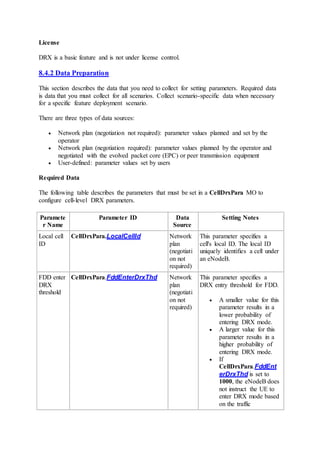
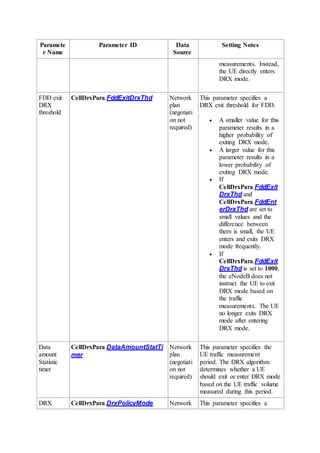
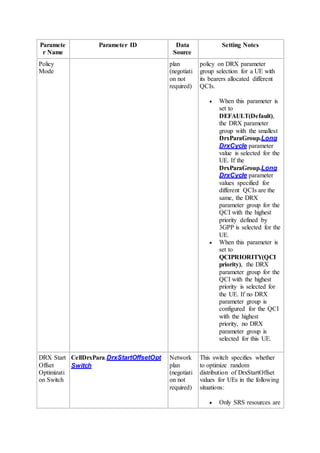
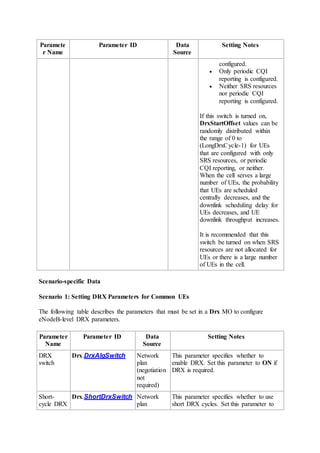
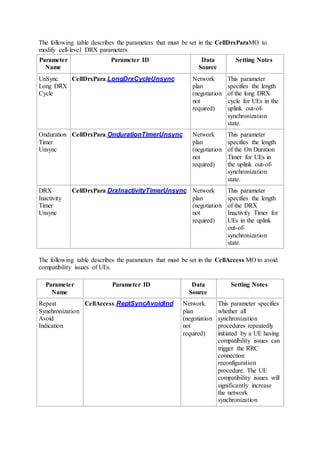
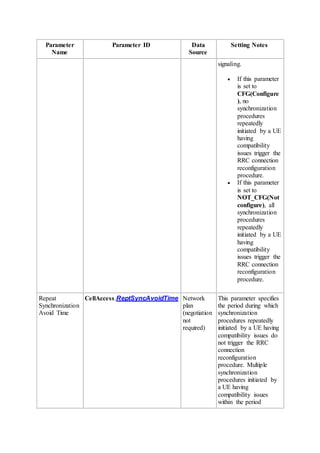
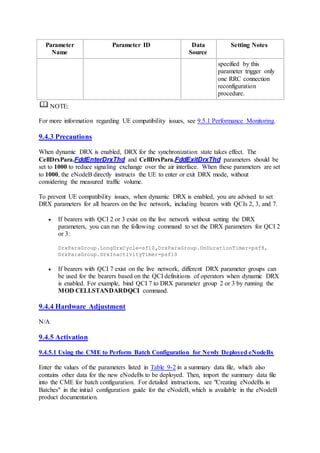
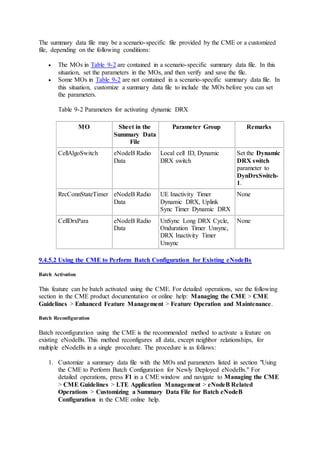
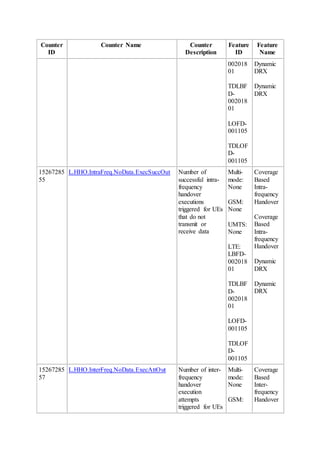
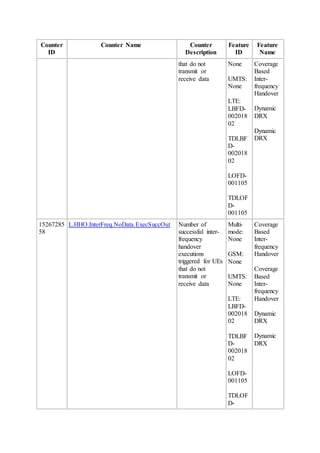
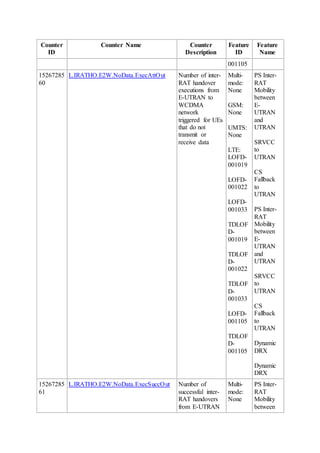
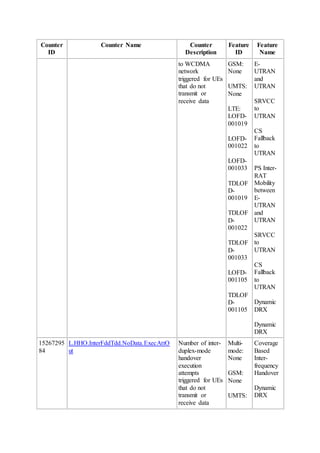
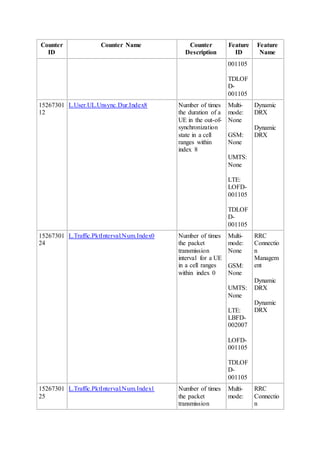
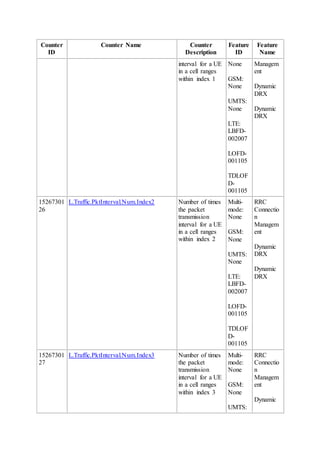
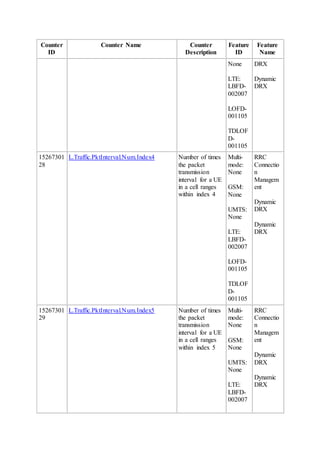
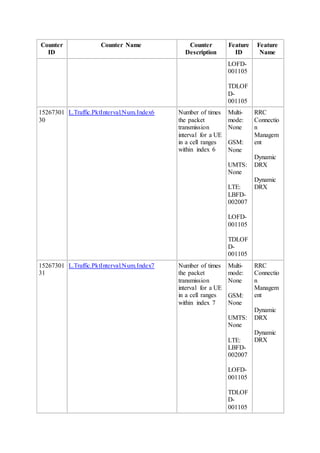
eRAN
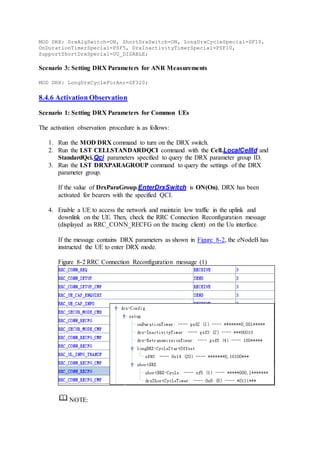
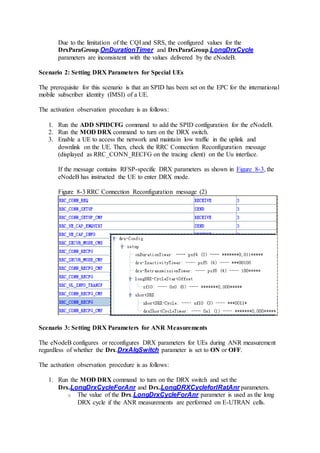
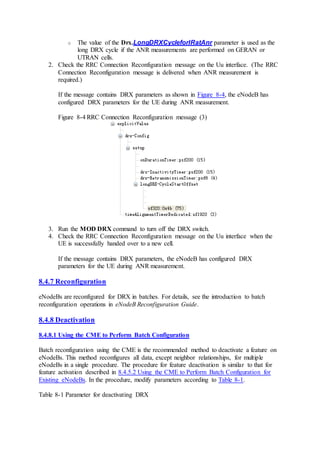
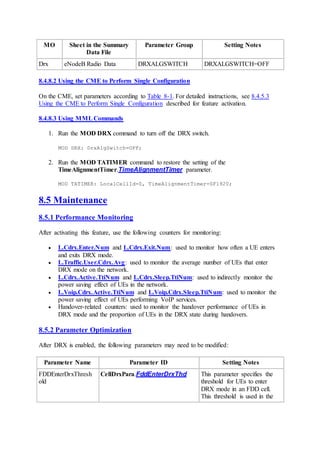
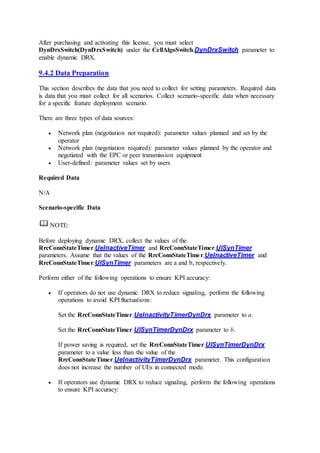
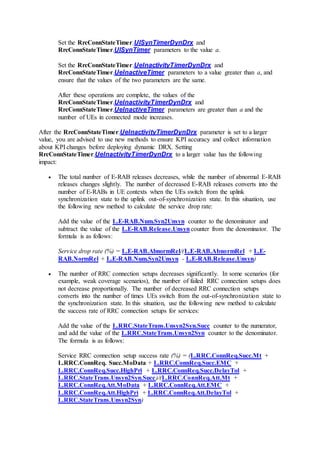
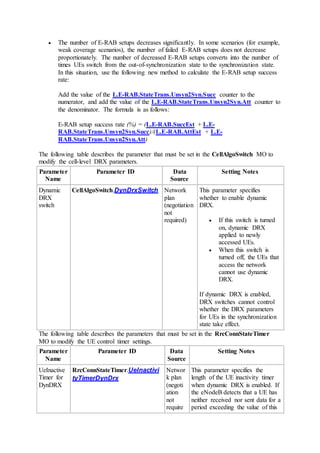
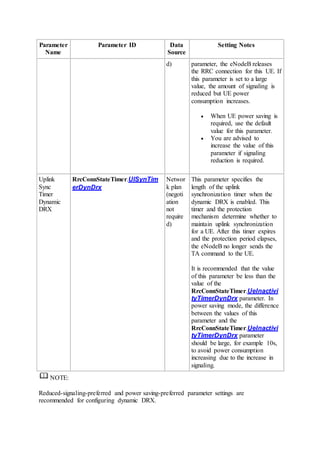
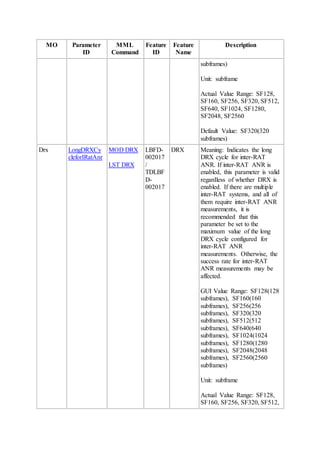
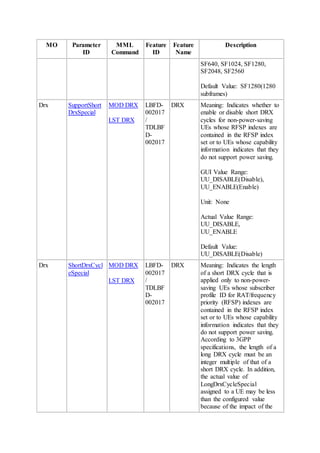
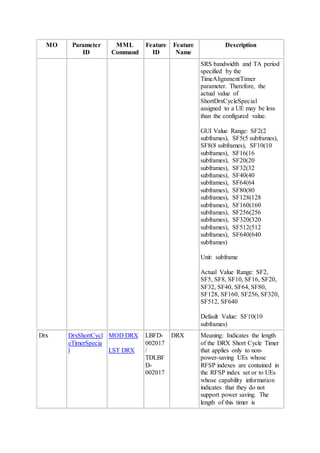
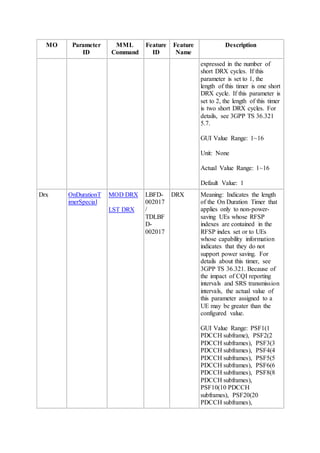
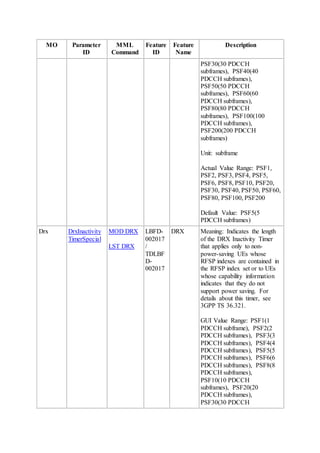
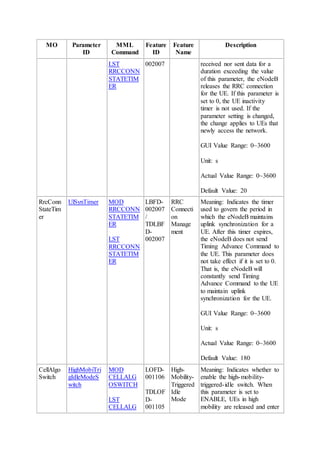
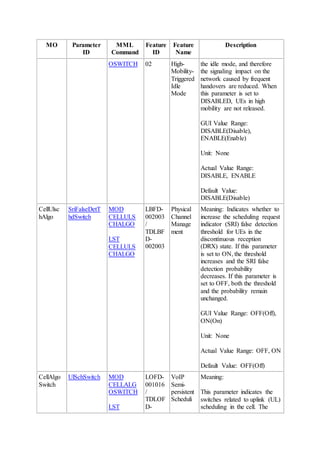
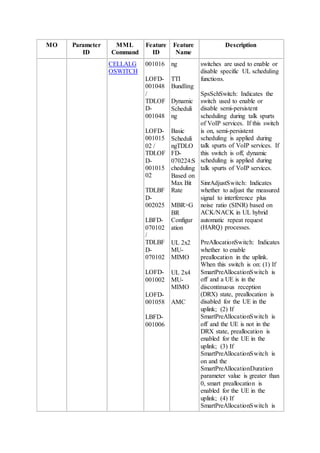
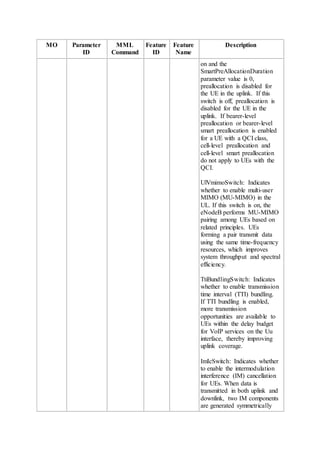
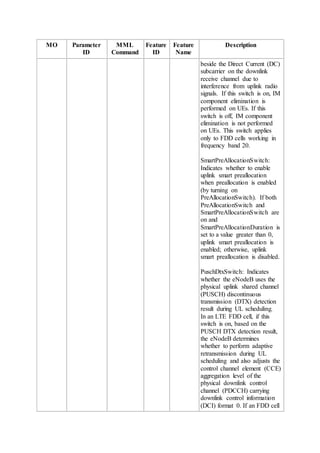
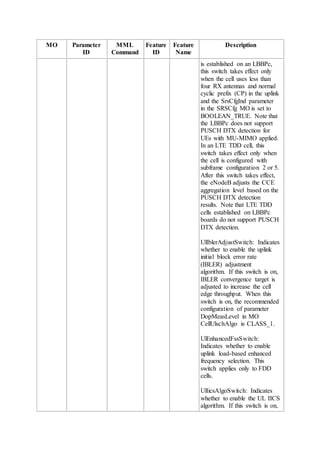
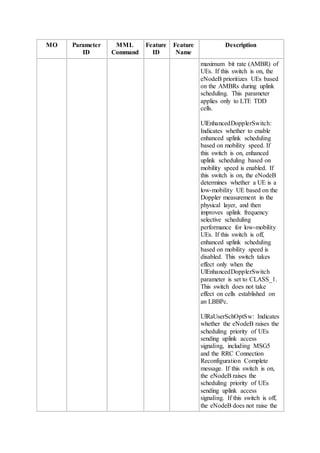
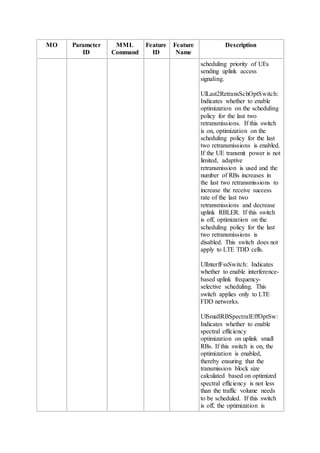
DRX and Signaling Control Feature Parameter Description
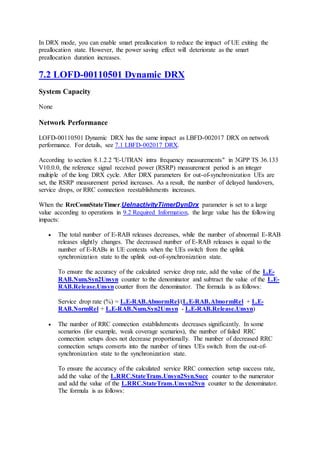
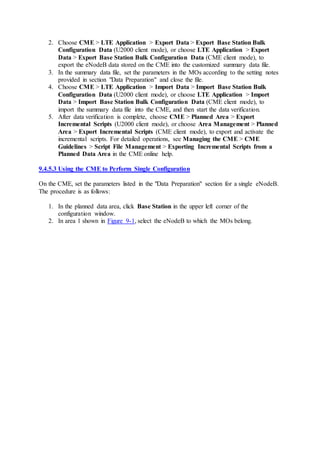
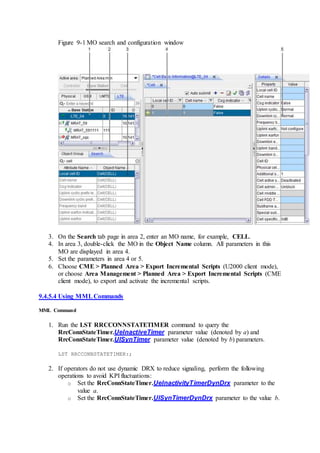
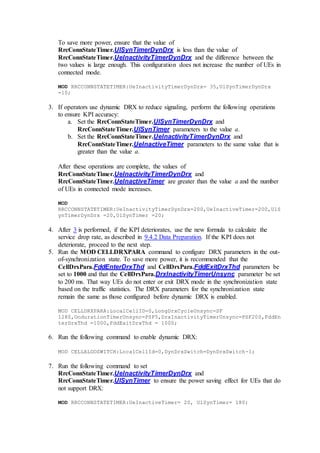
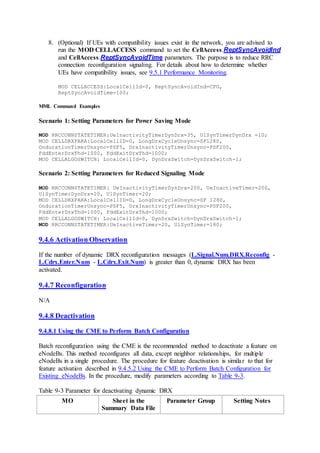
Issue 02
Date 2015-04-30
HUAWEI TECHNOLOGIES CO., LTD.
Copyright © Huawei Technologies Co., Ltd. 2015. All rights reserved.
No part of this document may be reproduced or transmitted in any form or by any means
without prior written consent of Huawei Technologies Co., Ltd.
Trademarks and Permissions
and other Huawei trademarks are trademarks of Huawei Technologies Co., Ltd.
All other trademarks and trade names mentioned in this document are the property of their
respective holders.
Notice
The purchased products, services and features are stipulated by the contract made between
Huawei and the customer. All or part of the products, services and features described in this
document may not be within the purchase scope or the usage scope. Unless otherwise
specified in the contract, all statements, information, and recommendations in this document
are provided "AS IS" without warranties, guarantees or representations of any kind, either
express or implied.
The information in this document is subject to change without notice. Every effort has been
made in the preparation of this document to ensure accuracy of the contents, but all
statements, information, and recommendations in this document do not constitute a warranty
of any kind, express or implied.
Huawei Technologies Co., Ltd.
Address:
Huawei Industrial Base Bantian, Longgang Shenzhen 518129 People's Republic
of China
Website: http://www.huawei.com
Email: support@huawei.com
Contents
1 About This Document
1.1 Scope
1.2 Intended Audience
1.3 Change History
1.4 Differences Between eNodeB Types
2 Overview of DRX and Signaling Control
3 DRX
3.1 Introduction
3.1.1 Definition and Application Scenarios
3.1.2 Benefits
3.1.3 Process
3.2 Relationship with QCI
3.3 Entry and Exit Conditions
3.3.1 Entry Conditions
3.3.2 Exit Conditions
3.4 Working Mechanism
3.4.1 Related Concepts
3.4.2 Startup of a DRX Cycle
3.4.3 Operation in a DRX Cycle
3.4.3.1 Operation in Active Time
3.4.3.2 Switching Between Active Time and Sleep Time
3.4.4 Switching Between Long and Short DRX Cycles
3.5 DRX Parameters for Various Scenarios
3.5.1 DRX Parameters for VoIP
3.5.2 DRX Parameters for Special UEs
3.5.3 DRX Parameters for ANR Measurements
4 Dynamic DRX
4.1 Introduction
4.1.1 Definition and Application Scenarios
4.1.2 Benefits
4.1.3 Process
4.2 Entry and Exit Conditions
4.2.1 Entry Conditions
4.2.2 Exit Conditions
4.3 Principles
5 High-Mobility-Triggered Idle Mode
5.1 Introduction
5.1.1 Definition and Application Scenarios
5.1.2 Benefits
5.2 Principles
6 Related Features
6.1 Features Related to LBFD-002017 DRX
6.2 Features Related to LOFD-00110501 Dynamic DRX
6.3 Features Related to LOFD-00110502 High-Mobility-Triggered Idle Mode
7 Network Impact
7.1 LBFD-002017 DRX
7.2 LOFD-00110501 Dynamic DRX
7.3 LOFD-00110502 High-Mobility-Triggered Idle Mode
8 Engineering Guidelines for LBFD-002017 DRX
8.1 When to Use DRX
8.2 Required Information
8.3 Planning
8.4 Deployment
8.4.1 Requirements
8.4.2 Data Preparation
8.4.3 Precautions
8.4.4 Hardware Adjustment
8.4.5 Activation
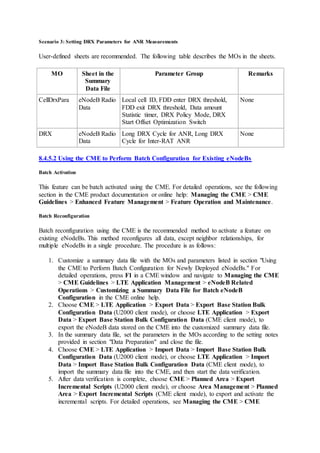
8.4.5.1 Using the CME to Perform Batch Configuration for Newly Deployed eNodeBs
8.4.5.2 Using the CME to Perform Batch Configuration for Existing eNodeBs
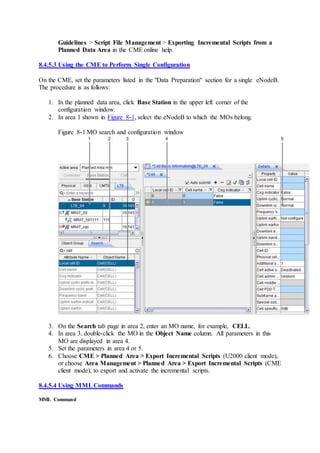
8.4.5.3 Using the CME to Perform Single Configuration
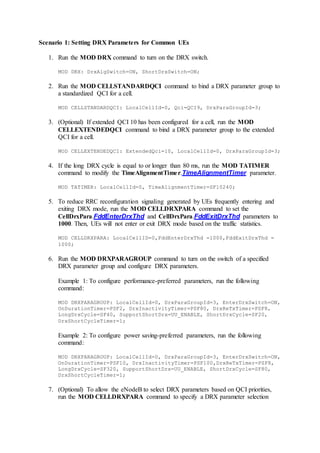
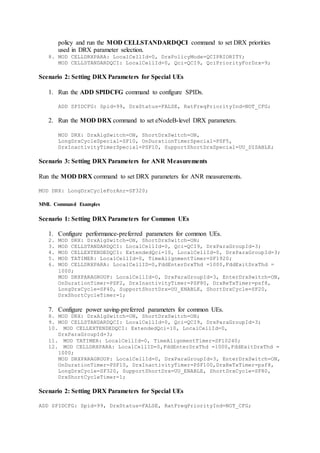
8.4.5.4 Using MML Commands
8.4.6 Activation Observation
8.4.7 Reconfiguration
8.4.8 Deactivation
8.4.8.1 Using the CME to Perform Batch Configuration
8.4.8.2 Using the CME to Perform Single Configuration
8.4.8.3 Using MML Commands
8.5 Maintenance
8.5.1 Performance Monitoring
8.5.2 Parameter Optimization
8.5.3 Troubleshooting
9 Engineering Guidelines for LOFD-00110501 Dynamic DRX
9.1 When to Use Dynamic DRX
9.2 Required Information
9.3 Planning
9.4 Deployment
9.4.1 Requirements
9.4.2 Data Preparation
9.4.3 Precautions
9.4.4 Hardware Adjustment
9.4.5 Activation
9.4.5.1 Using the CME to Perform Batch Configuration for Newly Deployed eNodeBs
9.4.5.2 Using the CME to Perform Batch Configuration for Existing eNodeBs
9.4.5.3 Using the CME to Perform Single Configuration
9.4.5.4 Using MML Commands
9.4.6 Activation Observation
9.4.7 Reconfiguration
9.4.8 Deactivation
9.4.8.1 Using the CME to Perform Batch Configuration
9.4.8.2 Using the CME to Perform Single Configuration
9.4.8.3 Using MML Commands
9.5 Maintenance
9.5.1 Performance Monitoring
9.5.2 Parameter Optimization
9.5.3 Troubleshooting
10 Engineering Guidelines for LOFD-00110502 High-Mobility-Triggered Idle Mode
10.1 When to Use High-Mobility-Triggered Idle Mode
10.2 Required Information
10.3 Planning
10.4 Deployment
10.4.1 Requirements
10.4.2 Data Preparation
10.4.3 Precautions
10.4.4 Hardware Adjustment
10.4.5 Activation
10.4.5.1 Using the CME to Perform Batch Configuration for Newly Deployed eNodeBs
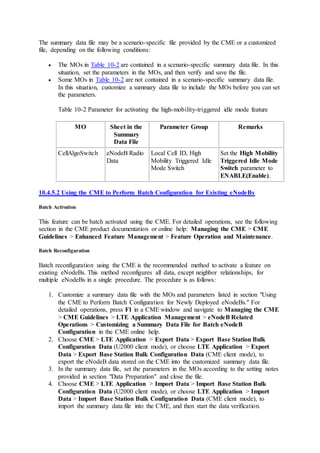
10.4.5.2 Using the CME to Perform Batch Configuration for Existing eNodeBs
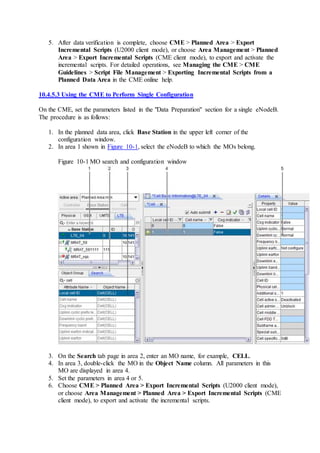
10.4.5.3 Using the CME to Perform Single Configuration
10.4.5.4 Using MML Commands
10.4.6 Activation Observation
10.4.7 Reconfiguration
10.4.8 Deactivation
10.4.8.1 Using the CME to Perform Batch Configuration
10.4.8.2 Using the CME to Perform Single Configuration
10.4.8.3 Using MML Commands
10.5 Maintenance
10.5.1 Performance Monitoring
10.5.2 Parameter Optimization
10.5.3 Troubleshooting
11 Parameters
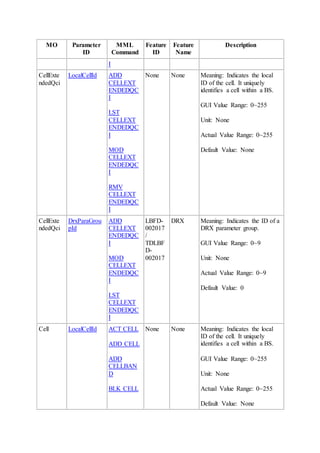
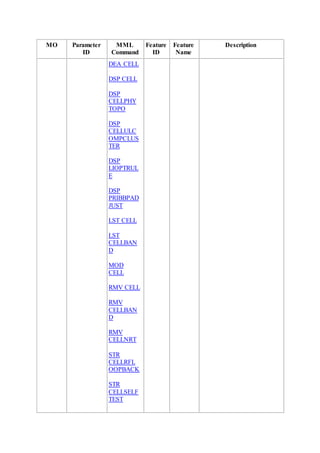
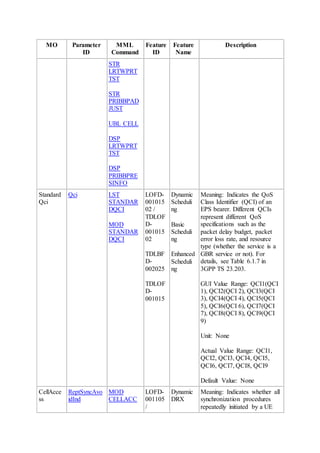
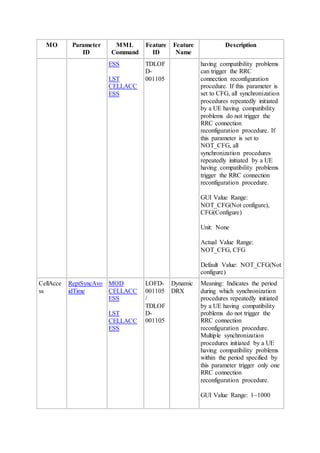
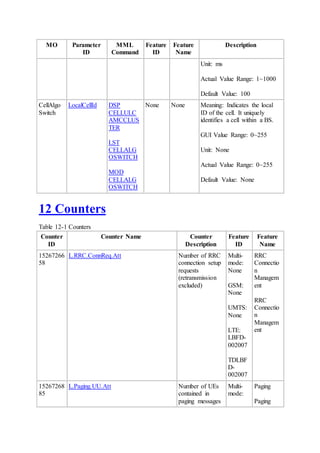
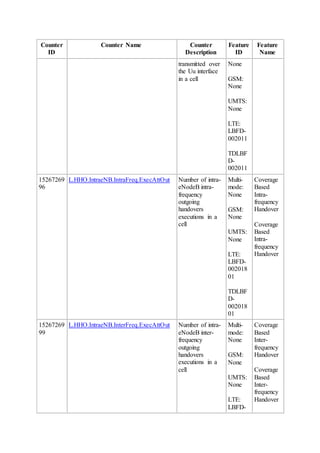
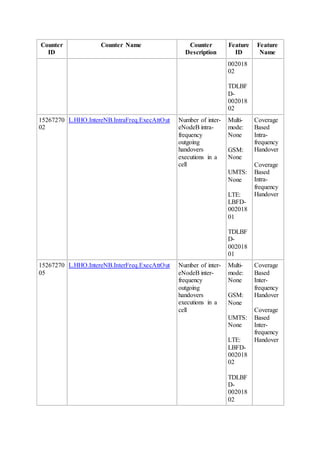
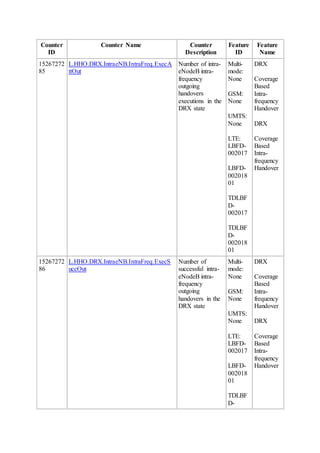
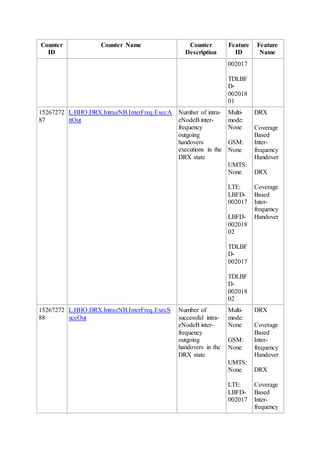
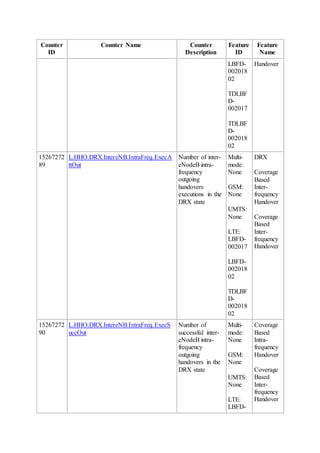
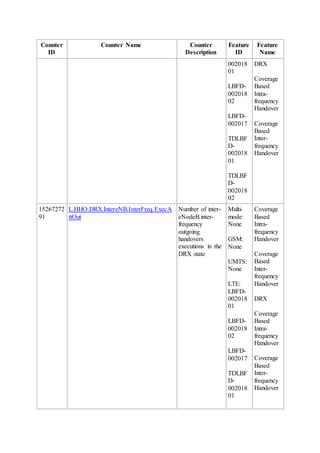
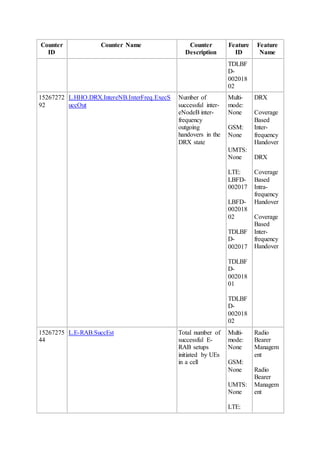
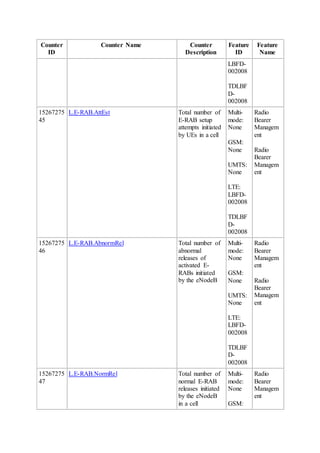
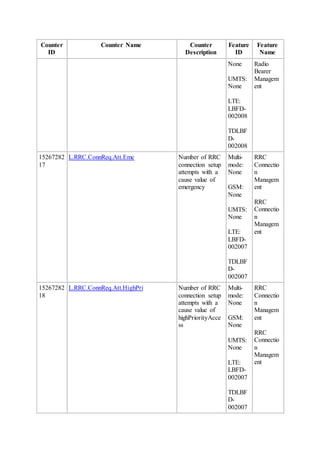
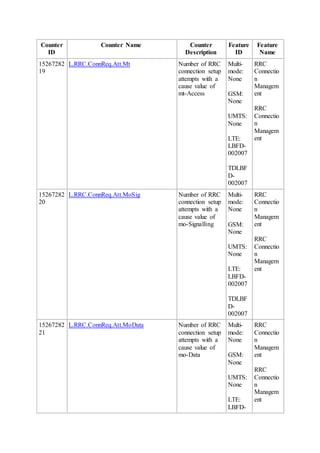
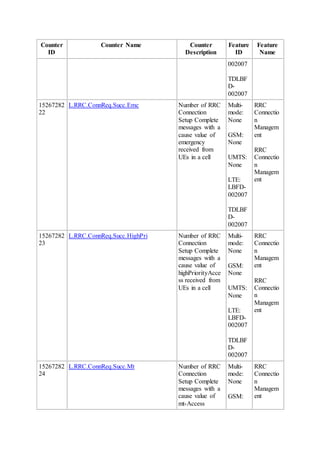
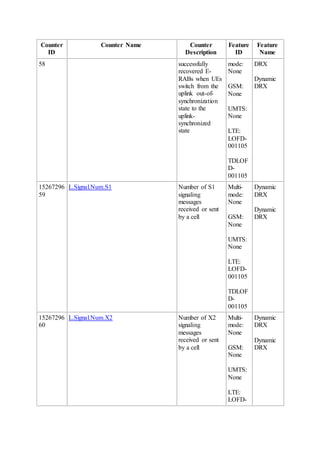
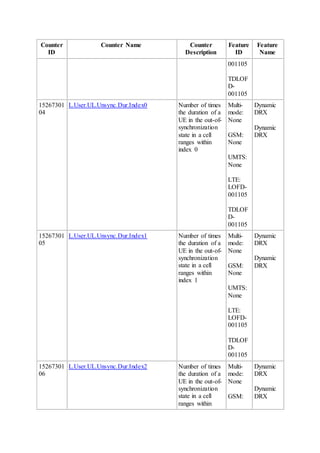
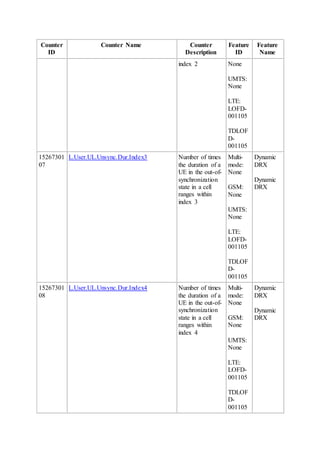
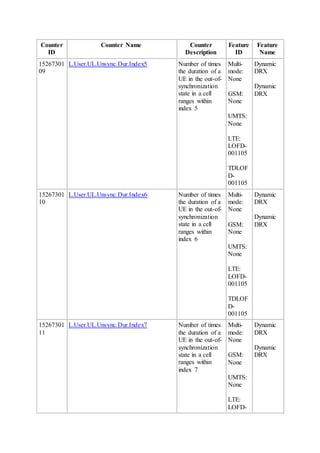
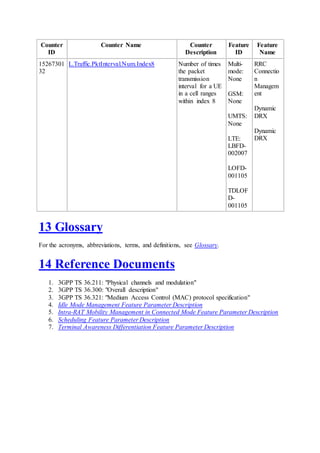
12 Counters
13 Glossary
14 Reference Documents
1 About This Document
1.1 Scope
This document describes discontinuous reception (DRX) and signaling control, including its
technical principles, related features, network impact, and engineering guidelines. This
document covers the following features:
 LBFD-002017 DRX
 LOFD-00110501 Dynamic DRX
 LOFD-00110502 High-Mobility-Triggered Idle Mode
Any managed objects (MOs), parameters, alarms, or counters described herein correspond to
the software release delivered with this document. Any future updates will be described in the
product documentation delivered with future software releases.
This document applies only to LTE FDD. Any "LTE" in this document refers to LTE FDD,
and "eNodeB" refers to LTE FDD eNodeB.
This document applies to the following types of eNodeBs.
eNodeB Type Model
Macro 3900 series eNodeB
Micro BTS3202E
LampSite DBS3900 LampSite
1.2 Intended Audience
This document is intended for personnel who:
 Need to understand the features described herein
 Work with Huawei products
1.3 Change History
This section provides information about the changes in different document versions. There
are two types of changes:
 Feature change
Changes in features and parameters of a specified version
 Editorial change
Changes in wording or addition of information and any related parameters affected by
editorial changes
eRAN8.1 02 (2015-04-30)
This issue includes the following changes.
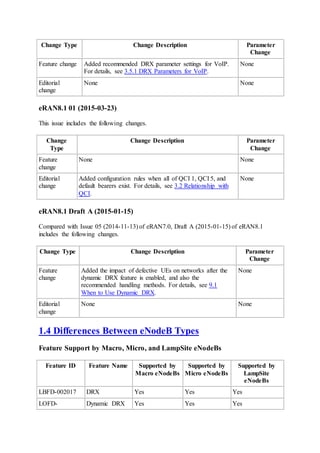
Change Type Change Description Parameter
Change
Feature change Added recommended DRX parameter settings for VoIP.
For details, see 3.5.1 DRX Parameters for VoIP.
None
Editorial
change
None None
eRAN8.1 01 (2015-03-23)
This issue includes the following changes.
Change
Type
Change Description Parameter
Change
Feature
change
None None
Editorial
change
Added configuration rules when all of QCI 1, QCI 5, and
default bearers exist. For details, see 3.2 Relationship with
QCI.
None
eRAN8.1 Draft A (2015-01-15)
Compared with Issue 05 (2014-11-13) of eRAN7.0, Draft A (2015-01-15) of eRAN8.1
includes the following changes.
Change Type Change Description Parameter
Change
Feature
change
Added the impact of defective UEs on networks after the
dynamic DRX feature is enabled, and also the
recommended handling methods. For details, see 9.1
When to Use Dynamic DRX.
None
Editorial
change
None None
1.4 Differences Between eNodeB Types
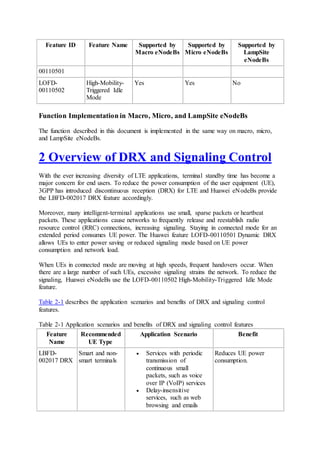
Feature Support by Macro, Micro, and LampSite eNodeBs
Feature ID Feature Name Supported by
Macro eNodeBs
Supported by
Micro eNodeBs
Supported by
LampSite
eNodeBs
LBFD-002017 DRX Yes Yes Yes
LOFD- Dynamic DRX Yes Yes Yes
Feature ID Feature Name Supported by
Macro eNodeBs
Supported by
Micro eNodeBs
Supported by
LampSite
eNodeBs
00110501
LOFD-
00110502
High-Mobility-
Triggered Idle
Mode
Yes Yes No
Function Implementation in Macro, Micro, and LampSite eNodeBs
The function described in this document is implemented in the same way on macro, micro,
and LampSite eNodeBs.
2 Overview of DRX and Signaling Control
With the ever increasing diversity of LTE applications, terminal standby time has become a
major concern for end users. To reduce the power consumption of the user equipment (UE),
3GPP has introduced discontinuous reception (DRX) for LTE and Huawei eNodeBs provide
the LBFD-002017 DRX feature accordingly.
Moreover, many intelligent-terminal applications use small, sparse packets or heartbeat
packets. These applications cause networks to frequently release and reestablish radio
resource control (RRC) connections, increasing signaling. Staying in connected mode for an
extended period consumes UE power. The Huawei feature LOFD-00110501 Dynamic DRX
allows UEs to enter power saving or reduced signaling mode based on UE power
consumption and network load.
When UEs in connected mode are moving at high speeds, frequent handovers occur. When
there are a large number of such UEs, excessive signaling strains the network. To reduce the
signaling, Huawei eNodeBs use the LOFD-00110502 High-Mobility-Triggered Idle Mode
feature.
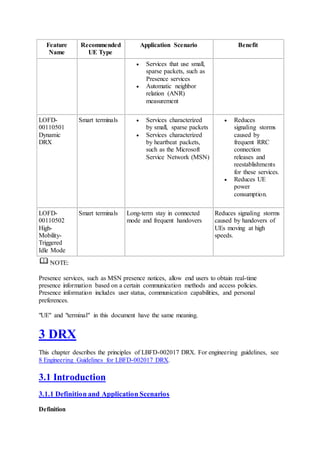
Table 2-1 describes the application scenarios and benefits of DRX and signaling control
features.
Table 2-1 Application scenarios and benefits of DRX and signaling control features
Feature
Name
Recommended
UE Type
Application Scenario Benefit
LBFD-
002017 DRX
Smart and non-
smart terminals
 Services with periodic
transmission of
continuous small
packets, such as voice
over IP (VoIP) services
 Delay-insensitive
services, such as web
browsing and emails
Reduces UE power
consumption.
Feature
Name
Recommended
UE Type
Application Scenario Benefit
 Services that use small,
sparse packets, such as
Presence services
 Automatic neighbor
relation (ANR)
measurement
LOFD-
00110501
Dynamic
DRX
Smart terminals  Services characterized
by small, sparse packets
 Services characterized
by heartbeat packets,
such as the Microsoft
Service Network (MSN)
 Reduces
signaling storms
caused by
frequent RRC
connection
releases and
reestablishments
for these services.
 Reduces UE
power
consumption.
LOFD-
00110502
High-
Mobility-
Triggered
Idle Mode
Smart terminals Long-term stay in connected
mode and frequent handovers
Reduces signaling storms
caused by handovers of
UEs moving at high
speeds.
NOTE:
Presence services, such as MSN presence notices, allow end users to obtain real-time
presence information based on a certain communication methods and access policies.
Presence information includes user status, communication capabilities, and personal
preferences.
"UE" and "terminal" in this document have the same meaning.
3 DRX
This chapter describes the principles of LBFD-002017 DRX. For engineering guidelines, see
8 Engineering Guidelines for LBFD-002017 DRX.
3.1 Introduction
3.1.1 Definition and Application Scenarios
Definition
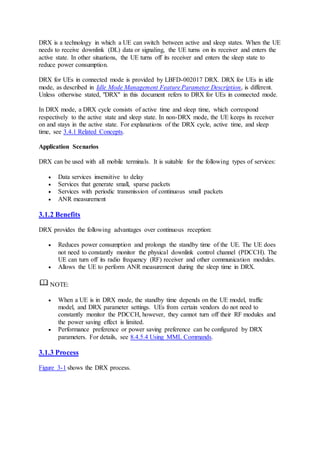
DRX is a technology in which a UE can switch between active and sleep states. When the UE
needs to receive downlink (DL) data or signaling, the UE turns on its receiver and enters the
active state. In other situations, the UE turns off its receiver and enters the sleep state to
reduce power consumption.
DRX for UEs in connected mode is provided by LBFD-002017 DRX. DRX for UEs in idle
mode, as described in Idle Mode Management Feature Parameter Description, is different.
Unless otherwise stated, "DRX" in this document refers to DRX for UEs in connected mode.
In DRX mode, a DRX cycle consists of active time and sleep time, which correspond
respectively to the active state and sleep state. In non-DRX mode, the UE keeps its receiver
on and stays in the active state. For explanations of the DRX cycle, active time, and sleep
time, see 3.4.1 Related Concepts.
Application Scenarios
DRX can be used with all mobile terminals. It is suitable for the following types of services:
 Data services insensitive to delay
 Services that generate small, sparse packets
 Services with periodic transmission of continuous small packets
 ANR measurement
3.1.2 Benefits
DRX provides the following advantages over continuous reception:
 Reduces power consumption and prolongs the standby time of the UE. The UE does
not need to constantly monitor the physical downlink control channel (PDCCH). The
UE can turn off its radio frequency (RF) receiver and other communication modules.
 Allows the UE to perform ANR measurement during the sleep time in DRX.
NOTE:
 When a UE is in DRX mode, the standby time depends on the UE model, traffic
model, and DRX parameter settings. UEs from certain vendors do not need to
constantly monitor the PDCCH, however, they cannot turn off their RF modules and
the power saving effect is limited.
 Performance preference or power saving preference can be configured by DRX
parameters. For details, see 8.4.5.4 Using MML Commands.
3.1.3 Process
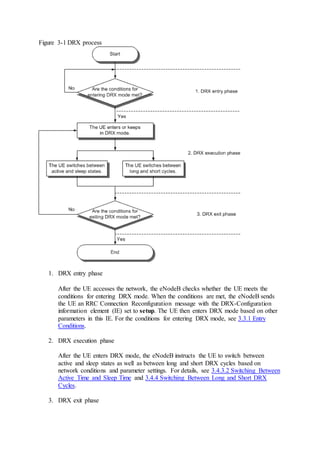
Figure 3-1 shows the DRX process.
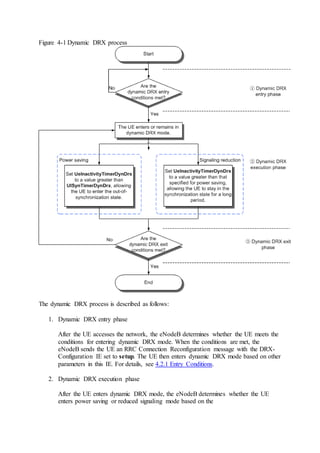
Figure 3-1 DRX process
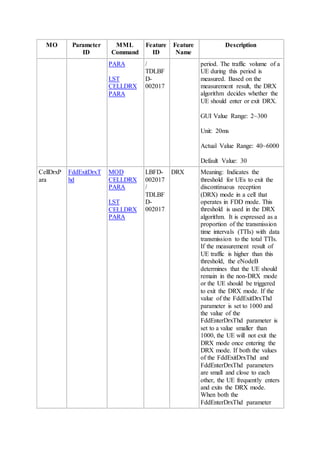
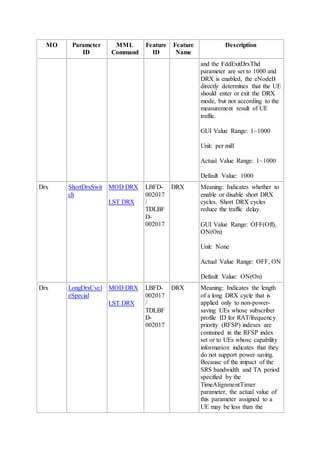
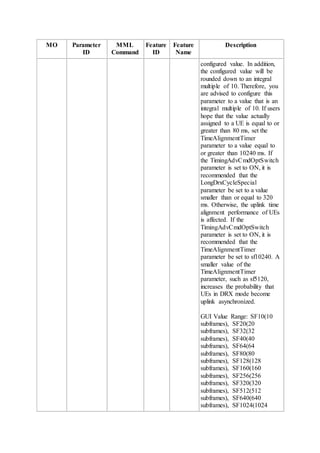
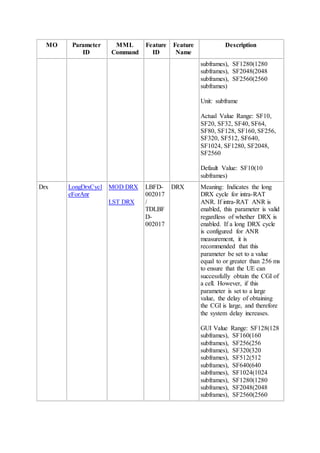
1. DRX entry phase
After the UE accesses the network, the eNodeB checks whether the UE meets the
conditions for entering DRX mode. When the conditions are met, the eNodeB sends
the UE an RRC Connection Reconfiguration message with the DRX-Configuration
information element (IE) set to setup. The UE then enters DRX mode based on other
parameters in this IE. For the conditions for entering DRX mode, see 3.3.1 Entry
Conditions.
2. DRX execution phase
After the UE enters DRX mode, the eNodeB instructs the UE to switch between
active and sleep states as well as between long and short DRX cycles based on
network conditions and parameter settings. For details, see 3.4.3.2 Switching Between
Active Time and Sleep Time and 3.4.4 Switching Between Long and Short DRX
Cycles.
3. DRX exit phase
The eNodeB checks whether the UE meets the conditions for exiting DRX mode.
When the conditions are met, the eNodeB sends the UE an RRC Connection
Reconfiguration message with the DRX-Configuration IE set to release. After the UE
receives the message, it immediately clears all the DRX parameters stored locally and
exits DRX mode. For the conditions for exiting DRX mode, see 3.3.2 Exit
Conditions.
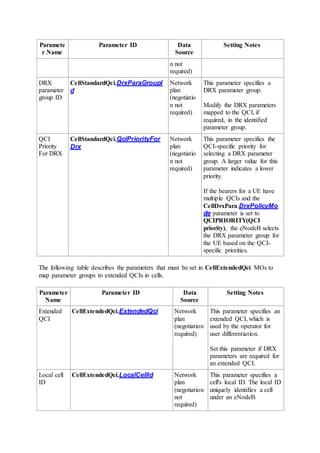
3.2 Relationship with QCI
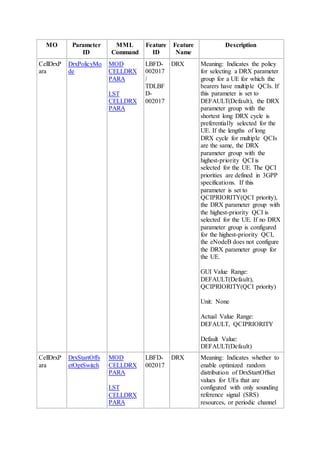
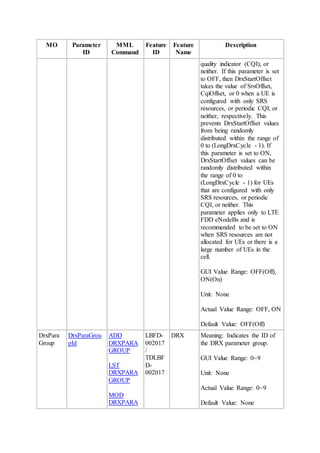
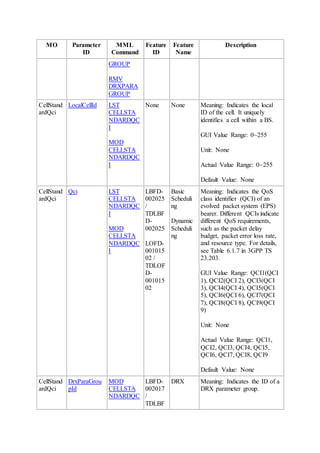
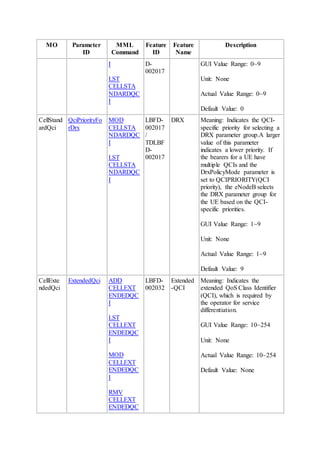
Services with different QoS class identifiers (QCIs) have different characteristics. Users can
set DRX policies on a per QCI basis. The following QCI-specific parameters are
configurable:
 DRX switch: DrxParaGroup.EnterDrxSwitch
For the function and usage of this switch, see 3.3 Entry and Exit Conditions.
 DRX timer parameters:
o DrxParaGroup.OnDurationTimer
o DrxParaGroup.DRXInactivityTimer
o DrxParaGroup.DRXReTxTimer
o DrxParaGroup.LongDrxCycle
o DrxParaGroup.ShortDrxCycle
o DrxParaGroup.DrxShortCycleTimer
o DrxParaGroup.SupportShortDrx
For the functions and usages of these timers, see 3.4 Working Mechanism.
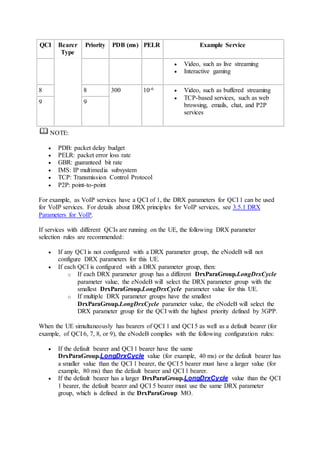
Table 3-1 lists the QCIs and corresponding service types.
Table 3-1 QCIs and corresponding service types
QCI Bearer
Type
Priority PDB (ms) PELR Example Service
1 GBR 2 100 10-2 Conversational voice
2 4 150 10-3 Conversational video, such as live streaming
3 3 50 10-3 Real-time gaming
4 5 300 10-6 Non-conversational video, such as buffered
streaming
5 Non-
GBR
1 100 10-6 IMS signaling
6 6 300 10-6  Video, such as buffered streaming
 TCP-based services, such as web
browsing, emails, chat, and P2P
services
7 7 100 10-3  Voice
QCI Bearer
Type
Priority PDB (ms) PELR Example Service
 Video, such as live streaming
 Interactive gaming
8 8 300 10-6  Video, such as buffered streaming
 TCP-based services, such as web
browsing, emails, chat, and P2P
services
9 9
NOTE:
 PDB: packet delay budget
 PELR: packet error loss rate
 GBR: guaranteed bit rate
 IMS: IP multimedia subsystem
 TCP: Transmission Control Protocol
 P2P: point-to-point
For example, as VoIP services have a QCI of 1, the DRX parameters for QCI 1 can be used
for VoIP services. For details about DRX principles for VoIP services, see 3.5.1 DRX
Parameters for VoIP.
If services with different QCIs are running on the UE, the following DRX parameter
selection rules are recommended:
 If any QCI is not configured with a DRX parameter group, the eNodeB will not
configure DRX parameters for this UE.
 If each QCI is configured with a DRX parameter group, then:
o If each DRX parameter group has a different DrxParaGroup.LongDrxCycle
parameter value, the eNodeB will select the DRX parameter group with the
smallest DrxParaGroup.LongDrxCycle parameter value for this UE.
o If multiple DRX parameter groups have the smallest
DrxParaGroup.LongDrxCycle parameter value, the eNodeB will select the
DRX parameter group for the QCI with the highest priority defined by 3GPP.
When the UE simultaneously has bearers of QCI 1 and QCI 5 as well as a default bearer (for
example, of QCI 6, 7, 8, or 9), the eNodeB complies with the following configuration rules:
 If the default bearer and QCI 1 bearer have the same
DrxParaGroup.LongDrxCycle value (for example, 40 ms) or the default bearer has
a smaller value than the QCI 1 bearer, the QCI 5 bearer must have a larger value (for
example, 80 ms) than the default bearer and QCI 1 bearer.
 If the default bearer has a larger DrxParaGroup.LongDrxCycle value than the QCI
1 bearer, the default bearer and QCI 5 bearer must use the same DRX parameter
group, which is defined in the DrxParaGroup MO.
3.3 Entry and Exit Conditions
The UE enters or exits DRX mode only after receiving an instruction from the eNodeB. This
section describes the conditions for entering and exiting DRX mode.
3.3.1 Entry Conditions
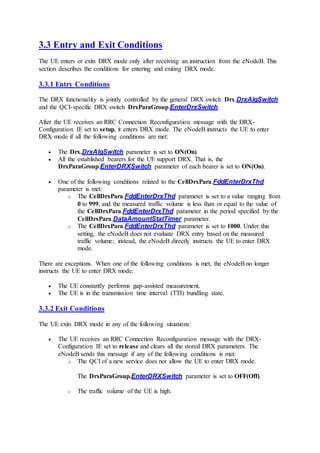
The DRX functionality is jointly controlled by the general DRX switch Drx.DrxAlgSwitch
and the QCI-specific DRX switch DrxParaGroup.EnterDrxSwitch.
After the UE receives an RRC Connection Reconfiguration message with the DRX-
Configuration IE set to setup, it enters DRX mode. The eNodeB instructs the UE to enter
DRX mode if all the following conditions are met:
 The Drx.DrxAlgSwitch parameter is set to ON(On).
 All the established bearers for the UE support DRX. That is, the
DrxParaGroup.EnterDRXSwitch parameter of each bearer is set to ON(On).
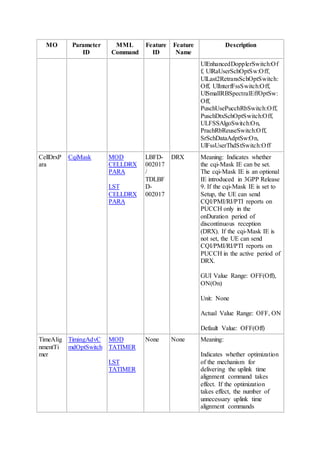
 One of the following conditions related to the CellDrxPara.FddEnterDrxThd
parameter is met:
o The CellDrxPara.FddEnterDrxThd parameter is set to a value ranging from
0 to 999, and the measured traffic volume is less than or equal to the value of
the CellDrxPara.FddEnterDrxThd parameter in the period specified by the
CellDrxPara.DataAmountStatTimer parameter.
o The CellDrxPara.FddEnterDrxThd parameter is set to 1000. Under this
setting, the eNodeB does not evaluate DRX entry based on the measured
traffic volume; instead, the eNodeB directly instructs the UE to enter DRX
mode.
There are exceptions. When one of the following conditions is met, the eNodeB no longer
instructs the UE to enter DRX mode:
 The UE constantly performs gap-assisted measurement.
 The UE is in the transmission time interval (TTI) bundling state.
3.3.2 Exit Conditions
The UE exits DRX mode in any of the following situations:
 The UE receives an RRC Connection Reconfiguration message with the DRX-
Configuration IE set to release and clears all the stored DRX parameters. The
eNodeB sends this message if any of the following conditions is met:
o The QCI of a new service does not allow the UE to enter DRX mode.
The DrxParaGroup.EnterDRXSwitch parameter is set to OFF(Off).
o The traffic volume of the UE is high.
The measured traffic volume is higher than the threshold specified by the
CellDrxPara.FddExitDrxThd parameter in the period specified by
theCellDrxPara.DataAmountStatTimer parameter.
However, if the CellDrxPara.FddExitDrxThd parameter is set to 1000, the
UE does not exit DRX mode.
 The Drx.DrxAlgSwitch parameter is set to OFF(Off), and the eNodeB instructs the
UE to exit DRX mode in the RRC connection reconfiguration procedure.
 The UE in connected mode experiences a radio link failure (RLF) when radio
conditions deteriorate.
 During a handover, the eNodeB instructs the UE to exit DRX mode.
 The UE enters the TTI bundling state.
3.4 Working Mechanism
In DRX mode, the UE no longer constantly monitors the PDCCH. When the UE is in the
active state in DRX mode, its receiver is turned on to monitor the PDCCH. When the UE is in
the sleep state, it no longer monitors the PDCCH and its receiver can be turned off to reduce
power consumption.
3.4.1 Related Concepts
On Duration
When the UE is in DRX mode, it cannot keep its receiver off all the time. It must periodically
turn on its receiver and monitor the PDCCH for incoming signaling for a consecutive period.
This consecutive period is called On Duration, and the related timer is named On Duration
Timer. The DrxParaGroup.OnDurationTimer parameter specifies the On Duration.
DRX Cycle
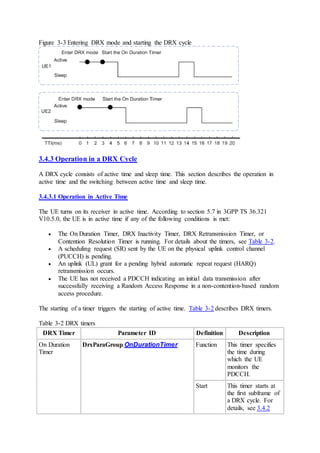
A DRX cycle is the interval between two occurrences of On Duration. A DRX cycle includes
an On Duration and a possible period of sleep time, as shown in Figure 3-2.
Figure 3-2 DRX cycle
NOTE:
The period following an On Duration may be active or sleep time. For details, see 3.4.3.1
Operation in Active Time.
A DRX cycle consists of active time and sleep time. It may be a long or short cycle.
Active Time
In active time, the UE turns on its receiver and monitors the PDCCH. Active time is equal to
an On Duration plus other possible periods during which the UE needs to turn on its receiver,
for example, a period during which a DRX timer is working or a high-priority service is
being processed. DRX timers include the DRX Inactivity Timer, Contention Resolution
Timer, and DRX Retransmission Timer. For details, see 3.4.3.1 Operation in Active Time.
For a given DRX cycle:
 A longer active time results in a shorter service delay but increased UE power
consumption.
 A shorter active time results in reduced UE power consumption but a longer service
delay.
SleepTime
During a DRX cycle, the UE is not active during sleep time. During sleep time, the UE turns
off its receiver.
Long DRX Cycle
Using a long DRX cycle can save more power. The long cycle is specified by the mandatory
parameter DrxParaGroup.LongDrxCycle.
NOTE:
If a short DRX cycle is not configured before DRX is enabled, the UE will use the long cycle
after entering DRX mode. If a short cycle has been configured before DRX is enabled, the
UE will preferentially use the short cycle and switches to the long cycle after the timer
defined by DrxParaGroup.DrxShortCycleTimer expires.
Short DRX Cycle
The application of a short DRX cycle is jointly controlled by Drx.ShortDrxSwitch and the
QCI-level DRX switch DrxParaGroup.SupportShortDrx.
A short cycle results in better service experience than a long cycle but saves less power. You
can use the following parameters for configuring a short cycle:
 Drx.ShortDrxSwitch: specifies whether to use short DRX cycles.
 DrxParaGroup.SupportShortDrx: specifies whether services of a specific QCI
support short DRX cycles.
 DrxParaGroup.ShortDRXCycle: specifies the length of a short DRX cycle.
These parameters are optional parameters.
If a short DRX cycle is configured for the UE, the UE will determine when to use the long or
short cycle as described in 3.4.4 Switching Between Long and Short DRX Cycles.
3.4.2 Startup of a DRX Cycle
After the UE enters DRX mode, the On Duration Timer may not start immediately. The timer
starts up and the UE starts a long or short DRX cycle only when the following conditions are
met:
 For a long DRX cycle:
[(SFN x 10) + SSFN] modulo DrxParaGroup.LongDRXCycle = DRX start offset
The long DRX cycle starts at the time specified by the system frame number (SFN) or
system subframe number (SSFN).
 For a short DRX cycle:
[(SFN x 10) + SSFN] modulo DrxParaGroup.ShortDRXCycle = (DRX start offset)
modulo DrxParaGroup.ShortDRXCycle
The short DRX cycle starts at the time specified by the SFN or SSFN.
NOTE:
These formulas are defined in section 5.7 "Discontinuous Reception (DRX)" of 3GPP TS
36.321 V10.5.0.
In these formulas, DRX start offset is the start offset of the long DRX cycle, and (DRX start
offset) modulo DrxParaGroup.ShortDRXCycle is the start offset of the short DRX cycle.
The eNodeB notifies the UE of the long DRX cycle, short DRX cycle, and DRX start offset
in the RRC Connection Reconfiguration message.
If the DrxParaGroup.ShortDRXCycle parameter is set, the value of the LongDrxCycle
parameter must be an integer multiple of the value of the DrxParaGroup.ShortDRXCycle
parameter.
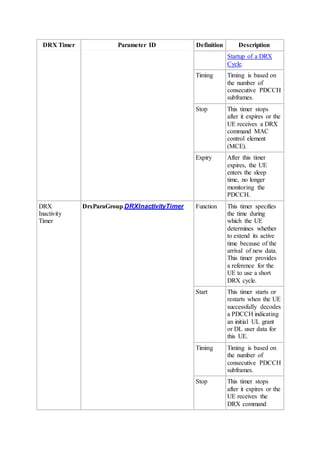
Figure 3-3 shows how the UE enters DRX mode. The eNodeB assigns the same long DRX
cycle of 10 transmission time intervals (TTIs) to both UE 1 and UE 2 in radio frame 0 (whose
SFN is 0) in a cell and instructs them to enter DRX mode respectively at TTI 1 and TTI 0.
UE 1 and UE 2 enter the DRX cycle respectively at TTI 3 and TTI 4, based on the configured
DRX start offset. Therefore, for UE 1, (SFN, SSFN) = (0, 3); for UE 2, (SFN, SSFN) = (0, 4).
Figure 3-3 Entering DRX mode and starting the DRX cycle
3.4.3 Operation in a DRX Cycle
A DRX cycle consists of active time and sleep time. This section describes the operation in
active time and the switching between active time and sleep time.
3.4.3.1 Operation in Active Time
The UE turns on its receiver in active time. According to section 5.7 in 3GPP TS 36.321
V10.5.0, the UE is in active time if any of the following conditions is met:
 The On Duration Timer, DRX Inactivity Timer, DRX Retransmission Timer, or
Contention Resolution Timer is running. For details about the timers, see Table 3-2.
 A scheduling request (SR) sent by the UE on the physical uplink control channel
(PUCCH) is pending.
 An uplink (UL) grant for a pending hybrid automatic repeat request (HARQ)
retransmission occurs.
 The UE has not received a PDCCH indicating an initial data transmission after
successfully receiving a Random Access Response in a non-contention-based random
access procedure.
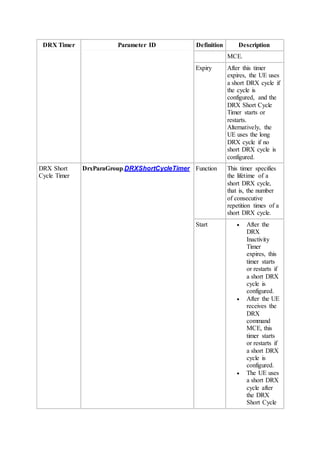
The starting of a timer triggers the starting of active time. Table 3-2 describes DRX timers.
Table 3-2 DRX timers
DRX Timer Parameter ID Definition Description
On Duration
Timer
DrxParaGroup.OnDurationTimer Function This timer specifies
the time during
which the UE
monitors the
PDCCH.
Start This timer starts at
the first subframe of
a DRX cycle. For
details, see 3.4.2
DRX Timer Parameter ID Definition Description
Startup of a DRX
Cycle.
Timing Timing is based on
the number of
consecutive PDCCH
subframes.
Stop This timer stops
after it expires or the
UE receives a DRX
command MAC
control element
(MCE).
Expiry After this timer
expires, the UE
enters the sleep
time, no longer
monitoring the
PDCCH.
DRX
Inactivity
Timer
DrxParaGroup.DRXInactivityTimer Function This timer specifies
the time during
which the UE
determines whether
to extend its active
time because of the
arrival of new data.
This timer provides
a reference for the
UE to use a short
DRX cycle.
Start This timer starts or
restarts when the UE
successfully decodes
a PDCCH indicating
an initial UL grant
or DL user data for
this UE.
Timing Timing is based on
the number of
consecutive PDCCH
subframes.
Stop This timer stops
after it expires or the
UE receives the
DRX command
DRX Timer Parameter ID Definition Description
MCE.
Expiry After this timer
expires, the UE uses
a short DRX cycle if
the cycle is
configured, and the
DRX Short Cycle
Timer starts or
restarts.
Alternatively, the
UE uses the long
DRX cycle if no
short DRX cycle is
configured.
DRX Short
Cycle Timer
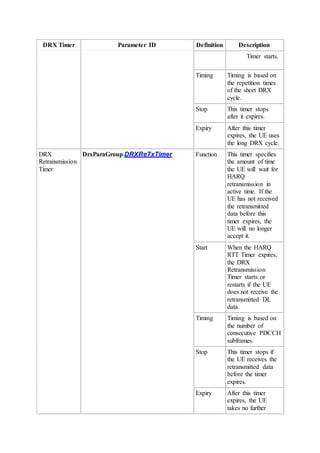
DrxParaGroup.DRXShortCycleTimer Function This timer specifies
the lifetime of a
short DRX cycle,
that is, the number
of consecutive
repetition times of a
short DRX cycle.
Start  After the
DRX
Inactivity
Timer
expires, this
timer starts
or restarts if
a short DRX
cycle is
configured.
 After the UE
receives the
DRX
command
MCE, this
timer starts
or restarts if
a short DRX
cycle is
configured.
 The UE uses
a short DRX
cycle after
the DRX
Short Cycle
DRX Timer Parameter ID Definition Description
Timer starts.
Timing Timing is based on
the repetition times
of the short DRX
cycle.
Stop This timer stops
after it expires.
Expiry After this timer
expires, the UE uses
the long DRX cycle.
DRX
Retransmission
Timer
DrxParaGroup.DRXReTxTimer Function This timer specifies
the amount of time
the UE will wait for
HARQ
retransmission in
active time. If the
UE has not received
the retransmitted
data before this
timer expires, the
UE will no longer
accept it.
Start When the HARQ
RTT Timer expires,
the DRX
Retransmission
Timer starts or
restarts if the UE
does not receive the
retransmitted DL
data.
Timing Timing is based on
the number of
consecutive PDCCH
subframes.
Stop This timer stops if
the UE receives the
retransmitted data
before the timer
expires.
Expiry After this timer
expires, the UE
takes no further
DRX Timer Parameter ID Definition Description
action.
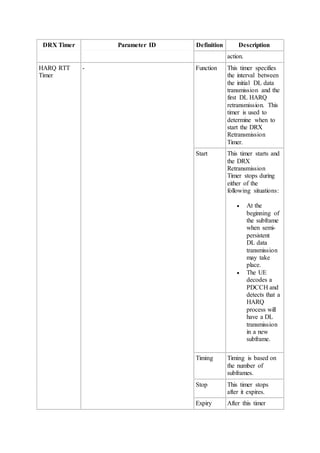
HARQ RTT
Timer
- Function This timer specifies
the interval between
the initial DL data
transmission and the
first DL HARQ
retransmission. This
timer is used to
determine when to
start the DRX
Retransmission
Timer.
Start This timer starts and
the DRX
Retransmission
Timer stops during
either of the
following situations:
 At the
beginning of
the subframe
when semi-
persistent
DL data
transmission
may take
place.
 The UE
decodes a
PDCCH and
detects that a
HARQ
process will
have a DL
transmission
in a new
subframe.
Timing Timing is based on
the number of
subframes.
Stop This timer stops
after it expires.
Expiry After this timer
DRX Timer Parameter ID Definition Description
expires, if the UE
detects that DL data
has been received
correctly, the UE
takes no further
action; otherwise,
the DRX
Retransmission
Timer starts.
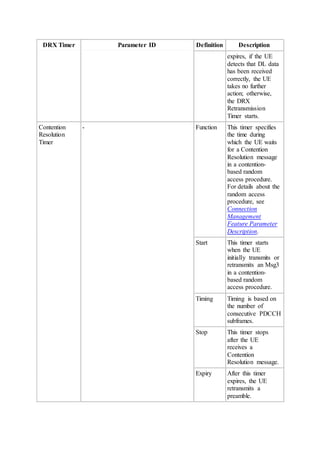
Contention
Resolution
Timer
- Function This timer specifies
the time during
which the UE waits
for a Contention
Resolution message
in a contention-
based random
access procedure.
For details about the
random access
procedure, see
Connection
Management
Feature Parameter
Description.
Start This timer starts
when the UE
initially transmits or
retransmits an Msg3
in a contention-
based random
access procedure.
Timing Timing is based on
the number of
consecutive PDCCH
subframes.
Stop This timer stops
after the UE
receives a
Contention
Resolution message.
Expiry After this timer
expires, the UE
retransmits a
preamble.
The hyphen (-) in this table indicates that there is no parameter ID.
In the On Duration, the DRX Inactivity Timer starts when the UE decodes a PDCCH and
detects that an initial data transmission is about to start. The UE continues to monitor the
PDCCH for new transmissions until the DRX Inactivity Time expires. The timer restarts if a
new transmission occurs. The DRX Inactivity Timer repeatedly restarts because of
continuous data transmission to prolong the active time.
When the DRX Inactivity Timer expires and a short DRX cycle has been configured, the UE
enters a short DRX cycle. For details, see Switching from a Long DRX Cycle to a Short DRX
Cycle.
3.4.3.2 Switching BetweenActive Time and Sleep Time
Switching between active time and sleep time depends on DRX timers and service processes.
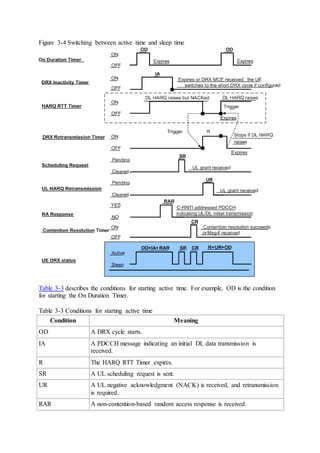
Figure 3-4 illustrates the switching between active time and sleep time in various frequency
division duplex (FDD) mode scenarios.
Figure 3-4 Switching between active time and sleep time
Table 3-3 describes the conditions for starting active time. For example, OD is the condition
for starting the On Duration Timer.
Table 3-3 Conditions for starting active time
Condition Meaning
OD A DRX cycle starts.
IA A PDCCH message indicating an initial DL data transmission is
received.
R The HARQ RTT Timer expires.
SR A UL scheduling request is sent.
UR A UL negative acknowledgment (NACK) is received, and retransmission
is required.
RAR A non-contention-based random access response is received.
Condition Meaning
CR Msg3 is sent in a random access procedure.
The active time shown in the UE DRX status plot in Figure 3-4 combines the active time
described in each of the other plots excluding the plot of HARQ RTT Timer.
In the plot of HARQ RTT Timer, "DL HARQ raises" refers to one of the two DL HARQ
transmission scenarios:
 A semi-persistent DL data transmission is scheduled to start at the subframe.
 A DL data transmission is scheduled to start at the subframe, which the UE learns by
monitoring the PDCCH.
3.4.4 Switching Between Long and Short DRX Cycles
Although the eNodeB assigns both long and short DRX cycles to the UE, the UE uses a long
or short DRX cycle at a time. The UE can switch between long and short DRX cycles
according to certain rules.
Switching from a Long DRX Cycle to a Short DRX Cycle
If the eNodeB delivers short DRX cycle parameters to the UE, the UE will exit the long DRX
cycle and enter a short DRX cycle if either of the following occurs:
 The DRX Inactivity Timer expires.
If there is data to transmit, the eNodeB starts the DRX Inactivity Timer. When the
DRX Inactivity Timer expires, the short DRX cycle starts.
 The UE receives the DRX command MCE.
After the UE receives the DRX command MCE, the UE enters a short DRX cycle.
Otherwise, the UE still uses the long DRX cycle.
Switching from a Short DRX Cycle to a Long DRX Cycle
If the UE does not receive new data during a specified period after entering a short DRX
cycle, it will switch to a long DRX cycle to save power.
The period before the UE switches to a long DRX cycle is called the lifetime of the short
DRX cycle. The lifetime is measured by the number of times the short DRX cycle repeats.
The DRX Short Cycle Timer determines how long the short DRX cycle runs. The
DrxParaGroup.DrxShortCycleTimer parameter sets the time for the DRX Short Cycle
Timer. After the DRX Short Cycle Timer expires, the UE uses the long DRX cycle.
3.5 DRX Parameters for Various Scenarios
UEs enter the active state and sleep state based on DRX configurations, as described in the
previous chapters.
For common services on common UEs, users can configure one set of DRX parameters. For
details, see 3.5.1 DRX Parameters for VoIP.
For special UEs or ANR measurements, users can configure special DRX parameters. For
details, see 3.5.2 DRX Parameters for Special UEs and 3.5.3 DRX Parameters for ANR
Measurements.
Table 3-4 lists the parameters for each scenario.
Table 3-4 DRX parameters for various scenarios
DRX
Parame
ter
Name
DRX Parameters for
Common UEs
DRX Parameters
for Special UEs
DRX Parameters for ANR
Measurements
VoI
P
Ser
vice
s
Non-VoIP Services Intra-RAT Inter-RAT
Long
DRX
Cycle
DrxParaGroup.LongDrx
Cycle
Drx.LongDrxCy
cleSpecial
Drx.LongDrx
CycleForAnr
Drx.LongDRX
CycleforIRatA
nr
Short-
cycle
DRX
support
ed
indicati
on
DrxParaGroup.Support
ShortDrx
Drx.SupportSho
rtDrxSpecial
N/A
Short
DRX
Cycle
N/A DrxParaGroup.Sh
ortDrxCycle
Drx.ShortDrxCy
cleSpecial
N/A
DRX
Short
Cycle
Timer
N/A DrxParaGroup.DR
XShortCycleTime
r
Drx.DrxShortCy
cleTimerSpecial
N/A
On
Duratio
n
Timer
DrxParaGroup.OnDurat
ionTimer
Drx.OnDuration
TimerSpecial
N/A
DRX
Inactivi
ty
Timer
DrxParaGroup.DrxInact
ivityTimer
Drx.DRXInactivi
tyTimerSpecial
N/A
DRX
Retrans
mission
Timer
DrxParaGroup.DRXReT
xTimer
N/A N/A
NOTE:
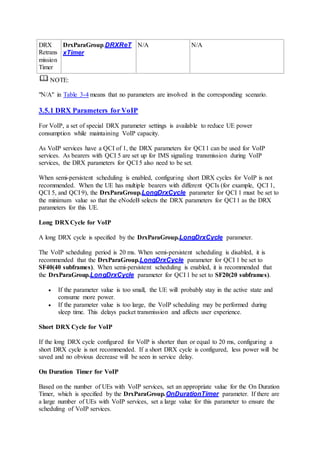
"N/A" in Table 3-4 means that no parameters are involved in the corresponding scenario.
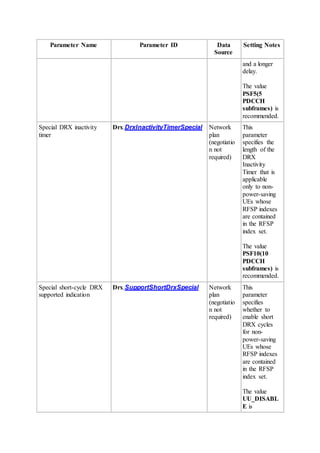
3.5.1 DRX Parameters for VoIP
For VoIP, a set of special DRX parameter settings is available to reduce UE power
consumption while maintaining VoIP capacity.
As VoIP services have a QCI of 1, the DRX parameters for QCI 1 can be used for VoIP
services. As bearers with QCI 5 are set up for IMS signaling transmission during VoIP
services, the DRX parameters for QCI 5 also need to be set.
When semi-persistent scheduling is enabled, configuring short DRX cycles for VoIP is not
recommended. When the UE has multiple bearers with different QCIs (for example, QCI 1,
QCI 5, and QCI 9), the DrxParaGroup.LongDrxCycle parameter for QCI 1 must be set to
the minimum value so that the eNodeB selects the DRX parameters for QCI 1 as the DRX
parameters for this UE.
Long DRX Cycle for VoIP
A long DRX cycle is specified by the DrxParaGroup.LongDrxCycle parameter.
The VoIP scheduling period is 20 ms. When semi-persistent scheduling is disabled, it is
recommended that the DrxParaGroup.LongDrxCycle parameter for QCI 1 be set to
SF40(40 subframes). When semi-persistent scheduling is enabled, it is recommended that
the DrxParaGroup.LongDrxCycle parameter for QCI 1 be set to SF20(20 subframes).
 If the parameter value is too small, the UE will probably stay in the active state and
consume more power.
 If the parameter value is too large, the VoIP scheduling may be performed during
sleep time. This delays packet transmission and affects user experience.
Short DRX Cycle for VoIP
If the long DRX cycle configured for VoIP is shorter than or equal to 20 ms, configuring a
short DRX cycle is not recommended. If a short DRX cycle is configured, less power will be
saved and no obvious decrease will be seen in service delay.
On Duration Timer for VoIP
Based on the number of UEs with VoIP services, set an appropriate value for the On Duration
Timer, which is specified by the DrxParaGroup.OnDurationTimer parameter. If there are
a large number of UEs with VoIP services, set a large value for this parameter to ensure the
scheduling of VoIP services.
It is recommended that the DrxParaGroup.OnDurationTimer parameter for QCI 1 be set
to PSF10(10 PDCCH subframes).
DRX Inactivity Timer for VoIP
It is recommended that the DrxParaGroup.DrxInactivityTimer parameter for QCI 1 be set
to PSF80(80 PDCCH subframes).
DRX Retransmission Timer for VoIP
It is recommended that the DrxParaGroup.DrxReTxTimer parameter for QCI 1 be set to
SF8(8 subframes).
Recommended DRX Parameter Settings for VoIP
Table 3-5 lists the recommended DRX parameter settings for VoIP when semi-persistent
scheduling is enabled.
Table 3-5 Recommended DRX parameter settings for VoIP when semi-persistent scheduling
is enabled
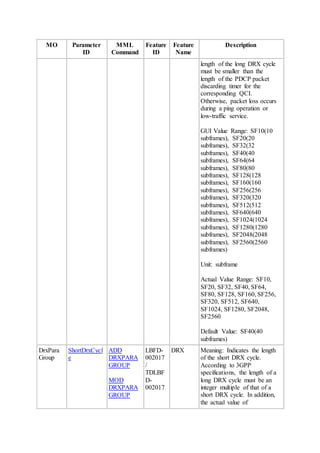
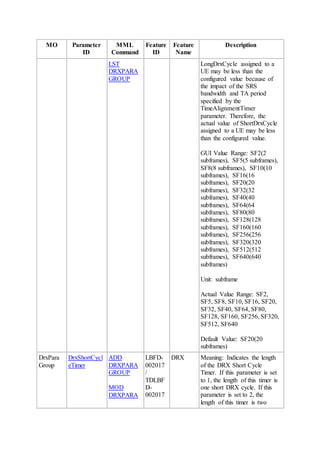
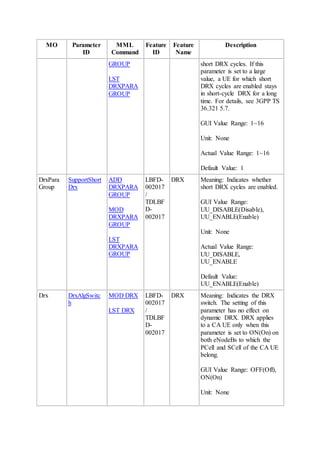
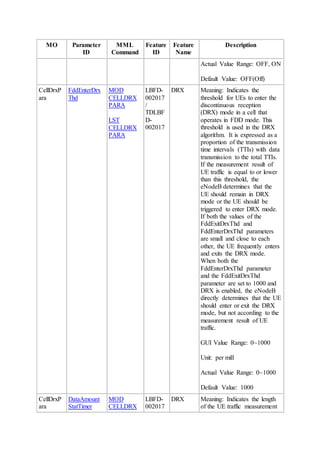
Parameter ID Recommended Value
DrxParaGroup.LongDrxCycle SF20
DrxParaGroup.onDurationTimer PSF10
DrxParaGroup.DrxInactivityTimer PSF80
DrxParaGroup.DrxReTxTimer SF8
DrxParaGroup.SupportShortDrx UU_DISABLE
Table 3-6 lists the recommended DRX parameter settings for VoIP when semi-persistent
scheduling is disabled.
Table 3-6 Recommended DRX parameter settings for VoIP when semi-persistent scheduling
is disabled
Parameter ID Recommended Value
DrxParaGroup.LongDrxCycle SF40
DrxParaGroup.onDurationTimer PSF10
DrxParaGroup.DrxInactivityTimer PSF80
DrxParaGroup.DrxReTxTimer SF8
DrxParaGroup.SupportShortDrx UU_DISABLE
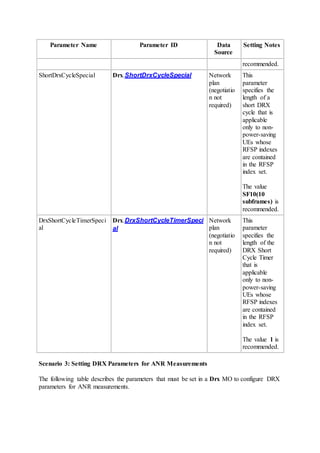
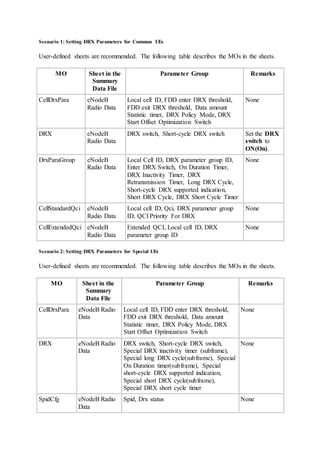
3.5.2 DRX Parameters for Special UEs
Not all UEs are sensitive to power consumption. For example, data cards or UEs with a
sufficient power supply focus on service delay rather than power consumption. These UEs
are called special UEs. The subscriber profile ID for RAT/frequency priority (RFSP) function
allows operators to designate a UE as a special UE and use special DRX parameters for this
UE to improve service performance and increase energy efficiency.
On the Evolved Packet Core (EPC) side, the UE RFSP is an integer ranging from 1 to 256.
Operators can define the RFSP and bind it to the mobile station international ISDN number
(MSISDN) of the UE. When the UE accesses the EPC, the RFSP of the UE is included in the
INITIAL CONTEXT SETUP REQUEST message and sent to the eNodeB over the S1
interface.
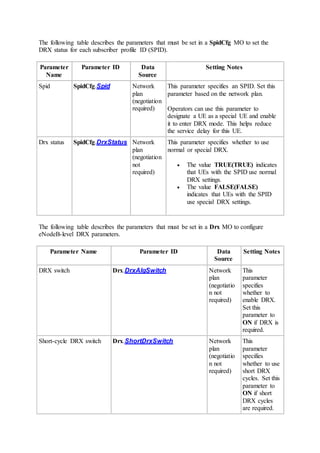
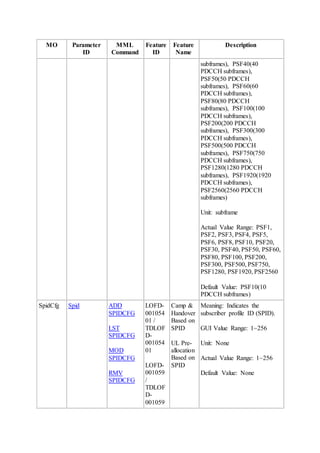
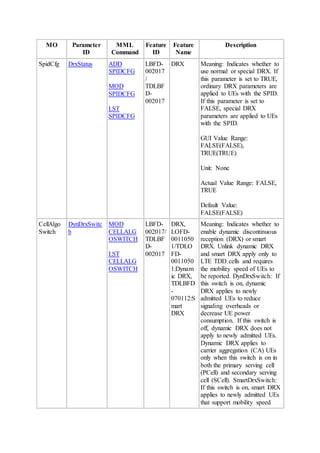
On the eNodeB side, operators can set the SpidCfg.Spid parameter to an integer ranging
from 1 to 256 on the U2000 or Web LMT. When the RFSP value of the UE is the same as the
SpidCfg.Spid parameter value and the SpidCfg.DrxStatus parameter is set to FALSE, the
eNodeB considers the UE to be a special UE. Otherwise, the eNodeB considers the UE to be
a common UE.
On the UE side, the UE reports its type to the eNodeB using the UE-EUTRA-Capability IE in
a UECapabilityInformation message. If the UE-EUTRA-Capability IE contains
noBenFromBatConsumpOpt, the UE is a special UE. Otherwise, the UE is a common UE.
The UE type (common or special) is reported on both the eNodeB and UE sides. The eNodeB
compares the results reported on the two sides. When the results are inconsistent, the eNodeB
considers the UE to be a special UE. When the results are consistent, the eNodeB identifies
the UE type based on the results and uses the appropriate DRX feature.
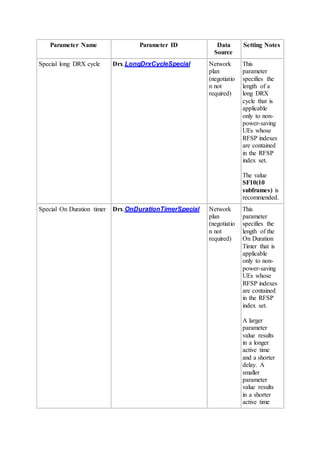
The working mode of special UEs is the same as that of common UEs except that DRX
parameters configured for special UEs are different from those configured for common UEs.
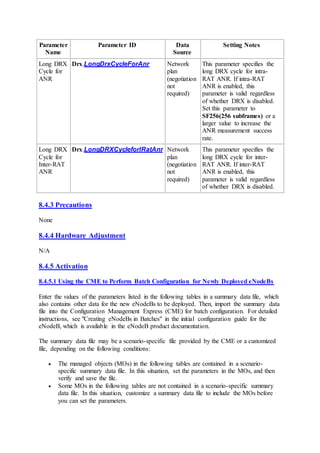
3.5.3 DRX Parameters for ANR Measurements
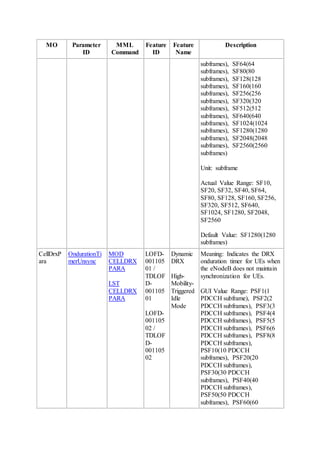
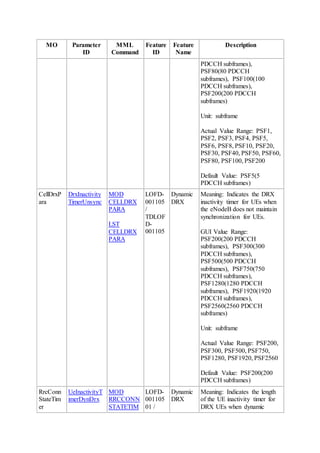
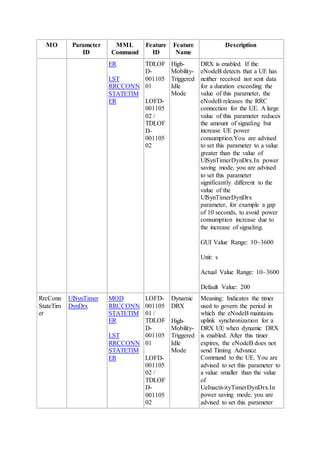
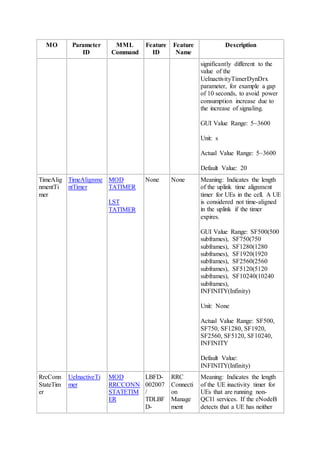
ANR measurements require a relatively long sleep time. If the
DrxParaGroup.LongDrxCycle parameter value is too small, ANR measurements cannot
be completed during this period. If the value is too large, the scheduling delay will be so long
that it fails to meet quality of service (QoS) requirements. When an eNodeB receives a
special-DRX start indication during ANR measurement, the eNodeB configures or
reconfigures a relatively large value for the long DRX cycle, during which UEs perform
ANR measurements in sleep time.
The eNodeB configures the long DRX cycle and the UE performs ANR measurements in
sleep time regardless of whether the general DRX switch Drx.DrxAlgSwitch is set to ON
or OFF.
 If the cells to be measured are E-UTRAN cells, the eNodeB will use the value of the
Drx.LongDrxCycleForAnr parameter as the long DRX cycle.
 If the cells to be measured are GERAN or UTRAN cells, the eNodeB will use the
value of the Drx.LongDRXCycleforIRatAnr parameter as the long DRX cycle.
4 Dynamic DRX
This chapter describes the implementation principles of dynamic DRX. For engineering
guidelines, see 9 Engineering Guidelines for LOFD-00110501 Dynamic DRX.
4.1 Introduction
4.1.1 Definition and Application Scenarios
Definition
Dynamic DRX allows eNodeBs to determine whether to reduce UE power consumption or
signaling overhead based on manual configurations when the amount of UE power
consumption increases rapidly or signaling overhead is high because of UE access to the
network.
Application Scenarios
Dynamic DRX can be used in the following scenarios:
 Networks where smart terminals are mainstream
 Services that use small, sparse packets
 Services that use heartbeat packets
4.1.2 Benefits
Dynamic DRX provides the following benefits but cannot provide all these benefits
simultaneously:
 Reduces UE power consumption. When UE power consumption is high, the eNodeB
sends different DRX parameters to UEs in the synchronization state and UEs in the
out-of-synchronization states, instructing them to dynamically switch between two
sets of DRX parameters.
 Reduces signaling overhead by reducing the amount of RRC connection
establishment and release signaling for services that use small, sparse packets or
heartbeat packets.
The UE inactivity timer is increased to allow UEs to stay in connected mode longer in
the case of high signaling overhead caused by UEs' access to the network.
4.1.3 Process
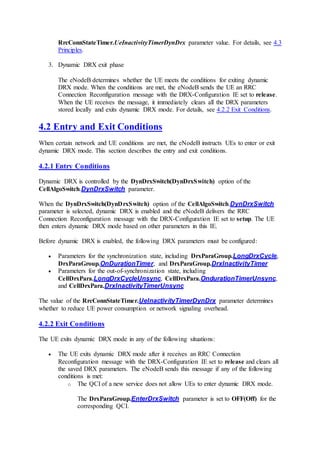
Figure 4-1 shows the dynamic DRX process.
Figure 4-1 Dynamic DRX process
The dynamic DRX process is described as follows:
1. Dynamic DRX entry phase
After the UE accesses the network, the eNodeB determines whether the UE meets the
conditions for entering dynamic DRX mode. When the conditions are met, the
eNodeB sends the UE an RRC Connection Reconfiguration message with the DRX-
Configuration IE set to setup. The UE then enters dynamic DRX mode based on other
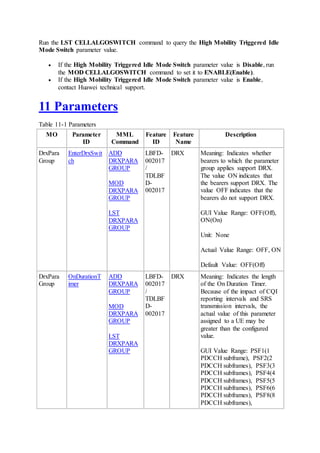
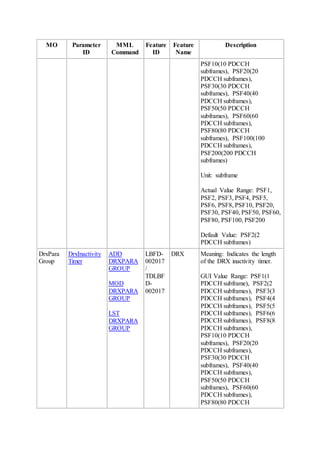
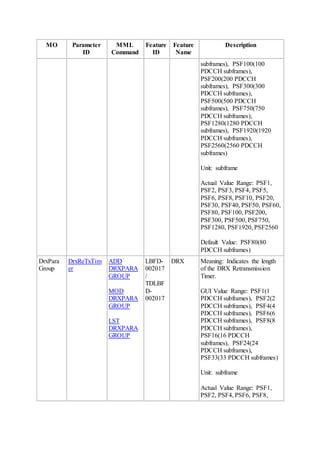
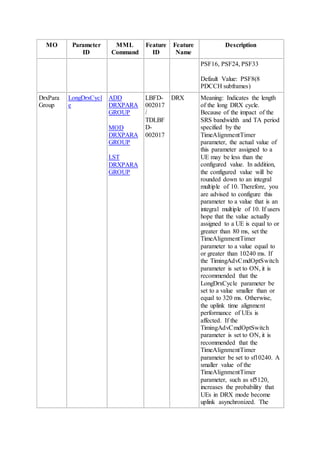
parameters in this IE. For details, see 4.2.1 Entry Conditions.
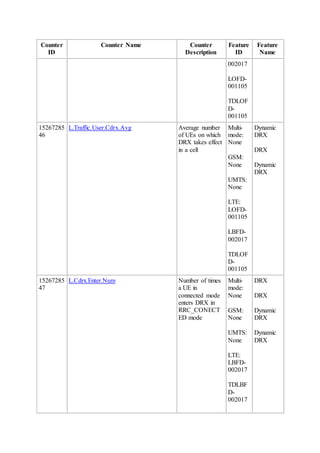
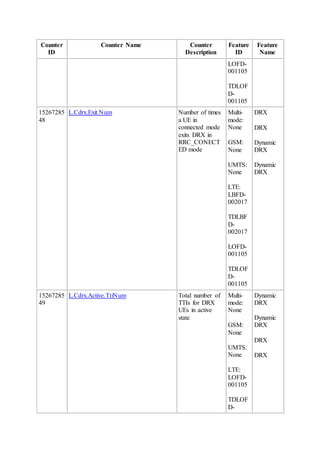
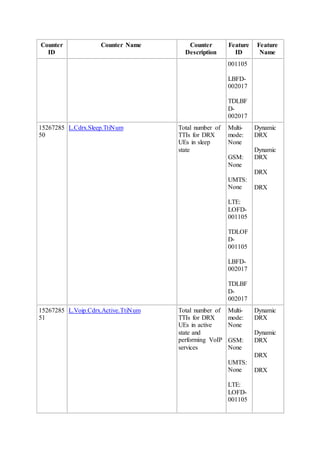
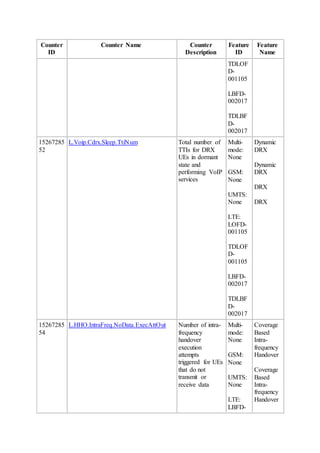
2. Dynamic DRX execution phase
After the UE enters dynamic DRX mode, the eNodeB determines whether the UE
enters power saving or reduced signaling mode based on the
RrcConnStateTimer.UeInactivityTimerDynDrx parameter value. For details, see 4.3
Principles.
3. Dynamic DRX exit phase
The eNodeB determines whether the UE meets the conditions for exiting dynamic
DRX mode. When the conditions are met, the eNodeB sends the UE an RRC
Connection Reconfiguration message with the DRX-Configuration IE set to release.
When the UE receives the message, it immediately clears all the DRX parameters
stored locally and exits dynamic DRX mode. For details, see 4.2.2 Exit Conditions.
4.2 Entry and Exit Conditions
When certain network and UE conditions are met, the eNodeB instructs UEs to enter or exit
dynamic DRX mode. This section describes the entry and exit conditions.
4.2.1 Entry Conditions
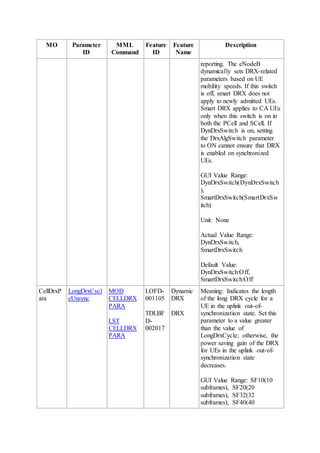
Dynamic DRX is controlled by the DynDrxSwitch(DynDrxSwitch) option of the
CellAlgoSwitch.DynDrxSwitch parameter.
When the DynDrxSwitch(DynDrxSwitch) option of the CellAlgoSwitch.DynDrxSwitch
parameter is selected, dynamic DRX is enabled and the eNodeB delivers the RRC
Connection Reconfiguration message with the DRX-Configuration IE set to setup. The UE
then enters dynamic DRX mode based on other parameters in this IE.
Before dynamic DRX is enabled, the following DRX parameters must be configured:
 Parameters for the synchronization state, including DrxParaGroup.LongDrxCycle,
DrxParaGroup.OnDurationTimer, and DrxParaGroup.DrxInactivityTimer
 Parameters for the out-of-synchronization state, including
CellDrxPara.LongDrxCycleUnsync, CellDrxPara.OndurationTimerUnsync,
and CellDrxPara.DrxInactivityTimerUnsync
The value of the RrcConnStateTimer.UeInactivityTimerDynDrx parameter determines
whether to reduce UE power consumption or network signaling overhead.
4.2.2 Exit Conditions
The UE exits dynamic DRX mode in any of the following situations:
 The UE exits dynamic DRX mode after it receives an RRC Connection
Reconfiguration message with the DRX-Configuration IE set to release and clears all
the saved DRX parameters. The eNodeB sends this message if any of the following
conditions is met:
o The QCI of a new service does not allow UEs to enter dynamic DRX mode.
The DrxParaGroup.EnterDrxSwitch parameter is set to OFF(Off) for the
corresponding QCI.
o The traffic volume of the UE is heavy.
The measured traffic volume is greater than the
CellDrxPara.FddExitDrxThd parameter value during the period specified
by the CellDrxPara.DataAmountStatTimer parameter.
NOTE:
If the CellDrxPara.FddExitDrxThd parameter is set to 1000, the UE will
not exit dynamic DRX mode.
 The DynDrxSwitch(DynDrxSwitch) option of the CellAlgoSwitch.DynDrxSwitch
parameter is deselected, and the eNodeB instructs the UE to exit dynamic DRX mode
during RRC connection reconfiguration.
 The UE in connected mode experiences an RLF when radio conditions deteriorate.
 During a handover, the eNodeB instructs the UE to exit DRX mode. After the
handover, the UE determines whether to reenter dynamic DRX mode according to the
entering conditions.
 The UE is in the TTI bundling state.
4.3 Principles
To allow smart terminals to stay in sleep state longer and consume less power, the eNodeB
selects different DRX parameters for UEs in synchronization and out-of-synchronization
states based on the RrcConnStateTimer.UeInactivityTimerDynDrx and
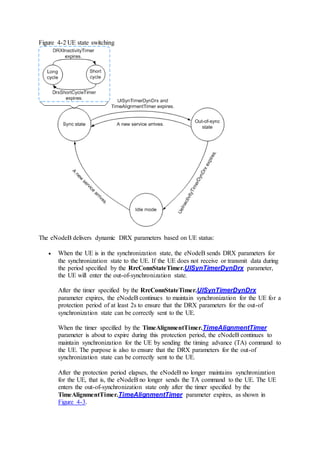
RrcConnStateTimer.UlSynTimerDynDrx parameter settings. Figure 4-2 shows how a UE
switches between different states.
Figure 4-2 UE state switching
The eNodeB delivers dynamic DRX parameters based on UE status:
 When the UE is in the synchronization state, the eNodeB sends DRX parameters for
the synchronization state to the UE. If the UE does not receive or transmit data during
the period specified by the RrcConnStateTimer.UlSynTimerDynDrx parameter,
the UE will enter the out-of-synchronization state.
After the timer specified by the RrcConnStateTimer.UlSynTimerDynDrx
parameter expires, the eNodeB continues to maintain synchronization for the UE for a
protection period of at least 2s to ensure that the DRX parameters for the out-of
synchronization state can be correctly sent to the UE.
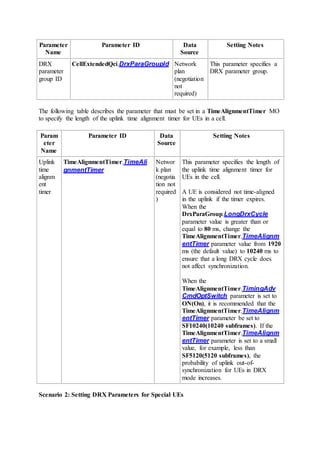
When the timer specified by the TimeAlignmentTimer.TimeAlignmentTimer
parameter is about to expire during this protection period, the eNodeB continues to
maintain synchronization for the UE by sending the timing advance (TA) command to
the UE. The purpose is also to ensure that the DRX parameters for the out-of
synchronization state can be correctly sent to the UE.
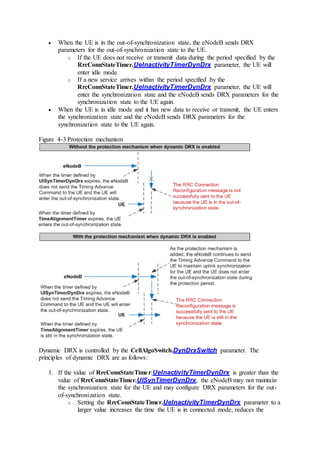
After the protection period elapses, the eNodeB no longer maintains synchronization
for the UE, that is, the eNodeB no longer sends the TA command to the UE. The UE
enters the out-of-synchronization state only after the timer specified by the
TimeAlignmentTimer.TimeAlignmentTimer parameter expires, as shown in
Figure 4-3.
 When the UE is in the out-of-synchronization state, the eNodeB sends DRX
parameters for the out-of-synchronization state to the UE.
o If the UE does not receive or transmit data during the period specified by the
RrcConnStateTimer.UeInactivityTimerDynDrx parameter, the UE will
enter idle mode.
o If a new service arrives within the period specified by the
RrcConnStateTimer.UeInactivityTimerDynDrx parameter, the UE will
enter the synchronization state and the eNodeB sends DRX parameters for the
synchronization state to the UE again.
 When the UE is in idle mode and it has new data to receive or transmit, the UE enters
the synchronization state and the eNodeB sends DRX parameters for the
synchronization state to the UE again.
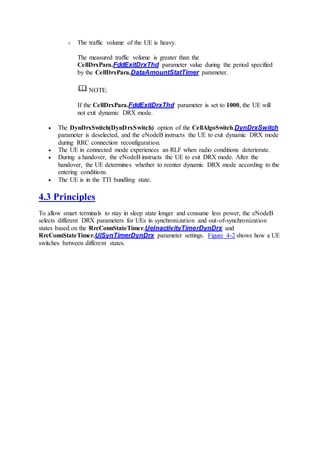
Figure 4-3 Protection mechanism
Dynamic DRX is controlled by the CellAlgoSwitch.DynDrxSwitch parameter. The
principles of dynamic DRX are as follows:
1. If the value of RrcConnStateTimer.UeInactivityTimerDynDrx is greater than the
value of RrcConnStateTimer.UlSynTimerDynDrx, the eNodeB may not maintain
the synchronization state for the UE and may configure DRX parameters for the out-
of-synchronization state.
o Setting the RrcConnStateTimer.UeInactivityTimerDynDrx parameter to a
larger value increases the time the UE is in connected mode, reduces the
number of transitions between connected and idle modes, reduces the
signaling overhead in frequent connection establishments and releases for
small, sparse packets or heartbeat packets, but saves less UE power.
o Setting the RrcConnStateTimer.UlSynTimerDynDrx parameter to a
smaller value decreases the time the eNodeB synchronizes with the UE and
saves more UE power.
NOTE:
If the CellAlgoSwitch.DynDrxSwitch parameter is on, the settings of the
RrcConnStateTimer.UeInactiveTimer and
RrcConnStateTimer.UlSynTimer parameters take effect only for UEs not
supporting DRX.
2. When the UE is in the synchronization state, the eNodeB assigns the UE the DRX
parameters for the synchronization state. When the timer defined by the
RrcConnStateTimer.UlSynTimerDynDrx parameter expires, the eNodeB assigns
the UE the DRX parameters for the out-of-synchronization state.
The eNodeB dynamically switches between the two types of DRX parameters based on UE
status.
5 High-Mobility-Triggered Idle Mode
This chapter describes the implementation principles of the high-mobility-triggered idle mode
feature. For engineering guidelines, see 10 Engineering Guidelines for LOFD-00110502
High-Mobility-Triggered Idle Mode.
5.1 Introduction
5.1.1 Definition and Application Scenarios
If UEs frequently move between cells while staying in connected mode for a long period of
time, a large number of handovers will be triggered, causing excessive handover signaling.
Especially after dynamic DRX is enabled, UEs stay in connected mode for a prolonged
period of time. In this scenario, if UEs move fast, instead of cell reselections, more handovers
are triggered. To prevent handover signaling from affecting eNodeB performance, the
eNodeB uses the high-mobility-triggered idle mode feature.
Definition
High-mobility-triggered idle mode is a state in which the number of handovers and the
amount of related signaling decrease after UEs enter idle mode based on their movement
speeds and the packet sending state.
Application Scenarios
The high-mobility-triggered idle mode feature is mainly used on mobile networks where most
UEs are smart terminals. This feature is suitable for UEs that stay in connected mode and
move frequently, especially for UEs in dynamic DRX mode.
5.1.2 Benefits
The high-mobility-triggered idle mode feature reduces the number of handovers and the
amount of signaling on the entire network, minimizing the impact of handover signaling on
network stability while maintaining user experience.
5.2 Principles
In high-mobility-triggered idle mode, eNodeBs determine whether to release UEs based on
their movement speeds, packet sending states, and camping times. For triggering conditions,
see Working Mechanism.
Characteristics of Fast-Moving UEs
LTE networks are often deployed in hot spots that have the following characteristics:
 Densely populated areas where people are often on the move
 Small spacing between eNodeBs
In these hot spots, handovers are easily triggered for fast-moving UEs.
Figure 5-1 shows that a UE moves between cells in a hot spot.
Figure 5-1 UE movement
Table 5-1 and Table 5-2 list the movement speeds and camping times for a UE passing
through the center coverage areas of cells with radii of 300 m and 500 m.
Table 5-1 Movement speed and camping time of a UE in a cell with a radius of 300 m
Movement Speed (km/h) Camping Time (Seconds)
[30-60] [18-36]
[60-120] [18-9]
> 120 < 9
Table 5-2 Movement speed and camping time of a UE in a cell with a radius of 500 m
Movement Speed (km/h) Camping Time (Seconds)
[30-60] [30-60]
[60-120] [15-30]
> 120 < 15
In reality, most UEs do not pass through the cell center and the camping time of these UEs is
even shorter.
Figure 5-2 shows the numbers of service requests triggered by heartbeats.
Figure 5-2 Numbers of service requests triggered by heartbeats
In Figure 5-2, the x-axis specifies the service types and the y-axis specifies the number of
network access requests triggered by heartbeats within an hour. The heartbeat period is equal
to 3600 divided by the number of service requests.
You can extrapolate the following from the data shown in Figure 5-2:
 The heartbeat periods for most services are 180s or longer.
 In each heartbeat period, the UE stays in connected mode for a long time.
During a heartbeat period, if the UE is moving fast, it may pass through several cells
and be handed over many times. For example, during a heartbeat period of 180s, a UE
moving at 30 km/h may pass through five 300 m radius cells. If the UE stays in
connected mode in this period, multiple handovers will be performed. During this
process, no service data is transmitted.
 Most UEs have only heartbeat packets to transmit and receive for an extended period,
a period even longer than the time the UEs take to process other services.
Working Mechanism
The high-mobility-triggered idle mode feature is enabled if the
CellAlgoSwitch.HighMobiTrigIdleModeSwitch parameter is set to ENABLE(Enable).
To avoid a handover, the eNodeB triggers the S1 release procedure after receiving the
measurement report from a UE and instructs the UE to enter idle mode when all of the
following conditions are met:
 The movement speed of the UE is greater than or equal to 30 km/h during the
camping.
 The UE does not transmit data when it is camping on a cell.
 The camping time is greater than or equal to 10s.
As the UE has data to transmit only when a heartbeat period begins, instructing the UE to
enter idle mode has no impact on the UE's services.
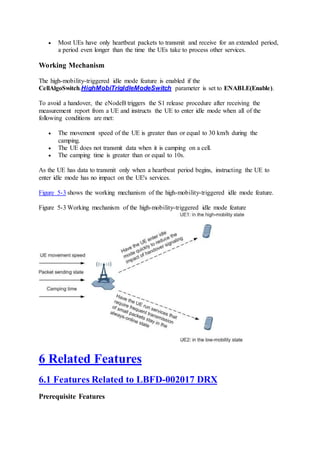
Figure 5-3 shows the working mechanism of the high-mobility-triggered idle mode feature.
Figure 5-3 Working mechanism of the high-mobility-triggered idle mode feature
6 Related Features
6.1 Features Related to LBFD-002017 DRX
Prerequisite Features
None
Mutually Exclusive Features
LOFD-001008 Ultra High Speed Mobility
When DRX is enabled in ultra high speed mobility scenarios, the handover success rate
decreases, the service drop rate increases, and other performance indicators may also
deteriorate.
Impacted Features
Scheduling
DRX has the following impact on scheduling:
 When no system information is being delivered and no paging is performed, the
eNodeB enables resource scheduling for the UE only during active time.
 In DRX mode, the UE sends an SR when there is data in the UE buffer, regardless of
whether the UE is in the active state. Even if the UE is in the sleep state, it
immediately switches to the active state and begins to monitor the PDCCH. When the
UE receives the data initially sent on the PDCCH, the eNodeB starts the DRX
Inactivity Timer to increase the active time until the UE obtains resources.
 For downlink scheduling (provided in LBFD-002025 Basic Scheduling and LBFD-
002005 DL Asynchronous HARQ), HARQ feedback takes priority over DRX. That
is, UEs can provide HARQ feedback regardless of whether they are in active time.
 For uplink scheduling (provided in LBFD-002025 Basic Scheduling and LBFD -
002006 UL Synchronous HARQ), the eNodeB allows the TTI during which the
uplink retransmitted data in the pending state to be assigned uplink scheduling grant
during active time. This facilitates ACK/NACK feedback or retransmission
scheduling. During the TTI, UEs need to receive HARQ feedback.
 There is a small chance that false detection of SRs may result in inconsistent DRX
status information between the eNodeB and the UE. When DRX is enabled, uplink
and downlink BLERs may increase. To reduce false SR detection, you are advised to
take one or more of the following actions:
o Set the CellUlschAlgo.SriFalseDetThdSwitch parameter to ON(ON) when
there are no VoIP services.
o Set the CellAlgoSwitch.UlSchSwitch parameter to PuschDtxSwitch-1. This
setting may lead to an increase in the service drop rate in weak coverage or
strong interference scenarios.
o Set the CellAlgoSwitch.UlSchSwitch parameter to
UlEnhancedSrSchSwitch-1.
For details, see Scheduling Feature Parameter Description.
 When the UE is in the uplink pre-scheduling state, the eNodeB instructs the UE to
exit the uplink pre-scheduling state after the UE enters DRX mode. Upon exiting
DRX mode, the UE enters the pre-scheduling state.
 When the UE is in the TTI bundling state (function provided in LOFD-001048 TTI
Bundling), the eNodeB does not instruct the UE to enter DRX mode unless required
during ANR measurement. When the UE is in DRX mode, the eNodeB instructs the
UE to exit DRX mode after TTI bundling is initiated. When the UE is performing
ANR measurements in DRX mode, the eNodeB does not instruct the UE to exit DRX
mode.
Connection Management
The UE immediately responds to random access requests, regardless of whether it is in the
active state.
Mobility Management in Connected Mode
During different stages of a handover, DRX functions in different ways:
 When the handover process starts:
After receiving a handover decision indicating that the handover request has been
accepted, the source eNodeB sends an RRC Connection Reconfiguration message to
instruct the UE to exit DRX mode. If this happens during sleep time, the UE will not
receive the message until after the next active time arrives.
 When the handover succeeds:
The eNodeB determines whether to apply DRX to the UE based on whether DRX is
enabled.
 When the handover fails:
The UE remains in the current cell, and the source eNodeB checks whether the UE
can enter DRX mode.
NOTE:
For details about the handover process in DRX mode, see Intra-RAT Mobility
Management in Connected Mode Feature Parameter Description
Measurement
When measurement configurations conflict with DRX configurations, measurement takes
priority.
NOTE:
For details about the handover process in DRX mode, see Intra-RAT Mobility Management in
Connected Mode Feature Parameter Description
UE measurement in the LTE system is classified into common measurement and gap-assisted
measurement. UE measurement in the LTE system is classified into common measurement
and gap-assisted measurement. Common measurement is used for intra-frequency
measurement, and gap-assisted measurement is used for inter-frequency measurement and
inter-radio access technology (RAT) measurement.
 Common measurement
For random access, the UE enters the active state if it is in sleep time and then uses
the first available random access channel (RACH) to send UL measurement reports.
In other scenarios, the UE sends measurement reports only in active time. If the UE is
in the sleep state, it will send measurement reports in active time in the next DRX
cycle.
 Gap-assisted measurement
In gap-assisted measurement, gaps with 6 ms each are generated every 40 ms or 80
ms. To reduce the impact on data transmission, the eNodeB needs to generate gaps in
sleep time. If gaps have been configured for the UE, the UE cannot enter DRX mode.
The UE cannot enter DRX mode in either of the following situations:
o Periodic measurement reporting based on the gap-assisted measurement has
been enabled for the modules that have subscribed to it. Such a module may
be the FARS cell tracing module or the Nastar module.
o Some operations are performed by mistake, which can be checked by querying
the operation logs on the U2000.
As shown in Figure 6-1, gaps are generated every 40 ms, six TTIs earlier than the
DRX cycle.
Figure 6-1 DRX cycles and gap-assisted measurements
CQI
In DRX mode, the UE turns off its receiver intermittently. When the UE is in the sleep state,
the eNodeB does not deliver channel quality indicator (CQI) or sounding reference signal
(SRS) measurement configurations and the UE reports the measurements in compliance with
the following protocol requirements:
 For UEs complying with 3GPP Release 8, CQIs, precoding matrix indicators (PMIs),
and rank indicators (RIs) can be reported over the PUCCH only in active time.
 For UEs complying with 3GPP Release 9, CQIs, PMIs, and RIs can be reported over
the PUCCH only in the On Duration.
The CellDrxPara.CqiMask parameter controls when CQIs, PMIs, and RIs can be reported
in the On Duration:
 If this parameter is set to ON, CQIs, PMIs, and RIs can be reported only in the On
Duration.
 If this parameter is set to OFF, CQIs, PMIs, and RIs can be reported in active time.
 SRSs can be sent only in active time.
CQI configurations affect the settings of DRX parameters controlled by the eNodeB. The
eNodeB can automatically adjust the value of the operator-defined
DrxParaGroup.OnDurationTimer parameter so that the number of CQIs reported by the UE
during a period meets the requirements for downlink scheduling performance.
NOTE:
Currently, most UEs that comply with 3GPP Release 9 do not support CQI mask. Retain the
default value OFF of the CellDrxPara.CqiMask parameter for these UEs.
Timing Control
When SRSs are used for timing control, the TA measurement precision for uplink
synchronization depends on the number of times the UE reports SRSs. To acquire sufficient
SRSs, the eNodeB adaptively adjusts the value of the DrxParaGroup.LongDrxCycle
parameter based on the SRS configurations of the UE and the period set for delivery of TA
measurements to the UE. Therefore, the value delivered to the UE may differ from that set by
MML commands. The value must be a multiple of 10 ms because the SRS reporting period is
a multiple of 10 ms and the CQI reporting period is a multiple of 5 ms for Huawei eNodeBs.
The specific value depends on other parameters:
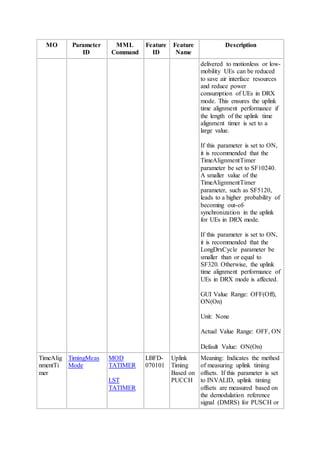
 When TimeAlignmentTimer.TimingAdvCmdOptSwitch is set to ON, the
eNodeB does not restrict the setting of DrxParaGroup.LongDrxCycle to ensure
timing performance. However, it is recommended that the cycle not exceed 320 ms.
Settings greater than 320 ms may affect uplink timing performance.
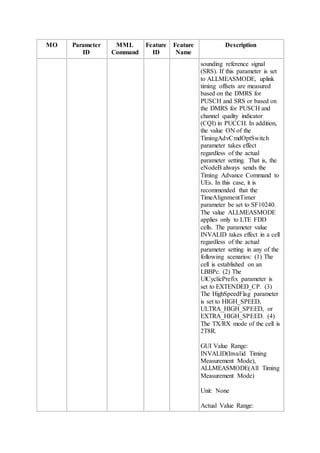
 When TimeAlignmentTimer.TimingMeasMode is set to ALLMEASMODE, the
eNodeB does not impose restrictions on DRX parameter settings.
When demodulation reference signals (DMRSs) are used for timing control and DRX is
enabled, at least one active time must exist during the period set for delivery of TA
measurements so that the eNodeB can deliver scheduling information to trigger the delivery.
NOTICE:
The eNodeB configures DRX parameters for UEs based on parameter validity, protocol
compatibility, and chip compatibility. For example, UEs with Qualcomm chips consider the
settings of certain DRX parameters invalid and the RRC connection needs to be
reestablished. These DRX parameters may be adjusted after the validity check. Validity
check is performed to see whether:
 The long DRX cycle should be an integer multiple of the short DRX cycle. Otherwise,
the short DRX cycle is automatically adjusted to an appropriate value.
 The long DRX cycle should be an integer multiple of 10. Otherwise, it is
automatically adjusted to an appropriate value.
 The OnDurationTimer value should be less than the short DRX cycle. Otherwise, the
short cycle is not configured.
 The OnDurationTimer value should be less than the long DRX cycle. Otherwise, the
DRX parameters are not configured.
Carrier Aggregation
When carrier aggregation (CA) is enabled, the DRX mechanism works as follows:
 If DRX is enabled in both the primary serving cell (PCell) and the secondary serving
cell (SCell) for a CA UE, when the serving eNodeB of the PCell sends an MCE
command to activate the SCell, the eNodeB will handle the UE states in the cells as
follows:
o If the UE has entered DRX mode in the PCell, the eNodeB will instruct the
UE to enter DRX mode in the SCell, with the DRX parameters for the PCell
applied to the SCell.
o If the UE has not entered DRX mode in the PCell, the eNodeB will determine
whether the UE should enter DRX mode in both the PCell and SCell based on
the traffic volume of the UE.
 If DRX is enabled in the PCell but disabled in the SCell, the UE will exit DRX mode
(if it has entered this mode) after the SCell is configured for the UE.
 If DRX is disabled in the PCell, the UE will not enter DRX mode in either the PCell
or the SCell, regardless of whether DRX is enabled in the SCell.
For details about CA features, see Carrier Aggregation Feature Parameter Description.
LOFD-001007 High Speed Mobility
In high speed mobility scenarios, if the long DRX cycle is 40 ms or shorter, no obvious effect
will be seen in UE power saving; if the long DRX cycle is longer than 40 ms, SRS-based
timing and reference signal received power (RSRP) measurement will be affected. Both
configurations may result in a low handover success rate, a high service drop rate, a large
number of RRC connection reestablishments, and a low reestablishment success rate.
Therefore, DRX is not recommended for high speed mobility scenarios.
6.2 Features Related to LOFD-00110501 Dynamic DRX
Prerequisite Features
None
Mutually Exclusive Features
LOFD-001008 Ultra High Speed Mobility
When LOFD-00110501 Dynamic DRX is enabled for ultra high speed mobility scenarios, the
handover success rate decreases, the service drop rate increases, and other performance
indicators may also deteriorate.
Impacted Features
LBFD-002017 DRX
The DRX parameters for UEs in the synchronization state used in LOFD-00110501 Dynamic
DRX are the same as the DRX parameters used in LBFD-002017 DRX. However, the two
features do not depend on each other.
When LOFD-00110501 Dynamic DRX is enabled, the switch for LBFD-002017 DRX cannot
control whether the DRX parameters for UEs in the synchronization state take effect.
Other features
The other impacted features of LOFD-00110501 Dynamic DRX are the same as those of
LBFD-002017 DRX. For details, see section 6.1 Features Related to LBFD-002017 DRX.
6.3 Features Related to LOFD-00110502 High-Mobility-
Triggered Idle Mode
Prerequisite Features
None
Mutually Exclusive Features
None
Impacted Features
None
7 Network Impact
7.1 LBFD-002017 DRX
System Capacity
None
Network Performance
The sleep time in DRX helps reduce UE power consumption but may increase delay for
ongoing services, resulting in decreased traffic volume or throughput.
DRX has the following impacts on network performance:
 If the value of the DrxParaGroup.OnDurationTimer parameter is too small, the
VoIP capacity will decrease, or the uplink and downlink packet loss rates for voice
services in heavy-load scenarios will increase. A large value for this parameter results
in reduced UE power saving.
 If the value of the DrxParaGroup.LongDrxCycle parameter is too large, the CQI
reporting period will increase, and the traffic volume or throughput under functions
such as scheduling and multiple-input-multiple-output (MIMO) will decrease. In
addition, the handover success rate decreases, and the service drop rate increases.
These impacts are more obvious in high-speed mobility or weak-coverage scenarios.
If the value of the DrxParaGroup.LongDrxCycle parameter is too small, the UE
power saving effect will deteriorate.
 If the value of the DrxParaGroup.DRXInactivityTimer parameter is too small, the
uplink and downlink cell throughput as well as user-perceived uplink and downlink
throughput may decrease, or the uplink and downlink packet loss rates will increase
for voice services when there are a large number of UEs in connected mode (for
example, when the average number of UEs in connected mode exceeds 100). When
there are no VoIP services, you are advised to set the
DrxParaGroup.DRXInactivityTimer parameter to be greater than or equal to 80
ms.
 If the sleep time is too short, ANR measurements will fail.
 UEs cannot be scheduled in sleep time. In this situation, the resource allocation for
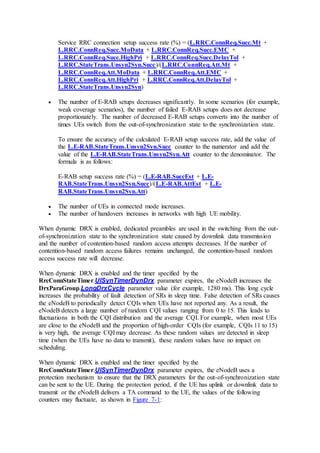
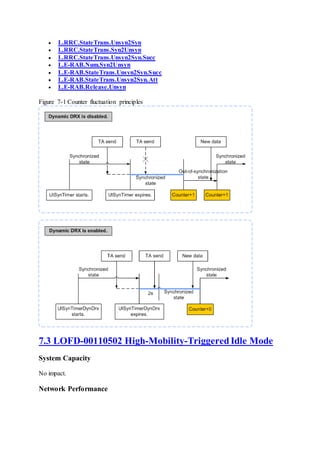
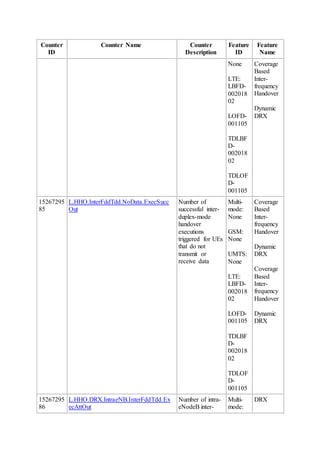
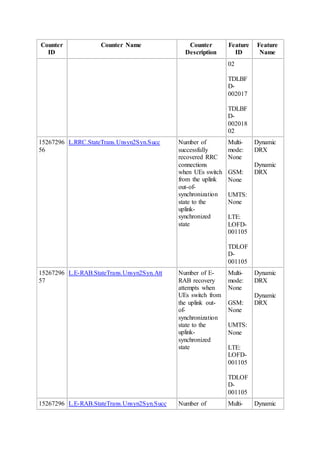
TA measurements is affected. Consequently, the L.RRC.StateTrans.Syn2Unsyn
counter value and the number of RRC connection reestablishments are affected. As a
result, the random access success rate is affected.
 After DRX is enabled, UEs can report CQIs only during active time. If the channel
quality of cell edge users (CEUs) fluctuates significantly during sleep time, the UEs
cannot report CQIs for modulation and coding scheme (MCS) adjustment in a timely
manner. As a result, the bit error rate (BER) for CEUs may increase, and the downlink
packet loss rate for voice services or data services may rise.
 When the UE initiates CSFB during a handover, the eNodeB preferentially processes
the handover but fails to process the CSFB. After the handover, the mobility
management entity (MME) initiates the CSFB again. When DRX is enabled, the
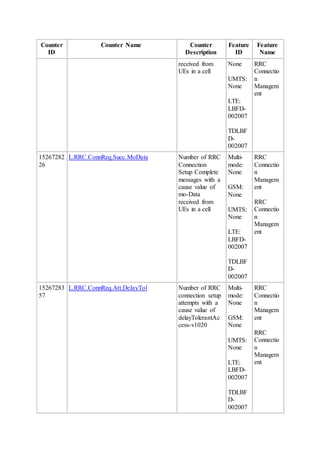
presence of the sleep time increases the probability of CSFB during handovers. In this
case, the number of CSFB-triggered handover failures and the number of CSFB-
triggered handover attempts may increase, while the number of successful CSFB
executions remains unchanged. As a result, the CSFB-triggered handover success rate
may decrease, but this has a very little impact on user experience.
 After DRX is enabled, multiple small packets accumulated during sleep time can be
scheduled all at once. The control channel element (CCE) usage and equivalent CCE
usage may decrease. However, the uplink/downlink cell throughput or user-perceived
uplink/downlink throughput may increase.
If there is severe uplink/downlink interference, cell edge users are less likely to be
scheduled and cell center users are more likely to be scheduled. If the PRB usage
remains at the highest level, DRX may increase the average CQI, uplink/downlink
cell throughput, or user-perceivable uplink/downlink throughput.
 After DRX is enabled, the long DRX cycle specified by the
DrxParaGroup.LongDrxCycle parameter must be shorter than the timer length
specified by the RlcPdcpParaGroup.DiscardTimer parameter. Otherwise, packet
loss may occur for ping services, small packet services, or VoIP services, especially
for services of QCIs 1 and 5.
 To reduce the CPU usage, it is recommended that:
o DRX be disabled for heavy traffic scenarios. Otherwise, multiple timers need
to be maintained for each UE. The CPU consumption of the baseband
processing board increases with the increasing number of UEs.
o The CellDrxPara.FddEnterDrxThd and CellDrxPara.FddExitDrxThd
parameters be set to 1000. Otherwise, a large amount of RRC connection
reconfiguration signaling is generated and the CPU usage of the main control
board or BBP is high.
 DRX takes effect once the E-UTRAN radio access bearer (E-RAB) is set up, leading
to failures in UE pre-scheduling. At the same time, some UEs may fail to send SRs
due to compatibility issues. This leads to fluctuations in the E-RAB setup success
rate. It is recommended that the smart preallocation function be enabled to avoid these
issues.
 When DRX is enabled and the sleep time specified by the
DrxParaGroup.LongDrxCycle, DrxParaGroup.OnDurationTimer, or
DrxParaGroup.DRXInactivityTimer parameter is lengthened, the probability of
fault detection of SRs in sleep time increases. False detection of SRs causes the
eNodeB to periodically detect CQIs when UEs have not reported any. As a result, the
eNodeB detects a large number of random CQI values ranging from 0 to 15. This
leads to fluctuations in both the CQI distribution and the average CQI. For example,
when most UEs are close to the eNodeB and the proportion of high-order CQIs (for
example, CQIs 11 to 15) is very high, the average CQI may decrease. As these
random values are detected in sleep time (when the UEs have no data to transmit),
these random values have no impact on scheduling.
The impact on key performance indicators (KPIs) is dependent on the specific service type,
application scenario, and parameter configuration. Specific KPIs are not listed in this section.
NOTE:
When DRX is enabled, the eNodeB instructs the UE to exit the preallocation state. The
performance of TCP services with ping delay and a small size deteriorates, the uplink
throughput increases, and the number of RBs for uplink frequency-selective scheduling and
that for UL Comp decreases. For details, see Scheduling Feature Parameter Description.
In DRX mode, you can enable smart preallocation to reduce the impact of UE exiting the
preallocation state. However, the power saving effect will deteriorate as the smart
preallocation duration increases.
7.2 LOFD-00110501 Dynamic DRX
System Capacity
None
Network Performance
LOFD-00110501 Dynamic DRX has the same impact as LBFD-002017 DRX on network
performance. For details, see 7.1 LBFD-002017 DRX.
According to section 8.1.2.2 "E-UTRAN intra frequency measurements" in 3GPP TS 36.133
V10.0.0, the reference signal received power (RSRP) measurement period is an integer
multiple of the long DRX cycle. After DRX parameters for out-of-synchronization UEs are
set, the RSRP measurement period increases. As a result, the number of delayed handovers,
service drops, or RRC connection reestablishments increases.
When the RrcConnStateTimer.UeInactivityTimerDynDrx parameter is set to a large
value according to operations in 9.2 Required Information, the large value has the following
impacts:
 The total number of E-RAB releases decreases, while the number of abnormal E-RAB
releases slightly changes. The decreased number of E-RAB releases is equal to the
number of E-RABs in UE contexts when the UEs switch from the uplink
synchronization state to the uplink out-of-synchronization state.
To ensure the accuracy of the calculated service drop rate, add the value of the L.E-
RAB.Num.Syn2Unsyn counter to the denominator and subtract the value of the L.E-
RAB.Release.Unsyncounter from the denominator. The formula is as follows:
Service drop rate (%) = L.E-RAB.AbnormRel/(L.E-RAB.AbnormRel + L.E-
RAB.NormRel + L.E-RAB.Num.Syn2Unsyn - L.E-RAB.Release.Unsyn)
 The number of RRC connection establishments decreases significantly. In some
scenarios (for example, weak coverage scenarios), the number of failed RRC
connection setups does not decrease proportionally. The number of decreased RRC
connection setups converts into the number of times UEs switch from the out-of-
synchronization state to the synchronization state.
To ensure the accuracy of the calculated service RRC connection setup success rate,
add the value of the L.RRC.StateTrans.Unsyn2Syn.Succ counter to the numerator
and add the value of the L.RRC.StateTrans.Unsyn2Syn counter to the denominator.
The formula is as follows:
Service RRC connection setup success rate (%) = (L.RRC.ConnReq.Succ.Mt +
L.RRC.ConnReq.Succ.MoData + L.RRC.ConnReq.Succ.EMC +
L.RRC.ConnReq.Succ.HighPri + L.RRC.ConnReq.Succ.DelayTol +
L.RRC.StateTrans.Unsyn2Syn.Succ)/(L.RRC.ConnReq.Att.Mt +
L.RRC.ConnReq.Att.MoData + L.RRC.ConnReq.Att.EMC +
L.RRC.ConnReq.Att.HighPri + L.RRC.ConnReq.Att.DelayTol +
L.RRC.StateTrans.Unsyn2Syn)
 The number of E-RAB setups decreases significantly. In some scenarios (for example,
weak coverage scenarios), the number of failed E-RAB setups does not decrease
proportionately. The number of decreased E-RAB setups converts into the number of
times UEs switch from the out-of-synchronization state to the synchronization state.
To ensure the accuracy of the calculated E-RAB setup success rate, add the value of
the L.E-RAB.StateTrans.Unsyn2Syn.Succ counter to the numerator and add the
value of the L.E-RAB.StateTrans.Unsyn2Syn.Att counter to the denominator. The
formula is as follows:
E-RAB setup success rate (%) = (L.E-RAB.SuccEst + L.E-
RAB.StateTrans.Unsyn2Syn.Succ)/(L.E-RAB.AttEst + L.E-
RAB.StateTrans.Unsyn2Syn.Att)
 The number of UEs in connected mode increases.
 The number of handovers increases in networks with high UE mobility.
When dynamic DRX is enabled, dedicated preambles are used in the switching from the out-
of-synchronization state to the synchronization state caused by downlink data transmission
and the number of contention-based random access attempts decreases. If the number of
contention-based random access failures remains unchanged, the contention-based random
access success rate will decrease.
When dynamic DRX is enabled and the timer specified by the
RrcConnStateTimer.UlSynTimerDynDrx parameter expires, the eNodeB increases the
DrxParaGroup.LongDrxCycle parameter value (for example, 1280 ms). This long cycle
increases the probability of fault detection of SRs in sleep time. False detection of SRs causes
the eNodeB to periodically detect CQIs when UEs have not reported any. As a result, the
eNodeB detects a large number of random CQI values ranging from 0 to 15. This leads to
fluctuations in both the CQI distribution and the average CQI. For example, when most UEs
are close to the eNodeB and the proportion of high-order CQIs (for example, CQIs 11 to 15)
is very high, the average CQI may decrease. As these random values are detected in sleep
time (when the UEs have no data to transmit), these random values have no impact on
scheduling.
When dynamic DRX is enabled and the timer specified by the
RrcConnStateTimer.UlSynTimerDynDrx parameter expires, the eNodeB uses a
protection mechanism to ensure that the DRX parameters for the out-of-synchronization state
can be sent to the UE. During the protection period, if the UE has uplink or downlink data to
transmit or the eNodeB delivers a TA command to the UE, the values of the following
counters may fluctuate, as shown in Figure 7-1:
 L.RRC.StateTrans.Unsyn2Syn
 L.RRC.StateTrans.Syn2Unsyn
 L.RRC.StateTrans.Unsyn2Syn.Succ
 L.E-RAB.Num.Syn2Unsyn
 L.E-RAB.StateTrans.Unsyn2Syn.Succ
 L.E-RAB.StateTrans.Unsyn2Syn.Att
 L.E-RAB.Release.Unsyn
Figure 7-1 Counter fluctuation principles
7.3 LOFD-00110502 High-Mobility-Triggered Idle Mode
System Capacity
No impact.
Network Performance
This feature decreases the number of handovers for fast-moving UEs, reduces the impact of
handover signaling on the network, and lowers the CPU usage of the eNodeB.
8 Engineering Guidelines for LBFD-002017
DRX
This chapter provides guidelines for configuring LBFD-002017 DRX.
8.1 When to Use DRX
It is recommended that DRX be activated if operators focus on UE power saving and accept
DRX-induced service delay.
8.2 Required Information
Before deploying DRX, collect information about whether mainstream UEs on the live
network support DRX. Consult manufacturers of the UE chips about potential interoperability
testing (IOT) compatibility issues.
8.3 Planning
RF Planning
N/A
Network Planning
N/A
Hardware Planning
N/A
8.4 Deployment
8.4.1 Requirements
Operating Environment
N/A
Transmission Networking
N/A
License
DRX is a basic feature and is not under license control.
8.4.2 Data Preparation
This section describes the data that you need to collect for setting parameters. Required data
is data that you must collect for all scenarios. Collect scenario-specific data when necessary
for a specific feature deployment scenario.
There are three types of data sources:
 Network plan (negotiation not required): parameter values planned and set by the
operator
 Network plan (negotiation required): parameter values planned by the operator and
negotiated with the evolved packet core (EPC) or peer transmission equipment
 User-defined: parameter values set by users
Required Data
The following table describes the parameters that must be set in a CellDrxPara MO to
configure cell-level DRX parameters.
Paramete
r Name
Parameter ID Data
Source
Setting Notes
Local cell
ID
CellDrxPara.LocalCellId Network
plan
(negotiati
on not
required)
This parameter specifies a
cell's local ID. The local ID
uniquely identifies a cell under
an eNodeB.
FDD enter
DRX
threshold
CellDrxPara.FddEnterDrxThd Network
plan
(negotiati
on not
required)
This parameter specifies a
DRX entry threshold for FDD.
 A smaller value for this
parameter results in a
lower probability of
entering DRX mode.
 A larger value for this
parameter results in a
higher probability of
entering DRX mode.
 If
CellDrxPara.FddEnt
erDrxThd is set to
1000, the eNodeB does
not instruct the UE to
enter DRX mode based
on the traffic
Paramete
r Name
Parameter ID Data
Source
Setting Notes
measurements. Instead,
the UE directly enters
DRX mode.
FDD exit
DRX
threshold
CellDrxPara.FddExitDrxThd Network
plan
(negotiati
on not
required)
This parameter specifies a
DRX exit threshold for FDD.
 A smaller value for this
parameter results in a
higher probability of
exiting DRX mode.
 A larger value for this
parameter results in a
lower probability of
exiting DRX mode.
 If
CellDrxPara.FddExit
DrxThd and
CellDrxPara.FddEnt
erDrxThd are set to
small values and the
difference between
them is small, the UE
enters and exits DRX
mode frequently.
 If
CellDrxPara.FddExit
DrxThd is set to 1000,
the eNodeB does not
instruct the UE to exit
DRX mode based on
the traffic
measurements. The UE
no longer exits DRX
mode after entering
DRX mode.
Data
amount
Statistic
timer
CellDrxPara.DataAmountStatTi
mer
Network
plan
(negotiati
on not
required)
This parameter specifies the
UE traffic measurement
period. The DRX algorithm
determines whether a UE
should exit or enter DRX mode
based on the UE traffic volume
measured during this period.
DRX CellDrxPara.DrxPolicyMode Network This parameter specifies a
Paramete
r Name
Parameter ID Data
Source
Setting Notes
Policy
Mode
plan
(negotiati
on not
required)
policy on DRX parameter
group selection for a UE with
its bearers allocated different
QCIs.
 When this parameter is
set to
DEFAULT(Default),
the DRX parameter
group with the smallest
DrxParaGroup.Long
DrxCycle parameter
value is selected for the
UE. If the
DrxParaGroup.Long
DrxCycle parameter
values specified for
different QCIs are the
same, the DRX
parameter group for the
QCI with the highest
priority defined by
3GPP is selected for the
UE.
 When this parameter is
set to
QCIPRIORITY(QCI
priority), the DRX
parameter group for the
QCI with the highest
priority is selected for
the UE. If no DRX
parameter group is
configured for the QCI
with the highest
priority, no DRX
parameter group is
selected for this UE.
DRX Start
Offset
Optimizati
on Switch
CellDrxPara.DrxStartOffsetOpt
Switch
Network
plan
(negotiati
on not
required)
This switch specifies whether
to optimize random
distribution of DrxStartOffset
values for UEs in the following
situations:
 Only SRS resources are
Paramete
r Name
Parameter ID Data
Source
Setting Notes
configured.
 Only periodic CQI
reporting is configured.
 Neither SRS resources
nor periodic CQI
reporting is configured.
If this switch is turned on,
DrxStartOffset values can be
randomly distributed within
the range of 0 to
(LongDrxCycle-1) for UEs
that are configured with only
SRS resources, or periodic
CQI reporting, or neither.
When the cell serves a large
number of UEs, the probability
that UEs are scheduled
centrally decreases, and the
downlink scheduling delay for
UEs decreases, and UE
downlink throughput increases.
It is recommended that this
switch be turned on when SRS
resources are not allocated for
UEs or there is a large number
of UEs in the cell.
Scenario-specific Data
Scenario 1: Setting DRX Parameters for Common UEs
The following table describes the parameters that must be set in a Drx MO to configure
eNodeB-level DRX parameters.
Parameter
Name
Parameter ID Data
Source
Setting Notes
DRX
switch
Drx.DrxAlgSwitch Network
plan
(negotiation
not
required)
This parameter specifies whether to
enable DRX. Set this parameter to ON if
DRX is required.
Short-
cycle DRX
Drx.ShortDrxSwitch Network
plan
This parameter specifies whether to use
short DRX cycles. Set this parameter to
Parameter
Name
Parameter ID Data
Source
Setting Notes
switch (negotiation
not
required)
ON if short DRX cycles are required.
The value ON is recommended in
scenarios with tight delay constraints.
The following table describes the parameters that must be set in a DrxParaGroup MO to
configure DRX parameter groups.
Paramete
r Name
Parameter ID Data
Source
Setting Notes
Local cell
ID
DrxParaGroup.LocalCellI
d
Networ
k plan
(negotia
tion not
required
)
This parameter specifies a cell's local
ID. The local ID uniquely identifies a
cell under an eNodeB.
DRX
parameter
group ID
DrxParaGroup.DrxParaGr
oupId
Networ
k plan
(negotia
tion not
required
)
This parameter specifies a DRX
parameter group.
Each group is mapped to a QCI.
Enter
DRX
Switch
DrxParaGroup.EnterDrxS
witch
Networ
k plan
(negotia
tion not
required
)
This parameter specifies whether the
bearers with a DRX parameter group
configured support DRX. A UE can
enter DRX mode only when all bearers
for the UE support DRX.
 The value OFF is
recommended for bearers with
tight delay constraints.
 The value ON is recommended
for bearers without tight delay
constraints.
On
Duration
Timer
DrxParaGroup.OnDuratio
nTimer
Networ
k plan
(negotia
tion not
required
)
This parameter specifies the length of
the On Duration Timer.
A larger parameter value results in a
longer active time and a shorter delay.
Set
DrxParaGroup.OnDurationTimer
to PSF10(10 PDCCH subframes) if
Paramete
r Name
Parameter ID Data
Source
Setting Notes
DrxParaGroup.LongDrxCycle is set
to SF320(320 subframes).
DRX
Inactivity
Timer
DrxParaGroup.DrxInactiv
ityTimer
Networ
k plan
(negotia
tion not
required
)
This parameter specifies the length of
the DRX Inactivity Timer.
A larger parameter value results in a
longer active time upon the arrival of
new data in the On Duration.
Set the
DrxParaGroup.DrxInactivityTimer
parameter to PSF100(100 PDCCH
subframes) if the
DrxParaGroup.LongDrxCycle
parameter is set to SF320(320
subframes).
DRX
Retransmi
ssion
Timer
DrxParaGroup.DrxReTxTi
mer
Networ
k plan
(negotia
tion not
required
)
This parameter specifies the length of
the DRX Retransmission Timer.
Long
DRX
Cycle
DrxParaGroup.LongDrxC
ycle
Networ
k plan
(negotia
tion not
required
)
This parameter specifies the length of a
long DRX cycle.
A larger parameter value results in a
longer sleep time and a longer delay.
When the
TimeAlignmentTimer.TimingAdvC
mdOptSwitch parameter is set to
ON(On),
It is recommended that the value of the
DrxParaGroup.LongDrxCycle
parameter not exceed 320 ms.
Otherwise, the uplink timing
performance is affected.
 For smart terminals with
stringent power supply, the
value SF320(320 subframes) is
recommended, and the
TimeAlignmentTimer.TimeA
lignmentTimer parameter
Paramete
r Name
Parameter ID Data
Source
Setting Notes
must be set to SF10240(10240
subframes).
NOTICE:
Theoretically, a long DRX cycle of 320
ms prolongs the interval at which the
measured RSRP is reported. This may
reduce the handover success rate,
which is closely related to UE mobility
and weak-coverage networking. Lab
tests need to be conducted for specific
scenarios. If the test results match
customer expectation, a long DRX
cycle of 320 ms can be used. In cells
where UEs move at high speeds, use
the default long DRX cycle of 40 ms.
 For VoIP services with QCI 1,
if
SpsSchSwitch(SpsSchSwitch)
under the
CellAlgoSwitch.DlSchSwitch
parameter is selected, set this
parameter to a value equal to or
less than the semi-persistent
scheduling period, that is, 20
ms. Otherwise, downlink semi-
persistent scheduling cannot
take effect.
The length of the long DRX cycle must
be smaller than the value of
RlcPdcpParaGroup.DiscardTimer
(indicating the length of the Packet
Data Convergence Protocol (PDCP)
data discard timer for the
corresponding QCI). Otherwise, packet
loss occurs during ping operations or
low-traffic services.
Short-
cycle
DRX
supported
indication
DrxParaGroup.SupportS
hortDrx
Networ
k plan
(negotia
tion not
required
)
This parameter specifies whether to use
short DRX cycles.
Paramete
r Name
Parameter ID Data
Source
Setting Notes
Short
DRX
Cycle
DrxParaGroup.ShortDrxC
ycle
Networ
k plan
(negotia
tion not
required
)
This parameter specifies the length of a
short DRX cycle.
A larger parameter value results in a
longer sleep time and a longer delay.
Set the
DrxParaGroup.ShortDrxCycle
parameter to SF80(80 subframes) if
the DrxParaGroup.LongDrxCycle
parameter is set to SF320(320
subframes).
DRX
Short
Cycle
Timer
DrxParaGroup.DrxShortC
ycleTimer
Networ
k plan
(negotia
tion not
required
)
This parameter specifies the length of
the DRX Short Cycle Timer.
A larger parameter value results in a
longer time during which the UE is in
short DRX cycles.
Set the
DrxParaGroup.DrxShortCycleTim
er parameter to 1 if the
DrxParaGroup.LongDrxCycle
parameter is set to SF320(320
subframes).
NOTE:
Performance-preferred and power saving-preferred parameter settings are recommended for
configuring DRX. For details, see "Scenario 1: Setting DRX Parameters for Common UEs"
in 8.4.5.4 Using MML Commands.
The following table describes the parameters that must be set in a CellStandardQci MO to
map parameter groups to standardized QCIs in cells.
Paramete
r Name
Parameter ID Data
Source
Setting Notes
Local cell
ID
CellStandardQci.LocalCellId Network
plan
(negotiatio
n not
required)
This parameter specifies a
cell's local ID. The local ID
uniquely identifies a cell
under an eNodeB.
QoS Class
Indication
CellStandardQci.Qci Network
plan
(negotiatio
This parameter specifies a
QCI for evolved packet
system (EPS) bearers.
Paramete
r Name
Parameter ID Data
Source
Setting Notes
n not
required)
DRX
parameter
group ID
CellStandardQci.DrxParaGroupI
d
Network
plan
(negotiatio
n not
required)
This parameter specifies a
DRX parameter group.
Modify the DRX parameters
mapped to the QCI, if
required, in the identified
parameter group.
QCI
Priority
For DRX
CellStandardQci.QciPriorityFor
Drx
Network
plan
(negotiatio
n not
required)
This parameter specifies the
QCI-specific priority for
selecting a DRX parameter
group. A larger value for this
parameter indicates a lower
priority.
If the bearers for a UE have
multiple QCIs and the
CellDrxPara.DrxPolicyMo
de parameter is set to
QCIPRIORITY(QCI
priority), the eNodeB selects
the DRX parameter group for
the UE based on the QCI-
specific priorities.
The following table describes the parameters that must be set in CellExtendedQci MOs to
map parameter groups to extended QCIs in cells.
Parameter
Name
Parameter ID Data
Source
Setting Notes
Extended
QCI
CellExtendedQci.ExtendedQci Network
plan
(negotiation
required)
This parameter specifies an
extended QCI, which is
used by the operator for
user differentiation.
Set this parameter if DRX
parameters are required for
an extended QCI.
Local cell
ID
CellExtendedQci.LocalCellId Network
plan
(negotiation
not
required)
This parameter specifies a
cell's local ID. The local ID
uniquely identifies a cell
under an eNodeB.
Parameter
Name
Parameter ID Data
Source
Setting Notes
DRX
parameter
group ID
CellExtendedQci.DrxParaGroupId Network
plan
(negotiation
not
required)
This parameter specifies a
DRX parameter group.
The following table describes the parameter that must be set in a TimeAlignmentTimer MO
to specify the length of the uplink time alignment timer for UEs in a cell.
Param
eter
Name
Parameter ID Data
Source
Setting Notes
Uplink
time
alignm
ent
timer
TimeAlignmentTimer.TimeAli
gnmentTimer
Networ
k plan
(negotia
tion not
required
)
This parameter specifies the length of
the uplink time alignment timer for
UEs in the cell.
A UE is considered not time-aligned
in the uplink if the timer expires.
When the
DrxParaGroup.LongDrxCycle
parameter value is greater than or
equal to 80 ms, change the
TimeAlignmentTimer.TimeAlignm
entTimer parameter value from 1920
ms (the default value) to 10240 ms to
ensure that a long DRX cycle does
not affect synchronization.
When the
TimeAlignmentTimer.TimingAdv
CmdOptSwitch parameter is set to
ON(On), it is recommended that the
TimeAlignmentTimer.TimeAlignm
entTimer parameter be set to
SF10240(10240 subframes). If the
TimeAlignmentTimer.TimeAlignm
entTimer parameter is set to a small
value, for example, less than
SF5120(5120 subframes), the
probability of uplink out-of-
synchronization for UEs in DRX
mode increases.
Scenario 2: Setting DRX Parameters for Special UEs
The following table describes the parameters that must be set in a SpidCfg MO to set the
DRX status for each subscriber profile ID (SPID).
Parameter
Name
Parameter ID Data
Source
Setting Notes
Spid SpidCfg.Spid Network
plan
(negotiation
required)
This parameter specifies an SPID. Set this
parameter based on the network plan.
Operators can use this parameter to
designate a UE as a special UE and enable
it to enter DRX mode. This helps reduce
the service delay for this UE.
Drx status SpidCfg.DrxStatus Network
plan
(negotiation
not
required)
This parameter specifies whether to use
normal or special DRX.
 The value TRUE(TRUE) indicates
that UEs with the SPID use normal
DRX settings.
 The value FALSE(FALSE)
indicates that UEs with the SPID
use special DRX settings.
The following table describes the parameters that must be set in a Drx MO to configure
eNodeB-level DRX parameters.
Parameter Name Parameter ID Data
Source
Setting Notes
DRX switch Drx.DrxAlgSwitch Network
plan
(negotiatio
n not
required)
This
parameter
specifies
whether to
enable DRX.
Set this
parameter to
ON if DRX is
required.
Short-cycle DRX switch Drx.ShortDrxSwitch Network
plan
(negotiatio
n not
required)
This
parameter
specifies
whether to use
short DRX
cycles. Set this
parameter to
ON if short
DRX cycles
are required.
Parameter Name Parameter ID Data
Source
Setting Notes
Special long DRX cycle Drx.LongDrxCycleSpecial Network
plan
(negotiatio
n not
required)
This
parameter
specifies the
length of a
long DRX
cycle that is
applicable
only to non-
power-saving
UEs whose
RFSP indexes
are contained
in the RFSP
index set.
The value
SF10(10
subframes) is
recommended.
Special On Duration timer Drx.OnDurationTimerSpecial Network
plan
(negotiatio
n not
required)
This
parameter
specifies the
length of the
On Duration
Timer that is
applicable
only to non-
power-saving
UEs whose
RFSP indexes
are contained
in the RFSP
index set.
A larger
parameter
value results
in a longer
active time
and a shorter
delay. A
smaller
parameter
value results
in a shorter
active time
Parameter Name Parameter ID Data
Source
Setting Notes
and a longer
delay.
The value
PSF5(5
PDCCH
subframes) is
recommended.
Special DRX inactivity
timer
Drx.DrxInactivityTimerSpecial Network
plan
(negotiatio
n not
required)
This
parameter
specifies the
length of the
DRX
Inactivity
Timer that is
applicable
only to non-
power-saving
UEs whose
RFSP indexes
are contained
in the RFSP
index set.
The value
PSF10(10
PDCCH
subframes) is
recommended.
Special short-cycle DRX
supported indication
Drx.SupportShortDrxSpecial Network
plan
(negotiatio
n not
required)
This
parameter
specifies
whether to
enable short
DRX cycles
for non-
power-saving
UEs whose
RFSP indexes
are contained
in the RFSP
index set.
The value
UU_DISABL
E is
Parameter Name Parameter ID Data
Source
Setting Notes
recommended.
ShortDrxCycleSpecial Drx.ShortDrxCycleSpecial Network
plan
(negotiatio
n not
required)
This
parameter
specifies the
length of a
short DRX
cycle that is
applicable
only to non-
power-saving
UEs whose
RFSP indexes
are contained
in the RFSP
index set.
The value
SF10(10
subframes) is
recommended.
DrxShortCycleTimerSpeci
al
Drx.DrxShortCycleTimerSpeci
al
Network
plan
(negotiatio
n not
required)
This
parameter
specifies the
length of the
DRX Short
Cycle Timer
that is
applicable
only to non-
power-saving
UEs whose
RFSP indexes
are contained
in the RFSP
index set.
The value 1 is
recommended.
Scenario 3: Setting DRX Parameters for ANR Measurements
The following table describes the parameters that must be set in a Drx MO to configure DRX
parameters for ANR measurements.
Parameter
Name
Parameter ID Data
Source
Setting Notes
Long DRX
Cycle for
ANR
Drx.LongDrxCycleForAnr Network
plan
(negotiation
not
required)
This parameter specifies the
long DRX cycle for intra-
RAT ANR. If intra-RAT
ANR is enabled, this
parameter is valid regardless
of whether DRX is disabled.
Set this parameter to
SF256(256 subframes) or a
larger value to increase the
ANR measurement success
rate.
Long DRX
Cycle for
Inter-RAT
ANR
Drx.LongDRXCycleforIRatAnr Network
plan
(negotiation
not
required)
This parameter specifies the
long DRX cycle for inter-
RAT ANR. If inter-RAT
ANR is enabled, this
parameter is valid regardless
of whether DRX is disabled.
8.4.3 Precautions
None
8.4.4 Hardware Adjustment
N/A
8.4.5 Activation
8.4.5.1 Using the CME to Perform Batch Configuration for Newly Deployed eNodeBs
Enter the values of the parameters listed in the following tables in a summary data file, which
also contains other data for the new eNodeBs to be deployed. Then, import the summary data
file into the Configuration Management Express (CME) for batch configuration. For detailed
instructions, see "Creating eNodeBs in Batches" in the initial configuration guide for the
eNodeB, which is available in the eNodeB product documentation.
The summary data file may be a scenario-specific file provided by the CME or a customized
file, depending on the following conditions:
 The managed objects (MOs) in the following tables are contained in a scenario-
specific summary data file. In this situation, set the parameters in the MOs, and then
verify and save the file.
 Some MOs in the following tables are not contained in a scenario-specific summary
data file. In this situation, customize a summary data file to include the MOs before
you can set the parameters.
Scenario 1: Setting DRX Parameters for Common UEs
User-defined sheets are recommended. The following table describes the MOs in the sheets.
MO Sheet in the
Summary
Data File
Parameter Group Remarks
CellDrxPara eNodeB
Radio Data
Local cell ID, FDD enter DRX threshold,
FDD exit DRX threshold, Data amount
Statistic timer, DRX Policy Mode, DRX
Start Offset Optimization Switch
None
DRX eNodeB
Radio Data
DRX switch, Short-cycle DRX switch Set the DRX
switch to
ON(On).
DrxParaGroup eNodeB
Radio Data
Local Cell ID, DRX parameter group ID,
Enter DRX Switch, On Duration Timer,
DRX Inactivity Timer, DRX
Retransmission Timer, Long DRX Cycle,
Short-cycle DRX supported indication,
Short DRX Cycle, DRX Short Cycle Timer
None
CellStandardQci eNodeB
Radio Data
Local cell ID, Qci, DRX parameter group
ID, QCI Priority For DRX
None
CellExtendedQci eNodeB
Radio Data
Extended QCI, Local cell ID, DRX
parameter group ID
None
Scenario 2: Setting DRX Parameters for Special UEs
User-defined sheets are recommended. The following table describes the MOs in the sheets.
MO Sheet in the
Summary
Data File
Parameter Group Remarks
CellDrxPara eNodeB Radio
Data
Local cell ID, FDD enter DRX threshold,
FDD exit DRX threshold, Data amount
Statistic timer, DRX Policy Mode, DRX
Start Offset Optimization Switch
None
DRX eNodeB Radio
Data
DRX switch, Short-cycle DRX switch,
Special DRX inactivity timer (subframe),
Special long DRX cycle(subframe), Special
On Duration timer(subframe), Special
short-cycle DRX supported indication,
Special short DRX cycle(subframe),
Special DRX short cycle timer
None
SpidCfg eNodeB Radio
Data
Spid, Drx status None
Scenario 3: Setting DRX Parameters for ANR Measurements
User-defined sheets are recommended. The following table describes the MOs in the sheets.
MO Sheet in the
Summary
Data File
Parameter Group Remarks
CellDrxPara eNodeB Radio
Data
Local cell ID, FDD enter DRX threshold,
FDD exit DRX threshold, Data amount
Statistic timer, DRX Policy Mode, DRX
Start Offset Optimization Switch
None
DRX eNodeB Radio
Data
Long DRX Cycle for ANR, Long DRX
Cycle for Inter-RAT ANR
None
8.4.5.2 Using the CME to Perform Batch Configuration for Existing eNodeBs
Batch Activation
This feature can be batch activated using the CME. For detailed operations, see the following
section in the CME product documentation or online help: Managing the CME > CME
Guidelines > Enhanced Feature Management > Feature Operation and Maintenance.
Batch Reconfiguration
Batch reconfiguration using the CME is the recommended method to activate a feature on
existing eNodeBs. This method reconfigures all data, except neighbor relationships, for
multiple eNodeBs in a single procedure. The procedure is as follows:
1. Customize a summary data file with the MOs and parameters listed in section "Using
the CME to Perform Batch Configuration for Newly Deployed eNodeBs." For
detailed operations, press F1 in a CME window and navigate to Managing the CME
> CME Guidelines > LTE Application Management > eNodeB Related
Operations > Customizing a Summary Data File for Batch eNodeB
Configuration in the CME online help.
2. Choose CME > LTE Application > Export Data > Export Base Station Bulk
Configuration Data (U2000 client mode), or choose LTE Application > Export
Data > Export Base Station Bulk Configuration Data (CME client mode), to
export the eNodeB data stored on the CME into the customized summary data file.
3. In the summary data file, set the parameters in the MOs according to the setting notes
provided in section "Data Preparation" and close the file.
4. Choose CME > LTE Application > Import Data > Import Base Station Bulk
Configuration Data (U2000 client mode), or choose LTE Application > Import
Data > Import Base Station Bulk Configuration Data (CME client mode), to
import the summary data file into the CME, and then start the data verification.
5. After data verification is complete, choose CME > Planned Area > Export
Incremental Scripts (U2000 client mode), or choose Area Management > Planned
Area > Export Incremental Scripts (CME client mode), to export and activate the
incremental scripts. For detailed operations, see Managing the CME > CME
Guidelines > Script File Management > Exporting Incremental Scripts from a
Planned Data Area in the CME online help.
8.4.5.3 Using the CME to Perform Single Configuration
On the CME, set the parameters listed in the "Data Preparation" section for a single eNodeB.
The procedure is as follows:
1. In the planned data area, click Base Station in the upper left corner of the
configuration window.
2. In area 1 shown in Figure 8-1, select the eNodeB to which the MOs belong.
Figure 8-1 MO search and configuration window
3. On the Search tab page in area 2, enter an MO name, for example, CELL.
4. In area 3, double-click the MO in the Object Name column. All parameters in this
MO are displayed in area 4.
5. Set the parameters in area 4 or 5.
6. Choose CME > Planned Area > Export Incremental Scripts (U2000 client mode),
or choose Area Management > Planned Area > Export Incremental Scripts (CME
client mode), to export and activate the incremental scripts.
8.4.5.4 Using MMLCommands
MML Command
Scenario 1: Setting DRX Parameters for Common UEs
1. Run the MOD DRX command to turn on the DRX switch.
MOD DRX: DrxAlgSwitch=ON, ShortDrxSwitch=ON;
2. Run the MOD CELLSTANDARDQCI command to bind a DRX parameter group to
a standardized QCI for a cell.
MOD CELLSTANDARDQCI: LocalCellId=0, Qci=QCI9, DrxParaGroupId=3;
3. (Optional) If extended QCI 10 has been configured for a cell, run the MOD
CELLEXTENDEDQCI command to bind a DRX parameter group to the extended
QCI for a cell.
MOD CELLEXTENDEDQCI: ExtendedQci=10, LocalCellId=0, DrxParaGroupId=3;
4. If the long DRX cycle is equal to or longer than 80 ms, run the MOD TATIMER
command to modify the TimeAlignmentTimer.TimeAlignmentTimer parameter.
MOD TATIMER: LocalCellId=0, TimeAlignmentTimer=SF10240;
5. To reduce RRC reconfiguration signaling generated by UEs frequently entering and
exiting DRX mode, run the MOD CELLDRXPARA command to set the
CellDrxPara.FddEnterDrxThd and CellDrxPara.FddExitDrxThd parameters to
1000. Then, UEs will not enter or exit DRX mode based on the traffic statistics.
MOD CELLDRXPARA: LocalCellID=0,FddEnterDrxThd =1000,FddExitDrxThd =
1000;
6. Run the MOD DRXPARAGROUP command to turn on the switch of a specified
DRX parameter group and configure DRX parameters.
Example 1: To configure performance-preferred parameters, run the following
command:
MOD DRXPARAGROUP: LocalCellId=0, DrxParaGroupId=3, EnterDrxSwitch=ON,
OnDurationTimer=PSF2, DrxInactivityTimer=PSF80, DrxReTxTimer=PSF8,
LongDrxCycle=SF40, SupportShortDrx=UU_ENABLE, ShortDrxCycle=SF20,
DrxShortCycleTimer=1;
Example 2: To configure power saving-preferred parameters, run the following
command:
MOD DRXPARAGROUP: LocalCellId=0, DrxParaGroupId=3, EnterDrxSwitch=ON,
OnDurationTimer=PSF10, DrxInactivityTimer=PSF100,DrxReTxTimer=PSF8,
LongDrxCycle=SF320, SupportShortDrx=UU_ENABLE, ShortDrxCycle=SF80,
DrxShortCycleTimer=1;
7. (Optional) To allow the eNodeB to select DRX parameters based on QCI priorities,
run the MOD CELLDRXPARA command to specify a DRX parameter selection
policy and run the MOD CELLSTANDARDQCI command to set DRX priorities
used in DRX parameter selection.
8. MOD CELLDRXPARA: LocalCellId=0, DrxPolicyMode=QCIPRIORITY;
MOD CELLSTANDARDQCI: LocalCellId=0, Qci=QCI9, QciPriorityForDrx=9;
Scenario 2: Setting DRX Parameters for Special UEs
1. Run the ADD SPIDCFG command to configure SPIDs.
ADD SPIDCFG: Spid=99, DrxStatus=FALSE, RatFreqPriorityInd=NOT_CFG;
2. Run the MOD DRX command to set eNodeB-level DRX parameters.
MOD DRX: DrxAlgSwitch=ON, ShortDrxSwitch=ON,
LongDrxCycleSpecial=SF10, OnDurationTimerSpecial=PSF5,
DrxInactivityTimerSpecial=PSF10, SupportShortDrxSpecial=UU_DISABLE;
Scenario 3: Setting DRX Parameters for ANR Measurements
Run the MOD DRX command to set DRX parameters for ANR measurements.
MOD DRX: LongDrxCycleForAnr=SF320;
MML Command Examples
Scenario 1: Setting DRX Parameters for Common UEs
1. Configure performance-preferred parameters for common UEs.
2. MOD DRX: DrxAlgSwitch=ON, ShortDrxSwitch=ON;
3. MOD CELLSTANDARDQCI: LocalCellId=0, Qci=QCI9, DrxParaGroupId=3;
4. MOD CELLEXTENDEDQCI: ExtendedQci=10, LocalCellId=0, DrxParaGroupId=3;
5. MOD TATIMER: LocalCellId=0, TimeAlignmentTimer=SF1920;
6. MOD CELLDRXPARA: LocalCellID=0,FddEnterDrxThd =1000,FddExitDrxThd =
1000;
MOD DRXPARAGROUP: LocalCellId=0, DrxParaGroupId=3, EnterDrxSwitch=ON,
OnDurationTimer=PSF2, DrxInactivityTimer=PSF80, DrxReTxTimer=psf8,
LongDrxCycle=SF40, SupportShortDrx=UU_ENABLE, ShortDrxCycle=SF20,
DrxShortCycleTimer=1;
7. Configure power saving-preferred parameters for common UEs.
8. MOD DRX: DrxAlgSwitch=ON, ShortDrxSwitch=ON;
9. MOD CELLSTANDARDQCI: LocalCellId=0, Qci=QCI9, DrxParaGroupId=3;
10. MOD CELLEXTENDEDQCI: ExtendedQci=10, LocalCellId=0,
DrxParaGroupId=3;
11. MOD TATIMER: LocalCellId=0, TimeAlignmentTimer=SF10240;
12. MOD CELLDRXPARA: LocalCellID=0,FddEnterDrxThd =1000,FddExitDrxThd =
1000;
MOD DRXPARAGROUP: LocalCellId=0, DrxParaGroupId=3, EnterDrxSwitch=ON,
OnDurationTimer=PSF10, DrxInactivityTimer=PSF100,DrxReTxTimer=psf8,
LongDrxCycle=SF320, SupportShortDrx=UU_ENABLE, ShortDrxCycle=SF80,
DrxShortCycleTimer=1;
Scenario 2: Setting DRX Parameters for Special UEs
ADD SPIDCFG: Spid=99, DrxStatus=FALSE, RatFreqPriorityInd=NOT_CFG;
MOD DRX: DrxAlgSwitch=ON, ShortDrxSwitch=ON, LongDrxCycleSpecial=SF10,
OnDurationTimerSpecial=PSF5, DrxInactivityTimerSpecial=PSF10,
SupportShortDrxSpecial=UU_DISABLE;
Scenario 3: Setting DRX Parameters for ANR Measurements
MOD DRX: LongDrxCycleForAnr=SF320;
8.4.6 Activation Observation
Scenario 1: Setting DRX Parameters for Common UEs
The activation observation procedure is as follows:
1. Run the MOD DRX command to turn on the DRX switch.
2. Run the LST CELLSTANDARDQCI command with the Cell.LocalCellId and
StandardQci.Qci parameters specified to query the DRX parameter group ID.
3. Run the LST DRXPARAGROUP command to query the settings of the DRX
parameter group.
If the value of DrxParaGroup.EnterDrxSwitch is ON(On), DRX has been
activated for bearers with the specified QCI.
4. Enable a UE to access the network and maintain low traffic in the uplink and
downlink on the UE. Then, check the RRC Connection Reconfiguration message
(displayed as RRC_CONN_RECFG on the tracing client) on the Uu interface.
If the message contains DRX parameters as shown in Figure 8-2, the eNodeB has
instructed the UE to enter DRX mode.
Figure 8-2 RRC Connection Reconfiguration message (1)
NOTE:
Due to the limitation of the CQI and SRS, the configured values for the
DrxParaGroup.OnDurationTimer and DrxParaGroup.LongDrxCycle
parameters are inconsistent with the values delivered by the eNodeB.
Scenario 2: Setting DRX Parameters for Special UEs
The prerequisite for this scenario is that an SPID has been set on the EPC for the international
mobile subscriber identity (IMSI) of a UE.
The activation observation procedure is as follows:
1. Run the ADD SPIDCFG command to add the SPID configuration for the eNodeB.
2. Run the MOD DRX command to turn on the DRX switch.
3. Enable a UE to access the network and maintain low traffic in the uplink and
downlink on the UE. Then, check the RRC Connection Reconfiguration message
(displayed as RRC_CONN_RECFG on the tracing client) on the Uu interface.
If the message contains RFSP-specific DRX parameters as shown in Figure 8-3, the
eNodeB has instructed the UE to enter DRX mode.
Figure 8-3 RRC Connection Reconfiguration message (2)
Scenario 3: Setting DRX Parameters for ANR Measurements
The eNodeB configures or reconfigures DRX parameters for UEs during ANR measurement
regardless of whether the Drx.DrxAlgSwitch parameter is set to ON or OFF.
The activation observation procedure is as follows:
1. Run the MOD DRX command to turn on the DRX switch and set the
Drx.LongDrxCycleForAnr and Drx.LongDRXCycleforIRatAnr parameters.
o The value of the Drx.LongDrxCycleForAnr parameter is used as the long
DRX cycle if the ANR measurements are performed on E-UTRAN cells.
o The value of the Drx.LongDRXCycleforIRatAnr parameter is used as the
long DRX cycle if the ANR measurements are performed on GERAN or
UTRAN cells.
2. Check the RRC Connection Reconfiguration message on the Uu interface. (The RRC
Connection Reconfiguration message is delivered when ANR measurement is
required.)
If the message contains DRX parameters as shown in Figure 8-4, the eNodeB has
configured DRX parameters for the UE during ANR measurement.
Figure 8-4 RRC Connection Reconfiguration message (3)
3. Run the MOD DRX command to turn off the DRX switch.
4. Check the RRC Connection Reconfiguration message on the Uu interface when the
UE is successfully handed over to a new cell.
If the message contains DRX parameters, the eNodeB has configured DRX
parameters for the UE during ANR measurement.
8.4.7 Reconfiguration
eNodeBs are reconfigured for DRX in batches. For details, see the introduction to batch
reconfiguration operations in eNodeB Reconfiguration Guide.
8.4.8 Deactivation
8.4.8.1 Using the CME to Perform Batch Configuration
Batch reconfiguration using the CME is the recommended method to deactivate a feature on
eNodeBs. This method reconfigures all data, except neighbor relationships, for multiple
eNodeBs in a single procedure. The procedure for feature deactivation is similar to that for
feature activation described in 8.4.5.2 Using the CME to Perform Batch Configuration for
Existing eNodeBs. In the procedure, modify parameters according to Table 8-1.
Table 8-1 Parameter for deactivating DRX
MO Sheet in the Summary
Data File
Parameter Group Setting Notes
Drx eNodeB Radio Data DRXALGSWITCH DRXALGSWITCH=OFF
8.4.8.2 Using the CME to Perform Single Configuration
On the CME, set parameters according to Table 8-1. For detailed instructions, see 8.4.5.3
Using the CME to Perform Single Configuration described for feature activation.
8.4.8.3 Using MMLCommands
1. Run the MOD DRX command to turn off the DRX switch.
MOD DRX: DrxAlgSwitch=OFF;
2. Run the MOD TATIMER command to restore the setting of the
TimeAlignmentTimer.TimeAlignmentTimer parameter.
MOD TATIMER: LocalCellId=0, TimeAlignmentTimer=SF1920;
8.5 Maintenance
8.5.1 Performance Monitoring
After activating this feature, use the following counters for monitoring:
 L.Cdrx.Enter.Num and L.Cdrx.Exit.Num: used to monitor how often a UE enters
and exits DRX mode.
 L.Traffic.User.Cdrx.Avg: used to monitor the average number of UEs that enter
DRX mode on the network.
 L.Cdrx.Active.TtiNum and L.Cdrx.Sleep.TtiNum: used to indirectly monitor the
power saving effect of UEs in the network.
 L.Voip.Cdrx.Active.TtiNum and L.Voip.Cdrx.Sleep.TtiNum: used to monitor the
power saving effect of UEs performing VoIP services.
 Handover-related counters: used to monitor the handover performance of UEs in
DRX mode and the proportion of UEs in the DRX state during handovers.
8.5.2 Parameter Optimization
After DRX is enabled, the following parameters may need to be modified:
Parameter Name Parameter ID Setting Notes
FDDEnterDrxThresh
old
CellDrxPara.FddEnterDrxThd This parameter specifies the
threshold for UEs to enter
DRX mode in an FDD cell.
This threshold is used in the
Parameter Name Parameter ID Setting Notes
DRX algorithm.
It is expressed as the
proportion of the number of
TTIs with data transmission to
the total number of TTIs. If
the traffic volume at a UE is
equal to or below this
threshold, the eNodeB
instructs the UE to stay in or
enter DRX mode. The value of
the
CellDrxPara.FddEnterDrxT
hd parameter must be less
than that of the
CellDrxPara.FddExitDrxTh
d parameter under the same
Cell MO.
The value 300 is
recommended.
To prevent UEs from
frequently entering and exiting
DRX mode for traffic volume
reasons, it is recommended
that the
CellDrxPara.FddEnterDrxT
hd parameter be set to 1000.
With this setting, the eNodeB
does not determine whether
UEs need to enter or exit DRX
mode based on traffic volume;
instead, the eNodeB instructs
UEs to directly enter DRX
mode during the initial access.
For this purpose, the eNodeB
sends DRX parameters to UEs
during the initial access
without additional RRC
connection reconfiguration
signaling.
FDDExitDrxThreshol
d
CellDrxPara.FddExitDrxThd This parameter specifies the
threshold for UEs to exit DRX
mode in an FDD cell. This
threshold is used in the DRX
Parameter Name Parameter ID Setting Notes
algorithm.
It is expressed as the
proportion of the number of
TTIs with data transmission to
the total number of TTIs. If
the traffic volume at a UE is
equal to or higher than this
threshold, the eNodeB
instructs the UE to stay in non-
DRX mode or exit DRX
mode. The value of the
CellDrxPara.FddEnterDrxT
hd parameter must be less
than that of the
CellDrxPara.FddExitDrxTh
d parameter under the same
Cell MO.
The value 800 is
recommended.
DataAmoutStateTime
r
CellDrxPara.DataAmountStatTi
mer
This parameter specifies the
UE traffic measurement
period. The traffic volume of a
UE is measured during this
period. The DRX algorithm
determines whether the UE
should enter or exit DRX
mode based on this
measurement.
The value 30 is recommended.
Long DRX Cycle for
ANR
Drx.LongDrxCycleForAnr This parameter specifies the
long DRX cycle for intra-RAT
ANR measurement. It is
recommended that this
parameter be set to a value
greater than 256 ms to
increase the measurement
success rate.
8.5.3 Troubleshooting
Fault Description
After accessing the network, the UE cannot enter DRX mode.
Fault Handling
1. Run the LST DRX command to check the DRX switch setting.
o If the DRX switch setting is Off, run the MOD DRX command to turn on the
DRX switch.
o If the DRX switch setting is On, go to 2.
2. Run the LST CELLDRXPARA command to check the FDD enter DRX
threshold(per mill) parameter value.
o If the value is inappropriate, change the value by referring to 8.4.2 Data
Preparation.
o If the value is appropriate, go to 3.
3. Check whether the UE is performing a service with a large traffic volume.
o If the UE is performing a service with a large traffic volume, it does not enter
DRX mode.
o If the UE is performing a service with a very small traffic volume (for
example, ping or VoIP), repeat 2 and then go to 4.
4. Run the LST CELLSTANDARDQCI command to query the DRX parameter group
IDs corresponding to the QCIs used by the UE.
5. Run the LST DRXPARAGROUP command to check the Enter DRX Switch
settings for the DRX parameter group IDs.
o If any Enter DRX Switch setting is Off, run the MOD DRXPARAGROUP
command to turn on the corresponding DRX switch or stop the ongoing
service on the corresponding bearer.
o If all the Enter DRX Switch settings are On, contact Huawei technical
support.
9 Engineering Guidelines for LOFD-
00110501 Dynamic DRX
This chapter provides guidelines for configuring LOFD-00110501 Dynamic DRX.
9.1 When to Use Dynamic DRX
Dynamic DRX is recommended in the following situations:
 Operators attach great importance to UE power saving.
In this scenario, you are advised to set a large difference between the value of the
RrcConnStateTimer.UeInactivityTimerDynDrx parameter and that of the
RrcConnStateTimer.UlSynTimerDynDrx parameter. This enables UEs to be in the
out-of-synchronization state for a longer time, thereby improving the power saving
performance. In addition, it is recommended that both the
CellDrxPara.FddEnterDrxThd and CellDrxPara.FddExitDrxThd parameters be
set to 1000 and the CellDrxPara.DrxInactivityTimerUnsync parameter be set to
200 ms so that UEs can save more power.
 Operators attach great importance to signaling reduction.
In this scenario, compare the total number of handovers in the network with the
number of E-RAB setups. Dynamic DRX is not recommended if the proportion of the
number of handovers in the network to the number of E-RAB setups is greater than
50%. If it is, the signaling storm is caused by handover-related signaling. If the ratio is
less than 50% and the number of E-RAB setups for a single user in peak hours is
greater than 200, dynamic DRX is recommended to reduce signaling overhead.
NOTE:
The value of RrcConnStateTimer.UeInactivityTimerDynDrx parameter may have UE
compatibility issues. In such a case, you are advised to contact Huawei technical support in
advance.
If the RrcConnStateTimer.UeInactivityTimerDynDrx parameter is set to a large value
(for example, 200s) on the eNodeB side, some UEs will be released and enter the idle mode
before the inactivity timer expires, which leads to service drops. To prevent such
incompatible UEs from affecting network performance, you can enable the LBFD-081103
Terminal Awareness Differentiation feature and add these UEs to a dynamic DRX blacklist.
For details about the operation, see Terminal Awareness Differentiation Feature Parameter
Description.
9.2 Required Information
The RrcConnStateTimer.UeInactivityTimerDynDrx parameter specifies the length of the
inactivity timer for UEs that support DRX, and the RrcConnStateTimer.UeInactiveTimer
parameter specifies the length of the inactivity timer for UEs that do not support DRX.
Before deploying dynamic DRX, collect information about the
RrcConnStateTimer.UeInactiveTimer and RrcConnStateTimer.UlSynTimer parameter
values. Assume that the values of the RrcConnStateTimer.UeInactiveTimer and
RrcConnStateTimer.UlSynTimer parameters are a and b, respectively.
Perform either of the following operations to ensure accurate KPIs:
 If operators do not use dynamic DRX to reduce signaling, perform the following
operations to avoid KPI fluctuations:
o Set the RrcConnStateTimer.UeInactivityTimerDynDrx parameter to the
value a.
o Set the RrcConnStateTimer.UlSynTimerDynDrx parameter to the value b.
If power saving is required, set the RrcConnStateTimer.UlSynTimerDynDrx
parameter to a value less than the value of the
RrcConnStateTimer.UeInactivityTimerDynDrx parameter. This configuration
does not increase the number of UEs in connected mode.
 If operators use dynamic DRX to reduce signaling, perform the following operations
to ensure KPI accuracy:
1. Set the RrcConnStateTimer.UlSynTimerDynDrx and
RrcConnStateTimer.UlSynTimer parameters to the value a.
2. Set the RrcConnStateTimer.UeInactivityTimerDynDrx and
RrcConnStateTimer.UeInactiveTimer parameters to a value greater than
the value a. Set the RrcConnStateTimer.UeInactivityTimerDynDrx and
RrcConnStateTimer.UeInactiveTimer parameters to the same value.
After these operations are complete, the values of
RrcConnStateTimer.UeInactivityTimerDynDrx and
RrcConnStateTimer.UeInactiveTimer are greater than the value a and the number
of UEs in connected mode increases.
Assume that the value of RrcConnStateTimer.UeInactiveTimer is 20s. Then, set
the RrcConnStateTimer.UeInactivityTimerDynDrx and
RrcConnStateTimer.UeInactiveTimer parameters to 200s; set the
RrcConnStateTimer.UlSynTimerDynDrx and
RrcConnStateTimer.UlSynTimer parameters to 20s. After the setting, the value of
RrcConnStateTimer.UeInactivityTimerDynDrx is greater than the value of
RrcConnStateTimer.UlSynTimerDynDrx.
To evaluate the impact of an adjustment to the RrcConnStateTimer.UeInactiveTimer or
RrcConnStateTimer.UeInactivityTimerDynDrx parameter,
Set the RrcConnStateTimer.UeInactiveTimer parameter to a large value V (for example,
200s) and collect the values of the following performance counters:
 L.Traffic.PktInterval.Num.Index0
 L.Traffic.PktInterval.Num.Index1
 L.Traffic.PktInterval.Num.Index2
 L.Traffic.PktInterval.Num.Index3
 L.Traffic.PktInterval.Num.Index4
 L.Traffic.PktInterval.Num.Index5
 L.Traffic.PktInterval.Num.Index6
 L.Traffic.PktInterval.Num.Index7
 L.Traffic.PktInterval.Num.Index8
Then, adjust the RrcConnStateTimer.UeInactiveTimer or
RrcConnStateTimer.UeInactivityTimerDynDrx parameter value ranging from 0 to V,
and observe the changes in signaling.
To evaluate the impact of an adjustment to the RrcConnStateTimer.UlSynTimer or
RrcConnStateTimer.UlSynTimerDynDrx parameter, collect the statistics on out-of-
synchronization durations. Longer durations indicate more effective adjustments and will
save more power after dynamic DRX is enabled. To collect the statistics, monitor the
following performance counters:
 L.User.UL.Unsync.Dur.Index0
 L.User.UL.Unsync.Dur.Index1
 L.User.UL.Unsync.Dur.Index2
 L.User.UL.Unsync.Dur.Index3
 L.User.UL.Unsync.Dur.Index4
 L.User.UL.Unsync.Dur.Index5
 L.User.UL.Unsync.Dur.Index6
 L.User.UL.Unsync.Dur.Index7
 L.User.UL.Unsync.Dur.Index8
9.3 Planning
RF Planning
To reduce signaling bursts caused by frequent access and release on live networks without
coverage problems (for example, without ping-pong handovers), dynamic DRX prolongs the
time UEs stay in connected mode. The networks must meet the following coverage
requirements:
 No coverage holes.
 No overshoot coverage.
 No pilot pollution.
 No path loss imbalance between uplink and downlink.
Network Planning
N/A
Hardware Planning
N/A
9.4 Deployment
9.4.1 Requirements
Operating Environment
N/A
Transmission Networking
N/A
License
The operator has purchased and activated the license for the feature listed in Table 9-1.
Table 9-1 License information for dynamic DRX
Feature ID Feature Name Model License Control
Item
NE Sales
Unit
LOFD-001105 Dynamic DRX LT1S00DDRX00 Dynamic DRX
(FDD)
eNodeB per cell
After purchasing and activating this license, you must select
DynDrxSwitch(DynDrxSwitch) under the CellAlgoSwitch.DynDrxSwitch parameter to
enable dynamic DRX.
9.4.2 Data Preparation
This section describes the data that you need to collect for setting parameters. Required data
is data that you must collect for all scenarios. Collect scenario-specific data when necessary
for a specific feature deployment scenario.
There are three types of data sources:
 Network plan (negotiation not required): parameter values planned and set by the
operator
 Network plan (negotiation required): parameter values planned by the operator and
negotiated with the EPC or peer transmission equipment
 User-defined: parameter values set by users
Required Data
N/A
Scenario-specific Data
NOTE:
Before deploying dynamic DRX, collect the values of the
RrcConnStateTimer.UeInactiveTimer and RrcConnStateTimer.UlSynTimer
parameters. Assume that the values of the RrcConnStateTimer.UeInactiveTimer and
RrcConnStateTimer.UlSynTimer parameters are a and b, respectively.
Perform either of the following operations to ensure KPI accuracy:
 If operators do not use dynamic DRX to reduce signaling, perform the following
operations to avoid KPI fluctuations:
Set the RrcConnStateTimer.UeInactivityTimerDynDrx parameter to a.
Set the RrcConnStateTimer.UlSynTimerDynDrx parameter to b.
If power saving is required, set the RrcConnStateTimer.UlSynTimerDynDrx
parameter to a value less than the value of the
RrcConnStateTimer.UeInactivityTimerDynDrx parameter. This configuration
does not increase the number of UEs in connected mode.
 If operators use dynamic DRX to reduce signaling, perform the following operations
to ensure KPI accuracy:
Set the RrcConnStateTimer.UlSynTimerDynDrx and
RrcConnStateTimer.UlSynTimer parameters to the value a.
Set the RrcConnStateTimer.UeInactivityTimerDynDrx and
RrcConnStateTimer.UeInactiveTimer parameters to a value greater than a, and
ensure that the values of the two parameters are the same.
After these operations are complete, the values of the
RrcConnStateTimer.UeInactivityTimerDynDrx and
RrcConnStateTimer.UeInactiveTimer parameters are greater than a and the
number of UEs in connected mode increases.
After the RrcConnStateTimer.UeInactivityTimerDynDrx parameter is set to a larger
value, you are advised to use new methods to ensure KPI accuracy and collect information
about KPI changes before deploying dynamic DRX. Setting
RrcConnStateTimer.UeInactivityTimerDynDrx to a larger value has the following
impact:
 The total number of E-RAB releases decreases, while the number of abnormal E-RAB
releases changes slightly. The number of decreased E-RAB releases converts into the
number of E-RABs in UE contexts when the UEs switch from the uplink
synchronization state to the uplink out-of-synchronization state. In this situation, use
the following new method to calculate the service drop rate:
Add the value of the L.E-RAB.Num.Syn2Unsyn counter to the denominator and
subtract the value of the L.E-RAB.Release.Unsyncounter from the denominator. The
formula is as follows:
Service drop rate (%) = L.E-RAB.AbnormRel/(L.E-RAB.AbnormRel + L.E-
RAB.NormRel + L.E-RAB.Num.Syn2Unsyn - L.E-RAB.Release.Unsyn)
 The number of RRC connection setups decreases significantly. In some scenarios (for
example, weak coverage scenarios), the number of failed RRC connection setups does
not decrease proportionally. The number of decreased RRC connection setups
converts into the number of times UEs switch from the out-of-synchronization state to
the synchronization state. In this situation, use the following new method to calculate
the success rate of RRC connection setups for services:
Add the value of the L.RRC.StateTrans.Unsyn2Syn.Succ counter to the numerator,
and add the value of the L.RRC.StateTrans.Unsyn2Syn counter to the denominator.
The formula is as follows:
Service RRC connection setup success rate (%) = (L.RRC.ConnReq.Succ.Mt +
L.RRC.ConnReq. Succ.MoData + L.RRC.ConnReq.Succ.EMC +
L.RRC.ConnReq.Succ.HighPri + L.RRC.ConnReq.Succ.DelayTol +
L.RRC.StateTrans.Unsyn2Syn.Succ)/(L.RRC.ConnReq.Att.Mt +
L.RRC.ConnReq.Att.MoData + L.RRC.ConnReq.Att.EMC +
L.RRC.ConnReq.Att.HighPri + L.RRC.ConnReq.Att.DelayTol +
L.RRC.StateTrans.Unsyn2Syn)
 The number of E-RAB setups decreases significantly. In some scenarios (for example,
weak coverage scenarios), the number of failed E-RAB setups does not decrease
proportionately. The number of decreased E-RAB setups converts into the number of
times UEs switch from the out-of-synchronization state to the synchronization state.
In this situation, use the following new method to calculate the E-RAB setup success
rate:
Add the value of the L.E-RAB.StateTrans.Unsyn2Syn.Succ counter to the
numerator, and add the value of the L.E-RAB.StateTrans.Unsyn2Syn.Att counter to
the denominator. The formula is as follows:
E-RAB setup success rate (%) = (L.E-RAB.SuccEst + L.E-
RAB.StateTrans.Unsyn2Syn.Succ)/(L.E-RAB.AttEst + L.E-
RAB.StateTrans.Unsyn2Syn.Att)
The following table describes the parameter that must be set in the CellAlgoSwitch MO to
modify the cell-level DRX parameters.
Parameter
Name
Parameter ID Data
Source
Setting Notes
Dynamic
DRX
switch
CellAlgoSwitch.DynDrxSwitch Network
plan
(negotiation
not
required)
This parameter specifies
whether to enable dynamic
DRX.
 If this switch is turned
on, dynamic DRX
applied to newly
accessed UEs.
 When this switch is
turned off, the UEs that
access the network
cannot use dynamic
DRX.
If dynamic DRX is enabled,
DRX switches cannot control
whether the DRX parameters
for UEs in the synchronization
state take effect.
The following table describes the parameters that must be set in the RrcConnStateTimer
MO to modify the UE control timer settings.
Parameter
Name
Parameter ID Data
Source
Setting Notes
UeInactive
Timer for
DynDRX
RrcConnStateTimer.UeInactivi
tyTimerDynDrx
Networ
k plan
(negoti
ation
not
require
This parameter specifies the
length of the UE inactivity timer
when dynamic DRX is enabled. If
the eNodeB detects that a UE has
neither received nor sent data for a
period exceeding the value of this
Parameter
Name
Parameter ID Data
Source
Setting Notes
d) parameter, the eNodeB releases
the RRC connection for this UE. If
this parameter is set to a large
value, the amount of signaling is
reduced but UE power
consumption increases.
 When UE power saving is
required, use the default
value for this parameter.
 You are advised to
increase the value of this
parameter if signaling
reduction is required.
Uplink
Sync
Timer
Dynamic
DRX
RrcConnStateTimer.UlSynTim
erDynDrx
Networ
k plan
(negoti
ation
not
require
d)
This parameter specifies the
length of the uplink
synchronization timer when the
dynamic DRX is enabled. This
timer and the protection
mechanism determine whether to
maintain uplink synchronization
for a UE. After this timer expires
and the protection period elapses,
the eNodeB no longer sends the
TA command to the UE.
It is recommended that the value
of this parameter be less than the
value of the
RrcConnStateTimer.UeInactivi
tyTimerDynDrx parameter. In
power saving mode, the difference
between the values of this
parameter and the
RrcConnStateTimer.UeInactivi
tyTimerDynDrx parameter
should be large, for example 10s,
to avoid power consumption
increasing due to the increase in
signaling.
NOTE:
Reduced-signaling-preferred and power saving-preferred parameter settings are
recommended for configuring dynamic DRX.
The following table describes the parameters that must be set in the CellDrxParaMO to
modify cell-level DRX parameters.
Parameter
Name
Parameter ID Data
Source
Setting Notes
UnSync
Long DRX
Cycle
CellDrxPara.LongDrxCycleUnsync Network
plan
(negotiation
not
required)
This parameter
specifies the length
of the long DRX
cycle for UEs in the
uplink out-of-
synchronization
state.
Onduration
Timer
Unsync
CellDrxPara.OndurationTimerUnsync Network
plan
(negotiation
not
required)
This parameter
specifies the length
of the On Duration
Timer for UEs in
the uplink out-of-
synchronization
state.
DRX
Inactivity
Timer
Unsync
CellDrxPara.DrxInactivityTimerUnsync Network
plan
(negotiation
not
required)
This parameter
specifies the length
of the DRX
Inactivity Timer for
UEs in the uplink
out-of-
synchronization
state.
The following table describes the parameters that must be set in the CellAccess MO to avoid
compatibility issues of UEs.
Parameter
Name
Parameter ID Data
Source
Setting Notes
Repeat
Synchronization
Avoid
Indication
CellAccess.ReptSyncAvoidInd Network
plan
(negotiation
not
required)
This parameter specifies
whether all
synchronization
procedures repeatedly
initiated by a UE having
compatibility issues can
trigger the RRC
connection
reconfiguration
procedure. The UE
compatibility issues will
significantly increase
the network
synchronization
Parameter
Name
Parameter ID Data
Source
Setting Notes
signaling.
 If this parameter
is set to
CFG(Configure
), no
synchronization
procedures
repeatedly
initiated by a UE
having
compatibility
issues trigger the
RRC connection
reconfiguration
procedure.
 If this parameter
is set to
NOT_CFG(Not
configure), all
synchronization
procedures
repeatedly
initiated by a UE
having
compatibility
issues trigger the
RRC connection
reconfiguration
procedure.
Repeat
Synchronization
Avoid Time
CellAccess.ReptSyncAvoidTime Network
plan
(negotiation
not
required)
This parameter specifies
the period during which
synchronization
procedures repeatedly
initiated by a UE having
compatibility issues do
not trigger the RRC
connection
reconfiguration
procedure. Multiple
synchronization
procedures initiated by
a UE having
compatibility issues
within the period
Parameter
Name
Parameter ID Data
Source
Setting Notes
specified by this
parameter trigger only
one RRC connection
reconfiguration
procedure.
NOTE:
For more information regarding UE compatibility issues, see 9.5.1 Performance Monitoring.
9.4.3 Precautions
When dynamic DRX is enabled, DRX for the synchronization state takes effect. The
CellDrxPara.FddEnterDrxThd and CellDrxPara.FddExitDrxThd parameters should be
set to 1000 to reduce signaling exchange over the air interface. When these parameters are set
to 1000, the eNodeB directly instructs the UE to enter or exit DRX mode, without
considering the measured traffic volume.
To prevent UE compatibility issues, when dynamic DRX is enabled, you are advised to set
DRX parameters for all bearers on the live network, including bearers with QCIs 2, 3, and 7.
 If bearers with QCI 2 or 3 exist on the live network without setting the DRX
parameters, you can run the following command to set the DRX parameters for QCI 2
or 3:
DrxParaGroup.LongDrxCycle=sf10,DrxParaGroup.OnDurationTimer=psf8,
DrxParaGroup.DrxInactivityTimer=psf10
 If bearers with QCI 7 exist on the live network, different DRX parameter groups can
be used for the bearers based on the QCI definitions of operators when dynamic DRX
is enabled. For example, bind QCI 7 to DRX parameter group 2 or 3 by running the
MOD CELLSTANDARDQCI command.
9.4.4 Hardware Adjustment
N/A
9.4.5 Activation
9.4.5.1 Using the CME to Perform Batch Configuration for Newly Deployed eNodeBs
Enter the values of the parameters listed in Table 9-2 in a summary data file, which also
contains other data for the new eNodeBs to be deployed. Then, import the summary data file
into the CME for batch configuration. For detailed instructions, see "Creating eNodeBs in
Batches" in the initial configuration guide for the eNodeB, which is available in the eNodeB
product documentation.
The summary data file may be a scenario-specific file provided by the CME or a customized
file, depending on the following conditions:
 The MOs in Table 9-2 are contained in a scenario-specific summary data file. In this
situation, set the parameters in the MOs, and then verify and save the file.
 Some MOs in Table 9-2 are not contained in a scenario-specific summary data file. In
this situation, customize a summary data file to include the MOs before you can set
the parameters.
Table 9-2 Parameters for activating dynamic DRX
MO Sheet in the
Summary Data
File
Parameter Group Remarks
CellAlgoSwitch eNodeB Radio
Data
Local cell ID, Dynamic
DRX switch
Set the Dynamic
DRX switch
parameter to
DynDrxSwitch-
1.
RrcConnStateTimer eNodeB Radio
Data
UE Inactivity Timer
Dynamic DRX, Uplink
Sync Timer Dynamic DRX
None
CellDrxPara eNodeB Radio
Data
UnSync Long DRX Cycle,
Onduration Timer Unsync,
DRX Inactivity Timer
Unsync
None
9.4.5.2 Using the CME to Perform Batch Configuration for Existing eNodeBs
Batch Activation
This feature can be batch activated using the CME. For detailed operations, see the following
section in the CME product documentation or online help: Managing the CME > CME
Guidelines > Enhanced Feature Management > Feature Operation and Maintenance.
Batch Reconfiguration
Batch reconfiguration using the CME is the recommended method to activate a feature on
existing eNodeBs. This method reconfigures all data, except neighbor relationships, for
multiple eNodeBs in a single procedure. The procedure is as follows:
1. Customize a summary data file with the MOs and parameters listed in section "Using
the CME to Perform Batch Configuration for Newly Deployed eNodeBs." For
detailed operations, press F1 in a CME window and navigate to Managing the CME
> CME Guidelines > LTE Application Management > eNodeB Related
Operations > Customizing a Summary Data File for Batch eNodeB
Configuration in the CME online help.
2. Choose CME > LTE Application > Export Data > Export Base Station Bulk
Configuration Data (U2000 client mode), or choose LTE Application > Export
Data > Export Base Station Bulk Configuration Data (CME client mode), to
export the eNodeB data stored on the CME into the customized summary data file.
3. In the summary data file, set the parameters in the MOs according to the setting notes
provided in section "Data Preparation" and close the file.
4. Choose CME > LTE Application > Import Data > Import Base Station Bulk
Configuration Data (U2000 client mode), or choose LTE Application > Import
Data > Import Base Station Bulk Configuration Data (CME client mode), to
import the summary data file into the CME, and then start the data verification.
5. After data verification is complete, choose CME > Planned Area > Export
Incremental Scripts (U2000 client mode), or choose Area Management > Planned
Area > Export Incremental Scripts (CME client mode), to export and activate the
incremental scripts. For detailed operations, see Managing the CME > CME
Guidelines > Script File Management > Exporting Incremental Scripts from a
Planned Data Area in the CME online help.
9.4.5.3 Using the CME to Perform Single Configuration
On the CME, set the parameters listed in the "Data Preparation" section for a single eNodeB.
The procedure is as follows:
1. In the planned data area, click Base Station in the upper left corner of the
configuration window.
2. In area 1 shown in Figure 9-1, select the eNodeB to which the MOs belong.
Figure 9-1 MO search and configuration window
3. On the Search tab page in area 2, enter an MO name, for example, CELL.
4. In area 3, double-click the MO in the Object Name column. All parameters in this
MO are displayed in area 4.
5. Set the parameters in area 4 or 5.
6. Choose CME > Planned Area > Export Incremental Scripts (U2000 client mode),
or choose Area Management > Planned Area > Export Incremental Scripts (CME
client mode), to export and activate the incremental scripts.
9.4.5.4 Using MMLCommands
MML Command
1. Run the LST RRCCONNSTATETIMER command to query the
RrcConnStateTimer.UeInactiveTimer parameter value (denoted by a) and
RrcConnStateTimer.UlSynTimer parameter value (denoted by b) parameters.
LST RRCCONNSTATETIMER:;
2. If operators do not use dynamic DRX to reduce signaling, perform the following
operations to avoid KPI fluctuations:
o Set the RrcConnStateTimer.UeInactivityTimerDynDrx parameter to the
value a.
o Set the RrcConnStateTimer.UlSynTimerDynDrx parameter to the value b.
To save more power, ensure that the value of
RrcConnStateTimer.UlSynTimerDynDrx is less than the value of
RrcConnStateTimer.UeInactivityTimerDynDrx and the difference between the
two values is large enough. This configuration does not increase the number of UEs in
connected mode.
MOD RRCCONNSTATETIMER:UeInactivityTimerDynDrx= 35,UlSynTimerDynDrx
=10;
3. If operators use dynamic DRX to reduce signaling, perform the following operations
to ensure KPI accuracy:
a. Set the RrcConnStateTimer.UlSynTimerDynDrx and
RrcConnStateTimer.UlSynTimer parameters to the value a.
b. Set the RrcConnStateTimer.UeInactivityTimerDynDrx and
RrcConnStateTimer.UeInactiveTimer parameters to the same value that is
greater than the value a.
After these operations are complete, the values of
RrcConnStateTimer.UeInactivityTimerDynDrx and
RrcConnStateTimer.UeInactiveTimer are greater than the value a and the number
of UEs in connected mode increases.
MOD
RRCCONNSTATETIMER:UeInactivityTimerDynDrx=200,UeInactiveTimer=200,UlS
ynTimerDynDrx =20,UlSynTimer =20;
4. After 3 is performed, if the KPI deteriorates, use the new formula to calculate the
service drop rate, as described in 9.4.2 Data Preparation. If the KPI does not
deteriorate, proceed to the next step.
5. Run the MOD CELLDRXPARA command to configure DRX parameters in the out-
of-synchronization state. To save more power, it is recommended that the
CellDrxPara.FddEnterDrxThd and CellDrxPara.FddExitDrxThd parameters be
set to 1000 and that the CellDrxPara.DrxInactivityTimerUnsync parameter be set
to 200 ms. That way UEs do not enter or exit DRX mode in the synchronization state
based on the traffic statistics. The DRX parameters for the synchronization state
remain the same as those configured before dynamic DRX is enabled.
MOD CELLDRXPARA:LocalCellID=0,LongDrxCycleUnsync=SF
1280,OndurationTimerUnsync=PSF5,DrxInactivityTimerUnsync=PSF200,FddEn
terDrxThd =1000,FddExitDrxThd = 1000;
6. Run the following command to enable dynamic DRX:
MOD CELLALGOSWITCH:LocalCellId=0,DynDrxSwitch=DynDrxSwitch-1;
7. Run the following command to set
RrcConnStateTimer.UeInactivityTimerDynDrx and
RrcConnStateTimer.UlSynTimer to ensure the power saving effect for UEs that do
not support DRX:
MOD RRCCONNSTATETIMER:UeInactiveTimer= 20, UlSynTimer= 180;
8. (Optional) If UEs with compatibility issues exist in the network, you are advised to
run the MOD CELLACCESS command to set the CellAccess.ReptSyncAvoidInd
and CellAccess.ReptSyncAvoidTime parameters. The purpose is to reduce RRC
connection reconfiguration signaling. For details about how to determine whether
UEs have compatibility issues, see 9.5.1 Performance Monitoring.
MOD CELLACCESS:LocalCellId=0, ReptSyncAvoidInd=CFG,
ReptSyncAvoidTime=100;
MML Command Examples
Scenario 1: Setting Parameters for Power Saving Mode
MOD RRCCONNSTATETIMER:UeInactivityTimerDynDrx=35, UlSynTimerDynDrx =10;
MOD CELLDRXPARA:LocalCellID=0, LongDrxCycleUnsync=SF1280,
OndurationTimerUnsync=PSF5, DrxInactivityTimerUnsync=PSF200,
FddEnterDrxThd=1000, FddExitDrxThd=1000;
MOD CELLALGOSWITCH: LocalCellId=0, DynDrxSwitch=DynDrxSwitch-1;
Scenario 2: Setting Parameters for Reduced Signaling Mode
MOD RRCCONNSTATETIMER: UeInactivityTimerDynDrx=200, UeInactiveTimer=200,
UlSynTimerDynDrx=20, UlSynTimer=20;
MOD CELLDRXPARA:LocalCellID=0, LongDrxCycleUnsync=SF 1280,
OndurationTimerUnsync=PSF5, DrxInactivityTimerUnsync=PSF200,
FddEnterDrxThd=1000, FddExitDrxThd=1000;
MOD CELLALGOSWITCH: LocalCellId=0, DynDrxSwitch=DynDrxSwitch-1;
MOD RRCCONNSTATETIMER:UeInactiveTimer=20, UlSynTimer=180;
9.4.6 Activation Observation
If the number of dynamic DRX reconfiguration messages (L.Signal.Num.DRX.Reconfig -
L.Cdrx.Enter.Num - L.Cdrx.Exit.Num) is greater than 0, dynamic DRX has been
activated.
9.4.7 Reconfiguration
N/A
9.4.8 Deactivation
9.4.8.1 Using the CME to Perform Batch Configuration
Batch reconfiguration using the CME is the recommended method to deactivate a feature on
eNodeBs. This method reconfigures all data, except neighbor relationships, for multiple
eNodeBs in a single procedure. The procedure for feature deactivation is similar to that for
feature activation described in 9.4.5.2 Using the CME to Perform Batch Configuration for
Existing eNodeBs. In the procedure, modify parameters according to Table 9-3.
Table 9-3 Parameter for deactivating dynamic DRX
MO Sheet in the
Summary Data File
Parameter Group Setting Notes
MO Sheet in the
Summary Data File
Parameter Group Setting Notes
CellAlgoSwitch eNodeB Radio Data Dynamic DRX switch Set this parameter to
DynDrxSwitch-0.
9.4.8.2 Using the CME to Perform Single Configuration
On the CME, set parameters according to Table 9-3. For detailed instructions, see 9.4.5.3
Using the CME to Perform Single Configuration described for feature activation.
9.4.8.3 Using MMLCommands
Run the MOD CELLALGOSWITCH command to deactivate dynamic DRX.
MOD CELLALGOSWITCH:LocalCellId=0,DynDrxSwitch=DynDrxSwitch-0;
9.5 Maintenance
9.5.1 Performance Monitoring
After dynamic DRX is enabled, monitor the power or signaling saving effect.
 Monitoring the power saving effect
You can monitor the power saving effect in either of the following ways:
o Use special tools to directly monitor the power saving effect.
o Use counters to indirectly monitor the power saving effect.
If the difference between the parameters
RrcConnStateTimer.UeInactivityTimerDynDrx and
RrcConnStateTimer.UlSynTimerDynDrx is large, use the counters
L.Cdrx.Active.TtiNum and L.Cdrx.Sleep.TtiNum and consider the power
saving performance to determine the power saving effect.
For example, when the DRX cycle is 40 ms, the UE does not turn off its
receiver; when the DRX cycle is 1280 ms, the UE turns off its receiver in
certain conditions. The L.Cdrx.Sleep.TtiNum counter indicates that less than
7% power is saved but actually more than 20% power is saved after the DRX
cycle increases from 40 ms to 1280 ms, provided that the traffic model
remains unchanged.
 Monitoring the signaling reduction effect
NOTE:
If the value of RrcConnStateTimer.UlSynTimerDynDrx after dynamic DRX is
enabled is less than the value of RrcConnStateTimer.UlSynTimer before dynamic
DRX is enabled, the signaling saving effect decreases.
o Use the following counters to monitor the number of RRC connection setup
attempts in different scenarios and the changes in signaling overhead:
L.RRC.ConnReq.Att
L.RRC.ConnReq.Att.Emc,
L.RRC.ConnReq.Att.HighPri
L.RRC.ConnReq.Att.Mt
L.RRC.ConnReq.Att.MoSig
L.RRC.ConnReq.Att.MoData,
L.RRC.ConnReq.Att.DelayTol.
o Use the L.Paging.UU.Att counter to monitor changes in the number of UEs
paged on the Uu interface so as to indirectly monitor changes in signaling
overhead.
o Use the L.Signal.Num.Uu counter to directly monitor changes in signaling
overhead on the Uu interface.
o Use the following formula to calculate the total change in signaling overhead
on the S1 and Uu interfaces:
L.E-RAB.AttEst + (L.Signal.Num.DRX.Reconfig +
L.RRC.StateTrans.Syn2Unsyn) / 10
NOTE:
Signaling overhead for 10 RRC connection reconfigurations is equivalent to
that for one E-RAB establishment.
In reduced signaling mode, some UEs are considered to have compatibility issues if one of
the following conditions is met:
 The L.Signal.Num.DRX.Reconfig counter value increases sharply.
 The Uu interface trace result shows that two or more consecutive RRC connection
reconfigurations are performed each time a UE switches from the out-of-
synchronization state to the synchronization state. Each RRC connection
reconfiguration involves RRC Connection Reconfiguration and RRC Connection
Reconfiguration Complete messages.
Under these conditions, multiple RRC connection reconfigurations are performed each time
the UE switches from the out-of-synchronization state to the synchronization state. To avoid
an increase in abnormal signaling overhead caused by such a UE, you are advised to perform
the following operations:
1. Set the CellAccess.ReptSyncAvoidInd parameter to CFG(Configure) to prohibit
multiple successful synchronization procedures repeatedly initiated by such a UE
from triggering multiple RRC connection reconfigurations.
2. Set the CellAccess.ReptSyncAvoidTime parameter to specify the period during
which multiple successful synchronization procedures repeatedly initiated by such a
UE trigger only one RRC connection reconfiguration.
9.5.2 Parameter Optimization
This section describes the parameters that can be modified to improve dynamic DRX
performance.
The following table describes the UE control timer parameters that can be modified in the
RrcConnStateTimer MO to adjust the balance between power saving and reduced signaling.
Parameter
Name
Parameter ID Data
Source
Setting Notes
UeInactive
Timer for
DynDRX
RrcConnStateTimer.UeInactivi
tyTimerDynDrx
Networ
k plan
(negoti
ation
not
require
d)
This parameter specifies the
length of the UE inactivity timer
when dynamic DRX is enabled.
During the timer length, the
eNodeB monitors whether the UE
receives and transmits data. If the
UE does not receive or transmit
data before the timer expires, the
eNodeB releases the UE. If this
parameter is set too large, the
signaling amount decreases but
UEs consume more power.
 In power saving mode, it is
recommended that this
parameter remain
unchanged.
 In reduced signaling mode,
it is recommended that this
parameter be changed to a
large value.
UlSynTim
er for
DynDRX
RrcConnStateTimer.UlSynTim
erDynDRX
Networ
k plan
(negoti
ation
not
require
This parameter specifies the
length of the uplink
synchronization timer when the
dynamic DRX is enabled. This
timer and the protection
mechanism determine whether to
Parameter
Name
Parameter ID Data
Source
Setting Notes
d) maintain uplink synchronization
for a UE. After this timer expires
and the protection period elapses,
the eNodeB no longer sends the
TA command to the UE. It is
recommended that the value of
this parameter be less than the
value of the
RrcConnStateTimer.UeInactivi
tyTimerDynDrx parameter.
The following table describes the cell-level DRX parameters that can be modified in the
CellDrxPara MO to improve DRX performance in the out-of-synchronization state.
Parameter Name Parameter ID Data
Source
Setting Notes
LongDrxCycle for
Unsync
CellDrxPara.LongDrxCycleUnsync Network
plan
(negotiatio
n not
required)
This parameter
specifies the
long DRX
cycle for a UE
in the out-of-
synchronizatio
n state when
the eNodeB
does not
maintain
synchronizatio
n for the UE.
Onduration Timer
for Unsync
CellDrxPara.OndurationTimerUnsyn
c
Network
plan
(negotiatio
n not
required)
This parameter
specifies the
length of the
DRX On
Duration
Timer for a UE
in the out-of-
synchronizatio
n state when
the eNodeB
does not
maintain
synchronizatio
n for the UE.
DrxInactivityTime
r for Unsync
CellDrxPara.DrxInactivityTimerUnsy
nc
Network
plan
(negotiatio
This parameter
specifies the
length of the
Parameter Name Parameter ID Data
Source
Setting Notes
n not
required)
DRX
Inactivity
Timer for a UE
in the out-of-
synchronizatio
n state when
the eNodeB
does not
maintain
synchronizatio
n for the UE.
9.5.3 Troubleshooting
Fault Description
Dynamic DRX is never triggered after the network is put into use.
Fault Handling
1. Run the LST CELLALGOSWITCH command to query the Dynamic DRX switch
setting.
o If the Dynamic DRX switch setting is DynDrxSwitch:Off, run the MOD
CELLALGOSWITCH command to set it to DynDrxSwitch:On.
o If the Dynamic DRX switch setting is DynDrxSwitch:On, go to 2.
2. Run the LST CELLSTANDARDQCI command to query the DRX parameter group
IDs corresponding to the QCIs used by the UE.
3. Run the LST DRXPARAGROUP command to check the Enter DRX Switch
settings for the DRX parameter group IDs.
o If any Enter DRX Switch setting is Off, run the MOD DRXPARAGROUP
command to turn on the corresponding DRX switch or stop the ongoing
service on the corresponding bearer.
o If all the Enter DRX Switch settings are On, contact Huawei technical
support.
10 Engineering Guidelines for LOFD-
00110502 High-Mobility-Triggered Idle
Mode
This chapter provides guidelines for configuring LOFD-00110502 High-Mobility-Triggered
Idle Mode.
10.1 When to Use High-Mobility-Triggered Idle Mode
When dynamic DRX is enabled or the UE inactivity timer is set to a large value, the number
of handovers of UEs moving at high speeds increases significantly as does the amount of
signaling. In this situation, it is recommended that LOFD-00110502 High-Mobility-Triggered
Idle Mode be enabled to prevent signaling bursts caused by frequent handovers.
10.2 Required Information
You must obtain the following information:
 EARFCNs, coverage, and configurations of E-UTRAN cells
 eNodeB's capability to support LOFD-00110502 High-Mobility-Triggered Idle Mode
 Handover frequency and online duration of existing UEs, which help determine
whether this feature needs to be deployed
10.3 Planning
RF Planning
On live networks with no coverage problems, the high-mobility-triggered idle mode feature
prevents signaling bursts by reducing the handover frequency for high-mobility UEs.
Therefore, the networks must meet the following coverage requirements:
 No coverage holes.
 No overshoot coverage.
 No pilot pollution.
 No path loss imbalance between uplink and downlink.
Network Planning
N/A
Hardware Planning
N/A
10.4 Deployment
10.4.1 Requirements
Operating Environment
N/A
Transmission Networking
N/A
License
The operator has purchased and activated the license for the feature listed in Table 10-1.
Table 10-1 License information for the high-mobility-triggered idle mode feature
Feature ID Feature Name Model License Control
Item
NE Sales
Unit
LOFD-001105 Dynamic DRX LT1S00DDRX00 Dynamic DRX
(FDD)
eNodeB per cell
After purchasing and activating this license, you must set the
CellAlgoSwitch.HighMobiTrigIdleModeSwitch parameter to ENABLE(Enable) to
enable the high-mobility-triggered idle mode feature.
RelatedFeatures
It is recommended that you enable LOFD-00110501 Dynamic DRX before enabling LOFD-
00110502 High-Mobility-Triggered Idle Mode.
10.4.2 Data Preparation
This section describes the data that you need to collect for setting parameters. Required data
is data that you must collect for all scenarios. Collect scenario-specific data when necessary
for a specific feature deployment scenario.
There are three types of data sources:
 Network plan (negotiation required): parameter values planned by the operator and
negotiated with the EPC or peer transmission equipment
 Network plan (negotiation not required): parameter values planned and set by the
operator
 User-defined: parameter values set by users
Required Data
The following table describes the parameters that must be set in the CellAlgoSwitch MO to
configure the high-mobility-triggered idle mode feature.
Parameter
Name
Parameter ID Data
Source
Setting
Notes
LocalCellID CellAlgoSwitch.LocalCellID Network
plan
(negotiatio
n not
required)
This
paramete
r
specifies
the ID of
the local
cell, in
which the
high-
Parameter
Name
Parameter ID Data
Source
Setting
Notes
mobility-
triggered
idle
mode
feature
will be
enabled.
CellAlgoSwitc
h
CellAlgoSwitch.HighMobiTrigIdleModeSwitc
h
Network
plan
(negotiatio
n not
required)
This
paramete
r
specifies
whether
to enable
the high-
mobility-
triggered
idle
mode
feature.
To
enable
this
feature,
turn on
this
switch.
10.4.3 Precautions
None
10.4.4 Hardware Adjustment
N/A
10.4.5 Activation
10.4.5.1 Using the CME to Perform Batch Configuration for Newly Deployed eNodeBs
Enter the values of the parameters listed in Table 10-2 in a summary data file, which also
contains other data for the new eNodeBs to be deployed. Then, import the summary data file
into the CME for batch configuration. For detailed instructions, see "Creating eNodeBs in
Batches" in the initial configuration guide for the eNodeB, which is available in the eNodeB
product documentation.
The summary data file may be a scenario-specific file provided by the CME or a customized
file, depending on the following conditions:
 The MOs in Table 10-2 are contained in a scenario-specific summary data file. In this
situation, set the parameters in the MOs, and then verify and save the file.
 Some MOs in Table 10-2 are not contained in a scenario-specific summary data file.
In this situation, customize a summary data file to include the MOs before you can set
the parameters.
Table 10-2 Parameter for activating the high-mobility-triggered idle mode feature
MO Sheet in the
Summary
Data File
Parameter Group Remarks
CellAlgoSwitch eNodeB Radio
Data
Local Cell ID, High
Mobility Triggered Idle
Mode Switch
Set the High Mobility
Triggered Idle Mode
Switch parameter to
ENABLE(Enable).
10.4.5.2 Using the CME to Perform Batch Configuration for Existing eNodeBs
Batch Activation
This feature can be batch activated using the CME. For detailed operations, see the following
section in the CME product documentation or online help: Managing the CME > CME
Guidelines > Enhanced Feature Management > Feature Operation and Maintenance.
Batch Reconfiguration
Batch reconfiguration using the CME is the recommended method to activate a feature on
existing eNodeBs. This method reconfigures all data, except neighbor relationships, for
multiple eNodeBs in a single procedure. The procedure is as follows:
1. Customize a summary data file with the MOs and parameters listed in section "Using
the CME to Perform Batch Configuration for Newly Deployed eNodeBs." For
detailed operations, press F1 in a CME window and navigate to Managing the CME
> CME Guidelines > LTE Application Management > eNodeB Related
Operations > Customizing a Summary Data File for Batch eNodeB
Configuration in the CME online help.
2. Choose CME > LTE Application > Export Data > Export Base Station Bulk
Configuration Data (U2000 client mode), or choose LTE Application > Export
Data > Export Base Station Bulk Configuration Data (CME client mode), to
export the eNodeB data stored on the CME into the customized summary data file.
3. In the summary data file, set the parameters in the MOs according to the setting notes
provided in section "Data Preparation" and close the file.
4. Choose CME > LTE Application > Import Data > Import Base Station Bulk
Configuration Data (U2000 client mode), or choose LTE Application > Import
Data > Import Base Station Bulk Configuration Data (CME client mode), to
import the summary data file into the CME, and then start the data verification.
5. After data verification is complete, choose CME > Planned Area > Export
Incremental Scripts (U2000 client mode), or choose Area Management > Planned
Area > Export Incremental Scripts (CME client mode), to export and activate the
incremental scripts. For detailed operations, see Managing the CME > CME
Guidelines > Script File Management > Exporting Incremental Scripts from a
Planned Data Area in the CME online help.
10.4.5.3 Using the CME to Perform Single Configuration
On the CME, set the parameters listed in the "Data Preparation" section for a single eNodeB.
The procedure is as follows:
1. In the planned data area, click Base Station in the upper left corner of the
configuration window.
2. In area 1 shown in Figure 10-1, select the eNodeB to which the MOs belong.
Figure 10-1 MO search and configuration window
3. On the Search tab page in area 2, enter an MO name, for example, CELL.
4. In area 3, double-click the MO in the Object Name column. All parameters in this
MO are displayed in area 4.
5. Set the parameters in area 4 or 5.
6. Choose CME > Planned Area > Export Incremental Scripts (U2000 client mode),
or choose Area Management > Planned Area > Export Incremental Scripts (CME
client mode), to export and activate the incremental scripts.
10.4.5.4 Using MMLCommands
Run the MOD CELLALGOSWITCH command with the High Mobility Triggered Idle
Mode Switch parameter set to ENABLE(Enable) to enable the high-mobility-triggered idle
mode feature.
MOD CELLALGOSWITCH :CellAlgoSwitch.HighMobiTrigIdleModeSwitch=false
10.4.6 Activation Observation
If the L.UECNTX.Release.HighSpeed counter value is greater than 0, the high-mobility-
triggered idle mode feature has been enabled and taken effect.
10.4.7 Reconfiguration
N/A
10.4.8 Deactivation
10.4.8.1 Using the CME to Perform Batch Configuration
Batch reconfiguration using the CME is the recommended method to deactivate a feature on
eNodeBs. This method reconfigures all data, except neighbor relationships, for multiple
eNodeBs in a single procedure. The procedure for feature deactivation is similar to that for
feature activation described in 10.4.5.2 Using the CME to Perform Batch Configuration for
Existing eNodeBs. In the procedure, modify parameters according to Table 10-3.
Table 10-3 Parameter for deactivating the high-mobility-triggered idle mode feature
MO Sheet in the
Summary Data
File
Parameter Group Remarks
CellAlgoSwitch eNodeB Radio
Data
High Mobility Triggered
Idle Mode Switch
Set the High Mobility
Triggered Idle Mode
Switch parameter to
DISABLE(Disable).
10.4.8.2 Using the CME to Perform Single Configuration
On the CME, set parameters according to Table 10-3. For detailed instructions, see 10.4.5.3
Using the CME to Perform Single Configuration described for feature activation.
10.4.8.3 Using MMLCommands
Run the MOD CELLALGOSWITCH command to deactivate the high-mobility-triggered
idle mode feature.
MOD CELLALGOSWITCH:HighMobiTrigIdleModeSwitch=Disable;
10.5 Maintenance
10.5.1 Performance Monitoring
After this feature is enabled, use counters to monitor performance:
 If the L.UECNTX.Release.HighSpeed counter value is greater than 0, this feature
has taken effect.
 If the number of handovers (measured by the following counters) after this feature is
enabled is much smaller than that before this feature is enabled, this feature has taken
effect.
Table 10-4 Counters for performance monitoring
Counter ID Counter Name Description
1526726996 L.HHO.IntraeNB.IntraFreq.ExecAttOut Number of intra-eNodeB
intra-frequency outgoing
handover executions in a
cell
1526726999 L.HHO.IntraeNB.InterFreq.ExecAttOut Number of intra-eNodeB
inter-frequency outgoing
handover executions in a
cell
1526727002 L.HHO.IntereNB.IntraFreq.ExecAttOut Number of inter-eNodeB
intra-frequency outgoing
handover executions in a
cell
1526727005 L.HHO.IntereNB.InterFreq.ExecAttOut Number of inter-eNodeB
inter-frequency outgoing
handover executions in a
cell
10.5.2 Parameter Optimization
N/A
10.5.3 Troubleshooting
Fault Description
The high-mobility-triggered idle mode feature has never been triggered after the network is
put into use.
Fault Handling
Run the LST CELLALGOSWITCH command to query the High Mobility Triggered Idle
Mode Switch parameter value.
 If the High Mobility Triggered Idle Mode Switch parameter value is Disable, run
the MOD CELLALGOSWITCH command to set it to ENABLE(Enable).
 If the High Mobility Triggered Idle Mode Switch parameter value is Enable,
contact Huawei technical support.
11 Parameters
Table 11-1 Parameters
MO Parameter
ID
MML
Command
Feature
ID
Feature
Name
Description
DrxPara
Group
EnterDrxSwit
ch
ADD
DRXPARA
GROUP
MOD
DRXPARA
GROUP
LST
DRXPARA
GROUP
LBFD-
002017
/
TDLBF
D-
002017
DRX Meaning: Indicates whether
bearers to which the parameter
group applies support DRX.
The value ON indicates that
the bearers support DRX. The
value OFF indicates that the
bearers do not support DRX.
GUI Value Range: OFF(Off),
ON(On)
Unit: None
Actual Value Range: OFF, ON
Default Value: OFF(Off)
DrxPara
Group
OnDurationT
imer
ADD
DRXPARA
GROUP
MOD
DRXPARA
GROUP
LST
DRXPARA
GROUP
LBFD-
002017
/
TDLBF
D-
002017
DRX Meaning: Indicates the length
of the On Duration Timer.
Because of the impact of CQI
reporting intervals and SRS
transmission intervals, the
actual value of this parameter
assigned to a UE may be
greater than the configured
value.
GUI Value Range: PSF1(1
PDCCH subframe), PSF2(2
PDCCH subframes), PSF3(3
PDCCH subframes), PSF4(4
PDCCH subframes), PSF5(5
PDCCH subframes), PSF6(6
PDCCH subframes), PSF8(8
PDCCH subframes),
MO Parameter
ID
MML
Command
Feature
ID
Feature
Name
Description
PSF10(10 PDCCH
subframes), PSF20(20
PDCCH subframes),
PSF30(30 PDCCH
subframes), PSF40(40
PDCCH subframes),
PSF50(50 PDCCH
subframes), PSF60(60
PDCCH subframes),
PSF80(80 PDCCH
subframes), PSF100(100
PDCCH subframes),
PSF200(200 PDCCH
subframes)
Unit: subframe
Actual Value Range: PSF1,
PSF2, PSF3, PSF4, PSF5,
PSF6, PSF8, PSF10, PSF20,
PSF30, PSF40, PSF50, PSF60,
PSF80, PSF100, PSF200
Default Value: PSF2(2
PDCCH subframes)
DrxPara
Group
DrxInactivity
Timer
ADD
DRXPARA
GROUP
MOD
DRXPARA
GROUP
LST
DRXPARA
GROUP
LBFD-
002017
/
TDLBF
D-
002017
DRX Meaning: Indicates the length
of the DRX inactivity timer.
GUI Value Range: PSF1(1
PDCCH subframe), PSF2(2
PDCCH subframes), PSF3(3
PDCCH subframes), PSF4(4
PDCCH subframes), PSF5(5
PDCCH subframes), PSF6(6
PDCCH subframes), PSF8(8
PDCCH subframes),
PSF10(10 PDCCH
subframes), PSF20(20
PDCCH subframes),
PSF30(30 PDCCH
subframes), PSF40(40
PDCCH subframes),
PSF50(50 PDCCH
subframes), PSF60(60
PDCCH subframes),
PSF80(80 PDCCH
MO Parameter
ID
MML
Command
Feature
ID
Feature
Name
Description
subframes), PSF100(100
PDCCH subframes),
PSF200(200 PDCCH
subframes), PSF300(300
PDCCH subframes),
PSF500(500 PDCCH
subframes), PSF750(750
PDCCH subframes),
PSF1280(1280 PDCCH
subframes), PSF1920(1920
PDCCH subframes),
PSF2560(2560 PDCCH
subframes)
Unit: subframe
Actual Value Range: PSF1,
PSF2, PSF3, PSF4, PSF5,
PSF6, PSF8, PSF10, PSF20,
PSF30, PSF40, PSF50, PSF60,
PSF80, PSF100, PSF200,
PSF300, PSF500, PSF750,
PSF1280, PSF1920, PSF2560
Default Value: PSF80(80
PDCCH subframes)
DrxPara
Group
DrxReTxTim
er
ADD
DRXPARA
GROUP
MOD
DRXPARA
GROUP
LST
DRXPARA
GROUP
LBFD-
002017
/
TDLBF
D-
002017
DRX Meaning: Indicates the length
of the DRX Retransmission
Timer.
GUI Value Range: PSF1(1
PDCCH subframes), PSF2(2
PDCCH subframes), PSF4(4
PDCCH subframes), PSF6(6
PDCCH subframes), PSF8(8
PDCCH subframes),
PSF16(16 PDCCH
subframes), PSF24(24
PDCCH subframes),
PSF33(33 PDCCH subframes)
Unit: subframe
Actual Value Range: PSF1,
PSF2, PSF4, PSF6, PSF8,
MO Parameter
ID
MML
Command
Feature
ID
Feature
Name
Description
PSF16, PSF24, PSF33
Default Value: PSF8(8
PDCCH subframes)
DrxPara
Group
LongDrxCycl
e
ADD
DRXPARA
GROUP
MOD
DRXPARA
GROUP
LST
DRXPARA
GROUP
LBFD-
002017
/
TDLBF
D-
002017
DRX Meaning: Indicates the length
of the long DRX cycle.
Because of the impact of the
SRS bandwidth and TA period
specified by the
TimeAlignmentTimer
parameter, the actual value of
this parameter assigned to a
UE may be less than the
configured value. In addition,
the configured value will be
rounded down to an integral
multiple of 10. Therefore, you
are advised to configure this
parameter to a value that is an
integral multiple of 10. If users
hope that the value actually
assigned to a UE is equal to or
greater than 80 ms, set the
TimeAlignmentTimer
parameter to a value equal to
or greater than 10240 ms. If
the TimingAdvCmdOptSwitch
parameter is set to ON, it is
recommended that the
LongDrxCycle parameter be
set to a value smaller than or
equal to 320 ms. Otherwise,
the uplink time alignment
performance of UEs is
affected. If the
TimingAdvCmdOptSwitch
parameter is set to ON, it is
recommended that the
TimeAlignmentTimer
parameter be set to sf10240. A
smaller value of the
TimeAlignmentTimer
parameter, such as sf5120,
increases the probability that
UEs in DRX mode become
uplink asynchronized. The
MO Parameter
ID
MML
Command
Feature
ID
Feature
Name
Description
length of the long DRX cycle
must be smaller than the
length of the PDCP packet
discarding timer for the
corresponding QCI.
Otherwise, packet loss occurs
during a ping operation or
low-traffic service.
GUI Value Range: SF10(10
subframes), SF20(20
subframes), SF32(32
subframes), SF40(40
subframes), SF64(64
subframes), SF80(80
subframes), SF128(128
subframes), SF160(160
subframes), SF256(256
subframes), SF320(320
subframes), SF512(512
subframes), SF640(640
subframes), SF1024(1024
subframes), SF1280(1280
subframes), SF2048(2048
subframes), SF2560(2560
subframes)
Unit: subframe
Actual Value Range: SF10,
SF20, SF32, SF40, SF64,
SF80, SF128, SF160, SF256,
SF320, SF512, SF640,
SF1024, SF1280, SF2048,
SF2560
Default Value: SF40(40
subframes)
DrxPara
Group
ShortDrxCycl
e
ADD
DRXPARA
GROUP
MOD
DRXPARA
GROUP
LBFD-
002017
/
TDLBF
D-
002017
DRX Meaning: Indicates the length
of the short DRX cycle.
According to 3GPP
specifications, the length of a
long DRX cycle must be an
integer multiple of that of a
short DRX cycle. In addition,
the actual value of
MO Parameter
ID
MML
Command
Feature
ID
Feature
Name
Description
LST
DRXPARA
GROUP
LongDrxCycle assigned to a
UE may be less than the
configured value because of
the impact of the SRS
bandwidth and TA period
specified by the
TimeAlignmentTimer
parameter. Therefore, the
actual value of ShortDrxCycle
assigned to a UE may be less
than the configured value.
GUI Value Range: SF2(2
subframes), SF5(5 subframes),
SF8(8 subframes), SF10(10
subframes), SF16(16
subframes), SF20(20
subframes), SF32(32
subframes), SF40(40
subframes), SF64(64
subframes), SF80(80
subframes), SF128(128
subframes), SF160(160
subframes), SF256(256
subframes), SF320(320
subframes), SF512(512
subframes), SF640(640
subframes)
Unit: subframe
Actual Value Range: SF2,
SF5, SF8, SF10, SF16, SF20,
SF32, SF40, SF64, SF80,
SF128, SF160, SF256, SF320,
SF512, SF640
Default Value: SF20(20
subframes)
DrxPara
Group
DrxShortCycl
eTimer
ADD
DRXPARA
GROUP
MOD
DRXPARA
LBFD-
002017
/
TDLBF
D-
002017
DRX Meaning: Indicates the length
of the DRX Short Cycle
Timer. If this parameter is set
to 1, the length of this timer is
one short DRX cycle. If this
parameter is set to 2, the
length of this timer is two
MO Parameter
ID
MML
Command
Feature
ID
Feature
Name
Description
GROUP
LST
DRXPARA
GROUP
short DRX cycles. If this
parameter is set to a large
value, a UE for which short
DRX cycles are enabled stays
in short-cycle DRX for a long
time. For details, see 3GPP TS
36.321 5.7.
GUI Value Range: 1~16
Unit: None
Actual Value Range: 1~16
Default Value: 1
DrxPara
Group
SupportShort
Drx
ADD
DRXPARA
GROUP
MOD
DRXPARA
GROUP
LST
DRXPARA
GROUP
LBFD-
002017
/
TDLBF
D-
002017
DRX Meaning: Indicates whether
short DRX cycles are enabled.
GUI Value Range:
UU_DISABLE(Disable),
UU_ENABLE(Enable)
Unit: None
Actual Value Range:
UU_DISABLE,
UU_ENABLE
Default Value:
UU_ENABLE(Enable)
Drx DrxAlgSwitc
h
MOD DRX
LST DRX
LBFD-
002017
/
TDLBF
D-
002017
DRX Meaning: Indicates the DRX
switch. The setting of this
parameter has no effect on
dynamic DRX. DRX applies
to a CA UE only when this
parameter is set to ON(On) on
both eNodeBs to which the
PCell and SCell of the CA UE
belong.
GUI Value Range: OFF(Off),
ON(On)
Unit: None
MO Parameter
ID
MML
Command
Feature
ID
Feature
Name
Description
Actual Value Range: OFF, ON
Default Value: OFF(Off)
CellDrxP
ara
FddEnterDrx
Thd
MOD
CELLDRX
PARA
LST
CELLDRX
PARA
LBFD-
002017
/
TDLBF
D-
002017
DRX Meaning: Indicates the
threshold for UEs to enter the
discontinuous reception
(DRX) mode in a cell that
operates in FDD mode. This
threshold is used in the DRX
algorithm. It is expressed as a
proportion of the transmission
time intervals (TTIs) with data
transmission to the total TTIs.
If the measurement result of
UE traffic is equal to or lower
than this threshold, the
eNodeB determines that the
UE should remain in DRX
mode or the UE should be
triggered to enter DRX mode.
If both the values of the
FddExitDrxThd and
FddEnterDrxThd parameters
are small and close to each
other, the UE frequently enters
and exits the DRX mode.
When both the
FddEnterDrxThd parameter
and the FddExitDrxThd
parameter are set to 1000 and
DRX is enabled, the eNodeB
directly determines that the UE
should enter or exit the DRX
mode, but not according to the
measurement result of UE
traffic.
GUI Value Range: 0~1000
Unit: per mill
Actual Value Range: 0~1000
Default Value: 1000
CellDrxP
ara
DataAmount
StatTimer
MOD
CELLDRX
LBFD-
002017
DRX Meaning: Indicates the length
of the UE traffic measurement
MO Parameter
ID
MML
Command
Feature
ID
Feature
Name
Description
PARA
LST
CELLDRX
PARA
/
TDLBF
D-
002017
period. The traffic volume of a
UE during this period is
measured. Based on the
measurement result, the DRX
algorithm decides whether the
UE should enter or exit DRX.
GUI Value Range: 2~300
Unit: 20ms
Actual Value Range: 40~6000
Default Value: 30
CellDrxP
ara
FddExitDrxT
hd
MOD
CELLDRX
PARA
LST
CELLDRX
PARA
LBFD-
002017
/
TDLBF
D-
002017
DRX Meaning: Indicates the
threshold for UEs to exit the
discontinuous reception
(DRX) mode in a cell that
operates in FDD mode. This
threshold is used in the DRX
algorithm. It is expressed as a
proportion of the transmission
time intervals (TTIs) with data
transmission to the total TTIs.
If the measurement result of
UE traffic is higher than this
threshold, the eNodeB
determines that the UE should
remain in the non-DRX mode
or the UE should be triggered
to exit the DRX mode. If the
value of the FddExitDrxThd
parameter is set to 1000 and
the value of the
FddEnterDrxThd parameter is
set to a value smaller than
1000, the UE will not exit the
DRX mode once entering the
DRX mode. If both the values
of the FddExitDrxThd and
FddEnterDrxThd parameters
are small and close to each
other, the UE frequently enters
and exits the DRX mode.
When both the
FddEnterDrxThd parameter
MO Parameter
ID
MML
Command
Feature
ID
Feature
Name
Description
and the FddExitDrxThd
parameter are set to 1000 and
DRX is enabled, the eNodeB
directly determines that the UE
should enter or exit the DRX
mode, but not according to the
measurement result of UE
traffic.
GUI Value Range: 1~1000
Unit: per mill
Actual Value Range: 1~1000
Default Value: 1000
Drx ShortDrxSwit
ch
MOD DRX
LST DRX
LBFD-
002017
/
TDLBF
D-
002017
DRX Meaning: Indicates whether to
enable or disable short DRX
cycles. Short DRX cycles
reduce the traffic delay.
GUI Value Range: OFF(Off),
ON(On)
Unit: None
Actual Value Range: OFF, ON
Default Value: ON(On)
Drx LongDrxCycl
eSpecial
MOD DRX
LST DRX
LBFD-
002017
/
TDLBF
D-
002017
DRX Meaning: Indicates the length
of a long DRX cycle that is
applied only to non-power-
saving UEs whose subscriber
profile ID for RAT/frequency
priority (RFSP) indexes are
contained in the RFSP index
set or to UEs whose capability
information indicates that they
do not support power saving.
Because of the impact of the
SRS bandwidth and TA period
specified by the
TimeAlignmentTimer
parameter, the actual value of
this parameter assigned to a
UE may be less than the
MO Parameter
ID
MML
Command
Feature
ID
Feature
Name
Description
configured value. In addition,
the configured value will be
rounded down to an integral
multiple of 10. Therefore, you
are advised to configure this
parameter to a value that is an
integral multiple of 10. If users
hope that the value actually
assigned to a UE is equal to or
greater than 80 ms, set the
TimeAlignmentTimer
parameter to a value equal to
or greater than 10240 ms. If
the TimingAdvCmdOptSwitch
parameter is set to ON, it is
recommended that the
LongDrxCycleSpecial
parameter be set to a value
smaller than or equal to 320
ms. Otherwise, the uplink time
alignment performance of UEs
is affected. If the
TimingAdvCmdOptSwitch
parameter is set to ON, it is
recommended that the
TimeAlignmentTimer
parameter be set to sf10240. A
smaller value of the
TimeAlignmentTimer
parameter, such as sf5120,
increases the probability that
UEs in DRX mode become
uplink asynchronized.
GUI Value Range: SF10(10
subframes), SF20(20
subframes), SF32(32
subframes), SF40(40
subframes), SF64(64
subframes), SF80(80
subframes), SF128(128
subframes), SF160(160
subframes), SF256(256
subframes), SF320(320
subframes), SF512(512
subframes), SF640(640
subframes), SF1024(1024
MO Parameter
ID
MML
Command
Feature
ID
Feature
Name
Description
subframes), SF1280(1280
subframes), SF2048(2048
subframes), SF2560(2560
subframes)
Unit: subframe
Actual Value Range: SF10,
SF20, SF32, SF40, SF64,
SF80, SF128, SF160, SF256,
SF320, SF512, SF640,
SF1024, SF1280, SF2048,
SF2560
Default Value: SF10(10
subframes)
Drx LongDrxCycl
eForAnr
MOD DRX
LST DRX
LBFD-
002017
/
TDLBF
D-
002017
DRX Meaning: Indicates the long
DRX cycle for intra-RAT
ANR. If intra-RAT ANR is
enabled, this parameter is valid
regardless of whether DRX is
enabled. If a long DRX cycle
is configured for ANR
measurement, it is
recommended that this
parameter be set to a value
equal to or greater than 256 ms
to ensure that the UE can
successfully obtain the CGI of
a cell. However, if this
parameter is set to a large
value, the delay of obtaining
the CGI is large, and therefore
the system delay increases.
GUI Value Range: SF128(128
subframes), SF160(160
subframes), SF256(256
subframes), SF320(320
subframes), SF512(512
subframes), SF640(640
subframes), SF1024(1024
subframes), SF1280(1280
subframes), SF2048(2048
subframes), SF2560(2560
MO Parameter
ID
MML
Command
Feature
ID
Feature
Name
Description
subframes)
Unit: subframe
Actual Value Range: SF128,
SF160, SF256, SF320, SF512,
SF640, SF1024, SF1280,
SF2048, SF2560
Default Value: SF320(320
subframes)
Drx LongDRXCy
cleforIRatAnr
MOD DRX
LST DRX
LBFD-
002017
/
TDLBF
D-
002017
DRX Meaning: Indicates the long
DRX cycle for inter-RAT
ANR. If inter-RAT ANR is
enabled, this parameter is valid
regardless of whether DRX is
enabled. If there are multiple
inter-RAT systems, and all of
them require inter-RAT ANR
measurements, it is
recommended that this
parameter be set to the
maximum value of the long
DRX cycle configured for
inter-RAT ANR
measurements. Otherwise, the
success rate for inter-RAT
ANR measurements may be
affected.
GUI Value Range: SF128(128
subframes), SF160(160
subframes), SF256(256
subframes), SF320(320
subframes), SF512(512
subframes), SF640(640
subframes), SF1024(1024
subframes), SF1280(1280
subframes), SF2048(2048
subframes), SF2560(2560
subframes)
Unit: subframe
Actual Value Range: SF128,
SF160, SF256, SF320, SF512,
MO Parameter
ID
MML
Command
Feature
ID
Feature
Name
Description
SF640, SF1024, SF1280,
SF2048, SF2560
Default Value: SF1280(1280
subframes)
Drx SupportShort
DrxSpecial
MOD DRX
LST DRX
LBFD-
002017
/
TDLBF
D-
002017
DRX Meaning: Indicates whether to
enable or disable short DRX
cycles for non-power-saving
UEs whose RFSP indexes are
contained in the RFSP index
set or to UEs whose capability
information indicates that they
do not support power saving.
GUI Value Range:
UU_DISABLE(Disable),
UU_ENABLE(Enable)
Unit: None
Actual Value Range:
UU_DISABLE,
UU_ENABLE
Default Value:
UU_DISABLE(Disable)
Drx ShortDrxCycl
eSpecial
MOD DRX
LST DRX
LBFD-
002017
/
TDLBF
D-
002017
DRX Meaning: Indicates the length
of a short DRX cycle that is
applied only to non-power-
saving UEs whose subscriber
profile ID for RAT/frequency
priority (RFSP) indexes are
contained in the RFSP index
set or to UEs whose capability
information indicates that they
do not support power saving.
According to 3GPP
specifications, the length of a
long DRX cycle must be an
integer multiple of that of a
short DRX cycle. In addition,
the actual value of
LongDrxCycleSpecial
assigned to a UE may be less
than the configured value
because of the impact of the
MO Parameter
ID
MML
Command
Feature
ID
Feature
Name
Description
SRS bandwidth and TA period
specified by the
TimeAlignmentTimer
parameter. Therefore, the
actual value of
ShortDrxCycleSpecial
assigned to a UE may be less
than the configured value.
GUI Value Range: SF2(2
subframes), SF5(5 subframes),
SF8(8 subframes), SF10(10
subframes), SF16(16
subframes), SF20(20
subframes), SF32(32
subframes), SF40(40
subframes), SF64(64
subframes), SF80(80
subframes), SF128(128
subframes), SF160(160
subframes), SF256(256
subframes), SF320(320
subframes), SF512(512
subframes), SF640(640
subframes)
Unit: subframe
Actual Value Range: SF2,
SF5, SF8, SF10, SF16, SF20,
SF32, SF40, SF64, SF80,
SF128, SF160, SF256, SF320,
SF512, SF640
Default Value: SF10(10
subframes)
Drx DrxShortCycl
eTimerSpecia
l
MOD DRX
LST DRX
LBFD-
002017
/
TDLBF
D-
002017
DRX Meaning: Indicates the length
of the DRX Short Cycle Timer
that applies only to non-
power-saving UEs whose
RFSP indexes are contained in
the RFSP index set or to UEs
whose capability information
indicates that they do not
support power saving. The
length of this timer is
MO Parameter
ID
MML
Command
Feature
ID
Feature
Name
Description
expressed in the number of
short DRX cycles. If this
parameter is set to 1, the
length of this timer is one short
DRX cycle. If this parameter is
set to 2, the length of this timer
is two short DRX cycles. For
details, see 3GPP TS 36.321
5.7.
GUI Value Range: 1~16
Unit: None
Actual Value Range: 1~16
Default Value: 1
Drx OnDurationT
imerSpecial
MOD DRX
LST DRX
LBFD-
002017
/
TDLBF
D-
002017
DRX Meaning: Indicates the length
of the On Duration Timer that
applies only to non-power-
saving UEs whose RFSP
indexes are contained in the
RFSP index set or to UEs
whose capability information
indicates that they do not
support power saving. For
details about this timer, see
3GPP TS 36.321. Because of
the impact of CQI reporting
intervals and SRS transmission
intervals, the actual value of
this parameter assigned to a
UE may be greater than the
configured value.
GUI Value Range: PSF1(1
PDCCH subframe), PSF2(2
PDCCH subframes), PSF3(3
PDCCH subframes), PSF4(4
PDCCH subframes), PSF5(5
PDCCH subframes), PSF6(6
PDCCH subframes), PSF8(8
PDCCH subframes),
PSF10(10 PDCCH
subframes), PSF20(20
PDCCH subframes),
MO Parameter
ID
MML
Command
Feature
ID
Feature
Name
Description
PSF30(30 PDCCH
subframes), PSF40(40
PDCCH subframes),
PSF50(50 PDCCH
subframes), PSF60(60
PDCCH subframes),
PSF80(80 PDCCH
subframes), PSF100(100
PDCCH subframes),
PSF200(200 PDCCH
subframes)
Unit: subframe
Actual Value Range: PSF1,
PSF2, PSF3, PSF4, PSF5,
PSF6, PSF8, PSF10, PSF20,
PSF30, PSF40, PSF50, PSF60,
PSF80, PSF100, PSF200
Default Value: PSF5(5
PDCCH subframes)
Drx DrxInactivity
TimerSpecial
MOD DRX
LST DRX
LBFD-
002017
/
TDLBF
D-
002017
DRX Meaning: Indicates the length
of the DRX Inactivity Timer
that applies only to non-
power-saving UEs whose
RFSP indexes are contained in
the RFSP index set or to UEs
whose capability information
indicates that they do not
support power saving. For
details about this timer, see
3GPP TS 36.321.
GUI Value Range: PSF1(1
PDCCH subframe), PSF2(2
PDCCH subframes), PSF3(3
PDCCH subframes), PSF4(4
PDCCH subframes), PSF5(5
PDCCH subframes), PSF6(6
PDCCH subframes), PSF8(8
PDCCH subframes),
PSF10(10 PDCCH
subframes), PSF20(20
PDCCH subframes),
PSF30(30 PDCCH
MO Parameter
ID
MML
Command
Feature
ID
Feature
Name
Description
subframes), PSF40(40
PDCCH subframes),
PSF50(50 PDCCH
subframes), PSF60(60
PDCCH subframes),
PSF80(80 PDCCH
subframes), PSF100(100
PDCCH subframes),
PSF200(200 PDCCH
subframes), PSF300(300
PDCCH subframes),
PSF500(500 PDCCH
subframes), PSF750(750
PDCCH subframes),
PSF1280(1280 PDCCH
subframes), PSF1920(1920
PDCCH subframes),
PSF2560(2560 PDCCH
subframes)
Unit: subframe
Actual Value Range: PSF1,
PSF2, PSF3, PSF4, PSF5,
PSF6, PSF8, PSF10, PSF20,
PSF30, PSF40, PSF50, PSF60,
PSF80, PSF100, PSF200,
PSF300, PSF500, PSF750,
PSF1280, PSF1920, PSF2560
Default Value: PSF10(10
PDCCH subframes)
SpidCfg Spid ADD
SPIDCFG
LST
SPIDCFG
MOD
SPIDCFG
RMV
SPIDCFG
LOFD-
001054
01 /
TDLOF
D-
001054
01
LOFD-
001059
/
TDLOF
D-
001059
Camp &
Handover
Based on
SPID
UL Pre-
allocation
Based on
SPID
Meaning: Indicates the
subscriber profile ID (SPID).
GUI Value Range: 1~256
Unit: None
Actual Value Range: 1~256
Default Value: None
MO Parameter
ID
MML
Command
Feature
ID
Feature
Name
Description
SpidCfg DrxStatus ADD
SPIDCFG
MOD
SPIDCFG
LST
SPIDCFG
LBFD-
002017
/
TDLBF
D-
002017
DRX Meaning: Indicates whether to
use normal or special DRX. If
this parameter is set to TRUE,
ordinary DRX parameters are
applied to UEs with the SPID.
If this parameter is set to
FALSE, special DRX
parameters are applied to UEs
with the SPID.
GUI Value Range:
FALSE(FALSE),
TRUE(TRUE)
Unit: None
Actual Value Range: FALSE,
TRUE
Default Value:
FALSE(FALSE)
CellAlgo
Switch
DynDrxSwitc
h
MOD
CELLALG
OSWITCH
LST
CELLALG
OSWITCH
LBFD-
002017/
TDLBF
D-
002017
DRX,
LOFD-
0011050
1/TDLO
FD-
0011050
1:Dynam
ic DRX,
TDLBFD
-
070112:S
mart
DRX
Meaning: Indicates whether to
enable dynamic discontinuous
reception (DRX) or smart
DRX. Unlink dynamic DRX
and smart DRX apply only to
LTE TDD cells and requires
the mobility speed of UEs to
be reported. DynDrxSwitch: If
this switch is on, dynamic
DRX applies to newly
admitted UEs to reduce
signaling overheads or
decrease UE power
consumption. If this switch is
off, dynamic DRX does not
apply to newly admitted UEs.
Dynamic DRX applies to
carrier aggregation (CA) UEs
only when this switch is on in
both the primary serving cell
(PCell) and secondary serving
cell (SCell). SmartDrxSwitch:
If this switch is on, smart DRX
applies to newly admitted UEs
that support mobility speed
MO Parameter
ID
MML
Command
Feature
ID
Feature
Name
Description
reporting. The eNodeB
dynamically sets DRX-related
parameters based on UE
mobility speeds. If this switch
is off, smart DRX does not
apply to newly admitted UEs.
Smart DRX applies to CA UEs
only when this switch is on in
both the PCell and SCell. If
DynDrxSwitch is on, setting
the DrxAlgSwitch parameter
to ON cannot ensure that DRX
is enabled on synchronized
UEs.
GUI Value Range:
DynDrxSwitch(DynDrxSwitch
),
SmartDrxSwitch(SmartDrxSw
itch)
Unit: None
Actual Value Range:
DynDrxSwitch,
SmartDrxSwitch
Default Value:
DynDrxSwitch:Off,
SmartDrxSwitch:Off
CellDrxP
ara
LongDrxCycl
eUnsync
MOD
CELLDRX
PARA
LST
CELLDRX
PARA
LOFD-
001105
TDLBF
D-
002017
Dynamic
DRX
DRX
Meaning: Indicates the length
of the long DRX cycle for a
UE in the uplink out-of-
synchronization state. Set this
parameter to a value greater
than the value of
LongDrxCycle; otherwise, the
power saving gain of the DRX
for UEs in the uplink out-of-
synchronization state
decreases.
GUI Value Range: SF10(10
subframes), SF20(20
subframes), SF32(32
subframes), SF40(40
MO Parameter
ID
MML
Command
Feature
ID
Feature
Name
Description
subframes), SF64(64
subframes), SF80(80
subframes), SF128(128
subframes), SF160(160
subframes), SF256(256
subframes), SF320(320
subframes), SF512(512
subframes), SF640(640
subframes), SF1024(1024
subframes), SF1280(1280
subframes), SF2048(2048
subframes), SF2560(2560
subframes)
Unit: subframe
Actual Value Range: SF10,
SF20, SF32, SF40, SF64,
SF80, SF128, SF160, SF256,
SF320, SF512, SF640,
SF1024, SF1280, SF2048,
SF2560
Default Value: SF1280(1280
subframes)
CellDrxP
ara
OndurationTi
merUnsync
MOD
CELLDRX
PARA
LST
CELLDRX
PARA
LOFD-
001105
01 /
TDLOF
D-
001105
01
LOFD-
001105
02 /
TDLOF
D-
001105
02
Dynamic
DRX
High-
Mobility-
Triggered
Idle
Mode
Meaning: Indicates the DRX
onduration timer for UEs when
the eNodeB does not maintain
synchronization for UEs.
GUI Value Range: PSF1(1
PDCCH subframe), PSF2(2
PDCCH subframes), PSF3(3
PDCCH subframes), PSF4(4
PDCCH subframes), PSF5(5
PDCCH subframes), PSF6(6
PDCCH subframes), PSF8(8
PDCCH subframes),
PSF10(10 PDCCH
subframes), PSF20(20
PDCCH subframes),
PSF30(30 PDCCH
subframes), PSF40(40
PDCCH subframes),
PSF50(50 PDCCH
subframes), PSF60(60
MO Parameter
ID
MML
Command
Feature
ID
Feature
Name
Description
PDCCH subframes),
PSF80(80 PDCCH
subframes), PSF100(100
PDCCH subframes),
PSF200(200 PDCCH
subframes)
Unit: subframe
Actual Value Range: PSF1,
PSF2, PSF3, PSF4, PSF5,
PSF6, PSF8, PSF10, PSF20,
PSF30, PSF40, PSF50, PSF60,
PSF80, PSF100, PSF200
Default Value: PSF5(5
PDCCH subframes)
CellDrxP
ara
DrxInactivity
TimerUnsync
MOD
CELLDRX
PARA
LST
CELLDRX
PARA
LOFD-
001105
/
TDLOF
D-
001105
Dynamic
DRX
Meaning: Indicates the DRX
inactivity timer for UEs when
the eNodeB does not maintain
synchronization for UEs.
GUI Value Range:
PSF200(200 PDCCH
subframes), PSF300(300
PDCCH subframes),
PSF500(500 PDCCH
subframes), PSF750(750
PDCCH subframes),
PSF1280(1280 PDCCH
subframes), PSF1920(1920
PDCCH subframes),
PSF2560(2560 PDCCH
subframes)
Unit: subframe
Actual Value Range: PSF200,
PSF300, PSF500, PSF750,
PSF1280, PSF1920, PSF2560
Default Value: PSF200(200
PDCCH subframes)
RrcConn
StateTim
er
UeInactivityT
imerDynDrx
MOD
RRCCONN
STATETIM
LOFD-
001105
01 /
Dynamic
DRX
Meaning: Indicates the length
of the UE inactivity timer for
DRX UEs when dynamic
MO Parameter
ID
MML
Command
Feature
ID
Feature
Name
Description
ER
LST
RRCCONN
STATETIM
ER
TDLOF
D-
001105
01
LOFD-
001105
02 /
TDLOF
D-
001105
02
High-
Mobility-
Triggered
Idle
Mode
DRX is enabled. If the
eNodeB detects that a UE has
neither received nor sent data
for a duration exceeding the
value of this parameter, the
eNodeB releases the RRC
connection for the UE. A large
value of this parameter reduces
the amount of signaling but
increase UE power
consumption.You are advised
to set this parameter to a value
greater than the value of
UlSynTimerDynDrx.In power
saving mode, you are advised
to set this parameter
significantly different to the
value of the
UlSynTimerDynDrx
parameter, for example a gap
of 10 seconds, to avoid power
consumption increase due to
the increase of signaling.
GUI Value Range: 10~3600
Unit: s
Actual Value Range: 10~3600
Default Value: 200
RrcConn
StateTim
er
UlSynTimer
DynDrx
MOD
RRCCONN
STATETIM
ER
LST
RRCCONN
STATETIM
ER
LOFD-
001105
01 /
TDLOF
D-
001105
01
LOFD-
001105
02 /
TDLOF
D-
001105
02
Dynamic
DRX
High-
Mobility-
Triggered
Idle
Mode
Meaning: Indicates the timer
used to govern the period in
which the eNodeB maintains
uplink synchronization for a
DRX UE when dynamic DRX
is enabled. After this timer
expires, the eNodeB does not
send Timing Advance
Command to the UE. You are
advised to set this parameter to
a value smaller than the value
of
UeInactivityTimerDynDrx.In
power saving mode, you are
advised to set this parameter
MO Parameter
ID
MML
Command
Feature
ID
Feature
Name
Description
significantly different to the
value of the
UeInactivityTimerDynDrx
parameter, for example a gap
of 10 seconds, to avoid power
consumption increase due to
the increase of signaling.
GUI Value Range: 5~3600
Unit: s
Actual Value Range: 5~3600
Default Value: 20
TimeAlig
nmentTi
mer
TimeAlignme
ntTimer
MOD
TATIMER
LST
TATIMER
None None Meaning: Indicates the length
of the uplink time alignment
timer for UEs in the cell. A UE
is considered not time-aligned
in the uplink if the timer
expires.
GUI Value Range: SF500(500
subframes), SF750(750
subframes), SF1280(1280
subframes), SF1920(1920
subframes), SF2560(2560
subframes), SF5120(5120
subframes), SF10240(10240
subframes),
INFINITY(Infinity)
Unit: None
Actual Value Range: SF500,
SF750, SF1280, SF1920,
SF2560, SF5120, SF10240,
INFINITY
Default Value:
INFINITY(Infinity)
RrcConn
StateTim
er
UeInactiveTi
mer
MOD
RRCCONN
STATETIM
ER
LBFD-
002007
/
TDLBF
D-
RRC
Connecti
on
Manage
ment
Meaning: Indicates the length
of the UE inactivity timer for
UEs that are running non-
QCI1 services. If the eNodeB
detects that a UE has neither
MO Parameter
ID
MML
Command
Feature
ID
Feature
Name
Description
LST
RRCCONN
STATETIM
ER
002007 received nor sent data for a
duration exceeding the value
of this parameter, the eNodeB
releases the RRC connection
for the UE. If this parameter is
set to 0, the UE inactivity
timer is not used. If the
parameter setting is changed,
the change applies to UEs that
newly access the network.
GUI Value Range: 0~3600
Unit: s
Actual Value Range: 0~3600
Default Value: 20
RrcConn
StateTim
er
UlSynTimer MOD
RRCCONN
STATETIM
ER
LST
RRCCONN
STATETIM
ER
LBFD-
002007
/
TDLBF
D-
002007
RRC
Connecti
on
Manage
ment
Meaning: Indicates the timer
used to govern the period in
which the eNodeB maintains
uplink synchronization for a
UE. After this timer expires,
the eNodeB does not send
Timing Advance Command to
the UE. This parameter does
not take effect if it is set to 0.
That is, the eNodeB will
constantly send Timing
Advance Command to the UE
to maintain uplink
synchronization for the UE.
GUI Value Range: 0~3600
Unit: s
Actual Value Range: 0~3600
Default Value: 180
CellAlgo
Switch
HighMobiTri
gIdleModeS
witch
MOD
CELLALG
OSWITCH
LST
CELLALG
LOFD-
001106
TDLOF
D-
001105
High-
Mobility-
Triggered
Idle
Mode
Meaning: Indicates whether to
enable the high-mobility-
triggered-idle switch. When
this parameter is set to
ENABLE, UEs in high
mobility are released and enter
MO Parameter
ID
MML
Command
Feature
ID
Feature
Name
Description
OSWITCH 02 High-
Mobility-
Triggered
Idle
Mode
the idle mode, and therefore
the signaling impact on the
network caused by frequent
handovers are reduced. When
this parameter is set to
DISABLED, UEs in high
mobility are not released.
GUI Value Range:
DISABLE(Disable),
ENABLE(Enable)
Unit: None
Actual Value Range:
DISABLE, ENABLE
Default Value:
DISABLE(Disable)
CellUlsc
hAlgo
SriFalseDetT
hdSwitch
MOD
CELLULS
CHALGO
LST
CELLULS
CHALGO
LBFD-
002003
/
TDLBF
D-
002003
Physical
Channel
Manage
ment
Meaning: Indicates whether to
increase the scheduling request
indicator (SRI) false detection
threshold for UEs in the
discontinuous reception
(DRX) state. If this parameter
is set to ON, the threshold
increases and the SRI false
detection probability
decreases. If this parameter is
set to OFF, both the threshold
and the probability remain
unchanged.
GUI Value Range: OFF(Off),
ON(On)
Unit: None
Actual Value Range: OFF, ON
Default Value: OFF(Off)
CellAlgo
Switch
UlSchSwitch MOD
CELLALG
OSWITCH
LST
LOFD-
001016
/
TDLOF
D-
VoIP
Semi-
persistent
Scheduli
Meaning:
This parameter indicates the
switches related to uplink (UL)
scheduling in the cell. The
MO Parameter
ID
MML
Command
Feature
ID
Feature
Name
Description
CELLALG
OSWITCH
001016
LOFD-
001048
/
TDLOF
D-
001048
LOFD-
001015
02 /
TDLOF
D-
001015
02
TDLBF
D-
002025
LBFD-
070102
/
TDLBF
D-
070102
LOFD-
001002
LOFD-
001058
LBFD-
001006
ng
TTI
Bundling
Dynamic
Scheduli
ng
Basic
Scheduli
ngTDLO
FD-
070224:S
cheduling
Based on
Max Bit
Rate
MBR>G
BR
Configur
ation
UL 2x2
MU-
MIMO
UL 2x4
MU-
MIMO
AMC
switches are used to enable or
disable specific UL scheduling
functions.
SpsSchSwitch: Indicates the
switch used to enable or
disable semi-persistent
scheduling during talk spurts
of VoIP services. If this switch
is on, semi-persistent
scheduling is applied during
talk spurts of VoIP services. If
this switch is off, dynamic
scheduling is applied during
talk spurts of VoIP services.
SinrAdjustSwitch: Indicates
whether to adjust the measured
signal to interference plus
noise ratio (SINR) based on
ACK/NACK in UL hybrid
automatic repeat request
(HARQ) processes.
PreAllocationSwitch: Indicates
whether to enable
preallocation in the uplink.
When this switch is on: (1) If
SmartPreAllocationSwitch is
off and a UE is in the
discontinuous reception
(DRX) state, preallocation is
disabled for the UE in the
uplink; (2) If
SmartPreAllocationSwitch is
off and the UE is not in the
DRX state, preallocation is
enabled for the UE in the
uplink; (3) If
SmartPreAllocationSwitch is
on and the
SmartPreAllocationDuration
parameter value is greater than
0, smart preallocation is
enabled for the UE in the
uplink; (4) If
SmartPreAllocationSwitch is
MO Parameter
ID
MML
Command
Feature
ID
Feature
Name
Description
on and the
SmartPreAllocationDuration
parameter value is 0,
preallocation is disabled for
the UE in the uplink. If this
switch is off, preallocation is
disabled for the UE in the
uplink. If bearer-level
preallocation or bearer-level
smart preallocation is enabled
for a UE with a QCI class,
cell-level preallocation and
cell-level smart preallocation
do not apply to UEs with the
QCI.
UlVmimoSwitch: Indicates
whether to enable multi-user
MIMO (MU-MIMO) in the
UL. If this switch is on, the
eNodeB performs MU-MIMO
pairing among UEs based on
related principles. UEs
forming a pair transmit data
using the same time-frequency
resources, which improves
system throughput and spectral
efficiency.
TtiBundlingSwitch: Indicates
whether to enable transmission
time interval (TTI) bundling.
If TTI bundling is enabled,
more transmission
opportunities are available to
UEs within the delay budget
for VoIP services on the Uu
interface, thereby improving
uplink coverage.
ImIcSwitch: Indicates whether
to enable the intermodulation
interference (IM) cancellation
for UEs. When data is
transmitted in both uplink and
downlink, two IM components
are generated symmetrically
MO Parameter
ID
MML
Command
Feature
ID
Feature
Name
Description
beside the Direct Current (DC)
subcarrier on the downlink
receive channel due to
interference from uplink radio
signals. If this switch is on, IM
component elimination is
performed on UEs. If this
switch is off, IM component
elimination is not performed
on UEs. This switch applies
only to FDD cells working in
frequency band 20.
SmartPreAllocationSwitch:
Indicates whether to enable
uplink smart preallocation
when preallocation is enabled
(by turning on
PreAllocationSwitch). If both
PreAllocationSwitch and
SmartPreAllocationSwitch are
on and
SmartPreAllocationDuration is
set to a value greater than 0,
uplink smart preallocation is
enabled; otherwise, uplink
smart preallocation is disabled.
PuschDtxSwitch: Indicates
whether the eNodeB uses the
physical uplink shared channel
(PUSCH) discontinuous
transmission (DTX) detection
result during UL scheduling.
In an LTE FDD cell, if this
switch is on, based on the
PUSCH DTX detection result,
the eNodeB determines
whether to perform adaptive
retransmission during UL
scheduling and also adjusts the
control channel element (CCE)
aggregation level of the
physical downlink control
channel (PDCCH) carrying
downlink control information
(DCI) format 0. If an FDD cell
MO Parameter
ID
MML
Command
Feature
ID
Feature
Name
Description
is established on an LBBPc,
this switch takes effect only
when the cell uses less than
four RX antennas and normal
cyclic prefix (CP) in the uplink
and the SrsCfgInd parameter
in the SRSCfg MO is set to
BOOLEAN_TRUE. Note that
the LBBPc does not support
PUSCH DTX detection for
UEs with MU-MIMO applied.
In an LTE TDD cell, this
switch takes effect only when
the cell is configured with
subframe configuration 2 or 5.
After this switch takes effect,
the eNodeB adjusts the CCE
aggregation level based on the
PUSCH DTX detection
results. Note that LTE TDD
cells established on LBBPc
boards do not support PUSCH
DTX detection.
UlIblerAdjustSwitch: Indicates
whether to enable the uplink
initial block error rate
(IBLER) adjustment
algorithm. If this switch is on,
IBLER convergence target is
adjusted to increase the cell
edge throughput. When this
switch is on, the recommended
configuration of parameter
DopMeasLevel in MO
CellUlschAlgo is CLASS_1.
UlEnhancedFssSwitch:
Indicates whether to enable
uplink load-based enhanced
frequency selection. This
switch applies only to FDD
cells.
UlIicsAlgoSwitch: Indicates
whether to enable the UL IICS
algorithm. If this switch is on,
MO Parameter
ID
MML
Command
Feature
ID
Feature
Name
Description
interference can be reduced
based on accurate detection of
user attributes and resource
scheduling coordination,
thereby increasing the cell
edge throughput. This switch
applies only to LTE TDD
networks.
UlEnhancedSrSchSwitch:
Indicates whether uplink re-
scheduling is performed only
when the On Duration timer
for the DRX long cycle starts.
Uplink re-scheduling is
required if the number of
HARQ retransmissions for a
scheduling request (SR)
reaches the maximum value
but the scheduling still fails. If
this switch is on, uplink re-
scheduling is performed only
when the On Duration timer
for the DRX long cycle starts.
If this switch is off, uplink re-
scheduling is performed
immediately when the number
of HARQ retransmissions for
SR reaches the maximum
value but the scheduling still
fails. It is recommended that
the switch be turned on in live
networks.
SchedulerCtrlPowerSwitch:
Indicates whether the uplink
scheduler performs scheduling
without considering power
control restrictions. If this
switch is on, the uplink
scheduler performs scheduling
without considering power
control restrictions, which
ensures full utilization of the
transmit power for all UEs. If
this switch is off, the uplink
scheduler considers power
MO Parameter
ID
MML
Command
Feature
ID
Feature
Name
Description
control restrictions while
performing scheduling, which
prevents full utilization of the
transmit power for UEs at far
or medium distances from the
cell center.
UlMinGbrSwitch: Indicates
whether to enable uplink
minimum guaranteed bit rate
(GBR). If this switch is on, the
minimum GBR of non-GBR
services is ensured by
increasing the scheduling
priority of UEs whose non-
GBR service rates are lower
than the minimum GBR of
GBR services.
UlMbrCtrlSwitch: Indicates
whether to enable uplink
scheduling based on the
maximum bit rate (MBR) and
guaranteed bit rate (GBR) on
the GBR bearer. If this switch
is on, the eNodeB performs
uplink scheduling on GBR
bearers based on the MBR and
GBR. If this switch is off, the
eNodeB performs uplink
scheduling on GBR bearers
based only on the GBR.
MbrUlSchSwitch: Indicates
whether the eNodeB performs
uplink scheduling based on
MBR. If this switch is on, the
eNodeB prioritizes UEs based
on the MBRs during uplink
scheduling. This parameter
applies only to LTE TDD
cells.
UeAmbrUlSchSwitch:
Indicates whether the eNodeB
performs uplink scheduling
based on the aggregate
MO Parameter
ID
MML
Command
Feature
ID
Feature
Name
Description
maximum bit rate (AMBR) of
UEs. If this switch is on, the
eNodeB prioritizes UEs based
on the AMBRs during uplink
scheduling. This parameter
applies only to LTE TDD
cells.
UlEnhancedDopplerSwitch:
Indicates whether to enable
enhanced uplink scheduling
based on mobility speed. If
this switch is on, enhanced
uplink scheduling based on
mobility speed is enabled. If
this switch is on, the eNodeB
determines whether a UE is a
low-mobility UE based on the
Doppler measurement in the
physical layer, and then
improves uplink frequency
selective scheduling
performance for low-mobility
UEs. If this switch is off,
enhanced uplink scheduling
based on mobility speed is
disabled. This switch takes
effect only when the
UlEnhancedDopplerSwitch
parameter is set to CLASS_1.
This switch does not take
effect on cells established on
an LBBPc.
UlRaUserSchOptSw: Indicates
whether the eNodeB raises the
scheduling priority of UEs
sending uplink access
signaling, including MSG5
and the RRC Connection
Reconfiguration Complete
message. If this switch is on,
the eNodeB raises the
scheduling priority of UEs
sending uplink access
signaling. If this switch is off,
the eNodeB does not raise the
MO Parameter
ID
MML
Command
Feature
ID
Feature
Name
Description
scheduling priority of UEs
sending uplink access
signaling.
UlLast2RetransSchOptSwitch:
Indicates whether to enable
optimization on the scheduling
policy for the last two
retransmissions. If this switch
is on, optimization on the
scheduling policy for the last
two retransmissions is enabled.
If the UE transmit power is not
limited, adaptive
retransmission is used and the
number of RBs increases in
the last two retransmissions to
increase the receive success
rate of the last two
retransmissions and decrease
uplink RBLER. If this switch
is off, optimization on the
scheduling policy for the last
two retransmissions is
disabled. This switch does not
apply to LTE TDD cells.
UlInterfFssSwitch: Indicates
whether to enable interference-
based uplink frequency-
selective scheduling. This
switch applies only to LTE
FDD networks.
UlSmallRBSpectralEffOptSw:
Indicates whether to enable
spectral efficiency
optimization on uplink small
RBs. If this switch is on, the
optimization is enabled,
thereby ensuring that the
transmission block size
calculated based on optimized
spectral efficiency is not less
than the traffic volume needs
to be scheduled. If this switch
is off, the optimization is
MO Parameter
ID
MML
Command
Feature
ID
Feature
Name
Description
disabled.
PuschUsePucchRbSwitch:
Indicates whether PUCCH
RBs can be occupied by the
PUSCH. In scenarios with a
single user, if this switch is on,
PUCCH RBs can be occupied
by the PUSCH. If this switch
is off, PUCCH RBs cannot be
occupied by the PUSCH. In
scenarios with multiple users,
PUCCH RBs cannot be
occupied by the PUSCH no
matter whether this switch is
on or off.
PuschDtxSchOptSwitch: If
this switch is on, the eNodeB
determines whether to perform
adaptive retransmission during
UL scheduling based on the
PUSCH DTX detection result.
This switch takes effect only
when subframe configuration
2 or 5 is used. If a TDD cell is
established on an LBBPc,
PUSCH DTX detection is not
supported. This switch applies
only to LTE TDD cells.
PrachRbReuseSwitch:If this
switch is on, the PUSCH and
PRACH transmissions can use
the same resource.
If this switch is off, the
PUSCH and PRACH
transmissions cannot use the
same resource. This switch
applies only to LTE TDD
cells.
ULFSSAlgoswitch:If this
switch is off, uplink
frequency-selective scheduling
is disabled. If this switch is on,
MO Parameter
ID
MML
Command
Feature
ID
Feature
Name
Description
uplink frequency-selective
scheduling is enabled. This
switch is invalid if the
HighSpeedFlag parameter in
the Cell MO is set to
HIGH_SPEED(High speed
cell flag) or
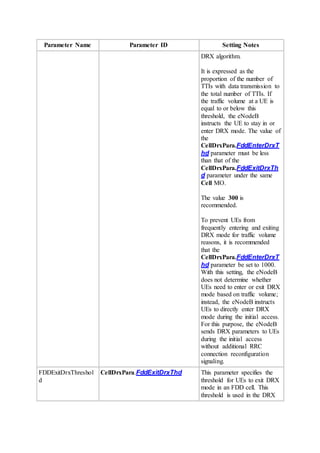
ULTRA_HIGH_SPEED(Ultra
high speed cell flag), that is,
uplink frequency-selective
scheduling is disabled in high
speed and ultra high speed
mobility conditions. This
switch applies only to LTE
TDD cells.
SrSchDataAdptSw: Indicates
whether to enable data volume
adaption in SR scheduling.
Data volume adaption in SR
scheduling is enabled only
when this option is selected.
UlFssUserThdStSwitch:
Indicates whether to enable the
optimization policy on the UE
number threshold for
frequency selective
scheduling. The optimization
policy is enabled only when
this option is selected.
GUI Value Range:
SpsSchSwitch(SpsSchSwitch),
SinrAdjustSwitch(SinrAdjustS
witch),
PreAllocationSwitch(PreAlloc
ationSwitch),
UlVmimoSwitch(UlVmimoS
witch),
TtiBundlingSwitch(TtiBundlin
gSwitch),
ImIcSwitch(ImIcSwitch),
SmartPreAllocationSwitch(Sm
artPreAllocationSwitch),
PuschDtxSwitch(PuschDtxSwi
MO Parameter
ID
MML
Command
Feature
ID
Feature
Name
Description
tch),
UlIblerAdjustSwitch(UlIblerA
djustSwitch),
UlEnhancedFssSwitch(UlEnha
ncedFssSwitch),
UlEnhancedSrSchSwitch(UlE
nhancedSrSchSwitch),
SchedulerCtrlPowerSwitch(Sc
hedulerCtrlPowerSwitch),
UlIicsAlgoSwitch(UlIicsAlgo
Switch),
UlMinGbrSwitch(UlMinGbrS
witch),
UlMbrCtrlSwitch(UlMbrCtrlS
witch),
MbrUlSchSwitch(MbrUlSchS
witch),
UeAmbrUlSchSwitch(UeAmb
rUlSchSwitch),
UlEnhancedDopplerSwitch(Ul
EnhancedDopplerSwitch),
UlRaUserSchOptSw(UlRaUse
rSchOptSw),
UlLast2RetransSchOptSwitch(
UlLast2RetransSchOptSwitch)
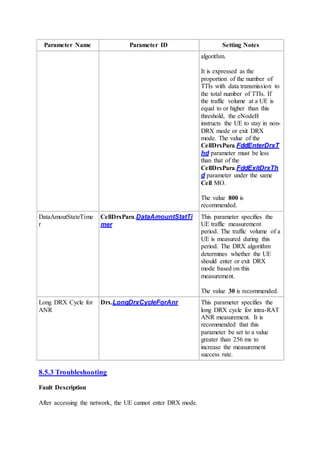
,
UlInterfFssSwitch(UlInterfFss
Switch),
UlSmallRBSpectralEffOptSw(
UlSmallRBSpectralEfficiency
OptSw),
PuschUsePucchRbSwitch(Pus
chUsePucchRbSwitch),
PuschDtxSchOptSwitch(Pusch
DtxSchOptSwitch),
ULFSSAlgoSwitch(ULFSSAl
goSwitch),
PrachRbReuseSwitch(PrachRb
ReuseSwitch),
SrSchDataAdptSw(SrSchData
AdptSw),
UlFssUserThdStSwitch(UlFss
UserThdStSwitch)
Unit: None
Actual Value Range:
MO Parameter
ID
MML
Command
Feature
ID
Feature
Name
Description
SpsSchSwitch,
SinrAdjustSwitch,
PreAllocationSwitch,
UlVmimoSwitch,
TtiBundlingSwitch,
ImIcSwitch,
SmartPreAllocationSwitch,
PuschDtxSwitch,
UlIblerAdjustSwitch,
UlEnhancedFssSwitch,
UlEnhancedSrSchSwitch,
SchedulerCtrlPowerSwitch,
UlIicsAlgoSwitch,
UlMinGbrSwitch,
UlMbrCtrlSwitch,
MbrUlSchSwitch,
UeAmbrUlSchSwitch,
UlEnhancedDopplerSwitch,
UlRaUserSchOptSw,
UlLast2RetransSchOptSwitch,
UlInterfFssSwitch,
UlSmallRBSpectralEffOptSw,
PuschUsePucchRbSwitch,
PuschDtxSchOptSwitch,
ULFSSAlgoSwitch,
PrachRbReuseSwitch,
SrSchDataAdptSw,
UlFssUserThdStSwitch
Default Value:
SpsSchSwitch:Off,
SinrAdjustSwitch:On,
PreAllocationSwitch:On,
UlVmimoSwitch:Off,
TtiBundlingSwitch:Off,
ImIcSwitch:Off,
SmartPreAllocationSwitch:Off
, PuschDtxSwitch:On,
UlIblerAdjustSwitch:Off,
UlEnhancedFssSwitch:On,
UlEnhancedSrSchSwitch:Off,
SchedulerCtrlPowerSwitch:Of
f, UlIicsAlgoSwitch:Off,
UlMinGbrSwitch:Off,
UlMbrCtrlSwitch:Off,
MbrUlSchSwitch:Off,
UeAmbrUlSchSwitch:Off,
MO Parameter
ID
MML
Command
Feature
ID
Feature
Name
Description
UlEnhancedDopplerSwitch:Of
f, UlRaUserSchOptSw:Off,
UlLast2RetransSchOptSwitch:
Off, UlInterfFssSwitch:Off,
UlSmallRBSpectralEffOptSw:
Off,
PuschUsePucchRbSwitch:Off,
PuschDtxSchOptSwitch:Off,
ULFSSAlgoSwitch:On,
PrachRbReuseSwitch:Off,
SrSchDataAdptSw:On,
UlFssUserThdStSwitch:Off
CellDrxP
ara
CqiMask MOD
CELLDRX
PARA
LST
CELLDRX
PARA
LBFD-
002017
/
TDLBF
D-
002017
DRX Meaning: Indicates whether
the cqi-Mask IE can be set.
The cqi-Mask IE is an optional
IE introduced in 3GPP Release
9. If the cqi-Mask IE is set to
Setup, the UE can send
CQI/PMI/RI/PTI reports on
PUCCH only in the
onDuration period of
discontinuous reception
(DRX). If the cqi-Mask IE is
not set, the UE can send
CQI/PMI/RI/PTI reports on
PUCCH in the active period of
DRX.
GUI Value Range: OFF(Off),
ON(On)
Unit: None
Actual Value Range: OFF, ON
Default Value: OFF(Off)
TimeAlig
nmentTi
mer
TimingAdvC
mdOptSwitch
MOD
TATIMER
LST
TATIMER
None None Meaning:
Indicates whether optimization
of the mechanism for
delivering the uplink time
alignment command takes
effect. If the optimization
takes effect, the number of
unnecessary uplink time
alignment commands
MO Parameter
ID
MML
Command
Feature
ID
Feature
Name
Description
delivered to motionless or low-
mobility UEs can be reduced
to save air interface resources
and reduce power
consumption of UEs in DRX
mode. This ensures the uplink
time alignment performance if
the length of the uplink time
alignment timer is set to a
large value.
If this parameter is set to ON,
it is recommended that the
TimeAlignmentTimer
parameter be set to SF10240.
A smaller value of the
TimeAlignmentTimer
parameter, such as SF5120,
leads to a higher probability of
becoming out-of-
synchronization in the uplink
for UEs in DRX mode.
If this parameter is set to ON,
it is recommended that the
LongDrxCycle parameter be
smaller than or equal to
SF320. Otherwise, the uplink
time alignment performance of
UEs in DRX mode is affected.
GUI Value Range: OFF(Off),
ON(On)
Unit: None
Actual Value Range: OFF, ON
Default Value: ON(On)
TimeAlig
nmentTi
mer
TimingMeas
Mode
MOD
TATIMER
LST
TATIMER
LBFD-
070101
Uplink
Timing
Based on
PUCCH
Meaning: Indicates the method
of measuring uplink timing
offsets. If this parameter is set
to INVALID, uplink timing
offsets are measured based on
the demodulation reference
signal (DMRS) for PUSCH or
MO Parameter
ID
MML
Command
Feature
ID
Feature
Name
Description
sounding reference signal
(SRS). If this parameter is set
to ALLMEASMODE, uplink
timing offsets are measured
based on the DMRS for
PUSCH and SRS or based on
the DMRS for PUSCH and
channel quality indicator
(CQI) in PUCCH. In addition,
the value ON of the
TimingAdvCmdOptSwitch
parameter takes effect
regardless of the actual
parameter setting. That is, the
eNodeB always sends the
Timing Advance Command to
UEs. In this case, it is
recommended that the
TimeAlignmentTimer
parameter be set to SF10240.
The value ALLMEASMODE
applies only to LTE FDD
cells. The parameter value
INVALID takes effect in a cell
regardless of the actual
parameter setting in any of the
following scenarios: (1) The
cell is established on an
LBBPc. (2) The
UlCyclicPrefix parameter is
set to EXTENDED_CP. (3)
The HighSpeedFlag parameter
is set to HIGH_SPEED,
ULTRA_HIGH_SPEED, or
EXTRA_HIGH_SPEED. (4)
The TX/RX mode of the cell is
2T8R.
GUI Value Range:
INVALID(Invalid Timing
Measurement Mode),
ALLMEASMODE(All Timing
Measurement Mode)
Unit: None
Actual Value Range:
MO Parameter
ID
MML
Command
Feature
ID
Feature
Name
Description
INVALID, ALLMEASMODE
Default Value:
INVALID(Invalid Timing
Measurement Mode)
RlcPdcpP
araGroup
DiscardTimer ADD
RLCPDCPP
ARAGROU
P
MOD
RLCPDCPP
ARAGROU
P
LST
RLCPDCPP
ARAGROU
P
LBFD-
002008
/
TDLBF
D-
002008
Radio
Bearer
Manage
ment
Meaning: Indicates the length
of the PDCP discard timer.
GUI Value Range:
DiscardTimer_50(50),
DiscardTimer_100(100),
DiscardTimer_150(150),
DiscardTimer_300(300),
DiscardTimer_500(500),
DiscardTimer_750(750),
DiscardTimer_1500(1500),
DiscardTimer_Infinity(infinity
)
Unit: ms
Actual Value Range:
DiscardTimer_50,
DiscardTimer_100,
DiscardTimer_150,
DiscardTimer_300,
DiscardTimer_500,
DiscardTimer_750,
DiscardTimer_1500,
DiscardTimer_Infinity
Default Value:
DiscardTimer_Infinity(infinity
)
CellDrxP
ara
LocalCellId LST
CELLDRX
PARA
MOD
CELLDRX
PARA
None None Meaning: Indicates the local
ID of the cell. It uniquely
identifies a cell within a BS.
GUI Value Range: 0~255
Unit: None
Actual Value Range: 0~255
Default Value: None
MO Parameter
ID
MML
Command
Feature
ID
Feature
Name
Description
CellDrxP
ara
DrxPolicyMo
de
MOD
CELLDRX
PARA
LST
CELLDRX
PARA
LBFD-
002017
/
TDLBF
D-
002017
DRX Meaning: Indicates the policy
for selecting a DRX parameter
group for a UE for which the
bearers have multiple QCIs. If
this parameter is set to
DEFAULT(Default), the DRX
parameter group with the
shortest long DRX cycle is
preferentially selected for the
UE. If the lengths of long
DRX cycle for multiple QCIs
are the same, the DRX
parameter group with the
highest-priority QCI is
selected for the UE. The QCI
priorities are defined in 3GPP
specifications. If this
parameter is set to
QCIPRIORITY(QCI priority),
the DRX parameter group with
the highest-priority QCI is
selected for the UE. If no DRX
parameter group is configured
for the highest-priority QCI,
the eNodeB does not configure
the DRX parameter group for
the UE.
GUI Value Range:
DEFAULT(Default),
QCIPRIORITY(QCI priority)
Unit: None
Actual Value Range:
DEFAULT, QCIPRIORITY
Default Value:
DEFAULT(Default)
CellDrxP
ara
DrxStartOffs
etOptSwitch
MOD
CELLDRX
PARA
LST
CELLDRX
PARA
LBFD-
002017
DRX Meaning: Indicates whether to
enable optimized random
distribution of DrxStartOffset
values for UEs that are
configured with only sounding
reference signal (SRS)
resources, or periodic channel
MO Parameter
ID
MML
Command
Feature
ID
Feature
Name
Description
quality indicator (CQI), or
neither. If this parameter is set
to OFF, then DrxStartOffset
takes the value of SrsOffset,
CqiOffset, or 0 when a UE is
configured with only SRS
resources, or periodic CQI, or
neither, respectively. This
prevents DrxStartOffset values
from being randomly
distributed within the range of
0 to (LongDrxCycle - 1). If
this parameter is set to ON,
DrxStartOffset values can be
randomly distributed within
the range of 0 to
(LongDrxCycle - 1) for UEs
that are configured with only
SRS resources, or periodic
CQI, or neither. This
parameter applies only to LTE
FDD eNodeBs and is
recommended to be set to ON
when SRS resources are not
allocated for UEs or there is a
large number of UEs in the
cell.
GUI Value Range: OFF(Off),
ON(On)
Unit: None
Actual Value Range: OFF, ON
Default Value: OFF(Off)
DrxPara
Group
DrxParaGrou
pId
ADD
DRXPARA
GROUP
LST
DRXPARA
GROUP
MOD
DRXPARA
LBFD-
002017
/
TDLBF
D-
002017
DRX Meaning: Indicates the ID of
the DRX parameter group.
GUI Value Range: 0~9
Unit: None
Actual Value Range: 0~9
Default Value: None
MO Parameter
ID
MML
Command
Feature
ID
Feature
Name
Description
GROUP
RMV
DRXPARA
GROUP
CellStand
ardQci
LocalCellId LST
CELLSTA
NDARDQC
I
MOD
CELLSTA
NDARDQC
I
None None Meaning: Indicates the local
ID of the cell. It uniquely
identifies a cell within a BS.
GUI Value Range: 0~255
Unit: None
Actual Value Range: 0~255
Default Value: None
CellStand
ardQci
Qci LST
CELLSTA
NDARDQC
I
MOD
CELLSTA
NDARDQC
I
LBFD-
002025
/
TDLBF
D-
002025
LOFD-
001015
02 /
TDLOF
D-
001015
02
Basic
Scheduli
ng
Dynamic
Scheduli
ng
Meaning: Indicates the QoS
class identifier (QCI) of an
evolved packet system (EPS)
bearer. Different QCIs indicate
different QoS requirements,
such as the packet delay
budget, packet error loss rate,
and resource type. For details,
see Table 6.1.7 in 3GPP TS
23.203.
GUI Value Range: QCI1(QCI
1), QCI2(QCI 2), QCI3(QCI
3), QCI4(QCI 4), QCI5(QCI
5), QCI6(QCI 6), QCI7(QCI
7), QCI8(QCI 8), QCI9(QCI
9)
Unit: None
Actual Value Range: QCI1,
QCI2, QCI3, QCI4, QCI5,
QCI6, QCI7, QCI8, QCI9
Default Value: None
CellStand
ardQci
DrxParaGrou
pId
MOD
CELLSTA
NDARDQC
LBFD-
002017
/
TDLBF
DRX Meaning: Indicates the ID of a
DRX parameter group.
MO Parameter
ID
MML
Command
Feature
ID
Feature
Name
Description
I
LST
CELLSTA
NDARDQC
I
D-
002017
GUI Value Range: 0~9
Unit: None
Actual Value Range: 0~9
Default Value: 0
CellStand
ardQci
QciPriorityFo
rDrx
MOD
CELLSTA
NDARDQC
I
LST
CELLSTA
NDARDQC
I
LBFD-
002017
/
TDLBF
D-
002017
DRX Meaning: Indicates the QCI-
specific priority for selecting a
DRX parameter group.A larger
value of this parameter
indicates a lower priority. If
the bearers for a UE have
multiple QCIs and the
DrxPolicyMode parameter is
set to QCIPRIORITY(QCI
priority), the eNodeB selects
the DRX parameter group for
the UE based on the QCI-
specific priorities.
GUI Value Range: 1~9
Unit: None
Actual Value Range: 1~9
Default Value: 9
CellExte
ndedQci
ExtendedQci ADD
CELLEXT
ENDEDQC
I
LST
CELLEXT
ENDEDQC
I
MOD
CELLEXT
ENDEDQC
I
RMV
CELLEXT
ENDEDQC
LBFD-
002032
Extended
-QCI
Meaning: Indicates the
extended QoS Class Identifier
(QCI), which is required by
the operator for service
differentiation.
GUI Value Range: 10~254
Unit: None
Actual Value Range: 10~254
Default Value: None
MO Parameter
ID
MML
Command
Feature
ID
Feature
Name
Description
I
CellExte
ndedQci
LocalCellId ADD
CELLEXT
ENDEDQC
I
LST
CELLEXT
ENDEDQC
I
MOD
CELLEXT
ENDEDQC
I
RMV
CELLEXT
ENDEDQC
I
None None Meaning: Indicates the local
ID of the cell. It uniquely
identifies a cell within a BS.
GUI Value Range: 0~255
Unit: None
Actual Value Range: 0~255
Default Value: None
CellExte
ndedQci
DrxParaGrou
pId
ADD
CELLEXT
ENDEDQC
I
MOD
CELLEXT
ENDEDQC
I
LST
CELLEXT
ENDEDQC
I
LBFD-
002017
/
TDLBF
D-
002017
DRX Meaning: Indicates the ID of a
DRX parameter group.
GUI Value Range: 0~9
Unit: None
Actual Value Range: 0~9
Default Value: 0
Cell LocalCellId ACT CELL
ADD CELL
ADD
CELLBAN
D
BLK CELL
None None Meaning: Indicates the local
ID of the cell. It uniquely
identifies a cell within a BS.
GUI Value Range: 0~255
Unit: None
Actual Value Range: 0~255
Default Value: None
MO Parameter
ID
MML
Command
Feature
ID
Feature
Name
Description
DEA CELL
DSP CELL
DSP
CELLPHY
TOPO
DSP
CELLULC
OMPCLUS
TER
DSP
LIOPTRUL
E
DSP
PRIBBPAD
JUST
LST CELL
LST
CELLBAN
D
MOD
CELL
RMV CELL
RMV
CELLBAN
D
RMV
CELLNRT
STR
CELLRFL
OOPBACK
STR
CELLSELF
TEST
MO Parameter
ID
MML
Command
Feature
ID
Feature
Name
Description
STR
LRTWPRT
TST
STR
PRIBBPAD
JUST
UBL CELL
DSP
LRTWPRT
TST
DSP
PRIBBPRE
SINFO
Standard
Qci
Qci LST
STANDAR
DQCI
MOD
STANDAR
DQCI
LOFD-
001015
02 /
TDLOF
D-
001015
02
TDLBF
D-
002025
TDLOF
D-
001015
Dynamic
Scheduli
ng
Basic
Scheduli
ng
Enhanced
Scheduli
ng
Meaning: Indicates the QoS
Class Identifier (QCI) of an
EPS bearer. Different QCIs
represent different QoS
specifications such as the
packet delay budget, packet
error loss rate, and resource
type (whether the service is a
GBR service or not). For
details, see Table 6.1.7 in
3GPP TS 23.203.
GUI Value Range: QCI1(QCI
1), QCI2(QCI 2), QCI3(QCI
3), QCI4(QCI 4), QCI5(QCI
5), QCI6(QCI 6), QCI7(QCI
7), QCI8(QCI 8), QCI9(QCI
9)
Unit: None
Actual Value Range: QCI1,
QCI2, QCI3, QCI4, QCI5,
QCI6, QCI7, QCI8, QCI9
Default Value: None
CellAcce
ss
ReptSyncAvo
idInd
MOD
CELLACC
LOFD-
001105
/
Dynamic
DRX
Meaning: Indicates whether all
synchronization procedures
repeatedly initiated by a UE
MO Parameter
ID
MML
Command
Feature
ID
Feature
Name
Description
ESS
LST
CELLACC
ESS
TDLOF
D-
001105
having compatibility problems
can trigger the RRC
connection reconfiguration
procedure. If this parameter is
set to CFG, all synchronization
procedures repeatedly initiated
by a UE having compatibility
problems do not trigger the
RRC connection
reconfiguration procedure. If
this parameter is set to
NOT_CFG, all
synchronization procedures
repeatedly initiated by a UE
having compatibility problems
trigger the RRC connection
reconfiguration procedure.
GUI Value Range:
NOT_CFG(Not configure),
CFG(Configure)
Unit: None
Actual Value Range:
NOT_CFG, CFG
Default Value: NOT_CFG(Not
configure)
CellAcce
ss
ReptSyncAvo
idTime
MOD
CELLACC
ESS
LST
CELLACC
ESS
LOFD-
001105
/
TDLOF
D-
001105
Dynamic
DRX
Meaning: Indicates the period
during which synchronization
procedures repeatedly initiated
by a UE having compatibility
problems do not trigger the
RRC connection
reconfiguration procedure.
Multiple synchronization
procedures initiated by a UE
having compatibility problems
within the period specified by
this parameter trigger only one
RRC connection
reconfiguration procedure.
GUI Value Range: 1~1000
MO Parameter
ID
MML
Command
Feature
ID
Feature
Name
Description
Unit: ms
Actual Value Range: 1~1000
Default Value: 100
CellAlgo
Switch
LocalCellId DSP
CELLULC
AMCCLUS
TER
LST
CELLALG
OSWITCH
MOD
CELLALG
OSWITCH
None None Meaning: Indicates the local
ID of the cell. It uniquely
identifies a cell within a BS.
GUI Value Range: 0~255
Unit: None
Actual Value Range: 0~255
Default Value: None
12 Counters
Table 12-1 Counters
Counter
ID
Counter Name Counter
Description
Feature
ID
Feature
Name
15267266
58
L.RRC.ConnReq.Att Number of RRC
connection setup
requests
(retransmission
excluded)
Multi-
mode:
None
GSM:
None
UMTS:
None
LTE:
LBFD-
002007
TDLBF
D-
002007
RRC
Connectio
n
Managem
ent
RRC
Connectio
n
Managem
ent
15267268
85
L.Paging.UU.Att Number of UEs
contained in
paging messages
Multi-
mode:
Paging
Paging
Counter
ID
Counter Name Counter
Description
Feature
ID
Feature
Name
transmitted over
the Uu interface
in a cell
None
GSM:
None
UMTS:
None
LTE:
LBFD-
002011
TDLBF
D-
002011
15267269
96
L.HHO.IntraeNB.IntraFreq.ExecAttOut Number of intra-
eNodeB intra-
frequency
outgoing
handovers
executions in a
cell
Multi-
mode:
None
GSM:
None
UMTS:
None
LTE:
LBFD-
002018
01
TDLBF
D-
002018
01
Coverage
Based
Intra-
frequency
Handover
Coverage
Based
Intra-
frequency
Handover
15267269
99
L.HHO.IntraeNB.InterFreq.ExecAttOut Number of intra-
eNodeB inter-
frequency
outgoing
handovers
executions in a
cell
Multi-
mode:
None
GSM:
None
UMTS:
None
LTE:
LBFD-
Coverage
Based
Inter-
frequency
Handover
Coverage
Based
Inter-
frequency
Handover
Counter
ID
Counter Name Counter
Description
Feature
ID
Feature
Name
002018
02
TDLBF
D-
002018
02
15267270
02
L.HHO.IntereNB.IntraFreq.ExecAttOut Number of inter-
eNodeB intra-
frequency
outgoing
handovers
executions in a
cell
Multi-
mode:
None
GSM:
None
UMTS:
None
LTE:
LBFD-
002018
01
TDLBF
D-
002018
01
Coverage
Based
Intra-
frequency
Handover
Coverage
Based
Intra-
frequency
Handover
15267270
05
L.HHO.IntereNB.InterFreq.ExecAttOut Number of inter-
eNodeB inter-
frequency
outgoing
handovers
executions in a
cell
Multi-
mode:
None
GSM:
None
UMTS:
None
LTE:
LBFD-
002018
02
TDLBF
D-
002018
02
Coverage
Based
Inter-
frequency
Handover
Coverage
Based
Inter-
frequency
Handover
Counter
ID
Counter Name Counter
Description
Feature
ID
Feature
Name
15267272
85
L.HHO.DRX.IntraeNB.IntraFreq.ExecA
ttOut
Number of intra-
eNodeB intra-
frequency
outgoing
handovers
executions in the
DRX state
Multi-
mode:
None
GSM:
None
UMTS:
None
LTE:
LBFD-
002017
LBFD-
002018
01
TDLBF
D-
002017
TDLBF
D-
002018
01
DRX
Coverage
Based
Intra-
frequency
Handover
DRX
Coverage
Based
Intra-
frequency
Handover
15267272
86
L.HHO.DRX.IntraeNB.IntraFreq.ExecS
uccOut
Number of
successful intra-
eNodeB intra-
frequency
outgoing
handovers in the
DRX state
Multi-
mode:
None
GSM:
None
UMTS:
None
LTE:
LBFD-
002017
LBFD-
002018
01
TDLBF
D-
DRX
Coverage
Based
Intra-
frequency
Handover
DRX
Coverage
Based
Intra-
frequency
Handover
Counter
ID
Counter Name Counter
Description
Feature
ID
Feature
Name
002017
TDLBF
D-
002018
01
15267272
87
L.HHO.DRX.IntraeNB.InterFreq.ExecA
ttOut
Number of intra-
eNodeB inter-
frequency
outgoing
handovers
executions in the
DRX state
Multi-
mode:
None
GSM:
None
UMTS:
None
LTE:
LBFD-
002017
LBFD-
002018
02
TDLBF
D-
002017
TDLBF
D-
002018
02
DRX
Coverage
Based
Inter-
frequency
Handover
DRX
Coverage
Based
Inter-
frequency
Handover
15267272
88
L.HHO.DRX.IntraeNB.InterFreq.ExecS
uccOut
Number of
successful intra-
eNodeB inter-
frequency
outgoing
handovers in the
DRX state
Multi-
mode:
None
GSM:
None
UMTS:
None
LTE:
LBFD-
002017
DRX
Coverage
Based
Inter-
frequency
Handover
DRX
Coverage
Based
Inter-
frequency
Counter
ID
Counter Name Counter
Description
Feature
ID
Feature
Name
LBFD-
002018
02
TDLBF
D-
002017
TDLBF
D-
002018
02
Handover
15267272
89
L.HHO.DRX.IntereNB.IntraFreq.ExecA
ttOut
Number of inter-
eNodeB intra-
frequency
outgoing
handovers
executions in the
DRX state
Multi-
mode:
None
GSM:
None
UMTS:
None
LTE:
LBFD-
002017
LBFD-
002018
02
TDLBF
D-
002018
02
DRX
Coverage
Based
Inter-
frequency
Handover
Coverage
Based
Inter-
frequency
Handover
15267272
90
L.HHO.DRX.IntereNB.IntraFreq.ExecS
uccOut
Number of
successful inter-
eNodeB intra-
frequency
outgoing
handovers in the
DRX state
Multi-
mode:
None
GSM:
None
UMTS:
None
LTE:
LBFD-
Coverage
Based
Intra-
frequency
Handover
Coverage
Based
Inter-
frequency
Handover
Counter
ID
Counter Name Counter
Description
Feature
ID
Feature
Name
002018
01
LBFD-
002018
02
LBFD-
002017
TDLBF
D-
002018
01
TDLBF
D-
002018
02
DRX
Coverage
Based
Intra-
frequency
Handover
Coverage
Based
Inter-
frequency
Handover
15267272
91
L.HHO.DRX.IntereNB.InterFreq.ExecA
ttOut
Number of inter-
eNodeB inter-
frequency
outgoing
handovers
executions in the
DRX state
Multi-
mode:
None
GSM:
None
UMTS:
None
LTE:
LBFD-
002018
01
LBFD-
002018
02
LBFD-
002017
TDLBF
D-
002018
01
Coverage
Based
Intra-
frequency
Handover
Coverage
Based
Inter-
frequency
Handover
DRX
Coverage
Based
Intra-
frequency
Handover
Coverage
Based
Inter-
frequency
Handover
Counter
ID
Counter Name Counter
Description
Feature
ID
Feature
Name
TDLBF
D-
002018
02
15267272
92
L.HHO.DRX.IntereNB.InterFreq.ExecS
uccOut
Number of
successful inter-
eNodeB inter-
frequency
outgoing
handovers in the
DRX state
Multi-
mode:
None
GSM:
None
UMTS:
None
LTE:
LBFD-
002017
LBFD-
002018
02
TDLBF
D-
002017
TDLBF
D-
002018
01
TDLBF
D-
002018
02
DRX
Coverage
Based
Inter-
frequency
Handover
DRX
Coverage
Based
Intra-
frequency
Handover
Coverage
Based
Inter-
frequency
Handover
15267275
44
L.E-RAB.SuccEst Total number of
successful E-
RAB setups
initiated by UEs
in a cell
Multi-
mode:
None
GSM:
None
UMTS:
None
LTE:
Radio
Bearer
Managem
ent
Radio
Bearer
Managem
ent
Counter
ID
Counter Name Counter
Description
Feature
ID
Feature
Name
LBFD-
002008
TDLBF
D-
002008
15267275
45
L.E-RAB.AttEst Total number of
E-RAB setup
attempts initiated
by UEs in a cell
Multi-
mode:
None
GSM:
None
UMTS:
None
LTE:
LBFD-
002008
TDLBF
D-
002008
Radio
Bearer
Managem
ent
Radio
Bearer
Managem
ent
15267275
46
L.E-RAB.AbnormRel Total number of
abnormal
releases of
activated E-
RABs initiated
by the eNodeB
Multi-
mode:
None
GSM:
None
UMTS:
None
LTE:
LBFD-
002008
TDLBF
D-
002008
Radio
Bearer
Managem
ent
Radio
Bearer
Managem
ent
15267275
47
L.E-RAB.NormRel Total number of
normal E-RAB
releases initiated
by the eNodeB
in a cell
Multi-
mode:
None
GSM:
Radio
Bearer
Managem
ent
Counter
ID
Counter Name Counter
Description
Feature
ID
Feature
Name
None
UMTS:
None
LTE:
LBFD-
002008
TDLBF
D-
002008
Radio
Bearer
Managem
ent
15267282
17
L.RRC.ConnReq.Att.Emc Number of RRC
connection setup
attempts with a
cause value of
emergency
Multi-
mode:
None
GSM:
None
UMTS:
None
LTE:
LBFD-
002007
TDLBF
D-
002007
RRC
Connectio
n
Managem
ent
RRC
Connectio
n
Managem
ent
15267282
18
L.RRC.ConnReq.Att.HighPri Number of RRC
connection setup
attempts with a
cause value of
highPriorityAcce
ss
Multi-
mode:
None
GSM:
None
UMTS:
None
LTE:
LBFD-
002007
TDLBF
D-
002007
RRC
Connectio
n
Managem
ent
RRC
Connectio
n
Managem
ent
Counter
ID
Counter Name Counter
Description
Feature
ID
Feature
Name
15267282
19
L.RRC.ConnReq.Att.Mt Number of RRC
connection setup
attempts with a
cause value of
mt-Access
Multi-
mode:
None
GSM:
None
UMTS:
None
LTE:
LBFD-
002007
TDLBF
D-
002007
RRC
Connectio
n
Managem
ent
RRC
Connectio
n
Managem
ent
15267282
20
L.RRC.ConnReq.Att.MoSig Number of RRC
connection setup
attempts with a
cause value of
mo-Signalling
Multi-
mode:
None
GSM:
None
UMTS:
None
LTE:
LBFD-
002007
TDLBF
D-
002007
RRC
Connectio
n
Managem
ent
RRC
Connectio
n
Managem
ent
15267282
21
L.RRC.ConnReq.Att.MoData Number of RRC
connection setup
attempts with a
cause value of
mo-Data
Multi-
mode:
None
GSM:
None
UMTS:
None
LTE:
LBFD-
RRC
Connectio
n
Managem
ent
RRC
Connectio
n
Managem
ent
Counter
ID
Counter Name Counter
Description
Feature
ID
Feature
Name
002007
TDLBF
D-
002007
15267282
22
L.RRC.ConnReq.Succ.Emc Number of RRC
Connection
Setup Complete
messages with a
cause value of
emergency
received from
UEs in a cell
Multi-
mode:
None
GSM:
None
UMTS:
None
LTE:
LBFD-
002007
TDLBF
D-
002007
RRC
Connectio
n
Managem
ent
RRC
Connectio
n
Managem
ent
15267282
23
L.RRC.ConnReq.Succ.HighPri Number of RRC
Connection
Setup Complete
messages with a
cause value of
highPriorityAcce
ss received from
UEs in a cell
Multi-
mode:
None
GSM:
None
UMTS:
None
LTE:
LBFD-
002007
TDLBF
D-
002007
RRC
Connectio
n
Managem
ent
RRC
Connectio
n
Managem
ent
15267282
24
L.RRC.ConnReq.Succ.Mt Number of RRC
Connection
Setup Complete
messages with a
cause value of
mt-Access
Multi-
mode:
None
GSM:
RRC
Connectio
n
Managem
ent
Counter
ID
Counter Name Counter
Description
Feature
ID
Feature
Name
received from
UEs in a cell
None
UMTS:
None
LTE:
LBFD-
002007
TDLBF
D-
002007
RRC
Connectio
n
Managem
ent
15267282
26
L.RRC.ConnReq.Succ.MoData Number of RRC
Connection
Setup Complete
messages with a
cause value of
mo-Data
received from
UEs in a cell
Multi-
mode:
None
GSM:
None
UMTS:
None
LTE:
LBFD-
002007
TDLBF
D-
002007
RRC
Connectio
n
Managem
ent
RRC
Connectio
n
Managem
ent
15267283
57
L.RRC.ConnReq.Att.DelayTol Number of RRC
connection setup
attempts with a
cause value of
delayTolerantAc
cess-v1020
Multi-
mode:
None
GSM:
None
UMTS:
None
LTE:
LBFD-
002007
TDLBF
D-
002007
RRC
Connectio
n
Managem
ent
RRC
Connectio
n
Managem
ent
Counter
ID
Counter Name Counter
Description
Feature
ID
Feature
Name
15267283
58
L.RRC.ConnReq.Succ.DelayTol Number of
successful RRC
connection
setups with a
cause value of
delayTolerantAc
cess-v1020
Multi-
mode:
None
GSM:
None
UMTS:
None
LTE:
LBFD-
002007
TDLBF
D-
002007
RRC
Connectio
n
Managem
ent
RRC
Connectio
n
Managem
ent
15267284
36
L.E-RAB.Release.Unsyn Number of
released E-RABs
of UEs in the
uplink out-of-
synchronization
state
Multi-
mode:
None
GSM:
None
UMTS:
None
LTE:
LBFD-
002008
TDLBF
D-
002008
Radio
Bearer
Managem
ent
Radio
Bearer
Managem
ent
15267284
37
L.E-RAB.Num.Syn2Unsyn Total number of
E-RABs in UE
contexts when
the UEs switch
from the uplink
synchronized
state to the
uplink out-of-
synchronization
state in a cell
Multi-
mode:
None
GSM:
None
UMTS:
None
LTE:
LBFD-
Radio
Bearer
Managem
ent
Radio
Bearer
Managem
ent
Counter
ID
Counter Name Counter
Description
Feature
ID
Feature
Name
002008
TDLBF
D-
002008
15267284
38
L.RRC.StateTrans.Syn2Unsyn Number of times
a UE switch
from the Uplink-
Synchronized
state to the
uplink out-of-
synchronization
state
Multi-
mode:
None
GSM:
None
UMTS:
None
LTE:
LBFD-
002007
TDLBF
D-
002007
RRC
Connectio
n
Managem
ent
RRC
Connectio
n
Managem
ent
15267284
39
L.RRC.StateTrans.Unsyn2Syn Number of times
a UE switch
from the out-of-
synchronization
state to the
uplink-
synchronized
state
Multi-
mode:
None
GSM:
None
UMTS:
None
LTE:
LBFD-
002007
TDLBF
D-
002007
RRC
Connectio
n
Managem
ent
RRC
Connectio
n
Managem
ent
15267284
40
L.UECNTX.Release.HighSpeed Number of UE
context releases
due to high
mobility of UEs
Multi-
mode:
None
GSM:
Radio
Bearer
Managem
ent
Radio
Counter
ID
Counter Name Counter
Description
Feature
ID
Feature
Name
None
UMTS:
None
LTE:
LBFD-
002008
TDLBF
D-
002008
Bearer
Managem
ent
15267284
65
L.Signal.Num.Uu Number of
signaling
messages over
the Uu interface
Multi-
mode:
None
GSM:
None
UMTS:
None
LTE:
LBFD-
002017
TDLBF
D-
002017
DRX
DRX
15267284
66
L.Signal.Num.DRX.Reconfig Number of DRX
reconfiguration
messages
Multi-
mode:
None
GSM:
None
UMTS:
None
LTE:
LBFD-
002017
TDLBF
D-
DRX
DRX
Dynamic
DRX
Dynamic
DRX
Counter
ID
Counter Name Counter
Description
Feature
ID
Feature
Name
002017
LOFD-
001105
TDLOF
D-
001105
15267285
46
L.Traffic.User.Cdrx.Avg Average number
of UEs on which
DRX takes effect
in a cell
Multi-
mode:
None
GSM:
None
UMTS:
None
LTE:
LOFD-
001105
LBFD-
002017
TDLOF
D-
001105
Dynamic
DRX
DRX
Dynamic
DRX
15267285
47
L.Cdrx.Enter.Num Number of times
a UE in
connected mode
enters DRX in
RRC_CONECT
ED mode
Multi-
mode:
None
GSM:
None
UMTS:
None
LTE:
LBFD-
002017
TDLBF
D-
002017
DRX
DRX
Dynamic
DRX
Dynamic
DRX
Counter
ID
Counter Name Counter
Description
Feature
ID
Feature
Name
LOFD-
001105
TDLOF
D-
001105
15267285
48
L.Cdrx.Exit.Num Number of times
a UE in
connected mode
exits DRX in
RRC_CONECT
ED mode
Multi-
mode:
None
GSM:
None
UMTS:
None
LTE:
LBFD-
002017
TDLBF
D-
002017
LOFD-
001105
TDLOF
D-
001105
DRX
DRX
Dynamic
DRX
Dynamic
DRX
15267285
49
L.Cdrx.Active.TtiNum Total number of
TTIs for DRX
UEs in active
state
Multi-
mode:
None
GSM:
None
UMTS:
None
LTE:
LOFD-
001105
TDLOF
D-
Dynamic
DRX
Dynamic
DRX
DRX
DRX
Counter
ID
Counter Name Counter
Description
Feature
ID
Feature
Name
001105
LBFD-
002017
TDLBF
D-
002017
15267285
50
L.Cdrx.Sleep.TtiNum Total number of
TTIs for DRX
UEs in sleep
state
Multi-
mode:
None
GSM:
None
UMTS:
None
LTE:
LOFD-
001105
TDLOF
D-
001105
LBFD-
002017
TDLBF
D-
002017
Dynamic
DRX
Dynamic
DRX
DRX
DRX
15267285
51
L.Voip.Cdrx.Active.TtiNum Total number of
TTIs for DRX
UEs in active
state and
performing VoIP
services
Multi-
mode:
None
GSM:
None
UMTS:
None
LTE:
LOFD-
001105
Dynamic
DRX
Dynamic
DRX
DRX
DRX
Counter
ID
Counter Name Counter
Description
Feature
ID
Feature
Name
TDLOF
D-
001105
LBFD-
002017
TDLBF
D-
002017
15267285
52
L.Voip.Cdrx.Sleep.TtiNum Total number of
TTIs for DRX
UEs in dormant
state and
performing VoIP
services
Multi-
mode:
None
GSM:
None
UMTS:
None
LTE:
LOFD-
001105
TDLOF
D-
001105
LBFD-
002017
TDLBF
D-
002017
Dynamic
DRX
Dynamic
DRX
DRX
DRX
15267285
54
L.HHO.IntraFreq.NoData.ExecAttOut Number of intra-
frequency
handover
execution
attempts
triggered for UEs
that do not
transmit or
receive data
Multi-
mode:
None
GSM:
None
UMTS:
None
LTE:
LBFD-
Coverage
Based
Intra-
frequency
Handover
Coverage
Based
Intra-
frequency
Handover
Counter
ID
Counter Name Counter
Description
Feature
ID
Feature
Name
002018
01
TDLBF
D-
002018
01
LOFD-
001105
TDLOF
D-
001105
Dynamic
DRX
Dynamic
DRX
15267285
55
L.HHO.IntraFreq.NoData.ExecSuccOut Number of
successful intra-
frequency
handover
executions
triggered for UEs
that do not
transmit or
receive data
Multi-
mode:
None
GSM:
None
UMTS:
None
LTE:
LBFD-
002018
01
TDLBF
D-
002018
01
LOFD-
001105
TDLOF
D-
001105
Coverage
Based
Intra-
frequency
Handover
Coverage
Based
Intra-
frequency
Handover
Dynamic
DRX
Dynamic
DRX
15267285
57
L.HHO.InterFreq.NoData.ExecAttOut Number of inter-
frequency
handover
execution
attempts
triggered for UEs
Multi-
mode:
None
GSM:
Coverage
Based
Inter-
frequency
Handover
Counter
ID
Counter Name Counter
Description
Feature
ID
Feature
Name
that do not
transmit or
receive data
None
UMTS:
None
LTE:
LBFD-
002018
02
TDLBF
D-
002018
02
LOFD-
001105
TDLOF
D-
001105
Coverage
Based
Inter-
frequency
Handover
Dynamic
DRX
Dynamic
DRX
15267285
58
L.HHO.InterFreq.NoData.ExecSuccOut Number of
successful inter-
frequency
handover
executions
triggered for UEs
that do not
transmit or
receive data
Multi-
mode:
None
GSM:
None
UMTS:
None
LTE:
LBFD-
002018
02
TDLBF
D-
002018
02
LOFD-
001105
TDLOF
D-
Coverage
Based
Inter-
frequency
Handover
Coverage
Based
Inter-
frequency
Handover
Dynamic
DRX
Dynamic
DRX
Counter
ID
Counter Name Counter
Description
Feature
ID
Feature
Name
001105
15267285
60
L.IRATHO.E2W.NoData.ExecAttOut Number of inter-
RAT handover
executions from
E-UTRAN to
WCDMA
network
triggered for UEs
that do not
transmit or
receive data
Multi-
mode:
None
GSM:
None
UMTS:
None
LTE:
LOFD-
001019
LOFD-
001022
LOFD-
001033
TDLOF
D-
001019
TDLOF
D-
001022
TDLOF
D-
001033
LOFD-
001105
TDLOF
D-
001105
PS Inter-
RAT
Mobility
between
E-
UTRAN
and
UTRAN
SRVCC
to
UTRAN
CS
Fallback
to
UTRAN
PS Inter-
RAT
Mobility
between
E-
UTRAN
and
UTRAN
SRVCC
to
UTRAN
CS
Fallback
to
UTRAN
Dynamic
DRX
Dynamic
DRX
15267285
61
L.IRATHO.E2W.NoData.ExecSuccOut Number of
successful inter-
RAT handovers
from E-UTRAN
Multi-
mode:
None
PS Inter-
RAT
Mobility
between
Counter
ID
Counter Name Counter
Description
Feature
ID
Feature
Name
to WCDMA
network
triggered for UEs
that do not
transmit or
receive data
GSM:
None
UMTS:
None
LTE:
LOFD-
001019
LOFD-
001022
LOFD-
001033
TDLOF
D-
001019
TDLOF
D-
001022
TDLOF
D-
001033
LOFD-
001105
TDLOF
D-
001105
E-
UTRAN
and
UTRAN
SRVCC
to
UTRAN
CS
Fallback
to
UTRAN
PS Inter-
RAT
Mobility
between
E-
UTRAN
and
UTRAN
SRVCC
to
UTRAN
CS
Fallback
to
UTRAN
Dynamic
DRX
Dynamic
DRX
15267295
84
L.HHO.InterFddTdd.NoData.ExecAttO
ut
Number of inter-
duplex-mode
handover
execution
attempts
triggered for UEs
that do not
transmit or
receive data
Multi-
mode:
None
GSM:
None
UMTS:
Coverage
Based
Inter-
frequency
Handover
Dynamic
DRX
Counter
ID
Counter Name Counter
Description
Feature
ID
Feature
Name
None
LTE:
LBFD-
002018
02
LOFD-
001105
TDLBF
D-
002018
02
TDLOF
D-
001105
Coverage
Based
Inter-
frequency
Handover
Dynamic
DRX
15267295
85
L.HHO.InterFddTdd.NoData.ExecSucc
Out
Number of
successful inter-
duplex-mode
handover
executions
triggered for UEs
that do not
transmit or
receive data
Multi-
mode:
None
GSM:
None
UMTS:
None
LTE:
LBFD-
002018
02
LOFD-
001105
TDLBF
D-
002018
02
TDLOF
D-
001105
Coverage
Based
Inter-
frequency
Handover
Dynamic
DRX
Coverage
Based
Inter-
frequency
Handover
Dynamic
DRX
15267295
86
L.HHO.DRX.IntraeNB.InterFddTdd.Ex
ecAttOut
Number of intra-
eNodeB inter-
Multi-
mode:
DRX
Counter
ID
Counter Name Counter
Description
Feature
ID
Feature
Name
duplex-mode
handover
executions
triggered for UEs
in the DRX state
None
GSM:
None
UMTS:
None
LTE:
LBFD-
002017
LBFD-
002018
02
TDLBF
D-
002017
TDLBF
D-
002018
02
Coverage
Based
Inter-
frequency
Handover
DRX
Coverage
Based
Inter-
frequency
Handover
15267295
87
L.HHO.DRX.IntraeNB.InterFddTdd.Ex
ecSuccOut
Number of
successful intra-
eNodeB inter-
duplex-mode
outgoing
handovers
triggered for UEs
in the DRX state
Multi-
mode:
None
GSM:
None
UMTS:
None
LTE:
LBFD-
002017
LBFD-
002018
02
TDLBF
D-
002017
DRX
Coverage
Based
Inter-
frequency
Handover
DRX
Coverage
Based
Inter-
frequency
Handover
Counter
ID
Counter Name Counter
Description
Feature
ID
Feature
Name
TDLBF
D-
002018
02
15267295
88
L.HHO.DRX.IntereNB.InterFddTdd.Ex
ecAttOut
Number of inter-
eNodeB inter-
duplex-mode
handover
executions
triggered for UEs
in the DRX state
Multi-
mode:
None
GSM:
None
UMTS:
None
LTE:
LBFD-
002017
LBFD-
002018
02
TDLBF
D-
002017
TDLBF
D-
002018
02
DRX
Coverage
Based
Inter-
frequency
Handover
DRX
Coverage
Based
Inter-
frequency
Handover
15267295
89
L.HHO.DRX.IntereNB.InterFddTdd.Ex
ecSuccOut
Number of
successful inter-
eNodeB inter-
duplex-mode
outgoing
handovers
triggered for UEs
in the DRX state
Multi-
mode:
None
GSM:
None
UMTS:
None
LTE:
LBFD-
002017
LBFD-
002018
DRX
Coverage
Based
Inter-
frequency
Handover
DRX
Coverage
Based
Inter-
frequency
Handover
Counter
ID
Counter Name Counter
Description
Feature
ID
Feature
Name
02
TDLBF
D-
002017
TDLBF
D-
002018
02
15267296
56
L.RRC.StateTrans.Unsyn2Syn.Succ Number of
successfully
recovered RRC
connections
when UEs switch
from the uplink
out-of-
synchronization
state to the
uplink-
synchronized
state
Multi-
mode:
None
GSM:
None
UMTS:
None
LTE:
LOFD-
001105
TDLOF
D-
001105
Dynamic
DRX
Dynamic
DRX
15267296
57
L.E-RAB.StateTrans.Unsyn2Syn.Att Number of E-
RAB recovery
attempts when
UEs switch from
the uplink out-
of-
synchronization
state to the
uplink-
synchronized
state
Multi-
mode:
None
GSM:
None
UMTS:
None
LTE:
LOFD-
001105
TDLOF
D-
001105
Dynamic
DRX
Dynamic
DRX
15267296 L.E-RAB.StateTrans.Unsyn2Syn.Succ Number of Multi- Dynamic
Counter
ID
Counter Name Counter
Description
Feature
ID
Feature
Name
58 successfully
recovered E-
RABs when UEs
switch from the
uplink out-of-
synchronization
state to the
uplink-
synchronized
state
mode:
None
GSM:
None
UMTS:
None
LTE:
LOFD-
001105
TDLOF
D-
001105
DRX
Dynamic
DRX
15267296
59
L.Signal.Num.S1 Number of S1
signaling
messages
received or sent
by a cell
Multi-
mode:
None
GSM:
None
UMTS:
None
LTE:
LOFD-
001105
TDLOF
D-
001105
Dynamic
DRX
Dynamic
DRX
15267296
60
L.Signal.Num.X2 Number of X2
signaling
messages
received or sent
by a cell
Multi-
mode:
None
GSM:
None
UMTS:
None
LTE:
LOFD-
Dynamic
DRX
Dynamic
DRX
Counter
ID
Counter Name Counter
Description
Feature
ID
Feature
Name
001105
TDLOF
D-
001105
15267301
04
L.User.UL.Unsync.Dur.Index0 Number of times
the duration of a
UE in the out-of-
synchronization
state in a cell
ranges within
index 0
Multi-
mode:
None
GSM:
None
UMTS:
None
LTE:
LOFD-
001105
TDLOF
D-
001105
Dynamic
DRX
Dynamic
DRX
15267301
05
L.User.UL.Unsync.Dur.Index1 Number of times
the duration of a
UE in the out-of-
synchronization
state in a cell
ranges within
index 1
Multi-
mode:
None
GSM:
None
UMTS:
None
LTE:
LOFD-
001105
TDLOF
D-
001105
Dynamic
DRX
Dynamic
DRX
15267301
06
L.User.UL.Unsync.Dur.Index2 Number of times
the duration of a
UE in the out-of-
synchronization
state in a cell
ranges within
Multi-
mode:
None
GSM:
Dynamic
DRX
Dynamic
DRX
Counter
ID
Counter Name Counter
Description
Feature
ID
Feature
Name
index 2 None
UMTS:
None
LTE:
LOFD-
001105
TDLOF
D-
001105
15267301
07
L.User.UL.Unsync.Dur.Index3 Number of times
the duration of a
UE in the out-of-
synchronization
state in a cell
ranges within
index 3
Multi-
mode:
None
GSM:
None
UMTS:
None
LTE:
LOFD-
001105
TDLOF
D-
001105
Dynamic
DRX
Dynamic
DRX
15267301
08
L.User.UL.Unsync.Dur.Index4 Number of times
the duration of a
UE in the out-of-
synchronization
state in a cell
ranges within
index 4
Multi-
mode:
None
GSM:
None
UMTS:
None
LTE:
LOFD-
001105
TDLOF
D-
001105
Dynamic
DRX
Dynamic
DRX
Counter
ID
Counter Name Counter
Description
Feature
ID
Feature
Name
15267301
09
L.User.UL.Unsync.Dur.Index5 Number of times
the duration of a
UE in the out-of-
synchronization
state in a cell
ranges within
index 5
Multi-
mode:
None
GSM:
None
UMTS:
None
LTE:
LOFD-
001105
TDLOF
D-
001105
Dynamic
DRX
Dynamic
DRX
15267301
10
L.User.UL.Unsync.Dur.Index6 Number of times
the duration of a
UE in the out-of-
synchronization
state in a cell
ranges within
index 6
Multi-
mode:
None
GSM:
None
UMTS:
None
LTE:
LOFD-
001105
TDLOF
D-
001105
Dynamic
DRX
Dynamic
DRX
15267301
11
L.User.UL.Unsync.Dur.Index7 Number of times
the duration of a
UE in the out-of-
synchronization
state in a cell
ranges within
index 7
Multi-
mode:
None
GSM:
None
UMTS:
None
LTE:
LOFD-
Dynamic
DRX
Dynamic
DRX
Counter
ID
Counter Name Counter
Description
Feature
ID
Feature
Name
001105
TDLOF
D-
001105
15267301
12
L.User.UL.Unsync.Dur.Index8 Number of times
the duration of a
UE in the out-of-
synchronization
state in a cell
ranges within
index 8
Multi-
mode:
None
GSM:
None
UMTS:
None
LTE:
LOFD-
001105
TDLOF
D-
001105
Dynamic
DRX
Dynamic
DRX
15267301
24
L.Traffic.PktInterval.Num.Index0 Number of times
the packet
transmission
interval for a UE
in a cell ranges
within index 0
Multi-
mode:
None
GSM:
None
UMTS:
None
LTE:
LBFD-
002007
LOFD-
001105
TDLOF
D-
001105
RRC
Connectio
n
Managem
ent
Dynamic
DRX
Dynamic
DRX
15267301
25
L.Traffic.PktInterval.Num.Index1 Number of times
the packet
transmission
Multi-
mode:
RRC
Connectio
n
Counter
ID
Counter Name Counter
Description
Feature
ID
Feature
Name
interval for a UE
in a cell ranges
within index 1
None
GSM:
None
UMTS:
None
LTE:
LBFD-
002007
LOFD-
001105
TDLOF
D-
001105
Managem
ent
Dynamic
DRX
Dynamic
DRX
15267301
26
L.Traffic.PktInterval.Num.Index2 Number of times
the packet
transmission
interval for a UE
in a cell ranges
within index 2
Multi-
mode:
None
GSM:
None
UMTS:
None
LTE:
LBFD-
002007
LOFD-
001105
TDLOF
D-
001105
RRC
Connectio
n
Managem
ent
Dynamic
DRX
Dynamic
DRX
15267301
27
L.Traffic.PktInterval.Num.Index3 Number of times
the packet
transmission
interval for a UE
in a cell ranges
within index 3
Multi-
mode:
None
GSM:
None
UMTS:
RRC
Connectio
n
Managem
ent
Dynamic
Counter
ID
Counter Name Counter
Description
Feature
ID
Feature
Name
None
LTE:
LBFD-
002007
LOFD-
001105
TDLOF
D-
001105
DRX
Dynamic
DRX
15267301
28
L.Traffic.PktInterval.Num.Index4 Number of times
the packet
transmission
interval for a UE
in a cell ranges
within index 4
Multi-
mode:
None
GSM:
None
UMTS:
None
LTE:
LBFD-
002007
LOFD-
001105
TDLOF
D-
001105
RRC
Connectio
n
Managem
ent
Dynamic
DRX
Dynamic
DRX
15267301
29
L.Traffic.PktInterval.Num.Index5 Number of times
the packet
transmission
interval for a UE
in a cell ranges
within index 5
Multi-
mode:
None
GSM:
None
UMTS:
None
LTE:
LBFD-
002007
RRC
Connectio
n
Managem
ent
Dynamic
DRX
Dynamic
DRX
Counter
ID
Counter Name Counter
Description
Feature
ID
Feature
Name
LOFD-
001105
TDLOF
D-
001105
15267301
30
L.Traffic.PktInterval.Num.Index6 Number of times
the packet
transmission
interval for a UE
in a cell ranges
within index 6
Multi-
mode:
None
GSM:
None
UMTS:
None
LTE:
LBFD-
002007
LOFD-
001105
TDLOF
D-
001105
RRC
Connectio
n
Managem
ent
Dynamic
DRX
Dynamic
DRX
15267301
31
L.Traffic.PktInterval.Num.Index7 Number of times
the packet
transmission
interval for a UE
in a cell ranges
within index 7
Multi-
mode:
None
GSM:
None
UMTS:
None
LTE:
LBFD-
002007
LOFD-
001105
TDLOF
D-
001105
RRC
Connectio
n
Managem
ent
Dynamic
DRX
Dynamic
DRX
Counter
ID
Counter Name Counter
Description
Feature
ID
Feature
Name
15267301
32
L.Traffic.PktInterval.Num.Index8 Number of times
the packet
transmission
interval for a UE
in a cell ranges
within index 8
Multi-
mode:
None
GSM:
None
UMTS:
None
LTE:
LBFD-
002007
LOFD-
001105
TDLOF
D-
001105
RRC
Connectio
n
Managem
ent
Dynamic
DRX
Dynamic
DRX
13 Glossary
For the acronyms, abbreviations, terms, and definitions, see Glossary.
14 Reference Documents
1. 3GPP TS 36.211: "Physical channels and modulation"
2. 3GPP TS 36.300: "Overall description"
3. 3GPP TS 36.321: "Medium Access Control (MAC) protocol specification"
4. Idle Mode Management Feature Parameter Description
5. Intra-RAT Mobility Management in Connected Mode Feature Parameter Description
6. Scheduling Feature Parameter Description
7. Terminal Awareness Differentiation Feature Parameter Description

Drx

  • 1.
    eRAN DRX and SignalingControl Feature Parameter Description Issue 02 Date 2015-04-30 HUAWEI TECHNOLOGIES CO., LTD.
  • 2.
    Copyright © HuaweiTechnologies Co., Ltd. 2015. All rights reserved. No part of this document may be reproduced or transmitted in any form or by any means without prior written consent of Huawei Technologies Co., Ltd. Trademarks and Permissions and other Huawei trademarks are trademarks of Huawei Technologies Co., Ltd. All other trademarks and trade names mentioned in this document are the property of their respective holders. Notice The purchased products, services and features are stipulated by the contract made between Huawei and the customer. All or part of the products, services and features described in this document may not be within the purchase scope or the usage scope. Unless otherwise specified in the contract, all statements, information, and recommendations in this document are provided "AS IS" without warranties, guarantees or representations of any kind, either express or implied. The information in this document is subject to change without notice. Every effort has been made in the preparation of this document to ensure accuracy of the contents, but all statements, information, and recommendations in this document do not constitute a warranty of any kind, express or implied. Huawei Technologies Co., Ltd. Address: Huawei Industrial Base Bantian, Longgang Shenzhen 518129 People's Republic of China Website: http://www.huawei.com Email: support@huawei.com Contents 1 About This Document 1.1 Scope
  • 3.
    1.2 Intended Audience 1.3Change History 1.4 Differences Between eNodeB Types 2 Overview of DRX and Signaling Control 3 DRX 3.1 Introduction 3.1.1 Definition and Application Scenarios 3.1.2 Benefits 3.1.3 Process 3.2 Relationship with QCI 3.3 Entry and Exit Conditions 3.3.1 Entry Conditions 3.3.2 Exit Conditions 3.4 Working Mechanism 3.4.1 Related Concepts 3.4.2 Startup of a DRX Cycle 3.4.3 Operation in a DRX Cycle 3.4.3.1 Operation in Active Time 3.4.3.2 Switching Between Active Time and Sleep Time 3.4.4 Switching Between Long and Short DRX Cycles 3.5 DRX Parameters for Various Scenarios 3.5.1 DRX Parameters for VoIP 3.5.2 DRX Parameters for Special UEs 3.5.3 DRX Parameters for ANR Measurements 4 Dynamic DRX
  • 4.
    4.1 Introduction 4.1.1 Definitionand Application Scenarios 4.1.2 Benefits 4.1.3 Process 4.2 Entry and Exit Conditions 4.2.1 Entry Conditions 4.2.2 Exit Conditions 4.3 Principles 5 High-Mobility-Triggered Idle Mode 5.1 Introduction 5.1.1 Definition and Application Scenarios 5.1.2 Benefits 5.2 Principles 6 Related Features 6.1 Features Related to LBFD-002017 DRX 6.2 Features Related to LOFD-00110501 Dynamic DRX 6.3 Features Related to LOFD-00110502 High-Mobility-Triggered Idle Mode 7 Network Impact 7.1 LBFD-002017 DRX 7.2 LOFD-00110501 Dynamic DRX 7.3 LOFD-00110502 High-Mobility-Triggered Idle Mode 8 Engineering Guidelines for LBFD-002017 DRX 8.1 When to Use DRX 8.2 Required Information 8.3 Planning
  • 5.
    8.4 Deployment 8.4.1 Requirements 8.4.2Data Preparation 8.4.3 Precautions 8.4.4 Hardware Adjustment 8.4.5 Activation 8.4.5.1 Using the CME to Perform Batch Configuration for Newly Deployed eNodeBs 8.4.5.2 Using the CME to Perform Batch Configuration for Existing eNodeBs 8.4.5.3 Using the CME to Perform Single Configuration 8.4.5.4 Using MML Commands 8.4.6 Activation Observation 8.4.7 Reconfiguration 8.4.8 Deactivation 8.4.8.1 Using the CME to Perform Batch Configuration 8.4.8.2 Using the CME to Perform Single Configuration 8.4.8.3 Using MML Commands 8.5 Maintenance 8.5.1 Performance Monitoring 8.5.2 Parameter Optimization 8.5.3 Troubleshooting 9 Engineering Guidelines for LOFD-00110501 Dynamic DRX 9.1 When to Use Dynamic DRX 9.2 Required Information 9.3 Planning 9.4 Deployment
  • 6.
    9.4.1 Requirements 9.4.2 DataPreparation 9.4.3 Precautions 9.4.4 Hardware Adjustment 9.4.5 Activation 9.4.5.1 Using the CME to Perform Batch Configuration for Newly Deployed eNodeBs 9.4.5.2 Using the CME to Perform Batch Configuration for Existing eNodeBs 9.4.5.3 Using the CME to Perform Single Configuration 9.4.5.4 Using MML Commands 9.4.6 Activation Observation 9.4.7 Reconfiguration 9.4.8 Deactivation 9.4.8.1 Using the CME to Perform Batch Configuration 9.4.8.2 Using the CME to Perform Single Configuration 9.4.8.3 Using MML Commands 9.5 Maintenance 9.5.1 Performance Monitoring 9.5.2 Parameter Optimization 9.5.3 Troubleshooting 10 Engineering Guidelines for LOFD-00110502 High-Mobility-Triggered Idle Mode 10.1 When to Use High-Mobility-Triggered Idle Mode 10.2 Required Information 10.3 Planning 10.4 Deployment 10.4.1 Requirements
  • 7.
    10.4.2 Data Preparation 10.4.3Precautions 10.4.4 Hardware Adjustment 10.4.5 Activation 10.4.5.1 Using the CME to Perform Batch Configuration for Newly Deployed eNodeBs 10.4.5.2 Using the CME to Perform Batch Configuration for Existing eNodeBs 10.4.5.3 Using the CME to Perform Single Configuration 10.4.5.4 Using MML Commands 10.4.6 Activation Observation 10.4.7 Reconfiguration 10.4.8 Deactivation 10.4.8.1 Using the CME to Perform Batch Configuration 10.4.8.2 Using the CME to Perform Single Configuration 10.4.8.3 Using MML Commands 10.5 Maintenance 10.5.1 Performance Monitoring 10.5.2 Parameter Optimization 10.5.3 Troubleshooting 11 Parameters 12 Counters 13 Glossary 14 Reference Documents 1 About This Document 1.1 Scope
  • 8.
    This document describesdiscontinuous reception (DRX) and signaling control, including its technical principles, related features, network impact, and engineering guidelines. This document covers the following features:  LBFD-002017 DRX  LOFD-00110501 Dynamic DRX  LOFD-00110502 High-Mobility-Triggered Idle Mode Any managed objects (MOs), parameters, alarms, or counters described herein correspond to the software release delivered with this document. Any future updates will be described in the product documentation delivered with future software releases. This document applies only to LTE FDD. Any "LTE" in this document refers to LTE FDD, and "eNodeB" refers to LTE FDD eNodeB. This document applies to the following types of eNodeBs. eNodeB Type Model Macro 3900 series eNodeB Micro BTS3202E LampSite DBS3900 LampSite 1.2 Intended Audience This document is intended for personnel who:  Need to understand the features described herein  Work with Huawei products 1.3 Change History This section provides information about the changes in different document versions. There are two types of changes:  Feature change Changes in features and parameters of a specified version  Editorial change Changes in wording or addition of information and any related parameters affected by editorial changes eRAN8.1 02 (2015-04-30) This issue includes the following changes.
  • 9.
    Change Type ChangeDescription Parameter Change Feature change Added recommended DRX parameter settings for VoIP. For details, see 3.5.1 DRX Parameters for VoIP. None Editorial change None None eRAN8.1 01 (2015-03-23) This issue includes the following changes. Change Type Change Description Parameter Change Feature change None None Editorial change Added configuration rules when all of QCI 1, QCI 5, and default bearers exist. For details, see 3.2 Relationship with QCI. None eRAN8.1 Draft A (2015-01-15) Compared with Issue 05 (2014-11-13) of eRAN7.0, Draft A (2015-01-15) of eRAN8.1 includes the following changes. Change Type Change Description Parameter Change Feature change Added the impact of defective UEs on networks after the dynamic DRX feature is enabled, and also the recommended handling methods. For details, see 9.1 When to Use Dynamic DRX. None Editorial change None None 1.4 Differences Between eNodeB Types Feature Support by Macro, Micro, and LampSite eNodeBs Feature ID Feature Name Supported by Macro eNodeBs Supported by Micro eNodeBs Supported by LampSite eNodeBs LBFD-002017 DRX Yes Yes Yes LOFD- Dynamic DRX Yes Yes Yes
  • 10.
    Feature ID FeatureName Supported by Macro eNodeBs Supported by Micro eNodeBs Supported by LampSite eNodeBs 00110501 LOFD- 00110502 High-Mobility- Triggered Idle Mode Yes Yes No Function Implementation in Macro, Micro, and LampSite eNodeBs The function described in this document is implemented in the same way on macro, micro, and LampSite eNodeBs. 2 Overview of DRX and Signaling Control With the ever increasing diversity of LTE applications, terminal standby time has become a major concern for end users. To reduce the power consumption of the user equipment (UE), 3GPP has introduced discontinuous reception (DRX) for LTE and Huawei eNodeBs provide the LBFD-002017 DRX feature accordingly. Moreover, many intelligent-terminal applications use small, sparse packets or heartbeat packets. These applications cause networks to frequently release and reestablish radio resource control (RRC) connections, increasing signaling. Staying in connected mode for an extended period consumes UE power. The Huawei feature LOFD-00110501 Dynamic DRX allows UEs to enter power saving or reduced signaling mode based on UE power consumption and network load. When UEs in connected mode are moving at high speeds, frequent handovers occur. When there are a large number of such UEs, excessive signaling strains the network. To reduce the signaling, Huawei eNodeBs use the LOFD-00110502 High-Mobility-Triggered Idle Mode feature. Table 2-1 describes the application scenarios and benefits of DRX and signaling control features. Table 2-1 Application scenarios and benefits of DRX and signaling control features Feature Name Recommended UE Type Application Scenario Benefit LBFD- 002017 DRX Smart and non- smart terminals  Services with periodic transmission of continuous small packets, such as voice over IP (VoIP) services  Delay-insensitive services, such as web browsing and emails Reduces UE power consumption.
  • 11.
    Feature Name Recommended UE Type Application ScenarioBenefit  Services that use small, sparse packets, such as Presence services  Automatic neighbor relation (ANR) measurement LOFD- 00110501 Dynamic DRX Smart terminals  Services characterized by small, sparse packets  Services characterized by heartbeat packets, such as the Microsoft Service Network (MSN)  Reduces signaling storms caused by frequent RRC connection releases and reestablishments for these services.  Reduces UE power consumption. LOFD- 00110502 High- Mobility- Triggered Idle Mode Smart terminals Long-term stay in connected mode and frequent handovers Reduces signaling storms caused by handovers of UEs moving at high speeds. NOTE: Presence services, such as MSN presence notices, allow end users to obtain real-time presence information based on a certain communication methods and access policies. Presence information includes user status, communication capabilities, and personal preferences. "UE" and "terminal" in this document have the same meaning. 3 DRX This chapter describes the principles of LBFD-002017 DRX. For engineering guidelines, see 8 Engineering Guidelines for LBFD-002017 DRX. 3.1 Introduction 3.1.1 Definition and Application Scenarios Definition
  • 12.
    DRX is atechnology in which a UE can switch between active and sleep states. When the UE needs to receive downlink (DL) data or signaling, the UE turns on its receiver and enters the active state. In other situations, the UE turns off its receiver and enters the sleep state to reduce power consumption. DRX for UEs in connected mode is provided by LBFD-002017 DRX. DRX for UEs in idle mode, as described in Idle Mode Management Feature Parameter Description, is different. Unless otherwise stated, "DRX" in this document refers to DRX for UEs in connected mode. In DRX mode, a DRX cycle consists of active time and sleep time, which correspond respectively to the active state and sleep state. In non-DRX mode, the UE keeps its receiver on and stays in the active state. For explanations of the DRX cycle, active time, and sleep time, see 3.4.1 Related Concepts. Application Scenarios DRX can be used with all mobile terminals. It is suitable for the following types of services:  Data services insensitive to delay  Services that generate small, sparse packets  Services with periodic transmission of continuous small packets  ANR measurement 3.1.2 Benefits DRX provides the following advantages over continuous reception:  Reduces power consumption and prolongs the standby time of the UE. The UE does not need to constantly monitor the physical downlink control channel (PDCCH). The UE can turn off its radio frequency (RF) receiver and other communication modules.  Allows the UE to perform ANR measurement during the sleep time in DRX. NOTE:  When a UE is in DRX mode, the standby time depends on the UE model, traffic model, and DRX parameter settings. UEs from certain vendors do not need to constantly monitor the PDCCH, however, they cannot turn off their RF modules and the power saving effect is limited.  Performance preference or power saving preference can be configured by DRX parameters. For details, see 8.4.5.4 Using MML Commands. 3.1.3 Process Figure 3-1 shows the DRX process.
  • 13.
    Figure 3-1 DRXprocess 1. DRX entry phase After the UE accesses the network, the eNodeB checks whether the UE meets the conditions for entering DRX mode. When the conditions are met, the eNodeB sends the UE an RRC Connection Reconfiguration message with the DRX-Configuration information element (IE) set to setup. The UE then enters DRX mode based on other parameters in this IE. For the conditions for entering DRX mode, see 3.3.1 Entry Conditions. 2. DRX execution phase After the UE enters DRX mode, the eNodeB instructs the UE to switch between active and sleep states as well as between long and short DRX cycles based on network conditions and parameter settings. For details, see 3.4.3.2 Switching Between Active Time and Sleep Time and 3.4.4 Switching Between Long and Short DRX Cycles. 3. DRX exit phase
  • 14.
    The eNodeB checkswhether the UE meets the conditions for exiting DRX mode. When the conditions are met, the eNodeB sends the UE an RRC Connection Reconfiguration message with the DRX-Configuration IE set to release. After the UE receives the message, it immediately clears all the DRX parameters stored locally and exits DRX mode. For the conditions for exiting DRX mode, see 3.3.2 Exit Conditions. 3.2 Relationship with QCI Services with different QoS class identifiers (QCIs) have different characteristics. Users can set DRX policies on a per QCI basis. The following QCI-specific parameters are configurable:  DRX switch: DrxParaGroup.EnterDrxSwitch For the function and usage of this switch, see 3.3 Entry and Exit Conditions.  DRX timer parameters: o DrxParaGroup.OnDurationTimer o DrxParaGroup.DRXInactivityTimer o DrxParaGroup.DRXReTxTimer o DrxParaGroup.LongDrxCycle o DrxParaGroup.ShortDrxCycle o DrxParaGroup.DrxShortCycleTimer o DrxParaGroup.SupportShortDrx For the functions and usages of these timers, see 3.4 Working Mechanism. Table 3-1 lists the QCIs and corresponding service types. Table 3-1 QCIs and corresponding service types QCI Bearer Type Priority PDB (ms) PELR Example Service 1 GBR 2 100 10-2 Conversational voice 2 4 150 10-3 Conversational video, such as live streaming 3 3 50 10-3 Real-time gaming 4 5 300 10-6 Non-conversational video, such as buffered streaming 5 Non- GBR 1 100 10-6 IMS signaling 6 6 300 10-6  Video, such as buffered streaming  TCP-based services, such as web browsing, emails, chat, and P2P services 7 7 100 10-3  Voice
  • 15.
    QCI Bearer Type Priority PDB(ms) PELR Example Service  Video, such as live streaming  Interactive gaming 8 8 300 10-6  Video, such as buffered streaming  TCP-based services, such as web browsing, emails, chat, and P2P services 9 9 NOTE:  PDB: packet delay budget  PELR: packet error loss rate  GBR: guaranteed bit rate  IMS: IP multimedia subsystem  TCP: Transmission Control Protocol  P2P: point-to-point For example, as VoIP services have a QCI of 1, the DRX parameters for QCI 1 can be used for VoIP services. For details about DRX principles for VoIP services, see 3.5.1 DRX Parameters for VoIP. If services with different QCIs are running on the UE, the following DRX parameter selection rules are recommended:  If any QCI is not configured with a DRX parameter group, the eNodeB will not configure DRX parameters for this UE.  If each QCI is configured with a DRX parameter group, then: o If each DRX parameter group has a different DrxParaGroup.LongDrxCycle parameter value, the eNodeB will select the DRX parameter group with the smallest DrxParaGroup.LongDrxCycle parameter value for this UE. o If multiple DRX parameter groups have the smallest DrxParaGroup.LongDrxCycle parameter value, the eNodeB will select the DRX parameter group for the QCI with the highest priority defined by 3GPP. When the UE simultaneously has bearers of QCI 1 and QCI 5 as well as a default bearer (for example, of QCI 6, 7, 8, or 9), the eNodeB complies with the following configuration rules:  If the default bearer and QCI 1 bearer have the same DrxParaGroup.LongDrxCycle value (for example, 40 ms) or the default bearer has a smaller value than the QCI 1 bearer, the QCI 5 bearer must have a larger value (for example, 80 ms) than the default bearer and QCI 1 bearer.  If the default bearer has a larger DrxParaGroup.LongDrxCycle value than the QCI 1 bearer, the default bearer and QCI 5 bearer must use the same DRX parameter group, which is defined in the DrxParaGroup MO.
  • 16.
    3.3 Entry andExit Conditions The UE enters or exits DRX mode only after receiving an instruction from the eNodeB. This section describes the conditions for entering and exiting DRX mode. 3.3.1 Entry Conditions The DRX functionality is jointly controlled by the general DRX switch Drx.DrxAlgSwitch and the QCI-specific DRX switch DrxParaGroup.EnterDrxSwitch. After the UE receives an RRC Connection Reconfiguration message with the DRX- Configuration IE set to setup, it enters DRX mode. The eNodeB instructs the UE to enter DRX mode if all the following conditions are met:  The Drx.DrxAlgSwitch parameter is set to ON(On).  All the established bearers for the UE support DRX. That is, the DrxParaGroup.EnterDRXSwitch parameter of each bearer is set to ON(On).  One of the following conditions related to the CellDrxPara.FddEnterDrxThd parameter is met: o The CellDrxPara.FddEnterDrxThd parameter is set to a value ranging from 0 to 999, and the measured traffic volume is less than or equal to the value of the CellDrxPara.FddEnterDrxThd parameter in the period specified by the CellDrxPara.DataAmountStatTimer parameter. o The CellDrxPara.FddEnterDrxThd parameter is set to 1000. Under this setting, the eNodeB does not evaluate DRX entry based on the measured traffic volume; instead, the eNodeB directly instructs the UE to enter DRX mode. There are exceptions. When one of the following conditions is met, the eNodeB no longer instructs the UE to enter DRX mode:  The UE constantly performs gap-assisted measurement.  The UE is in the transmission time interval (TTI) bundling state. 3.3.2 Exit Conditions The UE exits DRX mode in any of the following situations:  The UE receives an RRC Connection Reconfiguration message with the DRX- Configuration IE set to release and clears all the stored DRX parameters. The eNodeB sends this message if any of the following conditions is met: o The QCI of a new service does not allow the UE to enter DRX mode. The DrxParaGroup.EnterDRXSwitch parameter is set to OFF(Off). o The traffic volume of the UE is high.
  • 17.
    The measured trafficvolume is higher than the threshold specified by the CellDrxPara.FddExitDrxThd parameter in the period specified by theCellDrxPara.DataAmountStatTimer parameter. However, if the CellDrxPara.FddExitDrxThd parameter is set to 1000, the UE does not exit DRX mode.  The Drx.DrxAlgSwitch parameter is set to OFF(Off), and the eNodeB instructs the UE to exit DRX mode in the RRC connection reconfiguration procedure.  The UE in connected mode experiences a radio link failure (RLF) when radio conditions deteriorate.  During a handover, the eNodeB instructs the UE to exit DRX mode.  The UE enters the TTI bundling state. 3.4 Working Mechanism In DRX mode, the UE no longer constantly monitors the PDCCH. When the UE is in the active state in DRX mode, its receiver is turned on to monitor the PDCCH. When the UE is in the sleep state, it no longer monitors the PDCCH and its receiver can be turned off to reduce power consumption. 3.4.1 Related Concepts On Duration When the UE is in DRX mode, it cannot keep its receiver off all the time. It must periodically turn on its receiver and monitor the PDCCH for incoming signaling for a consecutive period. This consecutive period is called On Duration, and the related timer is named On Duration Timer. The DrxParaGroup.OnDurationTimer parameter specifies the On Duration. DRX Cycle A DRX cycle is the interval between two occurrences of On Duration. A DRX cycle includes an On Duration and a possible period of sleep time, as shown in Figure 3-2. Figure 3-2 DRX cycle NOTE: The period following an On Duration may be active or sleep time. For details, see 3.4.3.1 Operation in Active Time. A DRX cycle consists of active time and sleep time. It may be a long or short cycle.
  • 18.
    Active Time In activetime, the UE turns on its receiver and monitors the PDCCH. Active time is equal to an On Duration plus other possible periods during which the UE needs to turn on its receiver, for example, a period during which a DRX timer is working or a high-priority service is being processed. DRX timers include the DRX Inactivity Timer, Contention Resolution Timer, and DRX Retransmission Timer. For details, see 3.4.3.1 Operation in Active Time. For a given DRX cycle:  A longer active time results in a shorter service delay but increased UE power consumption.  A shorter active time results in reduced UE power consumption but a longer service delay. SleepTime During a DRX cycle, the UE is not active during sleep time. During sleep time, the UE turns off its receiver. Long DRX Cycle Using a long DRX cycle can save more power. The long cycle is specified by the mandatory parameter DrxParaGroup.LongDrxCycle. NOTE: If a short DRX cycle is not configured before DRX is enabled, the UE will use the long cycle after entering DRX mode. If a short cycle has been configured before DRX is enabled, the UE will preferentially use the short cycle and switches to the long cycle after the timer defined by DrxParaGroup.DrxShortCycleTimer expires. Short DRX Cycle The application of a short DRX cycle is jointly controlled by Drx.ShortDrxSwitch and the QCI-level DRX switch DrxParaGroup.SupportShortDrx. A short cycle results in better service experience than a long cycle but saves less power. You can use the following parameters for configuring a short cycle:  Drx.ShortDrxSwitch: specifies whether to use short DRX cycles.  DrxParaGroup.SupportShortDrx: specifies whether services of a specific QCI support short DRX cycles.  DrxParaGroup.ShortDRXCycle: specifies the length of a short DRX cycle. These parameters are optional parameters. If a short DRX cycle is configured for the UE, the UE will determine when to use the long or short cycle as described in 3.4.4 Switching Between Long and Short DRX Cycles.
  • 19.
    3.4.2 Startup ofa DRX Cycle After the UE enters DRX mode, the On Duration Timer may not start immediately. The timer starts up and the UE starts a long or short DRX cycle only when the following conditions are met:  For a long DRX cycle: [(SFN x 10) + SSFN] modulo DrxParaGroup.LongDRXCycle = DRX start offset The long DRX cycle starts at the time specified by the system frame number (SFN) or system subframe number (SSFN).  For a short DRX cycle: [(SFN x 10) + SSFN] modulo DrxParaGroup.ShortDRXCycle = (DRX start offset) modulo DrxParaGroup.ShortDRXCycle The short DRX cycle starts at the time specified by the SFN or SSFN. NOTE: These formulas are defined in section 5.7 "Discontinuous Reception (DRX)" of 3GPP TS 36.321 V10.5.0. In these formulas, DRX start offset is the start offset of the long DRX cycle, and (DRX start offset) modulo DrxParaGroup.ShortDRXCycle is the start offset of the short DRX cycle. The eNodeB notifies the UE of the long DRX cycle, short DRX cycle, and DRX start offset in the RRC Connection Reconfiguration message. If the DrxParaGroup.ShortDRXCycle parameter is set, the value of the LongDrxCycle parameter must be an integer multiple of the value of the DrxParaGroup.ShortDRXCycle parameter. Figure 3-3 shows how the UE enters DRX mode. The eNodeB assigns the same long DRX cycle of 10 transmission time intervals (TTIs) to both UE 1 and UE 2 in radio frame 0 (whose SFN is 0) in a cell and instructs them to enter DRX mode respectively at TTI 1 and TTI 0. UE 1 and UE 2 enter the DRX cycle respectively at TTI 3 and TTI 4, based on the configured DRX start offset. Therefore, for UE 1, (SFN, SSFN) = (0, 3); for UE 2, (SFN, SSFN) = (0, 4).
  • 20.
    Figure 3-3 EnteringDRX mode and starting the DRX cycle 3.4.3 Operation in a DRX Cycle A DRX cycle consists of active time and sleep time. This section describes the operation in active time and the switching between active time and sleep time. 3.4.3.1 Operation in Active Time The UE turns on its receiver in active time. According to section 5.7 in 3GPP TS 36.321 V10.5.0, the UE is in active time if any of the following conditions is met:  The On Duration Timer, DRX Inactivity Timer, DRX Retransmission Timer, or Contention Resolution Timer is running. For details about the timers, see Table 3-2.  A scheduling request (SR) sent by the UE on the physical uplink control channel (PUCCH) is pending.  An uplink (UL) grant for a pending hybrid automatic repeat request (HARQ) retransmission occurs.  The UE has not received a PDCCH indicating an initial data transmission after successfully receiving a Random Access Response in a non-contention-based random access procedure. The starting of a timer triggers the starting of active time. Table 3-2 describes DRX timers. Table 3-2 DRX timers DRX Timer Parameter ID Definition Description On Duration Timer DrxParaGroup.OnDurationTimer Function This timer specifies the time during which the UE monitors the PDCCH. Start This timer starts at the first subframe of a DRX cycle. For details, see 3.4.2
  • 21.
    DRX Timer ParameterID Definition Description Startup of a DRX Cycle. Timing Timing is based on the number of consecutive PDCCH subframes. Stop This timer stops after it expires or the UE receives a DRX command MAC control element (MCE). Expiry After this timer expires, the UE enters the sleep time, no longer monitoring the PDCCH. DRX Inactivity Timer DrxParaGroup.DRXInactivityTimer Function This timer specifies the time during which the UE determines whether to extend its active time because of the arrival of new data. This timer provides a reference for the UE to use a short DRX cycle. Start This timer starts or restarts when the UE successfully decodes a PDCCH indicating an initial UL grant or DL user data for this UE. Timing Timing is based on the number of consecutive PDCCH subframes. Stop This timer stops after it expires or the UE receives the DRX command
  • 22.
    DRX Timer ParameterID Definition Description MCE. Expiry After this timer expires, the UE uses a short DRX cycle if the cycle is configured, and the DRX Short Cycle Timer starts or restarts. Alternatively, the UE uses the long DRX cycle if no short DRX cycle is configured. DRX Short Cycle Timer DrxParaGroup.DRXShortCycleTimer Function This timer specifies the lifetime of a short DRX cycle, that is, the number of consecutive repetition times of a short DRX cycle. Start  After the DRX Inactivity Timer expires, this timer starts or restarts if a short DRX cycle is configured.  After the UE receives the DRX command MCE, this timer starts or restarts if a short DRX cycle is configured.  The UE uses a short DRX cycle after the DRX Short Cycle
  • 23.
    DRX Timer ParameterID Definition Description Timer starts. Timing Timing is based on the repetition times of the short DRX cycle. Stop This timer stops after it expires. Expiry After this timer expires, the UE uses the long DRX cycle. DRX Retransmission Timer DrxParaGroup.DRXReTxTimer Function This timer specifies the amount of time the UE will wait for HARQ retransmission in active time. If the UE has not received the retransmitted data before this timer expires, the UE will no longer accept it. Start When the HARQ RTT Timer expires, the DRX Retransmission Timer starts or restarts if the UE does not receive the retransmitted DL data. Timing Timing is based on the number of consecutive PDCCH subframes. Stop This timer stops if the UE receives the retransmitted data before the timer expires. Expiry After this timer expires, the UE takes no further
  • 24.
    DRX Timer ParameterID Definition Description action. HARQ RTT Timer - Function This timer specifies the interval between the initial DL data transmission and the first DL HARQ retransmission. This timer is used to determine when to start the DRX Retransmission Timer. Start This timer starts and the DRX Retransmission Timer stops during either of the following situations:  At the beginning of the subframe when semi- persistent DL data transmission may take place.  The UE decodes a PDCCH and detects that a HARQ process will have a DL transmission in a new subframe. Timing Timing is based on the number of subframes. Stop This timer stops after it expires. Expiry After this timer
  • 25.
    DRX Timer ParameterID Definition Description expires, if the UE detects that DL data has been received correctly, the UE takes no further action; otherwise, the DRX Retransmission Timer starts. Contention Resolution Timer - Function This timer specifies the time during which the UE waits for a Contention Resolution message in a contention- based random access procedure. For details about the random access procedure, see Connection Management Feature Parameter Description. Start This timer starts when the UE initially transmits or retransmits an Msg3 in a contention- based random access procedure. Timing Timing is based on the number of consecutive PDCCH subframes. Stop This timer stops after the UE receives a Contention Resolution message. Expiry After this timer expires, the UE retransmits a preamble.
  • 26.
    The hyphen (-)in this table indicates that there is no parameter ID. In the On Duration, the DRX Inactivity Timer starts when the UE decodes a PDCCH and detects that an initial data transmission is about to start. The UE continues to monitor the PDCCH for new transmissions until the DRX Inactivity Time expires. The timer restarts if a new transmission occurs. The DRX Inactivity Timer repeatedly restarts because of continuous data transmission to prolong the active time. When the DRX Inactivity Timer expires and a short DRX cycle has been configured, the UE enters a short DRX cycle. For details, see Switching from a Long DRX Cycle to a Short DRX Cycle. 3.4.3.2 Switching BetweenActive Time and Sleep Time Switching between active time and sleep time depends on DRX timers and service processes. Figure 3-4 illustrates the switching between active time and sleep time in various frequency division duplex (FDD) mode scenarios.
  • 27.
    Figure 3-4 Switchingbetween active time and sleep time Table 3-3 describes the conditions for starting active time. For example, OD is the condition for starting the On Duration Timer. Table 3-3 Conditions for starting active time Condition Meaning OD A DRX cycle starts. IA A PDCCH message indicating an initial DL data transmission is received. R The HARQ RTT Timer expires. SR A UL scheduling request is sent. UR A UL negative acknowledgment (NACK) is received, and retransmission is required. RAR A non-contention-based random access response is received.
  • 28.
    Condition Meaning CR Msg3is sent in a random access procedure. The active time shown in the UE DRX status plot in Figure 3-4 combines the active time described in each of the other plots excluding the plot of HARQ RTT Timer. In the plot of HARQ RTT Timer, "DL HARQ raises" refers to one of the two DL HARQ transmission scenarios:  A semi-persistent DL data transmission is scheduled to start at the subframe.  A DL data transmission is scheduled to start at the subframe, which the UE learns by monitoring the PDCCH. 3.4.4 Switching Between Long and Short DRX Cycles Although the eNodeB assigns both long and short DRX cycles to the UE, the UE uses a long or short DRX cycle at a time. The UE can switch between long and short DRX cycles according to certain rules. Switching from a Long DRX Cycle to a Short DRX Cycle If the eNodeB delivers short DRX cycle parameters to the UE, the UE will exit the long DRX cycle and enter a short DRX cycle if either of the following occurs:  The DRX Inactivity Timer expires. If there is data to transmit, the eNodeB starts the DRX Inactivity Timer. When the DRX Inactivity Timer expires, the short DRX cycle starts.  The UE receives the DRX command MCE. After the UE receives the DRX command MCE, the UE enters a short DRX cycle. Otherwise, the UE still uses the long DRX cycle. Switching from a Short DRX Cycle to a Long DRX Cycle If the UE does not receive new data during a specified period after entering a short DRX cycle, it will switch to a long DRX cycle to save power. The period before the UE switches to a long DRX cycle is called the lifetime of the short DRX cycle. The lifetime is measured by the number of times the short DRX cycle repeats. The DRX Short Cycle Timer determines how long the short DRX cycle runs. The DrxParaGroup.DrxShortCycleTimer parameter sets the time for the DRX Short Cycle Timer. After the DRX Short Cycle Timer expires, the UE uses the long DRX cycle. 3.5 DRX Parameters for Various Scenarios
  • 29.
    UEs enter theactive state and sleep state based on DRX configurations, as described in the previous chapters. For common services on common UEs, users can configure one set of DRX parameters. For details, see 3.5.1 DRX Parameters for VoIP. For special UEs or ANR measurements, users can configure special DRX parameters. For details, see 3.5.2 DRX Parameters for Special UEs and 3.5.3 DRX Parameters for ANR Measurements. Table 3-4 lists the parameters for each scenario. Table 3-4 DRX parameters for various scenarios DRX Parame ter Name DRX Parameters for Common UEs DRX Parameters for Special UEs DRX Parameters for ANR Measurements VoI P Ser vice s Non-VoIP Services Intra-RAT Inter-RAT Long DRX Cycle DrxParaGroup.LongDrx Cycle Drx.LongDrxCy cleSpecial Drx.LongDrx CycleForAnr Drx.LongDRX CycleforIRatA nr Short- cycle DRX support ed indicati on DrxParaGroup.Support ShortDrx Drx.SupportSho rtDrxSpecial N/A Short DRX Cycle N/A DrxParaGroup.Sh ortDrxCycle Drx.ShortDrxCy cleSpecial N/A DRX Short Cycle Timer N/A DrxParaGroup.DR XShortCycleTime r Drx.DrxShortCy cleTimerSpecial N/A On Duratio n Timer DrxParaGroup.OnDurat ionTimer Drx.OnDuration TimerSpecial N/A DRX Inactivi ty Timer DrxParaGroup.DrxInact ivityTimer Drx.DRXInactivi tyTimerSpecial N/A
  • 30.
    DRX Retrans mission Timer DrxParaGroup.DRXReT xTimer N/A N/A NOTE: "N/A" inTable 3-4 means that no parameters are involved in the corresponding scenario. 3.5.1 DRX Parameters for VoIP For VoIP, a set of special DRX parameter settings is available to reduce UE power consumption while maintaining VoIP capacity. As VoIP services have a QCI of 1, the DRX parameters for QCI 1 can be used for VoIP services. As bearers with QCI 5 are set up for IMS signaling transmission during VoIP services, the DRX parameters for QCI 5 also need to be set. When semi-persistent scheduling is enabled, configuring short DRX cycles for VoIP is not recommended. When the UE has multiple bearers with different QCIs (for example, QCI 1, QCI 5, and QCI 9), the DrxParaGroup.LongDrxCycle parameter for QCI 1 must be set to the minimum value so that the eNodeB selects the DRX parameters for QCI 1 as the DRX parameters for this UE. Long DRX Cycle for VoIP A long DRX cycle is specified by the DrxParaGroup.LongDrxCycle parameter. The VoIP scheduling period is 20 ms. When semi-persistent scheduling is disabled, it is recommended that the DrxParaGroup.LongDrxCycle parameter for QCI 1 be set to SF40(40 subframes). When semi-persistent scheduling is enabled, it is recommended that the DrxParaGroup.LongDrxCycle parameter for QCI 1 be set to SF20(20 subframes).  If the parameter value is too small, the UE will probably stay in the active state and consume more power.  If the parameter value is too large, the VoIP scheduling may be performed during sleep time. This delays packet transmission and affects user experience. Short DRX Cycle for VoIP If the long DRX cycle configured for VoIP is shorter than or equal to 20 ms, configuring a short DRX cycle is not recommended. If a short DRX cycle is configured, less power will be saved and no obvious decrease will be seen in service delay. On Duration Timer for VoIP Based on the number of UEs with VoIP services, set an appropriate value for the On Duration Timer, which is specified by the DrxParaGroup.OnDurationTimer parameter. If there are a large number of UEs with VoIP services, set a large value for this parameter to ensure the scheduling of VoIP services.
  • 31.
    It is recommendedthat the DrxParaGroup.OnDurationTimer parameter for QCI 1 be set to PSF10(10 PDCCH subframes). DRX Inactivity Timer for VoIP It is recommended that the DrxParaGroup.DrxInactivityTimer parameter for QCI 1 be set to PSF80(80 PDCCH subframes). DRX Retransmission Timer for VoIP It is recommended that the DrxParaGroup.DrxReTxTimer parameter for QCI 1 be set to SF8(8 subframes). Recommended DRX Parameter Settings for VoIP Table 3-5 lists the recommended DRX parameter settings for VoIP when semi-persistent scheduling is enabled. Table 3-5 Recommended DRX parameter settings for VoIP when semi-persistent scheduling is enabled Parameter ID Recommended Value DrxParaGroup.LongDrxCycle SF20 DrxParaGroup.onDurationTimer PSF10 DrxParaGroup.DrxInactivityTimer PSF80 DrxParaGroup.DrxReTxTimer SF8 DrxParaGroup.SupportShortDrx UU_DISABLE Table 3-6 lists the recommended DRX parameter settings for VoIP when semi-persistent scheduling is disabled. Table 3-6 Recommended DRX parameter settings for VoIP when semi-persistent scheduling is disabled Parameter ID Recommended Value DrxParaGroup.LongDrxCycle SF40 DrxParaGroup.onDurationTimer PSF10 DrxParaGroup.DrxInactivityTimer PSF80 DrxParaGroup.DrxReTxTimer SF8 DrxParaGroup.SupportShortDrx UU_DISABLE 3.5.2 DRX Parameters for Special UEs Not all UEs are sensitive to power consumption. For example, data cards or UEs with a sufficient power supply focus on service delay rather than power consumption. These UEs
  • 32.
    are called specialUEs. The subscriber profile ID for RAT/frequency priority (RFSP) function allows operators to designate a UE as a special UE and use special DRX parameters for this UE to improve service performance and increase energy efficiency. On the Evolved Packet Core (EPC) side, the UE RFSP is an integer ranging from 1 to 256. Operators can define the RFSP and bind it to the mobile station international ISDN number (MSISDN) of the UE. When the UE accesses the EPC, the RFSP of the UE is included in the INITIAL CONTEXT SETUP REQUEST message and sent to the eNodeB over the S1 interface. On the eNodeB side, operators can set the SpidCfg.Spid parameter to an integer ranging from 1 to 256 on the U2000 or Web LMT. When the RFSP value of the UE is the same as the SpidCfg.Spid parameter value and the SpidCfg.DrxStatus parameter is set to FALSE, the eNodeB considers the UE to be a special UE. Otherwise, the eNodeB considers the UE to be a common UE. On the UE side, the UE reports its type to the eNodeB using the UE-EUTRA-Capability IE in a UECapabilityInformation message. If the UE-EUTRA-Capability IE contains noBenFromBatConsumpOpt, the UE is a special UE. Otherwise, the UE is a common UE. The UE type (common or special) is reported on both the eNodeB and UE sides. The eNodeB compares the results reported on the two sides. When the results are inconsistent, the eNodeB considers the UE to be a special UE. When the results are consistent, the eNodeB identifies the UE type based on the results and uses the appropriate DRX feature. The working mode of special UEs is the same as that of common UEs except that DRX parameters configured for special UEs are different from those configured for common UEs. 3.5.3 DRX Parameters for ANR Measurements ANR measurements require a relatively long sleep time. If the DrxParaGroup.LongDrxCycle parameter value is too small, ANR measurements cannot be completed during this period. If the value is too large, the scheduling delay will be so long that it fails to meet quality of service (QoS) requirements. When an eNodeB receives a special-DRX start indication during ANR measurement, the eNodeB configures or reconfigures a relatively large value for the long DRX cycle, during which UEs perform ANR measurements in sleep time. The eNodeB configures the long DRX cycle and the UE performs ANR measurements in sleep time regardless of whether the general DRX switch Drx.DrxAlgSwitch is set to ON or OFF.  If the cells to be measured are E-UTRAN cells, the eNodeB will use the value of the Drx.LongDrxCycleForAnr parameter as the long DRX cycle.  If the cells to be measured are GERAN or UTRAN cells, the eNodeB will use the value of the Drx.LongDRXCycleforIRatAnr parameter as the long DRX cycle. 4 Dynamic DRX
  • 33.
    This chapter describesthe implementation principles of dynamic DRX. For engineering guidelines, see 9 Engineering Guidelines for LOFD-00110501 Dynamic DRX. 4.1 Introduction 4.1.1 Definition and Application Scenarios Definition Dynamic DRX allows eNodeBs to determine whether to reduce UE power consumption or signaling overhead based on manual configurations when the amount of UE power consumption increases rapidly or signaling overhead is high because of UE access to the network. Application Scenarios Dynamic DRX can be used in the following scenarios:  Networks where smart terminals are mainstream  Services that use small, sparse packets  Services that use heartbeat packets 4.1.2 Benefits Dynamic DRX provides the following benefits but cannot provide all these benefits simultaneously:  Reduces UE power consumption. When UE power consumption is high, the eNodeB sends different DRX parameters to UEs in the synchronization state and UEs in the out-of-synchronization states, instructing them to dynamically switch between two sets of DRX parameters.  Reduces signaling overhead by reducing the amount of RRC connection establishment and release signaling for services that use small, sparse packets or heartbeat packets. The UE inactivity timer is increased to allow UEs to stay in connected mode longer in the case of high signaling overhead caused by UEs' access to the network. 4.1.3 Process Figure 4-1 shows the dynamic DRX process.
  • 34.
    Figure 4-1 DynamicDRX process The dynamic DRX process is described as follows: 1. Dynamic DRX entry phase After the UE accesses the network, the eNodeB determines whether the UE meets the conditions for entering dynamic DRX mode. When the conditions are met, the eNodeB sends the UE an RRC Connection Reconfiguration message with the DRX- Configuration IE set to setup. The UE then enters dynamic DRX mode based on other parameters in this IE. For details, see 4.2.1 Entry Conditions. 2. Dynamic DRX execution phase After the UE enters dynamic DRX mode, the eNodeB determines whether the UE enters power saving or reduced signaling mode based on the
  • 35.
    RrcConnStateTimer.UeInactivityTimerDynDrx parameter value.For details, see 4.3 Principles. 3. Dynamic DRX exit phase The eNodeB determines whether the UE meets the conditions for exiting dynamic DRX mode. When the conditions are met, the eNodeB sends the UE an RRC Connection Reconfiguration message with the DRX-Configuration IE set to release. When the UE receives the message, it immediately clears all the DRX parameters stored locally and exits dynamic DRX mode. For details, see 4.2.2 Exit Conditions. 4.2 Entry and Exit Conditions When certain network and UE conditions are met, the eNodeB instructs UEs to enter or exit dynamic DRX mode. This section describes the entry and exit conditions. 4.2.1 Entry Conditions Dynamic DRX is controlled by the DynDrxSwitch(DynDrxSwitch) option of the CellAlgoSwitch.DynDrxSwitch parameter. When the DynDrxSwitch(DynDrxSwitch) option of the CellAlgoSwitch.DynDrxSwitch parameter is selected, dynamic DRX is enabled and the eNodeB delivers the RRC Connection Reconfiguration message with the DRX-Configuration IE set to setup. The UE then enters dynamic DRX mode based on other parameters in this IE. Before dynamic DRX is enabled, the following DRX parameters must be configured:  Parameters for the synchronization state, including DrxParaGroup.LongDrxCycle, DrxParaGroup.OnDurationTimer, and DrxParaGroup.DrxInactivityTimer  Parameters for the out-of-synchronization state, including CellDrxPara.LongDrxCycleUnsync, CellDrxPara.OndurationTimerUnsync, and CellDrxPara.DrxInactivityTimerUnsync The value of the RrcConnStateTimer.UeInactivityTimerDynDrx parameter determines whether to reduce UE power consumption or network signaling overhead. 4.2.2 Exit Conditions The UE exits dynamic DRX mode in any of the following situations:  The UE exits dynamic DRX mode after it receives an RRC Connection Reconfiguration message with the DRX-Configuration IE set to release and clears all the saved DRX parameters. The eNodeB sends this message if any of the following conditions is met: o The QCI of a new service does not allow UEs to enter dynamic DRX mode. The DrxParaGroup.EnterDrxSwitch parameter is set to OFF(Off) for the corresponding QCI.
  • 36.
    o The trafficvolume of the UE is heavy. The measured traffic volume is greater than the CellDrxPara.FddExitDrxThd parameter value during the period specified by the CellDrxPara.DataAmountStatTimer parameter. NOTE: If the CellDrxPara.FddExitDrxThd parameter is set to 1000, the UE will not exit dynamic DRX mode.  The DynDrxSwitch(DynDrxSwitch) option of the CellAlgoSwitch.DynDrxSwitch parameter is deselected, and the eNodeB instructs the UE to exit dynamic DRX mode during RRC connection reconfiguration.  The UE in connected mode experiences an RLF when radio conditions deteriorate.  During a handover, the eNodeB instructs the UE to exit DRX mode. After the handover, the UE determines whether to reenter dynamic DRX mode according to the entering conditions.  The UE is in the TTI bundling state. 4.3 Principles To allow smart terminals to stay in sleep state longer and consume less power, the eNodeB selects different DRX parameters for UEs in synchronization and out-of-synchronization states based on the RrcConnStateTimer.UeInactivityTimerDynDrx and RrcConnStateTimer.UlSynTimerDynDrx parameter settings. Figure 4-2 shows how a UE switches between different states.
  • 37.
    Figure 4-2 UEstate switching The eNodeB delivers dynamic DRX parameters based on UE status:  When the UE is in the synchronization state, the eNodeB sends DRX parameters for the synchronization state to the UE. If the UE does not receive or transmit data during the period specified by the RrcConnStateTimer.UlSynTimerDynDrx parameter, the UE will enter the out-of-synchronization state. After the timer specified by the RrcConnStateTimer.UlSynTimerDynDrx parameter expires, the eNodeB continues to maintain synchronization for the UE for a protection period of at least 2s to ensure that the DRX parameters for the out-of synchronization state can be correctly sent to the UE. When the timer specified by the TimeAlignmentTimer.TimeAlignmentTimer parameter is about to expire during this protection period, the eNodeB continues to maintain synchronization for the UE by sending the timing advance (TA) command to the UE. The purpose is also to ensure that the DRX parameters for the out-of synchronization state can be correctly sent to the UE. After the protection period elapses, the eNodeB no longer maintains synchronization for the UE, that is, the eNodeB no longer sends the TA command to the UE. The UE enters the out-of-synchronization state only after the timer specified by the TimeAlignmentTimer.TimeAlignmentTimer parameter expires, as shown in Figure 4-3.
  • 38.
     When theUE is in the out-of-synchronization state, the eNodeB sends DRX parameters for the out-of-synchronization state to the UE. o If the UE does not receive or transmit data during the period specified by the RrcConnStateTimer.UeInactivityTimerDynDrx parameter, the UE will enter idle mode. o If a new service arrives within the period specified by the RrcConnStateTimer.UeInactivityTimerDynDrx parameter, the UE will enter the synchronization state and the eNodeB sends DRX parameters for the synchronization state to the UE again.  When the UE is in idle mode and it has new data to receive or transmit, the UE enters the synchronization state and the eNodeB sends DRX parameters for the synchronization state to the UE again. Figure 4-3 Protection mechanism Dynamic DRX is controlled by the CellAlgoSwitch.DynDrxSwitch parameter. The principles of dynamic DRX are as follows: 1. If the value of RrcConnStateTimer.UeInactivityTimerDynDrx is greater than the value of RrcConnStateTimer.UlSynTimerDynDrx, the eNodeB may not maintain the synchronization state for the UE and may configure DRX parameters for the out- of-synchronization state. o Setting the RrcConnStateTimer.UeInactivityTimerDynDrx parameter to a larger value increases the time the UE is in connected mode, reduces the
  • 39.
    number of transitionsbetween connected and idle modes, reduces the signaling overhead in frequent connection establishments and releases for small, sparse packets or heartbeat packets, but saves less UE power. o Setting the RrcConnStateTimer.UlSynTimerDynDrx parameter to a smaller value decreases the time the eNodeB synchronizes with the UE and saves more UE power. NOTE: If the CellAlgoSwitch.DynDrxSwitch parameter is on, the settings of the RrcConnStateTimer.UeInactiveTimer and RrcConnStateTimer.UlSynTimer parameters take effect only for UEs not supporting DRX. 2. When the UE is in the synchronization state, the eNodeB assigns the UE the DRX parameters for the synchronization state. When the timer defined by the RrcConnStateTimer.UlSynTimerDynDrx parameter expires, the eNodeB assigns the UE the DRX parameters for the out-of-synchronization state. The eNodeB dynamically switches between the two types of DRX parameters based on UE status. 5 High-Mobility-Triggered Idle Mode This chapter describes the implementation principles of the high-mobility-triggered idle mode feature. For engineering guidelines, see 10 Engineering Guidelines for LOFD-00110502 High-Mobility-Triggered Idle Mode. 5.1 Introduction 5.1.1 Definition and Application Scenarios If UEs frequently move between cells while staying in connected mode for a long period of time, a large number of handovers will be triggered, causing excessive handover signaling. Especially after dynamic DRX is enabled, UEs stay in connected mode for a prolonged period of time. In this scenario, if UEs move fast, instead of cell reselections, more handovers are triggered. To prevent handover signaling from affecting eNodeB performance, the eNodeB uses the high-mobility-triggered idle mode feature. Definition High-mobility-triggered idle mode is a state in which the number of handovers and the amount of related signaling decrease after UEs enter idle mode based on their movement speeds and the packet sending state. Application Scenarios
  • 40.
    The high-mobility-triggered idlemode feature is mainly used on mobile networks where most UEs are smart terminals. This feature is suitable for UEs that stay in connected mode and move frequently, especially for UEs in dynamic DRX mode. 5.1.2 Benefits The high-mobility-triggered idle mode feature reduces the number of handovers and the amount of signaling on the entire network, minimizing the impact of handover signaling on network stability while maintaining user experience. 5.2 Principles In high-mobility-triggered idle mode, eNodeBs determine whether to release UEs based on their movement speeds, packet sending states, and camping times. For triggering conditions, see Working Mechanism. Characteristics of Fast-Moving UEs LTE networks are often deployed in hot spots that have the following characteristics:  Densely populated areas where people are often on the move  Small spacing between eNodeBs In these hot spots, handovers are easily triggered for fast-moving UEs. Figure 5-1 shows that a UE moves between cells in a hot spot. Figure 5-1 UE movement Table 5-1 and Table 5-2 list the movement speeds and camping times for a UE passing through the center coverage areas of cells with radii of 300 m and 500 m. Table 5-1 Movement speed and camping time of a UE in a cell with a radius of 300 m
  • 41.
    Movement Speed (km/h)Camping Time (Seconds) [30-60] [18-36] [60-120] [18-9] > 120 < 9 Table 5-2 Movement speed and camping time of a UE in a cell with a radius of 500 m Movement Speed (km/h) Camping Time (Seconds) [30-60] [30-60] [60-120] [15-30] > 120 < 15 In reality, most UEs do not pass through the cell center and the camping time of these UEs is even shorter. Figure 5-2 shows the numbers of service requests triggered by heartbeats. Figure 5-2 Numbers of service requests triggered by heartbeats In Figure 5-2, the x-axis specifies the service types and the y-axis specifies the number of network access requests triggered by heartbeats within an hour. The heartbeat period is equal to 3600 divided by the number of service requests. You can extrapolate the following from the data shown in Figure 5-2:  The heartbeat periods for most services are 180s or longer.  In each heartbeat period, the UE stays in connected mode for a long time. During a heartbeat period, if the UE is moving fast, it may pass through several cells and be handed over many times. For example, during a heartbeat period of 180s, a UE moving at 30 km/h may pass through five 300 m radius cells. If the UE stays in connected mode in this period, multiple handovers will be performed. During this process, no service data is transmitted.
  • 42.
     Most UEshave only heartbeat packets to transmit and receive for an extended period, a period even longer than the time the UEs take to process other services. Working Mechanism The high-mobility-triggered idle mode feature is enabled if the CellAlgoSwitch.HighMobiTrigIdleModeSwitch parameter is set to ENABLE(Enable). To avoid a handover, the eNodeB triggers the S1 release procedure after receiving the measurement report from a UE and instructs the UE to enter idle mode when all of the following conditions are met:  The movement speed of the UE is greater than or equal to 30 km/h during the camping.  The UE does not transmit data when it is camping on a cell.  The camping time is greater than or equal to 10s. As the UE has data to transmit only when a heartbeat period begins, instructing the UE to enter idle mode has no impact on the UE's services. Figure 5-3 shows the working mechanism of the high-mobility-triggered idle mode feature. Figure 5-3 Working mechanism of the high-mobility-triggered idle mode feature 6 Related Features 6.1 Features Related to LBFD-002017 DRX Prerequisite Features
  • 43.
    None Mutually Exclusive Features LOFD-001008Ultra High Speed Mobility When DRX is enabled in ultra high speed mobility scenarios, the handover success rate decreases, the service drop rate increases, and other performance indicators may also deteriorate. Impacted Features Scheduling DRX has the following impact on scheduling:  When no system information is being delivered and no paging is performed, the eNodeB enables resource scheduling for the UE only during active time.  In DRX mode, the UE sends an SR when there is data in the UE buffer, regardless of whether the UE is in the active state. Even if the UE is in the sleep state, it immediately switches to the active state and begins to monitor the PDCCH. When the UE receives the data initially sent on the PDCCH, the eNodeB starts the DRX Inactivity Timer to increase the active time until the UE obtains resources.  For downlink scheduling (provided in LBFD-002025 Basic Scheduling and LBFD- 002005 DL Asynchronous HARQ), HARQ feedback takes priority over DRX. That is, UEs can provide HARQ feedback regardless of whether they are in active time.  For uplink scheduling (provided in LBFD-002025 Basic Scheduling and LBFD - 002006 UL Synchronous HARQ), the eNodeB allows the TTI during which the uplink retransmitted data in the pending state to be assigned uplink scheduling grant during active time. This facilitates ACK/NACK feedback or retransmission scheduling. During the TTI, UEs need to receive HARQ feedback.  There is a small chance that false detection of SRs may result in inconsistent DRX status information between the eNodeB and the UE. When DRX is enabled, uplink and downlink BLERs may increase. To reduce false SR detection, you are advised to take one or more of the following actions: o Set the CellUlschAlgo.SriFalseDetThdSwitch parameter to ON(ON) when there are no VoIP services. o Set the CellAlgoSwitch.UlSchSwitch parameter to PuschDtxSwitch-1. This setting may lead to an increase in the service drop rate in weak coverage or strong interference scenarios. o Set the CellAlgoSwitch.UlSchSwitch parameter to UlEnhancedSrSchSwitch-1. For details, see Scheduling Feature Parameter Description.  When the UE is in the uplink pre-scheduling state, the eNodeB instructs the UE to exit the uplink pre-scheduling state after the UE enters DRX mode. Upon exiting DRX mode, the UE enters the pre-scheduling state.  When the UE is in the TTI bundling state (function provided in LOFD-001048 TTI Bundling), the eNodeB does not instruct the UE to enter DRX mode unless required
  • 44.
    during ANR measurement.When the UE is in DRX mode, the eNodeB instructs the UE to exit DRX mode after TTI bundling is initiated. When the UE is performing ANR measurements in DRX mode, the eNodeB does not instruct the UE to exit DRX mode. Connection Management The UE immediately responds to random access requests, regardless of whether it is in the active state. Mobility Management in Connected Mode During different stages of a handover, DRX functions in different ways:  When the handover process starts: After receiving a handover decision indicating that the handover request has been accepted, the source eNodeB sends an RRC Connection Reconfiguration message to instruct the UE to exit DRX mode. If this happens during sleep time, the UE will not receive the message until after the next active time arrives.  When the handover succeeds: The eNodeB determines whether to apply DRX to the UE based on whether DRX is enabled.  When the handover fails: The UE remains in the current cell, and the source eNodeB checks whether the UE can enter DRX mode. NOTE: For details about the handover process in DRX mode, see Intra-RAT Mobility Management in Connected Mode Feature Parameter Description Measurement When measurement configurations conflict with DRX configurations, measurement takes priority. NOTE: For details about the handover process in DRX mode, see Intra-RAT Mobility Management in Connected Mode Feature Parameter Description UE measurement in the LTE system is classified into common measurement and gap-assisted measurement. UE measurement in the LTE system is classified into common measurement and gap-assisted measurement. Common measurement is used for intra-frequency
  • 45.
    measurement, and gap-assistedmeasurement is used for inter-frequency measurement and inter-radio access technology (RAT) measurement.  Common measurement For random access, the UE enters the active state if it is in sleep time and then uses the first available random access channel (RACH) to send UL measurement reports. In other scenarios, the UE sends measurement reports only in active time. If the UE is in the sleep state, it will send measurement reports in active time in the next DRX cycle.  Gap-assisted measurement In gap-assisted measurement, gaps with 6 ms each are generated every 40 ms or 80 ms. To reduce the impact on data transmission, the eNodeB needs to generate gaps in sleep time. If gaps have been configured for the UE, the UE cannot enter DRX mode. The UE cannot enter DRX mode in either of the following situations: o Periodic measurement reporting based on the gap-assisted measurement has been enabled for the modules that have subscribed to it. Such a module may be the FARS cell tracing module or the Nastar module. o Some operations are performed by mistake, which can be checked by querying the operation logs on the U2000. As shown in Figure 6-1, gaps are generated every 40 ms, six TTIs earlier than the DRX cycle. Figure 6-1 DRX cycles and gap-assisted measurements CQI In DRX mode, the UE turns off its receiver intermittently. When the UE is in the sleep state, the eNodeB does not deliver channel quality indicator (CQI) or sounding reference signal
  • 46.
    (SRS) measurement configurationsand the UE reports the measurements in compliance with the following protocol requirements:  For UEs complying with 3GPP Release 8, CQIs, precoding matrix indicators (PMIs), and rank indicators (RIs) can be reported over the PUCCH only in active time.  For UEs complying with 3GPP Release 9, CQIs, PMIs, and RIs can be reported over the PUCCH only in the On Duration. The CellDrxPara.CqiMask parameter controls when CQIs, PMIs, and RIs can be reported in the On Duration:  If this parameter is set to ON, CQIs, PMIs, and RIs can be reported only in the On Duration.  If this parameter is set to OFF, CQIs, PMIs, and RIs can be reported in active time.  SRSs can be sent only in active time. CQI configurations affect the settings of DRX parameters controlled by the eNodeB. The eNodeB can automatically adjust the value of the operator-defined DrxParaGroup.OnDurationTimer parameter so that the number of CQIs reported by the UE during a period meets the requirements for downlink scheduling performance. NOTE: Currently, most UEs that comply with 3GPP Release 9 do not support CQI mask. Retain the default value OFF of the CellDrxPara.CqiMask parameter for these UEs. Timing Control When SRSs are used for timing control, the TA measurement precision for uplink synchronization depends on the number of times the UE reports SRSs. To acquire sufficient SRSs, the eNodeB adaptively adjusts the value of the DrxParaGroup.LongDrxCycle parameter based on the SRS configurations of the UE and the period set for delivery of TA measurements to the UE. Therefore, the value delivered to the UE may differ from that set by MML commands. The value must be a multiple of 10 ms because the SRS reporting period is a multiple of 10 ms and the CQI reporting period is a multiple of 5 ms for Huawei eNodeBs. The specific value depends on other parameters:  When TimeAlignmentTimer.TimingAdvCmdOptSwitch is set to ON, the eNodeB does not restrict the setting of DrxParaGroup.LongDrxCycle to ensure timing performance. However, it is recommended that the cycle not exceed 320 ms. Settings greater than 320 ms may affect uplink timing performance.  When TimeAlignmentTimer.TimingMeasMode is set to ALLMEASMODE, the eNodeB does not impose restrictions on DRX parameter settings. When demodulation reference signals (DMRSs) are used for timing control and DRX is enabled, at least one active time must exist during the period set for delivery of TA measurements so that the eNodeB can deliver scheduling information to trigger the delivery. NOTICE:
  • 47.
    The eNodeB configuresDRX parameters for UEs based on parameter validity, protocol compatibility, and chip compatibility. For example, UEs with Qualcomm chips consider the settings of certain DRX parameters invalid and the RRC connection needs to be reestablished. These DRX parameters may be adjusted after the validity check. Validity check is performed to see whether:  The long DRX cycle should be an integer multiple of the short DRX cycle. Otherwise, the short DRX cycle is automatically adjusted to an appropriate value.  The long DRX cycle should be an integer multiple of 10. Otherwise, it is automatically adjusted to an appropriate value.  The OnDurationTimer value should be less than the short DRX cycle. Otherwise, the short cycle is not configured.  The OnDurationTimer value should be less than the long DRX cycle. Otherwise, the DRX parameters are not configured. Carrier Aggregation When carrier aggregation (CA) is enabled, the DRX mechanism works as follows:  If DRX is enabled in both the primary serving cell (PCell) and the secondary serving cell (SCell) for a CA UE, when the serving eNodeB of the PCell sends an MCE command to activate the SCell, the eNodeB will handle the UE states in the cells as follows: o If the UE has entered DRX mode in the PCell, the eNodeB will instruct the UE to enter DRX mode in the SCell, with the DRX parameters for the PCell applied to the SCell. o If the UE has not entered DRX mode in the PCell, the eNodeB will determine whether the UE should enter DRX mode in both the PCell and SCell based on the traffic volume of the UE.  If DRX is enabled in the PCell but disabled in the SCell, the UE will exit DRX mode (if it has entered this mode) after the SCell is configured for the UE.  If DRX is disabled in the PCell, the UE will not enter DRX mode in either the PCell or the SCell, regardless of whether DRX is enabled in the SCell. For details about CA features, see Carrier Aggregation Feature Parameter Description. LOFD-001007 High Speed Mobility In high speed mobility scenarios, if the long DRX cycle is 40 ms or shorter, no obvious effect will be seen in UE power saving; if the long DRX cycle is longer than 40 ms, SRS-based timing and reference signal received power (RSRP) measurement will be affected. Both configurations may result in a low handover success rate, a high service drop rate, a large number of RRC connection reestablishments, and a low reestablishment success rate. Therefore, DRX is not recommended for high speed mobility scenarios. 6.2 Features Related to LOFD-00110501 Dynamic DRX Prerequisite Features
  • 48.
    None Mutually Exclusive Features LOFD-001008Ultra High Speed Mobility When LOFD-00110501 Dynamic DRX is enabled for ultra high speed mobility scenarios, the handover success rate decreases, the service drop rate increases, and other performance indicators may also deteriorate. Impacted Features LBFD-002017 DRX The DRX parameters for UEs in the synchronization state used in LOFD-00110501 Dynamic DRX are the same as the DRX parameters used in LBFD-002017 DRX. However, the two features do not depend on each other. When LOFD-00110501 Dynamic DRX is enabled, the switch for LBFD-002017 DRX cannot control whether the DRX parameters for UEs in the synchronization state take effect. Other features The other impacted features of LOFD-00110501 Dynamic DRX are the same as those of LBFD-002017 DRX. For details, see section 6.1 Features Related to LBFD-002017 DRX. 6.3 Features Related to LOFD-00110502 High-Mobility- Triggered Idle Mode Prerequisite Features None Mutually Exclusive Features None Impacted Features None 7 Network Impact 7.1 LBFD-002017 DRX System Capacity
  • 49.
    None Network Performance The sleeptime in DRX helps reduce UE power consumption but may increase delay for ongoing services, resulting in decreased traffic volume or throughput. DRX has the following impacts on network performance:  If the value of the DrxParaGroup.OnDurationTimer parameter is too small, the VoIP capacity will decrease, or the uplink and downlink packet loss rates for voice services in heavy-load scenarios will increase. A large value for this parameter results in reduced UE power saving.  If the value of the DrxParaGroup.LongDrxCycle parameter is too large, the CQI reporting period will increase, and the traffic volume or throughput under functions such as scheduling and multiple-input-multiple-output (MIMO) will decrease. In addition, the handover success rate decreases, and the service drop rate increases. These impacts are more obvious in high-speed mobility or weak-coverage scenarios. If the value of the DrxParaGroup.LongDrxCycle parameter is too small, the UE power saving effect will deteriorate.  If the value of the DrxParaGroup.DRXInactivityTimer parameter is too small, the uplink and downlink cell throughput as well as user-perceived uplink and downlink throughput may decrease, or the uplink and downlink packet loss rates will increase for voice services when there are a large number of UEs in connected mode (for example, when the average number of UEs in connected mode exceeds 100). When there are no VoIP services, you are advised to set the DrxParaGroup.DRXInactivityTimer parameter to be greater than or equal to 80 ms.  If the sleep time is too short, ANR measurements will fail.  UEs cannot be scheduled in sleep time. In this situation, the resource allocation for TA measurements is affected. Consequently, the L.RRC.StateTrans.Syn2Unsyn counter value and the number of RRC connection reestablishments are affected. As a result, the random access success rate is affected.  After DRX is enabled, UEs can report CQIs only during active time. If the channel quality of cell edge users (CEUs) fluctuates significantly during sleep time, the UEs cannot report CQIs for modulation and coding scheme (MCS) adjustment in a timely manner. As a result, the bit error rate (BER) for CEUs may increase, and the downlink packet loss rate for voice services or data services may rise.  When the UE initiates CSFB during a handover, the eNodeB preferentially processes the handover but fails to process the CSFB. After the handover, the mobility management entity (MME) initiates the CSFB again. When DRX is enabled, the presence of the sleep time increases the probability of CSFB during handovers. In this case, the number of CSFB-triggered handover failures and the number of CSFB- triggered handover attempts may increase, while the number of successful CSFB executions remains unchanged. As a result, the CSFB-triggered handover success rate may decrease, but this has a very little impact on user experience.  After DRX is enabled, multiple small packets accumulated during sleep time can be scheduled all at once. The control channel element (CCE) usage and equivalent CCE
  • 50.
    usage may decrease.However, the uplink/downlink cell throughput or user-perceived uplink/downlink throughput may increase. If there is severe uplink/downlink interference, cell edge users are less likely to be scheduled and cell center users are more likely to be scheduled. If the PRB usage remains at the highest level, DRX may increase the average CQI, uplink/downlink cell throughput, or user-perceivable uplink/downlink throughput.  After DRX is enabled, the long DRX cycle specified by the DrxParaGroup.LongDrxCycle parameter must be shorter than the timer length specified by the RlcPdcpParaGroup.DiscardTimer parameter. Otherwise, packet loss may occur for ping services, small packet services, or VoIP services, especially for services of QCIs 1 and 5.  To reduce the CPU usage, it is recommended that: o DRX be disabled for heavy traffic scenarios. Otherwise, multiple timers need to be maintained for each UE. The CPU consumption of the baseband processing board increases with the increasing number of UEs. o The CellDrxPara.FddEnterDrxThd and CellDrxPara.FddExitDrxThd parameters be set to 1000. Otherwise, a large amount of RRC connection reconfiguration signaling is generated and the CPU usage of the main control board or BBP is high.  DRX takes effect once the E-UTRAN radio access bearer (E-RAB) is set up, leading to failures in UE pre-scheduling. At the same time, some UEs may fail to send SRs due to compatibility issues. This leads to fluctuations in the E-RAB setup success rate. It is recommended that the smart preallocation function be enabled to avoid these issues.  When DRX is enabled and the sleep time specified by the DrxParaGroup.LongDrxCycle, DrxParaGroup.OnDurationTimer, or DrxParaGroup.DRXInactivityTimer parameter is lengthened, the probability of fault detection of SRs in sleep time increases. False detection of SRs causes the eNodeB to periodically detect CQIs when UEs have not reported any. As a result, the eNodeB detects a large number of random CQI values ranging from 0 to 15. This leads to fluctuations in both the CQI distribution and the average CQI. For example, when most UEs are close to the eNodeB and the proportion of high-order CQIs (for example, CQIs 11 to 15) is very high, the average CQI may decrease. As these random values are detected in sleep time (when the UEs have no data to transmit), these random values have no impact on scheduling. The impact on key performance indicators (KPIs) is dependent on the specific service type, application scenario, and parameter configuration. Specific KPIs are not listed in this section. NOTE: When DRX is enabled, the eNodeB instructs the UE to exit the preallocation state. The performance of TCP services with ping delay and a small size deteriorates, the uplink throughput increases, and the number of RBs for uplink frequency-selective scheduling and that for UL Comp decreases. For details, see Scheduling Feature Parameter Description.
  • 51.
    In DRX mode,you can enable smart preallocation to reduce the impact of UE exiting the preallocation state. However, the power saving effect will deteriorate as the smart preallocation duration increases. 7.2 LOFD-00110501 Dynamic DRX System Capacity None Network Performance LOFD-00110501 Dynamic DRX has the same impact as LBFD-002017 DRX on network performance. For details, see 7.1 LBFD-002017 DRX. According to section 8.1.2.2 "E-UTRAN intra frequency measurements" in 3GPP TS 36.133 V10.0.0, the reference signal received power (RSRP) measurement period is an integer multiple of the long DRX cycle. After DRX parameters for out-of-synchronization UEs are set, the RSRP measurement period increases. As a result, the number of delayed handovers, service drops, or RRC connection reestablishments increases. When the RrcConnStateTimer.UeInactivityTimerDynDrx parameter is set to a large value according to operations in 9.2 Required Information, the large value has the following impacts:  The total number of E-RAB releases decreases, while the number of abnormal E-RAB releases slightly changes. The decreased number of E-RAB releases is equal to the number of E-RABs in UE contexts when the UEs switch from the uplink synchronization state to the uplink out-of-synchronization state. To ensure the accuracy of the calculated service drop rate, add the value of the L.E- RAB.Num.Syn2Unsyn counter to the denominator and subtract the value of the L.E- RAB.Release.Unsyncounter from the denominator. The formula is as follows: Service drop rate (%) = L.E-RAB.AbnormRel/(L.E-RAB.AbnormRel + L.E- RAB.NormRel + L.E-RAB.Num.Syn2Unsyn - L.E-RAB.Release.Unsyn)  The number of RRC connection establishments decreases significantly. In some scenarios (for example, weak coverage scenarios), the number of failed RRC connection setups does not decrease proportionally. The number of decreased RRC connection setups converts into the number of times UEs switch from the out-of- synchronization state to the synchronization state. To ensure the accuracy of the calculated service RRC connection setup success rate, add the value of the L.RRC.StateTrans.Unsyn2Syn.Succ counter to the numerator and add the value of the L.RRC.StateTrans.Unsyn2Syn counter to the denominator. The formula is as follows:
  • 52.
    Service RRC connectionsetup success rate (%) = (L.RRC.ConnReq.Succ.Mt + L.RRC.ConnReq.Succ.MoData + L.RRC.ConnReq.Succ.EMC + L.RRC.ConnReq.Succ.HighPri + L.RRC.ConnReq.Succ.DelayTol + L.RRC.StateTrans.Unsyn2Syn.Succ)/(L.RRC.ConnReq.Att.Mt + L.RRC.ConnReq.Att.MoData + L.RRC.ConnReq.Att.EMC + L.RRC.ConnReq.Att.HighPri + L.RRC.ConnReq.Att.DelayTol + L.RRC.StateTrans.Unsyn2Syn)  The number of E-RAB setups decreases significantly. In some scenarios (for example, weak coverage scenarios), the number of failed E-RAB setups does not decrease proportionately. The number of decreased E-RAB setups converts into the number of times UEs switch from the out-of-synchronization state to the synchronization state. To ensure the accuracy of the calculated E-RAB setup success rate, add the value of the L.E-RAB.StateTrans.Unsyn2Syn.Succ counter to the numerator and add the value of the L.E-RAB.StateTrans.Unsyn2Syn.Att counter to the denominator. The formula is as follows: E-RAB setup success rate (%) = (L.E-RAB.SuccEst + L.E- RAB.StateTrans.Unsyn2Syn.Succ)/(L.E-RAB.AttEst + L.E- RAB.StateTrans.Unsyn2Syn.Att)  The number of UEs in connected mode increases.  The number of handovers increases in networks with high UE mobility. When dynamic DRX is enabled, dedicated preambles are used in the switching from the out- of-synchronization state to the synchronization state caused by downlink data transmission and the number of contention-based random access attempts decreases. If the number of contention-based random access failures remains unchanged, the contention-based random access success rate will decrease. When dynamic DRX is enabled and the timer specified by the RrcConnStateTimer.UlSynTimerDynDrx parameter expires, the eNodeB increases the DrxParaGroup.LongDrxCycle parameter value (for example, 1280 ms). This long cycle increases the probability of fault detection of SRs in sleep time. False detection of SRs causes the eNodeB to periodically detect CQIs when UEs have not reported any. As a result, the eNodeB detects a large number of random CQI values ranging from 0 to 15. This leads to fluctuations in both the CQI distribution and the average CQI. For example, when most UEs are close to the eNodeB and the proportion of high-order CQIs (for example, CQIs 11 to 15) is very high, the average CQI may decrease. As these random values are detected in sleep time (when the UEs have no data to transmit), these random values have no impact on scheduling. When dynamic DRX is enabled and the timer specified by the RrcConnStateTimer.UlSynTimerDynDrx parameter expires, the eNodeB uses a protection mechanism to ensure that the DRX parameters for the out-of-synchronization state can be sent to the UE. During the protection period, if the UE has uplink or downlink data to transmit or the eNodeB delivers a TA command to the UE, the values of the following counters may fluctuate, as shown in Figure 7-1:
  • 53.
     L.RRC.StateTrans.Unsyn2Syn  L.RRC.StateTrans.Syn2Unsyn L.RRC.StateTrans.Unsyn2Syn.Succ  L.E-RAB.Num.Syn2Unsyn  L.E-RAB.StateTrans.Unsyn2Syn.Succ  L.E-RAB.StateTrans.Unsyn2Syn.Att  L.E-RAB.Release.Unsyn Figure 7-1 Counter fluctuation principles 7.3 LOFD-00110502 High-Mobility-Triggered Idle Mode System Capacity No impact. Network Performance
  • 54.
    This feature decreasesthe number of handovers for fast-moving UEs, reduces the impact of handover signaling on the network, and lowers the CPU usage of the eNodeB. 8 Engineering Guidelines for LBFD-002017 DRX This chapter provides guidelines for configuring LBFD-002017 DRX. 8.1 When to Use DRX It is recommended that DRX be activated if operators focus on UE power saving and accept DRX-induced service delay. 8.2 Required Information Before deploying DRX, collect information about whether mainstream UEs on the live network support DRX. Consult manufacturers of the UE chips about potential interoperability testing (IOT) compatibility issues. 8.3 Planning RF Planning N/A Network Planning N/A Hardware Planning N/A 8.4 Deployment 8.4.1 Requirements Operating Environment N/A Transmission Networking N/A
  • 55.
    License DRX is abasic feature and is not under license control. 8.4.2 Data Preparation This section describes the data that you need to collect for setting parameters. Required data is data that you must collect for all scenarios. Collect scenario-specific data when necessary for a specific feature deployment scenario. There are three types of data sources:  Network plan (negotiation not required): parameter values planned and set by the operator  Network plan (negotiation required): parameter values planned by the operator and negotiated with the evolved packet core (EPC) or peer transmission equipment  User-defined: parameter values set by users Required Data The following table describes the parameters that must be set in a CellDrxPara MO to configure cell-level DRX parameters. Paramete r Name Parameter ID Data Source Setting Notes Local cell ID CellDrxPara.LocalCellId Network plan (negotiati on not required) This parameter specifies a cell's local ID. The local ID uniquely identifies a cell under an eNodeB. FDD enter DRX threshold CellDrxPara.FddEnterDrxThd Network plan (negotiati on not required) This parameter specifies a DRX entry threshold for FDD.  A smaller value for this parameter results in a lower probability of entering DRX mode.  A larger value for this parameter results in a higher probability of entering DRX mode.  If CellDrxPara.FddEnt erDrxThd is set to 1000, the eNodeB does not instruct the UE to enter DRX mode based on the traffic
  • 56.
    Paramete r Name Parameter IDData Source Setting Notes measurements. Instead, the UE directly enters DRX mode. FDD exit DRX threshold CellDrxPara.FddExitDrxThd Network plan (negotiati on not required) This parameter specifies a DRX exit threshold for FDD.  A smaller value for this parameter results in a higher probability of exiting DRX mode.  A larger value for this parameter results in a lower probability of exiting DRX mode.  If CellDrxPara.FddExit DrxThd and CellDrxPara.FddEnt erDrxThd are set to small values and the difference between them is small, the UE enters and exits DRX mode frequently.  If CellDrxPara.FddExit DrxThd is set to 1000, the eNodeB does not instruct the UE to exit DRX mode based on the traffic measurements. The UE no longer exits DRX mode after entering DRX mode. Data amount Statistic timer CellDrxPara.DataAmountStatTi mer Network plan (negotiati on not required) This parameter specifies the UE traffic measurement period. The DRX algorithm determines whether a UE should exit or enter DRX mode based on the UE traffic volume measured during this period. DRX CellDrxPara.DrxPolicyMode Network This parameter specifies a
  • 57.
    Paramete r Name Parameter IDData Source Setting Notes Policy Mode plan (negotiati on not required) policy on DRX parameter group selection for a UE with its bearers allocated different QCIs.  When this parameter is set to DEFAULT(Default), the DRX parameter group with the smallest DrxParaGroup.Long DrxCycle parameter value is selected for the UE. If the DrxParaGroup.Long DrxCycle parameter values specified for different QCIs are the same, the DRX parameter group for the QCI with the highest priority defined by 3GPP is selected for the UE.  When this parameter is set to QCIPRIORITY(QCI priority), the DRX parameter group for the QCI with the highest priority is selected for the UE. If no DRX parameter group is configured for the QCI with the highest priority, no DRX parameter group is selected for this UE. DRX Start Offset Optimizati on Switch CellDrxPara.DrxStartOffsetOpt Switch Network plan (negotiati on not required) This switch specifies whether to optimize random distribution of DrxStartOffset values for UEs in the following situations:  Only SRS resources are
  • 58.
    Paramete r Name Parameter IDData Source Setting Notes configured.  Only periodic CQI reporting is configured.  Neither SRS resources nor periodic CQI reporting is configured. If this switch is turned on, DrxStartOffset values can be randomly distributed within the range of 0 to (LongDrxCycle-1) for UEs that are configured with only SRS resources, or periodic CQI reporting, or neither. When the cell serves a large number of UEs, the probability that UEs are scheduled centrally decreases, and the downlink scheduling delay for UEs decreases, and UE downlink throughput increases. It is recommended that this switch be turned on when SRS resources are not allocated for UEs or there is a large number of UEs in the cell. Scenario-specific Data Scenario 1: Setting DRX Parameters for Common UEs The following table describes the parameters that must be set in a Drx MO to configure eNodeB-level DRX parameters. Parameter Name Parameter ID Data Source Setting Notes DRX switch Drx.DrxAlgSwitch Network plan (negotiation not required) This parameter specifies whether to enable DRX. Set this parameter to ON if DRX is required. Short- cycle DRX Drx.ShortDrxSwitch Network plan This parameter specifies whether to use short DRX cycles. Set this parameter to
  • 59.
    Parameter Name Parameter ID Data Source SettingNotes switch (negotiation not required) ON if short DRX cycles are required. The value ON is recommended in scenarios with tight delay constraints. The following table describes the parameters that must be set in a DrxParaGroup MO to configure DRX parameter groups. Paramete r Name Parameter ID Data Source Setting Notes Local cell ID DrxParaGroup.LocalCellI d Networ k plan (negotia tion not required ) This parameter specifies a cell's local ID. The local ID uniquely identifies a cell under an eNodeB. DRX parameter group ID DrxParaGroup.DrxParaGr oupId Networ k plan (negotia tion not required ) This parameter specifies a DRX parameter group. Each group is mapped to a QCI. Enter DRX Switch DrxParaGroup.EnterDrxS witch Networ k plan (negotia tion not required ) This parameter specifies whether the bearers with a DRX parameter group configured support DRX. A UE can enter DRX mode only when all bearers for the UE support DRX.  The value OFF is recommended for bearers with tight delay constraints.  The value ON is recommended for bearers without tight delay constraints. On Duration Timer DrxParaGroup.OnDuratio nTimer Networ k plan (negotia tion not required ) This parameter specifies the length of the On Duration Timer. A larger parameter value results in a longer active time and a shorter delay. Set DrxParaGroup.OnDurationTimer to PSF10(10 PDCCH subframes) if
  • 60.
    Paramete r Name Parameter IDData Source Setting Notes DrxParaGroup.LongDrxCycle is set to SF320(320 subframes). DRX Inactivity Timer DrxParaGroup.DrxInactiv ityTimer Networ k plan (negotia tion not required ) This parameter specifies the length of the DRX Inactivity Timer. A larger parameter value results in a longer active time upon the arrival of new data in the On Duration. Set the DrxParaGroup.DrxInactivityTimer parameter to PSF100(100 PDCCH subframes) if the DrxParaGroup.LongDrxCycle parameter is set to SF320(320 subframes). DRX Retransmi ssion Timer DrxParaGroup.DrxReTxTi mer Networ k plan (negotia tion not required ) This parameter specifies the length of the DRX Retransmission Timer. Long DRX Cycle DrxParaGroup.LongDrxC ycle Networ k plan (negotia tion not required ) This parameter specifies the length of a long DRX cycle. A larger parameter value results in a longer sleep time and a longer delay. When the TimeAlignmentTimer.TimingAdvC mdOptSwitch parameter is set to ON(On), It is recommended that the value of the DrxParaGroup.LongDrxCycle parameter not exceed 320 ms. Otherwise, the uplink timing performance is affected.  For smart terminals with stringent power supply, the value SF320(320 subframes) is recommended, and the TimeAlignmentTimer.TimeA lignmentTimer parameter
  • 61.
    Paramete r Name Parameter IDData Source Setting Notes must be set to SF10240(10240 subframes). NOTICE: Theoretically, a long DRX cycle of 320 ms prolongs the interval at which the measured RSRP is reported. This may reduce the handover success rate, which is closely related to UE mobility and weak-coverage networking. Lab tests need to be conducted for specific scenarios. If the test results match customer expectation, a long DRX cycle of 320 ms can be used. In cells where UEs move at high speeds, use the default long DRX cycle of 40 ms.  For VoIP services with QCI 1, if SpsSchSwitch(SpsSchSwitch) under the CellAlgoSwitch.DlSchSwitch parameter is selected, set this parameter to a value equal to or less than the semi-persistent scheduling period, that is, 20 ms. Otherwise, downlink semi- persistent scheduling cannot take effect. The length of the long DRX cycle must be smaller than the value of RlcPdcpParaGroup.DiscardTimer (indicating the length of the Packet Data Convergence Protocol (PDCP) data discard timer for the corresponding QCI). Otherwise, packet loss occurs during ping operations or low-traffic services. Short- cycle DRX supported indication DrxParaGroup.SupportS hortDrx Networ k plan (negotia tion not required ) This parameter specifies whether to use short DRX cycles.
  • 62.
    Paramete r Name Parameter IDData Source Setting Notes Short DRX Cycle DrxParaGroup.ShortDrxC ycle Networ k plan (negotia tion not required ) This parameter specifies the length of a short DRX cycle. A larger parameter value results in a longer sleep time and a longer delay. Set the DrxParaGroup.ShortDrxCycle parameter to SF80(80 subframes) if the DrxParaGroup.LongDrxCycle parameter is set to SF320(320 subframes). DRX Short Cycle Timer DrxParaGroup.DrxShortC ycleTimer Networ k plan (negotia tion not required ) This parameter specifies the length of the DRX Short Cycle Timer. A larger parameter value results in a longer time during which the UE is in short DRX cycles. Set the DrxParaGroup.DrxShortCycleTim er parameter to 1 if the DrxParaGroup.LongDrxCycle parameter is set to SF320(320 subframes). NOTE: Performance-preferred and power saving-preferred parameter settings are recommended for configuring DRX. For details, see "Scenario 1: Setting DRX Parameters for Common UEs" in 8.4.5.4 Using MML Commands. The following table describes the parameters that must be set in a CellStandardQci MO to map parameter groups to standardized QCIs in cells. Paramete r Name Parameter ID Data Source Setting Notes Local cell ID CellStandardQci.LocalCellId Network plan (negotiatio n not required) This parameter specifies a cell's local ID. The local ID uniquely identifies a cell under an eNodeB. QoS Class Indication CellStandardQci.Qci Network plan (negotiatio This parameter specifies a QCI for evolved packet system (EPS) bearers.
  • 63.
    Paramete r Name Parameter IDData Source Setting Notes n not required) DRX parameter group ID CellStandardQci.DrxParaGroupI d Network plan (negotiatio n not required) This parameter specifies a DRX parameter group. Modify the DRX parameters mapped to the QCI, if required, in the identified parameter group. QCI Priority For DRX CellStandardQci.QciPriorityFor Drx Network plan (negotiatio n not required) This parameter specifies the QCI-specific priority for selecting a DRX parameter group. A larger value for this parameter indicates a lower priority. If the bearers for a UE have multiple QCIs and the CellDrxPara.DrxPolicyMo de parameter is set to QCIPRIORITY(QCI priority), the eNodeB selects the DRX parameter group for the UE based on the QCI- specific priorities. The following table describes the parameters that must be set in CellExtendedQci MOs to map parameter groups to extended QCIs in cells. Parameter Name Parameter ID Data Source Setting Notes Extended QCI CellExtendedQci.ExtendedQci Network plan (negotiation required) This parameter specifies an extended QCI, which is used by the operator for user differentiation. Set this parameter if DRX parameters are required for an extended QCI. Local cell ID CellExtendedQci.LocalCellId Network plan (negotiation not required) This parameter specifies a cell's local ID. The local ID uniquely identifies a cell under an eNodeB.
  • 64.
    Parameter Name Parameter ID Data Source SettingNotes DRX parameter group ID CellExtendedQci.DrxParaGroupId Network plan (negotiation not required) This parameter specifies a DRX parameter group. The following table describes the parameter that must be set in a TimeAlignmentTimer MO to specify the length of the uplink time alignment timer for UEs in a cell. Param eter Name Parameter ID Data Source Setting Notes Uplink time alignm ent timer TimeAlignmentTimer.TimeAli gnmentTimer Networ k plan (negotia tion not required ) This parameter specifies the length of the uplink time alignment timer for UEs in the cell. A UE is considered not time-aligned in the uplink if the timer expires. When the DrxParaGroup.LongDrxCycle parameter value is greater than or equal to 80 ms, change the TimeAlignmentTimer.TimeAlignm entTimer parameter value from 1920 ms (the default value) to 10240 ms to ensure that a long DRX cycle does not affect synchronization. When the TimeAlignmentTimer.TimingAdv CmdOptSwitch parameter is set to ON(On), it is recommended that the TimeAlignmentTimer.TimeAlignm entTimer parameter be set to SF10240(10240 subframes). If the TimeAlignmentTimer.TimeAlignm entTimer parameter is set to a small value, for example, less than SF5120(5120 subframes), the probability of uplink out-of- synchronization for UEs in DRX mode increases. Scenario 2: Setting DRX Parameters for Special UEs
  • 65.
    The following tabledescribes the parameters that must be set in a SpidCfg MO to set the DRX status for each subscriber profile ID (SPID). Parameter Name Parameter ID Data Source Setting Notes Spid SpidCfg.Spid Network plan (negotiation required) This parameter specifies an SPID. Set this parameter based on the network plan. Operators can use this parameter to designate a UE as a special UE and enable it to enter DRX mode. This helps reduce the service delay for this UE. Drx status SpidCfg.DrxStatus Network plan (negotiation not required) This parameter specifies whether to use normal or special DRX.  The value TRUE(TRUE) indicates that UEs with the SPID use normal DRX settings.  The value FALSE(FALSE) indicates that UEs with the SPID use special DRX settings. The following table describes the parameters that must be set in a Drx MO to configure eNodeB-level DRX parameters. Parameter Name Parameter ID Data Source Setting Notes DRX switch Drx.DrxAlgSwitch Network plan (negotiatio n not required) This parameter specifies whether to enable DRX. Set this parameter to ON if DRX is required. Short-cycle DRX switch Drx.ShortDrxSwitch Network plan (negotiatio n not required) This parameter specifies whether to use short DRX cycles. Set this parameter to ON if short DRX cycles are required.
  • 66.
    Parameter Name ParameterID Data Source Setting Notes Special long DRX cycle Drx.LongDrxCycleSpecial Network plan (negotiatio n not required) This parameter specifies the length of a long DRX cycle that is applicable only to non- power-saving UEs whose RFSP indexes are contained in the RFSP index set. The value SF10(10 subframes) is recommended. Special On Duration timer Drx.OnDurationTimerSpecial Network plan (negotiatio n not required) This parameter specifies the length of the On Duration Timer that is applicable only to non- power-saving UEs whose RFSP indexes are contained in the RFSP index set. A larger parameter value results in a longer active time and a shorter delay. A smaller parameter value results in a shorter active time
  • 67.
    Parameter Name ParameterID Data Source Setting Notes and a longer delay. The value PSF5(5 PDCCH subframes) is recommended. Special DRX inactivity timer Drx.DrxInactivityTimerSpecial Network plan (negotiatio n not required) This parameter specifies the length of the DRX Inactivity Timer that is applicable only to non- power-saving UEs whose RFSP indexes are contained in the RFSP index set. The value PSF10(10 PDCCH subframes) is recommended. Special short-cycle DRX supported indication Drx.SupportShortDrxSpecial Network plan (negotiatio n not required) This parameter specifies whether to enable short DRX cycles for non- power-saving UEs whose RFSP indexes are contained in the RFSP index set. The value UU_DISABL E is
  • 68.
    Parameter Name ParameterID Data Source Setting Notes recommended. ShortDrxCycleSpecial Drx.ShortDrxCycleSpecial Network plan (negotiatio n not required) This parameter specifies the length of a short DRX cycle that is applicable only to non- power-saving UEs whose RFSP indexes are contained in the RFSP index set. The value SF10(10 subframes) is recommended. DrxShortCycleTimerSpeci al Drx.DrxShortCycleTimerSpeci al Network plan (negotiatio n not required) This parameter specifies the length of the DRX Short Cycle Timer that is applicable only to non- power-saving UEs whose RFSP indexes are contained in the RFSP index set. The value 1 is recommended. Scenario 3: Setting DRX Parameters for ANR Measurements The following table describes the parameters that must be set in a Drx MO to configure DRX parameters for ANR measurements.
  • 69.
    Parameter Name Parameter ID Data Source SettingNotes Long DRX Cycle for ANR Drx.LongDrxCycleForAnr Network plan (negotiation not required) This parameter specifies the long DRX cycle for intra- RAT ANR. If intra-RAT ANR is enabled, this parameter is valid regardless of whether DRX is disabled. Set this parameter to SF256(256 subframes) or a larger value to increase the ANR measurement success rate. Long DRX Cycle for Inter-RAT ANR Drx.LongDRXCycleforIRatAnr Network plan (negotiation not required) This parameter specifies the long DRX cycle for inter- RAT ANR. If inter-RAT ANR is enabled, this parameter is valid regardless of whether DRX is disabled. 8.4.3 Precautions None 8.4.4 Hardware Adjustment N/A 8.4.5 Activation 8.4.5.1 Using the CME to Perform Batch Configuration for Newly Deployed eNodeBs Enter the values of the parameters listed in the following tables in a summary data file, which also contains other data for the new eNodeBs to be deployed. Then, import the summary data file into the Configuration Management Express (CME) for batch configuration. For detailed instructions, see "Creating eNodeBs in Batches" in the initial configuration guide for the eNodeB, which is available in the eNodeB product documentation. The summary data file may be a scenario-specific file provided by the CME or a customized file, depending on the following conditions:  The managed objects (MOs) in the following tables are contained in a scenario- specific summary data file. In this situation, set the parameters in the MOs, and then verify and save the file.  Some MOs in the following tables are not contained in a scenario-specific summary data file. In this situation, customize a summary data file to include the MOs before you can set the parameters.
  • 70.
    Scenario 1: SettingDRX Parameters for Common UEs User-defined sheets are recommended. The following table describes the MOs in the sheets. MO Sheet in the Summary Data File Parameter Group Remarks CellDrxPara eNodeB Radio Data Local cell ID, FDD enter DRX threshold, FDD exit DRX threshold, Data amount Statistic timer, DRX Policy Mode, DRX Start Offset Optimization Switch None DRX eNodeB Radio Data DRX switch, Short-cycle DRX switch Set the DRX switch to ON(On). DrxParaGroup eNodeB Radio Data Local Cell ID, DRX parameter group ID, Enter DRX Switch, On Duration Timer, DRX Inactivity Timer, DRX Retransmission Timer, Long DRX Cycle, Short-cycle DRX supported indication, Short DRX Cycle, DRX Short Cycle Timer None CellStandardQci eNodeB Radio Data Local cell ID, Qci, DRX parameter group ID, QCI Priority For DRX None CellExtendedQci eNodeB Radio Data Extended QCI, Local cell ID, DRX parameter group ID None Scenario 2: Setting DRX Parameters for Special UEs User-defined sheets are recommended. The following table describes the MOs in the sheets. MO Sheet in the Summary Data File Parameter Group Remarks CellDrxPara eNodeB Radio Data Local cell ID, FDD enter DRX threshold, FDD exit DRX threshold, Data amount Statistic timer, DRX Policy Mode, DRX Start Offset Optimization Switch None DRX eNodeB Radio Data DRX switch, Short-cycle DRX switch, Special DRX inactivity timer (subframe), Special long DRX cycle(subframe), Special On Duration timer(subframe), Special short-cycle DRX supported indication, Special short DRX cycle(subframe), Special DRX short cycle timer None SpidCfg eNodeB Radio Data Spid, Drx status None
  • 71.
    Scenario 3: SettingDRX Parameters for ANR Measurements User-defined sheets are recommended. The following table describes the MOs in the sheets. MO Sheet in the Summary Data File Parameter Group Remarks CellDrxPara eNodeB Radio Data Local cell ID, FDD enter DRX threshold, FDD exit DRX threshold, Data amount Statistic timer, DRX Policy Mode, DRX Start Offset Optimization Switch None DRX eNodeB Radio Data Long DRX Cycle for ANR, Long DRX Cycle for Inter-RAT ANR None 8.4.5.2 Using the CME to Perform Batch Configuration for Existing eNodeBs Batch Activation This feature can be batch activated using the CME. For detailed operations, see the following section in the CME product documentation or online help: Managing the CME > CME Guidelines > Enhanced Feature Management > Feature Operation and Maintenance. Batch Reconfiguration Batch reconfiguration using the CME is the recommended method to activate a feature on existing eNodeBs. This method reconfigures all data, except neighbor relationships, for multiple eNodeBs in a single procedure. The procedure is as follows: 1. Customize a summary data file with the MOs and parameters listed in section "Using the CME to Perform Batch Configuration for Newly Deployed eNodeBs." For detailed operations, press F1 in a CME window and navigate to Managing the CME > CME Guidelines > LTE Application Management > eNodeB Related Operations > Customizing a Summary Data File for Batch eNodeB Configuration in the CME online help. 2. Choose CME > LTE Application > Export Data > Export Base Station Bulk Configuration Data (U2000 client mode), or choose LTE Application > Export Data > Export Base Station Bulk Configuration Data (CME client mode), to export the eNodeB data stored on the CME into the customized summary data file. 3. In the summary data file, set the parameters in the MOs according to the setting notes provided in section "Data Preparation" and close the file. 4. Choose CME > LTE Application > Import Data > Import Base Station Bulk Configuration Data (U2000 client mode), or choose LTE Application > Import Data > Import Base Station Bulk Configuration Data (CME client mode), to import the summary data file into the CME, and then start the data verification. 5. After data verification is complete, choose CME > Planned Area > Export Incremental Scripts (U2000 client mode), or choose Area Management > Planned Area > Export Incremental Scripts (CME client mode), to export and activate the incremental scripts. For detailed operations, see Managing the CME > CME
  • 72.
    Guidelines > ScriptFile Management > Exporting Incremental Scripts from a Planned Data Area in the CME online help. 8.4.5.3 Using the CME to Perform Single Configuration On the CME, set the parameters listed in the "Data Preparation" section for a single eNodeB. The procedure is as follows: 1. In the planned data area, click Base Station in the upper left corner of the configuration window. 2. In area 1 shown in Figure 8-1, select the eNodeB to which the MOs belong. Figure 8-1 MO search and configuration window 3. On the Search tab page in area 2, enter an MO name, for example, CELL. 4. In area 3, double-click the MO in the Object Name column. All parameters in this MO are displayed in area 4. 5. Set the parameters in area 4 or 5. 6. Choose CME > Planned Area > Export Incremental Scripts (U2000 client mode), or choose Area Management > Planned Area > Export Incremental Scripts (CME client mode), to export and activate the incremental scripts. 8.4.5.4 Using MMLCommands MML Command
  • 73.
    Scenario 1: SettingDRX Parameters for Common UEs 1. Run the MOD DRX command to turn on the DRX switch. MOD DRX: DrxAlgSwitch=ON, ShortDrxSwitch=ON; 2. Run the MOD CELLSTANDARDQCI command to bind a DRX parameter group to a standardized QCI for a cell. MOD CELLSTANDARDQCI: LocalCellId=0, Qci=QCI9, DrxParaGroupId=3; 3. (Optional) If extended QCI 10 has been configured for a cell, run the MOD CELLEXTENDEDQCI command to bind a DRX parameter group to the extended QCI for a cell. MOD CELLEXTENDEDQCI: ExtendedQci=10, LocalCellId=0, DrxParaGroupId=3; 4. If the long DRX cycle is equal to or longer than 80 ms, run the MOD TATIMER command to modify the TimeAlignmentTimer.TimeAlignmentTimer parameter. MOD TATIMER: LocalCellId=0, TimeAlignmentTimer=SF10240; 5. To reduce RRC reconfiguration signaling generated by UEs frequently entering and exiting DRX mode, run the MOD CELLDRXPARA command to set the CellDrxPara.FddEnterDrxThd and CellDrxPara.FddExitDrxThd parameters to 1000. Then, UEs will not enter or exit DRX mode based on the traffic statistics. MOD CELLDRXPARA: LocalCellID=0,FddEnterDrxThd =1000,FddExitDrxThd = 1000; 6. Run the MOD DRXPARAGROUP command to turn on the switch of a specified DRX parameter group and configure DRX parameters. Example 1: To configure performance-preferred parameters, run the following command: MOD DRXPARAGROUP: LocalCellId=0, DrxParaGroupId=3, EnterDrxSwitch=ON, OnDurationTimer=PSF2, DrxInactivityTimer=PSF80, DrxReTxTimer=PSF8, LongDrxCycle=SF40, SupportShortDrx=UU_ENABLE, ShortDrxCycle=SF20, DrxShortCycleTimer=1; Example 2: To configure power saving-preferred parameters, run the following command: MOD DRXPARAGROUP: LocalCellId=0, DrxParaGroupId=3, EnterDrxSwitch=ON, OnDurationTimer=PSF10, DrxInactivityTimer=PSF100,DrxReTxTimer=PSF8, LongDrxCycle=SF320, SupportShortDrx=UU_ENABLE, ShortDrxCycle=SF80, DrxShortCycleTimer=1; 7. (Optional) To allow the eNodeB to select DRX parameters based on QCI priorities, run the MOD CELLDRXPARA command to specify a DRX parameter selection
  • 74.
    policy and runthe MOD CELLSTANDARDQCI command to set DRX priorities used in DRX parameter selection. 8. MOD CELLDRXPARA: LocalCellId=0, DrxPolicyMode=QCIPRIORITY; MOD CELLSTANDARDQCI: LocalCellId=0, Qci=QCI9, QciPriorityForDrx=9; Scenario 2: Setting DRX Parameters for Special UEs 1. Run the ADD SPIDCFG command to configure SPIDs. ADD SPIDCFG: Spid=99, DrxStatus=FALSE, RatFreqPriorityInd=NOT_CFG; 2. Run the MOD DRX command to set eNodeB-level DRX parameters. MOD DRX: DrxAlgSwitch=ON, ShortDrxSwitch=ON, LongDrxCycleSpecial=SF10, OnDurationTimerSpecial=PSF5, DrxInactivityTimerSpecial=PSF10, SupportShortDrxSpecial=UU_DISABLE; Scenario 3: Setting DRX Parameters for ANR Measurements Run the MOD DRX command to set DRX parameters for ANR measurements. MOD DRX: LongDrxCycleForAnr=SF320; MML Command Examples Scenario 1: Setting DRX Parameters for Common UEs 1. Configure performance-preferred parameters for common UEs. 2. MOD DRX: DrxAlgSwitch=ON, ShortDrxSwitch=ON; 3. MOD CELLSTANDARDQCI: LocalCellId=0, Qci=QCI9, DrxParaGroupId=3; 4. MOD CELLEXTENDEDQCI: ExtendedQci=10, LocalCellId=0, DrxParaGroupId=3; 5. MOD TATIMER: LocalCellId=0, TimeAlignmentTimer=SF1920; 6. MOD CELLDRXPARA: LocalCellID=0,FddEnterDrxThd =1000,FddExitDrxThd = 1000; MOD DRXPARAGROUP: LocalCellId=0, DrxParaGroupId=3, EnterDrxSwitch=ON, OnDurationTimer=PSF2, DrxInactivityTimer=PSF80, DrxReTxTimer=psf8, LongDrxCycle=SF40, SupportShortDrx=UU_ENABLE, ShortDrxCycle=SF20, DrxShortCycleTimer=1; 7. Configure power saving-preferred parameters for common UEs. 8. MOD DRX: DrxAlgSwitch=ON, ShortDrxSwitch=ON; 9. MOD CELLSTANDARDQCI: LocalCellId=0, Qci=QCI9, DrxParaGroupId=3; 10. MOD CELLEXTENDEDQCI: ExtendedQci=10, LocalCellId=0, DrxParaGroupId=3; 11. MOD TATIMER: LocalCellId=0, TimeAlignmentTimer=SF10240; 12. MOD CELLDRXPARA: LocalCellID=0,FddEnterDrxThd =1000,FddExitDrxThd = 1000; MOD DRXPARAGROUP: LocalCellId=0, DrxParaGroupId=3, EnterDrxSwitch=ON, OnDurationTimer=PSF10, DrxInactivityTimer=PSF100,DrxReTxTimer=psf8, LongDrxCycle=SF320, SupportShortDrx=UU_ENABLE, ShortDrxCycle=SF80, DrxShortCycleTimer=1; Scenario 2: Setting DRX Parameters for Special UEs ADD SPIDCFG: Spid=99, DrxStatus=FALSE, RatFreqPriorityInd=NOT_CFG;
  • 75.
    MOD DRX: DrxAlgSwitch=ON,ShortDrxSwitch=ON, LongDrxCycleSpecial=SF10, OnDurationTimerSpecial=PSF5, DrxInactivityTimerSpecial=PSF10, SupportShortDrxSpecial=UU_DISABLE; Scenario 3: Setting DRX Parameters for ANR Measurements MOD DRX: LongDrxCycleForAnr=SF320; 8.4.6 Activation Observation Scenario 1: Setting DRX Parameters for Common UEs The activation observation procedure is as follows: 1. Run the MOD DRX command to turn on the DRX switch. 2. Run the LST CELLSTANDARDQCI command with the Cell.LocalCellId and StandardQci.Qci parameters specified to query the DRX parameter group ID. 3. Run the LST DRXPARAGROUP command to query the settings of the DRX parameter group. If the value of DrxParaGroup.EnterDrxSwitch is ON(On), DRX has been activated for bearers with the specified QCI. 4. Enable a UE to access the network and maintain low traffic in the uplink and downlink on the UE. Then, check the RRC Connection Reconfiguration message (displayed as RRC_CONN_RECFG on the tracing client) on the Uu interface. If the message contains DRX parameters as shown in Figure 8-2, the eNodeB has instructed the UE to enter DRX mode. Figure 8-2 RRC Connection Reconfiguration message (1) NOTE:
  • 76.
    Due to thelimitation of the CQI and SRS, the configured values for the DrxParaGroup.OnDurationTimer and DrxParaGroup.LongDrxCycle parameters are inconsistent with the values delivered by the eNodeB. Scenario 2: Setting DRX Parameters for Special UEs The prerequisite for this scenario is that an SPID has been set on the EPC for the international mobile subscriber identity (IMSI) of a UE. The activation observation procedure is as follows: 1. Run the ADD SPIDCFG command to add the SPID configuration for the eNodeB. 2. Run the MOD DRX command to turn on the DRX switch. 3. Enable a UE to access the network and maintain low traffic in the uplink and downlink on the UE. Then, check the RRC Connection Reconfiguration message (displayed as RRC_CONN_RECFG on the tracing client) on the Uu interface. If the message contains RFSP-specific DRX parameters as shown in Figure 8-3, the eNodeB has instructed the UE to enter DRX mode. Figure 8-3 RRC Connection Reconfiguration message (2) Scenario 3: Setting DRX Parameters for ANR Measurements The eNodeB configures or reconfigures DRX parameters for UEs during ANR measurement regardless of whether the Drx.DrxAlgSwitch parameter is set to ON or OFF. The activation observation procedure is as follows: 1. Run the MOD DRX command to turn on the DRX switch and set the Drx.LongDrxCycleForAnr and Drx.LongDRXCycleforIRatAnr parameters. o The value of the Drx.LongDrxCycleForAnr parameter is used as the long DRX cycle if the ANR measurements are performed on E-UTRAN cells.
  • 77.
    o The valueof the Drx.LongDRXCycleforIRatAnr parameter is used as the long DRX cycle if the ANR measurements are performed on GERAN or UTRAN cells. 2. Check the RRC Connection Reconfiguration message on the Uu interface. (The RRC Connection Reconfiguration message is delivered when ANR measurement is required.) If the message contains DRX parameters as shown in Figure 8-4, the eNodeB has configured DRX parameters for the UE during ANR measurement. Figure 8-4 RRC Connection Reconfiguration message (3) 3. Run the MOD DRX command to turn off the DRX switch. 4. Check the RRC Connection Reconfiguration message on the Uu interface when the UE is successfully handed over to a new cell. If the message contains DRX parameters, the eNodeB has configured DRX parameters for the UE during ANR measurement. 8.4.7 Reconfiguration eNodeBs are reconfigured for DRX in batches. For details, see the introduction to batch reconfiguration operations in eNodeB Reconfiguration Guide. 8.4.8 Deactivation 8.4.8.1 Using the CME to Perform Batch Configuration Batch reconfiguration using the CME is the recommended method to deactivate a feature on eNodeBs. This method reconfigures all data, except neighbor relationships, for multiple eNodeBs in a single procedure. The procedure for feature deactivation is similar to that for feature activation described in 8.4.5.2 Using the CME to Perform Batch Configuration for Existing eNodeBs. In the procedure, modify parameters according to Table 8-1. Table 8-1 Parameter for deactivating DRX
  • 78.
    MO Sheet inthe Summary Data File Parameter Group Setting Notes Drx eNodeB Radio Data DRXALGSWITCH DRXALGSWITCH=OFF 8.4.8.2 Using the CME to Perform Single Configuration On the CME, set parameters according to Table 8-1. For detailed instructions, see 8.4.5.3 Using the CME to Perform Single Configuration described for feature activation. 8.4.8.3 Using MMLCommands 1. Run the MOD DRX command to turn off the DRX switch. MOD DRX: DrxAlgSwitch=OFF; 2. Run the MOD TATIMER command to restore the setting of the TimeAlignmentTimer.TimeAlignmentTimer parameter. MOD TATIMER: LocalCellId=0, TimeAlignmentTimer=SF1920; 8.5 Maintenance 8.5.1 Performance Monitoring After activating this feature, use the following counters for monitoring:  L.Cdrx.Enter.Num and L.Cdrx.Exit.Num: used to monitor how often a UE enters and exits DRX mode.  L.Traffic.User.Cdrx.Avg: used to monitor the average number of UEs that enter DRX mode on the network.  L.Cdrx.Active.TtiNum and L.Cdrx.Sleep.TtiNum: used to indirectly monitor the power saving effect of UEs in the network.  L.Voip.Cdrx.Active.TtiNum and L.Voip.Cdrx.Sleep.TtiNum: used to monitor the power saving effect of UEs performing VoIP services.  Handover-related counters: used to monitor the handover performance of UEs in DRX mode and the proportion of UEs in the DRX state during handovers. 8.5.2 Parameter Optimization After DRX is enabled, the following parameters may need to be modified: Parameter Name Parameter ID Setting Notes FDDEnterDrxThresh old CellDrxPara.FddEnterDrxThd This parameter specifies the threshold for UEs to enter DRX mode in an FDD cell. This threshold is used in the
  • 79.
    Parameter Name ParameterID Setting Notes DRX algorithm. It is expressed as the proportion of the number of TTIs with data transmission to the total number of TTIs. If the traffic volume at a UE is equal to or below this threshold, the eNodeB instructs the UE to stay in or enter DRX mode. The value of the CellDrxPara.FddEnterDrxT hd parameter must be less than that of the CellDrxPara.FddExitDrxTh d parameter under the same Cell MO. The value 300 is recommended. To prevent UEs from frequently entering and exiting DRX mode for traffic volume reasons, it is recommended that the CellDrxPara.FddEnterDrxT hd parameter be set to 1000. With this setting, the eNodeB does not determine whether UEs need to enter or exit DRX mode based on traffic volume; instead, the eNodeB instructs UEs to directly enter DRX mode during the initial access. For this purpose, the eNodeB sends DRX parameters to UEs during the initial access without additional RRC connection reconfiguration signaling. FDDExitDrxThreshol d CellDrxPara.FddExitDrxThd This parameter specifies the threshold for UEs to exit DRX mode in an FDD cell. This threshold is used in the DRX
  • 80.
    Parameter Name ParameterID Setting Notes algorithm. It is expressed as the proportion of the number of TTIs with data transmission to the total number of TTIs. If the traffic volume at a UE is equal to or higher than this threshold, the eNodeB instructs the UE to stay in non- DRX mode or exit DRX mode. The value of the CellDrxPara.FddEnterDrxT hd parameter must be less than that of the CellDrxPara.FddExitDrxTh d parameter under the same Cell MO. The value 800 is recommended. DataAmoutStateTime r CellDrxPara.DataAmountStatTi mer This parameter specifies the UE traffic measurement period. The traffic volume of a UE is measured during this period. The DRX algorithm determines whether the UE should enter or exit DRX mode based on this measurement. The value 30 is recommended. Long DRX Cycle for ANR Drx.LongDrxCycleForAnr This parameter specifies the long DRX cycle for intra-RAT ANR measurement. It is recommended that this parameter be set to a value greater than 256 ms to increase the measurement success rate. 8.5.3 Troubleshooting Fault Description After accessing the network, the UE cannot enter DRX mode.
  • 81.
    Fault Handling 1. Runthe LST DRX command to check the DRX switch setting. o If the DRX switch setting is Off, run the MOD DRX command to turn on the DRX switch. o If the DRX switch setting is On, go to 2. 2. Run the LST CELLDRXPARA command to check the FDD enter DRX threshold(per mill) parameter value. o If the value is inappropriate, change the value by referring to 8.4.2 Data Preparation. o If the value is appropriate, go to 3. 3. Check whether the UE is performing a service with a large traffic volume. o If the UE is performing a service with a large traffic volume, it does not enter DRX mode. o If the UE is performing a service with a very small traffic volume (for example, ping or VoIP), repeat 2 and then go to 4. 4. Run the LST CELLSTANDARDQCI command to query the DRX parameter group IDs corresponding to the QCIs used by the UE. 5. Run the LST DRXPARAGROUP command to check the Enter DRX Switch settings for the DRX parameter group IDs. o If any Enter DRX Switch setting is Off, run the MOD DRXPARAGROUP command to turn on the corresponding DRX switch or stop the ongoing service on the corresponding bearer. o If all the Enter DRX Switch settings are On, contact Huawei technical support. 9 Engineering Guidelines for LOFD- 00110501 Dynamic DRX This chapter provides guidelines for configuring LOFD-00110501 Dynamic DRX. 9.1 When to Use Dynamic DRX Dynamic DRX is recommended in the following situations:  Operators attach great importance to UE power saving. In this scenario, you are advised to set a large difference between the value of the RrcConnStateTimer.UeInactivityTimerDynDrx parameter and that of the RrcConnStateTimer.UlSynTimerDynDrx parameter. This enables UEs to be in the out-of-synchronization state for a longer time, thereby improving the power saving performance. In addition, it is recommended that both the CellDrxPara.FddEnterDrxThd and CellDrxPara.FddExitDrxThd parameters be set to 1000 and the CellDrxPara.DrxInactivityTimerUnsync parameter be set to 200 ms so that UEs can save more power.  Operators attach great importance to signaling reduction.
  • 82.
    In this scenario,compare the total number of handovers in the network with the number of E-RAB setups. Dynamic DRX is not recommended if the proportion of the number of handovers in the network to the number of E-RAB setups is greater than 50%. If it is, the signaling storm is caused by handover-related signaling. If the ratio is less than 50% and the number of E-RAB setups for a single user in peak hours is greater than 200, dynamic DRX is recommended to reduce signaling overhead. NOTE: The value of RrcConnStateTimer.UeInactivityTimerDynDrx parameter may have UE compatibility issues. In such a case, you are advised to contact Huawei technical support in advance. If the RrcConnStateTimer.UeInactivityTimerDynDrx parameter is set to a large value (for example, 200s) on the eNodeB side, some UEs will be released and enter the idle mode before the inactivity timer expires, which leads to service drops. To prevent such incompatible UEs from affecting network performance, you can enable the LBFD-081103 Terminal Awareness Differentiation feature and add these UEs to a dynamic DRX blacklist. For details about the operation, see Terminal Awareness Differentiation Feature Parameter Description. 9.2 Required Information The RrcConnStateTimer.UeInactivityTimerDynDrx parameter specifies the length of the inactivity timer for UEs that support DRX, and the RrcConnStateTimer.UeInactiveTimer parameter specifies the length of the inactivity timer for UEs that do not support DRX. Before deploying dynamic DRX, collect information about the RrcConnStateTimer.UeInactiveTimer and RrcConnStateTimer.UlSynTimer parameter values. Assume that the values of the RrcConnStateTimer.UeInactiveTimer and RrcConnStateTimer.UlSynTimer parameters are a and b, respectively. Perform either of the following operations to ensure accurate KPIs:  If operators do not use dynamic DRX to reduce signaling, perform the following operations to avoid KPI fluctuations: o Set the RrcConnStateTimer.UeInactivityTimerDynDrx parameter to the value a. o Set the RrcConnStateTimer.UlSynTimerDynDrx parameter to the value b. If power saving is required, set the RrcConnStateTimer.UlSynTimerDynDrx parameter to a value less than the value of the RrcConnStateTimer.UeInactivityTimerDynDrx parameter. This configuration does not increase the number of UEs in connected mode.  If operators use dynamic DRX to reduce signaling, perform the following operations to ensure KPI accuracy: 1. Set the RrcConnStateTimer.UlSynTimerDynDrx and RrcConnStateTimer.UlSynTimer parameters to the value a.
  • 83.
    2. Set theRrcConnStateTimer.UeInactivityTimerDynDrx and RrcConnStateTimer.UeInactiveTimer parameters to a value greater than the value a. Set the RrcConnStateTimer.UeInactivityTimerDynDrx and RrcConnStateTimer.UeInactiveTimer parameters to the same value. After these operations are complete, the values of RrcConnStateTimer.UeInactivityTimerDynDrx and RrcConnStateTimer.UeInactiveTimer are greater than the value a and the number of UEs in connected mode increases. Assume that the value of RrcConnStateTimer.UeInactiveTimer is 20s. Then, set the RrcConnStateTimer.UeInactivityTimerDynDrx and RrcConnStateTimer.UeInactiveTimer parameters to 200s; set the RrcConnStateTimer.UlSynTimerDynDrx and RrcConnStateTimer.UlSynTimer parameters to 20s. After the setting, the value of RrcConnStateTimer.UeInactivityTimerDynDrx is greater than the value of RrcConnStateTimer.UlSynTimerDynDrx. To evaluate the impact of an adjustment to the RrcConnStateTimer.UeInactiveTimer or RrcConnStateTimer.UeInactivityTimerDynDrx parameter, Set the RrcConnStateTimer.UeInactiveTimer parameter to a large value V (for example, 200s) and collect the values of the following performance counters:  L.Traffic.PktInterval.Num.Index0  L.Traffic.PktInterval.Num.Index1  L.Traffic.PktInterval.Num.Index2  L.Traffic.PktInterval.Num.Index3  L.Traffic.PktInterval.Num.Index4  L.Traffic.PktInterval.Num.Index5  L.Traffic.PktInterval.Num.Index6  L.Traffic.PktInterval.Num.Index7  L.Traffic.PktInterval.Num.Index8 Then, adjust the RrcConnStateTimer.UeInactiveTimer or RrcConnStateTimer.UeInactivityTimerDynDrx parameter value ranging from 0 to V, and observe the changes in signaling. To evaluate the impact of an adjustment to the RrcConnStateTimer.UlSynTimer or RrcConnStateTimer.UlSynTimerDynDrx parameter, collect the statistics on out-of- synchronization durations. Longer durations indicate more effective adjustments and will save more power after dynamic DRX is enabled. To collect the statistics, monitor the following performance counters:  L.User.UL.Unsync.Dur.Index0  L.User.UL.Unsync.Dur.Index1  L.User.UL.Unsync.Dur.Index2  L.User.UL.Unsync.Dur.Index3  L.User.UL.Unsync.Dur.Index4  L.User.UL.Unsync.Dur.Index5
  • 84.
     L.User.UL.Unsync.Dur.Index6  L.User.UL.Unsync.Dur.Index7 L.User.UL.Unsync.Dur.Index8 9.3 Planning RF Planning To reduce signaling bursts caused by frequent access and release on live networks without coverage problems (for example, without ping-pong handovers), dynamic DRX prolongs the time UEs stay in connected mode. The networks must meet the following coverage requirements:  No coverage holes.  No overshoot coverage.  No pilot pollution.  No path loss imbalance between uplink and downlink. Network Planning N/A Hardware Planning N/A 9.4 Deployment 9.4.1 Requirements Operating Environment N/A Transmission Networking N/A License The operator has purchased and activated the license for the feature listed in Table 9-1. Table 9-1 License information for dynamic DRX Feature ID Feature Name Model License Control Item NE Sales Unit LOFD-001105 Dynamic DRX LT1S00DDRX00 Dynamic DRX (FDD) eNodeB per cell
  • 85.
    After purchasing andactivating this license, you must select DynDrxSwitch(DynDrxSwitch) under the CellAlgoSwitch.DynDrxSwitch parameter to enable dynamic DRX. 9.4.2 Data Preparation This section describes the data that you need to collect for setting parameters. Required data is data that you must collect for all scenarios. Collect scenario-specific data when necessary for a specific feature deployment scenario. There are three types of data sources:  Network plan (negotiation not required): parameter values planned and set by the operator  Network plan (negotiation required): parameter values planned by the operator and negotiated with the EPC or peer transmission equipment  User-defined: parameter values set by users Required Data N/A Scenario-specific Data NOTE: Before deploying dynamic DRX, collect the values of the RrcConnStateTimer.UeInactiveTimer and RrcConnStateTimer.UlSynTimer parameters. Assume that the values of the RrcConnStateTimer.UeInactiveTimer and RrcConnStateTimer.UlSynTimer parameters are a and b, respectively. Perform either of the following operations to ensure KPI accuracy:  If operators do not use dynamic DRX to reduce signaling, perform the following operations to avoid KPI fluctuations: Set the RrcConnStateTimer.UeInactivityTimerDynDrx parameter to a. Set the RrcConnStateTimer.UlSynTimerDynDrx parameter to b. If power saving is required, set the RrcConnStateTimer.UlSynTimerDynDrx parameter to a value less than the value of the RrcConnStateTimer.UeInactivityTimerDynDrx parameter. This configuration does not increase the number of UEs in connected mode.  If operators use dynamic DRX to reduce signaling, perform the following operations to ensure KPI accuracy:
  • 86.
    Set the RrcConnStateTimer.UlSynTimerDynDrxand RrcConnStateTimer.UlSynTimer parameters to the value a. Set the RrcConnStateTimer.UeInactivityTimerDynDrx and RrcConnStateTimer.UeInactiveTimer parameters to a value greater than a, and ensure that the values of the two parameters are the same. After these operations are complete, the values of the RrcConnStateTimer.UeInactivityTimerDynDrx and RrcConnStateTimer.UeInactiveTimer parameters are greater than a and the number of UEs in connected mode increases. After the RrcConnStateTimer.UeInactivityTimerDynDrx parameter is set to a larger value, you are advised to use new methods to ensure KPI accuracy and collect information about KPI changes before deploying dynamic DRX. Setting RrcConnStateTimer.UeInactivityTimerDynDrx to a larger value has the following impact:  The total number of E-RAB releases decreases, while the number of abnormal E-RAB releases changes slightly. The number of decreased E-RAB releases converts into the number of E-RABs in UE contexts when the UEs switch from the uplink synchronization state to the uplink out-of-synchronization state. In this situation, use the following new method to calculate the service drop rate: Add the value of the L.E-RAB.Num.Syn2Unsyn counter to the denominator and subtract the value of the L.E-RAB.Release.Unsyncounter from the denominator. The formula is as follows: Service drop rate (%) = L.E-RAB.AbnormRel/(L.E-RAB.AbnormRel + L.E- RAB.NormRel + L.E-RAB.Num.Syn2Unsyn - L.E-RAB.Release.Unsyn)  The number of RRC connection setups decreases significantly. In some scenarios (for example, weak coverage scenarios), the number of failed RRC connection setups does not decrease proportionally. The number of decreased RRC connection setups converts into the number of times UEs switch from the out-of-synchronization state to the synchronization state. In this situation, use the following new method to calculate the success rate of RRC connection setups for services: Add the value of the L.RRC.StateTrans.Unsyn2Syn.Succ counter to the numerator, and add the value of the L.RRC.StateTrans.Unsyn2Syn counter to the denominator. The formula is as follows: Service RRC connection setup success rate (%) = (L.RRC.ConnReq.Succ.Mt + L.RRC.ConnReq. Succ.MoData + L.RRC.ConnReq.Succ.EMC + L.RRC.ConnReq.Succ.HighPri + L.RRC.ConnReq.Succ.DelayTol + L.RRC.StateTrans.Unsyn2Syn.Succ)/(L.RRC.ConnReq.Att.Mt + L.RRC.ConnReq.Att.MoData + L.RRC.ConnReq.Att.EMC + L.RRC.ConnReq.Att.HighPri + L.RRC.ConnReq.Att.DelayTol + L.RRC.StateTrans.Unsyn2Syn)
  • 87.
     The numberof E-RAB setups decreases significantly. In some scenarios (for example, weak coverage scenarios), the number of failed E-RAB setups does not decrease proportionately. The number of decreased E-RAB setups converts into the number of times UEs switch from the out-of-synchronization state to the synchronization state. In this situation, use the following new method to calculate the E-RAB setup success rate: Add the value of the L.E-RAB.StateTrans.Unsyn2Syn.Succ counter to the numerator, and add the value of the L.E-RAB.StateTrans.Unsyn2Syn.Att counter to the denominator. The formula is as follows: E-RAB setup success rate (%) = (L.E-RAB.SuccEst + L.E- RAB.StateTrans.Unsyn2Syn.Succ)/(L.E-RAB.AttEst + L.E- RAB.StateTrans.Unsyn2Syn.Att) The following table describes the parameter that must be set in the CellAlgoSwitch MO to modify the cell-level DRX parameters. Parameter Name Parameter ID Data Source Setting Notes Dynamic DRX switch CellAlgoSwitch.DynDrxSwitch Network plan (negotiation not required) This parameter specifies whether to enable dynamic DRX.  If this switch is turned on, dynamic DRX applied to newly accessed UEs.  When this switch is turned off, the UEs that access the network cannot use dynamic DRX. If dynamic DRX is enabled, DRX switches cannot control whether the DRX parameters for UEs in the synchronization state take effect. The following table describes the parameters that must be set in the RrcConnStateTimer MO to modify the UE control timer settings. Parameter Name Parameter ID Data Source Setting Notes UeInactive Timer for DynDRX RrcConnStateTimer.UeInactivi tyTimerDynDrx Networ k plan (negoti ation not require This parameter specifies the length of the UE inactivity timer when dynamic DRX is enabled. If the eNodeB detects that a UE has neither received nor sent data for a period exceeding the value of this
  • 88.
    Parameter Name Parameter ID Data Source SettingNotes d) parameter, the eNodeB releases the RRC connection for this UE. If this parameter is set to a large value, the amount of signaling is reduced but UE power consumption increases.  When UE power saving is required, use the default value for this parameter.  You are advised to increase the value of this parameter if signaling reduction is required. Uplink Sync Timer Dynamic DRX RrcConnStateTimer.UlSynTim erDynDrx Networ k plan (negoti ation not require d) This parameter specifies the length of the uplink synchronization timer when the dynamic DRX is enabled. This timer and the protection mechanism determine whether to maintain uplink synchronization for a UE. After this timer expires and the protection period elapses, the eNodeB no longer sends the TA command to the UE. It is recommended that the value of this parameter be less than the value of the RrcConnStateTimer.UeInactivi tyTimerDynDrx parameter. In power saving mode, the difference between the values of this parameter and the RrcConnStateTimer.UeInactivi tyTimerDynDrx parameter should be large, for example 10s, to avoid power consumption increasing due to the increase in signaling. NOTE: Reduced-signaling-preferred and power saving-preferred parameter settings are recommended for configuring dynamic DRX.
  • 89.
    The following tabledescribes the parameters that must be set in the CellDrxParaMO to modify cell-level DRX parameters. Parameter Name Parameter ID Data Source Setting Notes UnSync Long DRX Cycle CellDrxPara.LongDrxCycleUnsync Network plan (negotiation not required) This parameter specifies the length of the long DRX cycle for UEs in the uplink out-of- synchronization state. Onduration Timer Unsync CellDrxPara.OndurationTimerUnsync Network plan (negotiation not required) This parameter specifies the length of the On Duration Timer for UEs in the uplink out-of- synchronization state. DRX Inactivity Timer Unsync CellDrxPara.DrxInactivityTimerUnsync Network plan (negotiation not required) This parameter specifies the length of the DRX Inactivity Timer for UEs in the uplink out-of- synchronization state. The following table describes the parameters that must be set in the CellAccess MO to avoid compatibility issues of UEs. Parameter Name Parameter ID Data Source Setting Notes Repeat Synchronization Avoid Indication CellAccess.ReptSyncAvoidInd Network plan (negotiation not required) This parameter specifies whether all synchronization procedures repeatedly initiated by a UE having compatibility issues can trigger the RRC connection reconfiguration procedure. The UE compatibility issues will significantly increase the network synchronization
  • 90.
    Parameter Name Parameter ID Data Source SettingNotes signaling.  If this parameter is set to CFG(Configure ), no synchronization procedures repeatedly initiated by a UE having compatibility issues trigger the RRC connection reconfiguration procedure.  If this parameter is set to NOT_CFG(Not configure), all synchronization procedures repeatedly initiated by a UE having compatibility issues trigger the RRC connection reconfiguration procedure. Repeat Synchronization Avoid Time CellAccess.ReptSyncAvoidTime Network plan (negotiation not required) This parameter specifies the period during which synchronization procedures repeatedly initiated by a UE having compatibility issues do not trigger the RRC connection reconfiguration procedure. Multiple synchronization procedures initiated by a UE having compatibility issues within the period
  • 91.
    Parameter Name Parameter ID Data Source SettingNotes specified by this parameter trigger only one RRC connection reconfiguration procedure. NOTE: For more information regarding UE compatibility issues, see 9.5.1 Performance Monitoring. 9.4.3 Precautions When dynamic DRX is enabled, DRX for the synchronization state takes effect. The CellDrxPara.FddEnterDrxThd and CellDrxPara.FddExitDrxThd parameters should be set to 1000 to reduce signaling exchange over the air interface. When these parameters are set to 1000, the eNodeB directly instructs the UE to enter or exit DRX mode, without considering the measured traffic volume. To prevent UE compatibility issues, when dynamic DRX is enabled, you are advised to set DRX parameters for all bearers on the live network, including bearers with QCIs 2, 3, and 7.  If bearers with QCI 2 or 3 exist on the live network without setting the DRX parameters, you can run the following command to set the DRX parameters for QCI 2 or 3: DrxParaGroup.LongDrxCycle=sf10,DrxParaGroup.OnDurationTimer=psf8, DrxParaGroup.DrxInactivityTimer=psf10  If bearers with QCI 7 exist on the live network, different DRX parameter groups can be used for the bearers based on the QCI definitions of operators when dynamic DRX is enabled. For example, bind QCI 7 to DRX parameter group 2 or 3 by running the MOD CELLSTANDARDQCI command. 9.4.4 Hardware Adjustment N/A 9.4.5 Activation 9.4.5.1 Using the CME to Perform Batch Configuration for Newly Deployed eNodeBs Enter the values of the parameters listed in Table 9-2 in a summary data file, which also contains other data for the new eNodeBs to be deployed. Then, import the summary data file into the CME for batch configuration. For detailed instructions, see "Creating eNodeBs in Batches" in the initial configuration guide for the eNodeB, which is available in the eNodeB product documentation.
  • 92.
    The summary datafile may be a scenario-specific file provided by the CME or a customized file, depending on the following conditions:  The MOs in Table 9-2 are contained in a scenario-specific summary data file. In this situation, set the parameters in the MOs, and then verify and save the file.  Some MOs in Table 9-2 are not contained in a scenario-specific summary data file. In this situation, customize a summary data file to include the MOs before you can set the parameters. Table 9-2 Parameters for activating dynamic DRX MO Sheet in the Summary Data File Parameter Group Remarks CellAlgoSwitch eNodeB Radio Data Local cell ID, Dynamic DRX switch Set the Dynamic DRX switch parameter to DynDrxSwitch- 1. RrcConnStateTimer eNodeB Radio Data UE Inactivity Timer Dynamic DRX, Uplink Sync Timer Dynamic DRX None CellDrxPara eNodeB Radio Data UnSync Long DRX Cycle, Onduration Timer Unsync, DRX Inactivity Timer Unsync None 9.4.5.2 Using the CME to Perform Batch Configuration for Existing eNodeBs Batch Activation This feature can be batch activated using the CME. For detailed operations, see the following section in the CME product documentation or online help: Managing the CME > CME Guidelines > Enhanced Feature Management > Feature Operation and Maintenance. Batch Reconfiguration Batch reconfiguration using the CME is the recommended method to activate a feature on existing eNodeBs. This method reconfigures all data, except neighbor relationships, for multiple eNodeBs in a single procedure. The procedure is as follows: 1. Customize a summary data file with the MOs and parameters listed in section "Using the CME to Perform Batch Configuration for Newly Deployed eNodeBs." For detailed operations, press F1 in a CME window and navigate to Managing the CME > CME Guidelines > LTE Application Management > eNodeB Related Operations > Customizing a Summary Data File for Batch eNodeB Configuration in the CME online help.
  • 93.
    2. Choose CME> LTE Application > Export Data > Export Base Station Bulk Configuration Data (U2000 client mode), or choose LTE Application > Export Data > Export Base Station Bulk Configuration Data (CME client mode), to export the eNodeB data stored on the CME into the customized summary data file. 3. In the summary data file, set the parameters in the MOs according to the setting notes provided in section "Data Preparation" and close the file. 4. Choose CME > LTE Application > Import Data > Import Base Station Bulk Configuration Data (U2000 client mode), or choose LTE Application > Import Data > Import Base Station Bulk Configuration Data (CME client mode), to import the summary data file into the CME, and then start the data verification. 5. After data verification is complete, choose CME > Planned Area > Export Incremental Scripts (U2000 client mode), or choose Area Management > Planned Area > Export Incremental Scripts (CME client mode), to export and activate the incremental scripts. For detailed operations, see Managing the CME > CME Guidelines > Script File Management > Exporting Incremental Scripts from a Planned Data Area in the CME online help. 9.4.5.3 Using the CME to Perform Single Configuration On the CME, set the parameters listed in the "Data Preparation" section for a single eNodeB. The procedure is as follows: 1. In the planned data area, click Base Station in the upper left corner of the configuration window. 2. In area 1 shown in Figure 9-1, select the eNodeB to which the MOs belong.
  • 94.
    Figure 9-1 MOsearch and configuration window 3. On the Search tab page in area 2, enter an MO name, for example, CELL. 4. In area 3, double-click the MO in the Object Name column. All parameters in this MO are displayed in area 4. 5. Set the parameters in area 4 or 5. 6. Choose CME > Planned Area > Export Incremental Scripts (U2000 client mode), or choose Area Management > Planned Area > Export Incremental Scripts (CME client mode), to export and activate the incremental scripts. 9.4.5.4 Using MMLCommands MML Command 1. Run the LST RRCCONNSTATETIMER command to query the RrcConnStateTimer.UeInactiveTimer parameter value (denoted by a) and RrcConnStateTimer.UlSynTimer parameter value (denoted by b) parameters. LST RRCCONNSTATETIMER:; 2. If operators do not use dynamic DRX to reduce signaling, perform the following operations to avoid KPI fluctuations: o Set the RrcConnStateTimer.UeInactivityTimerDynDrx parameter to the value a. o Set the RrcConnStateTimer.UlSynTimerDynDrx parameter to the value b.
  • 95.
    To save morepower, ensure that the value of RrcConnStateTimer.UlSynTimerDynDrx is less than the value of RrcConnStateTimer.UeInactivityTimerDynDrx and the difference between the two values is large enough. This configuration does not increase the number of UEs in connected mode. MOD RRCCONNSTATETIMER:UeInactivityTimerDynDrx= 35,UlSynTimerDynDrx =10; 3. If operators use dynamic DRX to reduce signaling, perform the following operations to ensure KPI accuracy: a. Set the RrcConnStateTimer.UlSynTimerDynDrx and RrcConnStateTimer.UlSynTimer parameters to the value a. b. Set the RrcConnStateTimer.UeInactivityTimerDynDrx and RrcConnStateTimer.UeInactiveTimer parameters to the same value that is greater than the value a. After these operations are complete, the values of RrcConnStateTimer.UeInactivityTimerDynDrx and RrcConnStateTimer.UeInactiveTimer are greater than the value a and the number of UEs in connected mode increases. MOD RRCCONNSTATETIMER:UeInactivityTimerDynDrx=200,UeInactiveTimer=200,UlS ynTimerDynDrx =20,UlSynTimer =20; 4. After 3 is performed, if the KPI deteriorates, use the new formula to calculate the service drop rate, as described in 9.4.2 Data Preparation. If the KPI does not deteriorate, proceed to the next step. 5. Run the MOD CELLDRXPARA command to configure DRX parameters in the out- of-synchronization state. To save more power, it is recommended that the CellDrxPara.FddEnterDrxThd and CellDrxPara.FddExitDrxThd parameters be set to 1000 and that the CellDrxPara.DrxInactivityTimerUnsync parameter be set to 200 ms. That way UEs do not enter or exit DRX mode in the synchronization state based on the traffic statistics. The DRX parameters for the synchronization state remain the same as those configured before dynamic DRX is enabled. MOD CELLDRXPARA:LocalCellID=0,LongDrxCycleUnsync=SF 1280,OndurationTimerUnsync=PSF5,DrxInactivityTimerUnsync=PSF200,FddEn terDrxThd =1000,FddExitDrxThd = 1000; 6. Run the following command to enable dynamic DRX: MOD CELLALGOSWITCH:LocalCellId=0,DynDrxSwitch=DynDrxSwitch-1; 7. Run the following command to set RrcConnStateTimer.UeInactivityTimerDynDrx and RrcConnStateTimer.UlSynTimer to ensure the power saving effect for UEs that do not support DRX: MOD RRCCONNSTATETIMER:UeInactiveTimer= 20, UlSynTimer= 180;
  • 96.
    8. (Optional) IfUEs with compatibility issues exist in the network, you are advised to run the MOD CELLACCESS command to set the CellAccess.ReptSyncAvoidInd and CellAccess.ReptSyncAvoidTime parameters. The purpose is to reduce RRC connection reconfiguration signaling. For details about how to determine whether UEs have compatibility issues, see 9.5.1 Performance Monitoring. MOD CELLACCESS:LocalCellId=0, ReptSyncAvoidInd=CFG, ReptSyncAvoidTime=100; MML Command Examples Scenario 1: Setting Parameters for Power Saving Mode MOD RRCCONNSTATETIMER:UeInactivityTimerDynDrx=35, UlSynTimerDynDrx =10; MOD CELLDRXPARA:LocalCellID=0, LongDrxCycleUnsync=SF1280, OndurationTimerUnsync=PSF5, DrxInactivityTimerUnsync=PSF200, FddEnterDrxThd=1000, FddExitDrxThd=1000; MOD CELLALGOSWITCH: LocalCellId=0, DynDrxSwitch=DynDrxSwitch-1; Scenario 2: Setting Parameters for Reduced Signaling Mode MOD RRCCONNSTATETIMER: UeInactivityTimerDynDrx=200, UeInactiveTimer=200, UlSynTimerDynDrx=20, UlSynTimer=20; MOD CELLDRXPARA:LocalCellID=0, LongDrxCycleUnsync=SF 1280, OndurationTimerUnsync=PSF5, DrxInactivityTimerUnsync=PSF200, FddEnterDrxThd=1000, FddExitDrxThd=1000; MOD CELLALGOSWITCH: LocalCellId=0, DynDrxSwitch=DynDrxSwitch-1; MOD RRCCONNSTATETIMER:UeInactiveTimer=20, UlSynTimer=180; 9.4.6 Activation Observation If the number of dynamic DRX reconfiguration messages (L.Signal.Num.DRX.Reconfig - L.Cdrx.Enter.Num - L.Cdrx.Exit.Num) is greater than 0, dynamic DRX has been activated. 9.4.7 Reconfiguration N/A 9.4.8 Deactivation 9.4.8.1 Using the CME to Perform Batch Configuration Batch reconfiguration using the CME is the recommended method to deactivate a feature on eNodeBs. This method reconfigures all data, except neighbor relationships, for multiple eNodeBs in a single procedure. The procedure for feature deactivation is similar to that for feature activation described in 9.4.5.2 Using the CME to Perform Batch Configuration for Existing eNodeBs. In the procedure, modify parameters according to Table 9-3. Table 9-3 Parameter for deactivating dynamic DRX MO Sheet in the Summary Data File Parameter Group Setting Notes
  • 97.
    MO Sheet inthe Summary Data File Parameter Group Setting Notes CellAlgoSwitch eNodeB Radio Data Dynamic DRX switch Set this parameter to DynDrxSwitch-0. 9.4.8.2 Using the CME to Perform Single Configuration On the CME, set parameters according to Table 9-3. For detailed instructions, see 9.4.5.3 Using the CME to Perform Single Configuration described for feature activation. 9.4.8.3 Using MMLCommands Run the MOD CELLALGOSWITCH command to deactivate dynamic DRX. MOD CELLALGOSWITCH:LocalCellId=0,DynDrxSwitch=DynDrxSwitch-0; 9.5 Maintenance 9.5.1 Performance Monitoring After dynamic DRX is enabled, monitor the power or signaling saving effect.  Monitoring the power saving effect You can monitor the power saving effect in either of the following ways: o Use special tools to directly monitor the power saving effect. o Use counters to indirectly monitor the power saving effect. If the difference between the parameters RrcConnStateTimer.UeInactivityTimerDynDrx and RrcConnStateTimer.UlSynTimerDynDrx is large, use the counters L.Cdrx.Active.TtiNum and L.Cdrx.Sleep.TtiNum and consider the power saving performance to determine the power saving effect. For example, when the DRX cycle is 40 ms, the UE does not turn off its receiver; when the DRX cycle is 1280 ms, the UE turns off its receiver in certain conditions. The L.Cdrx.Sleep.TtiNum counter indicates that less than 7% power is saved but actually more than 20% power is saved after the DRX cycle increases from 40 ms to 1280 ms, provided that the traffic model remains unchanged.  Monitoring the signaling reduction effect NOTE:
  • 98.
    If the valueof RrcConnStateTimer.UlSynTimerDynDrx after dynamic DRX is enabled is less than the value of RrcConnStateTimer.UlSynTimer before dynamic DRX is enabled, the signaling saving effect decreases. o Use the following counters to monitor the number of RRC connection setup attempts in different scenarios and the changes in signaling overhead: L.RRC.ConnReq.Att L.RRC.ConnReq.Att.Emc, L.RRC.ConnReq.Att.HighPri L.RRC.ConnReq.Att.Mt L.RRC.ConnReq.Att.MoSig L.RRC.ConnReq.Att.MoData, L.RRC.ConnReq.Att.DelayTol. o Use the L.Paging.UU.Att counter to monitor changes in the number of UEs paged on the Uu interface so as to indirectly monitor changes in signaling overhead. o Use the L.Signal.Num.Uu counter to directly monitor changes in signaling overhead on the Uu interface. o Use the following formula to calculate the total change in signaling overhead on the S1 and Uu interfaces: L.E-RAB.AttEst + (L.Signal.Num.DRX.Reconfig + L.RRC.StateTrans.Syn2Unsyn) / 10 NOTE: Signaling overhead for 10 RRC connection reconfigurations is equivalent to that for one E-RAB establishment. In reduced signaling mode, some UEs are considered to have compatibility issues if one of the following conditions is met:  The L.Signal.Num.DRX.Reconfig counter value increases sharply.  The Uu interface trace result shows that two or more consecutive RRC connection reconfigurations are performed each time a UE switches from the out-of- synchronization state to the synchronization state. Each RRC connection reconfiguration involves RRC Connection Reconfiguration and RRC Connection Reconfiguration Complete messages. Under these conditions, multiple RRC connection reconfigurations are performed each time the UE switches from the out-of-synchronization state to the synchronization state. To avoid
  • 99.
    an increase inabnormal signaling overhead caused by such a UE, you are advised to perform the following operations: 1. Set the CellAccess.ReptSyncAvoidInd parameter to CFG(Configure) to prohibit multiple successful synchronization procedures repeatedly initiated by such a UE from triggering multiple RRC connection reconfigurations. 2. Set the CellAccess.ReptSyncAvoidTime parameter to specify the period during which multiple successful synchronization procedures repeatedly initiated by such a UE trigger only one RRC connection reconfiguration. 9.5.2 Parameter Optimization This section describes the parameters that can be modified to improve dynamic DRX performance. The following table describes the UE control timer parameters that can be modified in the RrcConnStateTimer MO to adjust the balance between power saving and reduced signaling. Parameter Name Parameter ID Data Source Setting Notes UeInactive Timer for DynDRX RrcConnStateTimer.UeInactivi tyTimerDynDrx Networ k plan (negoti ation not require d) This parameter specifies the length of the UE inactivity timer when dynamic DRX is enabled. During the timer length, the eNodeB monitors whether the UE receives and transmits data. If the UE does not receive or transmit data before the timer expires, the eNodeB releases the UE. If this parameter is set too large, the signaling amount decreases but UEs consume more power.  In power saving mode, it is recommended that this parameter remain unchanged.  In reduced signaling mode, it is recommended that this parameter be changed to a large value. UlSynTim er for DynDRX RrcConnStateTimer.UlSynTim erDynDRX Networ k plan (negoti ation not require This parameter specifies the length of the uplink synchronization timer when the dynamic DRX is enabled. This timer and the protection mechanism determine whether to
  • 100.
    Parameter Name Parameter ID Data Source SettingNotes d) maintain uplink synchronization for a UE. After this timer expires and the protection period elapses, the eNodeB no longer sends the TA command to the UE. It is recommended that the value of this parameter be less than the value of the RrcConnStateTimer.UeInactivi tyTimerDynDrx parameter. The following table describes the cell-level DRX parameters that can be modified in the CellDrxPara MO to improve DRX performance in the out-of-synchronization state. Parameter Name Parameter ID Data Source Setting Notes LongDrxCycle for Unsync CellDrxPara.LongDrxCycleUnsync Network plan (negotiatio n not required) This parameter specifies the long DRX cycle for a UE in the out-of- synchronizatio n state when the eNodeB does not maintain synchronizatio n for the UE. Onduration Timer for Unsync CellDrxPara.OndurationTimerUnsyn c Network plan (negotiatio n not required) This parameter specifies the length of the DRX On Duration Timer for a UE in the out-of- synchronizatio n state when the eNodeB does not maintain synchronizatio n for the UE. DrxInactivityTime r for Unsync CellDrxPara.DrxInactivityTimerUnsy nc Network plan (negotiatio This parameter specifies the length of the
  • 101.
    Parameter Name ParameterID Data Source Setting Notes n not required) DRX Inactivity Timer for a UE in the out-of- synchronizatio n state when the eNodeB does not maintain synchronizatio n for the UE. 9.5.3 Troubleshooting Fault Description Dynamic DRX is never triggered after the network is put into use. Fault Handling 1. Run the LST CELLALGOSWITCH command to query the Dynamic DRX switch setting. o If the Dynamic DRX switch setting is DynDrxSwitch:Off, run the MOD CELLALGOSWITCH command to set it to DynDrxSwitch:On. o If the Dynamic DRX switch setting is DynDrxSwitch:On, go to 2. 2. Run the LST CELLSTANDARDQCI command to query the DRX parameter group IDs corresponding to the QCIs used by the UE. 3. Run the LST DRXPARAGROUP command to check the Enter DRX Switch settings for the DRX parameter group IDs. o If any Enter DRX Switch setting is Off, run the MOD DRXPARAGROUP command to turn on the corresponding DRX switch or stop the ongoing service on the corresponding bearer. o If all the Enter DRX Switch settings are On, contact Huawei technical support. 10 Engineering Guidelines for LOFD- 00110502 High-Mobility-Triggered Idle Mode This chapter provides guidelines for configuring LOFD-00110502 High-Mobility-Triggered Idle Mode. 10.1 When to Use High-Mobility-Triggered Idle Mode
  • 102.
    When dynamic DRXis enabled or the UE inactivity timer is set to a large value, the number of handovers of UEs moving at high speeds increases significantly as does the amount of signaling. In this situation, it is recommended that LOFD-00110502 High-Mobility-Triggered Idle Mode be enabled to prevent signaling bursts caused by frequent handovers. 10.2 Required Information You must obtain the following information:  EARFCNs, coverage, and configurations of E-UTRAN cells  eNodeB's capability to support LOFD-00110502 High-Mobility-Triggered Idle Mode  Handover frequency and online duration of existing UEs, which help determine whether this feature needs to be deployed 10.3 Planning RF Planning On live networks with no coverage problems, the high-mobility-triggered idle mode feature prevents signaling bursts by reducing the handover frequency for high-mobility UEs. Therefore, the networks must meet the following coverage requirements:  No coverage holes.  No overshoot coverage.  No pilot pollution.  No path loss imbalance between uplink and downlink. Network Planning N/A Hardware Planning N/A 10.4 Deployment 10.4.1 Requirements Operating Environment N/A Transmission Networking N/A License
  • 103.
    The operator haspurchased and activated the license for the feature listed in Table 10-1. Table 10-1 License information for the high-mobility-triggered idle mode feature Feature ID Feature Name Model License Control Item NE Sales Unit LOFD-001105 Dynamic DRX LT1S00DDRX00 Dynamic DRX (FDD) eNodeB per cell After purchasing and activating this license, you must set the CellAlgoSwitch.HighMobiTrigIdleModeSwitch parameter to ENABLE(Enable) to enable the high-mobility-triggered idle mode feature. RelatedFeatures It is recommended that you enable LOFD-00110501 Dynamic DRX before enabling LOFD- 00110502 High-Mobility-Triggered Idle Mode. 10.4.2 Data Preparation This section describes the data that you need to collect for setting parameters. Required data is data that you must collect for all scenarios. Collect scenario-specific data when necessary for a specific feature deployment scenario. There are three types of data sources:  Network plan (negotiation required): parameter values planned by the operator and negotiated with the EPC or peer transmission equipment  Network plan (negotiation not required): parameter values planned and set by the operator  User-defined: parameter values set by users Required Data The following table describes the parameters that must be set in the CellAlgoSwitch MO to configure the high-mobility-triggered idle mode feature. Parameter Name Parameter ID Data Source Setting Notes LocalCellID CellAlgoSwitch.LocalCellID Network plan (negotiatio n not required) This paramete r specifies the ID of the local cell, in which the high-
  • 104.
    Parameter Name Parameter ID Data Source Setting Notes mobility- triggered idle mode feature willbe enabled. CellAlgoSwitc h CellAlgoSwitch.HighMobiTrigIdleModeSwitc h Network plan (negotiatio n not required) This paramete r specifies whether to enable the high- mobility- triggered idle mode feature. To enable this feature, turn on this switch. 10.4.3 Precautions None 10.4.4 Hardware Adjustment N/A 10.4.5 Activation 10.4.5.1 Using the CME to Perform Batch Configuration for Newly Deployed eNodeBs Enter the values of the parameters listed in Table 10-2 in a summary data file, which also contains other data for the new eNodeBs to be deployed. Then, import the summary data file into the CME for batch configuration. For detailed instructions, see "Creating eNodeBs in Batches" in the initial configuration guide for the eNodeB, which is available in the eNodeB product documentation.
  • 105.
    The summary datafile may be a scenario-specific file provided by the CME or a customized file, depending on the following conditions:  The MOs in Table 10-2 are contained in a scenario-specific summary data file. In this situation, set the parameters in the MOs, and then verify and save the file.  Some MOs in Table 10-2 are not contained in a scenario-specific summary data file. In this situation, customize a summary data file to include the MOs before you can set the parameters. Table 10-2 Parameter for activating the high-mobility-triggered idle mode feature MO Sheet in the Summary Data File Parameter Group Remarks CellAlgoSwitch eNodeB Radio Data Local Cell ID, High Mobility Triggered Idle Mode Switch Set the High Mobility Triggered Idle Mode Switch parameter to ENABLE(Enable). 10.4.5.2 Using the CME to Perform Batch Configuration for Existing eNodeBs Batch Activation This feature can be batch activated using the CME. For detailed operations, see the following section in the CME product documentation or online help: Managing the CME > CME Guidelines > Enhanced Feature Management > Feature Operation and Maintenance. Batch Reconfiguration Batch reconfiguration using the CME is the recommended method to activate a feature on existing eNodeBs. This method reconfigures all data, except neighbor relationships, for multiple eNodeBs in a single procedure. The procedure is as follows: 1. Customize a summary data file with the MOs and parameters listed in section "Using the CME to Perform Batch Configuration for Newly Deployed eNodeBs." For detailed operations, press F1 in a CME window and navigate to Managing the CME > CME Guidelines > LTE Application Management > eNodeB Related Operations > Customizing a Summary Data File for Batch eNodeB Configuration in the CME online help. 2. Choose CME > LTE Application > Export Data > Export Base Station Bulk Configuration Data (U2000 client mode), or choose LTE Application > Export Data > Export Base Station Bulk Configuration Data (CME client mode), to export the eNodeB data stored on the CME into the customized summary data file. 3. In the summary data file, set the parameters in the MOs according to the setting notes provided in section "Data Preparation" and close the file. 4. Choose CME > LTE Application > Import Data > Import Base Station Bulk Configuration Data (U2000 client mode), or choose LTE Application > Import Data > Import Base Station Bulk Configuration Data (CME client mode), to import the summary data file into the CME, and then start the data verification.
  • 106.
    5. After dataverification is complete, choose CME > Planned Area > Export Incremental Scripts (U2000 client mode), or choose Area Management > Planned Area > Export Incremental Scripts (CME client mode), to export and activate the incremental scripts. For detailed operations, see Managing the CME > CME Guidelines > Script File Management > Exporting Incremental Scripts from a Planned Data Area in the CME online help. 10.4.5.3 Using the CME to Perform Single Configuration On the CME, set the parameters listed in the "Data Preparation" section for a single eNodeB. The procedure is as follows: 1. In the planned data area, click Base Station in the upper left corner of the configuration window. 2. In area 1 shown in Figure 10-1, select the eNodeB to which the MOs belong. Figure 10-1 MO search and configuration window 3. On the Search tab page in area 2, enter an MO name, for example, CELL. 4. In area 3, double-click the MO in the Object Name column. All parameters in this MO are displayed in area 4. 5. Set the parameters in area 4 or 5. 6. Choose CME > Planned Area > Export Incremental Scripts (U2000 client mode), or choose Area Management > Planned Area > Export Incremental Scripts (CME client mode), to export and activate the incremental scripts.
  • 107.
    10.4.5.4 Using MMLCommands Runthe MOD CELLALGOSWITCH command with the High Mobility Triggered Idle Mode Switch parameter set to ENABLE(Enable) to enable the high-mobility-triggered idle mode feature. MOD CELLALGOSWITCH :CellAlgoSwitch.HighMobiTrigIdleModeSwitch=false 10.4.6 Activation Observation If the L.UECNTX.Release.HighSpeed counter value is greater than 0, the high-mobility- triggered idle mode feature has been enabled and taken effect. 10.4.7 Reconfiguration N/A 10.4.8 Deactivation 10.4.8.1 Using the CME to Perform Batch Configuration Batch reconfiguration using the CME is the recommended method to deactivate a feature on eNodeBs. This method reconfigures all data, except neighbor relationships, for multiple eNodeBs in a single procedure. The procedure for feature deactivation is similar to that for feature activation described in 10.4.5.2 Using the CME to Perform Batch Configuration for Existing eNodeBs. In the procedure, modify parameters according to Table 10-3. Table 10-3 Parameter for deactivating the high-mobility-triggered idle mode feature MO Sheet in the Summary Data File Parameter Group Remarks CellAlgoSwitch eNodeB Radio Data High Mobility Triggered Idle Mode Switch Set the High Mobility Triggered Idle Mode Switch parameter to DISABLE(Disable). 10.4.8.2 Using the CME to Perform Single Configuration On the CME, set parameters according to Table 10-3. For detailed instructions, see 10.4.5.3 Using the CME to Perform Single Configuration described for feature activation. 10.4.8.3 Using MMLCommands Run the MOD CELLALGOSWITCH command to deactivate the high-mobility-triggered idle mode feature. MOD CELLALGOSWITCH:HighMobiTrigIdleModeSwitch=Disable;
  • 108.
    10.5 Maintenance 10.5.1 PerformanceMonitoring After this feature is enabled, use counters to monitor performance:  If the L.UECNTX.Release.HighSpeed counter value is greater than 0, this feature has taken effect.  If the number of handovers (measured by the following counters) after this feature is enabled is much smaller than that before this feature is enabled, this feature has taken effect. Table 10-4 Counters for performance monitoring Counter ID Counter Name Description 1526726996 L.HHO.IntraeNB.IntraFreq.ExecAttOut Number of intra-eNodeB intra-frequency outgoing handover executions in a cell 1526726999 L.HHO.IntraeNB.InterFreq.ExecAttOut Number of intra-eNodeB inter-frequency outgoing handover executions in a cell 1526727002 L.HHO.IntereNB.IntraFreq.ExecAttOut Number of inter-eNodeB intra-frequency outgoing handover executions in a cell 1526727005 L.HHO.IntereNB.InterFreq.ExecAttOut Number of inter-eNodeB inter-frequency outgoing handover executions in a cell 10.5.2 Parameter Optimization N/A 10.5.3 Troubleshooting Fault Description The high-mobility-triggered idle mode feature has never been triggered after the network is put into use. Fault Handling
  • 109.
    Run the LSTCELLALGOSWITCH command to query the High Mobility Triggered Idle Mode Switch parameter value.  If the High Mobility Triggered Idle Mode Switch parameter value is Disable, run the MOD CELLALGOSWITCH command to set it to ENABLE(Enable).  If the High Mobility Triggered Idle Mode Switch parameter value is Enable, contact Huawei technical support. 11 Parameters Table 11-1 Parameters MO Parameter ID MML Command Feature ID Feature Name Description DrxPara Group EnterDrxSwit ch ADD DRXPARA GROUP MOD DRXPARA GROUP LST DRXPARA GROUP LBFD- 002017 / TDLBF D- 002017 DRX Meaning: Indicates whether bearers to which the parameter group applies support DRX. The value ON indicates that the bearers support DRX. The value OFF indicates that the bearers do not support DRX. GUI Value Range: OFF(Off), ON(On) Unit: None Actual Value Range: OFF, ON Default Value: OFF(Off) DrxPara Group OnDurationT imer ADD DRXPARA GROUP MOD DRXPARA GROUP LST DRXPARA GROUP LBFD- 002017 / TDLBF D- 002017 DRX Meaning: Indicates the length of the On Duration Timer. Because of the impact of CQI reporting intervals and SRS transmission intervals, the actual value of this parameter assigned to a UE may be greater than the configured value. GUI Value Range: PSF1(1 PDCCH subframe), PSF2(2 PDCCH subframes), PSF3(3 PDCCH subframes), PSF4(4 PDCCH subframes), PSF5(5 PDCCH subframes), PSF6(6 PDCCH subframes), PSF8(8 PDCCH subframes),
  • 110.
    MO Parameter ID MML Command Feature ID Feature Name Description PSF10(10 PDCCH subframes),PSF20(20 PDCCH subframes), PSF30(30 PDCCH subframes), PSF40(40 PDCCH subframes), PSF50(50 PDCCH subframes), PSF60(60 PDCCH subframes), PSF80(80 PDCCH subframes), PSF100(100 PDCCH subframes), PSF200(200 PDCCH subframes) Unit: subframe Actual Value Range: PSF1, PSF2, PSF3, PSF4, PSF5, PSF6, PSF8, PSF10, PSF20, PSF30, PSF40, PSF50, PSF60, PSF80, PSF100, PSF200 Default Value: PSF2(2 PDCCH subframes) DrxPara Group DrxInactivity Timer ADD DRXPARA GROUP MOD DRXPARA GROUP LST DRXPARA GROUP LBFD- 002017 / TDLBF D- 002017 DRX Meaning: Indicates the length of the DRX inactivity timer. GUI Value Range: PSF1(1 PDCCH subframe), PSF2(2 PDCCH subframes), PSF3(3 PDCCH subframes), PSF4(4 PDCCH subframes), PSF5(5 PDCCH subframes), PSF6(6 PDCCH subframes), PSF8(8 PDCCH subframes), PSF10(10 PDCCH subframes), PSF20(20 PDCCH subframes), PSF30(30 PDCCH subframes), PSF40(40 PDCCH subframes), PSF50(50 PDCCH subframes), PSF60(60 PDCCH subframes), PSF80(80 PDCCH
  • 111.
    MO Parameter ID MML Command Feature ID Feature Name Description subframes), PSF100(100 PDCCHsubframes), PSF200(200 PDCCH subframes), PSF300(300 PDCCH subframes), PSF500(500 PDCCH subframes), PSF750(750 PDCCH subframes), PSF1280(1280 PDCCH subframes), PSF1920(1920 PDCCH subframes), PSF2560(2560 PDCCH subframes) Unit: subframe Actual Value Range: PSF1, PSF2, PSF3, PSF4, PSF5, PSF6, PSF8, PSF10, PSF20, PSF30, PSF40, PSF50, PSF60, PSF80, PSF100, PSF200, PSF300, PSF500, PSF750, PSF1280, PSF1920, PSF2560 Default Value: PSF80(80 PDCCH subframes) DrxPara Group DrxReTxTim er ADD DRXPARA GROUP MOD DRXPARA GROUP LST DRXPARA GROUP LBFD- 002017 / TDLBF D- 002017 DRX Meaning: Indicates the length of the DRX Retransmission Timer. GUI Value Range: PSF1(1 PDCCH subframes), PSF2(2 PDCCH subframes), PSF4(4 PDCCH subframes), PSF6(6 PDCCH subframes), PSF8(8 PDCCH subframes), PSF16(16 PDCCH subframes), PSF24(24 PDCCH subframes), PSF33(33 PDCCH subframes) Unit: subframe Actual Value Range: PSF1, PSF2, PSF4, PSF6, PSF8,
  • 112.
    MO Parameter ID MML Command Feature ID Feature Name Description PSF16, PSF24,PSF33 Default Value: PSF8(8 PDCCH subframes) DrxPara Group LongDrxCycl e ADD DRXPARA GROUP MOD DRXPARA GROUP LST DRXPARA GROUP LBFD- 002017 / TDLBF D- 002017 DRX Meaning: Indicates the length of the long DRX cycle. Because of the impact of the SRS bandwidth and TA period specified by the TimeAlignmentTimer parameter, the actual value of this parameter assigned to a UE may be less than the configured value. In addition, the configured value will be rounded down to an integral multiple of 10. Therefore, you are advised to configure this parameter to a value that is an integral multiple of 10. If users hope that the value actually assigned to a UE is equal to or greater than 80 ms, set the TimeAlignmentTimer parameter to a value equal to or greater than 10240 ms. If the TimingAdvCmdOptSwitch parameter is set to ON, it is recommended that the LongDrxCycle parameter be set to a value smaller than or equal to 320 ms. Otherwise, the uplink time alignment performance of UEs is affected. If the TimingAdvCmdOptSwitch parameter is set to ON, it is recommended that the TimeAlignmentTimer parameter be set to sf10240. A smaller value of the TimeAlignmentTimer parameter, such as sf5120, increases the probability that UEs in DRX mode become uplink asynchronized. The
  • 113.
    MO Parameter ID MML Command Feature ID Feature Name Description length ofthe long DRX cycle must be smaller than the length of the PDCP packet discarding timer for the corresponding QCI. Otherwise, packet loss occurs during a ping operation or low-traffic service. GUI Value Range: SF10(10 subframes), SF20(20 subframes), SF32(32 subframes), SF40(40 subframes), SF64(64 subframes), SF80(80 subframes), SF128(128 subframes), SF160(160 subframes), SF256(256 subframes), SF320(320 subframes), SF512(512 subframes), SF640(640 subframes), SF1024(1024 subframes), SF1280(1280 subframes), SF2048(2048 subframes), SF2560(2560 subframes) Unit: subframe Actual Value Range: SF10, SF20, SF32, SF40, SF64, SF80, SF128, SF160, SF256, SF320, SF512, SF640, SF1024, SF1280, SF2048, SF2560 Default Value: SF40(40 subframes) DrxPara Group ShortDrxCycl e ADD DRXPARA GROUP MOD DRXPARA GROUP LBFD- 002017 / TDLBF D- 002017 DRX Meaning: Indicates the length of the short DRX cycle. According to 3GPP specifications, the length of a long DRX cycle must be an integer multiple of that of a short DRX cycle. In addition, the actual value of
  • 114.
    MO Parameter ID MML Command Feature ID Feature Name Description LST DRXPARA GROUP LongDrxCycle assignedto a UE may be less than the configured value because of the impact of the SRS bandwidth and TA period specified by the TimeAlignmentTimer parameter. Therefore, the actual value of ShortDrxCycle assigned to a UE may be less than the configured value. GUI Value Range: SF2(2 subframes), SF5(5 subframes), SF8(8 subframes), SF10(10 subframes), SF16(16 subframes), SF20(20 subframes), SF32(32 subframes), SF40(40 subframes), SF64(64 subframes), SF80(80 subframes), SF128(128 subframes), SF160(160 subframes), SF256(256 subframes), SF320(320 subframes), SF512(512 subframes), SF640(640 subframes) Unit: subframe Actual Value Range: SF2, SF5, SF8, SF10, SF16, SF20, SF32, SF40, SF64, SF80, SF128, SF160, SF256, SF320, SF512, SF640 Default Value: SF20(20 subframes) DrxPara Group DrxShortCycl eTimer ADD DRXPARA GROUP MOD DRXPARA LBFD- 002017 / TDLBF D- 002017 DRX Meaning: Indicates the length of the DRX Short Cycle Timer. If this parameter is set to 1, the length of this timer is one short DRX cycle. If this parameter is set to 2, the length of this timer is two
  • 115.
    MO Parameter ID MML Command Feature ID Feature Name Description GROUP LST DRXPARA GROUP short DRXcycles. If this parameter is set to a large value, a UE for which short DRX cycles are enabled stays in short-cycle DRX for a long time. For details, see 3GPP TS 36.321 5.7. GUI Value Range: 1~16 Unit: None Actual Value Range: 1~16 Default Value: 1 DrxPara Group SupportShort Drx ADD DRXPARA GROUP MOD DRXPARA GROUP LST DRXPARA GROUP LBFD- 002017 / TDLBF D- 002017 DRX Meaning: Indicates whether short DRX cycles are enabled. GUI Value Range: UU_DISABLE(Disable), UU_ENABLE(Enable) Unit: None Actual Value Range: UU_DISABLE, UU_ENABLE Default Value: UU_ENABLE(Enable) Drx DrxAlgSwitc h MOD DRX LST DRX LBFD- 002017 / TDLBF D- 002017 DRX Meaning: Indicates the DRX switch. The setting of this parameter has no effect on dynamic DRX. DRX applies to a CA UE only when this parameter is set to ON(On) on both eNodeBs to which the PCell and SCell of the CA UE belong. GUI Value Range: OFF(Off), ON(On) Unit: None
  • 116.
    MO Parameter ID MML Command Feature ID Feature Name Description Actual ValueRange: OFF, ON Default Value: OFF(Off) CellDrxP ara FddEnterDrx Thd MOD CELLDRX PARA LST CELLDRX PARA LBFD- 002017 / TDLBF D- 002017 DRX Meaning: Indicates the threshold for UEs to enter the discontinuous reception (DRX) mode in a cell that operates in FDD mode. This threshold is used in the DRX algorithm. It is expressed as a proportion of the transmission time intervals (TTIs) with data transmission to the total TTIs. If the measurement result of UE traffic is equal to or lower than this threshold, the eNodeB determines that the UE should remain in DRX mode or the UE should be triggered to enter DRX mode. If both the values of the FddExitDrxThd and FddEnterDrxThd parameters are small and close to each other, the UE frequently enters and exits the DRX mode. When both the FddEnterDrxThd parameter and the FddExitDrxThd parameter are set to 1000 and DRX is enabled, the eNodeB directly determines that the UE should enter or exit the DRX mode, but not according to the measurement result of UE traffic. GUI Value Range: 0~1000 Unit: per mill Actual Value Range: 0~1000 Default Value: 1000 CellDrxP ara DataAmount StatTimer MOD CELLDRX LBFD- 002017 DRX Meaning: Indicates the length of the UE traffic measurement
  • 117.
    MO Parameter ID MML Command Feature ID Feature Name Description PARA LST CELLDRX PARA / TDLBF D- 002017 period. Thetraffic volume of a UE during this period is measured. Based on the measurement result, the DRX algorithm decides whether the UE should enter or exit DRX. GUI Value Range: 2~300 Unit: 20ms Actual Value Range: 40~6000 Default Value: 30 CellDrxP ara FddExitDrxT hd MOD CELLDRX PARA LST CELLDRX PARA LBFD- 002017 / TDLBF D- 002017 DRX Meaning: Indicates the threshold for UEs to exit the discontinuous reception (DRX) mode in a cell that operates in FDD mode. This threshold is used in the DRX algorithm. It is expressed as a proportion of the transmission time intervals (TTIs) with data transmission to the total TTIs. If the measurement result of UE traffic is higher than this threshold, the eNodeB determines that the UE should remain in the non-DRX mode or the UE should be triggered to exit the DRX mode. If the value of the FddExitDrxThd parameter is set to 1000 and the value of the FddEnterDrxThd parameter is set to a value smaller than 1000, the UE will not exit the DRX mode once entering the DRX mode. If both the values of the FddExitDrxThd and FddEnterDrxThd parameters are small and close to each other, the UE frequently enters and exits the DRX mode. When both the FddEnterDrxThd parameter
  • 118.
    MO Parameter ID MML Command Feature ID Feature Name Description and theFddExitDrxThd parameter are set to 1000 and DRX is enabled, the eNodeB directly determines that the UE should enter or exit the DRX mode, but not according to the measurement result of UE traffic. GUI Value Range: 1~1000 Unit: per mill Actual Value Range: 1~1000 Default Value: 1000 Drx ShortDrxSwit ch MOD DRX LST DRX LBFD- 002017 / TDLBF D- 002017 DRX Meaning: Indicates whether to enable or disable short DRX cycles. Short DRX cycles reduce the traffic delay. GUI Value Range: OFF(Off), ON(On) Unit: None Actual Value Range: OFF, ON Default Value: ON(On) Drx LongDrxCycl eSpecial MOD DRX LST DRX LBFD- 002017 / TDLBF D- 002017 DRX Meaning: Indicates the length of a long DRX cycle that is applied only to non-power- saving UEs whose subscriber profile ID for RAT/frequency priority (RFSP) indexes are contained in the RFSP index set or to UEs whose capability information indicates that they do not support power saving. Because of the impact of the SRS bandwidth and TA period specified by the TimeAlignmentTimer parameter, the actual value of this parameter assigned to a UE may be less than the
  • 119.
    MO Parameter ID MML Command Feature ID Feature Name Description configured value.In addition, the configured value will be rounded down to an integral multiple of 10. Therefore, you are advised to configure this parameter to a value that is an integral multiple of 10. If users hope that the value actually assigned to a UE is equal to or greater than 80 ms, set the TimeAlignmentTimer parameter to a value equal to or greater than 10240 ms. If the TimingAdvCmdOptSwitch parameter is set to ON, it is recommended that the LongDrxCycleSpecial parameter be set to a value smaller than or equal to 320 ms. Otherwise, the uplink time alignment performance of UEs is affected. If the TimingAdvCmdOptSwitch parameter is set to ON, it is recommended that the TimeAlignmentTimer parameter be set to sf10240. A smaller value of the TimeAlignmentTimer parameter, such as sf5120, increases the probability that UEs in DRX mode become uplink asynchronized. GUI Value Range: SF10(10 subframes), SF20(20 subframes), SF32(32 subframes), SF40(40 subframes), SF64(64 subframes), SF80(80 subframes), SF128(128 subframes), SF160(160 subframes), SF256(256 subframes), SF320(320 subframes), SF512(512 subframes), SF640(640 subframes), SF1024(1024
  • 120.
    MO Parameter ID MML Command Feature ID Feature Name Description subframes), SF1280(1280 subframes),SF2048(2048 subframes), SF2560(2560 subframes) Unit: subframe Actual Value Range: SF10, SF20, SF32, SF40, SF64, SF80, SF128, SF160, SF256, SF320, SF512, SF640, SF1024, SF1280, SF2048, SF2560 Default Value: SF10(10 subframes) Drx LongDrxCycl eForAnr MOD DRX LST DRX LBFD- 002017 / TDLBF D- 002017 DRX Meaning: Indicates the long DRX cycle for intra-RAT ANR. If intra-RAT ANR is enabled, this parameter is valid regardless of whether DRX is enabled. If a long DRX cycle is configured for ANR measurement, it is recommended that this parameter be set to a value equal to or greater than 256 ms to ensure that the UE can successfully obtain the CGI of a cell. However, if this parameter is set to a large value, the delay of obtaining the CGI is large, and therefore the system delay increases. GUI Value Range: SF128(128 subframes), SF160(160 subframes), SF256(256 subframes), SF320(320 subframes), SF512(512 subframes), SF640(640 subframes), SF1024(1024 subframes), SF1280(1280 subframes), SF2048(2048 subframes), SF2560(2560
  • 121.
    MO Parameter ID MML Command Feature ID Feature Name Description subframes) Unit: subframe ActualValue Range: SF128, SF160, SF256, SF320, SF512, SF640, SF1024, SF1280, SF2048, SF2560 Default Value: SF320(320 subframes) Drx LongDRXCy cleforIRatAnr MOD DRX LST DRX LBFD- 002017 / TDLBF D- 002017 DRX Meaning: Indicates the long DRX cycle for inter-RAT ANR. If inter-RAT ANR is enabled, this parameter is valid regardless of whether DRX is enabled. If there are multiple inter-RAT systems, and all of them require inter-RAT ANR measurements, it is recommended that this parameter be set to the maximum value of the long DRX cycle configured for inter-RAT ANR measurements. Otherwise, the success rate for inter-RAT ANR measurements may be affected. GUI Value Range: SF128(128 subframes), SF160(160 subframes), SF256(256 subframes), SF320(320 subframes), SF512(512 subframes), SF640(640 subframes), SF1024(1024 subframes), SF1280(1280 subframes), SF2048(2048 subframes), SF2560(2560 subframes) Unit: subframe Actual Value Range: SF128, SF160, SF256, SF320, SF512,
  • 122.
    MO Parameter ID MML Command Feature ID Feature Name Description SF640, SF1024,SF1280, SF2048, SF2560 Default Value: SF1280(1280 subframes) Drx SupportShort DrxSpecial MOD DRX LST DRX LBFD- 002017 / TDLBF D- 002017 DRX Meaning: Indicates whether to enable or disable short DRX cycles for non-power-saving UEs whose RFSP indexes are contained in the RFSP index set or to UEs whose capability information indicates that they do not support power saving. GUI Value Range: UU_DISABLE(Disable), UU_ENABLE(Enable) Unit: None Actual Value Range: UU_DISABLE, UU_ENABLE Default Value: UU_DISABLE(Disable) Drx ShortDrxCycl eSpecial MOD DRX LST DRX LBFD- 002017 / TDLBF D- 002017 DRX Meaning: Indicates the length of a short DRX cycle that is applied only to non-power- saving UEs whose subscriber profile ID for RAT/frequency priority (RFSP) indexes are contained in the RFSP index set or to UEs whose capability information indicates that they do not support power saving. According to 3GPP specifications, the length of a long DRX cycle must be an integer multiple of that of a short DRX cycle. In addition, the actual value of LongDrxCycleSpecial assigned to a UE may be less than the configured value because of the impact of the
  • 123.
    MO Parameter ID MML Command Feature ID Feature Name Description SRS bandwidthand TA period specified by the TimeAlignmentTimer parameter. Therefore, the actual value of ShortDrxCycleSpecial assigned to a UE may be less than the configured value. GUI Value Range: SF2(2 subframes), SF5(5 subframes), SF8(8 subframes), SF10(10 subframes), SF16(16 subframes), SF20(20 subframes), SF32(32 subframes), SF40(40 subframes), SF64(64 subframes), SF80(80 subframes), SF128(128 subframes), SF160(160 subframes), SF256(256 subframes), SF320(320 subframes), SF512(512 subframes), SF640(640 subframes) Unit: subframe Actual Value Range: SF2, SF5, SF8, SF10, SF16, SF20, SF32, SF40, SF64, SF80, SF128, SF160, SF256, SF320, SF512, SF640 Default Value: SF10(10 subframes) Drx DrxShortCycl eTimerSpecia l MOD DRX LST DRX LBFD- 002017 / TDLBF D- 002017 DRX Meaning: Indicates the length of the DRX Short Cycle Timer that applies only to non- power-saving UEs whose RFSP indexes are contained in the RFSP index set or to UEs whose capability information indicates that they do not support power saving. The length of this timer is
  • 124.
    MO Parameter ID MML Command Feature ID Feature Name Description expressed inthe number of short DRX cycles. If this parameter is set to 1, the length of this timer is one short DRX cycle. If this parameter is set to 2, the length of this timer is two short DRX cycles. For details, see 3GPP TS 36.321 5.7. GUI Value Range: 1~16 Unit: None Actual Value Range: 1~16 Default Value: 1 Drx OnDurationT imerSpecial MOD DRX LST DRX LBFD- 002017 / TDLBF D- 002017 DRX Meaning: Indicates the length of the On Duration Timer that applies only to non-power- saving UEs whose RFSP indexes are contained in the RFSP index set or to UEs whose capability information indicates that they do not support power saving. For details about this timer, see 3GPP TS 36.321. Because of the impact of CQI reporting intervals and SRS transmission intervals, the actual value of this parameter assigned to a UE may be greater than the configured value. GUI Value Range: PSF1(1 PDCCH subframe), PSF2(2 PDCCH subframes), PSF3(3 PDCCH subframes), PSF4(4 PDCCH subframes), PSF5(5 PDCCH subframes), PSF6(6 PDCCH subframes), PSF8(8 PDCCH subframes), PSF10(10 PDCCH subframes), PSF20(20 PDCCH subframes),
  • 125.
    MO Parameter ID MML Command Feature ID Feature Name Description PSF30(30 PDCCH subframes),PSF40(40 PDCCH subframes), PSF50(50 PDCCH subframes), PSF60(60 PDCCH subframes), PSF80(80 PDCCH subframes), PSF100(100 PDCCH subframes), PSF200(200 PDCCH subframes) Unit: subframe Actual Value Range: PSF1, PSF2, PSF3, PSF4, PSF5, PSF6, PSF8, PSF10, PSF20, PSF30, PSF40, PSF50, PSF60, PSF80, PSF100, PSF200 Default Value: PSF5(5 PDCCH subframes) Drx DrxInactivity TimerSpecial MOD DRX LST DRX LBFD- 002017 / TDLBF D- 002017 DRX Meaning: Indicates the length of the DRX Inactivity Timer that applies only to non- power-saving UEs whose RFSP indexes are contained in the RFSP index set or to UEs whose capability information indicates that they do not support power saving. For details about this timer, see 3GPP TS 36.321. GUI Value Range: PSF1(1 PDCCH subframe), PSF2(2 PDCCH subframes), PSF3(3 PDCCH subframes), PSF4(4 PDCCH subframes), PSF5(5 PDCCH subframes), PSF6(6 PDCCH subframes), PSF8(8 PDCCH subframes), PSF10(10 PDCCH subframes), PSF20(20 PDCCH subframes), PSF30(30 PDCCH
  • 126.
    MO Parameter ID MML Command Feature ID Feature Name Description subframes), PSF40(40 PDCCHsubframes), PSF50(50 PDCCH subframes), PSF60(60 PDCCH subframes), PSF80(80 PDCCH subframes), PSF100(100 PDCCH subframes), PSF200(200 PDCCH subframes), PSF300(300 PDCCH subframes), PSF500(500 PDCCH subframes), PSF750(750 PDCCH subframes), PSF1280(1280 PDCCH subframes), PSF1920(1920 PDCCH subframes), PSF2560(2560 PDCCH subframes) Unit: subframe Actual Value Range: PSF1, PSF2, PSF3, PSF4, PSF5, PSF6, PSF8, PSF10, PSF20, PSF30, PSF40, PSF50, PSF60, PSF80, PSF100, PSF200, PSF300, PSF500, PSF750, PSF1280, PSF1920, PSF2560 Default Value: PSF10(10 PDCCH subframes) SpidCfg Spid ADD SPIDCFG LST SPIDCFG MOD SPIDCFG RMV SPIDCFG LOFD- 001054 01 / TDLOF D- 001054 01 LOFD- 001059 / TDLOF D- 001059 Camp & Handover Based on SPID UL Pre- allocation Based on SPID Meaning: Indicates the subscriber profile ID (SPID). GUI Value Range: 1~256 Unit: None Actual Value Range: 1~256 Default Value: None
  • 127.
    MO Parameter ID MML Command Feature ID Feature Name Description SpidCfg DrxStatusADD SPIDCFG MOD SPIDCFG LST SPIDCFG LBFD- 002017 / TDLBF D- 002017 DRX Meaning: Indicates whether to use normal or special DRX. If this parameter is set to TRUE, ordinary DRX parameters are applied to UEs with the SPID. If this parameter is set to FALSE, special DRX parameters are applied to UEs with the SPID. GUI Value Range: FALSE(FALSE), TRUE(TRUE) Unit: None Actual Value Range: FALSE, TRUE Default Value: FALSE(FALSE) CellAlgo Switch DynDrxSwitc h MOD CELLALG OSWITCH LST CELLALG OSWITCH LBFD- 002017/ TDLBF D- 002017 DRX, LOFD- 0011050 1/TDLO FD- 0011050 1:Dynam ic DRX, TDLBFD - 070112:S mart DRX Meaning: Indicates whether to enable dynamic discontinuous reception (DRX) or smart DRX. Unlink dynamic DRX and smart DRX apply only to LTE TDD cells and requires the mobility speed of UEs to be reported. DynDrxSwitch: If this switch is on, dynamic DRX applies to newly admitted UEs to reduce signaling overheads or decrease UE power consumption. If this switch is off, dynamic DRX does not apply to newly admitted UEs. Dynamic DRX applies to carrier aggregation (CA) UEs only when this switch is on in both the primary serving cell (PCell) and secondary serving cell (SCell). SmartDrxSwitch: If this switch is on, smart DRX applies to newly admitted UEs that support mobility speed
  • 128.
    MO Parameter ID MML Command Feature ID Feature Name Description reporting. TheeNodeB dynamically sets DRX-related parameters based on UE mobility speeds. If this switch is off, smart DRX does not apply to newly admitted UEs. Smart DRX applies to CA UEs only when this switch is on in both the PCell and SCell. If DynDrxSwitch is on, setting the DrxAlgSwitch parameter to ON cannot ensure that DRX is enabled on synchronized UEs. GUI Value Range: DynDrxSwitch(DynDrxSwitch ), SmartDrxSwitch(SmartDrxSw itch) Unit: None Actual Value Range: DynDrxSwitch, SmartDrxSwitch Default Value: DynDrxSwitch:Off, SmartDrxSwitch:Off CellDrxP ara LongDrxCycl eUnsync MOD CELLDRX PARA LST CELLDRX PARA LOFD- 001105 TDLBF D- 002017 Dynamic DRX DRX Meaning: Indicates the length of the long DRX cycle for a UE in the uplink out-of- synchronization state. Set this parameter to a value greater than the value of LongDrxCycle; otherwise, the power saving gain of the DRX for UEs in the uplink out-of- synchronization state decreases. GUI Value Range: SF10(10 subframes), SF20(20 subframes), SF32(32 subframes), SF40(40
  • 129.
    MO Parameter ID MML Command Feature ID Feature Name Description subframes), SF64(64 subframes),SF80(80 subframes), SF128(128 subframes), SF160(160 subframes), SF256(256 subframes), SF320(320 subframes), SF512(512 subframes), SF640(640 subframes), SF1024(1024 subframes), SF1280(1280 subframes), SF2048(2048 subframes), SF2560(2560 subframes) Unit: subframe Actual Value Range: SF10, SF20, SF32, SF40, SF64, SF80, SF128, SF160, SF256, SF320, SF512, SF640, SF1024, SF1280, SF2048, SF2560 Default Value: SF1280(1280 subframes) CellDrxP ara OndurationTi merUnsync MOD CELLDRX PARA LST CELLDRX PARA LOFD- 001105 01 / TDLOF D- 001105 01 LOFD- 001105 02 / TDLOF D- 001105 02 Dynamic DRX High- Mobility- Triggered Idle Mode Meaning: Indicates the DRX onduration timer for UEs when the eNodeB does not maintain synchronization for UEs. GUI Value Range: PSF1(1 PDCCH subframe), PSF2(2 PDCCH subframes), PSF3(3 PDCCH subframes), PSF4(4 PDCCH subframes), PSF5(5 PDCCH subframes), PSF6(6 PDCCH subframes), PSF8(8 PDCCH subframes), PSF10(10 PDCCH subframes), PSF20(20 PDCCH subframes), PSF30(30 PDCCH subframes), PSF40(40 PDCCH subframes), PSF50(50 PDCCH subframes), PSF60(60
  • 130.
    MO Parameter ID MML Command Feature ID Feature Name Description PDCCH subframes), PSF80(80PDCCH subframes), PSF100(100 PDCCH subframes), PSF200(200 PDCCH subframes) Unit: subframe Actual Value Range: PSF1, PSF2, PSF3, PSF4, PSF5, PSF6, PSF8, PSF10, PSF20, PSF30, PSF40, PSF50, PSF60, PSF80, PSF100, PSF200 Default Value: PSF5(5 PDCCH subframes) CellDrxP ara DrxInactivity TimerUnsync MOD CELLDRX PARA LST CELLDRX PARA LOFD- 001105 / TDLOF D- 001105 Dynamic DRX Meaning: Indicates the DRX inactivity timer for UEs when the eNodeB does not maintain synchronization for UEs. GUI Value Range: PSF200(200 PDCCH subframes), PSF300(300 PDCCH subframes), PSF500(500 PDCCH subframes), PSF750(750 PDCCH subframes), PSF1280(1280 PDCCH subframes), PSF1920(1920 PDCCH subframes), PSF2560(2560 PDCCH subframes) Unit: subframe Actual Value Range: PSF200, PSF300, PSF500, PSF750, PSF1280, PSF1920, PSF2560 Default Value: PSF200(200 PDCCH subframes) RrcConn StateTim er UeInactivityT imerDynDrx MOD RRCCONN STATETIM LOFD- 001105 01 / Dynamic DRX Meaning: Indicates the length of the UE inactivity timer for DRX UEs when dynamic
  • 131.
    MO Parameter ID MML Command Feature ID Feature Name Description ER LST RRCCONN STATETIM ER TDLOF D- 001105 01 LOFD- 001105 02 / TDLOF D- 001105 02 High- Mobility- Triggered Idle Mode DRXis enabled. If the eNodeB detects that a UE has neither received nor sent data for a duration exceeding the value of this parameter, the eNodeB releases the RRC connection for the UE. A large value of this parameter reduces the amount of signaling but increase UE power consumption.You are advised to set this parameter to a value greater than the value of UlSynTimerDynDrx.In power saving mode, you are advised to set this parameter significantly different to the value of the UlSynTimerDynDrx parameter, for example a gap of 10 seconds, to avoid power consumption increase due to the increase of signaling. GUI Value Range: 10~3600 Unit: s Actual Value Range: 10~3600 Default Value: 200 RrcConn StateTim er UlSynTimer DynDrx MOD RRCCONN STATETIM ER LST RRCCONN STATETIM ER LOFD- 001105 01 / TDLOF D- 001105 01 LOFD- 001105 02 / TDLOF D- 001105 02 Dynamic DRX High- Mobility- Triggered Idle Mode Meaning: Indicates the timer used to govern the period in which the eNodeB maintains uplink synchronization for a DRX UE when dynamic DRX is enabled. After this timer expires, the eNodeB does not send Timing Advance Command to the UE. You are advised to set this parameter to a value smaller than the value of UeInactivityTimerDynDrx.In power saving mode, you are advised to set this parameter
  • 132.
    MO Parameter ID MML Command Feature ID Feature Name Description significantly differentto the value of the UeInactivityTimerDynDrx parameter, for example a gap of 10 seconds, to avoid power consumption increase due to the increase of signaling. GUI Value Range: 5~3600 Unit: s Actual Value Range: 5~3600 Default Value: 20 TimeAlig nmentTi mer TimeAlignme ntTimer MOD TATIMER LST TATIMER None None Meaning: Indicates the length of the uplink time alignment timer for UEs in the cell. A UE is considered not time-aligned in the uplink if the timer expires. GUI Value Range: SF500(500 subframes), SF750(750 subframes), SF1280(1280 subframes), SF1920(1920 subframes), SF2560(2560 subframes), SF5120(5120 subframes), SF10240(10240 subframes), INFINITY(Infinity) Unit: None Actual Value Range: SF500, SF750, SF1280, SF1920, SF2560, SF5120, SF10240, INFINITY Default Value: INFINITY(Infinity) RrcConn StateTim er UeInactiveTi mer MOD RRCCONN STATETIM ER LBFD- 002007 / TDLBF D- RRC Connecti on Manage ment Meaning: Indicates the length of the UE inactivity timer for UEs that are running non- QCI1 services. If the eNodeB detects that a UE has neither
  • 133.
    MO Parameter ID MML Command Feature ID Feature Name Description LST RRCCONN STATETIM ER 002007 receivednor sent data for a duration exceeding the value of this parameter, the eNodeB releases the RRC connection for the UE. If this parameter is set to 0, the UE inactivity timer is not used. If the parameter setting is changed, the change applies to UEs that newly access the network. GUI Value Range: 0~3600 Unit: s Actual Value Range: 0~3600 Default Value: 20 RrcConn StateTim er UlSynTimer MOD RRCCONN STATETIM ER LST RRCCONN STATETIM ER LBFD- 002007 / TDLBF D- 002007 RRC Connecti on Manage ment Meaning: Indicates the timer used to govern the period in which the eNodeB maintains uplink synchronization for a UE. After this timer expires, the eNodeB does not send Timing Advance Command to the UE. This parameter does not take effect if it is set to 0. That is, the eNodeB will constantly send Timing Advance Command to the UE to maintain uplink synchronization for the UE. GUI Value Range: 0~3600 Unit: s Actual Value Range: 0~3600 Default Value: 180 CellAlgo Switch HighMobiTri gIdleModeS witch MOD CELLALG OSWITCH LST CELLALG LOFD- 001106 TDLOF D- 001105 High- Mobility- Triggered Idle Mode Meaning: Indicates whether to enable the high-mobility- triggered-idle switch. When this parameter is set to ENABLE, UEs in high mobility are released and enter
  • 134.
    MO Parameter ID MML Command Feature ID Feature Name Description OSWITCH 02High- Mobility- Triggered Idle Mode the idle mode, and therefore the signaling impact on the network caused by frequent handovers are reduced. When this parameter is set to DISABLED, UEs in high mobility are not released. GUI Value Range: DISABLE(Disable), ENABLE(Enable) Unit: None Actual Value Range: DISABLE, ENABLE Default Value: DISABLE(Disable) CellUlsc hAlgo SriFalseDetT hdSwitch MOD CELLULS CHALGO LST CELLULS CHALGO LBFD- 002003 / TDLBF D- 002003 Physical Channel Manage ment Meaning: Indicates whether to increase the scheduling request indicator (SRI) false detection threshold for UEs in the discontinuous reception (DRX) state. If this parameter is set to ON, the threshold increases and the SRI false detection probability decreases. If this parameter is set to OFF, both the threshold and the probability remain unchanged. GUI Value Range: OFF(Off), ON(On) Unit: None Actual Value Range: OFF, ON Default Value: OFF(Off) CellAlgo Switch UlSchSwitch MOD CELLALG OSWITCH LST LOFD- 001016 / TDLOF D- VoIP Semi- persistent Scheduli Meaning: This parameter indicates the switches related to uplink (UL) scheduling in the cell. The
  • 135.
    MO Parameter ID MML Command Feature ID Feature Name Description CELLALG OSWITCH 001016 LOFD- 001048 / TDLOF D- 001048 LOFD- 001015 02 / TDLOF D- 001015 02 TDLBF D- 002025 LBFD- 070102 / TDLBF D- 070102 LOFD- 001002 LOFD- 001058 LBFD- 001006 ng TTI Bundling Dynamic Scheduli ng Basic Scheduli ngTDLO FD- 070224:S cheduling Basedon Max Bit Rate MBR>G BR Configur ation UL 2x2 MU- MIMO UL 2x4 MU- MIMO AMC switches are used to enable or disable specific UL scheduling functions. SpsSchSwitch: Indicates the switch used to enable or disable semi-persistent scheduling during talk spurts of VoIP services. If this switch is on, semi-persistent scheduling is applied during talk spurts of VoIP services. If this switch is off, dynamic scheduling is applied during talk spurts of VoIP services. SinrAdjustSwitch: Indicates whether to adjust the measured signal to interference plus noise ratio (SINR) based on ACK/NACK in UL hybrid automatic repeat request (HARQ) processes. PreAllocationSwitch: Indicates whether to enable preallocation in the uplink. When this switch is on: (1) If SmartPreAllocationSwitch is off and a UE is in the discontinuous reception (DRX) state, preallocation is disabled for the UE in the uplink; (2) If SmartPreAllocationSwitch is off and the UE is not in the DRX state, preallocation is enabled for the UE in the uplink; (3) If SmartPreAllocationSwitch is on and the SmartPreAllocationDuration parameter value is greater than 0, smart preallocation is enabled for the UE in the uplink; (4) If SmartPreAllocationSwitch is
  • 136.
    MO Parameter ID MML Command Feature ID Feature Name Description on andthe SmartPreAllocationDuration parameter value is 0, preallocation is disabled for the UE in the uplink. If this switch is off, preallocation is disabled for the UE in the uplink. If bearer-level preallocation or bearer-level smart preallocation is enabled for a UE with a QCI class, cell-level preallocation and cell-level smart preallocation do not apply to UEs with the QCI. UlVmimoSwitch: Indicates whether to enable multi-user MIMO (MU-MIMO) in the UL. If this switch is on, the eNodeB performs MU-MIMO pairing among UEs based on related principles. UEs forming a pair transmit data using the same time-frequency resources, which improves system throughput and spectral efficiency. TtiBundlingSwitch: Indicates whether to enable transmission time interval (TTI) bundling. If TTI bundling is enabled, more transmission opportunities are available to UEs within the delay budget for VoIP services on the Uu interface, thereby improving uplink coverage. ImIcSwitch: Indicates whether to enable the intermodulation interference (IM) cancellation for UEs. When data is transmitted in both uplink and downlink, two IM components are generated symmetrically
  • 137.
    MO Parameter ID MML Command Feature ID Feature Name Description beside theDirect Current (DC) subcarrier on the downlink receive channel due to interference from uplink radio signals. If this switch is on, IM component elimination is performed on UEs. If this switch is off, IM component elimination is not performed on UEs. This switch applies only to FDD cells working in frequency band 20. SmartPreAllocationSwitch: Indicates whether to enable uplink smart preallocation when preallocation is enabled (by turning on PreAllocationSwitch). If both PreAllocationSwitch and SmartPreAllocationSwitch are on and SmartPreAllocationDuration is set to a value greater than 0, uplink smart preallocation is enabled; otherwise, uplink smart preallocation is disabled. PuschDtxSwitch: Indicates whether the eNodeB uses the physical uplink shared channel (PUSCH) discontinuous transmission (DTX) detection result during UL scheduling. In an LTE FDD cell, if this switch is on, based on the PUSCH DTX detection result, the eNodeB determines whether to perform adaptive retransmission during UL scheduling and also adjusts the control channel element (CCE) aggregation level of the physical downlink control channel (PDCCH) carrying downlink control information (DCI) format 0. If an FDD cell
  • 138.
    MO Parameter ID MML Command Feature ID Feature Name Description is establishedon an LBBPc, this switch takes effect only when the cell uses less than four RX antennas and normal cyclic prefix (CP) in the uplink and the SrsCfgInd parameter in the SRSCfg MO is set to BOOLEAN_TRUE. Note that the LBBPc does not support PUSCH DTX detection for UEs with MU-MIMO applied. In an LTE TDD cell, this switch takes effect only when the cell is configured with subframe configuration 2 or 5. After this switch takes effect, the eNodeB adjusts the CCE aggregation level based on the PUSCH DTX detection results. Note that LTE TDD cells established on LBBPc boards do not support PUSCH DTX detection. UlIblerAdjustSwitch: Indicates whether to enable the uplink initial block error rate (IBLER) adjustment algorithm. If this switch is on, IBLER convergence target is adjusted to increase the cell edge throughput. When this switch is on, the recommended configuration of parameter DopMeasLevel in MO CellUlschAlgo is CLASS_1. UlEnhancedFssSwitch: Indicates whether to enable uplink load-based enhanced frequency selection. This switch applies only to FDD cells. UlIicsAlgoSwitch: Indicates whether to enable the UL IICS algorithm. If this switch is on,
  • 139.
    MO Parameter ID MML Command Feature ID Feature Name Description interference canbe reduced based on accurate detection of user attributes and resource scheduling coordination, thereby increasing the cell edge throughput. This switch applies only to LTE TDD networks. UlEnhancedSrSchSwitch: Indicates whether uplink re- scheduling is performed only when the On Duration timer for the DRX long cycle starts. Uplink re-scheduling is required if the number of HARQ retransmissions for a scheduling request (SR) reaches the maximum value but the scheduling still fails. If this switch is on, uplink re- scheduling is performed only when the On Duration timer for the DRX long cycle starts. If this switch is off, uplink re- scheduling is performed immediately when the number of HARQ retransmissions for SR reaches the maximum value but the scheduling still fails. It is recommended that the switch be turned on in live networks. SchedulerCtrlPowerSwitch: Indicates whether the uplink scheduler performs scheduling without considering power control restrictions. If this switch is on, the uplink scheduler performs scheduling without considering power control restrictions, which ensures full utilization of the transmit power for all UEs. If this switch is off, the uplink scheduler considers power
  • 140.
    MO Parameter ID MML Command Feature ID Feature Name Description control restrictionswhile performing scheduling, which prevents full utilization of the transmit power for UEs at far or medium distances from the cell center. UlMinGbrSwitch: Indicates whether to enable uplink minimum guaranteed bit rate (GBR). If this switch is on, the minimum GBR of non-GBR services is ensured by increasing the scheduling priority of UEs whose non- GBR service rates are lower than the minimum GBR of GBR services. UlMbrCtrlSwitch: Indicates whether to enable uplink scheduling based on the maximum bit rate (MBR) and guaranteed bit rate (GBR) on the GBR bearer. If this switch is on, the eNodeB performs uplink scheduling on GBR bearers based on the MBR and GBR. If this switch is off, the eNodeB performs uplink scheduling on GBR bearers based only on the GBR. MbrUlSchSwitch: Indicates whether the eNodeB performs uplink scheduling based on MBR. If this switch is on, the eNodeB prioritizes UEs based on the MBRs during uplink scheduling. This parameter applies only to LTE TDD cells. UeAmbrUlSchSwitch: Indicates whether the eNodeB performs uplink scheduling based on the aggregate
  • 141.
    MO Parameter ID MML Command Feature ID Feature Name Description maximum bitrate (AMBR) of UEs. If this switch is on, the eNodeB prioritizes UEs based on the AMBRs during uplink scheduling. This parameter applies only to LTE TDD cells. UlEnhancedDopplerSwitch: Indicates whether to enable enhanced uplink scheduling based on mobility speed. If this switch is on, enhanced uplink scheduling based on mobility speed is enabled. If this switch is on, the eNodeB determines whether a UE is a low-mobility UE based on the Doppler measurement in the physical layer, and then improves uplink frequency selective scheduling performance for low-mobility UEs. If this switch is off, enhanced uplink scheduling based on mobility speed is disabled. This switch takes effect only when the UlEnhancedDopplerSwitch parameter is set to CLASS_1. This switch does not take effect on cells established on an LBBPc. UlRaUserSchOptSw: Indicates whether the eNodeB raises the scheduling priority of UEs sending uplink access signaling, including MSG5 and the RRC Connection Reconfiguration Complete message. If this switch is on, the eNodeB raises the scheduling priority of UEs sending uplink access signaling. If this switch is off, the eNodeB does not raise the
  • 142.
    MO Parameter ID MML Command Feature ID Feature Name Description scheduling priorityof UEs sending uplink access signaling. UlLast2RetransSchOptSwitch: Indicates whether to enable optimization on the scheduling policy for the last two retransmissions. If this switch is on, optimization on the scheduling policy for the last two retransmissions is enabled. If the UE transmit power is not limited, adaptive retransmission is used and the number of RBs increases in the last two retransmissions to increase the receive success rate of the last two retransmissions and decrease uplink RBLER. If this switch is off, optimization on the scheduling policy for the last two retransmissions is disabled. This switch does not apply to LTE TDD cells. UlInterfFssSwitch: Indicates whether to enable interference- based uplink frequency- selective scheduling. This switch applies only to LTE FDD networks. UlSmallRBSpectralEffOptSw: Indicates whether to enable spectral efficiency optimization on uplink small RBs. If this switch is on, the optimization is enabled, thereby ensuring that the transmission block size calculated based on optimized spectral efficiency is not less than the traffic volume needs to be scheduled. If this switch is off, the optimization is
  • 143.
    MO Parameter ID MML Command Feature ID Feature Name Description disabled. PuschUsePucchRbSwitch: Indicates whetherPUCCH RBs can be occupied by the PUSCH. In scenarios with a single user, if this switch is on, PUCCH RBs can be occupied by the PUSCH. If this switch is off, PUCCH RBs cannot be occupied by the PUSCH. In scenarios with multiple users, PUCCH RBs cannot be occupied by the PUSCH no matter whether this switch is on or off. PuschDtxSchOptSwitch: If this switch is on, the eNodeB determines whether to perform adaptive retransmission during UL scheduling based on the PUSCH DTX detection result. This switch takes effect only when subframe configuration 2 or 5 is used. If a TDD cell is established on an LBBPc, PUSCH DTX detection is not supported. This switch applies only to LTE TDD cells. PrachRbReuseSwitch:If this switch is on, the PUSCH and PRACH transmissions can use the same resource. If this switch is off, the PUSCH and PRACH transmissions cannot use the same resource. This switch applies only to LTE TDD cells. ULFSSAlgoswitch:If this switch is off, uplink frequency-selective scheduling is disabled. If this switch is on,
  • 144.
    MO Parameter ID MML Command Feature ID Feature Name Description uplink frequency-selective schedulingis enabled. This switch is invalid if the HighSpeedFlag parameter in the Cell MO is set to HIGH_SPEED(High speed cell flag) or ULTRA_HIGH_SPEED(Ultra high speed cell flag), that is, uplink frequency-selective scheduling is disabled in high speed and ultra high speed mobility conditions. This switch applies only to LTE TDD cells. SrSchDataAdptSw: Indicates whether to enable data volume adaption in SR scheduling. Data volume adaption in SR scheduling is enabled only when this option is selected. UlFssUserThdStSwitch: UlFssUserThdStSwitch: Indicates whether to enable the optimization policy on the UE number threshold for frequency selective scheduling. The optimization policy is enabled only when this option is selected. GUI Value Range: SpsSchSwitch(SpsSchSwitch), SinrAdjustSwitch(SinrAdjustS witch), PreAllocationSwitch(PreAlloc ationSwitch), UlVmimoSwitch(UlVmimoS witch), TtiBundlingSwitch(TtiBundlin gSwitch), ImIcSwitch(ImIcSwitch), SmartPreAllocationSwitch(Sm artPreAllocationSwitch), PuschDtxSwitch(PuschDtxSwi
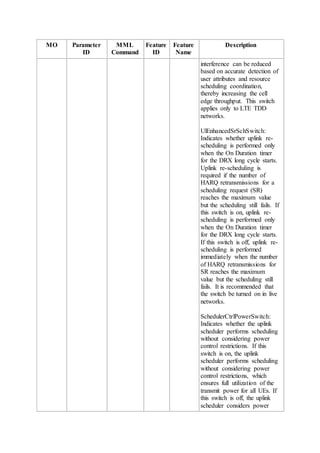
  • 145.
    MO Parameter ID MML Command Feature ID Feature Name Description tch), UlIblerAdjustSwitch(UlIblerA djustSwitch), UlEnhancedFssSwitch(UlEnha ncedFssSwitch), UlEnhancedSrSchSwitch(UlE nhancedSrSchSwitch), SchedulerCtrlPowerSwitch(Sc hedulerCtrlPowerSwitch), UlIicsAlgoSwitch(UlIicsAlgo Switch), UlMinGbrSwitch(UlMinGbrS witch), UlMbrCtrlSwitch(UlMbrCtrlS witch), MbrUlSchSwitch(MbrUlSchS witch), UeAmbrUlSchSwitch(UeAmb rUlSchSwitch), UlEnhancedDopplerSwitch(Ul EnhancedDopplerSwitch), UlRaUserSchOptSw(UlRaUse rSchOptSw), UlLast2RetransSchOptSwitch( UlLast2RetransSchOptSwitch) , UlInterfFssSwitch(UlInterfFss Switch), UlSmallRBSpectralEffOptSw( UlSmallRBSpectralEfficiency OptSw), PuschUsePucchRbSwitch(Pus chUsePucchRbSwitch), PuschDtxSchOptSwitch(Pusch DtxSchOptSwitch), ULFSSAlgoSwitch(ULFSSAl goSwitch), PrachRbReuseSwitch(PrachRb ReuseSwitch), SrSchDataAdptSw(SrSchData AdptSw), UlFssUserThdStSwitch(UlFss UserThdStSwitch) Unit: None ActualValue Range:
  • 146.
    MO Parameter ID MML Command Feature ID Feature Name Description SpsSchSwitch, SinrAdjustSwitch, PreAllocationSwitch, UlVmimoSwitch, TtiBundlingSwitch, ImIcSwitch, SmartPreAllocationSwitch, PuschDtxSwitch, UlIblerAdjustSwitch, UlEnhancedFssSwitch, UlEnhancedSrSchSwitch, SchedulerCtrlPowerSwitch, UlIicsAlgoSwitch, UlMinGbrSwitch, UlMbrCtrlSwitch, MbrUlSchSwitch, UeAmbrUlSchSwitch, UlEnhancedDopplerSwitch, UlRaUserSchOptSw, UlLast2RetransSchOptSwitch, UlInterfFssSwitch, UlSmallRBSpectralEffOptSw, PuschUsePucchRbSwitch, PuschDtxSchOptSwitch, ULFSSAlgoSwitch, PrachRbReuseSwitch, SrSchDataAdptSw, UlFssUserThdStSwitch Default Value: SpsSchSwitch:Off, SinrAdjustSwitch:On, PreAllocationSwitch:On, UlVmimoSwitch:Off, TtiBundlingSwitch:Off, ImIcSwitch:Off, SmartPreAllocationSwitch:Off ,PuschDtxSwitch:On, UlIblerAdjustSwitch:Off, UlEnhancedFssSwitch:On, UlEnhancedSrSchSwitch:Off, SchedulerCtrlPowerSwitch:Of f, UlIicsAlgoSwitch:Off, UlMinGbrSwitch:Off, UlMbrCtrlSwitch:Off, MbrUlSchSwitch:Off, UeAmbrUlSchSwitch:Off,
  • 147.
    MO Parameter ID MML Command Feature ID Feature Name Description UlEnhancedDopplerSwitch:Of f, UlRaUserSchOptSw:Off, UlLast2RetransSchOptSwitch: Off,UlInterfFssSwitch:Off, UlSmallRBSpectralEffOptSw: Off, PuschUsePucchRbSwitch:Off, PuschDtxSchOptSwitch:Off, ULFSSAlgoSwitch:On, PrachRbReuseSwitch:Off, SrSchDataAdptSw:On, UlFssUserThdStSwitch:Off CellDrxP ara CqiMask MOD CELLDRX PARA LST CELLDRX PARA LBFD- 002017 / TDLBF D- 002017 DRX Meaning: Indicates whether the cqi-Mask IE can be set. The cqi-Mask IE is an optional IE introduced in 3GPP Release 9. If the cqi-Mask IE is set to Setup, the UE can send CQI/PMI/RI/PTI reports on PUCCH only in the onDuration period of discontinuous reception (DRX). If the cqi-Mask IE is not set, the UE can send CQI/PMI/RI/PTI reports on PUCCH in the active period of DRX. GUI Value Range: OFF(Off), ON(On) Unit: None Actual Value Range: OFF, ON Default Value: OFF(Off) TimeAlig nmentTi mer TimingAdvC mdOptSwitch MOD TATIMER LST TATIMER None None Meaning: Indicates whether optimization of the mechanism for delivering the uplink time alignment command takes effect. If the optimization takes effect, the number of unnecessary uplink time alignment commands
  • 148.
    MO Parameter ID MML Command Feature ID Feature Name Description delivered tomotionless or low- mobility UEs can be reduced to save air interface resources and reduce power consumption of UEs in DRX mode. This ensures the uplink time alignment performance if the length of the uplink time alignment timer is set to a large value. If this parameter is set to ON, it is recommended that the TimeAlignmentTimer parameter be set to SF10240. A smaller value of the TimeAlignmentTimer parameter, such as SF5120, leads to a higher probability of becoming out-of- synchronization in the uplink for UEs in DRX mode. If this parameter is set to ON, it is recommended that the LongDrxCycle parameter be smaller than or equal to SF320. Otherwise, the uplink time alignment performance of UEs in DRX mode is affected. GUI Value Range: OFF(Off), ON(On) Unit: None Actual Value Range: OFF, ON Default Value: ON(On) TimeAlig nmentTi mer TimingMeas Mode MOD TATIMER LST TATIMER LBFD- 070101 Uplink Timing Based on PUCCH Meaning: Indicates the method of measuring uplink timing offsets. If this parameter is set to INVALID, uplink timing offsets are measured based on the demodulation reference signal (DMRS) for PUSCH or
  • 149.
    MO Parameter ID MML Command Feature ID Feature Name Description sounding referencesignal (SRS). If this parameter is set to ALLMEASMODE, uplink timing offsets are measured based on the DMRS for PUSCH and SRS or based on the DMRS for PUSCH and channel quality indicator (CQI) in PUCCH. In addition, the value ON of the TimingAdvCmdOptSwitch parameter takes effect regardless of the actual parameter setting. That is, the eNodeB always sends the Timing Advance Command to UEs. In this case, it is recommended that the TimeAlignmentTimer parameter be set to SF10240. The value ALLMEASMODE applies only to LTE FDD cells. The parameter value INVALID takes effect in a cell regardless of the actual parameter setting in any of the following scenarios: (1) The cell is established on an LBBPc. (2) The UlCyclicPrefix parameter is set to EXTENDED_CP. (3) The HighSpeedFlag parameter is set to HIGH_SPEED, ULTRA_HIGH_SPEED, or EXTRA_HIGH_SPEED. (4) The TX/RX mode of the cell is 2T8R. GUI Value Range: INVALID(Invalid Timing Measurement Mode), ALLMEASMODE(All Timing Measurement Mode) Unit: None Actual Value Range:
  • 150.
    MO Parameter ID MML Command Feature ID Feature Name Description INVALID, ALLMEASMODE DefaultValue: INVALID(Invalid Timing Measurement Mode) RlcPdcpP araGroup DiscardTimer ADD RLCPDCPP ARAGROU P MOD RLCPDCPP ARAGROU P LST RLCPDCPP ARAGROU P LBFD- 002008 / TDLBF D- 002008 Radio Bearer Manage ment Meaning: Indicates the length of the PDCP discard timer. GUI Value Range: DiscardTimer_50(50), DiscardTimer_100(100), DiscardTimer_150(150), DiscardTimer_300(300), DiscardTimer_500(500), DiscardTimer_750(750), DiscardTimer_1500(1500), DiscardTimer_Infinity(infinity ) Unit: ms Actual Value Range: DiscardTimer_50, DiscardTimer_100, DiscardTimer_150, DiscardTimer_300, DiscardTimer_500, DiscardTimer_750, DiscardTimer_1500, DiscardTimer_Infinity Default Value: DiscardTimer_Infinity(infinity ) CellDrxP ara LocalCellId LST CELLDRX PARA MOD CELLDRX PARA None None Meaning: Indicates the local ID of the cell. It uniquely identifies a cell within a BS. GUI Value Range: 0~255 Unit: None Actual Value Range: 0~255 Default Value: None
  • 151.
    MO Parameter ID MML Command Feature ID Feature Name Description CellDrxP ara DrxPolicyMo de MOD CELLDRX PARA LST CELLDRX PARA LBFD- 002017 / TDLBF D- 002017 DRX Meaning:Indicates the policy for selecting a DRX parameter group for a UE for which the bearers have multiple QCIs. If this parameter is set to DEFAULT(Default), the DRX parameter group with the shortest long DRX cycle is preferentially selected for the UE. If the lengths of long DRX cycle for multiple QCIs are the same, the DRX parameter group with the highest-priority QCI is selected for the UE. The QCI priorities are defined in 3GPP specifications. If this parameter is set to QCIPRIORITY(QCI priority), the DRX parameter group with the highest-priority QCI is selected for the UE. If no DRX parameter group is configured for the highest-priority QCI, the eNodeB does not configure the DRX parameter group for the UE. GUI Value Range: DEFAULT(Default), QCIPRIORITY(QCI priority) Unit: None Actual Value Range: DEFAULT, QCIPRIORITY Default Value: DEFAULT(Default) CellDrxP ara DrxStartOffs etOptSwitch MOD CELLDRX PARA LST CELLDRX PARA LBFD- 002017 DRX Meaning: Indicates whether to enable optimized random distribution of DrxStartOffset values for UEs that are configured with only sounding reference signal (SRS) resources, or periodic channel
  • 152.
    MO Parameter ID MML Command Feature ID Feature Name Description quality indicator(CQI), or neither. If this parameter is set to OFF, then DrxStartOffset takes the value of SrsOffset, CqiOffset, or 0 when a UE is configured with only SRS resources, or periodic CQI, or neither, respectively. This prevents DrxStartOffset values from being randomly distributed within the range of 0 to (LongDrxCycle - 1). If this parameter is set to ON, DrxStartOffset values can be randomly distributed within the range of 0 to (LongDrxCycle - 1) for UEs that are configured with only SRS resources, or periodic CQI, or neither. This parameter applies only to LTE FDD eNodeBs and is recommended to be set to ON when SRS resources are not allocated for UEs or there is a large number of UEs in the cell. GUI Value Range: OFF(Off), ON(On) Unit: None Actual Value Range: OFF, ON Default Value: OFF(Off) DrxPara Group DrxParaGrou pId ADD DRXPARA GROUP LST DRXPARA GROUP MOD DRXPARA LBFD- 002017 / TDLBF D- 002017 DRX Meaning: Indicates the ID of the DRX parameter group. GUI Value Range: 0~9 Unit: None Actual Value Range: 0~9 Default Value: None
  • 153.
    MO Parameter ID MML Command Feature ID Feature Name Description GROUP RMV DRXPARA GROUP CellStand ardQci LocalCellId LST CELLSTA NDARDQC I MOD CELLSTA NDARDQC I NoneNone Meaning: Indicates the local ID of the cell. It uniquely identifies a cell within a BS. GUI Value Range: 0~255 Unit: None Actual Value Range: 0~255 Default Value: None CellStand ardQci Qci LST CELLSTA NDARDQC I MOD CELLSTA NDARDQC I LBFD- 002025 / TDLBF D- 002025 LOFD- 001015 02 / TDLOF D- 001015 02 Basic Scheduli ng Dynamic Scheduli ng Meaning: Indicates the QoS class identifier (QCI) of an evolved packet system (EPS) bearer. Different QCIs indicate different QoS requirements, such as the packet delay budget, packet error loss rate, and resource type. For details, see Table 6.1.7 in 3GPP TS 23.203. GUI Value Range: QCI1(QCI 1), QCI2(QCI 2), QCI3(QCI 3), QCI4(QCI 4), QCI5(QCI 5), QCI6(QCI 6), QCI7(QCI 7), QCI8(QCI 8), QCI9(QCI 9) Unit: None Actual Value Range: QCI1, QCI2, QCI3, QCI4, QCI5, QCI6, QCI7, QCI8, QCI9 Default Value: None CellStand ardQci DrxParaGrou pId MOD CELLSTA NDARDQC LBFD- 002017 / TDLBF DRX Meaning: Indicates the ID of a DRX parameter group.
  • 154.
    MO Parameter ID MML Command Feature ID Feature Name Description I LST CELLSTA NDARDQC I D- 002017 GUI ValueRange: 0~9 Unit: None Actual Value Range: 0~9 Default Value: 0 CellStand ardQci QciPriorityFo rDrx MOD CELLSTA NDARDQC I LST CELLSTA NDARDQC I LBFD- 002017 / TDLBF D- 002017 DRX Meaning: Indicates the QCI- specific priority for selecting a DRX parameter group.A larger value of this parameter indicates a lower priority. If the bearers for a UE have multiple QCIs and the DrxPolicyMode parameter is set to QCIPRIORITY(QCI priority), the eNodeB selects the DRX parameter group for the UE based on the QCI- specific priorities. GUI Value Range: 1~9 Unit: None Actual Value Range: 1~9 Default Value: 9 CellExte ndedQci ExtendedQci ADD CELLEXT ENDEDQC I LST CELLEXT ENDEDQC I MOD CELLEXT ENDEDQC I RMV CELLEXT ENDEDQC LBFD- 002032 Extended -QCI Meaning: Indicates the extended QoS Class Identifier (QCI), which is required by the operator for service differentiation. GUI Value Range: 10~254 Unit: None Actual Value Range: 10~254 Default Value: None
  • 155.
    MO Parameter ID MML Command Feature ID Feature Name Description I CellExte ndedQci LocalCellId ADD CELLEXT ENDEDQC I LST CELLEXT ENDEDQC I MOD CELLEXT ENDEDQC I RMV CELLEXT ENDEDQC I NoneNone Meaning: Indicates the local ID of the cell. It uniquely identifies a cell within a BS. GUI Value Range: 0~255 Unit: None Actual Value Range: 0~255 Default Value: None CellExte ndedQci DrxParaGrou pId ADD CELLEXT ENDEDQC I MOD CELLEXT ENDEDQC I LST CELLEXT ENDEDQC I LBFD- 002017 / TDLBF D- 002017 DRX Meaning: Indicates the ID of a DRX parameter group. GUI Value Range: 0~9 Unit: None Actual Value Range: 0~9 Default Value: 0 Cell LocalCellId ACT CELL ADD CELL ADD CELLBAN D BLK CELL None None Meaning: Indicates the local ID of the cell. It uniquely identifies a cell within a BS. GUI Value Range: 0~255 Unit: None Actual Value Range: 0~255 Default Value: None
  • 156.
    MO Parameter ID MML Command Feature ID Feature Name Description DEA CELL DSPCELL DSP CELLPHY TOPO DSP CELLULC OMPCLUS TER DSP LIOPTRUL E DSP PRIBBPAD JUST LST CELL LST CELLBAN D MOD CELL RMV CELL RMV CELLBAN D RMV CELLNRT STR CELLRFL OOPBACK STR CELLSELF TEST
  • 157.
    MO Parameter ID MML Command Feature ID Feature Name Description STR LRTWPRT TST STR PRIBBPAD JUST UBL CELL DSP LRTWPRT TST DSP PRIBBPRE SINFO Standard Qci QciLST STANDAR DQCI MOD STANDAR DQCI LOFD- 001015 02 / TDLOF D- 001015 02 TDLBF D- 002025 TDLOF D- 001015 Dynamic Scheduli ng Basic Scheduli ng Enhanced Scheduli ng Meaning: Indicates the QoS Class Identifier (QCI) of an EPS bearer. Different QCIs represent different QoS specifications such as the packet delay budget, packet error loss rate, and resource type (whether the service is a GBR service or not). For details, see Table 6.1.7 in 3GPP TS 23.203. GUI Value Range: QCI1(QCI 1), QCI2(QCI 2), QCI3(QCI 3), QCI4(QCI 4), QCI5(QCI 5), QCI6(QCI 6), QCI7(QCI 7), QCI8(QCI 8), QCI9(QCI 9) Unit: None Actual Value Range: QCI1, QCI2, QCI3, QCI4, QCI5, QCI6, QCI7, QCI8, QCI9 Default Value: None CellAcce ss ReptSyncAvo idInd MOD CELLACC LOFD- 001105 / Dynamic DRX Meaning: Indicates whether all synchronization procedures repeatedly initiated by a UE
  • 158.
    MO Parameter ID MML Command Feature ID Feature Name Description ESS LST CELLACC ESS TDLOF D- 001105 having compatibilityproblems can trigger the RRC connection reconfiguration procedure. If this parameter is set to CFG, all synchronization procedures repeatedly initiated by a UE having compatibility problems do not trigger the RRC connection reconfiguration procedure. If this parameter is set to NOT_CFG, all synchronization procedures repeatedly initiated by a UE having compatibility problems trigger the RRC connection reconfiguration procedure. GUI Value Range: NOT_CFG(Not configure), CFG(Configure) Unit: None Actual Value Range: NOT_CFG, CFG Default Value: NOT_CFG(Not configure) CellAcce ss ReptSyncAvo idTime MOD CELLACC ESS LST CELLACC ESS LOFD- 001105 / TDLOF D- 001105 Dynamic DRX Meaning: Indicates the period during which synchronization procedures repeatedly initiated by a UE having compatibility problems do not trigger the RRC connection reconfiguration procedure. Multiple synchronization procedures initiated by a UE having compatibility problems within the period specified by this parameter trigger only one RRC connection reconfiguration procedure. GUI Value Range: 1~1000
  • 159.
    MO Parameter ID MML Command Feature ID Feature Name Description Unit: ms ActualValue Range: 1~1000 Default Value: 100 CellAlgo Switch LocalCellId DSP CELLULC AMCCLUS TER LST CELLALG OSWITCH MOD CELLALG OSWITCH None None Meaning: Indicates the local ID of the cell. It uniquely identifies a cell within a BS. GUI Value Range: 0~255 Unit: None Actual Value Range: 0~255 Default Value: None 12 Counters Table 12-1 Counters Counter ID Counter Name Counter Description Feature ID Feature Name 15267266 58 L.RRC.ConnReq.Att Number of RRC connection setup requests (retransmission excluded) Multi- mode: None GSM: None UMTS: None LTE: LBFD- 002007 TDLBF D- 002007 RRC Connectio n Managem ent RRC Connectio n Managem ent 15267268 85 L.Paging.UU.Att Number of UEs contained in paging messages Multi- mode: Paging Paging
  • 160.
    Counter ID Counter Name Counter Description Feature ID Feature Name transmittedover the Uu interface in a cell None GSM: None UMTS: None LTE: LBFD- 002011 TDLBF D- 002011 15267269 96 L.HHO.IntraeNB.IntraFreq.ExecAttOut Number of intra- eNodeB intra- frequency outgoing handovers executions in a cell Multi- mode: None GSM: None UMTS: None LTE: LBFD- 002018 01 TDLBF D- 002018 01 Coverage Based Intra- frequency Handover Coverage Based Intra- frequency Handover 15267269 99 L.HHO.IntraeNB.InterFreq.ExecAttOut Number of intra- eNodeB inter- frequency outgoing handovers executions in a cell Multi- mode: None GSM: None UMTS: None LTE: LBFD- Coverage Based Inter- frequency Handover Coverage Based Inter- frequency Handover
  • 161.
    Counter ID Counter Name Counter Description Feature ID Feature Name 002018 02 TDLBF D- 002018 02 15267270 02 L.HHO.IntereNB.IntraFreq.ExecAttOutNumber of inter- eNodeB intra- frequency outgoing handovers executions in a cell Multi- mode: None GSM: None UMTS: None LTE: LBFD- 002018 01 TDLBF D- 002018 01 Coverage Based Intra- frequency Handover Coverage Based Intra- frequency Handover 15267270 05 L.HHO.IntereNB.InterFreq.ExecAttOut Number of inter- eNodeB inter- frequency outgoing handovers executions in a cell Multi- mode: None GSM: None UMTS: None LTE: LBFD- 002018 02 TDLBF D- 002018 02 Coverage Based Inter- frequency Handover Coverage Based Inter- frequency Handover
  • 162.
    Counter ID Counter Name Counter Description Feature ID Feature Name 15267272 85 L.HHO.DRX.IntraeNB.IntraFreq.ExecA ttOut Numberof intra- eNodeB intra- frequency outgoing handovers executions in the DRX state Multi- mode: None GSM: None UMTS: None LTE: LBFD- 002017 LBFD- 002018 01 TDLBF D- 002017 TDLBF D- 002018 01 DRX Coverage Based Intra- frequency Handover DRX Coverage Based Intra- frequency Handover 15267272 86 L.HHO.DRX.IntraeNB.IntraFreq.ExecS uccOut Number of successful intra- eNodeB intra- frequency outgoing handovers in the DRX state Multi- mode: None GSM: None UMTS: None LTE: LBFD- 002017 LBFD- 002018 01 TDLBF D- DRX Coverage Based Intra- frequency Handover DRX Coverage Based Intra- frequency Handover
  • 163.
    Counter ID Counter Name Counter Description Feature ID Feature Name 002017 TDLBF D- 002018 01 15267272 87 L.HHO.DRX.IntraeNB.InterFreq.ExecA ttOut Numberof intra- eNodeB inter- frequency outgoing handovers executions in the DRX state Multi- mode: None GSM: None UMTS: None LTE: LBFD- 002017 LBFD- 002018 02 TDLBF D- 002017 TDLBF D- 002018 02 DRX Coverage Based Inter- frequency Handover DRX Coverage Based Inter- frequency Handover 15267272 88 L.HHO.DRX.IntraeNB.InterFreq.ExecS uccOut Number of successful intra- eNodeB inter- frequency outgoing handovers in the DRX state Multi- mode: None GSM: None UMTS: None LTE: LBFD- 002017 DRX Coverage Based Inter- frequency Handover DRX Coverage Based Inter- frequency
  • 164.
    Counter ID Counter Name Counter Description Feature ID Feature Name LBFD- 002018 02 TDLBF D- 002017 TDLBF D- 002018 02 Handover 15267272 89 L.HHO.DRX.IntereNB.IntraFreq.ExecA ttOut Numberof inter- eNodeB intra- frequency outgoing handovers executions in the DRX state Multi- mode: None GSM: None UMTS: None LTE: LBFD- 002017 LBFD- 002018 02 TDLBF D- 002018 02 DRX Coverage Based Inter- frequency Handover Coverage Based Inter- frequency Handover 15267272 90 L.HHO.DRX.IntereNB.IntraFreq.ExecS uccOut Number of successful inter- eNodeB intra- frequency outgoing handovers in the DRX state Multi- mode: None GSM: None UMTS: None LTE: LBFD- Coverage Based Intra- frequency Handover Coverage Based Inter- frequency Handover
  • 165.
    Counter ID Counter Name Counter Description Feature ID Feature Name 002018 01 LBFD- 002018 02 LBFD- 002017 TDLBF D- 002018 01 TDLBF D- 002018 02 DRX Coverage Based Intra- frequency Handover Coverage Based Inter- frequency Handover 15267272 91 L.HHO.DRX.IntereNB.InterFreq.ExecA ttOut Numberof inter- eNodeB inter- frequency outgoing handovers executions in the DRX state Multi- mode: None GSM: None UMTS: None LTE: LBFD- 002018 01 LBFD- 002018 02 LBFD- 002017 TDLBF D- 002018 01 Coverage Based Intra- frequency Handover Coverage Based Inter- frequency Handover DRX Coverage Based Intra- frequency Handover Coverage Based Inter- frequency Handover
  • 166.
    Counter ID Counter Name Counter Description Feature ID Feature Name TDLBF D- 002018 02 15267272 92 L.HHO.DRX.IntereNB.InterFreq.ExecS uccOut Numberof successful inter- eNodeB inter- frequency outgoing handovers in the DRX state Multi- mode: None GSM: None UMTS: None LTE: LBFD- 002017 LBFD- 002018 02 TDLBF D- 002017 TDLBF D- 002018 01 TDLBF D- 002018 02 DRX Coverage Based Inter- frequency Handover DRX Coverage Based Intra- frequency Handover Coverage Based Inter- frequency Handover 15267275 44 L.E-RAB.SuccEst Total number of successful E- RAB setups initiated by UEs in a cell Multi- mode: None GSM: None UMTS: None LTE: Radio Bearer Managem ent Radio Bearer Managem ent
  • 167.
    Counter ID Counter Name Counter Description Feature ID Feature Name LBFD- 002008 TDLBF D- 002008 15267275 45 L.E-RAB.AttEstTotal number of E-RAB setup attempts initiated by UEs in a cell Multi- mode: None GSM: None UMTS: None LTE: LBFD- 002008 TDLBF D- 002008 Radio Bearer Managem ent Radio Bearer Managem ent 15267275 46 L.E-RAB.AbnormRel Total number of abnormal releases of activated E- RABs initiated by the eNodeB Multi- mode: None GSM: None UMTS: None LTE: LBFD- 002008 TDLBF D- 002008 Radio Bearer Managem ent Radio Bearer Managem ent 15267275 47 L.E-RAB.NormRel Total number of normal E-RAB releases initiated by the eNodeB in a cell Multi- mode: None GSM: Radio Bearer Managem ent
  • 168.
    Counter ID Counter Name Counter Description Feature ID Feature Name None UMTS: None LTE: LBFD- 002008 TDLBF D- 002008 Radio Bearer Managem ent 15267282 17 L.RRC.ConnReq.Att.EmcNumber of RRC connection setup attempts with a cause value of emergency Multi- mode: None GSM: None UMTS: None LTE: LBFD- 002007 TDLBF D- 002007 RRC Connectio n Managem ent RRC Connectio n Managem ent 15267282 18 L.RRC.ConnReq.Att.HighPri Number of RRC connection setup attempts with a cause value of highPriorityAcce ss Multi- mode: None GSM: None UMTS: None LTE: LBFD- 002007 TDLBF D- 002007 RRC Connectio n Managem ent RRC Connectio n Managem ent
  • 169.
    Counter ID Counter Name Counter Description Feature ID Feature Name 15267282 19 L.RRC.ConnReq.Att.MtNumber of RRC connection setup attempts with a cause value of mt-Access Multi- mode: None GSM: None UMTS: None LTE: LBFD- 002007 TDLBF D- 002007 RRC Connectio n Managem ent RRC Connectio n Managem ent 15267282 20 L.RRC.ConnReq.Att.MoSig Number of RRC connection setup attempts with a cause value of mo-Signalling Multi- mode: None GSM: None UMTS: None LTE: LBFD- 002007 TDLBF D- 002007 RRC Connectio n Managem ent RRC Connectio n Managem ent 15267282 21 L.RRC.ConnReq.Att.MoData Number of RRC connection setup attempts with a cause value of mo-Data Multi- mode: None GSM: None UMTS: None LTE: LBFD- RRC Connectio n Managem ent RRC Connectio n Managem ent
  • 170.
    Counter ID Counter Name Counter Description Feature ID Feature Name 002007 TDLBF D- 002007 15267282 22 L.RRC.ConnReq.Succ.EmcNumber of RRC Connection Setup Complete messages with a cause value of emergency received from UEs in a cell Multi- mode: None GSM: None UMTS: None LTE: LBFD- 002007 TDLBF D- 002007 RRC Connectio n Managem ent RRC Connectio n Managem ent 15267282 23 L.RRC.ConnReq.Succ.HighPri Number of RRC Connection Setup Complete messages with a cause value of highPriorityAcce ss received from UEs in a cell Multi- mode: None GSM: None UMTS: None LTE: LBFD- 002007 TDLBF D- 002007 RRC Connectio n Managem ent RRC Connectio n Managem ent 15267282 24 L.RRC.ConnReq.Succ.Mt Number of RRC Connection Setup Complete messages with a cause value of mt-Access Multi- mode: None GSM: RRC Connectio n Managem ent
  • 171.
    Counter ID Counter Name Counter Description Feature ID Feature Name receivedfrom UEs in a cell None UMTS: None LTE: LBFD- 002007 TDLBF D- 002007 RRC Connectio n Managem ent 15267282 26 L.RRC.ConnReq.Succ.MoData Number of RRC Connection Setup Complete messages with a cause value of mo-Data received from UEs in a cell Multi- mode: None GSM: None UMTS: None LTE: LBFD- 002007 TDLBF D- 002007 RRC Connectio n Managem ent RRC Connectio n Managem ent 15267283 57 L.RRC.ConnReq.Att.DelayTol Number of RRC connection setup attempts with a cause value of delayTolerantAc cess-v1020 Multi- mode: None GSM: None UMTS: None LTE: LBFD- 002007 TDLBF D- 002007 RRC Connectio n Managem ent RRC Connectio n Managem ent
  • 172.
    Counter ID Counter Name Counter Description Feature ID Feature Name 15267283 58 L.RRC.ConnReq.Succ.DelayTolNumber of successful RRC connection setups with a cause value of delayTolerantAc cess-v1020 Multi- mode: None GSM: None UMTS: None LTE: LBFD- 002007 TDLBF D- 002007 RRC Connectio n Managem ent RRC Connectio n Managem ent 15267284 36 L.E-RAB.Release.Unsyn Number of released E-RABs of UEs in the uplink out-of- synchronization state Multi- mode: None GSM: None UMTS: None LTE: LBFD- 002008 TDLBF D- 002008 Radio Bearer Managem ent Radio Bearer Managem ent 15267284 37 L.E-RAB.Num.Syn2Unsyn Total number of E-RABs in UE contexts when the UEs switch from the uplink synchronized state to the uplink out-of- synchronization state in a cell Multi- mode: None GSM: None UMTS: None LTE: LBFD- Radio Bearer Managem ent Radio Bearer Managem ent
  • 173.
    Counter ID Counter Name Counter Description Feature ID Feature Name 002008 TDLBF D- 002008 15267284 38 L.RRC.StateTrans.Syn2UnsynNumber of times a UE switch from the Uplink- Synchronized state to the uplink out-of- synchronization state Multi- mode: None GSM: None UMTS: None LTE: LBFD- 002007 TDLBF D- 002007 RRC Connectio n Managem ent RRC Connectio n Managem ent 15267284 39 L.RRC.StateTrans.Unsyn2Syn Number of times a UE switch from the out-of- synchronization state to the uplink- synchronized state Multi- mode: None GSM: None UMTS: None LTE: LBFD- 002007 TDLBF D- 002007 RRC Connectio n Managem ent RRC Connectio n Managem ent 15267284 40 L.UECNTX.Release.HighSpeed Number of UE context releases due to high mobility of UEs Multi- mode: None GSM: Radio Bearer Managem ent Radio
  • 174.
    Counter ID Counter Name Counter Description Feature ID Feature Name None UMTS: None LTE: LBFD- 002008 TDLBF D- 002008 Bearer Managem ent 15267284 65 L.Signal.Num.UuNumber of signaling messages over the Uu interface Multi- mode: None GSM: None UMTS: None LTE: LBFD- 002017 TDLBF D- 002017 DRX DRX 15267284 66 L.Signal.Num.DRX.Reconfig Number of DRX reconfiguration messages Multi- mode: None GSM: None UMTS: None LTE: LBFD- 002017 TDLBF D- DRX DRX Dynamic DRX Dynamic DRX
  • 175.
    Counter ID Counter Name Counter Description Feature ID Feature Name 002017 LOFD- 001105 TDLOF D- 001105 15267285 46 L.Traffic.User.Cdrx.AvgAverage number of UEs on which DRX takes effect in a cell Multi- mode: None GSM: None UMTS: None LTE: LOFD- 001105 LBFD- 002017 TDLOF D- 001105 Dynamic DRX DRX Dynamic DRX 15267285 47 L.Cdrx.Enter.Num Number of times a UE in connected mode enters DRX in RRC_CONECT ED mode Multi- mode: None GSM: None UMTS: None LTE: LBFD- 002017 TDLBF D- 002017 DRX DRX Dynamic DRX Dynamic DRX
  • 176.
    Counter ID Counter Name Counter Description Feature ID Feature Name LOFD- 001105 TDLOF D- 001105 15267285 48 L.Cdrx.Exit.NumNumber of times a UE in connected mode exits DRX in RRC_CONECT ED mode Multi- mode: None GSM: None UMTS: None LTE: LBFD- 002017 TDLBF D- 002017 LOFD- 001105 TDLOF D- 001105 DRX DRX Dynamic DRX Dynamic DRX 15267285 49 L.Cdrx.Active.TtiNum Total number of TTIs for DRX UEs in active state Multi- mode: None GSM: None UMTS: None LTE: LOFD- 001105 TDLOF D- Dynamic DRX Dynamic DRX DRX DRX
  • 177.
    Counter ID Counter Name Counter Description Feature ID Feature Name 001105 LBFD- 002017 TDLBF D- 002017 15267285 50 L.Cdrx.Sleep.TtiNumTotal number of TTIs for DRX UEs in sleep state Multi- mode: None GSM: None UMTS: None LTE: LOFD- 001105 TDLOF D- 001105 LBFD- 002017 TDLBF D- 002017 Dynamic DRX Dynamic DRX DRX DRX 15267285 51 L.Voip.Cdrx.Active.TtiNum Total number of TTIs for DRX UEs in active state and performing VoIP services Multi- mode: None GSM: None UMTS: None LTE: LOFD- 001105 Dynamic DRX Dynamic DRX DRX DRX
  • 178.
    Counter ID Counter Name Counter Description Feature ID Feature Name TDLOF D- 001105 LBFD- 002017 TDLBF D- 002017 15267285 52 L.Voip.Cdrx.Sleep.TtiNumTotal number of TTIs for DRX UEs in dormant state and performing VoIP services Multi- mode: None GSM: None UMTS: None LTE: LOFD- 001105 TDLOF D- 001105 LBFD- 002017 TDLBF D- 002017 Dynamic DRX Dynamic DRX DRX DRX 15267285 54 L.HHO.IntraFreq.NoData.ExecAttOut Number of intra- frequency handover execution attempts triggered for UEs that do not transmit or receive data Multi- mode: None GSM: None UMTS: None LTE: LBFD- Coverage Based Intra- frequency Handover Coverage Based Intra- frequency Handover
  • 179.
    Counter ID Counter Name Counter Description Feature ID Feature Name 002018 01 TDLBF D- 002018 01 LOFD- 001105 TDLOF D- 001105 Dynamic DRX Dynamic DRX 15267285 55 L.HHO.IntraFreq.NoData.ExecSuccOutNumber of successful intra- frequency handover executions triggered for UEs that do not transmit or receive data Multi- mode: None GSM: None UMTS: None LTE: LBFD- 002018 01 TDLBF D- 002018 01 LOFD- 001105 TDLOF D- 001105 Coverage Based Intra- frequency Handover Coverage Based Intra- frequency Handover Dynamic DRX Dynamic DRX 15267285 57 L.HHO.InterFreq.NoData.ExecAttOut Number of inter- frequency handover execution attempts triggered for UEs Multi- mode: None GSM: Coverage Based Inter- frequency Handover
  • 180.
    Counter ID Counter Name Counter Description Feature ID Feature Name thatdo not transmit or receive data None UMTS: None LTE: LBFD- 002018 02 TDLBF D- 002018 02 LOFD- 001105 TDLOF D- 001105 Coverage Based Inter- frequency Handover Dynamic DRX Dynamic DRX 15267285 58 L.HHO.InterFreq.NoData.ExecSuccOut Number of successful inter- frequency handover executions triggered for UEs that do not transmit or receive data Multi- mode: None GSM: None UMTS: None LTE: LBFD- 002018 02 TDLBF D- 002018 02 LOFD- 001105 TDLOF D- Coverage Based Inter- frequency Handover Coverage Based Inter- frequency Handover Dynamic DRX Dynamic DRX
  • 181.
    Counter ID Counter Name Counter Description Feature ID Feature Name 001105 15267285 60 L.IRATHO.E2W.NoData.ExecAttOutNumber of inter- RAT handover executions from E-UTRAN to WCDMA network triggered for UEs that do not transmit or receive data Multi- mode: None GSM: None UMTS: None LTE: LOFD- 001019 LOFD- 001022 LOFD- 001033 TDLOF D- 001019 TDLOF D- 001022 TDLOF D- 001033 LOFD- 001105 TDLOF D- 001105 PS Inter- RAT Mobility between E- UTRAN and UTRAN SRVCC to UTRAN CS Fallback to UTRAN PS Inter- RAT Mobility between E- UTRAN and UTRAN SRVCC to UTRAN CS Fallback to UTRAN Dynamic DRX Dynamic DRX 15267285 61 L.IRATHO.E2W.NoData.ExecSuccOut Number of successful inter- RAT handovers from E-UTRAN Multi- mode: None PS Inter- RAT Mobility between
  • 182.
    Counter ID Counter Name Counter Description Feature ID Feature Name toWCDMA network triggered for UEs that do not transmit or receive data GSM: None UMTS: None LTE: LOFD- 001019 LOFD- 001022 LOFD- 001033 TDLOF D- 001019 TDLOF D- 001022 TDLOF D- 001033 LOFD- 001105 TDLOF D- 001105 E- UTRAN and UTRAN SRVCC to UTRAN CS Fallback to UTRAN PS Inter- RAT Mobility between E- UTRAN and UTRAN SRVCC to UTRAN CS Fallback to UTRAN Dynamic DRX Dynamic DRX 15267295 84 L.HHO.InterFddTdd.NoData.ExecAttO ut Number of inter- duplex-mode handover execution attempts triggered for UEs that do not transmit or receive data Multi- mode: None GSM: None UMTS: Coverage Based Inter- frequency Handover Dynamic DRX
  • 183.
    Counter ID Counter Name Counter Description Feature ID Feature Name None LTE: LBFD- 002018 02 LOFD- 001105 TDLBF D- 002018 02 TDLOF D- 001105 Coverage Based Inter- frequency Handover Dynamic DRX 15267295 85 L.HHO.InterFddTdd.NoData.ExecSucc Out Numberof successful inter- duplex-mode handover executions triggered for UEs that do not transmit or receive data Multi- mode: None GSM: None UMTS: None LTE: LBFD- 002018 02 LOFD- 001105 TDLBF D- 002018 02 TDLOF D- 001105 Coverage Based Inter- frequency Handover Dynamic DRX Coverage Based Inter- frequency Handover Dynamic DRX 15267295 86 L.HHO.DRX.IntraeNB.InterFddTdd.Ex ecAttOut Number of intra- eNodeB inter- Multi- mode: DRX
  • 184.
    Counter ID Counter Name Counter Description Feature ID Feature Name duplex-mode handover executions triggeredfor UEs in the DRX state None GSM: None UMTS: None LTE: LBFD- 002017 LBFD- 002018 02 TDLBF D- 002017 TDLBF D- 002018 02 Coverage Based Inter- frequency Handover DRX Coverage Based Inter- frequency Handover 15267295 87 L.HHO.DRX.IntraeNB.InterFddTdd.Ex ecSuccOut Number of successful intra- eNodeB inter- duplex-mode outgoing handovers triggered for UEs in the DRX state Multi- mode: None GSM: None UMTS: None LTE: LBFD- 002017 LBFD- 002018 02 TDLBF D- 002017 DRX Coverage Based Inter- frequency Handover DRX Coverage Based Inter- frequency Handover
  • 185.
    Counter ID Counter Name Counter Description Feature ID Feature Name TDLBF D- 002018 02 15267295 88 L.HHO.DRX.IntereNB.InterFddTdd.Ex ecAttOut Numberof inter- eNodeB inter- duplex-mode handover executions triggered for UEs in the DRX state Multi- mode: None GSM: None UMTS: None LTE: LBFD- 002017 LBFD- 002018 02 TDLBF D- 002017 TDLBF D- 002018 02 DRX Coverage Based Inter- frequency Handover DRX Coverage Based Inter- frequency Handover 15267295 89 L.HHO.DRX.IntereNB.InterFddTdd.Ex ecSuccOut Number of successful inter- eNodeB inter- duplex-mode outgoing handovers triggered for UEs in the DRX state Multi- mode: None GSM: None UMTS: None LTE: LBFD- 002017 LBFD- 002018 DRX Coverage Based Inter- frequency Handover DRX Coverage Based Inter- frequency Handover
  • 186.
    Counter ID Counter Name Counter Description Feature ID Feature Name 02 TDLBF D- 002017 TDLBF D- 002018 02 15267296 56 L.RRC.StateTrans.Unsyn2Syn.SuccNumber of successfully recovered RRC connections when UEs switch from the uplink out-of- synchronization state to the uplink- synchronized state Multi- mode: None GSM: None UMTS: None LTE: LOFD- 001105 TDLOF D- 001105 Dynamic DRX Dynamic DRX 15267296 57 L.E-RAB.StateTrans.Unsyn2Syn.Att Number of E- RAB recovery attempts when UEs switch from the uplink out- of- synchronization state to the uplink- synchronized state Multi- mode: None GSM: None UMTS: None LTE: LOFD- 001105 TDLOF D- 001105 Dynamic DRX Dynamic DRX 15267296 L.E-RAB.StateTrans.Unsyn2Syn.Succ Number of Multi- Dynamic
  • 187.
    Counter ID Counter Name Counter Description Feature ID Feature Name 58successfully recovered E- RABs when UEs switch from the uplink out-of- synchronization state to the uplink- synchronized state mode: None GSM: None UMTS: None LTE: LOFD- 001105 TDLOF D- 001105 DRX Dynamic DRX 15267296 59 L.Signal.Num.S1 Number of S1 signaling messages received or sent by a cell Multi- mode: None GSM: None UMTS: None LTE: LOFD- 001105 TDLOF D- 001105 Dynamic DRX Dynamic DRX 15267296 60 L.Signal.Num.X2 Number of X2 signaling messages received or sent by a cell Multi- mode: None GSM: None UMTS: None LTE: LOFD- Dynamic DRX Dynamic DRX
  • 188.
    Counter ID Counter Name Counter Description Feature ID Feature Name 001105 TDLOF D- 001105 15267301 04 L.User.UL.Unsync.Dur.Index0Number of times the duration of a UE in the out-of- synchronization state in a cell ranges within index 0 Multi- mode: None GSM: None UMTS: None LTE: LOFD- 001105 TDLOF D- 001105 Dynamic DRX Dynamic DRX 15267301 05 L.User.UL.Unsync.Dur.Index1 Number of times the duration of a UE in the out-of- synchronization state in a cell ranges within index 1 Multi- mode: None GSM: None UMTS: None LTE: LOFD- 001105 TDLOF D- 001105 Dynamic DRX Dynamic DRX 15267301 06 L.User.UL.Unsync.Dur.Index2 Number of times the duration of a UE in the out-of- synchronization state in a cell ranges within Multi- mode: None GSM: Dynamic DRX Dynamic DRX
  • 189.
    Counter ID Counter Name Counter Description Feature ID Feature Name index2 None UMTS: None LTE: LOFD- 001105 TDLOF D- 001105 15267301 07 L.User.UL.Unsync.Dur.Index3 Number of times the duration of a UE in the out-of- synchronization state in a cell ranges within index 3 Multi- mode: None GSM: None UMTS: None LTE: LOFD- 001105 TDLOF D- 001105 Dynamic DRX Dynamic DRX 15267301 08 L.User.UL.Unsync.Dur.Index4 Number of times the duration of a UE in the out-of- synchronization state in a cell ranges within index 4 Multi- mode: None GSM: None UMTS: None LTE: LOFD- 001105 TDLOF D- 001105 Dynamic DRX Dynamic DRX
  • 190.
    Counter ID Counter Name Counter Description Feature ID Feature Name 15267301 09 L.User.UL.Unsync.Dur.Index5Number of times the duration of a UE in the out-of- synchronization state in a cell ranges within index 5 Multi- mode: None GSM: None UMTS: None LTE: LOFD- 001105 TDLOF D- 001105 Dynamic DRX Dynamic DRX 15267301 10 L.User.UL.Unsync.Dur.Index6 Number of times the duration of a UE in the out-of- synchronization state in a cell ranges within index 6 Multi- mode: None GSM: None UMTS: None LTE: LOFD- 001105 TDLOF D- 001105 Dynamic DRX Dynamic DRX 15267301 11 L.User.UL.Unsync.Dur.Index7 Number of times the duration of a UE in the out-of- synchronization state in a cell ranges within index 7 Multi- mode: None GSM: None UMTS: None LTE: LOFD- Dynamic DRX Dynamic DRX
  • 191.
    Counter ID Counter Name Counter Description Feature ID Feature Name 001105 TDLOF D- 001105 15267301 12 L.User.UL.Unsync.Dur.Index8Number of times the duration of a UE in the out-of- synchronization state in a cell ranges within index 8 Multi- mode: None GSM: None UMTS: None LTE: LOFD- 001105 TDLOF D- 001105 Dynamic DRX Dynamic DRX 15267301 24 L.Traffic.PktInterval.Num.Index0 Number of times the packet transmission interval for a UE in a cell ranges within index 0 Multi- mode: None GSM: None UMTS: None LTE: LBFD- 002007 LOFD- 001105 TDLOF D- 001105 RRC Connectio n Managem ent Dynamic DRX Dynamic DRX 15267301 25 L.Traffic.PktInterval.Num.Index1 Number of times the packet transmission Multi- mode: RRC Connectio n
  • 192.
    Counter ID Counter Name Counter Description Feature ID Feature Name intervalfor a UE in a cell ranges within index 1 None GSM: None UMTS: None LTE: LBFD- 002007 LOFD- 001105 TDLOF D- 001105 Managem ent Dynamic DRX Dynamic DRX 15267301 26 L.Traffic.PktInterval.Num.Index2 Number of times the packet transmission interval for a UE in a cell ranges within index 2 Multi- mode: None GSM: None UMTS: None LTE: LBFD- 002007 LOFD- 001105 TDLOF D- 001105 RRC Connectio n Managem ent Dynamic DRX Dynamic DRX 15267301 27 L.Traffic.PktInterval.Num.Index3 Number of times the packet transmission interval for a UE in a cell ranges within index 3 Multi- mode: None GSM: None UMTS: RRC Connectio n Managem ent Dynamic
  • 193.
    Counter ID Counter Name Counter Description Feature ID Feature Name None LTE: LBFD- 002007 LOFD- 001105 TDLOF D- 001105 DRX Dynamic DRX 15267301 28 L.Traffic.PktInterval.Num.Index4Number of times the packet transmission interval for a UE in a cell ranges within index 4 Multi- mode: None GSM: None UMTS: None LTE: LBFD- 002007 LOFD- 001105 TDLOF D- 001105 RRC Connectio n Managem ent Dynamic DRX Dynamic DRX 15267301 29 L.Traffic.PktInterval.Num.Index5 Number of times the packet transmission interval for a UE in a cell ranges within index 5 Multi- mode: None GSM: None UMTS: None LTE: LBFD- 002007 RRC Connectio n Managem ent Dynamic DRX Dynamic DRX
  • 194.
    Counter ID Counter Name Counter Description Feature ID Feature Name LOFD- 001105 TDLOF D- 001105 15267301 30 L.Traffic.PktInterval.Num.Index6Number of times the packet transmission interval for a UE in a cell ranges within index 6 Multi- mode: None GSM: None UMTS: None LTE: LBFD- 002007 LOFD- 001105 TDLOF D- 001105 RRC Connectio n Managem ent Dynamic DRX Dynamic DRX 15267301 31 L.Traffic.PktInterval.Num.Index7 Number of times the packet transmission interval for a UE in a cell ranges within index 7 Multi- mode: None GSM: None UMTS: None LTE: LBFD- 002007 LOFD- 001105 TDLOF D- 001105 RRC Connectio n Managem ent Dynamic DRX Dynamic DRX
  • 195.
    Counter ID Counter Name Counter Description Feature ID Feature Name 15267301 32 L.Traffic.PktInterval.Num.Index8Number of times the packet transmission interval for a UE in a cell ranges within index 8 Multi- mode: None GSM: None UMTS: None LTE: LBFD- 002007 LOFD- 001105 TDLOF D- 001105 RRC Connectio n Managem ent Dynamic DRX Dynamic DRX 13 Glossary For the acronyms, abbreviations, terms, and definitions, see Glossary. 14 Reference Documents 1. 3GPP TS 36.211: "Physical channels and modulation" 2. 3GPP TS 36.300: "Overall description" 3. 3GPP TS 36.321: "Medium Access Control (MAC) protocol specification" 4. Idle Mode Management Feature Parameter Description 5. Intra-RAT Mobility Management in Connected Mode Feature Parameter Description 6. Scheduling Feature Parameter Description 7. Terminal Awareness Differentiation Feature Parameter Description