Creating & Managing
Exceptional Web sites
Katie Paffhouse
Senior Manager, Affiliates


07/10/09
Using GoToWebinar


                    2
Steps for Web Design


                       3
Strategy Development
1. What are the overall organization’s goals that my Web strategy will
   contribute to?

3. What are the categories of customers using your Web site?

5. What are the top 10 questions visitors will ask when they reach your
   Web site? How will you answer these?

7. What will you consider a successful visit on your site?

9. What reason will a visitor have to tell others about your Web site?

11. How will I attract my target customers to our Web site?

13. What are my competitors doing?

15. How will we maintain the Web site?

17. If you currently have a Web site, what works well? What doesn’t?
Additional Resource

Web Strategy Recording
     • Developing strategy

     • Page development

     • Defining layout

     • Selecting provider

On www.eatright.org/affiliate-resources


                                          5
Web site Example
What’s Exceptional?

•Current, easy-to-understand information

•Search engine optimized

•Easy-to-navigate/view

•Interactive


                                           7
Content


07/10/09
Common Mistakes

              •Complicated Headlines

              •Under Construction Image

              •Coming Soon!

              •Never-ending Scroll Bar

              •Last Updated/Outdated News

              •Dead Links
Write for Your Reader


 •Scannable

 •Written at
 audience’s
 level

 •What your
 user-wants
Design for Your Reader


 Headlines


                                                                          Bulleted Lists
 Bolded Text


                                                                  Links
               http://www.provenanceunknown.com/edit/style.html
Design Standards

      Web site?     Website?           Web Site?


         Visit www.provenanceunknown.com/edit/style.html


                                                           12
How to Help Your Webmaster
   Provide
       Content update schedule
       Text in preferred format
       Design standards
       Clarify authority
       Ask his/her opinion


                                   13
Search Engine
Optimization


07/10/09
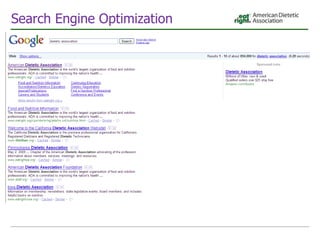
Search Engine Optimization

 #1: Keywords
                             •Dietetics

                             •Eat Healthy

                             •Nutrition advice

                             •ADA newsletter

                             •Volunteer positions
Search Engine Optimization

 #2: URLs/Links

 Instead Of…                                      Try ….
 www.website.org/218_2381d                        www.website.org/newsletters

 www.website.org/juneconferenc32009registration   www.website.org/conference
 opportunity
 www.website.org/career1                          www.website.org/careers
Search Engine Optimization

 #3: Metatags


<meta> keyword, description, title</meta>
Search Engine Optimization

 #4: Links from outside sites
How to Help Your Webmaster

  Provide
     Keywords
     Requested link text (2-3 options)
     Meta tag details
     When to expect updates


                                          20
Easy-to-Navigate


07/10/09
Breadcrumbs


              22
Search Field


    Free Resource: Google Custom Search: http://www.google.com/coop/cse/


                                                                           23
Menus


        24
Error Page


             25
Members-Only

   PROS                              CONS
   Adds perception of greater        Can be difficult to login/adds
   member benefits                   additional steps

   If content is needed to succeed   Won’t appear in search engines
   in job, will encourage members
   to join/renew

   Allows for member-to-member       Content may be available for
   networking                        free elsewhere
Members-Only Considerations


                              27
Evaluate
On a monthly basis:

  1.   Unique visitors
  2.   Time on site
  3.   Most visited pages
  4.   Keyword phrases
  5.   Download
                         Free Resource:
                 Google Analytics: www.google.com/analytics/


                                                               28
How to Help Your Webmaster

  Provide
     What should be members-only
     Identified teaser-text (with formatting!)
     Error page content and contact details

  Ask
     For a quote on members-only support,
     breadcrumb creation, search box additions.


                                                  29
Interactive


07/10/09
Poll: Interactive Tools

•   Blogs
•   Discussion Forums
•   Processing Payments/Registration
•   RSS Feeds
•   Widgets
Interactive Tools

1. Consider
  •   Your target audience
  •   Where they are/What they need
2. Plan Approach
  •   Objectives
  •   Guideline development
  •   Success metrics
3. Act
4. Evaluate
  •   How many subscribe
  •   How many view
Interactive Tools: Blogs

Tips
•     TEST!
•     Several bloggers
•     Planted responders
•     Web site embedding
•     Targeted topics (annual mtg)


Links
•     Example: blogs.asaecenter.org/Acronym
•     Compare free blogging software:
      http://ezinearticles.com/?Comparing-Free-Blogging-Software&id=41365
Interactive Tools: Discussion Forums

Tips                     Links
•   TEST!                • www.bloggeries.com/forum/
•   Planted threads      •www.healthboards.com/boards/forumdisplay.php
•   Identify experts
•   Web site embedding
Processing Information

Tips
•     TEST!
•     Determine rebate procedure
•     Determine complimentary
      registration procedure


Links
      •Processing payment: Paypal/Google
        Shopping Cart
      •Online reg/payment: Cvent
      •Online reg/payment: regonline
      •Registration: Surveymonkey
Interactive Tools: RSS Feeds

Tips
•   Determine Web site traffic
•   Identify location on Web site
•   BOD and Key Leaders sign up
•   TEST!


Links
•   http://www.whatisrss.com/
•   http://www.feedzilla.com/rss.asp
•   Example: cnn.com (scroll down)
Interactive Tools: Widgets

Tips
•     TEST!
•     Place in easy-to-access location
•     Key leaders subscribe
•     Link to new window


Links
•     Examples/Create Widget: http://widgets.yahoo.com/
•     Create: http://automattic.com/code/widgets/
•     Words of Advice: Business Week Article
How to Help Your Webmaster

  Provide
     Specific location on Web site (include url)
     Identified teaser-text
     Several testers


                                                    38
Questions?


07/10/09
Additional Resources

   •   http://www.stylishdesign.com/
   •   www.searchengineoptimizationjournal.com/
   •   Web Editing/Web Style Guide:
       http://www.provenanceunknown.com/edit/style.html
   •   Web Developer’s Blog:
       http://blog.case.edu/webdev/2007/04/02/links.html
   •   What is good hypertext writing? by Jutta Degener:
       http://kbs.cs.tu-berlin.de/~jutta/ht/writing.html
   •   Building an RSS Feed: http://www.xul.fr/en-xml-rss.html


   And one of the best ways to learn what not to do -
       http://www.webpagesthatsuck.com/
We are here for you!

                                                  Katie Paffhouse
          Harold J. Holler, RD, LDN               Senior Manager, Affiliates
          Vice President, Governance and          Chicago, IL
          Practice                                TEL: 312-899-4870
          Chicago, IL                             e-mail: kpaffhouse@eatright.org
          e-mail: hholler@eatright.org


          Diane Juskelis, MS, RD, CSP, LDN
          Director - Practice, Member Interest   Anne Czeropski
          and Affiliate Relations                Manager, MIGs/Affiliates
          Chicago, IL                            Chicago, IL
          TEL: 312-899-4811                      TEL: 312-899-4852
          e-mail: djuskelis@eatright.org         e-mail: aczeropski@eatright.org


                                                 Dana Whitley
          Juliana Smith
                                                 Member Advocacy Coordinator
          Director, State Government Relations
                                                 Washington, D.C.
          Washington, D.C.
                                                 TEL: 202-775-8277
          TEL: 202-775-6001
                                                 e-mail: dwhitley@eatright.org
          email: jsmith@eatright.org

Creating And Managing Exceptional Websites

  • 1.
    Creating & Managing ExceptionalWeb sites Katie Paffhouse Senior Manager, Affiliates 07/10/09
  • 2.
  • 3.
    Steps for WebDesign 3
  • 4.
    Strategy Development 1. Whatare the overall organization’s goals that my Web strategy will contribute to? 3. What are the categories of customers using your Web site? 5. What are the top 10 questions visitors will ask when they reach your Web site? How will you answer these? 7. What will you consider a successful visit on your site? 9. What reason will a visitor have to tell others about your Web site? 11. How will I attract my target customers to our Web site? 13. What are my competitors doing? 15. How will we maintain the Web site? 17. If you currently have a Web site, what works well? What doesn’t?
  • 5.
    Additional Resource Web StrategyRecording • Developing strategy • Page development • Defining layout • Selecting provider On www.eatright.org/affiliate-resources 5
  • 6.
  • 7.
    What’s Exceptional? •Current, easy-to-understandinformation •Search engine optimized •Easy-to-navigate/view •Interactive 7
  • 8.
  • 9.
    Common Mistakes •Complicated Headlines •Under Construction Image •Coming Soon! •Never-ending Scroll Bar •Last Updated/Outdated News •Dead Links
  • 10.
    Write for YourReader •Scannable •Written at audience’s level •What your user-wants
  • 11.
    Design for YourReader Headlines Bulleted Lists Bolded Text Links http://www.provenanceunknown.com/edit/style.html
  • 12.
    Design Standards Web site? Website? Web Site? Visit www.provenanceunknown.com/edit/style.html 12
  • 13.
    How to HelpYour Webmaster Provide  Content update schedule  Text in preferred format  Design standards  Clarify authority  Ask his/her opinion 13
  • 14.
  • 15.
  • 16.
    Search Engine Optimization #1: Keywords •Dietetics •Eat Healthy •Nutrition advice •ADA newsletter •Volunteer positions
  • 17.
    Search Engine Optimization #2: URLs/Links Instead Of… Try …. www.website.org/218_2381d www.website.org/newsletters www.website.org/juneconferenc32009registration www.website.org/conference opportunity www.website.org/career1 www.website.org/careers
  • 18.
    Search Engine Optimization #3: Metatags <meta> keyword, description, title</meta>
  • 19.
    Search Engine Optimization #4: Links from outside sites
  • 20.
    How to HelpYour Webmaster Provide Keywords Requested link text (2-3 options) Meta tag details When to expect updates 20
  • 21.
  • 22.
  • 23.
    Search Field Free Resource: Google Custom Search: http://www.google.com/coop/cse/ 23
  • 24.
  • 25.
  • 26.
    Members-Only PROS CONS Adds perception of greater Can be difficult to login/adds member benefits additional steps If content is needed to succeed Won’t appear in search engines in job, will encourage members to join/renew Allows for member-to-member Content may be available for networking free elsewhere
  • 27.
  • 28.
    Evaluate On a monthlybasis: 1. Unique visitors 2. Time on site 3. Most visited pages 4. Keyword phrases 5. Download Free Resource: Google Analytics: www.google.com/analytics/ 28
  • 29.
    How to HelpYour Webmaster Provide What should be members-only Identified teaser-text (with formatting!) Error page content and contact details Ask For a quote on members-only support, breadcrumb creation, search box additions. 29
  • 30.
  • 31.
    Poll: Interactive Tools • Blogs • Discussion Forums • Processing Payments/Registration • RSS Feeds • Widgets
  • 32.
    Interactive Tools 1. Consider • Your target audience • Where they are/What they need 2. Plan Approach • Objectives • Guideline development • Success metrics 3. Act 4. Evaluate • How many subscribe • How many view
  • 33.
    Interactive Tools: Blogs Tips • TEST! • Several bloggers • Planted responders • Web site embedding • Targeted topics (annual mtg) Links • Example: blogs.asaecenter.org/Acronym • Compare free blogging software: http://ezinearticles.com/?Comparing-Free-Blogging-Software&id=41365
  • 34.
    Interactive Tools: DiscussionForums Tips Links • TEST! • www.bloggeries.com/forum/ • Planted threads •www.healthboards.com/boards/forumdisplay.php • Identify experts • Web site embedding
  • 35.
    Processing Information Tips • TEST! • Determine rebate procedure • Determine complimentary registration procedure Links •Processing payment: Paypal/Google Shopping Cart •Online reg/payment: Cvent •Online reg/payment: regonline •Registration: Surveymonkey
  • 36.
    Interactive Tools: RSSFeeds Tips • Determine Web site traffic • Identify location on Web site • BOD and Key Leaders sign up • TEST! Links • http://www.whatisrss.com/ • http://www.feedzilla.com/rss.asp • Example: cnn.com (scroll down)
  • 37.
    Interactive Tools: Widgets Tips • TEST! • Place in easy-to-access location • Key leaders subscribe • Link to new window Links • Examples/Create Widget: http://widgets.yahoo.com/ • Create: http://automattic.com/code/widgets/ • Words of Advice: Business Week Article
  • 38.
    How to HelpYour Webmaster Provide Specific location on Web site (include url) Identified teaser-text Several testers 38
  • 39.
  • 40.
    Additional Resources • http://www.stylishdesign.com/ • www.searchengineoptimizationjournal.com/ • Web Editing/Web Style Guide: http://www.provenanceunknown.com/edit/style.html • Web Developer’s Blog: http://blog.case.edu/webdev/2007/04/02/links.html • What is good hypertext writing? by Jutta Degener: http://kbs.cs.tu-berlin.de/~jutta/ht/writing.html • Building an RSS Feed: http://www.xul.fr/en-xml-rss.html And one of the best ways to learn what not to do - http://www.webpagesthatsuck.com/
  • 41.
    We are herefor you! Katie Paffhouse Harold J. Holler, RD, LDN Senior Manager, Affiliates Vice President, Governance and Chicago, IL Practice TEL: 312-899-4870 Chicago, IL e-mail: kpaffhouse@eatright.org e-mail: hholler@eatright.org Diane Juskelis, MS, RD, CSP, LDN Director - Practice, Member Interest Anne Czeropski and Affiliate Relations Manager, MIGs/Affiliates Chicago, IL Chicago, IL TEL: 312-899-4811 TEL: 312-899-4852 e-mail: djuskelis@eatright.org e-mail: aczeropski@eatright.org Dana Whitley Juliana Smith Member Advocacy Coordinator Director, State Government Relations Washington, D.C. Washington, D.C. TEL: 202-775-8277 TEL: 202-775-6001 e-mail: dwhitley@eatright.org email: jsmith@eatright.org