Creating WebQuests Using Filamentality
WebQuests with MS WordMany teachers create webquests with MS Word.Ocean Water WebQuestThese webquests are great, but let’s look at a different way of creating webquests.
WebQuests with FilamentalityWebquests can also be created as a webpage.Science Fair WebQuestThis puts all the content onto one webpage and hosts the webpage on the internet.
Benefits with FilamentalityWebquests are a webpage and are accessible to students anywhere.All the content is on one screen and students do not have to navigate between several screens.The internet links are easy to access and use (no CTRL clicking).Depending on the format, student answers can be typed into the webpage and printed off.
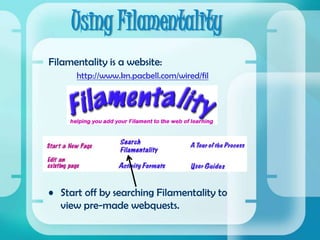
Using FilamentalityFilamentality is a website:http://www.kn.pacbell.com/wired/filStart off by searching Filamentality to view pre-made webquests.
Using FilamentalityFilamentality offers five different formats that allow you to create online learning for your students.1.)  Hotlist2.) Scrapbook3.) Treasure Hunt4.) Subject Sampler5.) WebQuest
HotlistsA Hotlist is simply a list of internet sites.  It can be used as a resource for student research or as additional resources for parents.Example 1Example 2
ScrapbooksA Scrapbook is also just a list of internet sites.  The difference with a scrapbook is that it contains multimedia resources such as streaming videos and images.Example 1Example 2
Treasure HuntsA Treasure Hunt is a list of internet sites that also contains questions about the sites and a larger focusing question.  Example 1Example 2
Subject SamplersA Subject Sampler is a list of websites that includes questions.  Several questions that can be answered by the information on the website are listed underneath each website.Example 1Example 2
WebQuestsA WebQuest is more of a project based type of online learning.  Students are given tasks and roles that they must carry out while visiting specified websites.Example 1
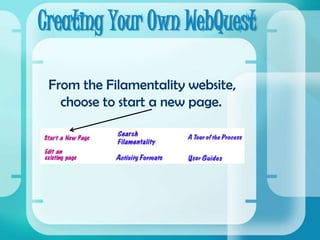
Creating Your Own WebQuestFrom the Filamentality website, choose to start a new page.
Creating Your Own WebQuestFill in your personal information.  It is ok to give your school email address and the school website.  They will not send you junk mail.
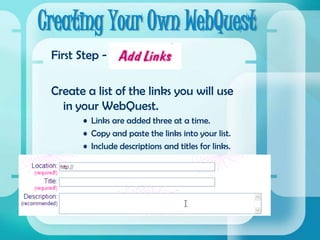
Creating Your Own WebQuestFirst Step - Create a list of the links you will use in your WebQuest.Links are added three at a time.Copy and paste the links into your list.Include descriptions and titles for links.
Creating Your Own WebQuestSecond Step - Once you have finished adding links, select the type of page you would like to create.Fill in the required blanks for your selected page.Choose your color schemes.Click on your page type again to view the page you created.
Creating Your Own WebQuestThird Step - Review the page that you have created.You are given an internet address for your new page.You can edit your page at any time.You can have your page removed from the internet at any time.You can log out and log back in later to complete or edit your page.
Questions??Any questions?Now its your turn to create your own WebQuest!

Creating Webquests

  • 1.
  • 2.
    WebQuests with MSWordMany teachers create webquests with MS Word.Ocean Water WebQuestThese webquests are great, but let’s look at a different way of creating webquests.
  • 3.
    WebQuests with FilamentalityWebquestscan also be created as a webpage.Science Fair WebQuestThis puts all the content onto one webpage and hosts the webpage on the internet.
  • 4.
    Benefits with FilamentalityWebquestsare a webpage and are accessible to students anywhere.All the content is on one screen and students do not have to navigate between several screens.The internet links are easy to access and use (no CTRL clicking).Depending on the format, student answers can be typed into the webpage and printed off.
  • 5.
    Using FilamentalityFilamentality isa website:http://www.kn.pacbell.com/wired/filStart off by searching Filamentality to view pre-made webquests.
  • 6.
    Using FilamentalityFilamentality offersfive different formats that allow you to create online learning for your students.1.) Hotlist2.) Scrapbook3.) Treasure Hunt4.) Subject Sampler5.) WebQuest
  • 7.
    HotlistsA Hotlist issimply a list of internet sites. It can be used as a resource for student research or as additional resources for parents.Example 1Example 2
  • 8.
    ScrapbooksA Scrapbook isalso just a list of internet sites. The difference with a scrapbook is that it contains multimedia resources such as streaming videos and images.Example 1Example 2
  • 9.
    Treasure HuntsA TreasureHunt is a list of internet sites that also contains questions about the sites and a larger focusing question. Example 1Example 2
  • 10.
    Subject SamplersA SubjectSampler is a list of websites that includes questions. Several questions that can be answered by the information on the website are listed underneath each website.Example 1Example 2
  • 11.
    WebQuestsA WebQuest ismore of a project based type of online learning. Students are given tasks and roles that they must carry out while visiting specified websites.Example 1
  • 12.
    Creating Your OwnWebQuestFrom the Filamentality website, choose to start a new page.
  • 13.
    Creating Your OwnWebQuestFill in your personal information. It is ok to give your school email address and the school website. They will not send you junk mail.
  • 14.
    Creating Your OwnWebQuestFirst Step - Create a list of the links you will use in your WebQuest.Links are added three at a time.Copy and paste the links into your list.Include descriptions and titles for links.
  • 15.
    Creating Your OwnWebQuestSecond Step - Once you have finished adding links, select the type of page you would like to create.Fill in the required blanks for your selected page.Choose your color schemes.Click on your page type again to view the page you created.
  • 16.
    Creating Your OwnWebQuestThird Step - Review the page that you have created.You are given an internet address for your new page.You can edit your page at any time.You can have your page removed from the internet at any time.You can log out and log back in later to complete or edit your page.
  • 17.
    Questions??Any questions?Now itsyour turn to create your own WebQuest!