Creating my double page spread
Main image
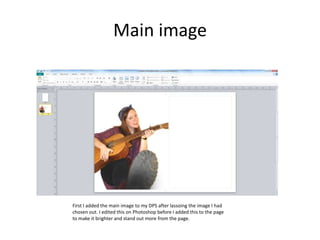
First I added the main image to my DPS after lassoing the image I had
chosen out. I edited this on Photoshop before I added this to the page
to make it brighter and stand out more from the page.
Footer
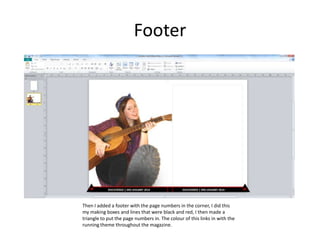
Then I added a footer with the page numbers in the corner, I did this
my making boxes and lines that were black and red, I then made a
triangle to put the page numbers in. The colour of this links in with the
running theme throughout the magazine.
Main article/text
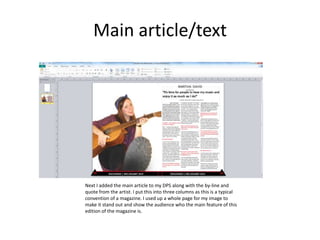
Next I added the main article to my DPS along with the by-line and
quote from the artist. I put this into three columns as this is a typical
convention of a magazine. I used up a whole page for my image to
make it stand out and show the audience who the main feature of this
edition of the magazine is.
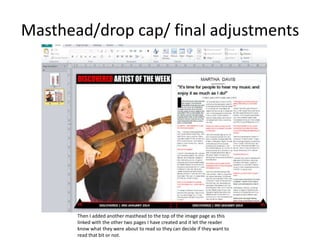
Masthead/drop cap/ final adjustments
Then I added another masthead to the top of the image page as this
linked with the other two pages I have created and it let the reader
know what they were about to read so they can decide if they want to
read that bit or not.

Creating my double page spread steps

  • 1.
    Creating my doublepage spread
  • 2.
    Main image First Iadded the main image to my DPS after lassoing the image I had chosen out. I edited this on Photoshop before I added this to the page to make it brighter and stand out more from the page.
  • 3.
    Footer Then I addeda footer with the page numbers in the corner, I did this my making boxes and lines that were black and red, I then made a triangle to put the page numbers in. The colour of this links in with the running theme throughout the magazine.
  • 4.
    Main article/text Next Iadded the main article to my DPS along with the by-line and quote from the artist. I put this into three columns as this is a typical convention of a magazine. I used up a whole page for my image to make it stand out and show the audience who the main feature of this edition of the magazine is.
  • 5.
    Masthead/drop cap/ finaladjustments Then I added another masthead to the top of the image page as this linked with the other two pages I have created and it let the reader know what they were about to read so they can decide if they want to read that bit or not.