© ψ ABC ®
Value Stream Mapping
Movement of information or
materials
Make arrows ‘zigzag’ if flow
is electronic
Place an envelope on
the arrow for an e-mail
Place a telephone on the arrow
for a phone call
Place a truck on the arrow to
indicate a physical transport
Icons & Arrows
DATA BOX
Used to store key data regarding the
value stream.
Data Type Value Unit
(Goes under the relevant
customer or process box)
OPERATOR ICON
Use this to show the number of
people involved
(Goes in Process Box)
x4
PROCESS BOX
Name of Process
Name
(Always goes in top right of
map)
STAR BURSTS
Description of
improvement
area or waste
Use these to highlight areas for
improvement or suggestions
INVENTORY
TRIANGLE
?
Used to show
inventory Level.
Key Calculation & Definitions
6 Steps to creating a Value Stream Map
Identify process
steps and
relationships
Select Process
Metrics
Collect Data and
complete Data
boxes
Add
Opportunities
and Wastes
Calculate System
summary metrics
Identify
Customer
Demand
Takt Time (TT) =
Time Available
Customer Demand
Amount of time in which one good or
service must be produced in order to
meet the demand of the customer.
=
Lead Time
(LT)
The period of time between the initiation of a
process and the completion of that process.
Little's Law provides an equation for relating
Lead Time, Work-in-Process (WIP) and
Average Completion Rate (ACR (Same as
DOR) for any process.
=
WIP (units)
DOR
How often a product or service should
be completed or ‘drop off the end of the
line’.
Cycle Time
No. of People
=
Drop Off
Rate (DOR)
=
Number of people required to perform
the process or each step.
Cycle Time
Takt Time
=
Full Time
Equivalent (FTE)
=
Cycle Time (CT) =
The actual time it takes to complete
a process or activity.
Effective Time
Available (ETA)
The amount of time allowed for a
process less breaks, etc.=
Customer
Demand (D)
The amount of a product or
service the customer wants.=
Utilisation (UT) =
Theoretical FTE
Actual FTE
The build up of queues is dependant on
the level of utilisation. If utilisation goes
above 70%/80% queues are highly likely.
=
=
CUSTOMER
Total Process = Y
time
Total Lead = X
timeValue-adding time
Lead time through
the process
10 secs
200 secs
TIMELINE
The Timeline is used to communicate Lead Time and Value
Added Time on the VSM.
Timeline is drawn under the process boxes to compile the total
process lean time and value added time analysis.

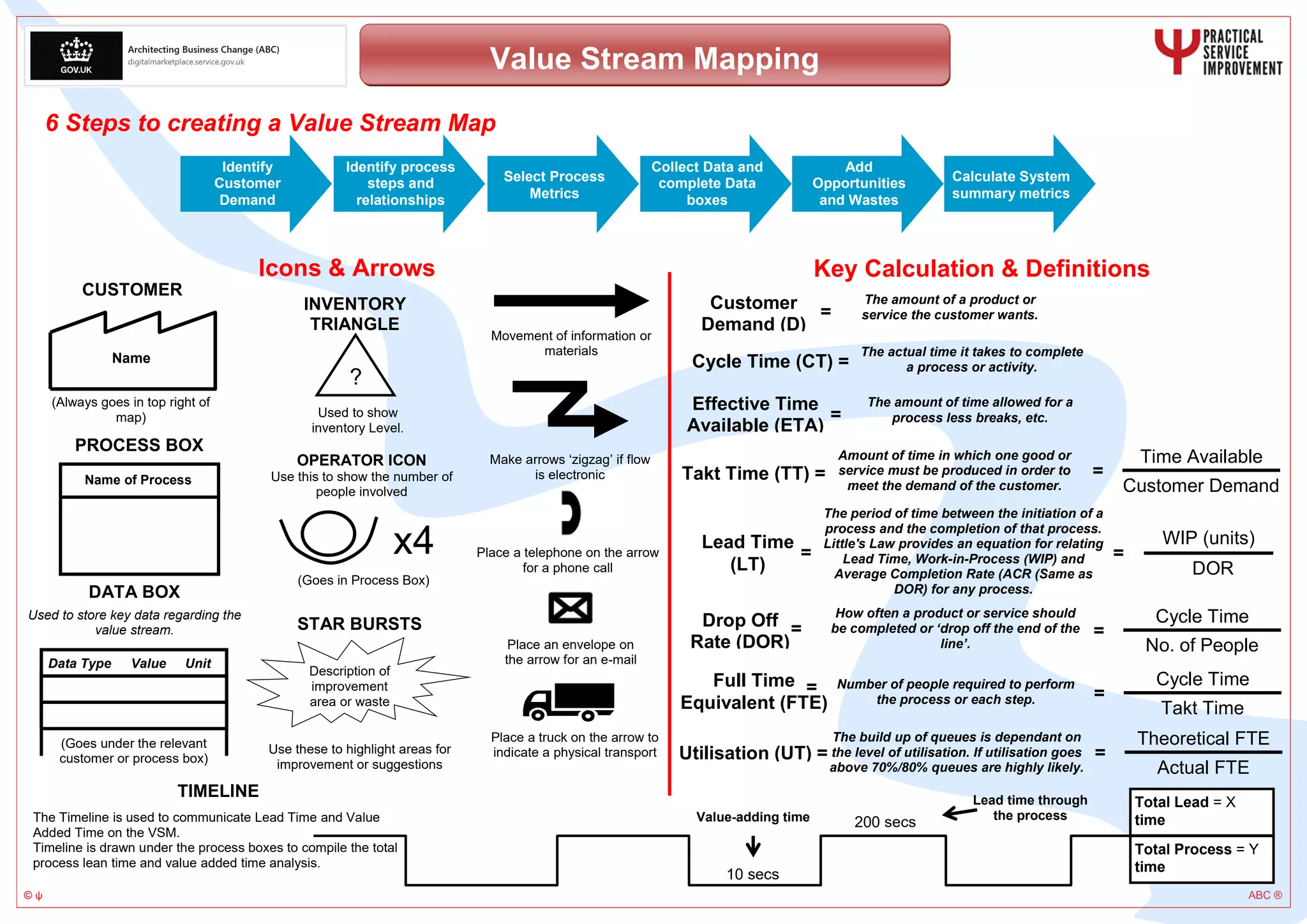
Creating a value stream map A3

  • 1.
    © ψ ABC® Value Stream Mapping Movement of information or materials Make arrows ‘zigzag’ if flow is electronic Place an envelope on the arrow for an e-mail Place a telephone on the arrow for a phone call Place a truck on the arrow to indicate a physical transport Icons & Arrows DATA BOX Used to store key data regarding the value stream. Data Type Value Unit (Goes under the relevant customer or process box) OPERATOR ICON Use this to show the number of people involved (Goes in Process Box) x4 PROCESS BOX Name of Process Name (Always goes in top right of map) STAR BURSTS Description of improvement area or waste Use these to highlight areas for improvement or suggestions INVENTORY TRIANGLE ? Used to show inventory Level. Key Calculation & Definitions 6 Steps to creating a Value Stream Map Identify process steps and relationships Select Process Metrics Collect Data and complete Data boxes Add Opportunities and Wastes Calculate System summary metrics Identify Customer Demand Takt Time (TT) = Time Available Customer Demand Amount of time in which one good or service must be produced in order to meet the demand of the customer. = Lead Time (LT) The period of time between the initiation of a process and the completion of that process. Little's Law provides an equation for relating Lead Time, Work-in-Process (WIP) and Average Completion Rate (ACR (Same as DOR) for any process. = WIP (units) DOR How often a product or service should be completed or ‘drop off the end of the line’. Cycle Time No. of People = Drop Off Rate (DOR) = Number of people required to perform the process or each step. Cycle Time Takt Time = Full Time Equivalent (FTE) = Cycle Time (CT) = The actual time it takes to complete a process or activity. Effective Time Available (ETA) The amount of time allowed for a process less breaks, etc.= Customer Demand (D) The amount of a product or service the customer wants.= Utilisation (UT) = Theoretical FTE Actual FTE The build up of queues is dependant on the level of utilisation. If utilisation goes above 70%/80% queues are highly likely. = = CUSTOMER Total Process = Y time Total Lead = X timeValue-adding time Lead time through the process 10 secs 200 secs TIMELINE The Timeline is used to communicate Lead Time and Value Added Time on the VSM. Timeline is drawn under the process boxes to compile the total process lean time and value added time analysis.