CPU is in Focus Again!
Implementing DOF on CPU.

         Advanced Visual Computing
                   3D Graphics Team

                          Presenter:
                    Evgeny Gorodetsky
                 Graphics Software Engineer
              evgeny.gorodetsky@intel.com,
                            twitter: egorodet
Agenda

 Introduction to depth of field effect & techniques
 DOF Explorer and post-processing pipeline
 DOF Techniques on GPU & with CPU Onloading:
  – Traditional: Poisson Disk & Gaussian Blur
  – Advanced: Summed Area Tables Gather & Scatter
 Performance results on Sandy Bridge processors


                        page 2
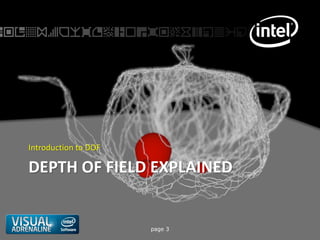
Introduction to DOF

DEPTH OF FIELD EXPLAINED


                      page 3
Depth of Field Explained
   Common effect in:
         – Photography
         – Cinematography
         – Modern 3D games
   Used to bring attention of the viewer
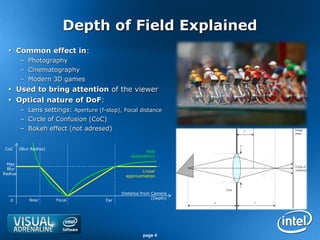
   Optical nature of DoF:
         – Lens settings: Aperture (f-stop), Focal distance
         – Circle of Confusion (CoC)
         – Bokeh effect (not adresed)


 CoC     (Blur Radius)
                                                       Real
                                                 dependency
 Max
 Blur
                                                      Linear
Radius
                                               approximation


                                             Distance from Camera
              Near       Focal                             (Depth)
   0                                   Far


                                                      page 4
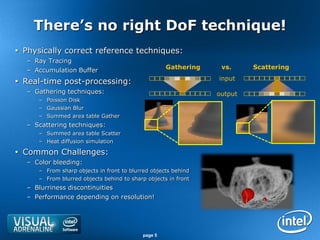
There’s no right DoF technique!
 Physically correct reference techniques:
   – Ray Tracing
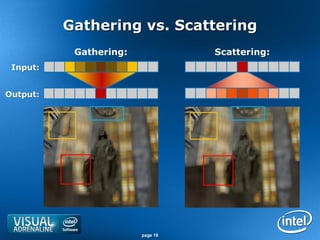
   – Accumulation Buffer                             Gathering    vs.     Scattering
                                                                 input
 Real-time post-processing:
   – Gathering techniques:                                       output
      – Poisson Disk
      – Gaussian Blur
      – Summed area table Gather
   – Scattering techniques:
      – Summed area table Scatter
      – Heat diffusion simulation

 Common Challenges:
   – Color bleeding:
      – From sharp objects in front to blurred objects behind
      – From blurred objects behind to sharp objects in front
   – Blurriness discontinuities
   – Performance depending on resolution!


                                            page 5
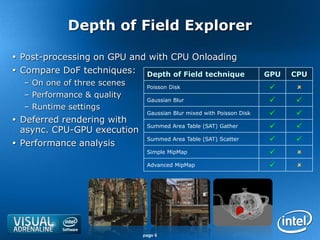
Depth of Field Explorer

 Post-processing on GPU and with CPU Onloading
 Compare DoF techniques: Depth of Field technique                    GPU   CPU
  – On one of three scenes    Poisson Disk                                  
  – Performance & quality
                              Gaussian Blur                                
  – Runtime settings
                              Gaussian Blur mixed with Poisson Disk        
 Deferred rendering with
  async. CPU-GPU execution
                              Summed Area Table (SAT) Gather               
                              Summed Area Table (SAT) Scatter              
 Performance analysis
                              Simple MipMap                                 
                              Advanced MipMap                               


                             page 6
Post-Processing Pipeline Infrastructure
        simplifies CPU Onloading
 Automatic resources management on GPU and CPU
 Deferred execution mode in CPU Onloading:
  – Performs computing on CPU while doing work on GPU
  – Hides data transfer latency
 Preview of intermediate resources
 Integrated performance analysis tools
                                  Stage 1         Stage 1                    Stage 2        Stage 2         Stage 2
    Defined by developer:         render        output pins                input pins       render         output pin


                                                             Color
                                                          [size, format]

                                  Render                                                Poisson Disk
       Pipeline Diagram:                                                                                                     Color
                                  Scene                                                     DoF                          [size, format]

                                                            Depth
                                                          [size, format]


      Created by Pipeline               Stage 1
                                                           Stage 1-2
                                                         Intermediate
                                                                                    Stage 2                  Stage 2
          infrastructure:          Render Target Views
                                                           Resources
                                                                             Shader Resource Views    Screen Render Target


                                        page 7
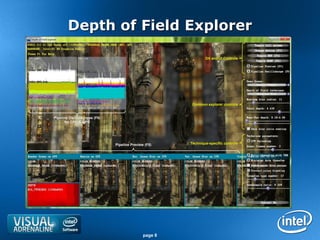
Depth of Field Explorer

                                                               DX and UI Controls


                                                        Common explorer controls


Pipeline Oscilloscopes (F6)
      for CPU & GPU


                              Pipeline Preview (F5)    Technique-specific controls


                                              page 8
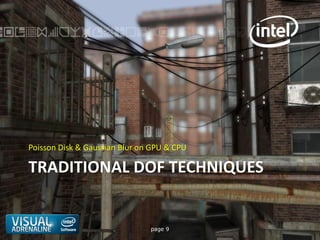
Poisson Disk & Gaussian Blur on GPU & CPU

TRADITIONAL DOF TECHNIQUES


                               page 9
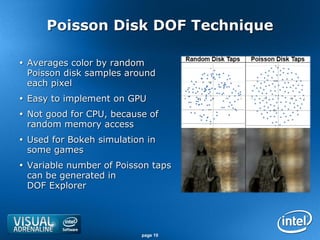
Poisson Disk DOF Technique

 Averages color by random
  Poisson disk samples around
  each pixel
 Easy to implement on GPU
 Not good for CPU, because of
  random memory access
 Used for Bokeh simulation in
  some games
 Variable number of Poisson taps
  can be generated in
  DOF Explorer


                          page 10
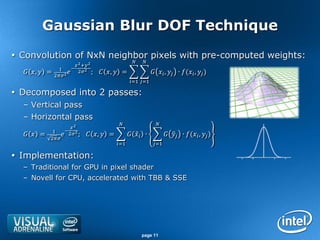
Gaussian Blur DOF Technique
 Convolution of NxN neighbor pixels with pre-computed weights:
                                                          
                            2 +2
                  1      −
   ,  =   22
                        22 ;        ,  =                  ,  ∙ ( ,  )
                                                      =1 =1

 Decomposed into 2 passes:
  – Vertical pass
  – Horizontal pass
                                                                  
                         2
             1        − 2
    =            2 ;     ,  =            ∙              ∙ ( ,  )
            2
                                              =1                 =1

 Implementation:
  – Traditional for GPU in pixel shader
  – Novell for CPU, accelerated with TBB & SSE


                                                            page 11
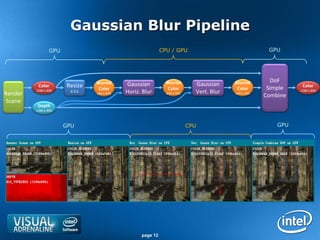
Gaussian Blur Pipeline
                 GPU                                         CPU / GPU                                 GPU


                                 Blurred                       Blurred                    Blurred       DoF
          Color         Resize               Gaussian                        Gaussian                            Color
                                  Color                         Color                      Color       Simple
Render
         1280 x 800      X 0.5   640 x 400   Horiz. Blur       640 x 400     Vert. Blur   640 x 400
                                                                                                                1280 x 800
                                                                                                      Combine
 Scene
          Depth
         1280 x 800


                       GPU                                                 CPU                            GPU


                                                   page 12
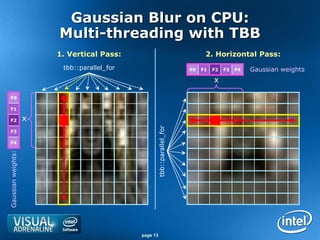
Gaussian Blur on CPU:
                        Multi-threading with TBB
                        1. Vertical Pass:                                    2. Horizontal Pass:
                         tbb::parallel_for                             F0   F1   F2   F3   F4   Gaussian weights
                                                                                 x

  F0

  F1

  F2                x


                                                   tbb::parallel_for
  F3

  F4
Gaussian weights:


                                             page 13
Gaussian Blur on CPU:
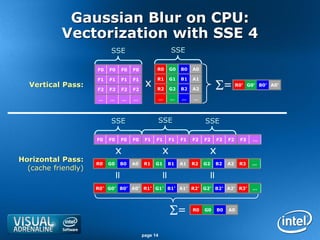
           Vectorization with SSE 4
                          SSE                             SSE

                     F0   F0   F0      F0         R0      G0   B0   A0


                                             x
                     F1   F1   F1      F1         R1      G1   B1   A1
  Vertical Pass:
                     F2   F2   F2      F2         R2      G2   B2   A2        = R0’         G0’ B0’ A0’


                     …    …        …   …              …   …    …    …


                          SSE                         SSE                SSE

                     F0   F0   F0      F0    F1   F1      F1   F1   F2   F2   F2   F2   F3     …

                               x                      x                   x
Horizontal Pass:     R0   G0   B0      A0   R1    G1      B1   A1   R2   G2   B2   A2   R3    …
  (cache friendly)
                           =


                                                      =


                                                                         =
                     R0’ G0’ B0’ A0’ R1’ G1’ B1’ A1’ R2’ G2’ B2’ A2’ R3’                       …


                                                          =        R0   G0   B0   A0


                                            page 14
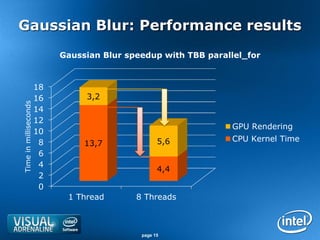
Gaussian Blur: Performance results
                            Gaussian Blur speedup with TBB parallel_for


                       18
                       16        3,2
Time in milliseconds


                       14
                       12
                                                                GPU Rendering
                       10
                        8                          5,6          CPU Kernel Time
                                 13,7
                        6
                        4
                                                   4,4
                        2
                        0
                             1 Thread       8 Threads


                                             page 15
Summed Area Tables Gather & Scatter

ADVANCED DOF TECHNIQUES


                              page 16
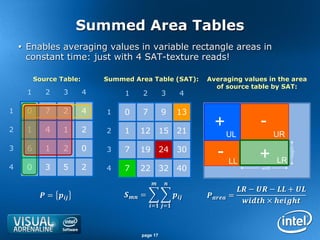
Summed Area Tables
     Enables averaging values in variable rectangle areas in
      constant time: just with 4 SAT-texture reads!

          Source Table:       Summed Area Table (SAT):               Averaging values in the area
                                                                       of source table by SAT:
      1      2      3     4        1     2          3           4

1     0      7      2     4   1    0     7          9         13

2     1      4      1     2   2    1    12          15        21
                                                                         +                    -
                                                                                  UL                  UR
3     6      1      2     0   3    7    19          24        30
                                                                          - LL               +


                                                                                                           height
                                                                                                      LR
4     0      3      5     2   4    7    22          32        40                              width


                                                                                     −  −  + 
            =               =                       =
                                                                                       × 
                                              = =


                                         page 17
Gathering vs. Scattering
           Gathering:             Scattering:
 Input:


Output:


                        page 18
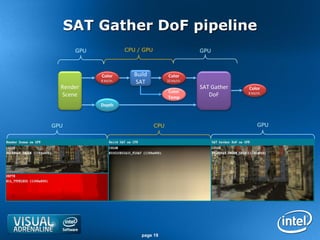
SAT Gather DoF pipeline
       GPU               CPU / GPU                      GPU


             Color          Build           Color
             8 bit/ch.      SAT            32 bit/ch.
  Render                                                SAT Gather   Color
                                           Color
  Scene                                    Temp
                                                           DoF       8 bit/ch.


             Depth


GPU                                  CPU                                   GPU


                              page 19
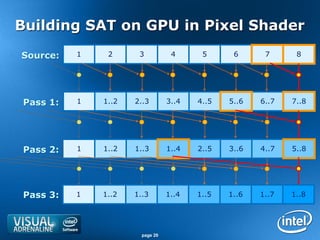
Building SAT on GPU in Pixel Shader
Source:   1    2      3           4      5      6      7      8


Pass 1:   1   1..2   2..3        3..4   4..5   5..6   6..7   7..8


Pass 2:   1   1..2   1..3        1..4   2..5   3..6   4..7   5..8


Pass 3:   1   1..2   1..3        1..4   1..5   1..6   1..7   1..8


                       page 20
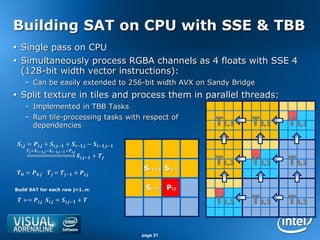
Building SAT on CPU with SSE & TBB
 Single pass on CPU
 Simultaneously process RGBA channels as 4 floats with SSE 4
  (128-bit width vector instructions):
     – Can be easily extended to 256-bit width AVX on Sandy Bridge
 Split texture in tiles and process them in parallel threads:
     – Implemented in TBB Tasks
     – Run tile-processing tasks with respect of
       dependencies                                                                    T1,1   T2,1   T3,1
, = , + ,− + −, − −,−
       =−, −−,− +,
                                                 ,− + 

                                                                     Si-1,j-1 Si,j-1
                                                                                       T1,2   T2,2   T3,2
 = ,  = − + ,

Build SAT for each row j=1..n:                                        Si-1,j   Pi,j
  += , , = ,− +                                                T1,3   T2,3   T3,3

                                                                     page 21
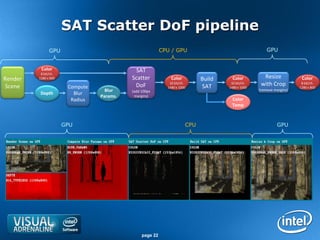
SAT Scatter DoF pipeline
               GPU                                        CPU / GPU                                   GPU


          Color                              SAT
          8 bit/ch.
Render   1280 x 800                        Scatter            Color         Build     Color         Resize            Color
Scene                  Compute              DoF              32 bit/ch.
                                                            1480 x 1000     SAT
                                                                                     32 bit/ch.
                                                                                    1480 x 1000
                                                                                                   with Crop          8 bit/ch.
                                                                                                                     1280 x 800
                                   Blur    (add 100px                                             (remove margins)
          Depth          Blur
                                 Params.    margins)
                        Radius                                                       Color
                                                                                     Temp


                      GPU                                             CPU                                   GPU


                                                page 22
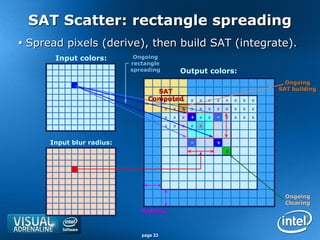
SAT Scatter: rectangle spreading
 Spread pixels (derive), then build SAT (integrate).
       Input colors:        Ongoing
                           rectangle
                           spreading            Output colors:
                                                                                      Ongoing
                                  SAT                                               SAT building
                                Computed
                                   x x x            x   x   x   x   x   x   x   x
                                        x   x   S   x   x   x   x   x   x   x   x
                                        x   x   x   +   x   x   ‒   x   x   x   x
                                        x   x   x   x   x


      Input blur radius:                            ‒           +
                                                                    0


                                                                                      Ongoing
                                                                                      Clearing
                              Padding


                              page 23
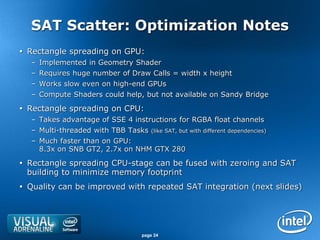
SAT Scatter: Optimization Notes
 Rectangle spreading on GPU:
  – Implemented in Geometry Shader
  – Requires huge number of Draw Calls = width x height
  – Works slow even on high-end GPUs
  – Compute Shaders could help, but not available on Sandy Bridge

 Rectangle spreading on CPU:
  – Takes advantage of SSE 4 instructions for RGBA float channels
  – Multi-threaded with TBB Tasks   (like SAT, but with different dependencies)

  – Much faster than on GPU:
    8.3x on SNB GT2, 2.7x on NHM GTX 280

 Rectangle spreading CPU-stage can be fused with zeroing and SAT
  building to minimize memory footprint
 Quality can be improved with repeated SAT integration (next slides)


                               page 24
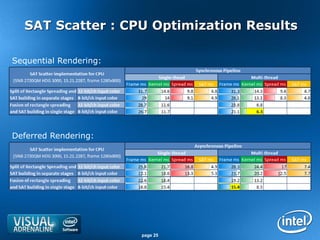
SAT Scatter : CPU Optimization Results

Sequential Rendering:


Deferred Rendering:


                        page 25
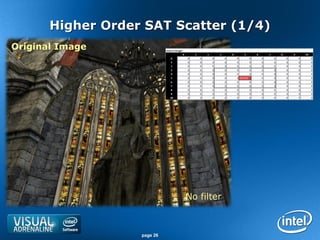
Higher Order SAT Scatter (1/4)
Original Image


                             No filter


                   page 26
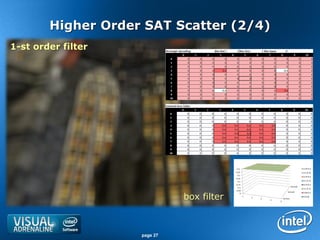
Higher Order SAT Scatter (2/4)
1-st order filter


                              box filter


                    page 27
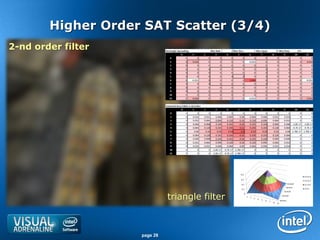
Higher Order SAT Scatter (3/4)
2-nd order filter


                              triangle filter


                    page 28
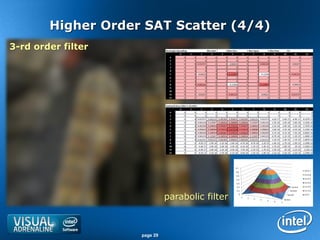
Higher Order SAT Scatter (4/4)
3-rd order filter


                              parabolic filter


                    page 29
PERFORMANCE RESULTS ON 2-ND
GENERATION CORE PROCESSORS

             page 30
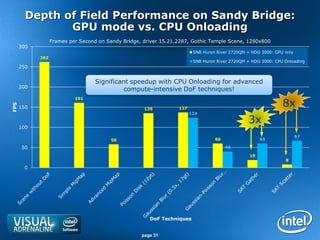
Depth of Field Performance on Sandy Bridge:
               GPU mode vs. CPU Onloading
                  Frames per Second on Sandy Bridge, driver 15.21.2287, Gothic Temple Scene, 1280x800
      300
                                                                         SNB Huron River 2720QM + HDG 3000: GPU only
            262
                                                                         SNB Huron River 2720QM + HDG 3000: CPU Onloading
      250


                                   Significant speedup with CPU Onloading for advanced
      200
                                             compute-intensive DoF techniques!
                           161
                                                                                                               8x
FPS


      150                                            135          137
                                                                        124

                                                                                                3x
      100
                                                                                                                       67
                                         58                                       60                  60

       50                                                                              40

                                                                                                 19
                                                                                                                8
       0


                                                       DoF Techniques


                                                    page 31
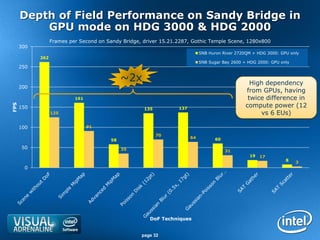
Depth of Field Performance on Sandy Bridge in
          GPU mode on HDG 3000 & HDG 2000
                  Frames per Second on Sandy Bridge, driver 15.21.2287, Gothic Temple Scene, 1280x800
      300
                                                                             SNB Huron River 2720QM + HDG 3000: GPU only
            262
                                                                             SNB Sugar Bay 2600 + HDG 2000: GPU only
      250

                                              ~2x                                                  High dependency
      200
                                                                                                 from GPUs, having
                           161                                                                    twice difference in
                                                                                                 compute power (12
FPS


      150                                            135          137
                  125                                                                                 vs 6 EUs)

      100                        91

                                                           70
                                                                        64         60
                                         58
       50                                     35                                        31
                                                                                                  19   17
                                                                                                                  8
                                                                                                                       3
       0


                                                       DoF Techniques


                                                    page 32
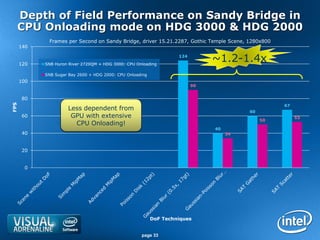
Depth of Field Performance on Sandy Bridge in
  CPU Onloading mode on HDG 3000 & HDG 2000
             Frames per Second on Sandy Bridge, driver 15.21.2287, Gothic Temple Scene, 1280x800
      140


      120   SNB Huron River 2720QM + HDG 3000: CPU Onloading
                                                                    124
                                                                               ~1.2-1.4x
            SNB Sugar Bay 2600 + HDG 2000: CPU Onloading
      100
                                                                          90


       80
FPS


                                                                                                   67
                     Less dependent from                                                 60
       60             GPU with extensive                                                                53
                                                                                              50
                       CPU Onloading!
                                                                               40
       40                                                                           34


       20


       0


                                                           DoF Techniques


                                                     page 33
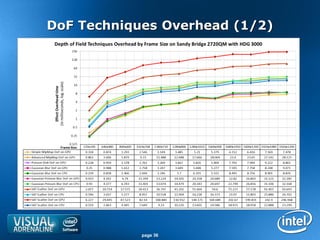
DoF Techniques Overhead (1/2)


            page 36
Conclusion & Follow ups
 Accelerate traditional & advanced post-processing
  techniques with CPU Onloading on modern processors with
  integrated processor graphics
 Optimize compute kernels code with Intel Parallel Studio,
  TBB, SSE/AVX, MKL, OpenCL and ICC:
  – http://software.intel.com/en-us/articles/intel-parallel-studio-home/
  – http://software.intel.com/en-us/articles/opencl-sdk/
  – http://software.intel.com/en-us/avx/

 DOF Source code & article (will be published later):
  – http://software.intel.com/en-us/articles/dofexplorer

 See other graphics samples:
  – http://software.intel.com/en-us/articles/code/


                                     page 38
page 39

CPU is in Focus Again! Implementing DOF on CPU.

  • 1.
    CPU is inFocus Again! Implementing DOF on CPU. Advanced Visual Computing 3D Graphics Team Presenter: Evgeny Gorodetsky Graphics Software Engineer evgeny.gorodetsky@intel.com, twitter: egorodet
  • 2.
    Agenda  Introduction todepth of field effect & techniques  DOF Explorer and post-processing pipeline  DOF Techniques on GPU & with CPU Onloading: – Traditional: Poisson Disk & Gaussian Blur – Advanced: Summed Area Tables Gather & Scatter  Performance results on Sandy Bridge processors page 2
  • 3.
    Introduction to DOF DEPTHOF FIELD EXPLAINED page 3
  • 4.
    Depth of FieldExplained  Common effect in: – Photography – Cinematography – Modern 3D games  Used to bring attention of the viewer  Optical nature of DoF: – Lens settings: Aperture (f-stop), Focal distance – Circle of Confusion (CoC) – Bokeh effect (not adresed) CoC (Blur Radius) Real dependency Max Blur Linear Radius approximation Distance from Camera Near Focal (Depth) 0 Far page 4
  • 5.
    There’s no rightDoF technique!  Physically correct reference techniques: – Ray Tracing – Accumulation Buffer Gathering vs. Scattering input  Real-time post-processing: – Gathering techniques: output – Poisson Disk – Gaussian Blur – Summed area table Gather – Scattering techniques: – Summed area table Scatter – Heat diffusion simulation  Common Challenges: – Color bleeding: – From sharp objects in front to blurred objects behind – From blurred objects behind to sharp objects in front – Blurriness discontinuities – Performance depending on resolution! page 5
  • 6.
    Depth of FieldExplorer  Post-processing on GPU and with CPU Onloading  Compare DoF techniques: Depth of Field technique GPU CPU – On one of three scenes Poisson Disk   – Performance & quality Gaussian Blur   – Runtime settings Gaussian Blur mixed with Poisson Disk    Deferred rendering with async. CPU-GPU execution Summed Area Table (SAT) Gather   Summed Area Table (SAT) Scatter    Performance analysis Simple MipMap   Advanced MipMap   page 6
  • 7.
    Post-Processing Pipeline Infrastructure simplifies CPU Onloading  Automatic resources management on GPU and CPU  Deferred execution mode in CPU Onloading: – Performs computing on CPU while doing work on GPU – Hides data transfer latency  Preview of intermediate resources  Integrated performance analysis tools Stage 1 Stage 1 Stage 2 Stage 2 Stage 2 Defined by developer: render output pins input pins render output pin Color [size, format] Render Poisson Disk Pipeline Diagram: Color Scene DoF [size, format] Depth [size, format] Created by Pipeline Stage 1 Stage 1-2 Intermediate Stage 2 Stage 2 infrastructure: Render Target Views Resources Shader Resource Views Screen Render Target page 7
  • 8.
    Depth of FieldExplorer DX and UI Controls Common explorer controls Pipeline Oscilloscopes (F6) for CPU & GPU Pipeline Preview (F5) Technique-specific controls page 8
  • 9.
    Poisson Disk &Gaussian Blur on GPU & CPU TRADITIONAL DOF TECHNIQUES page 9
  • 10.
    Poisson Disk DOFTechnique  Averages color by random Poisson disk samples around each pixel  Easy to implement on GPU  Not good for CPU, because of random memory access  Used for Bokeh simulation in some games  Variable number of Poisson taps can be generated in DOF Explorer page 10
  • 11.
    Gaussian Blur DOFTechnique  Convolution of NxN neighbor pixels with pre-computed weights: 2 +2 1 − , = 22 22 ; , = , ∙ ( , ) =1 =1  Decomposed into 2 passes: – Vertical pass – Horizontal pass 2 1 − 2 = 2 ; , = ∙ ∙ ( , ) 2 =1 =1  Implementation: – Traditional for GPU in pixel shader – Novell for CPU, accelerated with TBB & SSE page 11
  • 12.
    Gaussian Blur Pipeline GPU CPU / GPU GPU Blurred Blurred Blurred DoF Color Resize Gaussian Gaussian Color Color Color Color Simple Render 1280 x 800 X 0.5 640 x 400 Horiz. Blur 640 x 400 Vert. Blur 640 x 400 1280 x 800 Combine Scene Depth 1280 x 800 GPU CPU GPU page 12
  • 13.
    Gaussian Blur onCPU: Multi-threading with TBB 1. Vertical Pass: 2. Horizontal Pass: tbb::parallel_for F0 F1 F2 F3 F4 Gaussian weights x F0 F1 F2 x tbb::parallel_for F3 F4 Gaussian weights: page 13
  • 14.
    Gaussian Blur onCPU: Vectorization with SSE 4 SSE SSE F0 F0 F0 F0 R0 G0 B0 A0 x F1 F1 F1 F1 R1 G1 B1 A1 Vertical Pass: F2 F2 F2 F2 R2 G2 B2 A2 = R0’ G0’ B0’ A0’ … … … … … … … … SSE SSE SSE F0 F0 F0 F0 F1 F1 F1 F1 F2 F2 F2 F2 F3 … x x x Horizontal Pass: R0 G0 B0 A0 R1 G1 B1 A1 R2 G2 B2 A2 R3 … (cache friendly) = = = R0’ G0’ B0’ A0’ R1’ G1’ B1’ A1’ R2’ G2’ B2’ A2’ R3’ … = R0 G0 B0 A0 page 14
  • 15.
    Gaussian Blur: Performanceresults Gaussian Blur speedup with TBB parallel_for 18 16 3,2 Time in milliseconds 14 12 GPU Rendering 10 8 5,6 CPU Kernel Time 13,7 6 4 4,4 2 0 1 Thread 8 Threads page 15
  • 16.
    Summed Area TablesGather & Scatter ADVANCED DOF TECHNIQUES page 16
  • 17.
    Summed Area Tables  Enables averaging values in variable rectangle areas in constant time: just with 4 SAT-texture reads! Source Table: Summed Area Table (SAT): Averaging values in the area of source table by SAT: 1 2 3 4 1 2 3 4 1 0 7 2 4 1 0 7 9 13 2 1 4 1 2 2 1 12 15 21 + - UL UR 3 6 1 2 0 3 7 19 24 30 - LL + height LR 4 0 3 5 2 4 7 22 32 40 width − − + = = = × = = page 17
  • 18.
    Gathering vs. Scattering Gathering: Scattering: Input: Output: page 18
  • 19.
    SAT Gather DoFpipeline GPU CPU / GPU GPU Color Build Color 8 bit/ch. SAT 32 bit/ch. Render SAT Gather Color Color Scene Temp DoF 8 bit/ch. Depth GPU CPU GPU page 19
  • 20.
    Building SAT onGPU in Pixel Shader Source: 1 2 3 4 5 6 7 8 Pass 1: 1 1..2 2..3 3..4 4..5 5..6 6..7 7..8 Pass 2: 1 1..2 1..3 1..4 2..5 3..6 4..7 5..8 Pass 3: 1 1..2 1..3 1..4 1..5 1..6 1..7 1..8 page 20
  • 21.
    Building SAT onCPU with SSE & TBB  Single pass on CPU  Simultaneously process RGBA channels as 4 floats with SSE 4 (128-bit width vector instructions): – Can be easily extended to 256-bit width AVX on Sandy Bridge  Split texture in tiles and process them in parallel threads: – Implemented in TBB Tasks – Run tile-processing tasks with respect of dependencies T1,1 T2,1 T3,1 , = , + ,− + −, − −,− =−, −−,− +, ,− + Si-1,j-1 Si,j-1 T1,2 T2,2 T3,2 = , = − + , Build SAT for each row j=1..n: Si-1,j Pi,j += , , = ,− + T1,3 T2,3 T3,3 page 21
  • 22.
    SAT Scatter DoFpipeline GPU CPU / GPU GPU Color SAT 8 bit/ch. Render 1280 x 800 Scatter Color Build Color Resize Color Scene Compute DoF 32 bit/ch. 1480 x 1000 SAT 32 bit/ch. 1480 x 1000 with Crop 8 bit/ch. 1280 x 800 Blur (add 100px (remove margins) Depth Blur Params. margins) Radius Color Temp GPU CPU GPU page 22
  • 23.
    SAT Scatter: rectanglespreading  Spread pixels (derive), then build SAT (integrate). Input colors: Ongoing rectangle spreading Output colors: Ongoing SAT SAT building Computed x x x x x x x x x x x x x S x x x x x x x x x x x + x x ‒ x x x x x x x x x Input blur radius: ‒ + 0 Ongoing Clearing Padding page 23
  • 24.
    SAT Scatter: OptimizationNotes  Rectangle spreading on GPU: – Implemented in Geometry Shader – Requires huge number of Draw Calls = width x height – Works slow even on high-end GPUs – Compute Shaders could help, but not available on Sandy Bridge  Rectangle spreading on CPU: – Takes advantage of SSE 4 instructions for RGBA float channels – Multi-threaded with TBB Tasks (like SAT, but with different dependencies) – Much faster than on GPU: 8.3x on SNB GT2, 2.7x on NHM GTX 280  Rectangle spreading CPU-stage can be fused with zeroing and SAT building to minimize memory footprint  Quality can be improved with repeated SAT integration (next slides) page 24
  • 25.
    SAT Scatter :CPU Optimization Results Sequential Rendering: Deferred Rendering: page 25
  • 26.
    Higher Order SATScatter (1/4) Original Image No filter page 26
  • 27.
    Higher Order SATScatter (2/4) 1-st order filter box filter page 27
  • 28.
    Higher Order SATScatter (3/4) 2-nd order filter triangle filter page 28
  • 29.
    Higher Order SATScatter (4/4) 3-rd order filter parabolic filter page 29
  • 30.
    PERFORMANCE RESULTS ON2-ND GENERATION CORE PROCESSORS page 30
  • 31.
    Depth of FieldPerformance on Sandy Bridge: GPU mode vs. CPU Onloading Frames per Second on Sandy Bridge, driver 15.21.2287, Gothic Temple Scene, 1280x800 300 SNB Huron River 2720QM + HDG 3000: GPU only 262 SNB Huron River 2720QM + HDG 3000: CPU Onloading 250 Significant speedup with CPU Onloading for advanced 200 compute-intensive DoF techniques! 161 8x FPS 150 135 137 124 3x 100 67 58 60 60 50 40 19 8 0 DoF Techniques page 31
  • 32.
    Depth of FieldPerformance on Sandy Bridge in GPU mode on HDG 3000 & HDG 2000 Frames per Second on Sandy Bridge, driver 15.21.2287, Gothic Temple Scene, 1280x800 300 SNB Huron River 2720QM + HDG 3000: GPU only 262 SNB Sugar Bay 2600 + HDG 2000: GPU only 250 ~2x High dependency 200 from GPUs, having 161 twice difference in compute power (12 FPS 150 135 137 125 vs 6 EUs) 100 91 70 64 60 58 50 35 31 19 17 8 3 0 DoF Techniques page 32
  • 33.
    Depth of FieldPerformance on Sandy Bridge in CPU Onloading mode on HDG 3000 & HDG 2000 Frames per Second on Sandy Bridge, driver 15.21.2287, Gothic Temple Scene, 1280x800 140 120 SNB Huron River 2720QM + HDG 3000: CPU Onloading 124 ~1.2-1.4x SNB Sugar Bay 2600 + HDG 2000: CPU Onloading 100 90 80 FPS 67 Less dependent from 60 60 GPU with extensive 53 50 CPU Onloading! 40 40 34 20 0 DoF Techniques page 33
  • 34.
  • 35.
    Conclusion & Followups  Accelerate traditional & advanced post-processing techniques with CPU Onloading on modern processors with integrated processor graphics  Optimize compute kernels code with Intel Parallel Studio, TBB, SSE/AVX, MKL, OpenCL and ICC: – http://software.intel.com/en-us/articles/intel-parallel-studio-home/ – http://software.intel.com/en-us/articles/opencl-sdk/ – http://software.intel.com/en-us/avx/  DOF Source code & article (will be published later): – http://software.intel.com/en-us/articles/dofexplorer  See other graphics samples: – http://software.intel.com/en-us/articles/code/ page 38
  • 36.