Direct Memory Access
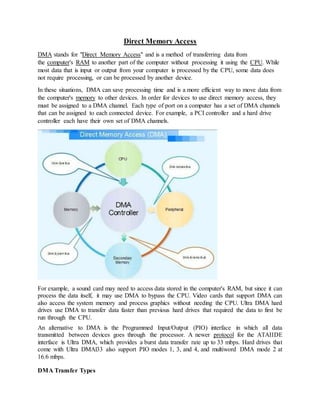
DMA stands for "Direct Memory Access" and is a method of transferring data from
the computer's RAM to another part of the computer without processing it using the CPU. While
most data that is input or output from your computer is processed by the CPU, some data does
not require processing, or can be processed by another device.
In these situations, DMA can save processing time and is a more efficient way to move data from
the computer's memory to other devices. In order for devices to use direct memory access, they
must be assigned to a DMA channel. Each type of port on a computer has a set of DMA channels
that can be assigned to each connected device. For example, a PCI controller and a hard drive
controller each have their own set of DMA channels.
For example, a sound card may need to access data stored in the computer's RAM, but since it can
process the data itself, it may use DMA to bypass the CPU. Video cards that support DMA can
also access the system memory and process graphics without needing the CPU. Ultra DMA hard
drives use DMA to transfer data faster than previous hard drives that required the data to first be
run through the CPU.
An alternative to DMA is the Programmed Input/Output (PIO) interface in which all data
transmitted between devices goes through the processor. A newer protocol for the ATAIIDE
interface is Ultra DMA, which provides a burst data transfer rate up to 33 mbps. Hard drives that
come with Ultra DMAl33 also support PIO modes 1, 3, and 4, and multiword DMA mode 2 at
16.6 mbps.
DMA Transfer Types
Memory To Memory Transfer
In this mode block of data from one memory address is moved to another memory address. In this
mode current address register of channel 0 is used to point the source address and the current
address register of channel is used to point the destination address in the first transfer cycle, data
byte from the source address is loaded in the temporary register of the DMA controller and in the
next transfer cycle the data from the temporary register is stored in the memory pointed by
destination address. After each data transfer current address registers are decremented or
incremented according to current settings. The channel 1 current word count register is also
decremented by 1 after each data transfer. When the word count of channel 1 goes to FFFFH, a
TC is generated which activates EOP output terminating the DMA service.
Auto initialize
In this mode, during the initialization the base address and word count registers are loaded
simultaneously with the current address and word count registers by the microprocessor. The
address and the count in the base registers remain unchanged throughout the DMA service.
After the first block transfer i.e. after the activation of the EOP signal, the original values of the
current address and current word count registers are automatically restored from the base address
and base word count register of that channel. After auto initialization the channel is ready to
perform another DMA service, without CPU intervention.
DMA Controller
The controller is integrated into the processor board and manages all DMA data transfers.
Transferring data between system memory and an 110 device requires two steps. Data goes from
the sending device to the DMA controller and then to the receiving device. The microprocessor
gives the DMA controller the location, destination, and amount of data that is to be transferred.
Then the DMA controller transfers the data, allowing the microprocessor to continue with other
processing tasks. When a device needs to use the Micro Channel bus to send or receive data, it
competes with all the other devices that are trying to gain control of the bus. This process is known
as arbitration. The DMA controller does not arbitrate for control of the BUS instead; the I/O device
that is sending or receiving data (the DMA slave) participates in arbitration. It is the DMA
controller, however, that takes control of the bus when the central arbitration control point grants
the DMA slave's request.
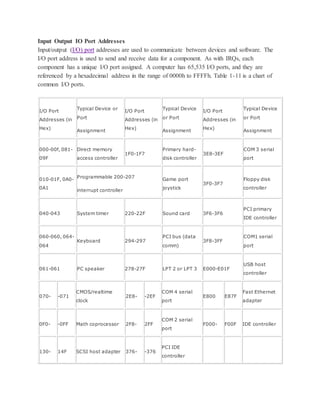
Input Output IO Port Addresses
Input/output (I/O) port addresses are used to communicate between devices and software. The
I/O port address is used to send and receive data for a component. As with IRQs, each
component has a unique I/O port assigned. A computer has 65,535 I/O ports, and they are
referenced by a hexadecimal address in the range of 0000h to FFFFh. Table 1-11 is a chart of
common I/O ports.
I/O Port
Addresses (in
Hex)
Typical Device or
Port
Assignment
I/O Port
Addresses (in
Hex)
Typical Device
or Port
Assignment
I/O Port
Addresses (in
Hex)
Typical Device
or Port
Assignment
000-00f, 081-
09F
Direct memory
access controller
1F0-1F7
Primary hard-
disk controller
3E8-3EF
COM 3 serial
port
010-01F, 0A0-
0A1
Programmable 200-207
interrupt controller
Game port
joystick
3F0-3F7
Floppy disk
controller
040-043 System timer 220-22F Sound card 3F6-3F6
PCI primary
IDE controller
060-060, 064-
064
Keyboard 294-297
PCI bus (data
comm)
3F8-3FF
COM1 serial
port
061-061 PC speaker 278-27F LPT 2 or LPT 3 E000-E01F
USB host
controller
070- -071
CMOS/realtime
clock
2E8- -2EF
COM 4 serial
port
E800 E87F
Fast Ethernet
adapter
0F0- -0FF Math coprocessor 2F8- 2FF
COM 2 serial
port
F000- F00F IDE controller
130- 14F SCSI host adapter 376- -376
PCI IDE
controller
170- 177
Secondary hard-
disk controller
378- -37F LPT1
Buses in Computer Architecture
Inside computers, there are many internal components. In order for these components to
communicate with each other, they make use of wires that are known as a ‘bus’.
A bus is a common pathway through which information flows from one computer component
to another. This pathway is used for communication purpose and it is established between two or
more computer components. We are going to check different computer bus architectures that
are found in computers.
Different Types of Computer Buses
Functions of Buses in Computers
Summary of functions of buses in computers
1. Data sharing - All types of buses found in a computer transfer data between the computer
peripherals connected to it.
The buses transfer or send data either in the serial or parallel method of data transfer. This allows
for the exchange of 1, 2, 4 or even 8 bytes of data at a time. (A byte is a group of 8 bits). Buses
are classified depending on how many bits they can move at the same time, which means that we
have 8-bit, 16-bit, 32-bit or even 64-bit buses.
2. Addressing - A bus has address lines, which match those of the processor. This allows data to
be sent to or from specific memory locations.
3. Power - A bus supplies power to various peripherals connected to it.
4. Timing - The bus provides a systemclock signal to synchronize the peripherals attached to it
with the rest of the system.
The expansion bus facilitates easy connection of more or additional components and devices on a
computer such as a TV card or sound card.
Bus Terminologies
Computers have two major types of buses:
1. System bus:- This is the bus that connects the CPU to the main memory on the motherboard.
The system bus is also called the front-side bus, memory bus, local bus, or host bus.
2. A number of I/O Buses, (I/O is an acronym for input/output), connecting various peripheral
devices to the CPU. These devices connect to the system bus via a ‘bridge’ implemented in the
processors' chipset. Other names for the I/O bus include “expansion bus", "external bus” or “host
bus”.
Expansion Bus Types
These are some of the common expansion bus types that have ever been used in computers:
 ISA - Industry Standard Architecture
 EISA - Extended Industry Standard Architecture
 MCA - Micro Channel Architecture
 VESA - Video Electronics Standards Association
 PCI - Peripheral Component Interconnect
 PCI Express (PCI-X)
 PCMCIA - Personal Computer Memory Card Industry Association (Also called PC bus)
 AGP - Accelerated Graphics Port
 SCSI - Small Computer Systems Interface.
The 8 Bit and 16 Bit ISA Buses
8 Bit and 16 Bit ISA Buses
ISA Bus
This is the most common type of early expansion bus, which was designed for use in the original
IBM PC. The IBM PC-XT used an 8-bit bus design. This means that the data transfers take place
in 8-bit chunks (i.e. one byte at a time) across the bus. The ISA bus ran at a clock speed of 4.77
MHz.
For the 80286-based IBM PC-AT, an improved bus design, which could transfer 16-bits of data
at a time, was announced. The 16-bit version of the ISA bus is sometimes known as the AT bus.
(AT-Advanced Technology)
The improved AT bus also provided a total of 24 address lines, which allowed 16MB of memory
to be addressed. The AT bus was backward compatible with its 8-bit predecessor and allowed 8-
bit cards to be used in 16-bit expansion slots.
When it first appeared the 8-bit ISA bus ran at a speed of 4.77MHZ – the same speed as the
processor. Improvements done over the years eventually made the AT bus ran at a clock speed of
8MHz.
Comparison Between 8 and 16 Bit ISA Bus
8-Bit ISA card (XT-Bus) 16-Bit ISA (AT –Bus card)
8-bit data interface 16-bit data interface
4.77 MHZ bus 8-MHZ bus
62-pin connector 62-pin connector
36-pin AT extension connection
Comparison of 8-bit, & 16-bit ISA Bus as Used in Early Computers.
MCA (Micro Channel Architecture)
IBM developed this bus as a replacement for ISA when they designed the PS/2 PC launched in
1987.
The bus offered a number of technical improvements over the ISA bus. For instance, the MCA
ran at a faster speed of 10MHz and supported either 16-bit or 32-bit data. It also supported bus
mastering - a technology that placed a mini-processor on each expansion card. These mini-
processors controlled much of the data transfer allowing the CPU to do other tasks.
One advantage of MCA was that the plug-in cards were software configurable; this means that
they required minimal intervention by the user when configuring.
The MCA expansion bus did not support ISA cards and IBM decided to charge other
manufacturers royalties for use of the technology. This made it unpopular and it is now obsolete
technology.
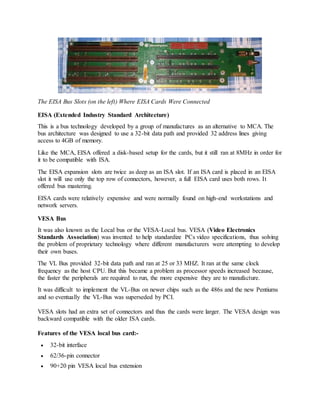
The EISA Bus
The EISA Bus Slots (on the left) Where EISA Cards Were Connected
EISA (Extended Industry Standard Architecture)
This is a bus technology developed by a group of manufactures as an alternative to MCA. The
bus architecture was designed to use a 32-bit data path and provided 32 address lines giving
access to 4GB of memory.
Like the MCA, EISA offered a disk-based setup for the cards, but it still ran at 8MHz in order for
it to be compatible with ISA.
The EISA expansion slots are twice as deep as an ISA slot. If an ISA card is placed in an EISA
slot it will use only the top row of connectors, however, a full EISA card uses both rows. It
offered bus mastering.
EISA cards were relatively expensive and were normally found on high-end workstations and
network servers.
VESA Bus
It was also known as the Local bus or the VESA-Local bus. VESA (Video Electronics
Standards Association) was invented to help standardize PCs video specifications, thus solving
the problem of proprietary technology where different manufacturers were attempting to develop
their own buses.
The VL Bus provided 32-bit data path and ran at 25 or 33 MHZ. It ran at the same clock
frequency as the host CPU. But this became a problem as processor speeds increased because,
the faster the peripherals are required to run, the more expensive they are to manufacture.
It was difficult to implement the VL-Bus on newer chips such as the 486s and the new Pentiums
and so eventually the VL-Bus was superseded by PCI.
VESA slots had an extra set of connectors and thus the cards were larger. The VESA design was
backward compatible with the older ISA cards.
Features of the VESA local bus card:-
 32-bit interface
 62/36-pin connector
 90+20 pin VESA local bus extension
Peripheral Component Interconnect
Peripheral Component Interconnect (PCI) is one of the latest developments in bus
architecture and is the current standard for PC expansion cards. Intel developed and launched it
as the expansion bus for the Pentium processor in 1993. It is a local bus like VESA, that is, it
connects the CPU, memory, and peripherals to a wider, faster data pathway.
PCI supports both 32-bit and 64-bit data width; it is compatible with 486s and Pentiums. The bus
data width is equal to the processor, such as a 32-bit processor would have a 32 bit PCI bus, and
operates at 33MHz.
PCI was used in developing Plug and Play (PnP) and all PCI cards support PnP. This means a
user can plug a new card into the computer, power it on and it will “self-identify” and “self-
specify” and start working without manual configuration using jumpers.
Unlike VESA, PCI supports bus mastering that is, the bus has some processing capability and
thus the CPU spends less time processing data. Most PCI cards are designed for 5v, but there are
also 3v and dual-voltage cards. Keying slots used help to differentiate 3v and 5v cards and also
to make sure that a 3v card is not slotted into a 5v socket and vice versa.
The PCI Slots
The PCI Bus Architecture
Accelerated Graphics Port
The need for high quality and very fast performance of video on computers led to the
development of the Accelerated Graphics Port (AGP). The AGP Port connects to the CPU and
operates at the speed of the processor bus. This means that video information is sent more
quickly to the card for processing.
The AGP uses the main PC memory to hold 3D images. In effect, this gives the AGP video card
an unlimited amount of video memory. To speed up the data transfer, Intel designed the port as a
direct path to the PC’s main memory.
Data transfer rate ranges from 264 Mbps to 528mbps, 800 Mbps up to 1.5 Gbps. AGP connector
is identified by its brown colour.
Personal Computer Memory Card Industry Association (PC Card)
The Personal Computer Memory Card Industry Association was founded to give a standard bus
for laptop computers. So it is basically used in the small computers.
Small Computer System Interface
Short for Small Computer System Interface, a parallel interface standard used by Apple
Macintosh computers, PCs and Unix systems for attaching peripheral devices to a computer.
The SCSI Port
Mac LC SCSI Port
Universal Serial Bus (USB)
This is an external bus standard that supports data transfer rates of 12 Mbps. A single USB port
connects up to 127 peripheral devices, such as mice, modems, and keyboards. The USB also
supports hot plugging or insertion (ability to connect a device without turning the PC off) and
plug and play (You connect a device and start using it without configuration).
We have two versions of USB:-
USB 1x
First released in 1996, the original USB 1.0 standard offered data rates of 1.5 Mbps. The USB
1.1 standard followed with two data rates: 12 Mbps for devices such as disk drives that need
high-speed throughput and 1.5 Mbps for devices such as joysticks that need much less
bandwidth.
USB 2x
In 2002 a newer specification USB 2.0, also called Hi-Speed USB 2.0, was introduced. It
increased the data transfer rate for PC to a USB device to 480 Mbps, which is 40 times faster
than the USB 1.1 specification. With the increased bandwidth, high throughput peripherals such
as digital cameras, CD burners, and video equipment could now be connected with USB.
IEEE 1394
The IEEE 1394 is a very fast external serial bus interface standard that supports data transfer
rates of up to 400Mbps (in 1394a) and 800Mbps (in 1394b). This makes it ideal for devices that
need to transfer high levels of data in real-time, such as video devices. It was developed by
Apple with the name firewire.
A single 1394 port can connect up 63 external devices.
 It supports Plug and play
 Supports hot plugging, and
 Provides power to peripheral devices.
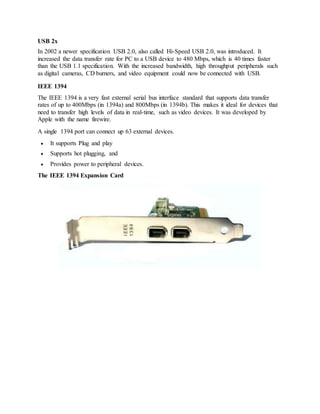
The IEEE 1394 Expansion Card

Cpi unit 01

  • 1.
    Direct Memory Access DMAstands for "Direct Memory Access" and is a method of transferring data from the computer's RAM to another part of the computer without processing it using the CPU. While most data that is input or output from your computer is processed by the CPU, some data does not require processing, or can be processed by another device. In these situations, DMA can save processing time and is a more efficient way to move data from the computer's memory to other devices. In order for devices to use direct memory access, they must be assigned to a DMA channel. Each type of port on a computer has a set of DMA channels that can be assigned to each connected device. For example, a PCI controller and a hard drive controller each have their own set of DMA channels. For example, a sound card may need to access data stored in the computer's RAM, but since it can process the data itself, it may use DMA to bypass the CPU. Video cards that support DMA can also access the system memory and process graphics without needing the CPU. Ultra DMA hard drives use DMA to transfer data faster than previous hard drives that required the data to first be run through the CPU. An alternative to DMA is the Programmed Input/Output (PIO) interface in which all data transmitted between devices goes through the processor. A newer protocol for the ATAIIDE interface is Ultra DMA, which provides a burst data transfer rate up to 33 mbps. Hard drives that come with Ultra DMAl33 also support PIO modes 1, 3, and 4, and multiword DMA mode 2 at 16.6 mbps. DMA Transfer Types
  • 2.
    Memory To MemoryTransfer In this mode block of data from one memory address is moved to another memory address. In this mode current address register of channel 0 is used to point the source address and the current address register of channel is used to point the destination address in the first transfer cycle, data byte from the source address is loaded in the temporary register of the DMA controller and in the next transfer cycle the data from the temporary register is stored in the memory pointed by destination address. After each data transfer current address registers are decremented or incremented according to current settings. The channel 1 current word count register is also decremented by 1 after each data transfer. When the word count of channel 1 goes to FFFFH, a TC is generated which activates EOP output terminating the DMA service. Auto initialize In this mode, during the initialization the base address and word count registers are loaded simultaneously with the current address and word count registers by the microprocessor. The address and the count in the base registers remain unchanged throughout the DMA service. After the first block transfer i.e. after the activation of the EOP signal, the original values of the current address and current word count registers are automatically restored from the base address and base word count register of that channel. After auto initialization the channel is ready to perform another DMA service, without CPU intervention. DMA Controller The controller is integrated into the processor board and manages all DMA data transfers. Transferring data between system memory and an 110 device requires two steps. Data goes from the sending device to the DMA controller and then to the receiving device. The microprocessor gives the DMA controller the location, destination, and amount of data that is to be transferred. Then the DMA controller transfers the data, allowing the microprocessor to continue with other processing tasks. When a device needs to use the Micro Channel bus to send or receive data, it competes with all the other devices that are trying to gain control of the bus. This process is known as arbitration. The DMA controller does not arbitrate for control of the BUS instead; the I/O device that is sending or receiving data (the DMA slave) participates in arbitration. It is the DMA controller, however, that takes control of the bus when the central arbitration control point grants the DMA slave's request.
  • 3.
    Input Output IOPort Addresses Input/output (I/O) port addresses are used to communicate between devices and software. The I/O port address is used to send and receive data for a component. As with IRQs, each component has a unique I/O port assigned. A computer has 65,535 I/O ports, and they are referenced by a hexadecimal address in the range of 0000h to FFFFh. Table 1-11 is a chart of common I/O ports. I/O Port Addresses (in Hex) Typical Device or Port Assignment I/O Port Addresses (in Hex) Typical Device or Port Assignment I/O Port Addresses (in Hex) Typical Device or Port Assignment 000-00f, 081- 09F Direct memory access controller 1F0-1F7 Primary hard- disk controller 3E8-3EF COM 3 serial port 010-01F, 0A0- 0A1 Programmable 200-207 interrupt controller Game port joystick 3F0-3F7 Floppy disk controller 040-043 System timer 220-22F Sound card 3F6-3F6 PCI primary IDE controller 060-060, 064- 064 Keyboard 294-297 PCI bus (data comm) 3F8-3FF COM1 serial port 061-061 PC speaker 278-27F LPT 2 or LPT 3 E000-E01F USB host controller 070- -071 CMOS/realtime clock 2E8- -2EF COM 4 serial port E800 E87F Fast Ethernet adapter 0F0- -0FF Math coprocessor 2F8- 2FF COM 2 serial port F000- F00F IDE controller 130- 14F SCSI host adapter 376- -376 PCI IDE controller
  • 4.
    170- 177 Secondary hard- diskcontroller 378- -37F LPT1
  • 5.
    Buses in ComputerArchitecture Inside computers, there are many internal components. In order for these components to communicate with each other, they make use of wires that are known as a ‘bus’. A bus is a common pathway through which information flows from one computer component to another. This pathway is used for communication purpose and it is established between two or more computer components. We are going to check different computer bus architectures that are found in computers. Different Types of Computer Buses Functions of Buses in Computers Summary of functions of buses in computers 1. Data sharing - All types of buses found in a computer transfer data between the computer peripherals connected to it. The buses transfer or send data either in the serial or parallel method of data transfer. This allows for the exchange of 1, 2, 4 or even 8 bytes of data at a time. (A byte is a group of 8 bits). Buses are classified depending on how many bits they can move at the same time, which means that we have 8-bit, 16-bit, 32-bit or even 64-bit buses. 2. Addressing - A bus has address lines, which match those of the processor. This allows data to be sent to or from specific memory locations. 3. Power - A bus supplies power to various peripherals connected to it. 4. Timing - The bus provides a systemclock signal to synchronize the peripherals attached to it with the rest of the system. The expansion bus facilitates easy connection of more or additional components and devices on a computer such as a TV card or sound card.
  • 6.
    Bus Terminologies Computers havetwo major types of buses: 1. System bus:- This is the bus that connects the CPU to the main memory on the motherboard. The system bus is also called the front-side bus, memory bus, local bus, or host bus. 2. A number of I/O Buses, (I/O is an acronym for input/output), connecting various peripheral devices to the CPU. These devices connect to the system bus via a ‘bridge’ implemented in the processors' chipset. Other names for the I/O bus include “expansion bus", "external bus” or “host bus”. Expansion Bus Types These are some of the common expansion bus types that have ever been used in computers:  ISA - Industry Standard Architecture  EISA - Extended Industry Standard Architecture  MCA - Micro Channel Architecture  VESA - Video Electronics Standards Association  PCI - Peripheral Component Interconnect  PCI Express (PCI-X)  PCMCIA - Personal Computer Memory Card Industry Association (Also called PC bus)  AGP - Accelerated Graphics Port  SCSI - Small Computer Systems Interface. The 8 Bit and 16 Bit ISA Buses 8 Bit and 16 Bit ISA Buses ISA Bus This is the most common type of early expansion bus, which was designed for use in the original IBM PC. The IBM PC-XT used an 8-bit bus design. This means that the data transfers take place
  • 7.
    in 8-bit chunks(i.e. one byte at a time) across the bus. The ISA bus ran at a clock speed of 4.77 MHz. For the 80286-based IBM PC-AT, an improved bus design, which could transfer 16-bits of data at a time, was announced. The 16-bit version of the ISA bus is sometimes known as the AT bus. (AT-Advanced Technology) The improved AT bus also provided a total of 24 address lines, which allowed 16MB of memory to be addressed. The AT bus was backward compatible with its 8-bit predecessor and allowed 8- bit cards to be used in 16-bit expansion slots. When it first appeared the 8-bit ISA bus ran at a speed of 4.77MHZ – the same speed as the processor. Improvements done over the years eventually made the AT bus ran at a clock speed of 8MHz. Comparison Between 8 and 16 Bit ISA Bus 8-Bit ISA card (XT-Bus) 16-Bit ISA (AT –Bus card) 8-bit data interface 16-bit data interface 4.77 MHZ bus 8-MHZ bus 62-pin connector 62-pin connector 36-pin AT extension connection Comparison of 8-bit, & 16-bit ISA Bus as Used in Early Computers. MCA (Micro Channel Architecture) IBM developed this bus as a replacement for ISA when they designed the PS/2 PC launched in 1987. The bus offered a number of technical improvements over the ISA bus. For instance, the MCA ran at a faster speed of 10MHz and supported either 16-bit or 32-bit data. It also supported bus mastering - a technology that placed a mini-processor on each expansion card. These mini- processors controlled much of the data transfer allowing the CPU to do other tasks. One advantage of MCA was that the plug-in cards were software configurable; this means that they required minimal intervention by the user when configuring. The MCA expansion bus did not support ISA cards and IBM decided to charge other manufacturers royalties for use of the technology. This made it unpopular and it is now obsolete technology. The EISA Bus
  • 8.
    The EISA BusSlots (on the left) Where EISA Cards Were Connected EISA (Extended Industry Standard Architecture) This is a bus technology developed by a group of manufactures as an alternative to MCA. The bus architecture was designed to use a 32-bit data path and provided 32 address lines giving access to 4GB of memory. Like the MCA, EISA offered a disk-based setup for the cards, but it still ran at 8MHz in order for it to be compatible with ISA. The EISA expansion slots are twice as deep as an ISA slot. If an ISA card is placed in an EISA slot it will use only the top row of connectors, however, a full EISA card uses both rows. It offered bus mastering. EISA cards were relatively expensive and were normally found on high-end workstations and network servers. VESA Bus It was also known as the Local bus or the VESA-Local bus. VESA (Video Electronics Standards Association) was invented to help standardize PCs video specifications, thus solving the problem of proprietary technology where different manufacturers were attempting to develop their own buses. The VL Bus provided 32-bit data path and ran at 25 or 33 MHZ. It ran at the same clock frequency as the host CPU. But this became a problem as processor speeds increased because, the faster the peripherals are required to run, the more expensive they are to manufacture. It was difficult to implement the VL-Bus on newer chips such as the 486s and the new Pentiums and so eventually the VL-Bus was superseded by PCI. VESA slots had an extra set of connectors and thus the cards were larger. The VESA design was backward compatible with the older ISA cards. Features of the VESA local bus card:-  32-bit interface  62/36-pin connector  90+20 pin VESA local bus extension
  • 9.
    Peripheral Component Interconnect PeripheralComponent Interconnect (PCI) is one of the latest developments in bus architecture and is the current standard for PC expansion cards. Intel developed and launched it as the expansion bus for the Pentium processor in 1993. It is a local bus like VESA, that is, it connects the CPU, memory, and peripherals to a wider, faster data pathway. PCI supports both 32-bit and 64-bit data width; it is compatible with 486s and Pentiums. The bus data width is equal to the processor, such as a 32-bit processor would have a 32 bit PCI bus, and operates at 33MHz. PCI was used in developing Plug and Play (PnP) and all PCI cards support PnP. This means a user can plug a new card into the computer, power it on and it will “self-identify” and “self- specify” and start working without manual configuration using jumpers. Unlike VESA, PCI supports bus mastering that is, the bus has some processing capability and thus the CPU spends less time processing data. Most PCI cards are designed for 5v, but there are also 3v and dual-voltage cards. Keying slots used help to differentiate 3v and 5v cards and also to make sure that a 3v card is not slotted into a 5v socket and vice versa. The PCI Slots The PCI Bus Architecture Accelerated Graphics Port The need for high quality and very fast performance of video on computers led to the development of the Accelerated Graphics Port (AGP). The AGP Port connects to the CPU and operates at the speed of the processor bus. This means that video information is sent more quickly to the card for processing.
  • 10.
    The AGP usesthe main PC memory to hold 3D images. In effect, this gives the AGP video card an unlimited amount of video memory. To speed up the data transfer, Intel designed the port as a direct path to the PC’s main memory. Data transfer rate ranges from 264 Mbps to 528mbps, 800 Mbps up to 1.5 Gbps. AGP connector is identified by its brown colour. Personal Computer Memory Card Industry Association (PC Card) The Personal Computer Memory Card Industry Association was founded to give a standard bus for laptop computers. So it is basically used in the small computers. Small Computer System Interface Short for Small Computer System Interface, a parallel interface standard used by Apple Macintosh computers, PCs and Unix systems for attaching peripheral devices to a computer. The SCSI Port Mac LC SCSI Port Universal Serial Bus (USB) This is an external bus standard that supports data transfer rates of 12 Mbps. A single USB port connects up to 127 peripheral devices, such as mice, modems, and keyboards. The USB also supports hot plugging or insertion (ability to connect a device without turning the PC off) and plug and play (You connect a device and start using it without configuration). We have two versions of USB:- USB 1x First released in 1996, the original USB 1.0 standard offered data rates of 1.5 Mbps. The USB 1.1 standard followed with two data rates: 12 Mbps for devices such as disk drives that need high-speed throughput and 1.5 Mbps for devices such as joysticks that need much less bandwidth.
  • 11.
    USB 2x In 2002a newer specification USB 2.0, also called Hi-Speed USB 2.0, was introduced. It increased the data transfer rate for PC to a USB device to 480 Mbps, which is 40 times faster than the USB 1.1 specification. With the increased bandwidth, high throughput peripherals such as digital cameras, CD burners, and video equipment could now be connected with USB. IEEE 1394 The IEEE 1394 is a very fast external serial bus interface standard that supports data transfer rates of up to 400Mbps (in 1394a) and 800Mbps (in 1394b). This makes it ideal for devices that need to transfer high levels of data in real-time, such as video devices. It was developed by Apple with the name firewire. A single 1394 port can connect up 63 external devices.  It supports Plug and play  Supports hot plugging, and  Provides power to peripheral devices. The IEEE 1394 Expansion Card