Introduction to Web Programming with PHP Scripting Language for Applications in Agricultural Climatology  Title
Course Outline Background & Introduction Resources Setup Input Comment & Output Data Type Variable Scope Control Flow Function File Input (combo box) Project Exercises
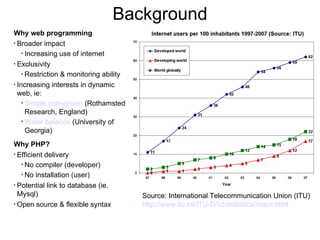
Background Why web programming Broader impact Increasing use of internet Exclusivity Restriction & monitoring ability Increasing interests in dynamic web, ie: Simple conversion  (Rothamsted Research, England) Water balance  (University of Georgia) Why PHP? Efficient delivery No compiler (developer) No installation (user) Potential link to database (ie. Mysql) Open source & flexible syntax Source: International Telecommunication Union (ITU) http://www.itu.int/ITU-D/ict/statistics/maps.html
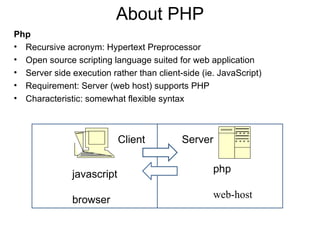
About PHP Php Recursive acronym: Hypertext Preprocessor Open source scripting language suited for web application Server side execution rather than client-side (ie. JavaScript) Requirement: Server (web host) supports PHP Characteristic: somewhat flexible syntax Server Client javascript browser php web-host
Server & File Transfer Example of Php-enabled server HPRCC - SSH approach AgilityHoster - FTP approach  File transfer methods SSH SSH - Secure Shelln, a network protocol that allows data to be exchanged using a secure channel between two networked devices SSH is used primarily on Linux and Unix based systems to access shell accounts. SSH is a replacement for telnet and other insecure remote shells FTP FTP – file transfer protocol FTP is built on a client-server architecture
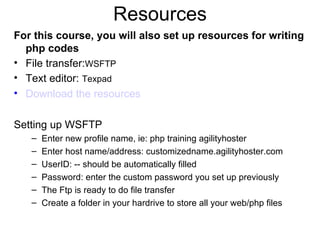
Resources For this course, you will also set up resources for writing php codes File transfer: WSFTP Text editor:  Texpad Download the resources Setting up WSFTP Enter new profile name, ie: php training agilityhoster Enter host name/address: customizedname.agilityhoster.com UserID: -- should be automatically filled Password: enter the custom password you set up previously The Ftp is ready to do file transfer Create a folder in your hardrive to store all your web/php files
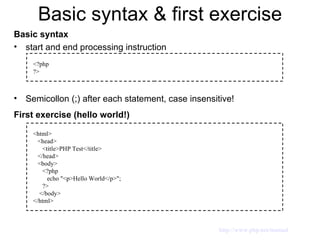
Basic syntax & first exercise Basic syntax start and end processing instruction Semicollon (;) after each statement, case insensitive! First exercise (hello world!) <?php ?> <html> <head>  <title>PHP Test</title> </head> <body> <?php  echo &quot;<p>Hello World</p>&quot;;  ?>  </body> </html> http://www.php.net/manual
Input (basic) Required HTML form  Functions: isset - Determines if a variable is set and is not NULL.  $_POST['variable'] is an associative array of variables passed to the current script via the  HTTP  POST method. $_POST is a superglobal contains information pertinent to any parameters passed using the POST method. POST is a preferred option (the other option is GET) as it can handle considerably more data A POST request includes a message body in addition to a  URL  used to specify information for the action being performed.  Example of URL encoding is as follow: Name: Jonathan Doe Age: 23 Formula: a + b == 13%! Encoded as: Name=Jonathan+Doe&Age=23&Formula=a+%2B+b+%3D%3D+13%25%21 http://www.php.net/manual
Input (syntax) Syntax (example): View this example <html> <head>  <title>PHP Test</title> </head> <body> <?php if (isset($_POST['submit'])) { echo &quot;Hi, &quot; . $_POST['name']. &quot;! <br/>&quot;; } ?> <form action=&quot;formexample.php&quot; method =&quot;post&quot;> <p> Name: <br/> <input type = &quot;text&quot; name=&quot;name&quot; size =&quot;20&quot; maxlength =&quot;40&quot; value=&quot;&quot; /> </p> <input type=&quot;submit&quot; name = &quot;submit&quot; value&quot;Go!&quot; /> </form>  </body> </html> http://www.php.net/manual
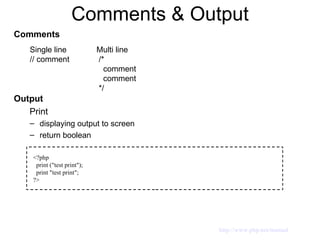
Comments & Output Comments Output Print displaying output to screen return boolean Single line // comment Multi line /* comment comment */ <?php print (&quot;test print&quot;); print &quot;test print&quot;; ?> http://www.php.net/manual
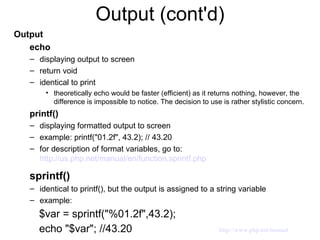
Output (cont'd) Output echo displaying output to screen return void identical to print theoretically echo would be faster (efficient) as it returns nothing, however, the difference is impossible to notice. The decision to use is rather stylistic concern. printf() displaying formatted output to screen  example: printf(&quot;01.2f&quot;, 43.2); // 43.20 for description of format variables, go to:  http://us.php.net/manual/en/function.sprintf.php sprintf()   identical to printf(), but the output is assigned to a string variable example: $var = sprintf(&quot;%01.2f&quot;,43.2); echo &quot;$var&quot;; //43.20 http://www.php.net/manual
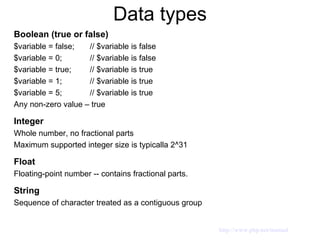
Data types Boolean (true or false) $variable = false;  // $variable is false $variable = 0;  // $variable is false $variable = true;  // $variable is true $variable = 1;  // $variable is true $variable = 5;  // $variable is true Any non-zero value – true Integer Whole number, no fractional parts Maximum supported integer size is typicalla 2^31 Float Floating-point number -- contains fractional parts. String Sequence of character treated as a contiguous group http://www.php.net/manual
Data types (cont'd) Array Series of similar items. Index collection of data values. Each index (key) references to a corresponding value. Example: member[0] = &quot;John&quot;; member[1] = &quot;Marry&quot;; member[2] = &quot;Suzzie&quot;; http://www.php.net/manual
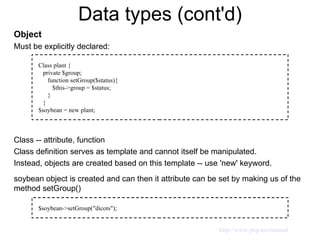
Data types (cont'd) Object Must be explicitly declared: Class -- attribute, function Class definition serves as template and cannot itself be manipulated. Instead, objects are created based on this template -- use 'new' keyword. soybean object is created and can then it attribute can be set by making us of the method setGroup() Class plant { private $group; function setGroup($status){ $this->group = $status;  } } $soybean = new plant; $soybean->setGroup(&quot;dicots&quot;); http://www.php.net/manual
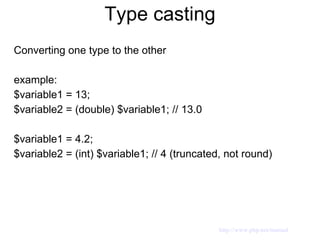
Type casting Converting one type to the other example: $variable1 = 13; $variable2 = (double) $variable1; // 13.0  $variable1 = 4.2; $variable2 = (int) $variable1; // 4 (truncated, not round) http://www.php.net/manual
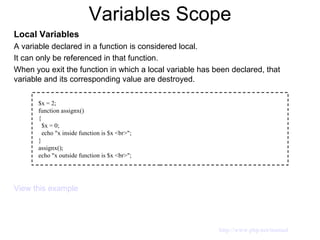
Variables Scope Local Variables A variable declared in a function is considered local. It can only be referenced in that function. When you exit the function in which a local variable has been declared, that variable and its corresponding value are destroyed. View this example $x = 2; function assignx() { $x = 0; echo &quot;x inside function is $x <br>&quot;; } assignx(); echo &quot;x outside function is $x <br>&quot;; http://www.php.net/manual
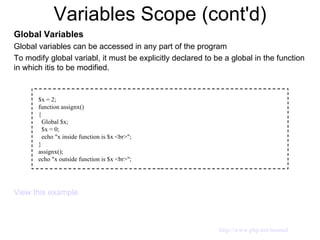
Variables Scope (cont'd) Global Variables Global variables can be accessed in any part of the program To modify global variabl, it must be explicitly declared to be a global in the function in which itis to be modified. View this example $x = 2; function assignx() { Global $x; $x = 0; echo &quot;x inside function is $x <br>&quot;; } assignx(); echo &quot;x outside function is $x <br>&quot;; http://www.php.net/manual
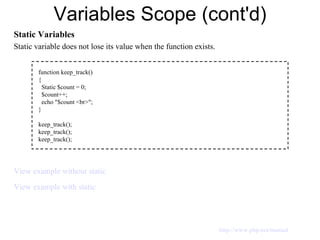
Variables Scope (cont'd) Static Variables Static variable does not lose its value when the function exists. View example without static View example with static function keep_track() { Static $count = 0; $count++; echo &quot;$count <br>&quot;; } keep_track(); keep_track(); keep_track(); http://www.php.net/manual
Variables Scope (cont'd) Superglobal Variables Predefined variables View example HTTP_USER_AGENT provide user's browser information For more examples of similar superglobal variables, go to: http://us3.php.net/manual/en/reserved.variables.server.php   echo &quot;Your browser is: $_SERVER['HTTP_USER_AGENT']&quot;; http://www.php.net/manual
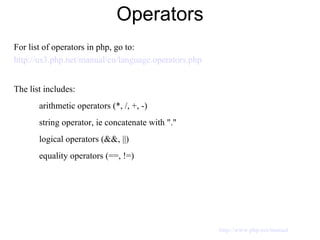
Operators For list of operators in php, go to: http://us3.php.net/manual/en/language.operators.php The list includes: arithmetic operators (*, /, +, -) string operator, ie concatenate with &quot;.&quot; logical operators (&&, ||) equality operators (==, !=) http://www.php.net/manual
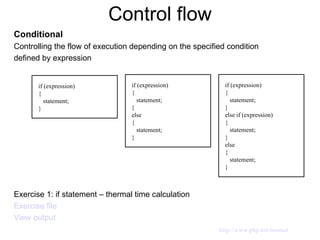
Control flow Conditional Controlling the flow of execution depending on the specified condition defined by expression Exercise 1: if statement – thermal time calculation Exercise file View output if (expression) { statement; } if (expression) { statement; } else  { statement; } if (expression) { statement; } else if (expression) { statement; } else { statement; } http://www.php.net/manual
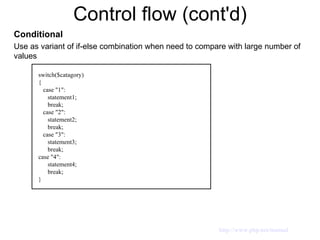
Control flow (cont'd) Conditional Use as variant of if-else combination when need to compare with large number of values switch($catagory) { case &quot;1&quot;: statement1; break; case &quot;2&quot;: statement2; break; case &quot;3&quot;: statement3; break; case &quot;4&quot;: statement4; break; } http://www.php.net/manual
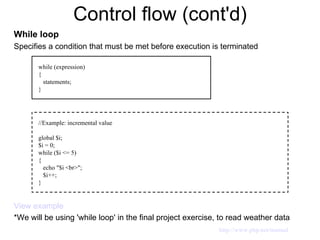
Control flow (cont'd) While loop Specifies a condition that must be met before execution is terminated View example *We will be using 'while loop' in the final project exercise, to read weather data  while (expression) { statements; } //Example: incremental value global $i; $i = 0; while ($i <= 5) { echo &quot;$i <br>&quot;; $i++; } http://www.php.net/manual
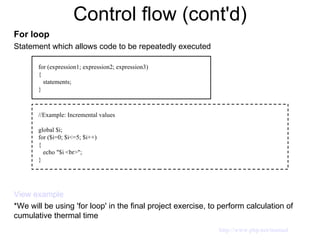
Control flow (cont'd) For loop Statement which allows code to be repeatedly executed View example *We will be using 'for loop' in the final project exercise, to perform calculation of cumulative thermal time for (expression1; expression2; expression3) { statements; } //Example: Incremental values global $i; for ($i=0; $i<=5; $i++) { echo &quot;$i <br>&quot;; } http://www.php.net/manual
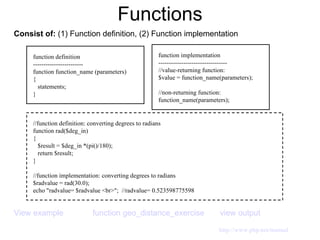
Functions Consist of:  (1) Function definition, (2) Function implementation  View example   function geo_distance_exercise   view output function definition ------------------------ function function_name (parameters) { statements; } //function definition: converting degrees to radians function rad($deg_in) { $result = $deg_in *(pi()/180); return $result; } //function implementation: converting degrees to radians $radvalue = rad(30.0); echo &quot;radvalue= $radvalue <br>&quot;;  //radvalue= 0.523598775598 function implementation --------------------------------- //value-returning function: $value = function_name(parameters); //non-returning function: function_name(parameters); http://www.php.net/manual
Arrays Series of similar items, accessible via index Index can be integer or string Array size is accessible by using 'count()' function //Basic syntax to access array's item $array_name[index]  = array value Exercise 2: array  Exercise file View output http://www.php.net/manual
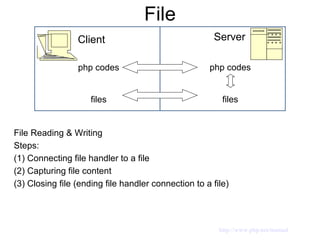
File Server Client php codes files php codes files File Reading & Writing Steps:  (1) Connecting file handler to a file (2) Capturing file content (3) Closing file (ending file handler connection to a file) http://www.php.net/manual
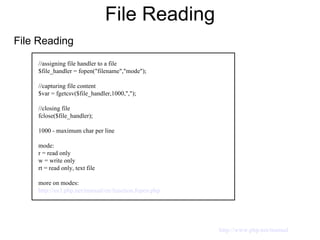
File Reading File Reading //assigning file handler to a file $file_handler = fopen(&quot;filename&quot;,&quot;mode&quot;); //capturing file content $var = fgetcsv($file_handler,1000,&quot;,&quot;); //closing file fclose($file_handler); 1000 - maximum char per line mode: r = read only w = write only rt = read only, text file more on modes: http://us3.php.net/manual/en/function.fopen.php http://www.php.net/manual
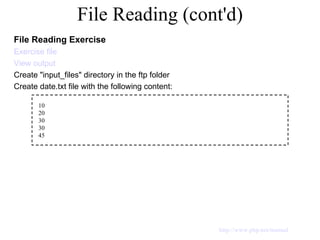
File Reading (cont'd) File Reading Exercise Exercise file View output Create &quot;input_files&quot; directory in the ftp folder Create date.txt file with the following content: 10 20 30 30 45 http://www.php.net/manual
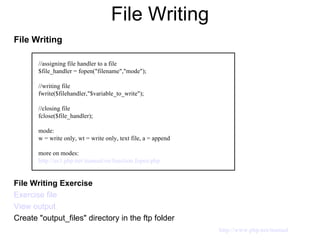
File Writing File Writing File Writing Exercise Exercise file View output Create &quot;output_files&quot; directory in the ftp folder //assigning file handler to a file $file_handler = fopen(&quot;filename&quot;,&quot;mode&quot;); //writing file fwrite($filehandler,&quot;$variable_to_write&quot;); //closing file fclose($file_handler); mode: w = write only, wt = write only, text file, a = append more on modes: http://us3.php.net/manual/en/function.fopen.php http://www.php.net/manual
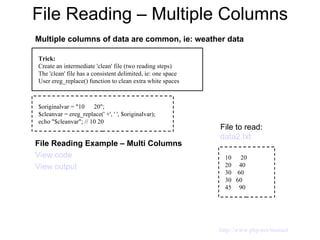
File Reading – Multiple Columns Multiple columns of data are common, ie: weather data File Reading Example – Multi Columns View code View output Trick: Create an intermediate 'clean' file (two reading steps) The 'clean' file has a consistent delimited, ie: one space User ereg_replace() function to clean extra white spaces $originalvar = &quot;10  20&quot;; $cleanvar = ereg_replace(' +', ' ', $originalvar); echo &quot;$cleanvar&quot;; // 10 20 10  20 20  40 30  60 30  60 45  90 File to read:  data2.txt http://www.php.net/manual
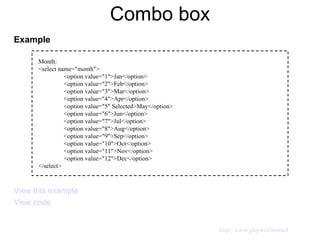
Combo box Example View this example View code Month: <select name=&quot;month&quot;> <option value=&quot;1&quot;>Jan</option> <option value=&quot;2&quot;>Feb</option> <option value=&quot;3&quot;>Mar</option> <option value=&quot;4&quot;>Apr</option> <option value=&quot;5&quot; Selected>May</option> <option value=&quot;6&quot;>Jun</option> <option value=&quot;7&quot;>Jul</option> <option value=&quot;8&quot;>Aug</option> <option value=&quot;9&quot;>Sep</option> <option value=&quot;10&quot;>Oct</option> <option value=&quot;11&quot;>Nov</option> <option value=&quot;12&quot;>Dec</option> </select> http://www.php.net/manual
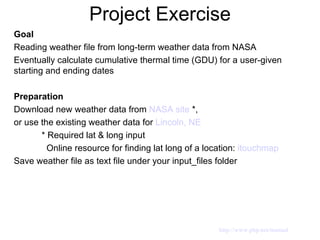
Project Exercise Goal   Reading weather file from long-term weather data from NASA Eventually calculate cumulative thermal time (GDU) for a user-given starting and ending dates  Preparation  Download new weather data from  NASA site   *, or use the existing weather data for  Lincoln, NE    * Required lat & long input    Online resource for finding lat long of a location:  itouchmap   Save weather file as text file under your input_files folder http://www.php.net/manual
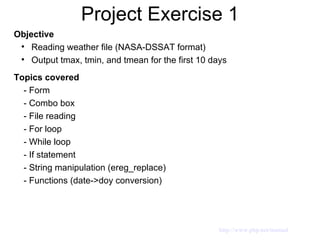
Project Exercise 1 Objective Reading weather file (NASA-DSSAT format) Output tmax, tmin, and tmean for the first 10 days Topics covered - Form  - Combo box - File reading - For loop - While loop - If statement - String manipulation (ereg_replace) - Functions (date->doy conversion)  http://www.php.net/manual
Project Exercise 1 (cont'd) View output   weather data: Lincoln, NE  lat: 40.82, long: -96.65, 1997-2008 To skip a header line, you can assign it to a dummy variable  $header = fgets($file_handler); Additional cleaning step would be needed if there is extra whie space to the left of the first column of the data. You can use the ltrim approach: Example: $array_output[$i] = ltrim($array_output[$i]); The goal is to read tmax and tmin. However, the data contains other weather variables (ie. solar radiation, rh, ect). You can assign dummy variables for the extra variables, or it doesn't hurt to assign each to uniqe variable (in case you would need it for something else) Particular important variable is tmean, not in the data, it's calculated as: Tmean = 0.5 * (Tmax + Tmin) http://www.php.net/manual
Project Exercise 2 Objective Reading weather file (NASA-DSSAT format) Output tmax, tmin, and tmean for the first 10 days from a defined starting date Topics covered - Form  - Combo box - File reading - For loop - While loop - If statement - String manipulation (ereg_replace) - Functions (date->doy conversion)  http://www.php.net/manual
Project Exercise 2 (cont'd) View output   Table of day of year vs date  Use practically all the component from the previous exercise For day selection combo box, you can use for loop, ie from i=1 to i=31 View Example The conversion from Date to DOY is needed because the user input is date while the weather data is index by year and DOY. View Date to DOY function Use  if statement  to identify starting point (year & doy) to start displaying the output, within a for loop going thru the whole index of data. ie: for ($i=0; $i<=$array_size; $i++) { if (($year_array[$i] == $yearinput) && ($doy_array[$i] >= $doyinput) &&  ($doy_array[$i] < $doyval+9)) { //put output statement here } } Use $_POST['var'] to capture form inputs $yearval = $_POST['year']; $monthval = $_POST['month']; $dayval = $_POST['day']; http://www.php.net/manual
Project Exercise 3 Objective Reading weather file (NASA-DSSAT format) Output tmax, tmin, and tmean, thermal time, and cumulative thermal time for a given range between starting and ending dates Topics covered - Form  - Combo box - File reading - For loop - While loop - If statement - String manipulation (ereg_replace) - Functions (date->doy conversion)  http://www.php.net/manual
Project Exercise 3 (cont'd) Everything the same as the previous exercise, except: add inputs in the forms also for the ending date  add text inputs for 'tbase' and 'topt'  tbase = temperature below which plant growth/development rate equals zero topt = temperature at which plant growth/development rate is maximal and thereafter it is to continue at such maximal rate Modify  if statement  to identify both starting and ending point (year & doy) to start displaying the output & calculating thermal time & it's cumulative value ie: if (($year_array[$i] >= $yearval) && ($doy_array[$i] >= $doyval) && ($year_array[$i] <= $yearendval) && ($doy_array[$i] <= $doyendval)) Use the previous thermal time algorithm, but should applied as a function (see  example ) To calculate cumulative thermal time, use the following accumulation algorithm: $cvalue = $cvalue + $value_array[$i]; To obtain final cumulative thermal time value, you can use max function: $CTTfinal = max($cval_array)); View output   http://www.php.net/manual
Misc. Definitions Uniform Resource Locators (URLs) URLs provide the hypertext links between one document and another. It specifies where an identified resource is available and the mechanism for retrieving it.  Hypertext Markup Language (HTML) WWW documents contain a mixture of directives (markup), and text or graphics. It provides a means to describe the structure of text-based information in a document—by denoting certain text as links, headings, paragraphs, lists, et. The World Wide Web is composed primarily of HTML documents transmitted from Web servers to Web browsers using the Hypertext Transfer Protocol (HTTP). http://www.php.net/manual

course slides -- powerpoint

  • 1.
    Introduction to WebProgramming with PHP Scripting Language for Applications in Agricultural Climatology Title
  • 2.
    Course Outline Background& Introduction Resources Setup Input Comment & Output Data Type Variable Scope Control Flow Function File Input (combo box) Project Exercises
  • 3.
    Background Why webprogramming Broader impact Increasing use of internet Exclusivity Restriction & monitoring ability Increasing interests in dynamic web, ie: Simple conversion (Rothamsted Research, England) Water balance (University of Georgia) Why PHP? Efficient delivery No compiler (developer) No installation (user) Potential link to database (ie. Mysql) Open source & flexible syntax Source: International Telecommunication Union (ITU) http://www.itu.int/ITU-D/ict/statistics/maps.html
  • 4.
    About PHP PhpRecursive acronym: Hypertext Preprocessor Open source scripting language suited for web application Server side execution rather than client-side (ie. JavaScript) Requirement: Server (web host) supports PHP Characteristic: somewhat flexible syntax Server Client javascript browser php web-host
  • 5.
    Server & FileTransfer Example of Php-enabled server HPRCC - SSH approach AgilityHoster - FTP approach File transfer methods SSH SSH - Secure Shelln, a network protocol that allows data to be exchanged using a secure channel between two networked devices SSH is used primarily on Linux and Unix based systems to access shell accounts. SSH is a replacement for telnet and other insecure remote shells FTP FTP – file transfer protocol FTP is built on a client-server architecture
  • 6.
    Resources For thiscourse, you will also set up resources for writing php codes File transfer: WSFTP Text editor: Texpad Download the resources Setting up WSFTP Enter new profile name, ie: php training agilityhoster Enter host name/address: customizedname.agilityhoster.com UserID: -- should be automatically filled Password: enter the custom password you set up previously The Ftp is ready to do file transfer Create a folder in your hardrive to store all your web/php files
  • 7.
    Basic syntax &first exercise Basic syntax start and end processing instruction Semicollon (;) after each statement, case insensitive! First exercise (hello world!) <?php ?> <html> <head> <title>PHP Test</title> </head> <body> <?php echo &quot;<p>Hello World</p>&quot;; ?> </body> </html> http://www.php.net/manual
  • 8.
    Input (basic) RequiredHTML form Functions: isset - Determines if a variable is set and is not NULL. $_POST['variable'] is an associative array of variables passed to the current script via the HTTP POST method. $_POST is a superglobal contains information pertinent to any parameters passed using the POST method. POST is a preferred option (the other option is GET) as it can handle considerably more data A POST request includes a message body in addition to a URL used to specify information for the action being performed. Example of URL encoding is as follow: Name: Jonathan Doe Age: 23 Formula: a + b == 13%! Encoded as: Name=Jonathan+Doe&Age=23&Formula=a+%2B+b+%3D%3D+13%25%21 http://www.php.net/manual
  • 9.
    Input (syntax) Syntax(example): View this example <html> <head> <title>PHP Test</title> </head> <body> <?php if (isset($_POST['submit'])) { echo &quot;Hi, &quot; . $_POST['name']. &quot;! <br/>&quot;; } ?> <form action=&quot;formexample.php&quot; method =&quot;post&quot;> <p> Name: <br/> <input type = &quot;text&quot; name=&quot;name&quot; size =&quot;20&quot; maxlength =&quot;40&quot; value=&quot;&quot; /> </p> <input type=&quot;submit&quot; name = &quot;submit&quot; value&quot;Go!&quot; /> </form> </body> </html> http://www.php.net/manual
  • 10.
    Comments & OutputComments Output Print displaying output to screen return boolean Single line // comment Multi line /* comment comment */ <?php print (&quot;test print&quot;); print &quot;test print&quot;; ?> http://www.php.net/manual
  • 11.
    Output (cont'd) Outputecho displaying output to screen return void identical to print theoretically echo would be faster (efficient) as it returns nothing, however, the difference is impossible to notice. The decision to use is rather stylistic concern. printf() displaying formatted output to screen example: printf(&quot;01.2f&quot;, 43.2); // 43.20 for description of format variables, go to: http://us.php.net/manual/en/function.sprintf.php sprintf() identical to printf(), but the output is assigned to a string variable example: $var = sprintf(&quot;%01.2f&quot;,43.2); echo &quot;$var&quot;; //43.20 http://www.php.net/manual
  • 12.
    Data types Boolean(true or false) $variable = false; // $variable is false $variable = 0; // $variable is false $variable = true; // $variable is true $variable = 1; // $variable is true $variable = 5; // $variable is true Any non-zero value – true Integer Whole number, no fractional parts Maximum supported integer size is typicalla 2^31 Float Floating-point number -- contains fractional parts. String Sequence of character treated as a contiguous group http://www.php.net/manual
  • 13.
    Data types (cont'd)Array Series of similar items. Index collection of data values. Each index (key) references to a corresponding value. Example: member[0] = &quot;John&quot;; member[1] = &quot;Marry&quot;; member[2] = &quot;Suzzie&quot;; http://www.php.net/manual
  • 14.
    Data types (cont'd)Object Must be explicitly declared: Class -- attribute, function Class definition serves as template and cannot itself be manipulated. Instead, objects are created based on this template -- use 'new' keyword. soybean object is created and can then it attribute can be set by making us of the method setGroup() Class plant { private $group; function setGroup($status){ $this->group = $status; } } $soybean = new plant; $soybean->setGroup(&quot;dicots&quot;); http://www.php.net/manual
  • 15.
    Type casting Convertingone type to the other example: $variable1 = 13; $variable2 = (double) $variable1; // 13.0 $variable1 = 4.2; $variable2 = (int) $variable1; // 4 (truncated, not round) http://www.php.net/manual
  • 16.
    Variables Scope LocalVariables A variable declared in a function is considered local. It can only be referenced in that function. When you exit the function in which a local variable has been declared, that variable and its corresponding value are destroyed. View this example $x = 2; function assignx() { $x = 0; echo &quot;x inside function is $x <br>&quot;; } assignx(); echo &quot;x outside function is $x <br>&quot;; http://www.php.net/manual
  • 17.
    Variables Scope (cont'd)Global Variables Global variables can be accessed in any part of the program To modify global variabl, it must be explicitly declared to be a global in the function in which itis to be modified. View this example $x = 2; function assignx() { Global $x; $x = 0; echo &quot;x inside function is $x <br>&quot;; } assignx(); echo &quot;x outside function is $x <br>&quot;; http://www.php.net/manual
  • 18.
    Variables Scope (cont'd)Static Variables Static variable does not lose its value when the function exists. View example without static View example with static function keep_track() { Static $count = 0; $count++; echo &quot;$count <br>&quot;; } keep_track(); keep_track(); keep_track(); http://www.php.net/manual
  • 19.
    Variables Scope (cont'd)Superglobal Variables Predefined variables View example HTTP_USER_AGENT provide user's browser information For more examples of similar superglobal variables, go to: http://us3.php.net/manual/en/reserved.variables.server.php echo &quot;Your browser is: $_SERVER['HTTP_USER_AGENT']&quot;; http://www.php.net/manual
  • 20.
    Operators For listof operators in php, go to: http://us3.php.net/manual/en/language.operators.php The list includes: arithmetic operators (*, /, +, -) string operator, ie concatenate with &quot;.&quot; logical operators (&&, ||) equality operators (==, !=) http://www.php.net/manual
  • 21.
    Control flow ConditionalControlling the flow of execution depending on the specified condition defined by expression Exercise 1: if statement – thermal time calculation Exercise file View output if (expression) { statement; } if (expression) { statement; } else { statement; } if (expression) { statement; } else if (expression) { statement; } else { statement; } http://www.php.net/manual
  • 22.
    Control flow (cont'd)Conditional Use as variant of if-else combination when need to compare with large number of values switch($catagory) { case &quot;1&quot;: statement1; break; case &quot;2&quot;: statement2; break; case &quot;3&quot;: statement3; break; case &quot;4&quot;: statement4; break; } http://www.php.net/manual
  • 23.
    Control flow (cont'd)While loop Specifies a condition that must be met before execution is terminated View example *We will be using 'while loop' in the final project exercise, to read weather data while (expression) { statements; } //Example: incremental value global $i; $i = 0; while ($i <= 5) { echo &quot;$i <br>&quot;; $i++; } http://www.php.net/manual
  • 24.
    Control flow (cont'd)For loop Statement which allows code to be repeatedly executed View example *We will be using 'for loop' in the final project exercise, to perform calculation of cumulative thermal time for (expression1; expression2; expression3) { statements; } //Example: Incremental values global $i; for ($i=0; $i<=5; $i++) { echo &quot;$i <br>&quot;; } http://www.php.net/manual
  • 25.
    Functions Consist of: (1) Function definition, (2) Function implementation View example function geo_distance_exercise view output function definition ------------------------ function function_name (parameters) { statements; } //function definition: converting degrees to radians function rad($deg_in) { $result = $deg_in *(pi()/180); return $result; } //function implementation: converting degrees to radians $radvalue = rad(30.0); echo &quot;radvalue= $radvalue <br>&quot;; //radvalue= 0.523598775598 function implementation --------------------------------- //value-returning function: $value = function_name(parameters); //non-returning function: function_name(parameters); http://www.php.net/manual
  • 26.
    Arrays Series ofsimilar items, accessible via index Index can be integer or string Array size is accessible by using 'count()' function //Basic syntax to access array's item $array_name[index] = array value Exercise 2: array Exercise file View output http://www.php.net/manual
  • 27.
    File Server Clientphp codes files php codes files File Reading & Writing Steps: (1) Connecting file handler to a file (2) Capturing file content (3) Closing file (ending file handler connection to a file) http://www.php.net/manual
  • 28.
    File Reading FileReading //assigning file handler to a file $file_handler = fopen(&quot;filename&quot;,&quot;mode&quot;); //capturing file content $var = fgetcsv($file_handler,1000,&quot;,&quot;); //closing file fclose($file_handler); 1000 - maximum char per line mode: r = read only w = write only rt = read only, text file more on modes: http://us3.php.net/manual/en/function.fopen.php http://www.php.net/manual
  • 29.
    File Reading (cont'd)File Reading Exercise Exercise file View output Create &quot;input_files&quot; directory in the ftp folder Create date.txt file with the following content: 10 20 30 30 45 http://www.php.net/manual
  • 30.
    File Writing FileWriting File Writing Exercise Exercise file View output Create &quot;output_files&quot; directory in the ftp folder //assigning file handler to a file $file_handler = fopen(&quot;filename&quot;,&quot;mode&quot;); //writing file fwrite($filehandler,&quot;$variable_to_write&quot;); //closing file fclose($file_handler); mode: w = write only, wt = write only, text file, a = append more on modes: http://us3.php.net/manual/en/function.fopen.php http://www.php.net/manual
  • 31.
    File Reading –Multiple Columns Multiple columns of data are common, ie: weather data File Reading Example – Multi Columns View code View output Trick: Create an intermediate 'clean' file (two reading steps) The 'clean' file has a consistent delimited, ie: one space User ereg_replace() function to clean extra white spaces $originalvar = &quot;10 20&quot;; $cleanvar = ereg_replace(' +', ' ', $originalvar); echo &quot;$cleanvar&quot;; // 10 20 10 20 20 40 30 60 30 60 45 90 File to read: data2.txt http://www.php.net/manual
  • 32.
    Combo box ExampleView this example View code Month: <select name=&quot;month&quot;> <option value=&quot;1&quot;>Jan</option> <option value=&quot;2&quot;>Feb</option> <option value=&quot;3&quot;>Mar</option> <option value=&quot;4&quot;>Apr</option> <option value=&quot;5&quot; Selected>May</option> <option value=&quot;6&quot;>Jun</option> <option value=&quot;7&quot;>Jul</option> <option value=&quot;8&quot;>Aug</option> <option value=&quot;9&quot;>Sep</option> <option value=&quot;10&quot;>Oct</option> <option value=&quot;11&quot;>Nov</option> <option value=&quot;12&quot;>Dec</option> </select> http://www.php.net/manual
  • 33.
    Project Exercise Goal Reading weather file from long-term weather data from NASA Eventually calculate cumulative thermal time (GDU) for a user-given starting and ending dates Preparation Download new weather data from NASA site *, or use the existing weather data for Lincoln, NE * Required lat & long input Online resource for finding lat long of a location: itouchmap Save weather file as text file under your input_files folder http://www.php.net/manual
  • 34.
    Project Exercise 1Objective Reading weather file (NASA-DSSAT format) Output tmax, tmin, and tmean for the first 10 days Topics covered - Form - Combo box - File reading - For loop - While loop - If statement - String manipulation (ereg_replace) - Functions (date->doy conversion) http://www.php.net/manual
  • 35.
    Project Exercise 1(cont'd) View output weather data: Lincoln, NE lat: 40.82, long: -96.65, 1997-2008 To skip a header line, you can assign it to a dummy variable $header = fgets($file_handler); Additional cleaning step would be needed if there is extra whie space to the left of the first column of the data. You can use the ltrim approach: Example: $array_output[$i] = ltrim($array_output[$i]); The goal is to read tmax and tmin. However, the data contains other weather variables (ie. solar radiation, rh, ect). You can assign dummy variables for the extra variables, or it doesn't hurt to assign each to uniqe variable (in case you would need it for something else) Particular important variable is tmean, not in the data, it's calculated as: Tmean = 0.5 * (Tmax + Tmin) http://www.php.net/manual
  • 36.
    Project Exercise 2Objective Reading weather file (NASA-DSSAT format) Output tmax, tmin, and tmean for the first 10 days from a defined starting date Topics covered - Form - Combo box - File reading - For loop - While loop - If statement - String manipulation (ereg_replace) - Functions (date->doy conversion) http://www.php.net/manual
  • 37.
    Project Exercise 2(cont'd) View output Table of day of year vs date Use practically all the component from the previous exercise For day selection combo box, you can use for loop, ie from i=1 to i=31 View Example The conversion from Date to DOY is needed because the user input is date while the weather data is index by year and DOY. View Date to DOY function Use if statement to identify starting point (year & doy) to start displaying the output, within a for loop going thru the whole index of data. ie: for ($i=0; $i<=$array_size; $i++) { if (($year_array[$i] == $yearinput) && ($doy_array[$i] >= $doyinput) && ($doy_array[$i] < $doyval+9)) { //put output statement here } } Use $_POST['var'] to capture form inputs $yearval = $_POST['year']; $monthval = $_POST['month']; $dayval = $_POST['day']; http://www.php.net/manual
  • 38.
    Project Exercise 3Objective Reading weather file (NASA-DSSAT format) Output tmax, tmin, and tmean, thermal time, and cumulative thermal time for a given range between starting and ending dates Topics covered - Form - Combo box - File reading - For loop - While loop - If statement - String manipulation (ereg_replace) - Functions (date->doy conversion) http://www.php.net/manual
  • 39.
    Project Exercise 3(cont'd) Everything the same as the previous exercise, except: add inputs in the forms also for the ending date add text inputs for 'tbase' and 'topt' tbase = temperature below which plant growth/development rate equals zero topt = temperature at which plant growth/development rate is maximal and thereafter it is to continue at such maximal rate Modify if statement to identify both starting and ending point (year & doy) to start displaying the output & calculating thermal time & it's cumulative value ie: if (($year_array[$i] >= $yearval) && ($doy_array[$i] >= $doyval) && ($year_array[$i] <= $yearendval) && ($doy_array[$i] <= $doyendval)) Use the previous thermal time algorithm, but should applied as a function (see example ) To calculate cumulative thermal time, use the following accumulation algorithm: $cvalue = $cvalue + $value_array[$i]; To obtain final cumulative thermal time value, you can use max function: $CTTfinal = max($cval_array)); View output http://www.php.net/manual
  • 40.
    Misc. Definitions UniformResource Locators (URLs) URLs provide the hypertext links between one document and another. It specifies where an identified resource is available and the mechanism for retrieving it. Hypertext Markup Language (HTML) WWW documents contain a mixture of directives (markup), and text or graphics. It provides a means to describe the structure of text-based information in a document—by denoting certain text as links, headings, paragraphs, lists, et. The World Wide Web is composed primarily of HTML documents transmitted from Web servers to Web browsers using the Hypertext Transfer Protocol (HTTP). http://www.php.net/manual