
Advanced XPath and XSLT Reuven Weiser, Suite Solutions
Who am I? Background in Computer Science and Education Experience in several computer companies over the past decade Web applications Server-  and Client-side applications Early member of the Suite Solutions team On-site and online training seminars PDF and HTML style sheet projects CMS integration Project Management
What is Suite Solutions? Our Mission To increase our customers’ profitability by significantly improving the efficiency of their information development and delivery processes. Qualitative Advantage Content Lifecycle Implementation (CLI) is Suite Solutions’  comprehensive approach – from concept to publication – to maximizing the value of your information assets. Our professionals are with you at every phase, determining, recommending and implementing the most cost-effective, flexible and long term solution for your business.
Main Topics What is XPath? XPath Basics Customization Examples List Numbering Trademark and current() Custom Functions tokenize() Keys Grouping
What is XPath? XML Path Language Provides a way to navigate an XML tree, and select and manipulate particular nodes or values Why is it useful? Allows us to create complex interactions between various nodes and values within an XML document Tutorial   -  http://www.w3schools.com/xpath/   XPath 1.0  - since November 1999 Comprehensive reference -  http://www.w3.org/TR/xpath/   XPath 2.0  – since January 2007, DITA-OT 1.5 Comprehensive reference -  http://www.w3.org/TR/xpath20/
Main Topics What is XPath? XPath Basics Customization Examples List Numbering Trademark and current() Custom Functions tokenize() Keys Grouping
Basic Structure Basic syntax: axis::node[predicate] For example: child::*[contains(@class,' topic/title ')] Means: “ looking at the children, any node whose class attribute contains the string‘ topic/title ’ ”
Basic Example From commons.xsl: <xsl:template  match= &quot;*[contains(@class,' topic/fig ')]&quot; > <fo:block  xsl:use-attribute-sets= &quot;fig&quot;  id= &quot;{@id}&quot; > <xsl:apply-templates  select= &quot;*[not(contains(@class,' topic/title '))]&quot; /> <xsl:apply-templates  select= &quot;*[contains(@class,' topic/title ')]&quot; /> </fo:block> </xsl:template>
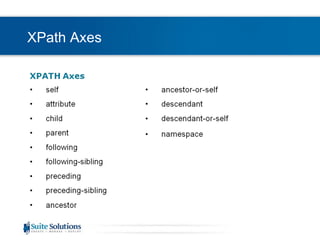
XPath Axes
XPath Abbreviations Expression Description Nodename Selects named node / Selects from the root node (start of expression) or the current node // Selects any descendant of the root node (start of expression) or the current node . Selects the current node .. Selects the parent of the current node @ Selects attributes * Wildcard – matches any element node() Matches any node of any kind [ ] Brackets that contain a predicate, which is used to find a specific node
Main Topics What is XPath? XPath Basics Customization Examples List Numbering Trademark and current() Custom Functions tokenize() Keys Grouping
List Numbering Goal: A client wants <ol>s in <fig>s to be uppercase-lettered, and sub-<ol>s to be lowercase-lettered Solution: <xsl:choose> <xsl:when  test= &quot;ancestor::*[contains(@class, ' topic/fig ')]&quot; > <xsl:number  format= &quot;A&quot; /> </xsl:when> <xsl:when  test= &quot;count(ancestor::*[contains(@class, ' topic/ol ')]) > 1&quot; > <xsl:number  format= &quot;a&quot; /> </xsl:when> <xsl:otherwise> <xsl:number/> </xsl:otherwise> </xsl:choose>
List Numbering Technique Note Instead of: <xsl:when  test= &quot;ancestor::*[contains(@class, ' topic/fig ')]&quot; > We could say: <xsl:when  test= &quot;ancestor::fig&quot; > But: That wouldn’t account for specialization!
Main Topics What is XPath? XPath Basics Customization Examples List Numbering Trademark and current() Custom Functions tokenize() Keys Grouping
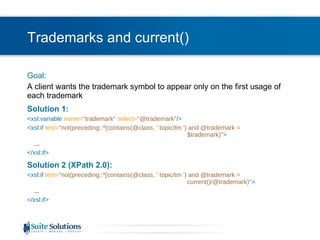
Trademarks and current() Goal: A client wants the trademark symbol to appear only on the first usage of each trademark Solution 1: <xsl:variable  name= &quot;trademark&quot;   select= &quot;@trademark&quot; /> <xsl:if  test= &quot;not(preceding::*[contains(@class, ' topic/tm ') and @trademark =  $trademark)&quot; > ... </xsl:if> Solution 2 (XPath 2.0): <xsl:if  test= &quot;not(preceding::*[contains(@class, ' topic/tm ') and @trademark =  current()/@trademark)&quot; > ... </xsl:if>
Main Topics What is XPath? XPath Basics Customization Examples List Numbering Trademark and current() Custom Functions tokenize() Keys Grouping
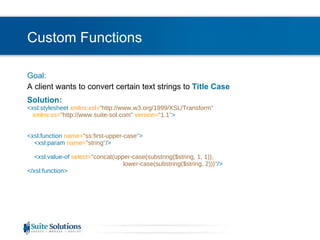
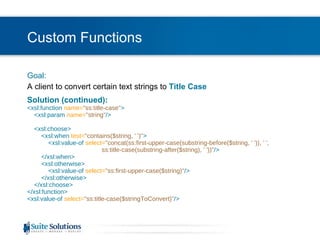
Custom Functions Goal: A client wants to convert certain text strings to  Title Case Solution: <xsl:stylesheet  xmlns:xsl= &quot;http://www.w3.org/1999/XSL/Transform&quot;    xmlns:ss= &quot;http://www.suite-sol.com&quot;  version= &quot;1.1&quot; > <xsl:function  name= &quot;ss:first-upper-case&quot; >   <xsl:param   name= &quot;string&quot; />   <xsl:value-of  select= &quot;concat(upper-case(substring($string, 1, 1)),  lower-case(substring($string, 2)))&quot; /> </xsl:function>
Custom Functions Goal: A client to convert certain text strings to  Title Case Solution (continued): <xsl:function  name= &quot;ss:title-case&quot; >   <xsl:param   name= &quot;string&quot; />   <xsl:choose>   <xsl:when  test= &quot;contains($string, ' ')&quot; >   <xsl:value-of  select= &quot;concat(ss:first-upper-case(substring-before($string, ' ')), ' ',    ss:title-case(substring-after($string), ' '))&quot; />   </xsl:when>   <xsl:otherwise>   <xsl:value-of  select= &quot;ss:first-upper-case($string)&quot; />   </xsl:otherwise>   </xsl:choose> </xsl:function> <xsl:value-of  select= &quot;ss:title-case($stringToConvert)&quot; />
Main Topics What is XPath? XPath Basics Customization Examples List Numbering Trademark and current() Custom Functions tokenize() Keys Grouping
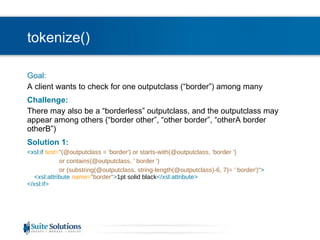
tokenize() Goal: A client wants to check for one outputclass (“border”) among many Challenge: There may also be a “borderless” outputclass, and the outputclass may appear among others (“border other”, “other border”, “otherA border otherB”) Solution 1: <xsl:if  test= &quot;(@outputclass = 'border') or starts-with(@outputclass, 'border ')  or contains(@outputclass, ' border ')  or (substring(@outputclass, string-length(@outputclass)-6, 7)= ' border')&quot; >   <xsl:attribute  name= &quot;border&quot; > 1pt solid black </xsl:attribute> </xsl:if>
tokenize() Goal: A client wants to check for one outputclass (“border”) among many Challenge: There may also be a “borderless” outputclass, and the outputclass may appear among others (“border other”, “other border”, “otherA border otherB”) Solution 2 (XPath 2.0): <xsl:if  test= &quot;tokenize(@outputclass, ' ')[. = 'border']&quot; >   <xsl:attribute  name= &quot;border&quot; > 1pt solid black </xsl:attribute> </xsl:if>
Main Topics What is XPath? XPath Basics Customization Examples List Numbering Trademark and current() Custom Functions tokenize() Keys Grouping
Keys Trademark Revisited Goal: A client wants the trademark symbol to appear only on the first usage of each trademark, but doesn’t want to take the performance hit of searching through the entire document each and every time a <tm> is processed Solution: <xsl:key  name= &quot;tm&quot;   match= &quot;*[contains(@class, ' topic/tm ')]&quot;  use= &quot;@trademark&quot; /> <xsl:if  test= &quot;generate-id(.) = generate-id(key('tm', @trademark)[1])&quot; > … </xsl:if>
Main Topics What is XPath? XPath Basics Customization Examples List Numbering Trademark and current() Custom Functions tokenize() Keys Grouping
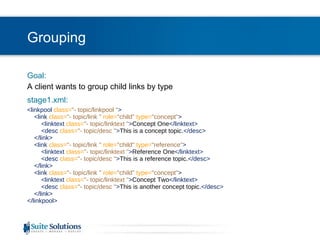
Grouping Goal: A client wants to group child links by type stage1.xml: <linkpool  class= &quot;- topic/linkpool &quot; >   <link  class= &quot;- topic/link &quot;  role= &quot;child&quot;  type= &quot;concept&quot; >   <linktext  class= &quot;- topic/linktext &quot; > Concept One </linktext>   <desc  class= &quot;- topic/desc &quot; > This is a concept topic. </desc>   </link>   <link  class= &quot;- topic/link &quot;  role= &quot;child&quot;  type= &quot;reference&quot; >   <linktext  class= &quot;- topic/linktext &quot; > Reference One </linktext>   <desc  class= &quot;- topic/desc &quot; > This is a reference topic. </desc>   </link>   <link  class= &quot;- topic/link &quot;  role= &quot;child&quot;  type= &quot;concept&quot; >   <linktext  class= &quot;- topic/linktext &quot; > Concept Two </linktext>   <desc  class= &quot;- topic/desc &quot; > This is another concept topic. </desc>   </link> </linkpool>
Grouping Solution 1 – Muenchian Method: <xsl:key  name= &quot;child-links&quot;  match= &quot;*[contains(@class, ' topic/link ') and @role='child']&quot;  use= &quot;@type&quot; />   <xsl:for-each  select= &quot;*[contains(@class, ' topic/link ') and @role = 'child'] [generate-id(.) = generate-id(key('child-links', @type)[1])&quot; >   <fo:block>   <xsl:value-of  select= &quot;ss:first-upper-case(@type)&quot; />   </fo:block>     <xsl:for-each  select= &quot;key('child-links', @type)&quot; > ...   </xsl:for-each>  </xsl:for-each>
Grouping Solution 2 (XPath 2.0): <xsl:for-each-group  select= &quot;*[contains(@class, ' topic/link ') and @role = 'child']&quot;   group-by= &quot;@type&quot; >   <fo:block>   <xsl:value-of  select= &quot;ss:first-upper-case(current-grouping-key())&quot; />   </fo:block>     <xsl:for-each  select= &quot;current-group()&quot; > ...   </xsl:for-each> </xsl:for-each-group>
Main Topics What is XPath? XPath Basics Customization Examples List Numbering Trademark and current() Custom Functions tokenize() Keys Grouping
End of Advanced XPATH Be in touch! Reuven Weiser [email_address] Let us know how we can help you further… Stylesheet development  One-on-one support and training CMS integration

AdvancedXPath

  • 1.
    Advanced XPath andXSLT Reuven Weiser, Suite Solutions
  • 2.
    Who am I?Background in Computer Science and Education Experience in several computer companies over the past decade Web applications Server- and Client-side applications Early member of the Suite Solutions team On-site and online training seminars PDF and HTML style sheet projects CMS integration Project Management
  • 3.
    What is SuiteSolutions? Our Mission To increase our customers’ profitability by significantly improving the efficiency of their information development and delivery processes. Qualitative Advantage Content Lifecycle Implementation (CLI) is Suite Solutions’ comprehensive approach – from concept to publication – to maximizing the value of your information assets. Our professionals are with you at every phase, determining, recommending and implementing the most cost-effective, flexible and long term solution for your business.
  • 4.
    Main Topics Whatis XPath? XPath Basics Customization Examples List Numbering Trademark and current() Custom Functions tokenize() Keys Grouping
  • 5.
    What is XPath?XML Path Language Provides a way to navigate an XML tree, and select and manipulate particular nodes or values Why is it useful? Allows us to create complex interactions between various nodes and values within an XML document Tutorial - http://www.w3schools.com/xpath/ XPath 1.0 - since November 1999 Comprehensive reference - http://www.w3.org/TR/xpath/ XPath 2.0 – since January 2007, DITA-OT 1.5 Comprehensive reference - http://www.w3.org/TR/xpath20/
  • 6.
    Main Topics Whatis XPath? XPath Basics Customization Examples List Numbering Trademark and current() Custom Functions tokenize() Keys Grouping
  • 7.
    Basic Structure Basicsyntax: axis::node[predicate] For example: child::*[contains(@class,' topic/title ')] Means: “ looking at the children, any node whose class attribute contains the string‘ topic/title ’ ”
  • 8.
    Basic Example Fromcommons.xsl: <xsl:template match= &quot;*[contains(@class,' topic/fig ')]&quot; > <fo:block xsl:use-attribute-sets= &quot;fig&quot; id= &quot;{@id}&quot; > <xsl:apply-templates select= &quot;*[not(contains(@class,' topic/title '))]&quot; /> <xsl:apply-templates select= &quot;*[contains(@class,' topic/title ')]&quot; /> </fo:block> </xsl:template>
  • 9.
  • 10.
    XPath Abbreviations ExpressionDescription Nodename Selects named node / Selects from the root node (start of expression) or the current node // Selects any descendant of the root node (start of expression) or the current node . Selects the current node .. Selects the parent of the current node @ Selects attributes * Wildcard – matches any element node() Matches any node of any kind [ ] Brackets that contain a predicate, which is used to find a specific node
  • 11.
    Main Topics Whatis XPath? XPath Basics Customization Examples List Numbering Trademark and current() Custom Functions tokenize() Keys Grouping
  • 12.
    List Numbering Goal:A client wants <ol>s in <fig>s to be uppercase-lettered, and sub-<ol>s to be lowercase-lettered Solution: <xsl:choose> <xsl:when test= &quot;ancestor::*[contains(@class, ' topic/fig ')]&quot; > <xsl:number format= &quot;A&quot; /> </xsl:when> <xsl:when test= &quot;count(ancestor::*[contains(@class, ' topic/ol ')]) > 1&quot; > <xsl:number format= &quot;a&quot; /> </xsl:when> <xsl:otherwise> <xsl:number/> </xsl:otherwise> </xsl:choose>
  • 13.
    List Numbering TechniqueNote Instead of: <xsl:when test= &quot;ancestor::*[contains(@class, ' topic/fig ')]&quot; > We could say: <xsl:when test= &quot;ancestor::fig&quot; > But: That wouldn’t account for specialization!
  • 14.
    Main Topics Whatis XPath? XPath Basics Customization Examples List Numbering Trademark and current() Custom Functions tokenize() Keys Grouping
  • 15.
    Trademarks and current()Goal: A client wants the trademark symbol to appear only on the first usage of each trademark Solution 1: <xsl:variable name= &quot;trademark&quot; select= &quot;@trademark&quot; /> <xsl:if test= &quot;not(preceding::*[contains(@class, ' topic/tm ') and @trademark = $trademark)&quot; > ... </xsl:if> Solution 2 (XPath 2.0): <xsl:if test= &quot;not(preceding::*[contains(@class, ' topic/tm ') and @trademark = current()/@trademark)&quot; > ... </xsl:if>
  • 16.
    Main Topics Whatis XPath? XPath Basics Customization Examples List Numbering Trademark and current() Custom Functions tokenize() Keys Grouping
  • 17.
    Custom Functions Goal:A client wants to convert certain text strings to Title Case Solution: <xsl:stylesheet xmlns:xsl= &quot;http://www.w3.org/1999/XSL/Transform&quot; xmlns:ss= &quot;http://www.suite-sol.com&quot; version= &quot;1.1&quot; > <xsl:function name= &quot;ss:first-upper-case&quot; > <xsl:param name= &quot;string&quot; /> <xsl:value-of select= &quot;concat(upper-case(substring($string, 1, 1)), lower-case(substring($string, 2)))&quot; /> </xsl:function>
  • 18.
    Custom Functions Goal:A client to convert certain text strings to Title Case Solution (continued): <xsl:function name= &quot;ss:title-case&quot; > <xsl:param name= &quot;string&quot; /> <xsl:choose> <xsl:when test= &quot;contains($string, ' ')&quot; > <xsl:value-of select= &quot;concat(ss:first-upper-case(substring-before($string, ' ')), ' ', ss:title-case(substring-after($string), ' '))&quot; /> </xsl:when> <xsl:otherwise> <xsl:value-of select= &quot;ss:first-upper-case($string)&quot; /> </xsl:otherwise> </xsl:choose> </xsl:function> <xsl:value-of select= &quot;ss:title-case($stringToConvert)&quot; />
  • 19.
    Main Topics Whatis XPath? XPath Basics Customization Examples List Numbering Trademark and current() Custom Functions tokenize() Keys Grouping
  • 20.
    tokenize() Goal: Aclient wants to check for one outputclass (“border”) among many Challenge: There may also be a “borderless” outputclass, and the outputclass may appear among others (“border other”, “other border”, “otherA border otherB”) Solution 1: <xsl:if test= &quot;(@outputclass = 'border') or starts-with(@outputclass, 'border ') or contains(@outputclass, ' border ') or (substring(@outputclass, string-length(@outputclass)-6, 7)= ' border')&quot; > <xsl:attribute name= &quot;border&quot; > 1pt solid black </xsl:attribute> </xsl:if>
  • 21.
    tokenize() Goal: Aclient wants to check for one outputclass (“border”) among many Challenge: There may also be a “borderless” outputclass, and the outputclass may appear among others (“border other”, “other border”, “otherA border otherB”) Solution 2 (XPath 2.0): <xsl:if test= &quot;tokenize(@outputclass, ' ')[. = 'border']&quot; > <xsl:attribute name= &quot;border&quot; > 1pt solid black </xsl:attribute> </xsl:if>
  • 22.
    Main Topics Whatis XPath? XPath Basics Customization Examples List Numbering Trademark and current() Custom Functions tokenize() Keys Grouping
  • 23.
    Keys Trademark RevisitedGoal: A client wants the trademark symbol to appear only on the first usage of each trademark, but doesn’t want to take the performance hit of searching through the entire document each and every time a <tm> is processed Solution: <xsl:key name= &quot;tm&quot; match= &quot;*[contains(@class, ' topic/tm ')]&quot; use= &quot;@trademark&quot; /> <xsl:if test= &quot;generate-id(.) = generate-id(key('tm', @trademark)[1])&quot; > … </xsl:if>
  • 24.
    Main Topics Whatis XPath? XPath Basics Customization Examples List Numbering Trademark and current() Custom Functions tokenize() Keys Grouping
  • 25.
    Grouping Goal: Aclient wants to group child links by type stage1.xml: <linkpool class= &quot;- topic/linkpool &quot; > <link class= &quot;- topic/link &quot; role= &quot;child&quot; type= &quot;concept&quot; > <linktext class= &quot;- topic/linktext &quot; > Concept One </linktext> <desc class= &quot;- topic/desc &quot; > This is a concept topic. </desc> </link> <link class= &quot;- topic/link &quot; role= &quot;child&quot; type= &quot;reference&quot; > <linktext class= &quot;- topic/linktext &quot; > Reference One </linktext> <desc class= &quot;- topic/desc &quot; > This is a reference topic. </desc> </link> <link class= &quot;- topic/link &quot; role= &quot;child&quot; type= &quot;concept&quot; > <linktext class= &quot;- topic/linktext &quot; > Concept Two </linktext> <desc class= &quot;- topic/desc &quot; > This is another concept topic. </desc> </link> </linkpool>
  • 26.
    Grouping Solution 1– Muenchian Method: <xsl:key name= &quot;child-links&quot; match= &quot;*[contains(@class, ' topic/link ') and @role='child']&quot; use= &quot;@type&quot; /> <xsl:for-each select= &quot;*[contains(@class, ' topic/link ') and @role = 'child'] [generate-id(.) = generate-id(key('child-links', @type)[1])&quot; > <fo:block> <xsl:value-of select= &quot;ss:first-upper-case(@type)&quot; /> </fo:block> <xsl:for-each select= &quot;key('child-links', @type)&quot; > ... </xsl:for-each> </xsl:for-each>
  • 27.
    Grouping Solution 2(XPath 2.0): <xsl:for-each-group select= &quot;*[contains(@class, ' topic/link ') and @role = 'child']&quot; group-by= &quot;@type&quot; > <fo:block> <xsl:value-of select= &quot;ss:first-upper-case(current-grouping-key())&quot; /> </fo:block> <xsl:for-each select= &quot;current-group()&quot; > ... </xsl:for-each> </xsl:for-each-group>
  • 28.
    Main Topics Whatis XPath? XPath Basics Customization Examples List Numbering Trademark and current() Custom Functions tokenize() Keys Grouping
  • 29.
    End of AdvancedXPATH Be in touch! Reuven Weiser [email_address] Let us know how we can help you further… Stylesheet development One-on-one support and training CMS integration

Editor's Notes

  • #3 Suite Solutions: DITA Quick Start Training for Authors iDTP, March 16-18, 2009