PHP & MySQL Christos Efstratiou
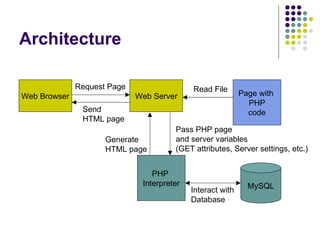
Architecture Web Browser Web Server Request Page Page with  PHP code Read File PHP  Interpreter Pass PHP page and server variables (GET attributes, Server settings, etc.) Generate  HTML page Send  HTML page MySQL Interact with Database
PHP Syntax In general PHP code is embedded into web pages  In most cases you will have pages that contain only PHP code Pages with PHP code should have the extension: .php, .php3, .php4 Examples: <?  $name  =   “World” ;   ?> <html> <body> <h1>Hello,  <?  echo  $name ;  ?>  </h1> </body> </html> <? include ( “header.html” ); if ( strpos ( $_SERVER[ “HTTP_USER_AGENT” ] ,  “MSIE” ) !==  FALSE ) { echo “You are using Internet explorer!”; } include ( “footer.html” ); ?>
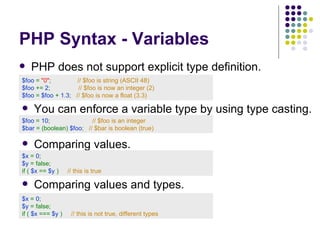
PHP Syntax - Variables PHP does not support explicit type definition.  $foo  =   &quot;0&quot; ;       // $foo is string (ASCII 48) $foo  +=  2 ;       // $foo is now an integer (2) $foo  =  $foo  +  1.3 ;      // $foo is now a float (3.3) You can enforce a variable type by using type casting.  $foo  =   1 0 ;       // $foo is  an integer $ bar   =   (boolean)  $foo ;     //  $bar is boolean (true) Comparing values.  $ x   =  0 ;       $ y   =   false ; if (  $ x   ==   $ y  )  //  this is true   Comparing values and types.  $ x   =  0 ;       $ y   =   false ; if (  $ x   = = =   $ y  )  //  this is not true, different types
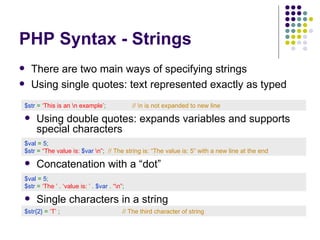
PHP Syntax - Strings There are two main ways of specifying strings Using single quotes: text represented exactly as typed $ str   =   ‘This is an \n example’ ;       //  \n is not expanded to new line Using double quotes: expands variables and supports special characters $ val   =   5 ;   $ str   =   “The value is:  $var  \n” ;     //  The string is: “The value is: 5” with a new line at the end       Concatenation with a “dot” $ val   =   5 ;   $ str   =   ‘The ’  .  ‘value is: ’  .   $var  .  “\n” ;   Single characters in a string $ str{2}  =   ‘T’   ;     //  The third character of string
PHP Syntax - Arrays PHP arrays are dynamic. Their size expands as needed. PHP supports associative arrays: Array indices can be of any type not just integers. Key types can be mixed in the same array. $arr[1]  =  ‘Test’   ;     // Using integers as keys $arr [ ‘first’ ] =  ‘Test’   ;   // Using strings as keys $arr  =   array( &quot;foo&quot;   =>   &quot;bar&quot; ,   12   =>   true );   $arr[5]   =   10 ; // The array is now: (“foo”=> “bar”, 12=>true, 5=>10) Defining  arrays Multidimensional  arrays $arr  =   array(  “first&quot;   =>    array( &quot;bar&quot; ,    ‘Test’   ),    “ second&quot;   =>    array( 1   =>   true ,    2   =>   false )  )   ;
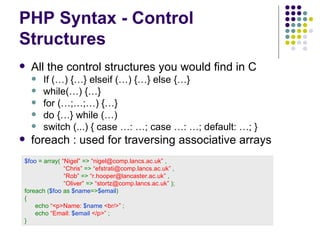
PHP Syntax - Control Structures All the control structures you would find in C If (…) {…} elseif (…) {…} else {…} while(…) {…} for (…;…;…) {…} do {…} while (…) switch (...) { case …: …; case …: …; default: …; } foreach : used for traversing associative arrays $foo  =  array(   “Nigel”   =>   “nigel@comp.lancs.ac.uk”  ,     “ Chris”   =>   “efstrati@comp.lancs.ac.uk”   ,   “ Rob”   =>   “r.hooper@lancaster.ac.uk”   ,   “ Oliver”   =>   “stortz@comp.lancs.ac.uk”   ); foreach ( $foo  as  $name => $email ) { echo   “<p>Name:  $name  <br/>”   ; echo   “Email:  $email  </p>”   ; }
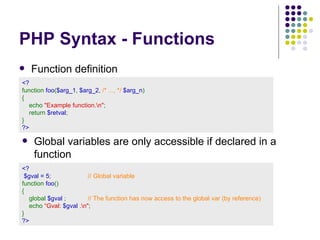
PHP Syntax - Functions Function definition  <?  function  foo ( $arg_1 ,  $arg_2 ,  /* ..., */  $arg_n ) {     echo  &quot;Example function.\n&quot; ;     return  $retval ; } ?>   Global variables are only accessible if declared in a function  <?   $ g val  = 5 ;     // Global variable function  foo () {   global  $ g val  ;     // The function has now access to the global var (by reference)      echo  “ Gval:  $ g val   .\n&quot; ; } ?>
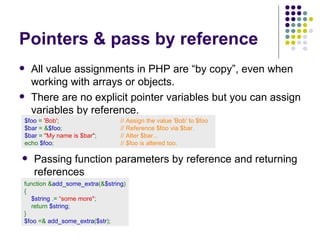
Pointers & pass by reference All value assignments in PHP are “by copy”, even when working with arrays or objects. There are no explicit pointer variables but you can assign variables by reference. $foo  =  'Bob' ;               // Assign the value 'Bob' to $foo $bar  = & $foo ;               // Reference $foo via $bar. $bar  =  &quot;My name is $bar&quot; ;   // Alter $bar... echo  $foo ;                  // $foo is altered too. Passing function parameters by reference and returning references function & add_some_extra (& $string ) { $string   .=  “ some more &quot; ;  return  $string ; } $foo   =&   add_some_extra ( $str );
Classes Support for object orientation in PHP has improved with version 4 and is much more substantial in version 5. class  Cart  {     var  $items ;   // Items in our shopping cart     // Add $num articles of $artnr to the cart       function  add_item ( $artnr ,  $num ) {          $this -> items [ $artnr ] +=  $num ;     } } $ myC art  = new  Cart ;    $ myCart -> myVar  =   “ test &quot; ;     //  This object has a new attribute not defined by the class Inheritance with the “extends” keyword class  Named_Cart  extends  Cart  { ………     }
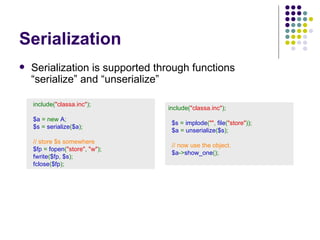
Serialization Serialization is supported through functions  “serialize” and “unserialize”    include( &quot;classa.inc&quot; );       $a  = new  A ;    $s  =  serialize ( $a );    // store $s somewhere    $fp  =  fopen ( &quot;store&quot; ,  &quot;w&quot; );    fwrite ( $fp ,  $s );    fclose ( $fp );   include( &quot;classa.inc&quot; );    $s  =  implode ( &quot;&quot; ,  file ( &quot;store&quot; ));    $a  =  unserialize ( $s );    // now use the object.      $a -> show_one ();
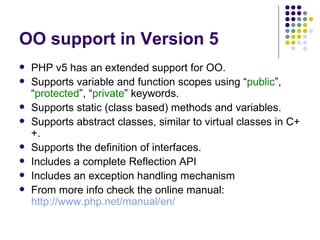
OO support in Version 5 PHP v5 has an extended support for OO. Supports variable and function scopes using “ public ”, “ protected ”, “ private ” keywords.  Supports static (class based) methods and variables. Supports abstract classes, similar to virtual classes in C++. Supports the definition of interfaces. Includes a complete Reflection API Includes an exception handling mechanism From more info check the online manual: http://www.php.net/manual/en/
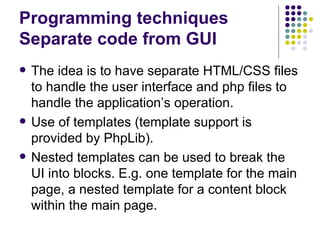
Programming techniques Separate code from GUI The idea is to have separate HTML/CSS files to handle the user interface and php files to handle the application’s operation. Use of templates (template support is provided by PhpLib). Nested templates can be used to break the UI into blocks. E.g. one template for the main page, a nested template for a content block within the main page.
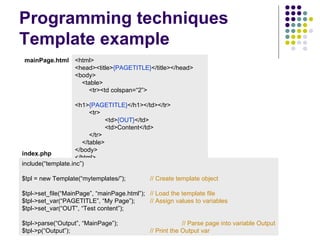
Programming techniques Template example <html> <head><title> {PAGETITLE} </title></head> <body> <table> <tr><td colspan=“2”> <h1> {PAGETITLE} </h1></td></tr> <tr> <td> {OUT} </td> <td>Content</td> </tr> </table> </body> </html> include(“template.inc”) $tpl = new Template(“mytemplates/”); // Create template object $tpl->set_file(“MainPage”, “mainPage.html”); // Load the template file $tpl->set_var(“PAGETITLE”, “My Page”); // Assign values to variables $tpl->set_var(“OUT”, “Test content”); $tpl->parse(“Output”, “MainPage”); // Parse page into variable Output $tpl->p(“Output”); // Print the Output var mainPage.html index.php
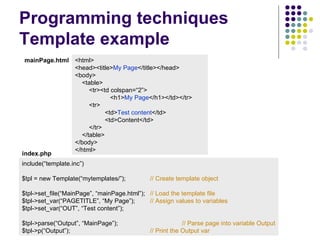
Programming techniques Template example <html> <head><title> My Page </title></head> <body> <table> <tr><td colspan=“2”> <h1> My Page </h1></td></tr> <tr> <td> Test content </td> <td>Content</td> </tr> </table> </body> </html> include(“template.inc”) $tpl = new Template(“mytemplates/”); // Create template object $tpl->set_file(“MainPage”, “mainPage.html”); // Load the template file $tpl->set_var(“PAGETITLE”, “My Page”); // Assign values to variables $tpl->set_var(“OUT”, “Test content”); $tpl->parse(“Output”, “MainPage”); // Parse page into variable Output $tpl->p(“Output”); // Print the Output var mainPage.html index.php
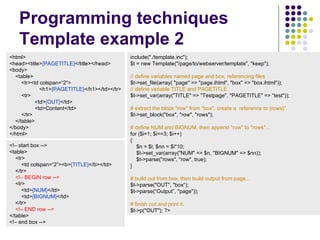
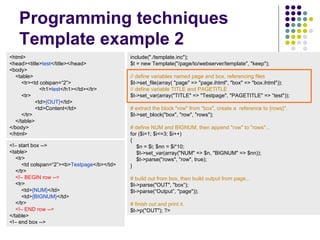
Programming techniques Template example 2 <html> <head><title> {PAGETITLE} </title></head> <body> <table> <tr><td colspan=“2”> <h1> {PAGETITLE} </h1></td></tr> <tr> <td> {OUT} </td> <td>Content</td> </tr> </table> </body> </html> <!– start box --> <table> <tr> <td colspan=“2”><b> {TITLE} </b></td> </tr> <!– BEGIN row --> <tr> <td> {NUM} </td> <td> {BIGNUM} </td> </tr> <!– END row --> </table> <!– end box --> include(&quot;./template.inc&quot;);  $t = new Template(&quot;/page/to/webserver/template&quot;, &quot;keep&quot;); //  define variables named page and box, referencing files   $t->set_file(array( &quot;page&quot; => &quot;page.ihtml&quot;, &quot;box&quot; => &quot;box.ihtml&quot;)); // define variable TITLE and PAGETITLE   $t->set_var(array(&quot;TITLE&quot; => &quot;Testpage&quot;, &quot;PAGETITLE&quot; => “ test &quot;));  # extract the block &quot;row&quot; from &quot;box&quot;, creat e  a  reference to {rows}&quot;.   $t->set_block(&quot;box&quot;, &quot;row&quot;, &quot;rows&quot;);  # define NUM and BIGNUM, then append &quot;row&quot; to &quot;rows&quot;...  for ($i=1; $i<=3; $i++)  {  $n = $i; $nn = $i*10;  $t->set_var(array(&quot;NUM&quot; => $n, &quot;BIGNUM&quot; => $nn));  $t->parse(&quot;rows&quot;, &quot;row&quot;, true);  } # build out from box, then build out put  from page...  $t->parse(&quot;OUT&quot;, &quot;box“ ); $t->parse(“Output” , &quot;page&quot;));  # finish out and print it.  $t->p(&quot;OUT&quot;); ?>
Programming techniques Template example 2 <html> <head><title> test </title></head> <body> <table> <tr><td colspan=“2”> <h1> test </h1></td></tr> <tr> <td> {OUT} </td> <td>Content</td> </tr> </table> </body> </html> <!– start box --> <table> <tr> <td colspan=“2”><b> Testpage </b></td> </tr> <!– BEGIN row --> <tr> <td> {NUM} </td> <td> {BIGNUM} </td> </tr> <!– END row --> </table> <!– end box --> include(&quot;./template.inc&quot;);  $t = new Template(&quot;/page/to/webserver/template&quot;, &quot;keep&quot;); //  define variables named page and box, referencing files   $t->set_file(array( &quot;page&quot; => &quot;page.ihtml&quot;, &quot;box&quot; => &quot;box.ihtml&quot;)); // define variable TITLE and PAGETITLE   $t->set_var(array(&quot;TITLE&quot; => &quot;Testpage&quot;, &quot;PAGETITLE&quot; => “ test &quot;));  # extract the block &quot;row&quot; from &quot;box&quot;, creat e  a  reference to {rows}&quot;.   $t->set_block(&quot;box&quot;, &quot;row&quot;, &quot;rows&quot;);  # define NUM and BIGNUM, then append &quot;row&quot; to &quot;rows&quot;...  for ($i=1; $i<=3; $i++)  {  $n = $i; $nn = $i*10;  $t->set_var(array(&quot;NUM&quot; => $n, &quot;BIGNUM&quot; => $nn));  $t->parse(&quot;rows&quot;, &quot;row&quot;, true);  } # build out from box, then build out put  from page...  $t->parse(&quot;OUT&quot;, &quot;box“ ); $t->parse(“Output” , &quot;page&quot;));  # finish out and print it.  $t->p(&quot;OUT&quot;); ?>
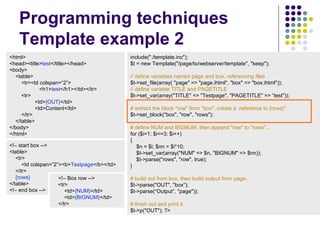
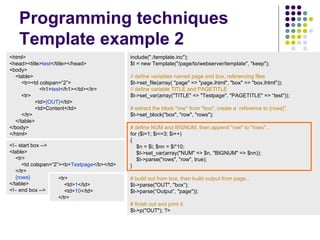
Programming techniques Template example 2 <html> <head><title> test </title></head> <body> <table> <tr><td colspan=“2”> <h1> test </h1></td></tr> <tr> <td> {OUT} </td> <td>Content</td> </tr> </table> </body> </html> <!– start box --> <table> <tr> <td colspan=“2”><b> Testpage </b></td> </tr> {rows} </table> <!– end box --> include(&quot;./template.inc&quot;);  $t = new Template(&quot;/page/to/webserver/template&quot;, &quot;keep&quot;); //  define variables named page and box, referencing files   $t->set_file(array( &quot;page&quot; => &quot;page.ihtml&quot;, &quot;box&quot; => &quot;box.ihtml&quot;)); // define variable TITLE and PAGETITLE   $t->set_var(array(&quot;TITLE&quot; => &quot;Testpage&quot;, &quot;PAGETITLE&quot; => “ test &quot;));  # extract the block &quot;row&quot; from &quot;box&quot;, creat e  a  reference to {rows}&quot;.   $t->set_block(&quot;box&quot;, &quot;row&quot;, &quot;rows&quot;);  # define NUM and BIGNUM, then append &quot;row&quot; to &quot;rows&quot;...  for ($i=1; $i<=3; $i++)  {  $n = $i; $nn = $i*10;  $t->set_var(array(&quot;NUM&quot; => $n, &quot;BIGNUM&quot; => $nn));  $t->parse(&quot;rows&quot;, &quot;row&quot;, true);  } # build out from box, then build out put  from page...  $t->parse(&quot;OUT&quot;, &quot;box“ ); $t->parse(“Output” , &quot;page&quot;));  # finish out and print it.  $t->p(&quot;OUT&quot;); ?> <!– Box row --> <tr> <td> {NUM} </td> <td> {BIGNUM} </td> </tr>
Programming techniques Template example 2 <html> <head><title> test </title></head> <body> <table> <tr><td colspan=“2”> <h1> test </h1></td></tr> <tr> <td> {OUT} </td> <td>Content</td> </tr> </table> </body> </html> <!– start box --> <table> <tr> <td colspan=“2”><b> Testpage </b></td> </tr> {rows} </table> <!– end box --> include(&quot;./template.inc&quot;);  $t = new Template(&quot;/page/to/webserver/template&quot;, &quot;keep&quot;); //  define variables named page and box, referencing files   $t->set_file(array( &quot;page&quot; => &quot;page.ihtml&quot;, &quot;box&quot; => &quot;box.ihtml&quot;)); // define variable TITLE and PAGETITLE   $t->set_var(array(&quot;TITLE&quot; => &quot;Testpage&quot;, &quot;PAGETITLE&quot; => “ test &quot;));  # extract the block &quot;row&quot; from &quot;box&quot;, creat e  a  reference to {rows}&quot;.   $t->set_block(&quot;box&quot;, &quot;row&quot;, &quot;rows&quot;);  # define NUM and BIGNUM, then append &quot;row&quot; to &quot;rows&quot;...  for ($i=1; $i<=3; $i++)  {  $n = $i; $nn = $i*10;  $t->set_var(array(&quot;NUM&quot; => $n, &quot;BIGNUM&quot; => $nn));  $t->parse(&quot;rows&quot;, &quot;row&quot;, true);  } # build out from box, then build out put  from page...  $t->parse(&quot;OUT&quot;, &quot;box“ ); $t->parse(“Output” , &quot;page&quot;));  # finish out and print it.  $t->p(&quot;OUT&quot;); ?> <tr> <td> 1 </td> <td> 10 </td> </tr>
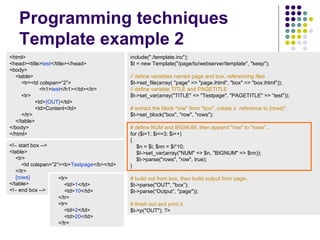
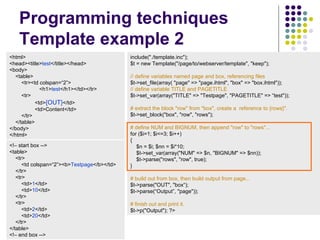
Programming techniques Template example 2 <html> <head><title> test </title></head> <body> <table> <tr><td colspan=“2”> <h1> test </h1></td></tr> <tr> <td> {OUT} </td> <td>Content</td> </tr> </table> </body> </html> <!– start box --> <table> <tr> <td colspan=“2”><b> Testpage </b></td> </tr> {rows} </table> <!– end box --> include(&quot;./template.inc&quot;);  $t = new Template(&quot;/page/to/webserver/template&quot;, &quot;keep&quot;); //  define variables named page and box, referencing files   $t->set_file(array( &quot;page&quot; => &quot;page.ihtml&quot;, &quot;box&quot; => &quot;box.ihtml&quot;)); // define variable TITLE and PAGETITLE   $t->set_var(array(&quot;TITLE&quot; => &quot;Testpage&quot;, &quot;PAGETITLE&quot; => “ test &quot;));  # extract the block &quot;row&quot; from &quot;box&quot;, creat e  a  reference to {rows}&quot;.   $t->set_block(&quot;box&quot;, &quot;row&quot;, &quot;rows&quot;);  # define NUM and BIGNUM, then append &quot;row&quot; to &quot;rows&quot;...  for ($i=1; $i<=3; $i++)  {  $n = $i; $nn = $i*10;  $t->set_var(array(&quot;NUM&quot; => $n, &quot;BIGNUM&quot; => $nn));  $t->parse(&quot;rows&quot;, &quot;row&quot;, true);  } # build out from box, then build out put  from page...  $t->parse(&quot;OUT&quot;, &quot;box“ ); $t->parse(“Output” , &quot;page&quot;));  # finish out and print it.  $t->p(&quot;OUT&quot;); ?> <tr> <td> 1 </td> <td> 10 </td> </tr> <tr> <td> 2 </td> <td> 20 </td> </tr>
Programming techniques Template example 2 <html> <head><title> test </title></head> <body> <table> <tr><td colspan=“2”> <h1> test </h1></td></tr> <tr> <td> {OUT} </td> <td>Content</td> </tr> </table> </body> </html> <!– start box --> <table> <tr> <td colspan=“2”><b> Testpage </b></td> </tr> <tr> <td> 1 </td> <td> 10 </td> </tr> <tr> <td> 2 </td> <td> 20 </td> </tr> </table> <!– end box --> include(&quot;./template.inc&quot;);  $t = new Template(&quot;/page/to/webserver/template&quot;, &quot;keep&quot;); //  define variables named page and box, referencing files   $t->set_file(array( &quot;page&quot; => &quot;page.ihtml&quot;, &quot;box&quot; => &quot;box.ihtml&quot;)); // define variable TITLE and PAGETITLE   $t->set_var(array(&quot;TITLE&quot; => &quot;Testpage&quot;, &quot;PAGETITLE&quot; => “ test &quot;));  # extract the block &quot;row&quot; from &quot;box&quot;, creat e  a  reference to {rows}&quot;.   $t->set_block(&quot;box&quot;, &quot;row&quot;, &quot;rows&quot;);  # define NUM and BIGNUM, then append &quot;row&quot; to &quot;rows&quot;...  for ($i=1; $i<=3; $i++)  {  $n = $i; $nn = $i*10;  $t->set_var(array(&quot;NUM&quot; => $n, &quot;BIGNUM&quot; => $nn));  $t->parse(&quot;rows&quot;, &quot;row&quot;, true);  } # build out from box, then build out put  from page...  $t->parse(&quot;OUT&quot;, &quot;box“ ); $t->parse(“Output” , &quot;page&quot;));  # finish out and print it.  $t->p(&quot;O utput &quot;); ?>
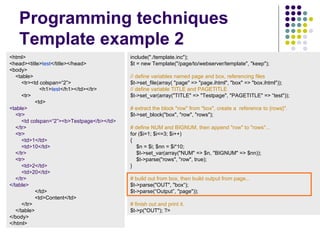
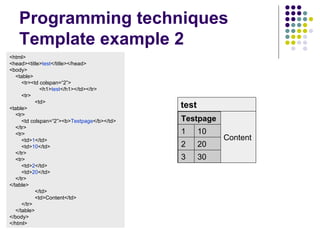
Programming techniques Template example 2 <html> <head><title> test </title></head> <body> <table> <tr><td colspan=“2”> <h1> test </h1></td></tr> <tr> <td> <table> <tr> <td colspan=“2”><b>Testpage</b></td> </tr> <tr> <td>1</td> <td>10</td> </tr> <tr> <td>2</td> <td>20</td> </tr> </table> </td> <td>Content</td> </tr> </table> </body> </html> include(&quot;./template.inc&quot;);  $t = new Template(&quot;/page/to/webserver/template&quot;, &quot;keep&quot;); //  define variables named page and box, referencing files   $t->set_file(array( &quot;page&quot; => &quot;page.ihtml&quot;, &quot;box&quot; => &quot;box.ihtml&quot;)); // define variable TITLE and PAGETITLE   $t->set_var(array(&quot;TITLE&quot; => &quot;Testpage&quot;, &quot;PAGETITLE&quot; => “ test &quot;));  # extract the block &quot;row&quot; from &quot;box&quot;, creat e  a  reference to {rows}&quot;.   $t->set_block(&quot;box&quot;, &quot;row&quot;, &quot;rows&quot;);  # define NUM and BIGNUM, then append &quot;row&quot; to &quot;rows&quot;...  for ($i=1; $i<=3; $i++)  {  $n = $i; $nn = $i*10;  $t->set_var(array(&quot;NUM&quot; => $n, &quot;BIGNUM&quot; => $nn));  $t->parse(&quot;rows&quot;, &quot;row&quot;, true);  } # build out from box, then build out put  from page...  $t->parse(&quot;OUT&quot;, &quot;box“ ); $t->parse(“Output” , &quot;page&quot;));  # finish out and print it.  $t->p(&quot;OUT&quot;); ?>
Programming techniques Template example 2 <html> <head><title> test </title></head> <body> <table> <tr><td colspan=“2”> <h1> test </h1></td></tr> <tr> <td> <table> <tr> <td colspan=“2”><b> Testpage </b></td> </tr> <tr> <td> 1 </td> <td> 10 </td> </tr> <tr> <td> 2 </td> <td> 20 </td> </tr> </table> </td> <td>Content</td> </tr> </table> </body> </html> Content test 30  3 20  2 10  1 Testpage
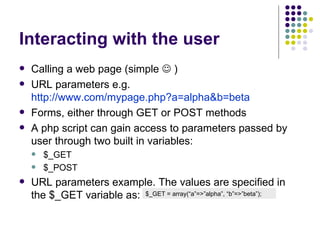
Interacting with the user Calling a web page (simple    ) URL parameters e.g. http://www.com/mypage.php?a=alpha&b=beta Forms, either through GET or POST methods A php script can gain access to parameters passed by user through two built in variables: $_GET $_POST URL parameters example. The values are specified in the $_GET variable as: $_GET = array(“a”=>”alpha”, “b”=>”beta”);
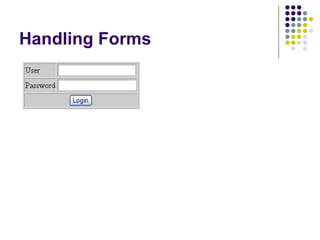
Handling Forms
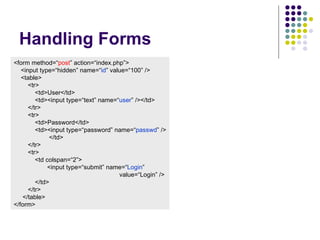
Handling Forms <form method=“ post ” action=“index.php”> <input type=“hidden” name=“ id ” value=“100” /> <table> <tr> <td>User</td> <td><input type=“text” name=“ user ” /></td> </tr> <tr> <td>Password</td> <td><input type=“password” name=“ passwd ” /> </td> </tr> <tr> <td colspan=“2”> <input type=“submit” name=“ Login ”  value=“Login” /> </td> </tr> </table> </form>
Handling Forms <form method=“ post ” action=“index.php”> <input type=“hidden” name=“ id ” value=“100” /> <table> <tr> <td>User</td> <td><input type=“text” name=“ user ” /></td> </tr> <tr> <td>Password</td> <td><input type=“password” name=“ passwd ” /> </td> </tr> <tr> <td colspan=“2”> <input type=“submit” name=“ Login ”  value=“Login” /> </td> </tr> </table> </form> $ok = false; if (array_key_exists(“submit”,  $_POST ) && ( $_POST [“submit”] == “Login”) ) { $ok = CheckLogin( $_POST [“id”], $_POST [“user”], $_POST [“passwd”]); } if ($ok) { include(“restrictedArea.html”); } else { include(“loginForm.html”); }
Handling Forms <form method=“ get ” action=“index.php”> <input type=“hidden” name=“ id ” value=“100” /> <table> <tr> <td>User</td> <td><input type=“text” name=“ user ” /></td> </tr> <tr> <td>Password</td> <td><input type=“password” name=“ passwd ” /> </td> </tr> <tr> <td colspan=“2”> <input type=“submit” name=“ Login ”  value=“Login” /> </td> </tr> </table> </form> $ok = false; if (array_key_exists(“submit”,  $_ GET ) && ( $_ GET [“submit”] == “Login”) ) { $ok = CheckLogin( $_GET [“id”], $_GET [“user”], $_GET [“passwd”]); } if ($ok) { include(“restrictedArea.html”); } else { include(“loginForm.html”); }
Handling Forms Protection from user input. Data received by a form should not be trusted. Functions that remove html code from source data htmlspecials ( $str ) : convert HTML special characters to HTML entities (e.g. &quot;). html_entity_decode ( $str ) : reverse, convert entities to HTML characters. striptags ( $str ) : remove HTML and PHP tags from a string. Validate input using regular expressions example: validate an e-mail address  $ret  =  ereg ( ‘^([a-z0-9_]|\\-|\\.)+@(([a-z0-9_]|\\-)+\\.)+[a-z]{2,4}$’ ,  $string );
Sessions HTTP communication is inherently stateless The way to handle state information is through cookies. PHP offers a built in mechanism for maintaining session information (hiding the cookie handling from the developer)
Sessions session_start() creates a session or resumes the current one being passed via a cookie. $_SESSION this array is used for assigning session variables or retrieving existing ones session_destroy() ends an existing session (e.g. when you logout).
Sessions <? // Login page session_start(); // Process the login form …………………… // Login is completed $_SESSION[‘user’] = $_POST[‘user’]; $_SESSION[‘passwd’] = $_POST[‘passwd’]; // Redirect to the private page header(&quot;Location:  ”. ” http:// www.server.com/nextpage.php” ); ?> <? // next page session_start(); // Check login user if (!array_key_exists(“user”, $_SESSION)) { // No user logged in echo “You need to login first”; exit(); } echo “Hello “. $_SESSION[“user”] .”!<br/>”; ?>
Sessions With sessions you can assign an arbitrary number of data to the $_SESSION variable. The data is stored on the server side and only a session id is passed through cookies to the web client. You can manage the timeout of sessions as you would with any cookie.
Authentication It is simple to implement authentication through sessions. The main advantage compared to HTTP authentication is that username and password are transmitted only once (login) and not in every request. Permissions are handled by your code and do not rely on directories. The general approach is to save the username and password in the session and check on every page that they are the correct ones. If not redirect to the login page.
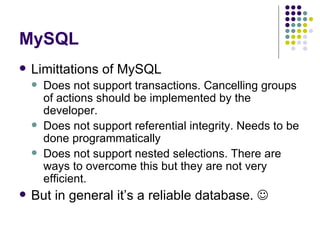
MySQL Limittations of MySQL Does not support transactions. Cancelling groups of actions should be implemented by the developer. Does not support referential integrity. Needs to be done programmatically Does not support nested selections. There are ways to overcome this but they are not very efficient. But in general it’s a reliable database.  
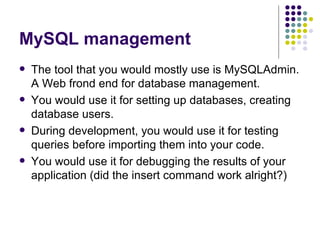
MySQL management The tool that you would mostly use is MySQLAdmin. A Web frond end for database management. You would use it for setting up databases, creating database users. During development, you would use it for testing queries before importing them into your code. You would use it for debugging the results of your application (did the insert command work alright?)
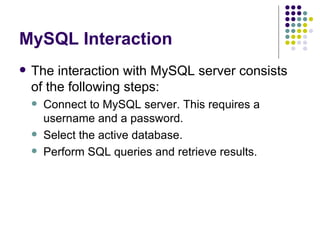
MySQL Interaction The interaction with MySQL server consists of the following steps: Connect to MySQL server. This requires a username and a password. Select the active database. Perform SQL queries and retrieve results.
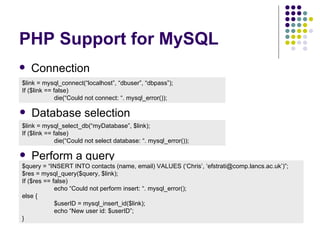
PHP Support for MySQL Connection $link = mysql_connect(“localhost”, “dbuser”, “dbpass”); If ($link == false) die(“Could not connect: “. mysql_error()); Database selection $link = mysql_select_db(“myDatabase”, $link); If ($link == false) die(“Could not select database: “. mysql_error()); Perform a query $query = “INSERT INTO contacts (name, email) VALUES (‘Chris’, ‘efstrati@comp.lancs.ac.uk’)”; $res = mysql_query($query, $link); If ($res == false) echo “Could not perform insert: “. mysql_error(); else { $userID = mysql_insert_id($link); echo “New user id: $userID”; }
MySQL retrieving results $query = “SELECT * FROM contacts”; $res = mysql_query($query, $link); while ($record = mysql_fetch_assoc($res)) { echo “Name: “.$record[‘name’].”, email: “.$record[‘email’].”<br/>”; } mysql_free_results($res); There are a number of ways for retrieving the results of a query. The most commonly used are mysql_fetch_assoc():  returns an associative array where the keys are the record field names. mysql_fetch_object():  returns a record as an object. There are object attributes for each record field.
MySQL & PHP:  Things to remember Usually you would get the data that you put in your database from the user. Make sure that the data will not break your SQL queries. mysql_real_escape_string(): a useful function for escaping characters before using a string in an SQL query.
Suggested reading Online Php Manual http://www.php.net/manual/en/index.php Online MySQL Manual http://dev.mysql.com/doc/ Web Application Development with PHP Tobias Ratschiller, Till Gerken New Riders Publishing

PHP

  • 1.
    PHP & MySQLChristos Efstratiou
  • 2.
    Architecture Web BrowserWeb Server Request Page Page with PHP code Read File PHP Interpreter Pass PHP page and server variables (GET attributes, Server settings, etc.) Generate HTML page Send HTML page MySQL Interact with Database
  • 3.
    PHP Syntax Ingeneral PHP code is embedded into web pages In most cases you will have pages that contain only PHP code Pages with PHP code should have the extension: .php, .php3, .php4 Examples: <? $name = “World” ; ?> <html> <body> <h1>Hello, <? echo $name ; ?> </h1> </body> </html> <? include ( “header.html” ); if ( strpos ( $_SERVER[ “HTTP_USER_AGENT” ] , “MSIE” ) !== FALSE ) { echo “You are using Internet explorer!”; } include ( “footer.html” ); ?>
  • 4.
    PHP Syntax -Variables PHP does not support explicit type definition. $foo  =   &quot;0&quot; ;     // $foo is string (ASCII 48) $foo  +=  2 ;     // $foo is now an integer (2) $foo  =  $foo  +  1.3 ;    // $foo is now a float (3.3) You can enforce a variable type by using type casting. $foo  =   1 0 ;     // $foo is  an integer $ bar   =   (boolean) $foo ;     //  $bar is boolean (true) Comparing values. $ x   =  0 ;     $ y   =   false ; if ( $ x == $ y ) //  this is true Comparing values and types. $ x   =  0 ;     $ y   =   false ; if ( $ x = = = $ y ) //  this is not true, different types
  • 5.
    PHP Syntax -Strings There are two main ways of specifying strings Using single quotes: text represented exactly as typed $ str   =   ‘This is an \n example’ ;     //  \n is not expanded to new line Using double quotes: expands variables and supports special characters $ val   =   5 ;   $ str   =   “The value is: $var \n” ;   //  The string is: “The value is: 5” with a new line at the end   Concatenation with a “dot” $ val   =   5 ;   $ str   =   ‘The ’ . ‘value is: ’ . $var . “\n” ;   Single characters in a string $ str{2} = ‘T’ ;   //  The third character of string
  • 6.
    PHP Syntax -Arrays PHP arrays are dynamic. Their size expands as needed. PHP supports associative arrays: Array indices can be of any type not just integers. Key types can be mixed in the same array. $arr[1] = ‘Test’ ;   // Using integers as keys $arr [ ‘first’ ] = ‘Test’ ; // Using strings as keys $arr = array( &quot;foo&quot;   =>   &quot;bar&quot; ,   12   =>   true ); $arr[5] = 10 ; // The array is now: (“foo”=> “bar”, 12=>true, 5=>10) Defining arrays Multidimensional arrays $arr = array( “first&quot;   =>   array( &quot;bar&quot; ,   ‘Test’ ), “ second&quot;   =>   array( 1   =>   true ,   2   =>   false ) ) ;
  • 7.
    PHP Syntax -Control Structures All the control structures you would find in C If (…) {…} elseif (…) {…} else {…} while(…) {…} for (…;…;…) {…} do {…} while (…) switch (...) { case …: …; case …: …; default: …; } foreach : used for traversing associative arrays $foo  =  array( “Nigel” => “nigel@comp.lancs.ac.uk” , “ Chris” => “efstrati@comp.lancs.ac.uk” , “ Rob” => “r.hooper@lancaster.ac.uk” , “ Oliver” => “stortz@comp.lancs.ac.uk” ); foreach ( $foo as $name => $email ) { echo “<p>Name: $name <br/>” ; echo “Email: $email </p>” ; }
  • 8.
    PHP Syntax -Functions Function definition <? function  foo ( $arg_1 ,  $arg_2 ,  /* ..., */  $arg_n ) {     echo  &quot;Example function.\n&quot; ;     return  $retval ; } ?> Global variables are only accessible if declared in a function <? $ g val = 5 ; // Global variable function  foo () { global $ g val ; // The function has now access to the global var (by reference)      echo  “ Gval: $ g val .\n&quot; ; } ?>
  • 9.
    Pointers & passby reference All value assignments in PHP are “by copy”, even when working with arrays or objects. There are no explicit pointer variables but you can assign variables by reference. $foo  =  'Bob' ;               // Assign the value 'Bob' to $foo $bar  = & $foo ;               // Reference $foo via $bar. $bar  =  &quot;My name is $bar&quot; ;   // Alter $bar... echo  $foo ;                  // $foo is altered too. Passing function parameters by reference and returning references function & add_some_extra (& $string ) { $string .= “ some more &quot; ;  return $string ; } $foo =& add_some_extra ( $str );
  • 10.
    Classes Support forobject orientation in PHP has improved with version 4 and is much more substantial in version 5. class  Cart  {     var  $items ;   // Items in our shopping cart     // Add $num articles of $artnr to the cart     function  add_item ( $artnr ,  $num ) {          $this -> items [ $artnr ] +=  $num ;     } } $ myC art  = new  Cart ;  $ myCart -> myVar = “ test &quot; ;   //  This object has a new attribute not defined by the class Inheritance with the “extends” keyword class  Named_Cart  extends  Cart  { ………     }
  • 11.
    Serialization Serialization issupported through functions “serialize” and “unserialize”    include( &quot;classa.inc&quot; );       $a  = new  A ;    $s  =  serialize ( $a );    // store $s somewhere    $fp  =  fopen ( &quot;store&quot; ,  &quot;w&quot; );    fwrite ( $fp ,  $s );    fclose ( $fp ); include( &quot;classa.inc&quot; );    $s  =  implode ( &quot;&quot; ,  file ( &quot;store&quot; ));    $a  =  unserialize ( $s );    // now use the object.      $a -> show_one ();
  • 12.
    OO support inVersion 5 PHP v5 has an extended support for OO. Supports variable and function scopes using “ public ”, “ protected ”, “ private ” keywords. Supports static (class based) methods and variables. Supports abstract classes, similar to virtual classes in C++. Supports the definition of interfaces. Includes a complete Reflection API Includes an exception handling mechanism From more info check the online manual: http://www.php.net/manual/en/
  • 13.
    Programming techniques Separatecode from GUI The idea is to have separate HTML/CSS files to handle the user interface and php files to handle the application’s operation. Use of templates (template support is provided by PhpLib). Nested templates can be used to break the UI into blocks. E.g. one template for the main page, a nested template for a content block within the main page.
  • 14.
    Programming techniques Templateexample <html> <head><title> {PAGETITLE} </title></head> <body> <table> <tr><td colspan=“2”> <h1> {PAGETITLE} </h1></td></tr> <tr> <td> {OUT} </td> <td>Content</td> </tr> </table> </body> </html> include(“template.inc”) $tpl = new Template(“mytemplates/”); // Create template object $tpl->set_file(“MainPage”, “mainPage.html”); // Load the template file $tpl->set_var(“PAGETITLE”, “My Page”); // Assign values to variables $tpl->set_var(“OUT”, “Test content”); $tpl->parse(“Output”, “MainPage”); // Parse page into variable Output $tpl->p(“Output”); // Print the Output var mainPage.html index.php
  • 15.
    Programming techniques Templateexample <html> <head><title> My Page </title></head> <body> <table> <tr><td colspan=“2”> <h1> My Page </h1></td></tr> <tr> <td> Test content </td> <td>Content</td> </tr> </table> </body> </html> include(“template.inc”) $tpl = new Template(“mytemplates/”); // Create template object $tpl->set_file(“MainPage”, “mainPage.html”); // Load the template file $tpl->set_var(“PAGETITLE”, “My Page”); // Assign values to variables $tpl->set_var(“OUT”, “Test content”); $tpl->parse(“Output”, “MainPage”); // Parse page into variable Output $tpl->p(“Output”); // Print the Output var mainPage.html index.php
  • 16.
    Programming techniques Templateexample 2 <html> <head><title> {PAGETITLE} </title></head> <body> <table> <tr><td colspan=“2”> <h1> {PAGETITLE} </h1></td></tr> <tr> <td> {OUT} </td> <td>Content</td> </tr> </table> </body> </html> <!– start box --> <table> <tr> <td colspan=“2”><b> {TITLE} </b></td> </tr> <!– BEGIN row --> <tr> <td> {NUM} </td> <td> {BIGNUM} </td> </tr> <!– END row --> </table> <!– end box --> include(&quot;./template.inc&quot;); $t = new Template(&quot;/page/to/webserver/template&quot;, &quot;keep&quot;); // define variables named page and box, referencing files $t->set_file(array( &quot;page&quot; => &quot;page.ihtml&quot;, &quot;box&quot; => &quot;box.ihtml&quot;)); // define variable TITLE and PAGETITLE $t->set_var(array(&quot;TITLE&quot; => &quot;Testpage&quot;, &quot;PAGETITLE&quot; => “ test &quot;)); # extract the block &quot;row&quot; from &quot;box&quot;, creat e a reference to {rows}&quot;. $t->set_block(&quot;box&quot;, &quot;row&quot;, &quot;rows&quot;); # define NUM and BIGNUM, then append &quot;row&quot; to &quot;rows&quot;... for ($i=1; $i<=3; $i++) { $n = $i; $nn = $i*10; $t->set_var(array(&quot;NUM&quot; => $n, &quot;BIGNUM&quot; => $nn)); $t->parse(&quot;rows&quot;, &quot;row&quot;, true); } # build out from box, then build out put from page... $t->parse(&quot;OUT&quot;, &quot;box“ ); $t->parse(“Output” , &quot;page&quot;)); # finish out and print it. $t->p(&quot;OUT&quot;); ?>
  • 17.
    Programming techniques Templateexample 2 <html> <head><title> test </title></head> <body> <table> <tr><td colspan=“2”> <h1> test </h1></td></tr> <tr> <td> {OUT} </td> <td>Content</td> </tr> </table> </body> </html> <!– start box --> <table> <tr> <td colspan=“2”><b> Testpage </b></td> </tr> <!– BEGIN row --> <tr> <td> {NUM} </td> <td> {BIGNUM} </td> </tr> <!– END row --> </table> <!– end box --> include(&quot;./template.inc&quot;); $t = new Template(&quot;/page/to/webserver/template&quot;, &quot;keep&quot;); // define variables named page and box, referencing files $t->set_file(array( &quot;page&quot; => &quot;page.ihtml&quot;, &quot;box&quot; => &quot;box.ihtml&quot;)); // define variable TITLE and PAGETITLE $t->set_var(array(&quot;TITLE&quot; => &quot;Testpage&quot;, &quot;PAGETITLE&quot; => “ test &quot;)); # extract the block &quot;row&quot; from &quot;box&quot;, creat e a reference to {rows}&quot;. $t->set_block(&quot;box&quot;, &quot;row&quot;, &quot;rows&quot;); # define NUM and BIGNUM, then append &quot;row&quot; to &quot;rows&quot;... for ($i=1; $i<=3; $i++) { $n = $i; $nn = $i*10; $t->set_var(array(&quot;NUM&quot; => $n, &quot;BIGNUM&quot; => $nn)); $t->parse(&quot;rows&quot;, &quot;row&quot;, true); } # build out from box, then build out put from page... $t->parse(&quot;OUT&quot;, &quot;box“ ); $t->parse(“Output” , &quot;page&quot;)); # finish out and print it. $t->p(&quot;OUT&quot;); ?>
  • 18.
    Programming techniques Templateexample 2 <html> <head><title> test </title></head> <body> <table> <tr><td colspan=“2”> <h1> test </h1></td></tr> <tr> <td> {OUT} </td> <td>Content</td> </tr> </table> </body> </html> <!– start box --> <table> <tr> <td colspan=“2”><b> Testpage </b></td> </tr> {rows} </table> <!– end box --> include(&quot;./template.inc&quot;); $t = new Template(&quot;/page/to/webserver/template&quot;, &quot;keep&quot;); // define variables named page and box, referencing files $t->set_file(array( &quot;page&quot; => &quot;page.ihtml&quot;, &quot;box&quot; => &quot;box.ihtml&quot;)); // define variable TITLE and PAGETITLE $t->set_var(array(&quot;TITLE&quot; => &quot;Testpage&quot;, &quot;PAGETITLE&quot; => “ test &quot;)); # extract the block &quot;row&quot; from &quot;box&quot;, creat e a reference to {rows}&quot;. $t->set_block(&quot;box&quot;, &quot;row&quot;, &quot;rows&quot;); # define NUM and BIGNUM, then append &quot;row&quot; to &quot;rows&quot;... for ($i=1; $i<=3; $i++) { $n = $i; $nn = $i*10; $t->set_var(array(&quot;NUM&quot; => $n, &quot;BIGNUM&quot; => $nn)); $t->parse(&quot;rows&quot;, &quot;row&quot;, true); } # build out from box, then build out put from page... $t->parse(&quot;OUT&quot;, &quot;box“ ); $t->parse(“Output” , &quot;page&quot;)); # finish out and print it. $t->p(&quot;OUT&quot;); ?> <!– Box row --> <tr> <td> {NUM} </td> <td> {BIGNUM} </td> </tr>
  • 19.
    Programming techniques Templateexample 2 <html> <head><title> test </title></head> <body> <table> <tr><td colspan=“2”> <h1> test </h1></td></tr> <tr> <td> {OUT} </td> <td>Content</td> </tr> </table> </body> </html> <!– start box --> <table> <tr> <td colspan=“2”><b> Testpage </b></td> </tr> {rows} </table> <!– end box --> include(&quot;./template.inc&quot;); $t = new Template(&quot;/page/to/webserver/template&quot;, &quot;keep&quot;); // define variables named page and box, referencing files $t->set_file(array( &quot;page&quot; => &quot;page.ihtml&quot;, &quot;box&quot; => &quot;box.ihtml&quot;)); // define variable TITLE and PAGETITLE $t->set_var(array(&quot;TITLE&quot; => &quot;Testpage&quot;, &quot;PAGETITLE&quot; => “ test &quot;)); # extract the block &quot;row&quot; from &quot;box&quot;, creat e a reference to {rows}&quot;. $t->set_block(&quot;box&quot;, &quot;row&quot;, &quot;rows&quot;); # define NUM and BIGNUM, then append &quot;row&quot; to &quot;rows&quot;... for ($i=1; $i<=3; $i++) { $n = $i; $nn = $i*10; $t->set_var(array(&quot;NUM&quot; => $n, &quot;BIGNUM&quot; => $nn)); $t->parse(&quot;rows&quot;, &quot;row&quot;, true); } # build out from box, then build out put from page... $t->parse(&quot;OUT&quot;, &quot;box“ ); $t->parse(“Output” , &quot;page&quot;)); # finish out and print it. $t->p(&quot;OUT&quot;); ?> <tr> <td> 1 </td> <td> 10 </td> </tr>
  • 20.
    Programming techniques Templateexample 2 <html> <head><title> test </title></head> <body> <table> <tr><td colspan=“2”> <h1> test </h1></td></tr> <tr> <td> {OUT} </td> <td>Content</td> </tr> </table> </body> </html> <!– start box --> <table> <tr> <td colspan=“2”><b> Testpage </b></td> </tr> {rows} </table> <!– end box --> include(&quot;./template.inc&quot;); $t = new Template(&quot;/page/to/webserver/template&quot;, &quot;keep&quot;); // define variables named page and box, referencing files $t->set_file(array( &quot;page&quot; => &quot;page.ihtml&quot;, &quot;box&quot; => &quot;box.ihtml&quot;)); // define variable TITLE and PAGETITLE $t->set_var(array(&quot;TITLE&quot; => &quot;Testpage&quot;, &quot;PAGETITLE&quot; => “ test &quot;)); # extract the block &quot;row&quot; from &quot;box&quot;, creat e a reference to {rows}&quot;. $t->set_block(&quot;box&quot;, &quot;row&quot;, &quot;rows&quot;); # define NUM and BIGNUM, then append &quot;row&quot; to &quot;rows&quot;... for ($i=1; $i<=3; $i++) { $n = $i; $nn = $i*10; $t->set_var(array(&quot;NUM&quot; => $n, &quot;BIGNUM&quot; => $nn)); $t->parse(&quot;rows&quot;, &quot;row&quot;, true); } # build out from box, then build out put from page... $t->parse(&quot;OUT&quot;, &quot;box“ ); $t->parse(“Output” , &quot;page&quot;)); # finish out and print it. $t->p(&quot;OUT&quot;); ?> <tr> <td> 1 </td> <td> 10 </td> </tr> <tr> <td> 2 </td> <td> 20 </td> </tr>
  • 21.
    Programming techniques Templateexample 2 <html> <head><title> test </title></head> <body> <table> <tr><td colspan=“2”> <h1> test </h1></td></tr> <tr> <td> {OUT} </td> <td>Content</td> </tr> </table> </body> </html> <!– start box --> <table> <tr> <td colspan=“2”><b> Testpage </b></td> </tr> <tr> <td> 1 </td> <td> 10 </td> </tr> <tr> <td> 2 </td> <td> 20 </td> </tr> </table> <!– end box --> include(&quot;./template.inc&quot;); $t = new Template(&quot;/page/to/webserver/template&quot;, &quot;keep&quot;); // define variables named page and box, referencing files $t->set_file(array( &quot;page&quot; => &quot;page.ihtml&quot;, &quot;box&quot; => &quot;box.ihtml&quot;)); // define variable TITLE and PAGETITLE $t->set_var(array(&quot;TITLE&quot; => &quot;Testpage&quot;, &quot;PAGETITLE&quot; => “ test &quot;)); # extract the block &quot;row&quot; from &quot;box&quot;, creat e a reference to {rows}&quot;. $t->set_block(&quot;box&quot;, &quot;row&quot;, &quot;rows&quot;); # define NUM and BIGNUM, then append &quot;row&quot; to &quot;rows&quot;... for ($i=1; $i<=3; $i++) { $n = $i; $nn = $i*10; $t->set_var(array(&quot;NUM&quot; => $n, &quot;BIGNUM&quot; => $nn)); $t->parse(&quot;rows&quot;, &quot;row&quot;, true); } # build out from box, then build out put from page... $t->parse(&quot;OUT&quot;, &quot;box“ ); $t->parse(“Output” , &quot;page&quot;)); # finish out and print it. $t->p(&quot;O utput &quot;); ?>
  • 22.
    Programming techniques Templateexample 2 <html> <head><title> test </title></head> <body> <table> <tr><td colspan=“2”> <h1> test </h1></td></tr> <tr> <td> <table> <tr> <td colspan=“2”><b>Testpage</b></td> </tr> <tr> <td>1</td> <td>10</td> </tr> <tr> <td>2</td> <td>20</td> </tr> </table> </td> <td>Content</td> </tr> </table> </body> </html> include(&quot;./template.inc&quot;); $t = new Template(&quot;/page/to/webserver/template&quot;, &quot;keep&quot;); // define variables named page and box, referencing files $t->set_file(array( &quot;page&quot; => &quot;page.ihtml&quot;, &quot;box&quot; => &quot;box.ihtml&quot;)); // define variable TITLE and PAGETITLE $t->set_var(array(&quot;TITLE&quot; => &quot;Testpage&quot;, &quot;PAGETITLE&quot; => “ test &quot;)); # extract the block &quot;row&quot; from &quot;box&quot;, creat e a reference to {rows}&quot;. $t->set_block(&quot;box&quot;, &quot;row&quot;, &quot;rows&quot;); # define NUM and BIGNUM, then append &quot;row&quot; to &quot;rows&quot;... for ($i=1; $i<=3; $i++) { $n = $i; $nn = $i*10; $t->set_var(array(&quot;NUM&quot; => $n, &quot;BIGNUM&quot; => $nn)); $t->parse(&quot;rows&quot;, &quot;row&quot;, true); } # build out from box, then build out put from page... $t->parse(&quot;OUT&quot;, &quot;box“ ); $t->parse(“Output” , &quot;page&quot;)); # finish out and print it. $t->p(&quot;OUT&quot;); ?>
  • 23.
    Programming techniques Templateexample 2 <html> <head><title> test </title></head> <body> <table> <tr><td colspan=“2”> <h1> test </h1></td></tr> <tr> <td> <table> <tr> <td colspan=“2”><b> Testpage </b></td> </tr> <tr> <td> 1 </td> <td> 10 </td> </tr> <tr> <td> 2 </td> <td> 20 </td> </tr> </table> </td> <td>Content</td> </tr> </table> </body> </html> Content test 30 3 20 2 10 1 Testpage
  • 24.
    Interacting with theuser Calling a web page (simple  ) URL parameters e.g. http://www.com/mypage.php?a=alpha&b=beta Forms, either through GET or POST methods A php script can gain access to parameters passed by user through two built in variables: $_GET $_POST URL parameters example. The values are specified in the $_GET variable as: $_GET = array(“a”=>”alpha”, “b”=>”beta”);
  • 25.
  • 26.
    Handling Forms <formmethod=“ post ” action=“index.php”> <input type=“hidden” name=“ id ” value=“100” /> <table> <tr> <td>User</td> <td><input type=“text” name=“ user ” /></td> </tr> <tr> <td>Password</td> <td><input type=“password” name=“ passwd ” /> </td> </tr> <tr> <td colspan=“2”> <input type=“submit” name=“ Login ” value=“Login” /> </td> </tr> </table> </form>
  • 27.
    Handling Forms <formmethod=“ post ” action=“index.php”> <input type=“hidden” name=“ id ” value=“100” /> <table> <tr> <td>User</td> <td><input type=“text” name=“ user ” /></td> </tr> <tr> <td>Password</td> <td><input type=“password” name=“ passwd ” /> </td> </tr> <tr> <td colspan=“2”> <input type=“submit” name=“ Login ” value=“Login” /> </td> </tr> </table> </form> $ok = false; if (array_key_exists(“submit”, $_POST ) && ( $_POST [“submit”] == “Login”) ) { $ok = CheckLogin( $_POST [“id”], $_POST [“user”], $_POST [“passwd”]); } if ($ok) { include(“restrictedArea.html”); } else { include(“loginForm.html”); }
  • 28.
    Handling Forms <formmethod=“ get ” action=“index.php”> <input type=“hidden” name=“ id ” value=“100” /> <table> <tr> <td>User</td> <td><input type=“text” name=“ user ” /></td> </tr> <tr> <td>Password</td> <td><input type=“password” name=“ passwd ” /> </td> </tr> <tr> <td colspan=“2”> <input type=“submit” name=“ Login ” value=“Login” /> </td> </tr> </table> </form> $ok = false; if (array_key_exists(“submit”, $_ GET ) && ( $_ GET [“submit”] == “Login”) ) { $ok = CheckLogin( $_GET [“id”], $_GET [“user”], $_GET [“passwd”]); } if ($ok) { include(“restrictedArea.html”); } else { include(“loginForm.html”); }
  • 29.
    Handling Forms Protectionfrom user input. Data received by a form should not be trusted. Functions that remove html code from source data htmlspecials ( $str ) : convert HTML special characters to HTML entities (e.g. &quot;). html_entity_decode ( $str ) : reverse, convert entities to HTML characters. striptags ( $str ) : remove HTML and PHP tags from a string. Validate input using regular expressions example: validate an e-mail address $ret = ereg ( ‘^([a-z0-9_]|\\-|\\.)+@(([a-z0-9_]|\\-)+\\.)+[a-z]{2,4}$’ , $string );
  • 30.
    Sessions HTTP communicationis inherently stateless The way to handle state information is through cookies. PHP offers a built in mechanism for maintaining session information (hiding the cookie handling from the developer)
  • 31.
    Sessions session_start() createsa session or resumes the current one being passed via a cookie. $_SESSION this array is used for assigning session variables or retrieving existing ones session_destroy() ends an existing session (e.g. when you logout).
  • 32.
    Sessions <? //Login page session_start(); // Process the login form …………………… // Login is completed $_SESSION[‘user’] = $_POST[‘user’]; $_SESSION[‘passwd’] = $_POST[‘passwd’]; // Redirect to the private page header(&quot;Location:  ”. ” http:// www.server.com/nextpage.php” ); ?> <? // next page session_start(); // Check login user if (!array_key_exists(“user”, $_SESSION)) { // No user logged in echo “You need to login first”; exit(); } echo “Hello “. $_SESSION[“user”] .”!<br/>”; ?>
  • 33.
    Sessions With sessionsyou can assign an arbitrary number of data to the $_SESSION variable. The data is stored on the server side and only a session id is passed through cookies to the web client. You can manage the timeout of sessions as you would with any cookie.
  • 34.
    Authentication It issimple to implement authentication through sessions. The main advantage compared to HTTP authentication is that username and password are transmitted only once (login) and not in every request. Permissions are handled by your code and do not rely on directories. The general approach is to save the username and password in the session and check on every page that they are the correct ones. If not redirect to the login page.
  • 35.
    MySQL Limittations ofMySQL Does not support transactions. Cancelling groups of actions should be implemented by the developer. Does not support referential integrity. Needs to be done programmatically Does not support nested selections. There are ways to overcome this but they are not very efficient. But in general it’s a reliable database. 
  • 36.
    MySQL management Thetool that you would mostly use is MySQLAdmin. A Web frond end for database management. You would use it for setting up databases, creating database users. During development, you would use it for testing queries before importing them into your code. You would use it for debugging the results of your application (did the insert command work alright?)
  • 37.
    MySQL Interaction Theinteraction with MySQL server consists of the following steps: Connect to MySQL server. This requires a username and a password. Select the active database. Perform SQL queries and retrieve results.
  • 38.
    PHP Support forMySQL Connection $link = mysql_connect(“localhost”, “dbuser”, “dbpass”); If ($link == false) die(“Could not connect: “. mysql_error()); Database selection $link = mysql_select_db(“myDatabase”, $link); If ($link == false) die(“Could not select database: “. mysql_error()); Perform a query $query = “INSERT INTO contacts (name, email) VALUES (‘Chris’, ‘efstrati@comp.lancs.ac.uk’)”; $res = mysql_query($query, $link); If ($res == false) echo “Could not perform insert: “. mysql_error(); else { $userID = mysql_insert_id($link); echo “New user id: $userID”; }
  • 39.
    MySQL retrieving results$query = “SELECT * FROM contacts”; $res = mysql_query($query, $link); while ($record = mysql_fetch_assoc($res)) { echo “Name: “.$record[‘name’].”, email: “.$record[‘email’].”<br/>”; } mysql_free_results($res); There are a number of ways for retrieving the results of a query. The most commonly used are mysql_fetch_assoc(): returns an associative array where the keys are the record field names. mysql_fetch_object(): returns a record as an object. There are object attributes for each record field.
  • 40.
    MySQL & PHP: Things to remember Usually you would get the data that you put in your database from the user. Make sure that the data will not break your SQL queries. mysql_real_escape_string(): a useful function for escaping characters before using a string in an SQL query.
  • 41.
    Suggested reading OnlinePhp Manual http://www.php.net/manual/en/index.php Online MySQL Manual http://dev.mysql.com/doc/ Web Application Development with PHP Tobias Ratschiller, Till Gerken New Riders Publishing