Andreas Martin - Page 1
Master of Science in Business Information Systems FHNW
Pre-Master Information Systems
4. Business Logic Layer
Andreas Martin
4. Business Logic Layer
http://www.flickr.com/photos/dirk_hofmann/4200450207
Andreas Martin - Page 2
Business Logic Layer
 Enterprise JavaBeans
 Hands-on:
 Hands-on 3: ENTERPRISE JAVA BEANS I
 Hands-on 4: ENTERPRISE JAVA BEANS II
4. Business Logic Layer
The Latte Macchiato «Layering» Principle
http://www.flickr.com/photos/tf28/4367660424
Presentation Layer
Goal: Display of information, processing /
forwarding of user interactions.
Technologies: JavaServer Faces (JSF), JavaServer
Pages (JSP), Servlets, etc.
Business (Logic) Layer
Goal: Reproduction of actions or «verbs» of the
application (buy a book, print an order, deliver a
book, etc.).
Technologies: Enterprise Java Beans (EJBs)
Persistence Layer
Goal: Reproduction of database attributes,
information or «nouns» in object / class attributes
(Object-Relational Mapping, ORM).
Technologies: Java Persistence API (JPA)
Enterprise JavaBeans
http://www.flickr.com/photos/jcolivera/2950430514
Andreas Martin - Page 5
From the NOUNS to the VERBS…
 Previously we used the NOUNS on persistence layer, like
Books, Customers, Persons, etc…
 …now we are considering the VERBS, like create a book,
deliver a book, buy a book, etc.
 Now it becomes obvious why we talk about Enterprise Java
Beans…
 …because we are going to implement the business logic.
4. Business Logic Layer
Andreas Martin - Page 6
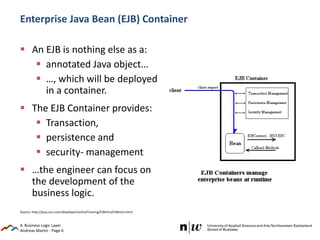
Enterprise Java Bean (EJB) Container
 An EJB is nothing else as a:
 annotated Java object…
 …, which will be deployed
in a container.
 The EJB Container provides:
 Transaction,
 persistence and
 security- management
 …the engineer can focus on
the development of the
business logic.
4. Business Logic Layer
Source: http://java.sun.com/developer/onlineTraining/EJBIntro/EJBIntro.html
Andreas Martin - Page 7
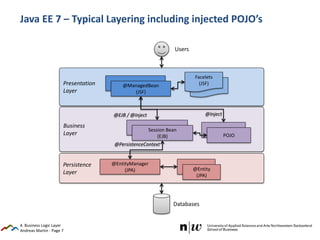
Business
Layer
Java EE 7 – Typical Layering including injected POJO’s
4. Business Logic Layer
Persistence
Layer
@EntityManager
(JPA)
(JPA)@Entity
(JPA)
Session Bean
(EJB)
@PersistenceContext
Presentation
Layer
Facelets(JSF)@ManagedBean
(JSF)
Facelets
(JSF)
Users
Databases
@EJB / @Inject
POJO
@Inject
Andreas Martin - Page 8
Annotations of an EJB
 @Stateless: A «Stateless Bean» does not have a state between
method calls from outside (e.g. a client) – it does not held
data in-memory.
 @Stateful: A «Stateful Bean» does have a state between
method calls e.g. from a client.
 @Singleton: A «Singleton Bean» (or Single Session Bean) exists
only once as object.
4. Business Logic Layer
Andreas Martin - Page 9
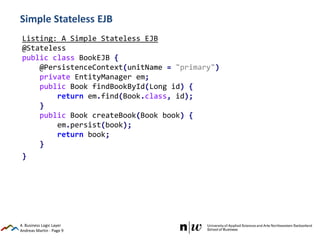
Simple Stateless EJB
4. Business Logic Layer
Listing: A Simple Stateless EJB
@Stateless
public class BookEJB {
@PersistenceContext(unitName = "primary")
private EntityManager em;
public Book findBookById(Long id) {
return em.find(Book.class, id);
}
public Book createBook(Book book) {
em.persist(book);
return book;
}
}
Andreas Martin - Page 10
@Startup and @Singleton Style
Dirty Java EE Testing
4. Business Logic Layer
Andreas Martin - Page 11
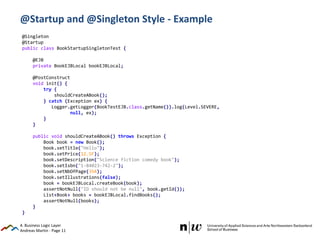
@Startup and @Singleton Style - Example
4. Business Logic Layer
@Singleton
@Startup
public class BookStartupSingletonTest {
@EJB
private BookEJBLocal bookEJBLocal;
@PostConstruct
void init() {
try {
shouldCreateABook();
} catch (Exception ex) {
Logger.getLogger(BookTestEJB.class.getName()).log(Level.SEVERE,
null, ex);
}
}
public void shouldCreateABook() throws Exception {
Book book = new Book();
book.setTitle("Hello");
book.setPrice(12.5F);
book.setDescription("Science fiction comedy book");
book.setIsbn("1-84023-742-2");
book.setNbOfPage(354);
book.setIllustrations(false);
book = bookEJBLocal.createBook(book);
assertNotNull("ID should not be null", book.getId());
List<Book> books = bookEJBLocal.findBooks();
assertNotNull(books);
}
}
Andreas Martin - Page 12
Hands-on 3
ENTERPRISE JAVA BEANS I
4. Business Logic Layer
Based on: Goncalves, 2010: Beginning Java™ EE 6 Platform with GlassFish™ 3
Andreas Martin - Page 13
Database Connection
…will be used for the next hands-on’s
 Modify the MySQL_premscis-ds.xml file:
 When using a Web Project in Eclipse, it is possible to deploy a datasource using a JBoss
datasource file (…-ds.xml)
 This file must be placed under:
Project
+---srcmainwebappWEB-INF
¦ faces-config.xml
¦ jboss-web.xml
¦ MySQL_premscis-ds.xml
 Choose another student ‘number’ (DatabaseName) to avoid overwriting.
4. Business Logic Layer
<?xml version="1.0" encoding="UTF-8"?>
<datasources xmlns="http://www.jboss.org/ironjacamar/schema">
<datasource jta="true" jndi-name="java:jboss/datasources/MySQL_premscis" enabled="true"
use-java-context="true" pool-name="MySQL_premscis">
<connection-url>jdbc:mysql://mature.iwi.wirtschaft.fhnw.ch:80/premscis</connection-url>
<driver>mysql-connector-java-5.1.32-bin.jarcom.mysql.jdbc.Driver_5_1</driver>
<pool></pool>
<security>
<user-name>premscis</user-name>
<password>premscis</password>
</security>
</datasource>
</datasources>
Andreas Martin - Page 14
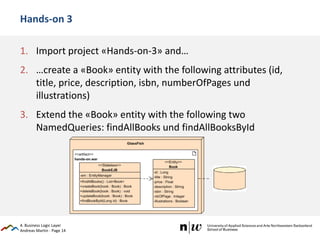
Hands-on 3
1. Import project «Hands-on-3» and…
2. …create a «Book» entity with the following attributes (id,
title, price, description, isbn, numberOfPages und
illustrations)
3. Extend the «Book» entity with the following two
NamedQueries: findAllBooks und findAllBooksById
4. Business Logic Layer
Andreas Martin - Page 15
Hands-on 3
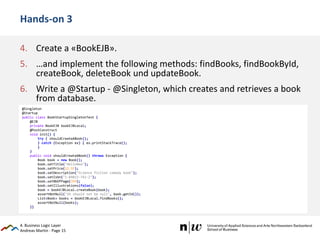
4. Create a «BookEJB».
5. …and implement the following methods: findBooks, findBookById,
createBook, deleteBook und updateBook.
6. Write a @Startup - @Singleton, which creates and retrieves a book
from database.
4. Business Logic Layer
@Singleton
@Startup
public class BookStartupSingletonTest {
@EJB
private BookEJB bookEJBLocal;
@PostConstruct
void init() {
try { shouldCreateABook();
} catch (Exception ex) { ex.printStackTrace();
}
}
public void shouldCreateABook() throws Exception {
Book book = new Book();
book.setTitle("HelloNew");
book.setPrice(12.5F);
book.setDescription("Science fiction comedy book");
book.setIsbn("1-84023-742-2");
book.setNbOfPage(354);
book.setIllustrations(false);
book = bookEJBLocal.createBook(book);
assertNotNull("ID should not be null", book.getId());
List<Book> books = bookEJBLocal.findBooks();
assertNotNull(books);
}}
Andreas Martin - Page 16
Hands-on 4
ENTERPRISE JAVA BEANS II
4. Business Logic Layer
Andreas Martin - Page 17
Book EJBCustomer EJB
Business cases:
• Create a customer including address
• …CRUD…
Book Lending EJB
Hands-on 4
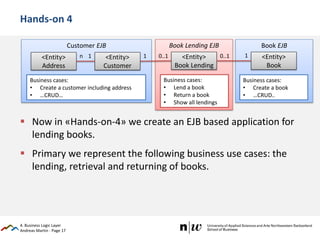
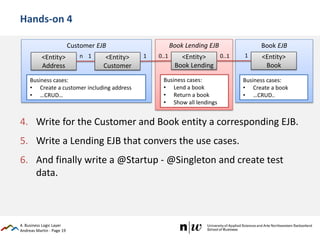
 Now in «Hands-on-4» we create an EJB based application for
lending books.
 Primary we represent the following business use cases: the
lending, retrieval and returning of books.
4. Business Logic Layer
<Entity>
Address
<Entity>
Customer
<Entity>
Book Lending
<Entity>
Book
n 1 0..1 0..1 1
Business cases:
• Lend a book
• Return a book
• Show all lendings
Business cases:
• Create a book
• …CRUD..
1
Andreas Martin - Page 18
Hands-on 4
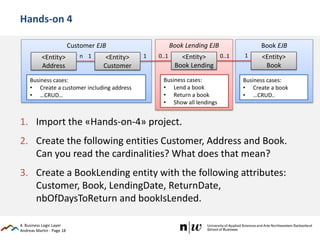
1. Import the «Hands-on-4» project.
2. Create the following entities Customer, Address and Book.
Can you read the cardinalities? What does that mean?
3. Create a BookLending entity with the following attributes:
Customer, Book, LendingDate, ReturnDate,
nbOfDaysToReturn and bookIsLended.
4. Business Logic Layer
Book EJBCustomer EJB
Business cases:
• Create a customer including address
• …CRUD…
Book Lending EJB
<Entity>
Address
<Entity>
Customer
<Entity>
Book Lending
<Entity>
Book
n 1 0..1 0..1 1
Business cases:
• Lend a book
• Return a book
• Show all lendings
Business cases:
• Create a book
• …CRUD..
1
Andreas Martin - Page 19
Hands-on 4
4. Write for the Customer and Book entity a corresponding EJB.
5. Write a Lending EJB that convers the use cases.
6. And finally write a @Startup - @Singleton and create test
data.
4. Business Logic Layer
Book EJBCustomer EJB
Business cases:
• Create a customer including address
• …CRUD…
Book Lending EJB
<Entity>
Address
<Entity>
Customer
<Entity>
Book Lending
<Entity>
Book
n 1 0..1 0..1 1
Business cases:
• Lend a book
• Return a book
• Show all lendings
Business cases:
• Create a book
• …CRUD..
1
Andreas Martin - Page 20
Hands-on 4
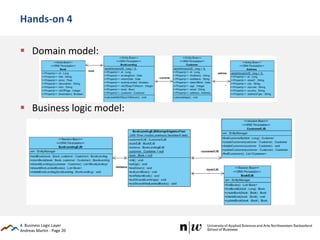
 Domain model:
 Business logic model:
4. Business Logic Layer

2014 Pre-MSc-IS-4 Business Logic Layer

  • 1.
    Andreas Martin -Page 1 Master of Science in Business Information Systems FHNW Pre-Master Information Systems 4. Business Logic Layer Andreas Martin 4. Business Logic Layer http://www.flickr.com/photos/dirk_hofmann/4200450207
  • 2.
    Andreas Martin -Page 2 Business Logic Layer  Enterprise JavaBeans  Hands-on:  Hands-on 3: ENTERPRISE JAVA BEANS I  Hands-on 4: ENTERPRISE JAVA BEANS II 4. Business Logic Layer
  • 3.
    The Latte Macchiato«Layering» Principle http://www.flickr.com/photos/tf28/4367660424 Presentation Layer Goal: Display of information, processing / forwarding of user interactions. Technologies: JavaServer Faces (JSF), JavaServer Pages (JSP), Servlets, etc. Business (Logic) Layer Goal: Reproduction of actions or «verbs» of the application (buy a book, print an order, deliver a book, etc.). Technologies: Enterprise Java Beans (EJBs) Persistence Layer Goal: Reproduction of database attributes, information or «nouns» in object / class attributes (Object-Relational Mapping, ORM). Technologies: Java Persistence API (JPA)
  • 4.
  • 5.
    Andreas Martin -Page 5 From the NOUNS to the VERBS…  Previously we used the NOUNS on persistence layer, like Books, Customers, Persons, etc…  …now we are considering the VERBS, like create a book, deliver a book, buy a book, etc.  Now it becomes obvious why we talk about Enterprise Java Beans…  …because we are going to implement the business logic. 4. Business Logic Layer
  • 6.
    Andreas Martin -Page 6 Enterprise Java Bean (EJB) Container  An EJB is nothing else as a:  annotated Java object…  …, which will be deployed in a container.  The EJB Container provides:  Transaction,  persistence and  security- management  …the engineer can focus on the development of the business logic. 4. Business Logic Layer Source: http://java.sun.com/developer/onlineTraining/EJBIntro/EJBIntro.html
  • 7.
    Andreas Martin -Page 7 Business Layer Java EE 7 – Typical Layering including injected POJO’s 4. Business Logic Layer Persistence Layer @EntityManager (JPA) (JPA)@Entity (JPA) Session Bean (EJB) @PersistenceContext Presentation Layer Facelets(JSF)@ManagedBean (JSF) Facelets (JSF) Users Databases @EJB / @Inject POJO @Inject
  • 8.
    Andreas Martin -Page 8 Annotations of an EJB  @Stateless: A «Stateless Bean» does not have a state between method calls from outside (e.g. a client) – it does not held data in-memory.  @Stateful: A «Stateful Bean» does have a state between method calls e.g. from a client.  @Singleton: A «Singleton Bean» (or Single Session Bean) exists only once as object. 4. Business Logic Layer
  • 9.
    Andreas Martin -Page 9 Simple Stateless EJB 4. Business Logic Layer Listing: A Simple Stateless EJB @Stateless public class BookEJB { @PersistenceContext(unitName = "primary") private EntityManager em; public Book findBookById(Long id) { return em.find(Book.class, id); } public Book createBook(Book book) { em.persist(book); return book; } }
  • 10.
    Andreas Martin -Page 10 @Startup and @Singleton Style Dirty Java EE Testing 4. Business Logic Layer
  • 11.
    Andreas Martin -Page 11 @Startup and @Singleton Style - Example 4. Business Logic Layer @Singleton @Startup public class BookStartupSingletonTest { @EJB private BookEJBLocal bookEJBLocal; @PostConstruct void init() { try { shouldCreateABook(); } catch (Exception ex) { Logger.getLogger(BookTestEJB.class.getName()).log(Level.SEVERE, null, ex); } } public void shouldCreateABook() throws Exception { Book book = new Book(); book.setTitle("Hello"); book.setPrice(12.5F); book.setDescription("Science fiction comedy book"); book.setIsbn("1-84023-742-2"); book.setNbOfPage(354); book.setIllustrations(false); book = bookEJBLocal.createBook(book); assertNotNull("ID should not be null", book.getId()); List<Book> books = bookEJBLocal.findBooks(); assertNotNull(books); } }
  • 12.
    Andreas Martin -Page 12 Hands-on 3 ENTERPRISE JAVA BEANS I 4. Business Logic Layer Based on: Goncalves, 2010: Beginning Java™ EE 6 Platform with GlassFish™ 3
  • 13.
    Andreas Martin -Page 13 Database Connection …will be used for the next hands-on’s  Modify the MySQL_premscis-ds.xml file:  When using a Web Project in Eclipse, it is possible to deploy a datasource using a JBoss datasource file (…-ds.xml)  This file must be placed under: Project +---srcmainwebappWEB-INF ¦ faces-config.xml ¦ jboss-web.xml ¦ MySQL_premscis-ds.xml  Choose another student ‘number’ (DatabaseName) to avoid overwriting. 4. Business Logic Layer <?xml version="1.0" encoding="UTF-8"?> <datasources xmlns="http://www.jboss.org/ironjacamar/schema"> <datasource jta="true" jndi-name="java:jboss/datasources/MySQL_premscis" enabled="true" use-java-context="true" pool-name="MySQL_premscis"> <connection-url>jdbc:mysql://mature.iwi.wirtschaft.fhnw.ch:80/premscis</connection-url> <driver>mysql-connector-java-5.1.32-bin.jarcom.mysql.jdbc.Driver_5_1</driver> <pool></pool> <security> <user-name>premscis</user-name> <password>premscis</password> </security> </datasource> </datasources>
  • 14.
    Andreas Martin -Page 14 Hands-on 3 1. Import project «Hands-on-3» and… 2. …create a «Book» entity with the following attributes (id, title, price, description, isbn, numberOfPages und illustrations) 3. Extend the «Book» entity with the following two NamedQueries: findAllBooks und findAllBooksById 4. Business Logic Layer
  • 15.
    Andreas Martin -Page 15 Hands-on 3 4. Create a «BookEJB». 5. …and implement the following methods: findBooks, findBookById, createBook, deleteBook und updateBook. 6. Write a @Startup - @Singleton, which creates and retrieves a book from database. 4. Business Logic Layer @Singleton @Startup public class BookStartupSingletonTest { @EJB private BookEJB bookEJBLocal; @PostConstruct void init() { try { shouldCreateABook(); } catch (Exception ex) { ex.printStackTrace(); } } public void shouldCreateABook() throws Exception { Book book = new Book(); book.setTitle("HelloNew"); book.setPrice(12.5F); book.setDescription("Science fiction comedy book"); book.setIsbn("1-84023-742-2"); book.setNbOfPage(354); book.setIllustrations(false); book = bookEJBLocal.createBook(book); assertNotNull("ID should not be null", book.getId()); List<Book> books = bookEJBLocal.findBooks(); assertNotNull(books); }}
  • 16.
    Andreas Martin -Page 16 Hands-on 4 ENTERPRISE JAVA BEANS II 4. Business Logic Layer
  • 17.
    Andreas Martin -Page 17 Book EJBCustomer EJB Business cases: • Create a customer including address • …CRUD… Book Lending EJB Hands-on 4  Now in «Hands-on-4» we create an EJB based application for lending books.  Primary we represent the following business use cases: the lending, retrieval and returning of books. 4. Business Logic Layer <Entity> Address <Entity> Customer <Entity> Book Lending <Entity> Book n 1 0..1 0..1 1 Business cases: • Lend a book • Return a book • Show all lendings Business cases: • Create a book • …CRUD.. 1
  • 18.
    Andreas Martin -Page 18 Hands-on 4 1. Import the «Hands-on-4» project. 2. Create the following entities Customer, Address and Book. Can you read the cardinalities? What does that mean? 3. Create a BookLending entity with the following attributes: Customer, Book, LendingDate, ReturnDate, nbOfDaysToReturn and bookIsLended. 4. Business Logic Layer Book EJBCustomer EJB Business cases: • Create a customer including address • …CRUD… Book Lending EJB <Entity> Address <Entity> Customer <Entity> Book Lending <Entity> Book n 1 0..1 0..1 1 Business cases: • Lend a book • Return a book • Show all lendings Business cases: • Create a book • …CRUD.. 1
  • 19.
    Andreas Martin -Page 19 Hands-on 4 4. Write for the Customer and Book entity a corresponding EJB. 5. Write a Lending EJB that convers the use cases. 6. And finally write a @Startup - @Singleton and create test data. 4. Business Logic Layer Book EJBCustomer EJB Business cases: • Create a customer including address • …CRUD… Book Lending EJB <Entity> Address <Entity> Customer <Entity> Book Lending <Entity> Book n 1 0..1 0..1 1 Business cases: • Lend a book • Return a book • Show all lendings Business cases: • Create a book • …CRUD.. 1
  • 20.
    Andreas Martin -Page 20 Hands-on 4  Domain model:  Business logic model: 4. Business Logic Layer