Mobile City: Core Data


       TaskList
About Me
●   Allan Davis
    –   Lead Developer of Mobile Technology for
        DealerMatch
    –   Cajun.code@gmail.com
    –   @cajun_code
Session Agenda
●   Introduction(Tip Calculator)
●   Overview of Objective C(TicTacToe)
●   UI UX (TrackerPoker)
●   CoreData (MyBloodyTaskList)
●   Networking and web-services
    (TrackerPokerLive)
●   Debugging, Testing, Tuning and Distribution
●   Game Development with Cocos2d (Oni Attack)
Class Agenda
●   What is CoreData
●   Create the Data Model
●   NSManagedObjectContext
●   UIManagedDocument
●   AppDelegate
●   Generate Object Models
●   Create
●   Read
●   Update
●   Delete
●   NSFetchedResultsController
What is Core Data
●   Object Relational Management tool.
●   How does it work?
    –   Create a visual mapping of database to objects
    –   Create query for objects using object-oriented API
    –   Access the “columns in the database table” using
        properties on the objects
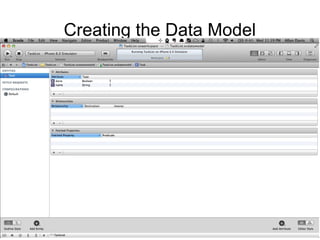
Creating the Data Model
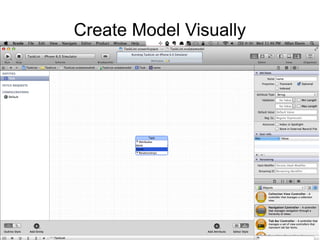
Create Model Visually
NSManagedObjectContext
●   Session Management object where all activity
    turns.
●   Two ways to create one.
    –   Create a UIManagedDocument and ask for the
        context
    –   Property off the AppDelegate if you selected “Use
        Core Data” when you created the project
UIManagedDocument
●     Create Property for UIManagedDocument
-   (void)useDocument
{
   if (![[NSFileManager defaultManager] fileExistsAtPath:[self.photoDatabase.fileURL path]]) {
       // does not exist on disk, so create it
       [self.photoDatabase saveToURL:self.photoDatabase.fileURL
forSaveOperation:UIDocumentSaveForCreating completionHandler:^(BOOL success) {
           [self setupFetchedResultsController];
           [self fetchFlickrDataIntoDocument:self.photoDatabase];

        }];
     } else if (self.photoDatabase.documentState == UIDocumentStateClosed) {
        // exists on disk, but we need to open it
        [self.photoDatabase openWithCompletionHandler:^(BOOL success) {
            [self setupFetchedResultsController];
        }];
     } else if (self.photoDatabase.documentState == UIDocumentStateNormal) {
        // already open and ready to use
        [self setupFetchedResultsController];
     }
}
AppDelegate
●   Generated by Xcode
●   Need to push context down to down to
    ViewController

UINavigationController *navigationController = (UINavigationController *)self.window.rootViewController;
UIViewController *controller = navigationController.topViewController;
[controller performSelector:@selector(setManagedObjectContext:) withObject:self.managedObjectContext];
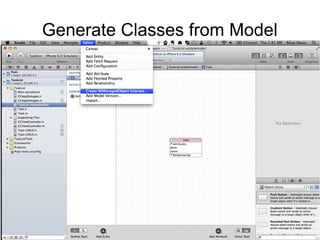
Generate Classes from Model
Create
Trim *trim = [NSEntityDescription insertNewObjectForEntityForName:@"Trim"
                                          inManagedObjectContext:context];
Read
NSFetchRequest *fetchRequest = [[NSFetchRequest alloc] init];
NSEntityDescription *entity = [NSEntityDescription
                      entityForName:@"Task" inManagedObjectContext:context];
[fetchRequest setEntity:entity];
fetchRequest.predicate =
     [NSPredicate predicateWithFormat:@"category.name = %@", category.name];
fetchRequest.sortDescriptors =
     @[[NSSortDescriptor sortDescriptorWithKey:@"name" ascending:YES]];
[context executeFetchRequest:fetchRequest error:&error];
Update
●   Make changes to property
●   Call save on the ManagedObjectContext
Delete
●   Call delete on the ManagedObjectContext and
    pass in the object to delete
NSFetchRequestController
●   Adds functionality to monitor a FetchRequest
    to update a table view.
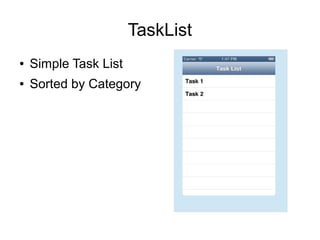
TaskList
●   Simple Task List
●   Sorted by Category
Resources
●   Stanford CS 193P
    –   Lecture 13 and 14 are Core Data
    –   http://www.stanford.edu/class/cs193p/cgi-bin/drupal/
●   Class Links
    –   Videos: http://vimeo.com/channels/mobilecity
    –   Slides: http://www.slideshare.net/javaalley/
    –   Code:
        https://github.com/organizations/AtlantaMobileDevGroup

MobileCity:Core Data

  • 1.
    Mobile City: CoreData TaskList
  • 2.
    About Me ● Allan Davis – Lead Developer of Mobile Technology for DealerMatch – Cajun.code@gmail.com – @cajun_code
  • 3.
    Session Agenda ● Introduction(Tip Calculator) ● Overview of Objective C(TicTacToe) ● UI UX (TrackerPoker) ● CoreData (MyBloodyTaskList) ● Networking and web-services (TrackerPokerLive) ● Debugging, Testing, Tuning and Distribution ● Game Development with Cocos2d (Oni Attack)
  • 4.
    Class Agenda ● What is CoreData ● Create the Data Model ● NSManagedObjectContext ● UIManagedDocument ● AppDelegate ● Generate Object Models ● Create ● Read ● Update ● Delete ● NSFetchedResultsController
  • 5.
    What is CoreData ● Object Relational Management tool. ● How does it work? – Create a visual mapping of database to objects – Create query for objects using object-oriented API – Access the “columns in the database table” using properties on the objects
  • 6.
  • 7.
  • 8.
    NSManagedObjectContext ● Session Management object where all activity turns. ● Two ways to create one. – Create a UIManagedDocument and ask for the context – Property off the AppDelegate if you selected “Use Core Data” when you created the project
  • 9.
    UIManagedDocument ● Create Property for UIManagedDocument - (void)useDocument { if (![[NSFileManager defaultManager] fileExistsAtPath:[self.photoDatabase.fileURL path]]) { // does not exist on disk, so create it [self.photoDatabase saveToURL:self.photoDatabase.fileURL forSaveOperation:UIDocumentSaveForCreating completionHandler:^(BOOL success) { [self setupFetchedResultsController]; [self fetchFlickrDataIntoDocument:self.photoDatabase]; }]; } else if (self.photoDatabase.documentState == UIDocumentStateClosed) { // exists on disk, but we need to open it [self.photoDatabase openWithCompletionHandler:^(BOOL success) { [self setupFetchedResultsController]; }]; } else if (self.photoDatabase.documentState == UIDocumentStateNormal) { // already open and ready to use [self setupFetchedResultsController]; } }
  • 10.
    AppDelegate ● Generated by Xcode ● Need to push context down to down to ViewController UINavigationController *navigationController = (UINavigationController *)self.window.rootViewController; UIViewController *controller = navigationController.topViewController; [controller performSelector:@selector(setManagedObjectContext:) withObject:self.managedObjectContext];
  • 11.
  • 12.
    Create Trim *trim =[NSEntityDescription insertNewObjectForEntityForName:@"Trim" inManagedObjectContext:context];
  • 13.
    Read NSFetchRequest *fetchRequest =[[NSFetchRequest alloc] init]; NSEntityDescription *entity = [NSEntityDescription entityForName:@"Task" inManagedObjectContext:context]; [fetchRequest setEntity:entity]; fetchRequest.predicate = [NSPredicate predicateWithFormat:@"category.name = %@", category.name]; fetchRequest.sortDescriptors = @[[NSSortDescriptor sortDescriptorWithKey:@"name" ascending:YES]]; [context executeFetchRequest:fetchRequest error:&error];
  • 14.
    Update ● Make changes to property ● Call save on the ManagedObjectContext
  • 15.
    Delete ● Call delete on the ManagedObjectContext and pass in the object to delete
  • 16.
    NSFetchRequestController ● Adds functionality to monitor a FetchRequest to update a table view.
  • 17.
    TaskList ● Simple Task List ● Sorted by Category
  • 18.
    Resources ● Stanford CS 193P – Lecture 13 and 14 are Core Data – http://www.stanford.edu/class/cs193p/cgi-bin/drupal/ ● Class Links – Videos: http://vimeo.com/channels/mobilecity – Slides: http://www.slideshare.net/javaalley/ – Code: https://github.com/organizations/AtlantaMobileDevGroup