Contextual Authentication:
                                                                  A Multi-factor Approach

                                           Multi-factor Authentication Layer
                                                                                     v.3.2-003


PortalGuard dba PistolStar, Inc.
PO Box 1226
Amherst, NH 03031 USA

Phone: 603.547.1200
Fax: 617.674.2727
E-mail: sales@portalguard.com
Website: www.portalguard.com

© 2012, PistolStar, Inc. dba PortalGuard All Rights Reserved.
Tech Brief — Contextual Authentication


                                                      PortalGuard Contextual Authentication
                                                             A Multi-factor Approach


                                 Table of Contents

                                 Summary ................................................................................................. 2
                                 The Basics............................................................................................... 2
                                 PortalGuard Contextual Authentication (CBA) ......................................... 2
                                            Contextual Authentication vs. Static Authentication ...................... 3
                                 Features .................................................................................................. 3
                                 Benefits ................................................................................................... 4
                                 CBA Terminology .................................................................................... 4
                                 How it Works ........................................................................................... 6
                                        Analysis Mode .............................................................................. 6
                                        Client-side Browser Add-on.......................................................... 6
                                        CBA Process................................................................................ 6
                                 Configuration ........................................................................................... 8
                                 Deployment ............................................................................................. 8
                                 IIS Install.................................................................................................. 8
                                 System Requirements ............................................................................. 9
                                 Supporting Videos ................................................................................... 9
                                 Platform Layers ....................................................................................... 9


© 2012, PistolStar, Inc. dba PortalGuard All rights reserved.                                                                                  Page 1
Tech Brief — Contextual Authentication


                                 Summary
                                 Increases in roaming user populations and remote access to organizations’ confidential
                                 data is becoming a larger security concern, leaving organizations with choices to make
                                 about how to secure these resources. A conflict of interest between business groups and
                                 IT security can create a struggle to maintain usability while increasing security. Although
                                 instituting better password policies is a preliminary option, organizations are often over
                                 steering towards rigid two-factor authentication solutions.

                                 Although these solutions are desirable for security, the barriers to entry for many organiza-
                                 tions are overwhelming. By applying stringent two-factor authentication to all users, it is
                                 not possible for the organization to adapt to all the different user access scenarios, usually
                                 resulting in poor user adoption and increased frustrations. Due to the size and structure of
                                 these solutions, integration usually requires dedicated IT resources and training, along
                                 with the potential of additional hardware. However, the biggest barrier is high total cost of
                                 ownership. The organization has the intention of increasing security but cannot handle the
                                 costs associated with the initial purchase and maintenance of a two-factor solution, rang-
                                 ing from hardware replacements to increased Help Desk calls.

                                 So you have to make a tough decision, do you institute better password policies? Or
                                 should you implement two-factor authentication across the whole company?

                                 Which makes you wonder…is there a midpoint between the two?


                                 The Basics
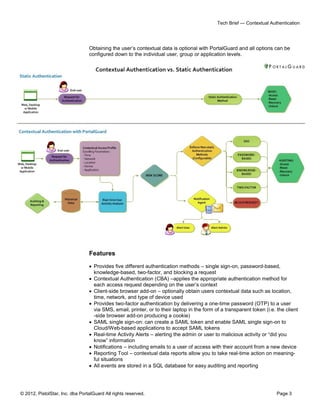
                                 The midpoint is referred to as “contextual authentication” which is focused on providing
                                 dynamic security to enhance usability for users and strengthen security to match your or-
                                 ganization’s policies and compliance standards.

                                 Contextual authentication works behind-the-scenes to prevent unauthorized access and
                                 applies the appropriate level of authentication based on the expected impact of the context
                                 around a user’s access request, including location, time, device, network and application.

                                 For example, users’ within your company’s four walls may only need to provide strong
                                 passwords whereas a traveling salesperson or roaming user must provide two-factors.
                                 However, a traveling salesperson now in the office only needs to provide a password to
                                 prove his identity due to his new situation when requesting access.


                                 PortalGuard Contextual Authentication (CBA)
                                 As an alternative to static authentication solutions, PortalGuard understands the midpoint
                                 and handles the challenges of remote user access scenarios. By taking a cost effective,
                                 flexible approach to authentication PortalGuard offers five methods of authentication
                                 (single sign-on, password-based, knowledge-based, two-factor authentication, and block a
                                 request) with the primary focus of the software platform being CBA.

                                 Using PortalGuard’s CBA, organizations can now gain insight into user access scenarios
                                 allowing them to make security and usability adjustments transparently to the user and
                                 dynamically adjust the authentication method to what is appropriate based on the user’s
                                 situation.


© 2012, PistolStar, Inc. dba PortalGuard All rights reserved.                                                        Page 2
Tech Brief — Contextual Authentication


                                 Obtaining the user’s contextual data is optional with PortalGuard and all options can be
                                 configured down to the individual user, group or application levels.


                                 Features

                                  Provides five different authentication methods – single sign-on, password-based,
                                   knowledge-based, two-factor, and blocking a request
                                  Contextual Authentication (CBA) –applies the appropriate authentication method for
                                   each access request depending on the user’s context
                                  Client-side browser add-on – optionally obtain users contextual data such as location,
                                   time, network, and type of device used
                                  Provides two-factor authentication by delivering a one-time password (OTP) to a user
                                   via SMS, email, printer, or to their laptop in the form of a transparent token (i.e. the client
                                   -side browser add-on producing a cookie)
                                  SAML single sign-on: can create a SAML token and enable SAML single sign-on to
                                   Cloud/Web-based applications to accept SAML tokens
                                  Real-time Activity Alerts – alerting the admin or user to malicious activity or “did you
                                   know” information
                                  Notifications – including emails to a user of access with their account from a new device
                                  Reporting Tool – contextual data reports allow you to take real-time action on meaning-
                                   ful situations
                                  All events are stored in a SQL database for easy auditing and reporting


© 2012, PistolStar, Inc. dba PortalGuard All rights reserved.                                                           Page 3
Tech Brief — Contextual Authentication


                                 Benefits

                                  Increase Security without impacting the end-user experience
                                  Increase Usability for authorized users while creating barriers for unauthorized users
                                  Configurable – to the user, group or application levels
                                  Lower Total Cost of ownership than token-based two-factor authentication alternatives
                                  Proactive approach to reducing threats - block suspicious users in real-time before a
                                   login attempt is made
                                  Gather Insight – analyze the contextual data reports PortalGuard provides


                                 CBA Terminology
                                 Authentication Methods: the type of authentication the user will be presented with:
                                         Single Sign-on: username and password (single password for multiple systems)
                                         Password-based: username and password
                                         Knowledge-based: username, password and challenge question
                                         One-time Password (OTP): username and OTP
                                         Two-factor: username, password and OTP

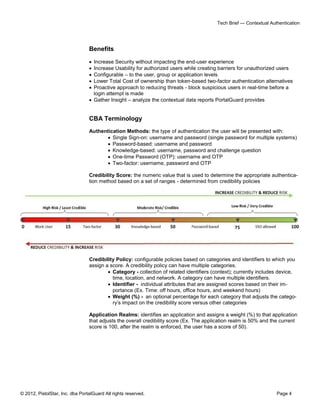
                                 Credibility Score: the numeric value that is used to determine the appropriate authentica-
                                 tion method based on a set of ranges - determined from credibility policies


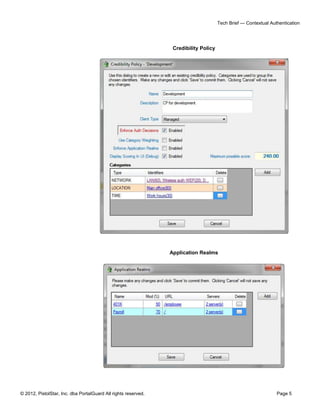
                                 Credibility Policy: configurable policies based on categories and identifiers to which you
                                 assign a score. A credibility policy can have multiple categories.
                                          Category - collection of related identifiers (context); currently includes device,
                                           time, location, and network. A category can have multiple identifiers.
                                          Identifier - individual attributes that are assigned scores based on their im-
                                           portance (Ex. Time: off hours, office hours, and weekend hours)
                                          Weight (%) - an optional percentage for each category that adjusts the catego-
                                           ry’s impact on the credibility score versus other categories

                                 Application Realms: identifies an application and assigns a weight (%) to that application
                                 that adjusts the overall credibility score (Ex. The application realm is 50% and the current
                                 score is 100, after the realm is enforced, the user has a score of 50).


© 2012, PistolStar, Inc. dba PortalGuard All rights reserved.                                                       Page 4
Tech Brief — Contextual Authentication


                                                                 Credibility Policy


                                                                Application Realms


© 2012, PistolStar, Inc. dba PortalGuard All rights reserved.                                                    Page 5
Tech Brief — Contextual Authentication


                                 How It Works

                                 Analysis Mode

                                 When implementing CBA it is recommended to run analysis mode first, to establish a
                                 baseline for the environment. This would run the CBA process in its entirety but stops
                                 short of adjusting the authentication method for the user. This allows you to establish a
                                 suitable configuration, collect reports, and determine the possible effects on your user
                                 community. After a recommended period, typically 60-90 days, the adjustment of the au-
                                 thentication method can be enforced to directly affect you user community.

                                 To turn on CBA, an administrator simply checks a box on the desired security policies
                                 which contain either individuals or groups of users.


                                 Client-side Browser Add-on

                                 In order to collect the contextual data around a user’s access request PortalGuard uses an
                                 installed browser add-on. This is installed using a standard MSI and can be pushed out
                                 silently. Although the add-on is optional, users without the client-side software installed are
                                 considered “unmanaged” and can be given a lower credibility score due to the lack of ac-
                                 tionable context data.

                                 CBA Process

                                 The following process is completed every time an access request is received. PortalGuard
                                 also supports CBA for password resets, recoveries, and account unlocks.

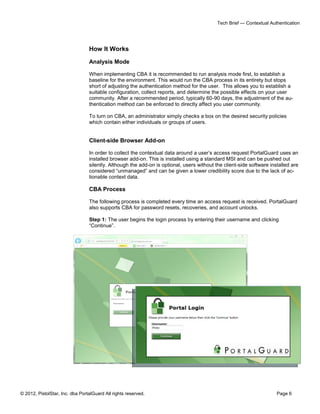
                                 Step 1: The user begins the login process by entering their username and clicking
                                 “Continue”.


© 2012, PistolStar, Inc. dba PortalGuard All rights reserved.                                                         Page 6
Tech Brief — Contextual Authentication


                                 NOTE: Steps 2-4 happen behind the scenes, transparently to the user and within millisec-
                                 onds.

                                 Step 2: Contextual data is sent from the client-side browser add-on to the PortalGuard
                                 server.

                                 Step 3: The PortalGuard server identifies a user’s credibility policy and computes the fol-
                                 lowing:
                                          Gross score for each category
                                          Any category weight impact to the score
                                          Net score from the policy and weights
                                          Modification due to sensitivity of requested application

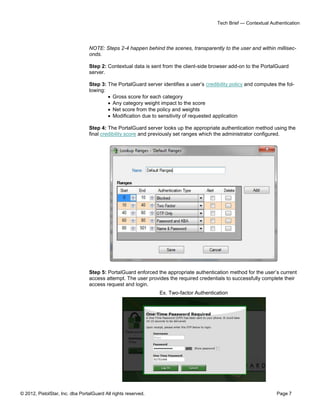
                                 Step 4: The PortalGuard server looks up the appropriate authentication method using the
                                 final credibility score and previously set ranges which the administrator configured.


                                 Step 5: PortalGuard enforced the appropriate authentication method for the user’s current
                                 access attempt. The user provides the required credentials to successfully complete their
                                 access request and login.
                                                                Ex. Two-factor Authentication


© 2012, PistolStar, Inc. dba PortalGuard All rights reserved.                                                       Page 7
Tech Brief — Contextual Authentication


                                 Configuration
                                 NOTE: All the following settings are policy specific, so you can have different values for
                                 different users/group/hierarchies.

                                           Configurable through the PortalGuard Configuration Utility:

                                            Enable or Disable CBA
                                            Assign users or groups to individual credibility policies
                                            Credibility Policies:
                                                    Client Type
                                                    Use Category Weighting
                                                    Enforce Application Realms
                                                    Display Scoring UI
                                                    Categories
                                                    Weight
                                                    Identifiers
                                                    Credibility Score
                                            Default Ranges
                                                    Start and End Scores
                                                    Authentication Type
                                                    Alert On or Off
                                            Application Realms
                                                    Application Name and URL
                                                    Modifier %
                                                    Servers


                                 Deployment

                                 Implementation of the PortalGuard platform is seamless and requires no changes to Active
                                 Directory/LDAP schema. A server-side software installation is required on at least one IIS
                                 server on the network. Additional client-side software is required with contextual authenti-
                                 cation in the form of the browser add-on which is installed using a standard MSI and can
                                 be pushed out silently.


                                 IIS Install

                                 A MSI is used to install PortalGuard on IIS 6 or 7.x. If installing PortalGuard on IIS 7.x/
                                 Windows Server 2008, make sure to have installed the following feature roles prior to
                                 launching the MSI:

                                 1. All the Web Server Management Tools role services
                                 2. All the Application Development role services
                                 3. All IIS 6 Management Compatibility role services

                                 The MSI is a wizard-based install which will quickly guide you through the installation.


© 2012, PistolStar, Inc. dba PortalGuard All rights reserved.                                                          Page 8
Tech Brief — Contextual Authentication


                                 System Requirements
                                 This version of PortalGuard supports direct access and authentication to cloud/browser-
                                 based applications, only.

                                 PortalGuard can be installed directly on the following web servers:

                                            IBM WebSphere/WebSphere Portal v5.1 or higher
                                            Microsoft IIS 6.0 or higher
                                            Microsoft Windows SharePoint Services 3.0 or higher
                                            Microsoft Office SharePoint Server 2007 or later

                                 The PortalGuard Web server also has the following requirements on Windows operating
                                 systems:

                                            .NET 2.0 framework or later must be installed
                                            (64-bit OS only) Microsoft Visual C++ 2005 SP1 Redistributable Package (x64)

                                 PortalGuard is fully supported for installation on virtual machines. Furthermore, Portal-
                                 Guard can currently be installed on the following platforms:

                                            Microsoft Windows Server 2000
                                            Microsoft Windows Server 2003 (32 or 64-bit)
                                            Microsoft Windows Server 2008 (32 or 64-bit)
                                            Microsoft Windows Server 2008 R2

                                 PortalGuard works with Windows Terminal Services on Win2003 servers and Remote
                                 Desktop Services on Win2008 servers.

                                 If you have a platform not listed here, please contact us at sales@portalguard.com to see
                                 if we have recently added support for your platform.


                                 Supporting Videos
                                 Please view the following videos to watch a demo of PortalGuard’s CBA Offerings:

                                 Welcome to the Platform: Discussing Contextual Authentication
                                 Consumerization Challenges: Discussing Device Management


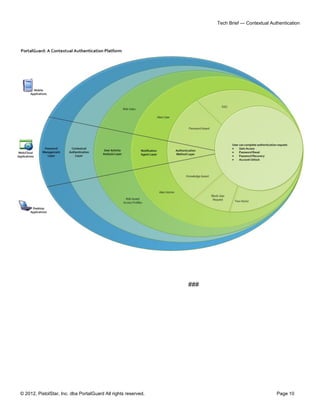
                                 Platform Layers
                                 Beyond contextual authentication, PortalGuard is a flexible authentication platform with
                                 multiple layers of available functionality to help you achieve your authentication goals:

                                              Tokenless Two-factor Authentication
                                              Self-service Password Reset
                                              Real-time Reports / Alerts
                                              Knowledge-based
                                              Password Management
                                              Single Sign-on


© 2012, PistolStar, Inc. dba PortalGuard All rights reserved.                                                          Page 9
Tech Brief — Contextual Authentication


                                                                ###


© 2012, PistolStar, Inc. dba PortalGuard All rights reserved.                                    Page 10

Contextual Authentication

  • 1.
    Contextual Authentication: A Multi-factor Approach Multi-factor Authentication Layer v.3.2-003 PortalGuard dba PistolStar, Inc. PO Box 1226 Amherst, NH 03031 USA Phone: 603.547.1200 Fax: 617.674.2727 E-mail: sales@portalguard.com Website: www.portalguard.com © 2012, PistolStar, Inc. dba PortalGuard All Rights Reserved.
  • 2.
    Tech Brief —Contextual Authentication PortalGuard Contextual Authentication A Multi-factor Approach Table of Contents Summary ................................................................................................. 2 The Basics............................................................................................... 2 PortalGuard Contextual Authentication (CBA) ......................................... 2 Contextual Authentication vs. Static Authentication ...................... 3 Features .................................................................................................. 3 Benefits ................................................................................................... 4 CBA Terminology .................................................................................... 4 How it Works ........................................................................................... 6 Analysis Mode .............................................................................. 6 Client-side Browser Add-on.......................................................... 6 CBA Process................................................................................ 6 Configuration ........................................................................................... 8 Deployment ............................................................................................. 8 IIS Install.................................................................................................. 8 System Requirements ............................................................................. 9 Supporting Videos ................................................................................... 9 Platform Layers ....................................................................................... 9 © 2012, PistolStar, Inc. dba PortalGuard All rights reserved. Page 1
  • 3.
    Tech Brief —Contextual Authentication Summary Increases in roaming user populations and remote access to organizations’ confidential data is becoming a larger security concern, leaving organizations with choices to make about how to secure these resources. A conflict of interest between business groups and IT security can create a struggle to maintain usability while increasing security. Although instituting better password policies is a preliminary option, organizations are often over steering towards rigid two-factor authentication solutions. Although these solutions are desirable for security, the barriers to entry for many organiza- tions are overwhelming. By applying stringent two-factor authentication to all users, it is not possible for the organization to adapt to all the different user access scenarios, usually resulting in poor user adoption and increased frustrations. Due to the size and structure of these solutions, integration usually requires dedicated IT resources and training, along with the potential of additional hardware. However, the biggest barrier is high total cost of ownership. The organization has the intention of increasing security but cannot handle the costs associated with the initial purchase and maintenance of a two-factor solution, rang- ing from hardware replacements to increased Help Desk calls. So you have to make a tough decision, do you institute better password policies? Or should you implement two-factor authentication across the whole company? Which makes you wonder…is there a midpoint between the two? The Basics The midpoint is referred to as “contextual authentication” which is focused on providing dynamic security to enhance usability for users and strengthen security to match your or- ganization’s policies and compliance standards. Contextual authentication works behind-the-scenes to prevent unauthorized access and applies the appropriate level of authentication based on the expected impact of the context around a user’s access request, including location, time, device, network and application. For example, users’ within your company’s four walls may only need to provide strong passwords whereas a traveling salesperson or roaming user must provide two-factors. However, a traveling salesperson now in the office only needs to provide a password to prove his identity due to his new situation when requesting access. PortalGuard Contextual Authentication (CBA) As an alternative to static authentication solutions, PortalGuard understands the midpoint and handles the challenges of remote user access scenarios. By taking a cost effective, flexible approach to authentication PortalGuard offers five methods of authentication (single sign-on, password-based, knowledge-based, two-factor authentication, and block a request) with the primary focus of the software platform being CBA. Using PortalGuard’s CBA, organizations can now gain insight into user access scenarios allowing them to make security and usability adjustments transparently to the user and dynamically adjust the authentication method to what is appropriate based on the user’s situation. © 2012, PistolStar, Inc. dba PortalGuard All rights reserved. Page 2
  • 4.
    Tech Brief —Contextual Authentication Obtaining the user’s contextual data is optional with PortalGuard and all options can be configured down to the individual user, group or application levels. Features  Provides five different authentication methods – single sign-on, password-based, knowledge-based, two-factor, and blocking a request  Contextual Authentication (CBA) –applies the appropriate authentication method for each access request depending on the user’s context  Client-side browser add-on – optionally obtain users contextual data such as location, time, network, and type of device used  Provides two-factor authentication by delivering a one-time password (OTP) to a user via SMS, email, printer, or to their laptop in the form of a transparent token (i.e. the client -side browser add-on producing a cookie)  SAML single sign-on: can create a SAML token and enable SAML single sign-on to Cloud/Web-based applications to accept SAML tokens  Real-time Activity Alerts – alerting the admin or user to malicious activity or “did you know” information  Notifications – including emails to a user of access with their account from a new device  Reporting Tool – contextual data reports allow you to take real-time action on meaning- ful situations  All events are stored in a SQL database for easy auditing and reporting © 2012, PistolStar, Inc. dba PortalGuard All rights reserved. Page 3
  • 5.
    Tech Brief —Contextual Authentication Benefits  Increase Security without impacting the end-user experience  Increase Usability for authorized users while creating barriers for unauthorized users  Configurable – to the user, group or application levels  Lower Total Cost of ownership than token-based two-factor authentication alternatives  Proactive approach to reducing threats - block suspicious users in real-time before a login attempt is made  Gather Insight – analyze the contextual data reports PortalGuard provides CBA Terminology Authentication Methods: the type of authentication the user will be presented with:  Single Sign-on: username and password (single password for multiple systems)  Password-based: username and password  Knowledge-based: username, password and challenge question  One-time Password (OTP): username and OTP  Two-factor: username, password and OTP Credibility Score: the numeric value that is used to determine the appropriate authentica- tion method based on a set of ranges - determined from credibility policies Credibility Policy: configurable policies based on categories and identifiers to which you assign a score. A credibility policy can have multiple categories.  Category - collection of related identifiers (context); currently includes device, time, location, and network. A category can have multiple identifiers.  Identifier - individual attributes that are assigned scores based on their im- portance (Ex. Time: off hours, office hours, and weekend hours)  Weight (%) - an optional percentage for each category that adjusts the catego- ry’s impact on the credibility score versus other categories Application Realms: identifies an application and assigns a weight (%) to that application that adjusts the overall credibility score (Ex. The application realm is 50% and the current score is 100, after the realm is enforced, the user has a score of 50). © 2012, PistolStar, Inc. dba PortalGuard All rights reserved. Page 4
  • 6.
    Tech Brief —Contextual Authentication Credibility Policy Application Realms © 2012, PistolStar, Inc. dba PortalGuard All rights reserved. Page 5
  • 7.
    Tech Brief —Contextual Authentication How It Works Analysis Mode When implementing CBA it is recommended to run analysis mode first, to establish a baseline for the environment. This would run the CBA process in its entirety but stops short of adjusting the authentication method for the user. This allows you to establish a suitable configuration, collect reports, and determine the possible effects on your user community. After a recommended period, typically 60-90 days, the adjustment of the au- thentication method can be enforced to directly affect you user community. To turn on CBA, an administrator simply checks a box on the desired security policies which contain either individuals or groups of users. Client-side Browser Add-on In order to collect the contextual data around a user’s access request PortalGuard uses an installed browser add-on. This is installed using a standard MSI and can be pushed out silently. Although the add-on is optional, users without the client-side software installed are considered “unmanaged” and can be given a lower credibility score due to the lack of ac- tionable context data. CBA Process The following process is completed every time an access request is received. PortalGuard also supports CBA for password resets, recoveries, and account unlocks. Step 1: The user begins the login process by entering their username and clicking “Continue”. © 2012, PistolStar, Inc. dba PortalGuard All rights reserved. Page 6
  • 8.
    Tech Brief —Contextual Authentication NOTE: Steps 2-4 happen behind the scenes, transparently to the user and within millisec- onds. Step 2: Contextual data is sent from the client-side browser add-on to the PortalGuard server. Step 3: The PortalGuard server identifies a user’s credibility policy and computes the fol- lowing:  Gross score for each category  Any category weight impact to the score  Net score from the policy and weights  Modification due to sensitivity of requested application Step 4: The PortalGuard server looks up the appropriate authentication method using the final credibility score and previously set ranges which the administrator configured. Step 5: PortalGuard enforced the appropriate authentication method for the user’s current access attempt. The user provides the required credentials to successfully complete their access request and login. Ex. Two-factor Authentication © 2012, PistolStar, Inc. dba PortalGuard All rights reserved. Page 7
  • 9.
    Tech Brief —Contextual Authentication Configuration NOTE: All the following settings are policy specific, so you can have different values for different users/group/hierarchies. Configurable through the PortalGuard Configuration Utility:  Enable or Disable CBA  Assign users or groups to individual credibility policies  Credibility Policies:  Client Type  Use Category Weighting  Enforce Application Realms  Display Scoring UI  Categories  Weight  Identifiers  Credibility Score  Default Ranges  Start and End Scores  Authentication Type  Alert On or Off  Application Realms  Application Name and URL  Modifier %  Servers Deployment Implementation of the PortalGuard platform is seamless and requires no changes to Active Directory/LDAP schema. A server-side software installation is required on at least one IIS server on the network. Additional client-side software is required with contextual authenti- cation in the form of the browser add-on which is installed using a standard MSI and can be pushed out silently. IIS Install A MSI is used to install PortalGuard on IIS 6 or 7.x. If installing PortalGuard on IIS 7.x/ Windows Server 2008, make sure to have installed the following feature roles prior to launching the MSI: 1. All the Web Server Management Tools role services 2. All the Application Development role services 3. All IIS 6 Management Compatibility role services The MSI is a wizard-based install which will quickly guide you through the installation. © 2012, PistolStar, Inc. dba PortalGuard All rights reserved. Page 8
  • 10.
    Tech Brief —Contextual Authentication System Requirements This version of PortalGuard supports direct access and authentication to cloud/browser- based applications, only. PortalGuard can be installed directly on the following web servers:  IBM WebSphere/WebSphere Portal v5.1 or higher  Microsoft IIS 6.0 or higher  Microsoft Windows SharePoint Services 3.0 or higher  Microsoft Office SharePoint Server 2007 or later The PortalGuard Web server also has the following requirements on Windows operating systems:  .NET 2.0 framework or later must be installed  (64-bit OS only) Microsoft Visual C++ 2005 SP1 Redistributable Package (x64) PortalGuard is fully supported for installation on virtual machines. Furthermore, Portal- Guard can currently be installed on the following platforms:  Microsoft Windows Server 2000  Microsoft Windows Server 2003 (32 or 64-bit)  Microsoft Windows Server 2008 (32 or 64-bit)  Microsoft Windows Server 2008 R2 PortalGuard works with Windows Terminal Services on Win2003 servers and Remote Desktop Services on Win2008 servers. If you have a platform not listed here, please contact us at sales@portalguard.com to see if we have recently added support for your platform. Supporting Videos Please view the following videos to watch a demo of PortalGuard’s CBA Offerings: Welcome to the Platform: Discussing Contextual Authentication Consumerization Challenges: Discussing Device Management Platform Layers Beyond contextual authentication, PortalGuard is a flexible authentication platform with multiple layers of available functionality to help you achieve your authentication goals:  Tokenless Two-factor Authentication  Self-service Password Reset  Real-time Reports / Alerts  Knowledge-based  Password Management  Single Sign-on © 2012, PistolStar, Inc. dba PortalGuard All rights reserved. Page 9
  • 11.
    Tech Brief —Contextual Authentication ### © 2012, PistolStar, Inc. dba PortalGuard All rights reserved. Page 10