Redis on Kubernetes
Deployment Overview
https://github.com/IdanAtias/redis-on-k8s
1
Proper Disclosure
● Parts of this guide are based on:
○ Kubernetes: up and running book
■ Great book for everyone interested in understanding Kubernetes concepts
○ Kubernetes official documentation
○ Redis official documentation
2
Prerequisites
● Basic understanding of Kubernetes concepts
● Basic familiarity with Kubernetes objects
3
Redis Intro | What is it?
● In-memory key-value store that can persist on disk
● Can be used as a:
○ Database
○ Cache
○ Message Broker (a.k.a Pub/Sub)
● Supports master-slave replication
● Written in ANSI C
● Open Source
● Used by: Twitter, Instagram, Uber, Airbnb and many more
4
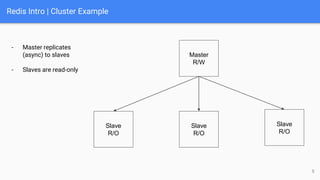
Redis Intro | Cluster Example
Master
R/W
Slave
R/O
Slave
R/O
Slave
R/O
- Master replicates
(async) to slaves
- Slaves are read-only
5
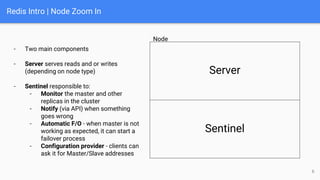
Redis Intro | Node Zoom In
- Two main components
- Server serves reads and or writes
(depending on node type)
- Sentinel responsible to:
- Monitor the master and other
replicas in the cluster
- Notify (via API) when something
goes wrong
- Automatic F/O - when master is not
working as expected, it can start a
failover process
- Configuration provider - clients can
ask it for Master/Slave addresses
Server
Sentinel
Node
6
Deploying Redis | Kubernetes Cluster Setup
● For this tutorial I chose to use GKE
○ Google offers one zonal-cluster for free
■ Single Master running in a single availability zone (no HA)
■ You pay only for the instances and the extra resources (e.g., LB)
■ Free tier credits are more than enough for our purpose
7
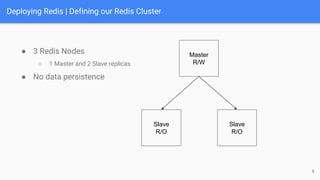
Deploying Redis | Defining our Redis Cluster
● 3 Redis Nodes
○ 1 Master and 2 Slave replicas
● No data persistence
8
Master
R/W
Slave
R/O
Slave
R/O
Deploying Redis | Strategy
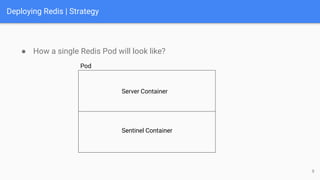
● How a single Redis Pod will look like?
9
Server Container
Sentinel Container
Pod
Deploying Redis | Strategy
● At first sight, it seems like ReplicaSet can fit our needs
○ Our Redis Pods are Identical
○ ReplicaSet will make sure we have just enough of them
10
● However, ReplicaSet is not what we need
○ Our Redis Pods maybe identical in their structure but not in their role!
○ We need to define different behaviours for different Pods (master/slave)
● In conclusion, ReplicaSet is not optimal for stateful applications
Deploying Redis | Strategy
● StatefulSet is the k8s object for managing stateful applications
● It is similar to ReplicaSet but with unique properties:
○ Pods get a persistent hostname with a unique index (e.g., db-0, db-1)
○ Pods are created in increasing order (0, 1, 2, …, N); New Pod creation is blocked until the
previous Pod is healthy
○ Deletion of Pods is done in decreasing order (N, …, 2, 1, 0)
● It is suitable for deploying applications needing unique, persistent
identities and stable hostnames
● Therefor, we’ll use StatefulSets for our deployment
11
Deploying Redis | Kubernetes Objects | Config Maps
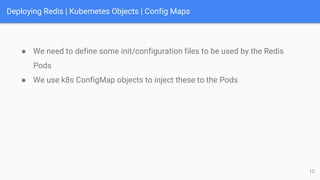
● We need to define some init/configuration files to be used by the Redis
Pods
● We use k8s ConfigMap objects to inject these to the Pods
12
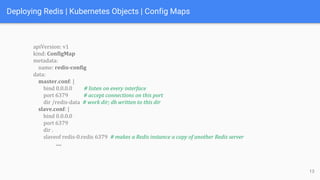
Deploying Redis | Kubernetes Objects | Config Maps
apiVersion: v1
kind: ConfigMap
metadata:
name: redis-config
data:
master.conf: |
bind 0.0.0.0 # listen on every interface
port 6379 # accept connections on this port
dir /redis-data # work dir; db written to this dir
slave.conf: |
bind 0.0.0.0
port 6379
dir .
slaveof redis-0.redis 6379 # makes a Redis instance a copy of another Redis server
….
13
Deploying Redis | Kubernetes Objects | Config Maps
….
sentinel.conf: |
bind 0.0.0.0
port 26379
sentinel monitor redis redis-0.redis 6379 2 # monitor a master called “redis”
sentinel parallel-syncs redis 1
sentinel down-after-milliseconds redis 10000
sentinel failover-timeout redis 20000
init.sh: |
#!/bin/bash
if [[ ${HOSTNAME} == 'redis-0' ]]; then
redis-server /redis-config/master.conf
else
redis-server /redis-config/slave.conf
fi
….
14
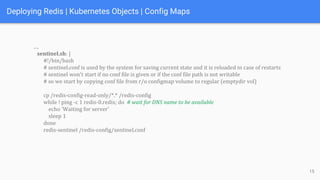
Deploying Redis | Kubernetes Objects | Config Maps
….
sentinel.sh: |
#!/bin/bash
# sentinel.conf is used by the system for saving current state and it is reloaded in case of restarts
# sentinel won't start if no conf file is given or if the conf file path is not writable
# so we start by copying conf file from r/o configmap volume to regular (emptydir vol)
cp /redis-config-read-only/*.* /redis-config
while ! ping -c 1 redis-0.redis; do # wait for DNS name to be available
echo 'Waiting for server'
sleep 1
done
redis-sentinel /redis-config/sentinel.conf
15
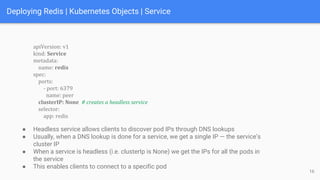
Deploying Redis | Kubernetes Objects | Service
apiVersion: v1
kind: Service
metadata:
name: redis
spec:
ports:
- port: 6379
name: peer
clusterIP: None # creates a headless service
selector:
app: redis
16
● Headless service allows clients to discover pod IPs through DNS lookups
● Usually, when a DNS lookup is done for a service, we get a single IP — the service’s
cluster IP
● When a service is headless (i.e. clusterIp is None) we get the IPs for all the pods in
the service
● This enables clients to connect to a specific pod
Deploying Redis | Kubernetes Objects | StatefulSet
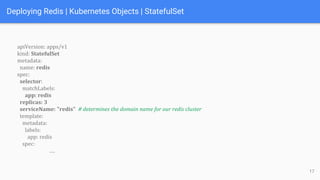
apiVersion: apps/v1
kind: StatefulSet
metadata:
name: redis
spec:
selector:
matchLabels:
app: redis
replicas: 3
serviceName: "redis" # determines the domain name for our redis cluster
template:
metadata:
labels:
app: redis
spec:
….
17
Deploying Redis | Kubernetes Objects | StatefulSet
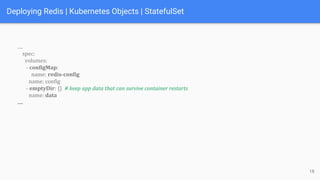
….
spec:
volumes:
- configMap:
name: redis-config
name: config
- emptyDir: {} # keep app data that can survive container restarts
name: data
….
18
Deploying Redis | Kubernetes Objects | StatefulSet
….
containers:
- command: [sh, -c, source /redis-config/init.sh ]
image: redis:4.0.11-alpine
name: redis
ports:
- containerPort: 6379
name: redis
volumeMounts:
- mountPath: /redis-config
name: config
- mountPath: /redis-data
name: data
- command: [sh, -c, source /redis-config-read-only/sentinel.sh]
image: redis:4.0.11-alpine
name: sentinel
volumeMounts:
- mountPath: /redis-config-read-only
name: config
- mountPath: /redis-config
name: data 19
Exposing Our Cluster
● What if we wanted use our Redis cluster as a simple K/V store that is
reachable via the internet?
20
● First, we may want to abstract the internals of Redis by deploying a simple
FE that will manage the operations against the Redis cluster (BE)
● Second, we need to make this FE reachable from the internet
Exposing Our Cluster | Strategy
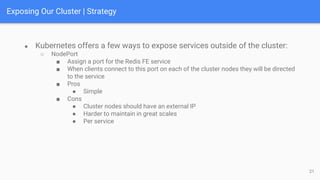
● Kubernetes offers a few ways to expose services outside of the cluster:
○ NodePort
■ Assign a port for the Redis FE service
■ When clients connect to this port on each of the cluster nodes they will be directed
to the service
■ Pros
● Simple
■ Cons
● Cluster nodes should have an external IP
● Harder to maintain in great scales
● Per service
21
Exposing Our Cluster | Strategy
● Kubernetes offers a few ways to expose services outside of the cluster:
○ LoadBalancer
■ Make the service of type LoadBalancer
■ Cloud provider will automatically assign a LB for this service
■ Pros:
● Simple (when on cloud)
■ Cons:
● LB is often an expensive and scarce resource
● Per service
22
● Although these methods can be just enough for our purpose, as
you’ve probably understood, we can do better.
Exposing Our Cluster | Strategy
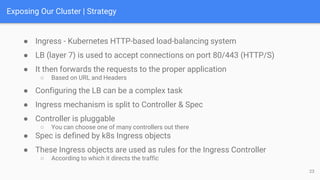
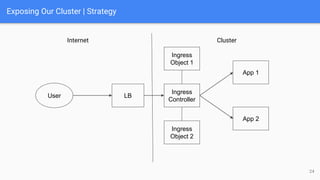
● Ingress - Kubernetes HTTP-based load-balancing system
● LB (layer 7) is used to accept connections on port 80/443 (HTTP/S)
● It then forwards the requests to the proper application
○ Based on URL and Headers
23
● Configuring the LB can be a complex task
● Ingress mechanism is split to Controller & Spec
● Controller is pluggable
○ You can choose one of many controllers out there
● Spec is defined by k8s Ingress objects
● These Ingress objects are used as rules for the Ingress Controller
○ According to which it directs the traffic
Exposing Our Cluster | Strategy
24
Internet Cluster
LB
User
Ingress
Controller
Ingress
Object 1
App 1
App 2
Ingress
Object 2
Exposing Our Cluster | Strategy
25
● For this tutorial we are going to use Ingress Controller called Contour
● This controller is used to configure the Envoy LB
○ It converts the k8s Ingress objects to something Envoy can understand
Exposing Our Cluster | Redis FE
26
● As mentioned, we’d like to have a simple Redis FE that will abstract the
internals of Redis for the external users
● We build this microservice using FastAPI
● It will support adding/getting items from Redis
Exposing Our Cluster | Redis FE
27
sentinel = Sentinel([('redis-0.redis', 26379)], socket_timeout=0.1)
@router.put("/{key}",summary="Create redis item", response_model=AddItemResponse)
def add(key: str, req: AddItemRequest):
logger.info("Adding redis item", key=key, value=req.value)
master = sentinel.master_for("redis") # slaves are read-only; use master for writes
master.set(key, req.value)
return AddItemResponse(key=key, value=req.value)
@router.get("/{key}", summary="Get redis item", response_model=GetItemResponse)
def get(key: str):
logger.info("Getting redis item", key=key)
slave = sentinel.slave_for("redis") # use slave for reads
value = slave.get(key)
if value is None:
raise HTTPException(status_code=404, detail="Item not found")
logger.info("Got redis item", key=key, value=value)
return GetItemResponse(key=key, value=value)
Exposing Our Cluster | Redis FE
28
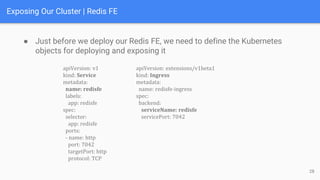
● Just before we deploy our Redis FE, we need to define the Kubernetes
objects for deploying and exposing it
apiVersion: v1
kind: Service
metadata:
name: redisfe
labels:
app: redisfe
spec:
selector:
app: redisfe
ports:
- name: http
port: 7042
targetPort: http
protocol: TCP
apiVersion: extensions/v1beta1
kind: Ingress
metadata:
name: redisfe-ingress
spec:
backend:
serviceName: redisfe
servicePort: 7042
Exposing Our Cluster | Redis FE
29
apiVersion: apps/v1
kind: Deployment
metadata:
name: redisfe
spec:
replicas: 1
strategy:
type: RollingUpdate
selector:
matchLabels:
app: redisfe
template:
metadata:
labels:
app: redisfe
….
….
spec:
containers:
- name: redisfe
image: registry.hub.docker.com/idanatias/redis-fe:latest
imagePullPolicy: Always
ports:
- name: http
containerPort: 7042
livenessProbe:
httpGet:
path: /healthz
port: http
initialDelaySeconds: 30
readinessProbe:
httpGet:
path: /healthz
port: http
initialDelaySeconds: 30
Redis on Kubernetes - End
Deployment Overview
https://github.com/IdanAtias/redis-on-k8s
30

Redis on Kubernetes

  • 1.
    Redis on Kubernetes DeploymentOverview https://github.com/IdanAtias/redis-on-k8s 1
  • 2.
    Proper Disclosure ● Partsof this guide are based on: ○ Kubernetes: up and running book ■ Great book for everyone interested in understanding Kubernetes concepts ○ Kubernetes official documentation ○ Redis official documentation 2
  • 3.
    Prerequisites ● Basic understandingof Kubernetes concepts ● Basic familiarity with Kubernetes objects 3
  • 4.
    Redis Intro |What is it? ● In-memory key-value store that can persist on disk ● Can be used as a: ○ Database ○ Cache ○ Message Broker (a.k.a Pub/Sub) ● Supports master-slave replication ● Written in ANSI C ● Open Source ● Used by: Twitter, Instagram, Uber, Airbnb and many more 4
  • 5.
    Redis Intro |Cluster Example Master R/W Slave R/O Slave R/O Slave R/O - Master replicates (async) to slaves - Slaves are read-only 5
  • 6.
    Redis Intro |Node Zoom In - Two main components - Server serves reads and or writes (depending on node type) - Sentinel responsible to: - Monitor the master and other replicas in the cluster - Notify (via API) when something goes wrong - Automatic F/O - when master is not working as expected, it can start a failover process - Configuration provider - clients can ask it for Master/Slave addresses Server Sentinel Node 6
  • 7.
    Deploying Redis |Kubernetes Cluster Setup ● For this tutorial I chose to use GKE ○ Google offers one zonal-cluster for free ■ Single Master running in a single availability zone (no HA) ■ You pay only for the instances and the extra resources (e.g., LB) ■ Free tier credits are more than enough for our purpose 7
  • 8.
    Deploying Redis |Defining our Redis Cluster ● 3 Redis Nodes ○ 1 Master and 2 Slave replicas ● No data persistence 8 Master R/W Slave R/O Slave R/O
  • 9.
    Deploying Redis |Strategy ● How a single Redis Pod will look like? 9 Server Container Sentinel Container Pod
  • 10.
    Deploying Redis |Strategy ● At first sight, it seems like ReplicaSet can fit our needs ○ Our Redis Pods are Identical ○ ReplicaSet will make sure we have just enough of them 10 ● However, ReplicaSet is not what we need ○ Our Redis Pods maybe identical in their structure but not in their role! ○ We need to define different behaviours for different Pods (master/slave) ● In conclusion, ReplicaSet is not optimal for stateful applications
  • 11.
    Deploying Redis |Strategy ● StatefulSet is the k8s object for managing stateful applications ● It is similar to ReplicaSet but with unique properties: ○ Pods get a persistent hostname with a unique index (e.g., db-0, db-1) ○ Pods are created in increasing order (0, 1, 2, …, N); New Pod creation is blocked until the previous Pod is healthy ○ Deletion of Pods is done in decreasing order (N, …, 2, 1, 0) ● It is suitable for deploying applications needing unique, persistent identities and stable hostnames ● Therefor, we’ll use StatefulSets for our deployment 11
  • 12.
    Deploying Redis |Kubernetes Objects | Config Maps ● We need to define some init/configuration files to be used by the Redis Pods ● We use k8s ConfigMap objects to inject these to the Pods 12
  • 13.
    Deploying Redis |Kubernetes Objects | Config Maps apiVersion: v1 kind: ConfigMap metadata: name: redis-config data: master.conf: | bind 0.0.0.0 # listen on every interface port 6379 # accept connections on this port dir /redis-data # work dir; db written to this dir slave.conf: | bind 0.0.0.0 port 6379 dir . slaveof redis-0.redis 6379 # makes a Redis instance a copy of another Redis server …. 13
  • 14.
    Deploying Redis |Kubernetes Objects | Config Maps …. sentinel.conf: | bind 0.0.0.0 port 26379 sentinel monitor redis redis-0.redis 6379 2 # monitor a master called “redis” sentinel parallel-syncs redis 1 sentinel down-after-milliseconds redis 10000 sentinel failover-timeout redis 20000 init.sh: | #!/bin/bash if [[ ${HOSTNAME} == 'redis-0' ]]; then redis-server /redis-config/master.conf else redis-server /redis-config/slave.conf fi …. 14
  • 15.
    Deploying Redis |Kubernetes Objects | Config Maps …. sentinel.sh: | #!/bin/bash # sentinel.conf is used by the system for saving current state and it is reloaded in case of restarts # sentinel won't start if no conf file is given or if the conf file path is not writable # so we start by copying conf file from r/o configmap volume to regular (emptydir vol) cp /redis-config-read-only/*.* /redis-config while ! ping -c 1 redis-0.redis; do # wait for DNS name to be available echo 'Waiting for server' sleep 1 done redis-sentinel /redis-config/sentinel.conf 15
  • 16.
    Deploying Redis |Kubernetes Objects | Service apiVersion: v1 kind: Service metadata: name: redis spec: ports: - port: 6379 name: peer clusterIP: None # creates a headless service selector: app: redis 16 ● Headless service allows clients to discover pod IPs through DNS lookups ● Usually, when a DNS lookup is done for a service, we get a single IP — the service’s cluster IP ● When a service is headless (i.e. clusterIp is None) we get the IPs for all the pods in the service ● This enables clients to connect to a specific pod
  • 17.
    Deploying Redis |Kubernetes Objects | StatefulSet apiVersion: apps/v1 kind: StatefulSet metadata: name: redis spec: selector: matchLabels: app: redis replicas: 3 serviceName: "redis" # determines the domain name for our redis cluster template: metadata: labels: app: redis spec: …. 17
  • 18.
    Deploying Redis |Kubernetes Objects | StatefulSet …. spec: volumes: - configMap: name: redis-config name: config - emptyDir: {} # keep app data that can survive container restarts name: data …. 18
  • 19.
    Deploying Redis |Kubernetes Objects | StatefulSet …. containers: - command: [sh, -c, source /redis-config/init.sh ] image: redis:4.0.11-alpine name: redis ports: - containerPort: 6379 name: redis volumeMounts: - mountPath: /redis-config name: config - mountPath: /redis-data name: data - command: [sh, -c, source /redis-config-read-only/sentinel.sh] image: redis:4.0.11-alpine name: sentinel volumeMounts: - mountPath: /redis-config-read-only name: config - mountPath: /redis-config name: data 19
  • 20.
    Exposing Our Cluster ●What if we wanted use our Redis cluster as a simple K/V store that is reachable via the internet? 20 ● First, we may want to abstract the internals of Redis by deploying a simple FE that will manage the operations against the Redis cluster (BE) ● Second, we need to make this FE reachable from the internet
  • 21.
    Exposing Our Cluster| Strategy ● Kubernetes offers a few ways to expose services outside of the cluster: ○ NodePort ■ Assign a port for the Redis FE service ■ When clients connect to this port on each of the cluster nodes they will be directed to the service ■ Pros ● Simple ■ Cons ● Cluster nodes should have an external IP ● Harder to maintain in great scales ● Per service 21
  • 22.
    Exposing Our Cluster| Strategy ● Kubernetes offers a few ways to expose services outside of the cluster: ○ LoadBalancer ■ Make the service of type LoadBalancer ■ Cloud provider will automatically assign a LB for this service ■ Pros: ● Simple (when on cloud) ■ Cons: ● LB is often an expensive and scarce resource ● Per service 22 ● Although these methods can be just enough for our purpose, as you’ve probably understood, we can do better.
  • 23.
    Exposing Our Cluster| Strategy ● Ingress - Kubernetes HTTP-based load-balancing system ● LB (layer 7) is used to accept connections on port 80/443 (HTTP/S) ● It then forwards the requests to the proper application ○ Based on URL and Headers 23 ● Configuring the LB can be a complex task ● Ingress mechanism is split to Controller & Spec ● Controller is pluggable ○ You can choose one of many controllers out there ● Spec is defined by k8s Ingress objects ● These Ingress objects are used as rules for the Ingress Controller ○ According to which it directs the traffic
  • 24.
    Exposing Our Cluster| Strategy 24 Internet Cluster LB User Ingress Controller Ingress Object 1 App 1 App 2 Ingress Object 2
  • 25.
    Exposing Our Cluster| Strategy 25 ● For this tutorial we are going to use Ingress Controller called Contour ● This controller is used to configure the Envoy LB ○ It converts the k8s Ingress objects to something Envoy can understand
  • 26.
    Exposing Our Cluster| Redis FE 26 ● As mentioned, we’d like to have a simple Redis FE that will abstract the internals of Redis for the external users ● We build this microservice using FastAPI ● It will support adding/getting items from Redis
  • 27.
    Exposing Our Cluster| Redis FE 27 sentinel = Sentinel([('redis-0.redis', 26379)], socket_timeout=0.1) @router.put("/{key}",summary="Create redis item", response_model=AddItemResponse) def add(key: str, req: AddItemRequest): logger.info("Adding redis item", key=key, value=req.value) master = sentinel.master_for("redis") # slaves are read-only; use master for writes master.set(key, req.value) return AddItemResponse(key=key, value=req.value) @router.get("/{key}", summary="Get redis item", response_model=GetItemResponse) def get(key: str): logger.info("Getting redis item", key=key) slave = sentinel.slave_for("redis") # use slave for reads value = slave.get(key) if value is None: raise HTTPException(status_code=404, detail="Item not found") logger.info("Got redis item", key=key, value=value) return GetItemResponse(key=key, value=value)
  • 28.
    Exposing Our Cluster| Redis FE 28 ● Just before we deploy our Redis FE, we need to define the Kubernetes objects for deploying and exposing it apiVersion: v1 kind: Service metadata: name: redisfe labels: app: redisfe spec: selector: app: redisfe ports: - name: http port: 7042 targetPort: http protocol: TCP apiVersion: extensions/v1beta1 kind: Ingress metadata: name: redisfe-ingress spec: backend: serviceName: redisfe servicePort: 7042
  • 29.
    Exposing Our Cluster| Redis FE 29 apiVersion: apps/v1 kind: Deployment metadata: name: redisfe spec: replicas: 1 strategy: type: RollingUpdate selector: matchLabels: app: redisfe template: metadata: labels: app: redisfe …. …. spec: containers: - name: redisfe image: registry.hub.docker.com/idanatias/redis-fe:latest imagePullPolicy: Always ports: - name: http containerPort: 7042 livenessProbe: httpGet: path: /healthz port: http initialDelaySeconds: 30 readinessProbe: httpGet: path: /healthz port: http initialDelaySeconds: 30
  • 30.
    Redis on Kubernetes- End Deployment Overview https://github.com/IdanAtias/redis-on-k8s 30