AKS best practices
Jose Moreno
Azure FastTrack Engineer
jose.moreno@microsoft.com
FastTrack for Azure
Infos: https://azure.microsoft.com/de-de/programs/azure-fasttrack/
Nominierung: https://azfasttrack.azurewebsites.net/
Agenda
• Cluster Isolation and Resource Management
• Storage
• Networking
• Network Policies
• Securing your Environment
• Scaling your Applications and Cluster
• Logging and Monitoring
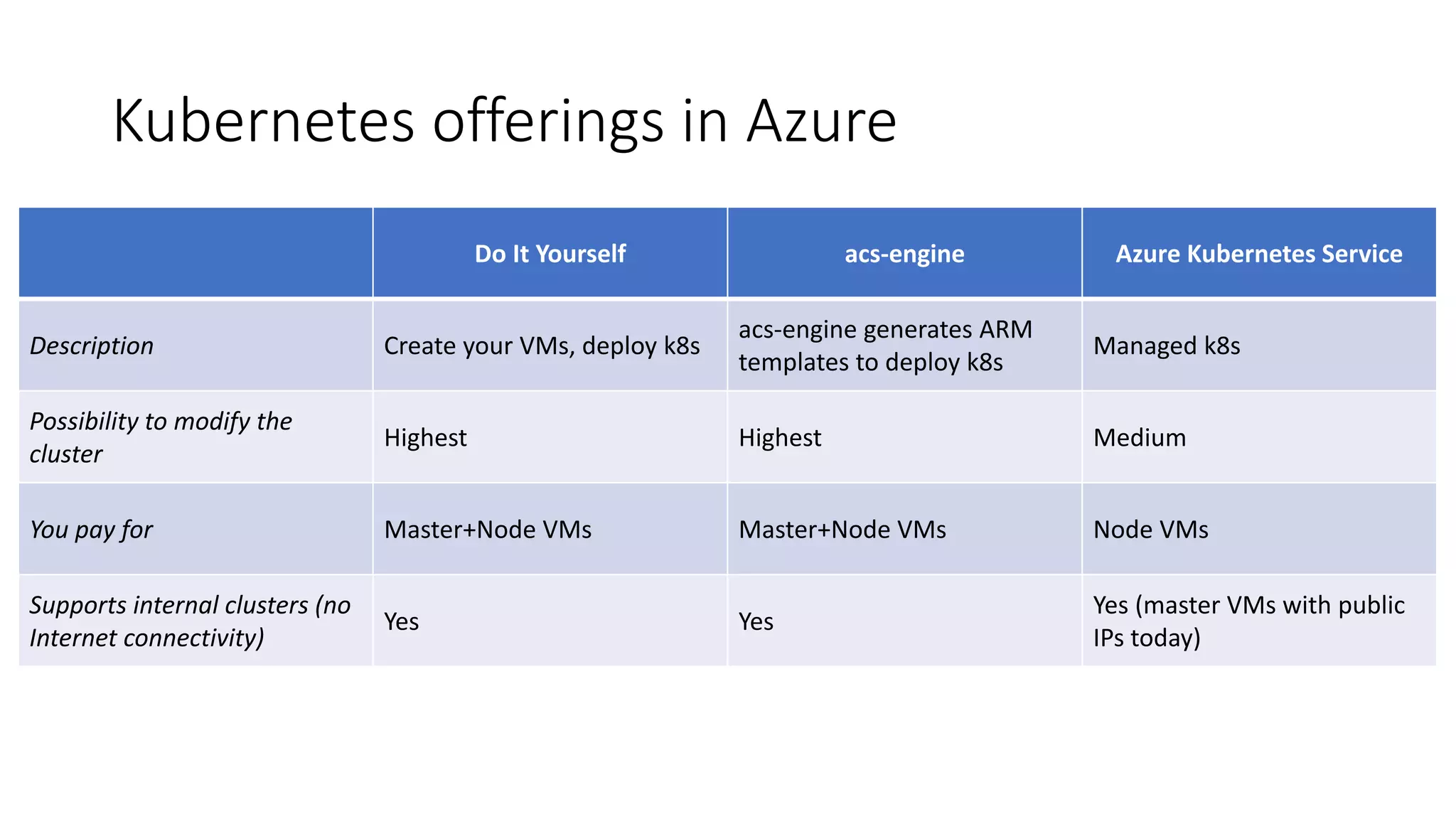
Kubernetes offerings in Azure
Do It Yourself acs-engine Azure Kubernetes Service
Description Create your VMs, deploy k8s
acs-engine generates ARM
templates to deploy k8s
Managed k8s
Possibility to modify the
cluster
Highest Highest Medium
You pay for Master+Node VMs Master+Node VMs Node VMs
Supports internal clusters (no
Internet connectivity)
Yes Yes
Yes (master VMs with public
IPs today)
az aks overview
$ az aks -h
Commands:
browse : Show the dashboard for a Kubernetes cluster in a web browser.
create : Create a new managed Kubernetes cluster.
delete : Delete a managed Kubernetes cluster.
disable-addons : Disable Kubernetes addons.
enable-addons : Enable Kubernetes addons.
get-credentials : Get access credentials for a managed Kubernetes cluster.
get-upgrades : Get the upgrade versions available for a managed Kubernetes cluster.
get-versions : Get the versions available for creating a managed Kubernetes cluster.
install-cli : Download and install kubectl, the Kubernetes command-line tool.
install-connector : (PREVIEW) Install the ACI Connector on a managed Kubernetes cluster.
list : List managed Kubernetes clusters.
remove-connector : (PREVIEW) Remove the ACI Connector from a managed Kubernetes cluster.
remove-dev-spaces : (PREVIEW) Remove Azure Dev Spaces from a managed Kubernetes cluster.
scale : Scale the node pool in a managed Kubernetes cluster.
show : Show the details for a managed Kubernetes cluster.
upgrade : Upgrade a managed Kubernetes cluster to a newer version.
upgrade-connector : (PREVIEW) Upgrade the ACI Connector on a managed Kubernetes cluster.
use-dev-spaces : (PREVIEW) Use Azure Dev Spaces with a managed Kubernetes cluster.
wait : Wait for a managed Kubernetes cluster to reach a desired state.
AKS provisioning
Day 0:
az aks create -n myakscluster -g aksrg --node-count 2 -k 1.11.3 -s Standard_DS2_v2
az aks get-credentials –myakscluster -g aksrg
kubectl get nodes
Day 1:
az aks enable-addons –myakscluster -g aksrg -a monitoring,http_application_routing
kubectl all the things!
Day 2:
az aks upgrade –myakscluster -g aksrg -k 1.11.4
Some Kubernetes best practices
• Use namespaces, do not deploy to default
• Optionally, use different clusters for different apps/environments
(remember, you do not pay for the master nodes!)
• Use resource quotas
• Use at least 3 nodes, that will give you enough capacity during upgrades
(especially if using disks as persistent volumes)
Kube-advisor
• Diagnostic tool for Kubernetes clusters. At the moment, it returns pods that are missing
resource and request limits.
• More info can be found at https://github.com/Azure/kube-advisor
VS Code extension for warnings
• Kubernetes VS Code extension adding warnings for resource request/limits
AKS Persistent Volumes
• You can use AAD-based access to Azure Files
• Managed Disks encrypted with Storage Service Encryption
https://docs.microsoft.com/mt-mt/azure/aks/concepts-storage
Persistent Volumes
• Dynamic Azure Disks
• Static Azure Disks
• Dynamic Azure Files
• Static Azure Files
• Disks are ReadWriteOnce, Files are
ReadWriteMany
• Only Disks support Premium storage
• Faster disk attachment:
https://github.com/khenidak/dysk
$ kubectl get sc
NAME PROVISIONER AGE
default (default) kubernetes.io/azure-disk 1h
managed-premium kubernetes.io/azure-disk 1h
apiVersion: v1
kind: PersistentVolumeClaim
metadata:
name: azure-managed-disk
spec:
accessModes:
- ReadWriteOnce
storageClassName: managed-premium
resources:
requests:
storage: 5Gi
Azure Premium SSD Managed Disks specs
https://azure.microsoft.com/en-us/pricing/details/managed-disks/
P4 P6 P10 P15 P20 P30 P40 P50 P60
(PREVIE
W)*
P70
(PREVIE
W)*
P80
(PREVIE
W)*
Disk Size 32 GiB 64 GiB 128 GiB 256 GiB 512 GiB 1 TiB 2 TiB 4 TiB 8 TiB 16 TiB 32 TiB
(32767
GiB)
Price per
month
$5.81 $11.23 $21.68 $41.82 $80.54 $148.68 $284.94 $545.10 $520.32 $991.09 $1,982.1
8
IOPS per disk 120 240 500 1,100 2,300 5,000 7,500 7,500 12,500 15,000 20,000
Throughput
per disk
25
MB/seco
nd
50
MB/seco
nd
100
MB/seco
nd
125
MB/seco
nd
150
MB/seco
nd
200
MB/seco
nd
250
MB/seco
nd
250
MB/seco
nd
480
MB/seco
nd
750
MB/seco
nd
750
MB/seco
nd
Verify your VM size
https://docs.microsoft.com/en-us/azure/virtual-machines/linux/sizes
Backups with Heptio Ark
• https://heptio.github.io/ark/v0.10.0/
• Complete backup including resource definitions and persistent volumes
• Azure Disks supported natively, Azure Files supported over restic
Leveraging Azure managed databases
• Great way to keep
your containers
stateless
• Leverage the
embedded HA/DR
capabilities of Azure
DBaaS offerings…
• …as well as security,
scalability, etc
AKS Basic Networking
• Done using Kubenet network plugin and has the following features
• Nodes and Pods are placed on different IP subnets
• User Defined Routing and IP Forwarding is for connectivity between Pods across Nodes.
• Drawbacks
• 2 different IP CIDRs to manage
• Performance impact
• Peering or On-Premise connectivity is hard to achieve
AKS Advanced Networking
• Done using the Azure CNI (Container Networking Interface)
• CNI is a vendor-neutral protocol, used by container runtimes to make requests to
Networking Providers
• Azure CNI is an implementation which allows you to integrate Kubernetes with your VNET
• Advantages
• Single IP CIDR to manage
• Better Performance
• Peering and On-Premise connectivity is out of the box
• Network Policy coming soon to Azure CNI plugin on AKS, already available in acs-engine!
(https://github.com/Azure/azure-container-networking/ )
AKS with Advanced Networking
AKS subnet
Backend
services subnet
Azure VNet A
On-premises
infrastructure
Enterprise
system
Other peered VNets
VNet B
VNet peering
Azure
Express
Route
AKS cluster SQL Server
• Service Type LoadBalancer
• Basic Layer4 Load Balancing (TCP/UDP)
• Each service as assigned an IP on the
ALB (Azure Load Balancer)
apiVersion: v1
kind: Service
metadata:
name: frontendservice
spec:
loadBalancerIP: X.X.X.X
type: LoadBalancer
ports:
- port: 80
selector:
app: frontend
Azure AKS VNet
AKS subnet
AKS cluster
FrontEndService
Pod1
label:Frontend
Pod2
label:Frontend
Pod3
label:Frontend
Public LB
Public IP
• Used for internal services that should
be accessed by other VNETs or On-
Premise only
apiVersion: v1
kind: Service
metadata:
name: internalservice
annotations:
service.beta.kubernetes.io/azure-load-balancer-internal:
"true"
spec:
type: LoadBalancer
loadBalancerIP: 10.240.0.25
ports:
- port: 80
selector:
app: internal
Azure AKS VNet
AKS subnet
AKS cluster
InternalService
Pod1
label:Internal
Pod2
label:Internal
Pod3
label:Internal
Internal LB
Internal IP
Other peered VNets
VNet B
VNet peering
On-premises
infrastructure
Enterprise
system
Azure Express Route
Ingress and Ingress Controllers
• Ingress is a Kubernetes API that manages external access to the services in the cluster
• Supports HTTP and HTTPs
• Path and Subdomain based routing
• SSL Termination
• Save on public Ips
• Ingress controller is a daemon, deployed as a Kubernetes Pod, that watches the Ingress
Endpoint for updates. Its job is to satisfy requests for ingresses. Most popular one being
Nginx.
kind: Ingress
metadata:
name: contoso-ingress
annotations: kubernetes.io/ingress.class:
”PublicIngress"
spec:
tls:
- hosts:
- contoso.com
secretName: contoso-secret
rules:
- host: contoso.com
http:
paths:
- path: /a
backend:
serviceName: servicea
servicePort: 80
- path: /b
backend:
serviceName: serviceb
servicePort: 80
Azure AKS VNet
AKS subnet
AKS cluster
On-premises
infrastructure
Enterprise
system
Azure Express Route
Private IP
serviceC.contoso.comcontoso.com/A contoso.com/B
ServiceA ServiceB ServiceC
PublicIngress PrivateIngress
Internal LBPublic LB
Public IP
VNet peering
Azure AKS VNet
AKS subnet
AKS cluster
Private IP
contoso.com/A contoso.com/B
ServiceA ServiceB ServiceC
service.contoso.com
Ingress
Internal LB
Azure
Management VNET
APP GW
Subnet
• Alternatively deploy an Azure
Application Gateway with an ingress
controller
• https://azure.github.io/application-
gateway-kubernetes-ingress/
VNet peering
Azure AKS VNet
AKS subnet
AKS cluster
Private IP
contoso.com/A contoso.com/B
ServiceA ServiceB ServiceC
service.contoso.com
Ingress
Internal LB
Azure
Management VNET
APP GW
Subnet
SSH Bastion
Subnet
Bastion
Host
On-premises
infrastructure
Enterprise
system
Azure
Express
Route
Admin
Tip: deploy SSH keys at
creation time, and store
them in a KMS such as
Azure Key Vault
Network policies
apiVersion: networking.k8s.io/v1
kind: NetworkPolicy
metadata:
name: test-network-policy
namespace: default
spec:
podSelector:
matchLabels:
role: db
policyTypes:
- Ingress
- Egress
ingress:
- from:
- namespaceSelector:
matchLabels:
project: myproject
- podSelector:
matchLabels:
role: frontend
ports:
- protocol: TCP
port: 6379
egress:
- to:
- ipBlock:
cidr: 10.0.0.0/24
ports:
- protocol: TCP
port: 5978
https://kubernetes.io/docs/concepts/services-networking/network-policies/
A Network Security Stack for Azure Kubernetes Service
Tigera Secure Enterprise
Controls, Compliance, & Visibility
Tigera Calico
Azure CNI
Calico already available in acs-engine: https://github.com/Azure/acs-engine/blob/master/docs/kubernetes/features.md
Cluster Level Security
• Securing endpoints for API server and cluster nodes
o Ensuring authentication and authorization (AAD + RBAC)
o Setting up & keeping least privileged access for common tasks
Cluster Level - Identity and Access Management through
AAD and RBAC
1. Kubernetes Developer
authenticates with AAD
2. The AAD token issuance
endpoint issues the access token
AKS
Azure Active
Directory
Token
3. Developer performs action w/
AAD token.
Eg. kubectl create pod
4. Kubernetes validates token with
AAD and fetches the Developer’s
AAD Groups
Eg. Dev Team A, App Group B
Developer
<>
5. Kubernetes RBAC and cluster
policies are applied
6. Request is successful or not based
on the previous validation
AAD-authentication experience in AKS (non admin user)
$ az aks get-credentials --resource-group myAKSCluster --name myAKSCluster
$ kubectl get nodes
To sign in, use a web browser to open the page https://microsoft.com/devicelogin and
enter the code BUJHWDGNL to authenticate.
NAME STATUS ROLES AGE VERSION
aks-nodepool1-42032720-0 Ready agent 1h v1.9.6
aks-nodepool1-42032720-1 Ready agent 1h v1.9.6
aks-nodepool1-42032720-2 Ready agent 1h v1.9.6
Or
Error from server (Forbidden): nodes is forbidden: User baduser@contoso.com cannot
list nodes at the cluster scope
Provisioning AD-enabled AKS (admin user)
$ az aks create --resource-group myAKSCluster --name myAKSCluster --generate-ssh-keys 
--aad-server-app-id <Azure AD Server App ID> 
--aad-server-app-secret <Azure AD Server App Secret> 
--aad-client-app-id <Azure AD Client App ID> 
--aad-tenant-id <Azure AD Tenant>
$ az aks get-credentials --resource-group myAKSCluster –name myAKSCluster --admin
Merged "myCluster" as current context ..
$ kubectl get nodes
NAME STATUS ROLES AGE VERSION
aks-nodepool1-42032720-0 Ready agent 1h v1.9.6
aks-nodepool1-42032720-1 Ready agent 1h v1.9.6
aks-nodepool1-42032720-2 Ready agent 1h v1.9.6
https://docs.microsoft.com/en-us/azure/aks/aad-integration
Provisioning AD-enabled AKS (admin user)
apiVersion: rbac.authorization.k8s.io/v1beta1
kind: ClusterRole
metadata:
labels:
kubernetes.io/cluster-service: "true"
name: cluster-admin
rules:
- apiGroups:
- extensions
- apps
resources:
- deployments
verbs:
- get
- list
- watch
- update
- patch
- apiGroups:
- ""
resources:
- events
- namespaces
- nodes
- pods
verbs:
- get
- list
- watch
Setting up a Cluster Role
apiVersion: rbac.authorization.k8s.io/v1
kind: ClusterRoleBinding
metadata:
name: contoso-cluster-admins
roleRef:
apiGroup: rbac.authorization.k8s.io
kind: ClusterRole
name: cluster-admin
subjects:
- apiGroup: rbac.authorization.k8s.io
kind: User
name: "user@contoso.com"
Bind the Cluster Role to a user
apiVersion: rbac.authorization.k8s.io/v1
kind: ClusterRoleBinding
metadata:
name: contoso-cluster-admins
roleRef:
apiGroup: rbac.authorization.k8s.io
kind: ClusterRole
name: cluster-admin
subjects:
- apiGroup: rbac.authorization.k8s.io
kind: Group
name: "894656e1-39f8-4bfe-b16a-510f61af6f41"
Bind the Cluster Role to a group
 Coming soon:
 NodeRestriction
 PodSecurityPolicy
Cluster Level Security
• Securing endpoints for API server and cluster nodes
o Ensuring authentication and authorization (AAD + RBAC)
o Setting up & keeping least privileged access for common tasks
o Admission Controllers
• NamespaceLifecycle
• LimitRanger
• ServiceAccount
• DefaultStorageClass
• DefaultTolerationSeconds
• MutatingAdmissionWebhook
• ValidatingAdmissionWebhook
• ResourceQuota
• DenyEscalatingExec
• AlwaysPullImages
https://docs.microsoft.com/en-us/azure/aks/faq#what-kubernetes-admission-controllers-does-aks-support-can-admission-controllers-be-added-or-removed
ValidatingAdmissionWebhook
apiVersion: admissionregistration.k8s.io/v1beta1
kind: ValidatingWebhookConfiguration
metadata:
name: denyuntrustedreg
webHooks:
- name: denyregistry.palma.sh
rules:
- apiGroups:
- ""
apiVersions:
- v1
operations:
- CREATE
resources:
- pods
failurePolicy: Fail
clientConfig:
url:
“https://denyregistry.azurewebsites.net/api/HttpTriggerJS1?code=NeZuU87adO
ayXyoTWphGECUJj7cAi4PDyaG8oDEGzWeZAU63mnvX6Q==&name=Ignite"
MutatingAdmissionWebhook
apiVersion: admissionregistration.k8s.io/v1beta1
kind: MutatingWebhookConfiguration
metadata:
name: label-injector-webhook-cfg
labels:
app: label-injector
webhooks:
- name: label-injector.palma.sh
clientConfig:
service:
name: label-injector-webhook-svc
namespace: default
path: "/mutate"
caBundle: ${CA_BUNDLE}
rules:
- operations: [ "CREATE" ]
resources: ["pods"]
apiGroups: [""]
apiVersions: ["v1"]
namespaceSelector:
matchLabels:
label-injector: enabled
Cluster Level – Nodes, Upgrade and Patches
• Regular maintenance, security and cleanup tasks
o Maintain, update and upgrade hosts and
kubernetes
o Monthly ideal, 3 months minimum
o Security patches
 AKS automatically applies security patches
to the nodes on a nightly schedule
 You’re responsible to reboot as required
 Kured DaemonSet:
https://github.com/weaveworks/kured
Upgrade to version 1.10.6
$ az aks upgrade --name myAKSCluster 
--resource-group myResourceGroup 
--kubernetes-version 1.10.6
• SSH Access
o DenyEscalatingExec
• Running benchmarks and tests to
validate cluster setup
o Kube-bench
o Aqua Hunter
o Others
https://docs.microsoft.com/en-us/azure/aks/faq#are-security-updates-applied-to-aks-agent-nodes
https://docs.microsoft.com/en-us/azure/aks/node-updates-kured
Container Level Security and Isolation
Container Level – The images
• Trusted Registry
• Regularly apply security updates to the container images
Container Level – Images and Runtime
• Scan your images, scan your containers
• Runtime enforcement and remediation
Database tier
AKS production cluster
Source
code control
Helm
chart
Inner loop
Test
Debug
VSCode
AKS dev
cluster
Azure
Container
Registry
Azure Pipelines/
DevOps Project
Auto-build
Business tier
Web tier
Azure
Monitor
CI/CD
Aqua and Twistlock
container security
Aqua, Twistlock, Neuvector
Container Security
Container Level – The access
• Avoid access to HOST IPC namespace - only if absolutely necessary
• Avoid access to Host PID namespace - only if absolutely necessary
• Avoid root / privileged access
o Consider Linux Capabilities
Container Level – apparmor profiles
$ kubectl exec hello-apparmor touch /tmp/test
touch: /tmp/test: Permission denied
error: error executing remote command: command terminated with non-zero exit
code: Error executing in Docker Container: 1
Container Level – seccomp profiles
$ kubectl create -f seccomp-pod.yaml
pod "chmod-prevented" created
$ kubectl get pods
NAME READY STATUS RESTARTS AGE
chmod-prevented 0/1 Error 0 8s
Pod Level Security
Pod Level – Pod Security Context
apiVersion: v1
kind: Pod
metadata:
name: security-context-demo
spec:
securityContext:
runAsUser: 1000
fsGroup: 2000
volumes:
- name: sec-ctx-vol
emptyDir: {}
containers:
- name: sec-ctx-demo
image: ignite.azurecr.io/nginx-demo
volumeMounts:
- name: sec-ctx-vol
mountPath: /data/demo
securityContext:
runAsUser: 2000
allowPrivilegeEscalation: false
capabilities:
add: ["NET_ADMIN", "SYS_TIME"]
seLinuxOptions:
level: "s0:c123,c456"
https://kubernetes.io/docs/tasks/configure-pod-container/security-context/
Pod Level – Pod Security Policies
apiVersion: policy/v1beta1
kind: PodSecurityPolicy
metadata:
name: restricted
annotations:
seccomp.security.alpha.kubernetes.io/allowedProfileNames: 'docker/default’
apparmor.security.beta.kubernetes.io/allowedProfileNames: 'runtime/default’
seccomp.security.alpha.kubernetes.io/defaultProfileName: 'docker/default’
apparmor.security.beta.kubernetes.io/defaultProfileName: 'runtime/default’
spec:
privileged: false
allowPrivilegeEscalation: false # Required to prevent escalations to root.
requiredDropCapabilities: # This is redundant with non-root + disallow privilege escalation, but we can provide it for defense in depth.
- ALL
volumes: # Allow core volume types.
- 'configMap’
- 'emptyDir’
- 'projected’
- 'secret’
- 'downwardAPI’
- 'persistentVolumeClaim’ # Assume that persistentVolumes set up by the cluster admin are safe to use.
hostNetwork: false
hostIPC: false
hostPID: false
runAsUser:
rule: 'MustRunAsNonRoot’ # Require the container to run without root privileges.
seLinux:
rule: 'RunAsAny’ # This policy assumes the nodes are using AppArmor rather than SELinux.
supplementalGroups:
rule: 'MustRunAs’
ranges:
- min: 1 # Forbid adding the root group.
max: 65535
fsGroup:
rule: 'MustRunAs’
ranges:
- min: 1 # Forbid adding the root group.
max: 65535
readOnlyRootFilesystem: false
Pod level
• Pod Security Context
• Pod Security Policies
• AlwaysPull Images
Securing Workloads
Storing your secrets in Azure Key Vault
https://github.com/Azure/kubernetes-keyvault-flexvol
apiVersion: v1
kind: Pod
metadata:
name: nginx-flex-kv
spec:
containers:
- name: nginx-flex-kv
image: nginx
volumeMounts:
- name: test
mountPath: /kvmnt
readOnly: true
volumes:
- name: test
flexVolume:
driver: "azure/kv"
secretRef:
name: kvcreds # k8s secret with KV credentials
options:
usepodidentity: "false"
keyvaultname: "testkeyvault"
keyvaultobjectname: "testsecret"
keyvaultobjecttype: secret # OPTIONS: secret, key, cert
resourcegroup: "testresourcegroup"
subscriptionid: "testsub"
tenantid: "testtenant"
Pod Identity
Kubernetes
controller
Kubernetes
Azure MSI
Azure
Identity
Binding
Active
Directory
Pod Identity
NMI + EMSI
Pod
Token
Azure SQL
Server
1. Kubernetes operator defines an
identity map for K8s service
accounts
2. Node Managed Identity (NMI)
watches for mapping reaction and
syncs to Managed Service Identify
(MSI)
3. Developer creates a pod with a
service account. Pod uses
standard Azure SDK to fetch a
token bound to MSI
4. Pod uses access token to
consume other Azure services;
services validate token
Developer
<>
https://github.com/Azure/aad-pod-identity
Securing workloads
• Managing secrets and privileged information
o Azure Key Vault
AKS w/
RBAC
SQL
Database Cosmos DB
Key Vault
Azure
Storage
https://github.com/Azure/kubernetes-kms
Compliance
• AKS is SOC 1/2 , PCI , HIPPA and ISO certified
• All the details are listed in the Azure Trust Center
Pod
Pod
Kublet
cAdvisor
Node1
Horizontal Pod
Autoscaler Deployment ReplicaSet
replicas++
replicas--
Pod
Kublet
cAdvisor
Node2
NodeX
Metrics Server
Collects metrics from all nodes
Gets
metrics
from
Collects metrics
from all containers
on the node
https://kubernetes.io/docs/tasks/run-application/horizontal-pod-autoscale/
• Scales nodes based on pending pods
• Scale up and scale down
• Reduces dependency on monitoring
• Removes need for users to manage
nodes and monitor service usage
manually
Pod Pod
CA
Pod Pod
Node Node
4. Pending pods
are scheduled
3. Node is granted
2. Additional
node(s) needed
1. Pods are in
pending state
Pod Pod
AKS Cluster
https://docs.microsoft.com/en-us/azure/aks/autoscaler
VM
Pods
VM
Pods
VM
Pods
VM
Pods
Kubernetes
control pane
Azure Container Instances (ACI)
Pods
ACI
Connector
Application
Architect
Infrastructure
Architect
Deployment/
tasks
https://docs.microsoft.com/en-us/azure/aks/virtual-kubelet
• Minimize downtime risk
• One live region
• Another backup
• Or weighted traffic
• A/B testing
Azure Traffic
Manager
AKS Cluster 1
Region 1
AKS Cluster 2
Region 2
Azure paired regions
Monitoring/Logging your cluster
• Log Everything to stdout / stderr
• Key Metrics:
o Node metrics (CPU Usage, Memory Usage, Disk Usage, Network Usage)
o Kube_node_status_condition
o Pod memory usage / limit; memory_failures_total
 container_memory_working_set_bytes
o Pod CPU usage average / limit
o Filesystem Usage / limit
o Network receive / transmit errors
• Azure Monitor for Containers
In the roadmap
Overview health of AKS cluster
Node event Logs
Pod usage and details
Customer control plane logs
• Use the Azure portal to enable diagnostics logs
• Pipe logs to log analytics, event hub or a
storage account
• Metrics available today
• Kube-controller-manager
• Kube-api-server
• Kube-scheduler
• Audit logs on the roadmap
Example control plane logs
Multi cluster monitoring
Resources
• AKS Best Practices GitHub: https://github.com/Azure/k8s-best-practices
• AKS Hackfest: aka.ms/k8s-hackfest & https://github.com/Azure/kubernetes-hackfest
• Distributed systems Labs by Brendan Burns
• Kube Advisor: https://github.com/Azure/kube-advisor
• VSCode Kubernetes Extension
• Documentation resources
• Regions and limits
• Ebook for distributed systems
• AKS HoL
Azure Dev Spaces
• Run and debug containers
directly in Azure
Kubernetes Service (AKS)
• VS and Vscode
• Java, .NET core, Node.js
https://docs.microsoft.com/en-us/azure/dev-spaces/
Best Practices with Azure Kubernetes Services

Best Practices with Azure Kubernetes Services

  • 1.
    AKS best practices JoseMoreno Azure FastTrack Engineer jose.moreno@microsoft.com
  • 2.
    FastTrack for Azure Infos:https://azure.microsoft.com/de-de/programs/azure-fasttrack/ Nominierung: https://azfasttrack.azurewebsites.net/
  • 3.
    Agenda • Cluster Isolationand Resource Management • Storage • Networking • Network Policies • Securing your Environment • Scaling your Applications and Cluster • Logging and Monitoring
  • 6.
    Kubernetes offerings inAzure Do It Yourself acs-engine Azure Kubernetes Service Description Create your VMs, deploy k8s acs-engine generates ARM templates to deploy k8s Managed k8s Possibility to modify the cluster Highest Highest Medium You pay for Master+Node VMs Master+Node VMs Node VMs Supports internal clusters (no Internet connectivity) Yes Yes Yes (master VMs with public IPs today)
  • 7.
    az aks overview $az aks -h Commands: browse : Show the dashboard for a Kubernetes cluster in a web browser. create : Create a new managed Kubernetes cluster. delete : Delete a managed Kubernetes cluster. disable-addons : Disable Kubernetes addons. enable-addons : Enable Kubernetes addons. get-credentials : Get access credentials for a managed Kubernetes cluster. get-upgrades : Get the upgrade versions available for a managed Kubernetes cluster. get-versions : Get the versions available for creating a managed Kubernetes cluster. install-cli : Download and install kubectl, the Kubernetes command-line tool. install-connector : (PREVIEW) Install the ACI Connector on a managed Kubernetes cluster. list : List managed Kubernetes clusters. remove-connector : (PREVIEW) Remove the ACI Connector from a managed Kubernetes cluster. remove-dev-spaces : (PREVIEW) Remove Azure Dev Spaces from a managed Kubernetes cluster. scale : Scale the node pool in a managed Kubernetes cluster. show : Show the details for a managed Kubernetes cluster. upgrade : Upgrade a managed Kubernetes cluster to a newer version. upgrade-connector : (PREVIEW) Upgrade the ACI Connector on a managed Kubernetes cluster. use-dev-spaces : (PREVIEW) Use Azure Dev Spaces with a managed Kubernetes cluster. wait : Wait for a managed Kubernetes cluster to reach a desired state.
  • 8.
    AKS provisioning Day 0: azaks create -n myakscluster -g aksrg --node-count 2 -k 1.11.3 -s Standard_DS2_v2 az aks get-credentials –myakscluster -g aksrg kubectl get nodes Day 1: az aks enable-addons –myakscluster -g aksrg -a monitoring,http_application_routing kubectl all the things! Day 2: az aks upgrade –myakscluster -g aksrg -k 1.11.4
  • 10.
    Some Kubernetes bestpractices • Use namespaces, do not deploy to default • Optionally, use different clusters for different apps/environments (remember, you do not pay for the master nodes!) • Use resource quotas • Use at least 3 nodes, that will give you enough capacity during upgrades (especially if using disks as persistent volumes)
  • 11.
    Kube-advisor • Diagnostic toolfor Kubernetes clusters. At the moment, it returns pods that are missing resource and request limits. • More info can be found at https://github.com/Azure/kube-advisor
  • 12.
    VS Code extensionfor warnings • Kubernetes VS Code extension adding warnings for resource request/limits
  • 14.
    AKS Persistent Volumes •You can use AAD-based access to Azure Files • Managed Disks encrypted with Storage Service Encryption https://docs.microsoft.com/mt-mt/azure/aks/concepts-storage
  • 15.
    Persistent Volumes • DynamicAzure Disks • Static Azure Disks • Dynamic Azure Files • Static Azure Files • Disks are ReadWriteOnce, Files are ReadWriteMany • Only Disks support Premium storage • Faster disk attachment: https://github.com/khenidak/dysk $ kubectl get sc NAME PROVISIONER AGE default (default) kubernetes.io/azure-disk 1h managed-premium kubernetes.io/azure-disk 1h apiVersion: v1 kind: PersistentVolumeClaim metadata: name: azure-managed-disk spec: accessModes: - ReadWriteOnce storageClassName: managed-premium resources: requests: storage: 5Gi
  • 16.
    Azure Premium SSDManaged Disks specs https://azure.microsoft.com/en-us/pricing/details/managed-disks/ P4 P6 P10 P15 P20 P30 P40 P50 P60 (PREVIE W)* P70 (PREVIE W)* P80 (PREVIE W)* Disk Size 32 GiB 64 GiB 128 GiB 256 GiB 512 GiB 1 TiB 2 TiB 4 TiB 8 TiB 16 TiB 32 TiB (32767 GiB) Price per month $5.81 $11.23 $21.68 $41.82 $80.54 $148.68 $284.94 $545.10 $520.32 $991.09 $1,982.1 8 IOPS per disk 120 240 500 1,100 2,300 5,000 7,500 7,500 12,500 15,000 20,000 Throughput per disk 25 MB/seco nd 50 MB/seco nd 100 MB/seco nd 125 MB/seco nd 150 MB/seco nd 200 MB/seco nd 250 MB/seco nd 250 MB/seco nd 480 MB/seco nd 750 MB/seco nd 750 MB/seco nd
  • 17.
    Verify your VMsize https://docs.microsoft.com/en-us/azure/virtual-machines/linux/sizes
  • 18.
    Backups with HeptioArk • https://heptio.github.io/ark/v0.10.0/ • Complete backup including resource definitions and persistent volumes • Azure Disks supported natively, Azure Files supported over restic
  • 19.
    Leveraging Azure manageddatabases • Great way to keep your containers stateless • Leverage the embedded HA/DR capabilities of Azure DBaaS offerings… • …as well as security, scalability, etc
  • 21.
    AKS Basic Networking •Done using Kubenet network plugin and has the following features • Nodes and Pods are placed on different IP subnets • User Defined Routing and IP Forwarding is for connectivity between Pods across Nodes. • Drawbacks • 2 different IP CIDRs to manage • Performance impact • Peering or On-Premise connectivity is hard to achieve
  • 22.
    AKS Advanced Networking •Done using the Azure CNI (Container Networking Interface) • CNI is a vendor-neutral protocol, used by container runtimes to make requests to Networking Providers • Azure CNI is an implementation which allows you to integrate Kubernetes with your VNET • Advantages • Single IP CIDR to manage • Better Performance • Peering and On-Premise connectivity is out of the box • Network Policy coming soon to Azure CNI plugin on AKS, already available in acs-engine! (https://github.com/Azure/azure-container-networking/ )
  • 23.
    AKS with AdvancedNetworking AKS subnet Backend services subnet Azure VNet A On-premises infrastructure Enterprise system Other peered VNets VNet B VNet peering Azure Express Route AKS cluster SQL Server
  • 24.
    • Service TypeLoadBalancer • Basic Layer4 Load Balancing (TCP/UDP) • Each service as assigned an IP on the ALB (Azure Load Balancer) apiVersion: v1 kind: Service metadata: name: frontendservice spec: loadBalancerIP: X.X.X.X type: LoadBalancer ports: - port: 80 selector: app: frontend Azure AKS VNet AKS subnet AKS cluster FrontEndService Pod1 label:Frontend Pod2 label:Frontend Pod3 label:Frontend Public LB Public IP
  • 25.
    • Used forinternal services that should be accessed by other VNETs or On- Premise only apiVersion: v1 kind: Service metadata: name: internalservice annotations: service.beta.kubernetes.io/azure-load-balancer-internal: "true" spec: type: LoadBalancer loadBalancerIP: 10.240.0.25 ports: - port: 80 selector: app: internal Azure AKS VNet AKS subnet AKS cluster InternalService Pod1 label:Internal Pod2 label:Internal Pod3 label:Internal Internal LB Internal IP Other peered VNets VNet B VNet peering On-premises infrastructure Enterprise system Azure Express Route
  • 26.
    Ingress and IngressControllers • Ingress is a Kubernetes API that manages external access to the services in the cluster • Supports HTTP and HTTPs • Path and Subdomain based routing • SSL Termination • Save on public Ips • Ingress controller is a daemon, deployed as a Kubernetes Pod, that watches the Ingress Endpoint for updates. Its job is to satisfy requests for ingresses. Most popular one being Nginx.
  • 27.
    kind: Ingress metadata: name: contoso-ingress annotations:kubernetes.io/ingress.class: ”PublicIngress" spec: tls: - hosts: - contoso.com secretName: contoso-secret rules: - host: contoso.com http: paths: - path: /a backend: serviceName: servicea servicePort: 80 - path: /b backend: serviceName: serviceb servicePort: 80 Azure AKS VNet AKS subnet AKS cluster On-premises infrastructure Enterprise system Azure Express Route Private IP serviceC.contoso.comcontoso.com/A contoso.com/B ServiceA ServiceB ServiceC PublicIngress PrivateIngress Internal LBPublic LB Public IP
  • 28.
    VNet peering Azure AKSVNet AKS subnet AKS cluster Private IP contoso.com/A contoso.com/B ServiceA ServiceB ServiceC service.contoso.com Ingress Internal LB Azure Management VNET APP GW Subnet
  • 29.
    • Alternatively deployan Azure Application Gateway with an ingress controller • https://azure.github.io/application- gateway-kubernetes-ingress/
  • 30.
    VNet peering Azure AKSVNet AKS subnet AKS cluster Private IP contoso.com/A contoso.com/B ServiceA ServiceB ServiceC service.contoso.com Ingress Internal LB Azure Management VNET APP GW Subnet SSH Bastion Subnet Bastion Host On-premises infrastructure Enterprise system Azure Express Route Admin Tip: deploy SSH keys at creation time, and store them in a KMS such as Azure Key Vault
  • 32.
    Network policies apiVersion: networking.k8s.io/v1 kind:NetworkPolicy metadata: name: test-network-policy namespace: default spec: podSelector: matchLabels: role: db policyTypes: - Ingress - Egress ingress: - from: - namespaceSelector: matchLabels: project: myproject - podSelector: matchLabels: role: frontend ports: - protocol: TCP port: 6379 egress: - to: - ipBlock: cidr: 10.0.0.0/24 ports: - protocol: TCP port: 5978 https://kubernetes.io/docs/concepts/services-networking/network-policies/
  • 33.
    A Network SecurityStack for Azure Kubernetes Service Tigera Secure Enterprise Controls, Compliance, & Visibility Tigera Calico Azure CNI Calico already available in acs-engine: https://github.com/Azure/acs-engine/blob/master/docs/kubernetes/features.md
  • 35.
  • 36.
    Cluster Level Security •Securing endpoints for API server and cluster nodes o Ensuring authentication and authorization (AAD + RBAC) o Setting up & keeping least privileged access for common tasks
  • 37.
    Cluster Level -Identity and Access Management through AAD and RBAC 1. Kubernetes Developer authenticates with AAD 2. The AAD token issuance endpoint issues the access token AKS Azure Active Directory Token 3. Developer performs action w/ AAD token. Eg. kubectl create pod 4. Kubernetes validates token with AAD and fetches the Developer’s AAD Groups Eg. Dev Team A, App Group B Developer <> 5. Kubernetes RBAC and cluster policies are applied 6. Request is successful or not based on the previous validation
  • 38.
    AAD-authentication experience inAKS (non admin user) $ az aks get-credentials --resource-group myAKSCluster --name myAKSCluster $ kubectl get nodes To sign in, use a web browser to open the page https://microsoft.com/devicelogin and enter the code BUJHWDGNL to authenticate. NAME STATUS ROLES AGE VERSION aks-nodepool1-42032720-0 Ready agent 1h v1.9.6 aks-nodepool1-42032720-1 Ready agent 1h v1.9.6 aks-nodepool1-42032720-2 Ready agent 1h v1.9.6 Or Error from server (Forbidden): nodes is forbidden: User baduser@contoso.com cannot list nodes at the cluster scope
  • 39.
    Provisioning AD-enabled AKS(admin user) $ az aks create --resource-group myAKSCluster --name myAKSCluster --generate-ssh-keys --aad-server-app-id <Azure AD Server App ID> --aad-server-app-secret <Azure AD Server App Secret> --aad-client-app-id <Azure AD Client App ID> --aad-tenant-id <Azure AD Tenant> $ az aks get-credentials --resource-group myAKSCluster –name myAKSCluster --admin Merged "myCluster" as current context .. $ kubectl get nodes NAME STATUS ROLES AGE VERSION aks-nodepool1-42032720-0 Ready agent 1h v1.9.6 aks-nodepool1-42032720-1 Ready agent 1h v1.9.6 aks-nodepool1-42032720-2 Ready agent 1h v1.9.6 https://docs.microsoft.com/en-us/azure/aks/aad-integration
  • 40.
    Provisioning AD-enabled AKS(admin user) apiVersion: rbac.authorization.k8s.io/v1beta1 kind: ClusterRole metadata: labels: kubernetes.io/cluster-service: "true" name: cluster-admin rules: - apiGroups: - extensions - apps resources: - deployments verbs: - get - list - watch - update - patch - apiGroups: - "" resources: - events - namespaces - nodes - pods verbs: - get - list - watch Setting up a Cluster Role apiVersion: rbac.authorization.k8s.io/v1 kind: ClusterRoleBinding metadata: name: contoso-cluster-admins roleRef: apiGroup: rbac.authorization.k8s.io kind: ClusterRole name: cluster-admin subjects: - apiGroup: rbac.authorization.k8s.io kind: User name: "user@contoso.com" Bind the Cluster Role to a user apiVersion: rbac.authorization.k8s.io/v1 kind: ClusterRoleBinding metadata: name: contoso-cluster-admins roleRef: apiGroup: rbac.authorization.k8s.io kind: ClusterRole name: cluster-admin subjects: - apiGroup: rbac.authorization.k8s.io kind: Group name: "894656e1-39f8-4bfe-b16a-510f61af6f41" Bind the Cluster Role to a group
  • 41.
     Coming soon: NodeRestriction  PodSecurityPolicy Cluster Level Security • Securing endpoints for API server and cluster nodes o Ensuring authentication and authorization (AAD + RBAC) o Setting up & keeping least privileged access for common tasks o Admission Controllers • NamespaceLifecycle • LimitRanger • ServiceAccount • DefaultStorageClass • DefaultTolerationSeconds • MutatingAdmissionWebhook • ValidatingAdmissionWebhook • ResourceQuota • DenyEscalatingExec • AlwaysPullImages https://docs.microsoft.com/en-us/azure/aks/faq#what-kubernetes-admission-controllers-does-aks-support-can-admission-controllers-be-added-or-removed
  • 42.
    ValidatingAdmissionWebhook apiVersion: admissionregistration.k8s.io/v1beta1 kind: ValidatingWebhookConfiguration metadata: name:denyuntrustedreg webHooks: - name: denyregistry.palma.sh rules: - apiGroups: - "" apiVersions: - v1 operations: - CREATE resources: - pods failurePolicy: Fail clientConfig: url: “https://denyregistry.azurewebsites.net/api/HttpTriggerJS1?code=NeZuU87adO ayXyoTWphGECUJj7cAi4PDyaG8oDEGzWeZAU63mnvX6Q==&name=Ignite"
  • 43.
    MutatingAdmissionWebhook apiVersion: admissionregistration.k8s.io/v1beta1 kind: MutatingWebhookConfiguration metadata: name:label-injector-webhook-cfg labels: app: label-injector webhooks: - name: label-injector.palma.sh clientConfig: service: name: label-injector-webhook-svc namespace: default path: "/mutate" caBundle: ${CA_BUNDLE} rules: - operations: [ "CREATE" ] resources: ["pods"] apiGroups: [""] apiVersions: ["v1"] namespaceSelector: matchLabels: label-injector: enabled
  • 44.
    Cluster Level –Nodes, Upgrade and Patches • Regular maintenance, security and cleanup tasks o Maintain, update and upgrade hosts and kubernetes o Monthly ideal, 3 months minimum o Security patches  AKS automatically applies security patches to the nodes on a nightly schedule  You’re responsible to reboot as required  Kured DaemonSet: https://github.com/weaveworks/kured Upgrade to version 1.10.6 $ az aks upgrade --name myAKSCluster --resource-group myResourceGroup --kubernetes-version 1.10.6 • SSH Access o DenyEscalatingExec • Running benchmarks and tests to validate cluster setup o Kube-bench o Aqua Hunter o Others https://docs.microsoft.com/en-us/azure/aks/faq#are-security-updates-applied-to-aks-agent-nodes https://docs.microsoft.com/en-us/azure/aks/node-updates-kured
  • 45.
  • 46.
    Container Level –The images • Trusted Registry • Regularly apply security updates to the container images
  • 47.
    Container Level –Images and Runtime • Scan your images, scan your containers • Runtime enforcement and remediation Database tier AKS production cluster Source code control Helm chart Inner loop Test Debug VSCode AKS dev cluster Azure Container Registry Azure Pipelines/ DevOps Project Auto-build Business tier Web tier Azure Monitor CI/CD Aqua and Twistlock container security Aqua, Twistlock, Neuvector Container Security
  • 48.
    Container Level –The access • Avoid access to HOST IPC namespace - only if absolutely necessary • Avoid access to Host PID namespace - only if absolutely necessary • Avoid root / privileged access o Consider Linux Capabilities
  • 49.
    Container Level –apparmor profiles $ kubectl exec hello-apparmor touch /tmp/test touch: /tmp/test: Permission denied error: error executing remote command: command terminated with non-zero exit code: Error executing in Docker Container: 1
  • 50.
    Container Level –seccomp profiles $ kubectl create -f seccomp-pod.yaml pod "chmod-prevented" created $ kubectl get pods NAME READY STATUS RESTARTS AGE chmod-prevented 0/1 Error 0 8s
  • 51.
  • 52.
    Pod Level –Pod Security Context apiVersion: v1 kind: Pod metadata: name: security-context-demo spec: securityContext: runAsUser: 1000 fsGroup: 2000 volumes: - name: sec-ctx-vol emptyDir: {} containers: - name: sec-ctx-demo image: ignite.azurecr.io/nginx-demo volumeMounts: - name: sec-ctx-vol mountPath: /data/demo securityContext: runAsUser: 2000 allowPrivilegeEscalation: false capabilities: add: ["NET_ADMIN", "SYS_TIME"] seLinuxOptions: level: "s0:c123,c456" https://kubernetes.io/docs/tasks/configure-pod-container/security-context/
  • 53.
    Pod Level –Pod Security Policies apiVersion: policy/v1beta1 kind: PodSecurityPolicy metadata: name: restricted annotations: seccomp.security.alpha.kubernetes.io/allowedProfileNames: 'docker/default’ apparmor.security.beta.kubernetes.io/allowedProfileNames: 'runtime/default’ seccomp.security.alpha.kubernetes.io/defaultProfileName: 'docker/default’ apparmor.security.beta.kubernetes.io/defaultProfileName: 'runtime/default’ spec: privileged: false allowPrivilegeEscalation: false # Required to prevent escalations to root. requiredDropCapabilities: # This is redundant with non-root + disallow privilege escalation, but we can provide it for defense in depth. - ALL volumes: # Allow core volume types. - 'configMap’ - 'emptyDir’ - 'projected’ - 'secret’ - 'downwardAPI’ - 'persistentVolumeClaim’ # Assume that persistentVolumes set up by the cluster admin are safe to use. hostNetwork: false hostIPC: false hostPID: false runAsUser: rule: 'MustRunAsNonRoot’ # Require the container to run without root privileges. seLinux: rule: 'RunAsAny’ # This policy assumes the nodes are using AppArmor rather than SELinux. supplementalGroups: rule: 'MustRunAs’ ranges: - min: 1 # Forbid adding the root group. max: 65535 fsGroup: rule: 'MustRunAs’ ranges: - min: 1 # Forbid adding the root group. max: 65535 readOnlyRootFilesystem: false
  • 54.
    Pod level • PodSecurity Context • Pod Security Policies • AlwaysPull Images
  • 55.
  • 56.
    Storing your secretsin Azure Key Vault https://github.com/Azure/kubernetes-keyvault-flexvol apiVersion: v1 kind: Pod metadata: name: nginx-flex-kv spec: containers: - name: nginx-flex-kv image: nginx volumeMounts: - name: test mountPath: /kvmnt readOnly: true volumes: - name: test flexVolume: driver: "azure/kv" secretRef: name: kvcreds # k8s secret with KV credentials options: usepodidentity: "false" keyvaultname: "testkeyvault" keyvaultobjectname: "testsecret" keyvaultobjecttype: secret # OPTIONS: secret, key, cert resourcegroup: "testresourcegroup" subscriptionid: "testsub" tenantid: "testtenant"
  • 57.
    Pod Identity Kubernetes controller Kubernetes Azure MSI Azure Identity Binding Active Directory PodIdentity NMI + EMSI Pod Token Azure SQL Server 1. Kubernetes operator defines an identity map for K8s service accounts 2. Node Managed Identity (NMI) watches for mapping reaction and syncs to Managed Service Identify (MSI) 3. Developer creates a pod with a service account. Pod uses standard Azure SDK to fetch a token bound to MSI 4. Pod uses access token to consume other Azure services; services validate token Developer <> https://github.com/Azure/aad-pod-identity
  • 58.
    Securing workloads • Managingsecrets and privileged information o Azure Key Vault AKS w/ RBAC SQL Database Cosmos DB Key Vault Azure Storage https://github.com/Azure/kubernetes-kms
  • 59.
    Compliance • AKS isSOC 1/2 , PCI , HIPPA and ISO certified • All the details are listed in the Azure Trust Center
  • 61.
    Pod Pod Kublet cAdvisor Node1 Horizontal Pod Autoscaler DeploymentReplicaSet replicas++ replicas-- Pod Kublet cAdvisor Node2 NodeX Metrics Server Collects metrics from all nodes Gets metrics from Collects metrics from all containers on the node https://kubernetes.io/docs/tasks/run-application/horizontal-pod-autoscale/
  • 62.
    • Scales nodesbased on pending pods • Scale up and scale down • Reduces dependency on monitoring • Removes need for users to manage nodes and monitor service usage manually Pod Pod CA Pod Pod Node Node 4. Pending pods are scheduled 3. Node is granted 2. Additional node(s) needed 1. Pods are in pending state Pod Pod AKS Cluster https://docs.microsoft.com/en-us/azure/aks/autoscaler
  • 63.
    VM Pods VM Pods VM Pods VM Pods Kubernetes control pane Azure ContainerInstances (ACI) Pods ACI Connector Application Architect Infrastructure Architect Deployment/ tasks https://docs.microsoft.com/en-us/azure/aks/virtual-kubelet
  • 65.
    • Minimize downtimerisk • One live region • Another backup • Or weighted traffic • A/B testing Azure Traffic Manager AKS Cluster 1 Region 1 AKS Cluster 2 Region 2 Azure paired regions
  • 67.
    Monitoring/Logging your cluster •Log Everything to stdout / stderr • Key Metrics: o Node metrics (CPU Usage, Memory Usage, Disk Usage, Network Usage) o Kube_node_status_condition o Pod memory usage / limit; memory_failures_total  container_memory_working_set_bytes o Pod CPU usage average / limit o Filesystem Usage / limit o Network receive / transmit errors • Azure Monitor for Containers In the roadmap
  • 68.
    Overview health ofAKS cluster
  • 69.
  • 70.
  • 71.
    Customer control planelogs • Use the Azure portal to enable diagnostics logs • Pipe logs to log analytics, event hub or a storage account • Metrics available today • Kube-controller-manager • Kube-api-server • Kube-scheduler • Audit logs on the roadmap
  • 72.
  • 73.
  • 75.
    Resources • AKS BestPractices GitHub: https://github.com/Azure/k8s-best-practices • AKS Hackfest: aka.ms/k8s-hackfest & https://github.com/Azure/kubernetes-hackfest • Distributed systems Labs by Brendan Burns • Kube Advisor: https://github.com/Azure/kube-advisor • VSCode Kubernetes Extension • Documentation resources • Regions and limits • Ebook for distributed systems • AKS HoL
  • 77.
    Azure Dev Spaces •Run and debug containers directly in Azure Kubernetes Service (AKS) • VS and Vscode • Java, .NET core, Node.js https://docs.microsoft.com/en-us/azure/dev-spaces/