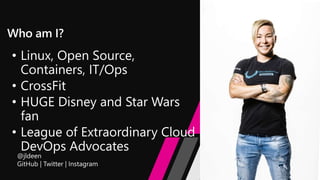
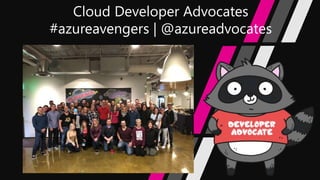
• Linux, Open Source,
Containers, IT/Ops
• CrossFit
• HUGE Disney and Star Wars
fan
• League of Extraordinary Cloud
DevOps Advocates
Agenda
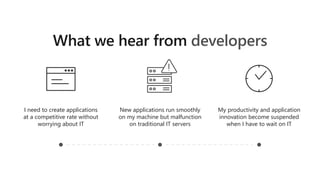
developers
I need to create applications
at a competitive rate without
worrying about IT
New applications run smoothly
on my machine but malfunction
on traditional IT servers
My productivity and application
innovation become suspended
when I have to wait on IT
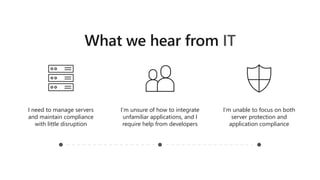
IT
I need to manage servers
and maintain compliance
with little disruption
I’m unsure of how to integrate
unfamiliar applications, and I
require help from developers
I’m unable to focus on both
server protection and
application compliance
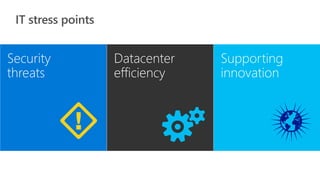
Security
threats
Datacenter
efficiency
Supporting
innovation
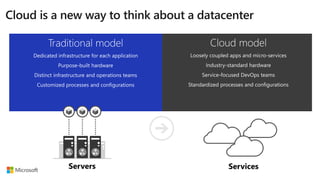
Servers Services
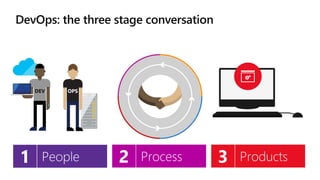
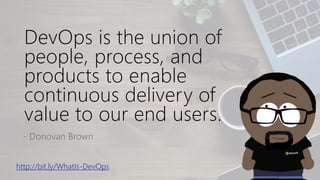
DevOps is the union of
people, process, and
products to enable
continuous delivery of
value to our end users.
- Donovan Brown
http://bit.ly/WhatIs-DevOps
Recap
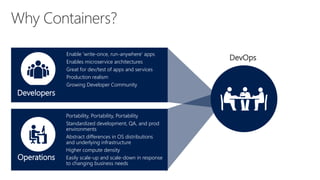
Developers
Enable ‘write-once, run-anywhere’ apps
Enables microservice architectures
Great for dev/test of apps and services
Production realism
Growing Developer Community
Operations
Portability, Portability, Portability
Standardized development, QA, and prod
environments
Abstract differences in OS distributions
and underlying infrastructure
Higher compute density
Easily scale-up and scale-down in response
to changing business needs
DevOps
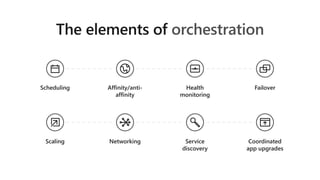
Container Orchestration
orchestration
Scheduling Affinity/anti-
affinity
Health
monitoring
Failover
Scaling Networking Service
discovery
Coordinated
app upgrades
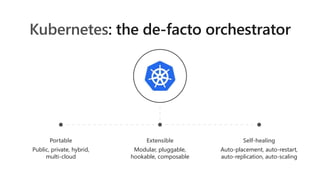
Kubernetes
Portable
Public, private, hybrid,
multi-cloud
Extensible
Modular, pluggable,
hookable, composable
Self-healing
Auto-placement, auto-restart,
auto-replication, auto-scaling
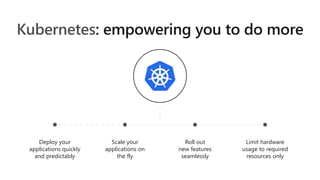
Kubernetes
Deploy your
applications quickly
and predictably
Scale your
applications on
the fly
Roll out
new features
seamlessly
Limit hardware
usage to required
resources only
Container Orchestration:
Kubernetes
Azure Container Service
(AKS)
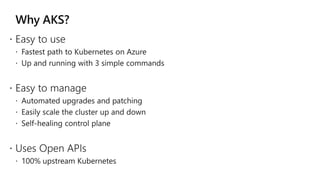
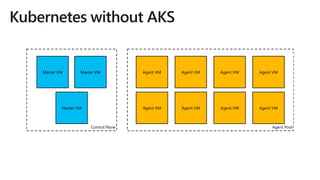
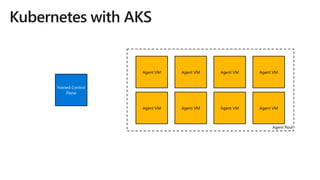
Why AKS?
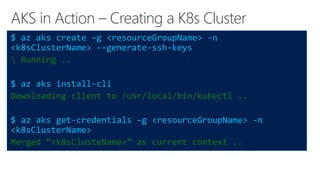
AKS in Action – Creating a K8s Cluster
$ az aks create –g <resourceGroupName> -n
<k8sClusterName> --generate-ssh-keys
 Running ..
$ az aks install-cli
Downloading client to /usr/local/bin/kubectl ..
$ az aks get-credentials –g <resourceGroupName> -n
<k8sClusterName>
Merged “<k8sClusteName>” as current context ..
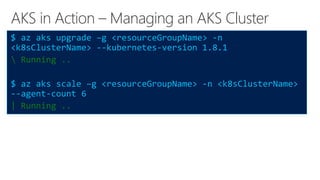
AKS in Action – Managing an AKS Cluster
$ az aks upgrade –g <resourceGroupName> -n
<k8sClusterName> --kubernetes-version 1.8.1
 Running ..
$ az aks scale –g <resourceGroupName> -n <k8sClusterName>
--agent-count 6
| Running ..
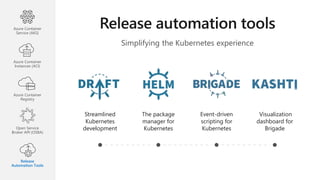
Simplifying the Kubernetes experience
Streamlined
Kubernetes
development
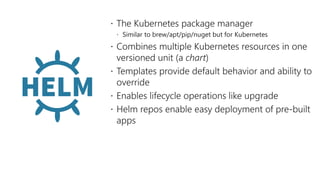
The package
manager for
Kubernetes
Event-driven
scripting for
Kubernetes
Visualization
dashboard for
Brigade
Azure Container
Service (AKS)
Azure Container
Instances (ACI)
Azure Container
Registry
Open Service
Broker API (OSBA)
Release
Automation Tools
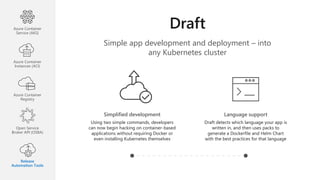
Simple app development and deployment – into
any Kubernetes cluster
Simplified development
Using two simple commands, developers
can now begin hacking on container-based
applications without requiring Docker or
even installing Kubernetes themselves
Language support
Draft detects which language your app is
written in, and then uses packs to
generate a Dockerfile and Helm Chart
with the best practices for that language
Azure Container
Service (AKS)
Azure Container
Instances (ACI)
Azure Container
Registry
Open Service
Broker API (OSBA)
Release
Automation Tools
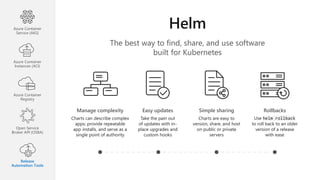
The best way to find, share, and use software
built for Kubernetes
Manage complexity
Charts can describe complex
apps; provide repeatable
app installs, and serve as a
single point of authority
Easy updates
Take the pain out
of updates with in-
place upgrades and
custom hooks
Simple sharing
Charts are easy to
version, share, and host
on public or private
servers
Rollbacks
Use helm rollback
to roll back to an older
version of a release
with ease
Azure Container
Service (AKS)
Azure Container
Instances (ACI)
Azure Container
Registry
Open Service
Broker API (OSBA)
Release
Automation Tools
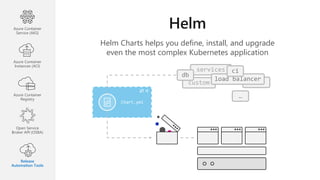
Helm Charts helps you define, install, and upgrade
even the most complex Kubernetes application
custom
services
Chart.yml
db
load balancer
ci
…
Azure Container
Service (AKS)
Azure Container
Instances (ACI)
Azure Container
Registry
Open Service
Broker API (OSBA)
Release
Automation Tools
 On October 15th, 2015
 Hackathon project at company offsite
 Could we take the ideas behind npm and Homebrew and build
something for deploying apps into Kubernetes?
 Installation tool for Deis Workflow
 Announced at the first KubeCon in San Francisco 2015
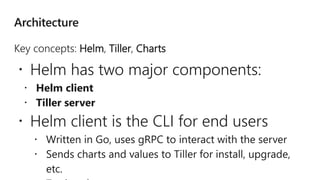
Key concepts: Helm, Tiller, Charts
 Helm has two major components:
 Helm client
 Tiller server
 Helm client is the CLI for end users
 Written in Go, uses gRPC to interact with the server
 Sends charts and values to Tiller for install, upgrade,
etc.
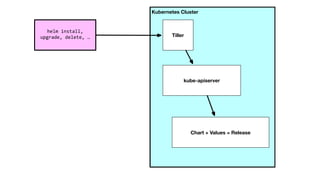
Tiller server
 In-cluster server that interacts with the
client and interfaces with the Kubernetes
API server
Chart
 Collection of Kubernetes resources
 Charts have structure
 Set of conventions, including file and directory
names
 Charts can be packaged into tarballs for
distribution
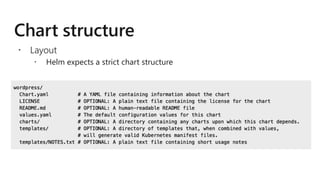
 Layout
 Helm expects a strict chart structure
 The knobs and dials:
 A values.yaml file provided with the chart
that contains default values
 Use -f to provide your own values overrides
 Use --set to override individual values
 Built on Go’s template language w/addition of 50 or so add-on
template functions
 Almost anything goes! ;)
 Also useful in generating random values (e.g. passwords)
 Provides flow control (if/else, with, range, etc)
 Named templates (partials)
 Built-in predefined values
 Release-related
 Release.Name, Release.Namespace,
Release.IsInstall, Release.IsUpgrade,
etc.
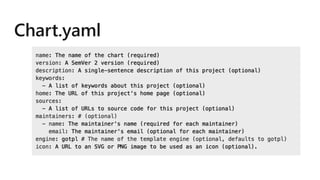
 Chart:
 Values from chart.yaml: Chart.Version,
Chart.Maintainers, etc.
 Helm uses version numbers as release markers
 All charts must specify SemVer2 numbers
Chart LICENSE, README and NOTES
 README.md: description of application or service that the chart
provides, prereqs to run, description of options in values.yaml and
their default values
 templates/NOTES.txt: NOTES are printed after install, upgrade, or
when viewing the status of a release. Meant for chart developers to
display usage notes, next steps, etc. for chart users.
 A chart can depend on any number of other charts.
 Dependencies are expressed by
 copying the dependency charts into the charts/ subdirectory
 Requirements.yaml allows you to declare dependencies
 Lifecycle Management
 Update
 Rollback
 Config management
 Testing
 Repeatability
Helm.sh
Draft.sh
 https://github.com/kubernetes/charts
 https://kubeapps.com
 Stable charts: we are pretty sure these work well.
 Incubator charts: good luck, hard fight!
 Interested in writing a chart? Reach out! We only bite on the
weekends.
Connect with me!
Email: jessica.deen@microsoft.com
Twitter/GitHub/Instagram: @jldeen
Blog: jessicadeen.com
LoECDA Website: loecda.com
Best Practices with Azure & Kubernetes

Best Practices with Azure & Kubernetes

  • 3.
    • Linux, OpenSource, Containers, IT/Ops • CrossFit • HUGE Disney and Star Wars fan • League of Extraordinary Cloud DevOps Advocates
  • 6.
  • 8.
    developers I need tocreate applications at a competitive rate without worrying about IT New applications run smoothly on my machine but malfunction on traditional IT servers My productivity and application innovation become suspended when I have to wait on IT
  • 9.
    IT I need tomanage servers and maintain compliance with little disruption I’m unsure of how to integrate unfamiliar applications, and I require help from developers I’m unable to focus on both server protection and application compliance
  • 10.
  • 11.
  • 13.
    DevOps is theunion of people, process, and products to enable continuous delivery of value to our end users. - Donovan Brown http://bit.ly/WhatIs-DevOps
  • 14.
  • 15.
    Developers Enable ‘write-once, run-anywhere’apps Enables microservice architectures Great for dev/test of apps and services Production realism Growing Developer Community Operations Portability, Portability, Portability Standardized development, QA, and prod environments Abstract differences in OS distributions and underlying infrastructure Higher compute density Easily scale-up and scale-down in response to changing business needs DevOps
  • 16.
  • 17.
  • 18.
    Kubernetes Portable Public, private, hybrid, multi-cloud Extensible Modular,pluggable, hookable, composable Self-healing Auto-placement, auto-restart, auto-replication, auto-scaling
  • 19.
    Kubernetes Deploy your applications quickly andpredictably Scale your applications on the fly Roll out new features seamlessly Limit hardware usage to required resources only
  • 20.
  • 21.
  • 23.
  • 24.
    AKS in Action– Creating a K8s Cluster $ az aks create –g <resourceGroupName> -n <k8sClusterName> --generate-ssh-keys Running .. $ az aks install-cli Downloading client to /usr/local/bin/kubectl .. $ az aks get-credentials –g <resourceGroupName> -n <k8sClusterName> Merged “<k8sClusteName>” as current context ..
  • 25.
    AKS in Action– Managing an AKS Cluster $ az aks upgrade –g <resourceGroupName> -n <k8sClusterName> --kubernetes-version 1.8.1 Running .. $ az aks scale –g <resourceGroupName> -n <k8sClusterName> --agent-count 6 | Running ..
  • 28.
    Simplifying the Kubernetesexperience Streamlined Kubernetes development The package manager for Kubernetes Event-driven scripting for Kubernetes Visualization dashboard for Brigade Azure Container Service (AKS) Azure Container Instances (ACI) Azure Container Registry Open Service Broker API (OSBA) Release Automation Tools
  • 29.
    Simple app developmentand deployment – into any Kubernetes cluster Simplified development Using two simple commands, developers can now begin hacking on container-based applications without requiring Docker or even installing Kubernetes themselves Language support Draft detects which language your app is written in, and then uses packs to generate a Dockerfile and Helm Chart with the best practices for that language Azure Container Service (AKS) Azure Container Instances (ACI) Azure Container Registry Open Service Broker API (OSBA) Release Automation Tools
  • 31.
    The best wayto find, share, and use software built for Kubernetes Manage complexity Charts can describe complex apps; provide repeatable app installs, and serve as a single point of authority Easy updates Take the pain out of updates with in- place upgrades and custom hooks Simple sharing Charts are easy to version, share, and host on public or private servers Rollbacks Use helm rollback to roll back to an older version of a release with ease Azure Container Service (AKS) Azure Container Instances (ACI) Azure Container Registry Open Service Broker API (OSBA) Release Automation Tools
  • 32.
    Helm Charts helpsyou define, install, and upgrade even the most complex Kubernetes application custom services Chart.yml db load balancer ci … Azure Container Service (AKS) Azure Container Instances (ACI) Azure Container Registry Open Service Broker API (OSBA) Release Automation Tools
  • 37.
     On October15th, 2015  Hackathon project at company offsite  Could we take the ideas behind npm and Homebrew and build something for deploying apps into Kubernetes?  Installation tool for Deis Workflow  Announced at the first KubeCon in San Francisco 2015
  • 38.
    Key concepts: Helm,Tiller, Charts  Helm has two major components:  Helm client  Tiller server  Helm client is the CLI for end users  Written in Go, uses gRPC to interact with the server  Sends charts and values to Tiller for install, upgrade, etc.
  • 39.
    Tiller server  In-clusterserver that interacts with the client and interfaces with the Kubernetes API server Chart  Collection of Kubernetes resources
  • 43.
     Charts havestructure  Set of conventions, including file and directory names  Charts can be packaged into tarballs for distribution
  • 44.
     Layout  Helmexpects a strict chart structure
  • 46.
     The knobsand dials:  A values.yaml file provided with the chart that contains default values  Use -f to provide your own values overrides  Use --set to override individual values
  • 47.
     Built onGo’s template language w/addition of 50 or so add-on template functions  Almost anything goes! ;)  Also useful in generating random values (e.g. passwords)  Provides flow control (if/else, with, range, etc)  Named templates (partials)
  • 48.
     Built-in predefinedvalues  Release-related  Release.Name, Release.Namespace, Release.IsInstall, Release.IsUpgrade, etc.  Chart:  Values from chart.yaml: Chart.Version, Chart.Maintainers, etc.
  • 49.
     Helm usesversion numbers as release markers  All charts must specify SemVer2 numbers
  • 50.
    Chart LICENSE, READMEand NOTES  README.md: description of application or service that the chart provides, prereqs to run, description of options in values.yaml and their default values  templates/NOTES.txt: NOTES are printed after install, upgrade, or when viewing the status of a release. Meant for chart developers to display usage notes, next steps, etc. for chart users.
  • 51.
     A chartcan depend on any number of other charts.  Dependencies are expressed by  copying the dependency charts into the charts/ subdirectory  Requirements.yaml allows you to declare dependencies
  • 52.
     Lifecycle Management Update  Rollback  Config management  Testing  Repeatability
  • 54.
  • 55.
  • 56.
     https://github.com/kubernetes/charts  https://kubeapps.com Stable charts: we are pretty sure these work well.  Incubator charts: good luck, hard fight!  Interested in writing a chart? Reach out! We only bite on the weekends.
  • 57.
    Connect with me! Email:jessica.deen@microsoft.com Twitter/GitHub/Instagram: @jldeen Blog: jessicadeen.com LoECDA Website: loecda.com

Editor's Notes

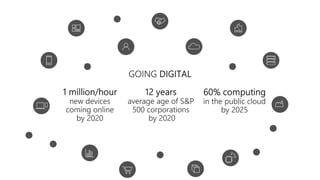
  • #8 Microsoft Envision 2016
  • #13 S4 Solution Specialist Sales Summit