2021
Samya Ghafoor
15/10/2021
Computer Short Notes:
Q#1: Define the following terms:
(a) RAM:
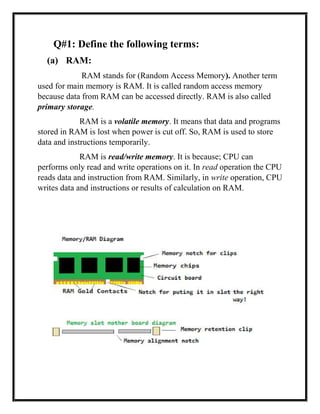
RAM stands for (Random Access Memory). Another term
used for main memory is RAM. It is called random access memory
because data from RAM can be accessed directly. RAM is also called
primary storage.
RAM is a volatile memory. It means that data and programs
stored in RAM is lost when power is cut off. So, RAM is used to store
data and instructions temporarily.
RAM is read/write memory. It is because; CPU can
performs only read and write operations on it. In read operation the CPU
reads data and instruction from RAM. Similarly, in write operation, CPU
writes data and instructions or results of calculation on RAM.
(b) Byte:
A group of 8-bits is called byte. One character takes only
one byte of memory. Byte, the basic unit of information in computer
storage and processing. A byte consists of 8 adjacent binary digits
(bits), each of which consists of a 0 or 1. (Originally, a byte was any
string of more than one bit that made up a simple piece of information
like a single character.
Bytes are the smallest operateable units of storage in
computer technology. A byte can represent the equivalent of a single
character, such as the letter B, a comma, or a percentage sign, or it
can represent a number from 0 to 255. Because a byte contains so
little information, the processing and storage capacities of computer
hardware are usually given in gigabytes (GB; one billion bytes) and
terabytes (TB; one trillion bytes).
Because the byte had its roots in binary digits,
originally one kilobyte was not 1,000 bytes but 1,024 bytes (1,024 =
210), and thus one megabyte (MB) was 1,024 × 1,024 bytes and so
on.
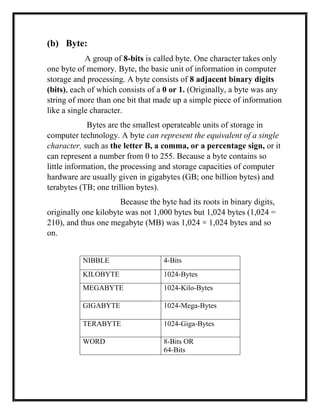
NIBBLE 4-Bits
KILOBYTE 1024-Bytes
MEGABYTE 1024-Kilo-Bytes
GIGABYTE 1024-Mega-Bytes
TERABYTE 1024-Giga-Bytes
WORD 8-Bits OR
64-Bits
(c) Mouse:
Mouse is the most commonly used pointing input
device. It is used to control the cursor or pointer on the screen
and to give commands to computer. It is very easy to use. The
mouse is attached with the computer through cables or wireless
connections.
The top of mouse contains two wheels 2 or 3 buttons.
These buttons can be clicked or double clicked to perform
different tasks.
Left click used for selection of object on the screen
Right click used for menu opening.
Types of Mouse:
Mechanical Mouse
Optical Mouse
Wireless Mouse
Infrared Technology
G-stick
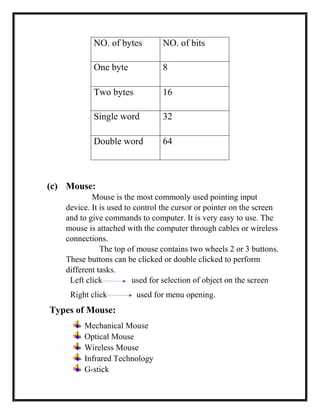
NO. of bytes NO. of bits
One byte 8
Two bytes 16
Single word 32
Double word 64
(d) Icons:
An icon is a pictogram or ideogram displayed on
a computer screen in order to help the user navigate a computer
system. The icon itself is a quickly comprehensible symbol of
a software tool, function, or a data file, accessible on the system and
is more like a traffic sign than a detailed illustration of the actual
entity it represents.
It can serve as an electronic hyperlink or file shortcut to
access the program or data. The user can activate an icon using a
mouse, pointer, finger, or recently voice commands.
Their placement on the screen, also in relation to
other icons, may provide further information to the user about their
usage.[2]
In activating an icon, the user can move directly into and out
of the identified function without knowing anything further about the
location or requirements of the file or code.
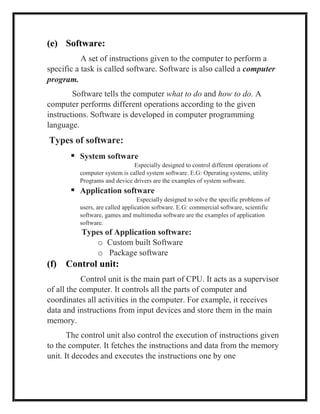
(e) Software:
A set of instructions given to the computer to perform a
specific a task is called software. Software is also called a computer
program.
Software tells the computer what to do and how to do. A
computer performs different operations according to the given
instructions. Software is developed in computer programming
language.
Types of software:
 System software
Especially designed to control different operations of
computer system is called system software. E.G: Operating systems, utility
Programs and device drivers are the examples of system software.
 Application software
Especially designed to solve the specific problems of
users, are called application software. E.G: commercial software, scientific
software, games and multimedia software are the examples of application
software.
Types of Application software:
o Custom built Software
o Package software
(f) Control unit:
Control unit is the main part of CPU. It acts as a supervisor
of all the computer. It controls all the parts of computer and
coordinates all activities in the computer. For example, it receives
data and instructions from input devices and store them in the main
memory.
The control unit also control the execution of instructions given
to the computer. It fetches the instructions and data from the memory
unit. It decodes and executes the instructions one by one
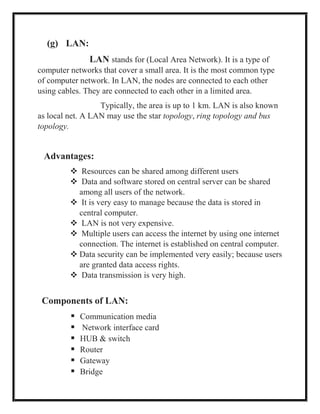
(g) LAN:
LAN stands for (Local Area Network). It is a type of
computer networks that cover a small area. It is the most common type
of computer network. In LAN, the nodes are connected to each other
using cables. They are connected to each other in a limited area.
Typically, the area is up to 1 km. LAN is also known
as local net. A LAN may use the star topology, ring topology and bus
topology.
Advantages:
 Resources can be shared among different users
 Data and software stored on central server can be shared
among all users of the network.
 It is very easy to manage because the data is stored in
central computer.
 LAN is not very expensive.
 Multiple users can access the internet by using one internet
connection. The internet is established on central computer.
 Data security can be implemented very easily; because users
are granted data access rights.
 Data transmission is very high.
Components of LAN:
 Communication media
 Network interface card
 HUB & switch
 Router
 Gateway
 Bridge
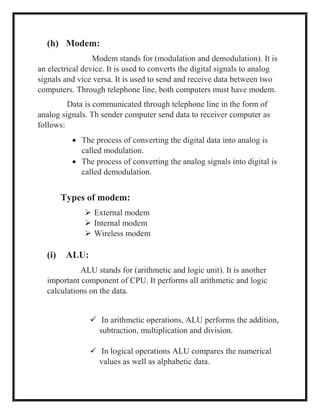
(h) Modem:
Modem stands for (modulation and demodulation). It is
an electrical device. It is used to converts the digital signals to analog
signals and vice versa. It is used to send and receive data between two
computers. Through telephone line, both computers must have modem.
Data is communicated through telephone line in the form of
analog signals. Th sender computer send data to receiver computer as
follows:
 The process of converting the digital data into analog is
called modulation.
 The process of converting the analog signals into digital is
called demodulation.
Types of modem:
 External modem
 Internal modem
 Wireless modem
(i) ALU:
ALU stands for (arithmetic and logic unit). It is another
important component of CPU. It performs all arithmetic and logic
calculations on the data.
 In arithmetic operations, ALU performs the addition,
subtraction, multiplication and division.
 In logical operations ALU compares the numerical
values as well as alphabetic data.
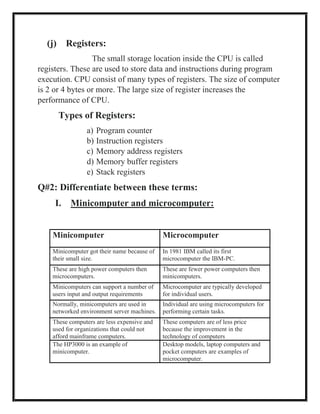
(j) Registers:
The small storage location inside the CPU is called
registers. These are used to store data and instructions during program
execution. CPU consist of many types of registers. The size of computer
is 2 or 4 bytes or more. The large size of register increases the
performance of CPU.
Types of Registers:
a) Program counter
b) Instruction registers
c) Memory address registers
d) Memory buffer registers
e) Stack registers
Q#2: Differentiate between these terms:
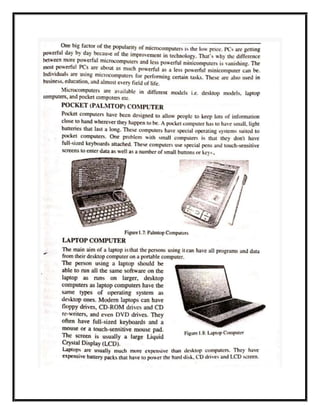
I. Minicomputer and microcomputer:
Minicomputer Microcomputer
Minicomputer got their name because of
their small size.
In 1981 IBM called its first
microcomputer the IBM-PC.
These are high power computers then
microcomputers.
These are fewer power computers then
minicomputers.
Minicomputers can support a number of
users input and output requirements
Microcomputer are typically developed
for individual users.
Normally, minicomputers are used in
networked environment server machines.
Individual are using microcomputers for
performing certain tasks.
These computers are less expensive and
used for organizations that could not
afford mainframe computers.
These computers are of less price
because the improvement in the
technology of computers
The HP3000 is an example of
minicomputer.
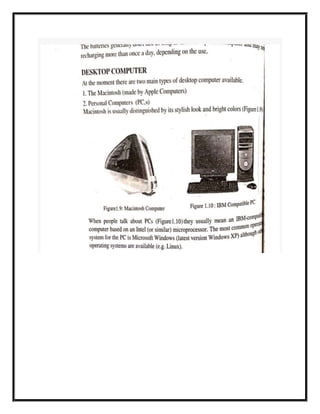
Desktop models, laptop computers and
pocket computers are examples of
microcomputer.
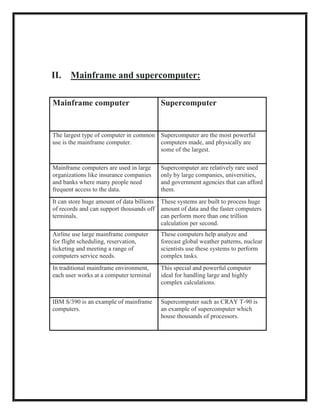
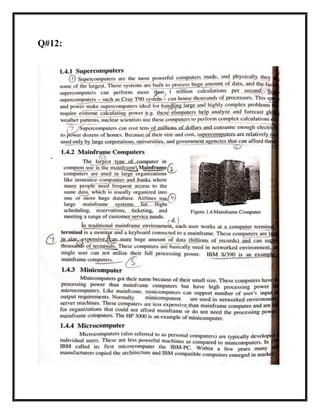
II. Mainframe and supercomputer:
Mainframe computer Supercomputer
The largest type of computer in common
use is the mainframe computer.
Supercomputer are the most powerful
computers made, and physically are
some of the largest.
Mainframe computers are used in large
organizations like insurance companies
and banks where many people need
frequent access to the data.
Supercomputer are relatively rare used
only by large companies, universities,
and government agencies that can afford
them.
It can store huge amount of data billions
of records and can support thousands off
terminals.
These systems are built to process huge
amount of data and the faster computers
can perform more than one trillion
calculation per second.
Airline use large mainframe computer
for flight scheduling, reservation,
ticketing and meeting a range of
computers service needs.
These computers help analyze and
forecast global weather patterns, nuclear
scientists use these systems to perform
complex tasks.
In traditional mainframe environment,
each user works at a computer terminal
This special and powerful computer
ideal for handling large and highly
complex calculations.
IBM S/390 is an example of mainframe
computers.
Supercomputer such as CRAY T-90 is
an example of supercomputer which
house thousands of processors.
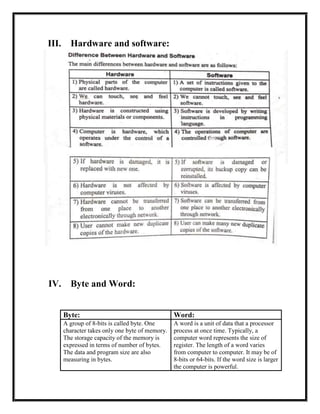
III. Hardware and software:
IV. Byte and Word:
Byte: Word:
A group of 8-bits is called byte. One
character takes only one byte of memory.
The storage capacity of the memory is
expressed in terms of number of bytes.
The data and program size are also
measuring in bytes.
A word is a unit of data that a processor
process at once time. Typically, a
computer word represents the size of
register. The length of a word varies
from computer to computer. It may be of
8-bits or 64-bits. If the word size is larger
the computer is powerful.
V. RAM and Cache memory:
VI.
RAM: Cache memory:
RAM the random-access memory
another term used for RAM is main
memory. It is called random memory
because the data on it can be accessed
directly. RAM is also called primary
storage. RAM is volatile memory. It
means the data is lost when the power
is cut off. RAM is read and write
memory. The storage capacity of
RAM is measured in bytes. It
improves the data processing speed of
system.
Cache memory is very small memory
then RAM. It is similar to RAM but it
is extremely fast then RAM. It is used
to improve the performance of the
processor for computer system. Some
cache memories are built in the CPU
and some re located close to the CPU.
CPU stores frequently stored
instructions and data in cache memory.
So, cache memory is used to speed up
the working of CPU.
Q#3: Define software:
See answers of Q#1(e) 😉
Q#4:
Byte and BIT:
Byte: Bit
A group of 8-bits is called byte. One
character takes only one byte of
memory. The storage capacity of the
memory is expressed in terms of
number of bytes. The data and
program size are also measuring in
bytes.
The binary digit 0 and 1 is called bit.
The bit stands for binary digit.
It is a basic unit for storing data in
the computer memory.
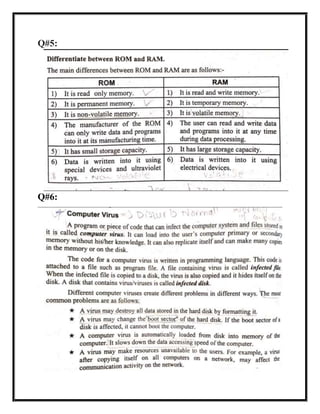
Q#5:
Q#6:
Q#7:
Q#8:
See answer of the pervious question 😉
Q#9:
See the answer of the Q#5 😊
Q#10:
Q#11:
OR
Q#12:
Q#13:
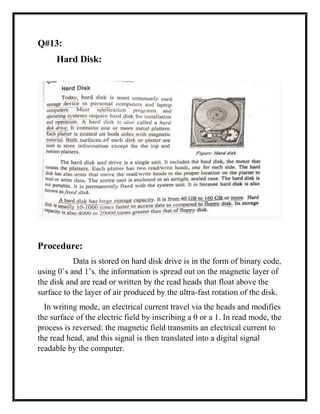
Hard Disk:
Procedure:
Data is stored on hard disk drive is in the form of binary code,
using 0’s and 1’s. the information is spread out on the magnetic layer of
the disk and are read or written by the read heads that float above the
surface to the layer of air produced by the ultra-fast rotation of the disk.
In writing mode, an electrical current travel via the heads and modifies
the surface of the electric field by inscribing a 0 or a 1. In read mode, the
process is reversed: the magnetic field transmits an electrical current to
the read head, and this signal is then translated into a digital signal
readable by the computer.

Computer Short Note1.docx

  • 1.
  • 2.
    Q#1: Define thefollowing terms: (a) RAM: RAM stands for (Random Access Memory). Another term used for main memory is RAM. It is called random access memory because data from RAM can be accessed directly. RAM is also called primary storage. RAM is a volatile memory. It means that data and programs stored in RAM is lost when power is cut off. So, RAM is used to store data and instructions temporarily. RAM is read/write memory. It is because; CPU can performs only read and write operations on it. In read operation the CPU reads data and instruction from RAM. Similarly, in write operation, CPU writes data and instructions or results of calculation on RAM.
  • 3.
    (b) Byte: A groupof 8-bits is called byte. One character takes only one byte of memory. Byte, the basic unit of information in computer storage and processing. A byte consists of 8 adjacent binary digits (bits), each of which consists of a 0 or 1. (Originally, a byte was any string of more than one bit that made up a simple piece of information like a single character. Bytes are the smallest operateable units of storage in computer technology. A byte can represent the equivalent of a single character, such as the letter B, a comma, or a percentage sign, or it can represent a number from 0 to 255. Because a byte contains so little information, the processing and storage capacities of computer hardware are usually given in gigabytes (GB; one billion bytes) and terabytes (TB; one trillion bytes). Because the byte had its roots in binary digits, originally one kilobyte was not 1,000 bytes but 1,024 bytes (1,024 = 210), and thus one megabyte (MB) was 1,024 × 1,024 bytes and so on. NIBBLE 4-Bits KILOBYTE 1024-Bytes MEGABYTE 1024-Kilo-Bytes GIGABYTE 1024-Mega-Bytes TERABYTE 1024-Giga-Bytes WORD 8-Bits OR 64-Bits
  • 4.
    (c) Mouse: Mouse isthe most commonly used pointing input device. It is used to control the cursor or pointer on the screen and to give commands to computer. It is very easy to use. The mouse is attached with the computer through cables or wireless connections. The top of mouse contains two wheels 2 or 3 buttons. These buttons can be clicked or double clicked to perform different tasks. Left click used for selection of object on the screen Right click used for menu opening. Types of Mouse: Mechanical Mouse Optical Mouse Wireless Mouse Infrared Technology G-stick NO. of bytes NO. of bits One byte 8 Two bytes 16 Single word 32 Double word 64
  • 5.
    (d) Icons: An iconis a pictogram or ideogram displayed on a computer screen in order to help the user navigate a computer system. The icon itself is a quickly comprehensible symbol of a software tool, function, or a data file, accessible on the system and is more like a traffic sign than a detailed illustration of the actual entity it represents. It can serve as an electronic hyperlink or file shortcut to access the program or data. The user can activate an icon using a mouse, pointer, finger, or recently voice commands. Their placement on the screen, also in relation to other icons, may provide further information to the user about their usage.[2] In activating an icon, the user can move directly into and out of the identified function without knowing anything further about the location or requirements of the file or code.
  • 6.
    (e) Software: A setof instructions given to the computer to perform a specific a task is called software. Software is also called a computer program. Software tells the computer what to do and how to do. A computer performs different operations according to the given instructions. Software is developed in computer programming language. Types of software:  System software Especially designed to control different operations of computer system is called system software. E.G: Operating systems, utility Programs and device drivers are the examples of system software.  Application software Especially designed to solve the specific problems of users, are called application software. E.G: commercial software, scientific software, games and multimedia software are the examples of application software. Types of Application software: o Custom built Software o Package software (f) Control unit: Control unit is the main part of CPU. It acts as a supervisor of all the computer. It controls all the parts of computer and coordinates all activities in the computer. For example, it receives data and instructions from input devices and store them in the main memory. The control unit also control the execution of instructions given to the computer. It fetches the instructions and data from the memory unit. It decodes and executes the instructions one by one
  • 7.
    (g) LAN: LAN standsfor (Local Area Network). It is a type of computer networks that cover a small area. It is the most common type of computer network. In LAN, the nodes are connected to each other using cables. They are connected to each other in a limited area. Typically, the area is up to 1 km. LAN is also known as local net. A LAN may use the star topology, ring topology and bus topology. Advantages:  Resources can be shared among different users  Data and software stored on central server can be shared among all users of the network.  It is very easy to manage because the data is stored in central computer.  LAN is not very expensive.  Multiple users can access the internet by using one internet connection. The internet is established on central computer.  Data security can be implemented very easily; because users are granted data access rights.  Data transmission is very high. Components of LAN:  Communication media  Network interface card  HUB & switch  Router  Gateway  Bridge
  • 8.
    (h) Modem: Modem standsfor (modulation and demodulation). It is an electrical device. It is used to converts the digital signals to analog signals and vice versa. It is used to send and receive data between two computers. Through telephone line, both computers must have modem. Data is communicated through telephone line in the form of analog signals. Th sender computer send data to receiver computer as follows:  The process of converting the digital data into analog is called modulation.  The process of converting the analog signals into digital is called demodulation. Types of modem:  External modem  Internal modem  Wireless modem (i) ALU: ALU stands for (arithmetic and logic unit). It is another important component of CPU. It performs all arithmetic and logic calculations on the data.  In arithmetic operations, ALU performs the addition, subtraction, multiplication and division.  In logical operations ALU compares the numerical values as well as alphabetic data.
  • 9.
    (j) Registers: The smallstorage location inside the CPU is called registers. These are used to store data and instructions during program execution. CPU consist of many types of registers. The size of computer is 2 or 4 bytes or more. The large size of register increases the performance of CPU. Types of Registers: a) Program counter b) Instruction registers c) Memory address registers d) Memory buffer registers e) Stack registers Q#2: Differentiate between these terms: I. Minicomputer and microcomputer: Minicomputer Microcomputer Minicomputer got their name because of their small size. In 1981 IBM called its first microcomputer the IBM-PC. These are high power computers then microcomputers. These are fewer power computers then minicomputers. Minicomputers can support a number of users input and output requirements Microcomputer are typically developed for individual users. Normally, minicomputers are used in networked environment server machines. Individual are using microcomputers for performing certain tasks. These computers are less expensive and used for organizations that could not afford mainframe computers. These computers are of less price because the improvement in the technology of computers The HP3000 is an example of minicomputer. Desktop models, laptop computers and pocket computers are examples of microcomputer.
  • 10.
    II. Mainframe andsupercomputer: Mainframe computer Supercomputer The largest type of computer in common use is the mainframe computer. Supercomputer are the most powerful computers made, and physically are some of the largest. Mainframe computers are used in large organizations like insurance companies and banks where many people need frequent access to the data. Supercomputer are relatively rare used only by large companies, universities, and government agencies that can afford them. It can store huge amount of data billions of records and can support thousands off terminals. These systems are built to process huge amount of data and the faster computers can perform more than one trillion calculation per second. Airline use large mainframe computer for flight scheduling, reservation, ticketing and meeting a range of computers service needs. These computers help analyze and forecast global weather patterns, nuclear scientists use these systems to perform complex tasks. In traditional mainframe environment, each user works at a computer terminal This special and powerful computer ideal for handling large and highly complex calculations. IBM S/390 is an example of mainframe computers. Supercomputer such as CRAY T-90 is an example of supercomputer which house thousands of processors.
  • 11.
    III. Hardware andsoftware: IV. Byte and Word: Byte: Word: A group of 8-bits is called byte. One character takes only one byte of memory. The storage capacity of the memory is expressed in terms of number of bytes. The data and program size are also measuring in bytes. A word is a unit of data that a processor process at once time. Typically, a computer word represents the size of register. The length of a word varies from computer to computer. It may be of 8-bits or 64-bits. If the word size is larger the computer is powerful.
  • 12.
    V. RAM andCache memory: VI. RAM: Cache memory: RAM the random-access memory another term used for RAM is main memory. It is called random memory because the data on it can be accessed directly. RAM is also called primary storage. RAM is volatile memory. It means the data is lost when the power is cut off. RAM is read and write memory. The storage capacity of RAM is measured in bytes. It improves the data processing speed of system. Cache memory is very small memory then RAM. It is similar to RAM but it is extremely fast then RAM. It is used to improve the performance of the processor for computer system. Some cache memories are built in the CPU and some re located close to the CPU. CPU stores frequently stored instructions and data in cache memory. So, cache memory is used to speed up the working of CPU. Q#3: Define software: See answers of Q#1(e) 😉 Q#4: Byte and BIT: Byte: Bit A group of 8-bits is called byte. One character takes only one byte of memory. The storage capacity of the memory is expressed in terms of number of bytes. The data and program size are also measuring in bytes. The binary digit 0 and 1 is called bit. The bit stands for binary digit. It is a basic unit for storing data in the computer memory.
  • 13.
  • 15.
  • 16.
    Q#8: See answer ofthe pervious question 😉 Q#9: See the answer of the Q#5 😊
  • 17.
  • 19.
  • 21.
  • 24.
    Q#13: Hard Disk: Procedure: Data isstored on hard disk drive is in the form of binary code, using 0’s and 1’s. the information is spread out on the magnetic layer of the disk and are read or written by the read heads that float above the surface to the layer of air produced by the ultra-fast rotation of the disk. In writing mode, an electrical current travel via the heads and modifies the surface of the electric field by inscribing a 0 or a 1. In read mode, the process is reversed: the magnetic field transmits an electrical current to the read head, and this signal is then translated into a digital signal readable by the computer.