 Definition of Software & Hardware.
 Why Learn About Software?
 Types of Software.
 Difference of Software & Hardware.
 if . . . Then. . . else statement.
 if . . . Then. . . else flowchart.
 if . . . Then. . . else example.
 Conclusion
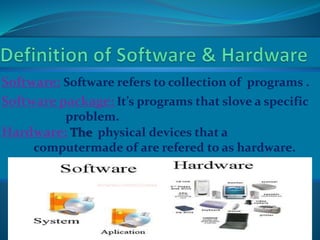
Software: Software refers to collection of programs .
Software package: It’s programs that slove a specific
problem.
Hardware: The physical devices that a
computermade of are refered to as hardware.
 Software is indispensable for any computer
system.
 Systems software needed for input,
calculations, and output
 Personal tasks using software
 InIcome tax preparation
 Keeping a budget
 Internet research
 Games
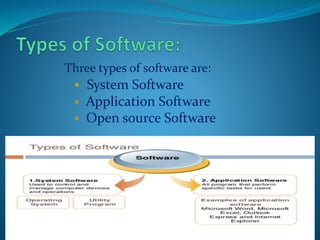
Three types of software are:
 System Software
 Application Software
 Open source Software
System Software includes the Operating System
and all the utilities that enable the computer to
function.
System Software: System software is the
programs that control and manage the basic
operations of a computer.
Example:
Operating Systems, Compiler, Loader, Linker,
Interpreter.
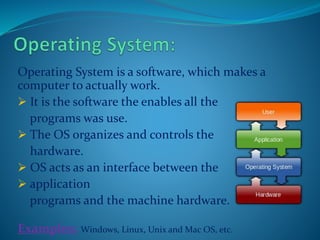
Operating System is a software, which makes a
computer to actually work.
 It is the software the enables all the
programs was use.
 The OS organizes and controls the
hardware.
 OS acts as an interface between the
 application
programs and the machine hardware.
Examples: Windows, Linux, Unix and Mac OS, etc.
Application Software: Application software
slove a specific problem or to do a specific task.
Example:
Payroll systems, Manage student database,
Word Processor, Spreadsheet and Database
Management System etc.
Word processing is a tool that helps user in creating,
editing, and printing documents.
 Spell checking
 Standard layouts for normal documents
 Have some characters appear in bold print,
italics, or underlined
 Save the document so it can be used again
print the document.
Examples: WordPerfect and Microsoft Word
Open Source Software: Open source software is
computer software whose source code is available
under a license that permits users to use, change,
and improve the software, and to redistribute it in
modified or unmodified form.
Example:
Linux, Netscape, Apache, etc.
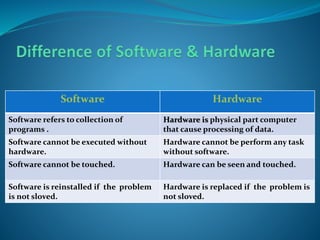
Software Hardware
Software refers to collection of
programs .
Hardware is physical part computer
that cause processing of data.
Software cannot be executed without
hardware.
Hardware cannot be perform any task
without software.
Software cannot be touched. Hardware can be seen and touched.
Software is reinstalled if the problem
is not sloved.
Hardware is replaced if the problem is
not sloved.
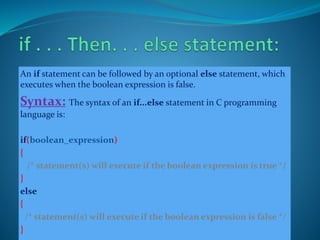
An if statement can be followed by an optional else statement, which
executes when the boolean expression is false.
Syntax: The syntax of an if...else statement in C programming
language is:
if(boolean_expression)
{
/* statement(s) will execute if the boolean expression is true */
}
else
{
/* statement(s) will execute if the boolean expression is false */
}
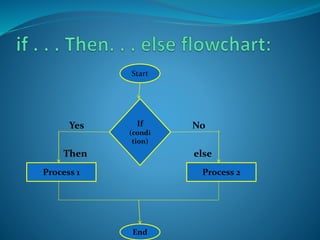
Yes No
Then else
Start
If
(condi
tion)
Process 2Process 1
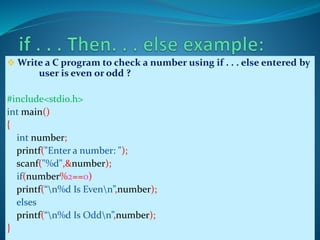
 Write a C program to check a number using if . . . else entered by
user is even or odd ?
#include<stdio.h>
int main()
{
int number;
printf("Enter a number: ");
scanf("%d",&number);
if(number%2==0)
printf(“n%d Is Evenn”,number);
elses
printf(“n%d Is Oddn”,number);
}
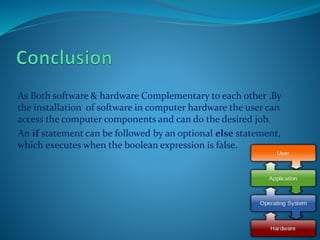
As Both software & hardware Complementary to each other .By
the installation of software in computer hardware the user can
access the computer components and can do the desired job.
An if statement can be followed by an optional else statement,
which executes when the boolean expression is false.

Computer Software & Hardware by MHM

  • 2.
     Definition ofSoftware & Hardware.  Why Learn About Software?  Types of Software.  Difference of Software & Hardware.  if . . . Then. . . else statement.  if . . . Then. . . else flowchart.  if . . . Then. . . else example.  Conclusion
  • 3.
    Software: Software refersto collection of programs . Software package: It’s programs that slove a specific problem. Hardware: The physical devices that a computermade of are refered to as hardware.
  • 4.
     Software isindispensable for any computer system.  Systems software needed for input, calculations, and output  Personal tasks using software  InIcome tax preparation  Keeping a budget  Internet research  Games
  • 5.
    Three types ofsoftware are:  System Software  Application Software  Open source Software
  • 6.
    System Software includesthe Operating System and all the utilities that enable the computer to function. System Software: System software is the programs that control and manage the basic operations of a computer. Example: Operating Systems, Compiler, Loader, Linker, Interpreter.
  • 7.
    Operating System isa software, which makes a computer to actually work.  It is the software the enables all the programs was use.  The OS organizes and controls the hardware.  OS acts as an interface between the  application programs and the machine hardware. Examples: Windows, Linux, Unix and Mac OS, etc.
  • 8.
    Application Software: Applicationsoftware slove a specific problem or to do a specific task. Example: Payroll systems, Manage student database, Word Processor, Spreadsheet and Database Management System etc.
  • 9.
    Word processing isa tool that helps user in creating, editing, and printing documents.  Spell checking  Standard layouts for normal documents  Have some characters appear in bold print, italics, or underlined  Save the document so it can be used again print the document. Examples: WordPerfect and Microsoft Word
  • 10.
    Open Source Software:Open source software is computer software whose source code is available under a license that permits users to use, change, and improve the software, and to redistribute it in modified or unmodified form. Example: Linux, Netscape, Apache, etc.
  • 11.
    Software Hardware Software refersto collection of programs . Hardware is physical part computer that cause processing of data. Software cannot be executed without hardware. Hardware cannot be perform any task without software. Software cannot be touched. Hardware can be seen and touched. Software is reinstalled if the problem is not sloved. Hardware is replaced if the problem is not sloved.
  • 12.
    An if statementcan be followed by an optional else statement, which executes when the boolean expression is false. Syntax: The syntax of an if...else statement in C programming language is: if(boolean_expression) { /* statement(s) will execute if the boolean expression is true */ } else { /* statement(s) will execute if the boolean expression is false */ }
  • 13.
  • 14.
     Write aC program to check a number using if . . . else entered by user is even or odd ? #include<stdio.h> int main() { int number; printf("Enter a number: "); scanf("%d",&number); if(number%2==0) printf(“n%d Is Evenn”,number); elses printf(“n%d Is Oddn”,number); }
  • 16.
    As Both software& hardware Complementary to each other .By the installation of software in computer hardware the user can access the computer components and can do the desired job. An if statement can be followed by an optional else statement, which executes when the boolean expression is false.