CHAPTER - ONE
Introduction to Operating System
6/7/2024
Compiled By:Shambel Adugna
Chapter Contents
• Overview of Operating System
• Functionality of a typical Operating system
• Types of Operating System
• History of Operating System Development
• Design issues (efficiency, robustness, flexibility, portability, security,
compatibility)
• Operating System Structure
6/7/2024
Compiled By:Shambel Adugna
Operating System - Overview
An operating system is a program that manages the computer hardware.
It is a program that acts as an interface between the user and the computer hardware.
It’s purpose is to provide an environment in which a user can execute programs.
A program is a set of instructions that a computer follows to perform a task.
 It is a software which performs all the basic tasks like:
• File management
• Memory management
• Process management
• Handling input and output and
• Controlling peripheral devices such as disk drives and printers.
6/7/2024
Compiled By:Shambel Adugna
Cont’d…
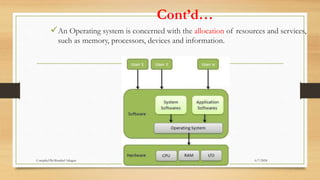
An Operating system is concerned with the allocation of resources and services,
such as memory, processors, devices and information.
6/7/2024
Compiled By:Shambel Adugna
Computer system
• A computer system can be divided roughly into two components, Hardware and
software.
• Hardware refers to the physical components that a computer is made of.
• E.g. CPU, RAM, secondary storage & I/O devices provides the basic computing
resources.
• Software is considered to be collection of executable programming code, associated
libraries and documentations.
• There are two general categories of software:
•System software and
•Application software.
6/7/2024
Compiled By:Shambel Adugna
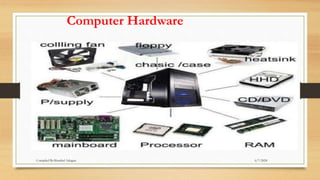
Computer Hardware
6/7/2024
Compiled By:Shambel Adugna
1.The CPU
When a computer is performing the tasks that a program tells it to do, we say that the
computer is running or executing the program.
CPU , is the part of a computer that actually runs programs.
The CPU is the most important component in a computer because without it,
the computer could not run software.
The CPU’s job is to fetch instructions, follow the instructions, and produce some
result.
6/7/2024
Compiled By:Shambel Adugna
2. Main Memory
RAM is the computer’s work area.
This is where the computer stores a program while the program is running, as well as
the data that the program is working with.
 A computer’s memory is divided into tiny storage locations known as bytes.
One byte is enough memory to store only a letter of the alphabet or a small number.
 Each byte is divided into eight smaller storage locations known as bits.
The term bit stands for binary digit .
Computer scientists usually think of bits as tiny switches that can be either on or off.
 In most computer systems, bits are tiny electrical components that can hold either a
positive or a negative charge.
 Each byte is assigned a unique number known as an address .
6/7/2024
Compiled By:Shambel Adugna
3. Secondary Storage
Secondary storage is a type of memory that can hold data for long periods of time—
even when there is no power to the computer.
Frequently used programs are stored in secondary memory and loaded into main
memory as needed.
 The most common type of secondary storage device is the disk drive.
6/7/2024
Compiled By:Shambel Adugna
4. I/O Device
The device that collects the information and sends it to the computer is called an input
device .
Common input devices are the keyboard, mouse, scanner, digital camera, and micro
phone.
The information is sent to an output device , which formats and presents it.
Common output devices are monitors, printers, and speakers.
6/7/2024
Compiled By:Shambel Adugna
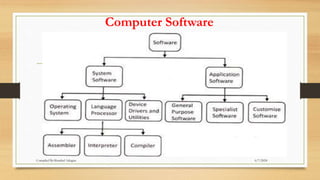
Computer Software
6/7/2024
Compiled By:Shambel Adugna
System Software
The programs that control and manage the basic operations of a computer are
generally referred to as system software .
1. Operating Systems .
 The operating system controls the internal operations of the computer’s
hardware, manages all the devices connected to the computer, allows data to be
saved to and retrieved from storage devices, and allows other programs to run
on the computer.
The OS simply provides an environment within which other programs can do
useful work.
Whether the device is a personal computer, mobile phone, or computerized
aircraft controls, an operating system must provide some way for the user to
interface with the device.
Modern OS use a GUI approach to simplify access to applications and
hardware resources. 6/7/2024
Compiled By:Shambel Adugna
Cont’d…
2. Utility Programs
A utility program performs a specialized task that enhances the computer’s
operation or safeguards data.
 Examples of utility programs are virus scanners, file-compression programs, and
data-backup programs.
3. Software Development Tools
The software tools that programmers use to create, modify, and test software.
 Assemblers, Interpreters, Compilers and integrated development environments
(IDEs), are examples of programs that fall into this category.
A computer’s CPU can only process instructions that are written in machine
language .
6/7/2024
Compiled By:Shambel Adugna
Application Software
1. General Purpose Software
• General-purpose software refers to computer applications that are not designed for a particular
business, industry or department
• Example: Word processing application, Database application, Supply Chain Management Software,
Presentation software, Desktop Publishing Software.
2. Specialist Software
• Specialized (Specialist) software is software that is written for a specific task rather for a broad
application area.
• Example: mobile software, project management software, project tracking software
3. Customized Software
• Customized software is a computer program or web application that is specifically designed for a
particular purpose, department or company.
• The software is owned by the customer and can incorporate features from other software programs.
• Example: Online Grading System 6/7/2024
Compiled By:Shambel Adugna
Examples of Operating Systems
The most popular is Microsoft Windows, which is the operating system used on
over 90% of the world‘s personal computer systems.
 Another popular operating system is Mac OS X, which is the operating system
used for Apple Macintosh computers .
While IMB PCs (mostly Windows) and Mac computers are not directly
compatible, it is possible to use virtualization(virtual box)to run one operating
system on an incompatible computer.
UNIX was a command line interface operating system developed for large scale
computers and networks in the 1960s.
 The latest generation of operating systems derived from UNIX is called Linux.
 It is a free, open-source operating system that is supported by most computer
platforms.
6/7/2024
Compiled By:Shambel Adugna
Functionality of Typical operating
System
Memory Management
It is the management of Primary Memory .
Memory is used by a computer to temporarily hold data and instructions that are
being used by applications, the operating system and hardware devices.
For a program to be executed, it must in the main memory.
It Keeps tracks of primary memory, i.e., what part of it are in use by whom, what
part are not in use.
In multiprogramming, the OS decides which process will get memory when and
how much.
Allocates the memory when a process requests it to do so.
De-allocates the memory when a process no longer needs it or has been
terminated
6/7/2024
Compiled By:Shambel Adugna
Cont’d…
Process Management
Processes given by the user or system ‘s own process are Handled by the Operating
System .
A process is basically a program in execution.
Most modern CPUs and operating systems can handle multitasking and multithreading.
That is, they can run more than one application at a time and they can process threads
from more than one device and application at a time
In multiprogramming environment OS decides which process gets the processor when
and for how much time.
OS Keeps tracks of processor and status of process. The program responsible for this
task is known as traffic controller.
Allocates the processor (CPU) to a process.
De-allocates processor when a process is no longer required. 6/7/2024
Compiled By:Shambel Adugna
Cont’d…
Device Management
 Peripheral devices are hardware that are connected to the computer by connection
ports on the motherboard.
 E.g. monitor, keyboard, mouse, webcam & printer.
 These devices are programmed and controlled using device drivers provided by the
operating system.
When an application needs to use a device it talks to the device drivers.
 The device drivers then tell the device what to do
So operating system Keeps tracks of all devices. Program responsible for this task is
known as the I/O controller.
Decides which process gets the device when and for how much time.
Allocates & De-allocates the device in the efficient way. 6/7/2024
Compiled By:Shambel Adugna
Cont’d…
File Management
Information is stored on your hard disk, CD/DVD discs, and removable storage devices.
Your operating system controls the actual physical operation of these storage devices.
 It also helps you to manage the files stored on these devices.
The operating system must perform certain key file management tasks for the user:
Manage the storage and retrieval of information;
Provide an easy to navigate for viewing and accessing storage devices and the
information.
Keeps track of information, location, uses, status etc. Decides who gets the resources.
Allocates & De-allocates the resources.
6/7/2024
Compiled By:Shambel Adugna
Cont’d…
Other functions
Security − By means of password and similar other techniques, it
prevents unauthorized access to programs and data.
Control over system performance − Recording delays between request
for a service and response from the system.
6/7/2024
Compiled By:Shambel Adugna
Types of operating system
Operating systems are there from the very first computer generation .
Following are few of the important types of operating system which are most
commonly used.
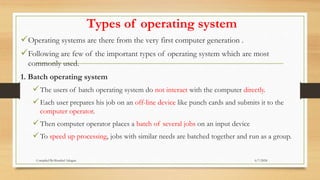
1. Batch operating system
The users of batch operating system do not interact with the computer directly.
Each user prepares his job on an off-line device like punch cards and submits it to the
computer operator.
Then computer operator places a batch of several jobs on an input device
To speed up processing, jobs with similar needs are batched together and run as a group.
6/7/2024
Compiled By:Shambel Adugna
Cont’d…
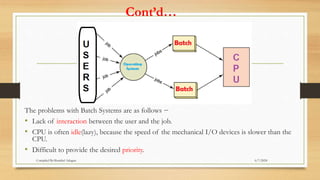
The problems with Batch Systems are as follows −
• Lack of interaction between the user and the job.
• CPU is often idle(lazy), because the speed of the mechanical I/O devices is slower than the
CPU.
• Difficult to provide the desired priority.
6/7/2024
Compiled By:Shambel Adugna
Cont’d…
2. Time-sharing(Multi-user) OS
It enables many people, located at various terminals, to use a computer at the same
time.
Processor's time which is shared among multiple users simultaneously is termed as
time-sharing.
it’s objective is to minimize response time.
Multiple jobs are executed by the CPU by switching between them.
E.g. transaction processing system
6/7/2024
Compiled By:Shambel Adugna
Cont’d…
Advantages of Timesharing operating systems are as follows −
• Provides the advantage of quick response.
• Avoids duplication of software.
• Reduces CPU idle time.
Disadvantages of Time-sharing operating systems are as follows −
• Problem of reliability.
• Question of security and integrity of user programs and data.
• Problem of data communication.
6/7/2024
Compiled By:Shambel Adugna
Cont’d…
3. Distributed operating System
• It uses multiple central processors to serve multiple real-time applications and multiple users.
• The processors communicate with one another through various communication lines.
The advantages of distributed systems are as follows −
• With resource sharing facility, a user at one site may be able to use the resources available at
another.
• Speedup the exchange of data with one another via electronic mail.
• If one site fails in a distributed system, the remaining sites can potentially continue operating.
• Better service to the customers.
• Reduction of the load on the host computer.
• Reduction of delays in data processing.
6/7/2024
Compiled By:Shambel Adugna
Cont’d…
• A distributed operating system manages a group of independent computers and
makes them appear to be a single computer.
• The development of networked computers that could be linked and communicate
with each other gave rise to distributed computing.
• Distributed computations are carried out on more than one machine.
• When computers in a group work in cooperation, they make a distributed system.
6/7/2024
Compiled By:Shambel Adugna
Cont’d…
4. Network operating System
• It runs on a server and provides the server the capability to manage data, users,
groups, security, applications, and other networking functions.
• it’s primary purpose is to allow shared file and printer access among multiple
computers in a network.
• E.g. Microsoft Windows Server 2003, Microsoft Windows Server 2008, Linux.
6/7/2024
Compiled By:Shambel Adugna
Cont’d…
The advantages of network operating systems are as follows −
• Centralized servers are highly stable.
• Security is server managed.
• Upgrades to new technologies and hardware can be easily integrated into the system.
• Remote access to servers is possible from different locations and types of systems.
The disadvantages of network operating systems are as follows −
• High cost of buying and running a server.
• Dependency on a central location for most operations.
• Regular maintenance and updates are required.
6/7/2024
Compiled By:Shambel Adugna
Cont’d…
5. Real Time Operating System
• A real-time system is defined as a data processing system in which the time interval
required to process and respond to inputs is so small that it controls the environment.
• It is used for a real-time application , means for those applications where data
processing should be done in the fixed and small quantum of time.
• A real-time operating system must have well-defined, fixed time constraints,
otherwise the system will fail.
• For example, Scientific experiments, medical imaging systems, industrial control
systems, weapon systems, robots, air traffic control systems, etc.
6/7/2024
Compiled By:Shambel Adugna
Cont’d…
• A real-time operating system is a multitasking operating system that aims at executing
real-time applications.
• Realtime operating systems often use specialized scheduling algorithms so that they
can achieve a deterministic nature of behavior.
• The main objective of real-time operating systems is their quick and predictable
response to events.
6/7/2024
Compiled By:Shambel Adugna
History of Operating System
Development
6/7/2024
Compiled By:Shambel Adugna
History of operating system
• Each generation of computer is characterized by a major technological development
resulting in increasingly smaller, cheaper, more powerful, more efficient and reliable
devices.
• In 1623,Wilhelm Schickard invented first known mechanical calculator, capable of
simple arithmetic.
• Similar mechanical adding machine made in 1640’s by Blaise Pascal. Still on display in
Paris.
• In 1673,More advanced mechanical calculator was invented by German mathematician
Gottfried Leibniz .
• It have Capability of multiplication and division .
• it was Purely mechanical with no source of power.
6/7/2024
Compiled By:Shambel Adugna
Cont’d…
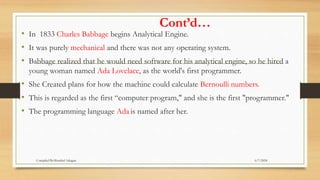
• In 1833 Charles Babbage begins Analytical Engine.
• It was purely mechanical and there was not any operating system.
• Babbage realized that he would need software for his analytical engine, so he hired a
young woman named Ada Lovelace, as the world's first programmer.
• She Created plans for how the machine could calculate Bernoulli numbers.
• This is regarded as the first “computer program," and she is the first "programmer."
• The programming language Ada is named after her.
6/7/2024
Compiled By:Shambel Adugna
Cont’d…
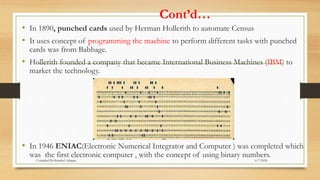
• In 1890, punched cards used by Herman Hollerith to automate Census
• It uses concept of programming the machine to perform different tasks with punched
cards was from Babbage.
• Hollerith founded a company that became International Business Machines (IBM) to
market the technology.
• In 1946 ENIAC(Electronic Numerical Integrator and Computer ) was completed which
was the first electronic computer , with the concept of using binary numbers.
6/7/2024
Compiled By:Shambel Adugna
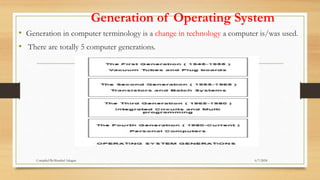
Generation of Operating System
• Generation in computer terminology is a change in technology a computer is/was used.
• There are totally 5 computer generations.
6/7/2024
Compiled By:Shambel Adugna
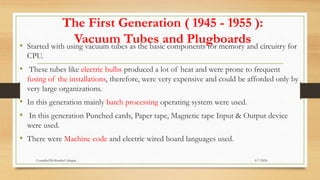
The First Generation ( 1945 - 1955 ):
Vacuum Tubes and Plugboards
• Started with using vacuum tubes as the basic components for memory and circuitry for
CPU.
• These tubes like electric bulbs produced a lot of heat and were prone to frequent
fusing of the installations, therefore, were very expensive and could be afforded only by
very large organizations.
• In this generation mainly batch processing operating system were used.
• In this generation Punched cards, Paper tape, Magnetic tape Input & Output device
were used.
• There were Machine code and electric wired board languages used.
6/7/2024
Compiled By:Shambel Adugna
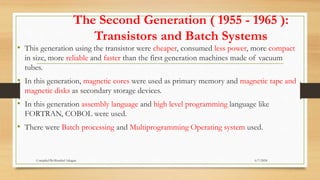
The Second Generation ( 1955 - 1965 ):
Transistors and Batch Systems
• This generation using the transistor were cheaper, consumed less power, more compact
in size, more reliable and faster than the first generation machines made of vacuum
tubes.
• In this generation, magnetic cores were used as primary memory and magnetic tape and
magnetic disks as secondary storage devices.
• In this generation assembly language and high level programming language like
FORTRAN, COBOL were used.
• There were Batch processing and Multiprogramming Operating system used.
6/7/2024
Compiled By:Shambel Adugna
The Third Generation ( 1965 - 1980 ): Integrated
Circuits and Multiprogramming
• Until the 1960’s, there were two types of computer systems i.e. the scientific and the
commercial computers.
• These were combined by IBM in the System/360.
• This used integrated circuits and provided a major price and performance advantage over
the second generation systems.
• The third generation operating systems also introduced multiprogramming.
• This meant that the processor was not idle while a job was completing its I/O operation.
• Another job was scheduled on the processor so that its time would not be wasted.
6/7/2024
Compiled By:Shambel Adugna
The Fourth Generation ( 1980 - Present):
Personal Computers
• The fourth generation of computers is marked by the use of (VLSI) circuits.
• VLSI circuits having about 5000 transistors and other circuit elements on a single chip
made it possible to have microcomputers of fourth generation.
• Fourth Generation computers became more powerful, compact, reliable, and affordable.
• As a result, it gave rise to personal computer (PC) revolution.
• In this generation Time sharing, Real time, Networks, Distributed Operating System were
used.
• All the Higher level languages like C and C++, DBASE etc. were used in this generation.
6/7/2024
Compiled By:Shambel Adugna
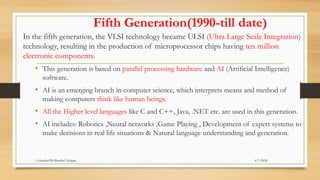
Fifth Generation(1990-till date)
In the fifth generation, the VLSI technology became ULSI (Ultra Large Scale Integration)
technology, resulting in the production of microprocessor chips having ten million
electronic components.
• This generation is based on parallel processing hardware and AI (Artificial Intelligence)
software.
• AI is an emerging branch in computer science, which interprets means and method of
making computers think like human beings.
• All the Higher level languages like C and C++, Java, .NET etc. are used in this generation.
• AI includes: Robotics ,Neural networks ,Game Playing , Development of expert systems to
make decisions in real life situations & Natural language understanding and generation.
6/7/2024
Compiled By:Shambel Adugna
Operating System Design Issues
Robustness
• a system should not break down easily.
• a system should recover quickly from any failure.
• a system should not wholly affected by a bug in one aspect of it .
Security
• preventing users from accessing objects they have no right to access
• allowing users to access objects they have every right to access.
• especially for multi-user systems with open access (such as Internet-based applications).
6/7/2024
Compiled By:Shambel Adugna
Cont’d…
Efficiency
• An OS encourages efficient use of the CPU by suspending programs that are waiting for I/O operations
to complete to make way for programs that can use the CPU more productively.
Compatibility
• The ability of one device or program to work with another device or program.
• For example, a printer and a computer are said to be compatible if they can be connected to each other.
Portability
• When used to describe hardware, portable means small and lightweight.
• When used to describe software, portable means that the software has the ability to run on a variety of
computers.
• Portable and machine independent mean the same thing-that the software does not depend on a particular type
of hardware.
6/7/2024
Compiled By:Shambel Adugna
Cont’d…
Flexibility
• Flexible operating systems are taken to be those whose designs have been motivated to some degree by the
desire to allow the system to be tailored, either statically or dynamically, to the requirements of specific
applications or application domains.
• The use of object orientation is a common feature of many flexible operating systems.
Reliability
• In general, reliability is the ability of a person or system to perform and maintain its functions in
routine/repetitive circumstances, as well as hostile or unexpected circumstances.
• Reliability is generally considered important by end users.
Scalability
• Scalability is a desirable property of a system, a network, or a process, which indicates its ability to either
handle growing amounts of work in a graceful manner, or to be readily enlarged.
• A system whose performance improves after adding hardware, proportionally to the capacity added, is said
to be a scalable system
6/7/2024
Compiled By:Shambel Adugna
ARCHITECTURE OF OPERATING SYSTEM
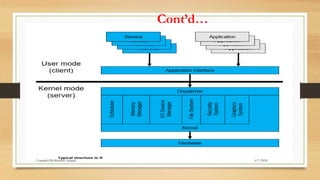
A typical operating system has two modes of operation.
User Mode
• The User Mode is concerned with the actual interface between the user and the
system.
• In User mode, the executing code has no ability to directly access hardware or
reference memory.
• Code running in user mode must delegate to system APIs to access Hardware or
memory
• It controls things like running applications and accessing files.
6/7/2024
Compiled By:Shambel Adugna
Cont’d…
Kernel Mode
• In Kernel mode, the executing code has complete and unrestricted access to the
underlying hardware.
• It can execute any CPU instruction and reference any memory address.
• Kernel mode is generally reserved for the lowest-level, most trusted functions of the
operating system.
• The Kernel forms the core of the operating system, and it acts like a supervisor for
everything that is happening in the computer.
• In the client-server model of an operating system, the User Mode is considered a client.
• That is, the User Mode accesses resources provided by the Kernel (the server).
6/7/2024
Compiled By:Shambel Adugna
Cont’d…
6/7/2024
Compiled By:Shambel Adugna
Interfacing with an Operating System
Command Line Interface(CLI)
• A CLI uses typed commands to issue instructions to the computer.
• It can be more difficult to use because the user must type the precise commands and
locations of files.
• DOS (Disk Operating System) and UNIX are examples of command line interface
Graphical User Interface (GUI)
• A GUI uses graphics (or pictures) and menus to help the user access resources and
issue commands.
• Windows (XP, 7, 8,10), Linux and Mac OS X are examples of GUI operating systems.
6/7/2024
Compiled By:Shambel Adugna
Starting an Operating System
How does your computer start the operating system?
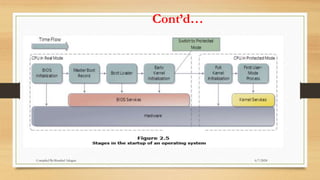
• In the first stage, you turn on the power supply to your computer.
• This sends electricity to the motherboard on a wire .
• If the power supply is good, then the BIOS chip takes over.
• The BIOS chip contains basic instructions for starting up the rest of the computer
system.
• The first thing that it will do is a POST, which will check to make sure all your
hardware is working properly.
6/7/2024
Compiled By:Shambel Adugna
Cont’d…
• If the hardware is all working, BIOS will then look for a small sector at the very
beginning of your primary hard disk called the MBR.
• The MBR contains a list, or map, of all of the partitions on your computer‘s hard disk
• After the MBR is found the Bootstrap Loader follows basic instructions for starting up
the rest of the computer, including the operating system.
• If multiple operating systems are installed, the user will be given a choice of which
operating system to use.
• The next stage is called Early Kernel Initialization.
• Kernel is the core of the operating system, and it regulates all of the background
functions of your computer.
6/7/2024
Compiled By:Shambel Adugna
Cont’d…
• In the Early Kernel Initialization stage, a smaller core of the Kernel is activated.
• This core includes the device drivers needed to use your computer‘s RAM chips.
• Without the extra memory provided by RAM, it is not possible to run the more
complicated code for the remainder of the operating system.
• Once the Early Kernel Initialization is complete, the CPU switches to Protected
Mode.
• The computer can now take advantage of the extended memory address system
provided by RAM, and the operating system‘s Kernel is fully initialized.
• Only at this stage are the first User Mode processes initialized, and the user can
begin interacting with the operating system, applications and hardware.
6/7/2024
Compiled By:Shambel Adugna
Cont’d…
6/7/2024
Compiled By:Shambel Adugna
Running Multiple Operating Systems
• It is possible to install more than one operating system on a computer.
• You can do this by partitioning your hard disk(s) and installing different operating
systems on different partitions.
• When you turn your computer on, you are given a choice of which operating system
to use.
• You can only run one operating system at a time.
6/7/2024
Compiled By:Shambel Adugna
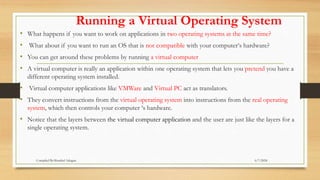
Running a Virtual Operating System
• What happens if you want to work on applications in two operating systems at the same time?
• What about if you want to run an OS that is not compatible with your computer‘s hardware?
• You can get around these problems by running a virtual computer
• A virtual computer is really an application within one operating system that lets you pretend you have a
different operating system installed.
• Virtual computer applications like VMWare and Virtual PC act as translators.
• They convert instructions from the virtual operating system into instructions from the real operating
system, which then controls your computer ‘s hardware.
• Notice that the layers between the virtual computer application and the user are just like the layers for a
single operating system.
6/7/2024
Compiled By:Shambel Adugna
System calls
• System programs interact with the OS (and ultimately hardware) through system
calls.
• Called when a user level program needs a service from the OS.
– Generally written in C/C++
– Execute in kernel mode
– code can access protected hardware.
6/7/2024
Compiled By:Shambel Adugna
Types of System Calls
• Process control
• File management
• Device management
• Information maintenance
• Communications
– Message passing and Shared memory
• Protection
• Application code generally does not invoke system calls directly.
• Programmer calls functions defined by an API.
6/7/2024
Compiled By:Shambel Adugna
Operating-System Structure
• Since the operating system is a complex structure, it should be created with greatest care
so it can be used and modified easily.
• An easy way to do this is to create the operating system in parts.
• Each of these parts should be well defined with clear inputs, outputs and functions.
• This keeps the complexity of the operating system design, manageable.
• Besides managing complexity, the structure of the operating system can influence key
features such as robustness or efficiency
6/7/2024
Compiled By:Shambel Adugna
Cont’d…
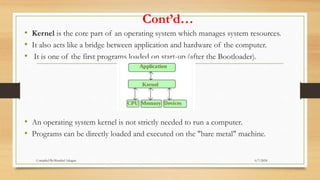
• Kernel is the core part of an operating system which manages system resources.
• It also acts like a bridge between application and hardware of the computer.
• It is one of the first programs loaded on start-up (after the Bootloader).
• An operating system kernel is not strictly needed to run a computer.
• Programs can be directly loaded and executed on the "bare metal" machine.
6/7/2024
Compiled By:Shambel Adugna
Cont’d…
• Eventually, small additional programs such as program loaders and debuggers were
typically left in-core between runs, or loaded from read-only memory.
• As these were developed, they formed the basis of what became early operating
system kernels.
• The following sections outline typical approaches to structuring the operating
system.
6/7/2024
Compiled By:Shambel Adugna
1 Simple Structure
• When DOS was originally written its developers had no idea how big and important it
would eventually become.
• It was written by a few programmers in a relatively short amount of time, without the
benefit of modern software engineering techniques, and then gradually grew over time to
exceed its original expectations.
• It does not break the system into subsystems, and has no distinction between user and
kernel modes, allowing all programs direct access to the underlying hardware.
• ( Note that user versus kernel mode was not supported by the 8088 chip set anyway, so
that really wasn't an option back then. )
6/7/2024
Compiled By:Shambel Adugna
Cont’d…
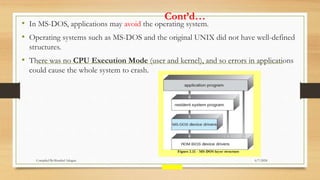
• In MS-DOS, applications may avoid the operating system.
• Operating systems such as MS-DOS and the original UNIX did not have well-defined
structures.
• There was no CPU Execution Mode (user and kernel), and so errors in applications
could cause the whole system to crash.
6/7/2024
Compiled By:Shambel Adugna
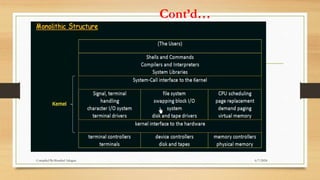
2. Monolithic Structure
• Functionality of the OS is invoked with simple function calls within the kernel, which
is one large program.
• Device drivers are loaded into the running kernel and become part of the kernel.
• user services and kernel services are implemented under same address space.
• It increases the size of the kernel, thus increases size of operating system as well.
• As both services are implemented under same address space, this makes operating
system execution faster.
6/7/2024
Compiled By:Shambel Adugna
Cont’d…
6/7/2024
Compiled By:Shambel Adugna
Cont’d…
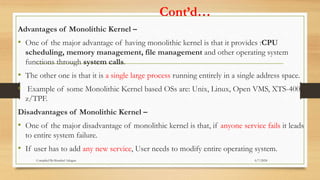
Advantages of Monolithic Kernel –
• One of the major advantage of having monolithic kernel is that it provides :CPU
scheduling, memory management, file management and other operating system
functions through system calls.
• The other one is that it is a single large process running entirely in a single address space.
• Example of some Monolithic Kernel based OSs are: Unix, Linux, Open VMS, XTS-400,
z/TPF.
Disadvantages of Monolithic Kernel –
• One of the major disadvantage of monolithic kernel is that, if anyone service fails it leads
to entire system failure.
• If user has to add any new service, User needs to modify entire operating system.
6/7/2024
Compiled By:Shambel Adugna
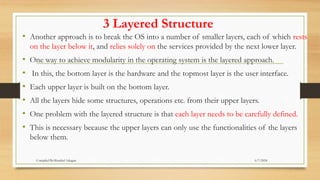
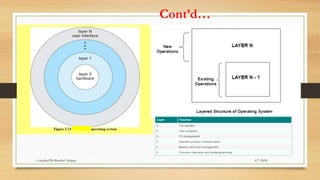
3 Layered Structure
• Another approach is to break the OS into a number of smaller layers, each of which rests
on the layer below it, and relies solely on the services provided by the next lower layer.
• One way to achieve modularity in the operating system is the layered approach.
• In this, the bottom layer is the hardware and the topmost layer is the user interface.
• Each upper layer is built on the bottom layer.
• All the layers hide some structures, operations etc. from their upper layers.
• One problem with the layered structure is that each layer needs to be carefully defined.
• This is necessary because the upper layers can only use the functionalities of the layers
below them.
6/7/2024
Compiled By:Shambel Adugna
Cont’d…
• A layered design of the operating system architecture attempts to achieve robustness by
structuring the architecture into layers with different privileges.
• The most privileged layer would contain code dealing with interrupt handling and
context switching, the layers above that would follow with device drivers, memory
management, file systems, user interface, and finally the least privileged layer would
contain the applications.
• MULTICS is a prominent example of a layered operating system.
• Modern operating systems, however, do not use the layered design, as it is believed too
restrictive and requires specific hardware support.
6/7/2024
Compiled By:Shambel Adugna
Cont’d…
• This approach allows each layer to be developed and debugged independently, with the
assumption that all lower layers have already been debugged and are trusted to deliver
proper services.
• The problem is deciding what order in which to place the layers, as no layer can call upon
the services of any higher layer, and so many chicken-and-egg situations may arise.
• Layered approaches can also be less efficient, as a request for service from a higher layer has
to filter through all lower layers before it reaches the HW, possibly with significant
processing at each step.
6/7/2024
Compiled By:Shambel Adugna
Cont’d…
6/7/2024
Compiled By:Shambel Adugna
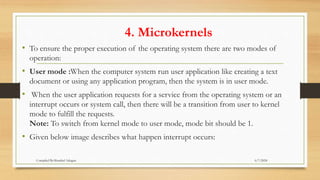
4. Microkernels
• To ensure the proper execution of the operating system there are two modes of
operation:
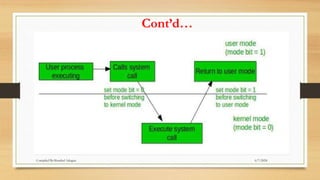
• User mode :When the computer system run user application like creating a text
document or using any application program, then the system is in user mode.
• When the user application requests for a service from the operating system or an
interrupt occurs or system call, then there will be a transition from user to kernel
mode to fulfill the requests.
Note: To switch from kernel mode to user mode, mode bit should be 1.
• Given below image describes what happen interrupt occurs:
6/7/2024
Compiled By:Shambel Adugna
Cont’d…
6/7/2024
Compiled By:Shambel Adugna
Cont’d…
• Kernel Mode –
When system boots then hardware starts in kernel mode and when operating system is
loaded then it start user application in user mode.
• To provide protection to the hardware, we have privileged instructions which execute
only in kernel mode.
• If user attempt to run privileged instruction in user mode then it will treat instruction
as illegal and traps to OS.
• Some of the privileged instructions are:
• Handling Interrupts
• To switch from user mode to kernel mode.
• Input Output management.
Note: To switch from user mode to kernel mode bit should be 0. 6/7/2024
Compiled By:Shambel Adugna
Cont’d…
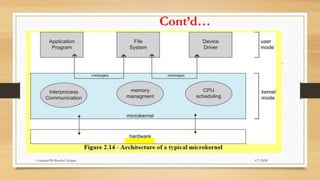
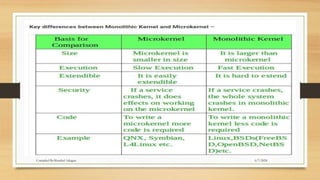
• The basic idea behind micro kernels is to remove all non-essential services from the
kernel, and implement them as system applications instead, thereby making the kernel
as small and efficient as possible.
• Most microkernels provide basic process ,memory management, and message passing
between other services, and not much more.
• Security and protection can be enhanced, as most services are performed in user
mode, not kernel mode.
• System expansion can also be easier, because it only involves adding more system
applications, not rebuilding a new kernel.
• Mach was the first and most widely known microkernel, and now forms a major
component of Mac OSX.
• Another microkernel example is QNX, a real-time OS for embedded systems.
6/7/2024
Compiled By:Shambel Adugna
Cont’d…
• The entire operating system works in the kernel space in the monolithic system. This increases the size
of the kernel as well as the operating system.
• This is different than the microkernel system where the minimum software that is required to correctly
implement an operating system is kept in the kernel.
• A microkernel design of the operating system architecture targets robustness.
• microkernel design suggests that only very few individual parts of the operating system need to have
more privileges than common applications.
• The microkernel design therefore leads to a small system kernel, accompanied by additional system
applications that provide most of the operating system features.
• MACH is a prominent example of a microkernel that has been used in contemporary operating systems,
including the NextStep and OpenStep systems.
• Most research operating systems also qualify as microkernel operating systems
6/7/2024
Compiled By:Shambel Adugna
Cont’d…
 This structure of operating system is by removing all nonessential portions of the kernel and
implementing them as
system and user level programs.
 Generally they provide minimal process and memory management, and a communications
facility.
 Communication between components of the OS is provided by message passing.
 Extending The benefits of the microkernel are as follows:
the operating system becomes much easier.
Any changes to the kernel tend to be fewer, since the kernel is smaller.
The microkernel also provides more security and reliability.
 Main disadvantage is poor performance due to increased system overhead from message
passing.
• In a microkernel, the user services and kernel services are implemented in different address
space.
• The user services are kept in user address space, and kernel services are kept under kernel
address space, thus also reduces the size of kernel and size of operating system as well.
6/7/2024
Compiled By:Shambel Adugna
Cont’d…
6/7/2024
Compiled By:Shambel Adugna
6/7/2024
Compiled By:Shambel Adugna
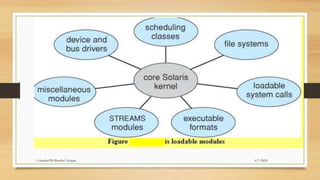
5. Modules
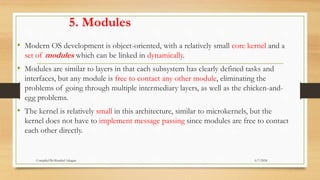
• Modern OS development is object-oriented, with a relatively small core kernel and a
set of modules which can be linked in dynamically.
• Modules are similar to layers in that each subsystem has clearly defined tasks and
interfaces, but any module is free to contact any other module, eliminating the
problems of going through multiple intermediary layers, as well as the chicken-and-
egg problems.
• The kernel is relatively small in this architecture, similar to microkernels, but the
kernel does not have to implement message passing since modules are free to contact
each other directly.
6/7/2024
Compiled By:Shambel Adugna
6/7/2024
Compiled By:Shambel Adugna
6. Hybrid Systems
• Most operating systems today do not strictly adhere to one architecture, but are
hybrids of several.
6/7/2024
Compiled By:Shambel Adugna
6/7/2024
Compiled By:Shambel Adugna

Computer Organization and archi. Chapter 1.pptx

  • 1.
    CHAPTER - ONE Introductionto Operating System 6/7/2024 Compiled By:Shambel Adugna
  • 2.
    Chapter Contents • Overviewof Operating System • Functionality of a typical Operating system • Types of Operating System • History of Operating System Development • Design issues (efficiency, robustness, flexibility, portability, security, compatibility) • Operating System Structure 6/7/2024 Compiled By:Shambel Adugna
  • 3.
    Operating System -Overview An operating system is a program that manages the computer hardware. It is a program that acts as an interface between the user and the computer hardware. It’s purpose is to provide an environment in which a user can execute programs. A program is a set of instructions that a computer follows to perform a task.  It is a software which performs all the basic tasks like: • File management • Memory management • Process management • Handling input and output and • Controlling peripheral devices such as disk drives and printers. 6/7/2024 Compiled By:Shambel Adugna
  • 4.
    Cont’d… An Operating systemis concerned with the allocation of resources and services, such as memory, processors, devices and information. 6/7/2024 Compiled By:Shambel Adugna
  • 5.
    Computer system • Acomputer system can be divided roughly into two components, Hardware and software. • Hardware refers to the physical components that a computer is made of. • E.g. CPU, RAM, secondary storage & I/O devices provides the basic computing resources. • Software is considered to be collection of executable programming code, associated libraries and documentations. • There are two general categories of software: •System software and •Application software. 6/7/2024 Compiled By:Shambel Adugna
  • 6.
  • 7.
    1.The CPU When acomputer is performing the tasks that a program tells it to do, we say that the computer is running or executing the program. CPU , is the part of a computer that actually runs programs. The CPU is the most important component in a computer because without it, the computer could not run software. The CPU’s job is to fetch instructions, follow the instructions, and produce some result. 6/7/2024 Compiled By:Shambel Adugna
  • 8.
    2. Main Memory RAMis the computer’s work area. This is where the computer stores a program while the program is running, as well as the data that the program is working with.  A computer’s memory is divided into tiny storage locations known as bytes. One byte is enough memory to store only a letter of the alphabet or a small number.  Each byte is divided into eight smaller storage locations known as bits. The term bit stands for binary digit . Computer scientists usually think of bits as tiny switches that can be either on or off.  In most computer systems, bits are tiny electrical components that can hold either a positive or a negative charge.  Each byte is assigned a unique number known as an address . 6/7/2024 Compiled By:Shambel Adugna
  • 9.
    3. Secondary Storage Secondarystorage is a type of memory that can hold data for long periods of time— even when there is no power to the computer. Frequently used programs are stored in secondary memory and loaded into main memory as needed.  The most common type of secondary storage device is the disk drive. 6/7/2024 Compiled By:Shambel Adugna
  • 10.
    4. I/O Device Thedevice that collects the information and sends it to the computer is called an input device . Common input devices are the keyboard, mouse, scanner, digital camera, and micro phone. The information is sent to an output device , which formats and presents it. Common output devices are monitors, printers, and speakers. 6/7/2024 Compiled By:Shambel Adugna
  • 11.
  • 12.
    System Software The programsthat control and manage the basic operations of a computer are generally referred to as system software . 1. Operating Systems .  The operating system controls the internal operations of the computer’s hardware, manages all the devices connected to the computer, allows data to be saved to and retrieved from storage devices, and allows other programs to run on the computer. The OS simply provides an environment within which other programs can do useful work. Whether the device is a personal computer, mobile phone, or computerized aircraft controls, an operating system must provide some way for the user to interface with the device. Modern OS use a GUI approach to simplify access to applications and hardware resources. 6/7/2024 Compiled By:Shambel Adugna
  • 13.
    Cont’d… 2. Utility Programs Autility program performs a specialized task that enhances the computer’s operation or safeguards data.  Examples of utility programs are virus scanners, file-compression programs, and data-backup programs. 3. Software Development Tools The software tools that programmers use to create, modify, and test software.  Assemblers, Interpreters, Compilers and integrated development environments (IDEs), are examples of programs that fall into this category. A computer’s CPU can only process instructions that are written in machine language . 6/7/2024 Compiled By:Shambel Adugna
  • 14.
    Application Software 1. GeneralPurpose Software • General-purpose software refers to computer applications that are not designed for a particular business, industry or department • Example: Word processing application, Database application, Supply Chain Management Software, Presentation software, Desktop Publishing Software. 2. Specialist Software • Specialized (Specialist) software is software that is written for a specific task rather for a broad application area. • Example: mobile software, project management software, project tracking software 3. Customized Software • Customized software is a computer program or web application that is specifically designed for a particular purpose, department or company. • The software is owned by the customer and can incorporate features from other software programs. • Example: Online Grading System 6/7/2024 Compiled By:Shambel Adugna
  • 15.
    Examples of OperatingSystems The most popular is Microsoft Windows, which is the operating system used on over 90% of the world‘s personal computer systems.  Another popular operating system is Mac OS X, which is the operating system used for Apple Macintosh computers . While IMB PCs (mostly Windows) and Mac computers are not directly compatible, it is possible to use virtualization(virtual box)to run one operating system on an incompatible computer. UNIX was a command line interface operating system developed for large scale computers and networks in the 1960s.  The latest generation of operating systems derived from UNIX is called Linux.  It is a free, open-source operating system that is supported by most computer platforms. 6/7/2024 Compiled By:Shambel Adugna
  • 16.
    Functionality of Typicaloperating System Memory Management It is the management of Primary Memory . Memory is used by a computer to temporarily hold data and instructions that are being used by applications, the operating system and hardware devices. For a program to be executed, it must in the main memory. It Keeps tracks of primary memory, i.e., what part of it are in use by whom, what part are not in use. In multiprogramming, the OS decides which process will get memory when and how much. Allocates the memory when a process requests it to do so. De-allocates the memory when a process no longer needs it or has been terminated 6/7/2024 Compiled By:Shambel Adugna
  • 17.
    Cont’d… Process Management Processes givenby the user or system ‘s own process are Handled by the Operating System . A process is basically a program in execution. Most modern CPUs and operating systems can handle multitasking and multithreading. That is, they can run more than one application at a time and they can process threads from more than one device and application at a time In multiprogramming environment OS decides which process gets the processor when and for how much time. OS Keeps tracks of processor and status of process. The program responsible for this task is known as traffic controller. Allocates the processor (CPU) to a process. De-allocates processor when a process is no longer required. 6/7/2024 Compiled By:Shambel Adugna
  • 18.
    Cont’d… Device Management  Peripheraldevices are hardware that are connected to the computer by connection ports on the motherboard.  E.g. monitor, keyboard, mouse, webcam & printer.  These devices are programmed and controlled using device drivers provided by the operating system. When an application needs to use a device it talks to the device drivers.  The device drivers then tell the device what to do So operating system Keeps tracks of all devices. Program responsible for this task is known as the I/O controller. Decides which process gets the device when and for how much time. Allocates & De-allocates the device in the efficient way. 6/7/2024 Compiled By:Shambel Adugna
  • 19.
    Cont’d… File Management Information isstored on your hard disk, CD/DVD discs, and removable storage devices. Your operating system controls the actual physical operation of these storage devices.  It also helps you to manage the files stored on these devices. The operating system must perform certain key file management tasks for the user: Manage the storage and retrieval of information; Provide an easy to navigate for viewing and accessing storage devices and the information. Keeps track of information, location, uses, status etc. Decides who gets the resources. Allocates & De-allocates the resources. 6/7/2024 Compiled By:Shambel Adugna
  • 20.
    Cont’d… Other functions Security −By means of password and similar other techniques, it prevents unauthorized access to programs and data. Control over system performance − Recording delays between request for a service and response from the system. 6/7/2024 Compiled By:Shambel Adugna
  • 21.
    Types of operatingsystem Operating systems are there from the very first computer generation . Following are few of the important types of operating system which are most commonly used. 1. Batch operating system The users of batch operating system do not interact with the computer directly. Each user prepares his job on an off-line device like punch cards and submits it to the computer operator. Then computer operator places a batch of several jobs on an input device To speed up processing, jobs with similar needs are batched together and run as a group. 6/7/2024 Compiled By:Shambel Adugna
  • 22.
    Cont’d… The problems withBatch Systems are as follows − • Lack of interaction between the user and the job. • CPU is often idle(lazy), because the speed of the mechanical I/O devices is slower than the CPU. • Difficult to provide the desired priority. 6/7/2024 Compiled By:Shambel Adugna
  • 23.
    Cont’d… 2. Time-sharing(Multi-user) OS Itenables many people, located at various terminals, to use a computer at the same time. Processor's time which is shared among multiple users simultaneously is termed as time-sharing. it’s objective is to minimize response time. Multiple jobs are executed by the CPU by switching between them. E.g. transaction processing system 6/7/2024 Compiled By:Shambel Adugna
  • 24.
    Cont’d… Advantages of Timesharingoperating systems are as follows − • Provides the advantage of quick response. • Avoids duplication of software. • Reduces CPU idle time. Disadvantages of Time-sharing operating systems are as follows − • Problem of reliability. • Question of security and integrity of user programs and data. • Problem of data communication. 6/7/2024 Compiled By:Shambel Adugna
  • 25.
    Cont’d… 3. Distributed operatingSystem • It uses multiple central processors to serve multiple real-time applications and multiple users. • The processors communicate with one another through various communication lines. The advantages of distributed systems are as follows − • With resource sharing facility, a user at one site may be able to use the resources available at another. • Speedup the exchange of data with one another via electronic mail. • If one site fails in a distributed system, the remaining sites can potentially continue operating. • Better service to the customers. • Reduction of the load on the host computer. • Reduction of delays in data processing. 6/7/2024 Compiled By:Shambel Adugna
  • 26.
    Cont’d… • A distributedoperating system manages a group of independent computers and makes them appear to be a single computer. • The development of networked computers that could be linked and communicate with each other gave rise to distributed computing. • Distributed computations are carried out on more than one machine. • When computers in a group work in cooperation, they make a distributed system. 6/7/2024 Compiled By:Shambel Adugna
  • 27.
    Cont’d… 4. Network operatingSystem • It runs on a server and provides the server the capability to manage data, users, groups, security, applications, and other networking functions. • it’s primary purpose is to allow shared file and printer access among multiple computers in a network. • E.g. Microsoft Windows Server 2003, Microsoft Windows Server 2008, Linux. 6/7/2024 Compiled By:Shambel Adugna
  • 28.
    Cont’d… The advantages ofnetwork operating systems are as follows − • Centralized servers are highly stable. • Security is server managed. • Upgrades to new technologies and hardware can be easily integrated into the system. • Remote access to servers is possible from different locations and types of systems. The disadvantages of network operating systems are as follows − • High cost of buying and running a server. • Dependency on a central location for most operations. • Regular maintenance and updates are required. 6/7/2024 Compiled By:Shambel Adugna
  • 29.
    Cont’d… 5. Real TimeOperating System • A real-time system is defined as a data processing system in which the time interval required to process and respond to inputs is so small that it controls the environment. • It is used for a real-time application , means for those applications where data processing should be done in the fixed and small quantum of time. • A real-time operating system must have well-defined, fixed time constraints, otherwise the system will fail. • For example, Scientific experiments, medical imaging systems, industrial control systems, weapon systems, robots, air traffic control systems, etc. 6/7/2024 Compiled By:Shambel Adugna
  • 30.
    Cont’d… • A real-timeoperating system is a multitasking operating system that aims at executing real-time applications. • Realtime operating systems often use specialized scheduling algorithms so that they can achieve a deterministic nature of behavior. • The main objective of real-time operating systems is their quick and predictable response to events. 6/7/2024 Compiled By:Shambel Adugna
  • 31.
    History of OperatingSystem Development 6/7/2024 Compiled By:Shambel Adugna
  • 32.
    History of operatingsystem • Each generation of computer is characterized by a major technological development resulting in increasingly smaller, cheaper, more powerful, more efficient and reliable devices. • In 1623,Wilhelm Schickard invented first known mechanical calculator, capable of simple arithmetic. • Similar mechanical adding machine made in 1640’s by Blaise Pascal. Still on display in Paris. • In 1673,More advanced mechanical calculator was invented by German mathematician Gottfried Leibniz . • It have Capability of multiplication and division . • it was Purely mechanical with no source of power. 6/7/2024 Compiled By:Shambel Adugna
  • 33.
    Cont’d… • In 1833Charles Babbage begins Analytical Engine. • It was purely mechanical and there was not any operating system. • Babbage realized that he would need software for his analytical engine, so he hired a young woman named Ada Lovelace, as the world's first programmer. • She Created plans for how the machine could calculate Bernoulli numbers. • This is regarded as the first “computer program," and she is the first "programmer." • The programming language Ada is named after her. 6/7/2024 Compiled By:Shambel Adugna
  • 34.
    Cont’d… • In 1890,punched cards used by Herman Hollerith to automate Census • It uses concept of programming the machine to perform different tasks with punched cards was from Babbage. • Hollerith founded a company that became International Business Machines (IBM) to market the technology. • In 1946 ENIAC(Electronic Numerical Integrator and Computer ) was completed which was the first electronic computer , with the concept of using binary numbers. 6/7/2024 Compiled By:Shambel Adugna
  • 35.
    Generation of OperatingSystem • Generation in computer terminology is a change in technology a computer is/was used. • There are totally 5 computer generations. 6/7/2024 Compiled By:Shambel Adugna
  • 36.
    The First Generation( 1945 - 1955 ): Vacuum Tubes and Plugboards • Started with using vacuum tubes as the basic components for memory and circuitry for CPU. • These tubes like electric bulbs produced a lot of heat and were prone to frequent fusing of the installations, therefore, were very expensive and could be afforded only by very large organizations. • In this generation mainly batch processing operating system were used. • In this generation Punched cards, Paper tape, Magnetic tape Input & Output device were used. • There were Machine code and electric wired board languages used. 6/7/2024 Compiled By:Shambel Adugna
  • 37.
    The Second Generation( 1955 - 1965 ): Transistors and Batch Systems • This generation using the transistor were cheaper, consumed less power, more compact in size, more reliable and faster than the first generation machines made of vacuum tubes. • In this generation, magnetic cores were used as primary memory and magnetic tape and magnetic disks as secondary storage devices. • In this generation assembly language and high level programming language like FORTRAN, COBOL were used. • There were Batch processing and Multiprogramming Operating system used. 6/7/2024 Compiled By:Shambel Adugna
  • 38.
    The Third Generation( 1965 - 1980 ): Integrated Circuits and Multiprogramming • Until the 1960’s, there were two types of computer systems i.e. the scientific and the commercial computers. • These were combined by IBM in the System/360. • This used integrated circuits and provided a major price and performance advantage over the second generation systems. • The third generation operating systems also introduced multiprogramming. • This meant that the processor was not idle while a job was completing its I/O operation. • Another job was scheduled on the processor so that its time would not be wasted. 6/7/2024 Compiled By:Shambel Adugna
  • 39.
    The Fourth Generation( 1980 - Present): Personal Computers • The fourth generation of computers is marked by the use of (VLSI) circuits. • VLSI circuits having about 5000 transistors and other circuit elements on a single chip made it possible to have microcomputers of fourth generation. • Fourth Generation computers became more powerful, compact, reliable, and affordable. • As a result, it gave rise to personal computer (PC) revolution. • In this generation Time sharing, Real time, Networks, Distributed Operating System were used. • All the Higher level languages like C and C++, DBASE etc. were used in this generation. 6/7/2024 Compiled By:Shambel Adugna
  • 40.
    Fifth Generation(1990-till date) Inthe fifth generation, the VLSI technology became ULSI (Ultra Large Scale Integration) technology, resulting in the production of microprocessor chips having ten million electronic components. • This generation is based on parallel processing hardware and AI (Artificial Intelligence) software. • AI is an emerging branch in computer science, which interprets means and method of making computers think like human beings. • All the Higher level languages like C and C++, Java, .NET etc. are used in this generation. • AI includes: Robotics ,Neural networks ,Game Playing , Development of expert systems to make decisions in real life situations & Natural language understanding and generation. 6/7/2024 Compiled By:Shambel Adugna
  • 41.
    Operating System DesignIssues Robustness • a system should not break down easily. • a system should recover quickly from any failure. • a system should not wholly affected by a bug in one aspect of it . Security • preventing users from accessing objects they have no right to access • allowing users to access objects they have every right to access. • especially for multi-user systems with open access (such as Internet-based applications). 6/7/2024 Compiled By:Shambel Adugna
  • 42.
    Cont’d… Efficiency • An OSencourages efficient use of the CPU by suspending programs that are waiting for I/O operations to complete to make way for programs that can use the CPU more productively. Compatibility • The ability of one device or program to work with another device or program. • For example, a printer and a computer are said to be compatible if they can be connected to each other. Portability • When used to describe hardware, portable means small and lightweight. • When used to describe software, portable means that the software has the ability to run on a variety of computers. • Portable and machine independent mean the same thing-that the software does not depend on a particular type of hardware. 6/7/2024 Compiled By:Shambel Adugna
  • 43.
    Cont’d… Flexibility • Flexible operatingsystems are taken to be those whose designs have been motivated to some degree by the desire to allow the system to be tailored, either statically or dynamically, to the requirements of specific applications or application domains. • The use of object orientation is a common feature of many flexible operating systems. Reliability • In general, reliability is the ability of a person or system to perform and maintain its functions in routine/repetitive circumstances, as well as hostile or unexpected circumstances. • Reliability is generally considered important by end users. Scalability • Scalability is a desirable property of a system, a network, or a process, which indicates its ability to either handle growing amounts of work in a graceful manner, or to be readily enlarged. • A system whose performance improves after adding hardware, proportionally to the capacity added, is said to be a scalable system 6/7/2024 Compiled By:Shambel Adugna
  • 44.
    ARCHITECTURE OF OPERATINGSYSTEM A typical operating system has two modes of operation. User Mode • The User Mode is concerned with the actual interface between the user and the system. • In User mode, the executing code has no ability to directly access hardware or reference memory. • Code running in user mode must delegate to system APIs to access Hardware or memory • It controls things like running applications and accessing files. 6/7/2024 Compiled By:Shambel Adugna
  • 45.
    Cont’d… Kernel Mode • InKernel mode, the executing code has complete and unrestricted access to the underlying hardware. • It can execute any CPU instruction and reference any memory address. • Kernel mode is generally reserved for the lowest-level, most trusted functions of the operating system. • The Kernel forms the core of the operating system, and it acts like a supervisor for everything that is happening in the computer. • In the client-server model of an operating system, the User Mode is considered a client. • That is, the User Mode accesses resources provided by the Kernel (the server). 6/7/2024 Compiled By:Shambel Adugna
  • 46.
  • 47.
    Interfacing with anOperating System Command Line Interface(CLI) • A CLI uses typed commands to issue instructions to the computer. • It can be more difficult to use because the user must type the precise commands and locations of files. • DOS (Disk Operating System) and UNIX are examples of command line interface Graphical User Interface (GUI) • A GUI uses graphics (or pictures) and menus to help the user access resources and issue commands. • Windows (XP, 7, 8,10), Linux and Mac OS X are examples of GUI operating systems. 6/7/2024 Compiled By:Shambel Adugna
  • 48.
    Starting an OperatingSystem How does your computer start the operating system? • In the first stage, you turn on the power supply to your computer. • This sends electricity to the motherboard on a wire . • If the power supply is good, then the BIOS chip takes over. • The BIOS chip contains basic instructions for starting up the rest of the computer system. • The first thing that it will do is a POST, which will check to make sure all your hardware is working properly. 6/7/2024 Compiled By:Shambel Adugna
  • 49.
    Cont’d… • If thehardware is all working, BIOS will then look for a small sector at the very beginning of your primary hard disk called the MBR. • The MBR contains a list, or map, of all of the partitions on your computer‘s hard disk • After the MBR is found the Bootstrap Loader follows basic instructions for starting up the rest of the computer, including the operating system. • If multiple operating systems are installed, the user will be given a choice of which operating system to use. • The next stage is called Early Kernel Initialization. • Kernel is the core of the operating system, and it regulates all of the background functions of your computer. 6/7/2024 Compiled By:Shambel Adugna
  • 50.
    Cont’d… • In theEarly Kernel Initialization stage, a smaller core of the Kernel is activated. • This core includes the device drivers needed to use your computer‘s RAM chips. • Without the extra memory provided by RAM, it is not possible to run the more complicated code for the remainder of the operating system. • Once the Early Kernel Initialization is complete, the CPU switches to Protected Mode. • The computer can now take advantage of the extended memory address system provided by RAM, and the operating system‘s Kernel is fully initialized. • Only at this stage are the first User Mode processes initialized, and the user can begin interacting with the operating system, applications and hardware. 6/7/2024 Compiled By:Shambel Adugna
  • 51.
  • 52.
    Running Multiple OperatingSystems • It is possible to install more than one operating system on a computer. • You can do this by partitioning your hard disk(s) and installing different operating systems on different partitions. • When you turn your computer on, you are given a choice of which operating system to use. • You can only run one operating system at a time. 6/7/2024 Compiled By:Shambel Adugna
  • 53.
    Running a VirtualOperating System • What happens if you want to work on applications in two operating systems at the same time? • What about if you want to run an OS that is not compatible with your computer‘s hardware? • You can get around these problems by running a virtual computer • A virtual computer is really an application within one operating system that lets you pretend you have a different operating system installed. • Virtual computer applications like VMWare and Virtual PC act as translators. • They convert instructions from the virtual operating system into instructions from the real operating system, which then controls your computer ‘s hardware. • Notice that the layers between the virtual computer application and the user are just like the layers for a single operating system. 6/7/2024 Compiled By:Shambel Adugna
  • 54.
    System calls • Systemprograms interact with the OS (and ultimately hardware) through system calls. • Called when a user level program needs a service from the OS. – Generally written in C/C++ – Execute in kernel mode – code can access protected hardware. 6/7/2024 Compiled By:Shambel Adugna
  • 55.
    Types of SystemCalls • Process control • File management • Device management • Information maintenance • Communications – Message passing and Shared memory • Protection • Application code generally does not invoke system calls directly. • Programmer calls functions defined by an API. 6/7/2024 Compiled By:Shambel Adugna
  • 56.
    Operating-System Structure • Sincethe operating system is a complex structure, it should be created with greatest care so it can be used and modified easily. • An easy way to do this is to create the operating system in parts. • Each of these parts should be well defined with clear inputs, outputs and functions. • This keeps the complexity of the operating system design, manageable. • Besides managing complexity, the structure of the operating system can influence key features such as robustness or efficiency 6/7/2024 Compiled By:Shambel Adugna
  • 57.
    Cont’d… • Kernel isthe core part of an operating system which manages system resources. • It also acts like a bridge between application and hardware of the computer. • It is one of the first programs loaded on start-up (after the Bootloader). • An operating system kernel is not strictly needed to run a computer. • Programs can be directly loaded and executed on the "bare metal" machine. 6/7/2024 Compiled By:Shambel Adugna
  • 58.
    Cont’d… • Eventually, smalladditional programs such as program loaders and debuggers were typically left in-core between runs, or loaded from read-only memory. • As these were developed, they formed the basis of what became early operating system kernels. • The following sections outline typical approaches to structuring the operating system. 6/7/2024 Compiled By:Shambel Adugna
  • 59.
    1 Simple Structure •When DOS was originally written its developers had no idea how big and important it would eventually become. • It was written by a few programmers in a relatively short amount of time, without the benefit of modern software engineering techniques, and then gradually grew over time to exceed its original expectations. • It does not break the system into subsystems, and has no distinction between user and kernel modes, allowing all programs direct access to the underlying hardware. • ( Note that user versus kernel mode was not supported by the 8088 chip set anyway, so that really wasn't an option back then. ) 6/7/2024 Compiled By:Shambel Adugna
  • 60.
    Cont’d… • In MS-DOS,applications may avoid the operating system. • Operating systems such as MS-DOS and the original UNIX did not have well-defined structures. • There was no CPU Execution Mode (user and kernel), and so errors in applications could cause the whole system to crash. 6/7/2024 Compiled By:Shambel Adugna
  • 61.
    2. Monolithic Structure •Functionality of the OS is invoked with simple function calls within the kernel, which is one large program. • Device drivers are loaded into the running kernel and become part of the kernel. • user services and kernel services are implemented under same address space. • It increases the size of the kernel, thus increases size of operating system as well. • As both services are implemented under same address space, this makes operating system execution faster. 6/7/2024 Compiled By:Shambel Adugna
  • 62.
  • 63.
    Cont’d… Advantages of MonolithicKernel – • One of the major advantage of having monolithic kernel is that it provides :CPU scheduling, memory management, file management and other operating system functions through system calls. • The other one is that it is a single large process running entirely in a single address space. • Example of some Monolithic Kernel based OSs are: Unix, Linux, Open VMS, XTS-400, z/TPF. Disadvantages of Monolithic Kernel – • One of the major disadvantage of monolithic kernel is that, if anyone service fails it leads to entire system failure. • If user has to add any new service, User needs to modify entire operating system. 6/7/2024 Compiled By:Shambel Adugna
  • 64.
    3 Layered Structure •Another approach is to break the OS into a number of smaller layers, each of which rests on the layer below it, and relies solely on the services provided by the next lower layer. • One way to achieve modularity in the operating system is the layered approach. • In this, the bottom layer is the hardware and the topmost layer is the user interface. • Each upper layer is built on the bottom layer. • All the layers hide some structures, operations etc. from their upper layers. • One problem with the layered structure is that each layer needs to be carefully defined. • This is necessary because the upper layers can only use the functionalities of the layers below them. 6/7/2024 Compiled By:Shambel Adugna
  • 65.
    Cont’d… • A layereddesign of the operating system architecture attempts to achieve robustness by structuring the architecture into layers with different privileges. • The most privileged layer would contain code dealing with interrupt handling and context switching, the layers above that would follow with device drivers, memory management, file systems, user interface, and finally the least privileged layer would contain the applications. • MULTICS is a prominent example of a layered operating system. • Modern operating systems, however, do not use the layered design, as it is believed too restrictive and requires specific hardware support. 6/7/2024 Compiled By:Shambel Adugna
  • 66.
    Cont’d… • This approachallows each layer to be developed and debugged independently, with the assumption that all lower layers have already been debugged and are trusted to deliver proper services. • The problem is deciding what order in which to place the layers, as no layer can call upon the services of any higher layer, and so many chicken-and-egg situations may arise. • Layered approaches can also be less efficient, as a request for service from a higher layer has to filter through all lower layers before it reaches the HW, possibly with significant processing at each step. 6/7/2024 Compiled By:Shambel Adugna
  • 67.
  • 68.
    4. Microkernels • Toensure the proper execution of the operating system there are two modes of operation: • User mode :When the computer system run user application like creating a text document or using any application program, then the system is in user mode. • When the user application requests for a service from the operating system or an interrupt occurs or system call, then there will be a transition from user to kernel mode to fulfill the requests. Note: To switch from kernel mode to user mode, mode bit should be 1. • Given below image describes what happen interrupt occurs: 6/7/2024 Compiled By:Shambel Adugna
  • 69.
  • 70.
    Cont’d… • Kernel Mode– When system boots then hardware starts in kernel mode and when operating system is loaded then it start user application in user mode. • To provide protection to the hardware, we have privileged instructions which execute only in kernel mode. • If user attempt to run privileged instruction in user mode then it will treat instruction as illegal and traps to OS. • Some of the privileged instructions are: • Handling Interrupts • To switch from user mode to kernel mode. • Input Output management. Note: To switch from user mode to kernel mode bit should be 0. 6/7/2024 Compiled By:Shambel Adugna
  • 71.
    Cont’d… • The basicidea behind micro kernels is to remove all non-essential services from the kernel, and implement them as system applications instead, thereby making the kernel as small and efficient as possible. • Most microkernels provide basic process ,memory management, and message passing between other services, and not much more. • Security and protection can be enhanced, as most services are performed in user mode, not kernel mode. • System expansion can also be easier, because it only involves adding more system applications, not rebuilding a new kernel. • Mach was the first and most widely known microkernel, and now forms a major component of Mac OSX. • Another microkernel example is QNX, a real-time OS for embedded systems. 6/7/2024 Compiled By:Shambel Adugna
  • 72.
    Cont’d… • The entireoperating system works in the kernel space in the monolithic system. This increases the size of the kernel as well as the operating system. • This is different than the microkernel system where the minimum software that is required to correctly implement an operating system is kept in the kernel. • A microkernel design of the operating system architecture targets robustness. • microkernel design suggests that only very few individual parts of the operating system need to have more privileges than common applications. • The microkernel design therefore leads to a small system kernel, accompanied by additional system applications that provide most of the operating system features. • MACH is a prominent example of a microkernel that has been used in contemporary operating systems, including the NextStep and OpenStep systems. • Most research operating systems also qualify as microkernel operating systems 6/7/2024 Compiled By:Shambel Adugna
  • 73.
    Cont’d…  This structureof operating system is by removing all nonessential portions of the kernel and implementing them as system and user level programs.  Generally they provide minimal process and memory management, and a communications facility.  Communication between components of the OS is provided by message passing.  Extending The benefits of the microkernel are as follows: the operating system becomes much easier. Any changes to the kernel tend to be fewer, since the kernel is smaller. The microkernel also provides more security and reliability.  Main disadvantage is poor performance due to increased system overhead from message passing. • In a microkernel, the user services and kernel services are implemented in different address space. • The user services are kept in user address space, and kernel services are kept under kernel address space, thus also reduces the size of kernel and size of operating system as well. 6/7/2024 Compiled By:Shambel Adugna
  • 74.
  • 75.
  • 76.
    5. Modules • ModernOS development is object-oriented, with a relatively small core kernel and a set of modules which can be linked in dynamically. • Modules are similar to layers in that each subsystem has clearly defined tasks and interfaces, but any module is free to contact any other module, eliminating the problems of going through multiple intermediary layers, as well as the chicken-and- egg problems. • The kernel is relatively small in this architecture, similar to microkernels, but the kernel does not have to implement message passing since modules are free to contact each other directly. 6/7/2024 Compiled By:Shambel Adugna
  • 77.
  • 78.
    6. Hybrid Systems •Most operating systems today do not strictly adhere to one architecture, but are hybrids of several. 6/7/2024 Compiled By:Shambel Adugna
  • 79.