CAE
COMPUTER AIDED ENGINEERING (CAE)
CAE is the use of computer software to simulate performance in
order to improve product designs or assist in the resolution of engineering
problems for a wide of industries this includes simulation validation and
optimization of products processes and manufacturing tools
A typical CAE process comprises of pre-processing, solving, and
post processing steps. In the pre-processing phase, engineers model the
geometry and the physical properties of the design, as well as the
environment in the form of applied loads or constraints. Next the model is
solved using an appropriate mathematical formulation of the underlying
physics. In the post-processing phase, the results are presented to the
engineer of review.
BENEFITS OF CAE
• Designs decision can be made based on their impact on performance.
• Designs can be evaluated and refined using computer simulation
rather than physical prototype testing saving money and time.
• CAE can provide performance insights earlier in the development
process, when design changes are less expensive to make.
• The Finite Element Analysis is a computing technique that is used to
obtain approximate solutions of boundary value problems it used a
numerical method called as Finite Element Method (FEM). FEA
involves a computer model of design that is loaded and analyzed for
specific results.
CAE APPLICATION
• Stress and dynamic analysis on components and
assemblies and finite element analysis (FEA)
• Thermal and fluid analysis using computational fluid
dynamics (CFD)
• Kinematics and dynamic analysis of mechanisms
(multibody dynamics)
•Simulation of manufacturing processes like casting,
molding and die press forming
• Optimization of the product or process
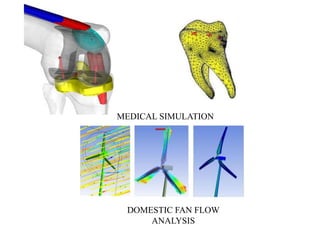
MEDICAL SIMULATION
DOMESTIC FAN FLOW
ANALYSIS
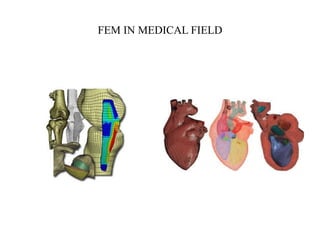
FEM IN MEDICAL FIELD
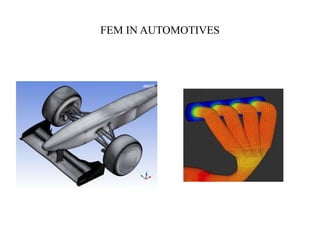
FEM IN AUTOMOTIVES
CAE SOFTWARES IN CADD CENTRE
1. ANSYS
2. NX-NASTRAN
3. HYPERMESH
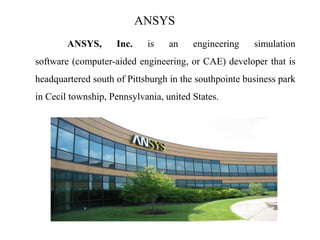
ANSYS
ANSYS, Inc. is an engineering simulation
software (computer-aided engineering, or CAE) developer that is
headquartered south of Pittsburgh in the southpointe business park
in Cecil township, Pennsylvania, united States.
HISTORY
The company was founded in 1970. by Dr.JOHN A.
SWANSON as Swanson Analysis Systems, Inc (SASI). Its primary purpose was
to develop and market finite element analysis software for structural physics that
could simulate static (stationary), dynamic (moving) and thermal (heat transfer)
problems. SASI developed its business in parallel with the growth in computer
technology and engineering needs.
SIMULATION is the imitation of the operation of a real-world process
or system over time. The act of simulating something first requires that a model
be developed; this model represents the key characteristics or
behaviors/functions of the selected physical or abstract system or process. The
model represents the system itself, whereas the simulation represents the
operation of the system over time.
FINITE ELEMENT METHOD
In mathematics, the finite element method (FEM) is
a numerical technique for finding approximate solutions to boundary
value problems for partial differential equations. It uses variational
methods (the calculus of variations) to minimize an error function and
produce a stable solution. Analogous to the idea that connecting many
tiny straight lines can approximate a larger circle, FEM encompasses
all the methods for connecting many simple element equations over
many small sub-domains, named finite elements, to approximate a
more complex equation over a larger domain.
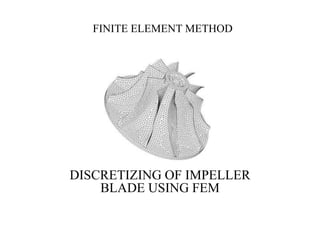
FINITE ELEMENT METHOD
DISCRETIZING OF IMPELLER
BLADE USING FEM
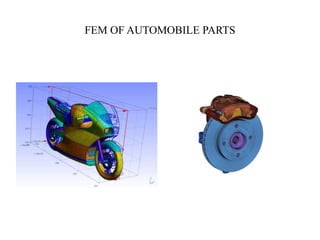
FEM OF AUTOMOBILE PARTS
ADVANDAGE OF FEA SOFTWARE
• It reduces the amount of prototype testing, thereby saving cost and
time.
• It provides the graphical representation of the result of analysis.
• The finite element modeling and analysis are performed in the pre-
processor and solution phases, which if done manually would consume
a lot of time and in some cases, might be impossible to perform.
• Variables such as stress and temperature can be measured at any
desired point of the model.
• It helps optimize a design.
• It helps you create more reliable, high quality and competitive
designs.
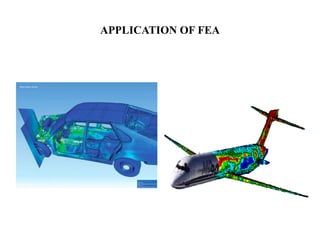
APPLICATION OF FEA
LIMITATIONS OF FEA SOFTWARE
• It does not provide exact solutions.
• FEA package are costly.
• Results give solutions and not remedies.
• For more accurate results, more hard disk space, RAM
and time are required.
GENERAL PROCEDURE TO CONDUCT FINITE
ELEMENT ANALYSIS
• Set the type of analysis to be used.
• Create the model.
• Define the element type.
• Divide the given problem into nodes and elements (mesh the
model).
• Apply material properties and boundary condition.
• Drive the element matrices and equations.
• Assembles the element equations.
• Solve the unknown quantities.
• Interpret the results.
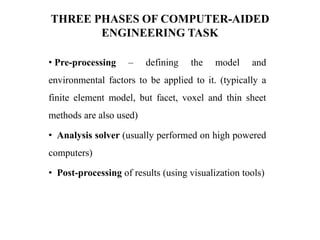
THREE PHASES OF COMPUTER-AIDED
ENGINEERING TASK
• Pre-processing – defining the model and
environmental factors to be applied to it. (typically a
finite element model, but facet, voxel and thin sheet
methods are also used)
• Analysis solver (usually performed on high powered
computers)
• Post-processing of results (using visualization tools)
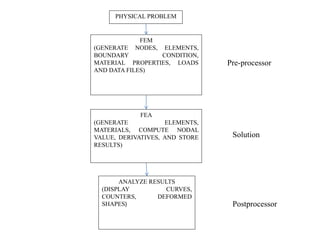
PHYSICAL PROBLEM
FEM
(GENERATE NODES, ELEMENTS,
BOUNDARY CONDITION,
MATERIAL PROPERTIES, LOADS
AND DATA FILES)
FEA
(GENERATE ELEMENTS,
MATERIALS, COMPUTE NODAL
VALUE, DERIVATIVES, AND STORE
RESULTS)
ANALYZE RESULTS
(DISPLAY CURVES,
COUNTERS, DEFORMED
SHAPES) Postprocessor
Solution
Pre-processor
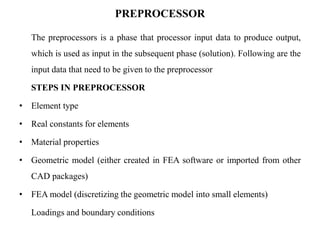
PREPROCESSOR
The preprocessors is a phase that processor input data to produce output,
which is used as input in the subsequent phase (solution). Following are the
input data that need to be given to the preprocessor
STEPS IN PREPROCESSOR
• Element type
• Real constants for elements
• Material properties
• Geometric model (either created in FEA software or imported from other
CAD packages)
• FEA model (discretizing the geometric model into small elements)
Loadings and boundary conditions
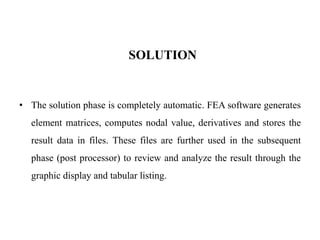
SOLUTION
• The solution phase is completely automatic. FEA software generates
element matrices, computes nodal value, derivatives and stores the
result data in files. These files are further used in the subsequent
phase (post processor) to review and analyze the result through the
graphic display and tabular listing.
POST PROCESSOR
The post processor processes the result data. The post processor
phase is automatic and generates graphical output in the specified
form to check or analyze the result.
STATIC ANALYSIS
In static analysis, the load or field conditions do not vary with respect
to time and therefore it is assumed that the load or field conditions applied
gradually not suddenly. The system under this analysis can be linier or
nonlinear. The inertia and damping effects are ignored in static analysis.
[k] {X} = {f}
Where,
[k] = stiffness matrix
{X} = displacement matrix
{f} = load matrix
The above equation is called the force balanced equation for the liner
system. If the elements of matrix [k] are the function of {x}, the system is
known as nonlinear system. Nonlinear system includes large deformation,
plasticity, creep and s on.
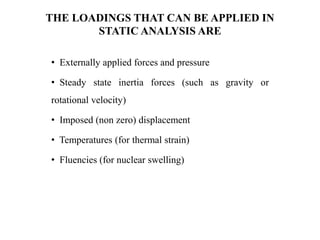
THE LOADINGS THAT CAN BE APPLIED IN
STATIC ANALYSIS ARE
• Externally applied forces and pressure
• Steady state inertia forces (such as gravity or
rotational velocity)
• Imposed (non zero) displacement
• Temperatures (for thermal strain)
• Fluencies (for nuclear swelling)
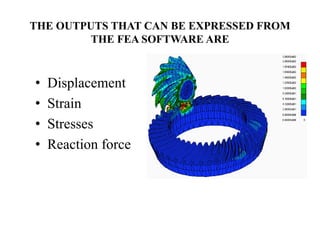
THE OUTPUTS THAT CAN BE EXPRESSED FROM
THE FEA SOFTWARE ARE
• Displacement
• Strain
• Stresses
• Reaction force
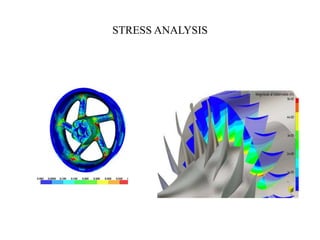
STRESS ANALYSIS
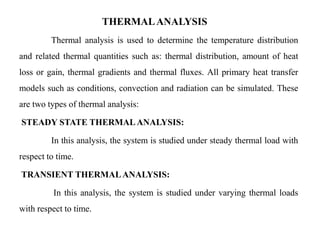
THERMALANALYSIS
Thermal analysis is used to determine the temperature distribution
and related thermal quantities such as: thermal distribution, amount of heat
loss or gain, thermal gradients and thermal fluxes. All primary heat transfer
models such as conditions, convection and radiation can be simulated. These
are two types of thermal analysis:
STEADY STATE THERMALANALYSIS:
In this analysis, the system is studied under steady thermal load with
respect to time.
TRANSIENT THERMALANALYSIS:
In this analysis, the system is studied under varying thermal loads
with respect to time.
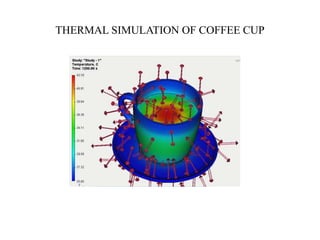
THERMAL SIMULATION OF COFFEE CUP
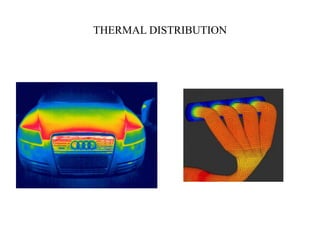
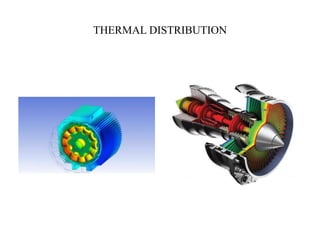
THERMAL DISTRIBUTION

COMPUTER AIDED ENGINEERING - INTRODUCTION

  • 1.
    CAE COMPUTER AIDED ENGINEERING(CAE) CAE is the use of computer software to simulate performance in order to improve product designs or assist in the resolution of engineering problems for a wide of industries this includes simulation validation and optimization of products processes and manufacturing tools A typical CAE process comprises of pre-processing, solving, and post processing steps. In the pre-processing phase, engineers model the geometry and the physical properties of the design, as well as the environment in the form of applied loads or constraints. Next the model is solved using an appropriate mathematical formulation of the underlying physics. In the post-processing phase, the results are presented to the engineer of review.
  • 2.
    BENEFITS OF CAE •Designs decision can be made based on their impact on performance. • Designs can be evaluated and refined using computer simulation rather than physical prototype testing saving money and time. • CAE can provide performance insights earlier in the development process, when design changes are less expensive to make. • The Finite Element Analysis is a computing technique that is used to obtain approximate solutions of boundary value problems it used a numerical method called as Finite Element Method (FEM). FEA involves a computer model of design that is loaded and analyzed for specific results.
  • 3.
    CAE APPLICATION • Stressand dynamic analysis on components and assemblies and finite element analysis (FEA) • Thermal and fluid analysis using computational fluid dynamics (CFD) • Kinematics and dynamic analysis of mechanisms (multibody dynamics) •Simulation of manufacturing processes like casting, molding and die press forming • Optimization of the product or process
  • 4.
  • 5.
  • 6.
  • 7.
    CAE SOFTWARES INCADD CENTRE 1. ANSYS 2. NX-NASTRAN 3. HYPERMESH
  • 8.
    ANSYS ANSYS, Inc. isan engineering simulation software (computer-aided engineering, or CAE) developer that is headquartered south of Pittsburgh in the southpointe business park in Cecil township, Pennsylvania, united States.
  • 9.
    HISTORY The company wasfounded in 1970. by Dr.JOHN A. SWANSON as Swanson Analysis Systems, Inc (SASI). Its primary purpose was to develop and market finite element analysis software for structural physics that could simulate static (stationary), dynamic (moving) and thermal (heat transfer) problems. SASI developed its business in parallel with the growth in computer technology and engineering needs. SIMULATION is the imitation of the operation of a real-world process or system over time. The act of simulating something first requires that a model be developed; this model represents the key characteristics or behaviors/functions of the selected physical or abstract system or process. The model represents the system itself, whereas the simulation represents the operation of the system over time.
  • 10.
    FINITE ELEMENT METHOD Inmathematics, the finite element method (FEM) is a numerical technique for finding approximate solutions to boundary value problems for partial differential equations. It uses variational methods (the calculus of variations) to minimize an error function and produce a stable solution. Analogous to the idea that connecting many tiny straight lines can approximate a larger circle, FEM encompasses all the methods for connecting many simple element equations over many small sub-domains, named finite elements, to approximate a more complex equation over a larger domain.
  • 11.
    FINITE ELEMENT METHOD DISCRETIZINGOF IMPELLER BLADE USING FEM
  • 12.
  • 13.
    ADVANDAGE OF FEASOFTWARE • It reduces the amount of prototype testing, thereby saving cost and time. • It provides the graphical representation of the result of analysis. • The finite element modeling and analysis are performed in the pre- processor and solution phases, which if done manually would consume a lot of time and in some cases, might be impossible to perform. • Variables such as stress and temperature can be measured at any desired point of the model. • It helps optimize a design. • It helps you create more reliable, high quality and competitive designs.
  • 14.
  • 15.
    LIMITATIONS OF FEASOFTWARE • It does not provide exact solutions. • FEA package are costly. • Results give solutions and not remedies. • For more accurate results, more hard disk space, RAM and time are required.
  • 16.
    GENERAL PROCEDURE TOCONDUCT FINITE ELEMENT ANALYSIS • Set the type of analysis to be used. • Create the model. • Define the element type. • Divide the given problem into nodes and elements (mesh the model). • Apply material properties and boundary condition. • Drive the element matrices and equations. • Assembles the element equations. • Solve the unknown quantities. • Interpret the results.
  • 17.
    THREE PHASES OFCOMPUTER-AIDED ENGINEERING TASK • Pre-processing – defining the model and environmental factors to be applied to it. (typically a finite element model, but facet, voxel and thin sheet methods are also used) • Analysis solver (usually performed on high powered computers) • Post-processing of results (using visualization tools)
  • 18.
    PHYSICAL PROBLEM FEM (GENERATE NODES,ELEMENTS, BOUNDARY CONDITION, MATERIAL PROPERTIES, LOADS AND DATA FILES) FEA (GENERATE ELEMENTS, MATERIALS, COMPUTE NODAL VALUE, DERIVATIVES, AND STORE RESULTS) ANALYZE RESULTS (DISPLAY CURVES, COUNTERS, DEFORMED SHAPES) Postprocessor Solution Pre-processor
  • 19.
    PREPROCESSOR The preprocessors isa phase that processor input data to produce output, which is used as input in the subsequent phase (solution). Following are the input data that need to be given to the preprocessor STEPS IN PREPROCESSOR • Element type • Real constants for elements • Material properties • Geometric model (either created in FEA software or imported from other CAD packages) • FEA model (discretizing the geometric model into small elements) Loadings and boundary conditions
  • 20.
    SOLUTION • The solutionphase is completely automatic. FEA software generates element matrices, computes nodal value, derivatives and stores the result data in files. These files are further used in the subsequent phase (post processor) to review and analyze the result through the graphic display and tabular listing.
  • 21.
    POST PROCESSOR The postprocessor processes the result data. The post processor phase is automatic and generates graphical output in the specified form to check or analyze the result.
  • 22.
    STATIC ANALYSIS In staticanalysis, the load or field conditions do not vary with respect to time and therefore it is assumed that the load or field conditions applied gradually not suddenly. The system under this analysis can be linier or nonlinear. The inertia and damping effects are ignored in static analysis. [k] {X} = {f} Where, [k] = stiffness matrix {X} = displacement matrix {f} = load matrix The above equation is called the force balanced equation for the liner system. If the elements of matrix [k] are the function of {x}, the system is known as nonlinear system. Nonlinear system includes large deformation, plasticity, creep and s on.
  • 23.
    THE LOADINGS THATCAN BE APPLIED IN STATIC ANALYSIS ARE • Externally applied forces and pressure • Steady state inertia forces (such as gravity or rotational velocity) • Imposed (non zero) displacement • Temperatures (for thermal strain) • Fluencies (for nuclear swelling)
  • 24.
    THE OUTPUTS THATCAN BE EXPRESSED FROM THE FEA SOFTWARE ARE • Displacement • Strain • Stresses • Reaction force
  • 25.
  • 26.
    THERMALANALYSIS Thermal analysis isused to determine the temperature distribution and related thermal quantities such as: thermal distribution, amount of heat loss or gain, thermal gradients and thermal fluxes. All primary heat transfer models such as conditions, convection and radiation can be simulated. These are two types of thermal analysis: STEADY STATE THERMALANALYSIS: In this analysis, the system is studied under steady thermal load with respect to time. TRANSIENT THERMALANALYSIS: In this analysis, the system is studied under varying thermal loads with respect to time.
  • 27.
  • 28.
  • 29.