MR ZARKOVIC


Communication Systems support people who are working
together by enabling them the electronic exchange of data
                    and information.

 This presentation will enable the users to access a wide
range of information regarding Communication Systems.
   Characteristics Of Communication Systems
   Examples Of Communication Systems
   Transmitting And Receiving
   Other Information Processes
   Issues Related To Communication Systems
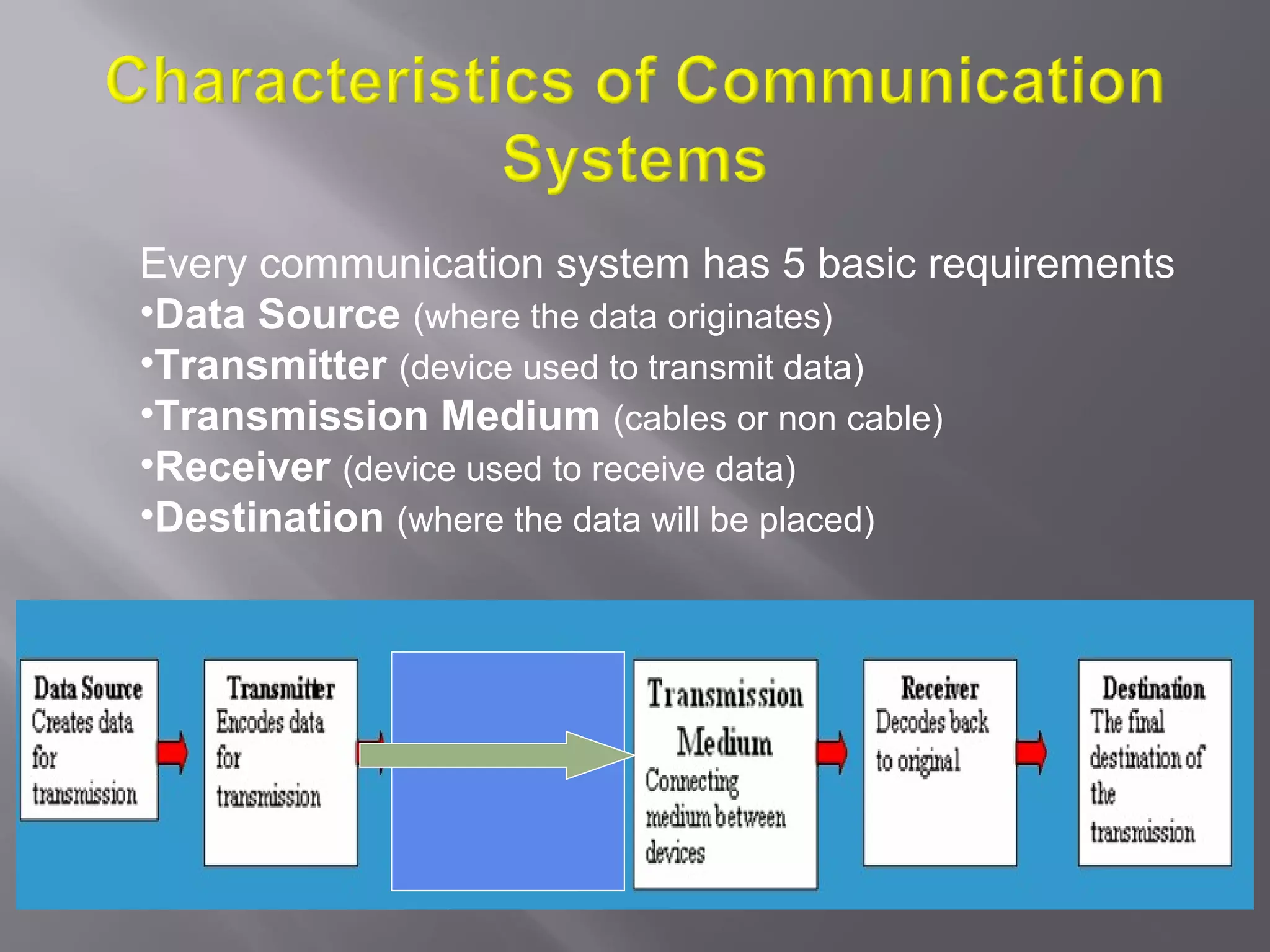
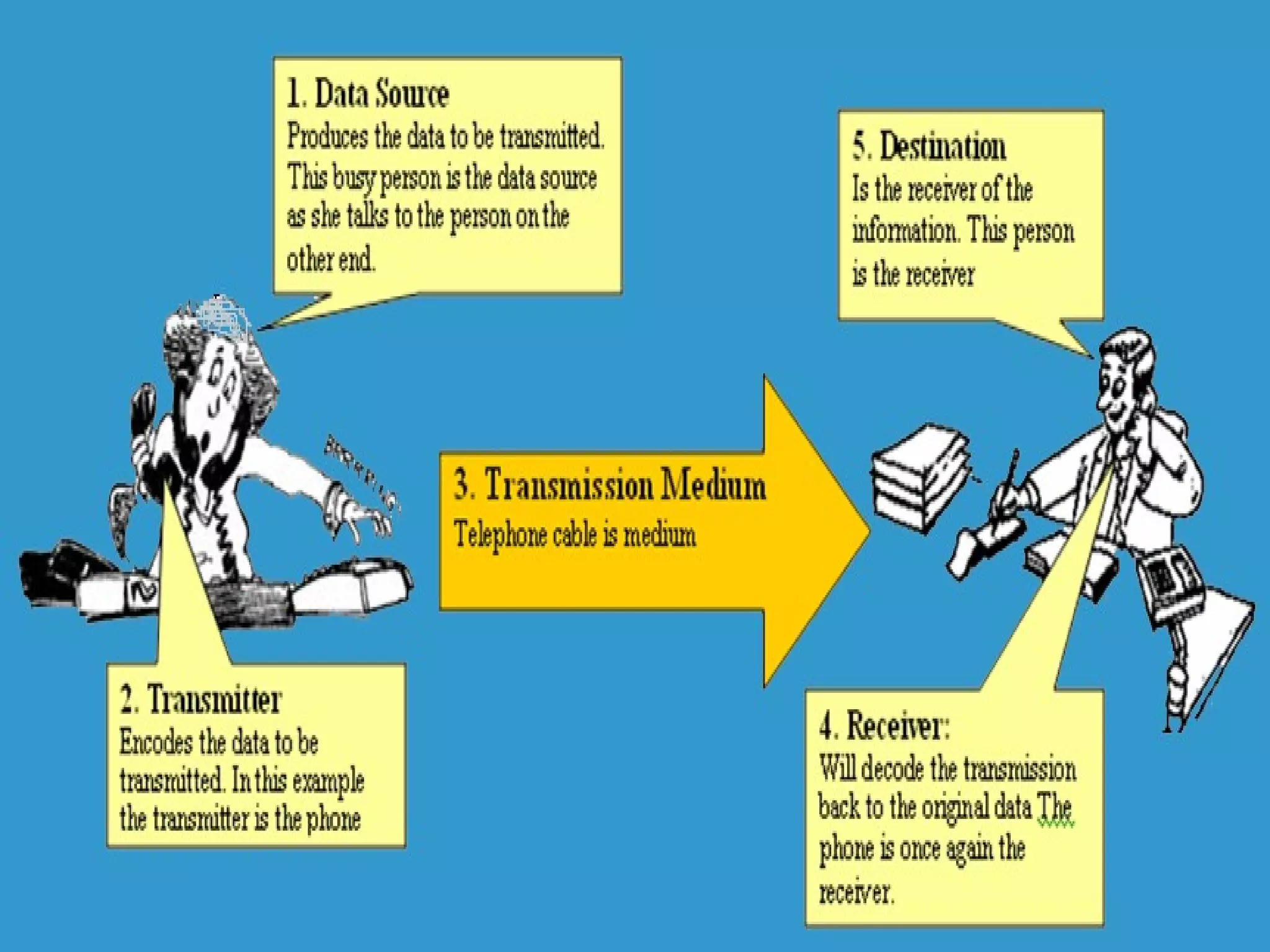
Every communication system has 5 basic requirements
•Data Source (where the data originates)
•Transmitter (device used to transmit data)
•Transmission Medium (cables or non cable)
•Receiver (device used to receive data)
•Destination (where the data will be placed)
The necessity of protocols in communication
     A protocol is needed when one computer communicates with
   another where one of its tasks is to ensure that the data send by
   the sending device is the same as the data received by the
   receiving device. A protocol is a set of rules that control a
   communications link.

       A protocol defines the format and meaning of information
   exchanged by describing parameters such as speed of
   transmission (bps, baud) transmission mode (answer or originate),
   handshake, parity, error detection and correction.

The elements that a protocol controls include: the type of language
   used (e.g. ASCII), type of error checking method used (e.g.
   checksum), what to do when error is detected (e.g. resend data),
   way data are sent (asynchronous or synchronous transmission)
   and how often receiving computer needs to acknowledge that it
   has received the data.
Handshaking – is the exchange of signals between two
  devices to establish a communication link for senders
  and receivers. The computer handshakes to a printer
  or a modem in order to establish a connection for
  communicating. For a link between the computer and
  modem, handshaking involves the signalling of both to
  each other that they are switched on and ready for
  work. The computer sends a DTR (Data Terminal
  Ready) signal to modem through a particular wire used
  only for this signal. When the modem is ready it sends
  a DSR (Data Set Ready) signal to computer through a
  different wire in the connecting cable.
   Measuring speed in a communication link
     Baud rate – the number of distinct signal events or
      timing intervals in a second. If a device like a
      modem can only send on-off signals then its bps
      equals its baud rate.
     Bits per second (bps) – the number of bits that
      are transmitted in a second. This measures the
      speed of communication. Bps is the number of 0s
      and 1s which are transmitted through the
      communication link in one second. This includes
      special bits described in the protocol, including
      start and stop bits and various error checking bits.
      Bps is more useful than baud rate as it shows how
      much data is sent and how fast it is sent.
Methods to check for errors in communications links

Parity  bit check – this is a character error detection method.
It adds an extra bit to every character or byte transmitted.

  Check sum – adds together the values of all the bytes
  transmitted in a message block and sends the total as the
  last data byte of the block.

  Cyclic redundancy check (CRC) – performs a division
  calculation on the entire block of data to produce a 16- or
  32- bit result. Like check sum, CRC is a block error detection
  method and cannot reveal which byte or bytes in a block are
  faulty.
Examples of
Communication Systems
- E-mail
- Voice Mail                - Fax
- Smart Phone               - Instant Messaging
- Teleconferencing          - Video-conferencing
- Groupware                 - Telephony
- E-Commerce                - The Internet
- Bulletin board system     - The Web
- Global positioning system
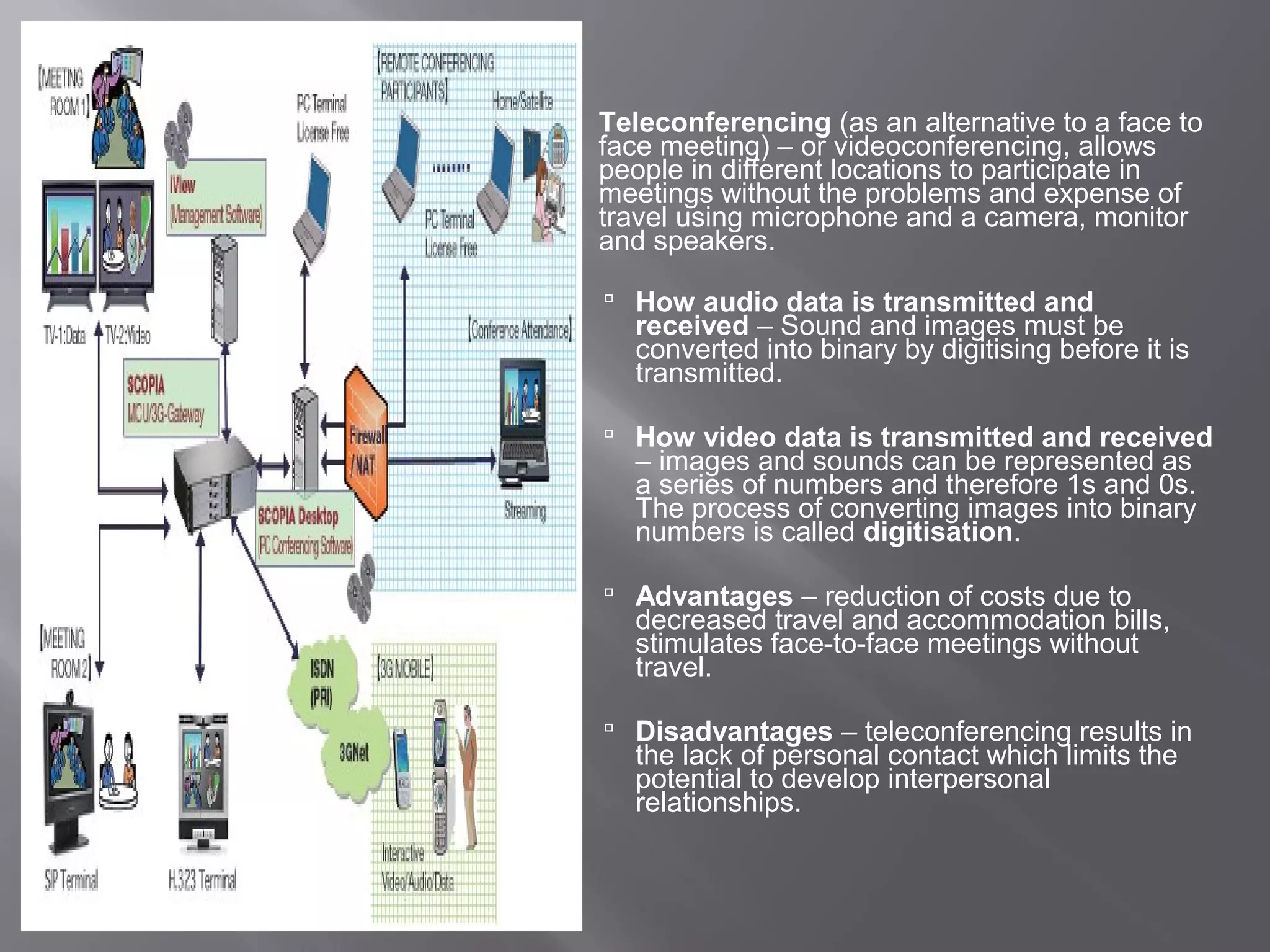
   Teleconferencing (as an alternative to a face to
    face meeting) – or videoconferencing, allows
    people in different locations to participate in
    meetings without the problems and expense of
    travel using microphone and a camera, monitor
    and speakers.

     How audio data is transmitted and
      received – Sound and images must be
      converted into binary by digitising before it is
      transmitted.

     How video data is transmitted and received
      – images and sounds can be represented as
      a series of numbers and therefore 1s and 0s.
      The process of converting images into binary
      numbers is called digitisation.

     Advantages – reduction of costs due to
      decreased travel and accommodation bills,
      stimulates face-to-face meetings without
      travel.

     Disadvantages – teleconferencing results in
      the lack of personal contact which limits the
      potential to develop interpersonal
      relationships.
Examples of teleconferencing
 Business use – Business use of teleconferencing is
  becoming common as meetings and conferences can be
  held in any city nationally or internationally without the need
  for all participants to b in the same location.

 Distance education – Unlike a video lecture,
  teleconferencing is interactive as it allows the participants
  to ask and answer questions. Student living in these
  remote areas can participate in teleconferences, lecture
  broadcasts and live tutorial sessions.
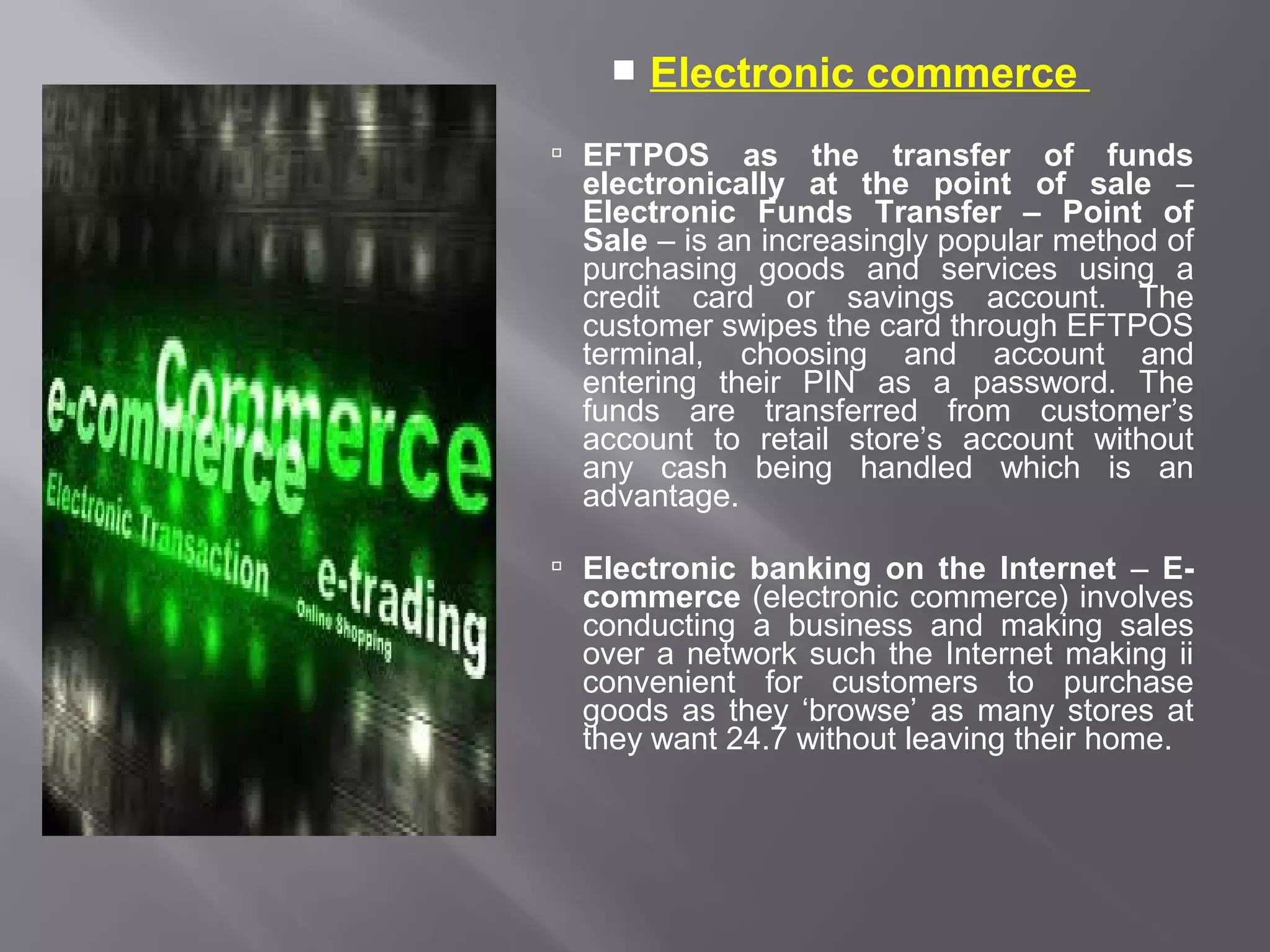
   Electronic commerce
 EFTPOS     as the transfer of funds
  electronically at the point of sale –
  Electronic Funds Transfer – Point of
  Sale – is an increasingly popular method of
  purchasing goods and services using a
  credit card or savings account. The
  customer swipes the card through EFTPOS
  terminal, choosing and account and
  entering their PIN as a password. The
  funds are transferred from customer’s
  account to retail store’s account without
  any cash being handled which is an
  advantage.

 Electronic banking on the Internet – E-
  commerce (electronic commerce) involves
  conducting a business and making sales
  over a network such the Internet making ii
  convenient for customers to purchase
  goods as they ‘browse’ as many stores at
  they want 24.7 without leaving their home.
Communication concepts
 Protocols – a protocol of information exchanged by describing
  parameters such as speed of transmission (bps, baud), transmission
  mode (answer or originate), handshake, parity, error, detection and
  correction.
  Examples include: Exports-modem, Z-modem, smtp, http and
  NETBIOS.
 Handshaking – is the process by which two devices initiate
  communications. It enables a communications protocol to be agreed
  upon. Bandwidth (bps) is a measure of how much information can
  flow along a data pipe.

 Error detection / correction – Error correction methods – these
  protocols attempt to correct any detected transmission errors.

 Retransmission is where the receiving computer requests that part
  of the message to be sent again and it may involve only the
  corrupted blocks of the message being transmitted or the whole
  message being transmitted. Retransmission is the most common
  error correction method.
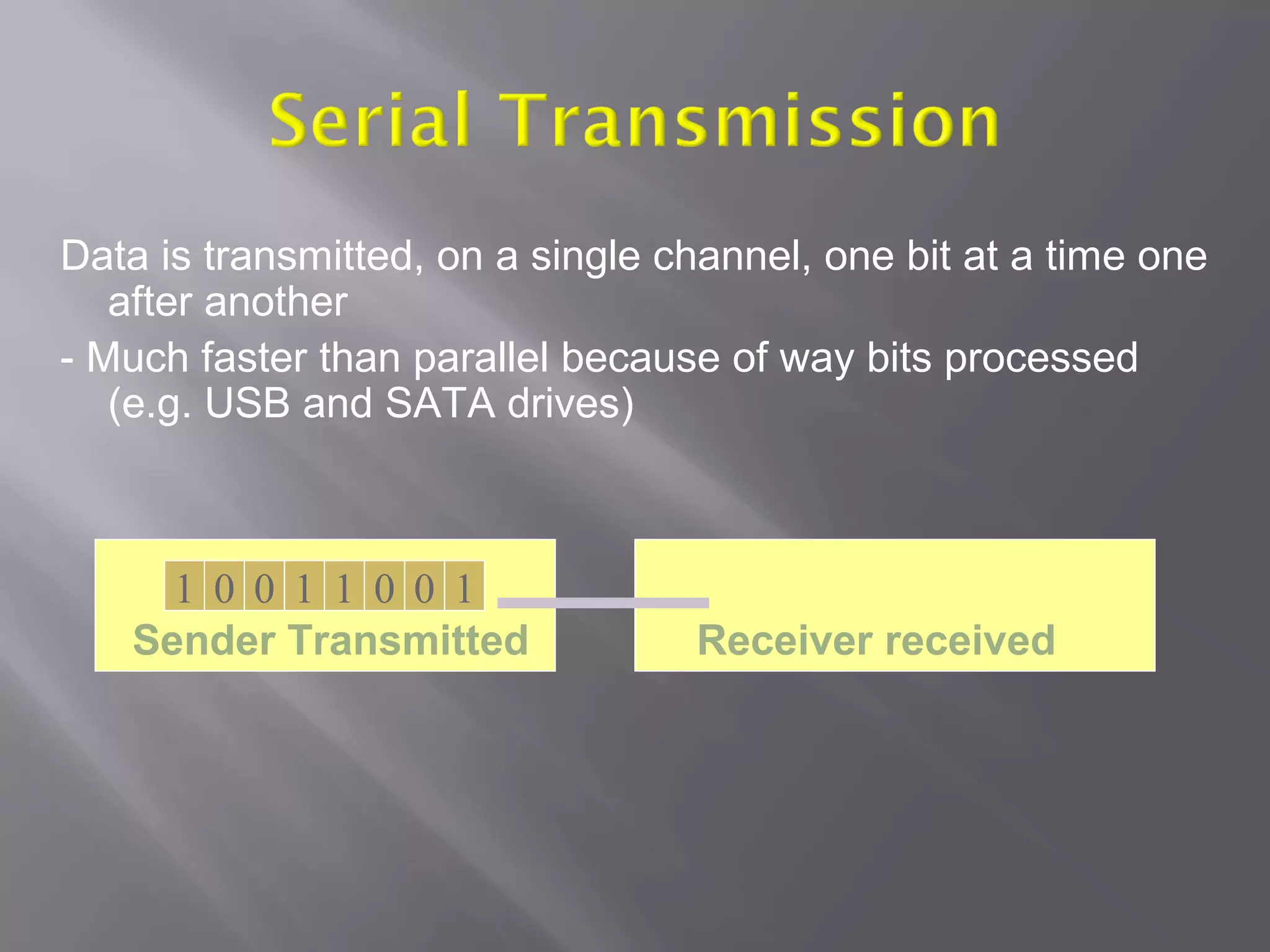
Data is transmitted, on a single channel, one bit at a time one
   after another
- Much faster than parallel because of way bits processed
   (e.g. USB and SATA drives)


     1 0 0 1 1 0 0 1
   Sender Transmitted             Receiver received
Parallel Transmission
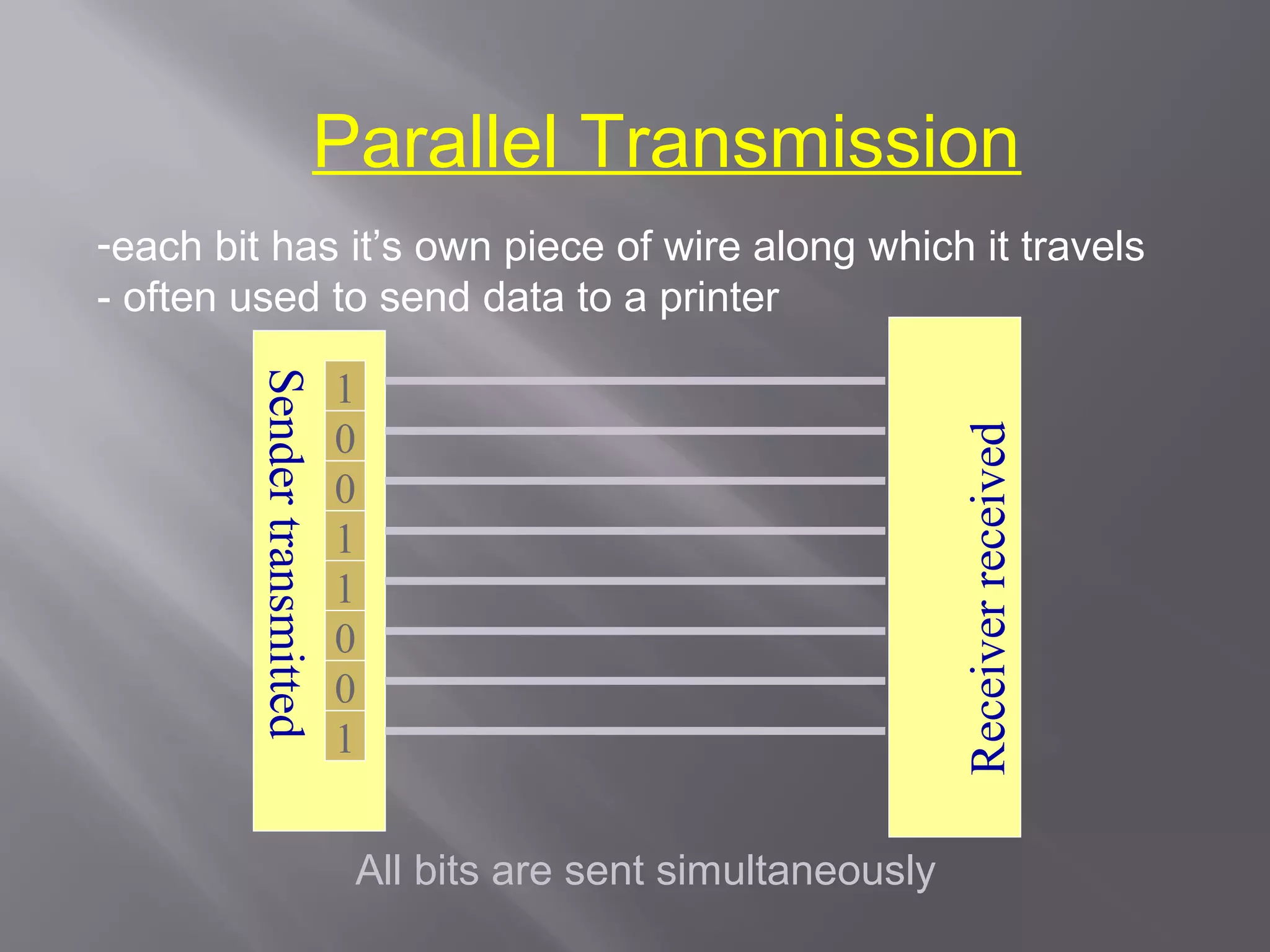
-each bit has it’s own piece of wire along which it travels
- often used to send data to a printer

                              1
         Sender transmitted


                              0


                                                                 Receiver received
                              0
                              1
                              1
                              0
                              0
                              1


                              All bits are sent simultaneously
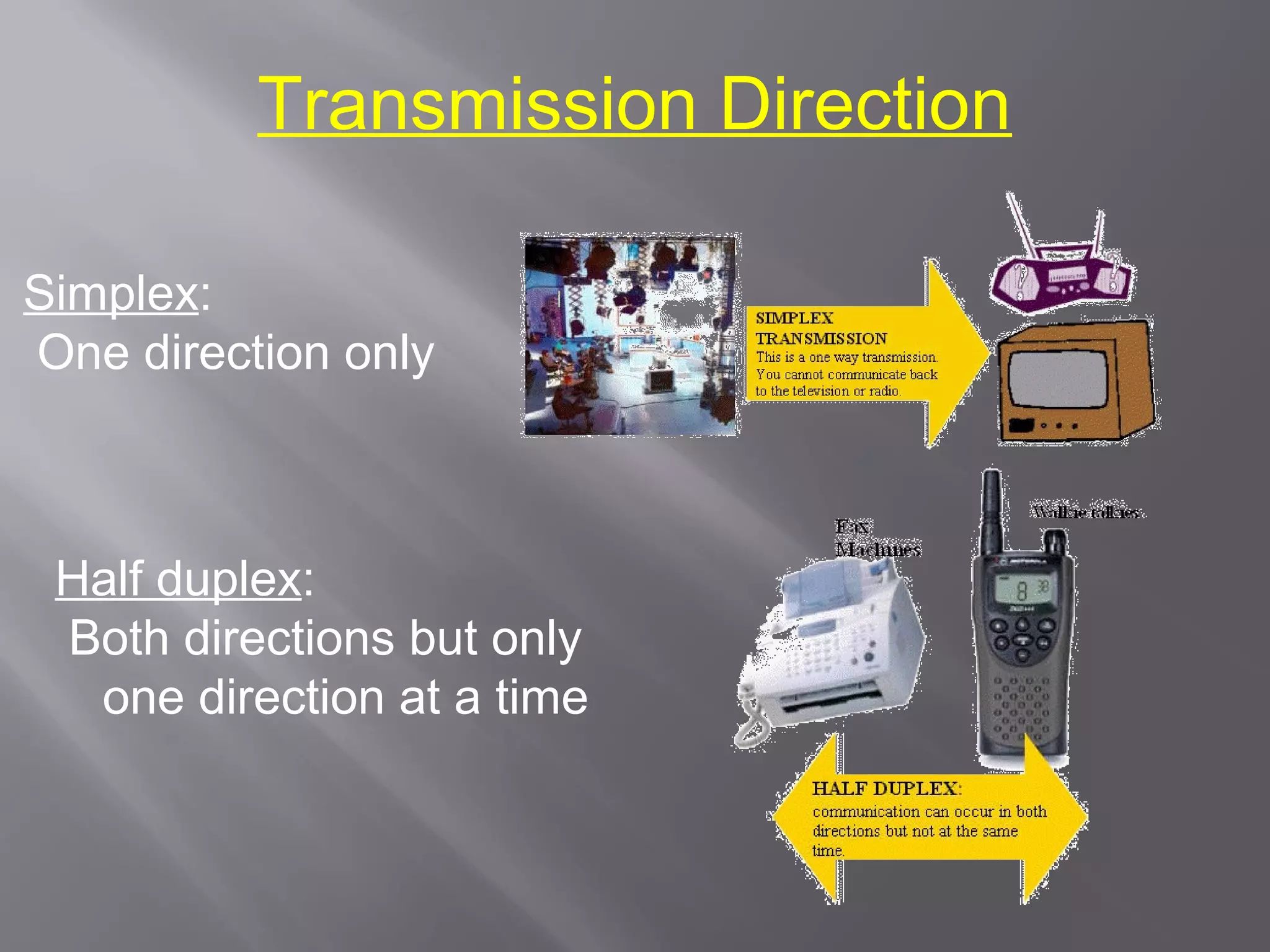
Transmission Direction

Simplex:
One direction only


 Half duplex:
 Both directions but only
  one direction at a time
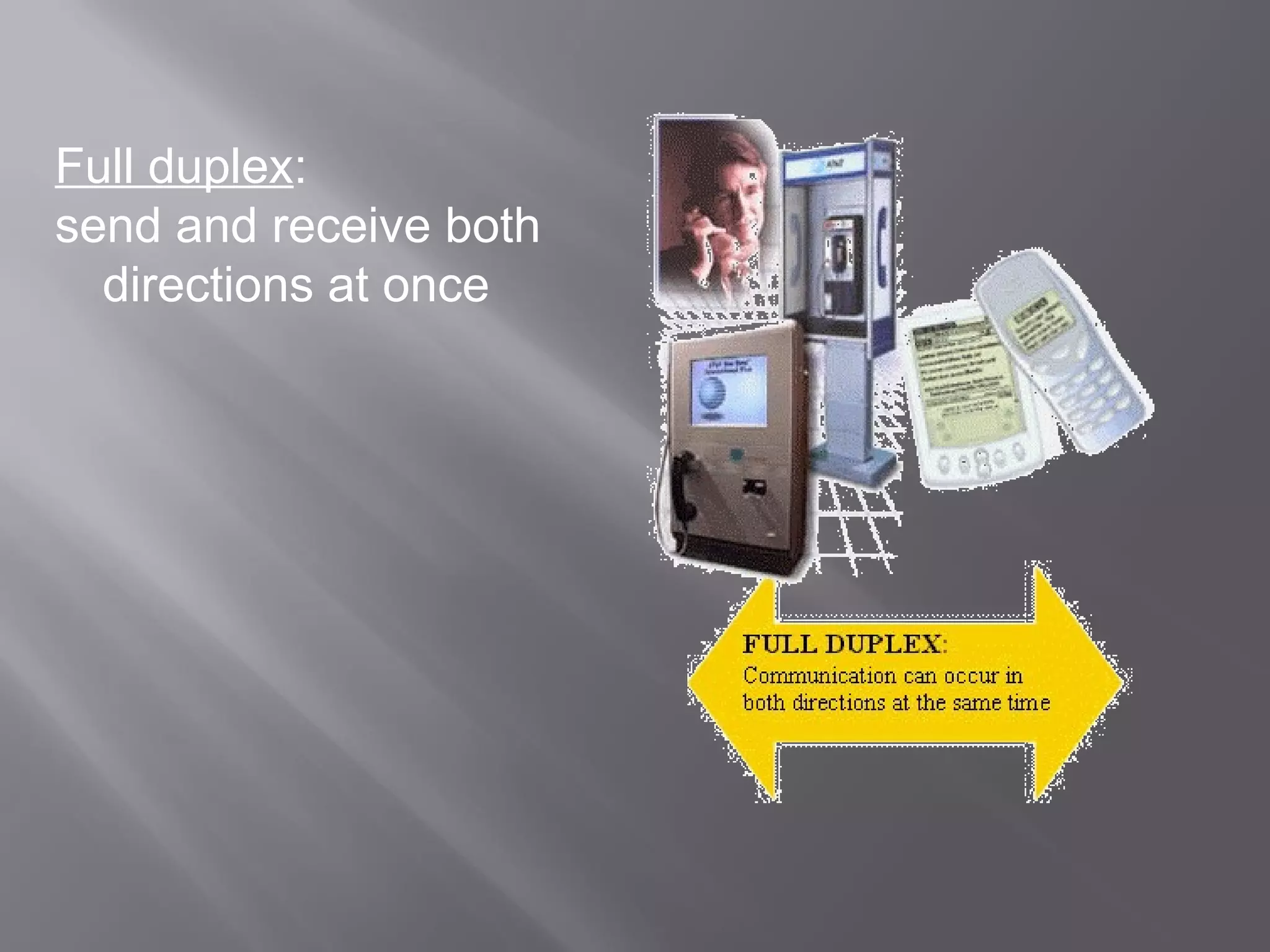
Full duplex:
send and receive both
  directions at once
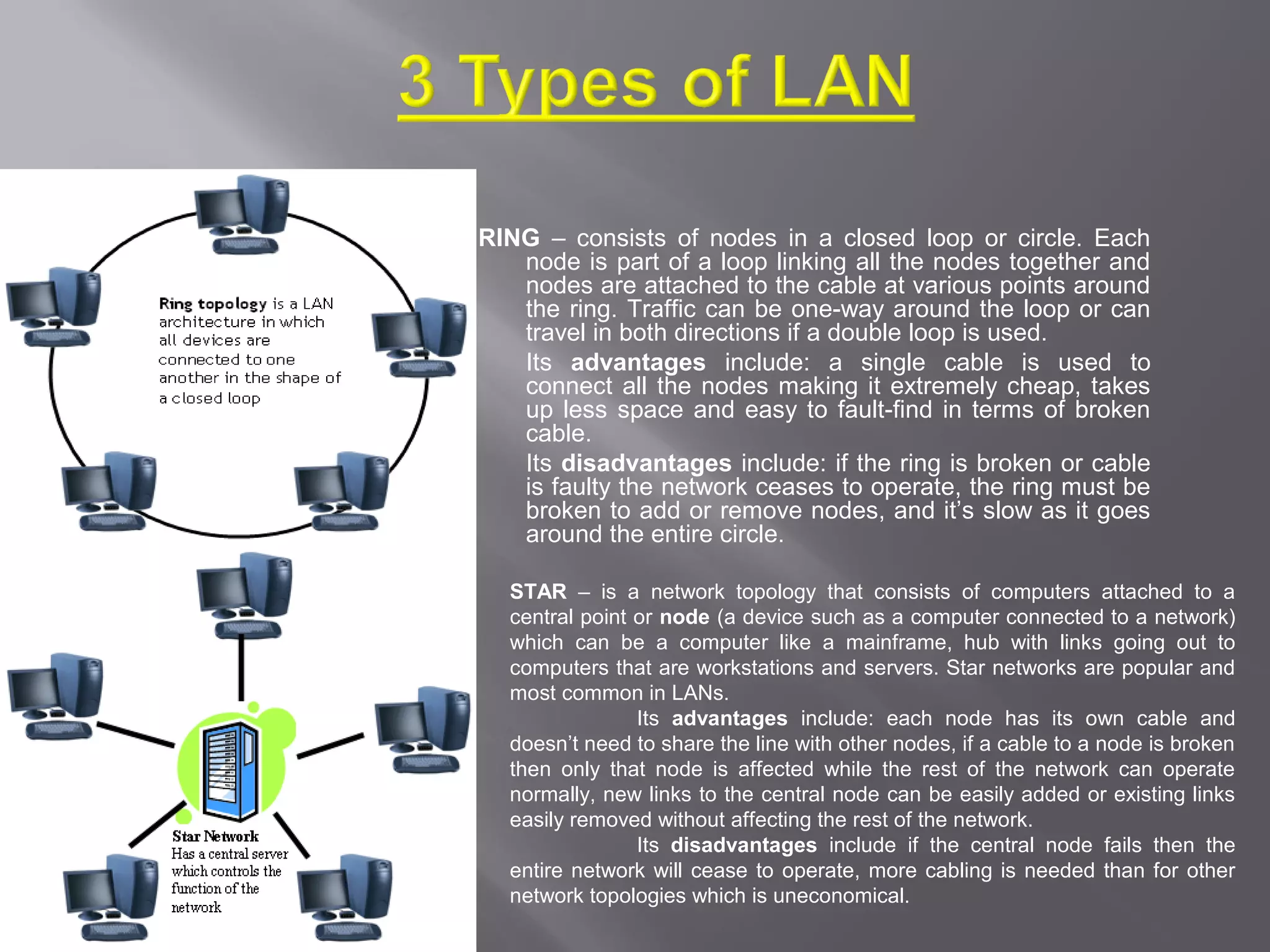
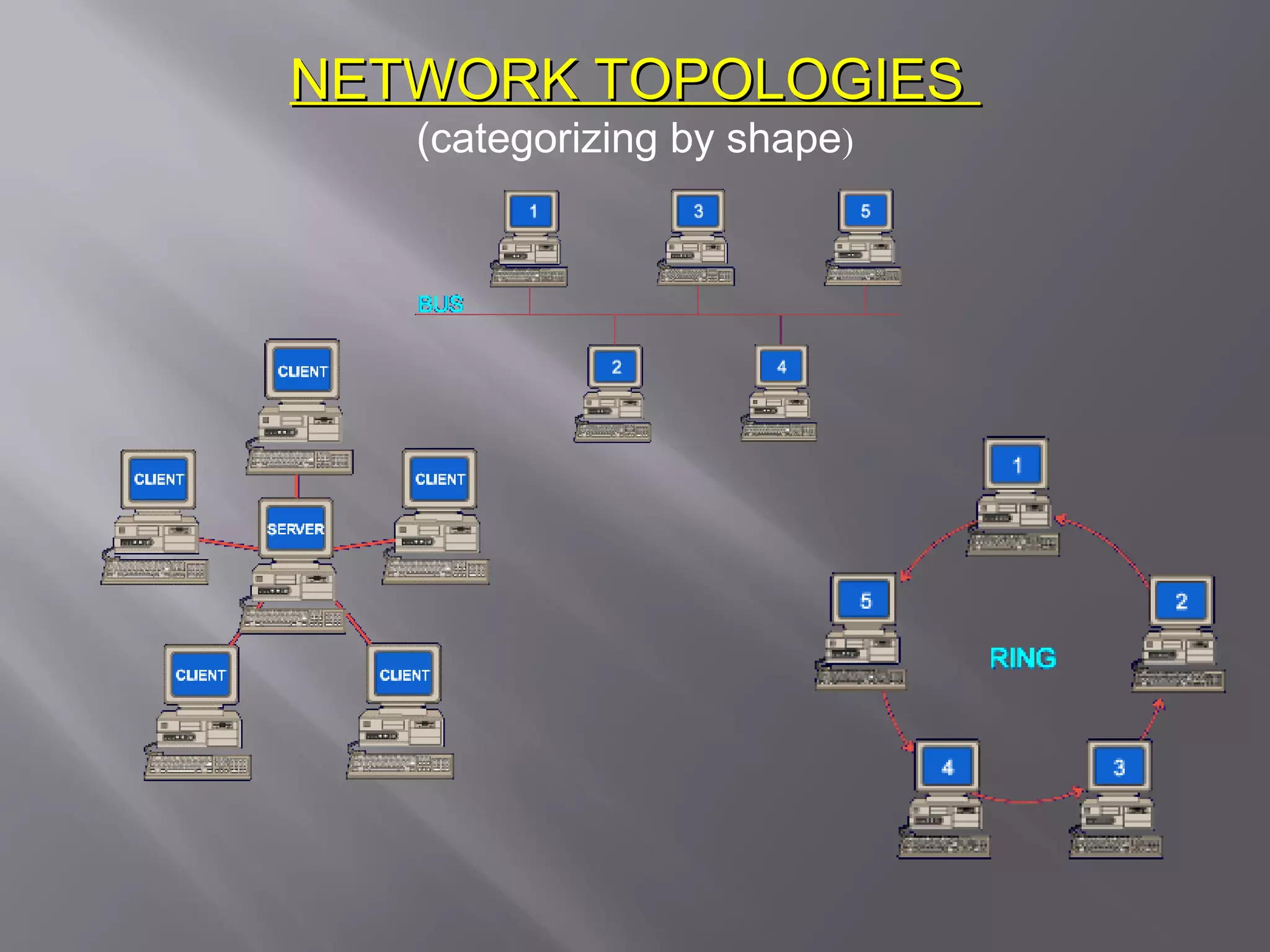
RING – consists of nodes in a closed loop or circle. Each
   node is part of a loop linking all the nodes together and
   nodes are attached to the cable at various points around
   the ring. Traffic can be one-way around the loop or can
   travel in both directions if a double loop is used.
   Its advantages include: a single cable is used to
   connect all the nodes making it extremely cheap, takes
   up less space and easy to fault-find in terms of broken
   cable.
   Its disadvantages include: if the ring is broken or cable
   is faulty the network ceases to operate, the ring must be
   broken to add or remove nodes, and it’s slow as it goes
   around the entire circle.

  STAR – is a network topology that consists of computers attached to a
  central point or node (a device such as a computer connected to a network)
  which can be a computer like a mainframe, hub with links going out to
  computers that are workstations and servers. Star networks are popular and
  most common in LANs.
                Its advantages include: each node has its own cable and
  doesn’t need to share the line with other nodes, if a cable to a node is broken
  then only that node is affected while the rest of the network can operate
  normally, new links to the central node can be easily added or existing links
  easily removed without affecting the rest of the network.
                Its disadvantages include if the central node fails then the
  entire network will cease to operate, more cabling is needed than for other
  network topologies which is uneconomical.
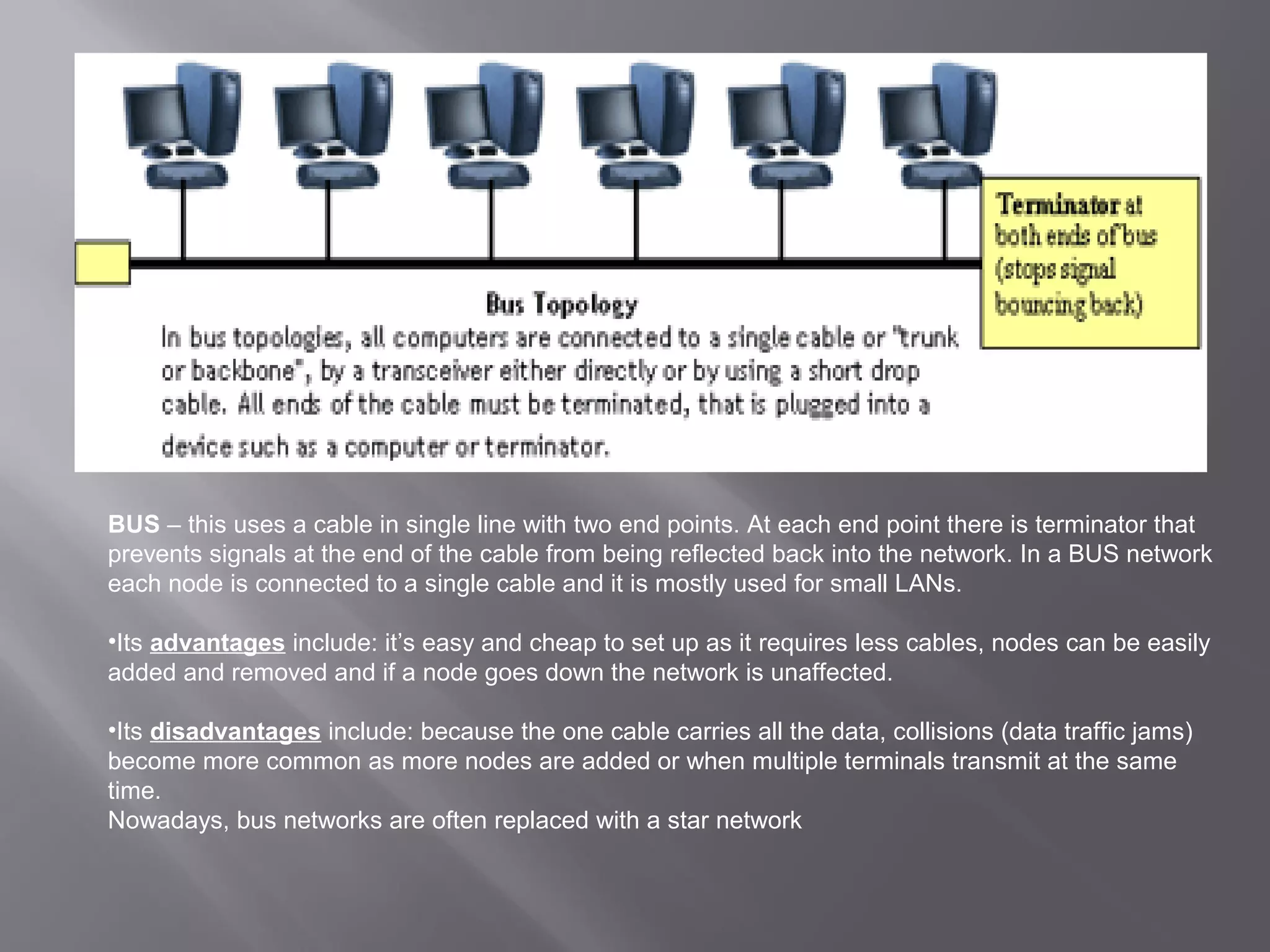
BUS – this uses a cable in single line with two end points. At each end point there is terminator that
prevents signals at the end of the cable from being reflected back into the network. In a BUS network
each node is connected to a single cable and it is mostly used for small LANs.

•Its advantages include: it’s easy and cheap to set up as it requires less cables, nodes can be easily
added and removed and if a node goes down the network is unaffected.

•Its disadvantages include: because the one cable carries all the data, collisions (data traffic jams)
become more common as more nodes are added or when multiple terminals transmit at the same
time.
Nowadays, bus networks are often replaced with a star network
Network Hardware
A PC needs specialised hardware to become part of a network which
   includes a network card and cables.

Servers – a computer that supplies a service to other nodes on the
   network, taking a responsibility for certain tasks such as file
   sharing, printing, and database and Internet access to network to
   users.

      1. File Server – computer dedicated to the task of sharing disk space,
         files and sometimes a printer. It uses the NOS to allowing many
         registered users to access files and programs at the same time.
      2. Print server – computer that manages printing tasks whereby
         printers are attached to them and can be accessed by all network
         users in the network environment.
      3. Mail server – this computer stores, receives and distributes
         electronic male for users.
      4. Web server – computer that stores and ‘serves’ webpages to users
         on either intranet or the internet.
      5. Proxy server – this computer acts as a temporary store for data
         moving between LAN and other network like the Internet.
NETWORK TOPOLOGIES
   (categorizing by shape)
Other information processes in
   communication systems
Collecting
refers to the process of obtaining data from a source external to the system.
  Data can be collected in either digital or analog form. A computer can
  directly process digital data but needs to digitise analog data before
  attempting to process.

   The phone as a collection device with voice mail –
    the callers are: given a series of options then requested to press a key on
    the phone’s keypad corresponding to their chosen option used in bill
    payment and product ordering systems and caller has to enter their credit
    card number allowing entered data to be immediately digitised and
    processed by computer.

   EFTPOS terminal as a collection device for electronic banking –
    (Electronic Funds Transfer- Point of Sale) is a collection device for electronic
    banking and can be used for: to pay for a purchase customer selects the
    account type (credit, savings or cheque) enters their PIN and amount is
    directly withdrawn from customer’s bank account or added to their credit card
    statement
Processing
this is an information system process that converts digital data into
   information within the information system.
    Sending of attachments with email – an email (Electronic Mail) is the
     transmission of memos and messages over a network. Users can email
     to a single recipient or broadcast it to multiple users. Attachments are
     computer files such as text, video, sound pictures or programs sent with
     an email message.
       Encoding and decoding methods – communication systems
       frequently convert data signals between analog and digital. The parts of
       a communication link that use analog signals (e.g. from telephone to
       local exchange) must convert all data to analog before transmission.
    Client-server architecture – shares the processing between client and
     server computers on a network.
    Client controls the user interface and application logic – the
     processing in client server networks is shared or distributed between
     server and client.
    Server controls access to the database – sometimes more than one
     user wants to access the same data record at the same time. The
     database software at the server can lock those records in use .
Displaying

is the process by which the information stored within the system is
  made available for its users. This is a necessary process within a
  communication system as it produces the output.

   The phone as display device with voice mail – a telephone is a
    display device for voice mail as the output is audio, not graphical. A
    caller’s telephone number and name can be recalled on the screen
    of a mobile phone.

   EFTPOS terminal as display device for electronic banking – the
    EFTPOS terminal will display the type of account user has selected,
    amount of cash to be withdrawn / amount to spend on the
    transaction. It asks for pin number, display processing messages
    and then whether the transaction has been approved or not.
Issues related to communication
            systems
   Usage of communication systems to share knowledge not just
    data – main role of communication systems is to share knowledge.
    Most communication systems are privately controlled an owned thus
    these powerful organisations and individuals control the information
    they pass on to receivers who also have control over the knowledge.

   Issues related to messaging systems – increasing business and
    personal communications occur via email or other Internet messaging
    solutions like chat rooms or instant messaging clients.
     Ideas delivered by this means appear less forceful and caring than
        ideas delivered personally
       Danger of being misinterpreted
       Power relationships – communications via electronic means restrict
        relationships as inter-personal socialisation is limited.
       Privacy and confidentiality
       Electronic junk mail – this is one a user receives countless unrequested
        emails from unknown people or spammers.
   Implications of Internet trading including – purchasing goods
    and services over the Internet has become common recently with
    payments transacted via a credit card. In today’s ‘cashless’ society, even
    people low on cash can purchase goods via a credit card, an EFTPOS
    terminal or instant credit checks, encouraging spending but resulting in
    increasing debt levels.

   Trading over the Internet and its commercial implications –
    many businesses which are based entirely on the Internet may have a
    great website and product but have neglected to plan their supply chain as
    thoroughly and thus consumers face lengthy delays when purchasing
    items.

   Difficulties of censoring content on the Internet – censorship
    is a major issue concerning control of the Internet where its contents
    (inappropriate websites, newsgroups, emails, chat rooms) should be
    censored but because the Internet is worldwide the responsibility of
    censorship becomes a problem whether the user, content provider or ISP
    (Internet Service Provider) should be responsible.
Issues arising from Internet
              banking
 Security of banking details – Internet banking customers have a right
  to the privacy of their transactions and financial details. When account
  details are entered into a response form on a webpage, the user has no
  control over the computer systems it passes through before reaching its
  destination. The encryption (data security coding) systems used on
  many web browsers and web servers aren’t totally secure as many have
  been broken by ‘hackers’.

 Changing nature of work – jobs have been eliminated due to
  increased Internet emphasis. Replacements generally require skills in IT
  and web support services causing the existing staff to retrain or find
  alternative jobs.

 Branch closure and job loss –This has had a major impact on
  customer access to traditional banking services, has increased
  customer dissatisfaction with the banks and reduced employment in the
  banking industry.
The emerging trend of accessing media such as
       radio and video across the Internet

   Communication technologies are converging into one technology
   –‘convergent technology’ - as multimedia and the Internet have
   already converged, radio and TV has started to converge with the
   Internet through live audio and video Internet broadcasts.

The web has started to converge with cable TV with the provision of fully
   interactive cable broadcast services and web services are now
   appearing on broadcast digital TV.

Telephones and mobile phones can now purchased with high resolution
    LCD screens and built-in web browser and email software while a PC
    is no longer needed to access the Internet with set top boxes that turn
    the TV into a web browser.

Communicationsystems2

  • 1.
    MR ZARKOVIC Communication Systemssupport people who are working together by enabling them the electronic exchange of data and information. This presentation will enable the users to access a wide range of information regarding Communication Systems.
  • 2.
    Characteristics Of Communication Systems  Examples Of Communication Systems  Transmitting And Receiving  Other Information Processes  Issues Related To Communication Systems
  • 3.
    Every communication systemhas 5 basic requirements •Data Source (where the data originates) •Transmitter (device used to transmit data) •Transmission Medium (cables or non cable) •Receiver (device used to receive data) •Destination (where the data will be placed)
  • 5.
    The necessity ofprotocols in communication A protocol is needed when one computer communicates with another where one of its tasks is to ensure that the data send by the sending device is the same as the data received by the receiving device. A protocol is a set of rules that control a communications link. A protocol defines the format and meaning of information exchanged by describing parameters such as speed of transmission (bps, baud) transmission mode (answer or originate), handshake, parity, error detection and correction. The elements that a protocol controls include: the type of language used (e.g. ASCII), type of error checking method used (e.g. checksum), what to do when error is detected (e.g. resend data), way data are sent (asynchronous or synchronous transmission) and how often receiving computer needs to acknowledge that it has received the data.
  • 6.
    Handshaking – isthe exchange of signals between two devices to establish a communication link for senders and receivers. The computer handshakes to a printer or a modem in order to establish a connection for communicating. For a link between the computer and modem, handshaking involves the signalling of both to each other that they are switched on and ready for work. The computer sends a DTR (Data Terminal Ready) signal to modem through a particular wire used only for this signal. When the modem is ready it sends a DSR (Data Set Ready) signal to computer through a different wire in the connecting cable.
  • 7.
    Measuring speed in a communication link  Baud rate – the number of distinct signal events or timing intervals in a second. If a device like a modem can only send on-off signals then its bps equals its baud rate.  Bits per second (bps) – the number of bits that are transmitted in a second. This measures the speed of communication. Bps is the number of 0s and 1s which are transmitted through the communication link in one second. This includes special bits described in the protocol, including start and stop bits and various error checking bits. Bps is more useful than baud rate as it shows how much data is sent and how fast it is sent.
  • 8.
    Methods to checkfor errors in communications links Parity bit check – this is a character error detection method. It adds an extra bit to every character or byte transmitted. Check sum – adds together the values of all the bytes transmitted in a message block and sends the total as the last data byte of the block. Cyclic redundancy check (CRC) – performs a division calculation on the entire block of data to produce a 16- or 32- bit result. Like check sum, CRC is a block error detection method and cannot reveal which byte or bytes in a block are faulty.
  • 9.
  • 10.
    - E-mail - VoiceMail - Fax - Smart Phone - Instant Messaging - Teleconferencing - Video-conferencing - Groupware - Telephony - E-Commerce - The Internet - Bulletin board system - The Web - Global positioning system
  • 11.
    Teleconferencing (as an alternative to a face to face meeting) – or videoconferencing, allows people in different locations to participate in meetings without the problems and expense of travel using microphone and a camera, monitor and speakers.  How audio data is transmitted and received – Sound and images must be converted into binary by digitising before it is transmitted.  How video data is transmitted and received – images and sounds can be represented as a series of numbers and therefore 1s and 0s. The process of converting images into binary numbers is called digitisation.  Advantages – reduction of costs due to decreased travel and accommodation bills, stimulates face-to-face meetings without travel.  Disadvantages – teleconferencing results in the lack of personal contact which limits the potential to develop interpersonal relationships.
  • 12.
    Examples of teleconferencing Business use – Business use of teleconferencing is becoming common as meetings and conferences can be held in any city nationally or internationally without the need for all participants to b in the same location.  Distance education – Unlike a video lecture, teleconferencing is interactive as it allows the participants to ask and answer questions. Student living in these remote areas can participate in teleconferences, lecture broadcasts and live tutorial sessions.
  • 13.
    Electronic commerce  EFTPOS as the transfer of funds electronically at the point of sale – Electronic Funds Transfer – Point of Sale – is an increasingly popular method of purchasing goods and services using a credit card or savings account. The customer swipes the card through EFTPOS terminal, choosing and account and entering their PIN as a password. The funds are transferred from customer’s account to retail store’s account without any cash being handled which is an advantage.  Electronic banking on the Internet – E- commerce (electronic commerce) involves conducting a business and making sales over a network such the Internet making ii convenient for customers to purchase goods as they ‘browse’ as many stores at they want 24.7 without leaving their home.
  • 15.
    Communication concepts  Protocols– a protocol of information exchanged by describing parameters such as speed of transmission (bps, baud), transmission mode (answer or originate), handshake, parity, error, detection and correction. Examples include: Exports-modem, Z-modem, smtp, http and NETBIOS.  Handshaking – is the process by which two devices initiate communications. It enables a communications protocol to be agreed upon. Bandwidth (bps) is a measure of how much information can flow along a data pipe.  Error detection / correction – Error correction methods – these protocols attempt to correct any detected transmission errors.  Retransmission is where the receiving computer requests that part of the message to be sent again and it may involve only the corrupted blocks of the message being transmitted or the whole message being transmitted. Retransmission is the most common error correction method.
  • 16.
    Data is transmitted,on a single channel, one bit at a time one after another - Much faster than parallel because of way bits processed (e.g. USB and SATA drives) 1 0 0 1 1 0 0 1 Sender Transmitted Receiver received
  • 17.
    Parallel Transmission -each bithas it’s own piece of wire along which it travels - often used to send data to a printer 1 Sender transmitted 0 Receiver received 0 1 1 0 0 1 All bits are sent simultaneously
  • 18.
    Transmission Direction Simplex: One directiononly Half duplex: Both directions but only one direction at a time
  • 19.
    Full duplex: send andreceive both directions at once
  • 20.
    RING – consistsof nodes in a closed loop or circle. Each node is part of a loop linking all the nodes together and nodes are attached to the cable at various points around the ring. Traffic can be one-way around the loop or can travel in both directions if a double loop is used. Its advantages include: a single cable is used to connect all the nodes making it extremely cheap, takes up less space and easy to fault-find in terms of broken cable. Its disadvantages include: if the ring is broken or cable is faulty the network ceases to operate, the ring must be broken to add or remove nodes, and it’s slow as it goes around the entire circle. STAR – is a network topology that consists of computers attached to a central point or node (a device such as a computer connected to a network) which can be a computer like a mainframe, hub with links going out to computers that are workstations and servers. Star networks are popular and most common in LANs. Its advantages include: each node has its own cable and doesn’t need to share the line with other nodes, if a cable to a node is broken then only that node is affected while the rest of the network can operate normally, new links to the central node can be easily added or existing links easily removed without affecting the rest of the network. Its disadvantages include if the central node fails then the entire network will cease to operate, more cabling is needed than for other network topologies which is uneconomical.
  • 21.
    BUS – thisuses a cable in single line with two end points. At each end point there is terminator that prevents signals at the end of the cable from being reflected back into the network. In a BUS network each node is connected to a single cable and it is mostly used for small LANs. •Its advantages include: it’s easy and cheap to set up as it requires less cables, nodes can be easily added and removed and if a node goes down the network is unaffected. •Its disadvantages include: because the one cable carries all the data, collisions (data traffic jams) become more common as more nodes are added or when multiple terminals transmit at the same time. Nowadays, bus networks are often replaced with a star network
  • 22.
    Network Hardware A PCneeds specialised hardware to become part of a network which includes a network card and cables. Servers – a computer that supplies a service to other nodes on the network, taking a responsibility for certain tasks such as file sharing, printing, and database and Internet access to network to users. 1. File Server – computer dedicated to the task of sharing disk space, files and sometimes a printer. It uses the NOS to allowing many registered users to access files and programs at the same time. 2. Print server – computer that manages printing tasks whereby printers are attached to them and can be accessed by all network users in the network environment. 3. Mail server – this computer stores, receives and distributes electronic male for users. 4. Web server – computer that stores and ‘serves’ webpages to users on either intranet or the internet. 5. Proxy server – this computer acts as a temporary store for data moving between LAN and other network like the Internet.
  • 23.
    NETWORK TOPOLOGIES (categorizing by shape)
  • 24.
    Other information processesin communication systems
  • 25.
    Collecting refers to theprocess of obtaining data from a source external to the system. Data can be collected in either digital or analog form. A computer can directly process digital data but needs to digitise analog data before attempting to process.  The phone as a collection device with voice mail – the callers are: given a series of options then requested to press a key on the phone’s keypad corresponding to their chosen option used in bill payment and product ordering systems and caller has to enter their credit card number allowing entered data to be immediately digitised and processed by computer.  EFTPOS terminal as a collection device for electronic banking – (Electronic Funds Transfer- Point of Sale) is a collection device for electronic banking and can be used for: to pay for a purchase customer selects the account type (credit, savings or cheque) enters their PIN and amount is directly withdrawn from customer’s bank account or added to their credit card statement
  • 26.
    Processing this is aninformation system process that converts digital data into information within the information system.  Sending of attachments with email – an email (Electronic Mail) is the transmission of memos and messages over a network. Users can email to a single recipient or broadcast it to multiple users. Attachments are computer files such as text, video, sound pictures or programs sent with an email message.  Encoding and decoding methods – communication systems frequently convert data signals between analog and digital. The parts of a communication link that use analog signals (e.g. from telephone to local exchange) must convert all data to analog before transmission.  Client-server architecture – shares the processing between client and server computers on a network.  Client controls the user interface and application logic – the processing in client server networks is shared or distributed between server and client.  Server controls access to the database – sometimes more than one user wants to access the same data record at the same time. The database software at the server can lock those records in use .
  • 27.
    Displaying is the processby which the information stored within the system is made available for its users. This is a necessary process within a communication system as it produces the output.  The phone as display device with voice mail – a telephone is a display device for voice mail as the output is audio, not graphical. A caller’s telephone number and name can be recalled on the screen of a mobile phone.  EFTPOS terminal as display device for electronic banking – the EFTPOS terminal will display the type of account user has selected, amount of cash to be withdrawn / amount to spend on the transaction. It asks for pin number, display processing messages and then whether the transaction has been approved or not.
  • 28.
    Issues related tocommunication systems
  • 29.
    Usage of communication systems to share knowledge not just data – main role of communication systems is to share knowledge. Most communication systems are privately controlled an owned thus these powerful organisations and individuals control the information they pass on to receivers who also have control over the knowledge.  Issues related to messaging systems – increasing business and personal communications occur via email or other Internet messaging solutions like chat rooms or instant messaging clients.  Ideas delivered by this means appear less forceful and caring than ideas delivered personally  Danger of being misinterpreted  Power relationships – communications via electronic means restrict relationships as inter-personal socialisation is limited.  Privacy and confidentiality  Electronic junk mail – this is one a user receives countless unrequested emails from unknown people or spammers.
  • 30.
    Implications of Internet trading including – purchasing goods and services over the Internet has become common recently with payments transacted via a credit card. In today’s ‘cashless’ society, even people low on cash can purchase goods via a credit card, an EFTPOS terminal or instant credit checks, encouraging spending but resulting in increasing debt levels.  Trading over the Internet and its commercial implications – many businesses which are based entirely on the Internet may have a great website and product but have neglected to plan their supply chain as thoroughly and thus consumers face lengthy delays when purchasing items.  Difficulties of censoring content on the Internet – censorship is a major issue concerning control of the Internet where its contents (inappropriate websites, newsgroups, emails, chat rooms) should be censored but because the Internet is worldwide the responsibility of censorship becomes a problem whether the user, content provider or ISP (Internet Service Provider) should be responsible.
  • 31.
    Issues arising fromInternet banking  Security of banking details – Internet banking customers have a right to the privacy of their transactions and financial details. When account details are entered into a response form on a webpage, the user has no control over the computer systems it passes through before reaching its destination. The encryption (data security coding) systems used on many web browsers and web servers aren’t totally secure as many have been broken by ‘hackers’.  Changing nature of work – jobs have been eliminated due to increased Internet emphasis. Replacements generally require skills in IT and web support services causing the existing staff to retrain or find alternative jobs.  Branch closure and job loss –This has had a major impact on customer access to traditional banking services, has increased customer dissatisfaction with the banks and reduced employment in the banking industry.
  • 32.
    The emerging trendof accessing media such as radio and video across the Internet Communication technologies are converging into one technology –‘convergent technology’ - as multimedia and the Internet have already converged, radio and TV has started to converge with the Internet through live audio and video Internet broadcasts. The web has started to converge with cable TV with the provision of fully interactive cable broadcast services and web services are now appearing on broadcast digital TV. Telephones and mobile phones can now purchased with high resolution LCD screens and built-in web browser and email software while a PC is no longer needed to access the Internet with set top boxes that turn the TV into a web browser.