
Communications Systems L2

         Characteristics of communication systems.
          Examples of communication systems.
          Transmitting and receiving in communication
         systems.
          Other information processes in communication
         systems.
          Issues related to communication systems.

MR ZARKOVIC
CONTENT


              Characteristics of Communication Systems
              Examples of Communication Systems
              Transmitting and Receiving
              Other Information Processes
              Issues Related To Communication Systems


MR ZARKOVIC
Characteristics of
              Communication Systems

                     Protocols
                   Handshaking
               Speed of Transmission
                  Error Checking
              Communication Settings

MR ZARKOVIC
Characteristics of Communication
                           Systems
       There must be a Sender and Receiver
       A protocol is a set of rules which governs the transfer of
     data between computers. Protocols allow communication
     between computers and networks.
       Handshaking is used to establish which protocols to use.
     Handshaking controls the flow of data between computers
       protocols will determine the speed of transmission, error
     checking method, size of bytes, and whether synchronous
     or asynchronous
       Examples         of       protocols      are:       token
     ring, CSMA/CD, X.25, TCP/IP

MR ZARKOVIC
5 Basic Components
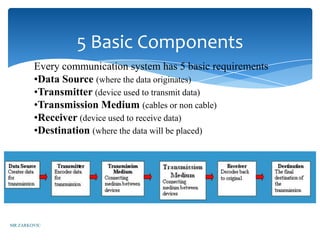
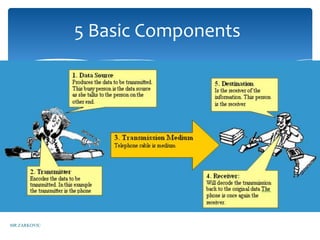
        Every communication system has 5 basic requirements
        •Data Source (where the data originates)
        •Transmitter (device used to transmit data)
        •Transmission Medium (cables or non cable)
        •Receiver (device used to receive data)
        •Destination (where the data will be placed)


MR ZARKOVIC
5 Basic Components


MR ZARKOVIC
Transmission Media Speed

     •Bandwidth:The amount of data which can be
     transmitted on a medium over a fixed amount of time
     (second). It is measured on Bits per Second or Baud

     •Bits per Second (bps): A measure of
     transmission speed. The number of bits (0 0r 1) which
     can be transmitted in a second

     •Baud Rate: Is a measure of how fast a change of
     state occurs (i.e. a change from 0 to 1)


MR ZARKOVIC
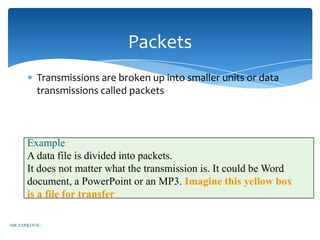
Packets
         Transmissions are broken up into smaller units or data
         transmissions called packets


      Example
      A This file is divided into broken into four packets
         data      has now been packets.
      It does not matter what the transmission is. It could be Word
      document, a PowerPoint or an MP3.PACKET this yellow box
          PACKET           PACKET            Imagine        PACKET
      is a file for transfer

MR ZARKOVIC
Packets and OSI

              After the file is divided into packets extra information
              is required to make sure it all goes back together
              correctly. The OSI model helps to look after this.

              The OSI model also provides much more information
              which is included with each package.


MR ZARKOVIC
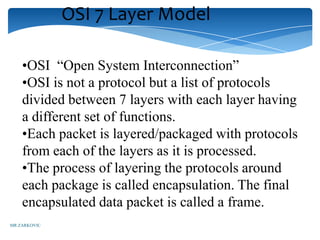
OSI 7 Layer Model

    •OSI “Open System Interconnection”
    •OSI is not a protocol but a list of protocols
    divided between 7 layers with each layer having
    a different set of functions.
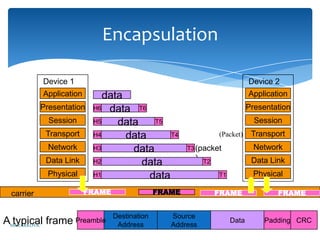
    •Each packet is layered/packaged with protocols
    from each of the layers as it is processed.
    •The process of layering the protocols around
    each package is called encapsulation. The final
    encapsulated data packet is called a frame.
MR ZARKOVIC
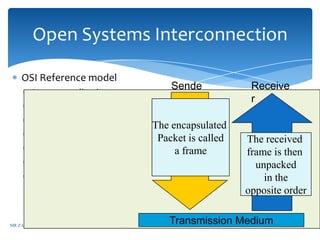
Open Systems Interconnection

    OSI Reference model
                                   Sende           Receive
       Layer 7 application
                                   r               r
       Layer 6 presentation     Each Packet
                                   Each file
                               The protocols
       Layer 5 session                will
                                  is divided
                              The encapsulated
                               Will be added
       Layer 4 transport            then be
                                      into
                               Packet is called
                                systematically    The received
       Layer 3 network
                                      File
                                       File
                                Encapsulated
                                    packets
                                     aLayer
                                       frame      frame is then
       Layer 2 data link
                                      with            File
                                   By layer         unpacked
                               PROTOCOLS
       Layer 1 physical                               in the
                                                  opposite order


MR ZARKOVIC
                                 Transmission Medium
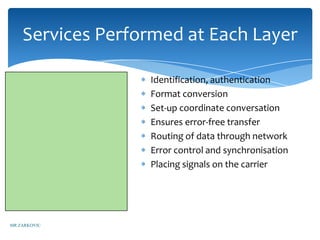
Services Performed at Each Layer

 Layer 7 application    Identification, authentication
 Layer 6 presentation   Format conversion
 Layer 5 session        Set-up coordinate conversation
 Layer 4 transport      Ensures error-free transfer
 Layer 3 network        Routing of data through network
 Layer 2 data link      Error control and synchronisation
 Layer 1 physical       Placing signals on the carrier


MR ZARKOVIC
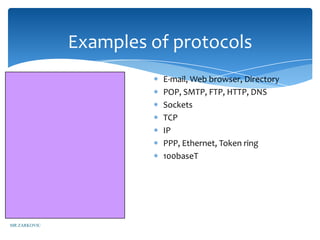
Examples of protocols
       Layer 7 application    E-mail, Web browser, Directory
       Layer 6 presentation   POP, SMTP, FTP, HTTP, DNS
       Layer 5 session        Sockets
       Layer 4 transport      TCP
       Layer 3 network        IP
       Layer 2 data link      PPP, Ethernet, Token ring
       Layer 1 physical       100baseT


MR ZARKOVIC
Encapsulation

            Device 1                                                           Device 2
            Application       data                                             Application
            Presentation   H6 data T6                                          Presentation
              Session      H5    data    T5                                      Session
             Transport     H4      data      T4                    (Packet)     Transport
              Network      H3       data                T3 (packet               Network
             Data Link                                    )                     Data Link
                           H2         data                    T2

              Physical     H1           data                       T1            Physical

  carrier                 FRAME                 FRAME              FRAME               FRAME


                                  Destination      Source
AMR ZARKOVIC frame
  typical              Preamble
                                   Address         Address
                                                                        Data       Padding CRC
Error Checking Methods

•            Parity bit check
•            Check sum
                    * data transmitted in blocks, each block added
                       to give a total – checksum
                    * used in X Modem protocol
•            Cycle redundancy check


    MR ZARKOVIC
Examples of Communication
                       Systems


MR ZARKOVIC
Examples of Communication Systems

        -   E-mail
        -   Voice Mail                -   Fax
        -   Smart Phone               -   Instant Messaging
        -   Telecommuting             -   Video-conferencing
        -   Groupware                 -   Telephony
        -   E-Commerce                -   The Internet
        -   Bulletin board system     -   The Web
        -   Global positioning system


MR ZARKOVIC
HSC Topic 3.4
                     Transmitting and Receiving in
                       Communication Systems
          Communication concepts
          (transmission of data, protocols and
          handshaking, networks, LANs and
          WANs,Topologies, Network Access Methods)

          Network Hardware
          (NICs, Servers, Routers and Switches, Bridges and
          gateways, Hubs, Transmission media

          Network Software
          NOSs, Network Operating System Tasks, Logon and Logoff
          Procedures, Intranets and Extranets
MR ZARKOVIC
Communication Concepts

              Any transmission May be:

              •analog or digital

              •Serial or parallel


MR ZARKOVIC
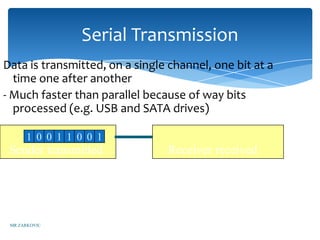
Serial Transmission
Data is transmitted, on a single channel, one bit at a
  time one after another
- Much faster than parallel because of way bits
  processed (e.g. USB and SATA drives)

      1 0 0 1 1 0 0 1
 Sender transmitted             Receiver received


 MR ZARKOVIC
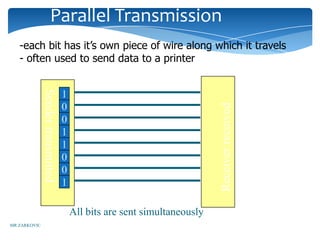
Parallel Transmission
   -each bit has it’s own piece of wire along which it travels
   - often used to send data to a printer
              Sender transmitted


                                   1


                                                                          Receiver received
                                   0
                                   0
                                   1
                                   1
                                   0
                                   0
                                   1

                                       All bits are sent simultaneously
MR ZARKOVIC
Why Not use Parallel Instead of
                         serial?


              Due to inconsistencies on channels data
              arrives at different times
              Because of the way it is transmitted packet
              switching cannot be used
              The above two points makes parallel slower
              than serial and requires higher bandwidth.
              Parallel transmissions are rarely used anymore
MR ZARKOVIC
Synchronous Vs
              AsynchronousTransmissions
     Synchronous Transmission
     all data sent at once and no packet switching

     Asynchronous Transmission
     •Uses stop/ start bits
     •most common type of serial data transfer
     •Allows packet switching
     •Allows sharing of bandwidth (i.e. talk on phone
     while another person is using internet)
MR ZARKOVIC
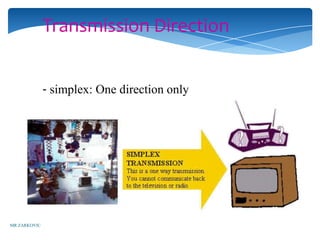
Transmission Direction


              - simplex: One direction only


MR ZARKOVIC
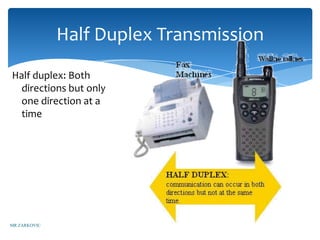
Half Duplex Transmission
Half duplex: Both
  directions but only
  one direction at a
  time


MR ZARKOVIC
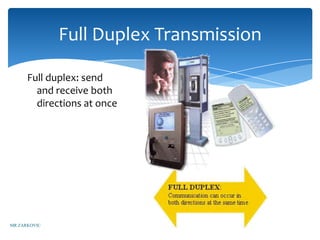
Full Duplex Transmission

      Full duplex: send
        and receive both
        directions at once


MR ZARKOVIC
3 Common Protocols

         •Ethernet (Ethernet Network)

         -Carrier Sense Multiple Access/Collision Detection
         (CSMA/CD)

         -TCP/IP


MR ZARKOVIC
Ethernet
         Developed at Xerox in 1976.
         First protocol approved as an industry standard
         protocol 1983
          LAN protocol used on bus and star
         Most popular LAN protocol
         Inexpensive


MR ZARKOVIC
Carrier Sense Multiple
              Access/Collision Detection
                      (CSMA/CD)
      - Used on bus networks to avoid data collisions.


MR ZARKOVIC
TCP/IP
    • Developed in 1973 for use on the
    ARPANET which was a defense force
    research network.

    -Adopted in 1983 as the Internet standard.
    all hosts on the Internet are required to
    use TCP/IP.

    - Allows transfer of data using packet
    switching
MR ZARKOVIC
LANs Vs WANs

              LAN is “local Area network” which is a network
              confined to a small geographic area which is a
              building or a group of buildings.
              WAN is “wide area network” which is a network
              spread over a large geographic area. The largest WAN
              is the internet.


MR ZARKOVIC
Examples of LANS


        3 different types of LANS are:
           Ring
           Bus
           Star

MR ZARKOVIC
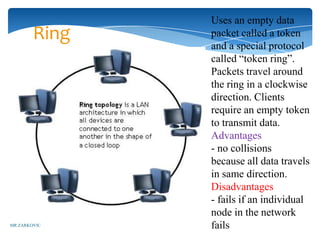
Uses an empty data
        Ring   packet called a token
               and a special protocol
               called “token ring”.
               Packets travel around
               the ring in a clockwise
               direction. Clients
               require an empty token
               to transmit data.
               Advantages
               - no collisions
               because all data travels
               in same direction.
               Disadvantages
               - fails if an individual
               node in the network
MR ZARKOVIC    fails
BUS TOPOLOGY


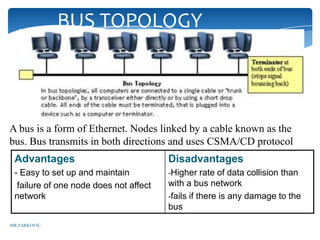
A bus is a form of Ethernet. Nodes linked by a cable known as the
bus. Bus transmits in both directions and uses CSMA/CD protocol
 Advantages                             Disadvantages
 - Easy to set up and maintain          -Higher rate of data collision than
  failure of one node does not affect   with a bus network
 network                                -fails if there is any damage to the
                                        bus
MR ZARKOVIC
Star
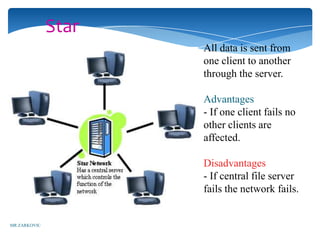
                     All data is sent from
                     one client to another
                     through the server.

                     Advantages
                     - If one client fails no
                     other clients are
                     affected.

                     Disadvantages
                     - If central file server
                     fails the network fails.


MR ZARKOVIC
Network Hardware


MR ZARKOVIC
What is a Network?
       A network is a number of computers and
     peripheral devices connected together so as
     to be able to communicate (i.e. transfer
     data)
       Each device in a network is called a
     node.
       Terminals are data entry points which
     can also display.
MR ZARKOVIC
NETWORKS: categorized by size
       LAN – a network that connects computers in a limited
       geographical area.

       MAN – a backbone that connects LANs in a metropolitan
       area such as a city and handles the bulk of communications
       activity across that region.

       WAN – covers a large geographical area such as a city or
       country. Communication channels include telephone lines,
       Microwave, satellites, etc.


MR ZARKOVIC
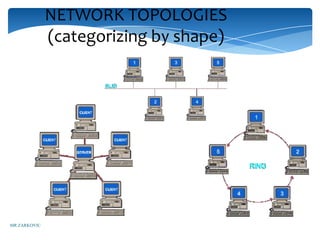
NETWORK TOPOLOGIES
              (categorizing by shape)


MR ZARKOVIC
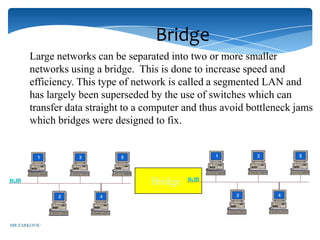
Bridge
       Large networks can be separated into two or more smaller
       networks using a bridge. This is done to increase speed and
       efficiency. This type of network is called a segmented LAN and
       has largely been superseded by the use of switches which can
       transfer data straight to a computer and thus avoid bottleneck jams
       which bridges were designed to fix.


                                   Bridge


MR ZARKOVIC
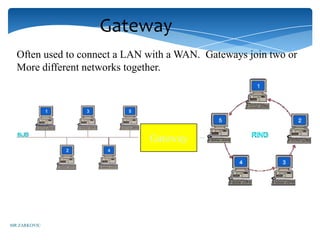
Gateway
  Often used to connect a LAN with a WAN. Gateways join two or
  More different networks together.


                              Gateway


MR ZARKOVIC
Internet, Intranet, Extranet
Internet
  public/international network which is used to access
information, e-shopping, e-banking, email

Intranet
  private network (LAN or WAN) used to share resources in secure
environment
  uses web pages (HTML to view) and TCP/IP protocols (to make
connection)

Extranet
  intranet that has been extended to include access to or from selected
external organizations such as customers, but not general public.
  Note: Connections via leased lines, or network interconnections.
 MR ZARKOVIC
Transmission Media
     twisted pair – telephone cable
     coaxial cable –Thick black cable used for higher bandwidth
     communications than twisted pair (i.e. Optus cable)
     fibre optic – data transferred through pulses of light.
     Extremely fast.
      Non cable methods such as satelite, microwave, wireless and
     bluetooth


MR ZARKOVIC
Network Hardware
SERVERS: Help to manage the network and the resources
of that network. On larger networks servers commonly have
specialised tasks such as: File Servers: stores and manages
files, Print Servers: manages printers and print jobs, Mail
Server: Manages email, Web Server: manages web access.
Routers: connects multiple networks and are protocol
independent. can be used in place of a switch or bridge.
Switches: smart hubs which transmit packets to the
destination port only
Hubs: like double adapters /power boards in the home
except instead of plugging in extension cords we are plugging
in computers to allow them to communicate.
MR ZARKOVIC
Some Network Administration
             Tasks
         - adding/removing users
         - assigning users to printers
         - giving users file access rights
         - installation of software and sharing with users
         - client installation and protocol assignment
         - logon and logoff procedures
         - network based applications


MR ZARKOVIC
Other Information Processes in
                 Communication Systems

              Collecting: phone as collection device with voice
              mail, EFTPOS terminal as a collection device for electronic
              banking

              processing: sending of attachments with e-mail, encoding
              and decoding methods, including: analog data to analog
              signal, digital data to analog signal, digital data to digital
              signal, analog data to digital signal, client-server
              architecture: the client controls the user interface and the
              application logic server controls access to the database


MR ZARKOVIC
Collecting

 Collecting: The following are collection devices: ATMs
 for internet banking, EFTPOS for stores, microphone and
 video camera for video conferencing. Data can be analog
 or digital


MR ZARKOVIC
Processing

              Processing: Is the manipulation or changing the data
              into a more useable format. The processing may
              include changing the appearance of the data, the file
              type or storage options.


MR ZARKOVIC
Displaying


      Displaying: How the information is
       made available for the user to see


MR ZARKOVIC
Issues related to Communication
                           Systems

Messaging Systems (social context, Danger of Misinterpretation, Power
Relationships, Privacy and confidentiality, power relationships, electronic junk
mail, information overload)

Internet (Internet trading, taxation, employment, nature of business, trade
barriers, censorship, child protection, internet banking, security, changing nature
of work, branch closures and job losses, radio and video)

Telecommuting (work from home), blurring between work and home, more
stress, advantagesand disadvantages)
MR ZARKOVIC
Issues relating to messaging
                  systems
   •‘netiquette’ is etiquette/ manners on net
   •Many people rely on messaging systems more
   than spoken or face to face communication.
   •written word only recipient miss out on (e.g. body
   language and voice inflection)
   •privacy (employers have right to read e-mail at
   work)
   •Spam is overloading mailboxes
   •Work/ information overload from ever growing
   number of emails
MR ZARKOVIC
Issues relating to internet trading


              employment ramifications
              Effect on trade barriers and
              taxation laws
              Phishing and security
MR ZARKOVIC
Issues relating to internet banking


     •branch closures and job losses
     •decreasing number of bank branches
     •job losses
     •changing nature of work
     •security of banking details


MR ZARKOVIC
Physical boundaries

              telecommuting is working from home
                   virtual organisations
                   national trade barriers


MR ZARKOVIC
THE END


MR ZARKOVIC

communication system l2

  • 1.
    Communications Systems L2 Characteristics of communication systems. Examples of communication systems. Transmitting and receiving in communication systems. Other information processes in communication systems. Issues related to communication systems. MR ZARKOVIC
  • 2.
    CONTENT Characteristics of Communication Systems Examples of Communication Systems Transmitting and Receiving Other Information Processes Issues Related To Communication Systems MR ZARKOVIC
  • 3.
    Characteristics of Communication Systems Protocols Handshaking Speed of Transmission Error Checking Communication Settings MR ZARKOVIC
  • 4.
    Characteristics of Communication Systems There must be a Sender and Receiver A protocol is a set of rules which governs the transfer of data between computers. Protocols allow communication between computers and networks. Handshaking is used to establish which protocols to use. Handshaking controls the flow of data between computers protocols will determine the speed of transmission, error checking method, size of bytes, and whether synchronous or asynchronous Examples of protocols are: token ring, CSMA/CD, X.25, TCP/IP MR ZARKOVIC
  • 5.
    5 Basic Components Every communication system has 5 basic requirements •Data Source (where the data originates) •Transmitter (device used to transmit data) •Transmission Medium (cables or non cable) •Receiver (device used to receive data) •Destination (where the data will be placed) MR ZARKOVIC
  • 6.
  • 7.
    Transmission Media Speed •Bandwidth:The amount of data which can be transmitted on a medium over a fixed amount of time (second). It is measured on Bits per Second or Baud •Bits per Second (bps): A measure of transmission speed. The number of bits (0 0r 1) which can be transmitted in a second •Baud Rate: Is a measure of how fast a change of state occurs (i.e. a change from 0 to 1) MR ZARKOVIC
  • 8.
    Packets Transmissions are broken up into smaller units or data transmissions called packets Example A This file is divided into broken into four packets data has now been packets. It does not matter what the transmission is. It could be Word document, a PowerPoint or an MP3.PACKET this yellow box PACKET PACKET Imagine PACKET is a file for transfer MR ZARKOVIC
  • 9.
    Packets and OSI After the file is divided into packets extra information is required to make sure it all goes back together correctly. The OSI model helps to look after this. The OSI model also provides much more information which is included with each package. MR ZARKOVIC
  • 10.
    OSI 7 LayerModel •OSI “Open System Interconnection” •OSI is not a protocol but a list of protocols divided between 7 layers with each layer having a different set of functions. •Each packet is layered/packaged with protocols from each of the layers as it is processed. •The process of layering the protocols around each package is called encapsulation. The final encapsulated data packet is called a frame. MR ZARKOVIC
  • 11.
    Open Systems Interconnection OSI Reference model Sende Receive Layer 7 application r r Layer 6 presentation Each Packet Each file The protocols Layer 5 session will is divided The encapsulated Will be added Layer 4 transport then be into Packet is called systematically The received Layer 3 network File File Encapsulated packets aLayer frame frame is then Layer 2 data link with File By layer unpacked PROTOCOLS Layer 1 physical in the opposite order MR ZARKOVIC Transmission Medium
  • 12.
    Services Performed atEach Layer Layer 7 application Identification, authentication Layer 6 presentation Format conversion Layer 5 session Set-up coordinate conversation Layer 4 transport Ensures error-free transfer Layer 3 network Routing of data through network Layer 2 data link Error control and synchronisation Layer 1 physical Placing signals on the carrier MR ZARKOVIC
  • 13.
    Examples of protocols Layer 7 application E-mail, Web browser, Directory Layer 6 presentation POP, SMTP, FTP, HTTP, DNS Layer 5 session Sockets Layer 4 transport TCP Layer 3 network IP Layer 2 data link PPP, Ethernet, Token ring Layer 1 physical 100baseT MR ZARKOVIC
  • 14.
    Encapsulation Device 1 Device 2 Application data Application Presentation H6 data T6 Presentation Session H5 data T5 Session Transport H4 data T4 (Packet) Transport Network H3 data T3 (packet Network Data Link ) Data Link H2 data T2 Physical H1 data T1 Physical carrier FRAME FRAME FRAME FRAME Destination Source AMR ZARKOVIC frame typical Preamble Address Address Data Padding CRC
  • 15.
    Error Checking Methods • Parity bit check • Check sum * data transmitted in blocks, each block added to give a total – checksum * used in X Modem protocol • Cycle redundancy check MR ZARKOVIC
  • 16.
    Examples of Communication Systems MR ZARKOVIC
  • 17.
    Examples of CommunicationSystems - E-mail - Voice Mail - Fax - Smart Phone - Instant Messaging - Telecommuting - Video-conferencing - Groupware - Telephony - E-Commerce - The Internet - Bulletin board system - The Web - Global positioning system MR ZARKOVIC
  • 18.
    HSC Topic 3.4 Transmitting and Receiving in Communication Systems Communication concepts (transmission of data, protocols and handshaking, networks, LANs and WANs,Topologies, Network Access Methods) Network Hardware (NICs, Servers, Routers and Switches, Bridges and gateways, Hubs, Transmission media Network Software NOSs, Network Operating System Tasks, Logon and Logoff Procedures, Intranets and Extranets MR ZARKOVIC
  • 19.
    Communication Concepts Any transmission May be: •analog or digital •Serial or parallel MR ZARKOVIC
  • 20.
    Serial Transmission Data istransmitted, on a single channel, one bit at a time one after another - Much faster than parallel because of way bits processed (e.g. USB and SATA drives) 1 0 0 1 1 0 0 1 Sender transmitted Receiver received MR ZARKOVIC
  • 21.
    Parallel Transmission -each bit has it’s own piece of wire along which it travels - often used to send data to a printer Sender transmitted 1 Receiver received 0 0 1 1 0 0 1 All bits are sent simultaneously MR ZARKOVIC
  • 22.
    Why Not useParallel Instead of serial? Due to inconsistencies on channels data arrives at different times Because of the way it is transmitted packet switching cannot be used The above two points makes parallel slower than serial and requires higher bandwidth. Parallel transmissions are rarely used anymore MR ZARKOVIC
  • 23.
    Synchronous Vs AsynchronousTransmissions Synchronous Transmission all data sent at once and no packet switching Asynchronous Transmission •Uses stop/ start bits •most common type of serial data transfer •Allows packet switching •Allows sharing of bandwidth (i.e. talk on phone while another person is using internet) MR ZARKOVIC
  • 24.
    Transmission Direction - simplex: One direction only MR ZARKOVIC
  • 25.
    Half Duplex Transmission Halfduplex: Both directions but only one direction at a time MR ZARKOVIC
  • 26.
    Full Duplex Transmission Full duplex: send and receive both directions at once MR ZARKOVIC
  • 27.
    3 Common Protocols •Ethernet (Ethernet Network) -Carrier Sense Multiple Access/Collision Detection (CSMA/CD) -TCP/IP MR ZARKOVIC
  • 28.
    Ethernet Developed at Xerox in 1976. First protocol approved as an industry standard protocol 1983 LAN protocol used on bus and star Most popular LAN protocol Inexpensive MR ZARKOVIC
  • 29.
    Carrier Sense Multiple Access/Collision Detection (CSMA/CD) - Used on bus networks to avoid data collisions. MR ZARKOVIC
  • 30.
    TCP/IP • Developed in 1973 for use on the ARPANET which was a defense force research network. -Adopted in 1983 as the Internet standard. all hosts on the Internet are required to use TCP/IP. - Allows transfer of data using packet switching MR ZARKOVIC
  • 31.
    LANs Vs WANs LAN is “local Area network” which is a network confined to a small geographic area which is a building or a group of buildings. WAN is “wide area network” which is a network spread over a large geographic area. The largest WAN is the internet. MR ZARKOVIC
  • 32.
    Examples of LANS 3 different types of LANS are: Ring Bus Star MR ZARKOVIC
  • 33.
    Uses an emptydata Ring packet called a token and a special protocol called “token ring”. Packets travel around the ring in a clockwise direction. Clients require an empty token to transmit data. Advantages - no collisions because all data travels in same direction. Disadvantages - fails if an individual node in the network MR ZARKOVIC fails
  • 34.
    BUS TOPOLOGY A busis a form of Ethernet. Nodes linked by a cable known as the bus. Bus transmits in both directions and uses CSMA/CD protocol Advantages Disadvantages - Easy to set up and maintain -Higher rate of data collision than failure of one node does not affect with a bus network network -fails if there is any damage to the bus MR ZARKOVIC
  • 35.
    Star All data is sent from one client to another through the server. Advantages - If one client fails no other clients are affected. Disadvantages - If central file server fails the network fails. MR ZARKOVIC
  • 36.
  • 37.
    What is aNetwork? A network is a number of computers and peripheral devices connected together so as to be able to communicate (i.e. transfer data) Each device in a network is called a node. Terminals are data entry points which can also display. MR ZARKOVIC
  • 38.
    NETWORKS: categorized bysize LAN – a network that connects computers in a limited geographical area. MAN – a backbone that connects LANs in a metropolitan area such as a city and handles the bulk of communications activity across that region. WAN – covers a large geographical area such as a city or country. Communication channels include telephone lines, Microwave, satellites, etc. MR ZARKOVIC
  • 39.
    NETWORK TOPOLOGIES (categorizing by shape) MR ZARKOVIC
  • 40.
    Bridge Large networks can be separated into two or more smaller networks using a bridge. This is done to increase speed and efficiency. This type of network is called a segmented LAN and has largely been superseded by the use of switches which can transfer data straight to a computer and thus avoid bottleneck jams which bridges were designed to fix. Bridge MR ZARKOVIC
  • 41.
    Gateway Oftenused to connect a LAN with a WAN. Gateways join two or More different networks together. Gateway MR ZARKOVIC
  • 42.
    Internet, Intranet, Extranet Internet public/international network which is used to access information, e-shopping, e-banking, email Intranet private network (LAN or WAN) used to share resources in secure environment uses web pages (HTML to view) and TCP/IP protocols (to make connection) Extranet intranet that has been extended to include access to or from selected external organizations such as customers, but not general public. Note: Connections via leased lines, or network interconnections. MR ZARKOVIC
  • 43.
    Transmission Media twisted pair – telephone cable coaxial cable –Thick black cable used for higher bandwidth communications than twisted pair (i.e. Optus cable) fibre optic – data transferred through pulses of light. Extremely fast. Non cable methods such as satelite, microwave, wireless and bluetooth MR ZARKOVIC
  • 44.
    Network Hardware SERVERS: Helpto manage the network and the resources of that network. On larger networks servers commonly have specialised tasks such as: File Servers: stores and manages files, Print Servers: manages printers and print jobs, Mail Server: Manages email, Web Server: manages web access. Routers: connects multiple networks and are protocol independent. can be used in place of a switch or bridge. Switches: smart hubs which transmit packets to the destination port only Hubs: like double adapters /power boards in the home except instead of plugging in extension cords we are plugging in computers to allow them to communicate. MR ZARKOVIC
  • 45.
    Some Network Administration Tasks - adding/removing users - assigning users to printers - giving users file access rights - installation of software and sharing with users - client installation and protocol assignment - logon and logoff procedures - network based applications MR ZARKOVIC
  • 46.
    Other Information Processesin Communication Systems Collecting: phone as collection device with voice mail, EFTPOS terminal as a collection device for electronic banking processing: sending of attachments with e-mail, encoding and decoding methods, including: analog data to analog signal, digital data to analog signal, digital data to digital signal, analog data to digital signal, client-server architecture: the client controls the user interface and the application logic server controls access to the database MR ZARKOVIC
  • 47.
    Collecting Collecting: Thefollowing are collection devices: ATMs for internet banking, EFTPOS for stores, microphone and video camera for video conferencing. Data can be analog or digital MR ZARKOVIC
  • 48.
    Processing Processing: Is the manipulation or changing the data into a more useable format. The processing may include changing the appearance of the data, the file type or storage options. MR ZARKOVIC
  • 49.
    Displaying Displaying: How the information is made available for the user to see MR ZARKOVIC
  • 50.
    Issues related toCommunication Systems Messaging Systems (social context, Danger of Misinterpretation, Power Relationships, Privacy and confidentiality, power relationships, electronic junk mail, information overload) Internet (Internet trading, taxation, employment, nature of business, trade barriers, censorship, child protection, internet banking, security, changing nature of work, branch closures and job losses, radio and video) Telecommuting (work from home), blurring between work and home, more stress, advantagesand disadvantages) MR ZARKOVIC
  • 51.
    Issues relating tomessaging systems •‘netiquette’ is etiquette/ manners on net •Many people rely on messaging systems more than spoken or face to face communication. •written word only recipient miss out on (e.g. body language and voice inflection) •privacy (employers have right to read e-mail at work) •Spam is overloading mailboxes •Work/ information overload from ever growing number of emails MR ZARKOVIC
  • 52.
    Issues relating tointernet trading employment ramifications Effect on trade barriers and taxation laws Phishing and security MR ZARKOVIC
  • 53.
    Issues relating tointernet banking •branch closures and job losses •decreasing number of bank branches •job losses •changing nature of work •security of banking details MR ZARKOVIC
  • 54.
    Physical boundaries telecommuting is working from home virtual organisations national trade barriers MR ZARKOVIC
  • 55.