





USING COLLABORATIVE TOOLS
TO ENHANCE STUDENT
LEARNING EXPERIENCE
What are collaboration tools?
   They are computers applications that allow
    individuals to work in a group on a single task
    to achieve common goal
   Enable student to communicate with other
    students and instructors
   Share ideas, Information, knowledge, views
    etc.
Why collaborative tools are important
   University still uses conventional ways of knowledge delivery
    (Pen & Paper based, hard copy and recently presentations )
   Introduces new ways of seeking and sharing knowledge
   Introduces efficiency to learning
   Flexible teaching/learning environment
   Decreases distance between students and teachers
   Enable student to think out of the box
   Individuals to see from different dimensions
   Bring motivation among team & Makes learning fun Enable
Common Collaboration tools for
student
Mind Map
Mind Map
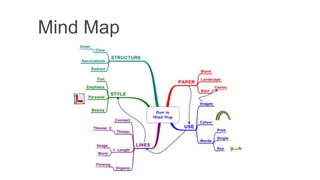
   Mind maps are diagrams used to brainstorm and
    organize ideas, and can be used by everyone for
    anything.
   Benefits of Mind Map
       Reduce re-reading tons of books
       Make revision easy for student (You only capture main
        point)
       Give a big picture of subject
       Easy to concentrate and memorize
       Organize information for research and assignments
Electronic Calendar
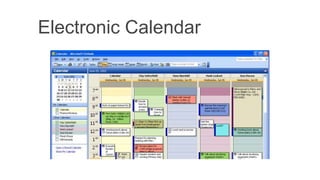
Electronic calendars
    E-Calendar is a great tool for managing time
   It helps student
     Schedule important academic event in Calendar
     Share calendar with other student
     Schedule meetings with instructors
     Tells students when they have free time
     Get reminder for the tasks
     Highlight important deadline and milestone
Google Cloud Connect for Ms.
Word
Google Cloud Connect
   Enable individuals to store, share, back up and
    simultaneously edit Microsoft Word, Excel and
    Power Point document with coworkers
     Enable   Multi-person editing
     Keeps a history of file edits
     Edit offline
     Syncing to the cloud
RefWorks
   Reference management software package
   Help researchers easily gather, manage, store
    and share all types of information, as well as
    generate citations and bibliographies
   Helps researcher avoid plagiarism
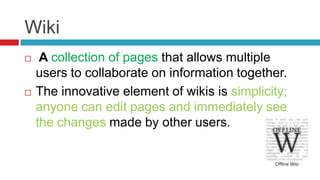
Wiki
    A collection of pages that allows multiple
    users to collaborate on information together.
   The innovative element of wikis is simplicity;
    anyone can edit pages and immediately see
    the changes made by other users.
Wiki tool for team work
   Enable students to work on an assignment as a
    team
   Enable student to learn about the challenges
    while working in a team
   Share, edit each others ideas and critically assess
    team member work
   Enable them to monitor team members progress
   Share and edit each other work
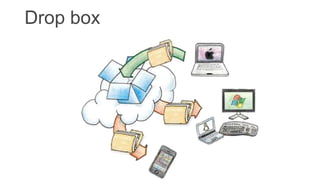
Drop box
Drop box
   Enable individual's to maintain a back up of their locally
    stored data on the cloud
   Benefits
     Enable user to share and access data through the
      Internet
     User friendly interface | 5 GB spare free

     Accessed globally | Maintain file versioning

     Synchronize locally stored files with Drop Box hosting
      servers
RSS Feeds
   Enable the delivery of regularly changing web
    contents
   Allow users to keep themselves abreast about
    recent development in their area of interest
   Saves time, by not needing to visit every site
    individually and ensure users privacy
Blog
   It is an online journal or website where users
    can post articles
   Express their view
   Share links, news, video, audios, etc.
     Professor  can write blog to share is expertise with
      other fellows or students
Delicious
   It is a social bookmarking web services used
    to store, share and discover web book marks
   Helps individuals collects all the web
    resources used for a class, project under
    single tag
   Most used social book marking tool
Podcast
   A multimedia digital file made available on the
    Internet for downloading to a portable media
    player, computer, etc.
   Post cast could be audio or Video cast
Video Cast
   A video file made available on the Internet for
    downloading or watching online

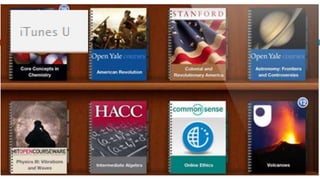
   Many universities throughout the world share
    their video lectures online, a good source is
What does collaboration tools offer?

• It not only helps student take most
  out of their academic life, but also

• Helps students learn most
  important skills needed for every
  job
Skills learned
   Improve                    Problem solving
    communication skill        Critical thinking
   Improve team work
                               Self confidence
   Improve time
    management skills          Increase productivity
   Increase and solidify
    knowledge
Recommendation
   University should add a new modules to its
    curricula by the name of Academic success,
    which will include the following
     Using collaborative tools in education
     Using social networking in higher education
     Project and time management skills
     Conducting research and referencing
     Searching for information
End

Collaboration tools for student

  • 1.
    USING COLLABORATIVE TOOLS TOENHANCE STUDENT LEARNING EXPERIENCE
  • 2.
    What are collaborationtools?  They are computers applications that allow individuals to work in a group on a single task to achieve common goal  Enable student to communicate with other students and instructors  Share ideas, Information, knowledge, views etc.
  • 3.
    Why collaborative toolsare important  University still uses conventional ways of knowledge delivery (Pen & Paper based, hard copy and recently presentations )  Introduces new ways of seeking and sharing knowledge  Introduces efficiency to learning  Flexible teaching/learning environment  Decreases distance between students and teachers  Enable student to think out of the box  Individuals to see from different dimensions  Bring motivation among team & Makes learning fun Enable
  • 4.
  • 5.
  • 6.
    Mind Map  Mind maps are diagrams used to brainstorm and organize ideas, and can be used by everyone for anything.  Benefits of Mind Map  Reduce re-reading tons of books  Make revision easy for student (You only capture main point)  Give a big picture of subject  Easy to concentrate and memorize  Organize information for research and assignments
  • 7.
  • 8.
    Electronic calendars  E-Calendar is a great tool for managing time  It helps student  Schedule important academic event in Calendar  Share calendar with other student  Schedule meetings with instructors  Tells students when they have free time  Get reminder for the tasks  Highlight important deadline and milestone
  • 9.
  • 10.
    Google Cloud Connect  Enable individuals to store, share, back up and simultaneously edit Microsoft Word, Excel and Power Point document with coworkers  Enable Multi-person editing  Keeps a history of file edits  Edit offline  Syncing to the cloud
  • 12.
    RefWorks  Reference management software package  Help researchers easily gather, manage, store and share all types of information, as well as generate citations and bibliographies  Helps researcher avoid plagiarism
  • 13.
    Wiki  A collection of pages that allows multiple users to collaborate on information together.  The innovative element of wikis is simplicity; anyone can edit pages and immediately see the changes made by other users.
  • 14.
    Wiki tool forteam work  Enable students to work on an assignment as a team  Enable student to learn about the challenges while working in a team  Share, edit each others ideas and critically assess team member work  Enable them to monitor team members progress  Share and edit each other work
  • 15.
  • 16.
    Drop box  Enable individual's to maintain a back up of their locally stored data on the cloud  Benefits  Enable user to share and access data through the Internet  User friendly interface | 5 GB spare free  Accessed globally | Maintain file versioning  Synchronize locally stored files with Drop Box hosting servers
  • 17.
    RSS Feeds  Enable the delivery of regularly changing web contents  Allow users to keep themselves abreast about recent development in their area of interest  Saves time, by not needing to visit every site individually and ensure users privacy
  • 19.
    Blog  It is an online journal or website where users can post articles  Express their view  Share links, news, video, audios, etc.  Professor can write blog to share is expertise with other fellows or students
  • 20.
    Delicious  It is a social bookmarking web services used to store, share and discover web book marks  Helps individuals collects all the web resources used for a class, project under single tag  Most used social book marking tool
  • 21.
    Podcast  A multimedia digital file made available on the Internet for downloading to a portable media player, computer, etc.  Post cast could be audio or Video cast
  • 22.
    Video Cast  A video file made available on the Internet for downloading or watching online  Many universities throughout the world share their video lectures online, a good source is
  • 26.
    What does collaborationtools offer? • It not only helps student take most out of their academic life, but also • Helps students learn most important skills needed for every job
  • 27.
    Skills learned  Improve  Problem solving communication skill  Critical thinking  Improve team work  Self confidence  Improve time management skills  Increase productivity  Increase and solidify knowledge
  • 28.
    Recommendation  University should add a new modules to its curricula by the name of Academic success, which will include the following  Using collaborative tools in education  Using social networking in higher education  Project and time management skills  Conducting research and referencing  Searching for information
  • 29.

Editor's Notes

  • #3 1. http://en.wikipedia.org/wiki/Collaborative_software
  • #4 1. http://en.wikipedia.org/wiki/Collaborative_software
  • #14 ePals: Connect with other students worldwide to learn: For a global view from a different perspective, try out ePals. Many of you may have heard of its usefulness in foreign language learning as a secure means that a class in one country can communicate with classes in other countries.
  • #15 37. What you need: Application (many free software apps: PBwiki , Wetpaint , MediaWiki , DokuWiki ; just to name a few) Commitment (“buy-in” from your contributors) Technical support (at least one person who can fool with the code behind the application) Training38. Wiki tools PBwiki http://pbwiki.com/ MediaWiki http://www.mediawiki.org/ DokuWiki http://wiki.splitbrain.org/wiki:dokuwiki TWiki (open source app) http://twiki.org ClearWiki (free for 10 users) http://clearwiki.com/ Wetpaint (free) http://www.wetpaint.com SeedWiki (free; multiple wikis) http://www.seedwiki.com39. PBwiki http://pbwiki.com/ Free Hosted (no need to download software) Web-based; login from any internet browser40. MediaWiki http://www.mediawiki.org/ Open source application Download and install on your own server Designed for use with large websites/multiple servers Some WYSIWYG Editing syntax allows users to edit and contribute content without knowledge of HTML41. DokuWiki http://wiki.splitbrain.org/wiki:dokuwiki Open source application Download and install on your own server Has its own editing syntax for contributing and editing content
  • #18 RSS (Rich Site Summary) is a format for delivering regularly changing web content. Many news-related sites, weblogs and other online publishers syndicate their content as an RSS Feed to whoever wants it.RSS solves a problem for people who regularly use the web. It allows you to easily stay informed by retrieving the latest content from the sites you are interested in. You save time by not needing to visit each site individually. You ensure your privacy, by not needing to join each site's email newsletter.
  • #21 http://en.wikipedia.org/wiki/Delicious_(website)
  • #28 Teamwork Increases Productivity