Teaching Method and
Flexible Tools
MATERIALS FOR STUDENTS
-ACTIVITIES GROUP 1 -
This project has been funded with support from the European Commission. This publication
reflects the views only of the author, and the Commission cannot be held responsible for
any use which may be made of the information contained therein.
Table of Contents
Computer Science for K - 5


4 Overview
11 Glossary
22 Lesson 1: Sequencing
30 Worksheets
41 Answer Key
33 Rubric
Download the full 10 lesson
curriculum at
thefoos.com/hourofcode
!
3
OVERVIEW
Computer Science for K - 5
Teacher Overview:
Our lesson plans provide a fun, flexible and engaging introduction to
foundational computer science concepts. They target students in K – 5th
grade, but we’ve successfully tested with students as old as 8th grade.
All lesson plans are meant to be highly adaptable. You will be the best
judge of what your students need to spend more time on and what they
seem to enjoy the most.
In addition, all lessons include both an activity with our game, The
Foos, and an “unplugged” activity that does not require a computer or
other connected device.
Materials:
Our game, The Foos – Code for an Hour. Download it at thefoos.com
Available for FREE on iPad, iPhone, Android Devices and web (e.g.
major browsers Chrome, Safari, IE, etc.)
Props as needed: see lesson for specifics
No experience is necessary, but we recommend you review the lesson
and play a few levels of the game prior to teaching it for the first time.
Note: This Hour of Code curriculum gives you
approximately 1 hour of lessons.
If you sign up for our “Foosletter” at thefoos.com, we
will notify you when we expand the curriculum and
release new versions of the game.
You can also download our full 10 lesson
curriculum at thefoos.com/hourofcode.
!
4
OVERVIEW
Computer Science for K - 5
What Is Computer Science?
Computer Science, or “CS” boils down to solving problems with very specific
sets of instructions because computers only do exactly what they are told to
do. We think of computers as smart but in reality we need to tell them what
to do! They can’t anticipate what we want from them; only computer
scientists can come up with precise instructions computers need in order to
act. Learning to think like a computer scientist or programmer helps children
break down problems, think in logical sequences, and use precise language
to give instructions.
The first lesson focuses on identifying common objects that only work when
given the proper instructions. Then we will put this idea to work by
programming the Police Foo – the first character players meet in our game.
Who Are The Foos?
The Foos are lovable and cute characters recently discovered by scientists.
They are very small and live deep inside every computer, including
smartphones, tablets and the computers in your class!
Each Foo can walk, jump, throw, eat and navigate their world, called
“Fooville.” Some Foos have special abilities that make them unique, for
example:
• Police Foo - can chase and capture the Glitch
• Chef Foo - can make many kinds of food
!
5
OVERVIEW
Computer Science for K - 5
• Ninja Foo - can shrink or grow bigger
• Astronaut Foo - can travel in four different directions
• Construction Foo - can make crates and also blow them up
But, just like computers, the Foos only do what they are told. Students
must learn to give them specific commands, or program the Foos, in a
specific order.
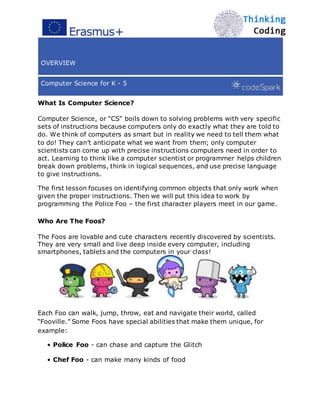
Look out! The blue character with the white horns is the
Glitch. He is a force of chaos in Fooville. Sometimes he
makes a mess, sometimes he throws things around and
sometimes he appears unexpectedly.
Tips and Tricks
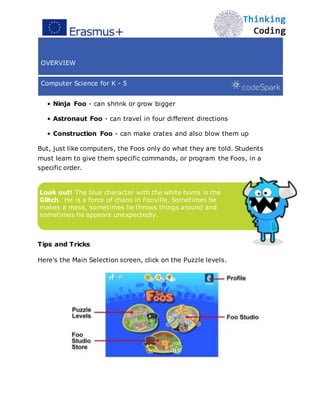
Here’s the Main Selection screen, click on the Puzzle levels.
!
6
OVERVIEW
Computer Science for K - 5
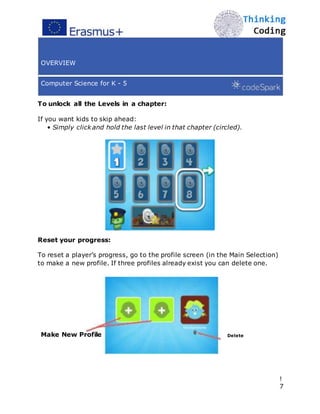
To unlock all the Levels in a chapter:
If you want kids to skip ahead:
• Simply click and hold the last level in that chapter (circled).
Reset your progress:
To reset a player’s progress, go to the profile screen (in the Main Selection)
to make a new profile. If three profiles already exist you can delete one.
Make New Profile Delete
!
7
OVERVIEW
Computer Science for K - 5
What is Foo Studio?
Foo Studio is a new addition to The Foos where players can build their own
video game levels, share those levels with friends and play levels their
peers make. Players can apply the coding principles they learned in the
puzzle levels to reprogram any object in Foo Studio.
Players earn coins in the puzzle levels that can be used to purchase Foo
Store items. All purchased items can be used in Foo Studio levels.
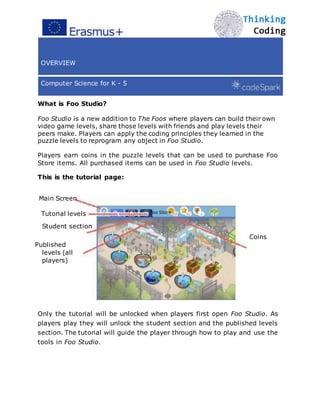
This is the tutorial page:
Main Screen
Tutorial levels Foo Store
Student section
Coins
Published
levels (all
players)
Only the tutorial will be unlocked when players first open Foo Studio. As
players play they will unlock the student section and the published levels
section. The tutorial will guide the player through how to play and use the
tools in Foo Studio.

!
8
OVERVIEW
Computer Science for K - 5
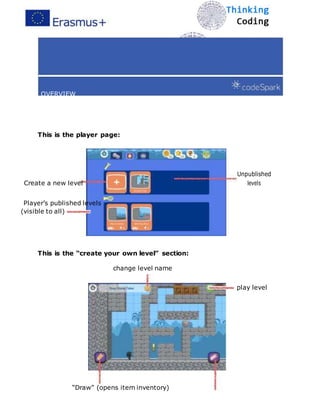
This is the player page:
Create a new level
Unpublished
levels
Player’s published levels
(visible to all)
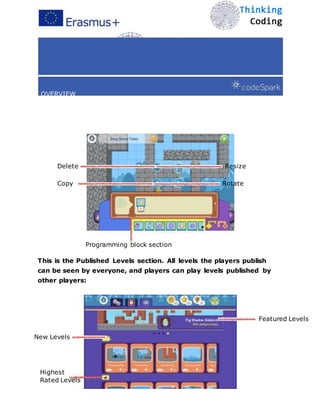
This is the “create your own level” section:
change level name


play level
“Draw” (opens item inventory)
“Erase” (erases placed items)
!
9
OVERVIEW
Computer Science for K - 5
Delete Resize
Copy Rotate
Programming block section
This is the Published Levels section. All levels the players publish
can be seen by everyone, and players can play levels published by
other players:
Featured Levels
New Levels
Highest
Rated Levels
!
1
0
Glossary
The Foos K-5
Algorithm: Instructions to solve a problem or complete a task.
Computer Science: Solving problems with very specific sets of
instructions because computers only do exactly what they are told to
do.
Programming: Creating a sequence of instructions, or an
algorithm, that makes a computer do something.
Sequence: The step-by-step order in which instructions should
occur.
!
1
1
Lesson 1
Sequencing
The Foos Chapter 1
Time:
45-60 Min
Materials:
Tablets or Computers with The Foos
A pencil for each student
Story Sequence 1 & 2 handouts
Learning Goals:
Understand that computers are powerful, but need help to work.
- They only do what they are told, in the specific order instructions are
received.
- Figuring out what instructions to give computers can be tricky.
Accustom students to using “test and learn” strategies for problem
solving.
- “Making mistakes is always part of the journey to the right answer.”
Vocabulary:
Programming: Creating a sequence of instructions, or an algorithm,
that makes a computer do something
Algorithm: Instructions to solve a problem or complete a task
Sequence: The step-by-step order in which instructions should occur
!
1
2
Lesson 1
Sequencing
The Foos Chapter 1
Introduction:
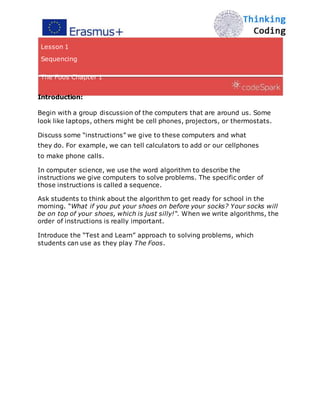
Begin with a group discussion of the computers that are around us. Some
look like laptops, others might be cell phones, projectors, or thermostats.
Discuss some “instructions” we give to these computers and what
they do. For example, we can tell calculators to add or our cellphones
to make phone calls.
In computer science, we use the word algorithm to describe the

instructions we give computers to solve problems. The specific order of
those instructions is called a sequence.
Ask students to think about the algorithm to get ready for school in the
morning. “What if you put your shoes on before your socks? Your socks will
be on top of your shoes, which is just silly!“. When we write algorithms, the
order of instructions is really important.
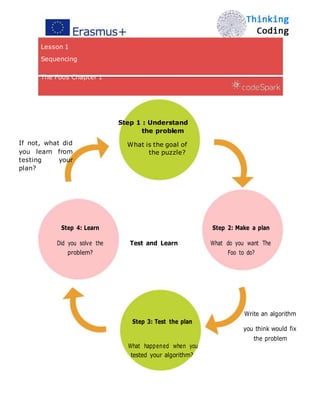
Introduce the “Test and Learn” approach to solving problems, which
students can use as they play The Foos.
!
1
3
Lesson 1
Sequencing
The Foos Chapter 1
Step 1 : Understand
the problem
If not, what did
you learn from
testing your
plan?
What is the goal of
the puzzle?
Step 4: Learn Step 2: Make a plan
Did you solve the Test and Learn What do you want The
problem? Foo to do?
Step 3: Test the plan
Write an algorithm
you think would fix
What happened when you
the problem
tested your algorithm?
!
1
4
Lesson 1
Sequencing
The Foos Chapter 1
Game Activities:
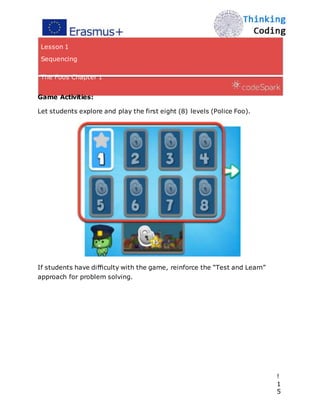
Let students explore and play the first eight (8) levels (Police Foo).
If students have difficulty with the game, reinforce the “Test and Learn”
approach for problem solving.

!
1
5
Unplugged Activity:
1. Put students into pairs.
2. Hand out a pencil and Story Sequence 1 handout to each pair.
3. Have each pair work together to identify which picture comes
first, second, third, etc. in the story and have them put a number
next to each picture to identify the order of events.
4. For an extra challenge, have students try Story Sequence 2.
ProTip: Paired Programming - If some of your students finish early, have
them help other students who are still working. You can also pair up
students at the beginning, where one person “drives” by controlling the
mouse, keyboard, or touchscreen and the other person “navigates” by
answering the driver’s questions and pointing out potential problems or
mistakes.
Debrief Discussion:
• What was the most challenging part of the Story Sequence activities?
• Brainstorm other everyday algorithms (e.g., getting ready for bed, the
class’ daily schedule).
• If time allows, try writing them out on the board to see if the order makes
sense.

!
1
6
Worksheets
!
1
7


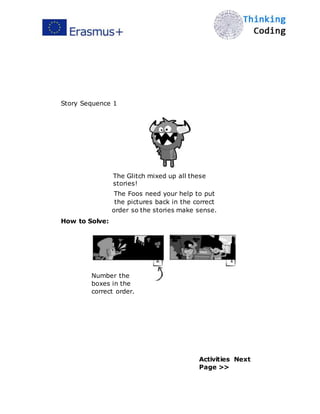
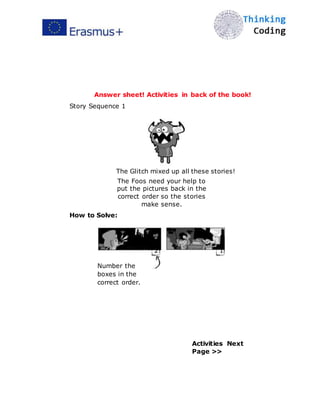
Story Sequence 1
The Glitch mixed up all these
stories!
The Foos need your help to put
the pictures back in the correct
order so the stories make sense.
How to Solve:
2
Number the
boxes in the
correct order.
1
Activities Next
Page >>
!
1
8


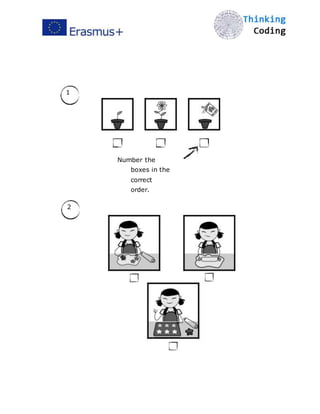
1
Number the
boxes in the
correct
order.
2
!
1
9


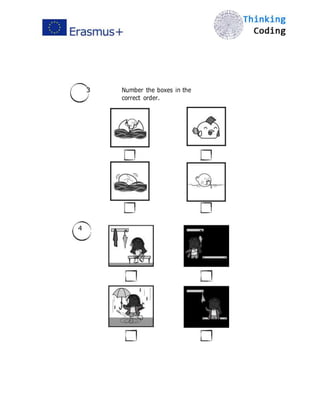
3 Number the boxes in the
correct order.
4
!2
0


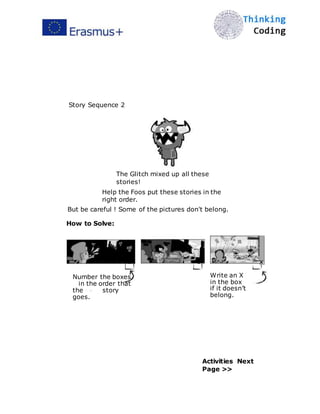
Story Sequence 2
The Glitch mixed up all these
stories!
Help the Foos put these stories in the
right order.
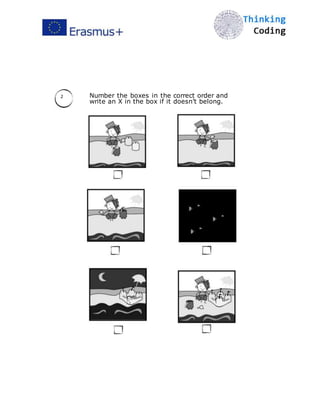
But be careful ! Some of the pictures don't belong.
How to Solve:
2
Number the boxes
in the order that
the story
goes.
1 x
Write an X
in the box
if it doesn’t
belong.
Activities Next
Page >>
!
2
1


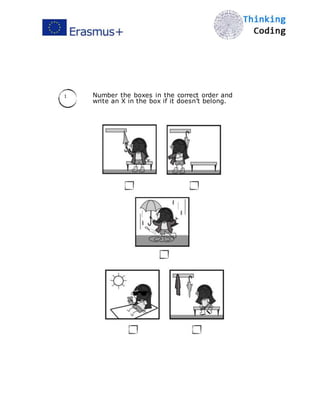
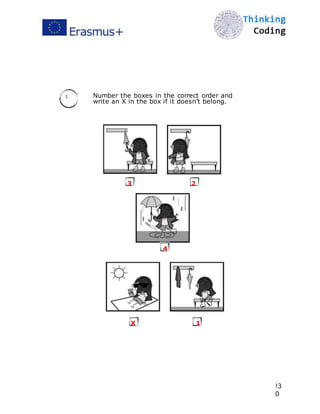
1 Number the boxes in the correct order and
write an X in the box if it doesn’t belong.
!2
2


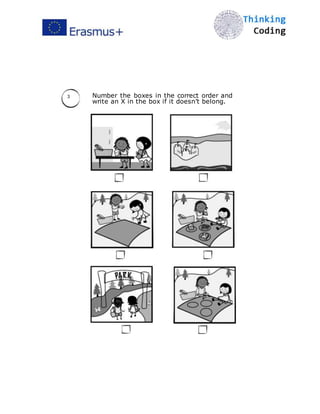
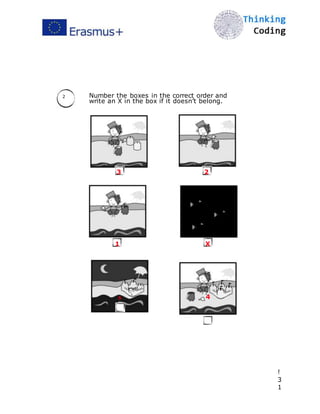
2 Number the boxes in the correct order and
write an X in the box if it doesn’t belong.
!2
3


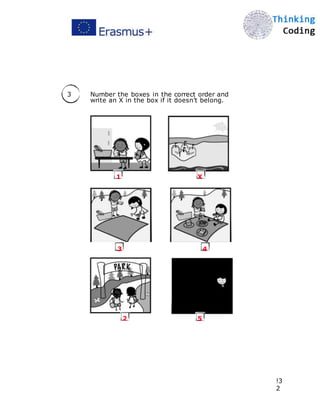
3 Number the boxes in the correct order and
write an X in the box if it doesn’t belong.
!
2
4
Answer Key
!2
5


Answer sheet! Activities in back of the book!
Story Sequence 1
The Glitch mixed up all these stories!
The Foos need your help to
put the pictures back in the
correct order so the stories
make sense.
How to Solve:
2
Number the
boxes in the
correct order.
1
Activities Next
Page >>
!2
6


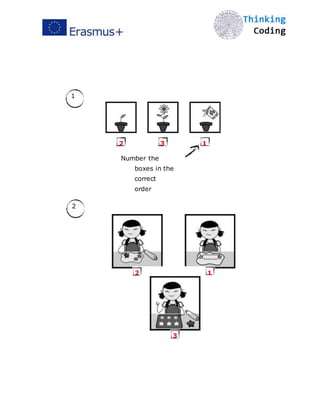
1
2 3 1
Number the
boxes in the
correct
order
2
2 1
3
!
2
7


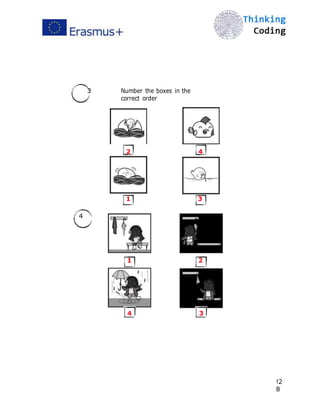
3 Number the boxes in the
correct order
2 4
1 3
4
1 2
4 3
!2
8


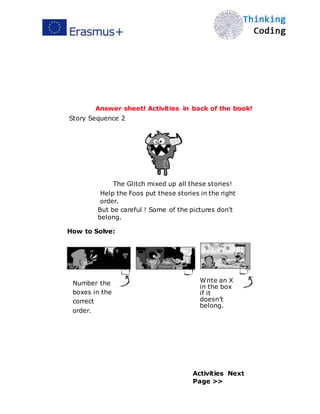
Answer sheet! Activities in back of the book!
Story Sequence 2
The Glitch mixed up all these stories!
Help the Foos put these stories in the right
order.
But be careful ! Some of the pictures don't
belong.
How to Solve:
2
Number the
boxes in the
correct
order.
1 x
Write an X
in the box
if it
doesn’t
belong.
Activities Next
Page >>
!2
9


1 Number the boxes in the correct order and
write an X in the box if it doesn’t belong.
3 2
4
X 1
!3
0


2 Number the boxes in the correct order and
write an X in the box if it doesn’t belong.
3 2
1 X
5 4
!
3
1
3 Number the boxes in the correct order and
write an X in the box if it doesn’t belong.
1 X
3 4
2 5
!3
2
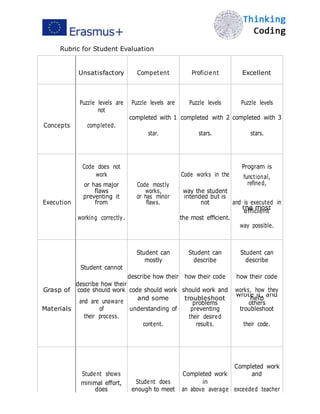
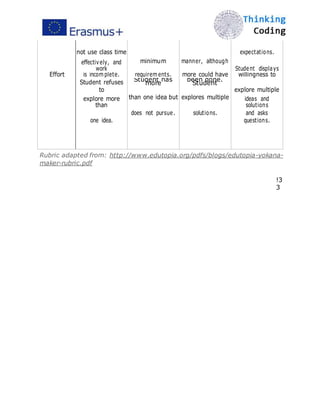
Rubric for Student Evaluation
Unsatisfactory Competent Proficient Excellent
Concepts
Puzzle levels are
not
Puzzle levels are Puzzle levels Puzzle levels
completed with 1 completed with 2 completed with 3
completed.
star. stars. stars.
Code does not
work Code works in the
Program is
functional,
refined,
Execution
or has major
flaws
Code mostly
works, way the student
and is executed in
preventing it
from
or has minor
flaws.
intended but is
not
working correctly. the most efficient.
the most
efficient
way possible.
Student cannot
Student can
mostly
Student can
describe
Student can
describe
describe how their how their code how their code
Grasp of
describe how their
code should work should work and works, how theycode should work
Materials
and are unaware
of
and some troubleshoot
wrote it, and
help
understanding of
problems
preventing
others
troubleshoot
their process.
content.
their desired
results. their code.
Student shows
Student does
Completed work
in
Completed work
and
minimal effort,
does exceeded teacherenough to meet an above average
not use class time expectations.
minimum manner, although
Effort
effectively, and
work Student displays
requirements. more could haveis incomplete. willingness to
Student refuses
to
Student has
more
been done.
Student
explore multiple
than one idea but explores multipleexplore more
than
ideas and
solutions
does not pursue. solutions.
one idea.
and asks
questions.
Rubric adapted from: http://www.edutopia.org/pdfs/blogs/edutopia-yokana-
maker-rubric.pdf
!3
3
Download the full curriculum
at thefoos.com/hourofcode
This work is licensed under the Creative
Commons Attribution-NonCommercial-
NoDerivatives 4.0 International License. To
view a copy of this license, visit
http://creativecommons.org/licenses/by-nc-
nd/4.0/.
!3
4

Coding io1-materials for students-group1

  • 1.
    Teaching Method and FlexibleTools MATERIALS FOR STUDENTS -ACTIVITIES GROUP 1 - This project has been funded with support from the European Commission. This publication reflects the views only of the author, and the Commission cannot be held responsible for any use which may be made of the information contained therein.
  • 2.
    Table of Contents ComputerScience for K - 5 
 4 Overview 11 Glossary 22 Lesson 1: Sequencing 30 Worksheets 41 Answer Key 33 Rubric Download the full 10 lesson curriculum at thefoos.com/hourofcode ! 3
  • 3.
    OVERVIEW Computer Science forK - 5 Teacher Overview: Our lesson plans provide a fun, flexible and engaging introduction to foundational computer science concepts. They target students in K – 5th grade, but we’ve successfully tested with students as old as 8th grade. All lesson plans are meant to be highly adaptable. You will be the best judge of what your students need to spend more time on and what they seem to enjoy the most. In addition, all lessons include both an activity with our game, The Foos, and an “unplugged” activity that does not require a computer or other connected device. Materials: Our game, The Foos – Code for an Hour. Download it at thefoos.com Available for FREE on iPad, iPhone, Android Devices and web (e.g. major browsers Chrome, Safari, IE, etc.) Props as needed: see lesson for specifics No experience is necessary, but we recommend you review the lesson and play a few levels of the game prior to teaching it for the first time. Note: This Hour of Code curriculum gives you approximately 1 hour of lessons. If you sign up for our “Foosletter” at thefoos.com, we will notify you when we expand the curriculum and release new versions of the game. You can also download our full 10 lesson curriculum at thefoos.com/hourofcode.
  • 4.
  • 5.
    OVERVIEW Computer Science forK - 5 What Is Computer Science? Computer Science, or “CS” boils down to solving problems with very specific sets of instructions because computers only do exactly what they are told to do. We think of computers as smart but in reality we need to tell them what to do! They can’t anticipate what we want from them; only computer scientists can come up with precise instructions computers need in order to act. Learning to think like a computer scientist or programmer helps children break down problems, think in logical sequences, and use precise language to give instructions. The first lesson focuses on identifying common objects that only work when given the proper instructions. Then we will put this idea to work by programming the Police Foo – the first character players meet in our game. Who Are The Foos? The Foos are lovable and cute characters recently discovered by scientists. They are very small and live deep inside every computer, including smartphones, tablets and the computers in your class! Each Foo can walk, jump, throw, eat and navigate their world, called “Fooville.” Some Foos have special abilities that make them unique, for example: • Police Foo - can chase and capture the Glitch • Chef Foo - can make many kinds of food
  • 6.
  • 7.
    OVERVIEW Computer Science forK - 5 • Ninja Foo - can shrink or grow bigger • Astronaut Foo - can travel in four different directions • Construction Foo - can make crates and also blow them up But, just like computers, the Foos only do what they are told. Students must learn to give them specific commands, or program the Foos, in a specific order. Look out! The blue character with the white horns is the Glitch. He is a force of chaos in Fooville. Sometimes he makes a mess, sometimes he throws things around and sometimes he appears unexpectedly. Tips and Tricks Here’s the Main Selection screen, click on the Puzzle levels.
  • 8.
  • 9.
    OVERVIEW Computer Science forK - 5 To unlock all the Levels in a chapter: If you want kids to skip ahead: • Simply click and hold the last level in that chapter (circled). Reset your progress: To reset a player’s progress, go to the profile screen (in the Main Selection) to make a new profile. If three profiles already exist you can delete one. Make New Profile Delete ! 7
  • 10.
    OVERVIEW Computer Science forK - 5 What is Foo Studio? Foo Studio is a new addition to The Foos where players can build their own video game levels, share those levels with friends and play levels their peers make. Players can apply the coding principles they learned in the puzzle levels to reprogram any object in Foo Studio. Players earn coins in the puzzle levels that can be used to purchase Foo Store items. All purchased items can be used in Foo Studio levels. This is the tutorial page: Main Screen Tutorial levels Foo Store Student section Coins Published levels (all players) Only the tutorial will be unlocked when players first open Foo Studio. As players play they will unlock the student section and the published levels section. The tutorial will guide the player through how to play and use the tools in Foo Studio.

  • 11.
  • 12.
    OVERVIEW Computer Science forK - 5 This is the player page: Create a new level Unpublished levels Player’s published levels (visible to all) This is the “create your own level” section: change level name 
 play level “Draw” (opens item inventory)
  • 13.
  • 14.
    OVERVIEW Computer Science forK - 5 Delete Resize Copy Rotate Programming block section This is the Published Levels section. All levels the players publish can be seen by everyone, and players can play levels published by other players: Featured Levels New Levels Highest Rated Levels
  • 15.
  • 16.
    Glossary The Foos K-5 Algorithm:Instructions to solve a problem or complete a task. Computer Science: Solving problems with very specific sets of instructions because computers only do exactly what they are told to do. Programming: Creating a sequence of instructions, or an algorithm, that makes a computer do something. Sequence: The step-by-step order in which instructions should occur.
  • 17.
  • 18.
    Lesson 1 Sequencing The FoosChapter 1 Time: 45-60 Min Materials: Tablets or Computers with The Foos A pencil for each student Story Sequence 1 & 2 handouts Learning Goals: Understand that computers are powerful, but need help to work. - They only do what they are told, in the specific order instructions are received. - Figuring out what instructions to give computers can be tricky. Accustom students to using “test and learn” strategies for problem solving. - “Making mistakes is always part of the journey to the right answer.” Vocabulary: Programming: Creating a sequence of instructions, or an algorithm, that makes a computer do something Algorithm: Instructions to solve a problem or complete a task Sequence: The step-by-step order in which instructions should occur ! 1 2
  • 19.
    Lesson 1 Sequencing The FoosChapter 1 Introduction: Begin with a group discussion of the computers that are around us. Some look like laptops, others might be cell phones, projectors, or thermostats. Discuss some “instructions” we give to these computers and what they do. For example, we can tell calculators to add or our cellphones to make phone calls. In computer science, we use the word algorithm to describe the instructions we give computers to solve problems. The specific order of those instructions is called a sequence. Ask students to think about the algorithm to get ready for school in the morning. “What if you put your shoes on before your socks? Your socks will be on top of your shoes, which is just silly!“. When we write algorithms, the order of instructions is really important. Introduce the “Test and Learn” approach to solving problems, which students can use as they play The Foos.
  • 20.
  • 21.
    Lesson 1 Sequencing The FoosChapter 1 Step 1 : Understand the problem If not, what did you learn from testing your plan? What is the goal of the puzzle? Step 4: Learn Step 2: Make a plan Did you solve the Test and Learn What do you want The problem? Foo to do? Step 3: Test the plan Write an algorithm you think would fix What happened when you the problem tested your algorithm?
  • 22.
  • 23.
    Lesson 1 Sequencing The FoosChapter 1 Game Activities: Let students explore and play the first eight (8) levels (Police Foo). If students have difficulty with the game, reinforce the “Test and Learn” approach for problem solving.
 ! 1 5
  • 24.
    Unplugged Activity: 1. Putstudents into pairs. 2. Hand out a pencil and Story Sequence 1 handout to each pair. 3. Have each pair work together to identify which picture comes first, second, third, etc. in the story and have them put a number next to each picture to identify the order of events. 4. For an extra challenge, have students try Story Sequence 2. ProTip: Paired Programming - If some of your students finish early, have them help other students who are still working. You can also pair up students at the beginning, where one person “drives” by controlling the mouse, keyboard, or touchscreen and the other person “navigates” by answering the driver’s questions and pointing out potential problems or mistakes. Debrief Discussion: • What was the most challenging part of the Story Sequence activities? • Brainstorm other everyday algorithms (e.g., getting ready for bed, the class’ daily schedule). • If time allows, try writing them out on the board to see if the order makes sense.

  • 25.
  • 26.
  • 27.
  • 28.
    
 Story Sequence 1 TheGlitch mixed up all these stories! The Foos need your help to put the pictures back in the correct order so the stories make sense. How to Solve: 2 Number the boxes in the correct order. 1 Activities Next Page >>
  • 29.
  • 30.
    
 1 Number the boxes inthe correct order. 2
  • 31.
  • 32.
    
 3 Number theboxes in the correct order. 4
  • 33.
  • 34.
    
 Story Sequence 2 TheGlitch mixed up all these stories! Help the Foos put these stories in the right order. But be careful ! Some of the pictures don't belong. How to Solve: 2 Number the boxes in the order that the story goes. 1 x Write an X in the box if it doesn’t belong. Activities Next Page >>
  • 35.
  • 36.
    
 1 Number theboxes in the correct order and write an X in the box if it doesn’t belong.
  • 37.
  • 38.
    
 2 Number theboxes in the correct order and write an X in the box if it doesn’t belong.
  • 39.
  • 40.
    
 3 Number theboxes in the correct order and write an X in the box if it doesn’t belong.
  • 41.
  • 42.
  • 43.
    
 Answer sheet! Activitiesin back of the book! Story Sequence 1 The Glitch mixed up all these stories! The Foos need your help to put the pictures back in the correct order so the stories make sense. How to Solve: 2 Number the boxes in the correct order. 1 Activities Next Page >>
  • 44.
  • 45.
    
 1 2 3 1 Numberthe boxes in the correct order 2 2 1 3
  • 46.
  • 47.
    
 3 Number theboxes in the correct order 2 4 1 3 4 1 2 4 3 !2 8
  • 48.
    
 Answer sheet! Activitiesin back of the book! Story Sequence 2 The Glitch mixed up all these stories! Help the Foos put these stories in the right order. But be careful ! Some of the pictures don't belong. How to Solve: 2 Number the boxes in the correct order. 1 x Write an X in the box if it doesn’t belong. Activities Next Page >>
  • 49.
  • 50.
    
 1 Number theboxes in the correct order and write an X in the box if it doesn’t belong. 3 2 4 X 1 !3 0
  • 51.
    
 2 Number theboxes in the correct order and write an X in the box if it doesn’t belong. 3 2 1 X 5 4 ! 3 1
  • 52.
    3 Number theboxes in the correct order and write an X in the box if it doesn’t belong. 1 X 3 4 2 5 !3 2
  • 53.
    Rubric for StudentEvaluation Unsatisfactory Competent Proficient Excellent Concepts Puzzle levels are not Puzzle levels are Puzzle levels Puzzle levels completed with 1 completed with 2 completed with 3 completed. star. stars. stars. Code does not work Code works in the Program is functional, refined, Execution or has major flaws Code mostly works, way the student and is executed in preventing it from or has minor flaws. intended but is not working correctly. the most efficient. the most efficient way possible. Student cannot Student can mostly Student can describe Student can describe describe how their how their code how their code Grasp of describe how their code should work should work and works, how theycode should work Materials and are unaware of and some troubleshoot wrote it, and help understanding of problems preventing others troubleshoot their process. content. their desired results. their code. Student shows Student does Completed work in Completed work and minimal effort, does exceeded teacherenough to meet an above average
  • 54.
    not use classtime expectations. minimum manner, although Effort effectively, and work Student displays requirements. more could haveis incomplete. willingness to Student refuses to Student has more been done. Student explore multiple than one idea but explores multipleexplore more than ideas and solutions does not pursue. solutions. one idea. and asks questions. Rubric adapted from: http://www.edutopia.org/pdfs/blogs/edutopia-yokana- maker-rubric.pdf !3 3
  • 55.
    Download the fullcurriculum at thefoos.com/hourofcode This work is licensed under the Creative Commons Attribution-NonCommercial- NoDerivatives 4.0 International License. To view a copy of this license, visit
  • 56.