Digital Natives *every child born since 2000 has never known a world without the internet  *their brains are hardwired to think differently, more linearly, more compatible to the way computers work, why, because they have grown up in a world of programmable toasters, phones, televisions and gadgets of all kinds *if children can build, play and understand games that work, it is possible that someday they will understand and design systems that work. And the world is full of complicated systems
Assessment is for Learning If you don’t have a piece of paper in front of you and boxes to tick, how do you assess your pupils? Practical hands-on 3 dimensional learning, to demonstrate their comprehension of a subject  Break your class into groups of 4 to 6 pupils These groups ought to be made up of right & left brain children, ‘thinkers & doers’, different sexes and learning abilities This ‘forces’ pupils to work together to problem solve Make notes of behavioral changes, digitally record their work, facilitate & enable  I call this method ‘the great classroom leveler’
A Crash Course in LEGO NXT Robotics - Getting Started Meri V. Cummings, Ph.D. NASA-sponsored Classroom of the Future Center for Educational Technologies Wheeling Jesuit University 316 Washington Ave. Wheeling, WV  26003 Phone: 304-243-2499 E-mail:  [email_address] URL:  http://www.cet.edu/robotics/
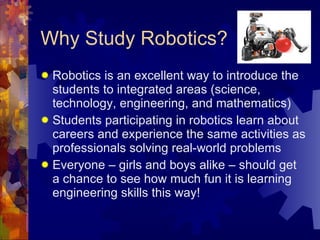
Why Study Robotics?  Robotics is an excellent way to introduce the students to integrated areas (science, technology, engineering, and mathematics) Students participating in robotics learn about  careers and experience the same activities as professionals solving real-world problems Everyone – girls and boys alike – should get a chance to see how much fun it is learning engineering skills this way!
The Least You Need One computer (ideally, a school computer lab with LEGO MINDSTORMS Education Software installed) One robotics kit, LEGO MINDSTORMS Education Base Set, per 2-10 youth - I recommend you start with a small group (e.g., 4 students) – 1 kit per 2 students is perfect – you might also want several Education Resource sets (spare parts) LEGO MINDSTORMS Education Software to program the robot
After you’ve learned the basics, then what? There are lots of robotics competitions kids can participate in, such as FIRST LEGO League (FLL)  The tournaments tend to include multipart, real-world problems and research and occur over specific time periods - for instance, the FLL challenge is released in mid-Sept. each year and competitions occur from Nov. through Feb.
The Problem-solving Process What is the robot’s task? What behaviors are needed to accomplish it? Create the program – debug then download. Run the program. Is the NXT behaving badly (doesn’t do task)? Check the robot first. If there’s a problem, can you fix it?  Next, check the program. Problem? Can you fix it? Last, go back to the beginning and reread the task. Does your program really tell the robot what it’s supposed to do?
Challenge 1: Line Program Create and test a program to make the robot go forward in a straight line for exactly 1 second Save your program as your first name and Line (e.g., File  Save as Maria Line  Enter)
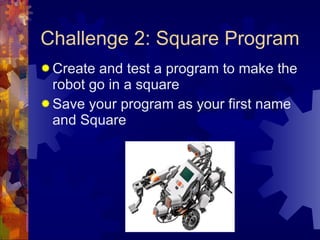
Challenge 2: Square Program Create and test a program to make the robot go in a square Save your program as your first name and Square
Challenge 3: Light Dark Program Create and test a program to make the robot: Go forward until it finds a dark line Stop for 1 second Go forward until it finds light Stop for 1 second Reverse for 4 seconds Save your program as your first name and Light Dark
Challenge 4: Tracker Program Create a program to make the robot: Go forward until it finds a dark line Move forward along the edge of the line Save your program as your first name and Tracker Hints : You need a loop, and it’s easier if the robot starts at less than a 90   angle
Challenge 5 – Bump Program Create a program to make the robot: Go forward until it finds a wall Turn moving backward for 2 seconds Repeat these behaviors for 5 “wall bumps” Save your program as your first name and Bump Hint : You’ll need to use wait until Touch in for the first step.
Bonus Beep Challenge Create a program to make the robot: Go forward until it finds a line Stop for 1 second and beep Repeat for 5 lines For fun, end with a different sound Save your program as your first name and Beep
NXT Education Links http: //firsthandtechnology .org. uk/Default .aspx http://thenxtstep.blogspot.com/ http://www.thenxtclassroom.com/ http://www. educatenxt .com/ http://www. nxtprograms .com/index1.html http://www. nxtprograms .com/index2.html
Robotics Web Sites NASA Robotics Alliance Project  http://robotics.nasa.gov/home.php NASA Robotics Curriculum Clearinghouse  http://robotics.nasa.gov/rcc/ Mars Exploration Rover Mission  http://marsrovers.jpl.nasa.gov/home/index.html Robotics Academy  http://www-education.rec.ri.cmu.edu/ FIRST LEGO League  http://www.firstlegoleague.org BEST Robotics http://www.bestinc.org/MVC/
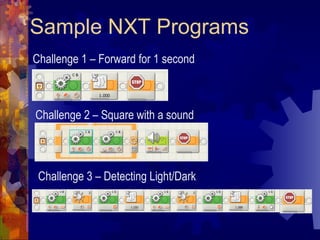
Sample NXT Programs Challenge 2 – Square with a sound Challenge 1 – Forward for 1 second Challenge 3 – Detecting Light/Dark
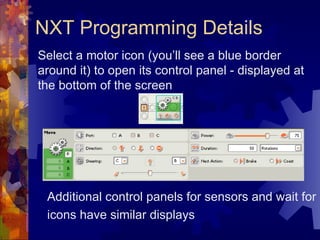
NXT Programming Details Select a motor icon (you’ll see a blue border around it) to open its control panel - displayed at the bottom of the screen Additional control panels for sensors and wait for icons have similar displays
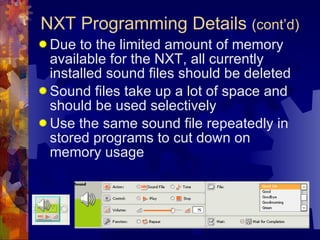
Due to the limited amount of memory available for the NXT, all currently installed sound files should be deleted Sound files take up a lot of space and should be used selectively Use the same sound file repeatedly in stored programs to cut down on memory usage NXT Programming Details  (cont’d)
Hands-on: Your Turn! Use LEGO MINDSTORMS Educator to program the NXT robot to move in a square Think about the robot’s required behaviours to move in a square  What motors have to do what for each behaviour? Which behaviours repeat? You can loop them!
Curriculum for Excellence *SUCCESSFUL LEARNERS *CONFIDENT INDIVIDUALS *RESPONSIBLE CITIZENS *EFFECTIVE CONTRIBUTORS
Unlocking Hidden Potential Games based learning is all about unlocking pupils’ hidden potential Empowering pupils to take control of their learning Encouraging pupils to mentor other pupils, share skills, work together and problem solve Teachers taking on the role of Facilitator, and pupils pushing learning forward
Games are very good at: *giving dynamic ongoing feedback *presenting challenging learning experiences *trusting in the ability of the player/learner *nurturing growth mindsets *maximising potential for peer assessment *presenting purposeful and relevant learning opportunities *ensuring assessment is not 'done to' but 'observed’ *giving players/learners the the best chance of success

The NXT Step - Assessing with Lego Robots

  • 1.
    Digital Natives *everychild born since 2000 has never known a world without the internet *their brains are hardwired to think differently, more linearly, more compatible to the way computers work, why, because they have grown up in a world of programmable toasters, phones, televisions and gadgets of all kinds *if children can build, play and understand games that work, it is possible that someday they will understand and design systems that work. And the world is full of complicated systems
  • 2.
    Assessment is forLearning If you don’t have a piece of paper in front of you and boxes to tick, how do you assess your pupils? Practical hands-on 3 dimensional learning, to demonstrate their comprehension of a subject Break your class into groups of 4 to 6 pupils These groups ought to be made up of right & left brain children, ‘thinkers & doers’, different sexes and learning abilities This ‘forces’ pupils to work together to problem solve Make notes of behavioral changes, digitally record their work, facilitate & enable I call this method ‘the great classroom leveler’
  • 3.
    A Crash Coursein LEGO NXT Robotics - Getting Started Meri V. Cummings, Ph.D. NASA-sponsored Classroom of the Future Center for Educational Technologies Wheeling Jesuit University 316 Washington Ave. Wheeling, WV 26003 Phone: 304-243-2499 E-mail: [email_address] URL: http://www.cet.edu/robotics/
  • 4.
    Why Study Robotics? Robotics is an excellent way to introduce the students to integrated areas (science, technology, engineering, and mathematics) Students participating in robotics learn about careers and experience the same activities as professionals solving real-world problems Everyone – girls and boys alike – should get a chance to see how much fun it is learning engineering skills this way!
  • 5.
    The Least YouNeed One computer (ideally, a school computer lab with LEGO MINDSTORMS Education Software installed) One robotics kit, LEGO MINDSTORMS Education Base Set, per 2-10 youth - I recommend you start with a small group (e.g., 4 students) – 1 kit per 2 students is perfect – you might also want several Education Resource sets (spare parts) LEGO MINDSTORMS Education Software to program the robot
  • 6.
    After you’ve learnedthe basics, then what? There are lots of robotics competitions kids can participate in, such as FIRST LEGO League (FLL) The tournaments tend to include multipart, real-world problems and research and occur over specific time periods - for instance, the FLL challenge is released in mid-Sept. each year and competitions occur from Nov. through Feb.
  • 7.
    The Problem-solving ProcessWhat is the robot’s task? What behaviors are needed to accomplish it? Create the program – debug then download. Run the program. Is the NXT behaving badly (doesn’t do task)? Check the robot first. If there’s a problem, can you fix it? Next, check the program. Problem? Can you fix it? Last, go back to the beginning and reread the task. Does your program really tell the robot what it’s supposed to do?
  • 8.
    Challenge 1: LineProgram Create and test a program to make the robot go forward in a straight line for exactly 1 second Save your program as your first name and Line (e.g., File  Save as Maria Line  Enter)
  • 9.
    Challenge 2: SquareProgram Create and test a program to make the robot go in a square Save your program as your first name and Square
  • 10.
    Challenge 3: LightDark Program Create and test a program to make the robot: Go forward until it finds a dark line Stop for 1 second Go forward until it finds light Stop for 1 second Reverse for 4 seconds Save your program as your first name and Light Dark
  • 11.
    Challenge 4: TrackerProgram Create a program to make the robot: Go forward until it finds a dark line Move forward along the edge of the line Save your program as your first name and Tracker Hints : You need a loop, and it’s easier if the robot starts at less than a 90  angle
  • 12.
    Challenge 5 –Bump Program Create a program to make the robot: Go forward until it finds a wall Turn moving backward for 2 seconds Repeat these behaviors for 5 “wall bumps” Save your program as your first name and Bump Hint : You’ll need to use wait until Touch in for the first step.
  • 13.
    Bonus Beep ChallengeCreate a program to make the robot: Go forward until it finds a line Stop for 1 second and beep Repeat for 5 lines For fun, end with a different sound Save your program as your first name and Beep
  • 14.
    NXT Education Linkshttp: //firsthandtechnology .org. uk/Default .aspx http://thenxtstep.blogspot.com/ http://www.thenxtclassroom.com/ http://www. educatenxt .com/ http://www. nxtprograms .com/index1.html http://www. nxtprograms .com/index2.html
  • 15.
    Robotics Web SitesNASA Robotics Alliance Project http://robotics.nasa.gov/home.php NASA Robotics Curriculum Clearinghouse http://robotics.nasa.gov/rcc/ Mars Exploration Rover Mission http://marsrovers.jpl.nasa.gov/home/index.html Robotics Academy http://www-education.rec.ri.cmu.edu/ FIRST LEGO League http://www.firstlegoleague.org BEST Robotics http://www.bestinc.org/MVC/
  • 16.
    Sample NXT ProgramsChallenge 2 – Square with a sound Challenge 1 – Forward for 1 second Challenge 3 – Detecting Light/Dark
  • 17.
    NXT Programming DetailsSelect a motor icon (you’ll see a blue border around it) to open its control panel - displayed at the bottom of the screen Additional control panels for sensors and wait for icons have similar displays
  • 18.
    Due to thelimited amount of memory available for the NXT, all currently installed sound files should be deleted Sound files take up a lot of space and should be used selectively Use the same sound file repeatedly in stored programs to cut down on memory usage NXT Programming Details (cont’d)
  • 19.
    Hands-on: Your Turn!Use LEGO MINDSTORMS Educator to program the NXT robot to move in a square Think about the robot’s required behaviours to move in a square What motors have to do what for each behaviour? Which behaviours repeat? You can loop them!
  • 20.
    Curriculum for Excellence*SUCCESSFUL LEARNERS *CONFIDENT INDIVIDUALS *RESPONSIBLE CITIZENS *EFFECTIVE CONTRIBUTORS
  • 21.
    Unlocking Hidden PotentialGames based learning is all about unlocking pupils’ hidden potential Empowering pupils to take control of their learning Encouraging pupils to mentor other pupils, share skills, work together and problem solve Teachers taking on the role of Facilitator, and pupils pushing learning forward
  • 22.
    Games are verygood at: *giving dynamic ongoing feedback *presenting challenging learning experiences *trusting in the ability of the player/learner *nurturing growth mindsets *maximising potential for peer assessment *presenting purposeful and relevant learning opportunities *ensuring assessment is not 'done to' but 'observed’ *giving players/learners the the best chance of success