
#CNX16
Evolve Your Email Creative
Identify where you are on the design sophistication spectrum
Anna Meier Litten
Manager, Creative Services
anna.meier@salesforce.com
Today’s Topics
Outlining creative strategy Identifying opportunities
with the Design
Sophistication Spectrum
Discuss your programs!
1 2 3
Creative Services
We support all stages
of email creation
Consulting
Workshops, assessments,
roadmaps
Design Systems
Template frameworks
Full-Service
Ongoing design and delivery
Outlining Creative Strategy
Laying the foundation
Outlining Creative Strategy
GOALS: What are you trying to accomplish? How will you measure success?
AUDIENCE: Who will receive this email? What is important to them?
CONTENT: What is the primary message? Why is it relevant?
ACTION: What action do you want them to take? Where will it take them?
EXPERIENCE: What is needed to make this friction-free & memorable?
​ Laying a solid foundation
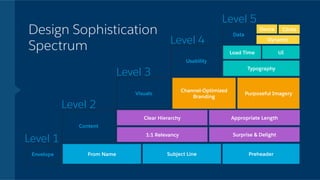
Design Sophistication
Spectrum
Aligning priorities with user experience
#CNX16
Email is experienced
in stages. Each stage
uncovers a deeper level
of engagement with
your brand.
engagement = marketing opportunity
Dynamic
Clear Hierarchy
Subject Line Preheader
Content
Envelope
Visuals
Usability
Data
From Name
1:1 Relevancy
Channel-Optimized
Branding
UILoad Time
Device
Design Sophistication
Spectrum
Level 1
Level 2
Level 3
Level 4
Level 5
Appropriate Length
Surprise & Delight
Purposeful Imagery
Typography
Clicks
Dynamic
Clear Hierarchy
Subject Line Preheader
Content
Envelope
Visuals
Usability
Data
From Name
1:1 Relevancy
Channel-Optimized
Branding
UILoad Time
Device
Design Sophistication
Spectrum
Level 1
Level 2
Level 3
Level 4
Level 5
Appropriate Length
Surprise & Delight
Purposeful Imagery
Typography
Clicks
Dynamic
Clear Hierarchy
Subject Line Preheader
Content
Envelope
Visuals
Usability
Data
From Name
1:1 Relevancy
Channel-Optimized
Branding
UILoad Time
Device
Design Sophistication
Spectrum
Level 1
Level 2
Level 3
Level 4
Level 5
Appropriate Length
Surprise & Delight
Purposeful Imagery
Typography
Clicks
Dynamic
Clear Hierarchy
Subject Line Preheader
Content
Envelope
Visuals
Usability
Data
From Name
1:1 Relevancy
Channel-Optimized
Branding
UILoad Time
Device
Design Sophistication
Spectrum
Level 1
Level 2
Level 3
Level 4
Level 5
Appropriate Length
Surprise & Delight
Purposeful Imagery
Typography
Clicks
Dynamic
Clear Hierarchy
Subject Line Preheader
Content
Envelope
Visuals
Usability
Data
From Name
1:1 Relevancy
Channel-Optimized
Branding
UILoad Time
Device
Design Sophistication
Spectrum
Level 1
Level 2
Level 3
Level 4
Level 5
Appropriate Length
Surprise & Delight
Purposeful Imagery
Typography
Clicks
Dynamic
Clear Hierarchy
Subject Line Preheader
Content
Envelope
Visuals
Usability
Data
From Name
1:1 Relevancy
Channel-Optimized
Branding
UILoad Time
Device
Design Sophistication
Spectrum
Level 1
Level 2
Level 3
Level 4
Level 5
Appropriate Length
Surprise & Delight
Purposeful Imagery
Typography
Clicks
Dynamic
Clear Hierarchy
Subject Line Preheader
Content
Envelope
Visuals
Usability
Data
From Name
1:1 Relevancy
Channel-Optimized
Branding
UILoad Time
Device
Design Sophistication
Spectrum
Level 1
Level 2
Level 3
Level 4
Level 5
Appropriate Length
Surprise & Delight
Purposeful Imagery
Typography
Clicks
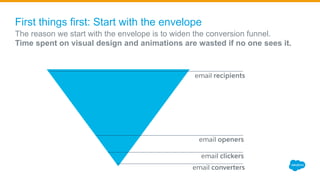
First things first: Start with the envelope
​ The reason we start with the envelope is to widen the conversion funnel.
​ Time spent on visual design and animations are wasted if no one sees it.
email recipients
email openers
email clickers
email converters
Keys to an Open-worthy
Email Envelope
1 Familiar From Name
Is it immediately recognizable? Under 35 characters?
2 Compelling or Expected Subject Line
Are the first 35 characters enticing? Would you open?
3
Compelling Preheader Snippet
Is it impactful? Does it expand on the value of the
subject line? At least 80 characters?
Clear Hierarchy
Is the important content at the top?
1:1 Relevancy
Does it deliver customer wants/needs?
Appropriate Length
Is it focused and skimmable?
Surprise & Delight
Is it memorable?
Keys to Compelling Email Content
1
2
3
4
Keys to Strong Visual Experiences in Email
1 Channel-Optimized Branding
Is it visually on brand? Is it familiar and
seamless with post-email experience?
2 Purposeful Imagery
Does it evoke the right feeling? Does it add
context and value, or is it purely decorative?
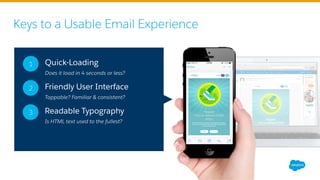
Keys to a Usable Email Experience
1 Quick-Loading
Does it load in 4 seconds or less?
2 Friendly User Interface
Tappable? Familiar & consistent?
3 Readable Typography
Is HTML text used to the fullest?
Keys to Effective Data-Driven Email
1 Device Usage
Where are your subscribers viewing
most? Is that experience optimal?
2 Click-through
Are all CTAs a seamless experience?
3 Dynamic Content
Have you included relevant
personalization?
Dynamic
Clear Hierarchy
Subject Line Preheader
Content
Envelope
Visuals
Usability
Data
From Name
1:1 Relevancy
Channel-Optimized
Branding
UILoad Time
Device
Design Sophistication
Spectrum
Level 1
Level 2
Level 3
Level 4
Level 5
Appropriate Length
Surprise & Delight
Purposeful Imagery
Typography
Clicks
#CNX16
Let’s Critique…
#CNX16
Do you begin each email
with creative strategy?
#CNX16
Where are your emails on the
design sophistication spectrum?
What we’ve learned
Outlining creative strategy Identifying opportunities
with the Design
Sophistication Spectrum
Discuss your programs!
1 2 3
#CNX16
Thank you!
anna.meier@salesforce.com

CNX16 - Evolve Your Email Creative

  • 1.
    #CNX16 Evolve Your EmailCreative Identify where you are on the design sophistication spectrum Anna Meier Litten Manager, Creative Services anna.meier@salesforce.com
  • 2.
    Today’s Topics Outlining creativestrategy Identifying opportunities with the Design Sophistication Spectrum Discuss your programs! 1 2 3
  • 3.
  • 4.
    We support allstages of email creation Consulting Workshops, assessments, roadmaps Design Systems Template frameworks Full-Service Ongoing design and delivery
  • 5.
  • 6.
    Outlining Creative Strategy GOALS:What are you trying to accomplish? How will you measure success? AUDIENCE: Who will receive this email? What is important to them? CONTENT: What is the primary message? Why is it relevant? ACTION: What action do you want them to take? Where will it take them? EXPERIENCE: What is needed to make this friction-free & memorable? ​ Laying a solid foundation
  • 7.
  • 8.
    #CNX16 Email is experienced instages. Each stage uncovers a deeper level of engagement with your brand. engagement = marketing opportunity
  • 9.
    Dynamic Clear Hierarchy Subject LinePreheader Content Envelope Visuals Usability Data From Name 1:1 Relevancy Channel-Optimized Branding UILoad Time Device Design Sophistication Spectrum Level 1 Level 2 Level 3 Level 4 Level 5 Appropriate Length Surprise & Delight Purposeful Imagery Typography Clicks
  • 10.
    Dynamic Clear Hierarchy Subject LinePreheader Content Envelope Visuals Usability Data From Name 1:1 Relevancy Channel-Optimized Branding UILoad Time Device Design Sophistication Spectrum Level 1 Level 2 Level 3 Level 4 Level 5 Appropriate Length Surprise & Delight Purposeful Imagery Typography Clicks
  • 11.
    Dynamic Clear Hierarchy Subject LinePreheader Content Envelope Visuals Usability Data From Name 1:1 Relevancy Channel-Optimized Branding UILoad Time Device Design Sophistication Spectrum Level 1 Level 2 Level 3 Level 4 Level 5 Appropriate Length Surprise & Delight Purposeful Imagery Typography Clicks
  • 12.
    Dynamic Clear Hierarchy Subject LinePreheader Content Envelope Visuals Usability Data From Name 1:1 Relevancy Channel-Optimized Branding UILoad Time Device Design Sophistication Spectrum Level 1 Level 2 Level 3 Level 4 Level 5 Appropriate Length Surprise & Delight Purposeful Imagery Typography Clicks
  • 13.
    Dynamic Clear Hierarchy Subject LinePreheader Content Envelope Visuals Usability Data From Name 1:1 Relevancy Channel-Optimized Branding UILoad Time Device Design Sophistication Spectrum Level 1 Level 2 Level 3 Level 4 Level 5 Appropriate Length Surprise & Delight Purposeful Imagery Typography Clicks
  • 14.
    Dynamic Clear Hierarchy Subject LinePreheader Content Envelope Visuals Usability Data From Name 1:1 Relevancy Channel-Optimized Branding UILoad Time Device Design Sophistication Spectrum Level 1 Level 2 Level 3 Level 4 Level 5 Appropriate Length Surprise & Delight Purposeful Imagery Typography Clicks
  • 15.
    Dynamic Clear Hierarchy Subject LinePreheader Content Envelope Visuals Usability Data From Name 1:1 Relevancy Channel-Optimized Branding UILoad Time Device Design Sophistication Spectrum Level 1 Level 2 Level 3 Level 4 Level 5 Appropriate Length Surprise & Delight Purposeful Imagery Typography Clicks
  • 16.
    First things first:Start with the envelope ​ The reason we start with the envelope is to widen the conversion funnel. ​ Time spent on visual design and animations are wasted if no one sees it. email recipients email openers email clickers email converters
  • 17.
    Keys to anOpen-worthy Email Envelope 1 Familiar From Name Is it immediately recognizable? Under 35 characters? 2 Compelling or Expected Subject Line Are the first 35 characters enticing? Would you open? 3 Compelling Preheader Snippet Is it impactful? Does it expand on the value of the subject line? At least 80 characters?
  • 18.
    Clear Hierarchy Is theimportant content at the top? 1:1 Relevancy Does it deliver customer wants/needs? Appropriate Length Is it focused and skimmable? Surprise & Delight Is it memorable? Keys to Compelling Email Content 1 2 3 4
  • 19.
    Keys to StrongVisual Experiences in Email 1 Channel-Optimized Branding Is it visually on brand? Is it familiar and seamless with post-email experience? 2 Purposeful Imagery Does it evoke the right feeling? Does it add context and value, or is it purely decorative?
  • 20.
    Keys to aUsable Email Experience 1 Quick-Loading Does it load in 4 seconds or less? 2 Friendly User Interface Tappable? Familiar & consistent? 3 Readable Typography Is HTML text used to the fullest?
  • 21.
    Keys to EffectiveData-Driven Email 1 Device Usage Where are your subscribers viewing most? Is that experience optimal? 2 Click-through Are all CTAs a seamless experience? 3 Dynamic Content Have you included relevant personalization?
  • 22.
    Dynamic Clear Hierarchy Subject LinePreheader Content Envelope Visuals Usability Data From Name 1:1 Relevancy Channel-Optimized Branding UILoad Time Device Design Sophistication Spectrum Level 1 Level 2 Level 3 Level 4 Level 5 Appropriate Length Surprise & Delight Purposeful Imagery Typography Clicks
  • 23.
  • 24.
    #CNX16 Do you begineach email with creative strategy?
  • 25.
    #CNX16 Where are youremails on the design sophistication spectrum?
  • 26.
    What we’ve learned Outliningcreative strategy Identifying opportunities with the Design Sophistication Spectrum Discuss your programs! 1 2 3
  • 27.