Email Marketing Essentials  Kristy Amy May 2008 [email_address] P: 440-463-2183
Agenda 8 Keys for Effective Email Marketing Current Trends Email Tools
8 Keys for Effective Email Marketing
How to improve email effectiveness Start with an Email Communications Plan.
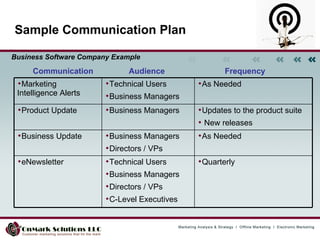
Sample Communication Plan Communication  Audience Frequency Business Software Company Example Quarterly Technical Users Business Managers Directors / VPs C-Level Executives eNewsletter As Needed Business Managers Directors / VPs Business Update Updates to the product suite New releases Business Managers Product Update As Needed Technical Users Business Managers Marketing Intelligence Alerts
How to improve email effectiveness Start with an Email Communications Plan.  Practice Good Design.
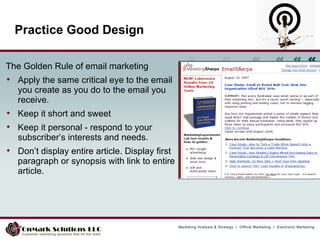
The Golden Rule of email marketing Apply the same critical eye to the email you create as you do to the email you receive.  Keep it short and sweet  Keep it personal - respond to your subscriber’s interests and needs.  Don’t display entire article. Display first paragraph or synopsis with link to entire article. Practice Good Design
Who cares who it comes from? Everyone! Use a consistent, plain English “From” name Use a simple from address such as  [email_address] Some email clients will only display the “from” address and not the “from” name Some display only the “from” name, not the address  Unless an individual with your organization has a strong personal brand, avoid using a person's name as "the from" name.
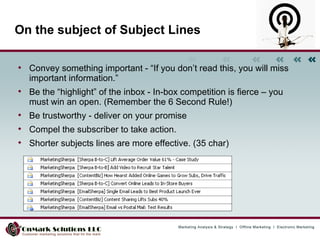
On the subject of Subject Lines Convey something important - “If you don’t read this, you will miss important information.”  Be the “highlight” of the inbox - In-box competition is fierce – you must win an open. (Remember the 6 Second Rule!)  Be trustworthy - deliver on your promise  Compel the subscriber to take action.  Shorter subjects lines are more effective. (35 char)
Entice an open Make the “call to action” visible in the preview pane Consider an images disabled layout Use an “alt” tag on any image to ensure text display Design with the Preview Pane in Mind Place text above your header image
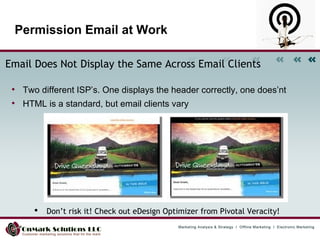
Permission Email at Work Email Does Not Display the Same Across Email Clients   Two different ISP’s. One displays the header correctly, one does’nt HTML is a standard, but email clients vary  •  Don’t risk it! Check out eDesign Optimizer from Pivotal Veracity!
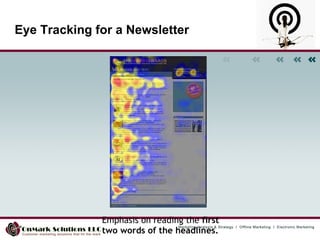
Eye Tracking for a Newsletter Emphasis on reading the  first two words of the headlines.
W3C Markup Validation Service:  http://validator.w3.org/  Non-compliant HTML: a leading SPAM indicator  AOL/Firewalls reject invalid HTML Can cause rendering problems Scripts: Can be security risks Most are stripped out Some ISP’s block messages that contain them  Validate your HTML / Avoid Pitfalls
How to improve email effectiveness Start with an Email Communications Plan.  Practice Good Design.  Provide Content that is Relevant and Timely.
Email works best when relevant “ Relevant e-mail campaigns increase net profit by an average of  18 times  more  than broadcast e-mailings.”  Source: Jupiter Research  Curious
Top 5 E-mail Content Mistakes  Making it ‘all about us’ instead of focusing on the readers’ needs Not using your prime real estate to engage the reader Assuming your e-mail will be ‘read’ – not just skimmed Skipping the proofing and QA check, on body content and subject line Ignoring the 60/40 editorial to promotion content ratio
Start with an Email Communications Plan.  Practice Good Design.  Provide Content that is Relevant and Timely.  Send Email “On Behalf” of the Relationship Owner.  How to improve email effectiveness
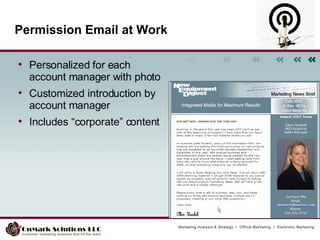
Permission Email at Work Personalized for each account manager with photo Customized introduction by account manager Includes “corporate” content
How to improve email effectiveness Start with an Email Communications Plan.  Practice Good Design.  Provide Content that is Relevant and Timely.  Send Email “On Behalf” of the Relationship Owner.  Test to Optimize Email Content and Layout.
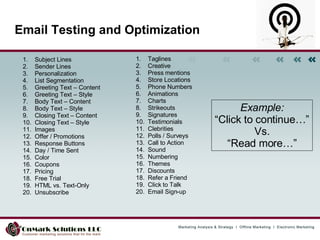
Email Testing and Optimization Subject Lines Sender Lines Personalization List Segmentation Greeting Text – Content Greeting Text – Style Body Text – Content Body Text – Style Closing Text – Content Closing Text – Style Images Offer / Promotions Response Buttons Day / Time Sent Color Coupons Pricing Free Trial HTML vs. Text-Only Unsubscribe Taglines Creative Press mentions Store Locations Phone Numbers Animations Charts Strikeouts Signatures Testimonials Clebrities Polls / Surveys Call to Action  Sound Numbering Themes Discounts Refer a Friend Click to Talk Email Sign-up Example: “ Click to continue…” Vs. “ Read more…”
How to improve email effectiveness Start with an Email Communications Plan.  Practice Good Design.  Provide Content that is Relevant and Timely.  Send Email “On Behalf” of the Relationship Owner.  Test to Optimize Email Content and Layout.  Use Web Analytics to Optimize Email Performance.
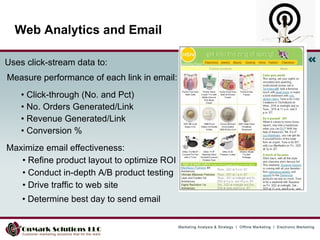
Web Analytics and Email Uses click-stream data to:   Measure performance of each link in email: •  Click-through (No. and Pct)  •  No. Orders Generated/Link  •  Revenue Generated/Link •  Conversion %  Maximize email effectiveness:  •  Refine product layout to optimize ROI  •  Conduct in-depth A/B product testing  •  Drive traffic to web site  •  Determine best day to send email
How to improve email effectiveness Start with an Email Communications Plan.  Practice Good Design.  Provide Content that is Relevant and Timely.  Send Email “On Behalf” of the Relationship Owner.  Test to Optimize Email Content and Layout.  Use Web Analytics to Optimize Email Performance.  Integrate your Email System with your CRM System .
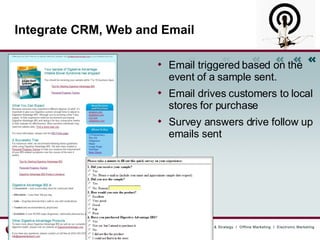
Integrate CRM, Web and Email Email triggered based on the event of a sample sent. Email drives customers to local stores for purchase Survey answers drive follow up emails sent
How to improve email effectiveness Start with an Email Communications Plan.  Practice Good Design.  Provide Content that is Relevant and Timely.  Send Email “On Behalf” of the Relationship Owner.  Test to Optimize Email Content and Layout.  Use Web Analytics to Optimize Email Performance.  Integrate your Email System with your CRM System.  Be Relentless About Deliverability.
Why ISP’s Block E-Mail or Send to Bulk ISPs block e-mail or route it to the bulk folder for four primary reasons: Technical sending problems (incorrect message headers, authentication problems, no reverse DNS entries) Excessive invalid addresses Excessive complaint levels Content that appears to be spam http://www.clickz.com/showPage.html?page=3625110
How to Navigate Spam Filters Avoid All Capital Letters in Subject line.  Reduce Caps in Body Copy.  Avoid Symbols like: !!!, and $$$  Avoid Words and Phrases Like: “Click Here,” “FREE,” “Limited Time Offer,” “Be your own boss” …  Use Bright Colors and Large Fonts Sparingly  Look Like a Newsletter - Use of Date, Month, and Frequency Reduces SPAM Score Limit your Email Message Size to 20K to 40K
How to improve deliverability Switch to a Private IP. If you send through a Public IP and another sender is blocked by an ISP, you will also be blocked.  Maintain the same “From” address Ask to be added to the subscriber’s address book or “Safe Sender” list Remove “bounced” email addresses from your mailing list.  If an address has produced a soft bounce three times in a row during the course of 21 days or more, remove it temporarily Conduct an Email Deliverability Audit. www.emaildeliveryaudit.com
Avoiding the SPAM Trap Watch for  alerts and reports  from anti-spam and anti-virus companies reporting spam and virus outbreaks keyed to specific events.  Take extra care if your marketing program revolves around key community events, such as product launches or alerts.  Patrol your inboxes and junk folders to see what spammers are using for subject lines and message content http://www.clickz.com/showPage.html?page=3625219
Industries Hardest Hit by Spam Technology Healthcare Financial services Luxury retail goods. (How many high-quality Rolex watch replicas have  you  bought lately?)
Techie Stuff on Deliverability 1. Configuration of SPF which stands for Sender Policy Framework. Here is the overview link: http://www.openspf.org/  This is a text entry to your DNS entry which lists the email servers (IP addresses) which are approved for sending email on your behalf. http://www.openspf.org/Tools  http://old.openspf.org/wizard.html  2. Configuration of Sender ID. This is Microsoft’s version of SPF. This can be confusing because you sometimes see SPF and SenderID referenced in the same support docs. However, these two items are different. Each tests a different level of the email header.  http://www.microsoft.com/mscorp/safety/technologies/senderid/default.mspx  http://www.microsoft.com/mscorp/safety/technologies/senderid/resources.mspx  3. Configuration of SPF 2.0 which needs to be configured. There is a useful overview doc here: http://en.wikipedia.org/wiki/Sender_ID  4. Setup of  Domain Key. This is another piece of the technical puzzle to help with deliverability. The setup is similar to the SPF key but a little more involved.  http://www.dkim.org/ 5. Testing your SPF / SenderID and Domain Key setup. ** Once you have done the above, you can test it here. http://senderid.espcoalition.org/ 6. Sender Score Certified Mail Program – This is becoming increasingly important as it weighs heavily towards deliverability at Hotmail. Joining the Sender Score program will also improve deliverability at Comcast, and  RoadRunner, and is gaining momentum at additional ISPs and filtering companies like SpamAssassin, IronPort Systems--they own SpamCop, and Barracuda. There is a configuration and a maintenance fee for participating in this program. http://www.senderscorecertified.com/about/self_assessment.php
Current Email Trends
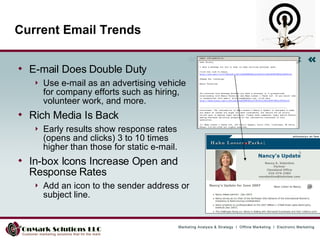
Current Email Trends E-mail Does Double Duty Use e-mail as an advertising vehicle for company efforts such as hiring, volunteer work, and more. Rich Media Is Back Early results show response rates (opens and clicks) 3 to 10 times higher than those for static e-mail.  In-box Icons Increase Open and Response Rates Add an icon to the sender address or subject line.
E-Newsletter Thoughts Frequency doesn't matter if the content is relevant and truly needed.  One-pagers are more digestible.  E-newsletter readers can't resist new e-newsletters. 16 e-newsletters is the limit for most people
Email Tools
E-mail Resources List of email marketing resources maintained by industry experts. www.wdfm.com/publish/email_marketing/index.htm http://www.espcoalition.org/  - Email Sender & Provider Coalition Content checker. Tools to test your message against the SPAM filters. www.lyris.com/contentchecker/ -- Free tool www.spamcheck.sitesell.com/ Research, trend reports, and news on email marketing.  www.marketingsherpa.com www.optinnews.com www.postmasterdirect.com/signup_landing2.htm www.newsletterbiz.com -- Paid newsletter for companies serious about sending email newsletters. Provides expert advice on content and execution.
Email Application Service Providers Blue Hornet CheetahMail Constant Contact Digital Impact EmailLabs ExactTarget iContact iPost Listrak Lyris Mail Chimp MyEmma Responsys RightNowTechnologies SilverPop StrongMail Topica Vertical Response WhatCounts YesMail
Raffle
Kristy Amy President OnMark Solutions P: 440-463-2183 [email_address] Web addresses:  www.OnmarkSolutions.com www.SmallBusinessEmailMarketing.com   Thank You and Questions!

EMarketing Techniques Conference_Emailmarketingessentials May2008

  • 1.
    Email Marketing Essentials Kristy Amy May 2008 [email_address] P: 440-463-2183
  • 2.
    Agenda 8 Keysfor Effective Email Marketing Current Trends Email Tools
  • 3.
    8 Keys forEffective Email Marketing
  • 4.
    How to improveemail effectiveness Start with an Email Communications Plan.
  • 5.
    Sample Communication PlanCommunication Audience Frequency Business Software Company Example Quarterly Technical Users Business Managers Directors / VPs C-Level Executives eNewsletter As Needed Business Managers Directors / VPs Business Update Updates to the product suite New releases Business Managers Product Update As Needed Technical Users Business Managers Marketing Intelligence Alerts
  • 6.
    How to improveemail effectiveness Start with an Email Communications Plan. Practice Good Design.
  • 7.
    The Golden Ruleof email marketing Apply the same critical eye to the email you create as you do to the email you receive. Keep it short and sweet Keep it personal - respond to your subscriber’s interests and needs. Don’t display entire article. Display first paragraph or synopsis with link to entire article. Practice Good Design
  • 8.
    Who cares whoit comes from? Everyone! Use a consistent, plain English “From” name Use a simple from address such as [email_address] Some email clients will only display the “from” address and not the “from” name Some display only the “from” name, not the address Unless an individual with your organization has a strong personal brand, avoid using a person's name as "the from" name.
  • 9.
    On the subjectof Subject Lines Convey something important - “If you don’t read this, you will miss important information.” Be the “highlight” of the inbox - In-box competition is fierce – you must win an open. (Remember the 6 Second Rule!) Be trustworthy - deliver on your promise Compel the subscriber to take action. Shorter subjects lines are more effective. (35 char)
  • 10.
    Entice an openMake the “call to action” visible in the preview pane Consider an images disabled layout Use an “alt” tag on any image to ensure text display Design with the Preview Pane in Mind Place text above your header image
  • 11.
    Permission Email atWork Email Does Not Display the Same Across Email Clients Two different ISP’s. One displays the header correctly, one does’nt HTML is a standard, but email clients vary • Don’t risk it! Check out eDesign Optimizer from Pivotal Veracity!
  • 12.
    Eye Tracking fora Newsletter Emphasis on reading the first two words of the headlines.
  • 13.
    W3C Markup ValidationService: http://validator.w3.org/ Non-compliant HTML: a leading SPAM indicator AOL/Firewalls reject invalid HTML Can cause rendering problems Scripts: Can be security risks Most are stripped out Some ISP’s block messages that contain them Validate your HTML / Avoid Pitfalls
  • 14.
    How to improveemail effectiveness Start with an Email Communications Plan. Practice Good Design. Provide Content that is Relevant and Timely.
  • 15.
    Email works bestwhen relevant “ Relevant e-mail campaigns increase net profit by an average of 18 times more than broadcast e-mailings.” Source: Jupiter Research Curious
  • 16.
    Top 5 E-mailContent Mistakes Making it ‘all about us’ instead of focusing on the readers’ needs Not using your prime real estate to engage the reader Assuming your e-mail will be ‘read’ – not just skimmed Skipping the proofing and QA check, on body content and subject line Ignoring the 60/40 editorial to promotion content ratio
  • 17.
    Start with anEmail Communications Plan. Practice Good Design. Provide Content that is Relevant and Timely. Send Email “On Behalf” of the Relationship Owner. How to improve email effectiveness
  • 18.
    Permission Email atWork Personalized for each account manager with photo Customized introduction by account manager Includes “corporate” content
  • 19.
    How to improveemail effectiveness Start with an Email Communications Plan. Practice Good Design. Provide Content that is Relevant and Timely. Send Email “On Behalf” of the Relationship Owner. Test to Optimize Email Content and Layout.
  • 20.
    Email Testing andOptimization Subject Lines Sender Lines Personalization List Segmentation Greeting Text – Content Greeting Text – Style Body Text – Content Body Text – Style Closing Text – Content Closing Text – Style Images Offer / Promotions Response Buttons Day / Time Sent Color Coupons Pricing Free Trial HTML vs. Text-Only Unsubscribe Taglines Creative Press mentions Store Locations Phone Numbers Animations Charts Strikeouts Signatures Testimonials Clebrities Polls / Surveys Call to Action Sound Numbering Themes Discounts Refer a Friend Click to Talk Email Sign-up Example: “ Click to continue…” Vs. “ Read more…”
  • 21.
    How to improveemail effectiveness Start with an Email Communications Plan. Practice Good Design. Provide Content that is Relevant and Timely. Send Email “On Behalf” of the Relationship Owner. Test to Optimize Email Content and Layout. Use Web Analytics to Optimize Email Performance.
  • 22.
    Web Analytics andEmail Uses click-stream data to: Measure performance of each link in email: • Click-through (No. and Pct) • No. Orders Generated/Link • Revenue Generated/Link • Conversion % Maximize email effectiveness: • Refine product layout to optimize ROI • Conduct in-depth A/B product testing • Drive traffic to web site • Determine best day to send email
  • 23.
    How to improveemail effectiveness Start with an Email Communications Plan. Practice Good Design. Provide Content that is Relevant and Timely. Send Email “On Behalf” of the Relationship Owner. Test to Optimize Email Content and Layout. Use Web Analytics to Optimize Email Performance. Integrate your Email System with your CRM System .
  • 24.
    Integrate CRM, Weband Email Email triggered based on the event of a sample sent. Email drives customers to local stores for purchase Survey answers drive follow up emails sent
  • 25.
    How to improveemail effectiveness Start with an Email Communications Plan. Practice Good Design. Provide Content that is Relevant and Timely. Send Email “On Behalf” of the Relationship Owner. Test to Optimize Email Content and Layout. Use Web Analytics to Optimize Email Performance. Integrate your Email System with your CRM System. Be Relentless About Deliverability.
  • 26.
    Why ISP’s BlockE-Mail or Send to Bulk ISPs block e-mail or route it to the bulk folder for four primary reasons: Technical sending problems (incorrect message headers, authentication problems, no reverse DNS entries) Excessive invalid addresses Excessive complaint levels Content that appears to be spam http://www.clickz.com/showPage.html?page=3625110
  • 27.
    How to NavigateSpam Filters Avoid All Capital Letters in Subject line. Reduce Caps in Body Copy. Avoid Symbols like: !!!, and $$$ Avoid Words and Phrases Like: “Click Here,” “FREE,” “Limited Time Offer,” “Be your own boss” … Use Bright Colors and Large Fonts Sparingly Look Like a Newsletter - Use of Date, Month, and Frequency Reduces SPAM Score Limit your Email Message Size to 20K to 40K
  • 28.
    How to improvedeliverability Switch to a Private IP. If you send through a Public IP and another sender is blocked by an ISP, you will also be blocked. Maintain the same “From” address Ask to be added to the subscriber’s address book or “Safe Sender” list Remove “bounced” email addresses from your mailing list. If an address has produced a soft bounce three times in a row during the course of 21 days or more, remove it temporarily Conduct an Email Deliverability Audit. www.emaildeliveryaudit.com
  • 29.
    Avoiding the SPAMTrap Watch for alerts and reports from anti-spam and anti-virus companies reporting spam and virus outbreaks keyed to specific events. Take extra care if your marketing program revolves around key community events, such as product launches or alerts. Patrol your inboxes and junk folders to see what spammers are using for subject lines and message content http://www.clickz.com/showPage.html?page=3625219
  • 30.
    Industries Hardest Hitby Spam Technology Healthcare Financial services Luxury retail goods. (How many high-quality Rolex watch replicas have you bought lately?)
  • 31.
    Techie Stuff onDeliverability 1. Configuration of SPF which stands for Sender Policy Framework. Here is the overview link: http://www.openspf.org/ This is a text entry to your DNS entry which lists the email servers (IP addresses) which are approved for sending email on your behalf. http://www.openspf.org/Tools http://old.openspf.org/wizard.html 2. Configuration of Sender ID. This is Microsoft’s version of SPF. This can be confusing because you sometimes see SPF and SenderID referenced in the same support docs. However, these two items are different. Each tests a different level of the email header. http://www.microsoft.com/mscorp/safety/technologies/senderid/default.mspx http://www.microsoft.com/mscorp/safety/technologies/senderid/resources.mspx 3. Configuration of SPF 2.0 which needs to be configured. There is a useful overview doc here: http://en.wikipedia.org/wiki/Sender_ID 4. Setup of Domain Key. This is another piece of the technical puzzle to help with deliverability. The setup is similar to the SPF key but a little more involved. http://www.dkim.org/ 5. Testing your SPF / SenderID and Domain Key setup. ** Once you have done the above, you can test it here. http://senderid.espcoalition.org/ 6. Sender Score Certified Mail Program – This is becoming increasingly important as it weighs heavily towards deliverability at Hotmail. Joining the Sender Score program will also improve deliverability at Comcast, and RoadRunner, and is gaining momentum at additional ISPs and filtering companies like SpamAssassin, IronPort Systems--they own SpamCop, and Barracuda. There is a configuration and a maintenance fee for participating in this program. http://www.senderscorecertified.com/about/self_assessment.php
  • 32.
  • 33.
    Current Email TrendsE-mail Does Double Duty Use e-mail as an advertising vehicle for company efforts such as hiring, volunteer work, and more. Rich Media Is Back Early results show response rates (opens and clicks) 3 to 10 times higher than those for static e-mail. In-box Icons Increase Open and Response Rates Add an icon to the sender address or subject line.
  • 34.
    E-Newsletter Thoughts Frequencydoesn't matter if the content is relevant and truly needed. One-pagers are more digestible. E-newsletter readers can't resist new e-newsletters. 16 e-newsletters is the limit for most people
  • 35.
  • 36.
    E-mail Resources Listof email marketing resources maintained by industry experts. www.wdfm.com/publish/email_marketing/index.htm http://www.espcoalition.org/ - Email Sender & Provider Coalition Content checker. Tools to test your message against the SPAM filters. www.lyris.com/contentchecker/ -- Free tool www.spamcheck.sitesell.com/ Research, trend reports, and news on email marketing. www.marketingsherpa.com www.optinnews.com www.postmasterdirect.com/signup_landing2.htm www.newsletterbiz.com -- Paid newsletter for companies serious about sending email newsletters. Provides expert advice on content and execution.
  • 37.
    Email Application ServiceProviders Blue Hornet CheetahMail Constant Contact Digital Impact EmailLabs ExactTarget iContact iPost Listrak Lyris Mail Chimp MyEmma Responsys RightNowTechnologies SilverPop StrongMail Topica Vertical Response WhatCounts YesMail
  • 38.
  • 39.
    Kristy Amy PresidentOnMark Solutions P: 440-463-2183 [email_address] Web addresses: www.OnmarkSolutions.com www.SmallBusinessEmailMarketing.com Thank You and Questions!