ShellBlack.com
Introduction to Campaigns
December 2013

Copyright © ShellBlack.com, LLC
Target audience for this session:
• 

I'm not using this area of Salesforce today and want to
learn more

• 

I am using this area of Salesforce today, but want to pick
up some tips or confirm "I'm doing it right”

• 

Functional Roles: Marketing & System Administrators

Copyright © ShellBlack.com, LLC
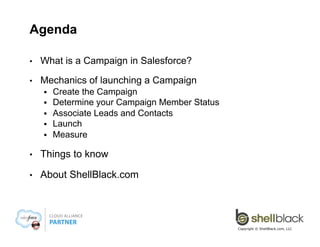
Agenda
• 

What is a Campaign in Salesforce?

• 

Mechanics of launching a Campaign
§ 
§ 
§ 
§ 
§ 

Create the Campaign
Determine your Campaign Member Status
Associate Leads and Contacts
Launch & Associate Opportunities
Measure

• 

Things to know

• 

About ShellBlack.com

Copyright © ShellBlack.com, LLC
What is a Campaign?
• 

A Campaign is a marketing initiative that you track in
Salesforce

• 

A Campaign allows you to see if your marketing spend was
effective in generating a response, and if those responses
resulted in revenue

• 

When setup correctly, Campaigns let you calculate a Return
On Investment (ROI)
• 

Won Opportunity $s > $ Spent on a Campaign

Copyright © ShellBlack.com, LLC
Campaigns - It's all about ROI!
• 

Campaigns allow you to see which initiatives (marketing spend)
have the best return

• 

For example:
§ 

Was attending the trade show in Chicago last year worth it, and if so,
should we buy a bigger booth next year?

§ 

We entertained guests with our stadium box seats, did it close any
business?

§ 

What advertising components of our product launch produced the best
results?

Copyright © ShellBlack.com, LLC
With Campaigns, you can:
• 

Target and market to existing Leads and Contacts

• 

Generate new Leads

• 

Track response rates on a Campaign

• 

Track conversion rates on a Campaign

• 

Attribute Opportunities to a Campaign

• 

Calculate ROI

Copyright © ShellBlack.com, LLC
What can be a Campaign?
• 

Any initiative (spend) to drive new Leads and Revenue
• 
• 
• 
• 
• 
• 
• 

Email
Outdoor Advertising
Print
Social Media
Direct Mail
Trade Shows
Telemarketing

• 
• 
• 
• 
• 
• 
• 

Customer Events
Training (yes, training)
PPC, Organic Web Traffic
Public Relations / Press Releases
Client Entertainment
Promotions
Etc

Copyright © ShellBlack.com, LLC
The Campaign Tab
• 

The Campaign tab can be configured like any other
object in Salesforce and supports:
§ 
§ 
§ 
§ 

• 

Custom Fields
Validation Rules
Workflow
Record Types and Page Layouts

Campaign records are unique in that they can rollup data about Leads, Contacts and Opportunities
to facilitate reporting on response rates,
conversion and ROI

Copyright © ShellBlack.com, LLC

8
Mechanics of launching a Campaign
• 

Create the Campaign

• 

Determine your Campaign Member Status

• 

Target Leads and Contacts

• 

Launch and communicate!

• 

Measure

Copyright © ShellBlack.com, LLC
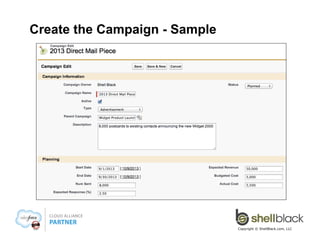
Create the Campaign – standard fields to
know
§ 

Parent Campaign – allows multiple individual Campaigns to be
associated to a larger initiative
– 

§ 

Type – A pick list used to categorize and segment your Campaigns
– 

§ 

e.g. Print, Direct Mail, Outdoor, Email, Webinar, Social Media, PR, etc

Status – A "lifecycle" pick list field
– 

§ 

e.g. 2014 Product Launch

e.g. Idea, Planned, Budgeted, Deployed, In Progress, Complete, Abandoned

Start Date and End Date – helpful if a promotion runs for a period of
time (but does not make the Campaign visible to users)

Copyright © ShellBlack.com, LLC
Create the Campaign – standard fields to
know (cont.)
§ 

Active – This checkbox is what makes a Campaign visible to
your users! Be sure to “retire” old Campaigns by unchecking
this box

§ 

Expected Revenue – what you expect in won Opportunities

§ 

Budgeted Costs – what you budgeted

§ 

Actual Costs – (used in ROI calculation) some companies use
a child object with summary roll-up

§ 

Num Sent and Expected Response – not very applicable if
you’re not targeting existing Leads and Contacts

Copyright © ShellBlack.com, LLC
Create the Campaign - Sample

Copyright © ShellBlack.com, LLC
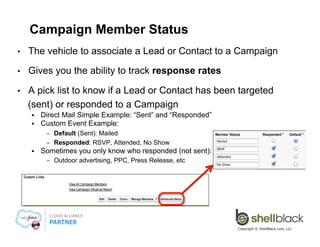
Campaign Member Status
• 

The vehicle to associate a Lead or Contact to a Campaign

• 

Gives you the ability to track response rates

• 

A pick list to know if a Lead or Contact has been targeted
(sent) or responded to a Campaign
§ 
§ 

Direct Mail Simple Example: “Sent” and “Responded”
Custom Event Example:
– 
– 

§ 

Default (Sent): Mailed
Responded: RSVP, Attended, No Show

Sometimes you only know who responded (not sent):
– 

Outdoor advertising, PPC, Press Release, etc

Copyright © ShellBlack.com, LLC
Campaign Members allows a Lead or Contact
to be associated to Multiple Campaigns
Campaign
Members
Campaign
Members
Campaign
Members

Copyright © ShellBlack.com, LLC

14
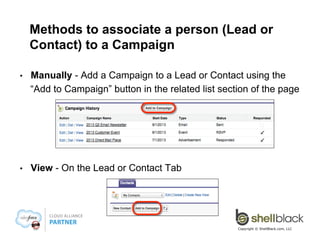
Methods to associate a person (Lead or
Contact) to a Campaign
• 

Manually - Add a Campaign to a Lead or Contact using the
“Add to Campaign” button in the related list section of the page

• 

View - On the Lead or Contact Tab

Copyright © ShellBlack.com, LLC
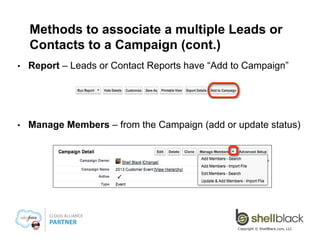
Methods to associate a multiple Leads or
Contacts to a Campaign (cont.)
• 

Report – Leads or Contact Reports have “Add to Campaign”

• 

Manage Members – from the Campaign (add or update status)

Copyright © ShellBlack.com, LLC
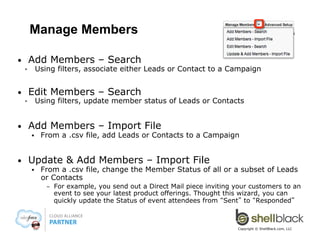
Manage Members
Add Members – Search

• 
§ 

Edit Members – Search

• 
§ 

• 

Using filters, associate either Leads or Contact to a Campaign

Using filters, update member status of Leads or Contacts

Add Members – Import File
§ 

• 

From a .csv file, add Leads or Contacts to a Campaign

Update & Add Members – Import File
§ 

From a .csv file, change the Member Status of all or a subset of Leads
or Contacts
– 

For example, you send out a Direct Mail piece inviting your customers to an
event to see your latest product offerings. Thought this wizard, you can
quickly update the Status of event attendees from “Sent” to “Responded”

Copyright © ShellBlack.com, LLC
Launch!
• 

Check the “Active” checkbox on the Campaign

• 

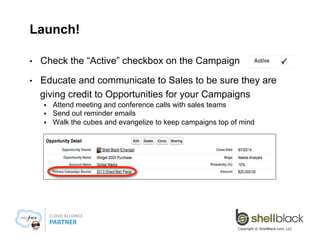
Educate and communicate to Sales to be sure they are
giving credit to Opportunities for your Campaigns
§ 
§ 
§ 

Attend meeting and conference calls with sales teams
Send out reminder emails
Walk the cubes and evangelize to keep campaigns top of mind

Copyright © ShellBlack.com, LLC
Primary Campaign Source (Opportunities)
• 

Primary Campaign Source is how you associate an
Opportunity to a Campaign

• 

On conversion, the Campaign most recently
associated to the Lead will automatically map to
“Primary Campaign Source ” on Opportunities

Copyright © ShellBlack.com, LLC

19
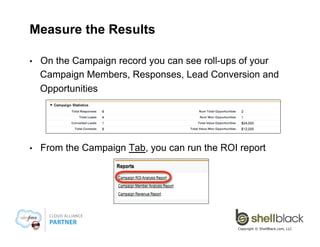
Measure the Results
• 

On the Campaign record you can see roll-ups of your
Campaign Members, Responses, Lead Conversion and
Opportunities

• 

From the Campaign Tab, you can run the ROI report

Copyright © ShellBlack.com, LLC
Associated Campaign Members and
Opportunities Drive the Campaign Statistics

Copyright © ShellBlack.com, LLC

21
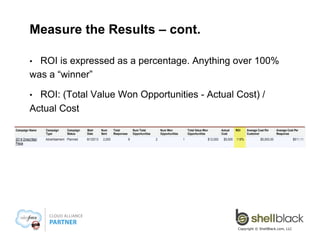
Measure the Results – cont.
ROI is expressed as a percentage. Anything over 100%
was a “winner”
• 

ROI: (Total Value Won Opportunities - Actual Cost) /
Actual Cost
• 

Copyright © ShellBlack.com, LLC
Additional things to know…
• 

To create, edit or delete a Campaign the “Marketing User”
needs to be checked on User record

• 

The maximum number of Leads/Contacts that can be
added from a report or a import file is 50,000

• 

The maximum number of Leads/Contacts that can be
added from a View is 250

• 

Use the API (Data Loader) for more than 50,000 Records

Copyright © ShellBlack.com, LLC
About ShellBlack.com
• 

Strictly Salesforce – Our sole focus on Salesforce
technologies allows us to maintain deep domain expertise on
the platform

• 

Community Leadership – Shell Black is a Salesforce MVP
and members of our leadership team chair both the Dallas
Salesforce User Group and the Dallas Non-profit User Group

• 

Proven Process – Our implementation methodology has
been fine tuned over hundreds of projects for efficiency,
effectiveness and on time delivery

• 

Silver Cloud Alliance Partner – Established in 2010.
Delivering ~60 projects per year. All resources are in Dallas
TX (no offshore)

Copyright © ShellBlack.com, LLC

24
Thank You!
Company Website: www.ShellBlack.com
SlideShare Presentations: www.slideshare.net/ShellBlack
YouTube Channel: http://www.youtube.com/user/ShellBlackLLC

For Salesforce news, updates and information follow us socially:
§ 

Facebook: Facebook.com/ShellBlack.com.LLC

§ 

Twitter: @Shell_Black

§ 

LinkedIn: Linkedin.com/company/shellblack-com-llc/

Copyright © ShellBlack.com, LLC

25

Introduction to Campaigns in Salesforce - Create, Manage, Launch, and Measure

  • 1.
    ShellBlack.com Introduction to Campaigns December2013 Copyright © ShellBlack.com, LLC
  • 2.
    Target audience forthis session: •  I'm not using this area of Salesforce today and want to learn more •  I am using this area of Salesforce today, but want to pick up some tips or confirm "I'm doing it right” •  Functional Roles: Marketing & System Administrators Copyright © ShellBlack.com, LLC
  • 3.
    Agenda •  What is aCampaign in Salesforce? •  Mechanics of launching a Campaign §  §  §  §  §  Create the Campaign Determine your Campaign Member Status Associate Leads and Contacts Launch & Associate Opportunities Measure •  Things to know •  About ShellBlack.com Copyright © ShellBlack.com, LLC
  • 4.
    What is aCampaign? •  A Campaign is a marketing initiative that you track in Salesforce •  A Campaign allows you to see if your marketing spend was effective in generating a response, and if those responses resulted in revenue •  When setup correctly, Campaigns let you calculate a Return On Investment (ROI) •  Won Opportunity $s > $ Spent on a Campaign Copyright © ShellBlack.com, LLC
  • 5.
    Campaigns - It'sall about ROI! •  Campaigns allow you to see which initiatives (marketing spend) have the best return •  For example: §  Was attending the trade show in Chicago last year worth it, and if so, should we buy a bigger booth next year? §  We entertained guests with our stadium box seats, did it close any business? §  What advertising components of our product launch produced the best results? Copyright © ShellBlack.com, LLC
  • 6.
    With Campaigns, youcan: •  Target and market to existing Leads and Contacts •  Generate new Leads •  Track response rates on a Campaign •  Track conversion rates on a Campaign •  Attribute Opportunities to a Campaign •  Calculate ROI Copyright © ShellBlack.com, LLC
  • 7.
    What can bea Campaign? •  Any initiative (spend) to drive new Leads and Revenue •  •  •  •  •  •  •  Email Outdoor Advertising Print Social Media Direct Mail Trade Shows Telemarketing •  •  •  •  •  •  •  Customer Events Training (yes, training) PPC, Organic Web Traffic Public Relations / Press Releases Client Entertainment Promotions Etc Copyright © ShellBlack.com, LLC
  • 8.
    The Campaign Tab •  TheCampaign tab can be configured like any other object in Salesforce and supports: §  §  §  §  •  Custom Fields Validation Rules Workflow Record Types and Page Layouts Campaign records are unique in that they can rollup data about Leads, Contacts and Opportunities to facilitate reporting on response rates, conversion and ROI Copyright © ShellBlack.com, LLC 8
  • 9.
    Mechanics of launchinga Campaign •  Create the Campaign •  Determine your Campaign Member Status •  Target Leads and Contacts •  Launch and communicate! •  Measure Copyright © ShellBlack.com, LLC
  • 10.
    Create the Campaign– standard fields to know §  Parent Campaign – allows multiple individual Campaigns to be associated to a larger initiative –  §  Type – A pick list used to categorize and segment your Campaigns –  §  e.g. Print, Direct Mail, Outdoor, Email, Webinar, Social Media, PR, etc Status – A "lifecycle" pick list field –  §  e.g. 2014 Product Launch e.g. Idea, Planned, Budgeted, Deployed, In Progress, Complete, Abandoned Start Date and End Date – helpful if a promotion runs for a period of time (but does not make the Campaign visible to users) Copyright © ShellBlack.com, LLC
  • 11.
    Create the Campaign– standard fields to know (cont.) §  Active – This checkbox is what makes a Campaign visible to your users! Be sure to “retire” old Campaigns by unchecking this box §  Expected Revenue – what you expect in won Opportunities §  Budgeted Costs – what you budgeted §  Actual Costs – (used in ROI calculation) some companies use a child object with summary roll-up §  Num Sent and Expected Response – not very applicable if you’re not targeting existing Leads and Contacts Copyright © ShellBlack.com, LLC
  • 12.
    Create the Campaign- Sample Copyright © ShellBlack.com, LLC
  • 13.
    Campaign Member Status •  Thevehicle to associate a Lead or Contact to a Campaign •  Gives you the ability to track response rates •  A pick list to know if a Lead or Contact has been targeted (sent) or responded to a Campaign §  §  Direct Mail Simple Example: “Sent” and “Responded” Custom Event Example: –  –  §  Default (Sent): Mailed Responded: RSVP, Attended, No Show Sometimes you only know who responded (not sent): –  Outdoor advertising, PPC, Press Release, etc Copyright © ShellBlack.com, LLC
  • 14.
    Campaign Members allowsa Lead or Contact to be associated to Multiple Campaigns Campaign Members Campaign Members Campaign Members Copyright © ShellBlack.com, LLC 14
  • 15.
    Methods to associatea person (Lead or Contact) to a Campaign •  Manually - Add a Campaign to a Lead or Contact using the “Add to Campaign” button in the related list section of the page •  View - On the Lead or Contact Tab Copyright © ShellBlack.com, LLC
  • 16.
    Methods to associatea multiple Leads or Contacts to a Campaign (cont.) •  Report – Leads or Contact Reports have “Add to Campaign” •  Manage Members – from the Campaign (add or update status) Copyright © ShellBlack.com, LLC
  • 17.
    Manage Members Add Members– Search •  §  Edit Members – Search •  §  •  Using filters, associate either Leads or Contact to a Campaign Using filters, update member status of Leads or Contacts Add Members – Import File §  •  From a .csv file, add Leads or Contacts to a Campaign Update & Add Members – Import File §  From a .csv file, change the Member Status of all or a subset of Leads or Contacts –  For example, you send out a Direct Mail piece inviting your customers to an event to see your latest product offerings. Thought this wizard, you can quickly update the Status of event attendees from “Sent” to “Responded” Copyright © ShellBlack.com, LLC
  • 18.
    Launch! •  Check the “Active”checkbox on the Campaign •  Educate and communicate to Sales to be sure they are giving credit to Opportunities for your Campaigns §  §  §  Attend meeting and conference calls with sales teams Send out reminder emails Walk the cubes and evangelize to keep campaigns top of mind Copyright © ShellBlack.com, LLC
  • 19.
    Primary Campaign Source(Opportunities) •  Primary Campaign Source is how you associate an Opportunity to a Campaign •  On conversion, the Campaign most recently associated to the Lead will automatically map to “Primary Campaign Source ” on Opportunities Copyright © ShellBlack.com, LLC 19
  • 20.
    Measure the Results •  Onthe Campaign record you can see roll-ups of your Campaign Members, Responses, Lead Conversion and Opportunities •  From the Campaign Tab, you can run the ROI report Copyright © ShellBlack.com, LLC
  • 21.
    Associated Campaign Membersand Opportunities Drive the Campaign Statistics Copyright © ShellBlack.com, LLC 21
  • 22.
    Measure the Results– cont. ROI is expressed as a percentage. Anything over 100% was a “winner” •  ROI: (Total Value Won Opportunities - Actual Cost) / Actual Cost •  Copyright © ShellBlack.com, LLC
  • 23.
    Additional things toknow… •  To create, edit or delete a Campaign the “Marketing User” needs to be checked on User record •  The maximum number of Leads/Contacts that can be added from a report or a import file is 50,000 •  The maximum number of Leads/Contacts that can be added from a View is 250 •  Use the API (Data Loader) for more than 50,000 Records Copyright © ShellBlack.com, LLC
  • 24.
    About ShellBlack.com •  Strictly Salesforce– Our sole focus on Salesforce technologies allows us to maintain deep domain expertise on the platform •  Community Leadership – Shell Black is a Salesforce MVP and members of our leadership team chair both the Dallas Salesforce User Group and the Dallas Non-profit User Group •  Proven Process – Our implementation methodology has been fine tuned over hundreds of projects for efficiency, effectiveness and on time delivery •  Silver Cloud Alliance Partner – Established in 2010. Delivering ~60 projects per year. All resources are in Dallas TX (no offshore) Copyright © ShellBlack.com, LLC 24
  • 25.
    Thank You! Company Website:www.ShellBlack.com SlideShare Presentations: www.slideshare.net/ShellBlack YouTube Channel: http://www.youtube.com/user/ShellBlackLLC For Salesforce news, updates and information follow us socially: §  Facebook: Facebook.com/ShellBlack.com.LLC §  Twitter: @Shell_Black §  LinkedIn: Linkedin.com/company/shellblack-com-llc/ Copyright © ShellBlack.com, LLC 25