By sadak pramodh
Guided by
 Introduction
 What is Cloud Operating System
 Why Cloud OS?
 Architecture
 Applications
 Live Demonstration
 Cloud Storage
 Advantages
 Disadvantages
 Conclusion
Introduction
 With traditional desktop computing, we run copies of software programs on our
own computer. The documents we create are stored on our own pc.
 Although documents can be accessed from other computers on the network, they
can’t be accessed by computers outside the network. This is PC-centric.
 With cloud computing, the software programs one use aren’t run from one’s
personal computer, but are rather stored on servers accessed via the Internet.
 If a computer crashes, the software is still available for others to use. Same goes for
the documents one create; they’re stored on a collection of servers accessed via the
Internet.
 Anyone with permission can not only access the documents, but can also edit and
collaborate on those documents in real time.
 Unlike traditional computing, this cloud computing model isn’t PC-centric, it’s
document-centric.
Examples of cloud operating systems
 EyeOS
 Joli OS
 Easy Peasy
 Google Chrome OS
 Osw3
 Own cloud
What is cloud operating System?
 Cloud operating system that runs just a web browser, providing access to a variety
of web-based applications that allow the user to perform many simple tasks
without booting a full-scale operating system. Because of its simplicity, Cloud
operating system can boot in just a few seconds.
 The operating system is designed for Netbooks, Mobile Internet Devices, and PCs
that are mainly used to browse the Internet.
 From Cloud the user can quickly boot into the main OS, because Cloud continues
booting the main OS in the background.
 Combining a browser with a basic operating system allows the use of cloud
computing, in which applications and data "live and run" on the Internet instead of
the hard drive.
Why cloud OS?
 For platform independence.
 Faster and safer access.
 Centralisized storage.
 Huge data analysis.
 Data sharing.
 Better administration.
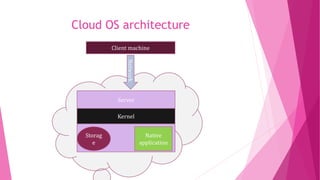
Cloud OS architecture
Client machine
Network
Server
Native
application
Kernel
Storag
e
 Individual users connect to the cloud from their own personal computers or
portable devices, over the Internet. To these individual users, the cloud is seen as a
single application, device, or document.
 The hardware in the cloud (and the operating system that manages the hardware
connections) is invisible.
 Data and instuctions are sent to cloud system. Here all data is stored.
 All insturctions passed over the network and information processed in the cloud
only.
Applications
 In company / organisation environment.
 For research and development.
 Social networking.
 Remote Assistance.
 Gamming.
Live Demonstration
Storage
 Data is centralisized so we can easily analyse,arrange and sharing over the
network.
 We can use access the data even the clent system file system is different.
 Can provide the better security to the data and also set restrictions to the users.
 Multiple users can access the same data many times.
 Common application format.
Advantages
 Lower computer costs.
 Improved performance.
 Reduced software costs.
 Instant software updates.
 Improved document format compatibility.
 Unlimited storage capacity.
 Increased data reliability.
 Universal document access.
 Latest version availability.
 Device independence.
Disadvantages
 Requires a constant Internet connection.
 Does not work well with low-speed connections.
 Features might be limited.
 Can be slow.
 Stored data might not be secure without proper administartion.
 Stored data can be lost by hardware failures.
Conclusion
 Thus cloud operating system provide a super-computing power .
 This cloud of computers extends beyond a single company or enterprise and also
home PC’s.
 The applications and data served by the cloud are available to broad group of
users, cross-enterprise and cross-platform.
 In future every home becomes a smart home by using the cloud service.
 A revoluation can’t stop by anyone.
References
 https://en.wikipedia.org/wiki/Cloud_(operating_system)
 https://en.wikipedia.org/wiki/EyeOS
 https://en.wikipedia.org/wiki/Google_Chrome_OS
 https://en.wikipedia.org/wiki/User:Sadakpramodh
Thank you

Cloud operating system

  • 1.
  • 2.
     Introduction  Whatis Cloud Operating System  Why Cloud OS?  Architecture  Applications  Live Demonstration  Cloud Storage  Advantages  Disadvantages  Conclusion
  • 3.
    Introduction  With traditionaldesktop computing, we run copies of software programs on our own computer. The documents we create are stored on our own pc.  Although documents can be accessed from other computers on the network, they can’t be accessed by computers outside the network. This is PC-centric.  With cloud computing, the software programs one use aren’t run from one’s personal computer, but are rather stored on servers accessed via the Internet.
  • 4.
     If acomputer crashes, the software is still available for others to use. Same goes for the documents one create; they’re stored on a collection of servers accessed via the Internet.  Anyone with permission can not only access the documents, but can also edit and collaborate on those documents in real time.  Unlike traditional computing, this cloud computing model isn’t PC-centric, it’s document-centric.
  • 5.
    Examples of cloudoperating systems  EyeOS  Joli OS  Easy Peasy  Google Chrome OS  Osw3  Own cloud
  • 6.
    What is cloudoperating System?  Cloud operating system that runs just a web browser, providing access to a variety of web-based applications that allow the user to perform many simple tasks without booting a full-scale operating system. Because of its simplicity, Cloud operating system can boot in just a few seconds.  The operating system is designed for Netbooks, Mobile Internet Devices, and PCs that are mainly used to browse the Internet.  From Cloud the user can quickly boot into the main OS, because Cloud continues booting the main OS in the background.  Combining a browser with a basic operating system allows the use of cloud computing, in which applications and data "live and run" on the Internet instead of the hard drive.
  • 7.
    Why cloud OS? For platform independence.  Faster and safer access.  Centralisized storage.  Huge data analysis.  Data sharing.  Better administration.
  • 8.
    Cloud OS architecture Clientmachine Network Server Native application Kernel Storag e
  • 9.
     Individual usersconnect to the cloud from their own personal computers or portable devices, over the Internet. To these individual users, the cloud is seen as a single application, device, or document.  The hardware in the cloud (and the operating system that manages the hardware connections) is invisible.  Data and instuctions are sent to cloud system. Here all data is stored.  All insturctions passed over the network and information processed in the cloud only.
  • 10.
    Applications  In company/ organisation environment.  For research and development.  Social networking.  Remote Assistance.  Gamming.
  • 11.
  • 12.
    Storage  Data iscentralisized so we can easily analyse,arrange and sharing over the network.  We can use access the data even the clent system file system is different.  Can provide the better security to the data and also set restrictions to the users.  Multiple users can access the same data many times.  Common application format.
  • 13.
    Advantages  Lower computercosts.  Improved performance.  Reduced software costs.  Instant software updates.  Improved document format compatibility.  Unlimited storage capacity.  Increased data reliability.  Universal document access.  Latest version availability.  Device independence.
  • 14.
    Disadvantages  Requires aconstant Internet connection.  Does not work well with low-speed connections.  Features might be limited.  Can be slow.  Stored data might not be secure without proper administartion.  Stored data can be lost by hardware failures.
  • 15.
    Conclusion  Thus cloudoperating system provide a super-computing power .  This cloud of computers extends beyond a single company or enterprise and also home PC’s.  The applications and data served by the cloud are available to broad group of users, cross-enterprise and cross-platform.  In future every home becomes a smart home by using the cloud service.  A revoluation can’t stop by anyone.
  • 16.
    References  https://en.wikipedia.org/wiki/Cloud_(operating_system)  https://en.wikipedia.org/wiki/EyeOS https://en.wikipedia.org/wiki/Google_Chrome_OS  https://en.wikipedia.org/wiki/User:Sadakpramodh
  • 18.