CLOUD COMPUTING
(SAFARICOM CLOUD)

BEN W WAKHUNGU
CS282-0801/2009
LECTURER: DR. WAWERU
What is cloud computing?
 Cloud Computing refers to both the

applications delivered as services over the
Internet and the hardware and systems
software in the data Centres that provide
those services.
 The services themselves have long been
referred to as Software as a Service (SaaS).
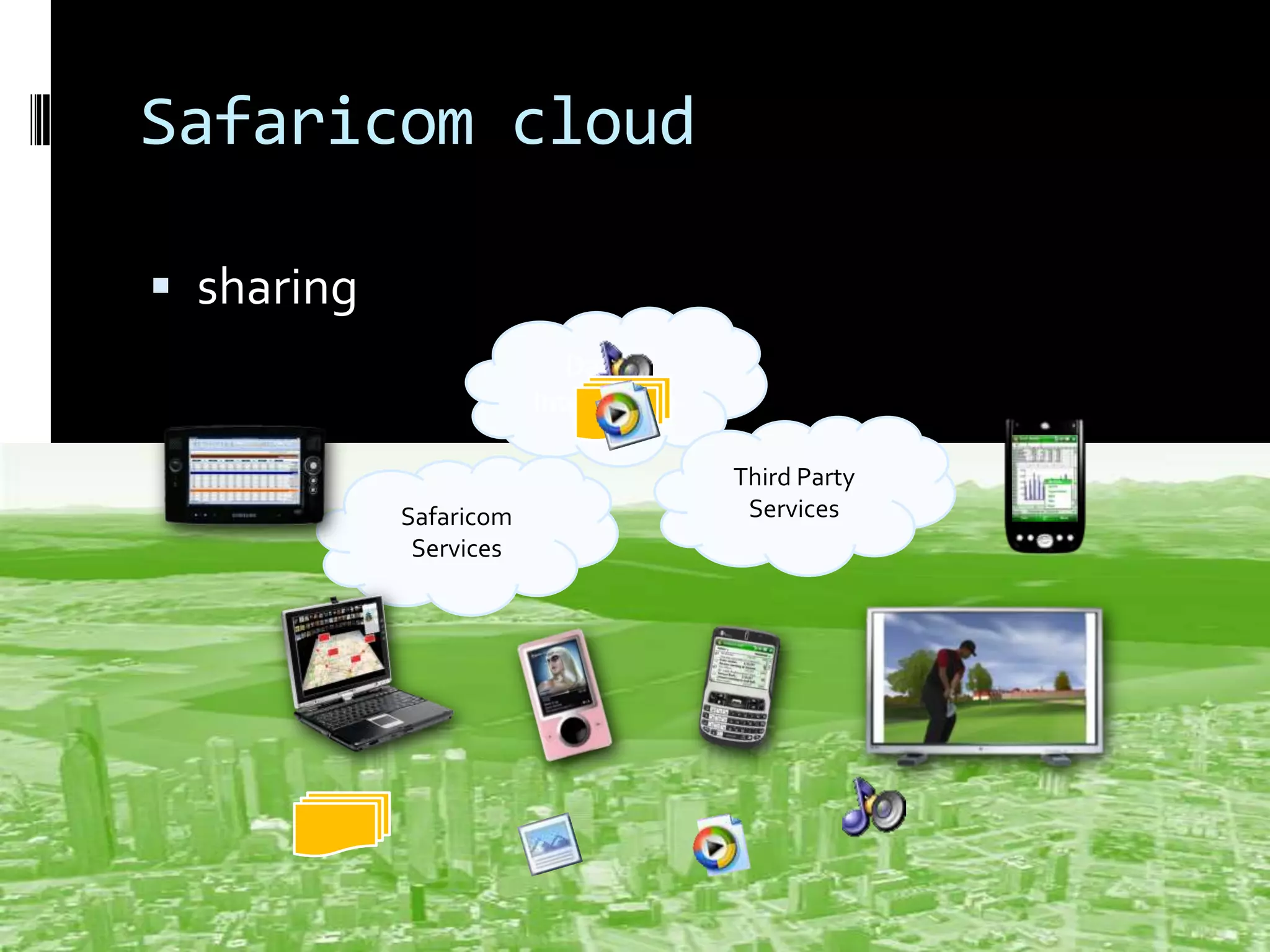
Safaricom cloud
 sharing
Data +
Intelligence

Safaricom
Services

Third Party
Services
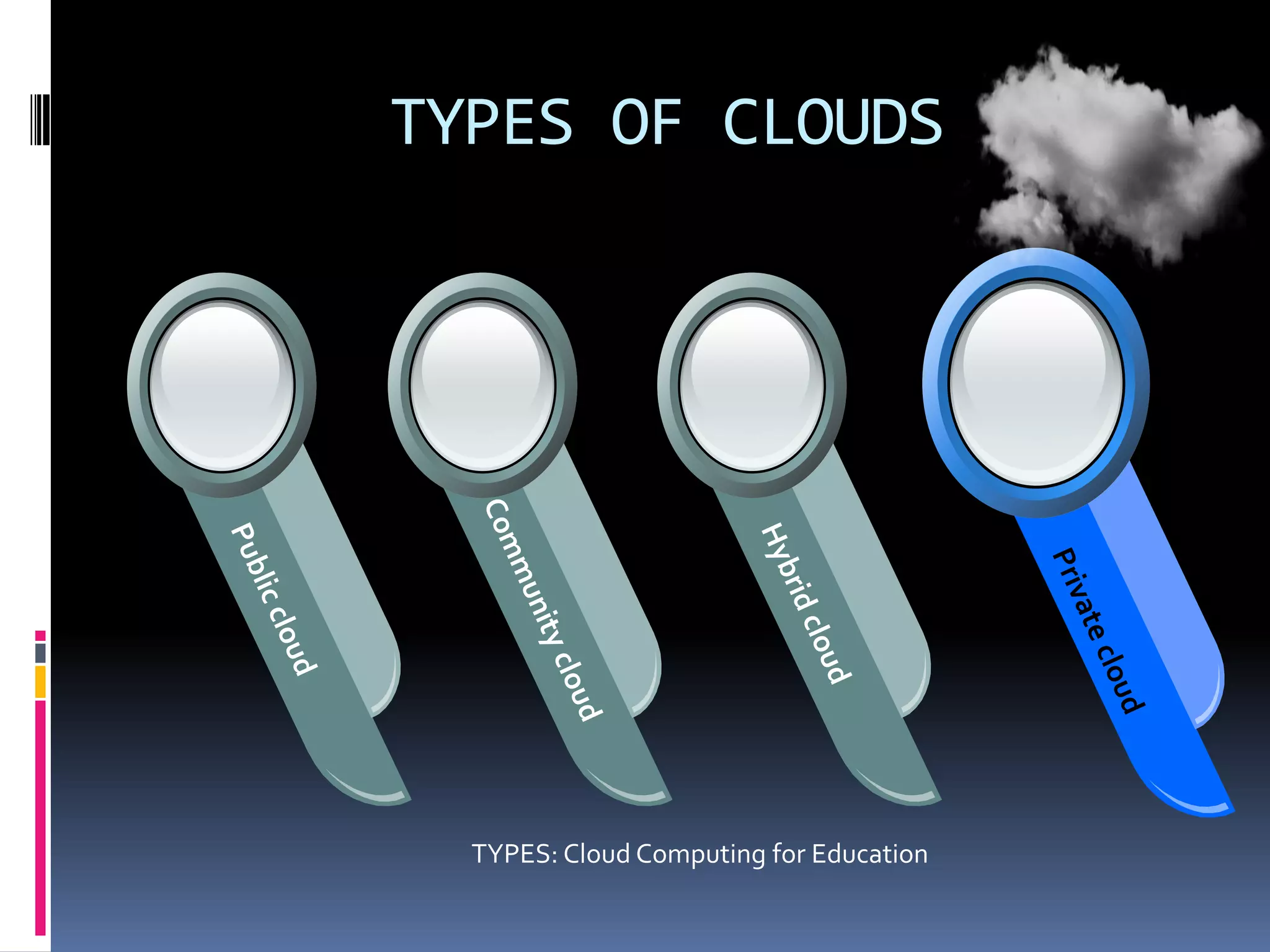
TYPES OF CLOUDS

TYPES: Cloud Computing for Education
DEPLOYMENT MODELS
 A community cloud may be established where several organizations

have similar requirements and seek to share infrastructure so as to
realize some of the benefits of cloud computing. With the costs
spread over fewer users than a public cloud (but more than a single
tenant) this option is more expensive but may offer a higher level of
privacy, security and/or policy compliance. Examples of community
cloud include Google's "Gov Cloud".

 When a Cloud is made available in a pay-as-you-go manner to the

general public, we call it a Public Cloud; the service being sold is
Utility Computing.

 Private Cloud refers to internal data centres of a business or

other organization, not made available to the general public.
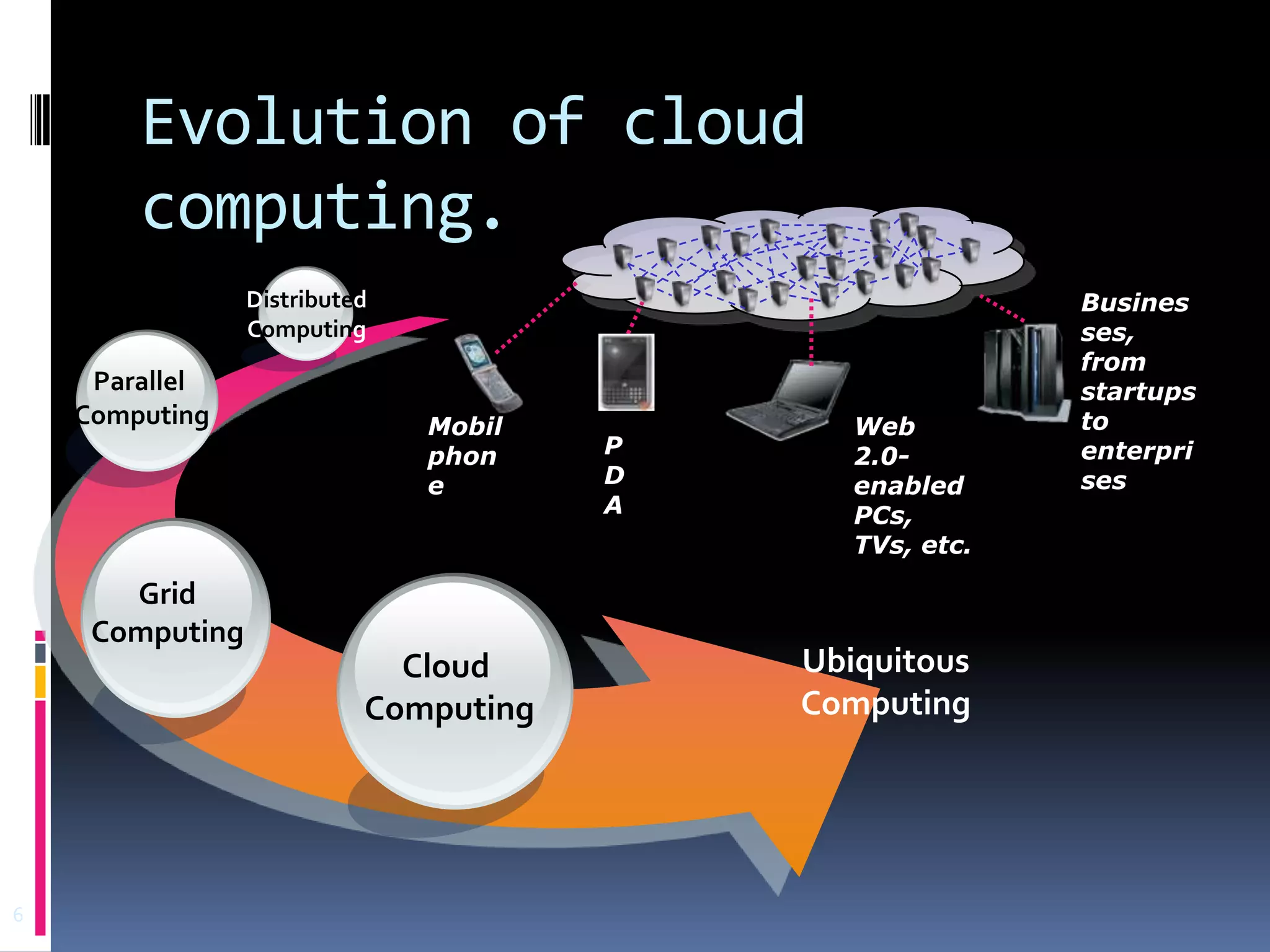
Evolution of cloud
computing.
Distributed
Computing

Parallel
Computing

Mobil
phon
e

Grid
Computing

Cloud
Computing

6

P
D
A

Web
2.0enabled
PCs,
TVs, etc.

Ubiquitous
Computing

Busines
ses,
from
startups
to
enterpri
ses
Evolution Of Cloud Computing
 Cloud computing has as its antecedents both

client/server computing and peer-to-peer
distributed computing.
 It’s all a matter of how centralized storage
facilitates collaboration and how multiple
computers work together to increase
computing power.
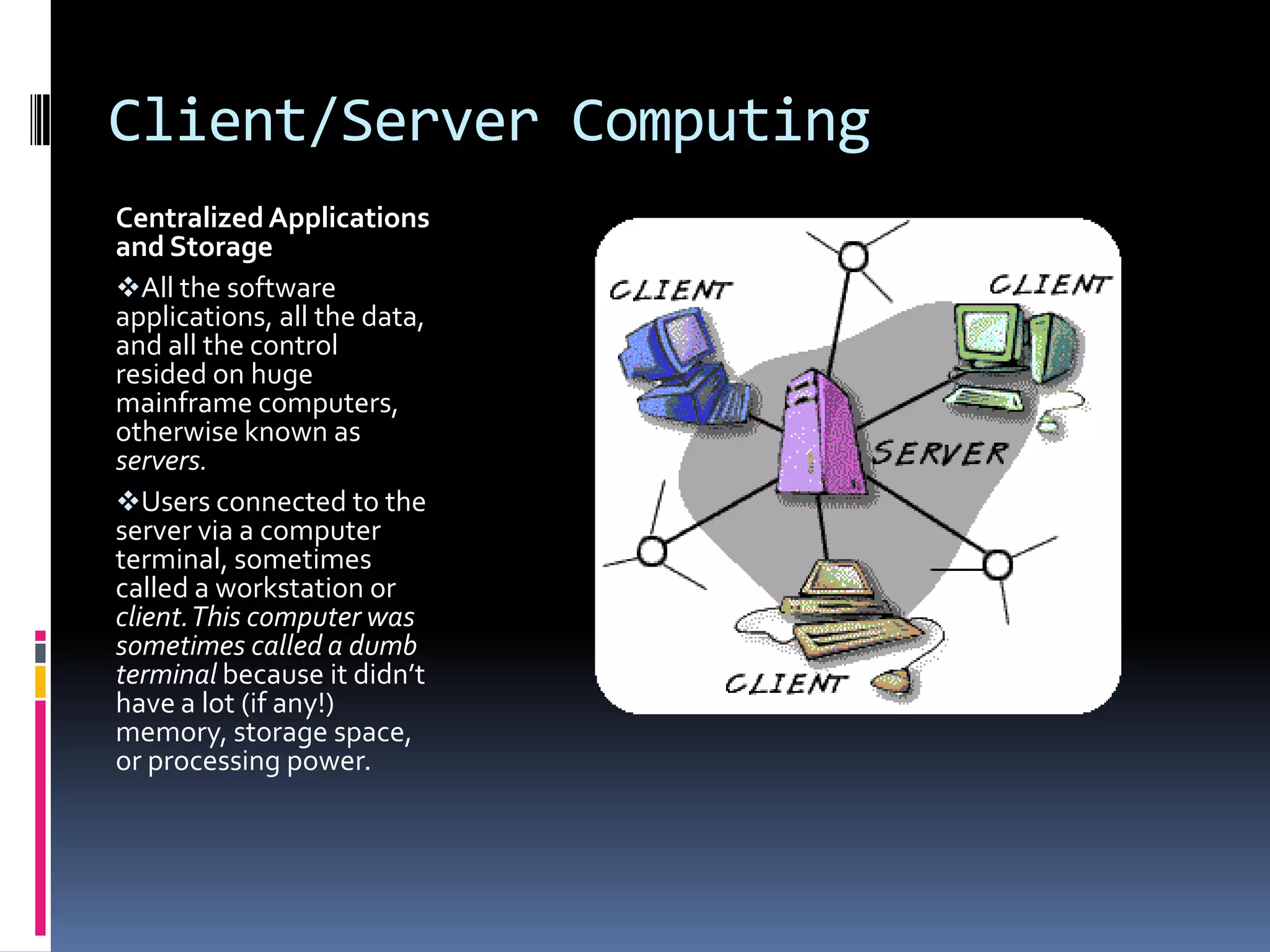
Client/Server Computing
Centralized Applications
and Storage
All the software
applications, all the data,
and all the control
resided on huge
mainframe computers,
otherwise known as
servers.
Users connected to the
server via a computer
terminal, sometimes
called a workstation or
client. This computer was
sometimes called a dumb
terminal because it didn’t
have a lot (if any!)
memory, storage space,
or processing power.
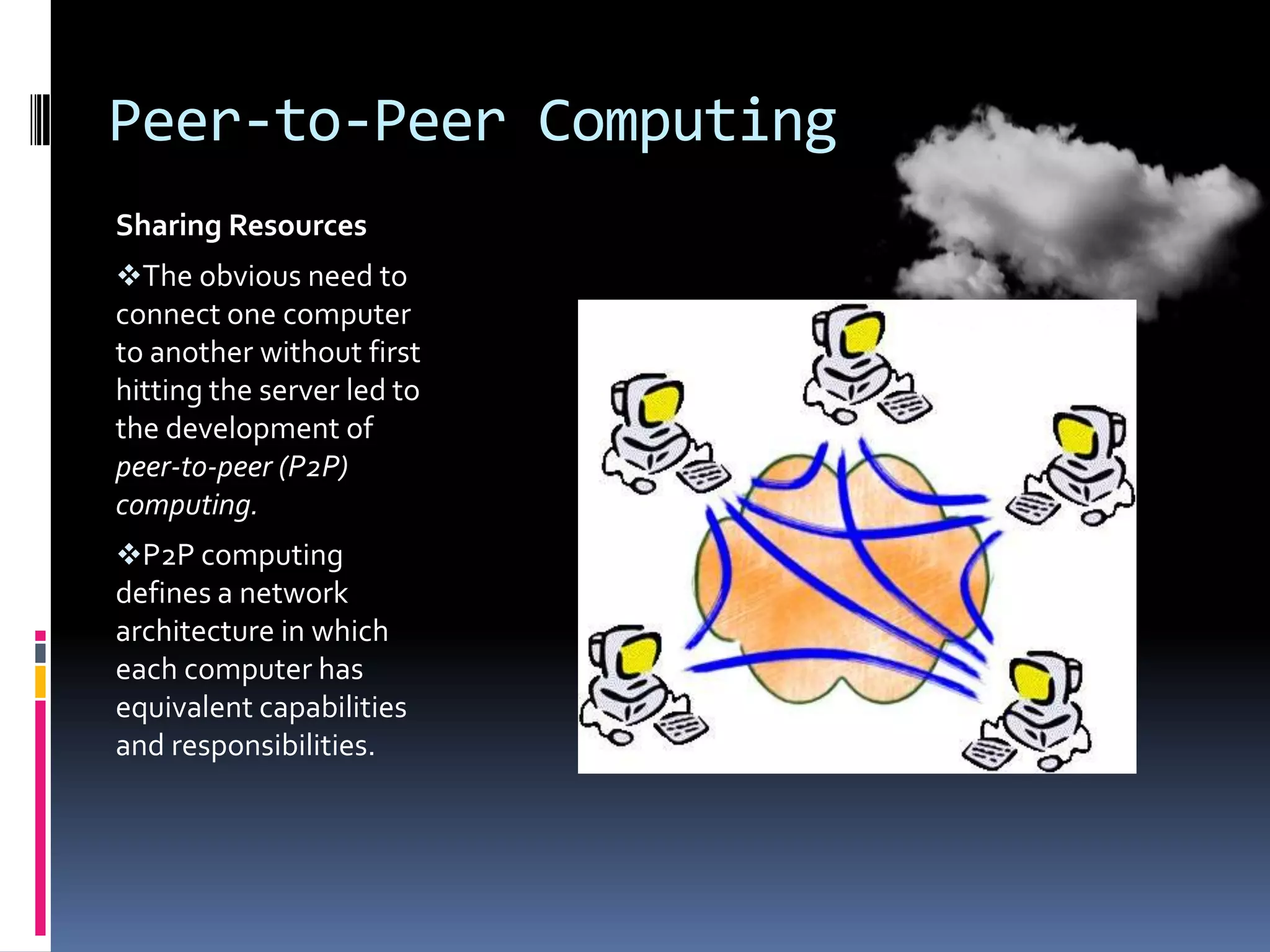
Peer-to-Peer Computing
Sharing Resources
The obvious need to
connect one computer
to another without first
hitting the server led to
the development of
peer-to-peer (P2P)
computing.
P2P computing
defines a network
architecture in which
each computer has
equivalent capabilities
and responsibilities.
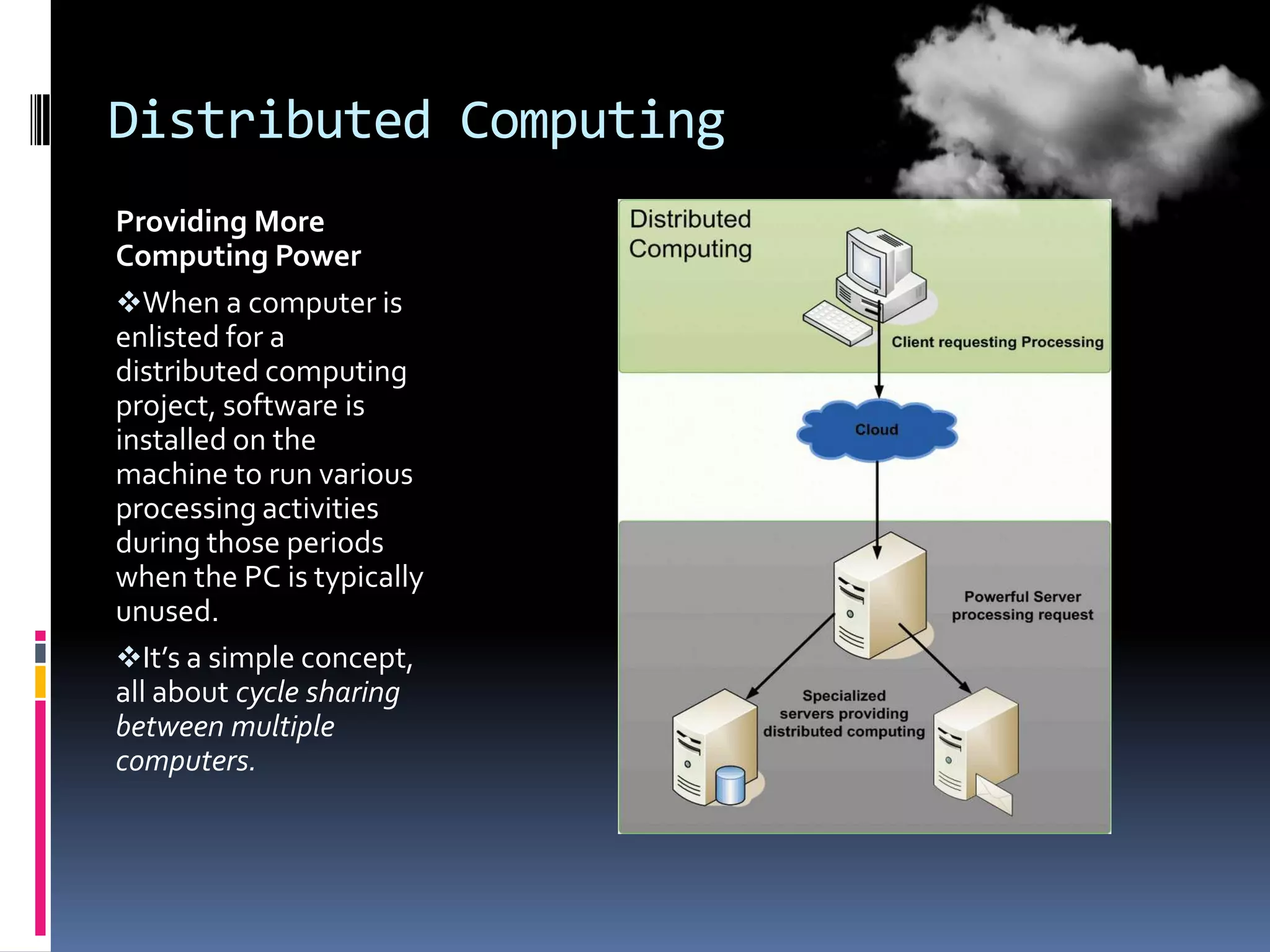
Distributed Computing
Providing More
Computing Power
When a computer is
enlisted for a
distributed computing
project, software is
installed on the
machine to run various
processing activities
during those periods
when the PC is typically
unused.
It’s a simple concept,
all about cycle sharing
between multiple
computers.
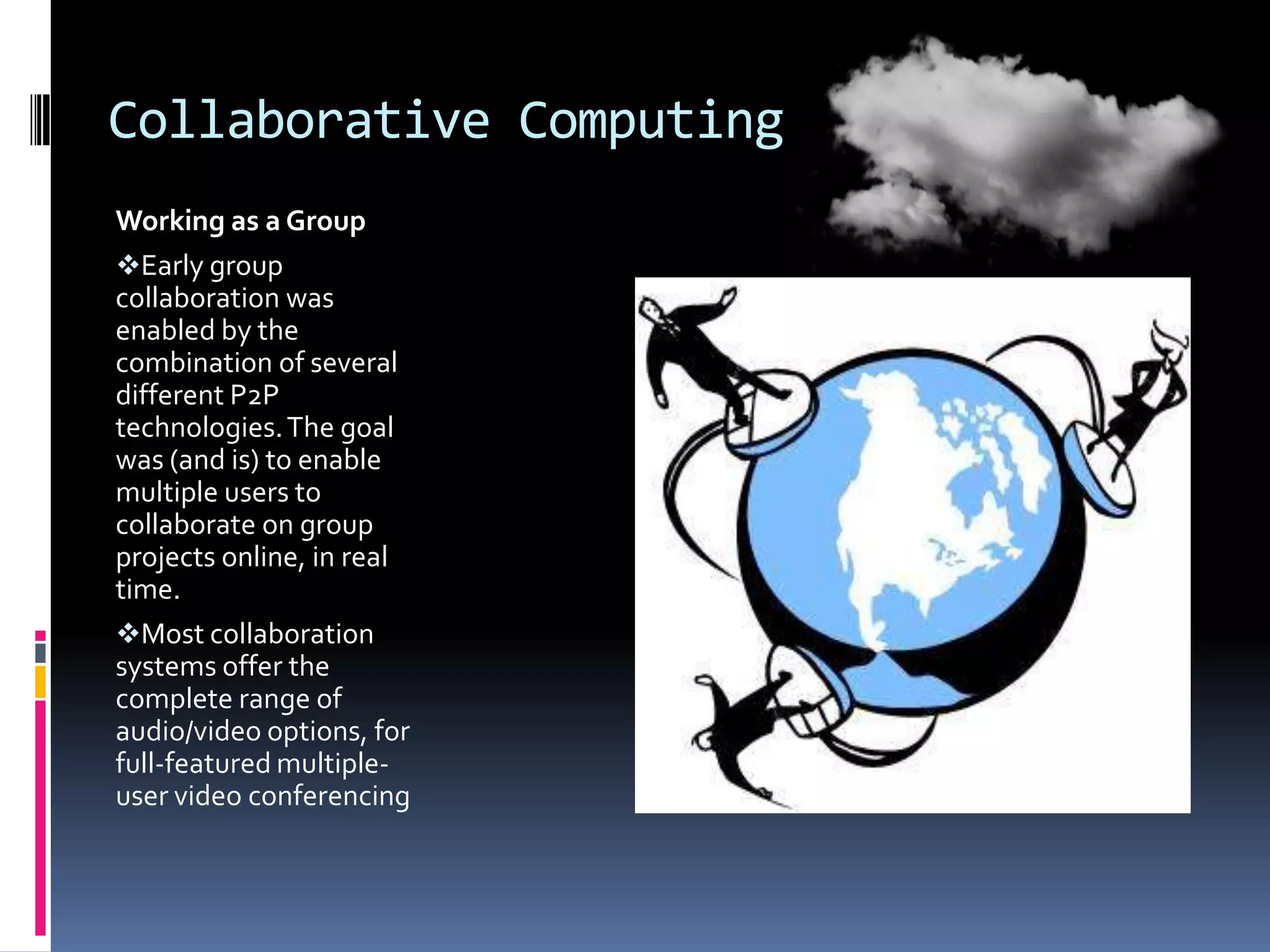
Collaborative Computing
Working as a Group
Early group
collaboration was
enabled by the
combination of several
different P2P
technologies. The goal
was (and is) to enable
multiple users to
collaborate on group
projects online, in real
time.
Most collaboration
systems offer the
complete range of
audio/video options, for
full-featured multipleuser video conferencing
Collaborative computing
 Real-time whiteboarding is also common,

especially in corporate and education
environments.
 Whiteboarding is where one or more users
“draw” on a virtual whiteboard that is
viewable by all the members of the group.
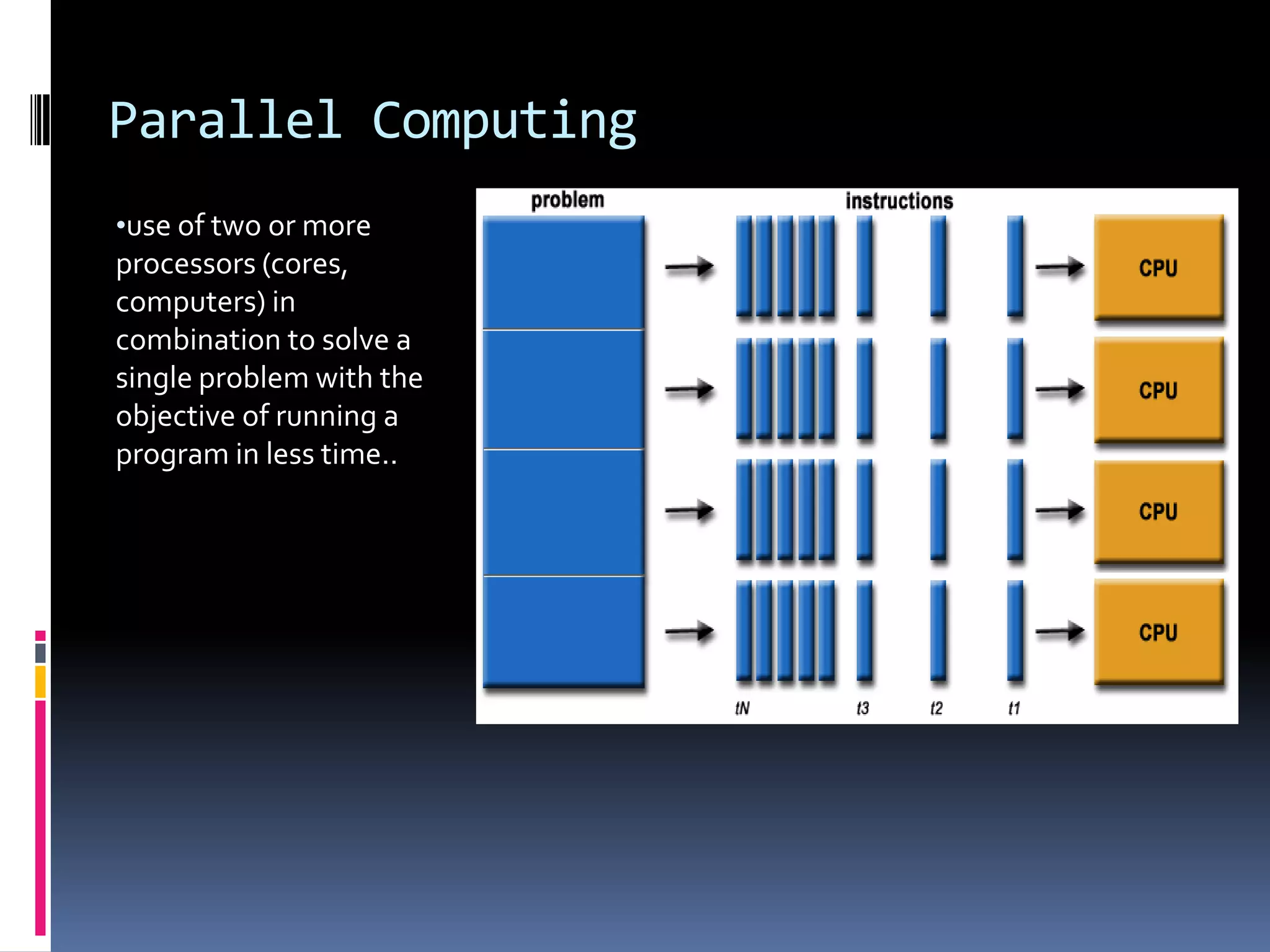
Parallel Computing
•use of two or more

processors (cores,
computers) in
combination to solve a
single problem with the
objective of running a
program in less time..
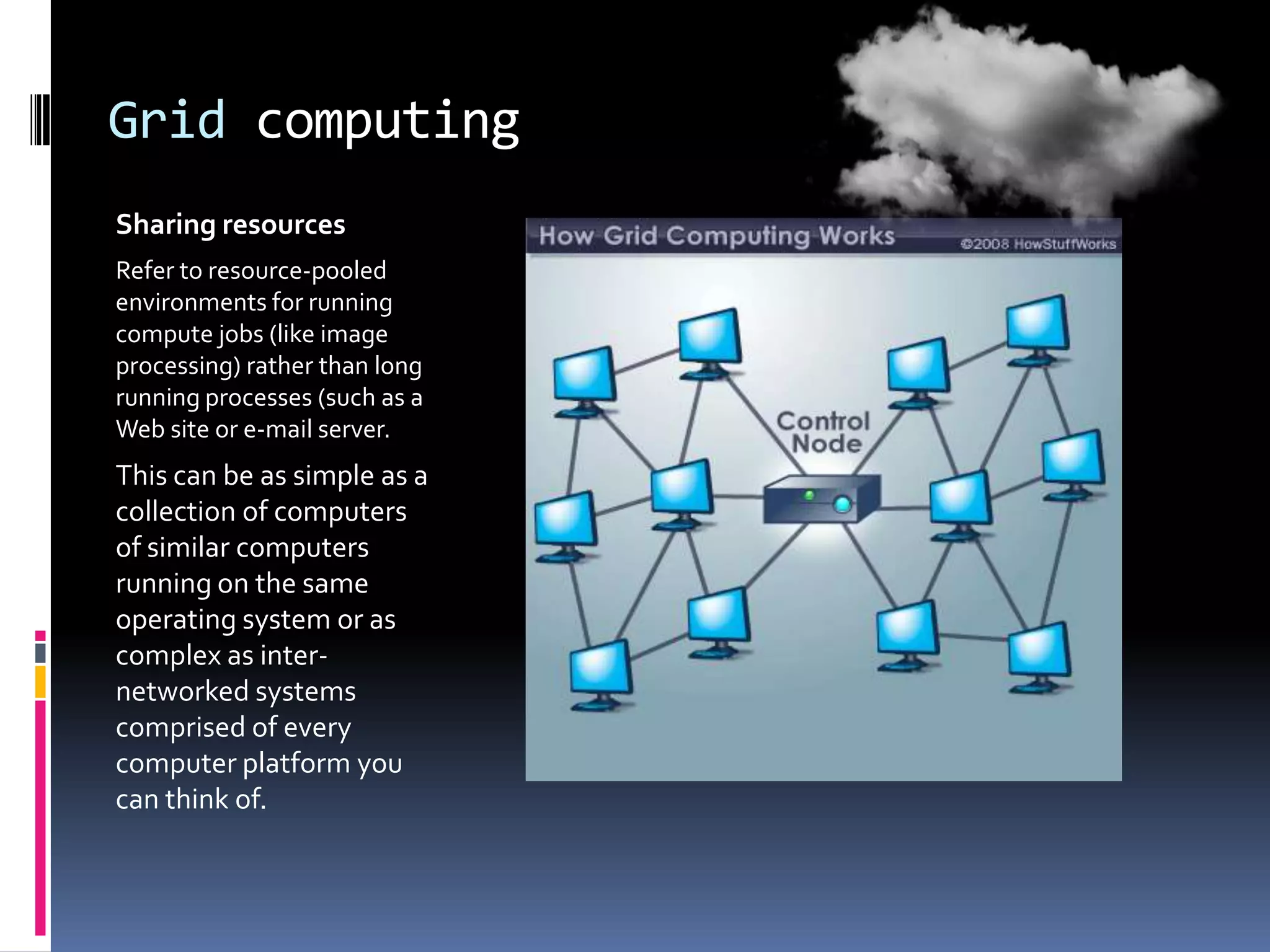
Grid computing
Sharing resources
Refer to resource-pooled
environments for running
compute jobs (like image
processing) rather than long
running processes (such as a
Web site or e-mail server.

This can be as simple as a
collection of computers
of similar computers
running on the same
operating system or as
complex as internetworked systems
comprised of every
computer platform you
can think of.
Why cloud computing?
 Cloud Computing: Advantages.
 Lower-Cost Computers for Users:

You don’t need a high-powered (and accordingly high-priced)
computer to run cloud computing’s web-based applications.
Because the application runs in the cloud, not on the desktop PC,
that desktop PC doesn’t need the processing power or hard disk
space demanded by traditional desktop software. Hence the client
computers in cloud computing can be lower priced, with smaller
hard disks, less memory, more efficient processors.
Why cloud computing
 Reduce capital and operations costs
 No longer required to make large up-front capital
investment on datacenters
 Eliminate the need to plan ahead for provisioning
 Allow companies to start small and increase their
resources investment as needed (pay-as-you-go.
 Simplify app deployment & management

 Common programming model across mobile, browser,

client, server, cloud
 Access to strong ecosystem of widely deployed
applications
 Integration with existing IT assets (Software +
Services)
Why cloud computing
 Fewer Maintenance Issues
Cloud computing greatly reduces both hardware

and software maintenance for organizations of
all sizes.
 Increased Data Safety
Unlike desktop computing, where a hard disk crash
can destroy all your valuable data, a computer
crashing in the cloud doesn’t affect the storage
of your data. That’s because data in the cloud is
automatically duplicated, so nothing is ever lost.
Disadvantages of cloud computing
 Requires a Constant Internet Connection

If you don’t have an Internet connection, you can’t
access anything, even your own documents. A dead
Internet connection means no work, period.
 Can Be Slow
Even on a fast connection, web-based applications can
sometimes be slower than accessing a similar
software program on your desktop PC. That’s
because everything about the program, from the
interface to the document you’re working on, has to
be sent back and forth from your computer to the
computers in the cloud.
Disadvantages of cloud computing
 If the Cloud Loses Your Data, You’re Screwed
Relying the cloud puts you at risk if the cloud lets

you down.
 Doesn’t Work Well with Low-Speed
Connections
Low-speed Internet connection, such as that found
with dial-up services, makes cloud computing
painful at best and often impossible. Web-based
apps often require a lot of bandwidth to
download, as do large documents.
Who Benefits from Cloud Computing?
 Let’s face it, cloud computing isn’t for everyone. What types of







users, then, are best suited for cloud computing—and which
aren’t?
Collaborators. If you often collaborate with others on group
projects, you’re an ideal candidate for cloud computing.
Road Warriors. Another prime candidate for cloud computing is
the road warrior. When you work at one office today, at home the
next day, and in another city the next, it’s tough to keep track of
all your documents and applications.
Cost-Conscious Users. save money on both
your hardware and software.
Cost-Conscious IT Departments. savings result from having to
buy fewer central servers.
Q&A

THANKS!

History and Evolution of Cloud computing (Safaricom cloud)

  • 1.
    CLOUD COMPUTING (SAFARICOM CLOUD) BENW WAKHUNGU CS282-0801/2009 LECTURER: DR. WAWERU
  • 2.
    What is cloudcomputing?  Cloud Computing refers to both the applications delivered as services over the Internet and the hardware and systems software in the data Centres that provide those services.  The services themselves have long been referred to as Software as a Service (SaaS).
  • 3.
    Safaricom cloud  sharing Data+ Intelligence Safaricom Services Third Party Services
  • 4.
    TYPES OF CLOUDS TYPES:Cloud Computing for Education
  • 5.
    DEPLOYMENT MODELS  Acommunity cloud may be established where several organizations have similar requirements and seek to share infrastructure so as to realize some of the benefits of cloud computing. With the costs spread over fewer users than a public cloud (but more than a single tenant) this option is more expensive but may offer a higher level of privacy, security and/or policy compliance. Examples of community cloud include Google's "Gov Cloud".  When a Cloud is made available in a pay-as-you-go manner to the general public, we call it a Public Cloud; the service being sold is Utility Computing.  Private Cloud refers to internal data centres of a business or other organization, not made available to the general public.
  • 6.
  • 7.
    Evolution Of CloudComputing  Cloud computing has as its antecedents both client/server computing and peer-to-peer distributed computing.  It’s all a matter of how centralized storage facilitates collaboration and how multiple computers work together to increase computing power.
  • 8.
    Client/Server Computing Centralized Applications andStorage All the software applications, all the data, and all the control resided on huge mainframe computers, otherwise known as servers. Users connected to the server via a computer terminal, sometimes called a workstation or client. This computer was sometimes called a dumb terminal because it didn’t have a lot (if any!) memory, storage space, or processing power.
  • 9.
    Peer-to-Peer Computing Sharing Resources Theobvious need to connect one computer to another without first hitting the server led to the development of peer-to-peer (P2P) computing. P2P computing defines a network architecture in which each computer has equivalent capabilities and responsibilities.
  • 10.
    Distributed Computing Providing More ComputingPower When a computer is enlisted for a distributed computing project, software is installed on the machine to run various processing activities during those periods when the PC is typically unused. It’s a simple concept, all about cycle sharing between multiple computers.
  • 11.
    Collaborative Computing Working asa Group Early group collaboration was enabled by the combination of several different P2P technologies. The goal was (and is) to enable multiple users to collaborate on group projects online, in real time. Most collaboration systems offer the complete range of audio/video options, for full-featured multipleuser video conferencing
  • 12.
    Collaborative computing  Real-timewhiteboarding is also common, especially in corporate and education environments.  Whiteboarding is where one or more users “draw” on a virtual whiteboard that is viewable by all the members of the group.
  • 13.
    Parallel Computing •use oftwo or more processors (cores, computers) in combination to solve a single problem with the objective of running a program in less time..
  • 14.
    Grid computing Sharing resources Referto resource-pooled environments for running compute jobs (like image processing) rather than long running processes (such as a Web site or e-mail server. This can be as simple as a collection of computers of similar computers running on the same operating system or as complex as internetworked systems comprised of every computer platform you can think of.
  • 15.
    Why cloud computing? Cloud Computing: Advantages.  Lower-Cost Computers for Users: You don’t need a high-powered (and accordingly high-priced) computer to run cloud computing’s web-based applications. Because the application runs in the cloud, not on the desktop PC, that desktop PC doesn’t need the processing power or hard disk space demanded by traditional desktop software. Hence the client computers in cloud computing can be lower priced, with smaller hard disks, less memory, more efficient processors.
  • 16.
    Why cloud computing Reduce capital and operations costs  No longer required to make large up-front capital investment on datacenters  Eliminate the need to plan ahead for provisioning  Allow companies to start small and increase their resources investment as needed (pay-as-you-go.  Simplify app deployment & management  Common programming model across mobile, browser, client, server, cloud  Access to strong ecosystem of widely deployed applications  Integration with existing IT assets (Software + Services)
  • 17.
    Why cloud computing Fewer Maintenance Issues Cloud computing greatly reduces both hardware and software maintenance for organizations of all sizes.  Increased Data Safety Unlike desktop computing, where a hard disk crash can destroy all your valuable data, a computer crashing in the cloud doesn’t affect the storage of your data. That’s because data in the cloud is automatically duplicated, so nothing is ever lost.
  • 18.
    Disadvantages of cloudcomputing  Requires a Constant Internet Connection If you don’t have an Internet connection, you can’t access anything, even your own documents. A dead Internet connection means no work, period.  Can Be Slow Even on a fast connection, web-based applications can sometimes be slower than accessing a similar software program on your desktop PC. That’s because everything about the program, from the interface to the document you’re working on, has to be sent back and forth from your computer to the computers in the cloud.
  • 19.
    Disadvantages of cloudcomputing  If the Cloud Loses Your Data, You’re Screwed Relying the cloud puts you at risk if the cloud lets you down.  Doesn’t Work Well with Low-Speed Connections Low-speed Internet connection, such as that found with dial-up services, makes cloud computing painful at best and often impossible. Web-based apps often require a lot of bandwidth to download, as do large documents.
  • 20.
    Who Benefits fromCloud Computing?  Let’s face it, cloud computing isn’t for everyone. What types of      users, then, are best suited for cloud computing—and which aren’t? Collaborators. If you often collaborate with others on group projects, you’re an ideal candidate for cloud computing. Road Warriors. Another prime candidate for cloud computing is the road warrior. When you work at one office today, at home the next day, and in another city the next, it’s tough to keep track of all your documents and applications. Cost-Conscious Users. save money on both your hardware and software. Cost-Conscious IT Departments. savings result from having to buy fewer central servers.
  • 21.