1
Subjectivity and Context
2
Cloud computing in qualitative
research: data analysis with the
support of webQDA Software
António Pedro Costa
apcosta@ua.pt
Oporto VTC training week, 20th april 2017
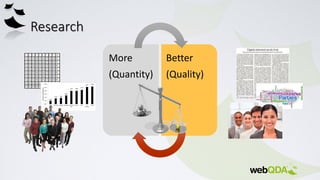
Research
More
(Quantity)
Better
(Quality)
Challenges of Qualitative Data Analysis
Software (QDAS)
• Enable direct work with various formats and data types.
• Robustness to deal with large amounts of data.
• Allow for greater flexibility in performing tasks.
• Enable collaborative work in large and small groups.
• Simplicity to reduce the learning curve of the tools.
• Greater compatibility and portability of data and analysis processes.
QDAS brief history
• In 1966, MIT developed a software called "The General Inquiry" to help text analysis.
• In 1984, Ethnograph software emerges.
• In 1987, Richards & Richards developed the Non-Numerical Unstructured Data Indexing Searching and Theorizing
software (NUD*IST). It evolved into the current NVivo.
• In 1991, the ATLAS-ti prototype was launched, mainly related to Grounded Theory.
• In the transition of the 2000s, it was possible to integrate video, image, audio and text in the analysis. However,
HyperRESEARCH had been presented before. Meantime, Transcriber and Transana are other software systems
that were developed.
• In 2004, NVivo provided an overview of some of the previous software with striking features, such as the Atlas-ti
– it recovers encoding by in vivo and Ethnograph – a visual presentation coding system.
• 2009 marks the beginning of the software development in computer contexts in the cloud. Examples are
Dedoose and webQDA, which were developed almost simultaneously in the US and Portugal, respectively.
• From 2013 onwards, we saw an effort by software companies to develop versions for iOS, incorporating data
from social networks, multimedia and other visual elements in the analysis process.
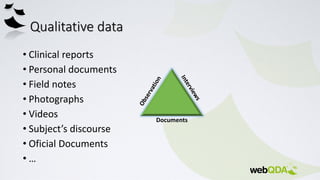
Qualitative data
• Clinical reports
• Personal documents
• Field notes
• Photographs
• Videos
• Subject’s discourse
• Oficial Documents
• …
Documents
What is data analysis in Qualitative Research?
• Working with data
• Organizing data
• Dividing data into manageable units
• Data synthesis
• Looking for patterns
• Discovery of the important aspects of data
• Discovery of what should be learned from the data
• Deciding how to transmit data to others
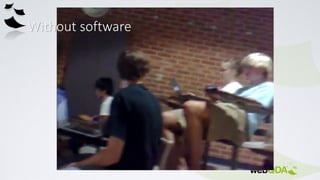
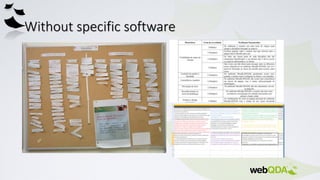
Without software
Without specific software
With specific software
“The researcher who does not use software beyond a word
processor will be hampered in comparison to those who do”
(Miles & Huberman, 1994, p.44)
What do we look for in a QDAS?
CAQDAS refer to software packages which include tools designed to facilitate a qualitative
approach to qualitative data analysis.
Qualitative data includes texts, graphics, audio or video. CAQDAS packages may also enable
the incorporation of quantitative (numeric) data and/or include tools for adopting
quantitative approaches in qualitative data analysis.
• Content searching tools
• Linking tools
• Coding tools
• Query tools
• Writing and annotation tools
• Mapping or networking tools
Cf. Lewins & Silver, 2009
• .
• AQUAD
• ATLAS/ti
• CoAn
• Code-A-Text
• DICTION
• DIMAP-MCCA
• HyperRESEARCH
• KEDS
• DEDOOSE
• NUD*IST
• NVivo
• QED
• TATOE
• TEXTPACK
• TextSmart
• Transana
• WinMaxPro
• WordStat
webQDA history and partnerships
• 2010
• 2015
Authors
• António Pedro Costa (pcosta@ludomedia.pt)
• António Moreira (moreira@ua.pt)
• Francislê Neri de Souza (fns@ua.pt)
• Software designed to assist
researchers to handle non-numeric
and unstructured data in qualitative
analysis.
• With webQDA the researchers can
edit, view and link documents. They
can create categories, encode,
manage, filter, query and question the
data in order to answer research
questions.
In academic contexts, webQDA is especially useful for researchers, graduation,
master's and doctorate students, as well as for research teams to develop
synchronous and asynchronous analysis of qualitative data in collaboration,
from any device connected to the internet. In a business context, webQDA is
especially useful for analysis of non-numeric and unstructured data, for
example, customers’ opinions about a product or an advert.
webQDA is to qualitative research and SPSS to quantitative
research, as the word-processor (word) is for writing. In any
case the human factor is always critical.
"My text editor doesn’t write alone."
Before and During the use of webQDA
• Sound Research Questions;
• Feasible Research Objectives;
• Comprehensive Theoretical Framework;
• Validate Data Collection Instruments;
• Carefull and Systematic Transcriptions;
• Well Structured Data Organization;
• Etc.
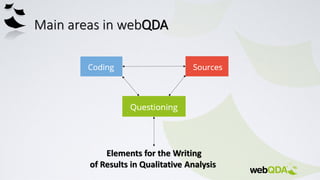
Main areas in webQDA
Elements for the Writing
of Results in Qualitative Analysis
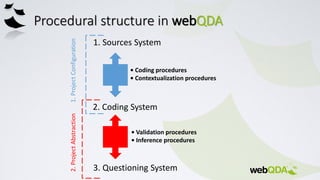
Procedural structure in webQDA
• Coding procedures
• Contextualization procedures
1. Sources System
2. Coding System
3. Questioning System
• Validation procedures
• Inference procedures
1.ProjectConfiguration2.ProjectAbstraction
Technical Specifications
• Respects the HTML5 standard that is supported by most popular web browsers
(Internet Explorer, Firefox, Safari, Chrome, Opera).
• Permissions for use of Cookies is also a requirement and the browser must be allowed
to run JavaScript.
• For a better user experience we recommend a resolution of at least of 1280 x 720.
• Sources requirements:
• Text Sources: DOCX, PDF and TXT (Maximum size of 500,000 characters per file)
• image sources: JPG and PNG (Maximum size of 5MB per file)
• Audio sources: MP3 and WAV (Maximum size of 10MB per file)
• video sources: MP4, OGG and WEBM (Maximum size of 20MB per file)
• You can use YouTube videos, or videos from public sharing of Dropbox.
Coding
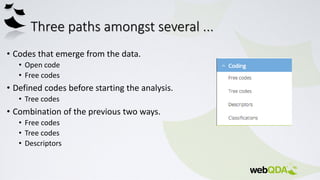
Three paths amongst several ...
• Codes that emerge from the data.
• Open code
• Free codes
• Defined codes before starting the analysis.
• Tree codes
• Combination of the previous two ways.
• Free codes
• Tree codes
• Descriptors
Manage and categorize data
• A code is a unifying topic of ideas.
• webQDA helps the researcher in the process of organization, contextualization
and categorization of information entered.
• What is the context of information about a case?
• Ex.: Interview with John: gender, age, length of service, nationality... (Rating: Attributes)
• How to organize and group all the information on cases or concepts.
• Ex.: All John’s documents and interviews... (Descriptors: Cases)
25
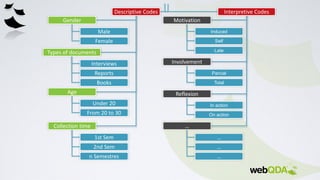
Descriptive Codes Interpretive Codes
Gender
Types of documents
Age
Collection time
Male
Female
Interviews
Reports
Books
Under 20
From 20 to 30
1st Sem
2nd Sem
Motivation
Involvement
Induced
Reflexion
In action
Parcial
Total
On action
Self
Late
n Semestres
…
…
…
…
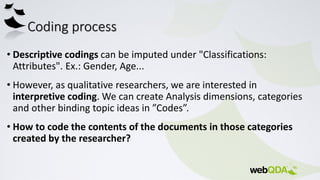
Coding process
• Descriptive codings can be imputed under "Classifications:
Attributes". Ex.: Gender, Age...
• However, as qualitative researchers, we are interested in
interpretive coding. We can create Analysis dimensions, categories
and other binding topic ideas in ”Codes”.
• How to code the contents of the documents in those categories
created by the researcher?
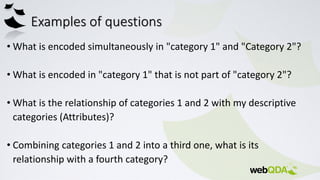
Examples of questions
• What is encoded simultaneously in "category 1" and "Category 2"?
• What is encoded in "category 1" that is not part of "category 2"?
• What is the relationship of categories 1 and 2 with my descriptive
categories (Attributes)?
• Combining categories 1 and 2 into a third one, what is its
relationship with a fourth category?
28
Reference 1
Reference 2
Reference 3
Reference 4
Reference 5
Reference 6
Reference 7
Reference 8
Reference 9
Reference 10
Data Source 1 Data Source 2
Reference 1
Reference 2
Reference 3
Reference 4
Reference 5
Reference 6
Reference 7
Reference 8
Reference 9
Reference 10
Induced Self Late
20
years
30
years
Induced Self Late
1st
Sem
2nd
Sem
Induced Self Late
Male
Fem
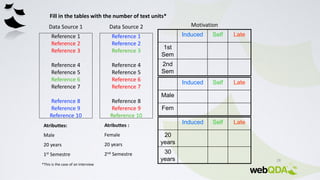
Fill in the tables with the number of text units*
Motivation
Atributtes:
Male
20 years
1st Semestre
Atributtes :
Female
20 years
2nd Semestre
*This is the case of an interview
29
Induced Self Late
20
years
5 3 5
30
years
0 0 0
Induced Self Late
1st
Sem
3 1 2
2nd
Sem
2 2 3
Induced Self Late
Male 3 1 2
Fem
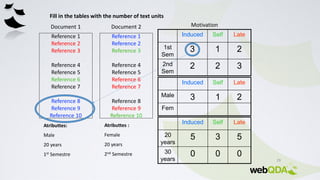
Fill in the tables with the number of text units
Motivation
Reference 1
Reference 2
Reference 3
Reference 4
Reference 5
Reference 6
Reference 7
Reference 8
Reference 9
Reference 10
Document 1 Document 2
Reference 1
Reference 2
Reference 3
Reference 4
Reference 5
Reference 6
Reference 7
Reference 8
Reference 9
Reference 10
Atributtes:
Male
20 years
1st Semestre
Atributtes :
Female
20 years
2nd Semestre
30
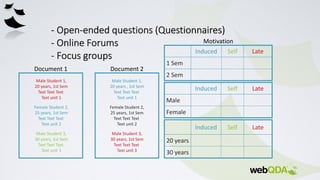
Document 1 Document 2
Induced Self Late
20 years
30 years
Induced Self Late
1 Sem
2 Sem
Induced Self Late
Male
Female
Motivation
Male Student 1,
20 years , 1st Sem
Text Text Text
Text unit 1
Female Student 2,
25 years, 1st Sem
Text Text Text
Text unit 2
Male Student 3,
30 years, 1st Sem
Text Text Text
Text unit 3
Male Student 1,
20 years, 1st Sem
Text Text Text
Text unit 1
Female Student 2,
25 years, 1st Sem
Text Text Text
Text unit 2
Male Student 3,
30 years, 1st Sem
Text Text Text
Text unit 3
31
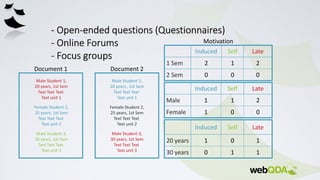
Document 1 Document 2
Induced Self Late
20 years 1 0 1
30 years 0 1 1
Induced Self Late
1 Sem 2 1 2
2 Sem 0 0 0
Motivation
Induced Self Late
Male 1 1 2
Female 1 0 0
Male Student 1,
20 years , 1st Sem
Text Text Text
Text unit 1
Female Student 2,
25 years, 1st Sem
Text Text Text
Text unit 2
Male Student 3,
30 years, 1st Sem
Text Text Text
Text unit 3
Male Student 1,
20 years, 1st Sem
Text Text Text
Text unit 1
Female Student 2,
25 years, 1st Sem
Text Text Text
Text unit 2
Male Student 3,
30 years, 1st Sem
Text Text Text
Text unit 3
Cloud computing in qualitative research data analysis with support of web qda software

Cloud computing in qualitative research data analysis with support of web qda software

  • 1.
  • 2.
  • 3.
    Cloud computing inqualitative research: data analysis with the support of webQDA Software António Pedro Costa apcosta@ua.pt Oporto VTC training week, 20th april 2017
  • 4.
  • 5.
    Challenges of QualitativeData Analysis Software (QDAS) • Enable direct work with various formats and data types. • Robustness to deal with large amounts of data. • Allow for greater flexibility in performing tasks. • Enable collaborative work in large and small groups. • Simplicity to reduce the learning curve of the tools. • Greater compatibility and portability of data and analysis processes.
  • 6.
    QDAS brief history •In 1966, MIT developed a software called "The General Inquiry" to help text analysis. • In 1984, Ethnograph software emerges. • In 1987, Richards & Richards developed the Non-Numerical Unstructured Data Indexing Searching and Theorizing software (NUD*IST). It evolved into the current NVivo. • In 1991, the ATLAS-ti prototype was launched, mainly related to Grounded Theory. • In the transition of the 2000s, it was possible to integrate video, image, audio and text in the analysis. However, HyperRESEARCH had been presented before. Meantime, Transcriber and Transana are other software systems that were developed. • In 2004, NVivo provided an overview of some of the previous software with striking features, such as the Atlas-ti – it recovers encoding by in vivo and Ethnograph – a visual presentation coding system. • 2009 marks the beginning of the software development in computer contexts in the cloud. Examples are Dedoose and webQDA, which were developed almost simultaneously in the US and Portugal, respectively. • From 2013 onwards, we saw an effort by software companies to develop versions for iOS, incorporating data from social networks, multimedia and other visual elements in the analysis process.
  • 7.
    Qualitative data • Clinicalreports • Personal documents • Field notes • Photographs • Videos • Subject’s discourse • Oficial Documents • … Documents
  • 8.
    What is dataanalysis in Qualitative Research? • Working with data • Organizing data • Dividing data into manageable units • Data synthesis • Looking for patterns • Discovery of the important aspects of data • Discovery of what should be learned from the data • Deciding how to transmit data to others
  • 9.
  • 10.
  • 11.
    With specific software “Theresearcher who does not use software beyond a word processor will be hampered in comparison to those who do” (Miles & Huberman, 1994, p.44)
  • 12.
    What do welook for in a QDAS? CAQDAS refer to software packages which include tools designed to facilitate a qualitative approach to qualitative data analysis. Qualitative data includes texts, graphics, audio or video. CAQDAS packages may also enable the incorporation of quantitative (numeric) data and/or include tools for adopting quantitative approaches in qualitative data analysis. • Content searching tools • Linking tools • Coding tools • Query tools • Writing and annotation tools • Mapping or networking tools Cf. Lewins & Silver, 2009
  • 13.
    • . • AQUAD •ATLAS/ti • CoAn • Code-A-Text • DICTION • DIMAP-MCCA • HyperRESEARCH • KEDS • DEDOOSE • NUD*IST • NVivo • QED • TATOE • TEXTPACK • TextSmart • Transana • WinMaxPro • WordStat
  • 14.
    webQDA history andpartnerships • 2010 • 2015 Authors • António Pedro Costa (pcosta@ludomedia.pt) • António Moreira (moreira@ua.pt) • Francislê Neri de Souza (fns@ua.pt)
  • 15.
    • Software designedto assist researchers to handle non-numeric and unstructured data in qualitative analysis. • With webQDA the researchers can edit, view and link documents. They can create categories, encode, manage, filter, query and question the data in order to answer research questions.
  • 16.
    In academic contexts,webQDA is especially useful for researchers, graduation, master's and doctorate students, as well as for research teams to develop synchronous and asynchronous analysis of qualitative data in collaboration, from any device connected to the internet. In a business context, webQDA is especially useful for analysis of non-numeric and unstructured data, for example, customers’ opinions about a product or an advert.
  • 17.
    webQDA is toqualitative research and SPSS to quantitative research, as the word-processor (word) is for writing. In any case the human factor is always critical. "My text editor doesn’t write alone."
  • 18.
    Before and Duringthe use of webQDA • Sound Research Questions; • Feasible Research Objectives; • Comprehensive Theoretical Framework; • Validate Data Collection Instruments; • Carefull and Systematic Transcriptions; • Well Structured Data Organization; • Etc.
  • 19.
    Main areas inwebQDA Elements for the Writing of Results in Qualitative Analysis
  • 20.
    Procedural structure inwebQDA • Coding procedures • Contextualization procedures 1. Sources System 2. Coding System 3. Questioning System • Validation procedures • Inference procedures 1.ProjectConfiguration2.ProjectAbstraction
  • 21.
    Technical Specifications • Respectsthe HTML5 standard that is supported by most popular web browsers (Internet Explorer, Firefox, Safari, Chrome, Opera). • Permissions for use of Cookies is also a requirement and the browser must be allowed to run JavaScript. • For a better user experience we recommend a resolution of at least of 1280 x 720. • Sources requirements: • Text Sources: DOCX, PDF and TXT (Maximum size of 500,000 characters per file) • image sources: JPG and PNG (Maximum size of 5MB per file) • Audio sources: MP3 and WAV (Maximum size of 10MB per file) • video sources: MP4, OGG and WEBM (Maximum size of 20MB per file) • You can use YouTube videos, or videos from public sharing of Dropbox.
  • 22.
  • 23.
    Three paths amongstseveral ... • Codes that emerge from the data. • Open code • Free codes • Defined codes before starting the analysis. • Tree codes • Combination of the previous two ways. • Free codes • Tree codes • Descriptors
  • 24.
    Manage and categorizedata • A code is a unifying topic of ideas. • webQDA helps the researcher in the process of organization, contextualization and categorization of information entered. • What is the context of information about a case? • Ex.: Interview with John: gender, age, length of service, nationality... (Rating: Attributes) • How to organize and group all the information on cases or concepts. • Ex.: All John’s documents and interviews... (Descriptors: Cases)
  • 25.
    25 Descriptive Codes InterpretiveCodes Gender Types of documents Age Collection time Male Female Interviews Reports Books Under 20 From 20 to 30 1st Sem 2nd Sem Motivation Involvement Induced Reflexion In action Parcial Total On action Self Late n Semestres … … … …
  • 26.
    Coding process • Descriptivecodings can be imputed under "Classifications: Attributes". Ex.: Gender, Age... • However, as qualitative researchers, we are interested in interpretive coding. We can create Analysis dimensions, categories and other binding topic ideas in ”Codes”. • How to code the contents of the documents in those categories created by the researcher?
  • 27.
    Examples of questions •What is encoded simultaneously in "category 1" and "Category 2"? • What is encoded in "category 1" that is not part of "category 2"? • What is the relationship of categories 1 and 2 with my descriptive categories (Attributes)? • Combining categories 1 and 2 into a third one, what is its relationship with a fourth category?
  • 28.
    28 Reference 1 Reference 2 Reference3 Reference 4 Reference 5 Reference 6 Reference 7 Reference 8 Reference 9 Reference 10 Data Source 1 Data Source 2 Reference 1 Reference 2 Reference 3 Reference 4 Reference 5 Reference 6 Reference 7 Reference 8 Reference 9 Reference 10 Induced Self Late 20 years 30 years Induced Self Late 1st Sem 2nd Sem Induced Self Late Male Fem Fill in the tables with the number of text units* Motivation Atributtes: Male 20 years 1st Semestre Atributtes : Female 20 years 2nd Semestre *This is the case of an interview
  • 29.
    29 Induced Self Late 20 years 53 5 30 years 0 0 0 Induced Self Late 1st Sem 3 1 2 2nd Sem 2 2 3 Induced Self Late Male 3 1 2 Fem Fill in the tables with the number of text units Motivation Reference 1 Reference 2 Reference 3 Reference 4 Reference 5 Reference 6 Reference 7 Reference 8 Reference 9 Reference 10 Document 1 Document 2 Reference 1 Reference 2 Reference 3 Reference 4 Reference 5 Reference 6 Reference 7 Reference 8 Reference 9 Reference 10 Atributtes: Male 20 years 1st Semestre Atributtes : Female 20 years 2nd Semestre
  • 30.
    30 Document 1 Document2 Induced Self Late 20 years 30 years Induced Self Late 1 Sem 2 Sem Induced Self Late Male Female Motivation Male Student 1, 20 years , 1st Sem Text Text Text Text unit 1 Female Student 2, 25 years, 1st Sem Text Text Text Text unit 2 Male Student 3, 30 years, 1st Sem Text Text Text Text unit 3 Male Student 1, 20 years, 1st Sem Text Text Text Text unit 1 Female Student 2, 25 years, 1st Sem Text Text Text Text unit 2 Male Student 3, 30 years, 1st Sem Text Text Text Text unit 3
  • 31.
    31 Document 1 Document2 Induced Self Late 20 years 1 0 1 30 years 0 1 1 Induced Self Late 1 Sem 2 1 2 2 Sem 0 0 0 Motivation Induced Self Late Male 1 1 2 Female 1 0 0 Male Student 1, 20 years , 1st Sem Text Text Text Text unit 1 Female Student 2, 25 years, 1st Sem Text Text Text Text unit 2 Male Student 3, 30 years, 1st Sem Text Text Text Text unit 3 Male Student 1, 20 years, 1st Sem Text Text Text Text unit 1 Female Student 2, 25 years, 1st Sem Text Text Text Text unit 2 Male Student 3, 30 years, 1st Sem Text Text Text Text unit 3