1
Feature Overview
MAXQDA 24
Data Types (Import & Analysis) .......................................................2
Data Management & Usability........................................................4
Transcription..................................................................................5
Qualitative Data Analysis................................................................6
Mixed Methods Analysis.................................................................8
Visualization...................................................................................9
Teamwork....................................................................................11
Report & Publish ..........................................................................12
User Community, Languages, and Support...................................14
Quantitative Text Analysis ............................................................15
Statistical Data Analysis................................................................16
AI Assist.......................................................................................17
Support, Distribution:
VERBI Software – Consult – Sozialforschung GmbH
info@maxqda.com
https://www.maxqda.com
All rights reserved, especially the right of duplication, redistribution, and translation. No part of this document may
be reproduced in any form (via photocopy, microfilm, etc.) or reworked without express written consent.
© VERBI Software – Consult – Sozialforschung. GmbH, Berlin 2023.
2
Data Types (Import & Analysis)
MAXQDA
MAXQDA
Analytics Pro
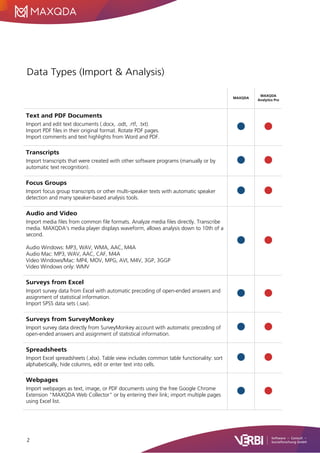
Text and PDF Documents
Import and edit text documents (.docx, .odt, .rtf, .txt).
Import PDF files in their original format. Rotate PDF pages.
Import comments and text highlights from Word and PDF.
Transcripts
Import transcripts that were created with other software programs (manually or by
automatic text recognition).
Focus Groups
Import focus group transcripts or other multi-speaker texts with automatic speaker
detection and many speaker-based analysis tools.
Audio and Video
Import media files from common file formats. Analyze media files directly. Transcribe
media. MAXQDA’s media player displays waveform, allows analysis down to 10th of a
second.
Audio Windows: MP3, WAV, WMA, AAC, M4A
Audio Mac: MP3, WAV, AAC, CAF, M4A
Video Windows/Mac: MP4, MOV, MPG, AVI, M4V, 3GP, 3GGP
Video Windows only: WMV
Surveys from Excel
Import survey data from Excel with automatic precoding of open-ended answers and
assignment of statistical information.
Import SPSS data sets (.sav).
Surveys from SurveyMonkey
Import survey data directly from SurveyMonkey account with automatic precoding of
open-ended answers and assignment of statistical information.
Spreadsheets
Import Excel spreadsheets (.xlsx). Table view includes common table functionality: sort
alphabetically, hide columns, edit or enter text into cells.
Webpages
Import webpages as text, image, or PDF documents using the free Google Chrome
Extension "MAXQDA Web Collector" or by entering their link; import multiple pages
using Excel list.
3
MAXQDA
MAXQDA
Analytics Pro
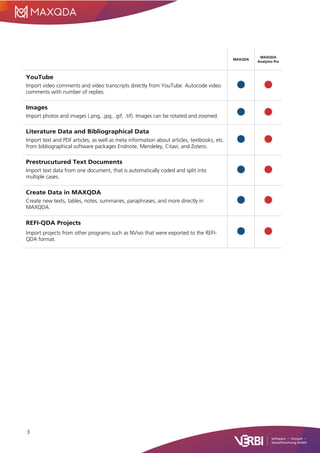
YouTube
Import video comments and video transcripts directly from YouTube. Autocode video
comments with number of replies.
Images
Import photos and images (.png, .jpg, .gif, .tif). Images can be rotated and zoomed.
Literature Data and Bibliographical Data
Import text and PDF articles, as well as meta information about articles, textbooks, etc.
from bibliographical software packages Endnote, Mendeley, Citavi, and Zotero.
Prestrucutured Text Documents
Import text data from one document, that is automatically coded and split into
multiple cases.
Create Data in MAXQDA
Create new texts, tables, notes, summaries, paraphrases, and more directly in
MAXQDA.
REFI-QDA Projects
Import projects from other programs such as NVivo that were exported to the REFI-
QDA format.
4
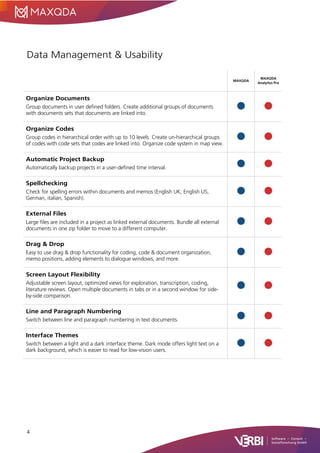
Data Management & Usability
MAXQDA
MAXQDA
Analytics Pro
Organize Documents
Group documents in user defined folders. Create additional groups of documents
with documents sets that documents are linked into.
Organize Codes
Group codes in hierarchical order with up to 10 levels. Create un-hierarchical groups
of codes with code sets that codes are linked into. Organize code system in map view.
Automatic Project Backup
Automatically backup projects in a user-defined time interval.
Spellchecking
Check for spelling errors within documents and memos (English UK, English US,
German, italian, Spanish).
External Files
Large files are included in a project as linked external documents. Bundle all external
documents in one zip folder to move to a different computer.
Drag & Drop
Easy to use drag & drop functionality for coding, code & document organization,
memo positions, adding elements to dialogue windows, and more.
Screen Layout Flexibility
Adjustable screen layout, optimized views for exploration, transcription, coding,
literature reviews. Open multiple documents in tabs or in a second window for side-
by-side comparison.
Line and Paragraph Numbering
Switch between line and paragraph numbering in text documents.
Interface Themes
Switch between a light and a dark interface theme. Dark mode offers light text on a
dark background, which is easier to read for low-vision users.
5
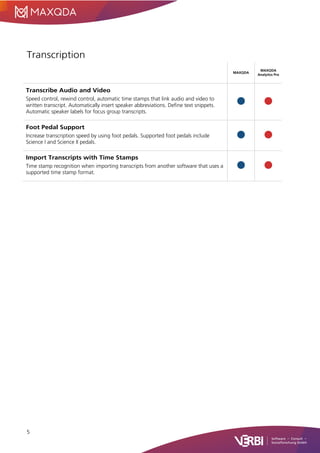
Transcription
MAXQDA
MAXQDA
Analytics Pro
Transcribe Audio and Video
Speed control, rewind control, automatic time stamps that link audio and video to
written transcript. Automatically insert speaker abbreviations. Define text snippets.
Automatic speaker labels for focus group transcripts.
Foot Pedal Support
Increase transcription speed by using foot pedals. Supported foot pedals include
Science I and Science II pedals.
Import Transcripts with Time Stamps
Time stamp recognition when importing transcripts from another software that uses a
supported time stamp format.
6
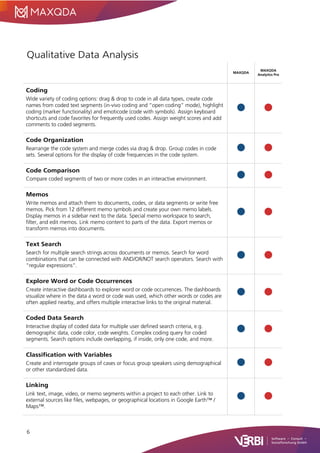
Qualitative Data Analysis
MAXQDA
MAXQDA
Analytics Pro
Coding
Wide variety of coding options: drag & drop to code in all data types, create code
names from coded text segments (in-vivo coding and “open coding” mode), highlight
coding (marker functionality) and emoticode (code with symbols). Assign keyboard
shortcuts and code favorites for frequently used codes. Assign weight scores and add
comments to coded segments.
Code Organization
Rearrange the code system and merge codes via drag & drop. Group codes in code
sets. Several options for the display of code frequencies in the code system.
Code Comparison
Compare coded segments of two or more codes in an interactive environment.
Memos
Write memos and attach them to documents, codes, or data segments or write free
memos. Pick from 12 different memo symbols and create your own memo labels.
Display memos in a sidebar next to the data. Special memo workspace to search,
filter, and edit memos. Link memo content to parts of the data. Export memos or
transform memos into documents.
Text Search
Search for multiple search strings across documents or memos. Search for word
combinations that can be connected with AND/OR/NOT search operators. Search with
“regular expressions”.
Explore Word or Code Occurrences
Create interactive dashboards to explorer word or code occurrences. The dashboards
visualize where in the data a word or code was used, which other words or codes are
often applied nearby, and offers multiple interactive links to the original material.
Coded Data Search
Interactive display of coded data for multiple user defined search criteria, e.g.
demographic data, code color, code weights. Complex coding query for coded
segments. Search options include overlapping, if inside, only one code, and more.
Classification with Variables
Create and interrogate groups of cases or focus group speakers using demographical
or other standardized data.
Linking
Link text, image, video, or memo segments within a project to each other. Link to
external sources like files, webpages, or geographical locations in Google Earth™ /
Maps™.
7
MAXQDA
MAXQDA
Analytics Pro
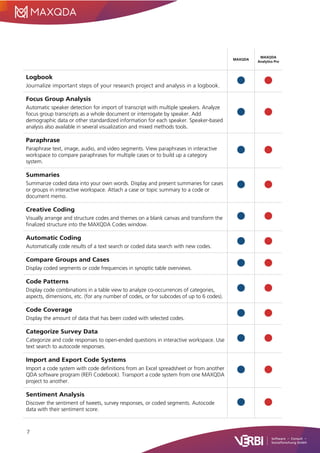
Logbook
Journalize important steps of your research project and analysis in a logbook.
Focus Group Analysis
Automatic speaker detection for import of transcript with multiple speakers. Analyze
focus group transcripts as a whole document or interrogate by speaker. Add
demographic data or other standardized information for each speaker. Speaker-based
analysis also available in several visualization and mixed methods tools.
Paraphrase
Paraphrase text, image, audio, and video segments. View paraphrases in interactive
workspace to compare paraphrases for multiple cases or to build up a category
system.
Summaries
Summarize coded data into your own words. Display and present summaries for cases
or groups in interactive workspace. Attach a case or topic summary to a code or
document memo.
Creative Coding
Visually arrange and structure codes and themes on a blank canvas and transform the
finalized structure into the MAXQDA Codes window.
Automatic Coding
Automatically code results of a text search or coded data search with new codes.
Compare Groups and Cases
Display coded segments or code frequencies in synoptic table overviews.
Code Patterns
Display code combinations in a table view to analyze co-occurrences of categories,
aspects, dimensions, etc. (for any number of codes, or for subcodes of up to 6 codes).
Code Coverage
Display the amount of data that has been coded with selected codes.
Categorize Survey Data
Categorize and code responses to open-ended questions in interactive workspace. Use
text search to autocode responses.
Import and Export Code Systems
Import a code system with code definitions from an Excel spreadsheet or from another
QDA software program (REFI Codebook). Transport a code system from one MAXQDA
project to another.
Sentiment Analysis
Discover the sentiment of tweets, survey responses, or coded segments. Autocode
data with their sentiment score.
8
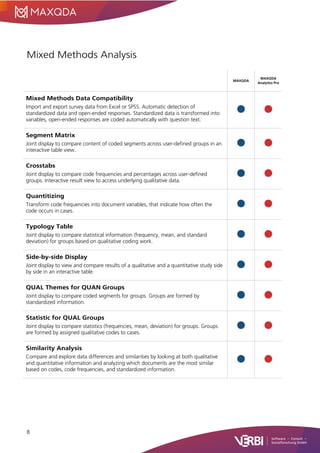
Mixed Methods Analysis
MAXQDA
MAXQDA
Analytics Pro
Mixed Methods Data Compatibility
Import and export survey data from Excel or SPSS. Automatic detection of
standardized data and open-ended responses. Standardized data is transformed into
variables, open-ended responses are coded automatically with question text.
Segment Matrix
Joint display to compare content of coded segments across user-defined groups in an
interactive table view.
Crosstabs
Joint display to compare code frequencies and percentages across user-defined
groups. Interactive result view to access underlying qualitative data.
Quantitizing
Transform code frequencies into document variables, that indicate how often the
code occurs in cases.
Typology Table
Joint display to compare statistical information (frequency, mean, and standard
deviation) for groups based on qualitative coding work.
Side-by-side Display
Joint display to view and compare results of a qualitative and a quantitative study side
by side in an interactive table.
QUAL Themes for QUAN Groups
Joint display to compare coded segments for groups. Groups are formed by
standardized information.
Statistic for QUAL Groups
Joint display to compare statistics (frequencies, mean, deviation) for groups. Groups
are formed by assigned qualitative codes to cases.
Similarity Analysis
Compare and explore data differences and similarities by looking at both qualitative
and quantitative information and analyzing which documents are the most similar
based on codes, code frequencies, and standardized information.
9
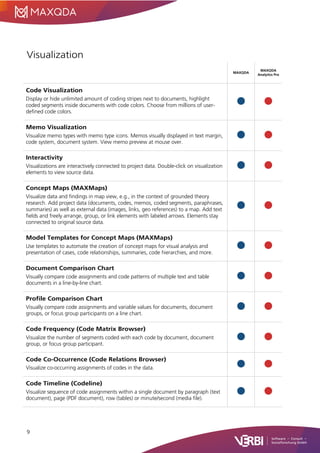
Visualization
MAXQDA
MAXQDA
Analytics Pro
Code Visualization
Display or hide unlimited amount of coding stripes next to documents, highlight
coded segments inside documents with code colors. Choose from millions of user-
defined code colors.
Memo Visualization
Visualize memo types with memo type icons. Memos visually displayed in text margin,
code system, document system. View memo preview at mouse over.
Interactivity
Visualizations are interactively connected to project data. Double-click on visualization
elements to view source data.
Concept Maps (MAXMaps)
Visualize data and findings in map view, e.g., in the context of grounded theory
research. Add project data (documents, codes, memos, coded segments, paraphrases,
summaries) as well as external data (images, links, geo references) to a map. Add text
fields and freely arrange, group, or link elements with labeled arrows. Elements stay
connected to original source data.
Model Templates for Concept Maps (MAXMaps)
Use templates to automate the creation of concept maps for visual analysis and
presentation of cases, code relationships, summaries, code hierarchies, and more.
Document Comparison Chart
Visually compare code assignments and code patterns of multiple text and table
documents in a line-by-line chart.
Profile Comparison Chart
Visually compare code assignments and variable values for documents, document
groups, or focus group participants on a line chart.
Code Frequency (Code Matrix Browser)
Visualize the number of segments coded with each code by document, document
group, or focus group participant.
Code Co-Occurrence (Code Relations Browser)
Visualize co-occurring assignments of codes in the data.
Code Timeline (Codeline)
Visualize sequence of code assignments within a single document by paragraph (text
document), page (PDF document), row (tables) or minute/second (media file).
10
MAXQDA
MAXQDA
Analytics Pro
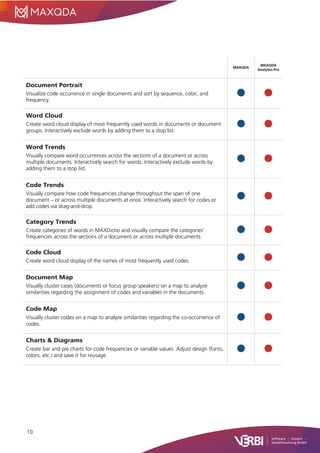
Document Portrait
Visualize code occurrence in single documents and sort by sequence, color, and
frequency.
Word Cloud
Create word cloud display of most frequently used words in documents or document
groups. Interactively exclude words by adding them to a stop list.
Word Trends
Visually compare word occurrences across the sections of a document or across
multiple documents. Interactively search for words. Interactively exclude words by
adding them to a stop list.
Code Trends
Visually compare how code frequencies change throughout the span of one
document – or across multiple documents at once. Interactively search for codes or
add codes via drag-and-drop.
Category Trends
Create categories of words in MAXDictio and visually compare the categories’
frequencies across the sections of a document or across multiple documents.
Code Cloud
Create word cloud display of the names of most frequently used codes.
Document Map
Visually cluster cases (documents or focus group speakers) on a map to analyze
similarities regarding the assignment of codes and variables in the documents.
Code Map
Visually cluster codes on a map to analyze similarities regarding the co-occurrence of
codes.
Charts & Diagrams
Create bar and pie charts for code frequencies or variable values. Adjust design (fonts,
colors, etc.) and save it for reusage.
11
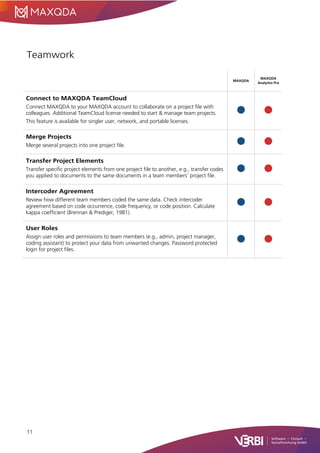
Teamwork
MAXQDA
MAXQDA
Analytics Pro
Connect to MAXQDA TeamCloud
Connect MAXQDA to your MAXQDA account to collaborate on a project file with
colleagues. Additional TeamCloud license needed to start & manage team projects.
This feature is available for singler user, network, and portable licenses.
Merge Projects
Merge several projects into one project file.
Transfer Project Elements
Transfer specific project elements from one project file to another, e.g., transfer codes
you applied to documents to the same documents in a team members’ project file.
Intercoder Agreement
Review how different team members coded the same data. Check intercoder
agreement based on code occurrence, code frequency, or code position. Calculate
kappa coefficient (Brennan & Prediger, 1981).
User Roles
Assign user roles and permissions to team members (e.g., admin, project manager,
coding assistant) to protect your data from unwanted changes. Password protected
login for project files.
12
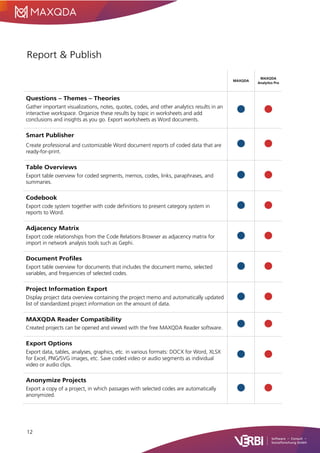
Report & Publish
MAXQDA
MAXQDA
Analytics Pro
Questions – Themes – Theories
Gather important visualizations, notes, quotes, codes, and other analytics results in an
interactive workspace. Organize these results by topic in worksheets and add
conclusions and insights as you go. Export worksheets as Word documents.
Smart Publisher
Create professional and customizable Word document reports of coded data that are
ready-for-print.
Table Overviews
Export table overview for coded segments, memos, codes, links, paraphrases, and
summaries.
Codebook
Export code system together with code definitions to present category system in
reports to Word.
Adjacency Matrix
Export code relationships from the Code Relations Browser as adjacency matrix for
import in network analysis tools such as Gephi.
Document Profiles
Export table overview for documents that includes the document memo, selected
variables, and frequencies of selected codes.
Project Information Export
Display project data overview containing the project memo and automatically updated
list of standardized project information on the amount of data.
MAXQDA Reader Compatibility
Created projects can be opened and viewed with the free MAXQDA Reader software.
Export Options
Export data, tables, analyses, graphics, etc. in various formats: DOCX for Word, XLSX
for Excel, PNG/SVG images, etc. Save coded video or audio segments as individual
video or audio clips.
Anonymize Projects
Export a copy of a project, in which passages with selected codes are automatically
anonymized.
13
MAXQDA
MAXQDA
Analytics Pro
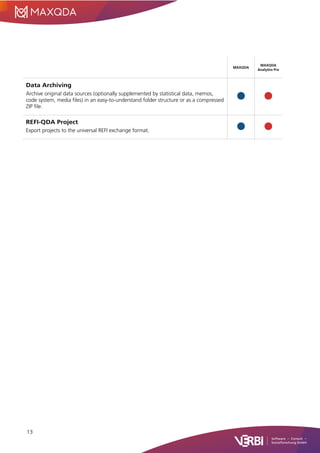
Data Archiving
Archive original data sources (optionally supplemented by statistical data, memos,
code system, media files) in an easy-to-understand folder structure or as a compressed
ZIP file.
REFI-QDA Project
Export projects to the universal REFI exchange format.
14
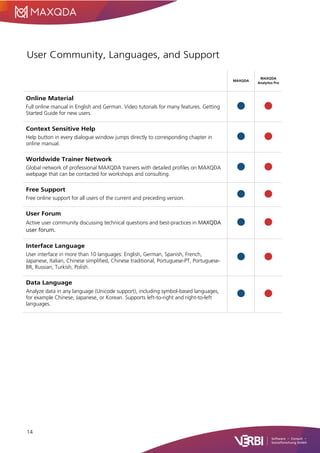
User Community, Languages, and Support
MAXQDA
MAXQDA
Analytics Pro
Online Material
Full online manual in English and German. Video tutorials for many features. Getting
Started Guide for new users.
Context Sensitive Help
Help button in every dialogue window jumps directly to corresponding chapter in
online manual.
Worldwide Trainer Network
Global network of professional MAXQDA trainers with detailed profiles on MAXQDA
webpage that can be contacted for workshops and consulting.
Free Support
Free online support for all users of the current and preceding version.
User Forum
Active user community discussing technical questions and best-practices in MAXQDA
user forum.
Interface Language
User interface in more than 10 languages: English, German, Spanish, French,
Japanese, Italian, Chinese simplified, Chinese traditional, Portuguese-PT, Portuguese-
BR, Russian, Turkish, Polish.
Data Language
Analyze data in any language (Unicode support), including symbol-based languages,
for example Chinese, Japanese, or Korean. Supports left-to-right and right-to-left
languages.
15
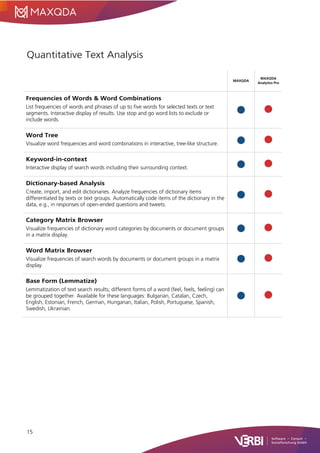
Quantitative Text Analysis
MAXQDA
MAXQDA
Analytics Pro
Frequencies of Words & Word Combinations
List frequencies of words and phrases of up to five words for selected texts or text
segments. Interactive display of results. Use stop and go word lists to exclude or
include words.
Word Tree
Visualize word frequencies and word combinations in interactive, tree-like structure.
Keyword-in-context
Interactive display of search words including their surrounding context.
Dictionary-based Analysis
Create, import, and edit dictionaries. Analyze frequencies of dictionary items
differentiated by texts or text groups. Automatically code items of the dictionary in the
data, e.g., in responses of open-ended questions and tweets.
Category Matrix Browser
Visualize frequencies of dictionary word categories by documents or document groups
in a matrix display.
Word Matrix Browser
Visualize frequencies of search words by documents or document groups in a matrix
display.
Base Form (Lemmatize)
Lemmatization of text search results; different forms of a word (feel, feels, feeling) can
be grouped together. Available for these languages: Bulgarian, Catalan, Czech,
English, Estonian, French, German, Hungarian, Italian, Polish, Portuguese, Spanish,
Swedish, Ukrainian.
16
Statistical Data Analysis
MAXQDA
MAXQDA
Analytics Pro
Statistical Analysis of MAXQDA Data
Transfer document variables (e.g., demographic data) and code frequencies to
MAXQDA’s Stats module for statistical analysis. Define variable labels, value labels and
missing values. Use results of statistical analysis to group MAXQDA project data for
further qualitative analysis.
Statistical Analysis of External Data Sets
Open and analyze external data sets from SPSS or Excel. Define variable labels, value
labels, and missing values. Save data as SPSS files.
Statistical Procedures
Full range of descriptive and inferential statistics.
• Calculate frequency tables, mean, median, standard deviation, mean error,
confidence intervals, etc.
• Analyze crosstabs: chi-square, Phi, contingency coefficient C, Cramer’s V.
• Correlation: Pearson’s r, Spearman’s rho.
• Analyze multiple responses and matrix questions: crosstabs and grouped bar
charts.
• Compare groups: t-Test for independent samples (Shapiro-Wilk, Cohen’s d,
Hedges’ g). Mann-whitney U-test for independent samples.
• Cluster analysis: typology table and line chart.
• Analysis of variance: Levene test for homogeneity of variances, Scheffe post-hoc
test, Cohen’s d, Hedges’ g for pairwise distances.
• Reliability analysis for scales: Cronbach’s Alpha.
Interactive Result Tables
Merge and delete table rows and columns with automatic recalculation. Sort and
rearrange result views. Use selected cases from table outputs as filters in the Data-
Editor or for in-depth analysis of sub-samples. Unlimited undo for changes.
Visualize Results
Create horizontal and vertical bar charts, pie charts, box plots, and histograms.
Interactive scatterplot: identify and filter outliers and special cases for in-depth
analysis.
Transform & Recode
Calculate new variables. Recode variables and/or code frequencies into same or new
variables. Recode multiple variables at once.
Export & Report
Display results in organized output viewer. Copy results to clipboard for use in
reporting programs like Word. Export to SPSS or other statistical packages.
17
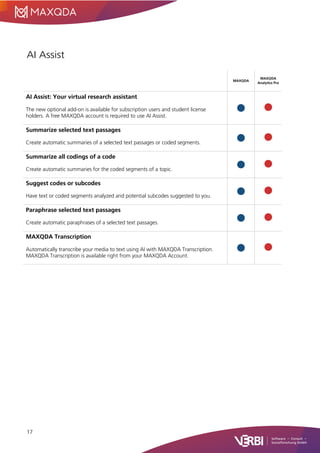
AI Assist
MAXQDA
MAXQDA
Analytics Pro
AI Assist: Your virtual research assistant
The new optional add-on is available for subscription users and student license
holders. A free MAXQDA account is required to use AI Assist.
Summarize selected text passages
Create automatic summaries of a selected text passages or coded segments.
Summarize all codings of a code
Create automatic summaries for the coded segments of a topic.
Suggest codes or subcodes
Have text or coded segments analyzed and potential subcodes suggested to you.
Paraphrase selected text passages
Create automatic paraphrases of a selected text passages.
MAXQDA Transcription
Automatically transcribe your media to text using AI with MAXQDA Transcription.
MAXQDA Transcription is available right from your MAXQDA Account.

MAXQDA-24-Features-EN.pdf

  • 1.
    1 Feature Overview MAXQDA 24 DataTypes (Import & Analysis) .......................................................2 Data Management & Usability........................................................4 Transcription..................................................................................5 Qualitative Data Analysis................................................................6 Mixed Methods Analysis.................................................................8 Visualization...................................................................................9 Teamwork....................................................................................11 Report & Publish ..........................................................................12 User Community, Languages, and Support...................................14 Quantitative Text Analysis ............................................................15 Statistical Data Analysis................................................................16 AI Assist.......................................................................................17 Support, Distribution: VERBI Software – Consult – Sozialforschung GmbH info@maxqda.com https://www.maxqda.com All rights reserved, especially the right of duplication, redistribution, and translation. No part of this document may be reproduced in any form (via photocopy, microfilm, etc.) or reworked without express written consent. © VERBI Software – Consult – Sozialforschung. GmbH, Berlin 2023.
  • 2.
    2 Data Types (Import& Analysis) MAXQDA MAXQDA Analytics Pro Text and PDF Documents Import and edit text documents (.docx, .odt, .rtf, .txt). Import PDF files in their original format. Rotate PDF pages. Import comments and text highlights from Word and PDF. Transcripts Import transcripts that were created with other software programs (manually or by automatic text recognition). Focus Groups Import focus group transcripts or other multi-speaker texts with automatic speaker detection and many speaker-based analysis tools. Audio and Video Import media files from common file formats. Analyze media files directly. Transcribe media. MAXQDA’s media player displays waveform, allows analysis down to 10th of a second. Audio Windows: MP3, WAV, WMA, AAC, M4A Audio Mac: MP3, WAV, AAC, CAF, M4A Video Windows/Mac: MP4, MOV, MPG, AVI, M4V, 3GP, 3GGP Video Windows only: WMV Surveys from Excel Import survey data from Excel with automatic precoding of open-ended answers and assignment of statistical information. Import SPSS data sets (.sav). Surveys from SurveyMonkey Import survey data directly from SurveyMonkey account with automatic precoding of open-ended answers and assignment of statistical information. Spreadsheets Import Excel spreadsheets (.xlsx). Table view includes common table functionality: sort alphabetically, hide columns, edit or enter text into cells. Webpages Import webpages as text, image, or PDF documents using the free Google Chrome Extension "MAXQDA Web Collector" or by entering their link; import multiple pages using Excel list.
  • 3.
    3 MAXQDA MAXQDA Analytics Pro YouTube Import videocomments and video transcripts directly from YouTube. Autocode video comments with number of replies. Images Import photos and images (.png, .jpg, .gif, .tif). Images can be rotated and zoomed. Literature Data and Bibliographical Data Import text and PDF articles, as well as meta information about articles, textbooks, etc. from bibliographical software packages Endnote, Mendeley, Citavi, and Zotero. Prestrucutured Text Documents Import text data from one document, that is automatically coded and split into multiple cases. Create Data in MAXQDA Create new texts, tables, notes, summaries, paraphrases, and more directly in MAXQDA. REFI-QDA Projects Import projects from other programs such as NVivo that were exported to the REFI- QDA format.
  • 4.
    4 Data Management &Usability MAXQDA MAXQDA Analytics Pro Organize Documents Group documents in user defined folders. Create additional groups of documents with documents sets that documents are linked into. Organize Codes Group codes in hierarchical order with up to 10 levels. Create un-hierarchical groups of codes with code sets that codes are linked into. Organize code system in map view. Automatic Project Backup Automatically backup projects in a user-defined time interval. Spellchecking Check for spelling errors within documents and memos (English UK, English US, German, italian, Spanish). External Files Large files are included in a project as linked external documents. Bundle all external documents in one zip folder to move to a different computer. Drag & Drop Easy to use drag & drop functionality for coding, code & document organization, memo positions, adding elements to dialogue windows, and more. Screen Layout Flexibility Adjustable screen layout, optimized views for exploration, transcription, coding, literature reviews. Open multiple documents in tabs or in a second window for side- by-side comparison. Line and Paragraph Numbering Switch between line and paragraph numbering in text documents. Interface Themes Switch between a light and a dark interface theme. Dark mode offers light text on a dark background, which is easier to read for low-vision users.
  • 5.
    5 Transcription MAXQDA MAXQDA Analytics Pro Transcribe Audioand Video Speed control, rewind control, automatic time stamps that link audio and video to written transcript. Automatically insert speaker abbreviations. Define text snippets. Automatic speaker labels for focus group transcripts. Foot Pedal Support Increase transcription speed by using foot pedals. Supported foot pedals include Science I and Science II pedals. Import Transcripts with Time Stamps Time stamp recognition when importing transcripts from another software that uses a supported time stamp format.
  • 6.
    6 Qualitative Data Analysis MAXQDA MAXQDA AnalyticsPro Coding Wide variety of coding options: drag & drop to code in all data types, create code names from coded text segments (in-vivo coding and “open coding” mode), highlight coding (marker functionality) and emoticode (code with symbols). Assign keyboard shortcuts and code favorites for frequently used codes. Assign weight scores and add comments to coded segments. Code Organization Rearrange the code system and merge codes via drag & drop. Group codes in code sets. Several options for the display of code frequencies in the code system. Code Comparison Compare coded segments of two or more codes in an interactive environment. Memos Write memos and attach them to documents, codes, or data segments or write free memos. Pick from 12 different memo symbols and create your own memo labels. Display memos in a sidebar next to the data. Special memo workspace to search, filter, and edit memos. Link memo content to parts of the data. Export memos or transform memos into documents. Text Search Search for multiple search strings across documents or memos. Search for word combinations that can be connected with AND/OR/NOT search operators. Search with “regular expressions”. Explore Word or Code Occurrences Create interactive dashboards to explorer word or code occurrences. The dashboards visualize where in the data a word or code was used, which other words or codes are often applied nearby, and offers multiple interactive links to the original material. Coded Data Search Interactive display of coded data for multiple user defined search criteria, e.g. demographic data, code color, code weights. Complex coding query for coded segments. Search options include overlapping, if inside, only one code, and more. Classification with Variables Create and interrogate groups of cases or focus group speakers using demographical or other standardized data. Linking Link text, image, video, or memo segments within a project to each other. Link to external sources like files, webpages, or geographical locations in Google Earth™ / Maps™.
  • 7.
    7 MAXQDA MAXQDA Analytics Pro Logbook Journalize importantsteps of your research project and analysis in a logbook. Focus Group Analysis Automatic speaker detection for import of transcript with multiple speakers. Analyze focus group transcripts as a whole document or interrogate by speaker. Add demographic data or other standardized information for each speaker. Speaker-based analysis also available in several visualization and mixed methods tools. Paraphrase Paraphrase text, image, audio, and video segments. View paraphrases in interactive workspace to compare paraphrases for multiple cases or to build up a category system. Summaries Summarize coded data into your own words. Display and present summaries for cases or groups in interactive workspace. Attach a case or topic summary to a code or document memo. Creative Coding Visually arrange and structure codes and themes on a blank canvas and transform the finalized structure into the MAXQDA Codes window. Automatic Coding Automatically code results of a text search or coded data search with new codes. Compare Groups and Cases Display coded segments or code frequencies in synoptic table overviews. Code Patterns Display code combinations in a table view to analyze co-occurrences of categories, aspects, dimensions, etc. (for any number of codes, or for subcodes of up to 6 codes). Code Coverage Display the amount of data that has been coded with selected codes. Categorize Survey Data Categorize and code responses to open-ended questions in interactive workspace. Use text search to autocode responses. Import and Export Code Systems Import a code system with code definitions from an Excel spreadsheet or from another QDA software program (REFI Codebook). Transport a code system from one MAXQDA project to another. Sentiment Analysis Discover the sentiment of tweets, survey responses, or coded segments. Autocode data with their sentiment score.
  • 8.
    8 Mixed Methods Analysis MAXQDA MAXQDA AnalyticsPro Mixed Methods Data Compatibility Import and export survey data from Excel or SPSS. Automatic detection of standardized data and open-ended responses. Standardized data is transformed into variables, open-ended responses are coded automatically with question text. Segment Matrix Joint display to compare content of coded segments across user-defined groups in an interactive table view. Crosstabs Joint display to compare code frequencies and percentages across user-defined groups. Interactive result view to access underlying qualitative data. Quantitizing Transform code frequencies into document variables, that indicate how often the code occurs in cases. Typology Table Joint display to compare statistical information (frequency, mean, and standard deviation) for groups based on qualitative coding work. Side-by-side Display Joint display to view and compare results of a qualitative and a quantitative study side by side in an interactive table. QUAL Themes for QUAN Groups Joint display to compare coded segments for groups. Groups are formed by standardized information. Statistic for QUAL Groups Joint display to compare statistics (frequencies, mean, deviation) for groups. Groups are formed by assigned qualitative codes to cases. Similarity Analysis Compare and explore data differences and similarities by looking at both qualitative and quantitative information and analyzing which documents are the most similar based on codes, code frequencies, and standardized information.
  • 9.
    9 Visualization MAXQDA MAXQDA Analytics Pro Code Visualization Displayor hide unlimited amount of coding stripes next to documents, highlight coded segments inside documents with code colors. Choose from millions of user- defined code colors. Memo Visualization Visualize memo types with memo type icons. Memos visually displayed in text margin, code system, document system. View memo preview at mouse over. Interactivity Visualizations are interactively connected to project data. Double-click on visualization elements to view source data. Concept Maps (MAXMaps) Visualize data and findings in map view, e.g., in the context of grounded theory research. Add project data (documents, codes, memos, coded segments, paraphrases, summaries) as well as external data (images, links, geo references) to a map. Add text fields and freely arrange, group, or link elements with labeled arrows. Elements stay connected to original source data. Model Templates for Concept Maps (MAXMaps) Use templates to automate the creation of concept maps for visual analysis and presentation of cases, code relationships, summaries, code hierarchies, and more. Document Comparison Chart Visually compare code assignments and code patterns of multiple text and table documents in a line-by-line chart. Profile Comparison Chart Visually compare code assignments and variable values for documents, document groups, or focus group participants on a line chart. Code Frequency (Code Matrix Browser) Visualize the number of segments coded with each code by document, document group, or focus group participant. Code Co-Occurrence (Code Relations Browser) Visualize co-occurring assignments of codes in the data. Code Timeline (Codeline) Visualize sequence of code assignments within a single document by paragraph (text document), page (PDF document), row (tables) or minute/second (media file).
  • 10.
    10 MAXQDA MAXQDA Analytics Pro Document Portrait Visualizecode occurrence in single documents and sort by sequence, color, and frequency. Word Cloud Create word cloud display of most frequently used words in documents or document groups. Interactively exclude words by adding them to a stop list. Word Trends Visually compare word occurrences across the sections of a document or across multiple documents. Interactively search for words. Interactively exclude words by adding them to a stop list. Code Trends Visually compare how code frequencies change throughout the span of one document – or across multiple documents at once. Interactively search for codes or add codes via drag-and-drop. Category Trends Create categories of words in MAXDictio and visually compare the categories’ frequencies across the sections of a document or across multiple documents. Code Cloud Create word cloud display of the names of most frequently used codes. Document Map Visually cluster cases (documents or focus group speakers) on a map to analyze similarities regarding the assignment of codes and variables in the documents. Code Map Visually cluster codes on a map to analyze similarities regarding the co-occurrence of codes. Charts & Diagrams Create bar and pie charts for code frequencies or variable values. Adjust design (fonts, colors, etc.) and save it for reusage.
  • 11.
    11 Teamwork MAXQDA MAXQDA Analytics Pro Connect toMAXQDA TeamCloud Connect MAXQDA to your MAXQDA account to collaborate on a project file with colleagues. Additional TeamCloud license needed to start & manage team projects. This feature is available for singler user, network, and portable licenses. Merge Projects Merge several projects into one project file. Transfer Project Elements Transfer specific project elements from one project file to another, e.g., transfer codes you applied to documents to the same documents in a team members’ project file. Intercoder Agreement Review how different team members coded the same data. Check intercoder agreement based on code occurrence, code frequency, or code position. Calculate kappa coefficient (Brennan & Prediger, 1981). User Roles Assign user roles and permissions to team members (e.g., admin, project manager, coding assistant) to protect your data from unwanted changes. Password protected login for project files.
  • 12.
    12 Report & Publish MAXQDA MAXQDA AnalyticsPro Questions – Themes – Theories Gather important visualizations, notes, quotes, codes, and other analytics results in an interactive workspace. Organize these results by topic in worksheets and add conclusions and insights as you go. Export worksheets as Word documents. Smart Publisher Create professional and customizable Word document reports of coded data that are ready-for-print. Table Overviews Export table overview for coded segments, memos, codes, links, paraphrases, and summaries. Codebook Export code system together with code definitions to present category system in reports to Word. Adjacency Matrix Export code relationships from the Code Relations Browser as adjacency matrix for import in network analysis tools such as Gephi. Document Profiles Export table overview for documents that includes the document memo, selected variables, and frequencies of selected codes. Project Information Export Display project data overview containing the project memo and automatically updated list of standardized project information on the amount of data. MAXQDA Reader Compatibility Created projects can be opened and viewed with the free MAXQDA Reader software. Export Options Export data, tables, analyses, graphics, etc. in various formats: DOCX for Word, XLSX for Excel, PNG/SVG images, etc. Save coded video or audio segments as individual video or audio clips. Anonymize Projects Export a copy of a project, in which passages with selected codes are automatically anonymized.
  • 13.
    13 MAXQDA MAXQDA Analytics Pro Data Archiving Archiveoriginal data sources (optionally supplemented by statistical data, memos, code system, media files) in an easy-to-understand folder structure or as a compressed ZIP file. REFI-QDA Project Export projects to the universal REFI exchange format.
  • 14.
    14 User Community, Languages,and Support MAXQDA MAXQDA Analytics Pro Online Material Full online manual in English and German. Video tutorials for many features. Getting Started Guide for new users. Context Sensitive Help Help button in every dialogue window jumps directly to corresponding chapter in online manual. Worldwide Trainer Network Global network of professional MAXQDA trainers with detailed profiles on MAXQDA webpage that can be contacted for workshops and consulting. Free Support Free online support for all users of the current and preceding version. User Forum Active user community discussing technical questions and best-practices in MAXQDA user forum. Interface Language User interface in more than 10 languages: English, German, Spanish, French, Japanese, Italian, Chinese simplified, Chinese traditional, Portuguese-PT, Portuguese- BR, Russian, Turkish, Polish. Data Language Analyze data in any language (Unicode support), including symbol-based languages, for example Chinese, Japanese, or Korean. Supports left-to-right and right-to-left languages.
  • 15.
    15 Quantitative Text Analysis MAXQDA MAXQDA AnalyticsPro Frequencies of Words & Word Combinations List frequencies of words and phrases of up to five words for selected texts or text segments. Interactive display of results. Use stop and go word lists to exclude or include words. Word Tree Visualize word frequencies and word combinations in interactive, tree-like structure. Keyword-in-context Interactive display of search words including their surrounding context. Dictionary-based Analysis Create, import, and edit dictionaries. Analyze frequencies of dictionary items differentiated by texts or text groups. Automatically code items of the dictionary in the data, e.g., in responses of open-ended questions and tweets. Category Matrix Browser Visualize frequencies of dictionary word categories by documents or document groups in a matrix display. Word Matrix Browser Visualize frequencies of search words by documents or document groups in a matrix display. Base Form (Lemmatize) Lemmatization of text search results; different forms of a word (feel, feels, feeling) can be grouped together. Available for these languages: Bulgarian, Catalan, Czech, English, Estonian, French, German, Hungarian, Italian, Polish, Portuguese, Spanish, Swedish, Ukrainian.
  • 16.
    16 Statistical Data Analysis MAXQDA MAXQDA AnalyticsPro Statistical Analysis of MAXQDA Data Transfer document variables (e.g., demographic data) and code frequencies to MAXQDA’s Stats module for statistical analysis. Define variable labels, value labels and missing values. Use results of statistical analysis to group MAXQDA project data for further qualitative analysis. Statistical Analysis of External Data Sets Open and analyze external data sets from SPSS or Excel. Define variable labels, value labels, and missing values. Save data as SPSS files. Statistical Procedures Full range of descriptive and inferential statistics. • Calculate frequency tables, mean, median, standard deviation, mean error, confidence intervals, etc. • Analyze crosstabs: chi-square, Phi, contingency coefficient C, Cramer’s V. • Correlation: Pearson’s r, Spearman’s rho. • Analyze multiple responses and matrix questions: crosstabs and grouped bar charts. • Compare groups: t-Test for independent samples (Shapiro-Wilk, Cohen’s d, Hedges’ g). Mann-whitney U-test for independent samples. • Cluster analysis: typology table and line chart. • Analysis of variance: Levene test for homogeneity of variances, Scheffe post-hoc test, Cohen’s d, Hedges’ g for pairwise distances. • Reliability analysis for scales: Cronbach’s Alpha. Interactive Result Tables Merge and delete table rows and columns with automatic recalculation. Sort and rearrange result views. Use selected cases from table outputs as filters in the Data- Editor or for in-depth analysis of sub-samples. Unlimited undo for changes. Visualize Results Create horizontal and vertical bar charts, pie charts, box plots, and histograms. Interactive scatterplot: identify and filter outliers and special cases for in-depth analysis. Transform & Recode Calculate new variables. Recode variables and/or code frequencies into same or new variables. Recode multiple variables at once. Export & Report Display results in organized output viewer. Copy results to clipboard for use in reporting programs like Word. Export to SPSS or other statistical packages.
  • 17.
    17 AI Assist MAXQDA MAXQDA Analytics Pro AIAssist: Your virtual research assistant The new optional add-on is available for subscription users and student license holders. A free MAXQDA account is required to use AI Assist. Summarize selected text passages Create automatic summaries of a selected text passages or coded segments. Summarize all codings of a code Create automatic summaries for the coded segments of a topic. Suggest codes or subcodes Have text or coded segments analyzed and potential subcodes suggested to you. Paraphrase selected text passages Create automatic paraphrases of a selected text passages. MAXQDA Transcription Automatically transcribe your media to text using AI with MAXQDA Transcription. MAXQDA Transcription is available right from your MAXQDA Account.