Choosing the right software for your research study : an overview of leading CAQDAS packages by Christina Silver
Choosing the right software for your research study : an overview of leading CAQDAS packages CAQR2009, Utrecht, The Netherlands Christina Silver Qualitative Innovations in CAQDAS (QUIC) CAQDAS Networking Project University of Surrey, Guildford, UK   http://caqdas.soc.surrey.ac.uk
Background context Long established Training and Capacity Building programme Qualitative Innovations in CAQDAS (QUIC) research programme Methodological Innovations in Computational Support (MICS) for qualitative research Integrating quantitative and qualitative data Analysis of (multi-stream) visual data Convergence of GIS technology with qualitative software http://caqdas.soc.surrey.ac.uk
Our Mission… To encourage  Independent use of CAQDAS Critical evaluation of s/w tools Critical selection of s/w tools Critical selection of functions within s/w tools Constructive use of software to suit personal/ project/methodological requirements http://caqdas.soc.surrey.ac.uk
Today…. Basic overview of CAQDAS packages Review of latest software developments Comparisons : methodological utility and practical usability Textual and multi-media analysis See also CAQDAS Networking Project Resources http:// caqdas.soc.surrey.ac.uk/softwareoptions.html   http://caqdas.soc.surrey.ac.uk
CAQDAS Definition Computer Assisted Qualitative Data AnalysiS Tools designed to facilitative  qualitative  approach to qualitative data including some of the following… Content searching tools Linking tools Coding tools (not pre-requisite) Query tools Writing and annotation tools Mapping or networking tools Need not include all the above, may include others and may incorporate quantitative data and approaches http://caqdas.soc.surrey.ac.uk
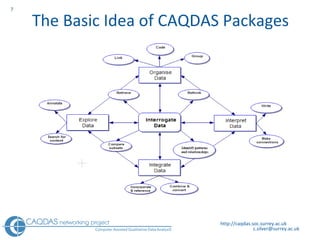
The Basic Idea of CAQDAS Packages http://caqdas.soc.surrey.ac.uk
General similarities in software functionality Code and retrieve Text/Word searches Data organisation (e.g. socio-demographics) Searches of position of codes in data (e.g. Co-occurrence, proximity etc.)  Writing tools (memos, comments etc.) Output of coded segments, results of searches etc.. http://caqdas.soc.surrey.ac.uk
Key Differences Software Architecture Textual data formatting  Multi-media data Coding schema structures Margin display  “ Closeness” to data Beyond “code & retrieve”  Querying, searching & auto-coding possibilities  Output options  http://caqdas.soc.surrey.ac.uk
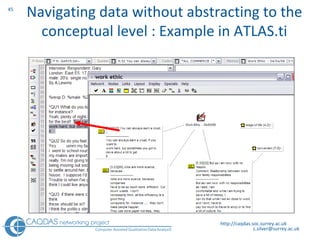
Some additionally have….. Team-working facilities   Excellent though different types support and methods of  merging   work  Quantitative data integration Allowing  import  of quantitative data generated in other applications which can be used to categorise the qualitative files with descriptive attributes & values Multi-media data handling Enabling working with images and audio/video data alongside or in isolation from textual data. Synchronicity with transcripts usually available. Linking tools – for non code-based approaches Tools for navigating around data without abstracting to the conceptual level. These vary significantly in flexibility and usability.   http://caqdas.soc.surrey.ac.uk
Potential role of software in the research process GENERALLY Overall - Improved access to data and thinking…  Project management tool  Data storage, coding, searching, memo-ing Enhanced flexibility,  readiness to ask questions/query, redo, rethink SPECIFICALLY Emphasis on particular tools/usefulness may depend on… Research questions/aims Constraints  Methodological & analytic approach Degree of familiarity with software http://caqdas.soc.surrey.ac.uk
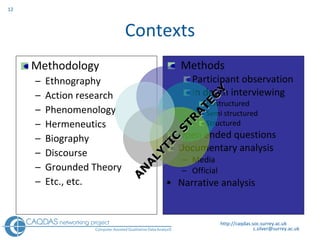
Contexts Methodology Ethnography Action research Phenomenology Hermeneutics Biography Discourse Grounded Theory Etc., etc. Methods Participant observation In depth interviewing Unstructured Semi structured Structured Open ended questions  Documentary analysis  Media Official Narrative analysis http://caqdas.soc.surrey.ac.uk ANALYTIC STRATEGY
Choosing a CAQDAS package: Some questions to ask yourself… Is there a package (and peer support) already available at your place of work? If not…what sort of a budget have you got? What platform? MAC or PC? How much time do you have to learn the software?  ( Realistically, how many sophisticated tools do you expect to use?) What kinds and amounts of data do you have? What is your preferred style of working? Do you have a well defined methodology at the outset? Do you principally need to think thematically about the data? Coding less important?  Principally need write notes in / at / about the data ?  Are you more concerned with the language, terminology used in the data?  (e.g. the comparison and occurrence of words and phrases across cases or between  different variables) Are you working individually or as part of a team? http://caqdas.soc.surrey.ac.uk
Budget : trial software ATLAS.ti  –  allows unlimited use but saving restricted to 10 files, 50 codes MAXqda  –  fully functional for 30 days use N V ivo  –  fully functional for 30 days use QDA Miner  –  fully functional for 30 days use Transana  - limited functionality but full version only $50 Student rates vary Always check if your institution has a site license http://caqdas.soc.surrey.ac.uk
Budget: freeware or low-cost  http://caqdas.soc.surrey.ac.uk/links1.htm Freeware Software  AnSWR  created by Centers for Disease Control: Information Systems Support Services (CISSS) (PC)  Division of HIV/AIDS Prevention, Epidemology Branch (PC)  Audacity   is an audio editor which will record sounds, play sounds, import, edit and export WAV, AIFF, Ogg Vorbis, and MP3 files  "CDC EZ-Text"  created by Centers for Disease Control and Protection (PC)  Express Scribe  professional audio playback control software  f4 PC transcription software  for wma, wav, mp3 and ogg formats, created by dresing&pehl GbR  IHMC Concept Map Software , Institute of Human and Machine Cognition, University of West Florida, (MAC & PC, Linux & Solaris)  InfoRapid   Cardfile System for managing documents & multi-media data (PC) (cost = 39euros)  TAMS Analyzer  open source qualitative package for the analysis of textual themes : from Matthew Weinstein (MAC OSX & GNUstep/Linux)  Transcriber  a tool for segmenting, labeling and transcribing speech (tested on Linux, Sun Solaris, Silicon Graphics and Windows NT)  Transana   cross platform tool for transcription and analysis of audio visual data: supported by the  Wisconsin Center for Education Research  Transana is part of the  Digital Insight  project. (PC & MAC)  VirtualDub , Video editing/cleaning up software - developed and made available free by Avery Lee but donations to him to defray expenses welcome (If your capture device is Video for Windows compatible)  Weft QDA  Open source tool for analysing textual data, developed by Alex Fenton to support his own MSc research (PC/Linux)   http://caqdas.soc.surrey.ac.uk 
Reviewing software developments Usability and accessibility Data handling and management ‘ T he world as data’ Data Analysis Homogenisation of tools  Flexible working New analytic possibilities Relationship between methodology and technology Data representation Transparency Validity  http://caqdas.soc.surrey.ac.uk
i) Usability and Accessibility Technical Platform S tability  Practical Terminology Team working  Personal User-interface Intuitiveness http://caqdas.soc.surrey.ac.uk 
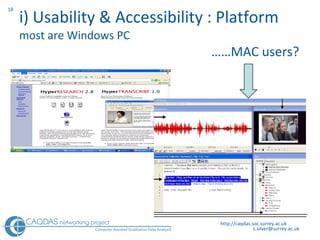
i) Usability & Accessibility : Platform most are Windows PC    …… MAC users? http://caqdas.soc.surrey.ac.uk
ii) Data handling and management  Field notes,  Summaries,  Abstracts & Literature files Interview transcripts Survey - open ended question data Discourse: news-political Bibliographic - lists Video, Film Tapes: oral history Handwritten letters Handwritten diaries Paintings Photography …………  and the rest http://caqdas.soc.surrey.ac.uk Project management - Incorporating and referencing ‘ The world as data’
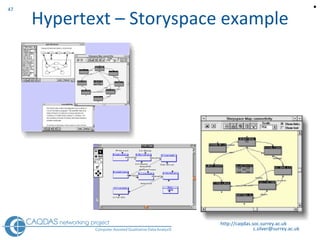
iii) Data Analysis :  Homogenisation of tools Code-based approaches Quantitative content analysis tools Multi-media data handling Commercial context Some exceptions bespoke tools for particular approaches or data types MAXqda - DRS  Transana - Story Space Framework  - MiMeG http://caqdas.soc.surrey.ac.uk 
iii) Data Analysis : Flexible working Critical evaluation and creative manipulation don’t use  a CAQDAS package to ‘create’ a methodology use it to ‘assist’ you in the best way possible to suit you, and your approach http://caqdas.soc.surrey.ac.uk
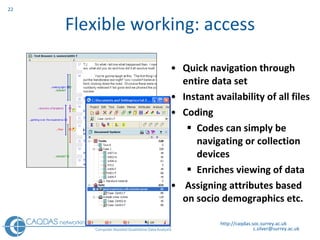
Flexible working: access Quick navigation through entire data set Instant availability of all files Coding Codes can simply be navigating or collection devices  Enriches viewing of data Assigning attributes based on socio demographics etc. http://caqdas.soc.surrey.ac.uk
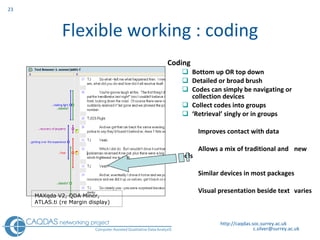
Flexible working : coding Coding Bottom up OR top down Detailed or broad brush Codes can simply be navigating or collection devices  Collect codes into groups ‘ Retrieval’ singly or in groups Improves contact with data Allows a mix of traditional and  new tools Similar devices in most packages Visual presentation beside text  varies http://caqdas.soc.surrey.ac.uk MAXqda V2,  QDA Miner, ATLAS.ti (re Margin display)
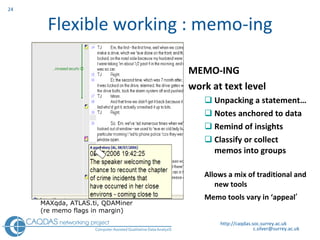
Flexible working : memo-ing MEMO-ING work at text level Unpacking a statement… Notes anchored to data Remind of insights Classify or collect memos into groups Allows a mix of traditional and new tools Memo tools vary in ‘appeal ’ http://caqdas.soc.surrey.ac.uk MAXqda,  ATLAS.ti, QDAMiner (re memo flags in margin)
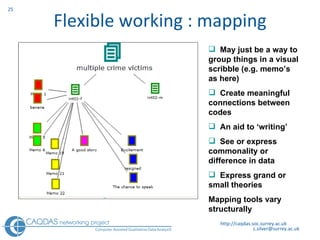
Flexible working : mapping http://caqdas.soc.surrey.ac.uk May just be a way to group things in a visual scribble (e.g. memo’s as here) Create meaningful  connections between codes  An aid to ‘writing’ See or express commonality or difference in data Express grand or small theories Mapping tools vary structurally
Flexible working Less linearity when using software Dip in and out of different functions Change your mind, go back and do something again, differently Build on something you’ve already done CAUTIONS Being flexible doesn’t mean inconsistent, patchy! Being flexible may take more time, not less! Using software doesn’t guarantee more rigour http://caqdas.soc.surrey.ac.uk
iv) New Analytic Possibilities : technology    methodology Convergence between GIS and CAQDAS  Synchronicity Written transcript and associated audio/video Multiple transcripts for audio/video files Time-based synchronicity between multiple file types Handling multi-stream video data Real-time collaborative working http://caqdas.soc.surrey.ac.uk
Geo-Linking in MAXqda http://caqdas.soc.surrey.ac.uk
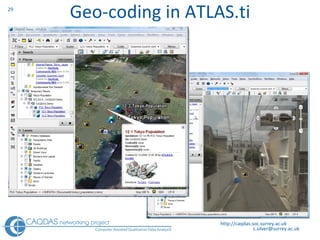
Geo-coding in ATLAS.ti http://caqdas.soc.surrey.ac.uk
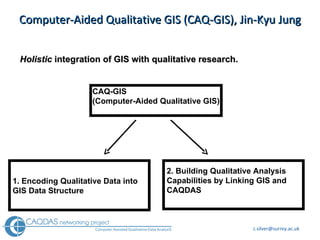
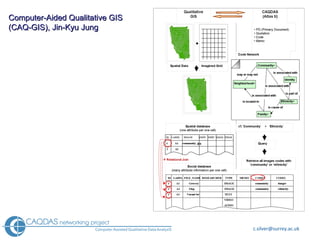
Computer-Aided Qualitative GIS (CAQ-GIS), Jin-Kyu Jung Holistic  integration of GIS with qualitative research.  CAQ-GIS (Computer-Aided Qualitative GIS) 1. Encoding Qualitative Data into GIS Data Structure 2. Building Qualitative Analysis Capabilities by Linking GIS and CAQDAS
Computer-Aided Qualitative GIS  (CAQ-GIS), Jin-Kyu Jung
v) Data Representation … visualizing data to facilitate data analysis Mapping / networking tools  Charts Matrices Output options Data exchange http://caqdas.soc.surrey.ac.uk
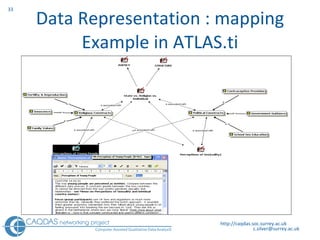
Data Representation : mapping Example in ATLAS.ti http://caqdas.soc.surrey.ac.uk
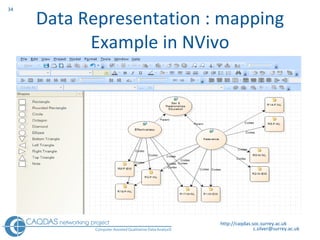
Data Representation : mapping Example in NVivo http://caqdas.soc.surrey.ac.uk
Key differences: mapping tools Each of these mapping tools individual qualities   (All provide integration to data behind) Scribbled links  NVivo and MAxqda = proactive links made between codes – do not ‘endure’ – each map is a scribble - has no enduring effect Enduring links ATLAS.ti =  proactive links to express relationship ‘endure’ – links made will recur in new  networks Co-occurrence   ATLAS.ti & MAXqda “co-occurring codes”, “top-down interrogation” http://caqdas.soc.surrey.ac.uk
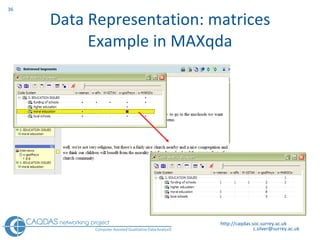
Data Representation: matrices Example in MAXqda http://caqdas.soc.surrey.ac.uk
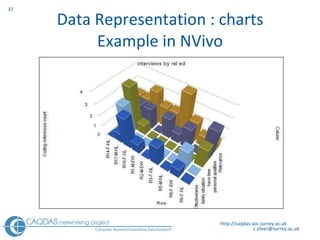
Data Representation : charts Example in NVivo http://caqdas.soc.surrey.ac.uk
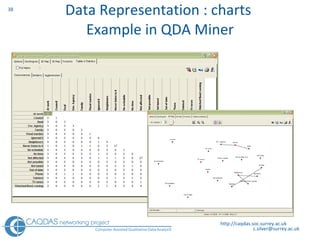
Data Representation : charts  Example in QDA Miner http://caqdas.soc.surrey.ac.uk
Key Differences  :  q uerying / searching Qualitative interactive cross-tabulations N V ivo,  MAXqda, ATLAS.ti  (different types of cross tabs) QDA Miner  –  not interactive Differences in the range and flexibility of available searches between software packages T rade-offs between sophistication and usability The more complex the data  organisation,  the wider the possibilities for interrogation  e.g. OE questions (often has to do with more complex data preparation) http://caqdas.soc.surrey.ac.uk
Data Representation : html output Example in NVivo L ink to html file to illustrate graphic & audio-visual segmentation  http://caqdas.soc.surrey.ac.uk
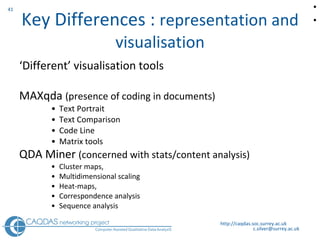
Key Differences :  representation and visualisation ‘ Different’ visualisation tools  MAXqda  (presence of coding in documents) Text Portrait Text Comparison Code Line Matrix tools QDA Miner  (concerned with stats/content analysis) Cluster maps,  Multidimensional scaling Heat-maps,  Correspondence analysis  Sequence analysis  http://caqdas.soc.surrey.ac.uk  
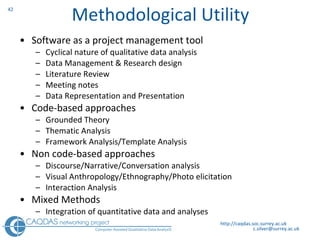
Methodological Utility Software as a project management tool Cyclical nature of qualitative data analysis Data Management & Research design Literature Review Meeting notes Data Representation and Presentation Code-based approaches Grounded Theory Thematic Analysis Framework Analysis/Template Analysis Non code-based approaches Discourse/Narrative/Conversation analysis Visual Anthropology/Ethnography/Photo elicitation Interaction Analysis Mixed Methods Integration of quantitative data and analyses http://caqdas.soc.surrey.ac.uk
Code-based approaches Powerful code and retrieve functionality Many sophisticated tools reliant on early coding Within and between case analysis  Inter-coder reliability Manipulate codes for alternative purposes  Gathering tools (e.g. literature reviews, reflexivity) Pointers (e.g. colour coding) Generating output http://caqdas.soc.surrey.ac.uk
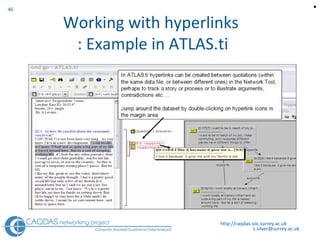
Non Code-based approaches Analytic needs Maintaining holistic view of data Navigate without abstracting to conceptual level Track processes, interactions, contradictions etc… Software tools Linking  Annotating  Networking  Outputting http://caqdas.soc.surrey.ac.uk
http://caqdas.soc.surrey.ac.uk Navigating data without abstracting to the conceptual level : Example in ATLAS.ti
http://caqdas.soc.surrey.ac.uk Working with hyperlinks  : Example in ATLAS.ti 
Hypertext – Storyspace example http://caqdas.soc.surrey.ac.uk 
Mixed Methods Integrating data  Working with different media in parallel Incorporate materials directly Reference to externally held materials  Developing synchronised written and audio/video transcriptions Integrating methods Importing quant measures about qual records Combining data types within an analysis  Converting qual data into quant measures http://caqdas.soc.surrey.ac.uk
Example : analysing open-ended survey questions Context Surveys vary in number of respondents which may influence the strategy adopted for analysing open-ended questions Factors influencing which software to use Which package(s) familiar / comfortable with? QUIC comparing ATLAS.ti, MAXqda, NVivo & QDA Miner What format(s) is the data currently in? What sort of analysis is required? http://caqdas.soc.surrey.ac.uk
What package(s) are you familiar with? Workarounds …within existing comfort-zone? Dataset size, several surveys Atlas.ti and N v ivo probably require some special procedures to handle open-ended survey data  MAXqda and QDA Miner have in-built routines to work with such data  http://caqdas.soc.surrey.ac.uk
In what format(s) is the data available? SPSS or Excel spreadsheet format including text C heck cells not truncated MAXqda & QDA Miner  I mport directly ATLAS.ti & N v ivo Convert to MS Word or rtf docs  http://caqdas.soc.surrey.ac.uk
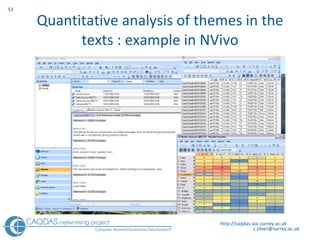
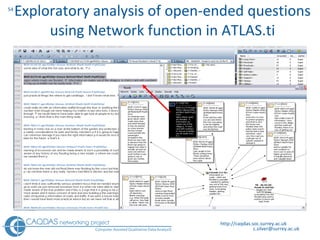
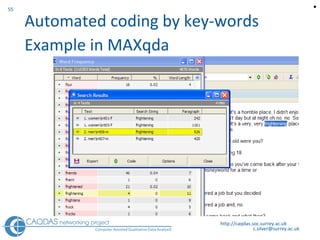
What sort of analysis is required? At least three types of qualitative analysis may be considered – with different software implications for each. Quantitative analysis of themes in the texts Exploratory analysis  Automated coding by keywords  http://caqdas.soc.surrey.ac.uk
Quantitative analysis of themes in the texts : example in NVivo http://caqdas.soc.surrey.ac.uk
Exploratory analysis of open-ended questions using Network function in ATLAS.ti http://caqdas.soc.surrey.ac.uk
Automated coding by key-words  Example in MAXqda http://caqdas.soc.surrey.ac.uk 
Analysis of visual data Use of CAQDAS less well established Status of visual data within a project Data representation key consideration Software bias towards code-based data analysis  Some bespoke tools for video analysis http://caqdas.soc.surrey.ac.uk
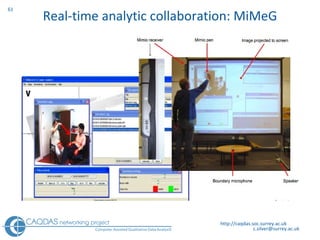
The status of visual data Bypassing the written transcript…? Synchronicity of (multiple) transcripts  Levels of data handling Abstraction and embeddedness Handling multi-stream video data Real-time analytic collaboration http://caqdas.soc.surrey.ac.uk
To transcribe or not…? Technically  Not always required (software depending) Methodologically Depends on analytic focus Practically Difficult to handle Types of transcript http://caqdas.soc.surrey.ac.uk
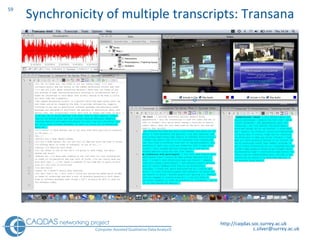
Synchronicity of multiple transcripts: Transana http://caqdas.soc.surrey.ac.uk
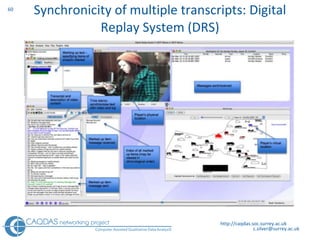
Synchronicity of multiple transcripts: Digital Replay System (DRS) http://caqdas.soc.surrey.ac.uk
Real-time analytic collaboration: MiMeG http://caqdas.soc.surrey.ac.uk
Representation of visual data Photo stories Video editing Sharing data Presenting data in non-traditional formats Ethical issues http://caqdas.soc.surrey.ac.uk
Analysing Audio-visual data technology    methodology Diachronic relationship Relatively low awareness levels A spectrum of scepticism The commercialisation of methodology http://caqdas.soc.surrey.ac.uk  
Keep in mind….. Managing Data Data Preparation  - specific to software Type(s) of data   - some are specific to software Respondent (& other known) characteristics Team logistics  and division of work if relevant Managing Ideas about Data Approach to coding (inductive, deductive, combination?)  Code Generation, definition & application Developing & Using the Coding Schema Managing Interpretations & Processes Making notes, comments, annotations Structured Memo System : Retrieving & using writing  Using Mapping Tools  http://caqdas.soc.surrey.ac.uk
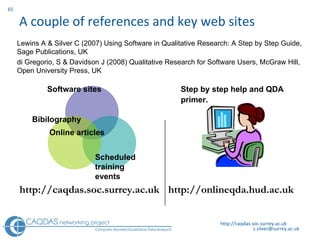
A couple of references and key web sites http://caqdas.soc.surrey.ac.uk Software sites Bibilography Scheduled  training events Online articles http://caqdas.soc.surrey.ac.uk Step by step help and QDA primer.   http://onlineqda.hud.ac.uk Lewins A & Silver C (2007) Using Software in Qualitative Research: A Step by Step Guide,   Sage Publications, UK  di Gregorio, S & Davidson J (2008) Qualitative Research for Software Users, McGraw Hill, Open University Press, UK
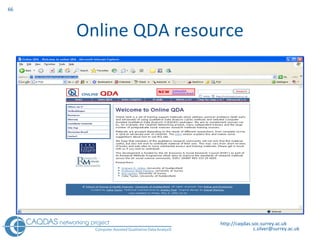
Online QDA resource http://caqdas.soc.surrey.ac.uk
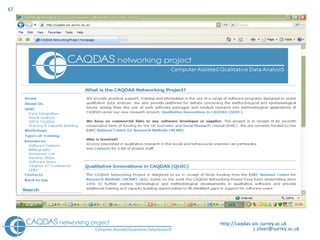
http://caqdas.soc.surrey.ac.uk
Thank you Questions…? http://caqdas.soc.surrey.ac.uk
This presentation is part of the proceedings of the International workshop on Computer-Aided Qualitative Research organised by Merlien Institute on the 4-5 June 2009 in Utrecht, The Netherlands Please feel free to share this presentation with your friends or colleagues who may find it beneficial for their work Do visit our website for upcoming events that may be of interest to you http://www.merlien.org

Choosing the right software for your research study : an overview of leading CAQDAS packages

  • 1.
    Choosing the rightsoftware for your research study : an overview of leading CAQDAS packages by Christina Silver
  • 2.
    Choosing the rightsoftware for your research study : an overview of leading CAQDAS packages CAQR2009, Utrecht, The Netherlands Christina Silver Qualitative Innovations in CAQDAS (QUIC) CAQDAS Networking Project University of Surrey, Guildford, UK http://caqdas.soc.surrey.ac.uk
  • 3.
    Background context Longestablished Training and Capacity Building programme Qualitative Innovations in CAQDAS (QUIC) research programme Methodological Innovations in Computational Support (MICS) for qualitative research Integrating quantitative and qualitative data Analysis of (multi-stream) visual data Convergence of GIS technology with qualitative software http://caqdas.soc.surrey.ac.uk
  • 4.
    Our Mission… Toencourage Independent use of CAQDAS Critical evaluation of s/w tools Critical selection of s/w tools Critical selection of functions within s/w tools Constructive use of software to suit personal/ project/methodological requirements http://caqdas.soc.surrey.ac.uk
  • 5.
    Today…. Basic overviewof CAQDAS packages Review of latest software developments Comparisons : methodological utility and practical usability Textual and multi-media analysis See also CAQDAS Networking Project Resources http:// caqdas.soc.surrey.ac.uk/softwareoptions.html http://caqdas.soc.surrey.ac.uk
  • 6.
    CAQDAS Definition ComputerAssisted Qualitative Data AnalysiS Tools designed to facilitative qualitative approach to qualitative data including some of the following… Content searching tools Linking tools Coding tools (not pre-requisite) Query tools Writing and annotation tools Mapping or networking tools Need not include all the above, may include others and may incorporate quantitative data and approaches http://caqdas.soc.surrey.ac.uk
  • 7.
    The Basic Ideaof CAQDAS Packages http://caqdas.soc.surrey.ac.uk
  • 8.
    General similarities insoftware functionality Code and retrieve Text/Word searches Data organisation (e.g. socio-demographics) Searches of position of codes in data (e.g. Co-occurrence, proximity etc.) Writing tools (memos, comments etc.) Output of coded segments, results of searches etc.. http://caqdas.soc.surrey.ac.uk
  • 9.
    Key Differences SoftwareArchitecture Textual data formatting Multi-media data Coding schema structures Margin display “ Closeness” to data Beyond “code & retrieve” Querying, searching & auto-coding possibilities Output options http://caqdas.soc.surrey.ac.uk
  • 10.
    Some additionally have…..Team-working facilities Excellent though different types support and methods of merging work Quantitative data integration Allowing import of quantitative data generated in other applications which can be used to categorise the qualitative files with descriptive attributes & values Multi-media data handling Enabling working with images and audio/video data alongside or in isolation from textual data. Synchronicity with transcripts usually available. Linking tools – for non code-based approaches Tools for navigating around data without abstracting to the conceptual level. These vary significantly in flexibility and usability. http://caqdas.soc.surrey.ac.uk
  • 11.
    Potential role ofsoftware in the research process GENERALLY Overall - Improved access to data and thinking… Project management tool Data storage, coding, searching, memo-ing Enhanced flexibility, readiness to ask questions/query, redo, rethink SPECIFICALLY Emphasis on particular tools/usefulness may depend on… Research questions/aims Constraints Methodological & analytic approach Degree of familiarity with software http://caqdas.soc.surrey.ac.uk
  • 12.
    Contexts Methodology EthnographyAction research Phenomenology Hermeneutics Biography Discourse Grounded Theory Etc., etc. Methods Participant observation In depth interviewing Unstructured Semi structured Structured Open ended questions Documentary analysis Media Official Narrative analysis http://caqdas.soc.surrey.ac.uk ANALYTIC STRATEGY
  • 13.
    Choosing a CAQDASpackage: Some questions to ask yourself… Is there a package (and peer support) already available at your place of work? If not…what sort of a budget have you got? What platform? MAC or PC? How much time do you have to learn the software? ( Realistically, how many sophisticated tools do you expect to use?) What kinds and amounts of data do you have? What is your preferred style of working? Do you have a well defined methodology at the outset? Do you principally need to think thematically about the data? Coding less important? Principally need write notes in / at / about the data ? Are you more concerned with the language, terminology used in the data? (e.g. the comparison and occurrence of words and phrases across cases or between different variables) Are you working individually or as part of a team? http://caqdas.soc.surrey.ac.uk
  • 14.
    Budget : trialsoftware ATLAS.ti – allows unlimited use but saving restricted to 10 files, 50 codes MAXqda – fully functional for 30 days use N V ivo – fully functional for 30 days use QDA Miner – fully functional for 30 days use Transana - limited functionality but full version only $50 Student rates vary Always check if your institution has a site license http://caqdas.soc.surrey.ac.uk
  • 15.
    Budget: freeware orlow-cost http://caqdas.soc.surrey.ac.uk/links1.htm Freeware Software AnSWR created by Centers for Disease Control: Information Systems Support Services (CISSS) (PC) Division of HIV/AIDS Prevention, Epidemology Branch (PC) Audacity is an audio editor which will record sounds, play sounds, import, edit and export WAV, AIFF, Ogg Vorbis, and MP3 files "CDC EZ-Text" created by Centers for Disease Control and Protection (PC) Express Scribe professional audio playback control software f4 PC transcription software for wma, wav, mp3 and ogg formats, created by dresing&pehl GbR IHMC Concept Map Software , Institute of Human and Machine Cognition, University of West Florida, (MAC & PC, Linux & Solaris) InfoRapid Cardfile System for managing documents & multi-media data (PC) (cost = 39euros) TAMS Analyzer open source qualitative package for the analysis of textual themes : from Matthew Weinstein (MAC OSX & GNUstep/Linux) Transcriber a tool for segmenting, labeling and transcribing speech (tested on Linux, Sun Solaris, Silicon Graphics and Windows NT) Transana cross platform tool for transcription and analysis of audio visual data: supported by the Wisconsin Center for Education Research Transana is part of the Digital Insight project. (PC & MAC) VirtualDub , Video editing/cleaning up software - developed and made available free by Avery Lee but donations to him to defray expenses welcome (If your capture device is Video for Windows compatible) Weft QDA Open source tool for analysing textual data, developed by Alex Fenton to support his own MSc research (PC/Linux) http://caqdas.soc.surrey.ac.uk 
  • 16.
    Reviewing software developmentsUsability and accessibility Data handling and management ‘ T he world as data’ Data Analysis Homogenisation of tools Flexible working New analytic possibilities Relationship between methodology and technology Data representation Transparency Validity http://caqdas.soc.surrey.ac.uk
  • 17.
    i) Usability andAccessibility Technical Platform S tability Practical Terminology Team working Personal User-interface Intuitiveness http://caqdas.soc.surrey.ac.uk 
  • 18.
    i) Usability &Accessibility : Platform most are Windows PC …… MAC users? http://caqdas.soc.surrey.ac.uk
  • 19.
    ii) Data handlingand management Field notes, Summaries, Abstracts & Literature files Interview transcripts Survey - open ended question data Discourse: news-political Bibliographic - lists Video, Film Tapes: oral history Handwritten letters Handwritten diaries Paintings Photography ………… and the rest http://caqdas.soc.surrey.ac.uk Project management - Incorporating and referencing ‘ The world as data’
  • 20.
    iii) Data Analysis: Homogenisation of tools Code-based approaches Quantitative content analysis tools Multi-media data handling Commercial context Some exceptions bespoke tools for particular approaches or data types MAXqda - DRS Transana - Story Space Framework - MiMeG http://caqdas.soc.surrey.ac.uk 
  • 21.
    iii) Data Analysis: Flexible working Critical evaluation and creative manipulation don’t use a CAQDAS package to ‘create’ a methodology use it to ‘assist’ you in the best way possible to suit you, and your approach http://caqdas.soc.surrey.ac.uk
  • 22.
    Flexible working: accessQuick navigation through entire data set Instant availability of all files Coding Codes can simply be navigating or collection devices Enriches viewing of data Assigning attributes based on socio demographics etc. http://caqdas.soc.surrey.ac.uk
  • 23.
    Flexible working :coding Coding Bottom up OR top down Detailed or broad brush Codes can simply be navigating or collection devices Collect codes into groups ‘ Retrieval’ singly or in groups Improves contact with data Allows a mix of traditional and new tools Similar devices in most packages Visual presentation beside text varies http://caqdas.soc.surrey.ac.uk MAXqda V2, QDA Miner, ATLAS.ti (re Margin display)
  • 24.
    Flexible working :memo-ing MEMO-ING work at text level Unpacking a statement… Notes anchored to data Remind of insights Classify or collect memos into groups Allows a mix of traditional and new tools Memo tools vary in ‘appeal ’ http://caqdas.soc.surrey.ac.uk MAXqda, ATLAS.ti, QDAMiner (re memo flags in margin)
  • 25.
    Flexible working :mapping http://caqdas.soc.surrey.ac.uk May just be a way to group things in a visual scribble (e.g. memo’s as here) Create meaningful connections between codes An aid to ‘writing’ See or express commonality or difference in data Express grand or small theories Mapping tools vary structurally
  • 26.
    Flexible working Lesslinearity when using software Dip in and out of different functions Change your mind, go back and do something again, differently Build on something you’ve already done CAUTIONS Being flexible doesn’t mean inconsistent, patchy! Being flexible may take more time, not less! Using software doesn’t guarantee more rigour http://caqdas.soc.surrey.ac.uk
  • 27.
    iv) New AnalyticPossibilities : technology  methodology Convergence between GIS and CAQDAS Synchronicity Written transcript and associated audio/video Multiple transcripts for audio/video files Time-based synchronicity between multiple file types Handling multi-stream video data Real-time collaborative working http://caqdas.soc.surrey.ac.uk
  • 28.
    Geo-Linking in MAXqdahttp://caqdas.soc.surrey.ac.uk
  • 29.
    Geo-coding in ATLAS.tihttp://caqdas.soc.surrey.ac.uk
  • 30.
    Computer-Aided Qualitative GIS(CAQ-GIS), Jin-Kyu Jung Holistic integration of GIS with qualitative research. CAQ-GIS (Computer-Aided Qualitative GIS) 1. Encoding Qualitative Data into GIS Data Structure 2. Building Qualitative Analysis Capabilities by Linking GIS and CAQDAS
  • 31.
    Computer-Aided Qualitative GIS (CAQ-GIS), Jin-Kyu Jung
  • 32.
    v) Data Representation… visualizing data to facilitate data analysis Mapping / networking tools Charts Matrices Output options Data exchange http://caqdas.soc.surrey.ac.uk
  • 33.
    Data Representation :mapping Example in ATLAS.ti http://caqdas.soc.surrey.ac.uk
  • 34.
    Data Representation :mapping Example in NVivo http://caqdas.soc.surrey.ac.uk
  • 35.
    Key differences: mappingtools Each of these mapping tools individual qualities (All provide integration to data behind) Scribbled links NVivo and MAxqda = proactive links made between codes – do not ‘endure’ – each map is a scribble - has no enduring effect Enduring links ATLAS.ti = proactive links to express relationship ‘endure’ – links made will recur in new networks Co-occurrence ATLAS.ti & MAXqda “co-occurring codes”, “top-down interrogation” http://caqdas.soc.surrey.ac.uk
  • 36.
    Data Representation: matricesExample in MAXqda http://caqdas.soc.surrey.ac.uk
  • 37.
    Data Representation :charts Example in NVivo http://caqdas.soc.surrey.ac.uk
  • 38.
    Data Representation :charts Example in QDA Miner http://caqdas.soc.surrey.ac.uk
  • 39.
    Key Differences : q uerying / searching Qualitative interactive cross-tabulations N V ivo, MAXqda, ATLAS.ti (different types of cross tabs) QDA Miner – not interactive Differences in the range and flexibility of available searches between software packages T rade-offs between sophistication and usability The more complex the data organisation, the wider the possibilities for interrogation e.g. OE questions (often has to do with more complex data preparation) http://caqdas.soc.surrey.ac.uk
  • 40.
    Data Representation :html output Example in NVivo L ink to html file to illustrate graphic & audio-visual segmentation http://caqdas.soc.surrey.ac.uk
  • 41.
    Key Differences : representation and visualisation ‘ Different’ visualisation tools MAXqda (presence of coding in documents) Text Portrait Text Comparison Code Line Matrix tools QDA Miner (concerned with stats/content analysis) Cluster maps, Multidimensional scaling Heat-maps, Correspondence analysis Sequence analysis http://caqdas.soc.surrey.ac.uk  
  • 42.
    Methodological Utility Softwareas a project management tool Cyclical nature of qualitative data analysis Data Management & Research design Literature Review Meeting notes Data Representation and Presentation Code-based approaches Grounded Theory Thematic Analysis Framework Analysis/Template Analysis Non code-based approaches Discourse/Narrative/Conversation analysis Visual Anthropology/Ethnography/Photo elicitation Interaction Analysis Mixed Methods Integration of quantitative data and analyses http://caqdas.soc.surrey.ac.uk
  • 43.
    Code-based approaches Powerfulcode and retrieve functionality Many sophisticated tools reliant on early coding Within and between case analysis Inter-coder reliability Manipulate codes for alternative purposes Gathering tools (e.g. literature reviews, reflexivity) Pointers (e.g. colour coding) Generating output http://caqdas.soc.surrey.ac.uk
  • 44.
    Non Code-based approachesAnalytic needs Maintaining holistic view of data Navigate without abstracting to conceptual level Track processes, interactions, contradictions etc… Software tools Linking Annotating Networking Outputting http://caqdas.soc.surrey.ac.uk
  • 45.
    http://caqdas.soc.surrey.ac.uk Navigating datawithout abstracting to the conceptual level : Example in ATLAS.ti
  • 46.
    http://caqdas.soc.surrey.ac.uk Working withhyperlinks : Example in ATLAS.ti 
  • 47.
    Hypertext – Storyspaceexample http://caqdas.soc.surrey.ac.uk 
  • 48.
    Mixed Methods Integratingdata Working with different media in parallel Incorporate materials directly Reference to externally held materials Developing synchronised written and audio/video transcriptions Integrating methods Importing quant measures about qual records Combining data types within an analysis Converting qual data into quant measures http://caqdas.soc.surrey.ac.uk
  • 49.
    Example : analysingopen-ended survey questions Context Surveys vary in number of respondents which may influence the strategy adopted for analysing open-ended questions Factors influencing which software to use Which package(s) familiar / comfortable with? QUIC comparing ATLAS.ti, MAXqda, NVivo & QDA Miner What format(s) is the data currently in? What sort of analysis is required? http://caqdas.soc.surrey.ac.uk
  • 50.
    What package(s) areyou familiar with? Workarounds …within existing comfort-zone? Dataset size, several surveys Atlas.ti and N v ivo probably require some special procedures to handle open-ended survey data MAXqda and QDA Miner have in-built routines to work with such data http://caqdas.soc.surrey.ac.uk
  • 51.
    In what format(s)is the data available? SPSS or Excel spreadsheet format including text C heck cells not truncated MAXqda & QDA Miner I mport directly ATLAS.ti & N v ivo Convert to MS Word or rtf docs http://caqdas.soc.surrey.ac.uk
  • 52.
    What sort ofanalysis is required? At least three types of qualitative analysis may be considered – with different software implications for each. Quantitative analysis of themes in the texts Exploratory analysis Automated coding by keywords http://caqdas.soc.surrey.ac.uk
  • 53.
    Quantitative analysis ofthemes in the texts : example in NVivo http://caqdas.soc.surrey.ac.uk
  • 54.
    Exploratory analysis ofopen-ended questions using Network function in ATLAS.ti http://caqdas.soc.surrey.ac.uk
  • 55.
    Automated coding bykey-words Example in MAXqda http://caqdas.soc.surrey.ac.uk 
  • 56.
    Analysis of visualdata Use of CAQDAS less well established Status of visual data within a project Data representation key consideration Software bias towards code-based data analysis Some bespoke tools for video analysis http://caqdas.soc.surrey.ac.uk
  • 57.
    The status ofvisual data Bypassing the written transcript…? Synchronicity of (multiple) transcripts Levels of data handling Abstraction and embeddedness Handling multi-stream video data Real-time analytic collaboration http://caqdas.soc.surrey.ac.uk
  • 58.
    To transcribe ornot…? Technically Not always required (software depending) Methodologically Depends on analytic focus Practically Difficult to handle Types of transcript http://caqdas.soc.surrey.ac.uk
  • 59.
    Synchronicity of multipletranscripts: Transana http://caqdas.soc.surrey.ac.uk
  • 60.
    Synchronicity of multipletranscripts: Digital Replay System (DRS) http://caqdas.soc.surrey.ac.uk
  • 61.
    Real-time analytic collaboration:MiMeG http://caqdas.soc.surrey.ac.uk
  • 62.
    Representation of visualdata Photo stories Video editing Sharing data Presenting data in non-traditional formats Ethical issues http://caqdas.soc.surrey.ac.uk
  • 63.
    Analysing Audio-visual datatechnology  methodology Diachronic relationship Relatively low awareness levels A spectrum of scepticism The commercialisation of methodology http://caqdas.soc.surrey.ac.uk  
  • 64.
    Keep in mind…..Managing Data Data Preparation - specific to software Type(s) of data - some are specific to software Respondent (& other known) characteristics Team logistics and division of work if relevant Managing Ideas about Data Approach to coding (inductive, deductive, combination?) Code Generation, definition & application Developing & Using the Coding Schema Managing Interpretations & Processes Making notes, comments, annotations Structured Memo System : Retrieving & using writing Using Mapping Tools http://caqdas.soc.surrey.ac.uk
  • 65.
    A couple ofreferences and key web sites http://caqdas.soc.surrey.ac.uk Software sites Bibilography Scheduled training events Online articles http://caqdas.soc.surrey.ac.uk Step by step help and QDA primer. http://onlineqda.hud.ac.uk Lewins A & Silver C (2007) Using Software in Qualitative Research: A Step by Step Guide, Sage Publications, UK di Gregorio, S & Davidson J (2008) Qualitative Research for Software Users, McGraw Hill, Open University Press, UK
  • 66.
    Online QDA resourcehttp://caqdas.soc.surrey.ac.uk
  • 67.
  • 68.
    Thank you Questions…?http://caqdas.soc.surrey.ac.uk
  • 69.
    This presentation ispart of the proceedings of the International workshop on Computer-Aided Qualitative Research organised by Merlien Institute on the 4-5 June 2009 in Utrecht, The Netherlands Please feel free to share this presentation with your friends or colleagues who may find it beneficial for their work Do visit our website for upcoming events that may be of interest to you http://www.merlien.org

Editor's Notes

  • #2 CAQDAS overview (c)2008 Ann Lewins & Christina Silver
  • #3 CAQDAS overview (c)2008 Ann Lewins & Christina Silver
  • #4 CAQDAS overview (c)2008 Ann Lewins & Christina Silver
  • #5 CAQDAS overview (c)2008 Ann Lewins & Christina Silver
  • #6 CAQDAS overview (c)2008 Ann Lewins & Christina Silver
  • #7 CAQDAS overview (c)2008 Ann Lewins & Christina Silver
  • #8 CAQDAS overview (c)2008 Ann Lewins & Christina Silver
  • #9 CAQDAS overview (c)2008 Ann Lewins & Christina Silver
  • #10 CAQDAS overview (c)2008 Ann Lewins & Christina Silver
  • #11 CAQDAS overview (c)2008 Ann Lewins & Christina Silver
  • #12 CAQDAS overview (c)2008 Ann Lewins & Christina Silver
  • #13 CAQDAS overview (c)2008 Ann Lewins & Christina Silver
  • #14 CAQDAS overview (c)2008 Ann Lewins & Christina Silver
  • #15 CAQDAS overview (c)2008 Ann Lewins & Christina Silver
  • #16 CAQDAS overview (c)2008 Ann Lewins & Christina Silver
  • #17 CAQDAS overview (c)2008 Ann Lewins & Christina Silver
  • #18 CAQDAS overview (c)2008 Ann Lewins & Christina Silver
  • #19 CAQDAS overview (c)2008 Ann Lewins & Christina Silver
  • #20 CAQDAS overview (c)2008 Ann Lewins & Christina Silver
  • #21 CAQDAS overview (c)2008 Ann Lewins & Christina Silver
  • #22 CAQDAS overview (c)2008 Ann Lewins & Christina Silver
  • #23 CAQDAS overview (c)2008 Ann Lewins & Christina Silver
  • #24 CAQDAS overview (c)2008 Ann Lewins & Christina Silver
  • #25 CAQDAS overview (c)2008 Ann Lewins & Christina Silver
  • #26 CAQDAS overview (c)2008 Ann Lewins & Christina Silver
  • #27 CAQDAS overview (c)2008 Ann Lewins & Christina Silver
  • #28 CAQDAS overview (c)2008 Ann Lewins & Christina Silver
  • #29 CAQDAS overview (c)2008 Ann Lewins & Christina Silver
  • #30 CAQDAS overview (c)2008 Ann Lewins & Christina Silver
  • #32 CAQDAS overview (c)2008 Ann Lewins & Christina Silver
  • #33 CAQDAS overview (c)2008 Ann Lewins & Christina Silver
  • #34 CAQDAS overview (c)2008 Ann Lewins & Christina Silver
  • #35 CAQDAS overview (c)2008 Ann Lewins & Christina Silver
  • #36 CAQDAS overview (c)2008 Ann Lewins & Christina Silver
  • #37 CAQDAS overview (c)2008 Ann Lewins & Christina Silver
  • #38 CAQDAS overview (c)2008 Ann Lewins & Christina Silver
  • #40 CAQDAS overview (c)2008 Ann Lewins & Christina Silver
  • #41 CAQDAS overview (c)2008 Ann Lewins & Christina Silver
  • #42 CAQDAS overview (c)2008 Ann Lewins & Christina Silver
  • #43 CAQDAS overview (c)2008 Ann Lewins & Christina Silver
  • #44 CAQDAS overview (c)2008 Ann Lewins & Christina Silver
  • #45 CAQDAS overview (c)2008 Ann Lewins & Christina Silver
  • #47 CAQDAS overview (c)2008 Ann Lewins & Christina Silver
  • #48 CAQDAS overview (c)2008 Ann Lewins & Christina Silver
  • #49 CAQDAS overview (c)2008 Ann Lewins & Christina Silver
  • #50 CAQDAS overview (c)2008 Ann Lewins & Christina Silver
  • #51 CAQDAS overview (c)2008 Ann Lewins & Christina Silver
  • #52 CAQDAS overview (c)2008 Ann Lewins & Christina Silver
  • #53 CAQDAS overview (c)2008 Ann Lewins & Christina Silver
  • #54 CAQDAS overview (c)2008 Ann Lewins & Christina Silver
  • #55 CAQDAS overview (c)2008 Ann Lewins & Christina Silver
  • #56 CAQDAS overview (c)2008 Ann Lewins & Christina Silver
  • #57 CAQDAS overview (c)2008 Ann Lewins & Christina Silver
  • #58 CAQDAS overview (c)2008 Ann Lewins & Christina Silver
  • #59 CAQDAS overview (c)2008 Ann Lewins & Christina Silver
  • #60 CAQDAS overview (c)2008 Ann Lewins & Christina Silver
  • #61 CAQDAS overview (c)2008 Ann Lewins & Christina Silver
  • #62 CAQDAS overview (c)2008 Ann Lewins & Christina Silver
  • #63 CAQDAS overview (c)2008 Ann Lewins & Christina Silver
  • #64 CAQDAS overview (c)2008 Ann Lewins & Christina Silver
  • #65 CAQDAS overview (c)2008 Ann Lewins & Christina Silver
  • #66 CAQDAS overview (c)2008 Ann Lewins & Christina Silver
  • #67 CAQDAS overview (c)2008 Ann Lewins & Christina Silver
  • #68 CAQDAS overview (c)2008 Ann Lewins & Christina Silver
  • #69 CAQDAS overview (c)2008 Ann Lewins & Christina Silver
  • #70 CAQDAS overview (c)2008 Ann Lewins & Christina Silver