CLOUD COMPUTING AND
VIRTUALIZATION TECHNIQUES


               By
        Vikash Kushwaha
          2010UIT146
          MNIT Jaipur
CONTENTS
• Cloud Computing
  • Need And Features
• Virtualization
  • what is it
  • benefits
  • VM Implementation Techniques
• XEN Internals
  •   XEN Domains
  •   CPU Sharing
  •   Memory Sharing
  •   IO Sharing
CLOUD COMPUTING
•   Cloud computing really is accessing resources and services
    needed to perform functions with dynamically changing needs.
    ... The cloud is a virtualization of resources that maintains and
    manages itself
•   Scale your infrastructure on demand within minutes or even
    seconds, instead of days or weeks, thereby avoiding
    underutilization (idle servers) and overutilization.
•   A broad array of webbased services aimed at allowing users
    to obtain a wide range of functional capabilities on a 'pay as
    you go' basis.
     –   On-demand service
     –   Networked Shared Resources
     –   Flexible Provisioning
     –   Fine-grained metering
RESOURCE PROVISIONING –
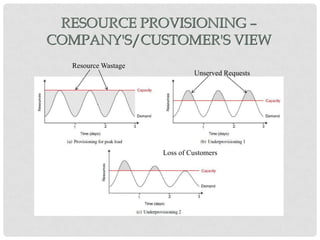
COMPANY'S/CUSTOMER'S VIEW
  Resource Wastage
                              Unserved Requests


                     Loss of Customers
RESOURCE PROVISIONING –
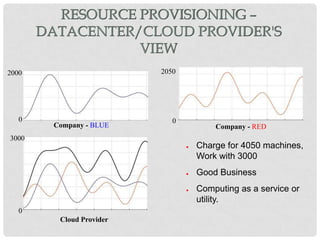
       DATACENTER/CLOUD PROVIDER'S
                  VIEW
2000                      2050


   0                         0
        Company - BLUE                   Company - RED
3000
                                 ●   Charge for 4050 machines,
                                     Work with 3000
                                 ●   Good Business
                                 ●   Computing as a service or
                                     utility.
   0
         Cloud Provider
WHAT IS REQUIRED

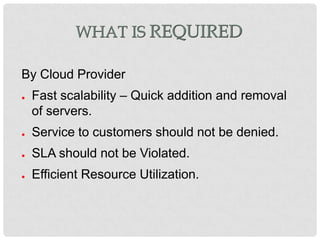
By Cloud Provider
●   Fast scalability – Quick addition and removal
    of servers.
●   Service to customers should not be denied.
●   SLA should not be Violated.
●   Efficient Resource Utilization.
WHAT IS VIRTUALIZATION
“Virtualization, in computing, is the creation of
  a virtual (rather than actual) version of
  something, such as a hardware platform,
  operating system, a storage device or
  network resources”
    Concept is not new.
●   Multi Programming – Each Process thinks it has
    complete control on all of the resources.
    –   Virtual Memory
    –   CPU Sharing
SIMILARITIES AND DIFFERENCES WITH
           MULTIPROGRAMMING

●   Multi Programming            ●   Virtualization
    –   CPU is shared among          –   CPU is shared among
        processes                        OSs.
    –   Memory is shared using       –   Memory is shared using
        Page Tables.                     more level of
                                         indirections. Multiple
    –   Process knows it is
                                         Page tables.
        being managed- uses
        system calls.                –   OS may or may not
                                         know that it is being
                                         managed.
VIRTUALIZATION
                     ARCHITECTURE
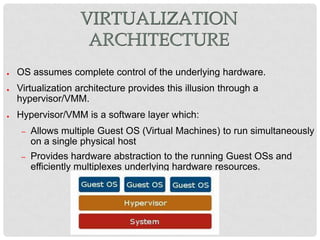
●   OS assumes complete control of the underlying hardware.
●   Virtualization architecture provides this illusion through a
    hypervisor/VMM.
●   Hypervisor/VMM is a software layer which:
     –   Allows multiple Guest OS (Virtual Machines) to run simultaneously
         on a single physical host
     –   Provides hardware abstraction to the running Guest OSs and
         efficiently multiplexes underlying hardware resources.
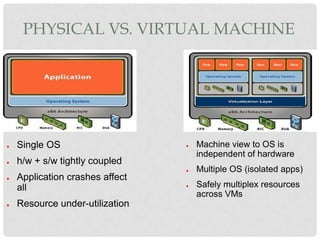
PHYSICAL VS. VIRTUAL MACHINE


●   Single OS                    ●   Machine view to OS is
                                     independent of hardware
●   h/w + s/w tightly coupled
                                 ●   Multiple OS (isolated apps)
●   Application crashes affect
    all                          ●   Safely multiplex resources
                                     across VMs
●   Resource under-utilization
IMPORTANCE OF VIRTUALIZATION IN
       CLOUD COMPUTING

●   Cloud can exist without Virtualization, although it
    will be difficult and inefficient.
●   Cloud makes notion of “Pay for what you use” ,
    “infinite availability- use as much you want”.
●   These notions are practical only if we have
    –   lot of flexibility
    –   efficiency in the back-end.      IO Ring
REQUIREMENT FOR
              VIRTUALIZABILITY
Popek and Goldberg mentioned a set of
requirements
● They divided instructions into three

categories:
●   Privileged instructions: execute in a privileged
    mode, but will trap otherwise.
●   Control sensitive instructions: attempt to change
    the config of resources.
●   Behavior sensitive instructions: are those that
    behave in a different way depending on the config of
    resources.
REQUIREMENT FOR
             VIRTUALIZABILITY

●   They said that all sensitive instructions must
    also be privileged instructions.
●   Hypervisor must be able to intercept any
    instructions that changes the state of the
    machine in a way that impacts other
    processes.
VM IMPLEMENTATION
             TECHNIQUES
1. Binary Translation


2. Paravirtualization


3. Hardware Supported Virtualization
BINARY TRANSLATION

●   Binary image of OS is manipulated at the runtime.
●   Privileged instructions are rewritten to point to
    their emulated versions.
●   Performance from this approach is not ideal,
    particularly when doing anything I/O intensive.
●   Caching of the locations of unsafe instructions
    can speed Up.
●   Used in VMWare.
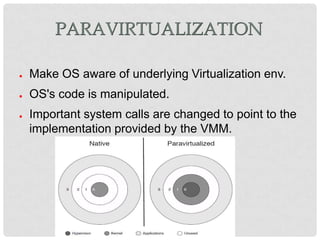
PARAVIRTUALIZATION

●   Make OS aware of underlying Virtualization env.
●   OS's code is manipulated.
●   Important system calls are changed to point to the
    implementation provided by the VMM.
HW SUPPORTED VIRTUALIZATION

• OS stays in its original privilege level 0.
• Attempts to access the hardware directly are
  caught and passed to VMM.
• In other words a new privilege ring is setup
  for the VMM.
• Added new instructions which makes
  Virtualization considerably easier for x86.
  • Intel – IVT(Intel Virtualization Technology)
  • AMD – introduced AMD-V
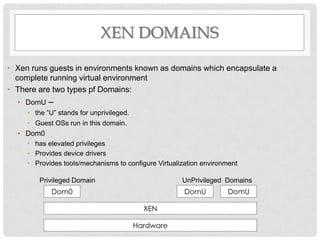
XEN DOMAINS

• Xen runs guests in environments known as domains which encapsulate a
  complete running virtual environment
• There are two types pf Domains:
  • DomU    –
     • the “U” stands for unprivileged.
     • Guest OSs run in this domain.
  • Dom0
     • has elevated privileges
     • Provides device drivers
     • Provides tools/mechanisms to configure Virtualization environment

         Privileged Domain                            UnPrivileged Domains
             Dom0                                      DomU         DomU

                                            XEN

                                          Hardware
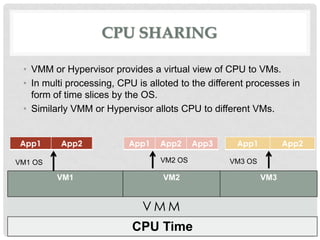
CPU SHARING

 • VMM or Hypervisor provides a virtual view of CPU to VMs.
 • In multi processing, CPU is alloted to the different processes in
   form of time slices by the OS.
 • Similarly VMM or Hypervisor allots CPU to different VMs.


 App1     App2            App1    App2     App3     App1          App2

VM1 OS                            VM2 OS           VM3 OS

         VM1                      VM2                       VM3


                             VMM
                           CPU Time
MEMORY SHARING

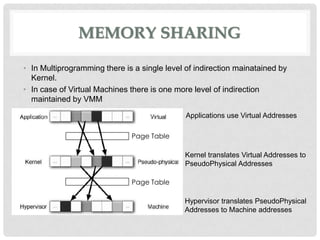
• In Multiprogramming there is a single level of indirection mainatained by
  Kernel.
• In case of Virtual Machines there is one more level of indirection
  maintained by VMM
                                              Applications use Virtual Addresses

                              Page Table

                                              Kernel translates Virtual Addresses to
                                              PseudoPhysical Addresses

                              Page Table

                                             Hypervisor translates PseudoPhysical
                                             Addresses to Machine addresses
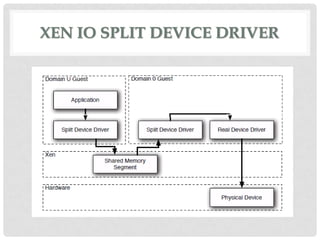
XEN IO SPLIT DEVICE DRIVER
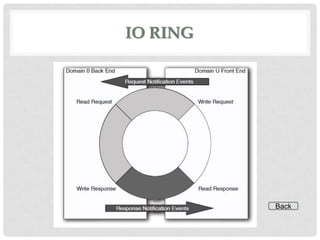
IO RING


          Back
FUTURE ASPECTS
• Currently SalesForce CRM has 97,700 customers across
  the global.
  As per survey across the global 41,546 companies are
  willing to move to SalesForce CRM by end of 2013.

• “World should follow India & Japan in cloud
  computing”
               Vivek Kundra, Chief information officer, US
THANK
 YOU

Cloud Computing

  • 1.
    CLOUD COMPUTING AND VIRTUALIZATIONTECHNIQUES By Vikash Kushwaha 2010UIT146 MNIT Jaipur
  • 2.
    CONTENTS • Cloud Computing • Need And Features • Virtualization • what is it • benefits • VM Implementation Techniques • XEN Internals • XEN Domains • CPU Sharing • Memory Sharing • IO Sharing
  • 3.
    CLOUD COMPUTING • Cloud computing really is accessing resources and services needed to perform functions with dynamically changing needs. ... The cloud is a virtualization of resources that maintains and manages itself • Scale your infrastructure on demand within minutes or even seconds, instead of days or weeks, thereby avoiding underutilization (idle servers) and overutilization. • A broad array of webbased services aimed at allowing users to obtain a wide range of functional capabilities on a 'pay as you go' basis. – On-demand service – Networked Shared Resources – Flexible Provisioning – Fine-grained metering
  • 4.
    RESOURCE PROVISIONING – COMPANY'S/CUSTOMER'SVIEW Resource Wastage Unserved Requests Loss of Customers
  • 5.
    RESOURCE PROVISIONING – DATACENTER/CLOUD PROVIDER'S VIEW 2000 2050 0 0 Company - BLUE Company - RED 3000 ● Charge for 4050 machines, Work with 3000 ● Good Business ● Computing as a service or utility. 0 Cloud Provider
  • 6.
    WHAT IS REQUIRED ByCloud Provider ● Fast scalability – Quick addition and removal of servers. ● Service to customers should not be denied. ● SLA should not be Violated. ● Efficient Resource Utilization.
  • 7.
    WHAT IS VIRTUALIZATION “Virtualization,in computing, is the creation of a virtual (rather than actual) version of something, such as a hardware platform, operating system, a storage device or network resources” Concept is not new. ● Multi Programming – Each Process thinks it has complete control on all of the resources. – Virtual Memory – CPU Sharing
  • 8.
    SIMILARITIES AND DIFFERENCESWITH MULTIPROGRAMMING ● Multi Programming ● Virtualization – CPU is shared among – CPU is shared among processes OSs. – Memory is shared using – Memory is shared using Page Tables. more level of indirections. Multiple – Process knows it is Page tables. being managed- uses system calls. – OS may or may not know that it is being managed.
  • 9.
    VIRTUALIZATION ARCHITECTURE ● OS assumes complete control of the underlying hardware. ● Virtualization architecture provides this illusion through a hypervisor/VMM. ● Hypervisor/VMM is a software layer which: – Allows multiple Guest OS (Virtual Machines) to run simultaneously on a single physical host – Provides hardware abstraction to the running Guest OSs and efficiently multiplexes underlying hardware resources.
  • 10.
    PHYSICAL VS. VIRTUALMACHINE ● Single OS ● Machine view to OS is independent of hardware ● h/w + s/w tightly coupled ● Multiple OS (isolated apps) ● Application crashes affect all ● Safely multiplex resources across VMs ● Resource under-utilization
  • 11.
    IMPORTANCE OF VIRTUALIZATIONIN CLOUD COMPUTING ● Cloud can exist without Virtualization, although it will be difficult and inefficient. ● Cloud makes notion of “Pay for what you use” , “infinite availability- use as much you want”. ● These notions are practical only if we have – lot of flexibility – efficiency in the back-end. IO Ring
  • 12.
    REQUIREMENT FOR VIRTUALIZABILITY Popek and Goldberg mentioned a set of requirements ● They divided instructions into three categories: ● Privileged instructions: execute in a privileged mode, but will trap otherwise. ● Control sensitive instructions: attempt to change the config of resources. ● Behavior sensitive instructions: are those that behave in a different way depending on the config of resources.
  • 13.
    REQUIREMENT FOR VIRTUALIZABILITY ● They said that all sensitive instructions must also be privileged instructions. ● Hypervisor must be able to intercept any instructions that changes the state of the machine in a way that impacts other processes.
  • 14.
    VM IMPLEMENTATION TECHNIQUES 1. Binary Translation 2. Paravirtualization 3. Hardware Supported Virtualization
  • 15.
    BINARY TRANSLATION ● Binary image of OS is manipulated at the runtime. ● Privileged instructions are rewritten to point to their emulated versions. ● Performance from this approach is not ideal, particularly when doing anything I/O intensive. ● Caching of the locations of unsafe instructions can speed Up. ● Used in VMWare.
  • 16.
    PARAVIRTUALIZATION ● Make OS aware of underlying Virtualization env. ● OS's code is manipulated. ● Important system calls are changed to point to the implementation provided by the VMM.
  • 17.
    HW SUPPORTED VIRTUALIZATION •OS stays in its original privilege level 0. • Attempts to access the hardware directly are caught and passed to VMM. • In other words a new privilege ring is setup for the VMM. • Added new instructions which makes Virtualization considerably easier for x86. • Intel – IVT(Intel Virtualization Technology) • AMD – introduced AMD-V
  • 18.
    XEN DOMAINS • Xenruns guests in environments known as domains which encapsulate a complete running virtual environment • There are two types pf Domains: • DomU – • the “U” stands for unprivileged. • Guest OSs run in this domain. • Dom0 • has elevated privileges • Provides device drivers • Provides tools/mechanisms to configure Virtualization environment Privileged Domain UnPrivileged Domains Dom0 DomU DomU XEN Hardware
  • 19.
    CPU SHARING •VMM or Hypervisor provides a virtual view of CPU to VMs. • In multi processing, CPU is alloted to the different processes in form of time slices by the OS. • Similarly VMM or Hypervisor allots CPU to different VMs. App1 App2 App1 App2 App3 App1 App2 VM1 OS VM2 OS VM3 OS VM1 VM2 VM3 VMM CPU Time
  • 20.
    MEMORY SHARING • InMultiprogramming there is a single level of indirection mainatained by Kernel. • In case of Virtual Machines there is one more level of indirection maintained by VMM Applications use Virtual Addresses Page Table Kernel translates Virtual Addresses to PseudoPhysical Addresses Page Table Hypervisor translates PseudoPhysical Addresses to Machine addresses
  • 21.
    XEN IO SPLITDEVICE DRIVER
  • 22.
  • 23.
    FUTURE ASPECTS • CurrentlySalesForce CRM has 97,700 customers across the global. As per survey across the global 41,546 companies are willing to move to SalesForce CRM by end of 2013. • “World should follow India & Japan in cloud computing” Vivek Kundra, Chief information officer, US
  • 24.