Classification of Digital
       Computers
             &
Applications of Computers
Classification
•   Personal Computers
•   Laptops
•   Network Computers
•   Mini and Microcomputers
•   PDAs
•   Workstations
•   Servers
•   Mainframes
•   Supercomputers
Personal Computers
• Used at home
• Used in Educations Institutions and
  Organizations as nodes
• Can perform typical activities like
  documentation, playing games, surfing
  web to more complex activities as
  programming, design, DTP etc.
Laptops
• Same as PCs in functionality
• More Compact, Portable
• Less Power requirement, operated on
  battery/s
• Less capacity compared to PCs
• Maintenance and actually are costlier
  compared to PCs
• Theft prone
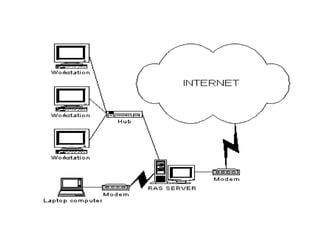
Network Computers
• Collection of PCs
• Additional Network Interface Card
• Can share the information, work from
  anywhere environment
• LAN – WAN – MAN – Internet
• Uniting the World
Mini and Microcomputers
• Microcomputer is also called Personal
  Computer
• Minicomputers are in between mainframes
  and Microcomputers. They are also called
  midrange computers
• They are maintained by some organization
  Ex. PDP - 11
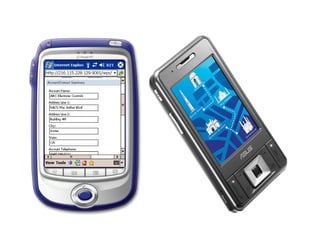
PDA – Personal Digital Assistant
• Like Mini computer in a general sense
• Smaller than laptops (can be called
  Palmtops)
• Used to store information used frequently
  wherever you go
• Nowadays work with smart cards which
  has all the information of a user and
  his/her transactions
Workstations
• They are similar to PCs but with more
  memory and a high speed processor
• They are intended to support network
  operating systems and network
  applications.
• They are used in architectural design,
  video editing, animations etc.
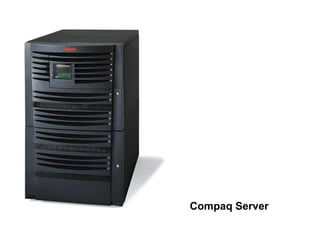
Servers
• A server is one for which many PCs are
  connected.
• It has large capacity secondary storage
  and more memory
• They host, like workstations, network
  servers and operating systems
• They avoid duplicate installation of
  applications and all users will access to a
  common copy of the program
Compaq Server
Mainframes
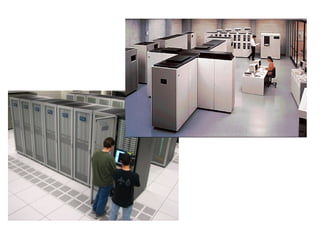
• Large computers both in terms of physical
  size as well as computations
• They support huge numbers of users
• Basically used to store and process huge
  amount of data
• Not all organizations can offered to
  maintain one mainframe. Take service of
  one vendor
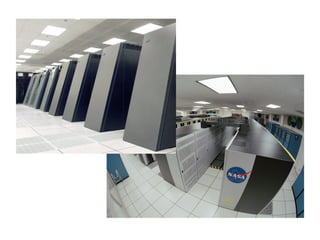
Supercomputers
• Used in scientific and engineering
  applications those handling huge data and
  do a great amount of computation.
• Extremely fast in operation (@ 1 trillion
  operations/second)
• Fastest, costliest and powerful computer
  available today
• Application involves, weather forecasting,
  military applications, electronic design etc.
Characteristics of Computers
  •   Speed – MIPS/BIPS
  •   Accuracy
  •   Reliability – No human Intervention
  •   Storage Capacity
  •   Diligence – same result forever
Applications
• At Home
  –   Mostly to check mails
  –   Small documentation
  –   Gaming
  –   Music and Video
  –   To solve homework
  –   Photo Printouts using Good Printers
  –   Work from Home concept
Applications..
• In Education
  – Schools to Universities
  – To Educate necessary skills demanded by
    Industries
  – To give a demo or training
  – Server the purpose of Teaching Aids
  – To convey messages using Internet
Applications…
• In Science
  – To analyze large data acquired over a period
    of time
  – To do complex floating point arithmetic
  – Image Processing
  – Research
Applications….
• In Industry
  – To develop software, mostly to automate the
    manual work
  – To provide necessary solution to clients’
    needs
  – Software is developed for the needs of
    networking, banking, business, retail etc
Applications…..
• Entertainment
  – Music Industry
  – Games
  – Movies – to watch and create – 200 Linux
    Machines in parallel to create visualization in
    Titanic, the movie
  – IIIly Cartoons, special effects
  – Nowadays to promote theirs productions
Business
• Banking
  – To store, access and modify huge amounts of
    data
  – Online business called e-business is
    becoming popular with a small amount of
    limitations
  – Paying bills become easy and time saving
  – online promotions
Applications……
• Government
  – “Biometrics Attendance Monitoring”
  – Weather Forecasting and military
    applications
  – E- governance
  – Online payment of taxes, Insurances
  – Send Messages to virtually unreachable
    places at present
  – Wireless communication
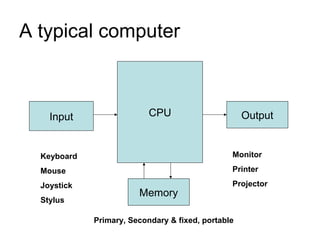
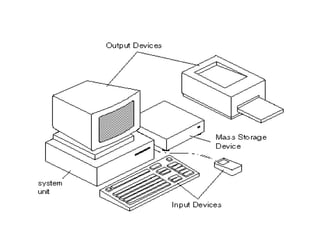
A typical computer


    Input                  CPU                      Output


  Keyboard                                      Monitor

  Mouse                                         Printer

  Joystick                                      Projector
                        Memory
  Stylus

             Primary, Secondary & fixed, portable
Hardware and Software
• Hardware
  – Whatever we see physically
• Software
  – Set of instructions written using a language
  – Application Vs System software
  – Natural Vs Artificial Languages
Criticality of an Application
• Science – Solve a problem using
  computer
• Commercial – Payroll management
• OLTP – Ticketing Reservation Systems
• Process Control Applications – Boiler
  Pressure Control System
• Satellite Communication
Classification of digital computers

Classification of digital computers

  • 1.
    Classification of Digital Computers & Applications of Computers
  • 2.
    Classification • Personal Computers • Laptops • Network Computers • Mini and Microcomputers • PDAs • Workstations • Servers • Mainframes • Supercomputers
  • 3.
    Personal Computers • Usedat home • Used in Educations Institutions and Organizations as nodes • Can perform typical activities like documentation, playing games, surfing web to more complex activities as programming, design, DTP etc.
  • 4.
    Laptops • Same asPCs in functionality • More Compact, Portable • Less Power requirement, operated on battery/s • Less capacity compared to PCs • Maintenance and actually are costlier compared to PCs • Theft prone
  • 6.
    Network Computers • Collectionof PCs • Additional Network Interface Card • Can share the information, work from anywhere environment • LAN – WAN – MAN – Internet • Uniting the World
  • 8.
    Mini and Microcomputers •Microcomputer is also called Personal Computer • Minicomputers are in between mainframes and Microcomputers. They are also called midrange computers • They are maintained by some organization Ex. PDP - 11
  • 9.
    PDA – PersonalDigital Assistant • Like Mini computer in a general sense • Smaller than laptops (can be called Palmtops) • Used to store information used frequently wherever you go • Nowadays work with smart cards which has all the information of a user and his/her transactions
  • 11.
    Workstations • They aresimilar to PCs but with more memory and a high speed processor • They are intended to support network operating systems and network applications. • They are used in architectural design, video editing, animations etc.
  • 12.
    Servers • A serveris one for which many PCs are connected. • It has large capacity secondary storage and more memory • They host, like workstations, network servers and operating systems • They avoid duplicate installation of applications and all users will access to a common copy of the program
  • 13.
  • 14.
    Mainframes • Large computersboth in terms of physical size as well as computations • They support huge numbers of users • Basically used to store and process huge amount of data • Not all organizations can offered to maintain one mainframe. Take service of one vendor
  • 16.
    Supercomputers • Used inscientific and engineering applications those handling huge data and do a great amount of computation. • Extremely fast in operation (@ 1 trillion operations/second) • Fastest, costliest and powerful computer available today • Application involves, weather forecasting, military applications, electronic design etc.
  • 18.
    Characteristics of Computers • Speed – MIPS/BIPS • Accuracy • Reliability – No human Intervention • Storage Capacity • Diligence – same result forever
  • 19.
    Applications • At Home – Mostly to check mails – Small documentation – Gaming – Music and Video – To solve homework – Photo Printouts using Good Printers – Work from Home concept
  • 20.
    Applications.. • In Education – Schools to Universities – To Educate necessary skills demanded by Industries – To give a demo or training – Server the purpose of Teaching Aids – To convey messages using Internet
  • 21.
    Applications… • In Science – To analyze large data acquired over a period of time – To do complex floating point arithmetic – Image Processing – Research
  • 22.
    Applications…. • In Industry – To develop software, mostly to automate the manual work – To provide necessary solution to clients’ needs – Software is developed for the needs of networking, banking, business, retail etc
  • 23.
    Applications….. • Entertainment – Music Industry – Games – Movies – to watch and create – 200 Linux Machines in parallel to create visualization in Titanic, the movie – IIIly Cartoons, special effects – Nowadays to promote theirs productions
  • 24.
    Business • Banking – To store, access and modify huge amounts of data – Online business called e-business is becoming popular with a small amount of limitations – Paying bills become easy and time saving – online promotions
  • 25.
    Applications…… • Government – “Biometrics Attendance Monitoring” – Weather Forecasting and military applications – E- governance – Online payment of taxes, Insurances – Send Messages to virtually unreachable places at present – Wireless communication
  • 26.
    A typical computer Input CPU Output Keyboard Monitor Mouse Printer Joystick Projector Memory Stylus Primary, Secondary & fixed, portable
  • 28.
    Hardware and Software •Hardware – Whatever we see physically • Software – Set of instructions written using a language – Application Vs System software – Natural Vs Artificial Languages
  • 29.
    Criticality of anApplication • Science – Solve a problem using computer • Commercial – Payroll management • OLTP – Ticketing Reservation Systems • Process Control Applications – Boiler Pressure Control System • Satellite Communication