
Automated testing
Android
Dependency Injection and Dagger
Dependency Injection
Dagger
Live Coding Sample 1
Live Coding Sample 2
The Business Goal
Why not automated tests on mobile?
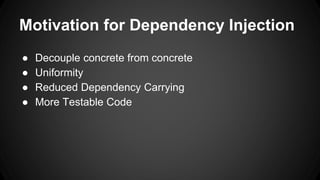
Motivation for Dependency Injection
● Decouple concrete from concrete
● Uniformity
● Reduced Dependency Carrying
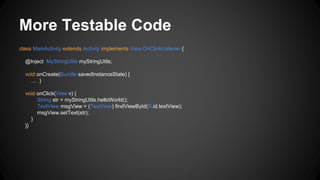
● More Testable Code
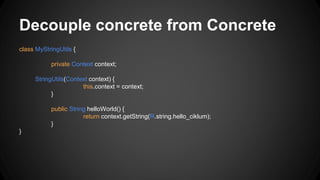
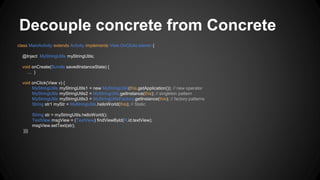
Decouple concrete from Concrete
class MyStringUtils {
private Context context;
StringUtils(Context context) {
this.context = context;
}
public String helloWorld() {
return context.getString(R.string.hello_ciklum);
}
}
Decouple concrete from Concrete
class MainActivity extends Activity implements View.OnClickListener {
@Inject MyStringUtils myStringUtils;
void onCreate(Bundle savedInstanceState) {
… }
void onClick(View v) {
MyStringUtils myStringUtils1 = new MyStringUtils(this.getApplication()); // new operator
MyStringUtils myStringUtils2 = MyStringUtils.getInstance(this); // singleton pattern
MyStringUtils myStringUtils3 = MyStringUtilsFactory.getInstance(this); // factory patterns
String str1 myStr = MyStringUtils.helloWorld(this); // Static
String str = myStringUtils.helloWorld();
TextView msgView = (TextView) findViewById(R.id.textView);
msgView.setText(str);
}}}
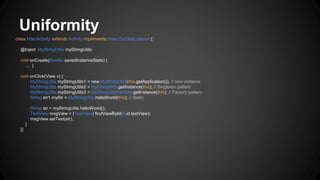
Uniformity
class MainActivity extends Activity implements View.OnClickListener {
@Inject MyStringUtils myStringUtils;
void onCreate(Bundle savedInstanceState) {
… }
void onClick(View v) {
MyStringUtils myStringUtils1 = new MyStringUtils(this.getApplication()); // new instance
MyStringUtils myStringUtils2 = MyStringUtils.getInstance(this); // Singleton pattern
MyStringUtils myStringUtils3 = MyStringUtilsFactory.getInstance(this); // Factory pattern
String str1 myStr = MyStringUtils.helloWorld(this); // Static
String str = myStringUtils.helloWorld();
TextView msgView = (TextView) findViewById(R.id.textView);
msgView.setText(str);
}
}}
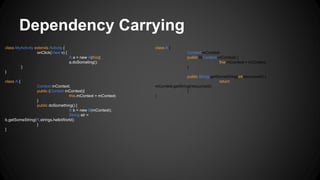
Dependency Carrying
class MyActivity extends Activity {
onClick(View v) {
A a = new A(this);
a.doSometing();
}
}
class A {
Context mContext;
public (Context mContext){
this.mContext = mContext;
}
public doSomething() {
B b = new B(mContext);
String str =
b.getSomeString(R.strings.helloWorld);
}
}
class B {
Context mContext;
public B(Context mContext) {
this.mContext = mContext;
}
public String getSomeString(int resourceId) {
return
mContext.getString(resourceId);
}
}
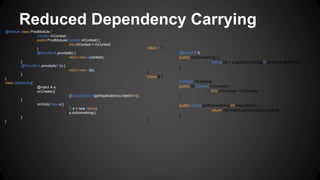
Reduced Dependency Carrying
@Module class ProdModule {
Context mContext;
public ProdModule(Context mContext) {
this.mContext = mContext;
}
@Provide B provideB() {
return new B(context);
}
@Provide A provideA(B b) {
return new A(b);
}
}
class MyActivity {
@Inject A a;
onCreate(){
((MyApplication)getApplication()).inject(this);
}
onClick(View v) {
A a = new A(this);
a.doSomething();
}
}
class A {
@Inject B b;
public doSomething() {
String str = b.getSomeString(R.strings.helloWorld);
}
}
class B {
Context mContext;
public B(Context mContext) {
this.mContext = mContext;
}
public String getSomeString(int resourceId) {
return mContext.getString(resourceId);
}
}
More Testable Code
class MainActivity extends Activity implements View.OnClickListener {
@Inject MyStringUtils myStringUtils;
void onCreate(Bundle savedInstanceState) {
… }
void onClick(View v) {
String str = myStringUtils.helloWorld();
TextView msgView = (TextView) findViewById(R.id.textView);
msgView.setText(str);
}
}}
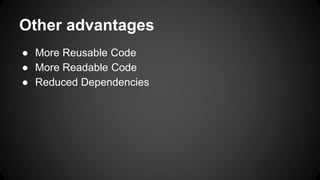
Other advantages
● More Reusable Code
● More Readable Code
● Reduced Dependencies
Dependency Injection
Dagger
Live Coding Sample 1
Live Coding Sample 2
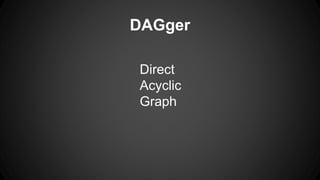
DAGger
Direct
Acyclic
Graph
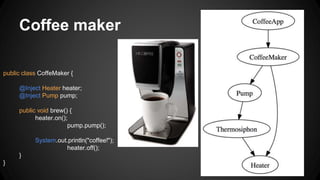
Coffee maker
public class CoffeMaker {
@Inject Heater heater;
@Inject Pump pump;
public void brew() {
heater.on();
pump.pump();
System.out.println("coffee!");
heater.off();
}
}
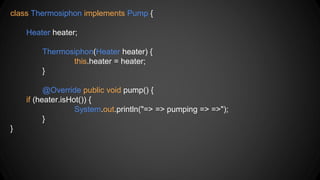
class Thermosiphon implements Pump {
Heater heater;
Thermosiphon(Heater heater) {
this.heater = heater;
}
@Override public void pump() {
if (heater.isHot()) {
System.out.println("=> => pumping => =>");
}
}
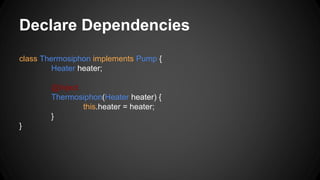
Declare Dependencies
class Thermosiphon implements Pump {
Heater heater;
@Inject
Thermosiphon(Heater heater) {
this.heater = heater;
}
}
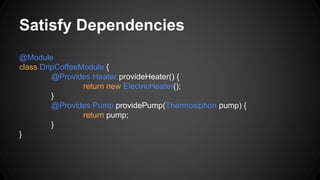
Satisfy Dependencies
@Module
class DripCoffeeModule {
@Provides Heater provideHeater() {
return new ElectricHeater();
}
@Provides Pump providePump(Thermosiphon pump) {
return pump;
}
}
Build the Graph
class CoffeeApp {
public static void main(String[] args) {
ObjectGraph objectGraph = ObjectGraph.create(new
DripCoffeeModule());
CoffeeMaker coffeeMaker = objectGraph.get(CoffeeMaker.class);
coffeeMaker.brew();
} }
Neat features
● Lazy<T>
● Module overrides
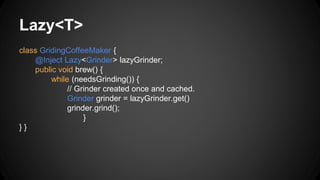
Lazy<T>
class GridingCoffeeMaker {
@Inject Lazy<Grinder> lazyGrinder;
public void brew() {
while (needsGrinding()) {
// Grinder created once and cached.
Grinder grinder = lazyGrinder.get()
grinder.grind();
}
} }
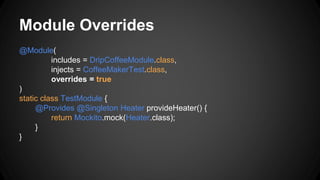
Module Overrides
@Module(
includes = DripCoffeeModule.class,
injects = CoffeeMakerTest.class,
overrides = true
)
static class TestModule {
@Provides @Singleton Heater provideHeater() {
return Mockito.mock(Heater.class);
}
}
Dependency Injection
Dagger
Live Coding Sample 1
Live Coding Sample 2
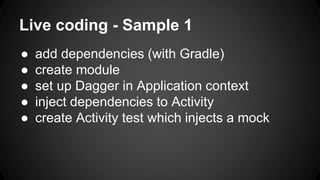
Live coding - Sample 1
● add dependencies (with Gradle)
● create module
● set up Dagger in Application context
● inject dependencies to Activity
● create Activity test which injects a mock
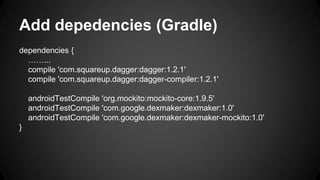
Add depedencies (Gradle)
dependencies {
……...
compile 'com.squareup.dagger:dagger:1.2.1'
compile 'com.squareup.dagger:dagger-compiler:1.2.1'
androidTestCompile 'org.mockito:mockito-core:1.9.5'
androidTestCompile 'com.google.dexmaker:dexmaker:1.0'
androidTestCompile 'com.google.dexmaker:dexmaker-mockito:1.0'
}
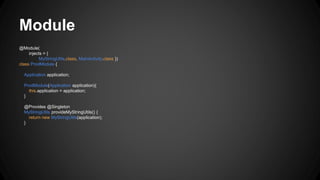
Module
@Module(
injects = {
MyStringUtils.class, MainActivity.class })
class ProdModule {
Application application;
ProdModule(Application application){
this.application = application;
}
@Provides @Singleton
MyStringUtils provideMyStringUtils() {
return new MyStringUtils(application);
}
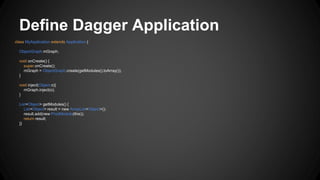
Define Dagger Application
class MyApplication extends Application {
ObjectGraph mGraph;
void onCreate() {
super.onCreate();
mGraph = ObjectGraph.create(getModules().toArray());
}
void inject(Object o){
mGraph.inject(o);
}
List<Object> getModules() {
List<Object> result = new ArrayList<Object>();
result.add(new ProdModule(this));
return result;
}}
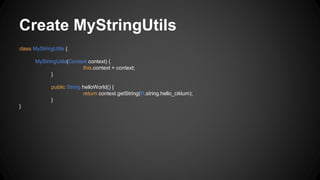
Create MyStringUtils
class MyStringUtils {
MyStringUtils(Context context) {
this.context = context;
}
public String helloWorld() {
return context.getString(R.string.hello_ciklum);
}
}
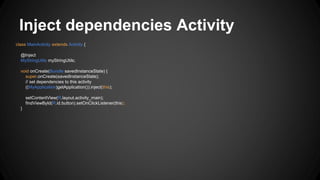
Inject dependencies Activity
class MainActivity extends Activity {
@Inject
MyStringUtils myStringUtils;
void onCreate(Bundle savedInstanceState) {
super.onCreate(savedInstanceState);
// set dependencies to this activity
((MyApplication)getApplication()).inject(this);
setContentView(R.layout.activity_main);
findViewById(R.id.button).setOnClickListener(this);
}
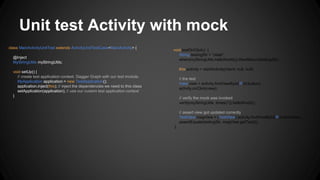
Unit test Activity with mock
class MainActivityUnitTest extends ActivityUnitTestCase<MainActivity> {
@Inject
MyStringUtils myStringUtils;
void setUp() {
// create test application context, Dagger Graph with our test module.
MyApplication application = new TestApplication();
application.inject(this); // inject the dependencies we need to this class
setApplication(application); // use our custom test application context
}
void testOnClick() {
String testingStr = "olala";
when(myStringUtils.helloWorld()).thenReturn(testingStr);
this.activity = startActivity(intent, null, null);
// the test
View view = activity.findViewById(R.id.button);
activity.onClick(view);
// verify the mock was invoked
verify(myStringUtils, times(1)).helloWorld();
// assert view got updated correctly
TextView msgView = (TextView) activity.findViewById(R.id.textView);
assertEquals(testingStr, msgView.getText());
}
Dependency Injection
Dagger
Live Coding Sample 1
Live Coding Sample 2
Sample app 2
● Threads
● HTTP mocks
Tips, tricks and Frameworks
● https://github.com/tha022/dagger-testing-example
● https://github.com/fizz-buzz/fb-android-dagger

Dependency Injection for Android

  • 1.
  • 2.
    Dependency Injection Dagger Live CodingSample 1 Live Coding Sample 2
  • 3.
  • 4.
    Why not automatedtests on mobile?
  • 5.
    Motivation for DependencyInjection ● Decouple concrete from concrete ● Uniformity ● Reduced Dependency Carrying ● More Testable Code
  • 6.
    Decouple concrete fromConcrete class MyStringUtils { private Context context; StringUtils(Context context) { this.context = context; } public String helloWorld() { return context.getString(R.string.hello_ciklum); } }
  • 7.
    Decouple concrete fromConcrete class MainActivity extends Activity implements View.OnClickListener { @Inject MyStringUtils myStringUtils; void onCreate(Bundle savedInstanceState) { … } void onClick(View v) { MyStringUtils myStringUtils1 = new MyStringUtils(this.getApplication()); // new operator MyStringUtils myStringUtils2 = MyStringUtils.getInstance(this); // singleton pattern MyStringUtils myStringUtils3 = MyStringUtilsFactory.getInstance(this); // factory patterns String str1 myStr = MyStringUtils.helloWorld(this); // Static String str = myStringUtils.helloWorld(); TextView msgView = (TextView) findViewById(R.id.textView); msgView.setText(str); }}}
  • 8.
    Uniformity class MainActivity extendsActivity implements View.OnClickListener { @Inject MyStringUtils myStringUtils; void onCreate(Bundle savedInstanceState) { … } void onClick(View v) { MyStringUtils myStringUtils1 = new MyStringUtils(this.getApplication()); // new instance MyStringUtils myStringUtils2 = MyStringUtils.getInstance(this); // Singleton pattern MyStringUtils myStringUtils3 = MyStringUtilsFactory.getInstance(this); // Factory pattern String str1 myStr = MyStringUtils.helloWorld(this); // Static String str = myStringUtils.helloWorld(); TextView msgView = (TextView) findViewById(R.id.textView); msgView.setText(str); } }}
  • 9.
    Dependency Carrying class MyActivityextends Activity { onClick(View v) { A a = new A(this); a.doSometing(); } } class A { Context mContext; public (Context mContext){ this.mContext = mContext; } public doSomething() { B b = new B(mContext); String str = b.getSomeString(R.strings.helloWorld); } } class B { Context mContext; public B(Context mContext) { this.mContext = mContext; } public String getSomeString(int resourceId) { return mContext.getString(resourceId); } }
  • 10.
    Reduced Dependency Carrying @Moduleclass ProdModule { Context mContext; public ProdModule(Context mContext) { this.mContext = mContext; } @Provide B provideB() { return new B(context); } @Provide A provideA(B b) { return new A(b); } } class MyActivity { @Inject A a; onCreate(){ ((MyApplication)getApplication()).inject(this); } onClick(View v) { A a = new A(this); a.doSomething(); } } class A { @Inject B b; public doSomething() { String str = b.getSomeString(R.strings.helloWorld); } } class B { Context mContext; public B(Context mContext) { this.mContext = mContext; } public String getSomeString(int resourceId) { return mContext.getString(resourceId); } }
  • 11.
    More Testable Code classMainActivity extends Activity implements View.OnClickListener { @Inject MyStringUtils myStringUtils; void onCreate(Bundle savedInstanceState) { … } void onClick(View v) { String str = myStringUtils.helloWorld(); TextView msgView = (TextView) findViewById(R.id.textView); msgView.setText(str); } }}
  • 12.
    Other advantages ● MoreReusable Code ● More Readable Code ● Reduced Dependencies
  • 13.
    Dependency Injection Dagger Live CodingSample 1 Live Coding Sample 2
  • 14.
  • 15.
    Coffee maker public classCoffeMaker { @Inject Heater heater; @Inject Pump pump; public void brew() { heater.on(); pump.pump(); System.out.println("coffee!"); heater.off(); } }
  • 16.
    class Thermosiphon implementsPump { Heater heater; Thermosiphon(Heater heater) { this.heater = heater; } @Override public void pump() { if (heater.isHot()) { System.out.println("=> => pumping => =>"); } }
  • 17.
    Declare Dependencies class Thermosiphonimplements Pump { Heater heater; @Inject Thermosiphon(Heater heater) { this.heater = heater; } }
  • 18.
    Satisfy Dependencies @Module class DripCoffeeModule{ @Provides Heater provideHeater() { return new ElectricHeater(); } @Provides Pump providePump(Thermosiphon pump) { return pump; } }
  • 19.
    Build the Graph classCoffeeApp { public static void main(String[] args) { ObjectGraph objectGraph = ObjectGraph.create(new DripCoffeeModule()); CoffeeMaker coffeeMaker = objectGraph.get(CoffeeMaker.class); coffeeMaker.brew(); } }
  • 20.
  • 21.
    Lazy<T> class GridingCoffeeMaker { @InjectLazy<Grinder> lazyGrinder; public void brew() { while (needsGrinding()) { // Grinder created once and cached. Grinder grinder = lazyGrinder.get() grinder.grind(); } } }
  • 22.
    Module Overrides @Module( includes =DripCoffeeModule.class, injects = CoffeeMakerTest.class, overrides = true ) static class TestModule { @Provides @Singleton Heater provideHeater() { return Mockito.mock(Heater.class); } }
  • 23.
    Dependency Injection Dagger Live CodingSample 1 Live Coding Sample 2
  • 24.
    Live coding -Sample 1 ● add dependencies (with Gradle) ● create module ● set up Dagger in Application context ● inject dependencies to Activity ● create Activity test which injects a mock
  • 25.
    Add depedencies (Gradle) dependencies{ ……... compile 'com.squareup.dagger:dagger:1.2.1' compile 'com.squareup.dagger:dagger-compiler:1.2.1' androidTestCompile 'org.mockito:mockito-core:1.9.5' androidTestCompile 'com.google.dexmaker:dexmaker:1.0' androidTestCompile 'com.google.dexmaker:dexmaker-mockito:1.0' }
  • 26.
    Module @Module( injects = { MyStringUtils.class,MainActivity.class }) class ProdModule { Application application; ProdModule(Application application){ this.application = application; } @Provides @Singleton MyStringUtils provideMyStringUtils() { return new MyStringUtils(application); }
  • 27.
    Define Dagger Application classMyApplication extends Application { ObjectGraph mGraph; void onCreate() { super.onCreate(); mGraph = ObjectGraph.create(getModules().toArray()); } void inject(Object o){ mGraph.inject(o); } List<Object> getModules() { List<Object> result = new ArrayList<Object>(); result.add(new ProdModule(this)); return result; }}
  • 28.
    Create MyStringUtils class MyStringUtils{ MyStringUtils(Context context) { this.context = context; } public String helloWorld() { return context.getString(R.string.hello_ciklum); } }
  • 29.
    Inject dependencies Activity classMainActivity extends Activity { @Inject MyStringUtils myStringUtils; void onCreate(Bundle savedInstanceState) { super.onCreate(savedInstanceState); // set dependencies to this activity ((MyApplication)getApplication()).inject(this); setContentView(R.layout.activity_main); findViewById(R.id.button).setOnClickListener(this); }
  • 30.
    Unit test Activitywith mock class MainActivityUnitTest extends ActivityUnitTestCase<MainActivity> { @Inject MyStringUtils myStringUtils; void setUp() { // create test application context, Dagger Graph with our test module. MyApplication application = new TestApplication(); application.inject(this); // inject the dependencies we need to this class setApplication(application); // use our custom test application context } void testOnClick() { String testingStr = "olala"; when(myStringUtils.helloWorld()).thenReturn(testingStr); this.activity = startActivity(intent, null, null); // the test View view = activity.findViewById(R.id.button); activity.onClick(view); // verify the mock was invoked verify(myStringUtils, times(1)).helloWorld(); // assert view got updated correctly TextView msgView = (TextView) activity.findViewById(R.id.textView); assertEquals(testingStr, msgView.getText()); }
  • 31.
    Dependency Injection Dagger Live CodingSample 1 Live Coding Sample 2
  • 32.
    Sample app 2 ●Threads ● HTTP mocks
  • 33.
    Tips, tricks andFrameworks ● https://github.com/tha022/dagger-testing-example ● https://github.com/fizz-buzz/fb-android-dagger

Editor's Notes

  • #6 DI is a design pattern where you get your concrete things decoupled from your other concrete things - helps reusability and testability
  • #8 There are so many ways you can get hold of a instance of MyStringUtils, you could create a new instance with the new keyword, you could have implemented a Singleton pattern, you could have used a Factory pattern, or you could have called the method statically by provding the context as input.
  • #9 Allows uniformity. Is underestimated. If you use DI you have a pattern throughout your application. Every time you depend on something, this is how you do it. Every time you wanna expose your self as a dependency, this is how you do it. You dont have to worry about writing Factory classes or different patterns for looking things up, if you use DI its the same everywhere. this really helps as your application gets bigger, you can have new guys coming in to your team, and everything works the same way. I think uniformity is the secret sauce which we overlooked a lot when using DI.
  • #12 Since its the dependency container which now creates your dependency, not your concrete class, it can also be substituded by an other implementation by the dependency container. It can replace it with any other implement, like a mock. A mock can also be used without the class having to be an interface. Other times you want to inject a stub, then the dependency needs an interface.
  • #15 DAGer, really bad name, in good nerd spirit. It stands for Direct Acyclic Graph. Acyclic, you can’t depend on your self, not even transitively. This is to keep the framework simple. In for example Spring cycle dependencies are allowed, which makes Spring easy to use. Mark the difference between easy and simple. Easy to do for you as a programmer is not the same as the framework is simple, and the acyclic restriction in Dagger is a good example on the design tradeoffs they did.
  • #16 Now to show how Dagger works. We gonna use the same example as Dagger has on their website. So we have an coffee app, which has a coffee maker. The coffee maker works like this: It has a pump, which pumps the water through the hot water (the Heater). The pump is an interface, so you can plug in different implementations of a pump. In this example we have a Thermosiphon pumper, which means something like that - Thermosiphon (alt. thermosyphon) is a property of physics and refers to a method of passive heat exchange based on natural convection, which circulates a substance (liquid, or gas such as air) without the necessity of a mechanical pump. The coffee maker has two dependencies: a Pumo and a Heater. A Thermosiphon pump has a dependency to a heater, since it needs heat to move (pump) the water. The coffe maker has a method “brew”. the way it brew is to first start the heater (create the object and start the method “on”). Then its starts to pump the water through the heater, and when the pump is finished with doing so it turns off the heater. The coffee is served !
  • #17 Here is the Thermosiphon pump implementation. I have a dependency, but Im not gonna worry about how it gets injected in my concrete class. The Hollywood principle, I dont care how the dependency comes in, its someone elses problem, my job is to make the water pump. If the heater is turned on, ergo hot, then we’r ready to pump.
  • #18 But we havent yet declared that the Thermosiphon is a dependency which Dagger should handle. here is where Dagger comes in, how we declare our dependency, with the @Inject annotation. With this we say “hey framework, opt in here “. The Inject is standard of the Java javax package, so this code is portable among Guice, Spring, etc. This is the first of two ways to declare a dependency which Dagger should handle. After compiling the code, the bean processor will be applied, which makes Dagger do a scan of your classes and look for the @Inject annotation, and when found, write a binder wrapper class (more under internals)
  • #19 The other way of defining dependencies are like this. So we tell the framework, each time someone ask you for a dependency if a given type, this is how you provide them. What is really powerful is that these provide methods can have parameters passed in. The simplicity of Dagger is, this is the only way you define dependencies, ergo with Provide or with @Inject on the constructor.
  • #20 This is how we bootstrap the graph. We create the object graph by providing the module class where we have defined our dependencies / objects. In addition Dagger will, through the bean processor, look for other dependencies in your source by looking for @Inject.