Chrome Extension Development Starts Xu Jiwei ohdarling88 at gmail d0t com 2010.01.17
Who is this guy Xu Jiwei ohdarling88 at gmail d0t com http://www.xujiwei.com F2E of Taobao UED Author of Chrome WangWang Extension
TOC Introduction User Interface Structure Programming Resources
What’s Chrome? Are you kidding?!
Chrome Fast start-up Google Chrome launches in a snap. Fast loading Google Chrome loads web pages quickly. Fast search Search the web right from the address bar. more:  http://www.google.com/chrome/intl/en/features_mac.html
Then, What is the Chrome Extension? Extensions are small software programs that can modify and enhance the functionality of Google Chrome. You write them using web technologies such as HTML, JavaScript, and CSS. Also you can use NPAPI plugin written by C++ or other language in your extension.
What can extension do? A client of some services Gmail Checker,  Metrist A assistant utility Proxy Switchy,  AutoExpander An enhancement feature History2
How user to use?
User Interface Browser Action or it’s popup Page Action or it’s popup Extension’s pages
Browser Action
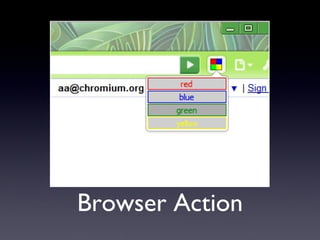
Browser Action Shown in Chrome’s main toolbar Could show a Badge for notification Could show a popup for more detail view At most ONE browser action allowed Some tips
Page Action
Page Action Display on the right of address bar By default the icon is hidden Only show under specified conditions At most ONE page action too
Extension’s Page
Extension’s Page You can browse a page of your extension with the protocol “chrome-extension://” chrome-extension://{extension-id}/path/to/page.html But the url is not shown in the address bar
Override Page? A extension’s page with SPECIAL chrome url, eg: chrome://newtab/ Currently only “new tab” page can be override DO NOT make a page similar to the default “new tab” page Except more useful or faster than the default “new tab” page Otherwise DON’T override the new tab page
Options Page? It’s just a normal extension page too But the page can be directly opened by clicking “Options” button in Extensions Management Page For saving settings of your extension only NO differences to a normal extension page
and, Popup Page? It is also a normal extension page.
Background tasks Or your extension doesn’t need interact with user, just do some background tasks Like Chrome WangWang Protocol Handler
How to build?
Directory Structure extension manifest.json background.htm, content_script.js _locales/ zh_CN/ messages.json en_US/
manifest.json Core configuration file Extension name, description, logo, update url and etc. Specify the background page, content scripts, option page, actions. Permissions
Background Page Every extension has at most ONE background page Background page is always running while Chrome is running For background tasks
Content Scripts Toggle page action and browser action’s visibility Access the web page’s DOM
How to program?
APIs
Chrome Extension’s API chrome.extension.* chrome.pageAction.* chrome.browserAction.* chrome.tabs.* chrome.windows.* chrome.bookmarks.* etc ...
Asynchronous API Always use callback to get api’s return value chrome.bookmarks.getTree(function(treeNodes) { // processing bookmarks’ tree }
Event driven Just like DOM Events chrome.pageAction.onClicked.addListener(function() { // do something }) chrome.tabs.onUpdated.addListener(function() { // do something })
Most of the apis are ASYNCHRONOUS ASYNCHRONOUS
Security and Sandbox Cross domain XHR is allowed “ Permission ” property in manifest.json JavaScript of Extension and web pages are running in two separated environments
Message Passing Communications in content scripts and background page, or other extension’s page Because API limits in content scripts Encoding
Message Passing Chrome Extension Background Page Content Scripts Page Action Browser Action Popup page, Options page, etc.
Extension’s Resource All files of your extension is accessible Just use the protocol “chrome-extension://” Use XHR in web pages to get extension’s file
i18n chrome.i18n.* Localized strings stored in _locales/{lang}/messages.json chrome.i18n.getMessage getMessage message name data Lookup localized string and format with data Localized string
How to publish?
Package If you publish the extension on Google Official Chrome Extensions site, this step should be  SKIPPED Before publishing your extension, you must package it as a “crx” file Without any other tools, Chrome is enough Protect your private key file, it’s very IMPORTANT
Auto Updating Tell Chrome to update your extension from somewhere Be careful about “version” in manifest.json Set “update_url” in manifest.json It is NOT required if you want to publish it on Google Official Extensions site
Publish Official Chrome Extensions Site https://chrome.google.com/extensions/developer/dashboard Note: Upload the source of you extension... Chrome Extensions http://www.chromeextensions.org/
Resources Chrome Extension’s Documentation Google Chrome Extensions Site Chrome Extensions Source code
Thanks

Chrome Extension Develop Starts

  • 1.
    Chrome Extension DevelopmentStarts Xu Jiwei ohdarling88 at gmail d0t com 2010.01.17
  • 2.
    Who is thisguy Xu Jiwei ohdarling88 at gmail d0t com http://www.xujiwei.com F2E of Taobao UED Author of Chrome WangWang Extension
  • 3.
    TOC Introduction UserInterface Structure Programming Resources
  • 4.
    What’s Chrome? Areyou kidding?!
  • 5.
    Chrome Fast start-upGoogle Chrome launches in a snap. Fast loading Google Chrome loads web pages quickly. Fast search Search the web right from the address bar. more: http://www.google.com/chrome/intl/en/features_mac.html
  • 6.
    Then, What isthe Chrome Extension? Extensions are small software programs that can modify and enhance the functionality of Google Chrome. You write them using web technologies such as HTML, JavaScript, and CSS. Also you can use NPAPI plugin written by C++ or other language in your extension.
  • 7.
    What can extensiondo? A client of some services Gmail Checker, Metrist A assistant utility Proxy Switchy, AutoExpander An enhancement feature History2
  • 8.
  • 9.
    User Interface BrowserAction or it’s popup Page Action or it’s popup Extension’s pages
  • 10.
  • 11.
    Browser Action Shownin Chrome’s main toolbar Could show a Badge for notification Could show a popup for more detail view At most ONE browser action allowed Some tips
  • 12.
  • 13.
    Page Action Displayon the right of address bar By default the icon is hidden Only show under specified conditions At most ONE page action too
  • 14.
  • 15.
    Extension’s Page Youcan browse a page of your extension with the protocol “chrome-extension://” chrome-extension://{extension-id}/path/to/page.html But the url is not shown in the address bar
  • 16.
    Override Page? Aextension’s page with SPECIAL chrome url, eg: chrome://newtab/ Currently only “new tab” page can be override DO NOT make a page similar to the default “new tab” page Except more useful or faster than the default “new tab” page Otherwise DON’T override the new tab page
  • 17.
    Options Page? It’sjust a normal extension page too But the page can be directly opened by clicking “Options” button in Extensions Management Page For saving settings of your extension only NO differences to a normal extension page
  • 18.
    and, Popup Page?It is also a normal extension page.
  • 19.
    Background tasks Oryour extension doesn’t need interact with user, just do some background tasks Like Chrome WangWang Protocol Handler
  • 20.
  • 21.
    Directory Structure extensionmanifest.json background.htm, content_script.js _locales/ zh_CN/ messages.json en_US/
  • 22.
    manifest.json Core configurationfile Extension name, description, logo, update url and etc. Specify the background page, content scripts, option page, actions. Permissions
  • 23.
    Background Page Everyextension has at most ONE background page Background page is always running while Chrome is running For background tasks
  • 24.
    Content Scripts Togglepage action and browser action’s visibility Access the web page’s DOM
  • 25.
  • 26.
  • 27.
    Chrome Extension’s APIchrome.extension.* chrome.pageAction.* chrome.browserAction.* chrome.tabs.* chrome.windows.* chrome.bookmarks.* etc ...
  • 28.
    Asynchronous API Alwaysuse callback to get api’s return value chrome.bookmarks.getTree(function(treeNodes) { // processing bookmarks’ tree }
  • 29.
    Event driven Justlike DOM Events chrome.pageAction.onClicked.addListener(function() { // do something }) chrome.tabs.onUpdated.addListener(function() { // do something })
  • 30.
    Most of theapis are ASYNCHRONOUS ASYNCHRONOUS
  • 31.
    Security and SandboxCross domain XHR is allowed “ Permission ” property in manifest.json JavaScript of Extension and web pages are running in two separated environments
  • 32.
    Message Passing Communicationsin content scripts and background page, or other extension’s page Because API limits in content scripts Encoding
  • 33.
    Message Passing ChromeExtension Background Page Content Scripts Page Action Browser Action Popup page, Options page, etc.
  • 34.
    Extension’s Resource Allfiles of your extension is accessible Just use the protocol “chrome-extension://” Use XHR in web pages to get extension’s file
  • 35.
    i18n chrome.i18n.* Localizedstrings stored in _locales/{lang}/messages.json chrome.i18n.getMessage getMessage message name data Lookup localized string and format with data Localized string
  • 36.
  • 37.
    Package If youpublish the extension on Google Official Chrome Extensions site, this step should be SKIPPED Before publishing your extension, you must package it as a “crx” file Without any other tools, Chrome is enough Protect your private key file, it’s very IMPORTANT
  • 38.
    Auto Updating TellChrome to update your extension from somewhere Be careful about “version” in manifest.json Set “update_url” in manifest.json It is NOT required if you want to publish it on Google Official Extensions site
  • 39.
    Publish Official ChromeExtensions Site https://chrome.google.com/extensions/developer/dashboard Note: Upload the source of you extension... Chrome Extensions http://www.chromeextensions.org/
  • 40.
    Resources Chrome Extension’sDocumentation Google Chrome Extensions Site Chrome Extensions Source code
  • 41.

Editor's Notes

  • #12 1. Use Browser Action as a useful function 2. Use a beautiful and alpha icon 3. DONT use animation