Chrome extensions
development
Michal Haták
twista.cz
@twistacz
http://sli.do/ctvrtkon
What are extensions?
●

Applications running inside Chrome browser

●

Provide additional functionality or customize browser experience

●

Written using HTML, Javascript and CSS

●

Integrated using simple chrome.* API
What are extensions?
●

Installed instantly

●

Updated automatically

●

Run in separate processes
Why Chrome instead of ….
Chrome is most used browser since May 2012
http://gs.statcounter.com/#browser-ww-monthly-201201-201401
Motivation
●

●

●

Small learning curve
Easy to distribute via
chrome.google.com/webstore
Permanent presence in browser
Structure of extension
●

Compressed file (.crx) composed of:
–

Manifest file

–

Optional HTML/CSS files

–

Optional Javascript files

–

Statics (images etc.)
Manifest
●

Every extension, installable web app, and
theme has a JSON-formatted manifest file,
named manifest.json, that provides important
information.

developer.chrome.com/extensions/manifest.html
manifest.json
{
"name": "Read it later!",
"version": "0.9.0",
"manifest_version": 2,
"description": "Enables save websites for later, no ads, no logins",
"browser_action": {
"default_icon": "img/icon48.png",
"default_popup": "popup.html"
},
"default_locale": "en",
"icons": {
"128": "img/icon128.png"
},
"offline_enabled": true,
"permissions": [
"contextMenus",
"storage",
"tabs"
],
"background": {
"scripts": [
"background.js"
]
}
Browser components
●

Browser action (popup)

●

Page action

●

Content scripts

●

Background page

●

Omnibox
Browser action - popup
●

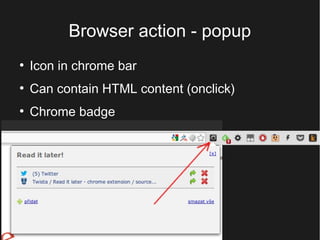
Icon in chrome bar

●

Can contain HTML content (onclick)

●

Chrome badge
Page action
●

Icon in Omnibox

●

Can contain HTML/JS content

●

Just on specific pages
Omnibox
Content script
●

●

●

Javascript which runs on page specified in
manifest (can be regexp)
Content script has access to the DOM of HTML
page, but runs on its isolated container
Can pass messages with the background page
+------------------------------------| background page
|------------------------------------|
|
+--------------------------------+
| web page
|
|--------------------------------|
|
|
|
|
|
|
|
|
|
|
|
|
|
|
|
|
^
|
|
|
|
|
|
|
|--------------------------|----|
^
|
|
|
|
|
+------------

------+
+-------------------|------------+
|

|
| content script
Background page
●

●

background page is an HTML page that runs in
the extension process
It exists for the lifetime of your extension, and
only one instance of it at a time is active*
*Exception if extension uses incognito „split mode“
Ok, what's next?
●

chrome.* APIs

●

Permissions

●

Distribution
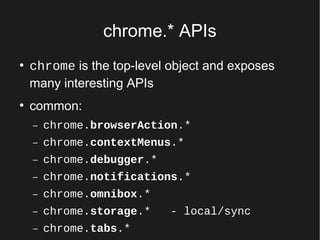
chrome.* APIs
●

●

chrome is the top-level object and exposes
many interesting APIs
common:
–

chrome.browserAction.*

–

chrome.contextMenus.*

–

chrome.debugger.*

–

chrome.notifications.*

–

chrome.omnibox.*

–

chrome.storage.*

–

chrome.tabs.*

- local/sync
chrome.* APIs
●

Less common APIs
–

chrome.i18n.*

- translations

–

chrome.power.* - system's power management

–

chrome.events.*

–

chrome.downloads.*

–

chrome.devtools.*

–

chrome.commands.*

–

chrome.alarms.*

- schedule code to run

developer.chrome.com/extensions/api_index.html
Permissions
●

●

Extension or app must declare its intent in the
"permissions" field (manifest)
Each permission can be either one of a list of
known strings (such as "downloads") or a
match pattern
Permissions examples
●

tabs

●

bookmarks

●

http://*.google.com/

●

http://*/*

●

<all_urls>
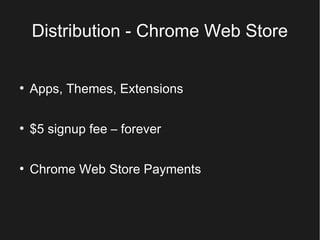
Distribution - Chrome Web Store
●

Apps, Themes, Extensions

●

$5 signup fee – forever

●

Chrome Web Store Payments
Let's start – demo time
●

Twista/chrome-skeleton

●

Simple skeleton for easy development

git clone http://git.twista.cz/chromeskeleton
Questions?

Chrome extension development