Developing Chrome Extensions
Metrowest Web Developers Meetup
By: Andrei McMillan
Yieldbot
Agenda
● What is an extension?
● Types of extensions
● Development / Testing
● Deploying
● Yieldbot’s extension dev cycle
● Q & A
What is an Extension?
Small downloadable plugins that allow you to
add new functionality to the Chrome browser.
Types of Extensions
● Background Script
● Content Script
● Dev Tools
● Page Action
● Browser Action
● Context Menu
Boiler Plate (browser action)
Displays current tab information
chrome.tabs.query({active: true, currentWindow: true}, function (tabs) {
document.getElementById('data').innerHTML = JSON.stringify(tabs[0], null, 2);
});
<body>
<h4>Boiler Plate Extension</h4>
<div>Tab Info</div>
<pre id="data"></pre>
<script src="index.js"></script>
</body>
browser_action.html
browser_action.js
Background Script
● a long lived script that runs in the
background
● only one instance of this script is active per
extension
Content Script
● js files that are executed in the context of the
user webpage
● direct access to the DOM
● no direct access to global variables
● multiple instances per extension (1 per tab)
Dev Tools
● allows interaction with the inspected page
● access to network resources
● multiple instances (1 per tab)
Page Action
chrome.pageAction.show(tabId);
background.js
// get the current active tab
chrome.tabs.query({active: true, currentWindow: true}, function (tabs) {
// send message to the content_script to get the open graph info to the current tab
chrome.tabs.sendMessage(tabs[0].id, {option: 'page_og_data'}, function (response) {
console.log(response);
});
});
page_action.js
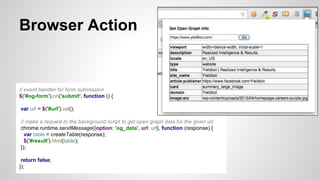
Browser Action
// event handler for form submission
$('#og-form').on('submit', function () {
var url = $('#url').val();
// make a request to the background script to get open graph data for the given url
chrome.runtime.sendMessage({option: 'og_data', url: url}, function (response) {
var table = createTable(response);
$('#result').html(table);
});
return false;
});
Context Menu
var contextMenuOptions = {
title: 'Chrome Extension',
contexts: ['selection'],
onclick: function (info, tab) {
chrome.tabs.sendMessage(tab.id, {value: info.selectionText}, ...);
}
};
chrome.contextMenus.create(contextMenuOptions, function () {});
Development / Testing / Deploying
Let’s See It In Action!
https://github.com/amcmillan01/chrome_extension
Useful Links
● https://developer.chrome.com/extensions/overview
● https://developer.chrome.com/extensions/manifest
● https://developer.chrome.com/extensions/devtools
● https://developer.chrome.com/extensions/api_index#stable_apis
● https://developer.chrome.com/webstore/using_webstore_api
● https://developer.chrome.com/apps/about_apps
● https://chrome.google.com/webstore/developer/dashboard
https://www.yieldbot.com/careers/
https://github.com/amcmillan01
@AndreiMcMillan
amcmillan@yieldbot.com

Chrome Extension

  • 1.
    Developing Chrome Extensions MetrowestWeb Developers Meetup By: Andrei McMillan Yieldbot
  • 2.
    Agenda ● What isan extension? ● Types of extensions ● Development / Testing ● Deploying ● Yieldbot’s extension dev cycle ● Q & A
  • 3.
    What is anExtension? Small downloadable plugins that allow you to add new functionality to the Chrome browser.
  • 4.
    Types of Extensions ●Background Script ● Content Script ● Dev Tools ● Page Action ● Browser Action ● Context Menu
  • 5.
    Boiler Plate (browseraction) Displays current tab information chrome.tabs.query({active: true, currentWindow: true}, function (tabs) { document.getElementById('data').innerHTML = JSON.stringify(tabs[0], null, 2); }); <body> <h4>Boiler Plate Extension</h4> <div>Tab Info</div> <pre id="data"></pre> <script src="index.js"></script> </body> browser_action.html browser_action.js
  • 6.
    Background Script ● along lived script that runs in the background ● only one instance of this script is active per extension
  • 7.
    Content Script ● jsfiles that are executed in the context of the user webpage ● direct access to the DOM ● no direct access to global variables ● multiple instances per extension (1 per tab)
  • 8.
    Dev Tools ● allowsinteraction with the inspected page ● access to network resources ● multiple instances (1 per tab)
  • 9.
    Page Action chrome.pageAction.show(tabId); background.js // getthe current active tab chrome.tabs.query({active: true, currentWindow: true}, function (tabs) { // send message to the content_script to get the open graph info to the current tab chrome.tabs.sendMessage(tabs[0].id, {option: 'page_og_data'}, function (response) { console.log(response); }); }); page_action.js
  • 10.
    Browser Action // eventhandler for form submission $('#og-form').on('submit', function () { var url = $('#url').val(); // make a request to the background script to get open graph data for the given url chrome.runtime.sendMessage({option: 'og_data', url: url}, function (response) { var table = createTable(response); $('#result').html(table); }); return false; });
  • 11.
    Context Menu var contextMenuOptions= { title: 'Chrome Extension', contexts: ['selection'], onclick: function (info, tab) { chrome.tabs.sendMessage(tab.id, {value: info.selectionText}, ...); } }; chrome.contextMenus.create(contextMenuOptions, function () {});
  • 12.
    Development / Testing/ Deploying Let’s See It In Action! https://github.com/amcmillan01/chrome_extension
  • 13.
    Useful Links ● https://developer.chrome.com/extensions/overview ●https://developer.chrome.com/extensions/manifest ● https://developer.chrome.com/extensions/devtools ● https://developer.chrome.com/extensions/api_index#stable_apis ● https://developer.chrome.com/webstore/using_webstore_api ● https://developer.chrome.com/apps/about_apps ● https://chrome.google.com/webstore/developer/dashboard
  • 14.

Editor's Notes

  • #10 allows you to perform action against the current page