Web browser extension development Chisan Petrisor Laurentiu Stefanache Pavel Cosmin
What is a browser extension?
  A browser extension is a  computer program that extends the functionality of a web browser  in some way.
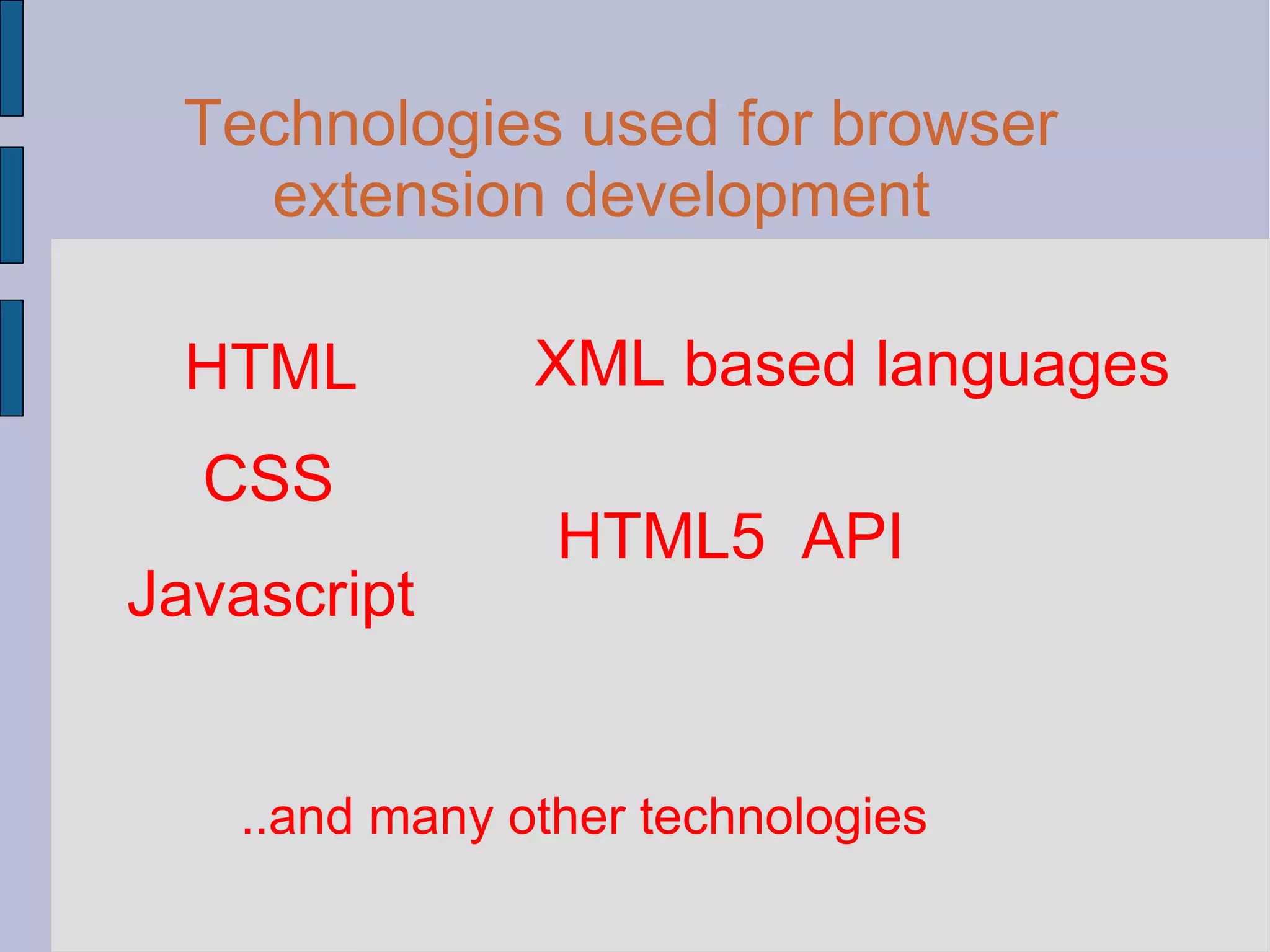
Technologies used for browser extension development HTML CSS Javascript XML based languages HTML5  API ..and many other technologies
Structure of an Extension metadata information  user interface extension  functionality
Developing firefox extensions
Web Developer AdBlock Plus Firebug Delicious
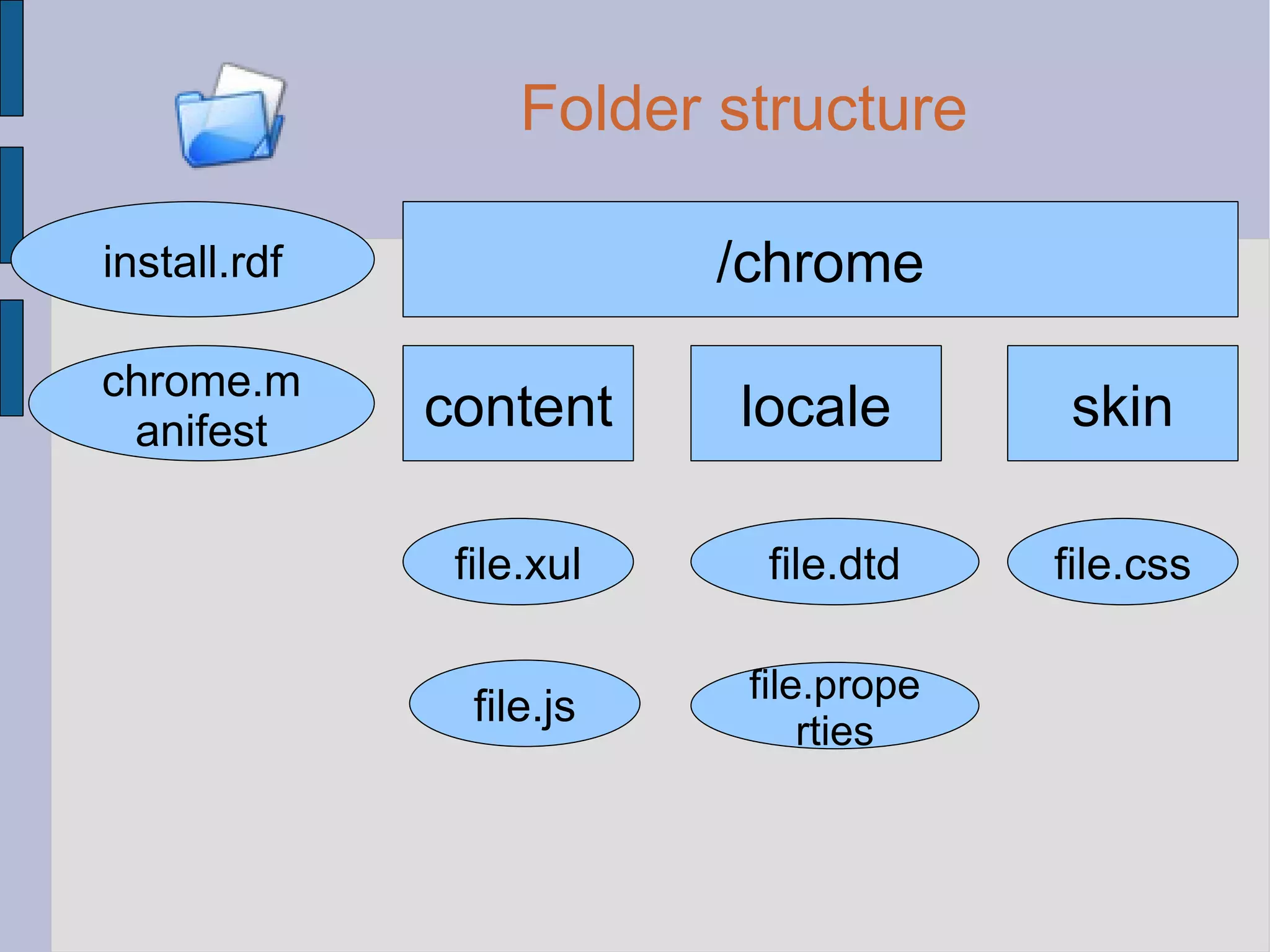
Folder structure /chrome content locale skin install.rdf chrome.manifest file.xul file.js file.dtd file.properties file.css
Everything zipped in an .xpi file extention.xpi
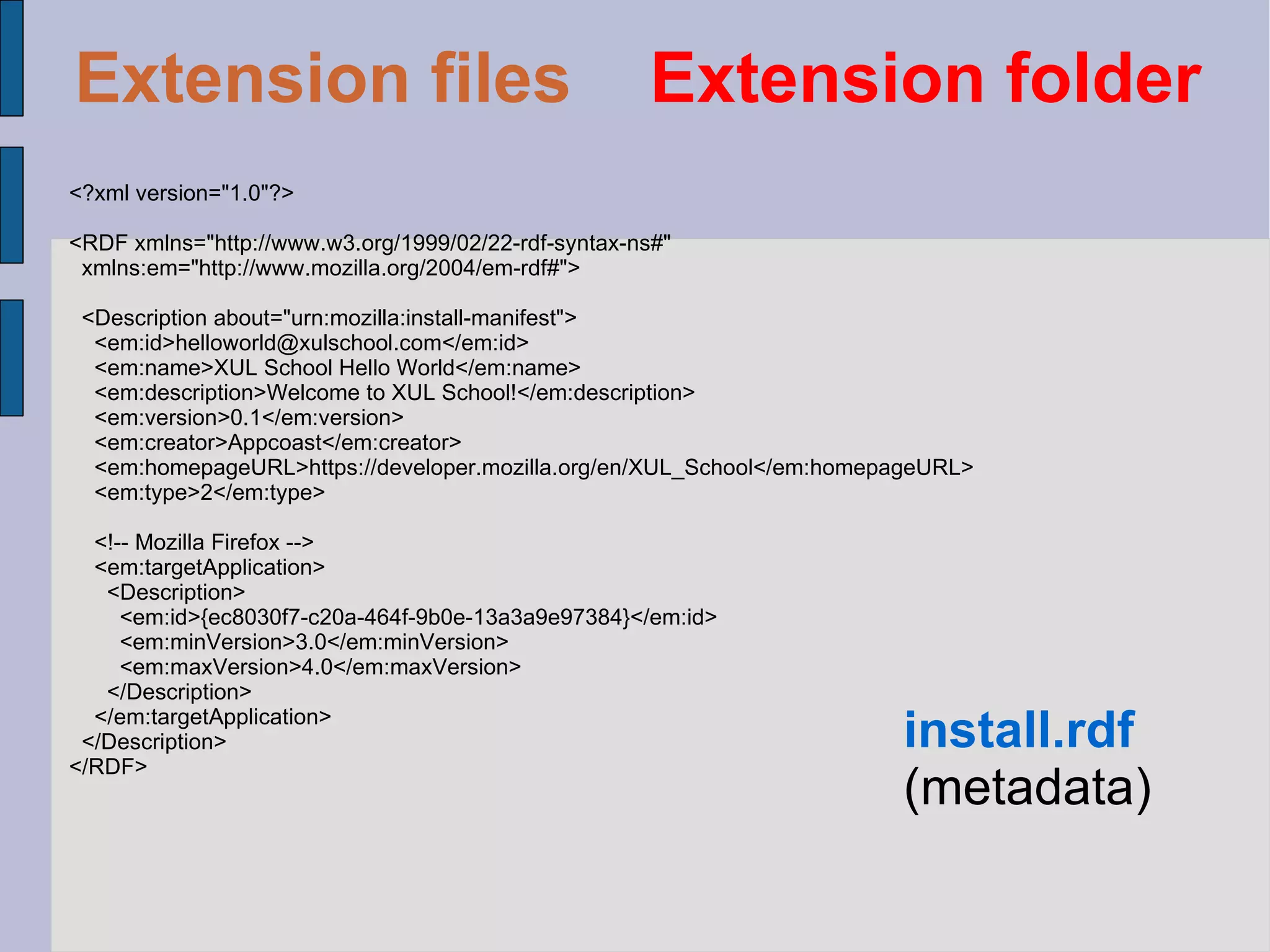
<?xml version=&quot;1.0&quot;?> <RDF xmlns=&quot;http://www.w3.org/1999/02/22-rdf-syntax-ns#&quot; xmlns:em=&quot;http://www.mozilla.org/2004/em-rdf#&quot;> <Description about=&quot;urn:mozilla:install-manifest&quot;> <em:id>helloworld@xulschool.com</em:id> <em:name>XUL School Hello World</em:name> <em:description>Welcome to XUL School!</em:description> <em:version>0.1</em:version> <em:creator>Appcoast</em:creator> <em:homepageURL>https://developer.mozilla.org/en/XUL_School</em:homepageURL> <em:type>2</em:type> <!-- Mozilla Firefox --> <em:targetApplication> <Description> <em:id>{ec8030f7-c20a-464f-9b0e-13a3a9e97384}</em:id> <em:minVersion>3.0</em:minVersion> <em:maxVersion>4.0</em:maxVersion> </Description> </em:targetApplication> </Description> </RDF>  install.rdf (metadata) Extension files   Extension folder
<Description about=&quot;urn:mozilla:install-manifest&quot;> <em:id> [email_address] </em:id> <em:name>XUL School Hello World</em:name> <em:description>Welcome to XUL School!</em:description> <em:version>0.1</em:version> <em:creator>Appcoast</em:creator> <em:homepageURL>   https://developer.mozilla.org/en/XUL_School </em:homepageURL> <em:type>2</em:type> … </Description> install.rdf (metadata) Extension files   Extension folder
<Description about=&quot;urn:mozilla:install-manifest&quot;> ... <!-- Mozilla Firefox -->   <em:targetApplication> <Description> <em:id> {ec8030f7-c20a-464f-9b0e-13a3a9e97384} </em:id> <em:minVersion>3.0</em:minVersion>   <em:maxVersion>4.0</em:maxVersion> </Description> </em:targetApplication> </Description> install.rdf (metadata) Extension files   Extension folder
content   xulschoolhello   jar:chrome/xulschoolhello.jar!/content/ skin   xulschoolhello   classic/1.0  jar:chrome/xulschoolhello.jar!/skin/ locale   xulschoolhello   en-US  jar:chrome/xulschoolhello.jar!/locale/en-US/ overlay  chrome://browser/content/browser.xul  chrome://xulschoolhello/content/browserOverlay.xul  chrome.maifest (file references) Extension files  Extension folder Extension files   Extension folder
<?xml version=&quot;1.0&quot;?> <?xml-stylesheet type=&quot;text/css&quot; href=&quot;chrome://global/skin/&quot; ?> <?xml-stylesheet type=&quot;text/css&quot; href=&quot;chrome://xulschoolhello/skin/browserOverlay.css&quot; ?> <!DOCTYPE overlay SYSTEM &quot;chrome://xulschoolhello/locale/browserOverlay.dtd&quot;> <overlay id=&quot;xulschoolhello-browser-overlay&quot; xmlns=&quot;http://www.mozilla.org/keymaster/gatekeeper/there.is.only.xul&quot;> <script type=&quot;application/x-javascript&quot; src=&quot;chrome://xulschoolhello/content/browserOverlay.js&quot; /> <stringbundleset id=&quot;stringbundleset&quot;> <stringbundle id=&quot;xulschoolhello-string-bundle&quot; src=&quot;chrome://xulschoolhello/locale/browserOverlay.properties&quot; /> </stringbundleset> <menupopup id=&quot;menu_ToolsPopup&quot;>   <menu id=&quot;xulschoolhello-hello-menu&quot; label=&quot;&xulschoolhello.hello.label;&quot; accesskey=&quot;&xulschoolhello.helloMenu.accesskey;&quot; insertafter=&quot;javascriptConsole,devToolsSeparator&quot;> <menupopup>   <menuitem id=&quot;xulschoolhello-hello-menu-item&quot; label=&quot;&xulschoolhello.hello.label;&quot; accesskey=&quot;&xulschoolhello.helloItem.accesskey;&quot; oncommand=&quot;XULSchoolChrome.BrowserOverlay.sayHello(event);&quot; /> </menupopup>   </menu> </menupopup> </overlay> browserOverlay.xul Extension files   content folder
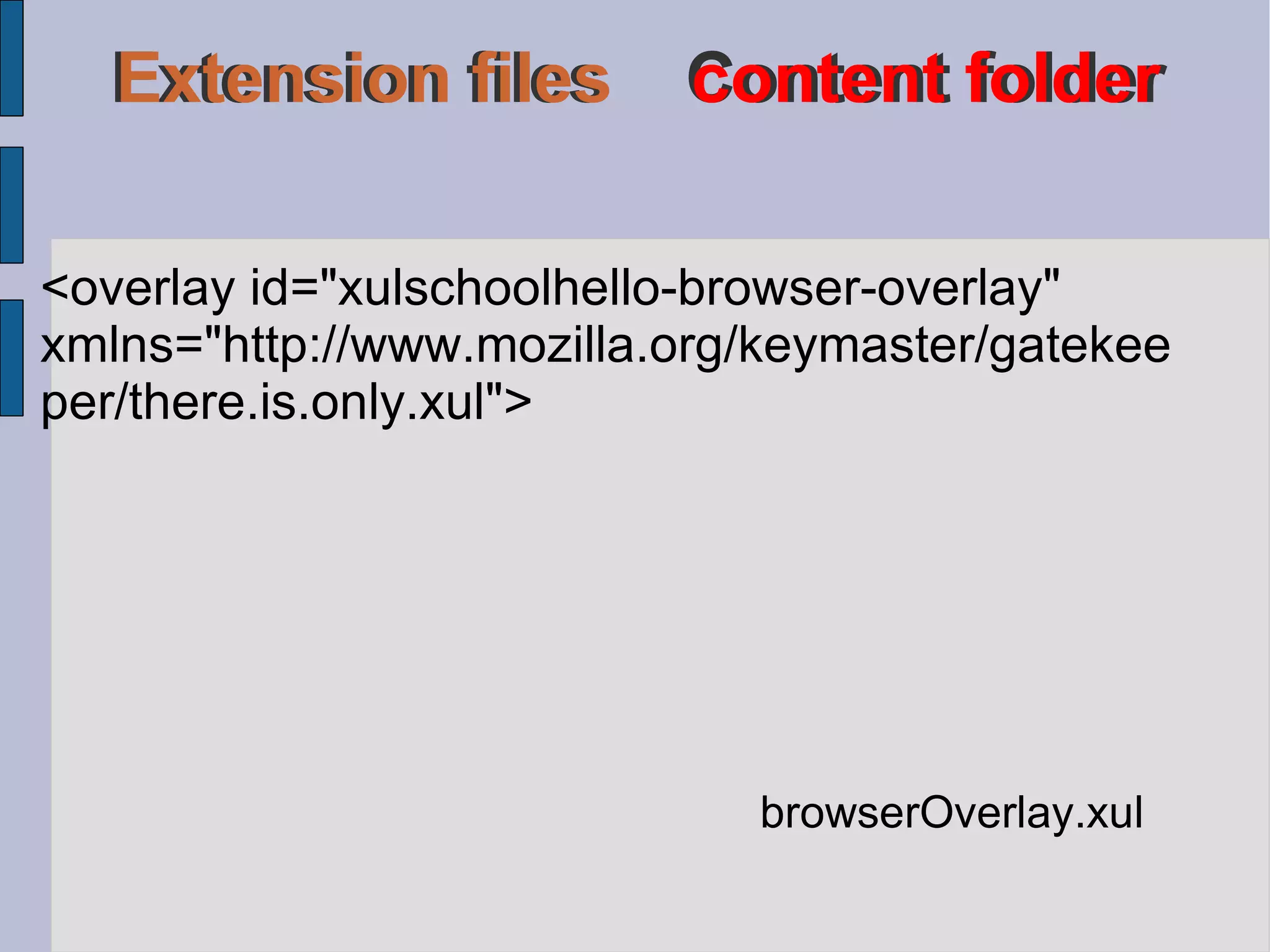
Extension files  Content folder Extension files  Content folder Extension files   content folder <overlay id=&quot;xulschoolhello-browser-overlay&quot;  xmlns=&quot;http://www.mozilla.org/keymaster/gatekeeper/there.is.only.xul&quot;> browserOverlay.xul
browserOverlay.xul <script type=&quot;application/x-javascript&quot;  src=&quot;chrome://xulschoolhello/content/ browserOverlay.js&quot; /> Extension files   content folder
<menupopup id=&quot;menu_ToolsPopup&quot;>   <menu id=&quot;xulschoolhello-hello-menu&quot; label=&quot;&xulschoolhello.hello.label;&quot; accesskey=&quot;&xulschoolhello.helloMenu.accesskey;&quot; insertafter=&quot;javascriptConsole,devToolsSeparator&quot;> <menupopup>     <menuitem id=&quot;xulschoolhello-hello-menu-item&quot; label=&quot;&xulschoolhello.hello.label;&quot; accesskey=&quot;&xulschoolhello.helloItem.accesskey;&quot;   oncommand=&quot;XULSchoolChrome.BrowserOverlay.sayHello(event);&quot; />   </menupopup>   </menu> </menupopup> browserOverlay.xul Extension files   content folder
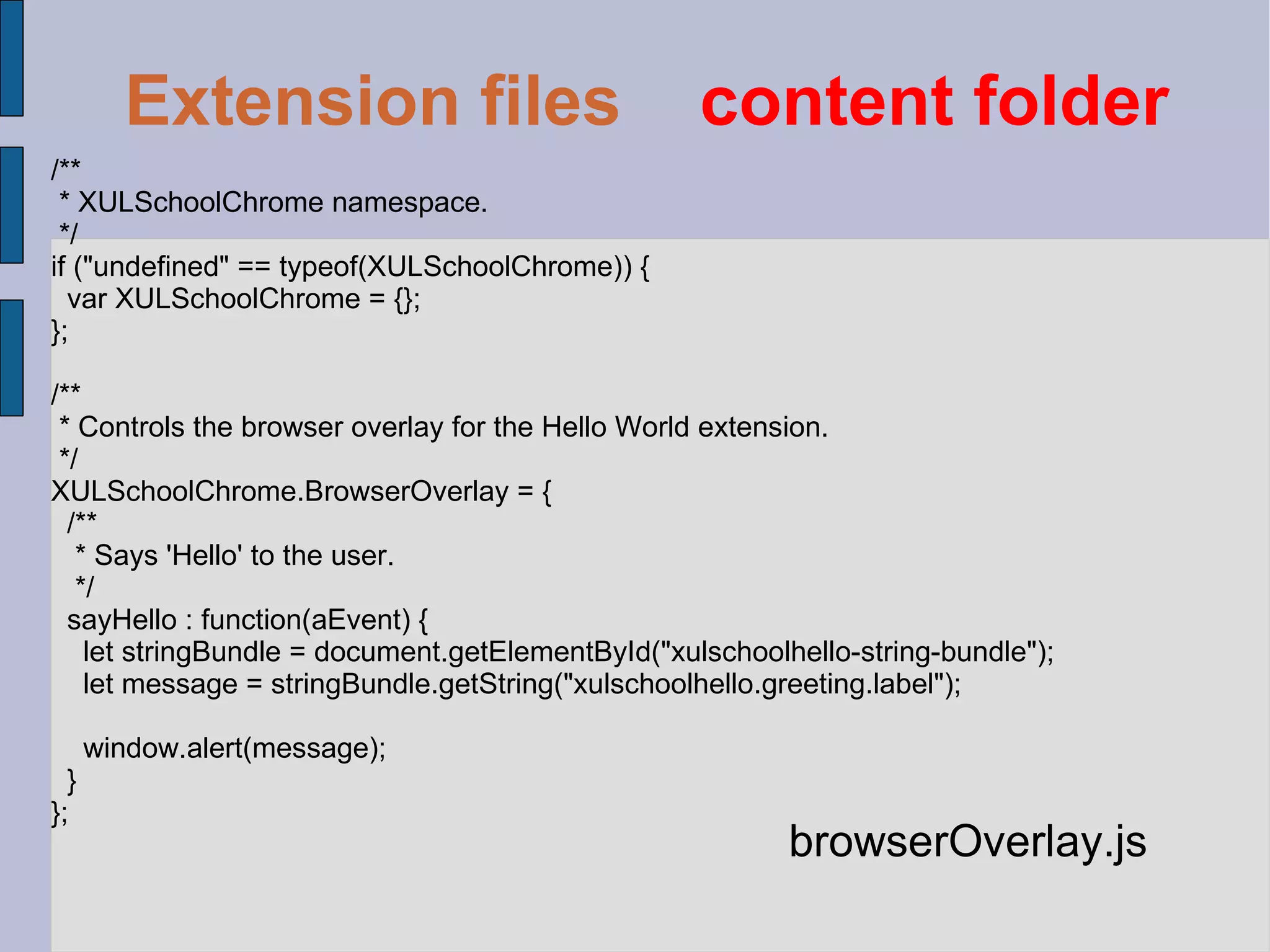
/** * XULSchoolChrome namespace. */ if (&quot;undefined&quot; == typeof(XULSchoolChrome)) { var XULSchoolChrome = {}; }; /** * Controls the browser overlay for the Hello World extension. */ XULSchoolChrome.BrowserOverlay = { /** * Says 'Hello' to the user. */ sayHello : function(aEvent) { let stringBundle = document.getElementById(&quot;xulschoolhello-string-bundle&quot;); let message = stringBundle.getString(&quot;xulschoolhello.greeting.label&quot;); window.alert(message); } }; browserOverlay.js Extension files   content folder
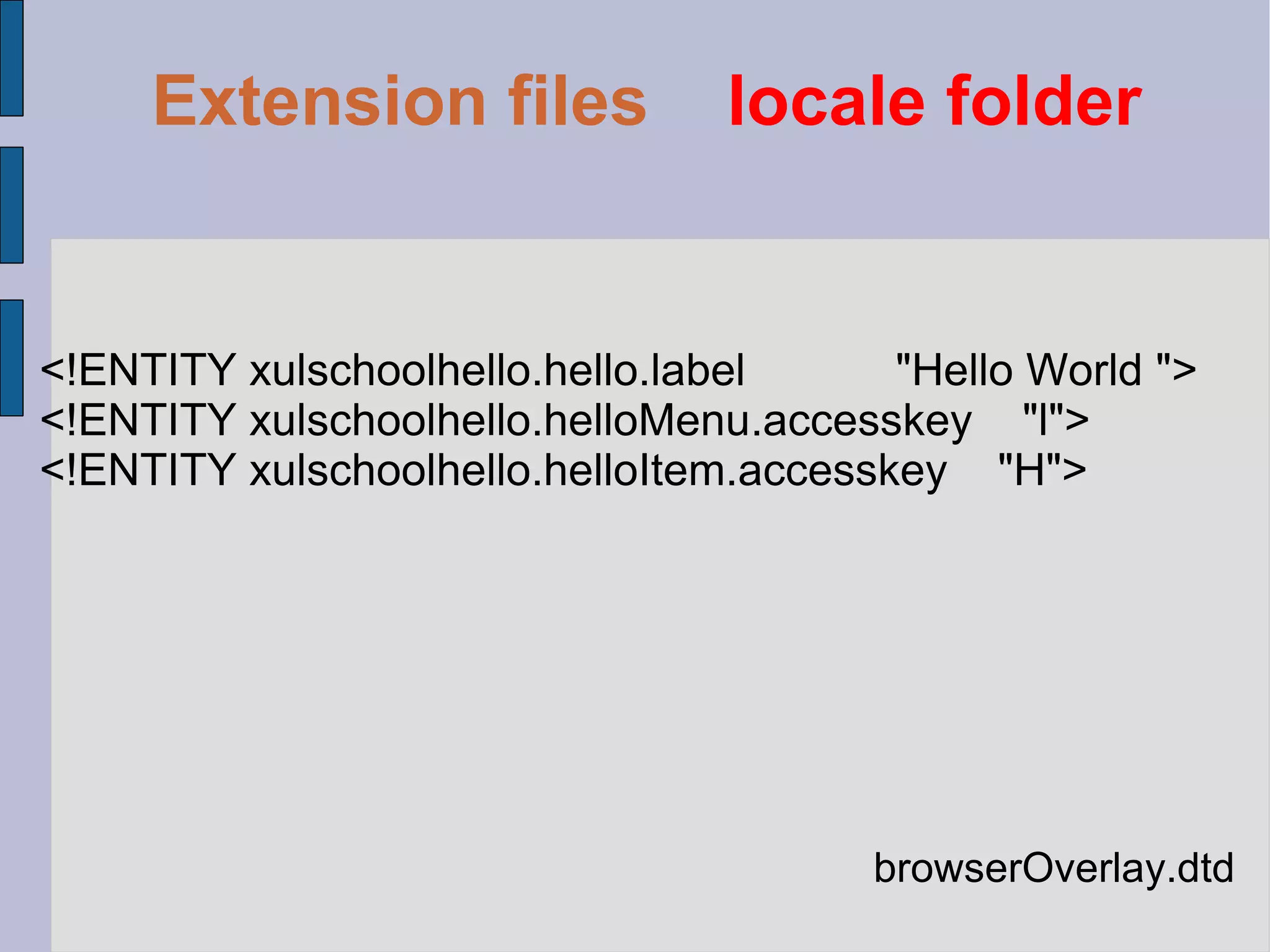
browserOverlay.dtd <!ENTITY xulschoolhello.hello.label  &quot;Hello World &quot;> <!ENTITY xulschoolhello.helloMenu.accesskey  &quot;l&quot;> <!ENTITY xulschoolhello.helloItem.accesskey  &quot;H&quot;> Extension files   locale folder
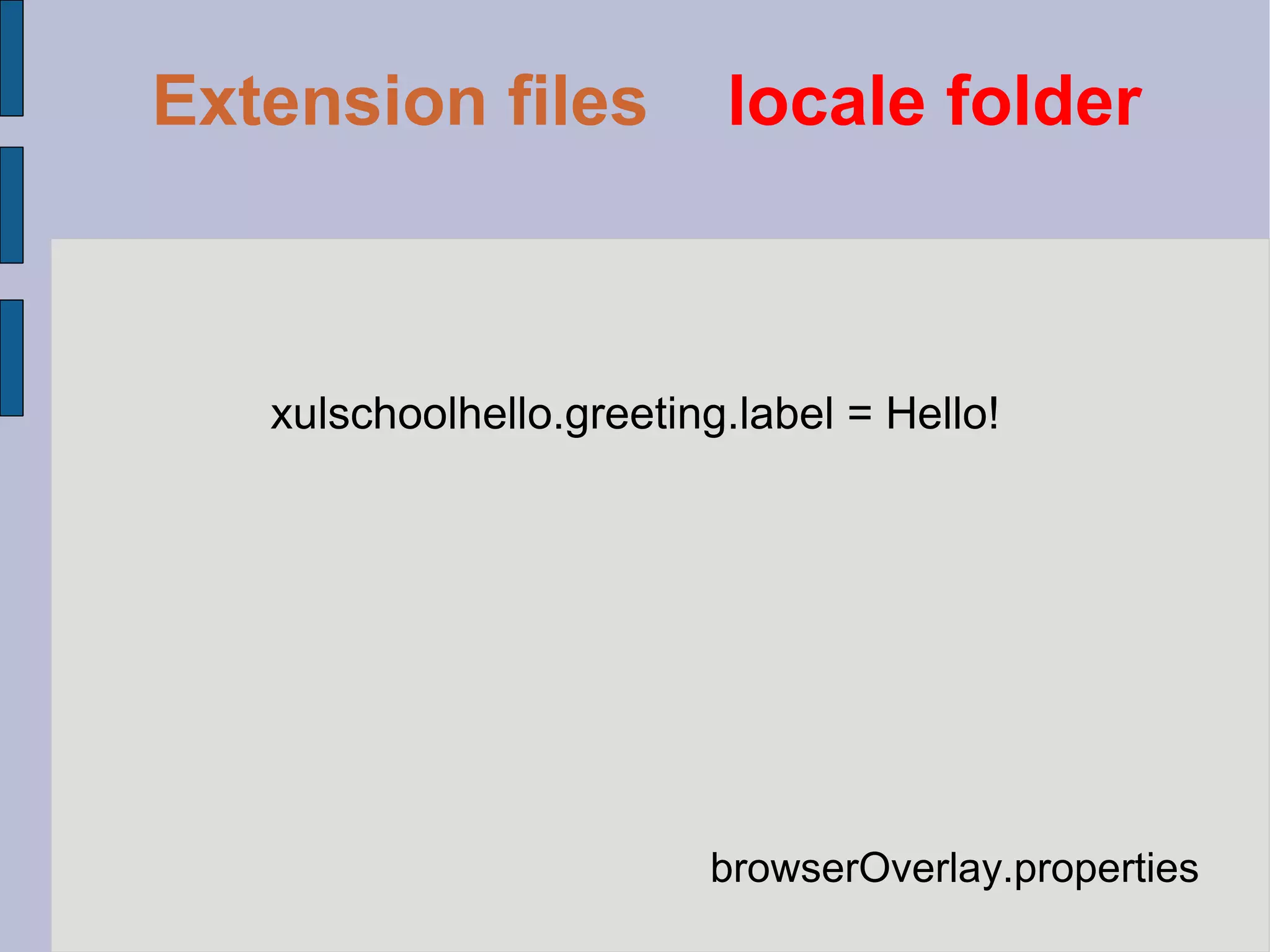
browserOverlay.properties xulschoolhello.greeting.label = Hello! Extension files   locale folder
Extension files   skin folder Here we put the CSS file for styling the the xul file
Tools for development Komodo Edit  Web developer DOM Inspector JavaScript Debugger
Developing google chrome extension
Folder structure / manifest.json popup.html file_name.js * Any file* * optional files
Now, let's see a simple exemple
{ &quot;name&quot;: &quot;My First Extension&quot;, &quot;version&quot;: &quot;1.0&quot;, &quot;description&quot;: &quot;The first extension that I made.&quot;, &quot;browser_action&quot;: { &quot;default_icon&quot;: &quot;icon.png&quot;, &quot;popup&quot; : &quot;popup.html&quot; }, &quot;permissions&quot;: [ &quot;http://api.flickr.com/&quot; ] } manifest.json
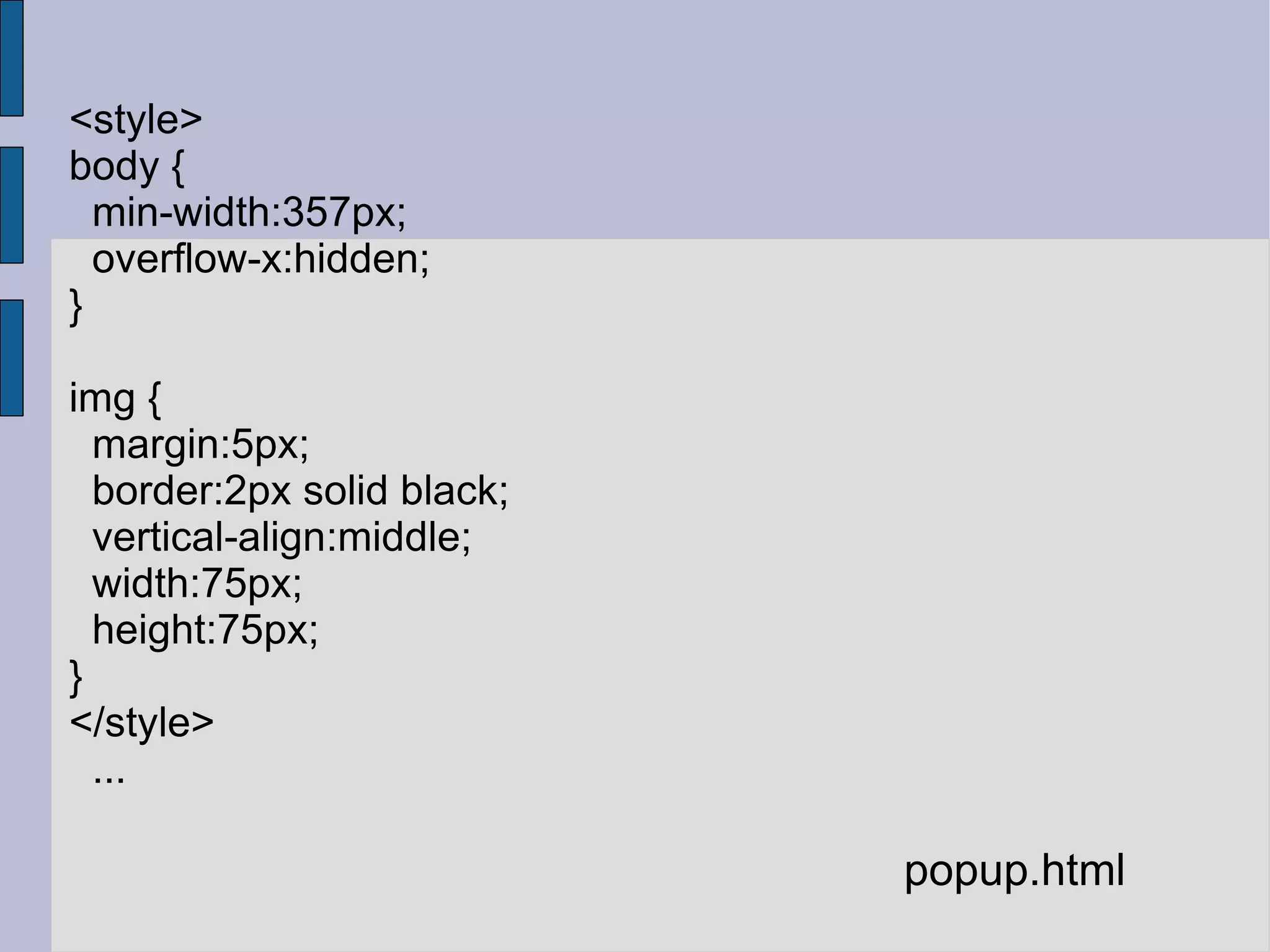
<style> body { min-width:357px; overflow-x:hidden; } img { margin:5px; border:2px solid black; vertical-align:middle; width:75px; height:75px; } </style> ... popup.html
<script> var req = new XMLHttpRequest(); req.open( &quot;GET&quot;, &quot;http://api.flickr.com/services/rest/?&quot; + &quot;method=flickr.photos.search&&quot; + &quot;api_key=90485e931f687a9b9c2a66bf58a3861a&&quot; + &quot;text=hello%20world&&quot; + &quot;safe_search=1&&quot; +  // 1 is &quot;safe&quot; &quot;content_type=1&&quot; +  // 1 is &quot;photos only&quot; &quot;sort=relevance&&quot; +  // another good one is &quot;interestingness-desc&quot; &quot;per_page=20&quot;, true); req.onload = showPhotos; req.send(null); … </script> popup.html
<script> ... function showPhotos() { var photos = req.responseXML.getElementsByTagName(&quot;photo&quot;); for (var i = 0, photo; photo = photos[i]; i++) { var img = document.createElement(&quot;image&quot;); img.src = constructImageURL(photo); document.body.appendChild(img); } } // See: http://www.flickr.com/services/api/misc.urls.html function constructImageURL(photo) { return &quot;http://farm&quot; + photo.getAttribute(&quot;farm&quot;) + &quot;.static.flickr.com/&quot; + photo.getAttribute(&quot;server&quot;) + &quot;/&quot; + photo.getAttribute(&quot;id&quot;) + &quot;_&quot; + photo.getAttribute(&quot;secret&quot;) + &quot;_s.jpg&quot;; } </script> popup.html
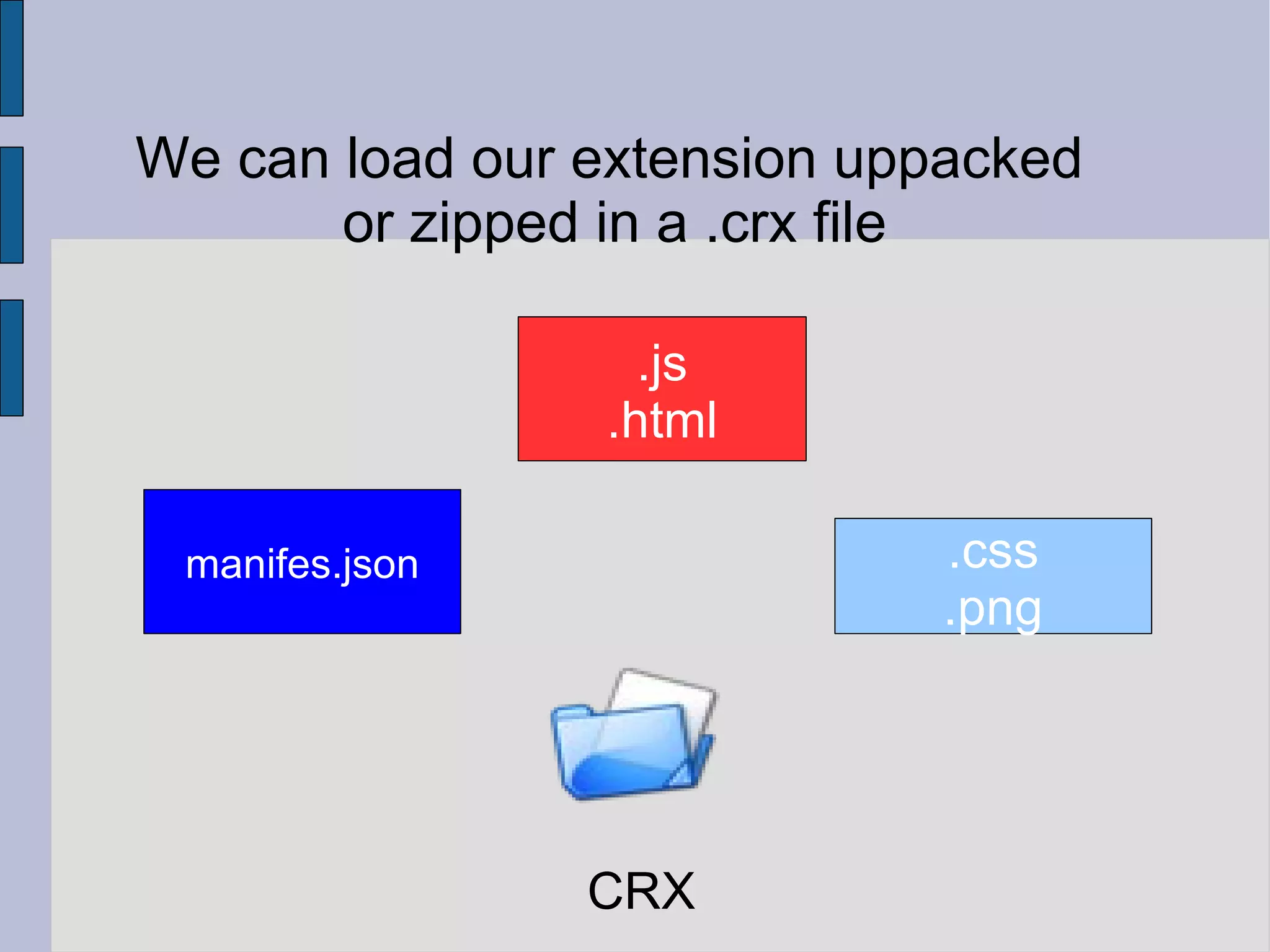
We can load our extension uppacked or zipped in a .crx file manifes.json .js .html .css .png CRX
And what's next ?
Publish your firefox extension  https://addons.mozilla.org/en-US/firefox/extensions/
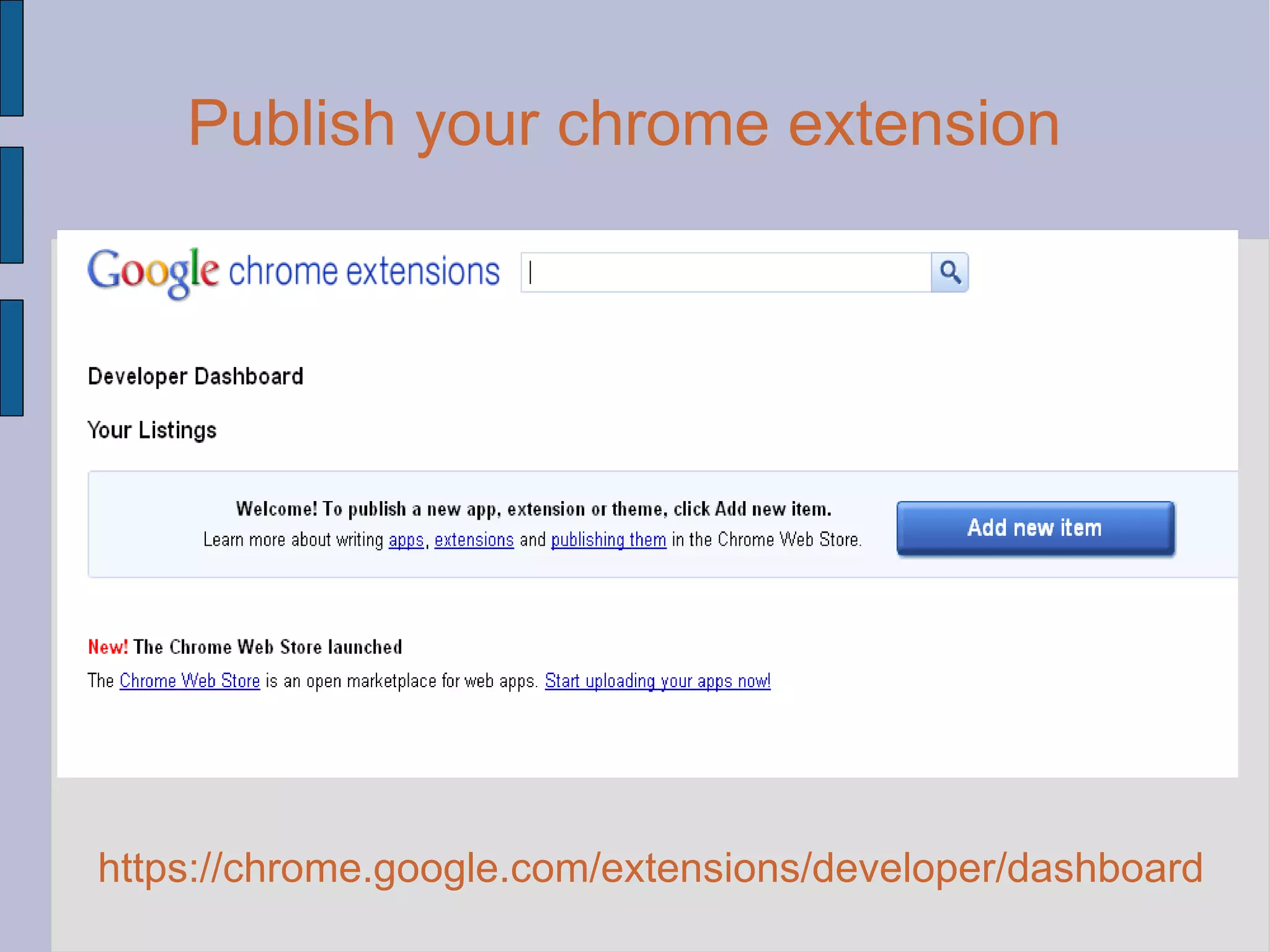
Publish your chrome extension  https://chrome.google.com/extensions/developer/dashboard
Bibliography http://code.google.com/chrome/extensions/getstarted.html https://developer.mozilla.org/en/Building_an_Extension

Browser extension

  • 1.
    Web browser extensiondevelopment Chisan Petrisor Laurentiu Stefanache Pavel Cosmin
  • 2.
    What is abrowser extension?
  • 3.
    Abrowser extension is a computer program that extends the functionality of a web browser in some way.
  • 4.
    Technologies used forbrowser extension development HTML CSS Javascript XML based languages HTML5 API ..and many other technologies
  • 5.
    Structure of anExtension metadata information user interface extension functionality
  • 6.
  • 7.
    Web Developer AdBlockPlus Firebug Delicious
  • 8.
    Folder structure /chromecontent locale skin install.rdf chrome.manifest file.xul file.js file.dtd file.properties file.css
  • 9.
    Everything zipped inan .xpi file extention.xpi
  • 10.
    <?xml version=&quot;1.0&quot;?> <RDFxmlns=&quot;http://www.w3.org/1999/02/22-rdf-syntax-ns#&quot; xmlns:em=&quot;http://www.mozilla.org/2004/em-rdf#&quot;> <Description about=&quot;urn:mozilla:install-manifest&quot;> <em:id>helloworld@xulschool.com</em:id> <em:name>XUL School Hello World</em:name> <em:description>Welcome to XUL School!</em:description> <em:version>0.1</em:version> <em:creator>Appcoast</em:creator> <em:homepageURL>https://developer.mozilla.org/en/XUL_School</em:homepageURL> <em:type>2</em:type> <!-- Mozilla Firefox --> <em:targetApplication> <Description> <em:id>{ec8030f7-c20a-464f-9b0e-13a3a9e97384}</em:id> <em:minVersion>3.0</em:minVersion> <em:maxVersion>4.0</em:maxVersion> </Description> </em:targetApplication> </Description> </RDF> install.rdf (metadata) Extension files Extension folder
  • 11.
    <Description about=&quot;urn:mozilla:install-manifest&quot;> <em:id>[email_address] </em:id> <em:name>XUL School Hello World</em:name> <em:description>Welcome to XUL School!</em:description> <em:version>0.1</em:version> <em:creator>Appcoast</em:creator> <em:homepageURL> https://developer.mozilla.org/en/XUL_School </em:homepageURL> <em:type>2</em:type> … </Description> install.rdf (metadata) Extension files Extension folder
  • 12.
    <Description about=&quot;urn:mozilla:install-manifest&quot;> ...<!-- Mozilla Firefox --> <em:targetApplication> <Description> <em:id> {ec8030f7-c20a-464f-9b0e-13a3a9e97384} </em:id> <em:minVersion>3.0</em:minVersion> <em:maxVersion>4.0</em:maxVersion> </Description> </em:targetApplication> </Description> install.rdf (metadata) Extension files Extension folder
  • 13.
    content xulschoolhello jar:chrome/xulschoolhello.jar!/content/ skin xulschoolhello classic/1.0 jar:chrome/xulschoolhello.jar!/skin/ locale xulschoolhello en-US jar:chrome/xulschoolhello.jar!/locale/en-US/ overlay chrome://browser/content/browser.xul chrome://xulschoolhello/content/browserOverlay.xul chrome.maifest (file references) Extension files Extension folder Extension files Extension folder
  • 14.
    <?xml version=&quot;1.0&quot;?> <?xml-stylesheettype=&quot;text/css&quot; href=&quot;chrome://global/skin/&quot; ?> <?xml-stylesheet type=&quot;text/css&quot; href=&quot;chrome://xulschoolhello/skin/browserOverlay.css&quot; ?> <!DOCTYPE overlay SYSTEM &quot;chrome://xulschoolhello/locale/browserOverlay.dtd&quot;> <overlay id=&quot;xulschoolhello-browser-overlay&quot; xmlns=&quot;http://www.mozilla.org/keymaster/gatekeeper/there.is.only.xul&quot;> <script type=&quot;application/x-javascript&quot; src=&quot;chrome://xulschoolhello/content/browserOverlay.js&quot; /> <stringbundleset id=&quot;stringbundleset&quot;> <stringbundle id=&quot;xulschoolhello-string-bundle&quot; src=&quot;chrome://xulschoolhello/locale/browserOverlay.properties&quot; /> </stringbundleset> <menupopup id=&quot;menu_ToolsPopup&quot;> <menu id=&quot;xulschoolhello-hello-menu&quot; label=&quot;&xulschoolhello.hello.label;&quot; accesskey=&quot;&xulschoolhello.helloMenu.accesskey;&quot; insertafter=&quot;javascriptConsole,devToolsSeparator&quot;> <menupopup> <menuitem id=&quot;xulschoolhello-hello-menu-item&quot; label=&quot;&xulschoolhello.hello.label;&quot; accesskey=&quot;&xulschoolhello.helloItem.accesskey;&quot; oncommand=&quot;XULSchoolChrome.BrowserOverlay.sayHello(event);&quot; /> </menupopup> </menu> </menupopup> </overlay> browserOverlay.xul Extension files content folder
  • 15.
    Extension files Content folder Extension files Content folder Extension files content folder <overlay id=&quot;xulschoolhello-browser-overlay&quot; xmlns=&quot;http://www.mozilla.org/keymaster/gatekeeper/there.is.only.xul&quot;> browserOverlay.xul
  • 16.
    browserOverlay.xul <script type=&quot;application/x-javascript&quot; src=&quot;chrome://xulschoolhello/content/ browserOverlay.js&quot; /> Extension files content folder
  • 17.
    <menupopup id=&quot;menu_ToolsPopup&quot;> <menu id=&quot;xulschoolhello-hello-menu&quot; label=&quot;&xulschoolhello.hello.label;&quot; accesskey=&quot;&xulschoolhello.helloMenu.accesskey;&quot; insertafter=&quot;javascriptConsole,devToolsSeparator&quot;> <menupopup> <menuitem id=&quot;xulschoolhello-hello-menu-item&quot; label=&quot;&xulschoolhello.hello.label;&quot; accesskey=&quot;&xulschoolhello.helloItem.accesskey;&quot; oncommand=&quot;XULSchoolChrome.BrowserOverlay.sayHello(event);&quot; /> </menupopup> </menu> </menupopup> browserOverlay.xul Extension files content folder
  • 18.
    /** * XULSchoolChromenamespace. */ if (&quot;undefined&quot; == typeof(XULSchoolChrome)) { var XULSchoolChrome = {}; }; /** * Controls the browser overlay for the Hello World extension. */ XULSchoolChrome.BrowserOverlay = { /** * Says 'Hello' to the user. */ sayHello : function(aEvent) { let stringBundle = document.getElementById(&quot;xulschoolhello-string-bundle&quot;); let message = stringBundle.getString(&quot;xulschoolhello.greeting.label&quot;); window.alert(message); } }; browserOverlay.js Extension files content folder
  • 19.
    browserOverlay.dtd <!ENTITY xulschoolhello.hello.label &quot;Hello World &quot;> <!ENTITY xulschoolhello.helloMenu.accesskey &quot;l&quot;> <!ENTITY xulschoolhello.helloItem.accesskey &quot;H&quot;> Extension files locale folder
  • 20.
  • 21.
    Extension files skin folder Here we put the CSS file for styling the the xul file
  • 22.
    Tools for developmentKomodo Edit Web developer DOM Inspector JavaScript Debugger
  • 23.
  • 24.
    Folder structure /manifest.json popup.html file_name.js * Any file* * optional files
  • 25.
    Now, let's seea simple exemple
  • 26.
    { &quot;name&quot;: &quot;MyFirst Extension&quot;, &quot;version&quot;: &quot;1.0&quot;, &quot;description&quot;: &quot;The first extension that I made.&quot;, &quot;browser_action&quot;: { &quot;default_icon&quot;: &quot;icon.png&quot;, &quot;popup&quot; : &quot;popup.html&quot; }, &quot;permissions&quot;: [ &quot;http://api.flickr.com/&quot; ] } manifest.json
  • 27.
    <style> body {min-width:357px; overflow-x:hidden; } img { margin:5px; border:2px solid black; vertical-align:middle; width:75px; height:75px; } </style> ... popup.html
  • 28.
    <script> var req= new XMLHttpRequest(); req.open( &quot;GET&quot;, &quot;http://api.flickr.com/services/rest/?&quot; + &quot;method=flickr.photos.search&&quot; + &quot;api_key=90485e931f687a9b9c2a66bf58a3861a&&quot; + &quot;text=hello%20world&&quot; + &quot;safe_search=1&&quot; + // 1 is &quot;safe&quot; &quot;content_type=1&&quot; + // 1 is &quot;photos only&quot; &quot;sort=relevance&&quot; + // another good one is &quot;interestingness-desc&quot; &quot;per_page=20&quot;, true); req.onload = showPhotos; req.send(null); … </script> popup.html
  • 29.
    <script> ... functionshowPhotos() { var photos = req.responseXML.getElementsByTagName(&quot;photo&quot;); for (var i = 0, photo; photo = photos[i]; i++) { var img = document.createElement(&quot;image&quot;); img.src = constructImageURL(photo); document.body.appendChild(img); } } // See: http://www.flickr.com/services/api/misc.urls.html function constructImageURL(photo) { return &quot;http://farm&quot; + photo.getAttribute(&quot;farm&quot;) + &quot;.static.flickr.com/&quot; + photo.getAttribute(&quot;server&quot;) + &quot;/&quot; + photo.getAttribute(&quot;id&quot;) + &quot;_&quot; + photo.getAttribute(&quot;secret&quot;) + &quot;_s.jpg&quot;; } </script> popup.html
  • 30.
    We can loadour extension uppacked or zipped in a .crx file manifes.json .js .html .css .png CRX
  • 31.
  • 32.
    Publish your firefoxextension https://addons.mozilla.org/en-US/firefox/extensions/
  • 33.
    Publish your chromeextension https://chrome.google.com/extensions/developer/dashboard
  • 34.