
Chrome Apps & Extension
About Me

Varun Raj
Web Developer | Internet Addict |
Android Fan Boy | Techie | Engineering

Student
Chrome Extensions and Apps
Looking beyond browsing on Chrome
What is an Extension?

•
•
•
•

A compressed package
Extends the functionality of the browser
Minimal or No UI

Usually enhances functionality of websites or web apps
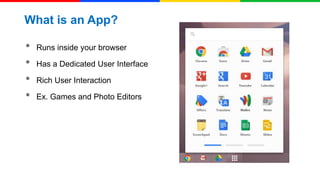
What is an App?

•
•
•
•

Runs inside your browser
Has a Dedicated User Interface
Rich User Interaction

Ex. Games and Photo Editors
What an Extension contains?

•
•
•
•
•

manifest.json
browser action or page action
content script - CSS/JS

background pages
Other media files
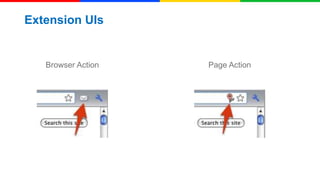
Extension UIs

Browser Action

Page Action
Layout of an Extension
chrome - top-level object & is exposed to extensions

•
•
•
•
•
•
•

chrome.extension.*

chrome.browserAction.*
chrome.pageAction.*
chrome.windows.*
chrome.tabs.*
chrome.bookmarks.*

Does not access much of the native code
Manifest.json
For details, see Manifest Files.
{

JSON

"manifest_version": 2,
"name": “HUG Chennai",
"description": "This is a sample app",
"version": "1.0",
"browser_action": {
"default_icon": "icon.png", "default_popup": "popup.html"
},
"permissions": [
"https://secure.flickr.com/"
]
}
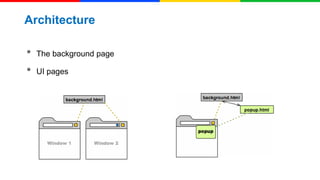
Architecture

•
•

The background page

UI pages
Background Pages

•
•

Persistent Background Pages
Event Pages
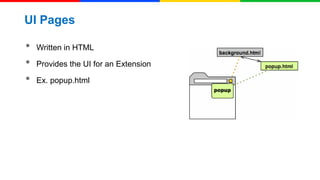
UI Pages

•
•
•

Written in HTML
Provides the UI for an Extension
Ex. popup.html
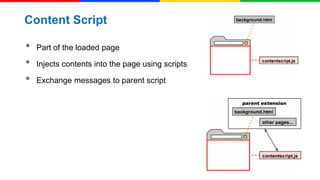
Content Script

•
•
•

Part of the loaded page
Injects contents into the page using scripts
Exchange messages to parent script
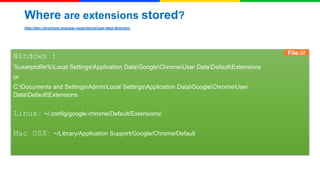
Where are extensions stored?
http://dev.chromium.org/user-experience/user-data-directory

Windows :
%userprofile%Local SettingsApplication DataGoogleChromeUser DataDefaultExtensions

or
C:Documents and SettingsAdminLocal SettingsApplication DataGoogleChromeUser
DataDefaultExtensions

Linux :

~/.config/google-chrome/Default/Extensions/

Mac OSX :

~/Library/Application Support/Google/Chrome/Default

File:///
Demo Time !
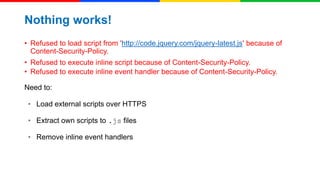
Nothing works!
• Refused to load script from 'http://code.jquery.com/jquery-latest.js' because of
Content-Security-Policy.
• Refused to execute inline script because of Content-Security-Policy.
• Refused to execute inline event handler because of Content-Security-Policy.
Need to:
• Load external scripts over HTTPS
• Extract own scripts to .js files
• Remove inline event handlers
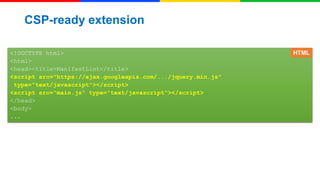
CSP-ready extension
<!DOCTYPE html>
<html>
<head><title>ManifestLint</title>
<script src="https://ajax.googleapis.com/.../jquery.min.js"
type="text/javascript"></script>
<script src="main.js" type="text/javascript"></script>
</head>
<body>
...

HTML
Chrome Apps
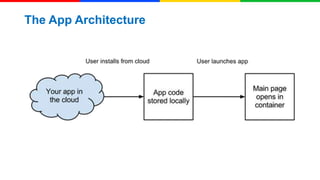
The App Architecture
Links
• Manifest versions:
o

http://code.google.com/chrome/extensions/manifestVersion.html

• Content Security Policy:
o

http://code.google.com/chrome/extensions/contentSecurityPolicy.html

• HTML5 sandbox attribute for iframes:
o

http://www.whatwg.org/specs/web-apps/current-work/multipage/the-

iframe-element.html#attr-iframe-sandbox
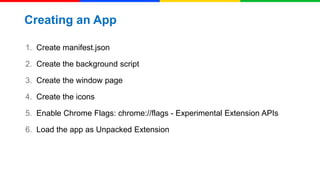
Creating an App
1. Create manifest.json
2. Create the background script
3. Create the window page

4. Create the icons
5. Enable Chrome Flags: chrome://flags - Experimental Extension APIs
6. Load the app as Unpacked Extension
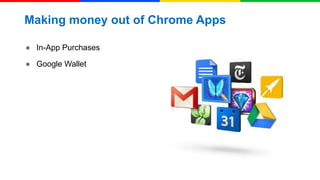
Making money out of Chrome Apps
● In-App Purchases
● Google Wallet
Thank You !
Contact Me
mailme@varunraj.in

Chrome Apps & Extensions

  • 1.
    Chrome Apps &Extension
  • 2.
    About Me Varun Raj WebDeveloper | Internet Addict | Android Fan Boy | Techie | Engineering Student
  • 3.
    Chrome Extensions andApps Looking beyond browsing on Chrome
  • 4.
    What is anExtension? • • • • A compressed package Extends the functionality of the browser Minimal or No UI Usually enhances functionality of websites or web apps
  • 5.
    What is anApp? • • • • Runs inside your browser Has a Dedicated User Interface Rich User Interaction Ex. Games and Photo Editors
  • 6.
    What an Extensioncontains? • • • • • manifest.json browser action or page action content script - CSS/JS background pages Other media files
  • 7.
  • 8.
    Layout of anExtension chrome - top-level object & is exposed to extensions • • • • • • • chrome.extension.* chrome.browserAction.* chrome.pageAction.* chrome.windows.* chrome.tabs.* chrome.bookmarks.* Does not access much of the native code
  • 9.
    Manifest.json For details, seeManifest Files. { JSON "manifest_version": 2, "name": “HUG Chennai", "description": "This is a sample app", "version": "1.0", "browser_action": { "default_icon": "icon.png", "default_popup": "popup.html" }, "permissions": [ "https://secure.flickr.com/" ] }
  • 10.
  • 11.
  • 12.
    UI Pages • • • Written inHTML Provides the UI for an Extension Ex. popup.html
  • 13.
    Content Script • • • Part ofthe loaded page Injects contents into the page using scripts Exchange messages to parent script
  • 14.
    Where are extensionsstored? http://dev.chromium.org/user-experience/user-data-directory Windows : %userprofile%Local SettingsApplication DataGoogleChromeUser DataDefaultExtensions or C:Documents and SettingsAdminLocal SettingsApplication DataGoogleChromeUser DataDefaultExtensions Linux : ~/.config/google-chrome/Default/Extensions/ Mac OSX : ~/Library/Application Support/Google/Chrome/Default File:///
  • 15.
  • 16.
    Nothing works! • Refusedto load script from 'http://code.jquery.com/jquery-latest.js' because of Content-Security-Policy. • Refused to execute inline script because of Content-Security-Policy. • Refused to execute inline event handler because of Content-Security-Policy. Need to: • Load external scripts over HTTPS • Extract own scripts to .js files • Remove inline event handlers
  • 17.
    CSP-ready extension <!DOCTYPE html> <html> <head><title>ManifestLint</title> <scriptsrc="https://ajax.googleapis.com/.../jquery.min.js" type="text/javascript"></script> <script src="main.js" type="text/javascript"></script> </head> <body> ... HTML
  • 18.
  • 19.
  • 20.
    Links • Manifest versions: o http://code.google.com/chrome/extensions/manifestVersion.html •Content Security Policy: o http://code.google.com/chrome/extensions/contentSecurityPolicy.html • HTML5 sandbox attribute for iframes: o http://www.whatwg.org/specs/web-apps/current-work/multipage/the- iframe-element.html#attr-iframe-sandbox
  • 21.
    Creating an App 1.Create manifest.json 2. Create the background script 3. Create the window page 4. Create the icons 5. Enable Chrome Flags: chrome://flags - Experimental Extension APIs 6. Load the app as Unpacked Extension
  • 22.
    Making money outof Chrome Apps ● In-App Purchases ● Google Wallet
  • 23.
    Thank You ! ContactMe mailme@varunraj.in