第三方内容开
发最佳实践
张立理 @otakustay
权一   @_Fr ank y
                  2012.6
讲师介绍
3.0


2.5

                                      nightly
                        3.5

                                4.0             dev
2.0


                                                  beta
         XP+SP1
                               5.0

                                          6.0
XP+SP2


                         KB2497640
<img>


Flash


           <iframe>
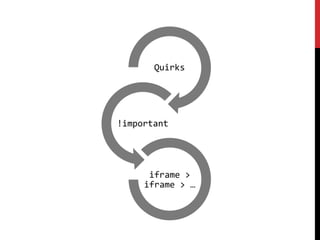
Quirks


!important


      iframe >
     iframe > …
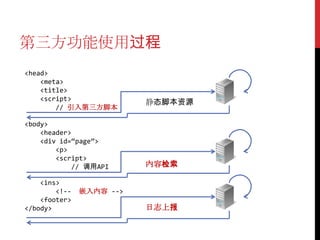
第三方功能使用过程
<head>
    <meta>
    <title>
    <script>
                          静态脚本资源
        // 引入第三方脚本

<body>
    <header>
    <div id=‚page‛>
        <p>
        <script>
            // 调用API      内容检索

    <ins>
        <!--   嵌入内容 -->
    <footer>
</body>                   日志上报
引入脚本
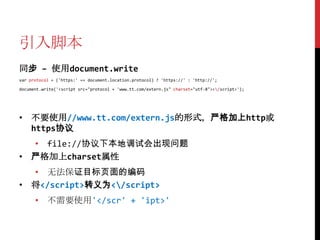
同步 – 使用document.write
var protocol = ('https:' == document.location.protocol) ? 'https://' : 'http://';

document.write('<script src="protocol + 'www.tt.com/extern.js" charset="utf-8"></script>');


• 不要使用//www.tt.com/extern.js的形式,严格加上http或
  https协议
  • file://协议下本地调试会出现问题
• 严格加上charset属性
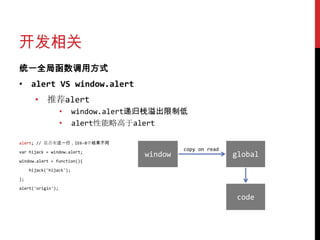
  • 无法保证目标页面的编码
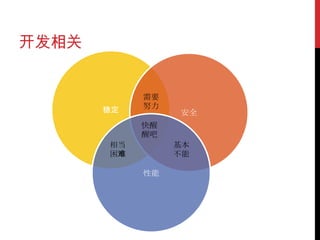
• 将</script>转义为</script>
      • 不需要使用'</scr' + 'ipt>'
引入脚本
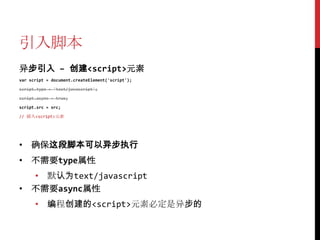
异步引入 – 创建<script>元素
var script = document.createElement('script');

script.type = 'text/javascript';

script.async = true;

script.src = src;

// 插入<script>元素


• 确保这段脚本可以异步执行
• 不需要type属性
  • 默认为text/javascript
• 不需要async属性
      • 编程创建的<script>元素必定是异步的
引入脚本
插入<script>元素 – 错误方法
document.body.appendChild(script);


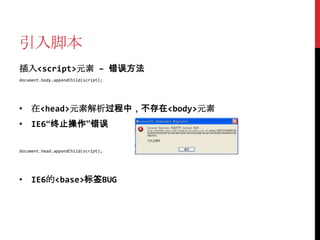
• 在<head>元素解析过程中,不存在<body>元素
• IE6“终止操作”错误

document.head.appendChild(script);


• IE6的<base>标签BUG
引入脚本
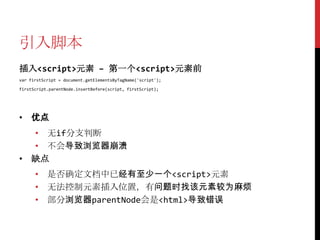
插入<script>元素 – 第一个<script>元素前
var firstScript = document.getElementsByTagName('script');

firstScript.parentNode.insertBefore(script, firstScript);


• 优点
  • 无if分支判断
  • 不会导致浏览器崩溃
• 缺点
      • 是否确定文档中已经有至少一个<script>元素
      • 无法控制元素插入位置,有问题时找该元素较为麻烦
      • 部分浏览器parentNode会是<html>导致错误
引入脚本
插入<script>元素 – <head>元素第一个子元素
var container = document.getElementsByTagName('haed')[0];

if (!head) // 补救;

else container.insertBefore(script, container.firstChild);


• 优点
  • 插入位置固定,易于查找
• 缺点
      • 需要if分支判断<head>是否存在
                •    多数浏览器会补全<head>
                •    例外:Firefox 4.0b1 / iPhone 3.0 / Chrome 5.0等
引入脚本
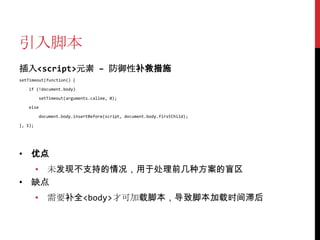
插入<script>元素 – 防御性补救措施
setTimeout(function() {

   if (!document.body)

          setTimeout(arguments.callee, 0);

   else

          document.body.insertBefore(script, document.body.firstChild);

}, 1);


• 优点
  • 未发现不支持的情况,用于处理前几种方案的盲区
• 缺点
         • 需要补全<body>才可加载脚本,导致脚本加载时间滞后
引入脚本
不要随意删除<script>元素
• 如果删除正在执行的<script>元素,会导致IE崩溃
• 过多<script>元素导致内存占用
  • 定时使用JSONP时容易出现
• 使用setTimeout来控制元素的删除
var scripts = document.getElementsByTagName('script');

var currentScript = scripts[scripts.length - 1];

setTimeout(function() {

   currentScript.parentNode.removeChild(currentScript);

}, 1);


• setTimeout能解决很多问题……
嵌入内容
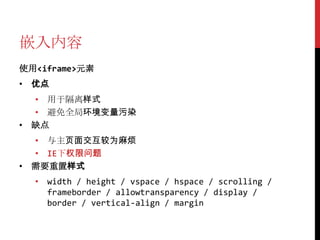
使用<iframe>元素
• 优点
  • 用于隔离样式
  • 避免全局环境变量污染
• 缺点
  • 与主页面交互较为麻烦
  • IE下权限问题
• 需要重置样式
  • width / height / vspace / hspace / scrolling /
    frameborder / allowtransparency / display /
    border / vertical-align / margin
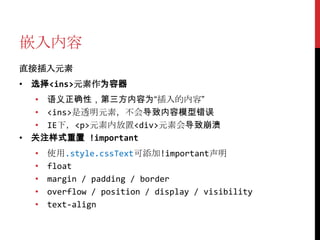
嵌入内容
直接插入元素
• 选择<ins>元素作为容器
  • 语义正确性,第三方内容为“插入的内容”
  • <ins>是透明元素,不会导致内容模型错误
  • IE下,<p>元素内放置<div>元素会导致崩溃
• 关注样式重置 !important
  •   使用.style.cssText可添加!important声明
  •   float
  •   margin / padding / border
  •   overflow / position / display / visibility
  •   text-align
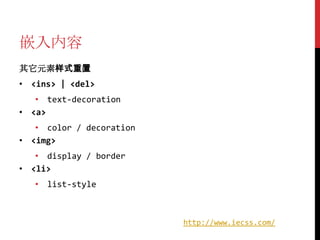
嵌入内容
其它元素样式重置
• <ins> | <del>
   • text-decoration
• <a>
   • color / decoration
• <img>
   • display / border
• <li>
   • list-style


                          http://www.iecss.com/
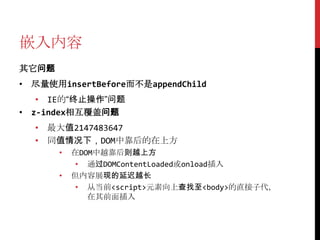
嵌入内容
其它问题
• 尽量使用insertBefore而不是appendChild
   • IE的“终止操作”问题
• z-index相互覆盖问题
  • 最大值2147483647
  • 同值情况下,DOM中靠后的在上方
       •   在DOM中越靠后则越上方
            • 通过DOMContentLoaded或onload插入
       •   但内容展现的延迟越长
            • 从当前<script>元素向上查找至<body>的直接子代,
              在其前面插入
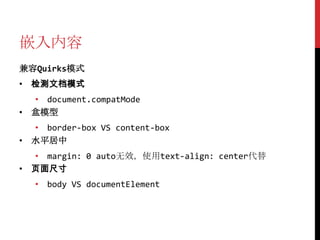
嵌入内容
兼容Quirks模式
• 检测文档模式
  • document.compatMode
• 盒模型
  • border-box VS content-box
• 水平居中
  • margin: 0 auto无效,使用text-align: center代替
• 页面尺寸
   • body VS documentElement
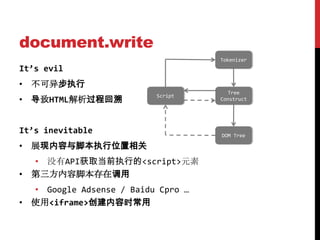
document.write
                                    Tokenizer
It’s evil
• 不可异步执行
                                      Tree
• 导致HTML解析过程回溯
                          Script
                                    Construct


It’s inevitable                     DOM Tree

• 展现内容与脚本执行位置相关
  • 没有API获取当前执行的<script>元素
• 第三方内容脚本存在调用
  • Google Adsense / Baidu Cpro …
• 使用<iframe>创建内容时常用
document.write
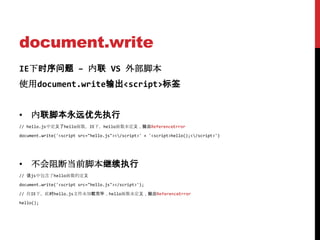
IE下时序问题 – 内联 VS 外部脚本
使用document.write输出<script>标签


• 内联脚本永远优先执行
// hello.js中定义了hello函数。IE下,hello函数未定义,抛出ReferenceError

document.write('<script src="hello.js"></script>' + '<script>hello();</script>')


• 不会阻断当前脚本继续执行
// 该js中包含了hello函数的定义

document.write('<script src="hello.js"></script>');

// 在IE下,此时hello.js文件未加载完毕,hello函数未定义,抛出ReferenceError

hello();
document.write
IE下时序问题 – 嵌套输出外部脚本
<script>
                                                         ex.js
   document.write('<script src="ex.js"></script>');     document.write('<script src="define.js"></script>');

   // ReferenceError
                                                         define.js
   try {                                                 var hello = 'world';
       alert(hello);

   }
                                                         read.js
                                                         if (window['hello']) {
   catch (ex) {                                              alert(hello);
                                                         }
       // 会加载2次read.js                                   else {
                                                             document.write('<script src="read.js"></script>');
       // 形成尝试为2的嵌套document.write
                                                         }
       // 才可以读取到hello

       document.write('<script src="read.js"></script>');

   }

</script>                                              ex.js                define.js                 hello

                                                       read.js                  read.js               hello
document.write
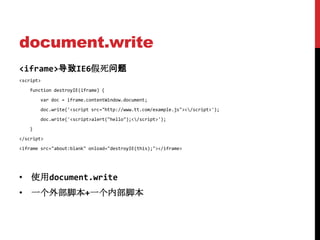
<iframe>导致IE6假死问题
<script>
   function destroyIE(iframe) {
       var doc = iframe.contentWindow.document;
       doc.write('<script src="http://www.tt.com/example.js"></script>');
       doc.write('<script>alert("hello");</script>');
   }
</script>
<iframe src="about:blank" onload="destroyIE(this);"></iframe>


• 使用document.write
• 一个外部脚本+一个内部脚本
<iframe>
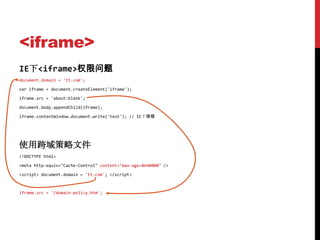
IE下<iframe>权限问题
document.domain = 'tt.com';

var iframe = document.createElement('iframe');

iframe.src = 'about:blank';

document.body.appendChild(iframe);

iframe.contentWindow.document.write('test'); // IE下报错


使用跨域策略文件
<!DOCTYPE html>

<meta http-equiv="Cache-Control" content="max-age=8640000" />

<script> document.domain = 'tt.com'; </script>


iframe.src = '/domain-policy.htm';
<iframe>
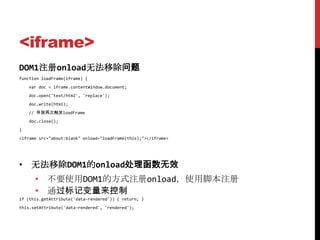
DOM1注册onload无法移除问题
function loadFrame(iframe) {
    var doc = iframe.contentWindow.document;
    doc.open('text/html', 'replace');
    doc.write(html);
    // 导致再次触发loadFrame
    doc.close();
}
<iframe src="about:blank" onload="loadFrame(this);"></iframe>


• 无法移除DOM1的onload处理函数无效
      • 不要使用DOM1的方式注册onload,使用脚本注册
      • 通过标记变量来控制
if (this.getAttribute('data-rendered')) { return; }
this.setAttribute('data-rendered', 'rendered');
<iframe>
IE6收藏夹问题
• 页面为www.tt.com/xxx,其中有一个iframe的地址为/frame
[DOC_baidu_clb_slot_iframe_1234567]
BASEURL=http://www.tt.com/xxx
ORIGURL=/frame


• 从收藏夹打开,加载的是BASEURL,忽略ORIGURL
• 判断当前<iframe>的src属性,不符合预期则重新加载一次
function renderThirdPartyFrame(iframe, content) {
    if (iframe.getAttribute(‘src’, 2) !== getFrameUrl()) { // IE会补全src
        iframe.src = getFrameUrl();
        return;
    }


    // 原renderThirdPartyFrame函数内容
}
<iframe>
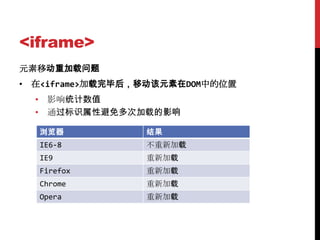
元素移动重加载问题
• 在<iframe>加载完毕后,移动该元素在DOM中的位置
  • 影响统计数值
  • 通过标识属性避免多次加载的影响

  浏览器            结果
  IE6-8          不重新加载
  IE9            重新加载
  Firefox        重新加载
  Chrome         重新加载
  Opera          重新加载
<iframe>
缓存BUG
var list = [ 'http://www.163.com', 'http://www.baidu.com' ];

var src = list[Math.random()*2 | 0];
                                                          <iframe src="//www.google.com" id="ifm"></iframe>
document.write('<iframe src=' + src + '></iframe>');      <script>
                                                              var ifm = document.getElementById('ifm');
document.write('当前iframe的src为:' + src);
                                                              window.onload = function () {
                                                                  // Firefox4-10刷新时baidu.com会加载2次
                                                                  ifm.src = '//www.baidu.com';
                                                              };
                                                          </script>
• 刷新时src改变但内容不变
  • createElement创建<iframe>加入DOM后设置src无此问题
  • 如果src符合^#+$则无此问题
• 解决方法
      • 使<iframe>符合上述条件之一
      • Firefox4开始修正,但极端情况下依旧存在问题
<iframe>
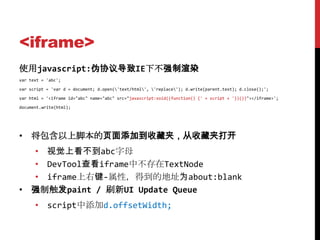
使用javascript:伪协议导致IE下不强制渲染
var text = 'abc';

var script = 'var d = document; d.open('text/html', 'replace'); d.write(parent.text); d.close();';

var html = '<iframe id="abc" name="abc" src="javascript:void((function() {' + script + '})())"></iframe>';

document.write(html);


• 将包含以上脚本的页面添加到收藏夹,从收藏夹打开
  • 视觉上看不到abc字母
  • DevTool查看iframe中不存在TextNode
  • iframe上右键-属性,得到的地址为about:blank
• 强制触发paint / 刷新UI Update Queue
      • script中添加d.offsetWidth;
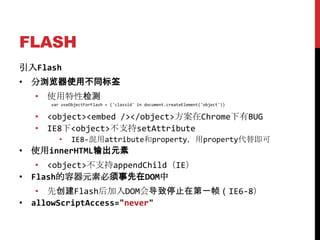
FLASH
引入Flash
• 分浏览器使用不同标签
  • 使用特性检测
     var useObjectForFlash = ('classid' in document.createElement('object'))


  • <object><embed /></object>方案在Chrome下有BUG
  • IE8下<object>不支持setAttribute
        •    IE8-混用attribute和property,用property代替即可
• 使用innerHTML输出元素
   • <object>不支持appendChild(IE)
• Flash的容器元素必须事先在DOM中
   • 先创建Flash后加入DOM会导致停止在第一帧(IE6-8)
• allowScriptAccess="never"
FLASH
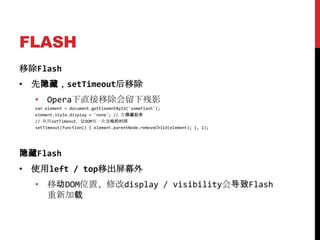
移除Flash
• 先隐藏,setTimeout后移除
  • Opera下直接移除会留下残影
  var element = document.getEleemntById('someFlash');
  element.style.display = 'none'; // 先隐藏起来
  // 利用setTimeout,让DOM有一次重绘的时间
  setTimeout(function() { element.parentNode.removeChild(element); }, 1);


隐藏Flash
• 使用left / top移出屏幕外
  • 移动DOM位置、修改display / visibility会导致Flash
    重新加载
FLASH
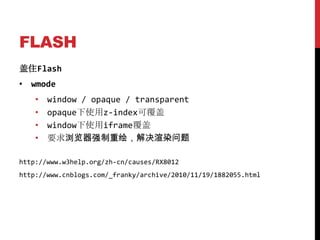
盖住Flash
• wmode
    •   window / opaque / transparent
    •   opaque下使用z-index可覆盖
    •   window下使用iframe覆盖
    •   要求浏览器强制重绘,解决渲染问题

http://www.w3help.org/zh-cn/causes/RX8012
http://www.cnblogs.com/_franky/archive/2010/11/19/1882055.html
日志上报
var log = (function() {

   var fix = [];
                                   解决GC问题
   return function(url) {

        var image = new Image();
                                                                           必须在src前设置
        fix.push(image);

        image.onload = image.onerror = image.onabort = function() {

            image = image.onload = image.onerror = image.onabort = null;

            for (var i = 0; i < fix.length; i++) {

                if (fix[i] === image)

                    fix.splice(i, 1);

            }
                                                                不是必须的
        }

        image.src = url;

   }

}());
日志上报
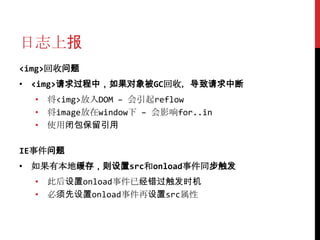
<img>回收问题
• <img>请求过程中,如果对象被GC回收,导致请求中断
  • 将<img>放入DOM – 会引起reflow
  • 将image放在window下 – 会影响for..in
  • 使用闭包保留引用

IE事件问题
• 如果有本地缓存,则设置src和onload事件同步触发
  • 此后设置onload事件已经错过触发时机
  • 必须先设置onload事件再设置src属性
日志上报
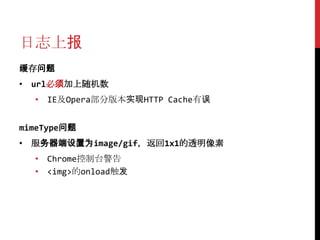
缓存问题
• url必须加上随机数
  • IE及Opera部分版本实现HTTP Cache有误


mimeType问题
• 服务器端设置为image/gif,返回1x1的透明像素
  • Chrome控制台警告
  • <img>的onload触发
日志上报
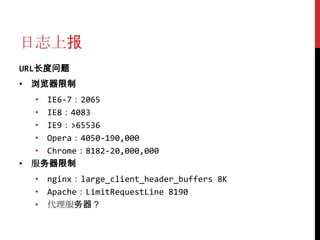
URL长度问题
• 浏览器限制
  • IE6-7:2065
  • IE8:4083
  • IE9:>65536
  • Opera:4050-190,000
  • Chrome:8182-20,000,000
• 服务器限制
  • nginx:large_client_header_buffers 8K
  • Apache:LimitRequestLine 8190
  • 代理服务器?
日志上报
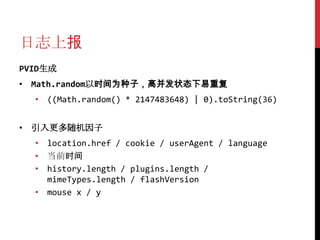
PVID生成
• Math.random以时间为种子,高并发状态下易重复
  • ((Math.random() * 2147483648) | 0).toString(36)


• 引入更多随机因子
  • location.href / cookie / userAgent / language
  • 当前时间
  • history.length / plugins.length /
    mimeTypes.length / flashVersion
  • mouse x / y
日志上报
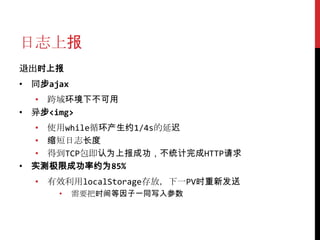
退出时上报
• 同步ajax
  • 跨域环境下不可用
• 异步<img>
  • 使用while循环产生约1/4s的延迟
  • 缩短日志长度
  • 得到TCP包即认为上报成功,不统计完成HTTP请求
• 实测极限成功率约为85%
  • 有效利用localStorage存放,下一PV时重新发送
      •    需要把时间等因子一同写入参数
日志上报
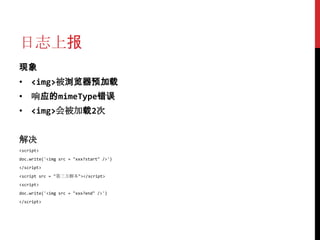
现象
• <img>被浏览器预加载
• 响应的mimeType错误
• <img>会被加载2次


解决
<script>
doc.write('<img src = "xxx?start" />')
</script>
<script src = "第三方脚本"></script>
<script>
doc.write('<img src = "xxx?end" />')
</script>
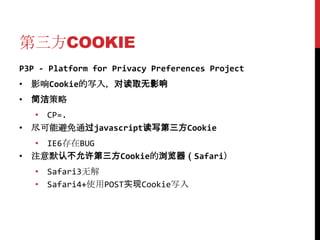
第三方COOKIE
P3P - Platform for Privacy Preferences Project
• 影响Cookie的写入,对读取无影响
• 简洁策略
  • CP=.
• 尽可能避免通过javascript读写第三方Cookie
  • IE6存在BUG
• 注意默认不允许第三方Cookie的浏览器(Safari)
   • Safari3无解
   • Safari4+使用POST实现Cookie写入
GZIP问题
IE6加载资源有gzip的资源不解析、执行
• 不缓存gzip资源时,使用max-age=0代替no-cache
• 一个gzip资源在多个<iframe>中使用时,在主页面先行完成加
  载,<iframe>使用缓存
• IE6对于gzip资源不使用ETag,注意使用Last-Modified
• IE6对于gzip资源会在Modified-Since后加上;length=xxx字
  符串,实现Web Server时注意匹配
• 针对IE6放弃gzip
 •   Nginx:gzip_disable "MSIE [1-6]. ";


                 http://www.cnblogs.com/_franky/archive/2012/04/28/2475223.html
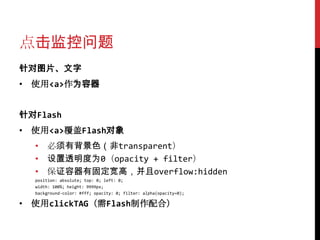
点击监控问题
针对图片、文字
• 使用<a>作为容器


针对Flash
• 使用<a>覆盖Flash对象
  • 必须有背景色(非transparent)
  • 设置透明度为0(opacity + filter)
  • 保证容器有固定宽高,并且overflow:hidden
  position: absolute; top: 0; left: 0;
  width: 100%; height: 9999px;
  background-color: #fff; opacity: 0; filter: alpha(opacity=0);

• 使用clickTAG(需Flash制作配合)
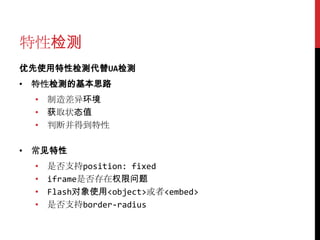
特性检测
优先使用特性检测代替UA检测
• 特性检测的基本思路
  • 制造差异环境
  • 获取状态值
  • 判断并得到特性

• 常见特性
  •   是否支持position: fixed
  •   iframe是否存在权限问题
  •   Flash对象使用<object>或者<embed>
  •   是否支持border-radius
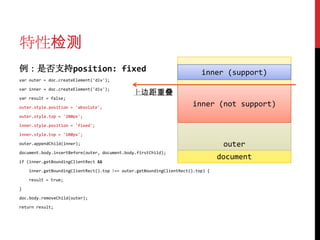
特性检测
例:是否支持position: fixed                                                     inner (support)
var outer = doc.createElement('div');

var inner = doc.createElement('div');
                                              上边距重叠
var result = false;

outer.style.position = 'absolute';
                                                                       inner (not support)
outer.style.top = '200px';

inner.style.position = 'fixed';

inner.style.top = '100px';

outer.appendChild(inner);                                                         outer
document.body.insertBefore(outer, document.body.firstChild);

if (inner.getBoundingClientRect &&
                                                                                 document
    inner.getBoundingClientRect().top !== outer.getBoundingClientRect().top) {

    result = true;

}

doc.body.removeChild(outer);

return result;
其他细节
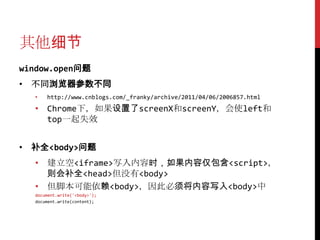
window.open问题
• 不同浏览器参数不同
  •   http://www.cnblogs.com/_franky/archive/2011/04/06/2006857.html
  • Chrome下,如果设置了screenX和screenY,会使left和
    top一起失效


• 补全<body>问题
  • 建立空<iframe>写入内容时,如果内容仅包含<script>,
    则会补全<head>但没有<body>
  • 但脚本可能依赖<body>,因此必须将内容写入<body>中
  document.write('<body>');
  document.write(content);
开发相关
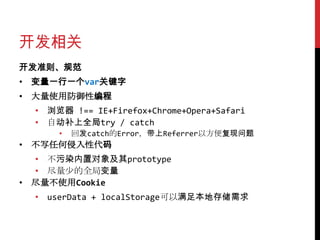
开发准则、规范
• 变量一行一个var关键字
• 大量使用防御性编程
  • 浏览器 !== IE+Firefox+Chrome+Opera+Safari
  • 自动补上全局try / catch
      •   回发catch的Error,带上Referrer以方便复现问题
• 不写任何侵入性代码
  • 不污染内置对象及其prototype
  • 尽量少的全局变量
• 尽量不使用Cookie
  • userData + localStorage可以满足本地存储需求
开发相关
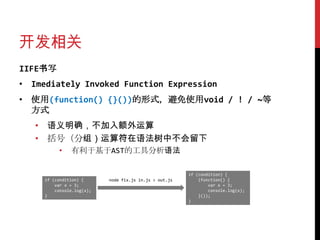
IIFE书写
• Imediately Invoked Function Expression
• 使用(function() {}())的形式,避免使用void / ! / ~等
  方式
   • 语义明确,不加入额外运算
   • 括号(分组)运算符在语法树中不会留下
          •    有利于基于AST的工具分析语法

                                                        if (condition) {
     if (condition) {      node fix.js in.js > out.js       (function() {
         var x = 3;                                             var x = 3;
         console.log(x);                                        console.log(x);
     }                                                      }());
                                                        }
开发相关
调试及测试
• 调试信息控制
 • 使用注释方式
    •   /* #DEBUG# {code} #DEBUG# */
    •   调试时保留全部,白盒测试时去除#DEBUG#段但保留内部
        console相关代码,生产环境全部去除
 • 使用函数变换方式
    •   enableDebug(someFunction, [options]);
         • options: enter / leave / time / count…
    •   测试、上线时去除所有enableDebug调用
    •   如果需要在函数体中部添加调试相关逻辑,则说明函数需要
        进一步拆分 – 对设计和编码有指导意义
开发相关
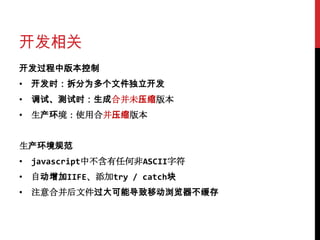
开发过程中版本控制
• 开发时:拆分为多个文件独立开发
• 调试、测试时:生成合并未压缩版本
• 生产环境:使用合并压缩版本


生产环境规范
• javascript中不含有任何非ASCII字符
• 自动增加IIFE、添加try / catch块
• 注意合并后文件过大可能导致移动浏览器不缓存
开发相关
统一全局函数调用方式
• alert VS window.alert
       • 推荐alert
                   •     window.alert递归栈溢出限制低
                   •     alert性能略高于alert

alert; // 是否有这一行,IE6-8中结果不同

var hijack = window.alert;
                                              copy on read
                                     window                  global
window.alert = function(){

     hijack('hijack');

};

alert('origin');

                                                             code
开发相关


            需要
            努力
       稳定        安全
            快醒
            醒吧
       相当        基本
       困难        不能

            性能
上线部署
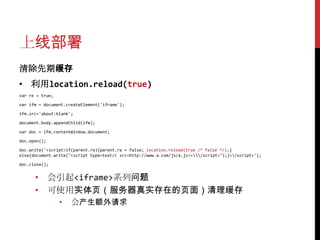
清除先期缓存
• 利用location.reload(true)
var re = true;

var ifm = document.createElement('iframe');

ifm.src='about:blank';

document.body.appendChild(ifm);

var doc = ifm.contentWindow.document;

doc.open();

doc.write('<script>if(parent.re){parent.re = false; location.reload(true /* false */);}
else{document.write("<script type=text/c src=http://www.a.com/js/a.js></script>");}</script>');

doc.close();


      • 会引起<iframe>系列问题
      • 可使用实体页(服务器真实存在的页面)清理缓存
                 •   会产生额外请求
上线部署
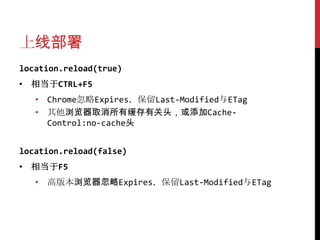
location.reload(true)
• 相当于CTRL+F5
   • Chrome忽略Expires,保留Last-Modified与ETag
   • 其他浏览器取消所有缓存有关头,或添加Cache-
     Control:no-cache头


location.reload(false)
• 相当于F5
   • 高版本浏览器忽略Expires,保留Last-Modified与ETag
上线部署
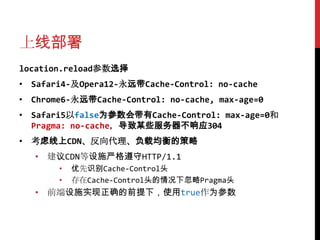
location.reload参数选择
• Safari4-及Opera12-永远带Cache-Control: no-cache
• Chrome6-永远带Cache-Control: no-cache, max-age=0
• Safari5以false为参数会带有Cache-Control: max-age=0和
  Pragma: no-cache,导致某些服务器不响应304
• 考虑线上CDN、反向代理、负载均衡的策略
   • 建议CDN等设施严格遵守HTTP/1.1
       •   优先识别Cache-Control头
       •   存在Cache-Control头的情况下忽略Pragma头
   • 前端设施实现正确的前提下,使用true作为参数
上线部署
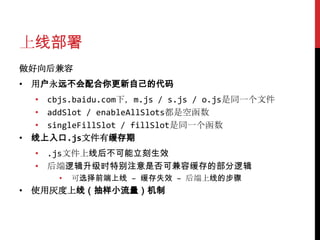
做好向后兼容
• 用户永远不会配合你更新自己的代码
  • cbjs.baidu.com下,m.js / s.js / o.js是同一个文件
  • addSlot / enableAllSlots都是空函数
  • singleFillSlot / fillSlot是同一个函数
• 线上入口.js文件有缓存期
  • .js文件上线后不可能立刻生效
  • 后端逻辑升级时特别注意是否可兼容缓存的部分逻辑
      •   可选择前端上线 – 缓存失效 – 后端上线的步骤
• 使用灰度上线(抽样小流量)机制
上线部署
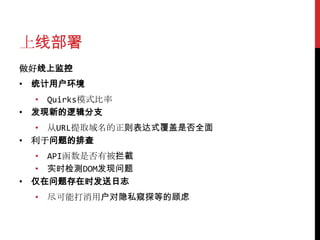
做好线上监控
• 统计用户环境
  • Quirks模式比率
• 发现新的逻辑分支
  • 从URL提取域名的正则表达式覆盖是否全面
• 利于问题的排查
  • API函数是否有被拦截
  • 实时检测DOM发现问题
• 仅在问题存在时发送日志
  • 尽可能打消用户对隐私窥探等的顾虑
问题排查
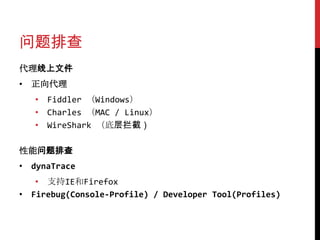
代理线上文件
• 正向代理
   • Fiddler (Windows)
   • Charles (MAC / Linux)
   • WireShark (底层拦截)

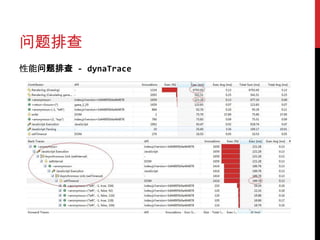
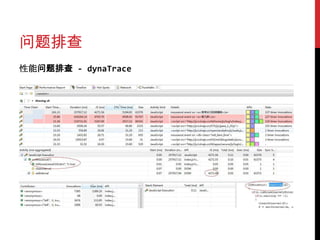
性能问题排查
• dynaTrace
   • 支持IE和Firefox
• Firebug(Console-Profile) / Developer Tool(Profiles)
问题排查
性能问题排查 - dynaTrace
问题排查
性能问题排查 - dynaTrace
问题排查
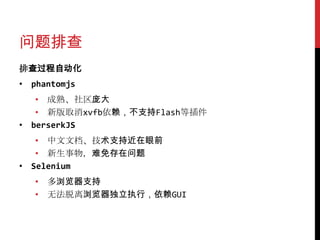
排查过程自动化
• phantomjs
   • 成熟、社区庞大
   • 新版取消xvfb依赖,不支持Flash等插件
• berserkJS
   • 中文文档、技术支持近在眼前
   • 新生事物,难免存在问题
• Selenium
   • 多浏览器支持
   • 无法脱离浏览器独立执行,依赖GUI
DONE
THANKS

第三方内容开发最佳实践

  • 1.
  • 2.
  • 4.
    3.0 2.5 nightly 3.5 4.0 dev 2.0 beta XP+SP1 5.0 6.0 XP+SP2 KB2497640
  • 5.
    <img> Flash <iframe>
  • 6.
    Quirks !important iframe > iframe > …
  • 7.
    第三方功能使用过程 <head> <meta> <title> <script> 静态脚本资源 // 引入第三方脚本 <body> <header> <div id=‚page‛> <p> <script> // 调用API 内容检索 <ins> <!-- 嵌入内容 --> <footer> </body> 日志上报
  • 8.
    引入脚本 同步 – 使用document.write varprotocol = ('https:' == document.location.protocol) ? 'https://' : 'http://'; document.write('<script src="protocol + 'www.tt.com/extern.js" charset="utf-8"></script>'); • 不要使用//www.tt.com/extern.js的形式,严格加上http或 https协议 • file://协议下本地调试会出现问题 • 严格加上charset属性 • 无法保证目标页面的编码 • 将</script>转义为</script> • 不需要使用'</scr' + 'ipt>'
  • 9.
    引入脚本 异步引入 – 创建<script>元素 varscript = document.createElement('script'); script.type = 'text/javascript'; script.async = true; script.src = src; // 插入<script>元素 • 确保这段脚本可以异步执行 • 不需要type属性 • 默认为text/javascript • 不需要async属性 • 编程创建的<script>元素必定是异步的
  • 10.
    引入脚本 插入<script>元素 – 错误方法 document.body.appendChild(script); •在<head>元素解析过程中,不存在<body>元素 • IE6“终止操作”错误 document.head.appendChild(script); • IE6的<base>标签BUG
  • 11.
    引入脚本 插入<script>元素 – 第一个<script>元素前 varfirstScript = document.getElementsByTagName('script'); firstScript.parentNode.insertBefore(script, firstScript); • 优点 • 无if分支判断 • 不会导致浏览器崩溃 • 缺点 • 是否确定文档中已经有至少一个<script>元素 • 无法控制元素插入位置,有问题时找该元素较为麻烦 • 部分浏览器parentNode会是<html>导致错误
  • 12.
    引入脚本 插入<script>元素 – <head>元素第一个子元素 varcontainer = document.getElementsByTagName('haed')[0]; if (!head) // 补救; else container.insertBefore(script, container.firstChild); • 优点 • 插入位置固定,易于查找 • 缺点 • 需要if分支判断<head>是否存在 • 多数浏览器会补全<head> • 例外:Firefox 4.0b1 / iPhone 3.0 / Chrome 5.0等
  • 13.
    引入脚本 插入<script>元素 – 防御性补救措施 setTimeout(function(){ if (!document.body) setTimeout(arguments.callee, 0); else document.body.insertBefore(script, document.body.firstChild); }, 1); • 优点 • 未发现不支持的情况,用于处理前几种方案的盲区 • 缺点 • 需要补全<body>才可加载脚本,导致脚本加载时间滞后
  • 14.
    引入脚本 不要随意删除<script>元素 • 如果删除正在执行的<script>元素,会导致IE崩溃 • 过多<script>元素导致内存占用 • 定时使用JSONP时容易出现 • 使用setTimeout来控制元素的删除 var scripts = document.getElementsByTagName('script'); var currentScript = scripts[scripts.length - 1]; setTimeout(function() { currentScript.parentNode.removeChild(currentScript); }, 1); • setTimeout能解决很多问题……
  • 15.
    嵌入内容 使用<iframe>元素 • 优点 • 用于隔离样式 • 避免全局环境变量污染 • 缺点 • 与主页面交互较为麻烦 • IE下权限问题 • 需要重置样式 • width / height / vspace / hspace / scrolling / frameborder / allowtransparency / display / border / vertical-align / margin
  • 16.
    嵌入内容 直接插入元素 • 选择<ins>元素作为容器 • 语义正确性,第三方内容为“插入的内容” • <ins>是透明元素,不会导致内容模型错误 • IE下,<p>元素内放置<div>元素会导致崩溃 • 关注样式重置 !important • 使用.style.cssText可添加!important声明 • float • margin / padding / border • overflow / position / display / visibility • text-align
  • 17.
    嵌入内容 其它元素样式重置 • <ins> |<del> • text-decoration • <a> • color / decoration • <img> • display / border • <li> • list-style http://www.iecss.com/
  • 18.
    嵌入内容 其它问题 • 尽量使用insertBefore而不是appendChild • IE的“终止操作”问题 • z-index相互覆盖问题 • 最大值2147483647 • 同值情况下,DOM中靠后的在上方 • 在DOM中越靠后则越上方 • 通过DOMContentLoaded或onload插入 • 但内容展现的延迟越长 • 从当前<script>元素向上查找至<body>的直接子代, 在其前面插入
  • 19.
    嵌入内容 兼容Quirks模式 • 检测文档模式 • document.compatMode • 盒模型 • border-box VS content-box • 水平居中 • margin: 0 auto无效,使用text-align: center代替 • 页面尺寸 • body VS documentElement
  • 20.
    document.write Tokenizer It’s evil • 不可异步执行 Tree • 导致HTML解析过程回溯 Script Construct It’s inevitable DOM Tree • 展现内容与脚本执行位置相关 • 没有API获取当前执行的<script>元素 • 第三方内容脚本存在调用 • Google Adsense / Baidu Cpro … • 使用<iframe>创建内容时常用
  • 21.
    document.write IE下时序问题 – 内联VS 外部脚本 使用document.write输出<script>标签 • 内联脚本永远优先执行 // hello.js中定义了hello函数。IE下,hello函数未定义,抛出ReferenceError document.write('<script src="hello.js"></script>' + '<script>hello();</script>') • 不会阻断当前脚本继续执行 // 该js中包含了hello函数的定义 document.write('<script src="hello.js"></script>'); // 在IE下,此时hello.js文件未加载完毕,hello函数未定义,抛出ReferenceError hello();
  • 22.
    document.write IE下时序问题 – 嵌套输出外部脚本 <script> ex.js document.write('<script src="ex.js"></script>'); document.write('<script src="define.js"></script>'); // ReferenceError define.js try { var hello = 'world'; alert(hello); } read.js if (window['hello']) { catch (ex) { alert(hello); } // 会加载2次read.js else { document.write('<script src="read.js"></script>'); // 形成尝试为2的嵌套document.write } // 才可以读取到hello document.write('<script src="read.js"></script>'); } </script> ex.js define.js hello read.js read.js hello
  • 23.
    document.write <iframe>导致IE6假死问题 <script> function destroyIE(iframe) { var doc = iframe.contentWindow.document; doc.write('<script src="http://www.tt.com/example.js"></script>'); doc.write('<script>alert("hello");</script>'); } </script> <iframe src="about:blank" onload="destroyIE(this);"></iframe> • 使用document.write • 一个外部脚本+一个内部脚本
  • 24.
    <iframe> IE下<iframe>权限问题 document.domain = 'tt.com'; variframe = document.createElement('iframe'); iframe.src = 'about:blank'; document.body.appendChild(iframe); iframe.contentWindow.document.write('test'); // IE下报错 使用跨域策略文件 <!DOCTYPE html> <meta http-equiv="Cache-Control" content="max-age=8640000" /> <script> document.domain = 'tt.com'; </script> iframe.src = '/domain-policy.htm';
  • 25.
    <iframe> DOM1注册onload无法移除问题 function loadFrame(iframe) { var doc = iframe.contentWindow.document; doc.open('text/html', 'replace'); doc.write(html); // 导致再次触发loadFrame doc.close(); } <iframe src="about:blank" onload="loadFrame(this);"></iframe> • 无法移除DOM1的onload处理函数无效 • 不要使用DOM1的方式注册onload,使用脚本注册 • 通过标记变量来控制 if (this.getAttribute('data-rendered')) { return; } this.setAttribute('data-rendered', 'rendered');
  • 26.
    <iframe> IE6收藏夹问题 • 页面为www.tt.com/xxx,其中有一个iframe的地址为/frame [DOC_baidu_clb_slot_iframe_1234567] BASEURL=http://www.tt.com/xxx ORIGURL=/frame • 从收藏夹打开,加载的是BASEURL,忽略ORIGURL •判断当前<iframe>的src属性,不符合预期则重新加载一次 function renderThirdPartyFrame(iframe, content) { if (iframe.getAttribute(‘src’, 2) !== getFrameUrl()) { // IE会补全src iframe.src = getFrameUrl(); return; } // 原renderThirdPartyFrame函数内容 }
  • 27.
    <iframe> 元素移动重加载问题 • 在<iframe>加载完毕后,移动该元素在DOM中的位置 • 影响统计数值 • 通过标识属性避免多次加载的影响 浏览器 结果 IE6-8 不重新加载 IE9 重新加载 Firefox 重新加载 Chrome 重新加载 Opera 重新加载
  • 28.
    <iframe> 缓存BUG var list =[ 'http://www.163.com', 'http://www.baidu.com' ]; var src = list[Math.random()*2 | 0]; <iframe src="//www.google.com" id="ifm"></iframe> document.write('<iframe src=' + src + '></iframe>'); <script> var ifm = document.getElementById('ifm'); document.write('当前iframe的src为:' + src); window.onload = function () { // Firefox4-10刷新时baidu.com会加载2次 ifm.src = '//www.baidu.com'; }; </script> • 刷新时src改变但内容不变 • createElement创建<iframe>加入DOM后设置src无此问题 • 如果src符合^#+$则无此问题 • 解决方法 • 使<iframe>符合上述条件之一 • Firefox4开始修正,但极端情况下依旧存在问题
  • 29.
    <iframe> 使用javascript:伪协议导致IE下不强制渲染 var text ='abc'; var script = 'var d = document; d.open('text/html', 'replace'); d.write(parent.text); d.close();'; var html = '<iframe id="abc" name="abc" src="javascript:void((function() {' + script + '})())"></iframe>'; document.write(html); • 将包含以上脚本的页面添加到收藏夹,从收藏夹打开 • 视觉上看不到abc字母 • DevTool查看iframe中不存在TextNode • iframe上右键-属性,得到的地址为about:blank • 强制触发paint / 刷新UI Update Queue • script中添加d.offsetWidth;
  • 30.
    FLASH 引入Flash • 分浏览器使用不同标签 • 使用特性检测 var useObjectForFlash = ('classid' in document.createElement('object')) • <object><embed /></object>方案在Chrome下有BUG • IE8下<object>不支持setAttribute • IE8-混用attribute和property,用property代替即可 • 使用innerHTML输出元素 • <object>不支持appendChild(IE) • Flash的容器元素必须事先在DOM中 • 先创建Flash后加入DOM会导致停止在第一帧(IE6-8) • allowScriptAccess="never"
  • 31.
    FLASH 移除Flash • 先隐藏,setTimeout后移除 • Opera下直接移除会留下残影 var element = document.getEleemntById('someFlash'); element.style.display = 'none'; // 先隐藏起来 // 利用setTimeout,让DOM有一次重绘的时间 setTimeout(function() { element.parentNode.removeChild(element); }, 1); 隐藏Flash • 使用left / top移出屏幕外 • 移动DOM位置、修改display / visibility会导致Flash 重新加载
  • 32.
    FLASH 盖住Flash • wmode • window / opaque / transparent • opaque下使用z-index可覆盖 • window下使用iframe覆盖 • 要求浏览器强制重绘,解决渲染问题 http://www.w3help.org/zh-cn/causes/RX8012 http://www.cnblogs.com/_franky/archive/2010/11/19/1882055.html
  • 33.
    日志上报 var log =(function() { var fix = []; 解决GC问题 return function(url) { var image = new Image(); 必须在src前设置 fix.push(image); image.onload = image.onerror = image.onabort = function() { image = image.onload = image.onerror = image.onabort = null; for (var i = 0; i < fix.length; i++) { if (fix[i] === image) fix.splice(i, 1); } 不是必须的 } image.src = url; } }());
  • 34.
    日志上报 <img>回收问题 • <img>请求过程中,如果对象被GC回收,导致请求中断 • 将<img>放入DOM – 会引起reflow • 将image放在window下 – 会影响for..in • 使用闭包保留引用 IE事件问题 • 如果有本地缓存,则设置src和onload事件同步触发 • 此后设置onload事件已经错过触发时机 • 必须先设置onload事件再设置src属性
  • 35.
    日志上报 缓存问题 • url必须加上随机数 • IE及Opera部分版本实现HTTP Cache有误 mimeType问题 • 服务器端设置为image/gif,返回1x1的透明像素 • Chrome控制台警告 • <img>的onload触发
  • 36.
    日志上报 URL长度问题 • 浏览器限制 • IE6-7:2065 • IE8:4083 • IE9:>65536 • Opera:4050-190,000 • Chrome:8182-20,000,000 • 服务器限制 • nginx:large_client_header_buffers 8K • Apache:LimitRequestLine 8190 • 代理服务器?
  • 37.
    日志上报 PVID生成 • Math.random以时间为种子,高并发状态下易重复 • ((Math.random() * 2147483648) | 0).toString(36) • 引入更多随机因子 • location.href / cookie / userAgent / language • 当前时间 • history.length / plugins.length / mimeTypes.length / flashVersion • mouse x / y
  • 38.
    日志上报 退出时上报 • 同步ajax • 跨域环境下不可用 • 异步<img> • 使用while循环产生约1/4s的延迟 • 缩短日志长度 • 得到TCP包即认为上报成功,不统计完成HTTP请求 • 实测极限成功率约为85% • 有效利用localStorage存放,下一PV时重新发送 • 需要把时间等因子一同写入参数
  • 39.
    日志上报 现象 • <img>被浏览器预加载 • 响应的mimeType错误 •<img>会被加载2次 解决 <script> doc.write('<img src = "xxx?start" />') </script> <script src = "第三方脚本"></script> <script> doc.write('<img src = "xxx?end" />') </script>
  • 40.
    第三方COOKIE P3P - Platformfor Privacy Preferences Project • 影响Cookie的写入,对读取无影响 • 简洁策略 • CP=. • 尽可能避免通过javascript读写第三方Cookie • IE6存在BUG • 注意默认不允许第三方Cookie的浏览器(Safari) • Safari3无解 • Safari4+使用POST实现Cookie写入
  • 41.
    GZIP问题 IE6加载资源有gzip的资源不解析、执行 • 不缓存gzip资源时,使用max-age=0代替no-cache • 一个gzip资源在多个<iframe>中使用时,在主页面先行完成加 载,<iframe>使用缓存 • IE6对于gzip资源不使用ETag,注意使用Last-Modified • IE6对于gzip资源会在Modified-Since后加上;length=xxx字 符串,实现Web Server时注意匹配 • 针对IE6放弃gzip • Nginx:gzip_disable "MSIE [1-6]. "; http://www.cnblogs.com/_franky/archive/2012/04/28/2475223.html
  • 42.
    点击监控问题 针对图片、文字 • 使用<a>作为容器 针对Flash • 使用<a>覆盖Flash对象 • 必须有背景色(非transparent) • 设置透明度为0(opacity + filter) • 保证容器有固定宽高,并且overflow:hidden position: absolute; top: 0; left: 0; width: 100%; height: 9999px; background-color: #fff; opacity: 0; filter: alpha(opacity=0); • 使用clickTAG(需Flash制作配合)
  • 43.
    特性检测 优先使用特性检测代替UA检测 • 特性检测的基本思路 • 制造差异环境 • 获取状态值 • 判断并得到特性 • 常见特性 • 是否支持position: fixed • iframe是否存在权限问题 • Flash对象使用<object>或者<embed> • 是否支持border-radius
  • 44.
    特性检测 例:是否支持position: fixed inner (support) var outer = doc.createElement('div'); var inner = doc.createElement('div'); 上边距重叠 var result = false; outer.style.position = 'absolute'; inner (not support) outer.style.top = '200px'; inner.style.position = 'fixed'; inner.style.top = '100px'; outer.appendChild(inner); outer document.body.insertBefore(outer, document.body.firstChild); if (inner.getBoundingClientRect && document inner.getBoundingClientRect().top !== outer.getBoundingClientRect().top) { result = true; } doc.body.removeChild(outer); return result;
  • 45.
    其他细节 window.open问题 • 不同浏览器参数不同 • http://www.cnblogs.com/_franky/archive/2011/04/06/2006857.html • Chrome下,如果设置了screenX和screenY,会使left和 top一起失效 • 补全<body>问题 • 建立空<iframe>写入内容时,如果内容仅包含<script>, 则会补全<head>但没有<body> • 但脚本可能依赖<body>,因此必须将内容写入<body>中 document.write('<body>'); document.write(content);
  • 46.
    开发相关 开发准则、规范 • 变量一行一个var关键字 • 大量使用防御性编程 • 浏览器 !== IE+Firefox+Chrome+Opera+Safari • 自动补上全局try / catch • 回发catch的Error,带上Referrer以方便复现问题 • 不写任何侵入性代码 • 不污染内置对象及其prototype • 尽量少的全局变量 • 尽量不使用Cookie • userData + localStorage可以满足本地存储需求
  • 47.
    开发相关 IIFE书写 • Imediately InvokedFunction Expression • 使用(function() {}())的形式,避免使用void / ! / ~等 方式 • 语义明确,不加入额外运算 • 括号(分组)运算符在语法树中不会留下 • 有利于基于AST的工具分析语法 if (condition) { if (condition) { node fix.js in.js > out.js (function() { var x = 3; var x = 3; console.log(x); console.log(x); } }()); }
  • 48.
    开发相关 调试及测试 • 调试信息控制 •使用注释方式 • /* #DEBUG# {code} #DEBUG# */ • 调试时保留全部,白盒测试时去除#DEBUG#段但保留内部 console相关代码,生产环境全部去除 • 使用函数变换方式 • enableDebug(someFunction, [options]); • options: enter / leave / time / count… • 测试、上线时去除所有enableDebug调用 • 如果需要在函数体中部添加调试相关逻辑,则说明函数需要 进一步拆分 – 对设计和编码有指导意义
  • 49.
    开发相关 开发过程中版本控制 • 开发时:拆分为多个文件独立开发 • 调试、测试时:生成合并未压缩版本 •生产环境:使用合并压缩版本 生产环境规范 • javascript中不含有任何非ASCII字符 • 自动增加IIFE、添加try / catch块 • 注意合并后文件过大可能导致移动浏览器不缓存
  • 50.
    开发相关 统一全局函数调用方式 • alert VSwindow.alert • 推荐alert • window.alert递归栈溢出限制低 • alert性能略高于alert alert; // 是否有这一行,IE6-8中结果不同 var hijack = window.alert; copy on read window global window.alert = function(){ hijack('hijack'); }; alert('origin'); code
  • 51.
    开发相关 需要 努力 稳定 安全 快醒 醒吧 相当 基本 困难 不能 性能
  • 52.
    上线部署 清除先期缓存 • 利用location.reload(true) var re= true; var ifm = document.createElement('iframe'); ifm.src='about:blank'; document.body.appendChild(ifm); var doc = ifm.contentWindow.document; doc.open(); doc.write('<script>if(parent.re){parent.re = false; location.reload(true /* false */);} else{document.write("<script type=text/c src=http://www.a.com/js/a.js></script>");}</script>'); doc.close(); • 会引起<iframe>系列问题 • 可使用实体页(服务器真实存在的页面)清理缓存 • 会产生额外请求
  • 53.
    上线部署 location.reload(true) • 相当于CTRL+F5 • Chrome忽略Expires,保留Last-Modified与ETag • 其他浏览器取消所有缓存有关头,或添加Cache- Control:no-cache头 location.reload(false) • 相当于F5 • 高版本浏览器忽略Expires,保留Last-Modified与ETag
  • 54.
    上线部署 location.reload参数选择 • Safari4-及Opera12-永远带Cache-Control: no-cache •Chrome6-永远带Cache-Control: no-cache, max-age=0 • Safari5以false为参数会带有Cache-Control: max-age=0和 Pragma: no-cache,导致某些服务器不响应304 • 考虑线上CDN、反向代理、负载均衡的策略 • 建议CDN等设施严格遵守HTTP/1.1 • 优先识别Cache-Control头 • 存在Cache-Control头的情况下忽略Pragma头 • 前端设施实现正确的前提下,使用true作为参数
  • 55.
    上线部署 做好向后兼容 • 用户永远不会配合你更新自己的代码 • cbjs.baidu.com下,m.js / s.js / o.js是同一个文件 • addSlot / enableAllSlots都是空函数 • singleFillSlot / fillSlot是同一个函数 • 线上入口.js文件有缓存期 • .js文件上线后不可能立刻生效 • 后端逻辑升级时特别注意是否可兼容缓存的部分逻辑 • 可选择前端上线 – 缓存失效 – 后端上线的步骤 • 使用灰度上线(抽样小流量)机制
  • 56.
    上线部署 做好线上监控 • 统计用户环境 • Quirks模式比率 • 发现新的逻辑分支 • 从URL提取域名的正则表达式覆盖是否全面 • 利于问题的排查 • API函数是否有被拦截 • 实时检测DOM发现问题 • 仅在问题存在时发送日志 • 尽可能打消用户对隐私窥探等的顾虑
  • 57.
    问题排查 代理线上文件 • 正向代理 • Fiddler (Windows) • Charles (MAC / Linux) • WireShark (底层拦截) 性能问题排查 • dynaTrace • 支持IE和Firefox • Firebug(Console-Profile) / Developer Tool(Profiles)
  • 58.
  • 59.
  • 60.
    问题排查 排查过程自动化 • phantomjs • 成熟、社区庞大 • 新版取消xvfb依赖,不支持Flash等插件 • berserkJS • 中文文档、技术支持近在眼前 • 新生事物,难免存在问题 • Selenium • 多浏览器支持 • 无法脱离浏览器独立执行,依赖GUI
  • 61.

Editor's Notes

  • #4 常见浏览器,所有前端都会用上
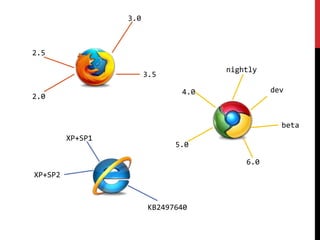
  • #5 对于第三方开发,浏览器版本更加多变
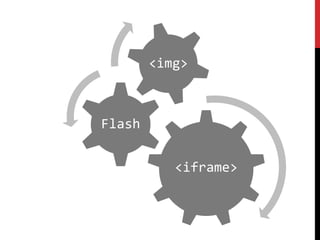
  • #6 使用正规开发不常用的元素
  • #7 目标页面环境不可预测
  • #8 前2个阶段关注:如何引入脚本嵌入内容关注:如何隔离样式/ iframe / document.write日志上报关注:&lt;img&gt;回收 / URL长度 / PVID生成 / 退出时上报