INTRODUCTION TO WEB 
APPLICATION DEVELOPMENT 
BIT05206 
Web Application 
Development
Contents 
 Introduction to WWW 
Web Application Development
Introduction to WWW
WWW History 
 1989 - Birth of WWW 
◦ Tim Berners-Lee & his associates at CERN 
 1990 - First Web Browser 
◦ Used within CERN 
 1991 - Public offering of WWW 
 1993 - Birth of Mosaic 
◦ Graphical, multimedia browser from NCSA 
 1994 - First commercial browser 
◦ By Netscape communications founded by Jim 
Clark and Marc Andreessen
Web Advantages 
 Creates a virtual hyperspace 
◦ Beyond geographical constraints 
◦ Break computer hardware and software 
obstacles 
◦ Bring the whole world together 
 A low cost way to Share, maintain, and 
distribute 
 Information 
◦ Intranet 
◦ Electronic commerce 
◦ Customer support
Web Client (browser) 
 
Internet
Web Server
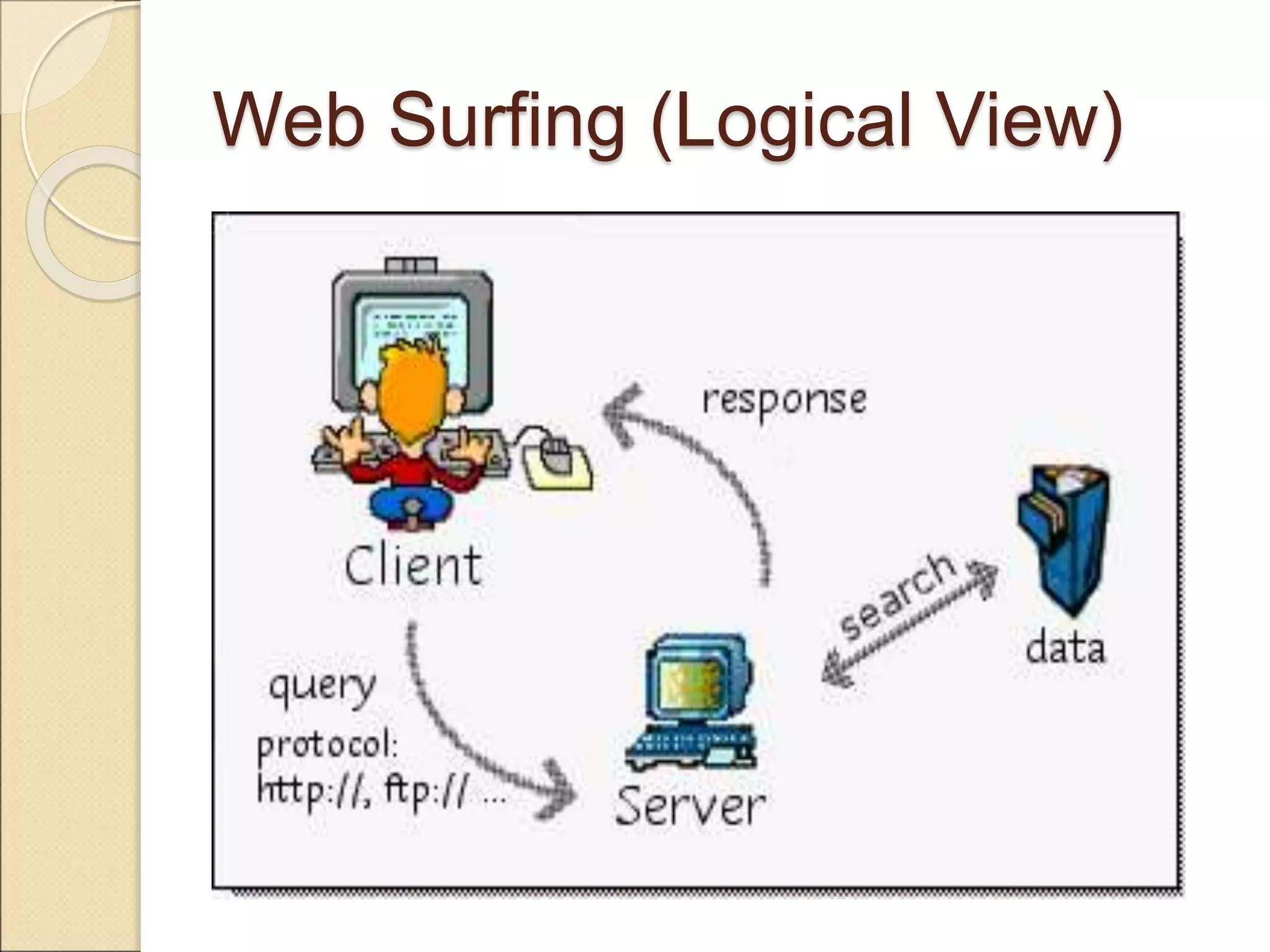
Web Surfing (Logical View)
Web Surfing (Network View)
Establishing Communication
Network Basis 
 TCP/IP protocol 
◦ Transmission Control Protocol and Internet 
Protocol 
◦ Specifies how two computer exchange data 
 HTML 
◦ Content-based or structural markup language, 
where the codes describe what the contents of 
the document are. 
◦ Codes are used to indicate the various parts of 
the document, such as headings, paragraphs, 
lists, etc 
 IP address 
◦ Every computer has a unique IP address 
◦ 32 bits in three 8 bit number groups 
◦ 131.96.142.17
Network Basis 
 Domain name system (DNS) 
◦ Symbolic name for IP address 
stm1.uum.edu.my 
◦ Communication is established by 
mapping a domain 
◦ name to its IP address 
 URL 
◦ Internet address consist of 
protocol 
host name 
path
URL 
Abbreviation of Uniform Resource Locator, the 
global address of documents and other resources 
on the World Wide Web. 
The first part of the address indicates what protocol 
to use, and the second part specifies the IP address 
or the domain name where the resource is located. 
For example, the two URLs below point to two 
different files at the domain pcwebopedia.com. The 
first specifies an executable file that should be 
fetched using the FTP protocol; the second 
specifies a Web page that should be fetched using 
the HTTP protocol: 
•ftp://www.bbc.com/stuff.exe 
•http://www.bbc.com/index.html
URL 
<protocol> <host name> <path> 
 HTTP--Hypertext Transfer Protocol 
◦ Protocol for accessing World Wide Web 
documents 
 FTP--File Transfer Protocol 
◦ Protocol for transferring files from one computer 
to another 
 Gopher 
◦ Protocol for accessing documents via Gopher 
menus (archaic; no longer widely used) 
 Telnet 
◦ Protocol that allows users to logon to a 
remote computer
URL Host Name 
<protocol> <host name> <path> 
<host>.<organization>.<org type> 
www.ucc.co.tz 
www.google.com 
www.acm.org 
www.jpa.gov.my
Organization Types 
 .org : non-profit organizations 
 .com : commercial hosts 
 .net : network hosts 
 .edu : educational institutions 
 .int : international treaty organizations 
 .gov : government agencies and 
organizations 
 .mil : U. S. military 
 .tz : represent country (Tanzania)
URL Examples 
 Full URL 
◦ http://www.uum.edu.my/welcome.htm 
◦ http://www.ucc.co.tz/services/index.ph 
p 
◦ http://www.w3schools.com/html/ 
 Not all characters can be used in 
URL
MIME Typing System 
 Multipurpose Internet Mail Extensions 
 A file type naming system on the 
Internet 
◦ .html (or .htm), .gif, .mpeg, .xls 
 Allow a browser to determine how to 
work correctly with given files 
◦ Handle by the browser itself 
◦ Call a helper application 
◦ Example: use Adobe Acrobat to read .PDF 
files 
use Microsoft Excel to read .xls 
files
Web Application 
Development
Static VS Dynamic 
 HTML documents are usually static 
 The contents can only be changed manually 
 There are needs for dynamic documents 
◦ Search results 
◦ Database access 
◦ Context sensitive reply 
 Static 
◦ page appears exactly as it was encoded, nothing 
changes 
 Dynamic 
◦ page is compiled, or able to be changed
Dynamic Web pages 
Applications executed by the 
server at run-time to process 
client input or generate 
document in response to client 
request 
Generating dynamic Web 
pages requires programming
Scripts: Server-Side VS Client- 
Side 
 Server-side 
◦ the first type possible on the Web 
◦ action occurs at the server 
 Client-side 
◦ generally easier to implement 
◦ may be prepared and implemented 
offline 
◦ action occurs on the client side 
(browser)
Client-Side Scripting 
 Client side scripts are embedded inside 
HTML document. They are interpreted by 
browser. 
 When Web browser encounters a script, it 
calls a scripting interpreter, which parses 
and deciphers the scripting code. 
 Provide response to questions and queries 
without interventions from the server 
◦ Validate user data 
◦ Calculate expressions 
◦ Link to other applications
Client-Side Scripting 
 Client side advantages 
◦ Faster response 
time 
◦ Better animation 
◦ Simpler server 
programs 
 Client side disadvantages 
◦ Longer load time 
◦ Browser compatibility 
◦ Complexity in web page 
design
JavaScript 
JavaScript (most common) 
–a scripting language for Web pages, developed 
by Netscape in 1995 
–JavaScript code is embedded directly in HTML 
(interpreted by browser) 
–good for adding dynamic features to Web page, 
controlling forms and GUI 
 Advantage 
◦ Easy to learn and use 
◦ Wide browser support 
◦ Protection of local 
resources 
 Disadvantage 
◦ Browser compatibility 
issues 
◦ Not object oriented 
◦ Unable to gain access to 
local resources
Java Applet 
Java applets 
– (can be server-side or client-side_ 
–can define small, special-purpose programs in Java 
called applets 
–provides full expressive power of Java (but more 
overhead) 
–applets are included in Web pages using special 
HTML tags 
–interpreted by the Java Virtual Machine embedded in 
the browser 
–good for more complex tasks or data heavy tasks, 
such as graphics
 Example 
Visit this site 
Java Applet 
Java Script
Java Applet 
 Advantage 
◦ High functionality 
◦ Object oriented and full 
graphics functionality 
◦ Protection of local 
resources 
◦ Wide Browser support 
◦ With Java2, be able to 
gain access to local 
resources with signed 
applets 
 Disadvantage 
◦ JVM compatibility issues 
◦ Difficulty to install and 
configure for local 
access 
◦ Loading time and 
performance may be 
poor for large 
application.
Server-Side Scripting 
Advantages 
 Allows creation of 
dynamic web pages 
 Modifies HTML code on 
the server before sent to 
client 
 Uses databases such as 
Access and Oracle 
 Responds to user input 
Disadvantages 
 More complicated then 
HTML (with debugging) 
 Slower to load on the 
server 
 Harder to learn 
 Web server must be 
enabled
Examples of Server-Side 
Scripts 
 CGI (Common Gateway Interface) 
◦ A standard for interfacing external applications with 
information servers, such as HTTP or Web servers 
◦ CGI program is any program designed to accept and 
return data that conforms to the CGI specification 
◦ CGI program can be written in any language that 
allows it to be executed on the system, such as: 
C/C++, Fortran, PERL, TCL, Any Unix shell, Visual 
Basic, AppleScript etc. 
 PHP (Hypertext Preprocessor ) 
Widely-used Open Source general-purpose 
scripting language that is especially suited 
for Web development and can be embedded into 
HTML.
Examples of Server-Side 
Scripts 
 Active Server Pages (Microsoft) 
◦ ASP is a Microsoft Technology and 
run on IIS (Internet Information 
Server) & PWS (Personal Web 
Server) 
 Java Server Pages (Sun) 
◦ Sun's solution for developing dynamic 
web sites 
◦ JSP enable the developers to directly 
insert java code into jsp file, this makes 
the development process very simple and 
its maintenance also becomes very easy
Web Development Tools 
 Many high-level tools exist for creating 
Web pages 
◦ e.g., Microsoft FrontPage, Netscape 
Composer, Adobe PageMill, Macromedia 
DreamWeaver, 
◦ also, many applications have "save to 
HTML" options (e.g., Word)
RESOURCES 
http://www.w3schools.com/html/ 
http://www.w3.org/standards/webdesign/htmlcss

introduction to web application development

  • 1.
    INTRODUCTION TO WEB APPLICATION DEVELOPMENT BIT05206 Web Application Development
  • 2.
    Contents  Introductionto WWW Web Application Development
  • 3.
  • 4.
    WWW History 1989 - Birth of WWW ◦ Tim Berners-Lee & his associates at CERN  1990 - First Web Browser ◦ Used within CERN  1991 - Public offering of WWW  1993 - Birth of Mosaic ◦ Graphical, multimedia browser from NCSA  1994 - First commercial browser ◦ By Netscape communications founded by Jim Clark and Marc Andreessen
  • 5.
    Web Advantages Creates a virtual hyperspace ◦ Beyond geographical constraints ◦ Break computer hardware and software obstacles ◦ Bring the whole world together  A low cost way to Share, maintain, and distribute  Information ◦ Intranet ◦ Electronic commerce ◦ Customer support
  • 6.
    Web Client (browser)  Internet
  • 7.
  • 8.
  • 9.
  • 10.
  • 11.
    Network Basis TCP/IP protocol ◦ Transmission Control Protocol and Internet Protocol ◦ Specifies how two computer exchange data  HTML ◦ Content-based or structural markup language, where the codes describe what the contents of the document are. ◦ Codes are used to indicate the various parts of the document, such as headings, paragraphs, lists, etc  IP address ◦ Every computer has a unique IP address ◦ 32 bits in three 8 bit number groups ◦ 131.96.142.17
  • 12.
    Network Basis Domain name system (DNS) ◦ Symbolic name for IP address stm1.uum.edu.my ◦ Communication is established by mapping a domain ◦ name to its IP address  URL ◦ Internet address consist of protocol host name path
  • 13.
    URL Abbreviation ofUniform Resource Locator, the global address of documents and other resources on the World Wide Web. The first part of the address indicates what protocol to use, and the second part specifies the IP address or the domain name where the resource is located. For example, the two URLs below point to two different files at the domain pcwebopedia.com. The first specifies an executable file that should be fetched using the FTP protocol; the second specifies a Web page that should be fetched using the HTTP protocol: •ftp://www.bbc.com/stuff.exe •http://www.bbc.com/index.html
  • 14.
    URL <protocol> <hostname> <path>  HTTP--Hypertext Transfer Protocol ◦ Protocol for accessing World Wide Web documents  FTP--File Transfer Protocol ◦ Protocol for transferring files from one computer to another  Gopher ◦ Protocol for accessing documents via Gopher menus (archaic; no longer widely used)  Telnet ◦ Protocol that allows users to logon to a remote computer
  • 15.
    URL Host Name <protocol> <host name> <path> <host>.<organization>.<org type> www.ucc.co.tz www.google.com www.acm.org www.jpa.gov.my
  • 16.
    Organization Types .org : non-profit organizations  .com : commercial hosts  .net : network hosts  .edu : educational institutions  .int : international treaty organizations  .gov : government agencies and organizations  .mil : U. S. military  .tz : represent country (Tanzania)
  • 17.
    URL Examples Full URL ◦ http://www.uum.edu.my/welcome.htm ◦ http://www.ucc.co.tz/services/index.ph p ◦ http://www.w3schools.com/html/  Not all characters can be used in URL
  • 18.
    MIME Typing System  Multipurpose Internet Mail Extensions  A file type naming system on the Internet ◦ .html (or .htm), .gif, .mpeg, .xls  Allow a browser to determine how to work correctly with given files ◦ Handle by the browser itself ◦ Call a helper application ◦ Example: use Adobe Acrobat to read .PDF files use Microsoft Excel to read .xls files
  • 19.
  • 20.
    Static VS Dynamic  HTML documents are usually static  The contents can only be changed manually  There are needs for dynamic documents ◦ Search results ◦ Database access ◦ Context sensitive reply  Static ◦ page appears exactly as it was encoded, nothing changes  Dynamic ◦ page is compiled, or able to be changed
  • 21.
    Dynamic Web pages Applications executed by the server at run-time to process client input or generate document in response to client request Generating dynamic Web pages requires programming
  • 22.
    Scripts: Server-Side VSClient- Side  Server-side ◦ the first type possible on the Web ◦ action occurs at the server  Client-side ◦ generally easier to implement ◦ may be prepared and implemented offline ◦ action occurs on the client side (browser)
  • 23.
    Client-Side Scripting Client side scripts are embedded inside HTML document. They are interpreted by browser.  When Web browser encounters a script, it calls a scripting interpreter, which parses and deciphers the scripting code.  Provide response to questions and queries without interventions from the server ◦ Validate user data ◦ Calculate expressions ◦ Link to other applications
  • 24.
    Client-Side Scripting Client side advantages ◦ Faster response time ◦ Better animation ◦ Simpler server programs  Client side disadvantages ◦ Longer load time ◦ Browser compatibility ◦ Complexity in web page design
  • 25.
    JavaScript JavaScript (mostcommon) –a scripting language for Web pages, developed by Netscape in 1995 –JavaScript code is embedded directly in HTML (interpreted by browser) –good for adding dynamic features to Web page, controlling forms and GUI  Advantage ◦ Easy to learn and use ◦ Wide browser support ◦ Protection of local resources  Disadvantage ◦ Browser compatibility issues ◦ Not object oriented ◦ Unable to gain access to local resources
  • 26.
    Java Applet Javaapplets – (can be server-side or client-side_ –can define small, special-purpose programs in Java called applets –provides full expressive power of Java (but more overhead) –applets are included in Web pages using special HTML tags –interpreted by the Java Virtual Machine embedded in the browser –good for more complex tasks or data heavy tasks, such as graphics
  • 27.
     Example Visitthis site Java Applet Java Script
  • 28.
    Java Applet Advantage ◦ High functionality ◦ Object oriented and full graphics functionality ◦ Protection of local resources ◦ Wide Browser support ◦ With Java2, be able to gain access to local resources with signed applets  Disadvantage ◦ JVM compatibility issues ◦ Difficulty to install and configure for local access ◦ Loading time and performance may be poor for large application.
  • 29.
    Server-Side Scripting Advantages  Allows creation of dynamic web pages  Modifies HTML code on the server before sent to client  Uses databases such as Access and Oracle  Responds to user input Disadvantages  More complicated then HTML (with debugging)  Slower to load on the server  Harder to learn  Web server must be enabled
  • 30.
    Examples of Server-Side Scripts  CGI (Common Gateway Interface) ◦ A standard for interfacing external applications with information servers, such as HTTP or Web servers ◦ CGI program is any program designed to accept and return data that conforms to the CGI specification ◦ CGI program can be written in any language that allows it to be executed on the system, such as: C/C++, Fortran, PERL, TCL, Any Unix shell, Visual Basic, AppleScript etc.  PHP (Hypertext Preprocessor ) Widely-used Open Source general-purpose scripting language that is especially suited for Web development and can be embedded into HTML.
  • 31.
    Examples of Server-Side Scripts  Active Server Pages (Microsoft) ◦ ASP is a Microsoft Technology and run on IIS (Internet Information Server) & PWS (Personal Web Server)  Java Server Pages (Sun) ◦ Sun's solution for developing dynamic web sites ◦ JSP enable the developers to directly insert java code into jsp file, this makes the development process very simple and its maintenance also becomes very easy
  • 32.
    Web Development Tools  Many high-level tools exist for creating Web pages ◦ e.g., Microsoft FrontPage, Netscape Composer, Adobe PageMill, Macromedia DreamWeaver, ◦ also, many applications have "save to HTML" options (e.g., Word)
  • 33.