WEB APPLICATION
DEVELOPMENT ( BASICS )
MADE BY :- CHIRAG NAG
BCA 2ND YEAR
COER SCHOOL OF MANAGEMENT
CONTENTS :-
1. INTRODUCTION
2. WEB BROWSER AND WEB SERVER
3. COMMUNICATION WITH WEB SERVER
INTRODUCTION
We all are familiar with world wide web or
simply web . As we must be aware that the world
wide web is a wide network of Internet servers
that support many different protocols.
World wide web is an example of an Internet
protocol/server that can be used to send and
receive information over the internet . It supports :-
 Multimedia Information (text , movies , picture,
sounds , programs…..)
 HyperText Information (information that
contains links to other information resources)
 Graphic User Interface ( user can point and click
to request information instead of typing in text
commands ).
WEB BROWSER & WEB SERVER
(The World wide web is based upon clients and server. A WWW client is called a Web
browser , and a WWW server is called a web server.
Web Browser :- A browser provides an interface to
interact with the internet.
Browser is also called client, any software that allows you
to browse the web is called a web client, A browser is a
software program that allows user to access and navigate
the World Wide Web.
Examples :- Google chrome, Mozila Firefox, Webkit etc.
Web Server :- A Web server is a program that
runs on a computer connected to the Internet .
The web server watches the internet connection
and wait for requests from the web browser .
When it receive a request, it finds the document,
generate the information if needed and send it
back to the browser that request it.
A Web Server Provides four major functions :
 Serving web pages
 Running gateways programs and return
output
 Controlling access to the server
 Monitoring and logging server access statistics
There are lots of different web servers that are
available on almost every kind of existing
platforms.
Here are some of the most popular so far :-
 Apache web server : Originally developed on UNIX platform but right now
available on Windows, LUNIX and other platforms. It’s an open source and
free-distributed software, available from Apache software foundation. It
dominates the web server market and has more than half of the total
market share upto mid 2001.
 Microsoft Internet Information Server (IIS) : Comes with Microsoft window
server. It is capable of only running on windows platform.
 Netscape Enterprise Web server : The web server from Netscape.
WEB ADDRESS & URL
A location on a net server is called a web site . Each web site has a unique address
called URL ( Uniform Resource Locator )
The internet structure of the world wide web is built on a set of rules called
Hypertext Transfer Protocol (HTTP) and a page description language called
Hypertext Markup Language ( HTML ) . HTTP uses internet address in a special
format called a UNIFORM RESOURCE LOCATOR or URL .
URLs look like this
Type://address /path
Where type: specify the type of server in which the file is located, address: is the
address of server , and path: tells the location of file server.
Example :- http://encycle.msn.com/getinfo/styles.asp
Communicating with web server
Client server Communication :-
Client server computing refers to a set-up in which program and
information resides on the server and clients connect to the
server for network access.
Browser interact with the server using a set of instruction called
protocols.
Some Commonly Internet protocols
 HTTP ( HYPERTEXT TRANSFER PROTOCOL) used on the world wide web
for transferring web pages and files contained in web pages such as
images.
 FTP ( FILE TRANSFER PROTOCOL ) employed for transferring files from one
machine to the other.
 SMTP ( SIMPLE MAIL TRANSPORT PROTOCOL ) used for email.
 TELNET PROTOCOL used to open remote – machine access ( telnet )
sessions
The web employs a connection- less protocol , which means that after every
client – server interaction, the connection between the two is lost
Client-Server Communication Models
The client server communication over the web
can take place in two forms:
1. For accessing static HTML pages.
2. For accessing dynamic web pages.
For accessing HTML pages
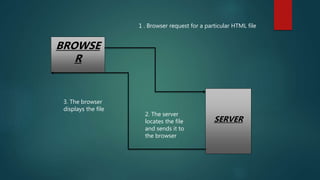
The client request for an HTML file stored
on the remote machine through the server
software . The server locates this file and
passes it to the client. The client then
displays this file on the machine
BROWSE
R
SERVER
1 . Browser request for a particular HTML file
3. The browser
displays the file
2. The server
locates the file
and sends it to
the browser
For accessing dynamic web pages
Dynamic web pages are generated via two different technology:
1. CGI script
2. Server side script
 With CGI script
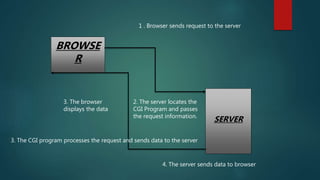
1. when a client demands a web page that requires a CGI script to be run ,
then server first looks for the appropriate CGI program and ask it to
process the information as required.
2. Once the CGI program processes and sends the result to the server, the
server sends the received data in form of the web-page to the client.
BROWSE
R
SERVER
1 . Browser sends request to the server
3. The browser
displays the data
2. The server locates the
CGI Program and passes
the request information.
3. The CGI program processes the request and sends data to the server
4. The server sends data to browser
 With server side scripting:
There are many server side technologies today . ACTIVE SERVER PAGES (ASP) ,
PERSONAL HOME PAGES (PHP) , JAVA SERVER PAGES (JSP) , SERVER SIDE
INCLUDES (SSI) etc :
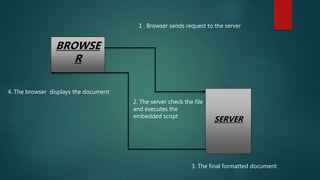
 With server side scripting , the developer embeds the server- side
language codes inside the HTML page.
 This code is passed to the appropriate interpreter which processes these
instruction and generates the final HTML displayed by the browser.
BROWSE
R
SERVER
1 . Browser sends request to the server
2. The server check the file
and executes the
embedded script
3. The final formatted document
4. The browser displays the document
Web application development ( basics )

Web application development ( basics )

  • 1.
    WEB APPLICATION DEVELOPMENT (BASICS ) MADE BY :- CHIRAG NAG BCA 2ND YEAR COER SCHOOL OF MANAGEMENT
  • 2.
    CONTENTS :- 1. INTRODUCTION 2.WEB BROWSER AND WEB SERVER 3. COMMUNICATION WITH WEB SERVER
  • 3.
    INTRODUCTION We all arefamiliar with world wide web or simply web . As we must be aware that the world wide web is a wide network of Internet servers that support many different protocols.
  • 4.
    World wide webis an example of an Internet protocol/server that can be used to send and receive information over the internet . It supports :-  Multimedia Information (text , movies , picture, sounds , programs…..)  HyperText Information (information that contains links to other information resources)  Graphic User Interface ( user can point and click to request information instead of typing in text commands ).
  • 5.
    WEB BROWSER &WEB SERVER (The World wide web is based upon clients and server. A WWW client is called a Web browser , and a WWW server is called a web server. Web Browser :- A browser provides an interface to interact with the internet. Browser is also called client, any software that allows you to browse the web is called a web client, A browser is a software program that allows user to access and navigate the World Wide Web. Examples :- Google chrome, Mozila Firefox, Webkit etc.
  • 6.
    Web Server :-A Web server is a program that runs on a computer connected to the Internet . The web server watches the internet connection and wait for requests from the web browser . When it receive a request, it finds the document, generate the information if needed and send it back to the browser that request it.
  • 7.
    A Web ServerProvides four major functions :  Serving web pages  Running gateways programs and return output  Controlling access to the server  Monitoring and logging server access statistics
  • 8.
    There are lotsof different web servers that are available on almost every kind of existing platforms. Here are some of the most popular so far :-  Apache web server : Originally developed on UNIX platform but right now available on Windows, LUNIX and other platforms. It’s an open source and free-distributed software, available from Apache software foundation. It dominates the web server market and has more than half of the total market share upto mid 2001.  Microsoft Internet Information Server (IIS) : Comes with Microsoft window server. It is capable of only running on windows platform.  Netscape Enterprise Web server : The web server from Netscape.
  • 9.
    WEB ADDRESS &URL A location on a net server is called a web site . Each web site has a unique address called URL ( Uniform Resource Locator ) The internet structure of the world wide web is built on a set of rules called Hypertext Transfer Protocol (HTTP) and a page description language called Hypertext Markup Language ( HTML ) . HTTP uses internet address in a special format called a UNIFORM RESOURCE LOCATOR or URL . URLs look like this Type://address /path Where type: specify the type of server in which the file is located, address: is the address of server , and path: tells the location of file server. Example :- http://encycle.msn.com/getinfo/styles.asp
  • 10.
    Communicating with webserver Client server Communication :- Client server computing refers to a set-up in which program and information resides on the server and clients connect to the server for network access. Browser interact with the server using a set of instruction called protocols.
  • 11.
    Some Commonly Internetprotocols  HTTP ( HYPERTEXT TRANSFER PROTOCOL) used on the world wide web for transferring web pages and files contained in web pages such as images.  FTP ( FILE TRANSFER PROTOCOL ) employed for transferring files from one machine to the other.  SMTP ( SIMPLE MAIL TRANSPORT PROTOCOL ) used for email.  TELNET PROTOCOL used to open remote – machine access ( telnet ) sessions The web employs a connection- less protocol , which means that after every client – server interaction, the connection between the two is lost
  • 12.
    Client-Server Communication Models Theclient server communication over the web can take place in two forms: 1. For accessing static HTML pages. 2. For accessing dynamic web pages.
  • 13.
    For accessing HTMLpages The client request for an HTML file stored on the remote machine through the server software . The server locates this file and passes it to the client. The client then displays this file on the machine
  • 14.
    BROWSE R SERVER 1 . Browserrequest for a particular HTML file 3. The browser displays the file 2. The server locates the file and sends it to the browser
  • 15.
    For accessing dynamicweb pages Dynamic web pages are generated via two different technology: 1. CGI script 2. Server side script  With CGI script 1. when a client demands a web page that requires a CGI script to be run , then server first looks for the appropriate CGI program and ask it to process the information as required. 2. Once the CGI program processes and sends the result to the server, the server sends the received data in form of the web-page to the client.
  • 16.
    BROWSE R SERVER 1 . Browsersends request to the server 3. The browser displays the data 2. The server locates the CGI Program and passes the request information. 3. The CGI program processes the request and sends data to the server 4. The server sends data to browser
  • 17.
     With serverside scripting: There are many server side technologies today . ACTIVE SERVER PAGES (ASP) , PERSONAL HOME PAGES (PHP) , JAVA SERVER PAGES (JSP) , SERVER SIDE INCLUDES (SSI) etc :  With server side scripting , the developer embeds the server- side language codes inside the HTML page.  This code is passed to the appropriate interpreter which processes these instruction and generates the final HTML displayed by the browser.
  • 18.
    BROWSE R SERVER 1 . Browsersends request to the server 2. The server check the file and executes the embedded script 3. The final formatted document 4. The browser displays the document