Web-Based Information Retrieval


       Patrick Alfred Waluchio Ongwen
       Knowledge Management Officer
African Research and Resource Forum
Web as Agent of Change
   "ICT is not an end in itself or an agent of
    change by itself but when incorporated
    into a well managed change process it is a
    powerful enabler and amplifier."
                                           Bryn Jones,
   Effective use of Web therefore, requires content,
    content management, hyperlinks and navigation
    tools, retrieval approaches, among others
Introduction
 A critical goal of successful information retrieval
  on the web is to identify which pages are of high
  quality and relevance to user’s query.
 Each search engine index web page,
  representing it by a set of weighted keywords
 A crawler (robot or spider) performs traversal of
  the web with goal of fetching high quality pages
  for indexing and retrieval.
Introduction
 Search engines must filter the most
 relevant information matching a user’s
 query and present retrieved information in
 a way a user will understand.
 Hyperlinks provide a valuable source of
  information for web retrieval.
 Hypertext and hypermedia enables searching
  the web in non-sequential manner
Challenges of Web Information
Retrieval
 Management    of huge amount of hyperlinked
  pages
 Crawling the web to find appropriate web
  sites to index
 Accessing documents

 Measuring the quality or authority of available
  information
Hypertext
   Non-Linear arrangements of textual material is called
    hypertext. The term hyper means extension to other
    dimensions.
   Converting text into a multidimensional space
   The term was invented by Ted Nelson in 1965
   Hypertext
       “non-sequential writing” Nelson, T. 1987. Literary
       Machines.
   Non-linear sequences of information (dictionary,
    encyclopaedia, newspaper)
   Hypertext are systems to manage collection of
    information that can be accessed non-sequentially.
Hypertext
 Consists of a network of nodes and logical links
  between nodes
 Node refer to chunks of content or web page
   The variety of nodes and links make hypertext a
    flexible structure in which information can be
    provided by what is stored in nodes and links to
    each node.
   Hypertext retrieval systems are the products of
    emerging technology that specifies alternative
    approach to the retrieval of information from web
Hypertext and Non-Linearity
 Allows a user to follow their own path in a
  non-sequential manner to access
  information
 Hypertext not usually read linearly
 Links encourage branching off
     History and back button permit backtracking
 The immediacy of following links by clicking
  creates a different experience from traditional
  non-linearity
Structure of Hypertext
   In a hypertext system objects in a database called
    nodes, are connected to one another by machine-
    supported links. Users follow links to access
    information.
   Text augmented with links
       Link: pointer to another piece of text in same or different
        document
       Hypertext systems can accessed by selecting link to icons
        and following links from node to node
       By searching the database for some key word in the
        normal way
       Use of browser to view and navigate hypertext
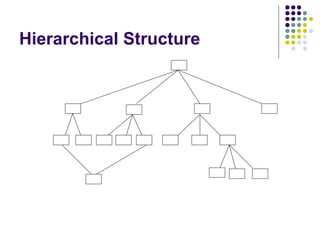
Hierarchical Structure
 Hierarchy  is the basis of almost all websites
  as well as hypertext
 They are orderly and provide ample
  navigational freedom
 Users start at the home page, descend the
  branch that most interest them, and continue
  making further choices as the branch divides
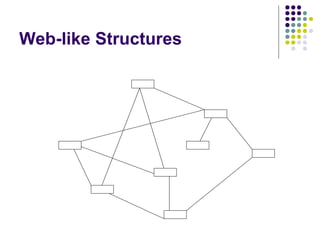
Web-like Structures
Web-like structures
 Relatively   unsystematic and difficult to
  navigate
 Mostly used in works of short stories and
  fiction in which artistic considerations may
  override desire for efficient navigation
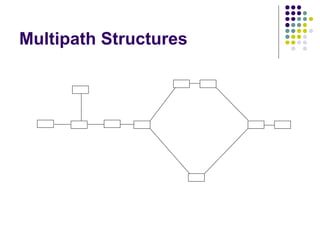
Multipath Structures
 Largely linear and to some extent hierarchical
 but offers alternative pathways hence
 multipath structures
Hypertext Component
Hypertext model:
 The run-time layer, which controls the user
  interface
 The storage layer, which is a database
  containing a network of nodes connected by
  links
 The within-component layer, which is the
  content structure inside the node.
Hypermedia
(Hypermedia = Hypertext + Multimedia)
 Hypermedia integrate text, images, video,
  graphics, sound within Web page or node
 Hyper- representation of textual and non-
  textual information in a non-sequential
  manner.
 Allows embedding bitmapped images (GIF,
  JPEG, PNG)
History of Hypertext
 1945:  Vannevar Bush describes “memex”
  (Atlantic Monthly)
 1965: Ted Nelson coins the term “hypertext”

 1985: Peter Brown, University of Kent,
  develops first commercially available
  hypertext - Guide
 1986-1990: More sophisticated hypertext
  systems developed
History …
 1991:  Tim Berners-Lee builds IP-based
  distributed hypertext system at CERN
  Develops UDI/URI, HTTP, and HTML…
 1993: Mosaic, first graphical Web browser,
  released
 2002: Work begins on Semantic Web
Hypertext and Hypermedia- In
Information retrieval
 Browsing – retrieve information by
 association
    Follow links, backtrack
    Maintain history, bookmarks
 Searching   – retrieve information by content
    Construct indexes of URLs
    Search by keyword/description of page
Cont…
   Hypertext and Hypermedia with new standards,
    HTML, XHTML, have brought tremendous revolution
    in the creation and delivery of content, as well as
    access and processing of information.
   Allows users to navigate within or across a range of
    documents from several computer networks.
   Allows browsers and other software to interpret and
    process information for different purposes
   Search engines use the links among pages to select
    information resources from the Internet.
   Google use the link data to rank pages in order of
    their relevance to query.
Underlying Principles and
Challenges of IR
 Information retrieval is a complex task
 Query-based IR system must be able to accept
  a query about any topic and find texts that
  contain the specified information of query.
 IR systems are required to operate in real-time,
  which demand they should be fast and efficient.
 Most searches are conducted on the natural
  language text, which inherently have all the
  ambiguities and imprecision.
 The following are some of the challenges IR
  systems face in natural language processing:
Synonyms
 Synonym occurs when different words of
  phrases mean essentially the same thing.
 For example, the words: “finance”, “fund”,
  “support”, may be related depending on context
  of inquiry.
 Natural language is filled with many words and
  phrases that have similar meanings, and it is
  often impossible for users to provide all the
  words which might be relevant to the query.
 To address this problem, some IR systems
  expand the query to include all the synonymous
  words for a given word with the help of
  thesaurus.
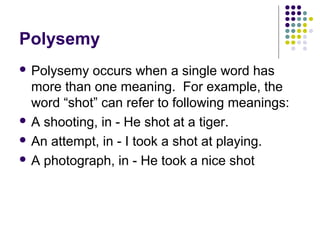
Polysemy
 Polysemy  occurs when a single word has
  more than one meaning. For example, the
  word “shot” can refer to following meanings:
 A shooting, in - He shot at a tiger.

 An attempt, in - I took a shot at playing.

 A photograph, in - He took a nice shot
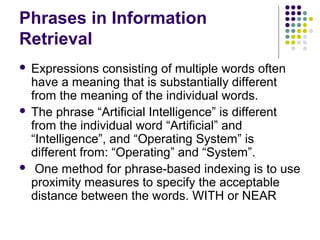
Phrases in Information
Retrieval
 Expressions consisting of multiple words often
  have a meaning that is substantially different
  from the meaning of the individual words.
 The phrase “Artificial Intelligence” is different
  from the individual word “Artificial” and
  “Intelligence”, and “Operating System” is
  different from: “Operating” and “System”.
 One method for phrase-based indexing is to use
  proximity measures to specify the acceptable
  distance between the words. WITH or NEAR
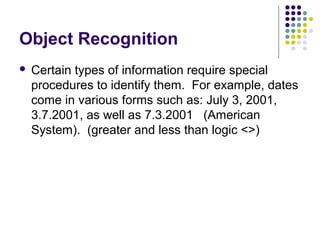
Object Recognition
   Certain types of information require special
    procedures to identify them. For example, dates
    come in various forms such as: July 3, 2001,
    3.7.2001, as well as 7.3.2001 (American
    System). (greater and less than logic <>)
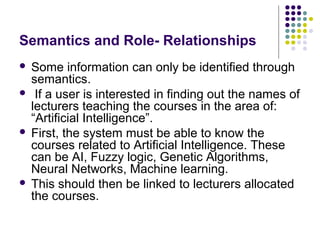
Semantics and Role- Relationships
 Some information can only be identified through
  semantics.
 If a user is interested in finding out the names of
  lecturers teaching the courses in the area of:
  “Artificial Intelligence”.
 First, the system must be able to know the
  courses related to Artificial Intelligence. These
  can be AI, Fuzzy logic, Genetic Algorithms,
  Neural Networks, Machine learning.
 This should then be linked to lecturers allocated
  the courses.
Computable Values
 Determining   whether information is relevant
  some times depends on a specific
  calculation.
 Suppose a user is interested in news paper
  article about merger in corporation that
  occurred after January, 1995.
 The IR system must identify the documents
  using search logic operator LESS THAN or
  GREATER THAN <>
Text Representation Techniques
 The purpose of IR system is to search the text
  database for relevant documents in real-time.
 Consequently, the text database is
  preprocessed and stored in a structure which
  helps in fast searching.
 This preprocessed form is called text
  representation
Inverted File Approach
   The inverted file approach is used in text representation.
    It allows an IR system to quickly determine what
    documents contain a given set of words, and how often
    each word appears in the document.
   In inverted file system, each database contains two files
   Text file –normal form in which documents appear in a
    database and,
    inverted file- which contain all index terms drawn
    automatically from the document records.
   Provides indirect file access
Using Probability Methods
 All IR systems draw conclusions about the
  content of a document by examining source
  representation
 IR must base its conclusions about the
  document features, such as the present or
  absence of particular word or phrases.
 IR system must take into account these
  uncertain relationships to determine the strength
  of the relevance of a document/s to a particular
  request.
Relevance feedback
 Relevance   feedback is a technique used by
  some IR systems to improve performance on
  query by asking the user for feedback about
  retrieved texts.
 Evaluation forms given to users to seek their
  views on performance of information retrieval
  systems.
CAT TWO- Search Engines


 Compare the assigned search engines and
  competently comment on the following:
 Structure of the search engines

 Indexing techniques used

 Information resources offered

 Links between nodes

 Search facilities and retrieval approaches used

 Ease of use by novice and experienced users

 Interface design and display of screen layout
Search Engines
 Group 1: Yahoo and Lycos
 Group 2: Google and Alta Vista

 Group 3: Ask Jeeves and Excite

 Group 4: All the Web and HotBot

 Group 5: Web crawler and MSN

 Group 6: Dogpile and EBay

Hypertext

  • 1.
    Web-Based Information Retrieval Patrick Alfred Waluchio Ongwen Knowledge Management Officer African Research and Resource Forum
  • 2.
    Web as Agentof Change  "ICT is not an end in itself or an agent of change by itself but when incorporated into a well managed change process it is a powerful enabler and amplifier." Bryn Jones,  Effective use of Web therefore, requires content, content management, hyperlinks and navigation tools, retrieval approaches, among others
  • 3.
    Introduction  A criticalgoal of successful information retrieval on the web is to identify which pages are of high quality and relevance to user’s query.  Each search engine index web page, representing it by a set of weighted keywords  A crawler (robot or spider) performs traversal of the web with goal of fetching high quality pages for indexing and retrieval.
  • 4.
    Introduction  Search enginesmust filter the most relevant information matching a user’s query and present retrieved information in a way a user will understand.  Hyperlinks provide a valuable source of information for web retrieval.  Hypertext and hypermedia enables searching the web in non-sequential manner
  • 5.
    Challenges of WebInformation Retrieval  Management of huge amount of hyperlinked pages  Crawling the web to find appropriate web sites to index  Accessing documents  Measuring the quality or authority of available information
  • 6.
    Hypertext  Non-Linear arrangements of textual material is called hypertext. The term hyper means extension to other dimensions.  Converting text into a multidimensional space  The term was invented by Ted Nelson in 1965  Hypertext “non-sequential writing” Nelson, T. 1987. Literary Machines.  Non-linear sequences of information (dictionary, encyclopaedia, newspaper)  Hypertext are systems to manage collection of information that can be accessed non-sequentially.
  • 7.
    Hypertext  Consists ofa network of nodes and logical links between nodes  Node refer to chunks of content or web page  The variety of nodes and links make hypertext a flexible structure in which information can be provided by what is stored in nodes and links to each node.  Hypertext retrieval systems are the products of emerging technology that specifies alternative approach to the retrieval of information from web
  • 8.
    Hypertext and Non-Linearity Allows a user to follow their own path in a non-sequential manner to access information  Hypertext not usually read linearly  Links encourage branching off  History and back button permit backtracking  The immediacy of following links by clicking creates a different experience from traditional non-linearity
  • 9.
    Structure of Hypertext  In a hypertext system objects in a database called nodes, are connected to one another by machine- supported links. Users follow links to access information.  Text augmented with links  Link: pointer to another piece of text in same or different document  Hypertext systems can accessed by selecting link to icons and following links from node to node  By searching the database for some key word in the normal way  Use of browser to view and navigate hypertext
  • 10.
  • 11.
    Hierarchical Structure  Hierarchy is the basis of almost all websites as well as hypertext  They are orderly and provide ample navigational freedom  Users start at the home page, descend the branch that most interest them, and continue making further choices as the branch divides
  • 12.
  • 13.
    Web-like structures  Relatively unsystematic and difficult to navigate  Mostly used in works of short stories and fiction in which artistic considerations may override desire for efficient navigation
  • 14.
  • 15.
    Multipath Structures  Largelylinear and to some extent hierarchical but offers alternative pathways hence multipath structures
  • 16.
    Hypertext Component Hypertext model: The run-time layer, which controls the user interface  The storage layer, which is a database containing a network of nodes connected by links  The within-component layer, which is the content structure inside the node.
  • 17.
    Hypermedia (Hypermedia = Hypertext+ Multimedia)  Hypermedia integrate text, images, video, graphics, sound within Web page or node  Hyper- representation of textual and non- textual information in a non-sequential manner.  Allows embedding bitmapped images (GIF, JPEG, PNG)
  • 18.
    History of Hypertext 1945: Vannevar Bush describes “memex” (Atlantic Monthly)  1965: Ted Nelson coins the term “hypertext”  1985: Peter Brown, University of Kent, develops first commercially available hypertext - Guide  1986-1990: More sophisticated hypertext systems developed
  • 19.
    History …  1991: Tim Berners-Lee builds IP-based distributed hypertext system at CERN Develops UDI/URI, HTTP, and HTML…  1993: Mosaic, first graphical Web browser, released  2002: Work begins on Semantic Web
  • 20.
    Hypertext and Hypermedia-In Information retrieval  Browsing – retrieve information by association  Follow links, backtrack  Maintain history, bookmarks  Searching – retrieve information by content  Construct indexes of URLs  Search by keyword/description of page
  • 21.
    Cont…  Hypertext and Hypermedia with new standards, HTML, XHTML, have brought tremendous revolution in the creation and delivery of content, as well as access and processing of information.  Allows users to navigate within or across a range of documents from several computer networks.  Allows browsers and other software to interpret and process information for different purposes  Search engines use the links among pages to select information resources from the Internet.  Google use the link data to rank pages in order of their relevance to query.
  • 22.
    Underlying Principles and Challengesof IR  Information retrieval is a complex task  Query-based IR system must be able to accept a query about any topic and find texts that contain the specified information of query.  IR systems are required to operate in real-time, which demand they should be fast and efficient.  Most searches are conducted on the natural language text, which inherently have all the ambiguities and imprecision.  The following are some of the challenges IR systems face in natural language processing:
  • 23.
    Synonyms  Synonym occurswhen different words of phrases mean essentially the same thing.  For example, the words: “finance”, “fund”, “support”, may be related depending on context of inquiry.  Natural language is filled with many words and phrases that have similar meanings, and it is often impossible for users to provide all the words which might be relevant to the query.  To address this problem, some IR systems expand the query to include all the synonymous words for a given word with the help of thesaurus.
  • 24.
    Polysemy  Polysemy occurs when a single word has more than one meaning. For example, the word “shot” can refer to following meanings:  A shooting, in - He shot at a tiger.  An attempt, in - I took a shot at playing.  A photograph, in - He took a nice shot
  • 25.
    Phrases in Information Retrieval Expressions consisting of multiple words often have a meaning that is substantially different from the meaning of the individual words.  The phrase “Artificial Intelligence” is different from the individual word “Artificial” and “Intelligence”, and “Operating System” is different from: “Operating” and “System”.  One method for phrase-based indexing is to use proximity measures to specify the acceptable distance between the words. WITH or NEAR
  • 26.
    Object Recognition  Certain types of information require special procedures to identify them. For example, dates come in various forms such as: July 3, 2001, 3.7.2001, as well as 7.3.2001 (American System). (greater and less than logic <>)
  • 27.
    Semantics and Role-Relationships  Some information can only be identified through semantics.  If a user is interested in finding out the names of lecturers teaching the courses in the area of: “Artificial Intelligence”.  First, the system must be able to know the courses related to Artificial Intelligence. These can be AI, Fuzzy logic, Genetic Algorithms, Neural Networks, Machine learning.  This should then be linked to lecturers allocated the courses.
  • 28.
    Computable Values  Determining whether information is relevant some times depends on a specific calculation.  Suppose a user is interested in news paper article about merger in corporation that occurred after January, 1995.  The IR system must identify the documents using search logic operator LESS THAN or GREATER THAN <>
  • 29.
    Text Representation Techniques The purpose of IR system is to search the text database for relevant documents in real-time.  Consequently, the text database is preprocessed and stored in a structure which helps in fast searching.  This preprocessed form is called text representation
  • 30.
    Inverted File Approach  The inverted file approach is used in text representation. It allows an IR system to quickly determine what documents contain a given set of words, and how often each word appears in the document.  In inverted file system, each database contains two files  Text file –normal form in which documents appear in a database and,  inverted file- which contain all index terms drawn automatically from the document records.  Provides indirect file access
  • 31.
    Using Probability Methods All IR systems draw conclusions about the content of a document by examining source representation  IR must base its conclusions about the document features, such as the present or absence of particular word or phrases.  IR system must take into account these uncertain relationships to determine the strength of the relevance of a document/s to a particular request.
  • 32.
    Relevance feedback  Relevance feedback is a technique used by some IR systems to improve performance on query by asking the user for feedback about retrieved texts.  Evaluation forms given to users to seek their views on performance of information retrieval systems.
  • 33.
    CAT TWO- SearchEngines  Compare the assigned search engines and competently comment on the following:  Structure of the search engines  Indexing techniques used  Information resources offered  Links between nodes  Search facilities and retrieval approaches used  Ease of use by novice and experienced users  Interface design and display of screen layout
  • 34.
    Search Engines  Group1: Yahoo and Lycos  Group 2: Google and Alta Vista  Group 3: Ask Jeeves and Excite  Group 4: All the Web and HotBot  Group 5: Web crawler and MSN  Group 6: Dogpile and EBay