Database Operations
Flat-File and Relational
Database
Source: Chapter 7, Tomorrow’s Technology & You (8th ed) by G Beekman & M Quinn
Objectives
So the students will be able to –
 Identify and discuss database operations
 Understand and explain the various special
purpose databases
 Explain the difference between a flat-file and
relational database
 Explain the concept of one-to-one and one-
to-many relationships
Database Operations
 Imports data from other sources - from
word processors, spreadsheets, or other
databases
 Browsing records
 Database queries
Query – an information request; can be a
search for a specific record or all records
that match a set of criteria
Database Operations
 Sorting Data – allows you to arrange record
in alphabetic or numeric order based on
values in one or more fields
Print reports, labels, and form letters
Display reports on screen or on printouts
Database Operations
 Complex queries – can be done using SQL
(Structured Query Language)
SQL , a special query language featured in
most database program
Used to filter the records of a database,
capturing only those that meet the
specific criteria
Use common English language and
common logical operator OR and AND.
Database Operations
 Use handout on – The Language of
Database Queries
 Example of SQL statements:
Select Vehicle_ID, Vehicle_Type FROM
Rental_Vehicles WHERE Transport_Mode
= ‘Land’ AND Rental_Price < 20.00
Special-Purpose Database Programs (SPDPs)
 Preprogrammed for specific data storage &
retrieval purposes
 Users do not need to define file structures
or design forms because these were taken
care of by the software
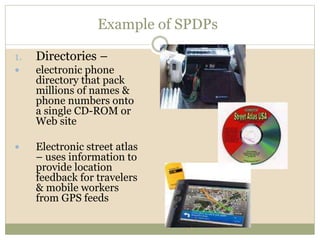
Example of SPDPs
1. Directories –
 electronic phone
directory that pack
millions of names &
phone numbers onto
a single CD-ROM or
Web site
 Electronic street atlas
– uses information to
provide location
feedback for travelers
& mobile workers
from GPS feeds
Example of SPDPs
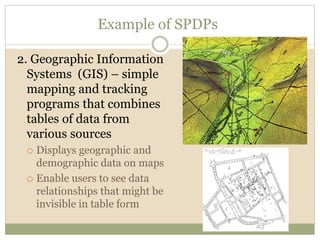
2. Geographic Information
Systems (GIS) – simple
mapping and tracking
programs that combines
tables of data from
various sources
 Displays geographic and
demographic data on maps
 Enable users to see data
relationships that might be
invisible in table form
Example of SPDPs
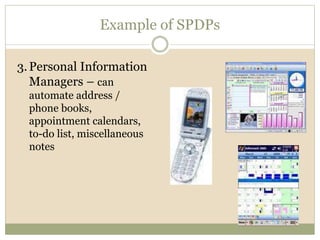
3.Personal Information
Managers – can
automate address /
phone books,
appointment calendars,
to-do list, miscellaneous
notes
Types of database programs
1. File managers – a program that enables
users to work with one file at a time.
 Example: FileMaker Pro
2. Database Management System (DBMS) - a
program that manipulate data in a large
collection of files (database), cross-
referencing between file as necessary
 Example: MS Access, Oracle
Type of Database structures
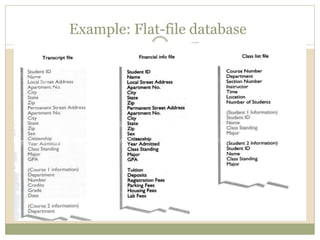
 Flat-file database – a database in which all records
are stored in one large table. For example, in a flat-file
customer order, a customer’s address, phone number,
& other important information will be entered over and
over again every time a customer placed an order.
 Characteristics of flat-file databases:
 It requires redundant data, which resulted into
files of large sizes.
 It is difficult to maintain because it requires a
large pool of human resources that equates to
more salaries, office space and equipment.
Example: Flat-file database
Type of Database structures
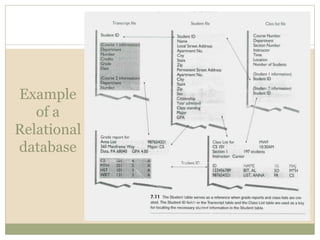
 Relational Database – a type of database which consists
of more than one file or table that are linked to each other
by a common data and in which changes in one file are
reflected automatically in other related files.
 The Relational Database Theory - solved the problem of
redundant data (in a flat-file format).
 Dr. E.F. Codd – introduced the relational database theory
in his published paper entitled “A Relational Model of
Data for Large Shared Data Banks” in 1970.
 He introduced a set of rules that eliminate the need to
store redundant data and formed the origin of relational
database theory.
Example
of a
Relational
database
Advantages of Relational databases
1. Eliminate redundant data
 reduces the number of times a data item is entered
therefore, minimizing data entry error.
 Each data item is stored only once, so if an error is made,
only one entry will be corrected.
Advantages of Relational databases
2. Reduce data inconsistencies
 Data consistency – means rules or procedures followed
in the entry and processing are one and the same for all
users
3. Protect data integrity
 Data integrity – concerned with the correctness of data;
data free from errors

Relational database revised

  • 1.
    Database Operations Flat-File andRelational Database Source: Chapter 7, Tomorrow’s Technology & You (8th ed) by G Beekman & M Quinn
  • 2.
    Objectives So the studentswill be able to –  Identify and discuss database operations  Understand and explain the various special purpose databases  Explain the difference between a flat-file and relational database  Explain the concept of one-to-one and one- to-many relationships
  • 3.
    Database Operations  Importsdata from other sources - from word processors, spreadsheets, or other databases  Browsing records  Database queries Query – an information request; can be a search for a specific record or all records that match a set of criteria
  • 4.
    Database Operations  SortingData – allows you to arrange record in alphabetic or numeric order based on values in one or more fields Print reports, labels, and form letters Display reports on screen or on printouts
  • 5.
    Database Operations  Complexqueries – can be done using SQL (Structured Query Language) SQL , a special query language featured in most database program Used to filter the records of a database, capturing only those that meet the specific criteria Use common English language and common logical operator OR and AND.
  • 6.
    Database Operations  Usehandout on – The Language of Database Queries  Example of SQL statements: Select Vehicle_ID, Vehicle_Type FROM Rental_Vehicles WHERE Transport_Mode = ‘Land’ AND Rental_Price < 20.00
  • 7.
    Special-Purpose Database Programs(SPDPs)  Preprogrammed for specific data storage & retrieval purposes  Users do not need to define file structures or design forms because these were taken care of by the software
  • 8.
    Example of SPDPs 1.Directories –  electronic phone directory that pack millions of names & phone numbers onto a single CD-ROM or Web site  Electronic street atlas – uses information to provide location feedback for travelers & mobile workers from GPS feeds
  • 9.
    Example of SPDPs 2.Geographic Information Systems (GIS) – simple mapping and tracking programs that combines tables of data from various sources  Displays geographic and demographic data on maps  Enable users to see data relationships that might be invisible in table form
  • 10.
    Example of SPDPs 3.PersonalInformation Managers – can automate address / phone books, appointment calendars, to-do list, miscellaneous notes
  • 11.
    Types of databaseprograms 1. File managers – a program that enables users to work with one file at a time.  Example: FileMaker Pro 2. Database Management System (DBMS) - a program that manipulate data in a large collection of files (database), cross- referencing between file as necessary  Example: MS Access, Oracle
  • 12.
    Type of Databasestructures  Flat-file database – a database in which all records are stored in one large table. For example, in a flat-file customer order, a customer’s address, phone number, & other important information will be entered over and over again every time a customer placed an order.  Characteristics of flat-file databases:  It requires redundant data, which resulted into files of large sizes.  It is difficult to maintain because it requires a large pool of human resources that equates to more salaries, office space and equipment.
  • 13.
  • 14.
    Type of Databasestructures  Relational Database – a type of database which consists of more than one file or table that are linked to each other by a common data and in which changes in one file are reflected automatically in other related files.  The Relational Database Theory - solved the problem of redundant data (in a flat-file format).  Dr. E.F. Codd – introduced the relational database theory in his published paper entitled “A Relational Model of Data for Large Shared Data Banks” in 1970.  He introduced a set of rules that eliminate the need to store redundant data and formed the origin of relational database theory.
  • 15.
  • 16.
    Advantages of Relationaldatabases 1. Eliminate redundant data  reduces the number of times a data item is entered therefore, minimizing data entry error.  Each data item is stored only once, so if an error is made, only one entry will be corrected.
  • 17.
    Advantages of Relationaldatabases 2. Reduce data inconsistencies  Data consistency – means rules or procedures followed in the entry and processing are one and the same for all users 3. Protect data integrity  Data integrity – concerned with the correctness of data; data free from errors