DATABASE
1
6.2 Basic Concept of Database
At the end of this topic,
students should be able to:
1. explain the basic concepts of database
DATABASE
Learning
Outcome
DATABASE
2
6.2 Basic Concept of Database
DATABASE
3
6.2 Basic Concept of Database
DATABASE
4
Data Hierarchy
6.2 Basic Concept of Database
DATABASE
5
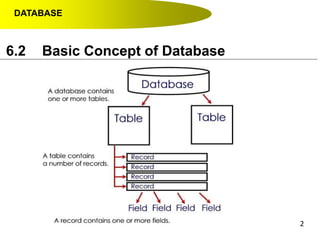
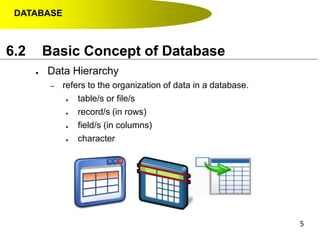
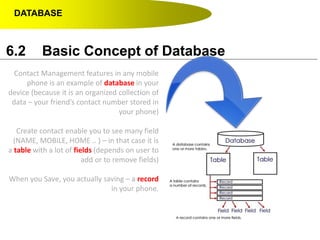
● Data Hierarchy
– refers to the organization of data in a database.
● table/s or file/s
● record/s (in rows)
● field/s (in columns)
● character
6.2 Basic Concept of Database
DATABASE
6
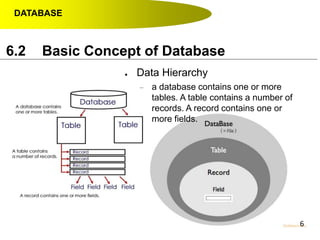
● Data Hierarchy
– a database contains one or more
tables. A table contains a number of
records. A record contains one or
more fields.
6.2 Basic Concept of Database
DATABASE
7
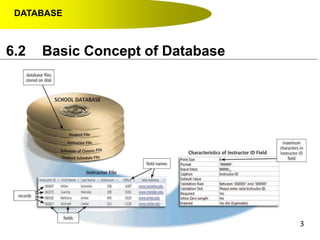
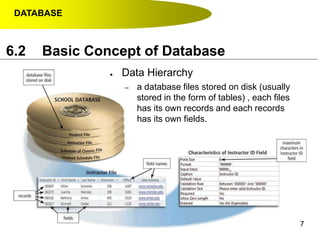
● Data Hierarchy
– a database files stored on disk (usually
stored in the form of tables) , each files
has its own records and each records
has its own fields.
6.2 Basic Concept of Database
DATABASE
6.2 Basic Concept of Database
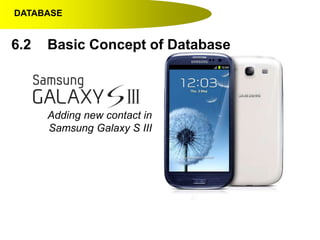
Adding new contact in
Samsung Galaxy S III
6.2 Basic Concept of Database
DATABASE
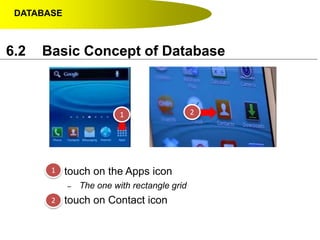
● touch on the Apps icon
– The one with rectangle grid
● touch on Contact icon
1 2
1
2
6.2 Basic Concept of Database
DATABASE
6.2 Basic Concept of Database
3
4
5
3
4
5
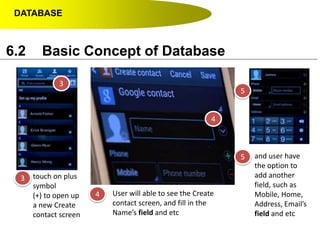
touch on plus
symbol
(+) to open up
a new Create
contact screen
User will able to see the Create
contact screen, and fill in the
Name’s field and etc
and user have
the option to
add another
field, such as
Mobile, Home,
Address, Email’s
field and etc
DATABASE
6
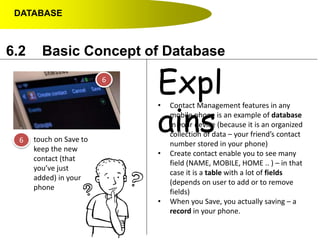
6 touch on Save to
keep the new
contact (that
you’ve just
added) in your
phone
6.2 Basic Concept of Database
• Contact Management features in any
mobile phone is an example of database
in your device (because it is an organized
collection of data – your friend’s contact
number stored in your phone)
• Create contact enable you to see many
field (NAME, MOBILE, HOME .. ) – in that
case it is a table with a lot of fields
(depends on user to add or to remove
fields)
• When you Save, you actually saving – a
record in your phone.
Expl
ains
DATABASE
6.2 Basic Concept of Database
Contact Management features in any mobile
phone is an example of database in your
device (because it is an organized collection of
data – your friend’s contact number stored in
your phone)
Create contact enable you to see many field
(NAME, MOBILE, HOME .. ) – in that case it is
a table with a lot of fields (depends on user to
add or to remove fields)
When you Save, you actually saving – a record
in your phone.
DATABASE
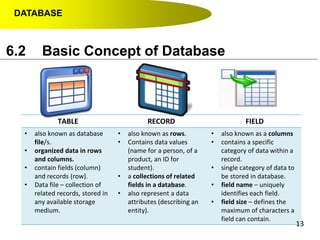
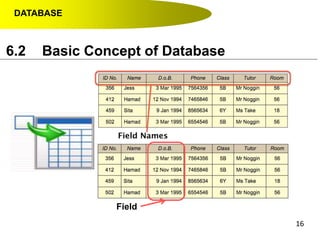
TABLE RECORD FIELD
• also known as database
file/s.
• organized data in rows
and columns.
• contain fields (column)
and records (row).
• Data file – collection of
related records, stored in
any available storage
medium.
• also known as rows.
• Contains data values
(name for a person, of a
product, an ID for
student).
• a collections of related
fields in a database.
• also represent a data
attributes (describing an
entity).
• also known as a columns
• contains a specific
category of data within a
record.
• single category of data to
be stored in database.
• field name – uniquely
identifies each field.
• field size – defines the
maximum of characters a
field can contain.
13
6.2 Basic Concept of Database
DATABASE
14
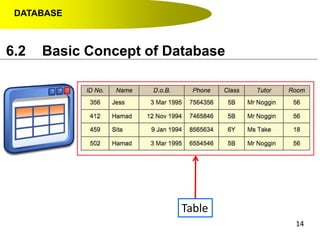
Table
6.2 Basic Concept of Database
DATABASE
15
6.2 Basic Concept of Database
DATABASE
16
6.2 Basic Concept of Database
Field
DATABASE
1717
Data Dictionary
and
Data Type
6.2 Basic Concept of Database
DATABASE
6.2 Basic Concept of Database
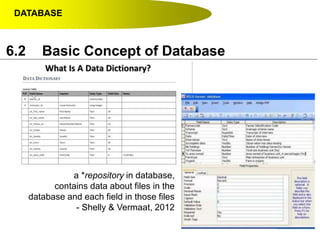
a *repository in database,
contains data about files in the
database and each field in those files
- Shelly & Vermaat, 2012
DATABASE
6.2 Basic Concept of Database
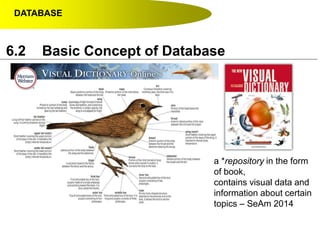
a *repository in the form
of book,
contains visual data and
information about certain
topics – SeAm 2014
DATABASE
6.2 Basic Concept of Database
List 3-4 examples of data
that can be extract from
student.
Imagine you are at the bus stop,
suddenly one female student that you’ve
already admire, walk to the bus stop and
sit near you. Ok man, what will you do ?
NAME PHONE NUMBER
CLASS STATUS
DATABASE
6.2 Basic Concept of Database
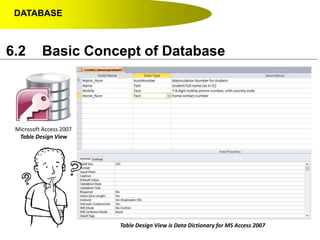
Microsoft Access 2007
Table Design View
Table Design View is Data Dictionary for MS Access 2007
DATABASE
6.2 Basic Concept of Database
Microsoft Access 2007
Table Design View
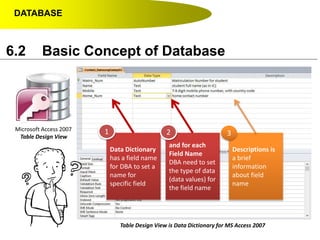
Table Design View is Data Dictionary for MS Access 2007
Data Dictionary
has a field name
for DBA to set a
name for
specific field
and for each
Field Name
DBA need to set
the type of data
(data values) for
the field name
Descriptions is
a brief
information
about field
name
1 2 3
DATABASE
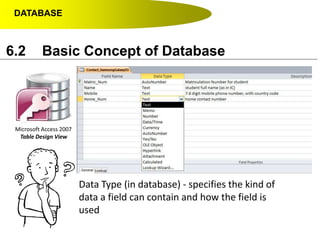
Microsoft Access 2007
Table Design View
Data Type (in database) - specifies the kind of
data a field can contain and how the field is
used
6.2 Basic Concept of Database
DATABASE
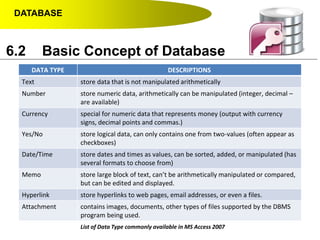
DATA TYPE DESCRIPTIONS
Text store data that is not manipulated arithmetically
Number store numeric data, arithmetically can be manipulated (integer, decimal –
are available)
Currency special for numeric data that represents money (output with currency
signs, decimal points and commas.)
Yes/No store logical data, can only contains one from two-values (often appear as
checkboxes)
Date/Time store dates and times as values, can be sorted, added, or manipulated (has
several formats to choose from)
Memo store large block of text, can’t be arithmetically manipulated or compared,
but can be edited and displayed.
Hyperlink store hyperlinks to web pages, email addresses, or even a files.
Attachment contains images, documents, other types of files supported by the DBMS
program being used.
6.2 Basic Concept of Database
List of Data Type commonly available in MS Access 2007
DATABASE
2525
Primary Key
and
Foreign Key
6.2 Basic Concept of Database
DATABASE
26
6.2 Basic Concept of Database
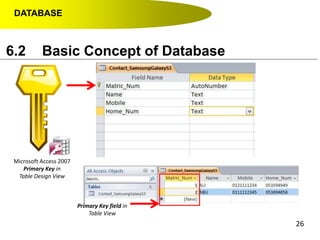
Microsoft Access 2007
Primary Key in
Table Design View
Primary Key field in
Table View
DATABASE
27
6.2 Basic Concept of Database
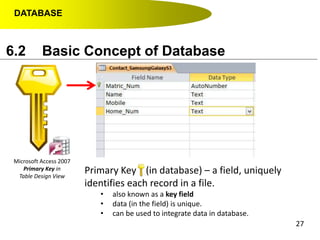
Microsoft Access 2007
Primary Key in
Table Design View
Primary Key (in database) – a field, uniquely
identifies each record in a file.
• also known as a key field
• data (in the field) is unique.
• can be used to integrate data in database.
DATABASE
28
6.2 Basic Concept of Database
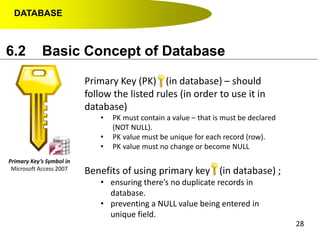
Primary Key’s Symbol in
Microsoft Access 2007
Primary Key (PK) (in database) – should
follow the listed rules (in order to use it in
database)
• PK must contain a value – that is must be declared
(NOT NULL).
• PK value must be unique for each record (row).
• PK value must no change or become NULL
Benefits of using primary key (in database) ;
• ensuring there’s no duplicate records in
database.
• preventing a NULL value being entered in
unique field.
DATABASE
29
6.2 Basic Concept of Database
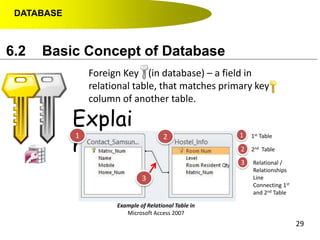
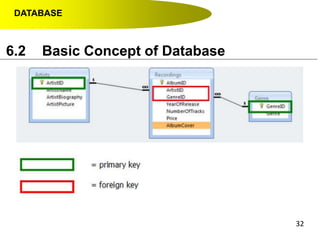
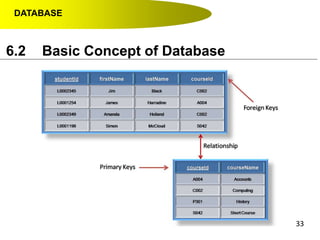
Foreign Key (in database) – a field in
relational table, that matches primary key
column of another table.
Explai
ns
Example of Relational Table in
Microsoft Access 2007
1 2
3
1
2
3
1st Table
2nd Table
Relational /
Relationships
Line
Connecting 1st
and 2nd Table
DATABASE
6.2 Basic Concept of Database
Example of Relational Table in
Microsoft Access 2007
Explai
ns
Foreign Key (in database) – a field in
relational table, that matches primary key
column of another table.
Reme
mber !
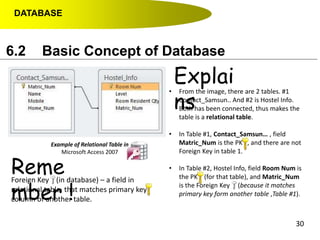
• From the image, there are 2 tables. #1
Contact_Samsun.. And #2 is Hostel Info.
Both has been connected, thus makes the
table is a relational table.
• In Table #1, Contact_Samsun… , field
Matric_Num is the PK , and there are not
Foreign Key in table 1.
• In Table #2, Hostel Info, field Room Num is
the PK (for that table), and Matric_Num
is the Foreign Key (because it matches
primary key form another table ,Table #1).
30
DATABASE
6.2 Basic Concept of Database
Example of Relational Table in
Microsoft Access 2007
Conclu
sions
Foreign Key (in database) – a field in
relational table, that matches primary key
column of another table.
Reme
mber !
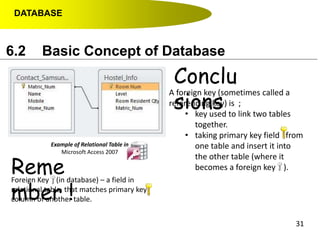
A foreign key (sometimes called a
referencing key) is ;
• key used to link two tables
together.
• taking primary key field from
one table and insert it into
the other table (where it
becomes a foreign key ).
31
DATABASE
6.2 Basic Concept of Database
32
DATABASE
6.2 Basic Concept of Database
33
DATABASE
34
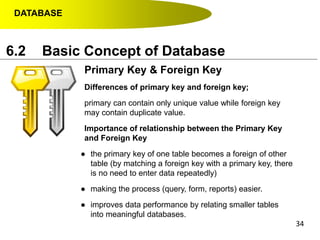
Primary Key & Foreign Key
Differences of primary key and foreign key;
primary can contain only unique value while foreign key
may contain duplicate value.
Importance of relationship between the Primary Key
and Foreign Key
● the primary key of one table becomes a foreign of other
table (by matching a foreign key with a primary key, there
is no need to enter data repeatedly)
● making the process (query, form, reports) easier.
● improves data performance by relating smaller tables
into meaningful databases.
6.2 Basic Concept of Database
DATABASE
35
Entity Relationship
6.2 Basic Concept of Database
a data model that describes data and
information, implemented in a relational
database.
DATABASE
36
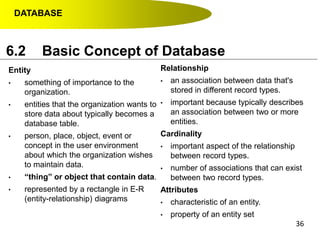
Entity
• something of importance to the
organization.
• entities that the organization wants to
store data about typically becomes a
database table.
• person, place, object, event or
concept in the user environment
about which the organization wishes
to maintain data.
• “thing” or object that contain data.
• represented by a rectangle in E-R
(entity-relationship) diagrams
6.2 Basic Concept of Database
Relationship
• an association between data that's
stored in different record types.
• important because typically describes
an association between two or more
entities.
Cardinality
• important aspect of the relationship
between record types.
• number of associations that can exist
between two record types.
Attributes
• characteristic of an entity.
• property of an entity set
DATABASE
6.2 Basic Concept of Database
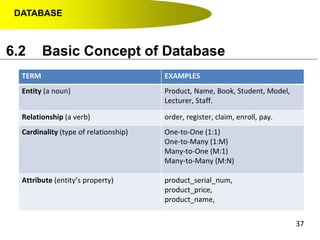
TERM EXAMPLES
Entity (a noun) Product, Name, Book, Student, Model,
Lecturer, Staff.
Relationship (a verb) order, register, claim, enroll, pay.
Cardinality (type of relationship) One-to-One (1:1)
One-to-Many (1:M)
Many-to-One (M:1)
Many-to-Many (M:N)
Attribute (entity’s property) product_serial_num,
product_price,
product_name,
37
DATABASE
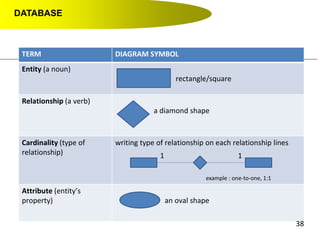
TERM DIAGRAM SYMBOL
Entity (a noun)
rectangle/square
Relationship (a verb)
a diamond shape
Cardinality (type of
relationship)
writing type of relationship on each relationship lines
Attribute (entity’s
property) an oval shape
1 1
example : one-to-one, 1:1
38
DATABASE
6.2 Basic Concept of Database
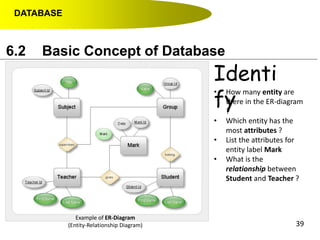
Example of ER-Diagram
(Entity-Relationship Diagram)
Identi
fy
• How many entity are
there in the ER-diagram
?
• Which entity has the
most attributes ?
• List the attributes for
entity label Mark
• What is the
relationship between
Student and Teacher ?
39
DATABASE
40
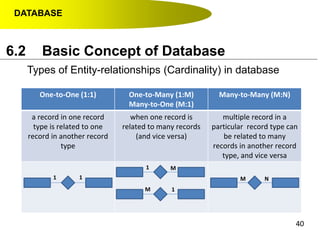
Types of Entity-relationships (Cardinality) in database
6.2 Basic Concept of Database
One-to-One (1:1) One-to-Many (1:M)
Many-to-One (M:1)
Many-to-Many (M:N)
a record in one record
type is related to one
record in another record
type
when one record is
related to many records
(and vice versa)
multiple record in a
particular record type can
be related to many
records in another record
type, and vice versa
1 1
1
1
M N
M
M
DATABASE
6.2 Basic Concept of Database
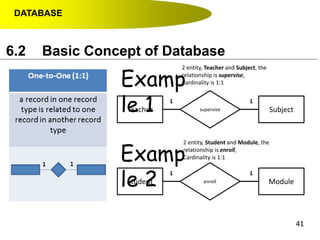
Teacher Subjectsupervise
1 1
Student Moduleenroll
1 1
Examp
le 1
Examp
le 2
2 entity, Teacher and Subject, the
relationship is supervise,
Cardinality is 1:1
2 entity, Student and Module, the
relationship is enroll,
Cardinality is 1:1
41
DATABASE
6.2 Basic Concept of Database
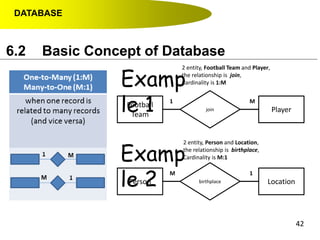
Football
Team
Playerjoin
1 M
Person Locationbirthplace
M 1
Examp
le 1
Examp
le 2
2 entity, Football Team and Player,
the relationship is join,
Cardinality is 1:M
2 entity, Person and Location,
the relationship is birthplace,
Cardinality is M:1
42
DATABASE
6.2 Basic Concept of Database
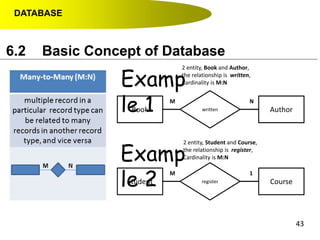
Book Authorwritten
M N
Student Courseregister
M 1
Examp
le 1
Examp
le 2
2 entity, Book and Author,
the relationship is written,
Cardinality is M:N
2 entity, Student and Course,
the relationship is register,
Cardinality is M:N
43

Database Part 2

  • 1.
    DATABASE 1 6.2 Basic Conceptof Database At the end of this topic, students should be able to: 1. explain the basic concepts of database DATABASE Learning Outcome
  • 2.
  • 3.
  • 4.
  • 5.
    DATABASE 5 ● Data Hierarchy –refers to the organization of data in a database. ● table/s or file/s ● record/s (in rows) ● field/s (in columns) ● character 6.2 Basic Concept of Database
  • 6.
    DATABASE 6 ● Data Hierarchy –a database contains one or more tables. A table contains a number of records. A record contains one or more fields. 6.2 Basic Concept of Database
  • 7.
    DATABASE 7 ● Data Hierarchy –a database files stored on disk (usually stored in the form of tables) , each files has its own records and each records has its own fields. 6.2 Basic Concept of Database
  • 8.
    DATABASE 6.2 Basic Conceptof Database Adding new contact in Samsung Galaxy S III 6.2 Basic Concept of Database
  • 9.
    DATABASE ● touch onthe Apps icon – The one with rectangle grid ● touch on Contact icon 1 2 1 2 6.2 Basic Concept of Database
  • 10.
    DATABASE 6.2 Basic Conceptof Database 3 4 5 3 4 5 touch on plus symbol (+) to open up a new Create contact screen User will able to see the Create contact screen, and fill in the Name’s field and etc and user have the option to add another field, such as Mobile, Home, Address, Email’s field and etc
  • 11.
    DATABASE 6 6 touch onSave to keep the new contact (that you’ve just added) in your phone 6.2 Basic Concept of Database • Contact Management features in any mobile phone is an example of database in your device (because it is an organized collection of data – your friend’s contact number stored in your phone) • Create contact enable you to see many field (NAME, MOBILE, HOME .. ) – in that case it is a table with a lot of fields (depends on user to add or to remove fields) • When you Save, you actually saving – a record in your phone. Expl ains
  • 12.
    DATABASE 6.2 Basic Conceptof Database Contact Management features in any mobile phone is an example of database in your device (because it is an organized collection of data – your friend’s contact number stored in your phone) Create contact enable you to see many field (NAME, MOBILE, HOME .. ) – in that case it is a table with a lot of fields (depends on user to add or to remove fields) When you Save, you actually saving – a record in your phone.
  • 13.
    DATABASE TABLE RECORD FIELD •also known as database file/s. • organized data in rows and columns. • contain fields (column) and records (row). • Data file – collection of related records, stored in any available storage medium. • also known as rows. • Contains data values (name for a person, of a product, an ID for student). • a collections of related fields in a database. • also represent a data attributes (describing an entity). • also known as a columns • contains a specific category of data within a record. • single category of data to be stored in database. • field name – uniquely identifies each field. • field size – defines the maximum of characters a field can contain. 13 6.2 Basic Concept of Database
  • 14.
  • 15.
  • 16.
  • 17.
  • 18.
    DATABASE 6.2 Basic Conceptof Database a *repository in database, contains data about files in the database and each field in those files - Shelly & Vermaat, 2012
  • 19.
    DATABASE 6.2 Basic Conceptof Database a *repository in the form of book, contains visual data and information about certain topics – SeAm 2014
  • 20.
    DATABASE 6.2 Basic Conceptof Database List 3-4 examples of data that can be extract from student. Imagine you are at the bus stop, suddenly one female student that you’ve already admire, walk to the bus stop and sit near you. Ok man, what will you do ? NAME PHONE NUMBER CLASS STATUS
  • 21.
    DATABASE 6.2 Basic Conceptof Database Microsoft Access 2007 Table Design View Table Design View is Data Dictionary for MS Access 2007
  • 22.
    DATABASE 6.2 Basic Conceptof Database Microsoft Access 2007 Table Design View Table Design View is Data Dictionary for MS Access 2007 Data Dictionary has a field name for DBA to set a name for specific field and for each Field Name DBA need to set the type of data (data values) for the field name Descriptions is a brief information about field name 1 2 3
  • 23.
    DATABASE Microsoft Access 2007 TableDesign View Data Type (in database) - specifies the kind of data a field can contain and how the field is used 6.2 Basic Concept of Database
  • 24.
    DATABASE DATA TYPE DESCRIPTIONS Textstore data that is not manipulated arithmetically Number store numeric data, arithmetically can be manipulated (integer, decimal – are available) Currency special for numeric data that represents money (output with currency signs, decimal points and commas.) Yes/No store logical data, can only contains one from two-values (often appear as checkboxes) Date/Time store dates and times as values, can be sorted, added, or manipulated (has several formats to choose from) Memo store large block of text, can’t be arithmetically manipulated or compared, but can be edited and displayed. Hyperlink store hyperlinks to web pages, email addresses, or even a files. Attachment contains images, documents, other types of files supported by the DBMS program being used. 6.2 Basic Concept of Database List of Data Type commonly available in MS Access 2007
  • 25.
  • 26.
    DATABASE 26 6.2 Basic Conceptof Database Microsoft Access 2007 Primary Key in Table Design View Primary Key field in Table View
  • 27.
    DATABASE 27 6.2 Basic Conceptof Database Microsoft Access 2007 Primary Key in Table Design View Primary Key (in database) – a field, uniquely identifies each record in a file. • also known as a key field • data (in the field) is unique. • can be used to integrate data in database.
  • 28.
    DATABASE 28 6.2 Basic Conceptof Database Primary Key’s Symbol in Microsoft Access 2007 Primary Key (PK) (in database) – should follow the listed rules (in order to use it in database) • PK must contain a value – that is must be declared (NOT NULL). • PK value must be unique for each record (row). • PK value must no change or become NULL Benefits of using primary key (in database) ; • ensuring there’s no duplicate records in database. • preventing a NULL value being entered in unique field.
  • 29.
    DATABASE 29 6.2 Basic Conceptof Database Foreign Key (in database) – a field in relational table, that matches primary key column of another table. Explai ns Example of Relational Table in Microsoft Access 2007 1 2 3 1 2 3 1st Table 2nd Table Relational / Relationships Line Connecting 1st and 2nd Table
  • 30.
    DATABASE 6.2 Basic Conceptof Database Example of Relational Table in Microsoft Access 2007 Explai ns Foreign Key (in database) – a field in relational table, that matches primary key column of another table. Reme mber ! • From the image, there are 2 tables. #1 Contact_Samsun.. And #2 is Hostel Info. Both has been connected, thus makes the table is a relational table. • In Table #1, Contact_Samsun… , field Matric_Num is the PK , and there are not Foreign Key in table 1. • In Table #2, Hostel Info, field Room Num is the PK (for that table), and Matric_Num is the Foreign Key (because it matches primary key form another table ,Table #1). 30
  • 31.
    DATABASE 6.2 Basic Conceptof Database Example of Relational Table in Microsoft Access 2007 Conclu sions Foreign Key (in database) – a field in relational table, that matches primary key column of another table. Reme mber ! A foreign key (sometimes called a referencing key) is ; • key used to link two tables together. • taking primary key field from one table and insert it into the other table (where it becomes a foreign key ). 31
  • 32.
  • 33.
  • 34.
    DATABASE 34 Primary Key &Foreign Key Differences of primary key and foreign key; primary can contain only unique value while foreign key may contain duplicate value. Importance of relationship between the Primary Key and Foreign Key ● the primary key of one table becomes a foreign of other table (by matching a foreign key with a primary key, there is no need to enter data repeatedly) ● making the process (query, form, reports) easier. ● improves data performance by relating smaller tables into meaningful databases. 6.2 Basic Concept of Database
  • 35.
    DATABASE 35 Entity Relationship 6.2 BasicConcept of Database a data model that describes data and information, implemented in a relational database.
  • 36.
    DATABASE 36 Entity • something ofimportance to the organization. • entities that the organization wants to store data about typically becomes a database table. • person, place, object, event or concept in the user environment about which the organization wishes to maintain data. • “thing” or object that contain data. • represented by a rectangle in E-R (entity-relationship) diagrams 6.2 Basic Concept of Database Relationship • an association between data that's stored in different record types. • important because typically describes an association between two or more entities. Cardinality • important aspect of the relationship between record types. • number of associations that can exist between two record types. Attributes • characteristic of an entity. • property of an entity set
  • 37.
    DATABASE 6.2 Basic Conceptof Database TERM EXAMPLES Entity (a noun) Product, Name, Book, Student, Model, Lecturer, Staff. Relationship (a verb) order, register, claim, enroll, pay. Cardinality (type of relationship) One-to-One (1:1) One-to-Many (1:M) Many-to-One (M:1) Many-to-Many (M:N) Attribute (entity’s property) product_serial_num, product_price, product_name, 37
  • 38.
    DATABASE TERM DIAGRAM SYMBOL Entity(a noun) rectangle/square Relationship (a verb) a diamond shape Cardinality (type of relationship) writing type of relationship on each relationship lines Attribute (entity’s property) an oval shape 1 1 example : one-to-one, 1:1 38
  • 39.
    DATABASE 6.2 Basic Conceptof Database Example of ER-Diagram (Entity-Relationship Diagram) Identi fy • How many entity are there in the ER-diagram ? • Which entity has the most attributes ? • List the attributes for entity label Mark • What is the relationship between Student and Teacher ? 39
  • 40.
    DATABASE 40 Types of Entity-relationships(Cardinality) in database 6.2 Basic Concept of Database One-to-One (1:1) One-to-Many (1:M) Many-to-One (M:1) Many-to-Many (M:N) a record in one record type is related to one record in another record type when one record is related to many records (and vice versa) multiple record in a particular record type can be related to many records in another record type, and vice versa 1 1 1 1 M N M M
  • 41.
    DATABASE 6.2 Basic Conceptof Database Teacher Subjectsupervise 1 1 Student Moduleenroll 1 1 Examp le 1 Examp le 2 2 entity, Teacher and Subject, the relationship is supervise, Cardinality is 1:1 2 entity, Student and Module, the relationship is enroll, Cardinality is 1:1 41
  • 42.
    DATABASE 6.2 Basic Conceptof Database Football Team Playerjoin 1 M Person Locationbirthplace M 1 Examp le 1 Examp le 2 2 entity, Football Team and Player, the relationship is join, Cardinality is 1:M 2 entity, Person and Location, the relationship is birthplace, Cardinality is M:1 42
  • 43.
    DATABASE 6.2 Basic Conceptof Database Book Authorwritten M N Student Courseregister M 1 Examp le 1 Examp le 2 2 entity, Book and Author, the relationship is written, Cardinality is M:N 2 entity, Student and Course, the relationship is register, Cardinality is M:N 43