Chapter 6 Teaching with Multimedia and Hypermedia By:  Tim Bryant,  Steve Compton, Jo Summers
Objectives Define multimedia and hypermedia from historic and current perspectives. Evaluate the quality and capabilities of a commercial multimedia/hypermedia product. Describe resources and skills required for multimedia/hypermedia authoring.
Objectives  cont. Use an authoring system to develop a product that meets visual, navigational, and instructional criteria. Design lesson activities appropriate for each kind of hypermedia product.
Introduction to Multimedia and Hypermedia   Computer-based multimedia learning stations have been used since 1966. Noncomputer multimedia have been around even longer. Look at current electronic media and its companion concept, hypermedia.
Introduction to Multimedia and Hypermedia  cont. Multimedia and Hypermedia:  How Do They Differ?   Multimedia  means “multiple media” or “a combination of media.”   Still pictures, sound, motion video, animation, and/or text items combined.
Introduction to Multimedia and Hypermedia  cont. Multimedia and Hypermedia:  How Do They Differ?  cont. Hypermedia  means “linked media” or interactive media.” Information stored in various media are connected (often via the Internet).
Introduction to Multimedia and Hypermedia  cont. Types of Hypermedia Systems   Come in a variety of hardware, software, and media configurations.  Classified according to their primary storage equipment such as interactive videodiscs (IVDs), CD-ROMs (compact disc-read-only memory) and digital versatile discs (DVDs).
Introduction to Multimedia and Hypermedia  cont. Types of Hypermedia Systems  cont. Commercial hypermedia software packages. Authoring tools:  Presentation software Video production and editing systems Hypermedia authoring systems Virtual reality (VR) systems
Introduction to Multimedia and Hypermedia  cont. Current and Future Impact of Hypermedia on Education   Increased motivation Flexible learning modes Development of creative and critical thinking skills Improved writing and process skills
Introduction to Multimedia and Hypermedia  cont. Research on the Impact of Multimedia and Hypermedia Systems   cont. Increased learner control is more useful to higher ability students.  Learner style helps determine which hypermedia features are effective in various learning environments.
Introduction to Multimedia and Hypermedia  cont. Research on the Design and Use of Multimedia and Hypermedia Systems   Stemeler (1997) reviewed findings on various characteristic that could have an impact on the potential effectiveness of these systems.
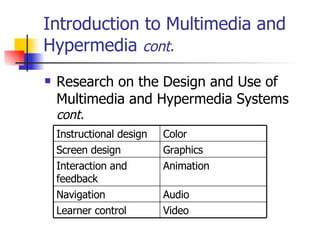
Introduction to Multimedia and Hypermedia  cont. Research on the Design and Use of Multimedia and Hypermedia Systems  cont. Video   Learner control   Audio   Navigation   Animation   Interaction and feedback   Graphics   Screen design   Color   Instructional design
Introduction to Multimedia and Hypermedia  cont. Recent Developments in Hypermedia Systems   The “vanishing videodisc” Convergence of offline (disc) and online (Internet) development Increasing ease of use
Commercial Hypermedia Software Packages Instructional Software   Tutorials Drill and practice Simulations Instructional games Problem solving
Commercial Hypermedia Software Packages  cont. Interactive Books and ebooks   Interactive storybooks for the younger students and interactive texts for the older students. ebooks offer greater flexibility than printed texts and are a valuable resource for students and teachers.
Commercial Hypermedia Software Packages  cont. Reference Materials   Available on CDs and DVDs with search engine software added to them to make information easier to attain.  Encyclopedias Almanacs Atlases Newspapers and newsletters Proceeding and other conference materials
Commercial Hypermedia Software Packages  cont. Collections of Development Resources   Collecting of clip art, video clips, sound effects, and photographs are some resources that have been developed and placed on CD-ROM.
Commercial Hypermedia Software Packages  cont. Evaluating Commercial Hypermedia Products   Instructional planning and support Instructional design Content Interface design and navigation Feedback and interactivity
Commercial Hypermedia Software Packages  cont. Integration Strategies for Commercial Hypermedia Products  Should offer computer based instruction, resources to support instruction and provide networking and online sources.
Background on Multimedia and Hypermedia Authoring Systems  Enabled non-technical skilled individuals to develop their own professional-looking hypermedia products.  Help prepare students for the world of the future.  Introduction to Multimedia and Hypermedia Authoring
Introduction to Multimedia and Hypermedia Authoring  cont. Multimedia and Hypermedia Authoring Resources   Audio resources Video resources Photos Graphic images Text
Introduction to Multimedia and Hypermedia Authoring  cont. Hardware Requirements for Hypermedia Authoring   Computer with keyboard and monitor Digital cameras Scanners Video digitizers Camcorders and other video input Microphones Audio speakers
Introduction to Multimedia and Hypermedia Authoring  cont. Hypermedia Authoring Procedures Review others’ products Do research first Storyboard Develop individual frames and segments Add links and/or scripts Test and revise the product
Introduction to Multimedia and Hypermedia Authoring  cont. Authoring Skills to Develop over Time   Media literacy Using music and art Print design principles Video design principles Creativity and novel thinking Considering the audience
Introduction to Multimedia and Hypermedia Authoring  cont. Evaluating Student-Developed Hypermedia   When students create their own multimedia/hypermedia products, it is suggested that the student self-assess their products.  They can do this by using a checklist or rubrics.  The teacher can also use these instruments to grade the student projects.
Multimedia Authoring Tools Type 1:  Presentation Software   Aid in creating on-screen descriptions, demonstrations and summaries of information.   These tools began as electronic slide shows . They have now become multimedia authoring tools.
Multimedia Authoring Tools Type 1:  Presentation Software  cont. Integration Strategies for Presentation Software   Support for lectures or presentations of content Practice screens Assessment screens Brief tutorials Book reports Student-created presentations
Multimedia Authoring Tools Type 2:  Video Production and Editing Systems   Introduction to Video Production and Editing Systems   Used in schools to produce school news programs and develop digitized video for use in authoring hypermedia products.
Multimedia Authoring Tools Type 2:  Video Production and Editing Systems  cont. Multimedia Authoring Tools Type 2:  Video Production and Editing Systems Demonstrations of procedures Student-created presentations Video lectures Video portfolios Video decision-making/problem-solving simulations Documenting of school activities Visual literacy instruction Teaching of video production
Multimedia Authoring Tools Type 3:  Hypermedia Software   Introduction to Hypermedia Software Tools In the late 1980’s, hypermedia authoring programs were introduced .
Multimedia Authoring Tools Type 3:  Hypermedia Software  cont. Integration Strategies for Hypermedia Authoring Software   Brief tutorials Student-created presentations Interactive storybooks
Multimedia Authoring Tools Type 4:  Virtual Reality and Other Immersion Tools   Introduction to Virtual Reality and Other Immersion Tools   Full immersion systems Web-based Virtual Reality 3-D models QuickTime Virtual Reality (QTVR)
Multimedia Authoring Tools Type 4:  Virtual Reality and Other Immersion Tools  cont. Integration Strategies for Virtual Reality and Other Immersion Tools   Imaging for virtual field trips 3-D models to illustrate how systems work Immersion learning environments for practice and exploration

Chapter 6

  • 1.
    Chapter 6 Teachingwith Multimedia and Hypermedia By: Tim Bryant, Steve Compton, Jo Summers
  • 2.
    Objectives Define multimediaand hypermedia from historic and current perspectives. Evaluate the quality and capabilities of a commercial multimedia/hypermedia product. Describe resources and skills required for multimedia/hypermedia authoring.
  • 3.
    Objectives cont.Use an authoring system to develop a product that meets visual, navigational, and instructional criteria. Design lesson activities appropriate for each kind of hypermedia product.
  • 4.
    Introduction to Multimediaand Hypermedia Computer-based multimedia learning stations have been used since 1966. Noncomputer multimedia have been around even longer. Look at current electronic media and its companion concept, hypermedia.
  • 5.
    Introduction to Multimediaand Hypermedia cont. Multimedia and Hypermedia: How Do They Differ? Multimedia means “multiple media” or “a combination of media.” Still pictures, sound, motion video, animation, and/or text items combined.
  • 6.
    Introduction to Multimediaand Hypermedia cont. Multimedia and Hypermedia: How Do They Differ? cont. Hypermedia means “linked media” or interactive media.” Information stored in various media are connected (often via the Internet).
  • 7.
    Introduction to Multimediaand Hypermedia cont. Types of Hypermedia Systems Come in a variety of hardware, software, and media configurations. Classified according to their primary storage equipment such as interactive videodiscs (IVDs), CD-ROMs (compact disc-read-only memory) and digital versatile discs (DVDs).
  • 8.
    Introduction to Multimediaand Hypermedia cont. Types of Hypermedia Systems cont. Commercial hypermedia software packages. Authoring tools: Presentation software Video production and editing systems Hypermedia authoring systems Virtual reality (VR) systems
  • 9.
    Introduction to Multimediaand Hypermedia cont. Current and Future Impact of Hypermedia on Education Increased motivation Flexible learning modes Development of creative and critical thinking skills Improved writing and process skills
  • 10.
    Introduction to Multimediaand Hypermedia cont. Research on the Impact of Multimedia and Hypermedia Systems cont. Increased learner control is more useful to higher ability students. Learner style helps determine which hypermedia features are effective in various learning environments.
  • 11.
    Introduction to Multimediaand Hypermedia cont. Research on the Design and Use of Multimedia and Hypermedia Systems Stemeler (1997) reviewed findings on various characteristic that could have an impact on the potential effectiveness of these systems.
  • 12.
    Introduction to Multimediaand Hypermedia cont. Research on the Design and Use of Multimedia and Hypermedia Systems cont. Video Learner control Audio Navigation Animation Interaction and feedback Graphics Screen design Color Instructional design
  • 13.
    Introduction to Multimediaand Hypermedia cont. Recent Developments in Hypermedia Systems The “vanishing videodisc” Convergence of offline (disc) and online (Internet) development Increasing ease of use
  • 14.
    Commercial Hypermedia SoftwarePackages Instructional Software Tutorials Drill and practice Simulations Instructional games Problem solving
  • 15.
    Commercial Hypermedia SoftwarePackages cont. Interactive Books and ebooks Interactive storybooks for the younger students and interactive texts for the older students. ebooks offer greater flexibility than printed texts and are a valuable resource for students and teachers.
  • 16.
    Commercial Hypermedia SoftwarePackages cont. Reference Materials Available on CDs and DVDs with search engine software added to them to make information easier to attain. Encyclopedias Almanacs Atlases Newspapers and newsletters Proceeding and other conference materials
  • 17.
    Commercial Hypermedia SoftwarePackages cont. Collections of Development Resources Collecting of clip art, video clips, sound effects, and photographs are some resources that have been developed and placed on CD-ROM.
  • 18.
    Commercial Hypermedia SoftwarePackages cont. Evaluating Commercial Hypermedia Products Instructional planning and support Instructional design Content Interface design and navigation Feedback and interactivity
  • 19.
    Commercial Hypermedia SoftwarePackages cont. Integration Strategies for Commercial Hypermedia Products Should offer computer based instruction, resources to support instruction and provide networking and online sources.
  • 20.
    Background on Multimediaand Hypermedia Authoring Systems Enabled non-technical skilled individuals to develop their own professional-looking hypermedia products. Help prepare students for the world of the future. Introduction to Multimedia and Hypermedia Authoring
  • 21.
    Introduction to Multimediaand Hypermedia Authoring cont. Multimedia and Hypermedia Authoring Resources Audio resources Video resources Photos Graphic images Text
  • 22.
    Introduction to Multimediaand Hypermedia Authoring cont. Hardware Requirements for Hypermedia Authoring Computer with keyboard and monitor Digital cameras Scanners Video digitizers Camcorders and other video input Microphones Audio speakers
  • 23.
    Introduction to Multimediaand Hypermedia Authoring cont. Hypermedia Authoring Procedures Review others’ products Do research first Storyboard Develop individual frames and segments Add links and/or scripts Test and revise the product
  • 24.
    Introduction to Multimediaand Hypermedia Authoring cont. Authoring Skills to Develop over Time Media literacy Using music and art Print design principles Video design principles Creativity and novel thinking Considering the audience
  • 25.
    Introduction to Multimediaand Hypermedia Authoring cont. Evaluating Student-Developed Hypermedia When students create their own multimedia/hypermedia products, it is suggested that the student self-assess their products. They can do this by using a checklist or rubrics. The teacher can also use these instruments to grade the student projects.
  • 26.
    Multimedia Authoring ToolsType 1: Presentation Software Aid in creating on-screen descriptions, demonstrations and summaries of information. These tools began as electronic slide shows . They have now become multimedia authoring tools.
  • 27.
    Multimedia Authoring ToolsType 1: Presentation Software cont. Integration Strategies for Presentation Software Support for lectures or presentations of content Practice screens Assessment screens Brief tutorials Book reports Student-created presentations
  • 28.
    Multimedia Authoring ToolsType 2: Video Production and Editing Systems Introduction to Video Production and Editing Systems Used in schools to produce school news programs and develop digitized video for use in authoring hypermedia products.
  • 29.
    Multimedia Authoring ToolsType 2: Video Production and Editing Systems cont. Multimedia Authoring Tools Type 2: Video Production and Editing Systems Demonstrations of procedures Student-created presentations Video lectures Video portfolios Video decision-making/problem-solving simulations Documenting of school activities Visual literacy instruction Teaching of video production
  • 30.
    Multimedia Authoring ToolsType 3: Hypermedia Software Introduction to Hypermedia Software Tools In the late 1980’s, hypermedia authoring programs were introduced .
  • 31.
    Multimedia Authoring ToolsType 3: Hypermedia Software cont. Integration Strategies for Hypermedia Authoring Software Brief tutorials Student-created presentations Interactive storybooks
  • 32.
    Multimedia Authoring ToolsType 4: Virtual Reality and Other Immersion Tools Introduction to Virtual Reality and Other Immersion Tools Full immersion systems Web-based Virtual Reality 3-D models QuickTime Virtual Reality (QTVR)
  • 33.
    Multimedia Authoring ToolsType 4: Virtual Reality and Other Immersion Tools cont. Integration Strategies for Virtual Reality and Other Immersion Tools Imaging for virtual field trips 3-D models to illustrate how systems work Immersion learning environments for practice and exploration