Chapter 4:
Security Part II:
Auditing Database Systems
IT Auditing, Hall, 4e
15/01/2017 0
Learning Objectives
• Understand the operational problems inherent in the
flat-file approach to data management that gave rise to
the database approach.
• Understand the relationships among the fundamental
component's of the database concept.
• Recognize the defining characteristics of three database
models: hierarchical, network, and relational.
• Understand the operational features and associated
risks of deploying centralized, partitioned, and
replicated database models in the DDP environment.
• Be familiar with the audit objectives and procedures
used to test data management controls.
15/01/2017 1
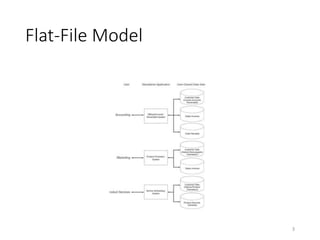
Flat-File Approach
• Associated with large, older legacy systems still in use
today.
• Promotes a single-user view approach where end users
own rather than share data files.
• Separate data sets for each user leads to data
redundancy which causes problems with:
• Data storage: Commonly used data duplicated multiple times
within the organization.
• Data updating: Changes must be made separately for each
user. If updating fails problem of currency of information
with users having outdated information.
• Task-data dependency: Users cannot obtain additional
information as needs change.
2
Flat-File Model
3
Database Approach
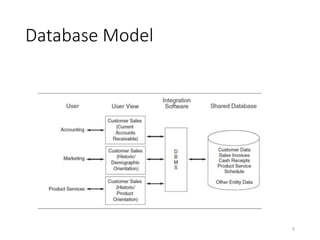
• Access to the data resource is controlled by a
database management system (DBMS).
• Centralizes organization’s data into a common
database shared by the user community.
• All users have access to data they need which may
overcome flat-file problems.
• Elimination of data storage problem: No data
redundancy.
• Elimination of data updating problem: Single update
procedure eliminates currency of information problem.
• Elimination of task-data dependency problem: Users
only constrained by legitimacy of access needs.
15/01/2017 4
Database Model
5
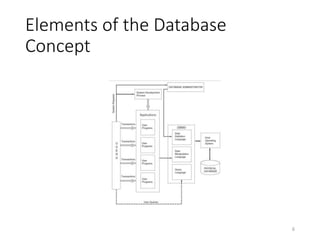
Elements of the Database
Concept
6
DBMS Features and Data
Definition Language
• Program Development – Applications may be
created by programmers and end users.
• Backup and Recovery - Copies made during
processing.
• Database Usage Reporting - Captures statistics on
database usage (who, when, etc.).
• Database Access - Authorizes access to sections of
the database.
• Data definition language used to define the
database to the DBMS on three levels (views).
7
Database Views
• Internal view/ Physical view: Physical arrangement
of records in the database.
• Describes structures of data records, linkage between
files and physical arrangement and sequence of records
in a file. Only one internal view.
• Conceptual view/ Logical view (schema): Describes
the entire database logically and abstractly rather
than physically. Only one conceptual view.
• External view/ User view (subschema): Portion of
database each user views. May be many distinct
users.
8
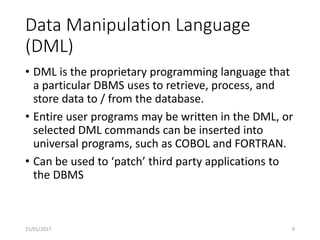
Data Manipulation Language
(DML)
• DML is the proprietary programming language that
a particular DBMS uses to retrieve, process, and
store data to / from the database.
• Entire user programs may be written in the DML, or
selected DML commands can be inserted into
universal programs, such as COBOL and FORTRAN.
• Can be used to ‘patch’ third party applications to
the DBMS
15/01/2017 9
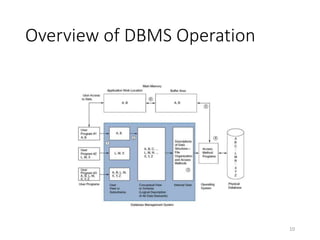
Overview of DBMS Operation
10
Informal Access: Query Language
• Query is an ad hoc access methodology for
extracting information from a database.
• Users can access data via direct query which requires no
formal application programs.
• IBM’s Structured Query Language (SQL) has
emerged as the standard query language.
• Query feature enhances ability to deal with
problems that pop-up but poses an important
control issue.
• Must ensure it is not used for unauthorized database
access.
15/01/2017 11
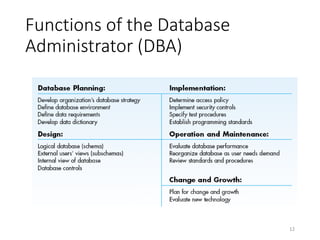
Functions of the Database
Administrator (DBA)
12
Organizational Interaction of the
DBA
13
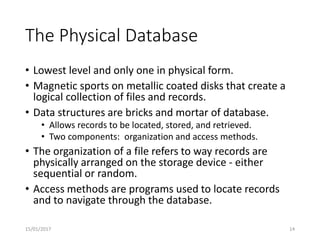
The Physical Database
• Lowest level and only one in physical form.
• Magnetic sports on metallic coated disks that create a
logical collection of files and records.
• Data structures are bricks and mortar of database.
• Allows records to be located, stored, and retrieved.
• Two components: organization and access methods.
• The organization of a file refers to way records are
physically arranged on the storage device - either
sequential or random.
• Access methods are programs used to locate records
and to navigate through the database.
15/01/2017 14
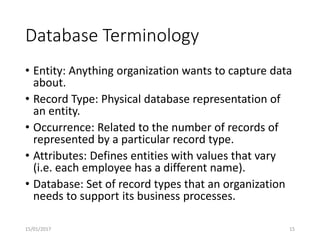
Database Terminology
• Entity: Anything organization wants to capture data
about.
• Record Type: Physical database representation of
an entity.
• Occurrence: Related to the number of records of
represented by a particular record type.
• Attributes: Defines entities with values that vary
(i.e. each employee has a different name).
• Database: Set of record types that an organization
needs to support its business processes.
15/01/2017 15
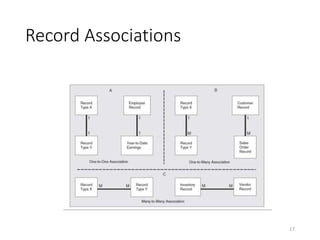
Associations
• Record types that constitute a database exist in
relation to other record types. Three basic record
association:
• One-to-one: For every occurrence of Record Type X
there is one (or zero) of Record Type Y.
• One-to-many: For every occurrence of Record Type X,
there are zero, one or many occurrences of Record Type
Y.
• Many-to-many: For every occurrence of Record Types X
and Y, there are zero, one or many occurrences of
Record Types Y and X, respectively.
15/01/2017 16
Record Associations
17
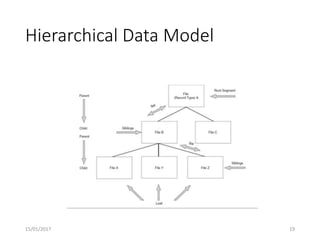
The Hierarchical Model
• Basis of earliest DBAs and still in use today.
• Sets that describe relationship between two linked
files.
• Each set contains a parent and a child.
• Files at the same level with the same parent are siblings.
• Tree structure with the highest level in the tree being
the root segment and the lowest file in a branch the leaf.
• Also called a navigational database.
• Usefulness of model is limited because no child
record can have more than one parent which leads
to data redundancy.
15/01/2017 18
Hierarchical Data Model
15/01/2017 19
The Network Model
15/01/2017 20
The Relational Model
• Difference between this and navigational models is
the way data associations are represented to the
user.
• Relational model portrays data in two-dimensional
tables with attributes across the top forming columns.
• Intersecting columns to form rows are tuples which are
normalized arrays of data similar to records in a flat-file
system.
• Relations are formed by an attribute common to
both tables in the relation.
21
Data Integration in the Relational
Model
15/01/2017 22
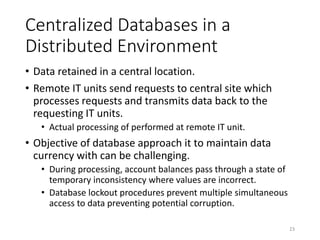
Centralized Databases in a
Distributed Environment
• Data retained in a central location.
• Remote IT units send requests to central site which
processes requests and transmits data back to the
requesting IT units.
• Actual processing of performed at remote IT unit.
• Objective of database approach it to maintain data
currency with can be challenging.
• During processing, account balances pass through a state of
temporary inconsistency where values are incorrect.
• Database lockout procedures prevent multiple simultaneous
access to data preventing potential corruption.
23
Distributed Databases:
Partitioned Databases
• Splits central database into segments distributed to
their primary users.
• Advantages:
• Users’ control increased by having data stored at local
sites.
• Improved transaction processing response time.
• Volume of transmitted data between IT units is reduced.
• Reduces potential data loss from a disaster.
• Works best for organizations that require minimal
data sharing among units.
24
The Deadlock Phenomenon
• Occurs when multiple sites lock each other out of
the database, preventing each from processing its
transactions.
• Transactions in a “wait” state until locks removed.
• Can result in transactions being incompletely processed
and database being corrupted.
• Deadlock is a permanent condition that must be
resolved with special software that analyzes and
resolve conflicts.
• Usually involves terminating one or more transactions to
complete processing of the other in deadlock.
• Preempted transactions must be reinitiated.
25
The Deadlock Condition
15/01/2017 26
Distributed Databases:
Replicated Databases
• Effective for situations with a high degree of data
sharing, but no primary user.
• Common data replicated at each site, reducing data
traffic between sites.
• Primary justification to support read-only queries.
• Problem is maintaining current versions of
database at each site.
• Since each IT unit processes its own transactions,
common data replicated at each site affected by
different transactions and reflect different values.
27
Concurrency Control
• Database concurrency is the presence of complete and
accurate data at all user sites.
• Designers need to employ methods to ensure
transactions processed at each site are accurately
reflected in the databases of all the other sites.
• Commonly used method is to serialize transactions
which involves labeling each transaction by two
criteria:
• Special software groups transactions into classes to identify
potential conflicts.
• Second part of control is to time-stamp each transaction.
28
Database Distribution Methods
and the Accountant
• Many issues and trade-offs in distributing
databases.
• Basic questions to be addressed:
• Centralized or distributed data?
• If distributed, replicated or partitioned?
• If replicated, total or partial replication?
• If partitioned, what is the allocation of the data
segments among the sites?
• Choices impact organization’s ability to maintain
database integrity, preserve audit trails, and have
accurate records.
29
Controlling and Auditing Data
Management Systems
• Controls over data management systems fall into
two categories.
• Access controls are designed to prevent
unauthorized individuals from viewing, retrieving,
corrupting or destroying data.
• Backup controls ensure tat the organization can
recover its database in the event of data loss.
30
Access Controls
• User views (subschema) is a subset of the database that
defines user’s data domain and access.
• Database authorization table contains rules that limit
user actions.
• User-defined procedures allow users to create a
personal security program or routine .
• Data encryption procedures protect sensitive data.
• Biometric devices such as fingerprints or retina prints
control access to the database.
• Inference controls should prevent users from inferring,
through query options, specific data values they are
unauthorized to access.
31
Subschema Restricting Access
15/01/2017 32
Audit Procedures for Testing
Database Access Controls
• Verify DBA personnel retain responsibility for
authority tables and designing user views.
• Select a sample of users and verify access privileges
are consistent with job description.
• Evaluate cost and benefits of biometric controls.
• Verify database query controls to prevent
unauthorized access via inference.
• Verify sensitive data are properly encrypted.
15/01/2017 33
Backup Controls in the Database
Environment
• Since data sharing is a fundamental objective of the
database approach, environment is vulnerable to
damage from individual users.
• Four needed backup and recovery features:
• Backup feature makes a periodic backup of entire database
which is stored in a secure, remote location.
• Transaction log provides an audit trail of all processed
transactions.
• Checkpoint facility suspends all processing while system
reconciles transaction log and database change log against
the database.
• Recovery module uses logs and backup files to restart the
system after a failure.
15/01/2017 34
Backup of Direct Access Files
15/01/2017 35
Audit Procedures for Testing
Database Access Controls
• Verify backups are performed routinely and
frequently.
• Backup policy should balance inconvenience of frequent
activity against business disruption caused by system
failure.
• Verify that automatic backup procedures are in
place and functioning and that copies of the
database are stored off-site.
15/01/2017 36

Chapter 4 security part ii auditing database systems

  • 1.
    Chapter 4: Security PartII: Auditing Database Systems IT Auditing, Hall, 4e 15/01/2017 0
  • 2.
    Learning Objectives • Understandthe operational problems inherent in the flat-file approach to data management that gave rise to the database approach. • Understand the relationships among the fundamental component's of the database concept. • Recognize the defining characteristics of three database models: hierarchical, network, and relational. • Understand the operational features and associated risks of deploying centralized, partitioned, and replicated database models in the DDP environment. • Be familiar with the audit objectives and procedures used to test data management controls. 15/01/2017 1
  • 3.
    Flat-File Approach • Associatedwith large, older legacy systems still in use today. • Promotes a single-user view approach where end users own rather than share data files. • Separate data sets for each user leads to data redundancy which causes problems with: • Data storage: Commonly used data duplicated multiple times within the organization. • Data updating: Changes must be made separately for each user. If updating fails problem of currency of information with users having outdated information. • Task-data dependency: Users cannot obtain additional information as needs change. 2
  • 4.
  • 5.
    Database Approach • Accessto the data resource is controlled by a database management system (DBMS). • Centralizes organization’s data into a common database shared by the user community. • All users have access to data they need which may overcome flat-file problems. • Elimination of data storage problem: No data redundancy. • Elimination of data updating problem: Single update procedure eliminates currency of information problem. • Elimination of task-data dependency problem: Users only constrained by legitimacy of access needs. 15/01/2017 4
  • 6.
  • 7.
    Elements of theDatabase Concept 6
  • 8.
    DBMS Features andData Definition Language • Program Development – Applications may be created by programmers and end users. • Backup and Recovery - Copies made during processing. • Database Usage Reporting - Captures statistics on database usage (who, when, etc.). • Database Access - Authorizes access to sections of the database. • Data definition language used to define the database to the DBMS on three levels (views). 7
  • 9.
    Database Views • Internalview/ Physical view: Physical arrangement of records in the database. • Describes structures of data records, linkage between files and physical arrangement and sequence of records in a file. Only one internal view. • Conceptual view/ Logical view (schema): Describes the entire database logically and abstractly rather than physically. Only one conceptual view. • External view/ User view (subschema): Portion of database each user views. May be many distinct users. 8
  • 10.
    Data Manipulation Language (DML) •DML is the proprietary programming language that a particular DBMS uses to retrieve, process, and store data to / from the database. • Entire user programs may be written in the DML, or selected DML commands can be inserted into universal programs, such as COBOL and FORTRAN. • Can be used to ‘patch’ third party applications to the DBMS 15/01/2017 9
  • 11.
    Overview of DBMSOperation 10
  • 12.
    Informal Access: QueryLanguage • Query is an ad hoc access methodology for extracting information from a database. • Users can access data via direct query which requires no formal application programs. • IBM’s Structured Query Language (SQL) has emerged as the standard query language. • Query feature enhances ability to deal with problems that pop-up but poses an important control issue. • Must ensure it is not used for unauthorized database access. 15/01/2017 11
  • 13.
    Functions of theDatabase Administrator (DBA) 12
  • 14.
  • 15.
    The Physical Database •Lowest level and only one in physical form. • Magnetic sports on metallic coated disks that create a logical collection of files and records. • Data structures are bricks and mortar of database. • Allows records to be located, stored, and retrieved. • Two components: organization and access methods. • The organization of a file refers to way records are physically arranged on the storage device - either sequential or random. • Access methods are programs used to locate records and to navigate through the database. 15/01/2017 14
  • 16.
    Database Terminology • Entity:Anything organization wants to capture data about. • Record Type: Physical database representation of an entity. • Occurrence: Related to the number of records of represented by a particular record type. • Attributes: Defines entities with values that vary (i.e. each employee has a different name). • Database: Set of record types that an organization needs to support its business processes. 15/01/2017 15
  • 17.
    Associations • Record typesthat constitute a database exist in relation to other record types. Three basic record association: • One-to-one: For every occurrence of Record Type X there is one (or zero) of Record Type Y. • One-to-many: For every occurrence of Record Type X, there are zero, one or many occurrences of Record Type Y. • Many-to-many: For every occurrence of Record Types X and Y, there are zero, one or many occurrences of Record Types Y and X, respectively. 15/01/2017 16
  • 18.
  • 19.
    The Hierarchical Model •Basis of earliest DBAs and still in use today. • Sets that describe relationship between two linked files. • Each set contains a parent and a child. • Files at the same level with the same parent are siblings. • Tree structure with the highest level in the tree being the root segment and the lowest file in a branch the leaf. • Also called a navigational database. • Usefulness of model is limited because no child record can have more than one parent which leads to data redundancy. 15/01/2017 18
  • 20.
  • 21.
  • 22.
    The Relational Model •Difference between this and navigational models is the way data associations are represented to the user. • Relational model portrays data in two-dimensional tables with attributes across the top forming columns. • Intersecting columns to form rows are tuples which are normalized arrays of data similar to records in a flat-file system. • Relations are formed by an attribute common to both tables in the relation. 21
  • 23.
    Data Integration inthe Relational Model 15/01/2017 22
  • 24.
    Centralized Databases ina Distributed Environment • Data retained in a central location. • Remote IT units send requests to central site which processes requests and transmits data back to the requesting IT units. • Actual processing of performed at remote IT unit. • Objective of database approach it to maintain data currency with can be challenging. • During processing, account balances pass through a state of temporary inconsistency where values are incorrect. • Database lockout procedures prevent multiple simultaneous access to data preventing potential corruption. 23
  • 25.
    Distributed Databases: Partitioned Databases •Splits central database into segments distributed to their primary users. • Advantages: • Users’ control increased by having data stored at local sites. • Improved transaction processing response time. • Volume of transmitted data between IT units is reduced. • Reduces potential data loss from a disaster. • Works best for organizations that require minimal data sharing among units. 24
  • 26.
    The Deadlock Phenomenon •Occurs when multiple sites lock each other out of the database, preventing each from processing its transactions. • Transactions in a “wait” state until locks removed. • Can result in transactions being incompletely processed and database being corrupted. • Deadlock is a permanent condition that must be resolved with special software that analyzes and resolve conflicts. • Usually involves terminating one or more transactions to complete processing of the other in deadlock. • Preempted transactions must be reinitiated. 25
  • 27.
  • 28.
    Distributed Databases: Replicated Databases •Effective for situations with a high degree of data sharing, but no primary user. • Common data replicated at each site, reducing data traffic between sites. • Primary justification to support read-only queries. • Problem is maintaining current versions of database at each site. • Since each IT unit processes its own transactions, common data replicated at each site affected by different transactions and reflect different values. 27
  • 29.
    Concurrency Control • Databaseconcurrency is the presence of complete and accurate data at all user sites. • Designers need to employ methods to ensure transactions processed at each site are accurately reflected in the databases of all the other sites. • Commonly used method is to serialize transactions which involves labeling each transaction by two criteria: • Special software groups transactions into classes to identify potential conflicts. • Second part of control is to time-stamp each transaction. 28
  • 30.
    Database Distribution Methods andthe Accountant • Many issues and trade-offs in distributing databases. • Basic questions to be addressed: • Centralized or distributed data? • If distributed, replicated or partitioned? • If replicated, total or partial replication? • If partitioned, what is the allocation of the data segments among the sites? • Choices impact organization’s ability to maintain database integrity, preserve audit trails, and have accurate records. 29
  • 31.
    Controlling and AuditingData Management Systems • Controls over data management systems fall into two categories. • Access controls are designed to prevent unauthorized individuals from viewing, retrieving, corrupting or destroying data. • Backup controls ensure tat the organization can recover its database in the event of data loss. 30
  • 32.
    Access Controls • Userviews (subschema) is a subset of the database that defines user’s data domain and access. • Database authorization table contains rules that limit user actions. • User-defined procedures allow users to create a personal security program or routine . • Data encryption procedures protect sensitive data. • Biometric devices such as fingerprints or retina prints control access to the database. • Inference controls should prevent users from inferring, through query options, specific data values they are unauthorized to access. 31
  • 33.
  • 34.
    Audit Procedures forTesting Database Access Controls • Verify DBA personnel retain responsibility for authority tables and designing user views. • Select a sample of users and verify access privileges are consistent with job description. • Evaluate cost and benefits of biometric controls. • Verify database query controls to prevent unauthorized access via inference. • Verify sensitive data are properly encrypted. 15/01/2017 33
  • 35.
    Backup Controls inthe Database Environment • Since data sharing is a fundamental objective of the database approach, environment is vulnerable to damage from individual users. • Four needed backup and recovery features: • Backup feature makes a periodic backup of entire database which is stored in a secure, remote location. • Transaction log provides an audit trail of all processed transactions. • Checkpoint facility suspends all processing while system reconciles transaction log and database change log against the database. • Recovery module uses logs and backup files to restart the system after a failure. 15/01/2017 34
  • 36.
    Backup of DirectAccess Files 15/01/2017 35
  • 37.
    Audit Procedures forTesting Database Access Controls • Verify backups are performed routinely and frequently. • Backup policy should balance inconvenience of frequent activity against business disruption caused by system failure. • Verify that automatic backup procedures are in place and functioning and that copies of the database are stored off-site. 15/01/2017 36